Western Digital have furnished us with their 2nd generation WD Blue SSD, let’s see how it fares in our tests.

Product on Review: Western Digital Blue 500GB SSD
Manufacturer: Western Digital
Street Price: £145.00 / $164.00
Western Digital are undoubtedly best known for their Hard Disk Drives, but with falling HDD sales and rising SSD purchases, they’ve being forced to move with the times; acquiring Sandisk back in 2015 seemed like the first, large step towards their goal of dominating both the solid state and mechanical storage sectors.
Last year, WD released the WD Blue SSD but this failed to worry any of the big players in the SSD market, namely Samsung, Corsair and Crucial. Today we take a look at the 2nd generation drive which, rather confusingly, goes by the exact same name as its predecessor. Western Digital have provided us with the 500GB model for testing.
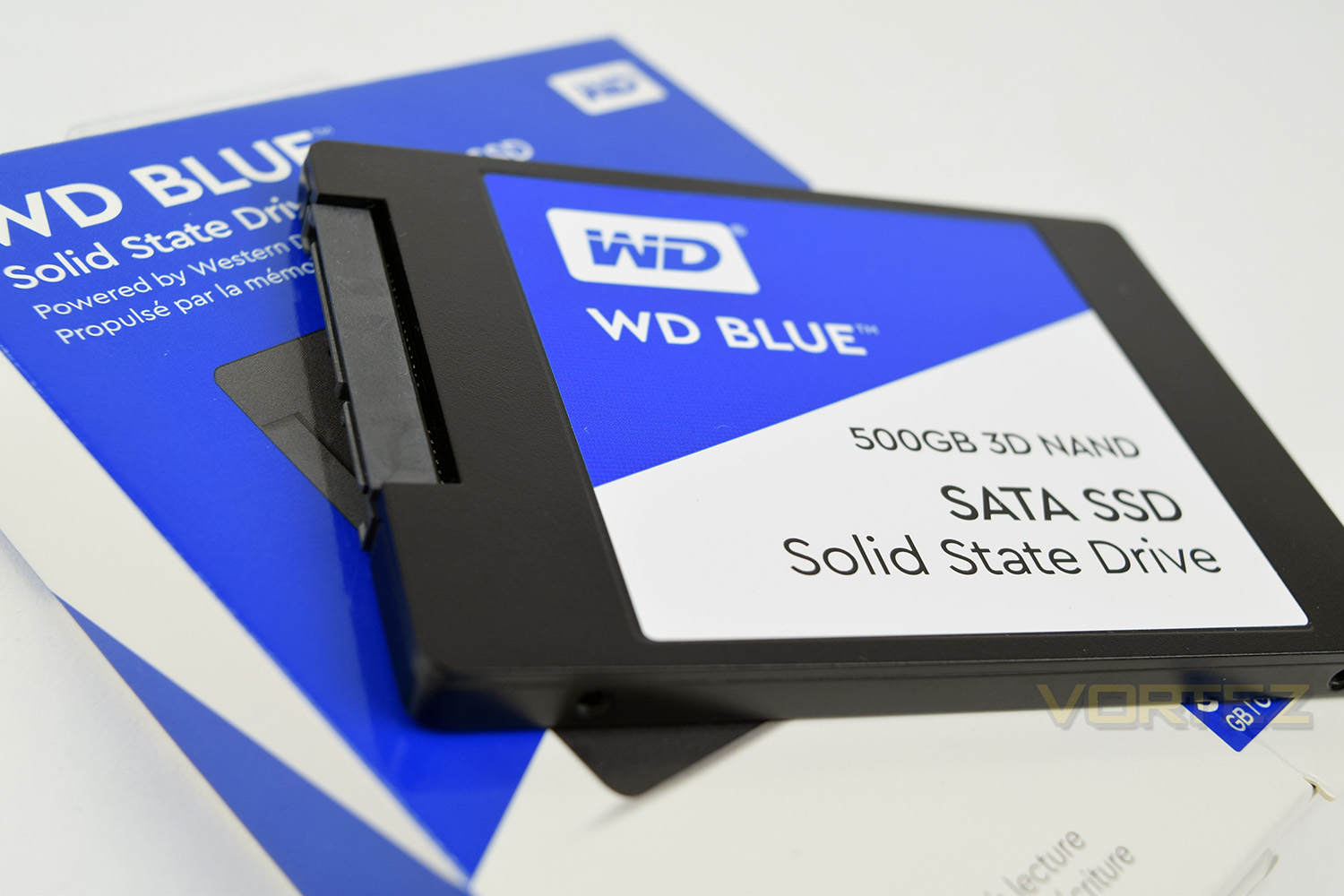
The WD Blue comes equipped with 64-layer 3D NAND paired to a Marvell 88SS1074 controller and is available in capacities of 250GB, 500GB, 1TB and 2TB. The drive also makes use of two distinctly different form factors, 2.5” (7mm) SATA 6GBPS or SATA M.2 2280.
Western Digital on the Blue SSD:
A WD Blue 3D NAND SATA SSD uses 3D NAND technology not only for higher capacities (up to 2TB1) than the previous generation WD Blue SSDs, but also to help reduce cell-to-cell interference for enhanced reliability.
Technical Specifications
Capacity
2TB, 1TB, 500GB, 250GB
Interface
SATA 6Gb/s
Form Factor
2.5 Inch 7mm
M.2 2280
Endurance (TBW)
250GB 100
500GB 200
1TB 400
2TB 500
2TB, 1TB, 500GB, 250GB
Interface
SATA 6Gb/s
Form Factor
2.5 Inch 7mm
M.2 2280
Endurance (TBW)
250GB 100
500GB 200
1TB 400
2TB 500
Packaging, Bundle & Closer Look
Western Digital puts its colour-coding system to good use on their packaging. Absolutely no confusion could be made as to which sector this sits in; it certainly isn’t green, or black. All of the key information you could require can be found on the front of the packet.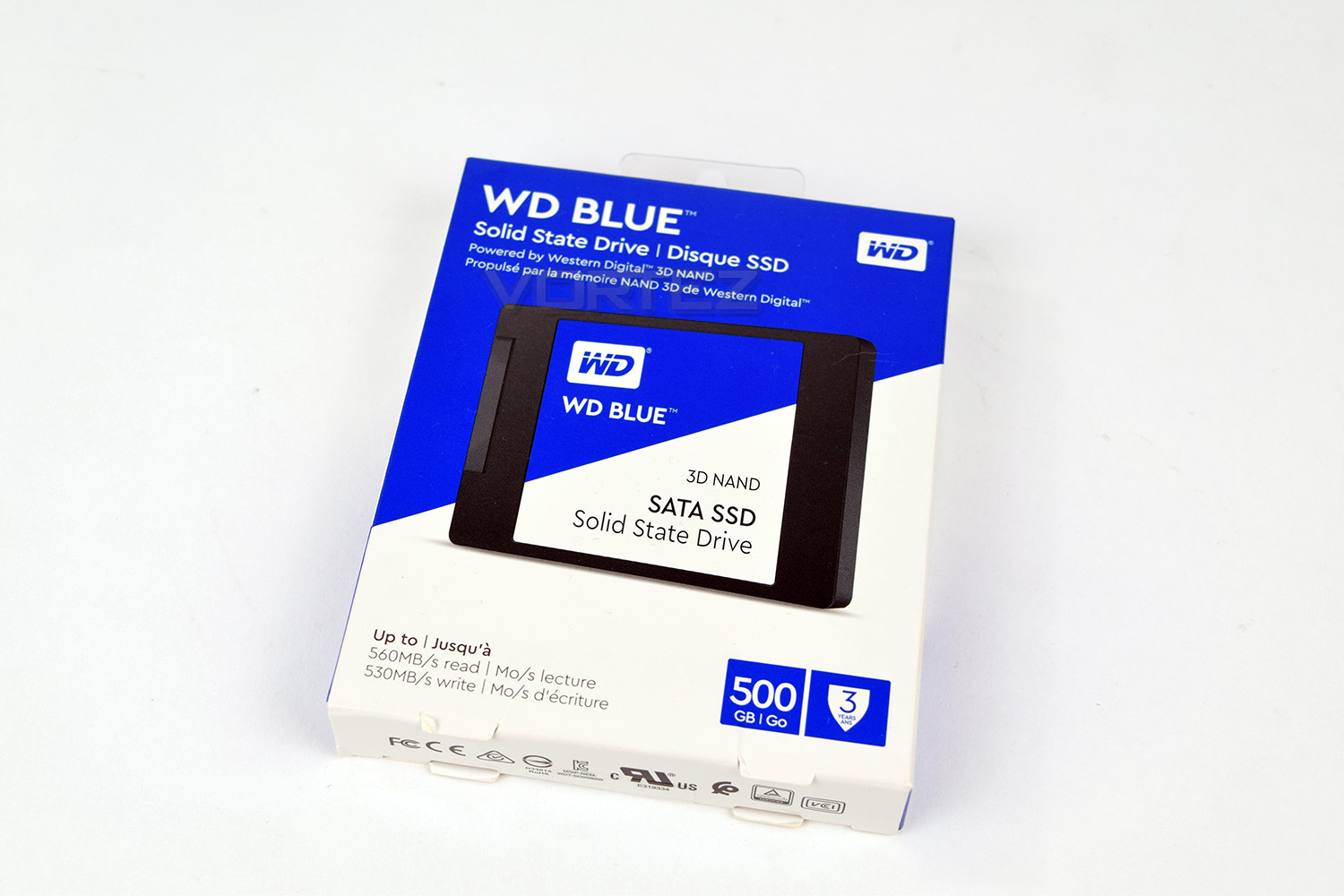
There’s very little to note on the back of the packaging so we’ll skip over that.
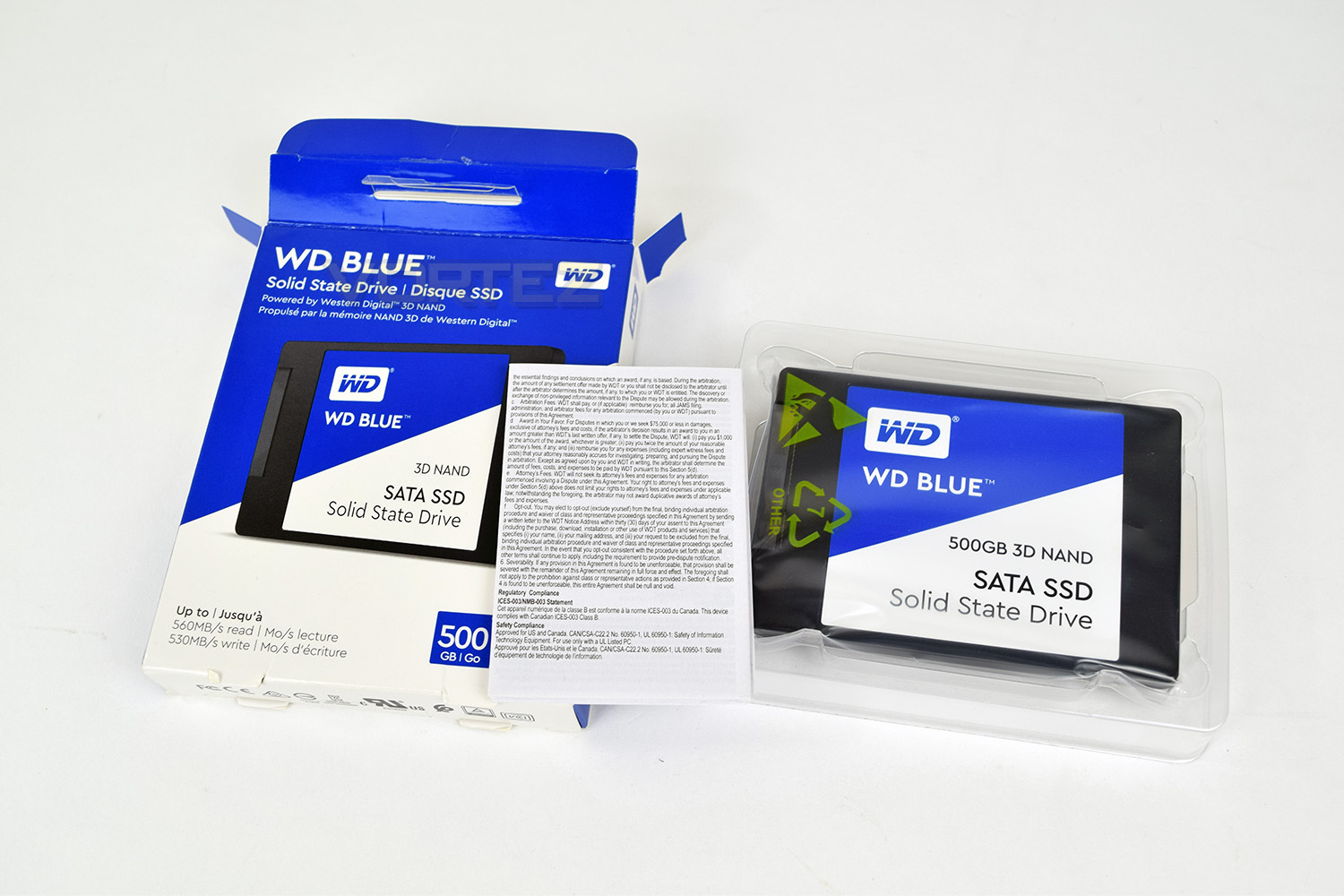
Opening up the box, the SSD is held in a plastic tray, encased in a thick, protective, plastic bag. No cables or 3.5” to 2.5” adaptors are included.
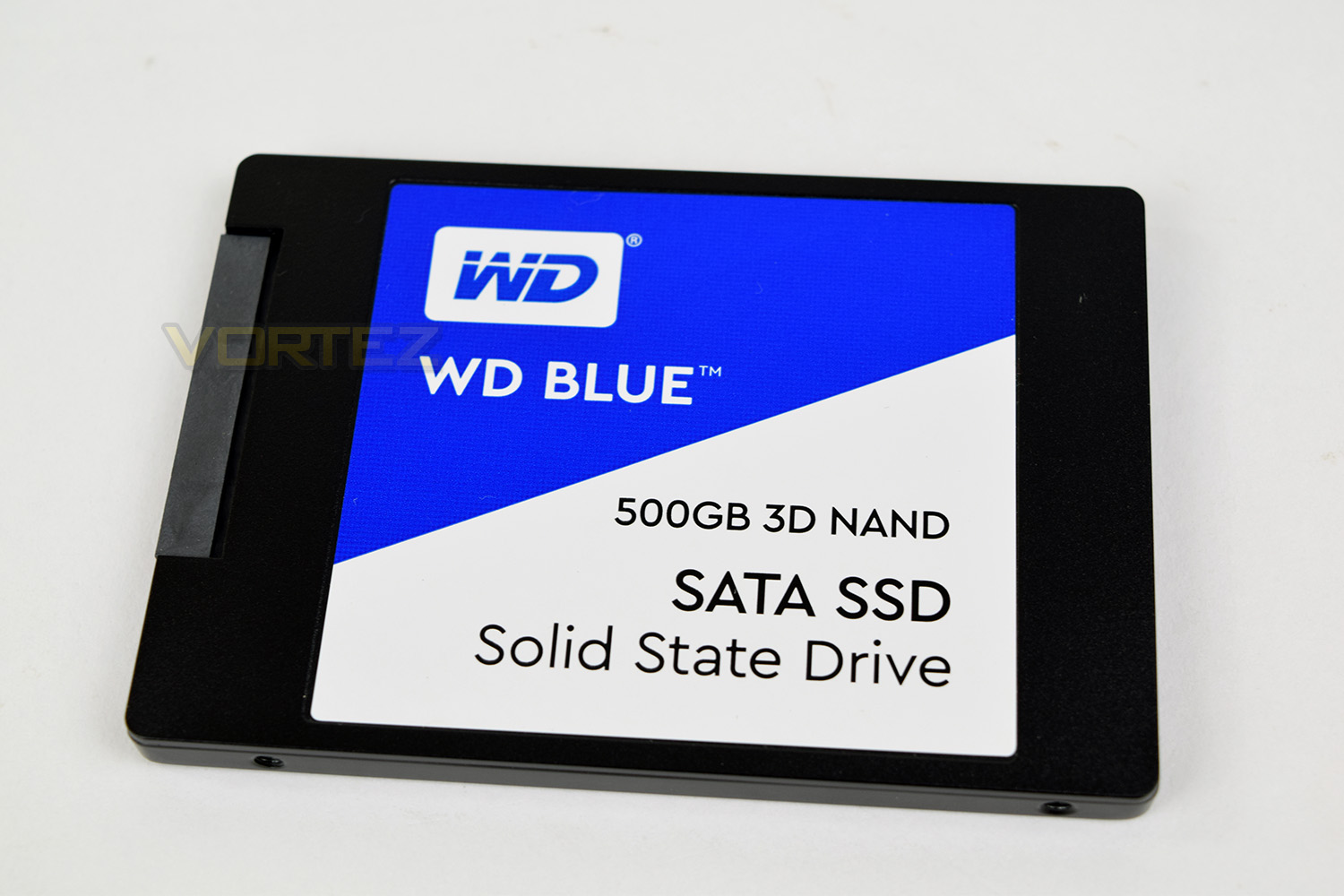
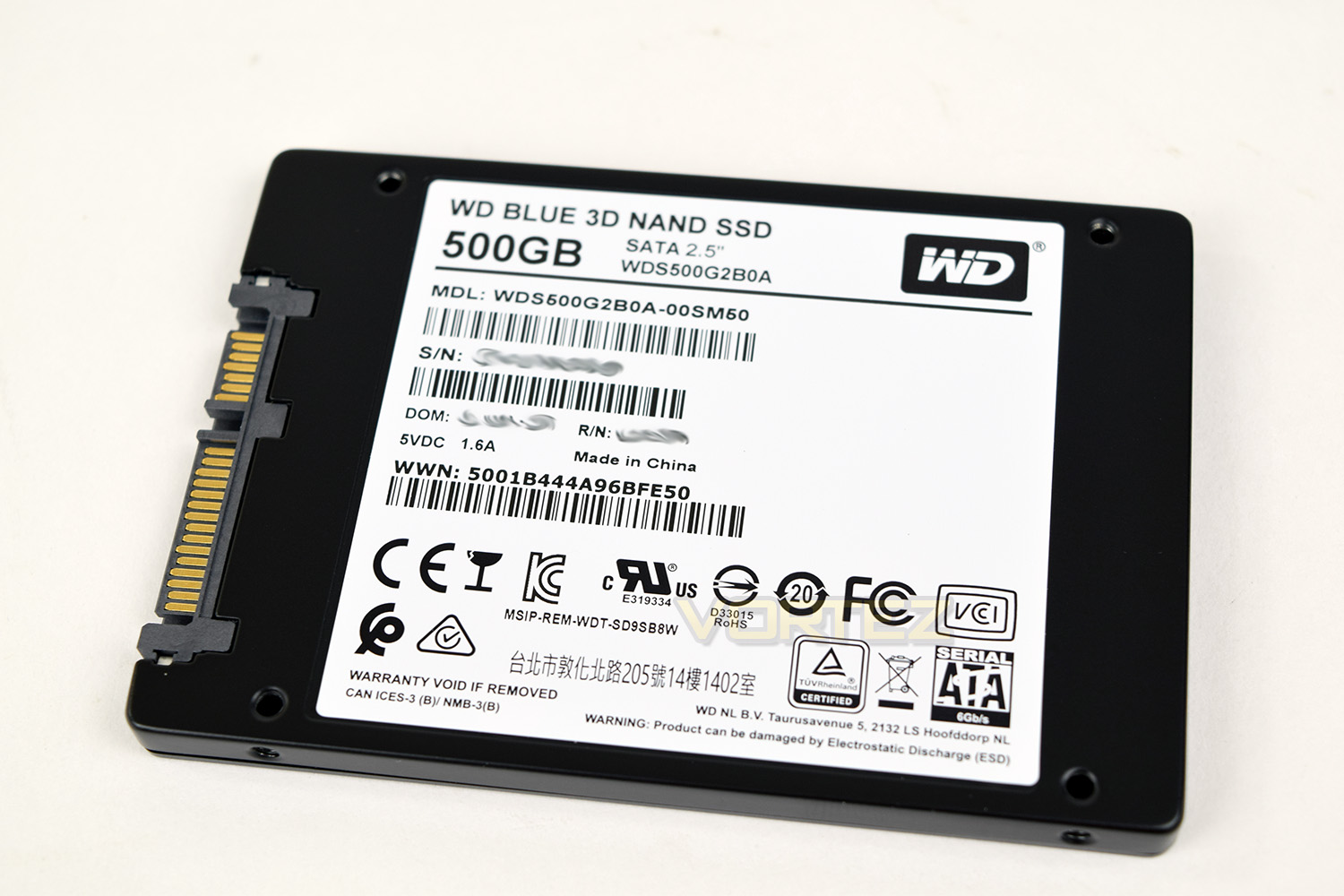
Following on from the colour scheme presented on the front of the packaging, the front of the Blue SSD keeps things simple. This SATA SSD is suitable for slim laptops due to it conforming to the 7mm (2.5”) standard.
On the rear of the SSD, the typical 4 screw holes are there for securing this drive into most builds, as well as the 4 screwholes on the sides. This is also where all of the identifying numbers are found.
Test Setup & Methodology
Our test system is formatted and a fresh version of Windows is installed with just drives in place – no additional applications. Windows is then updated to the latest release and the drivers are installed.Included in the list of benchmarks are the following applications:
Benchmarks
Anvil Pro
AS SSD
ATTO Disk Benchmark v2.46
Futuremark PCMark 8
AIDA64
AS SSD
ATTO Disk Benchmark v2.46
Futuremark PCMark 8
AIDA64
Test system
CPU: Intel Core i5 6600K
Motherboard: MSI Z270 Gaming M7
Graphics: EVGA GTX 1070 SC
Memory: 16GB CORSAIR Vengeance LPX 3200MHz DDR4
SAMSUNG SM961 256GB NVMe
Western Digital Blue 500GB SSD
PSU: Enermax Modu82+
OS: Microsoft Windows 10 Pro 64-Bit
Motherboard: MSI Z270 Gaming M7
Graphics: EVGA GTX 1070 SC
Memory: 16GB CORSAIR Vengeance LPX 3200MHz DDR4
SAMSUNG SM961 256GB NVMe
Western Digital Blue 500GB SSD
PSU: Enermax Modu82+
OS: Microsoft Windows 10 Pro 64-Bit
Benchmarks: Anvil Pro
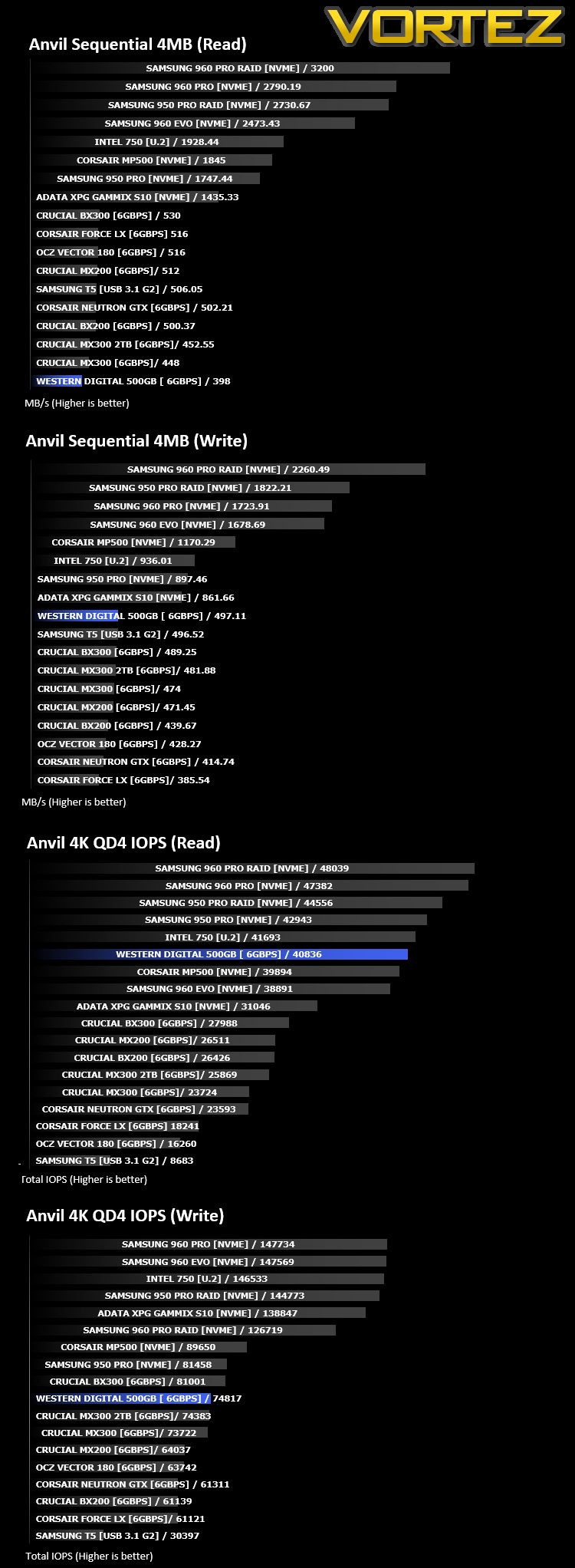
Anvil Pro from Anvil Storage utilities is one of the most popular storage benchmarking utilities today thanks to the large suit of tests available. You can test pretty much anything from Read/write Speed to IOPs with many variables to tweak allowing you to get either a single or host of results to compare with other likeminded enthusiasts. In our test we ran the standard suite 5 times, subtracting both the highest and lowest scores and determined the final result from the average of the remaining three results.
Benchmarks: AS SSD
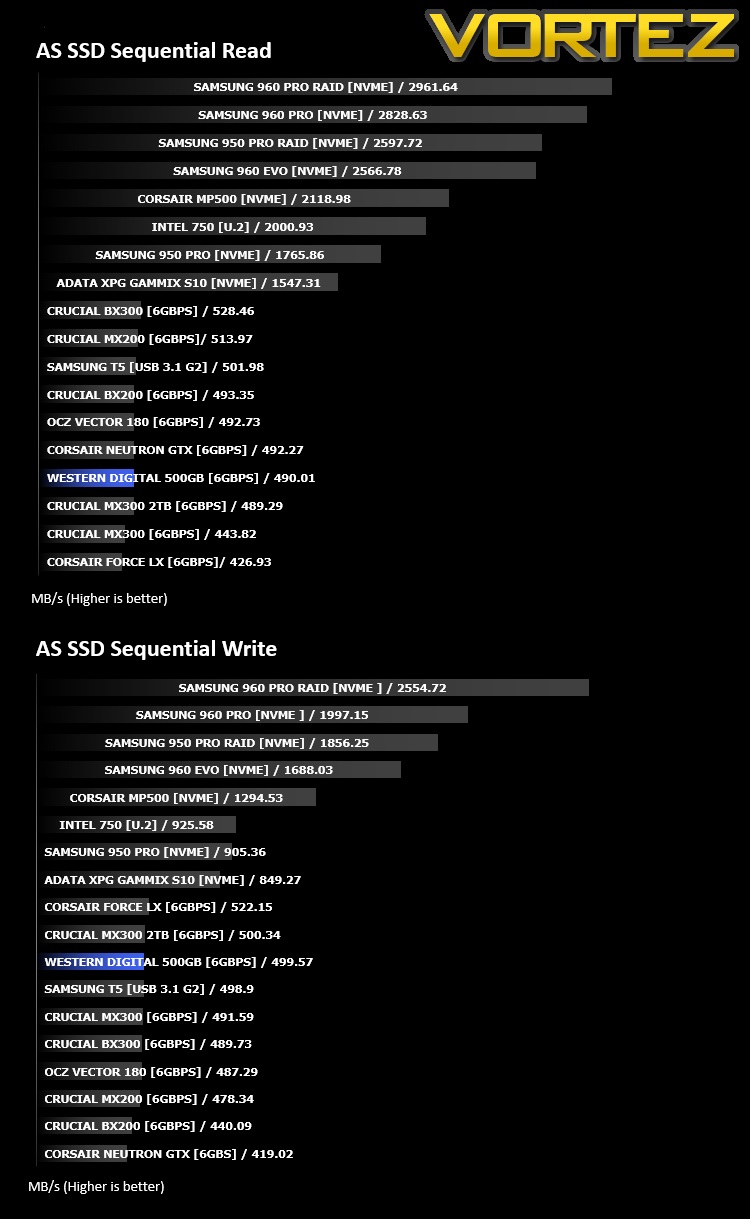
AS SSD Benchmark is a straightforward tool for measuring the speed of your SSD drive.
Simply launch the program, choose your drive, click Start, and it’ll test your SSD’s read and write speed in a variety of ways, delivering a score for each when it’s done. And if that’s not enough, there are also additional file copy and compression-related benchmarks available from the Tools menu. (The author’s support page is German only, but if you need further English explanations then there’s a thread on the program at the OCZ Technology forum.).
Simply launch the program, choose your drive, click Start, and it’ll test your SSD’s read and write speed in a variety of ways, delivering a score for each when it’s done. And if that’s not enough, there are also additional file copy and compression-related benchmarks available from the Tools menu. (The author’s support page is German only, but if you need further English explanations then there’s a thread on the program at the OCZ Technology forum.).
Benchmarks: ATTO
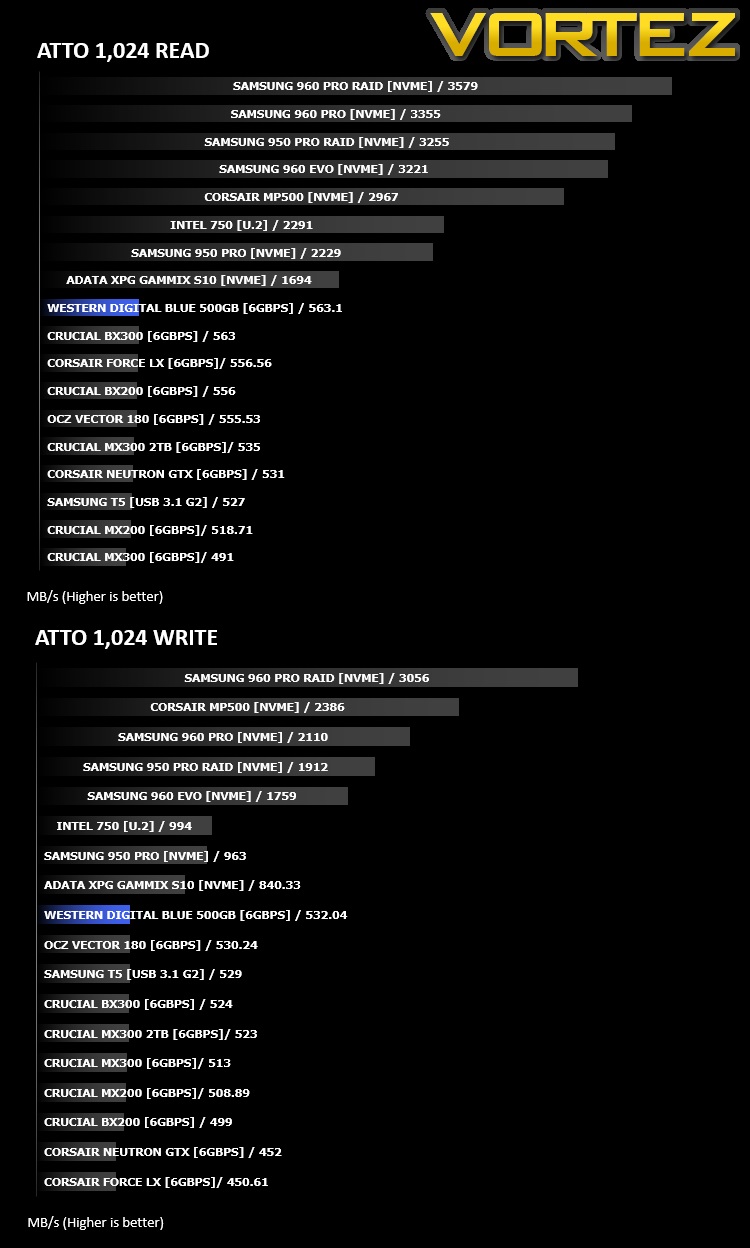
The ATTO Disk Benchmark performance measurement tool is compatible with Microsoft Windows. Measure your storage systems performance with various transfer sizes and test lengths for reads and writes. Several options are available to customize your performance measurement including queue depth, overlapped I/O and even a comparison mode with the option to run continuously. Use ATTO Disk Benchmark to test any manufacturers RAID controllers, storage controllers, host adapters, hard drives and SSD drives and notice that ATTO products will consistently provide the highest level of performance to your storage.
Benchmarks: AIDA64
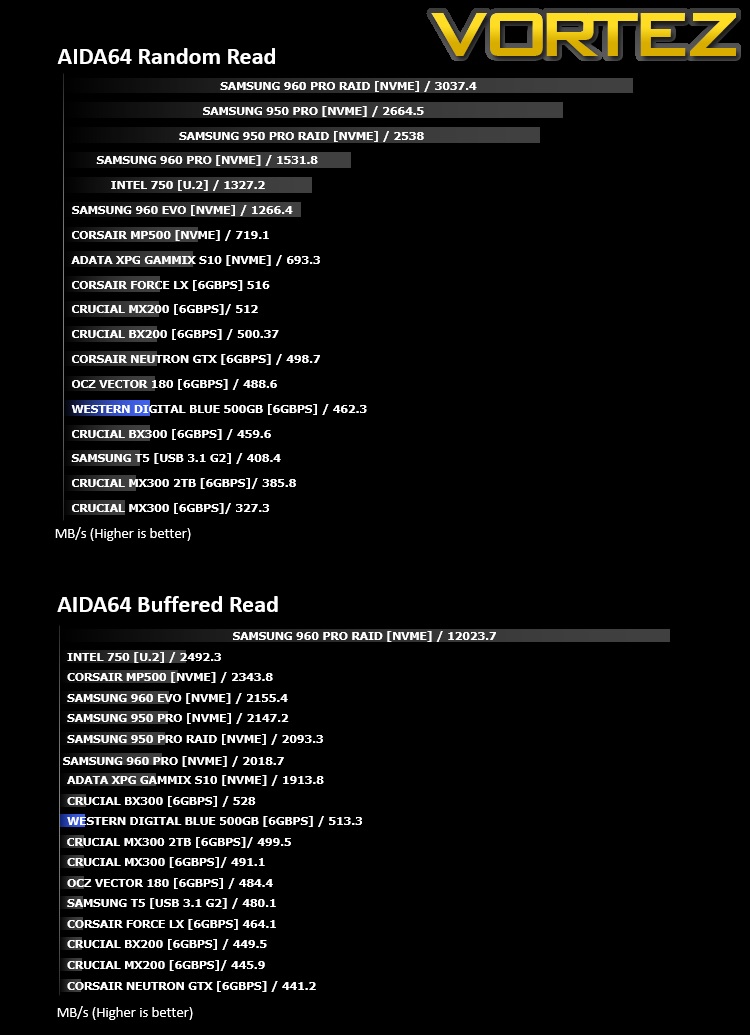
With this module, we can measure the performance of the PC’s storage devices, including (S)ATA or SCSI hard disk drives, RAID arrays, optical drives, solid-state drives (SSD), USB drives and memory cards. It also allows us to perform write tests, which helps us detect fake products and errors on the devices. In order to attain reliable benchmark results we have to make sure to close all background applications.
Benchmarks: PCMark 8
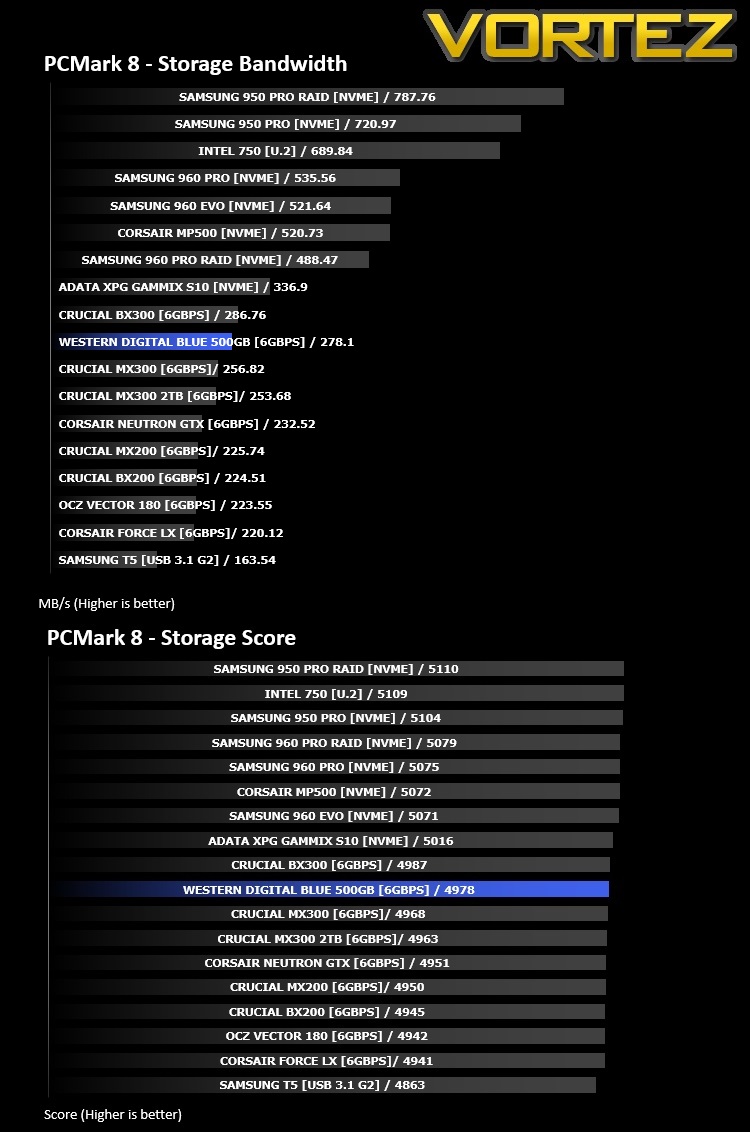
We use the Futuremark PCMark 8 utility to measure storage via Photoshop performance under both light and heavy loading conditions. Accelerated (open CL) is used to perform this test. The test is measured in seconds to complete.
Conclusion
In terms of reviewing an SSD, nothing speaks more than the benchmarks. They don’t need to look particularly pretty or be incredibly lightweight, they merely need to perform.Our results show some unbelievably strong numbers in PCMark 8 and ATTO but random read tests appeared to suffer substantially, especially in the Anvil sequential 4MB read test.
Despite the low numbers in some of the tests, as an average, the drive is incredibly fast, which the PCMark 8 test helps to solidify, due to its robust and thorough testing procedure. Read and Write IOPS in the Anvil tests were also higher than some M.2 NVME drives we’ve tested.
Due to recent advancements in Solid State memory, the endurance and performance of these drives have increased rapidly. WD claims that the 500GB drive can reach 200TBW (Total Bytes Written) which equates to over 100GB of data written to the drive, every single day, for over 5 years. The 250GB claims 100TBW, the 1TB claims 400TBW and the 2TB can endure a huge 500TBW. SSDs failing from too many writes appears to be a thing of the past, thankfully.
All things considered, the WD Blue SSD presents reasonable value for money along with a very capable SSD which should last the test of time.
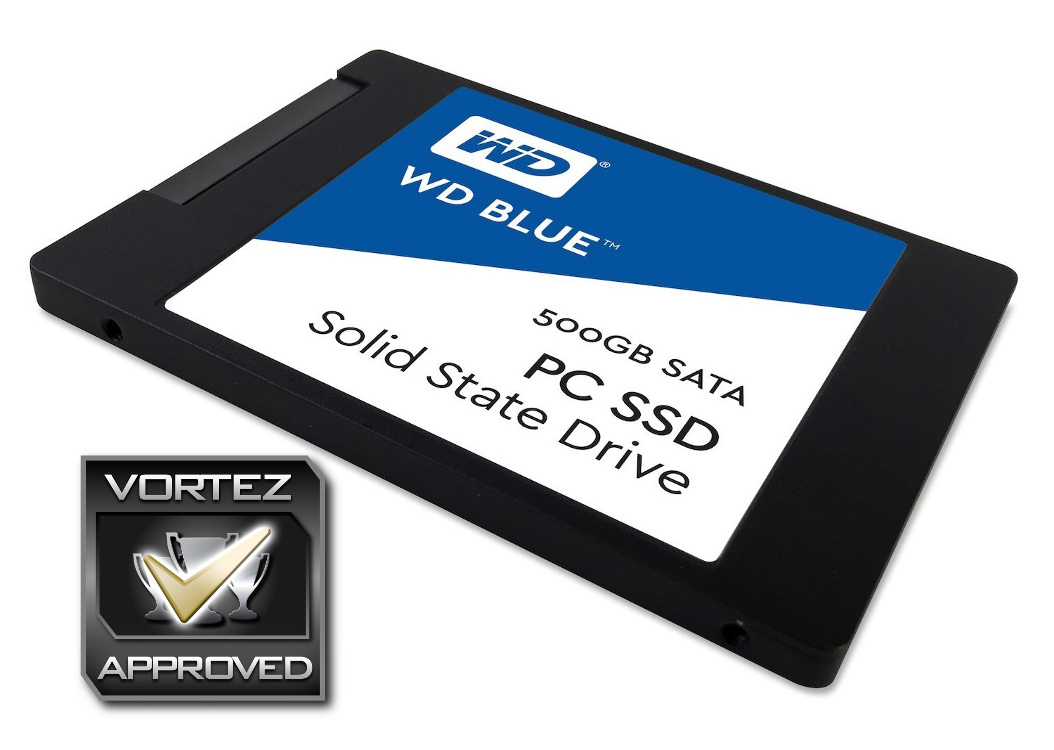
The WD Blue is a great choice for enthusiasts on a budget, allowing you to store all of your games or most-used software on a fast SSD.
Pros
+ Exemplary results in some benchmarks
+ Reasonably well priced for 500GB
+ 3-year warranty
+ Huge TBW rating
Neutral
+- Inconsistent results
Cons
– Sequential reads are lacking somewhat
+ Exemplary results in some benchmarks
+ Reasonably well priced for 500GB
+ 3-year warranty
+ Huge TBW rating
Neutral
+- Inconsistent results
Cons
– Sequential reads are lacking somewhat
Click here for an explanation of our awards at Vortez.net.
Stay connected with Vortez social media pages: