







A new era of ALC units is upon us. Can the newcomers Antec compete with their established competitors, Corsair and CoolIT?

Product on Review: Antec KÜHLER H2O 920
Manufacturer and Sponsor: Antec
MSRP: N/A
Street Price: £77.99
All-contained liquid cooling(ALC) solutions have been all the rage over the past year. Aimed at delivering the benefits of liquid cooling without the hassle of maintenance and choosing individual parts, the concept is a promising prospect. It certainly has wide appeal amongst users, whether they are enthusiasts looking for the best cooling solutions, or those interested in liquid cooling but lack the know-how, or those simply wanting an alternative to air coolers which are growing ever larger and cumbersome to use. However, when we first had a look at ALC units from CoolIT and Corsair last year, we were somewhat disappointed by the performance they delivered and the noise they generated compared to air coolers. Their main advantages included the fact that they were compact and thus perfectly suited to smaller cases, and that leaks were covered under warranty unlike DIY setups.
Since the introduction of the CoolIT Eco and Corsair H50, this market has seen much drama and the emergence of a wide new range of ALC units. CoolIT went back to being an OEM and Corsair began to source their new designs from their former competitor CoolIT over Asetek, another established ALC manufacturer. The void left by Corsair was quickly filled by Antec who saw this as a perfect opportunity to enter a new market and as such the KÜHLER H2O series was born. There are currently two units forming part of the KÜHLER H2O, the basic single radiator 620 with a single fan and a thicker variant with dual fans dubbed the 920 which we will be reviewing first today.
Those familiar with Corsair units may have noticed that Antec’s KÜHLER H2O series is very similar to Corsair’s Hydro Series, namely their single radiator H50 and the thicker dual fan variant, the H70. This isn’t surprising given that both series originate from Asetek. However, Antec have been quick to point out that their coolers use Asetek’s most up-to date and innovative designs whereas Corsair use previous iterations of the design. So we expect to see improved performance that will hopefully compete with our high end air coolers.
As mentioned above, today we will focus on the KÜHLER H2O 920, the larger variant of the series. Thomas previously reviewed the unit in his water-cooling shootout and found it to be a solid performer despite not quite matching a custom kit. In today’s review, we will compare the unit against an array of air coolers to see if the 920 has what it takes to dethrone the Thermalright Silver Arrow and Noctua NH-D14.
About Antec
Antec, Inc. is the global leader in high-performance computer components and accessories for the gaming, PC upgrade and Do-It-Yourself markets. Founded in 1986, Antec is recognized as a pioneer in the industry and has maintained its position as a worldwide market leader and international provider of quiet, efficient and innovative products. Antec has also achieved great success in the distribution channel, meeting the demands of quality-conscious system builders, VARs and integrators.
Antec, Inc. is the global leader in high-performance computer components and accessories for the gaming, PC upgrade and Do-It-Yourself markets. Founded in 1986, Antec is recognized as a pioneer in the industry and has maintained its position as a worldwide market leader and international provider of quiet, efficient and innovative products. Antec has also achieved great success in the distribution channel, meeting the demands of quality-conscious system builders, VARs and integrators.
About Asetek:
Founded in 2000, Asetek is a world leading thermal management solution provider of vapour phase, vapour chamber and liquid cooling solutions. These solutions are designed for OEM integration, servers/data centres, PC enthusiasts, gamers, and professionals who demands exceptional performance, maximum reliability and low noise. Asetek R& works with state-of-the-art lab facilities and thermal simulation tools in its design process.
For a decade, Asetek has developed the very strong brand names VapoChill® and WaterChill™, to become the preferred choice of enthusiast grade cooling solutions. The VapoChill® and WaterChill™ product lines have won more than 200 international press awards.
With headquarters in Denmark, a marketing and FAE office in San José, California, a QA and sourcing office in China, and a sales office in Taiwan, Asetek works actively with world leading companies within the industry to ensure maximum reliability, cost effectiveness, and performance for its products, while providing global logistical support for its customers.
Founded in 2000, Asetek is a world leading thermal management solution provider of vapour phase, vapour chamber and liquid cooling solutions. These solutions are designed for OEM integration, servers/data centres, PC enthusiasts, gamers, and professionals who demands exceptional performance, maximum reliability and low noise. Asetek R&
works with state-of-the-art lab facilities and thermal simulation tools in its design process. For a decade, Asetek has developed the very strong brand names VapoChill® and WaterChill™, to become the preferred choice of enthusiast grade cooling solutions. The VapoChill® and WaterChill™ product lines have won more than 200 international press awards.
With headquarters in Denmark, a marketing and FAE office in San José, California, a QA and sourcing office in China, and a sales office in Taiwan, Asetek works actively with world leading companies within the industry to ensure maximum reliability, cost effectiveness, and performance for its products, while providing global logistical support for its customers.
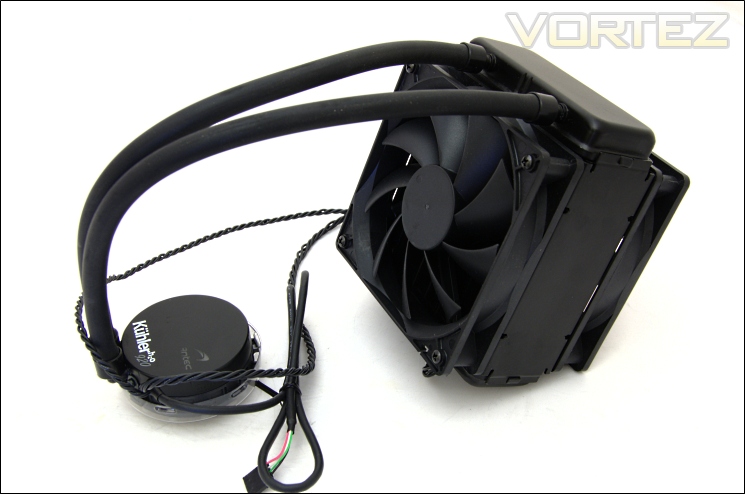
Let’s take a closer look at the Antec KÜHLER H2O 920…
Features & Specifications
Antec’s take on the KÜHLER H2O 920:
The Antec KÜHLER H2O 920 provides maximum-performance liquid cooling for your CPU in a quick, easy-to-install package. Unlike traditional liquid cooling systems, this self-contained unit comes prefilled and requires zero maintenance. The dual 120 mm Pulse Width Modulation (PWM) fans and 3rd generation copper coldplate ensure quiet, efficient cooling, while the 49 mm thick radiator is equipped to handle the highest performing CPUs on the market. Lastly, the included software helps you monitor and control the KÜHLER H2O 920’s performance and allows you to customize its stylish RGB LED. Designed to unlock the maximum potential of your CPU, the Antec KÜHLER H2O 920 delivers exceptional cooling when you need it the most.
The Antec KÜHLER H2O 920 provides maximum-performance liquid cooling for your CPU in a quick, easy-to-install package. Unlike traditional liquid cooling systems, this self-contained unit comes prefilled and requires zero maintenance. The dual 120 mm Pulse Width Modulation (PWM) fans and 3rd generation copper coldplate ensure quiet, efficient cooling, while the 49 mm thick radiator is equipped to handle the highest performing CPUs on the market. Lastly, the included software helps you monitor and control the KÜHLER H2O 920’s performance and allows you to customize its stylish RGB LED. Designed to unlock the maximum potential of your CPU, the Antec KÜHLER H2O 920 delivers exceptional cooling when you need it the most.
Features
-CPU Socket Compatibility: Intel LGA 775/1156/1155/1366, AMD AM2/AM2+/AM3/AM3+
-Included Software provides essential tools to control and monitor the KÜHLER H2O 920
-Non-corrugated easy-bend tubes for maximum flexibility in radiator positioning.
-Pulse Width Modulation (PWM) radiator fans generate quietest high performance cooling
-Customizable RGB LED create brilliant illumination
-Cooling Liquid: Safe, environmentally-friendly, anti-corrosive
-Pre-applied thermal paste
-Included Software provides essential tools to control and monitor the KÜHLER H2O 920
-Non-corrugated easy-bend tubes for maximum flexibility in radiator positioning.
-Pulse Width Modulation (PWM) radiator fans generate quietest high performance cooling
-Customizable RGB LED create brilliant illumination
-Cooling Liquid: Safe, environmentally-friendly, anti-corrosive
-Pre-applied thermal paste
Specifications
-Fan Speed: 700-2400RPM (PWM Controlled)
-Radiator Dimensions: 151mm x 120mm x 49mm (HxWxD)
-Fan Dimensions: 120mm x 25mm
-Air Flow: 110 CFM
-Noise Level: 43dBA
-Cold Plate + Pump Height: 29mm
-Tubing Length: 330mm
-Net Weight: 1.1kg
-Gross Weight: 1.6kg
-Radiator Dimensions: 151mm x 120mm x 49mm (HxWxD)
-Fan Dimensions: 120mm x 25mm
-Air Flow: 110 CFM
-Noise Level: 43dBA
-Cold Plate + Pump Height: 29mm
-Tubing Length: 330mm
-Net Weight: 1.1kg
-Gross Weight: 1.6kg
From the features and specifications, Antec seem to have outright performance in mind with less thought on noise. Despite the PWM capability and the marketing to suggest quiet operation, it is clear that the best performance will be with the two fans operating at the maximum speed of 2400RPM which will be by no means quiet. To achieve the best performance, Antec have opted for a 49mm think radiator for a higher surface area compared to typical single radiator designs which usually come at 27mm thick, as is the case for the KÜHLER H2O 620. Like other ALC units, the KÜHLER H2O 920 is composed of the same components, a 120.1 radiator with integrated reservoir and 2 hose pipes connected to the pump and cold plate combined module. Unique to the Antec KÜHLER H2O 920 is the ChillControl software that allows users to control the fan speed and the cooler’s RGB lighting.
Surprisingly, the cooler weighs in at a hefty 1.1kg, comparable to even the largest air coolers on the market. However, this weight does not hang off the motherboard but rather the case itself. Since the cooler is based off a similar Asetek design employed by Corsair, we can discuss some of the differences. The key difference without having a H70 to compare against is the Antec have positioned the fans as exhausts rather than intakes. This is a more intuitive design to compliment chassis airflow but we will have a look if changing the fan orientation makes any difference later on.
Packaging and Content
The packaging
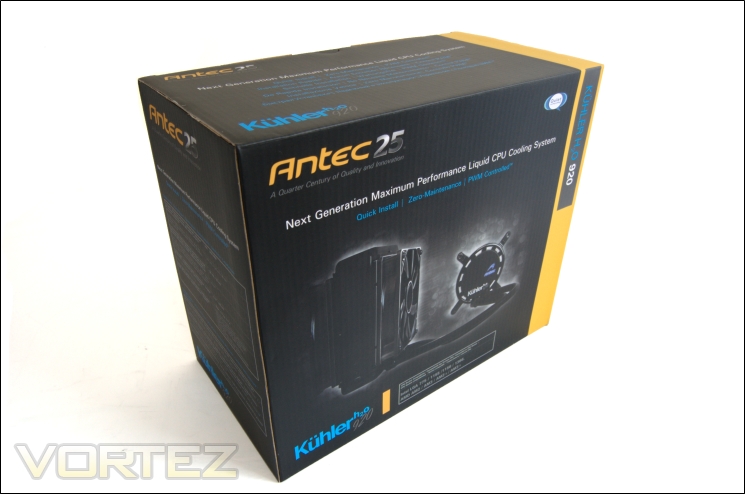
Antec have gone with a sizeable cardboard packaging for their KÜHLER H2O 920. The black and yellow theme follows Antec’s colour scheme and our own Vortez colours. Initially the box comes wrapped in a plastic film for added protection. This helps the box retain a very clean look. Antec make the most of the box to display as much information as possible about the cooler including the specifications and features.
The front of the box
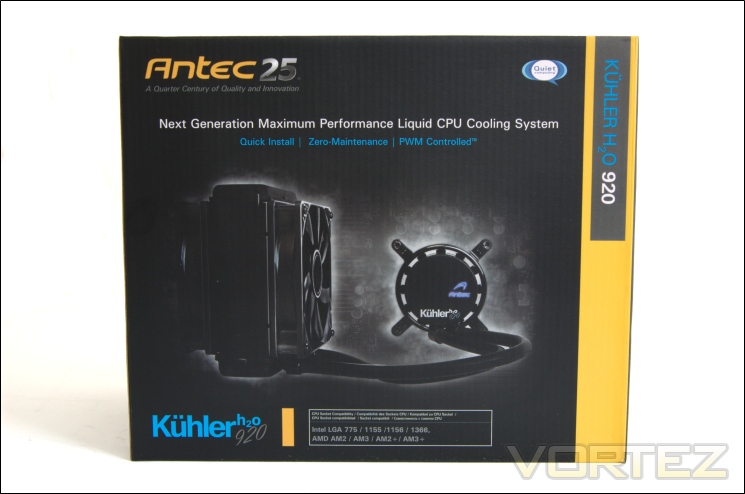
At the front, Antec illustrate the ALC unit so users know exactly what to expect, i.e. a dual fan and thick radiator. Antec also list some of the unit’s key attributes over other water cooling units such as quick installation and zero-maintenance with the added benefit of PWM control. Like most other coolers these days, the KÜHLER H2O 920 supports all current AMD and Intel sockets. The ‘Antec 25’ branding showcases the company’s 25 years of experience in the business delivering quality and innovation. We certainly revere Antec as one of the most popular manufacturers out there so it remains to be seen if their expertise translates well into the KÜHLER H2O 920.
The back of the box
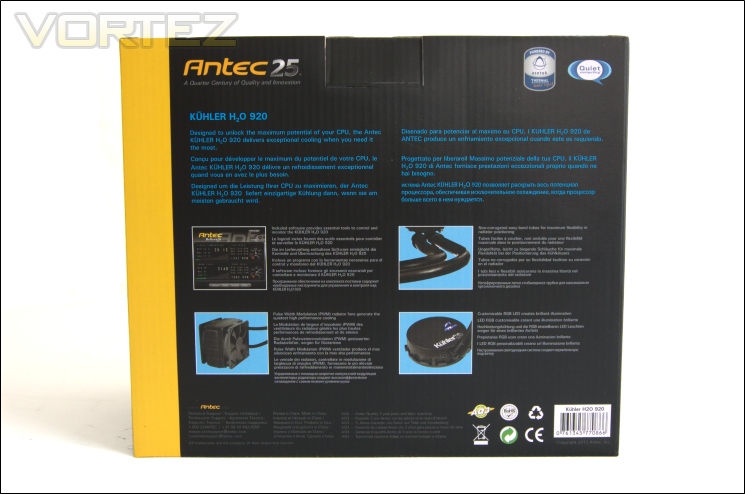
At the back, Antec describe some of the cooler’s features in more detail with illustrations depicting them. Antec’s global appeal is reflected in the 5 other languages the features are described in.
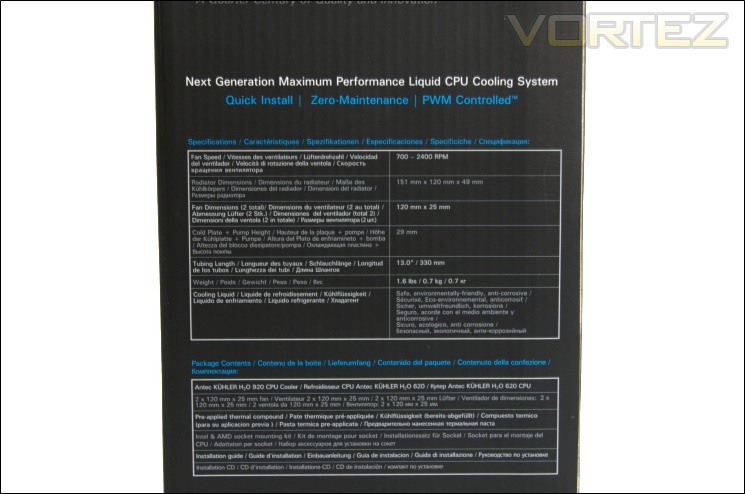
The specifications
On the side, all the specifications are listed as described on the previous page. All the radiator size specifications are listed so users can check to see if the cooler will fit inside their cases. The hose and pump sizes are also listed.
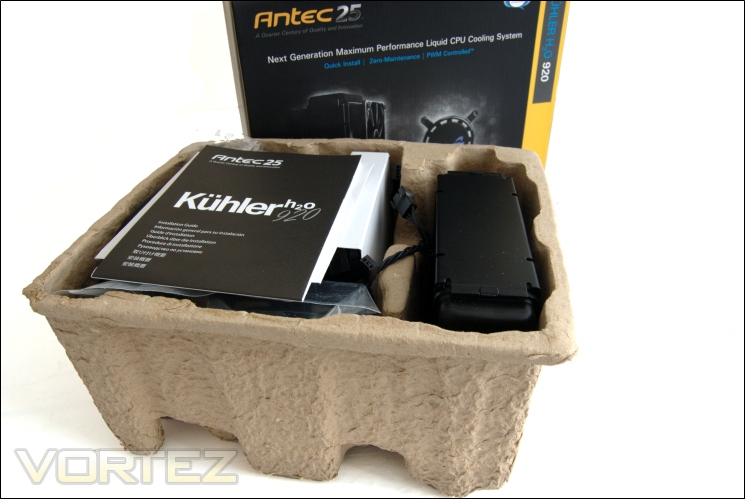
Inside of the box
The cooler comes packaged in what looks like an egg carton. The specially shaped cardboard does a good housing the cooler and protecting it so that the fins on the radiator are not bent out of shape. Compared to the CoolIT Eco and Corsair H50 packaging, Antec’s is a clear step above. The fans also have their own compartment in the middle.
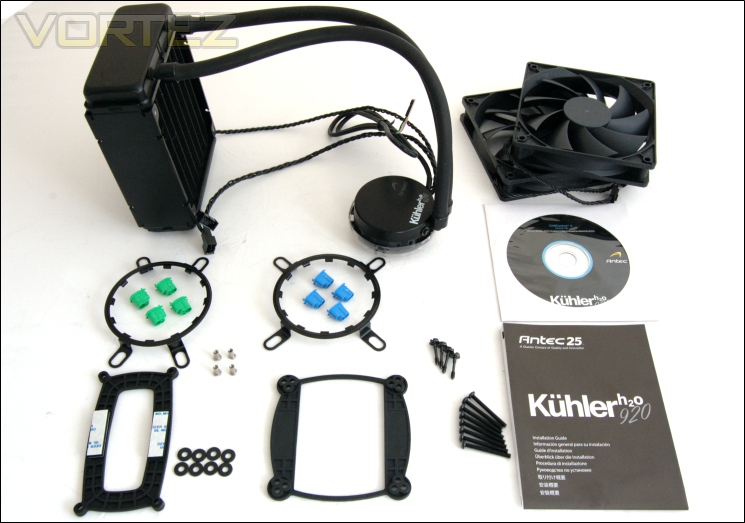
The bundle
Bundled in the packaging are the mounting kits and the cooler itself. Included are the:
-AMD back plate
-Intel back plate
-AMD retention ring
-Intel retention ring
-Washers x8
-Metal back plate inserts x4
-Mounting screws x4
-Adhesive backings x2
-Long fan screws x8
-Green retention inserts x4
-Blue retention inserts x4
-120mm fans x2
-Installation guide
-ChillControl CD
-KÜHLER H2O 920
The mounting kit is very comprehensive and exactly the same as Corsair’s H50 and H70 units due to their Asetek origin. We will have a closer look at the installation later on.
Closer Look
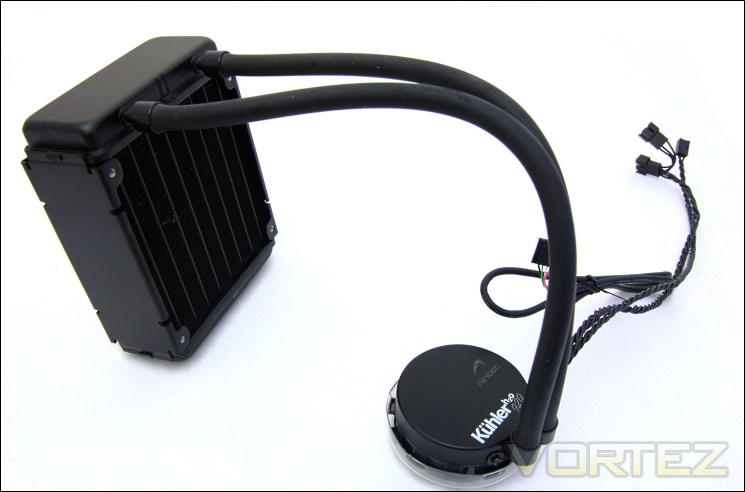
The cooler
The Antec KÜHLER H2O 920 is very reminiscent of other ALC units with all the components of a custom water cooling unit integrated into a single maintenance-free enclosed system. The main difference to the previously reviewed Corsair H50 and CoolIT Eco is the size of the radiator but there are many other more subtle differences. Since the Corsair H50 is from the same family of coolers, albeit an older design, it’s easier to compare this Antec unit to it. Asetek have opted for a smaller sized pump and CPU block unit in this case, suggesting an improved more compact design. The KÜHLER H2O 920 uses two 120mm fans on the radiator for raw performance. Integrated to the radiator is the reservoir and the two hoses transport the pre-filled liquid to the CPU block that also integrates the pump.
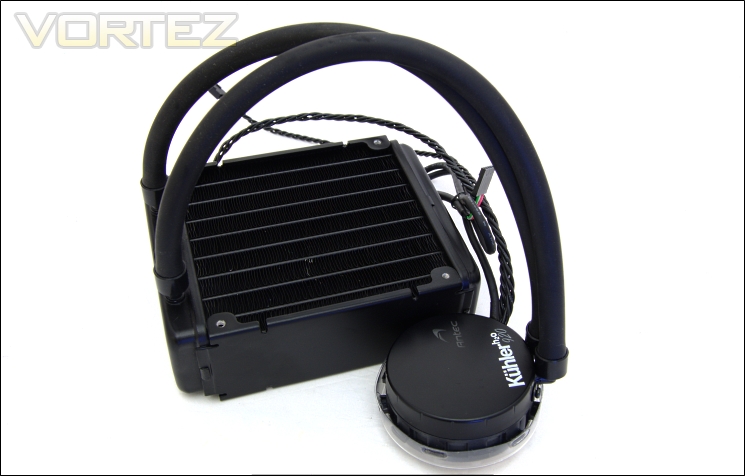
Compact size
The main advantage of such a unit is that everything is pre-assembled and designed to be leak proof, thanks mostly to the inability to dismantle the unit. All the components are tightly pre-assembled to reduce the risk of damaging the cooler and prevent leakages. Another advantage over air coolers is the fairly compact package the unit comes in. The radiator is the largest and heaviest component but due to being installed to the chassis instead of the motherboard, it is more secure. This leaves the CPU block and pump being the only components being installed to the motherboard, thereby not putting a lot of pressure. The question is whether the radiator has the same cooling capacity of larger air coolers.
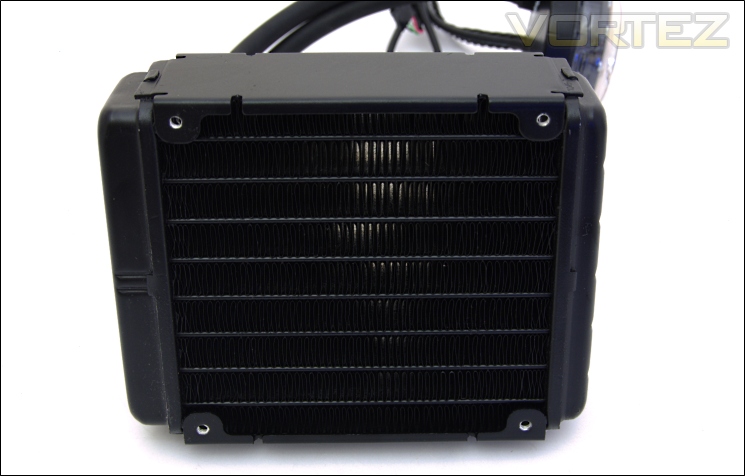
The 120mm radiator
The radiator is 49.5mm thick and features 9 banks of aluminium fins. These fins are tightly spaced at 1.5mm and the width of each individual fin is 11.5mm. The fins follow a corrugated pattern to maximise surface area for better heat dissipation. The bands to which the fins are attached to transport water so that heat can dissipate across all the fins. Antec’s packaging meant that the fins remain undamaged during transit thus retaining a cleaner look.
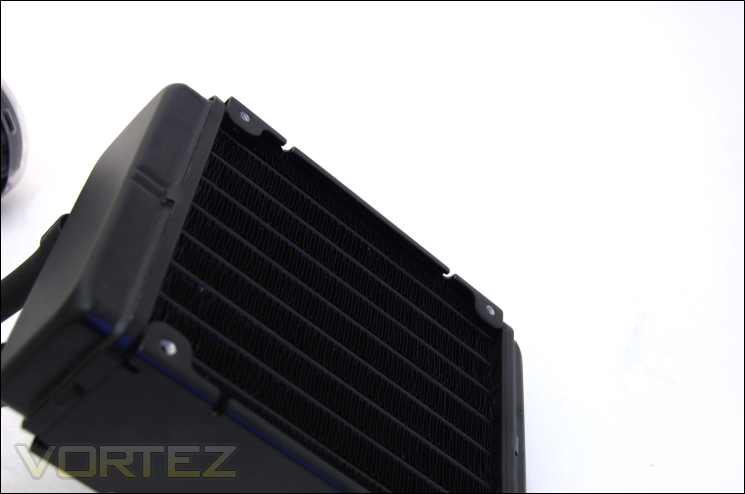
Radiator fan spacing
To make sure that users don’t accidentally knock the fins and bend them out of shape, there is a gap left between the fins the four fan mounting holes. It also reduces the likelihood of puncturing the narrow linear bands through which the liquid flows through across the radiator. Another benefit is that the fan doesn’t sit as close to the fins and generate a higher pitched noise.
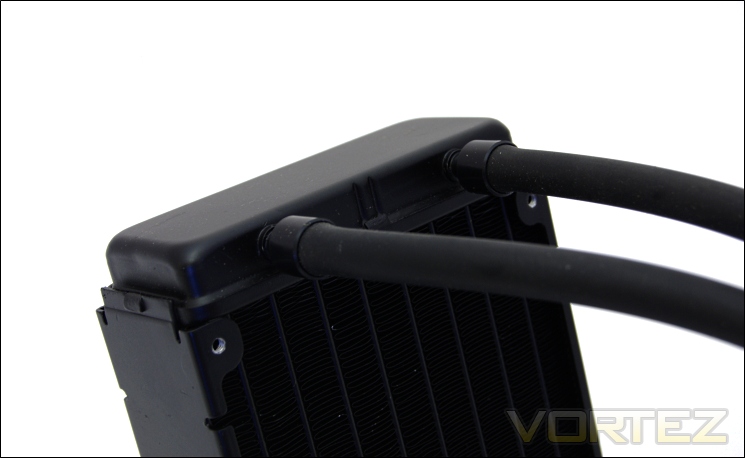
The reservoir
The reservoir is integrated into the radiator on the KÜHLER H2O 920 like all other ALC units. The two compartments are each connected to separate tubing so the liquid flows into one and out of the other once it flows through the entire radiator. The tubes are connected to barbs and tightly secured so users can’t pull them off and to prevent leakages. These barbs are designed to withstand high pressures and temperatures although they are not comparable to those used in custom water cooling loops. The fluid used in the system is de-ionised water with a propylene-glycol additive to prevent corrosion of the components.
The tubing
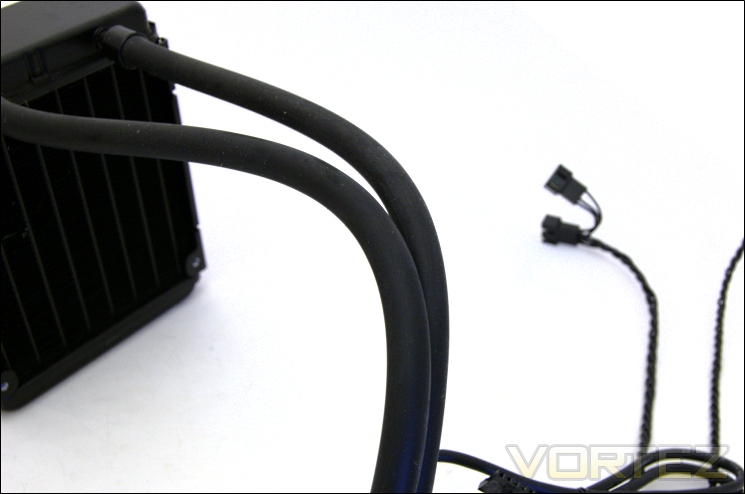
The tubes are 33cm in length and have a rubberised feel. They are fairly tough but at the same time designed to be flexible. This is achieved by using a non-corrugated design as found on previous Asetek designs. In practise, the tube was quite flexible but the length made it restrictive went trying to install the block and bending the tube into shape. Thankfully the length of the tubing is perfectly distanced such that the radiator can be installed to the exhaust of a chassis.
The CPU block with integrated pump
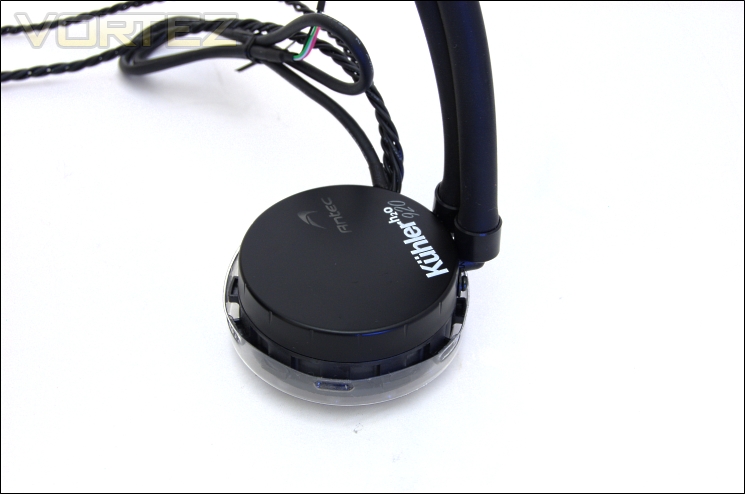
On the other end of the tubes is the CPU block with the pump integrated into it. The pump operates at 3000RPM +/- 10%. It’s quite an achievement for Asetek to have designed a smaller pump, making the whole block 29mm in height compared to the tall cylindrical shape of the Corsair H50. The KÜHLER H2O 920 model name has been printed on top and more uniquely to the Antec is a translucent logo through which light is emitted from. Users can customise the colour of the LEDs using the bundled software to match their system.
Closer Look (Continued)
The barb fittings
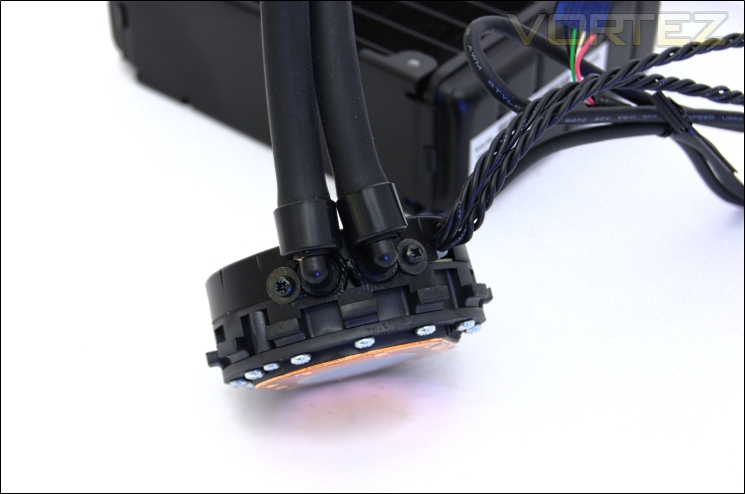
The tubes are connected to 90 degree barbs on the pump. The plastic shroud at the top is secured by screws which also keep the barbs in place. Near the base are alternate grooves and clips for installation using the mounting kit.
The CPU cold plate with pre-applied thermal paste
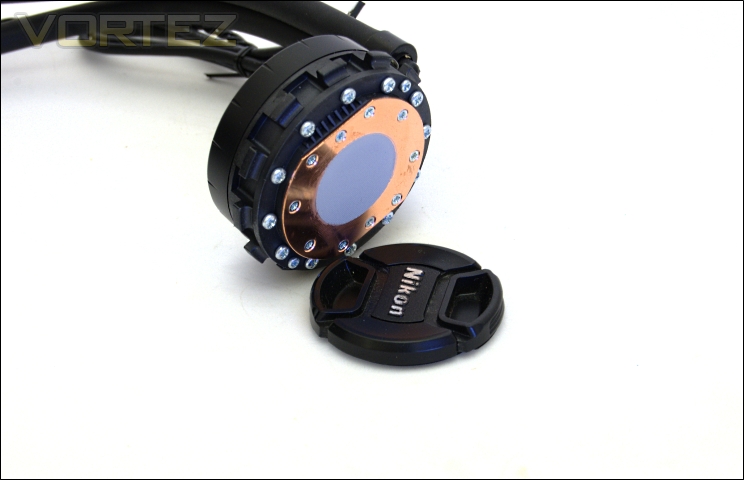
The copper cold plate at the base comes pre-applied with thermal paste that spreads very well onto the CPU when installed. The copper base is flat and has a near mirror finish ensuring better contact with the CPU and optimal heat transfer. The base is not dissimilar to other Asetek based Corsair units. Antec highlight that their coolers feature Asetek’s third generation copper cold plate whereas Corsair uses their first generation.
Pump, fan and USB cables
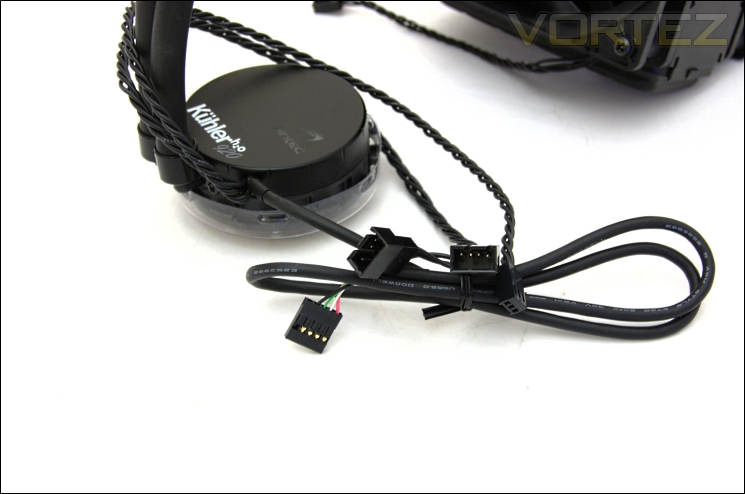
There is an array of cables connected to the CPU block. First is a y-splitter cable with two fan headers for the two bundled fans. These are 4 pin fan headers so retain the PWM functionality. The second cable is for the pump and power which connects directly to the motherboard. The last cable is half a USB header that connects to the on-board motherboard USB header. This provides the software functionality and RGB lighting control.
Installing one fan
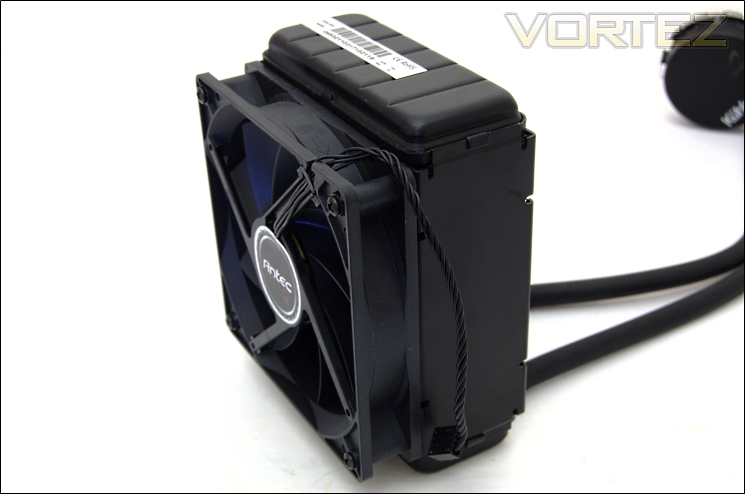
Here, we have the first 120mm fan installed. The back fan should be attached to the exhaust of the chassis. The fans have closed ends so that the long fan screws can reach the radiator more easily. Like the pump and fan y-splitter cables connected to the CPU block, the fan cable has no braiding. Instead the individual cables are wrapped in black and have a twisted weave. It’s not the most attractive finish and may have the tendency to unravel over time but it’s a cost-free method at tidying the look of the cables.
Adding a second fan
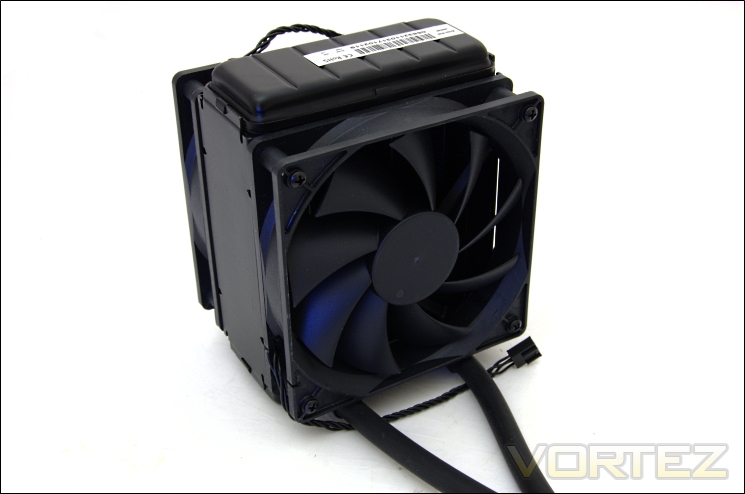
With two fans attached, the KÜHLER H2O 920 has push-pull in mind. The cooler is designed to exhaust air outside the system unlike Corsair units which are designed to draw cool air in. The fans boast 9 blades and PWM functionality, operating at 660-2580RPM. As you can imagine, the noise generated at full speed is not what you would call pleasing but the Antec relies on those high speeds for sheer cooling performance.
The cooler with both fans
The Antec KÜHLER H2O 920 ends up a very sizeable unit after both fans are installed.
The width of the cooler
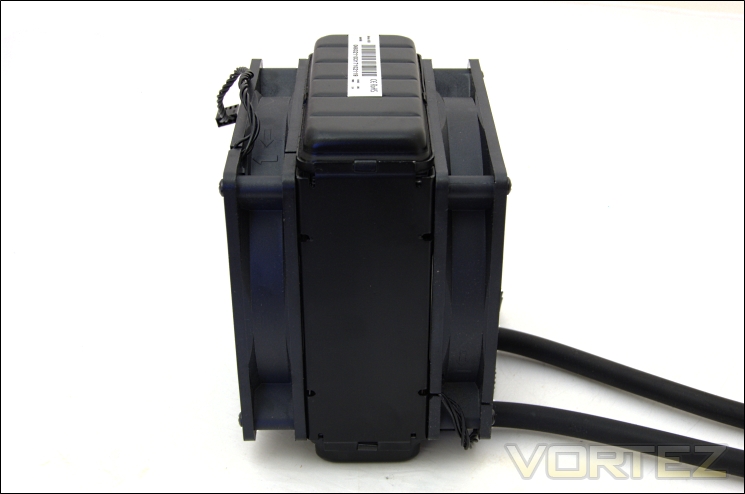
The radiator on its own is 49mm thick but with both fans attached come at 99mm.
Closer Look (Size Comparison)
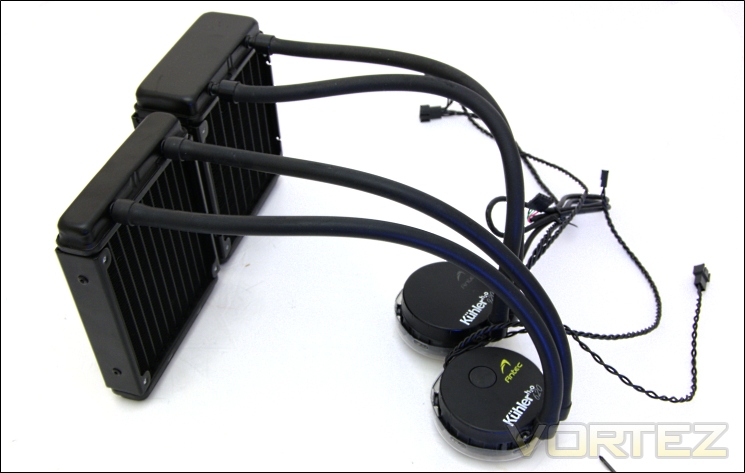
Antec KÜHLER H2O 620 VS 920
Comparing the Antec coolers, we see that both the 620 and the 920 are very similar in concept, the 920 being thicker and featuring a USB cable on top. Both support 120mm fans and have the same length tubes. The other notable difference is the arrangements of the fins on the respective radiators. The KÜHLER H2O 620 has 12 columns of fins where the 920 only has 9 but the fin width is 8.5mm instead of 11.5 on the latter. The KÜHLER H2O 620 also has narrower fin spacing of 1.25mm whereas the spacing on the KÜHLER H2O 920 is 1.5mm on average.
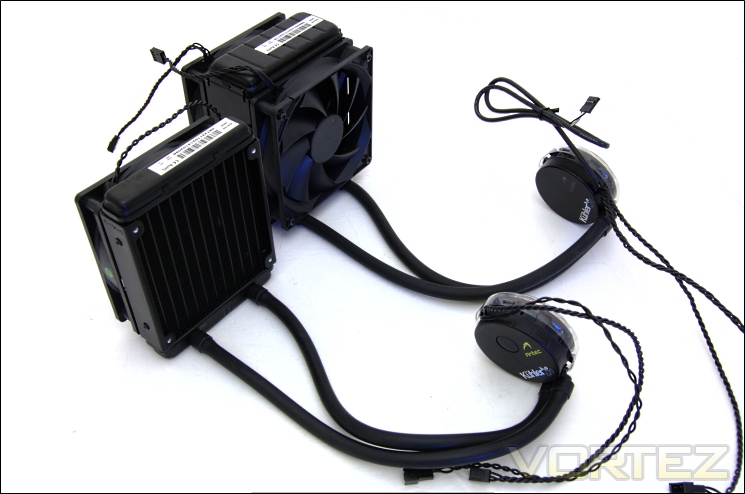
Antec KÜHLER H2O 620 VS 920 with fans
The KÜHLER H2O 920 features two 9 bladed PWM fans operating between 660-2580RPM whereas the KÜHLER H2O 620 features a single 7 bladed fan operating at 1450-2000RPM through voltage control instead..
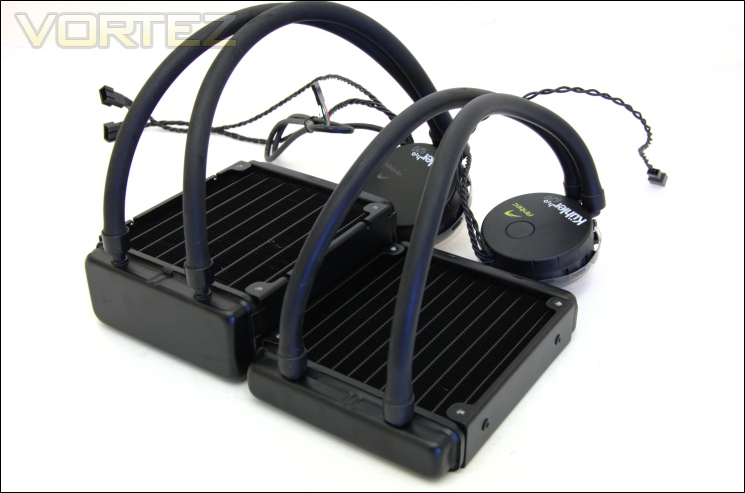
Antec KÜHLER H2O 620 VS 920 lying flat
The KÜHLER H2O 620 radiator is 27mm in thickness whereas the KÜHLER H2O 920’s radiator is 48mm thick. For comparison, a single radiator on the Noctua NH-D14 is 52mm deep.
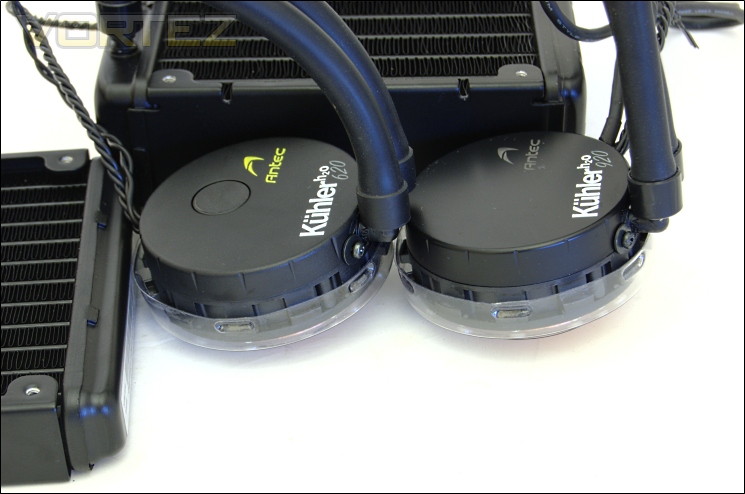
Antec KÜHLER H2O 620 VS 920 pumps
Both CPU blocks look identical and both are 29mm in height. The KÜHLER H2O 620 does not feature RGB LEDs like its bigger brother instead sporting a yellow logo.
Software Bundle
Antec have bundled a very intuitive application to allow users to control the fan speeds based on temperatures. It also allows for other customisation. Branded ChillControl, it is unique to the KÜHLER H2O 920.
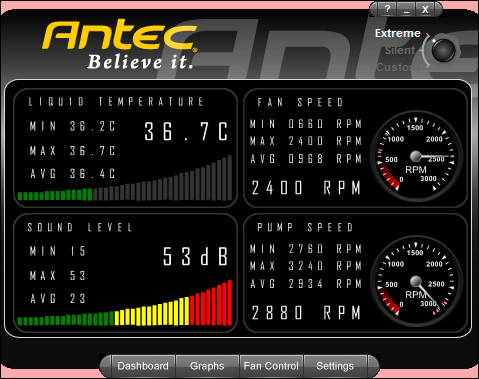
The first window displays a plethora of information regarding the cooler including the fan speed, pump speed, liquid coolant temperature and the sound level. For each, the minimum, maximum and averaged are recorded although they refresh frequently. Ideally, the minimum and maximum should be over saved for the whole duration and users be given the ability to refresh. Rather than record the CPU temperatures, the liquid temperature is recorded instead. In many ways, this is better as there are already plenty of applications that record the CPU temperatures already.
The application tool allows users to choose between two pre-determined profiles and to create their own custom one. Choosing ‘Extreme’ mode automatically sets the fan speeds to their maximum rated speed. At 2400RPM, the sound level reaches a mighty 53dB. The cooler doesn’t actually have a sound sensor so I can only imagine that the sound level are pre-calibrated based on the fan RPM rather than showing the actual noise. Still, it is an indication of how loud the KÜHLER H2O 920 can get.
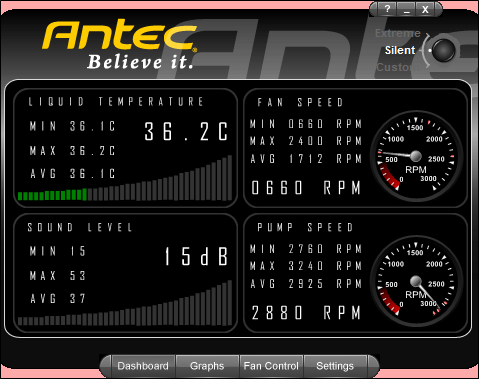
In ‘Silent’ mode, the fans respond to a default pre-programmed fan profile. When the liquid temperature is below 40C, the fans only operate at 660-700RPM making the whole system quiet. However, above 40C they start to increase and under the full load of an overclocked i7, the fan speed can even reach 2000RPM in this mode. This is counter-intuitive as the cooler is no longer quiet. The problem is that with a low fan speed, the liquid temperature will rise disproportionally quicker under full load and the fan speed will increase in response so the cooler will no longer be quiet. Thankfully, it is possible to customise a profile in the third setting. It would have been good if the fan speed could be set automatically rather than rely solely on the liquid temperature.
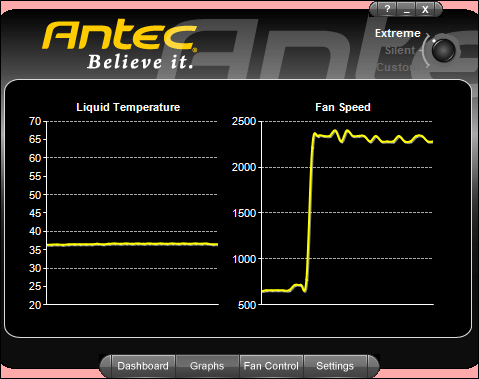
The second window monitors the liquid temperature and fan speed tracking them on graphs.
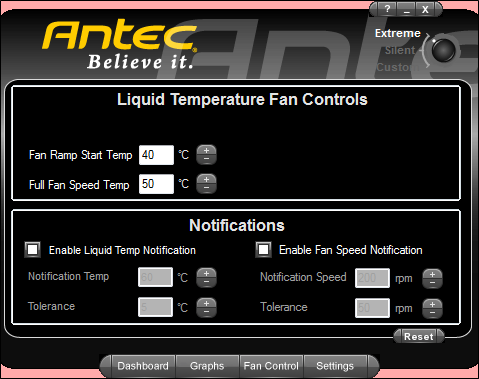
The fan control window can be customised when ‘Custom’ mode is selected. Here users can specify when they want the fan speeds to increase based on the liquid temperature. In this case, the fan will ramp up after the coolant reaches 40C and continue to increase linearly until 50C is reached. Notifications can also be set should the coolant temperature get too high.
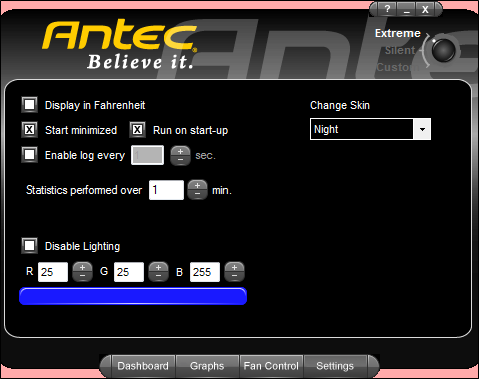
The settings window gives users the unique ability to change the LEDs colour on CPU block to anything within RGB space. Let’s take a look at how they look.
Lighting
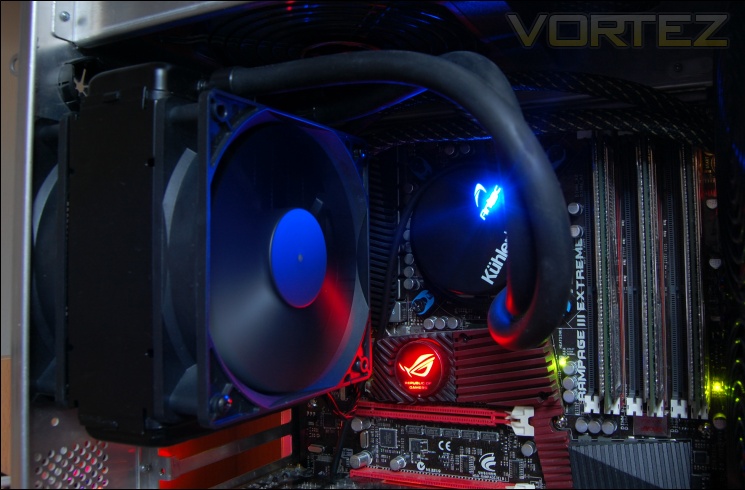
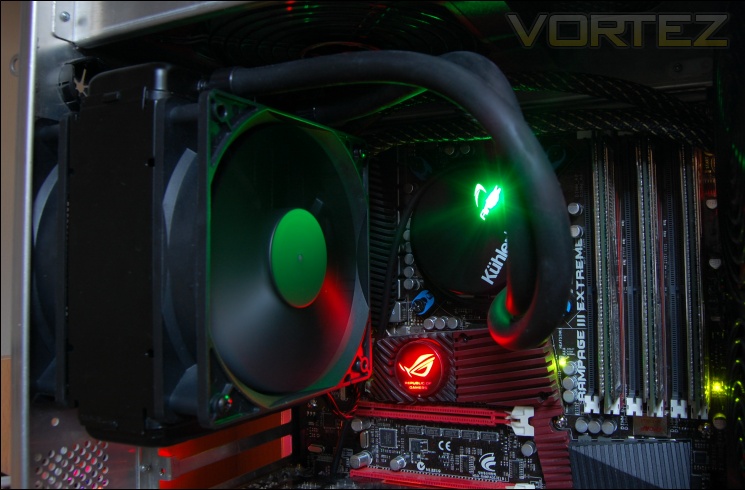
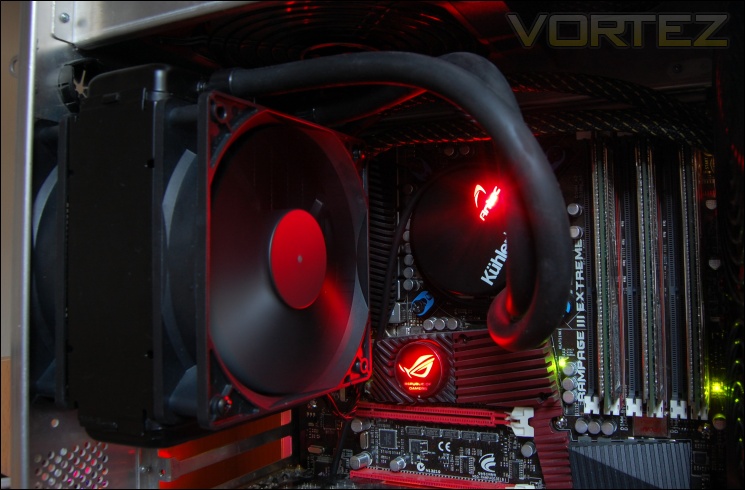
The lighting on the Antec CPU block is very prominent and in my case complimented the red Rampage III Extreme light very well.
Test Setup
CPU – Intel Core i7 920 – 2.66/4.0GHz
RAM – 6GB (3x2GB) OCZ Platinum DDR3 1333MHz
Motherboard – ASUS Rampage III Extreme
Graphics card – XFX HD5870 1024MB
Power Supply – Enermax Revolution 85+ 850W
Hard Drive – OCZ Vertex 2E 120GB
Samsung F1 320GB
Samsung F3 1TB
Drivers – ATI Catalyst 10.10
CPU Coolers:
Antec KÜHLER H2O 920 including tests using 2 stock fans, 2 Noctua NF-P12s and 2 SWiF2-120Ps.
Prolimatech Genesis including tests using 2 Noctua NF-P12s/NF-P14s, 2 SWiF2-120Ps and 2 Prolimatech Blue Vortex 14s
NZXT Havik 140 including tests using 2 NZXT fans, 2 Noctua NF-P12s/NF-P14s and 2 SWiF2-120Ps
Alpenföhn Matterhorn including tests using 2 Noctua NF-P12s/NF-P14s, 2 SWiF2-120Ps and 2 Föhn 120 Wing Boost fans
Prolimatech Super Mega including tests using 2 Noctua NF-P12s/NF-P14s, 2 SWiF2-120Ps and 2 Prolimatech Blue Vortex 14s
Noctua NH-C14 (U.L.N.A and default speed) including tests using 2 SWiF2-120Ps
Thermalright Silver Arrow including passive and tests using 2 Noctua NF-P12s and 2 SWiF2-120Ps
Thermalright HR-02 including passive and tests using Noctua NF-12/NF-P14s and Thermalright TR TY-140
Thermaltake Frio (Low/med/high speed) including tests using 2 Noctua NF-P12s
Corsair H50 including tests using 2 Noctua NF-P12s and 2 SWiF2-120Ps
CoolIT ECO A.L.C including tests using 2 Noctua NF-P12s and 2 SWiF2-120Ps
Thermalright Venomous X using 2 Noctua NF-P12s and 2 SWiF2-120Ps
Coolink Corator DS including tests with dual fan setups
Tuniq Propeller 120(High speed fan)
Noctua NH-C12P SE14
Prolimatech Megahalem
Noctua NH-D14 (U.L.N.A and default speed)
Noctua NH-U12P SE1366
Thermolab Baram (with 2 Noctua NF-P12 fans)
CoolIT Domino A.L.C
Sunbeam Core Contact Freezer
Coolermaster Hyper 212 Plus including test with 2 Noctua NF-P12 fans
Alpenföhn Nordwand including test with 2 Noctua NF-P12 fans
Tuniq Tower 120 Extreme (Low/med/high speed)
Program Suite:
Core Temp 0.99.5
LinX stress Test
AIDA 64 Extreme Edition
CPUID HWMonitor
How I tested:
Testing will be based on temperatures recorded by Core Temp and PC wizard after 20 passes of LinX stress test. The absolute temperatures recorded in the tables are averages of the 4 cores and the delta value provided for a fair comparison, taking into account ambient temperatures. The test will be run at stock speed and at an overclocked speed of 4GHz.
Installation
Installing the Antec KÜHLER H2O 920 is a fairly straightforward process thanks to the user manual but it can be fiddly due to the number of small components included in the mounting kit. In our guide, we will focus on installation on LGA1366 but the process is similar for other sockets.
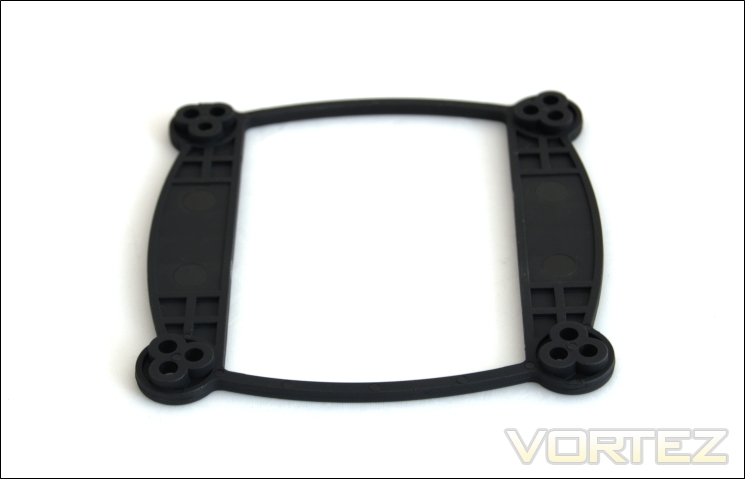
1.) Choose the appropriate backplate for either AMD or Intel. The rectangular one is for AMD whereas the above is for Intel sockets.
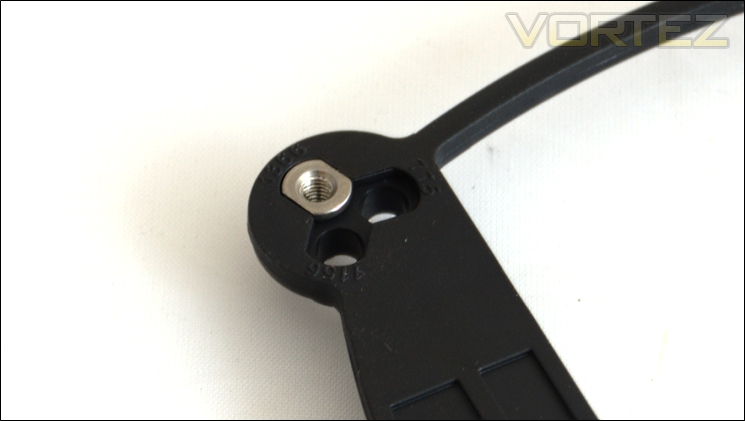
2.) Insert the metal backplate inserts into the appropriate labelled holes for socket 77/1156/1155/1366.
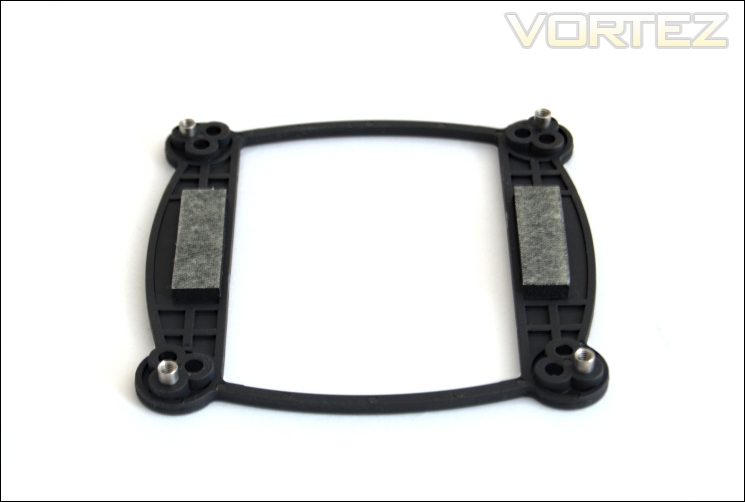
3.) Attach the adhesive pads to the backplate.
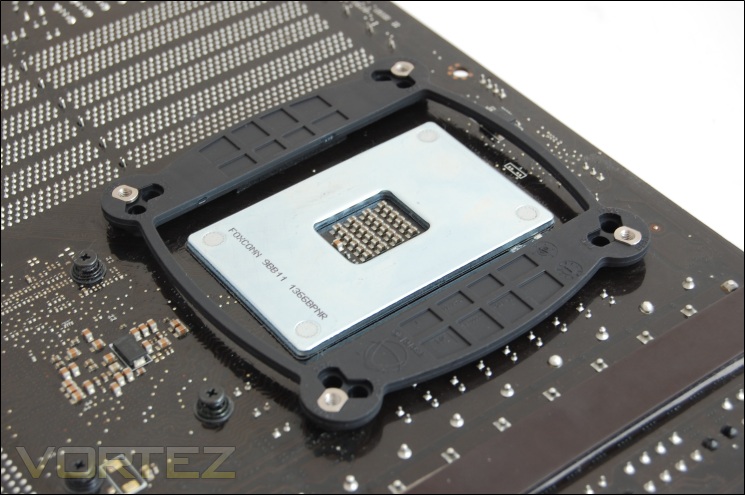
4.) Install the backplate to the back of the motherboard making sure each corner has gone through the holes.
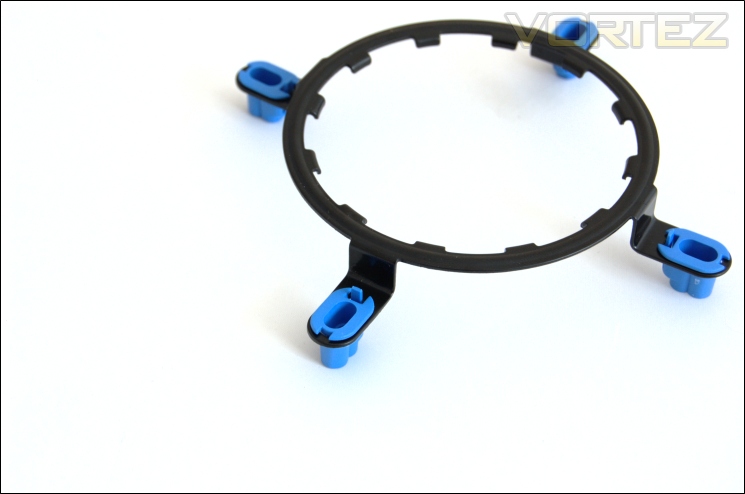
5.) Place the blue inserts into each corner of the retention ring making sure the clips are on the inside.
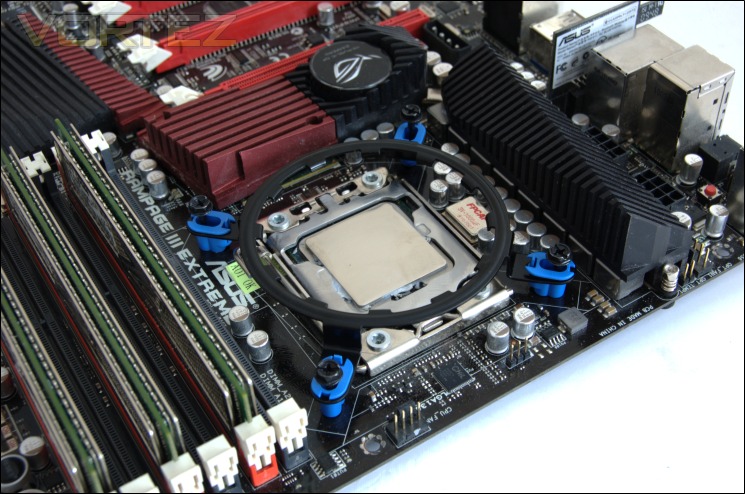
6.) Install the 4 mounting screws into the outer most holes of the inserts and line up the retention ring with the backplate on the front of the motherboard. Screw each corner in slightly so that they are in place but don’t tighten them just yet.
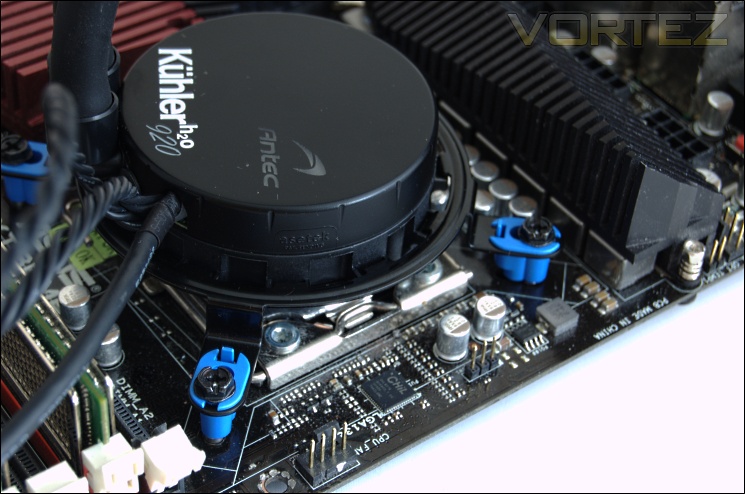
7.) Install the CPU block in the retention ring and twist it so that it is latched onto the bracket. Once secured, tighten the screws on the retention bracket. Do not over tighten as it may damage the plastic inserts.
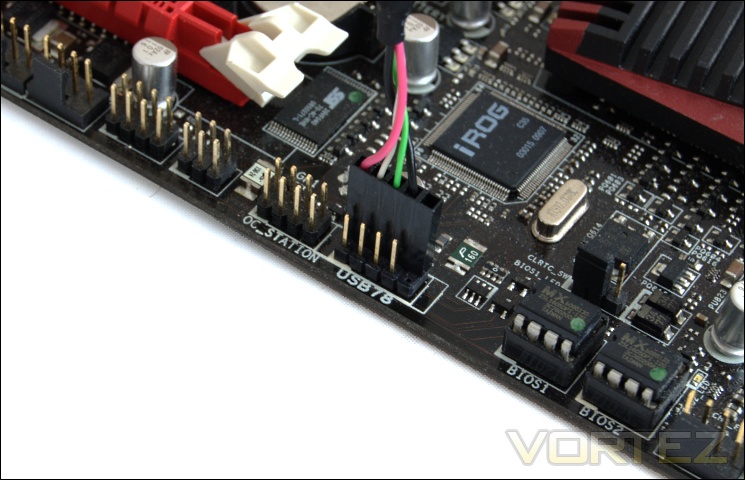
8.) Connect the two fans to the 4 pin header cables on the pump and plug the 3 pin pump cable into a motherboard 3 pin header. Connect the USB cable to an internal USB header making sure the black coloured cable is closest to the 5th pin on the header.
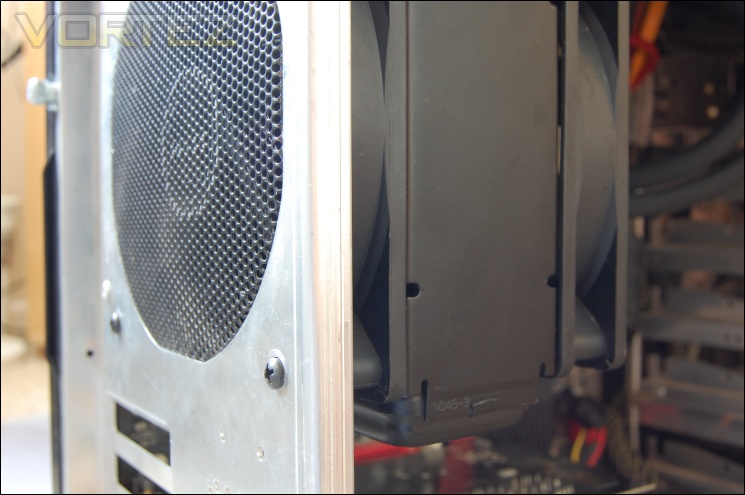
9.) Install the back fan and radiator using the 4 provided long screws.
Those familiar with earlier Corsair units will recognise the installation procedure as the process is exactly the same here using the same kit. All the Asetek units will be compatible with one another. As before, my main complaint is that the blue retention ring inserts are very fragile and screwing down too much can cause them to fracture. Another complaint is that it can be a pain to hold the radiator while trying to feed the long screws through the fan and to the radiator when installing the unit to the case. Overall though, installation is straightforward enough not to confuse anyone.
Results (Grouped)
The results have been arranged in terms of the fan configuration that yields the best results for each cooler. However, it is important to take into account that many coolers come with their own fans and changing those increases the costs significantly, so the “out of the box” cooler configurations have been highlighted in red each group.
Stock
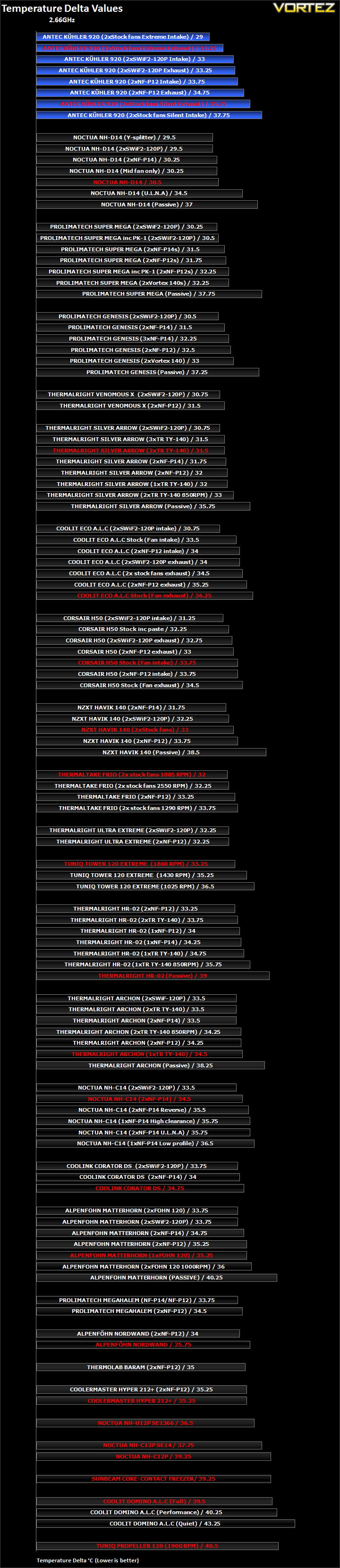
It’s not often that we see a cooler take the top spot but the Antec KÜHLER H2O 920 somehow does it. Let’s analyse the different fan setups more closely. The KÜHLER H2O 920 comes with two fans as default with them set up to exhaust air out of the back of the system. In ‘Extreme’ mode where the fan operated at 2580RPM, the delta temperature is an impressive 31.25C. The downside is the sheer noise generated. In ‘Silent’ mode, temperatures are higher by 4.5C due to the fans operating at a maximum of 1440RPM which was fairly quiet. Changing the orientation of the fans to intakes lowered the delta in ‘Extreme’ mode but increased it in ‘Silent’ mode. The latter is due to the fan speeds dropping to a mere 1020RPM. Generally, the intake orientation is better but at the cost of higher ambient temperatures. In this case, two Noctua NF-P12 fans were superior to the stock at low RPM. Conversely the SWiF2-120Ps were not as powerful as the stock fans under ‘Extreme’ mode.
Results (Ascending order)
Stock
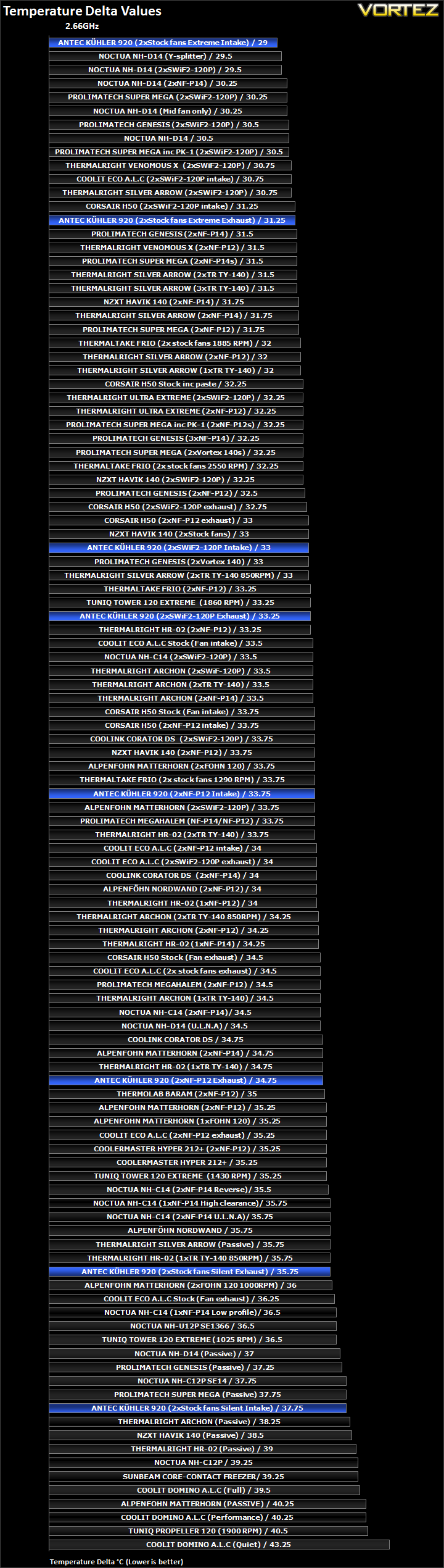
Now let’s take a look at how the results compare to other coolers. What is interesting to observe is that the different fan configurations give a wide spectrum of results. In ‘Extreme’ mode, the KÜHLER H2O 920 is comparable to our top coolers but it relies on very high RPM fans to do so at the cost of noise. For comparison, the Noctua NH-D14 and Thermalright Silver Arrow are still very quiet when achieving such good results. With two SWiF-120Ps, results are more comparable to our high end coolers using low RPM fans. It demonstrates the Antec’s reliance on high RPM fans to achieve good performance. In ‘Silent’ mode, the results are quite disappointing. Operating at 1440RPM as exhausts and 1020RPM as intakes, performance was near the bottom of the table where even our Silver Arrow running passively produced better results.
Results (In-depth analysis)
In the next comparison, we look at the default cooler performance as they come out of the box with their bundled fans. Coolers that come with no fans have been coupled with Noctua’s NF-P12 or fans that the manufacturers intended their coolers to be used with.
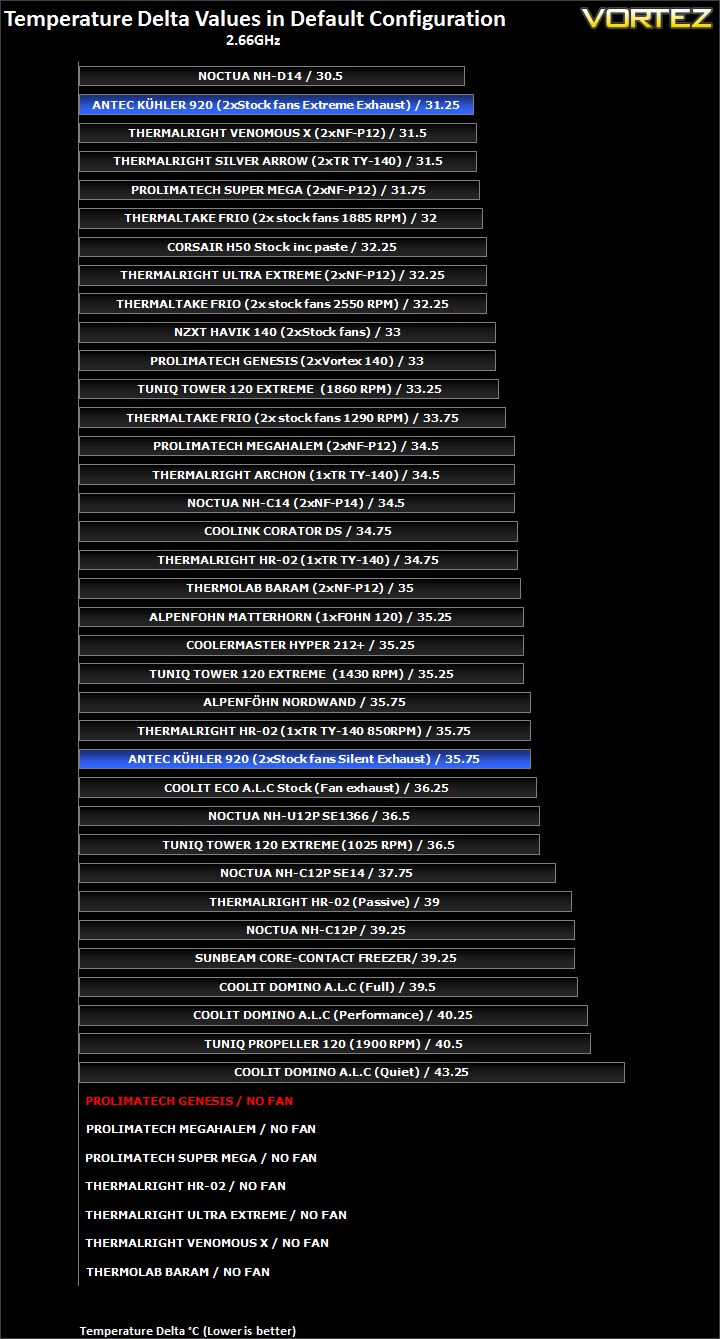
Compared to other out-of the box coolers combinations, the KÜHLER H2O 920 is most impressive in ‘Extreme’ mode but at the detriment of noise, especially when we consider our best air cooling solutions being near silent in comparison. Nonetheless, the performance is still very good and challenges air coolers like no other ALC units before.
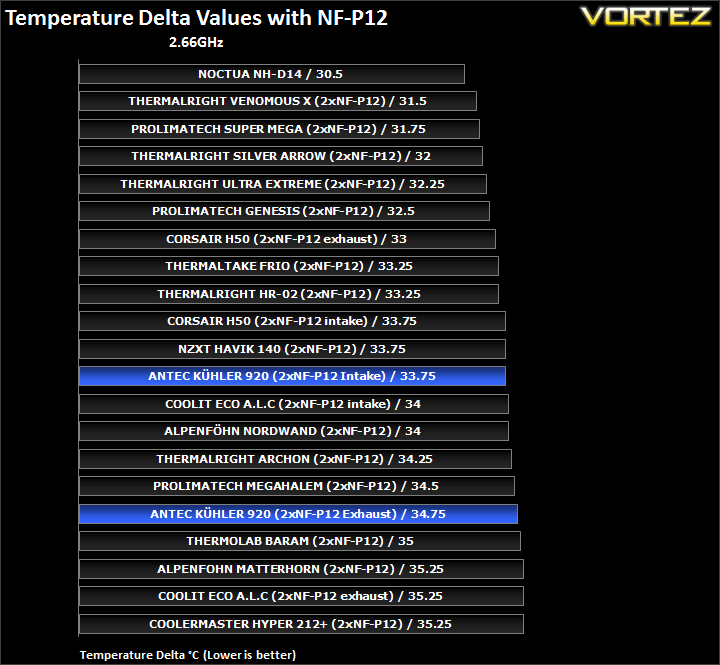
In terms of efficiency with two NF-P12s, the KÜHLER H2O 920 is comparable to the likes of the Megahalem and NZXT Havik. Strangely though, it doesn’t outperform the Corsair H50. This is possibly due to the stock CPU not showing the cooler’s true potential.
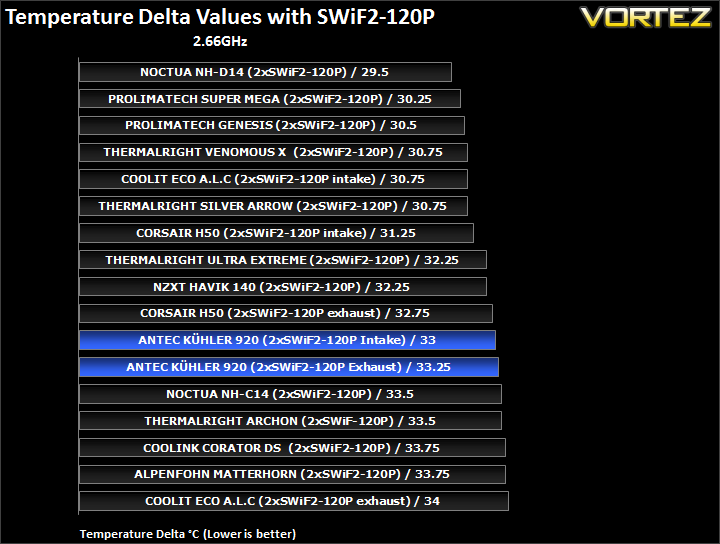
Again, we see the KÜHLER H2O 920 lagging behind the other ALC units when teamed up with the Coolink fans. Our next set of results with the overclocked CPU will give a different insight into the cooler’s performance.
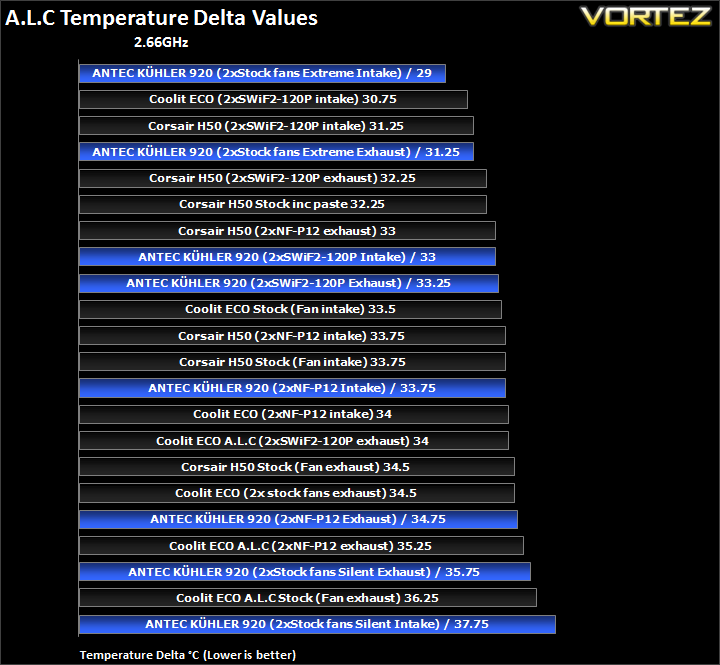
At stock speed, we see very little variation between the three coolers making it harder to distinguish a clear winner. But there’s no doubting that the Antec is still a good performer.
Results Overclocked (Grouped)
The results have been arranged in terms of the fan configuration that yields the best results for each cooler. However, it is important to take into account that many coolers come with their own fans and changing those increases the costs significantly, so the “out of the box” cooler configurations have been highlighted in red each group.
4GHz
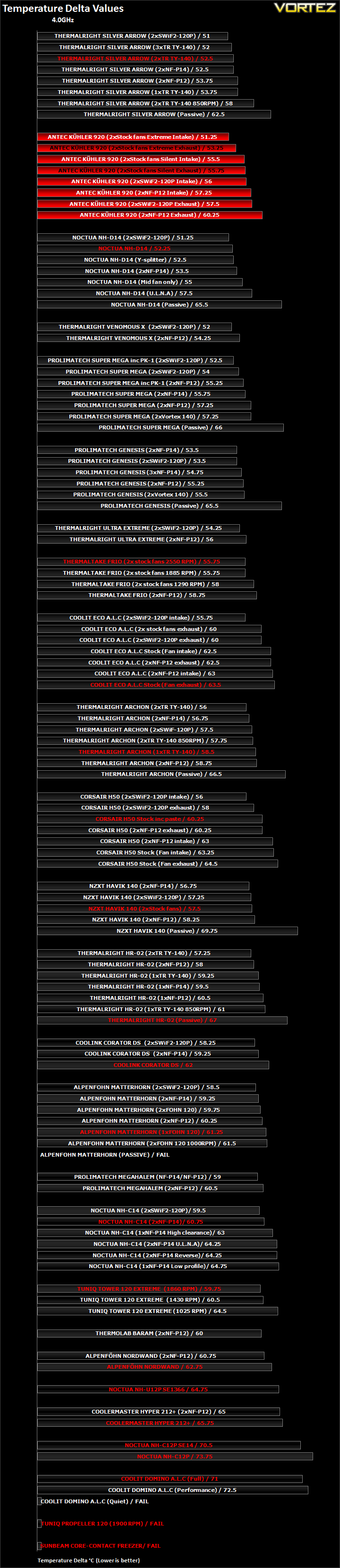
Like before, the KÜHLER H2O 920 impresses by shooting to the top. The trend is very similar to the stock results when we look at the different fan configurations. The stock fans in ‘Extreme’ mode perform the best followed by the Coolink fans and then the Noctua NF-P12s. What has changed is the relative performance of the fans in ‘Silent’ mode which now perform even better than the SWiF2-120Ps. The reason is because with a hotter running CPU, the liquid temperature also increased thus causing the fans to ramp up in speed. Despite the Silent name, the fans sped up to 1980RPM which is in no way quiet. In fact, beyond 1600RPM the fans become audible. Thankfully they don’t become intrusive until they reach 2000RPM.
Another observation is that the intake configuration performs better but the truth is that it comes to the detriment of overall ambient temperatures, especially in cases where the only exhaust fan is at the back.
Results Overclocked (Ascending order)
4GHz
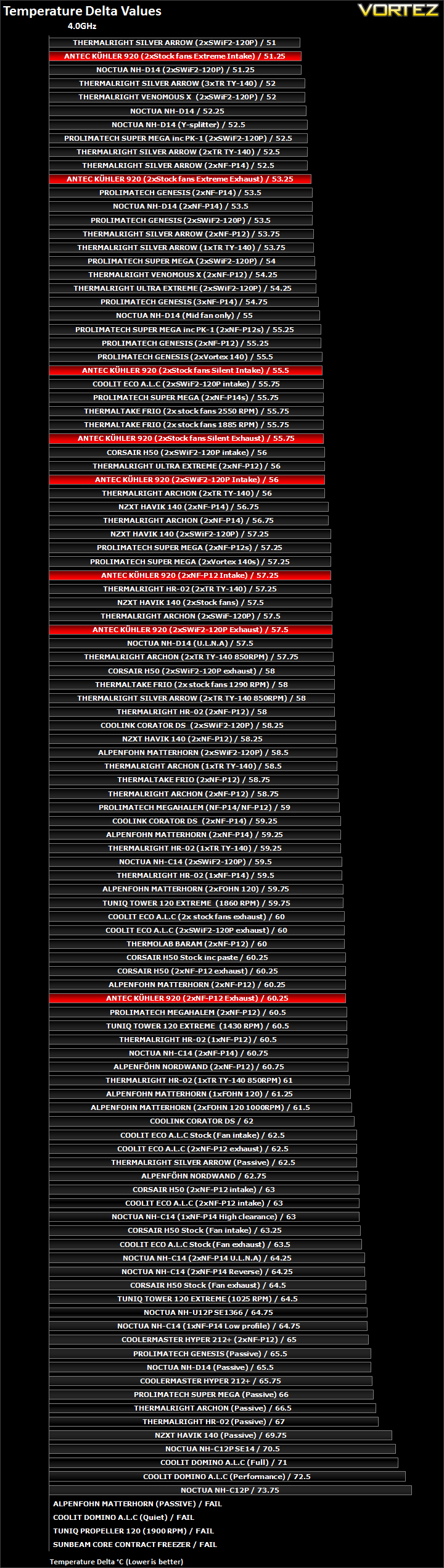
The best KÜHLER H2O 920 configuration matches the best Noctua NH-D14 configuration here which is an impressive feat although noise was still worse. In its default ‘Extreme’ mode, it was comparable to other high end coolers like the Prolimatech Genesis and Super Mega as well as the Silver Arrow using low RPM fans. In ‘Silent’ mode, the KÜHLER H2O 920 was comparable to the Thermaltake Frio.
Results Overclocked (In-depth analysis)
In the next comparison, we look at the default cooler performance as they come out of the box with their bundled fans. Coolers that come with no fans have been coupled with Noctua’s NF-P12 or fans that the manufacturers intended their coolers to be used with.
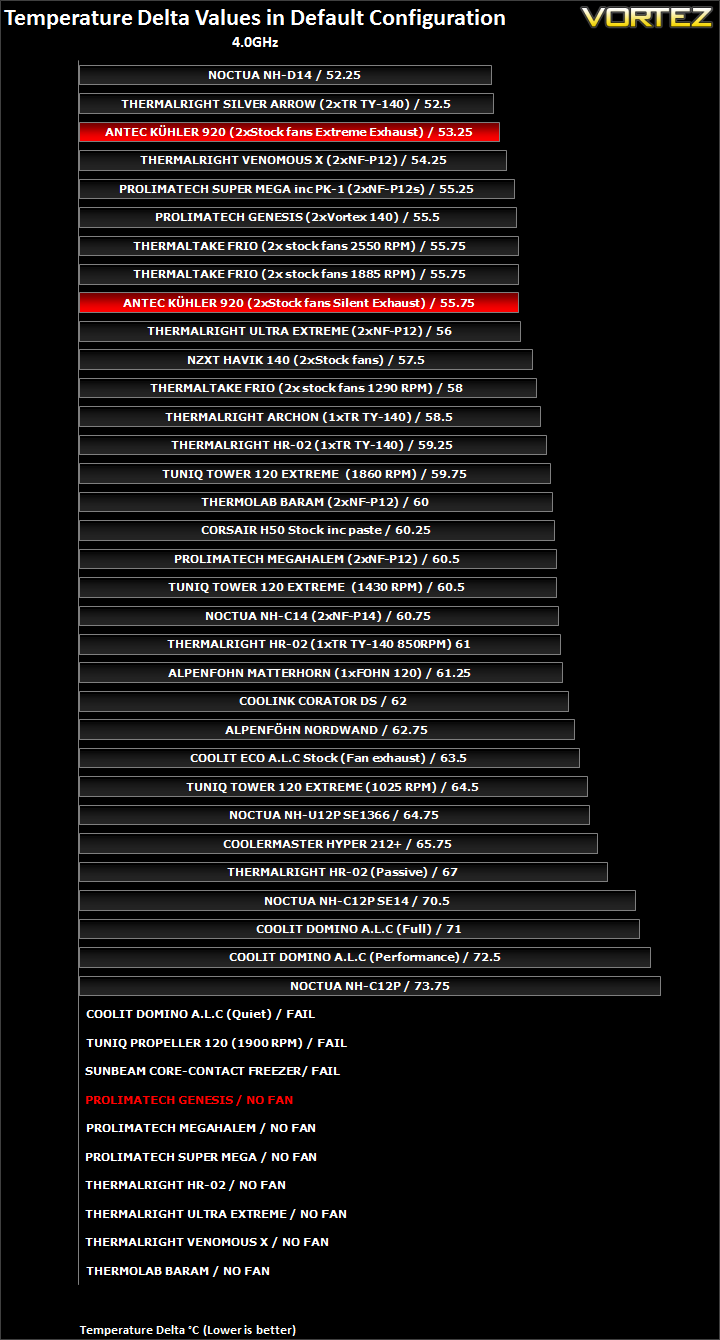
In its default configuration, the KÜHLER H2O 920 finds itself amongst our top air coolers and significantly ahead of the Corsair H50 and CoolIT Eco.
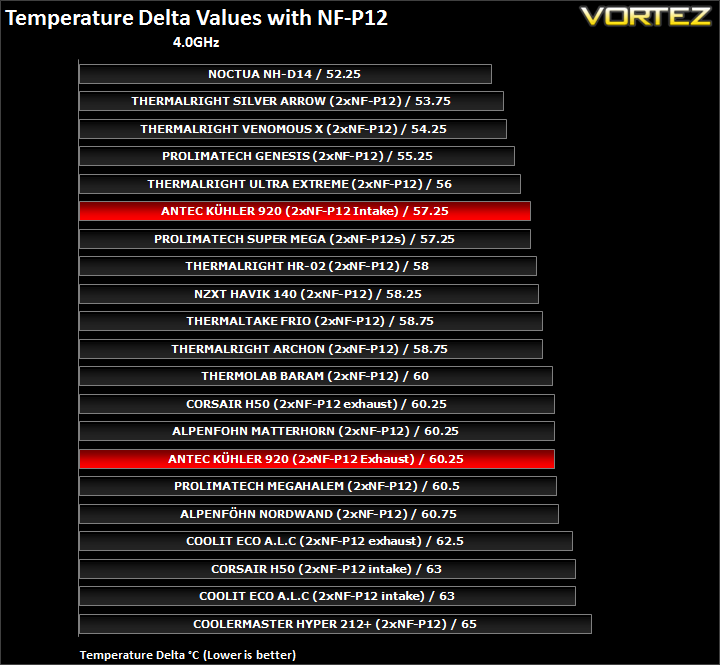
With two NF-P12s, performance was a bit disappointing suggesting that the Antec favours high RPM fans rather than low RPM ones despite the high static pressure of the Noctua fans. As intakes, the temperature delta drops by 3C.
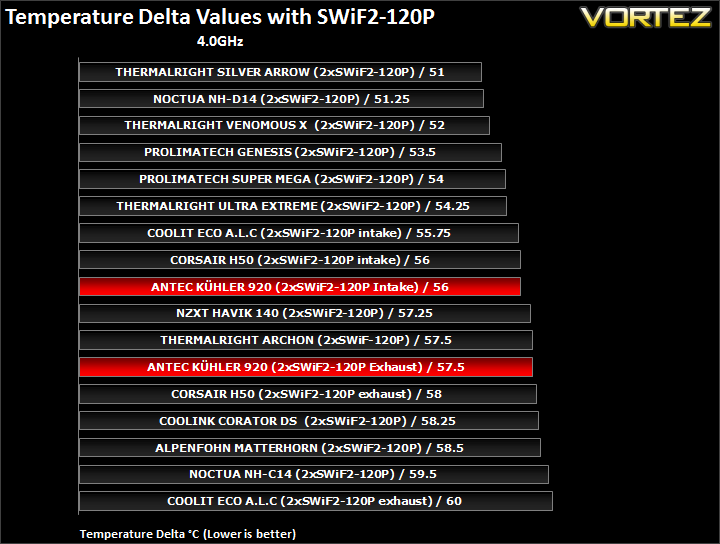
Strangely here, the Corsair H50 and CoolIT Eco perform the same as the Antec with the two Coolink fans as intakes despite the radiator size difference. The conclusion is that the Antec is best left with its default fans.
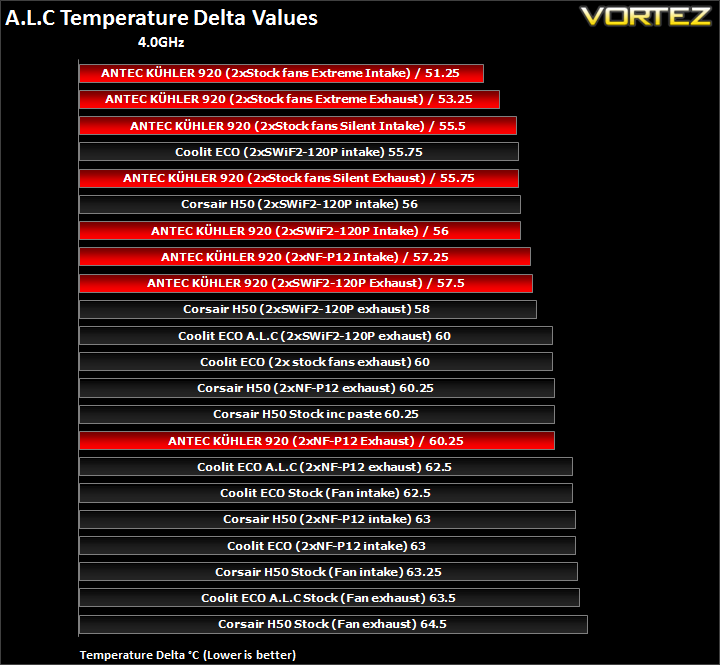
The KÜHLER H2O 920 is generally better than the other two units thanks to its high RPM stock fan. It’s interesting to note that it matches the Corsair H50 when coupled with the Coolink fans when it is expected to perform better.
Other Observations
Thermal paste comparison
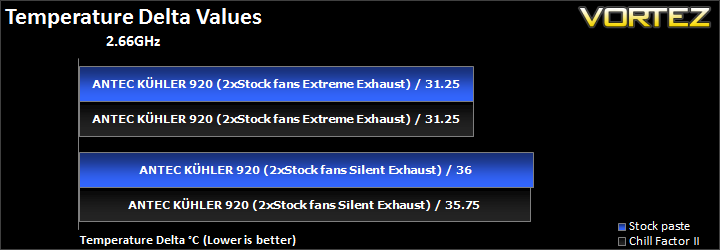
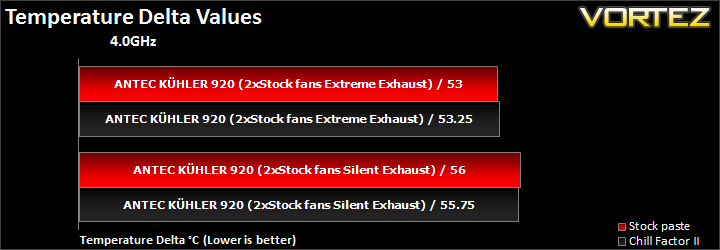
The stock thermal paste is very good quality and doesn’t require changing. It is comparable to Thermalright’s ChillFactor II which is what we use for all our tests.
Liquid Temperatures
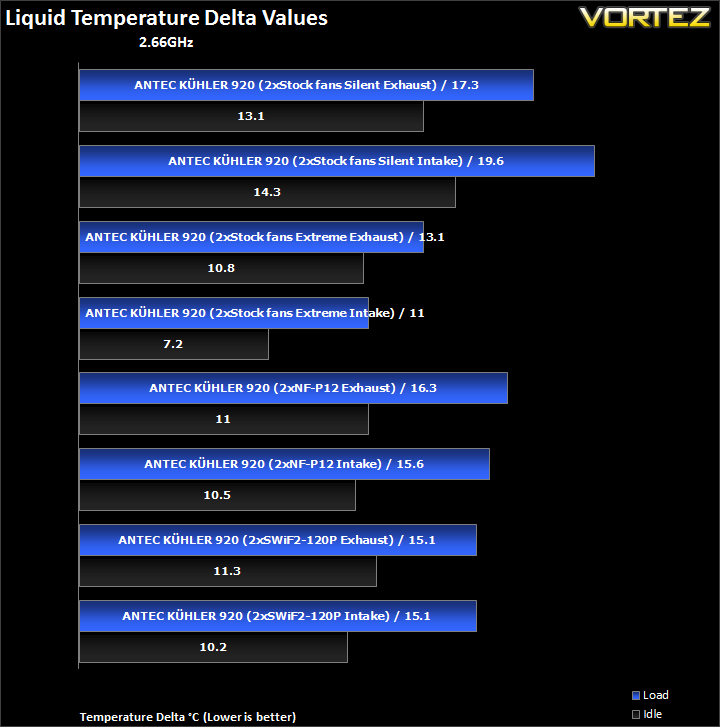
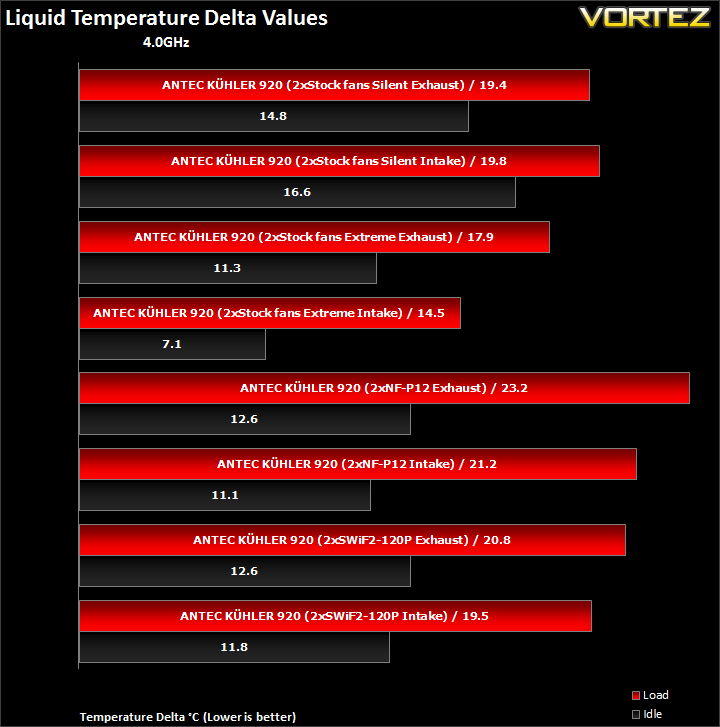
The coolant temperature was generally between 35C and 50C in absolute terms but the delta shows us that higher fan speeds yielded better results as we would expect. The main difference between the stock and overclocked results is that the stock Antec fans in ‘Silent’ mode performed relatively better at 4GHz. This is because the liquid temperature was higher in absolute terms and thus caused the fans to ramp up to 1980RPM. At stock clocks, the fans only operated at around 1000RPM so their cooling ability was reduced.
Chipset Temperatures
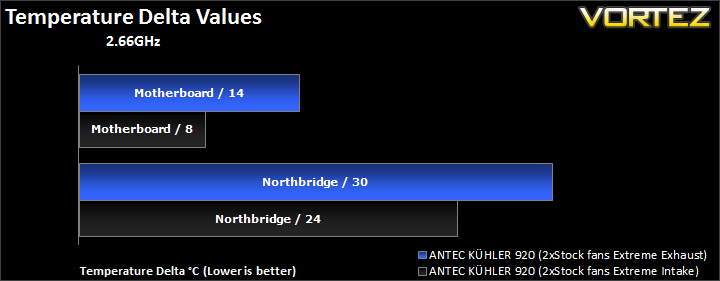
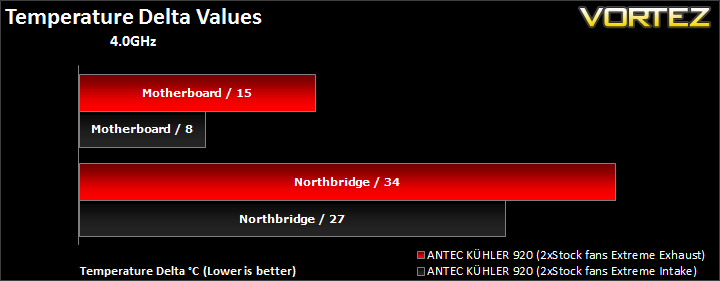
Now I’ve mentioned several times that although having the fans as intakes reduce temperatures, they raise ambient temperatures. Here, we see that chipset temperatures are also lower with the fans as intakes so the question is why don’t we use this configuration instead? The problem is that using the fans as intakes raises ambient temperatures disproportionally compared to the CPU and chipset temperatures so when calculating the delta, the latter two appear lower. This was more noticeable when the ‘Extreme’ mode was used as the hot air from the radiator was transferred inside the case quicker and rapidly raised my hard drive temperatures.
My own recommendation would be to use the cooler as an exhaust, especially in my case where there are no other exhaust fans. In cases where exhausts fans are present at the top, changing the fans to intakes wouldn’t have the same detrimental effect.
Conclusion
The KÜHLER H2O 920 is very good product from Antec, especially as it is their first foray into ALC units. Sure, their cooler is based on Asetek’s latest design but Antec have done their share of customisation to warrant their badge, such as their intuitive ChillControl software and inclusion of two PWM fans. Performance also proved to be very good, especially in ‘Extreme’ mode where it came to match the Noctua NH-D14 and Thermalright Silver Arrow. The added benefit of creating a custom profile also makes this cooler very appealing. Perhaps the KÜHLER H2O 920’s biggest advantage is its fairly compact size and maintenance free construction. It means that users can install it in virtually any case available without the worry of memory obstruction or height limitations.
However, I can’t help but feel unconvinced by the KÜHLER H2O 920, not because Antec have done a bad job but mostly at the concept of ALC coolers. In my review of the Corsair H50 and the CoolIT Eco, I remarked that performance came at the expense of silence and this hasn’t changed here. The KÜHLER H2O 920’s excellent performance only came with the fan operating at a blistering 2580RPM. The problem is that many such units advertise the fact that they are quiet and yet in reality their true performance is only visible at high RPM where noise is inevitable, in this case comparable to a reference HD6970 with its fan at 100%. The KÜHLER H2O 920 does have a silent mode and can be customised to as the user pleases. As we found though, even in silent mode the fans can ramp up under heavy loads and become intrusive. Conversely when idling, the fan speeds lower drastically and we get high idle temperatures. PWM functionality does have its advantages though. Like graphics cards, it means that users can enjoy silence during normal use and have the fan noise drowned by in-game sounds under load, assuming that games are the only applications that will stress the system. As such, it is ideal for gamers but not so much for people using heavy rendering applications or other intensive applications that are not game related.
So would I recommend it? The Antec KÜHLER H2O 920 is targeted as an alternative to heavy, cumbersome air coolers. Those afraid of the pressure such coolers can put on their motherboard, especially if they need to transport their PCs often, will surely find the Antec KÜHLER H2O 920 useful. In this case, the Antec is definitely a viable option. But then we come to the price point. At £80, it might be much cheaper than a custom water-cooling loop but it is in a completely different price band to the likes of the Thermalright Silver Arrow and Noctua NH-D14. As such, it becomes harder to recommend if performance and low noise are your primary concerns. Against its competition from Corsair, the Antec is more fairly priced.
To conclude, Antec have done a very good job with the KÜHLER H2O 920. There is no denying that the performance is present. However, the concept of ALC coolers still has some flaws and until those issues are rectified, most namely noise, I will find it hard recommending such a unit over a high end air cooler from a performance/noise perspective.
Pros
+Excellent performance
+Very well packaged
+Support for Intel and AMD sockets
+Bundled PWM fans
+ChillControl software
+RGB lighting
+Memory compatibility
+Compact size
Cons
-Cost
-Noise
-Fragile retention inserts
-High idle temperatures in ‘Silent’ mode
+Excellent performance
+Very well packaged
+Support for Intel and AMD sockets
+Bundled PWM fans
+ChillControl software
+RGB lighting
+Memory compatibility
+Compact size
Cons
-Cost
-Noise
-Fragile retention inserts
-High idle temperatures in ‘Silent’ mode
The Antec KÜHLER H2O 920 deserves our Vortez Silver Award.


