







Alpenföhn have sent us their new monstrous looking twin-tower K2 cooler to review. Will their efforts claim them the top spot on our charts?

Manufacturer and Sponsor: Alpenföhn
MSRP: ~£65/74.90Euros
Street Price: 69.90Euros
Alpenföhn is a brand we have grown accustomed to here on Vortez having reviewed many of their offerings, from their entry-level Triglav to the high-end Matterhorn. Despite not claiming any top spots on our ever-competitive charts, we have always admired their products for their engineering, aesthetics, and innovation. It’s not often that we see manufacturers deviating from the norm to bring new ideas to the table and Alpenföhn have never shied from such opportunities. We only have to look at Triglav and its 10mm heat pipes to see that such designs can prove very effective. However, the picture isn’t always so rosy when we turn our attention to some of their other ideas. While the features of the Matterhorn might have looked great on paper, it failed to translate well into real world performance leaving us somewhat disappointed. But this is where Alpenföhn hope to make a bigger impact in the cooling world and very fittingly as the case may be, they are doing so with their biggest cooler yet, the K2.
The Alpenföhn K2 is the company’s own attempt at a dual tower cooler. Before they start being accused of trying to copy Thermalright or Noctua, we have to remember that the K2 has been in development for a very long time and the first prototype was first seen back at Cebit earlier this year. So what exactly is the K2? Following their theme of naming coolers after famous mountains around the world, their dual tower cooler very appropriately takes its name after the world’s second highest mountain, Mount K2. Aside the dual radiators, the cooler features an impressive heat pipe array, counting 8 each 6mm in diameter. In many ways, the K2 is a culmination of Alpenföhn’s best designs and innovations so it’s not surprising to see a unique fin array sharing characteristics of the Matterhorn and even the older Nordwand. As with previous heatsinks, the K2 features a perfectly milled base plate for greater contact with the CPU and heat transfer efficiency. To top it off, the cooler comes bundled with two Wing Boost fans, one 120mm in size and the other 140mm. Although akin to the Noctua NH-D14’s configuration, we speculate that it is to allow greater memory compatibility rather than to simply copy the former.
With a feature set to challenge the best coolers on the market, the Alpenföhn K2 is setting its sight on the likes of the Noctua NH-D14, Thermalright Silver Arrow, and Phanteks PH-TC14PE which likewise are monstrous dual tower coolers. It wasn’t long ago that we were proclaiming the latter as our new king but the question is whether the K2 can make that time on the throne short.
Let’s see what Alpenföhn have to say about their K2 heatsink:
For ages, myths and legend surround one of the scariest mountains on earth. Icy winds and heavy snow fall had been the reason all attempts to reach the peak failed…
You might not be surprised that the K2 inspired us to choose the name for our latest creation. By using 8 heat pipes in a twin tower design, dual wing boost configuration and MnTal-Airflow Technology, the new Alpenföhn reaches highest performance at lowest noise.
For ages, myths and legend surround one of the scariest mountains on earth. Icy winds and heavy snow fall had been the reason all attempts to reach the peak failed…
You might not be surprised that the K2 inspired us to choose the name for our latest creation. By using 8 heat pipes in a twin tower design, dual wing boost configuration and MnTal-Airflow Technology, the new Alpenföhn reaches highest performance at lowest noise.
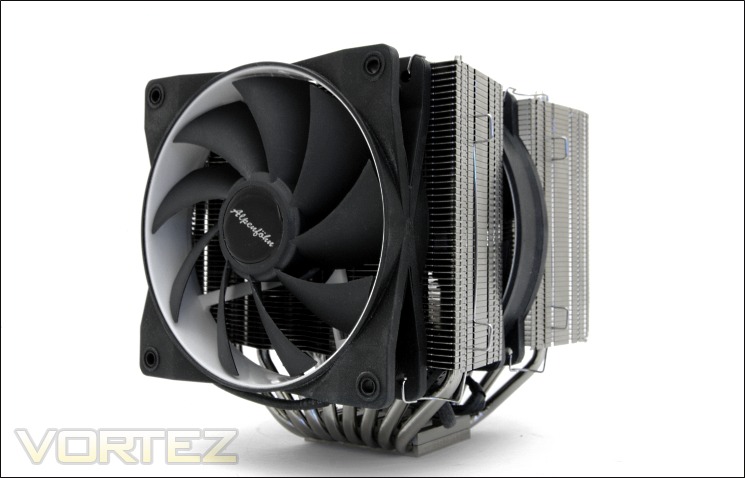
With looks that puts all of its competitors to shame and a feature set to match the best, can the K2 really deliver and can Alpenföhn’s efforts finally translate to real world success? Let’s find out…
Features and Specifications
Features
Twin tower with 8x6mm Heat pipes:
The new Twin Tower Design can reach best results in noise and performance by using a combination of 2 fans. The trapezoid fin shape ensures better compatibility with VGA coolers by keeping the distance to the PCI-X slot. All contact surfaces between fins, heat pipes and the base plate are soldered.
Wing Boost 120/140mm Dual Combination:
Equipped with integrated decoupling elements, WB technology and HD bearing, the K2 comes with each one 120mm and 140mm Wing Boost fans.
Fins:
The K2 is the first cooler to feature the brand new Minimised noise Transfer at Low Airflow Technology (MnTal). The advanced fin structure influences the airflow through the heatsink to increase the heat transfer.
Heat pipes/Base plate:
The U-Shape heat pipes offer a large connection area to the base plate for a better heat absorption. By CNC machining the surface of the base plate it is perfectly even and the thermal transfer is optimised.
The new Twin Tower Design can reach best results in noise and performance by using a combination of 2 fans. The trapezoid fin shape ensures better compatibility with VGA coolers by keeping the distance to the PCI-X slot. All contact surfaces between fins, heat pipes and the base plate are soldered.
Wing Boost 120/140mm Dual Combination:
Equipped with integrated decoupling elements, WB technology and HD bearing, the K2 comes with each one 120mm and 140mm Wing Boost fans.
Fins:
The K2 is the first cooler to feature the brand new Minimised noise Transfer at Low Airflow Technology (MnTal). The advanced fin structure influences the airflow through the heatsink to increase the heat transfer.
Heat pipes/Base plate:
The U-Shape heat pipes offer a large connection area to the base plate for a better heat absorption. By CNC machining the surface of the base plate it is perfectly even and the thermal transfer is optimised.
Specifications
•Cooler dimensions : 154x144x160mm (LxWxH)
•Cooler weight: 1378g (With 2 fans) / 1050g (With no fans)
•Heat pipe: 6mm x8 units
•Cooler material: full copper heat pipes and base, aluminium fins
•Compatibility: Intel Socket LGA1155, 1156, LGA1366, LGA775 (LGA2011 mounting kit provided free on request), and AMD AM2/2+/AM3, K8, FM1
Fan specifications – Wing Boost 120
•Fan dimension: Length 120x120x25mm (LxHxW)
•Weight: 165g
•Operating voltage: 12 VDC
•Fan speed: 500-1500RPM
•Fan noise level: 8-24.8 dB(A)
•Fan Airflow: 63.92 CFM
•PWM: Yes
Fan specifications – Wing Boost 140
•Fan dimension: Length 140x140x25mm (LxHxW)
•Weight: 143g
•Operating voltage: 12 VDC
•Fan speed: 300-1100RPM
•Fan noise level: 10-19.4 dB(A)
•Fan Airflow: 61.62 CFM
•PWM: Yes
Included accessories:
•1x Mounting material for Socket 775,1156,1366, AM2, AM2(+), AM3
•6x Fan mounting brackets
•1x syringe thermal grease
Dimensions
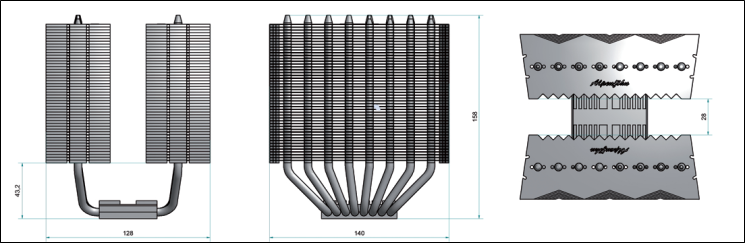
The Alpenföhn K2 boasts a list of features that can compares favourably to other ultra-high-end dual tower coolers. Starting with the dimensions, we see that it is 160mm in height, similar to the Noctua NH-D14 but shorter than the Phanteks PH-TC14PE and Thermalright Silver Arrow, thus ensuring compatibility with the majority of mid tower cases. Compatibility is a key factor of the K2 as reflected by the trapezoid shape of the fins. However, its maximum width of 144mm is 4mm wider than even the Phanteks PH-TC14PE. Length/depth-wise, the K2 is 154mm, 5mm less than the Phanteks cooler, noting that the dimension includes the fans installed. Further highlighting compatibility is the cooler’s support for all sockets dating back nearly 7 years.
Of all the dual tower radiators, the K2 is by far the heaviest at 1378g, a good 128g more than the already hefty Phanteks, our previous heaviest cooler. This could be attributed to the full copper base and the two extra heat pipes over conventional 6 heat piped designs. The fans are also slightly heavier than previous fans we have encountered. Speaking of the fans, we observe that Alpenföhn have gone for a 120mm and 140mm fan configuration to alleviate some memory compatibility issues. The fan specifications are also comparable to Noctua’s NF-P12 and NF-P14s. The former goes up against the same sized Wing Boost 120 which delivers slightly better performance thanks to the extra 200 RPM operational speed it has over the Noctua. Conversely, the Wing Boost 140 operates at 100 RPM less than the equivalent NF-P14 and not surprisingly delivers slightly less airflow, the difference being marginal at best. The main advantage of the Alpenföhn fans is their PWM functionality which only Thermalright fans currently support (amongst the four dual tower coolers), although this will soon change with Noctua’s new fans.
Like the other three coolers we will keep comparing the K2 to, Alpenföhn hopes to deliver the best in-class performance at low noise, achieving so with heatsink design and fan performance. Let’s take an even closer look at the K2.
Packaging and Content
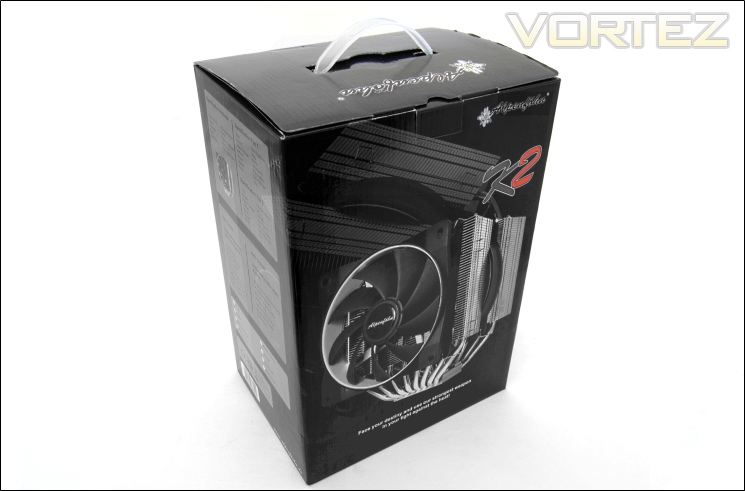
The front of the box
One of the greatest things about Alpenföhn is that they actually listen to past criticisms and work on those. I’m glad to see that they have responded to my past complaints about their box designs and created a far more appealing one. Alpenföhn have opted for a traditional cardboard packaging in black this time rather than the vibrant mismatch of colours that plagued their previous ideas. It brings a more sinister and subtle atmosphere that is fitting of their most powerful cooler. On the front is a picture of the K2 itself, with their logo and model name printed just above.
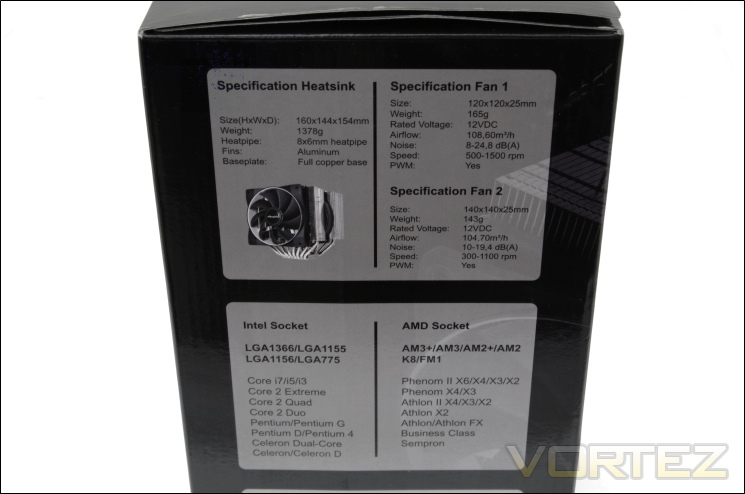
The specifications
On one side of the box is listed all the heatsink and fan specifications as well as the socket compatibility. It gives potential buyers a quick preview of what to expect in terms of performance and size. It also becomes apparent that two fans are already bundled and that there should be absolutely new compatibility issues with any motherboard socket dating back to K8 for AMD and LGA77 for Intel.
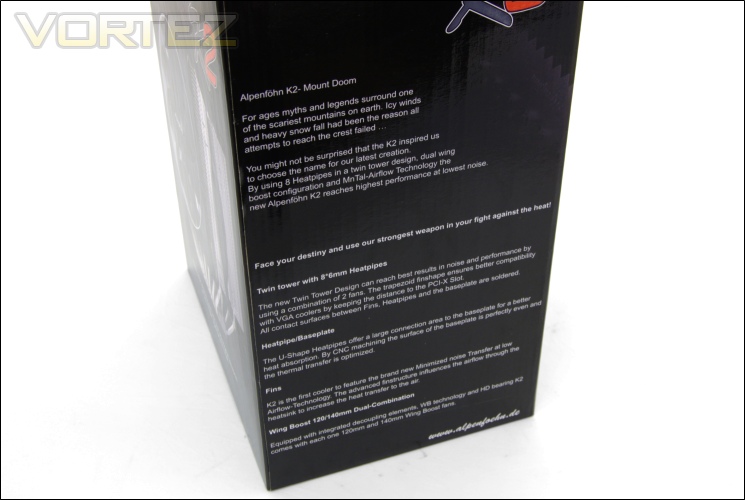
The features of the K2
Turning to the other side, Alpenföhn provides a blurb on the K2 referring to it as Mount Doom for obvious reasons. More importantly is the feature list highlighting the twin tower design and their 8x 6mm heat pipes concept. The inclusion of their two Wing Boost fans is also mentioned.
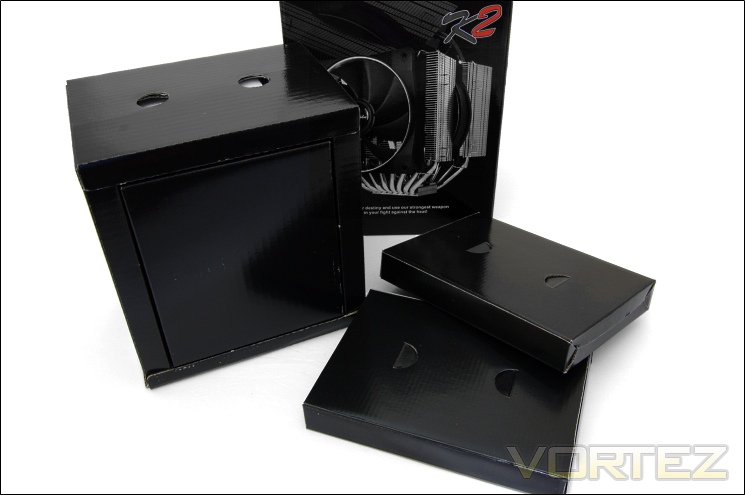
Inside the box
Opening the box, we are met with several more boxes retaining the entire bundle and the cooler. The larger one not surprisingly holds the heatsink and the middle fan whereas the other two holds the second fan and the accessories.
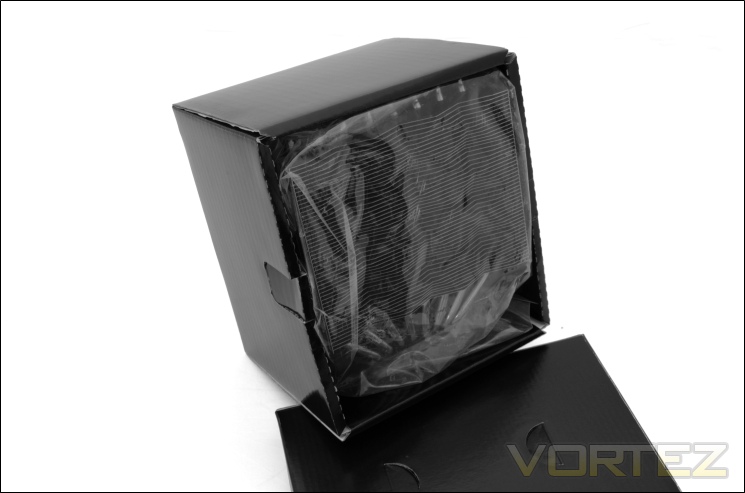
The heatsink packaging
The heatsink comes very nicely wrapped and packaged inside its own compartment to prevent damage. The overall packaging is leagues ahead of their previous designs and more representative of a high end product.
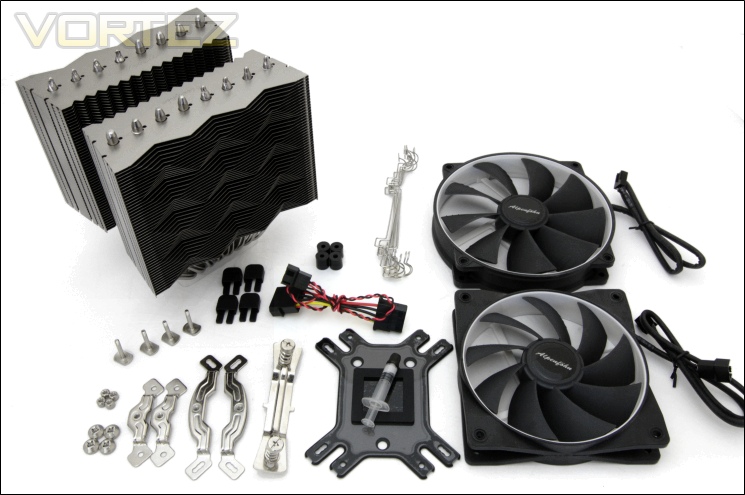
The bundle
Alpenföhn have to be commended once again here for developing a brand new mounting mechanism that is leaps ahead of their previous efforts. The extensive bundle includes:
-1x K2 heatsink
-1x 120mm Wing Boost fan
-1x 140mm Wing Boost fan
-1x Universal backplate
-8x Fan wire clips
-1x 7V low noise adapters
-2x Intel mounting brackets
-2x AMD mounting brackets
-4x Nuts (LGA1155/1156, LGA1366, AMD)
-4x Nuts (LGA775)
-4x Insulation pillars
-4x Double screw bolts
-4x Anti-vibration buckles
-1x LGA775 insulating washer
-1x Thermal Paste syringe
The mounting kit shares some similarities to Noctua’s SecuFirm2 and Phanteks’s SoliSku mounting kit but Alpenföhn have brought some originality to their components. Another great addition is the sheer number of fan clips bundled meaning more up to three fans can be mounted without issues leaving 2 spare ones. Despite the fans’ PWM functionality, a voltage adapter is still provided.
Closer Look
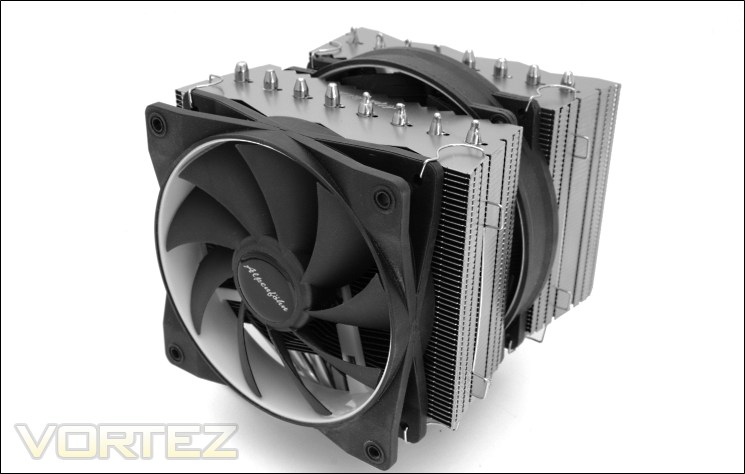
The Alpenföhn – ‘Mount Doom’
The Alpenföhn K2 is very distinctive in appearance and easily the best looking cooler to grace the cooling market today. Whereas Noctua insist on using their customary brown on their fans, and Thermalright seemingly doing the same with their TY-140s (only this time in an odd shade of blue and green), Alpenföhn have listened hard to the pleas echoed by potential buyers and settled for a safe but fantastically effective black and white theme. The heatsink itself is a nice matte silver that lacks the dullness of the NH-D14 and the reflectiveness of the Silver Arrow, striking a perfect balance instead. The quirky fan frame also adds to the appeal of the cooler. What is immediately apparent is the cooler’s sheer size thanks to its dual tower design, and its eight 6mm heat pipes.
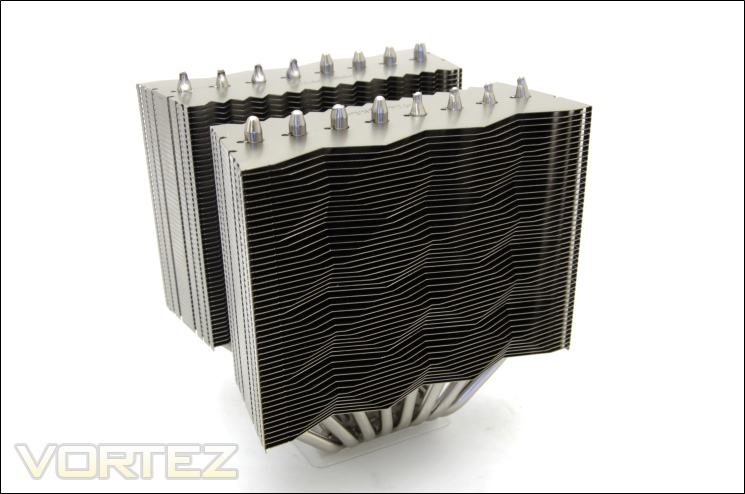
The dual tower heatsink – ‘The Two Towers’
Looking at the heatsink solely, we see a very unique fin array design that brings the K2 some character. Each block features trapezoidal shaped fins both getting narrower towards the centre. Although the purpose of this is to ensure compatibility with adjacent PCIe expansion devices, the fact that the widest cross-section would already get in the way means that the shape doesn’t really serve a function other than aesthetics. And aesthetics is not something the K2 lacks. The front face also has a distinguishing design differentiating it from the more regularly stacked alternatives. The overall construction feels very robust.
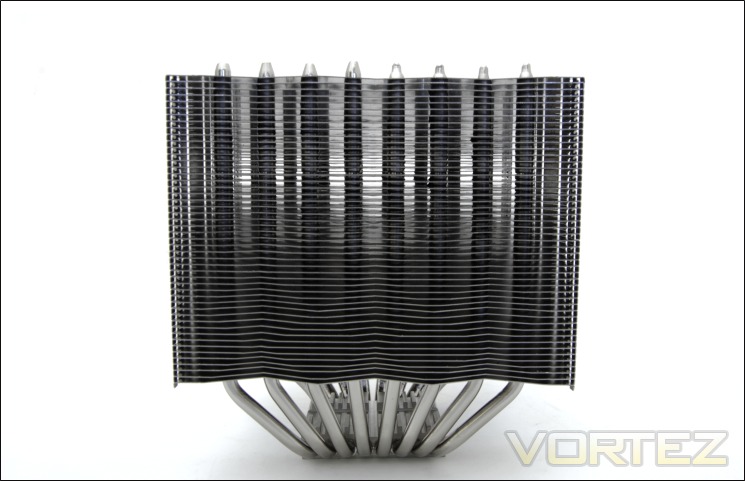
The front face of the heatsink
Turning our attention to the front face of the heatsink reveals the laminar stacking of the fins across both radiators, all 49 of them. This is 5 more than the Phanteks PH-TC14PE, and 7 more than the Noctua NH-D14 but 6 less than the Thermalright Silver Arrow. The result is each fin boasting a surface area of 6850mm squared, very similar the Phanteks. Considering the K2 features more fins, it ends up with a greater surface area for heat dissipation. The fins are also more tightly spaced than other coolers with a gap of merely 2mm rather than 2.5mm, suggesting that high static pressure fans will prove beneficial. Through the fins, we can also see the columns of heat pipes rising up. Each fin is interlocked to maintain structural rigidity and to close off the sides.
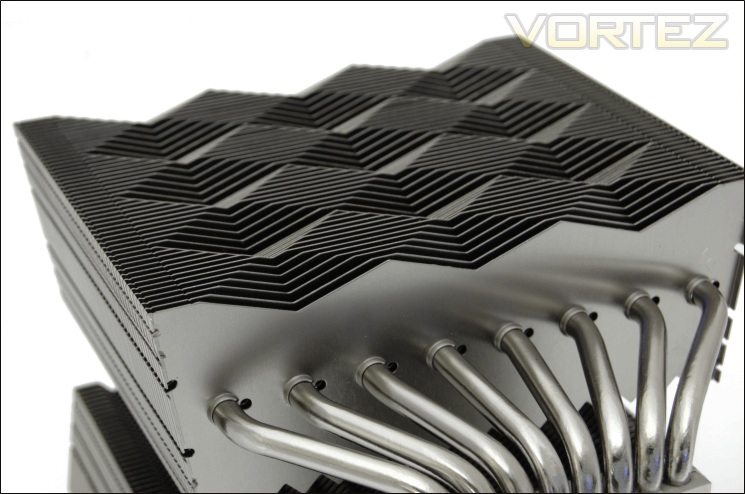
The fin stack design
Taking a closer look at what the fins are shapes like, we observe that the front face is actually flat with pyramid shaped depressions across the profile. These create a checker board pattern and the purpose, other than aesthetics is to create varying gaps between the fins and the fan. Its creativity sets Alpenföhn apart from other manufacturers and the best thing of all is that unlike the Noctua and Phanteks coolers, there are no sharp ridges digging into your fingers when installing. From a purely geometric standpoint, I absolutely love the K2.
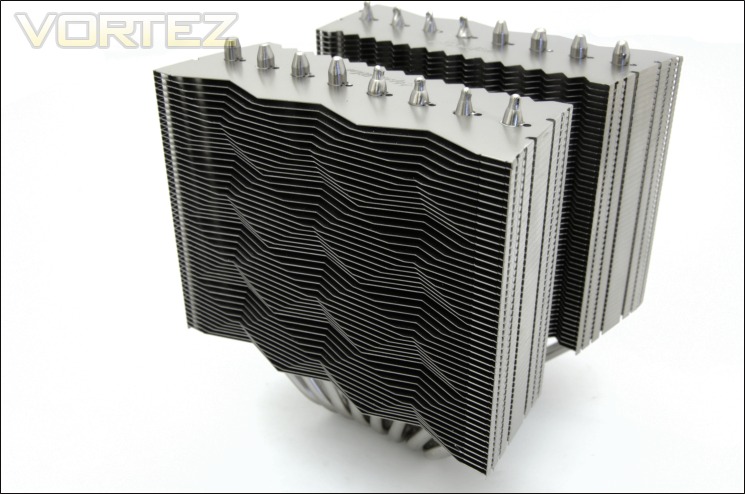
The fin stack design again
At an angle, the pattern is accentuated further to give the K2 a unique and memorable profile.
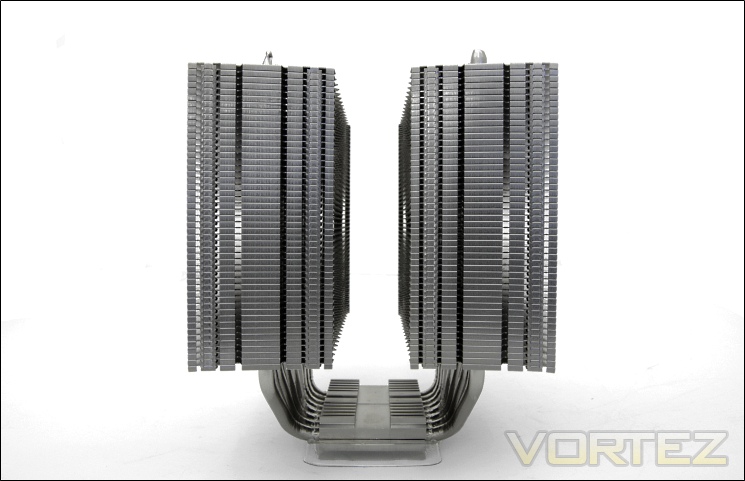
The side profile
From the side, the most stand-out feature is the closed fin design, which Alpenföhn highlight is to direct airflow. We saw similar design cues with the Triglav, Matterhorn and Nordwand. The problem with choosing this design for such a cooler is that the middle fan can only draw air from the centre rather than from the side so cool air cannot be fed through the second radiator. The two radiator stacks are also symmetrical about the base, unlike the Noctua where one stack protrudes further than the other for memory compatibility. This shouldn’t be a drawback because the K2 is less deep by about 4mm anyway. The 28mm gap in the middle is reserved for the 140mm fan although this can be tight when manoeuvring it in.
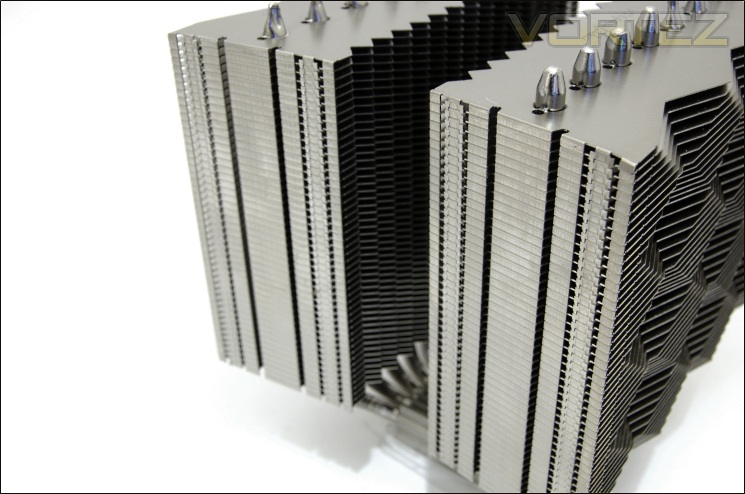
The closed fins
We can see here that each fin is interlocked at the sides and closed off in the process to focus airflow through the heatsink. The finish on the K2 is second to none.
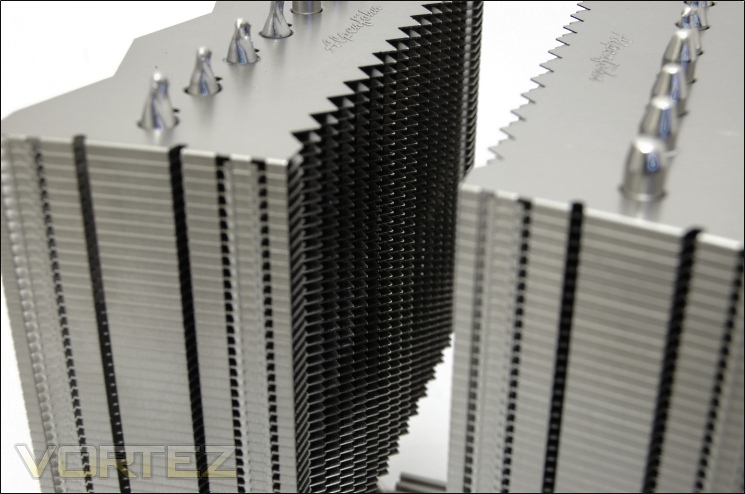
The serrated fin edga
On the inside of the radiators, the fin edges are jagged just like the NH-D14 to increase turbulence in airflow and thus to maximise heat transfer.
Closer Look (Continued)
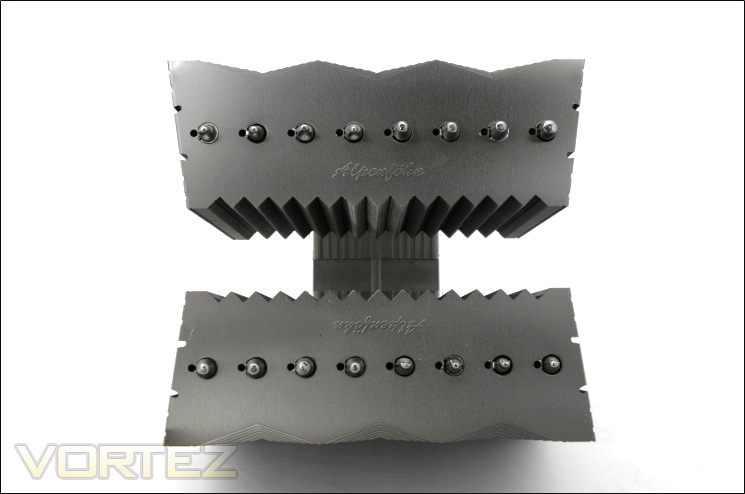
The top of the heatsink
The shape of the fin stacks is more apparent when we take a look from the top. Both radiators are identical in shape and share the same trapezoid shape. On the inside, the edges of the fins are serrated whereas on the outside, the flat profile is interrupted by the varying triangular cut outs. The finish, I have to emphasise again is perfect, not too shiny but not dull either. Alpenföhn have engraved the top fins with their brand as an added touch.
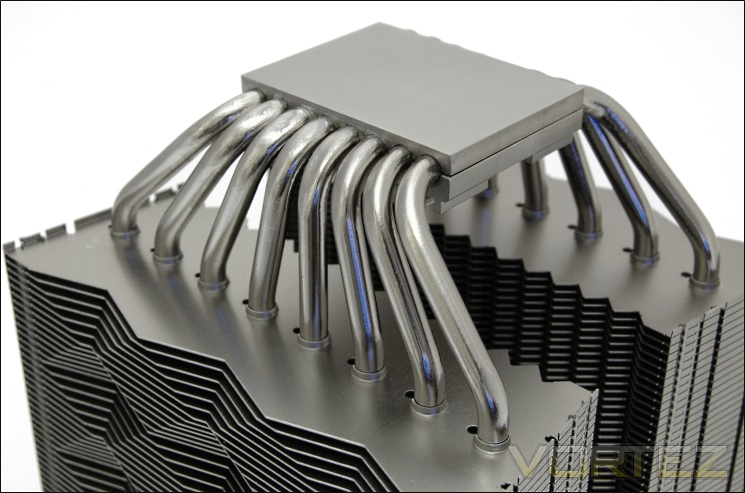
The 8x6mm heat pipe
With most high-end coolers either opting for 6x6mm heat pipes or 4x8mm heat pipes, Alpenföhn had to find a way to maximise performance by altering this geometry. The easiest way was to simply implement two more heat pipes for a total of 8, each with 6mm diameter. These are of copper construction, nickel-plated to follow the same colour scheme as the rest of the cooler. The question is whether this is optimal or just a waste given that a CPU would not be fully covered by them. The U-shaped heat pipes all converge to the copper base where they are in direct contact with the block.
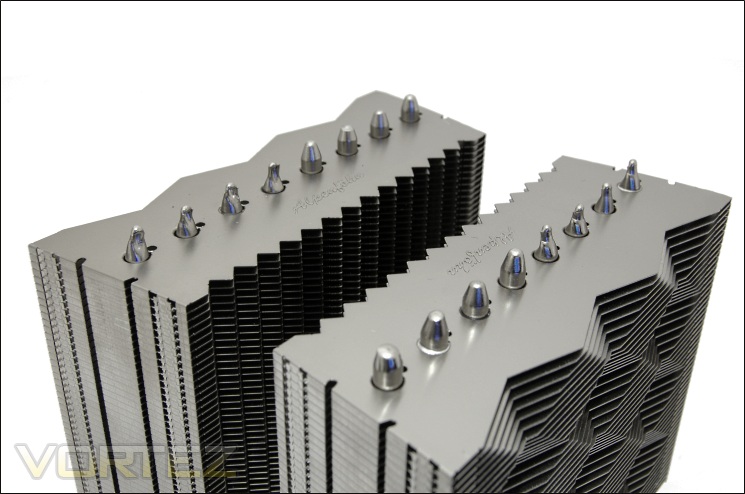
The heat pipe ends
At the top, the 16 heat pipes ends can be seen, 8 aligned along each radiator. They are optimally positioned so that all are exposed to the airflow for better heat transfer. This is not dissimilar to other dual tower coolers. As usual, we see half of them sporting rounded ends and the other half with grooved ends.
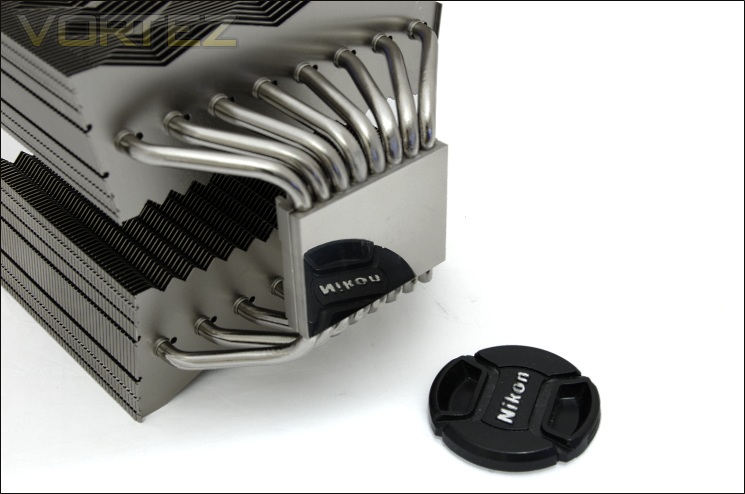
The base of the heatsink
The base has a perfect mirror finish thanks to the CNC machining. All 8 heat pipes are somehow packed into the base and to accommodate them, the base had to be enlarged significantly.
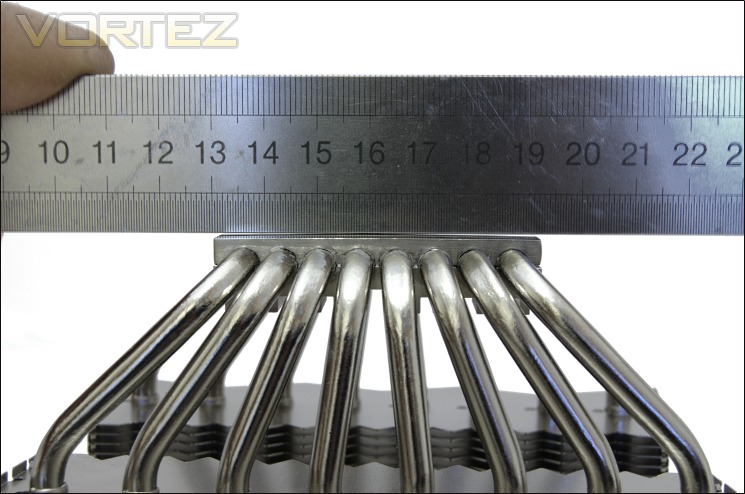
Measuring the flatness
The base is ever so slightly convex with a tiny gap at the outer edge of the base. However, nearer the centre where the CPU will be placed under, the base appears to be quite flat. Certainly, it did a great job spreading a blob of thermal paste through pressure alone, indicating a flat surface.
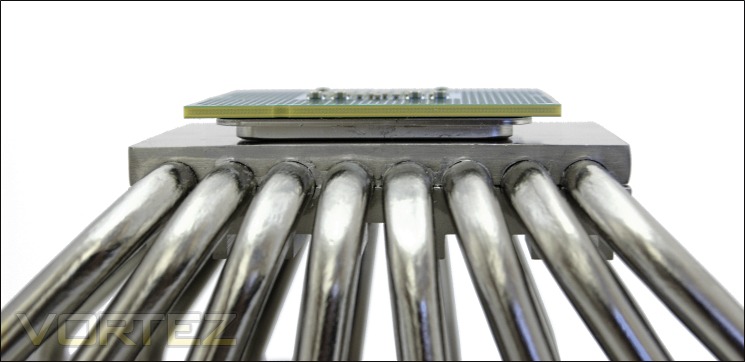
The base with an i7 990x on top
One of the worries I had with the Phanteks heatsink is that its base was too large for the CPU such that the heat pipes wouldn’t overlay the CPU directly. Fortunately for them, their design was perfectly adequate for the Core i7 990x, one of the biggest CPUs around. The K2 on the other hand reveals a different story. With a 59x45mm base area, it becomes immediately clear that it isn’t small. In fact, its length is a whole 17mm larger than the Phanteks base. More importantly, the heat pipes on either end don’t overlay the CPU directly so heat transfer cannot be as efficient. It can be argued that the copper base will help distribute heat to all the heat pipes anyway but the problem may well be that only the centre 4-6 heat pipes can efficiently transfer heat away. Of course, with even larger Sandy Bridge-E CPUs recently released, the K2’s design may prove more effective to them.
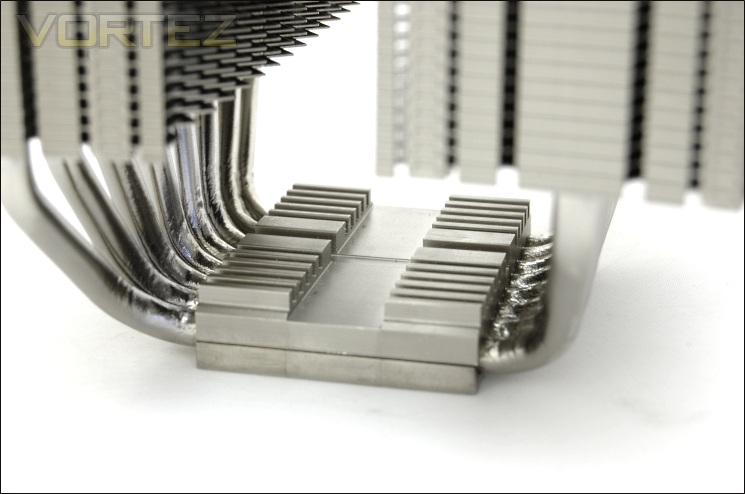
Another small heatsink
At the top of the base are aluminium ridges with a linear groove in the middle to install and secure the mounting bracket as we will show later on.
Closer Look (Continued)
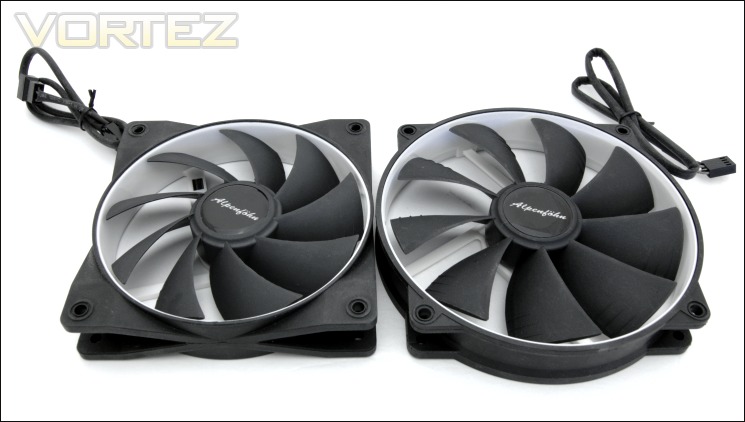
The two Wing Boost Fans
The Alpenföhn Wing Boost fans are no strangers to the Vortez test benches, having undergone extensive tests and coming out positively in both the 120mm and 140mm variants. The main difference here is the more pleasant choice of colour that aims to bring more widespread appeal. The other difference is that the 140mm fan sports a different frame despite by identical mechanically. Alpenföhn have settled for a circular fan design akin to Noctua’s NH-D14 for similar purposes; that is to ensure compatibility with its 120mm mountings and for a more attractive look. For those that haven’t encountered the Wing Boost fans before, they are famed for their rubberised feel to reduce vibrations and for their unique styling. The fans bundled with the K2, feature an entirely black frame and blades and a white inner rim.
While the 120mm variant operates between 500-1500RPM, the 140mm variant operates between 300-1100RPM, delivering the same performance as the former at lower acoustic levels. Both also support PWM functionality.
The fan cables
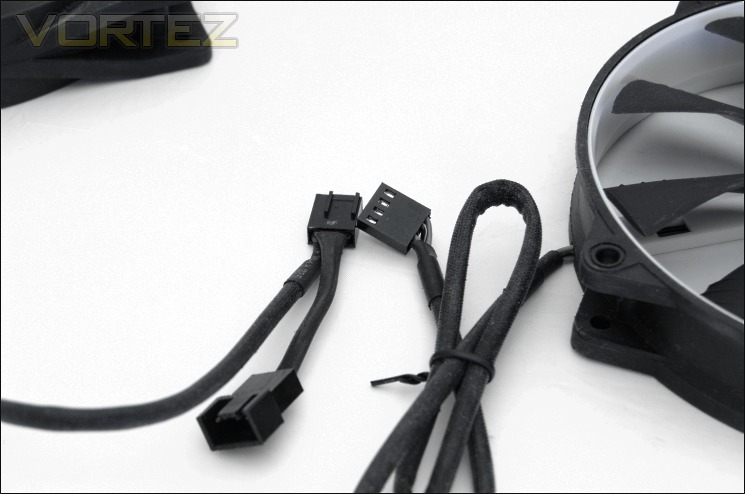
The fans also feature densely woven braided cables with 4 pin connectors for PWM functionality. The cables also feel rubberised. The 120mm fan cable has a 4 pin extension header to which the 140mm fan or any other fan can be connected to. Underneath the braiding, the cables are black and grey so no eye-scratching red, yellow and black in sight.
The fan wire clips
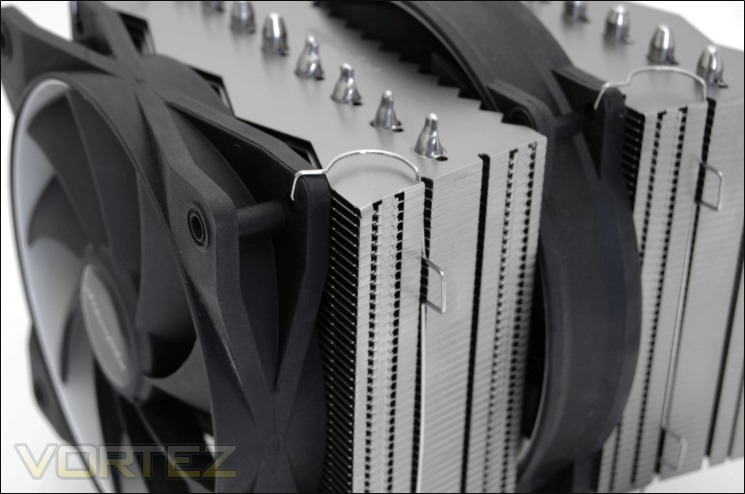
The fan clips bundled with the K2 is the same as the ones on the Matterhorn and just as tedious to install. The problem is that when installing the fans inside a case, it was hard to clip the ends into the fan mounting holes and clip the sides into the grooves alongside the heatsink at the same time, without the ends coming out of the fan frame whilst doing so. The only sure way of doing it perfectly is to install the cooler onto the motherboard along with the fans outside the case but then there’s the issue of installing the motherboard back in. A better method would have been to somehow secure the clips to either the heatsink or the fans first prior to actually installing the fans. The other three dual tower coolers have no such issues in comparison.
The K2 installed
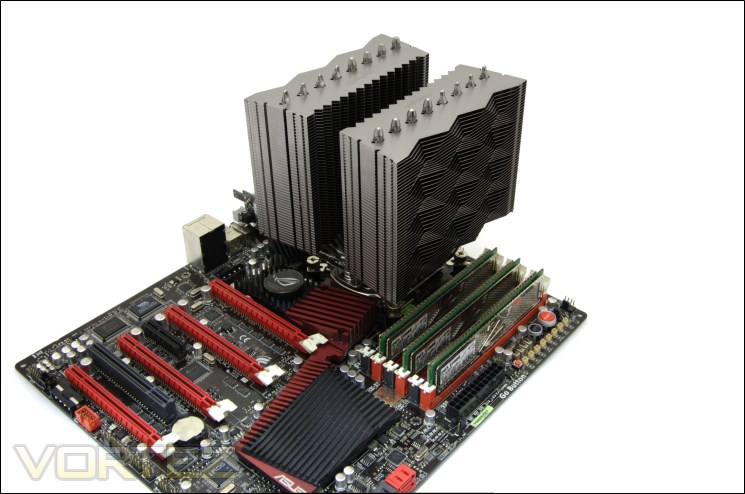
Finally installed, we can see how the K2 dominates the skyline above the motherboard. Despite the weight, the mounting mechanism is perfectly adapted to supporting it.
Adding the fans
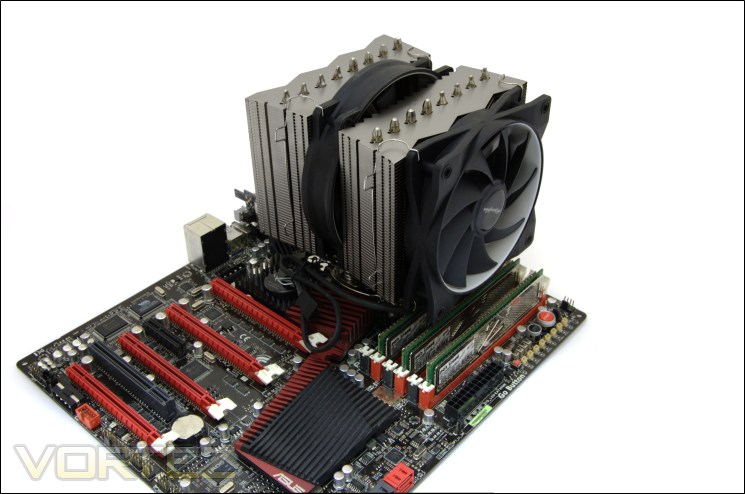
The K2 is very versatile when it comes to aesthetics because the silver and black finish suits motherboards of any themes, especially the new range of high end ASRock motherboards.
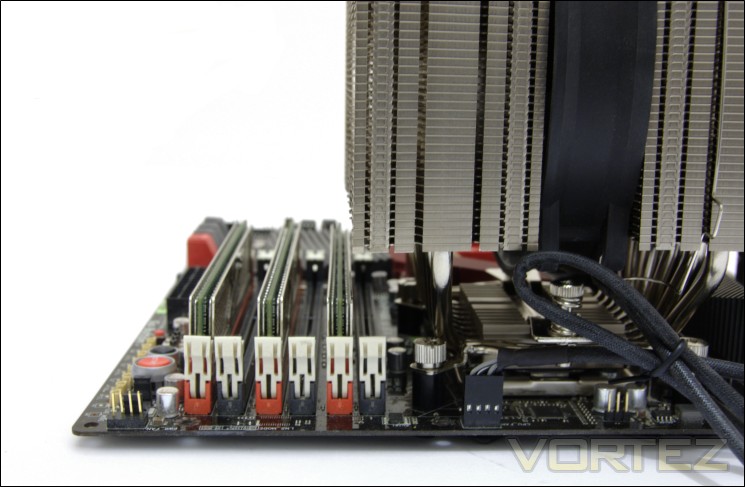
Heatsink memory compatibility
The K2 is inherently big due to its design. There was no doubt that memory compatibility was going to be an issue. In the above picture, we see that the heatsink itself overhangs the first adjacent slot so only low profile memory or modules with shorter heatsinks such as the G.Skill Rip Jaws will fit underneath. That’s a very small sacrifice to make given the quality of the K2 and my advice would be to always opt for smaller sized modules anyway. People only using three slots (LGA1366) or two slots shouldn’t have issues using the modules they want.
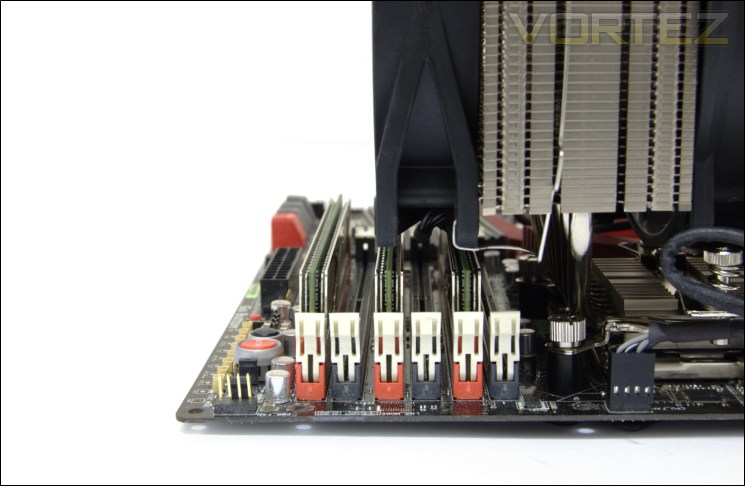
Cooler memory compatibility
However, when we install the front fan, the first four slots are overhung by the fan and heatsink so only the lower profile memory modules can be used. The fan can be adjusted up by around 10mm from its position displayed above putting the overall height of the cooler at around 165mm. As always, my advice would be to buy low profile memory modules but the problem can always be alleviated by moving the front fan to the back. For an official list of supported memory modules, have a look at Alpenföhn’s own database.
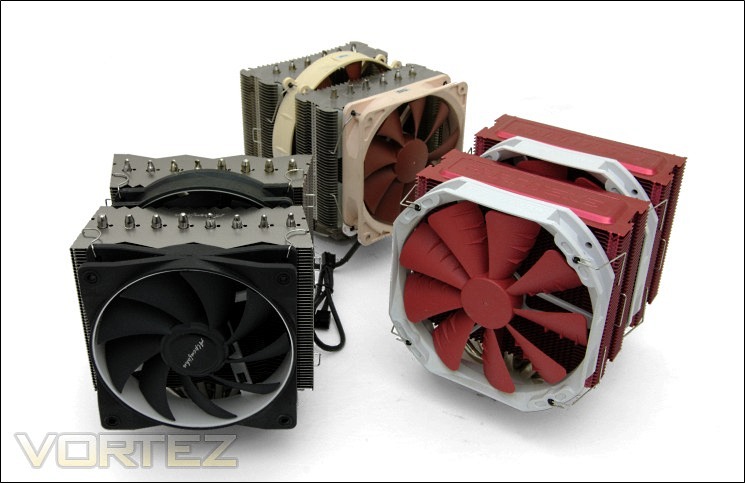
Clash of the Titans
Of the three coolers, and the Silver Arrow which unfortunately I didn’t have here, the K2 is easily the best looking one with a unique profile to differentiate itself from the others. Size wise, it is comparable to the others sharing the same 160mm height as the Noctua NH-D14, wider by 4mm than both the Phanteks and the Noctua, and less deep at 154mm.
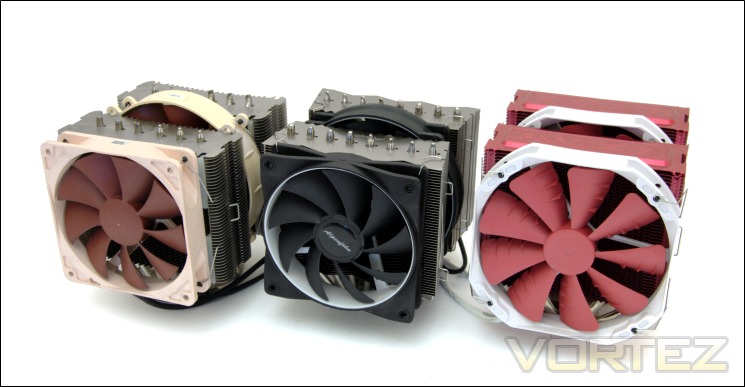
Size comparison
And finally the three titans lined up ready for battle (still missing a Silver Arrow).
Test Setup
CPU – Intel Core i7 920 – 2.66/4.0GHz
RAM – 6GB (3x2GB) OCZ Platinum DDR3 1333MHz
Motherboard – ASUS Rampage III Extreme
Graphics card – Inno3D GTX570 1.25GB
Power Supply – Enermax Revolution 85+ 850W
Hard Drive – OCZ Vertex 2E 120GB
Samsung F1 320GB
Samsung F3 1TB
Case – Lian Li B25B
Drivers – Nvidia ForceWare 285.38
CPU Coolers:
Alpenföhn K2 including tests using 2 stock fans, 2 Föhn 140, 2/3 Noctua NF-P12s/NF-P14s and 2 SWiF2-120Ps
Cooler Master Hyper 612S including tests using 1 stock fan, 2 Noctua NF-P12s/NF-P14s and 2 SWiF2-120Ps
Corsair H100 including tests using 2/4 stock fans, 2 Noctua NF-P12s and 2 SWiF2-120Ps
Phanteks PH-TC14PE including tests using 3 Phanteks PH-F140TS, 2 Noctua NF-P12s/NF-P14s and 2 SWiF2-120Ps
Alpenföhn Triglav including tests using 1 stock fan, 2 Noctua NF-P12s/NF-P14s and 2 SWiF2-120Ps
Antec KÜHLER H2O 620 including tests using 1 stock fan, 2 Noctua NF-P12s and 2 SWiF2-120Ps
Antec KÜHLER H2O 920 including tests using 2 stock fans, 2 Noctua NF-P12s and 2 SWiF2-120Ps
Prolimatech Genesis including tests using 2 Noctua NF-P12s/NF-P14s, 2 SWiF2-120Ps and 2 Prolimatech Blue Vortex 14s
NZXT Havik 140 including tests using 2 NZXT fans, 2 Noctua NF-P12s/NF-P14s and 2 SWiF2-120Ps
Alpenföhn Matterhorn including tests using 2 Noctua NF-P12s/NF-P14s, 2 SWiF2-120Ps and 2 Föhn 120 Wing Boost fans
Prolimatech Super Mega including tests using 2 Noctua NF-P12s/NF-P14s, 2 SWiF2-120Ps and 2 Prolimatech Blue Vortex 14s
Noctua NH-C14 (U.L.N.A and default speed) including tests using 2 SWiF2-120Ps
Thermalright Silver Arrow including passive and tests using 2 Noctua NF-P12s and 2 SWiF2-120Ps
Thermalright HR-02 including passive and tests using Noctua NF-12/NF-P14s and Thermalright TR TY-140
Thermaltake Frio (Low/med/high speed) including tests using 2 Noctua NF-P12s
Corsair H50 including tests using 2 Noctua NF-P12s and 2 SWiF2-120Ps
CoolIT ECO A.L.C including tests using 2 Noctua NF-P12s and 2 SWiF2-120Ps
Thermalright Venomous X using 2 Noctua NF-P12s and 2 SWiF2-120Ps
Coolink Corator DS including tests with dual fan setups
Tuniq Propeller 120(High speed fan)
Noctua NH-C12P SE14
Prolimatech Megahalem
Noctua NH-D14 (U.L.N.A and default speed)
Noctua NH-U12P SE1366
Thermolab Baram (with 2 Noctua NF-P12 fans)
CoolIT Domino A.L.C
Sunbeam Core Contact Freezer
Coolermaster Hyper 212 Plus including test with 2 Noctua NF-P12 fans
Alpenföhn Nordwand including test with 2 Noctua NF-P12 fans
Tuniq Tower 120 Extreme (Low/med/high speed)
Program Suite:
Core Temp 0.99.5
LinX stress Test
CPUID HWMonitor
How I tested:
Testing will be based on temperatures recorded by Core Temp and HWMonitor after 20 passes of LinX stress test. The maximum absolute temperatures will be recorded after the test and averaged over the 4 cores. The delta is then calculated by substituting the ambient temperature recorded near the intake fans. All tests are conducted with the i7 920 at its default 2.66GHz stock speed and overclocked to 4GHz. As always, the tests are done inside my own Lian Li B25B case to simulate real world conditions. To keep the tests standardised and based on people’s tendency to use their own thermal paste, we apply Thermalright’s ChillFactor II thermal paste to all coolers unless specified in the result entries (where the bundled thermal paste performs better).
Installation
Mounting kits has never been Alpenföhn’s forte, not so much a problem with the Triglav or Nordwand, but terrible on the higher-end Matterhorn. It was therefore a great sigh of relief to see that Alpenföhn have listened to our pleas and created a far better option, one that can be considered on par with Noctua’s famous SecuFirm 2 kit. As such, installation is an absolute breeze. The following steps detail installation on LGA1366 based motherboards.
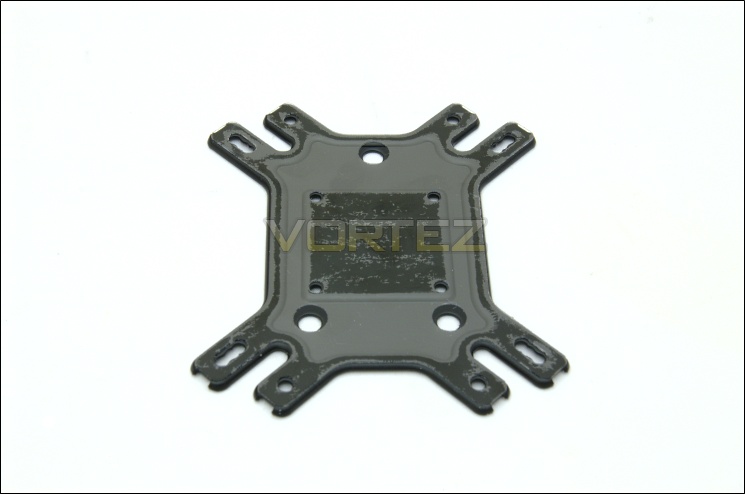
1. The first step is to identify the right mounting holes on the universal motherboard back plate. LGA775 users need to place the square insulating washer on top.
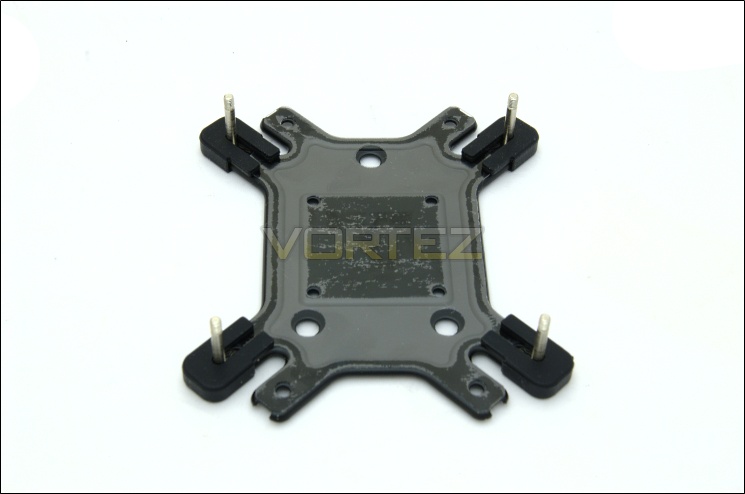
2. Insert the double screw bolts and secure them with the anti-vibration buckles.
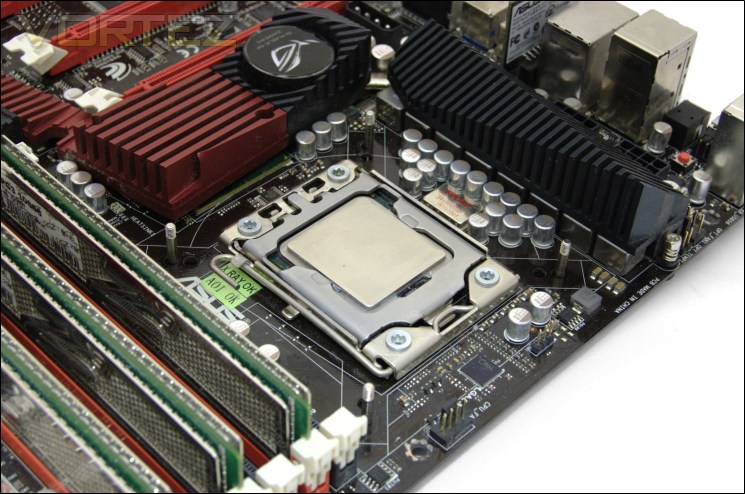
3. Install the back plate to the motherboard ensuring all the screws align with the mounting holes.
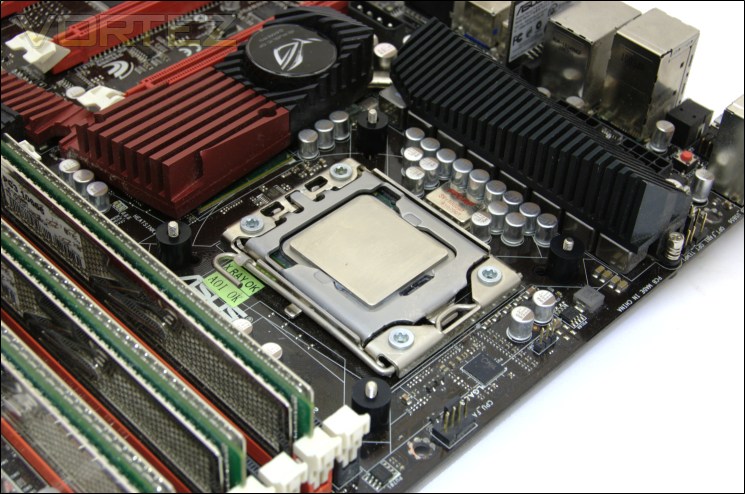
4. Place one insulation pillar on each corner.
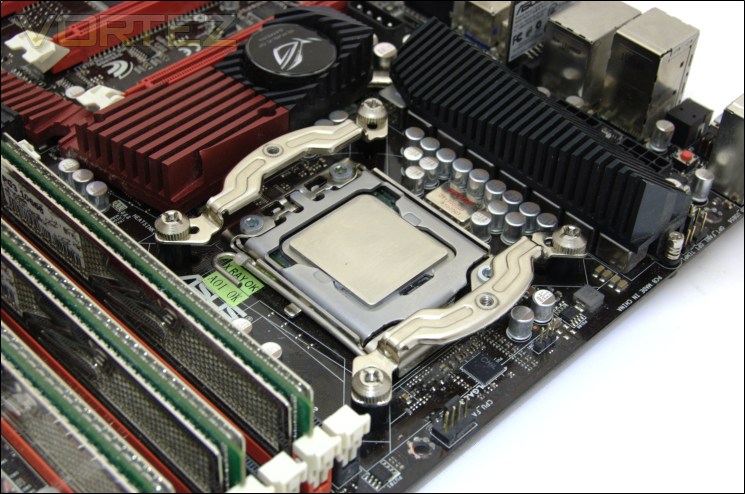
5. Install the appropriate AMD or Intel motherboard bracket so that the semi-circular rim faces outwards and. Secure them with the 4 nuts provided.
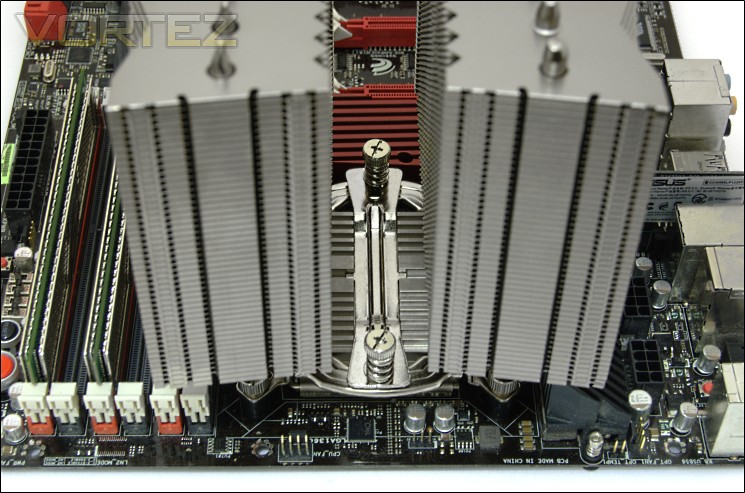
6. Place the heatsink on top after applying a drop of thermal and secure it with the retention place. Screw each end bit by bit in an alternating fashion.
Frankly, I have no qualms with their new mounting kit and it demonstrates Alpenföhn’s careful attention to ours and their customers’ requests. The use of a proper back plate and retention plate is welcome as it provides much better support for the heavy cooler and thanks to the retention plate’s specially designed shape; the cooler is firmly secured once installed. The addition of the rubber buckles to the back plate is also very clever, not only in securing the screw in place but also as an anti-vibration insulating washer. Despite the many positives observed on the installation, the fan installation is a completely different story.
Results (Grouped)
**UPDATE**: For updated K2 results, have a look at our revised testing
The results have been arranged in terms of the fan configuration that yields the best results for each cooler. However, it is important to take into account that many coolers come with their own fans and changing those increases the costs significantly, so the “out of the box” cooler configurations have been highlighted in red each group.
Stock

The Alpenföhn K2 gets off to a very promising start, landing 5th by group measurement. Ignoring the two ALC coolers for now (they rely on deafeningly loud fans for such good performance), the K2 ends up just behind the Phanteks and Noctua NH-D14. Let’s first take a look at the various fan configurations tested. Starting off with the default configuration comprising of the two 120/140mm Wing Boost fans, the delta temperature is an impressive 30.75C. Reducing their respective speeds of 1500/1100RPM to 60% through PWM functionality, the temperatures increase by 3C, and still delivering excellent performance with inaudible levels of noise. Using only the middle 140mm fan, temperatures are only 1.5C worse than the default dual fan configuration.
Switching the fans to Noctua’s NF-P12s yields a delta temperature of 31.5C, 0.75C more than the default configuration. The larger NF-P14s, although still lagging behind the stock fans, perform marginally better than their siblings. Opting for the higher RPM SWiF2-120P generates performance to match the two stock fans, the downside being that the setup ends up much louder. The best configuration, not surprisingly, is when three fans were installed thanks to Alpenföhn bundling some extra fan clips. The main observation here is that the two stock fans are perfectly adapted to the cooler and perform better than Noctua fans, an observation we also made on the Matterhorn. Another observation is that two Wing Boost 140s don’t perform as well as the 120/140mm configuration.
Results (Ascending order)
**UPDATE**: For updated K2 results, have a look at our revised testing
Stock

Now, let’s see how the K2 fares against the competition. In its default configuration, it makes a very impressive start, being a mere 0.25C behind the Noctua NH-D14and matching the Thermalright Silver Arrow with two Coolink fans as well as the Phanteks with two Noctua NF-P12s. Switching to the Coolink fans on the K2 yields the same performance and matches other high end coolers also using the same configuration. Impressively, the K2 performs better than a Corsair H100 with 4 stock fans at comparable speeds. It its best configuration, the K2 with its 3 NF-P14s matches the Phanteks, and the Noctua NH-D14 using only two of the same fans. Unfortunately, it doesn’t quite break the 30C delta barrier.
With two NF-P12s, the K2 performs admirably enough to match the Antec KUHLER 920’s extreme mode whereas with two NF-P12s, the K2 is still efficient enough to outperform the H100 with two fans at 2000RPM. Even with a single 140mm fan, it is comparable to the H100 with two NF-P12s and the Prolimatech Genesis with three 140mm NF-P14s! And with reduced fan speed, it finds itself amongst many high end alternatives that rely on much faster fans for the same performance. My distaste for ALC units becomes apparent when we realise that a passively cooled K2 can still match the Antec KUHLER 620.
Results (In-depth analysis)
**UPDATE**: For updated K2 results, have a look at our revised testing
Stock
In the next comparison, we look at the default cooler performance as they come out of the box with their bundled fans. Coolers that come with no fans have been coupled with Noctua’s NF-P12 or fans that the manufacturers intended their coolers to be used with.
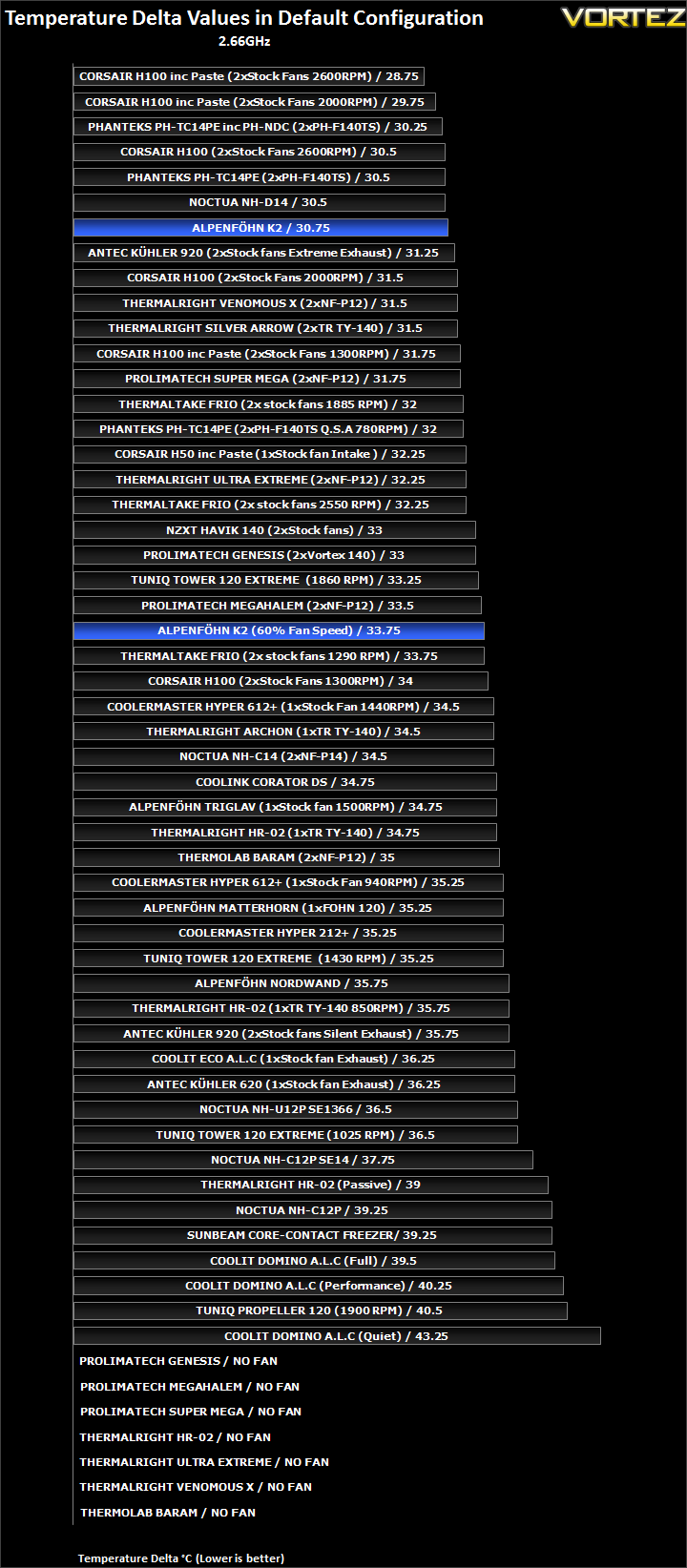
The K2 ends up the fourth best cooler, falling only slightly short of the NH-D14 and Phanteks cooler. The fact that it can outperform the Silver Arrow is testament enough that Alpenföhn have done a tremendous job here.
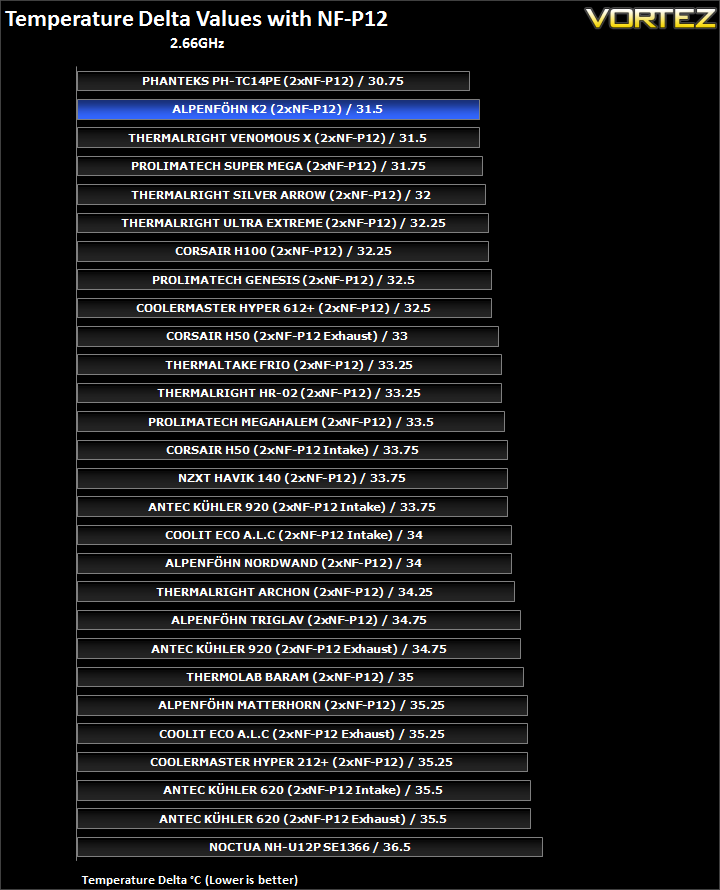
In terms of efficiency, it holds up very well, losing only to the Phanteks but only matching the much smaller Venomous X.
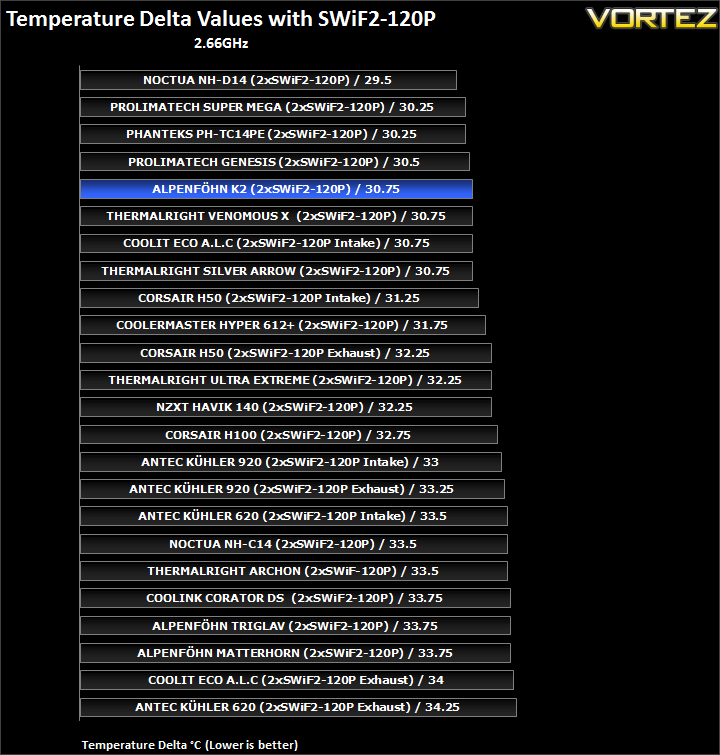
Teamed with the Coolink fans, the K2 doesn’t fare as well highlighting its superior efficiency with fans featuring high static pressure rather than sheer airflow. It nonetheless matches the Silver Arrow.
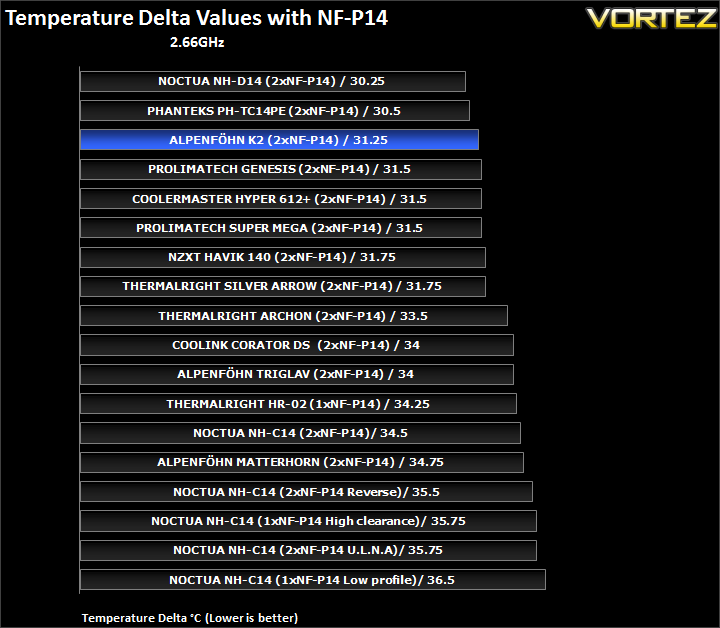
Once again, the K2 proves very efficient but still not highly enough to match the Noctua and Phanteks.
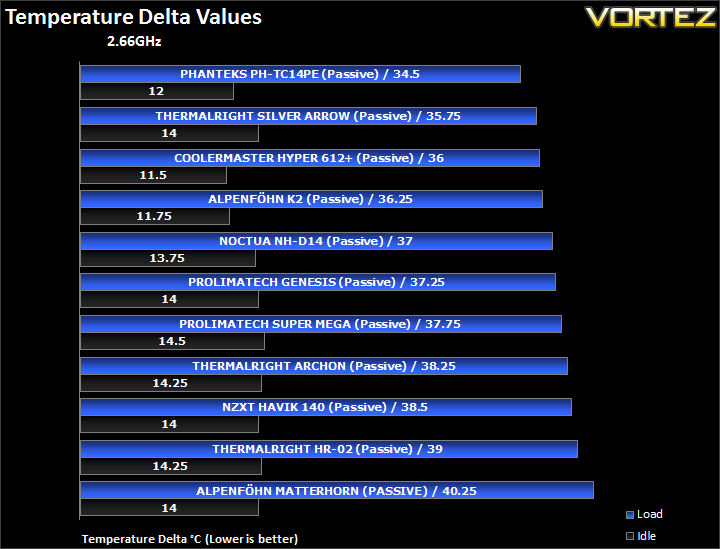
Passively, the K2 performed very well. It manages to lead the Noctua by 0.75C but is no match for the Phanteks.
Results Overclocked (Grouped)
**UPDATE**: For updated K2 results, have a look at our revised testing
The results have been arranged in terms of the fan configuration that yields the best results for each cooler. However, it is important to take into account that many coolers come with their own fans and changing those increases the costs significantly, so the “out of the box” cooler configurations have been highlighted in red each group.
4GHz

As usual, the results under an overclocked CPU are what concern us most. After all, the K2 was built with this purpose in mind. Unfortunately, this is also where the K2 falters and the Thermalright coolers take flex their muscles. In its default configuration, the K2 yields a delta temperature of 54.75C, and the same result when the 120mm fan is replaced with another 140mm Wing Boost instead. Strangely this time, the NF-P14 proves to be better by dropping temperatures by 0.75C and the Coolink fans follows that trend also, dropping temperatures 1C relative to the stock fans. Adding a third fan does well to drop temps by 1.5C compared to just two fans. This may well indicate that the heatsink is being starved of airflow or that the air isn’t being exhausted as easily because generally a third fan yields little to no difference. In saying that, switching to a single fan only increases the delta temperature by 1C. At 60% fan speed, temperatures increase more dramatically.
Results Overclocked (Ascending order)
**UPDATE**: For updated K2 results, have a look at our revised testing
4GHz

When comparing to other coolers, the K2’s brilliant performance under stock loses momentum and fails to match up to the Noctua NH-D14, Phanteks and Thermalright Silver Arrow. Instead, the K2 compares more favourably to the other heatsinks either using a single fan or two fans at reduced speed. Even the much smaller Venomous X manages to pull ahead using only two 120mm Noctua fans. Using two Coolink fans might help the K2 but it can only match the Genesis rather than the other dual tower coolers with their stock fans. To do so, the K2 requires three NF-P14s, even then only managing to match the Silver Arrow rather than beating it. On a positive note, the single Föhn 140 fan fares well on the K2 allowing to outperform several fan configurations based on the Super Mega or Corsair H100. The fact that it can still beat a Thermaltake Frio with fans at 2550RPM deserves some recognition. With reduced fan speeds, the K2 finds itself competing against single tower coolers such as the Thermalright HR-02 and the Matterhorn. Admittedly, we expected better especially when we consider what the other three dual tower coolers can achieve when teamed with low RPM fans.
Results Overclocked (In-depth analysis)
**UPDATE**: For updated K2 results, have a look at our revised testing
4GHz
In the next comparison, we look at the default cooler performance as they come out of the box with their bundled fans. Coolers that come with no fans have been coupled with Noctua’s NF-P12 or fans that the manufacturers intended their coolers to be used with.
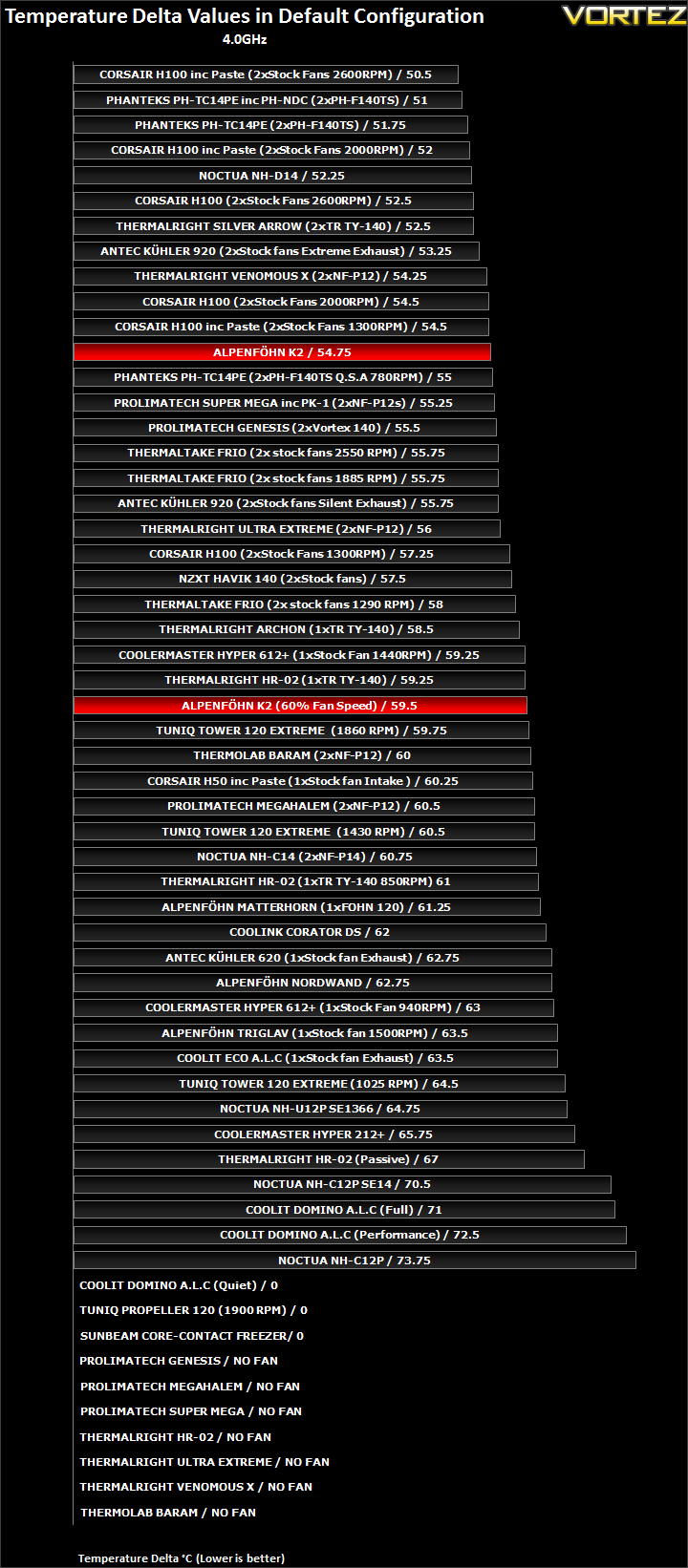
The stock K2 struggles to keep up with the other three dual tower coolers, with a 2C difference separating it from the Silver Arrow. 2C might not be much but it’s enough to lose several places on our competitive chart. It remains better than a lot of high end coolers such as the Prolimatech Genesis and Super Mega but the more compact Thermalright Venomous X puts the K2 to shame.
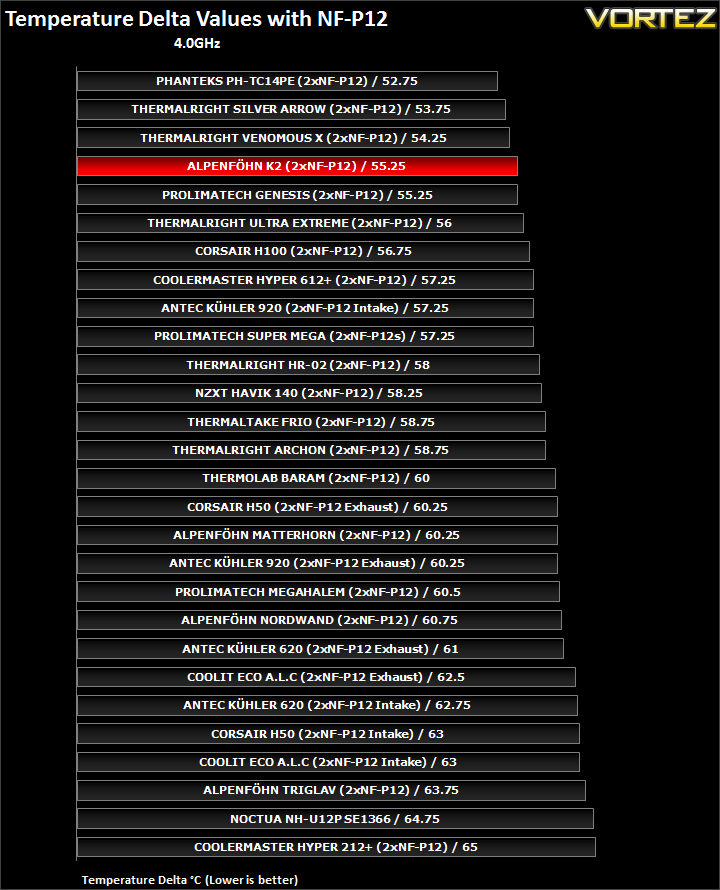
The K2 loses out on efficiency here being a whole 1C behind the Venomous X. Still, it proves much more efficient than high end ALC units.
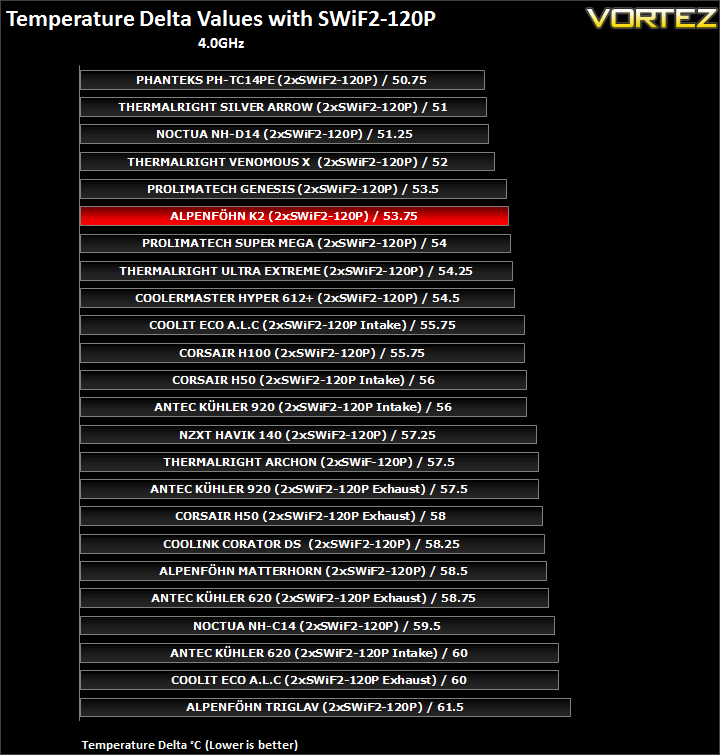
Again, the K2 is more competitive with the Prolimatech Genesis than the big dual tower coolers. 2.5C separates the K2 from the NH-D14 using the same Coolink fans and the similarly sized Phanteks performs 3C cooler.
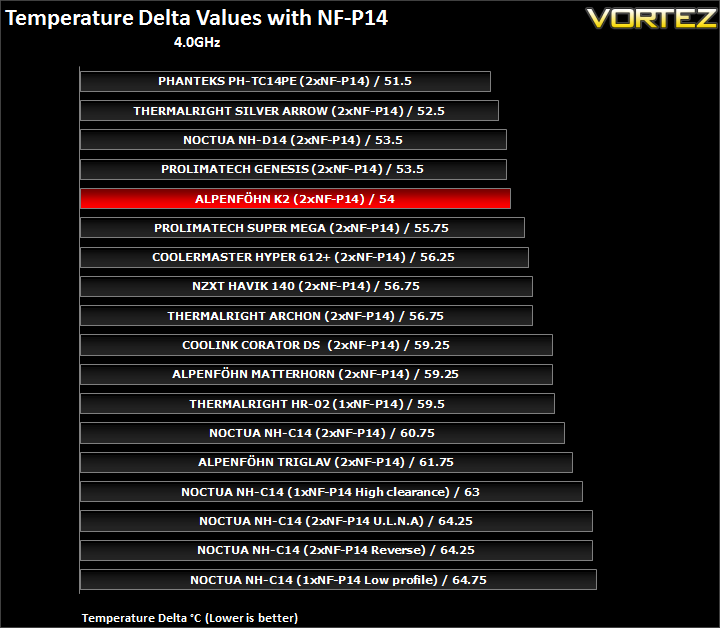
The results here reflect the same pattern as before although the K2 is only marginally behind the NH-D14 in this situation.
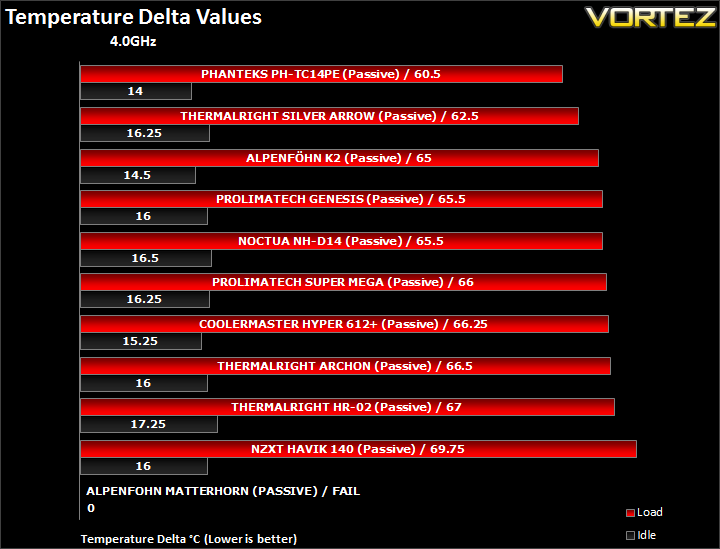
Passively, the K2 can still hold its own, edging ahead of the Genesis and NH-D14 but failing to match the Silver Arrow and Phanteks.
Other Observations
Thermal Paste
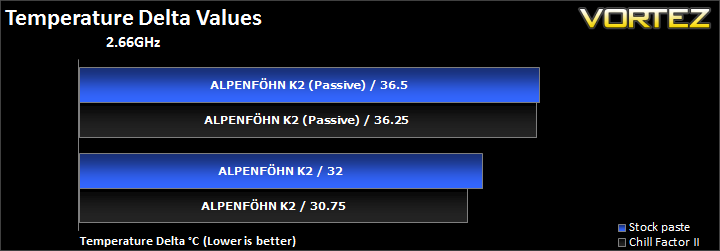
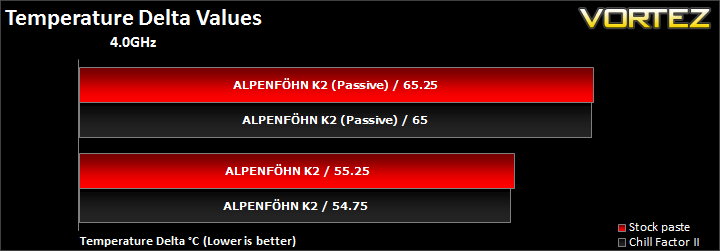
The bundled thermal paste performs quite remarkably for a non-branded compound. Against our standard-use Thermalright ChillFactor II, the biggest difference is 1.25C when the CPU is at stock speed. Otherwise, the difference is between 0.25C-0.5C.
Noise
As far as acoustics goes, the K2 is a relatively quiet unit thanks mostly to the high quality fans bundled. At 1500RPM, the 120mm Wing Boost fan is by no means inaudible but it is quiet enough to go completely unnoticed especially when case fans and graphics cards tend to be louder. The 140mm fan on the other hand is near inaudible at its rated speed. The main advantage of the two fans is their PWM functionality allowing them to be dynamically controlled based on temperatures. Unlike ALC units with fan control, the benefit of the K2 is that you don’t sacrifice performance as much when dialling down the fan, so users can still have respectable temperatures with near silent operation.
For a more comprehensive analysis of the noise levels, have a look at our dedicated reviews for the 120mm Wing Boost fan and its 140mm counterpart.
Conclusion
The Alpenföhn K2’s first prototype unveiling at Cebit in March of this year raised many an eyebrow amongst cooling aficionados and certainly caught my attention. In many ways, it was a breath of fresh air and it was exciting to see Alpenföhn trying to push the boundary. My expectations were immediately raised, knowing that their K2 dual tower cooler would be supported by Alpenföhn’s engineering and innovative concepts. Despite having what looked like a near finished product, the K2 was delayed until last month when it was finally unveiled officially. Having waited over half a year for the cooler to finally arrive at my door, my initials impressions lived up to my expectations. The K2 is a beautifully crafted masterpiece of a cooler, boasting two large radiators and two excellent fans. The matte Silver finish and the black and white theme that the fans bring demonstrate Alpenföhn’s keen desire to appeal to the mass market, where Noctua and Thermalright have failed with more risqué choice of colours. And at that, Alpenföhn have succeeded. I would easily say that the K2 is the best cooler on the market today and for that I commend Alpenföhn. Furthermore, Alpenföhn seem to have taken on board various criticisms I have made in the past concerning their mounting bracket, and replaced it with a universal and far more robust alternative. Again, I applaud Alpenföhn’s effort because it is refreshing to see manufacturers listening closely to users as well as reviewers when improving on their product line-up.
What about performance? This is where the K2 falters slightly. Let’s start by saying that the K2 is by no means a bad cooler and there was nothing to suggest that either from its design. In fact, in absolute terms, it is terrific! However, we have to consider how it fares against its toughest competition as the K2 was built to rival and even beat the likes of the Phanteks PH-TC14PE, the Noctua NH-D14 and the Thermalright Silver Arrow. We started with the CPU at its stock clock speed and the K2 proved very effective. It edged ahead of the Thermalright Silver Arrow and was only marginally slower than the Phanteks and Noctua NH-D14. Shifting our attention to its performance with the overclocked i7 920, the Alpenföhn K2 loses ground to the Thermalright Silver Arrow. More astonishingly, it failed to match the efficiency of the much smaller single tower Venomous X when both were teamed with the same fans. As such, it was inherently poorer than the other three dual tower radiators with a 2.25C margin separating it from the Silver Arrow and further 1.75C from the Phanteks. In that regard, I was disappointed that the K2 did not perform better.
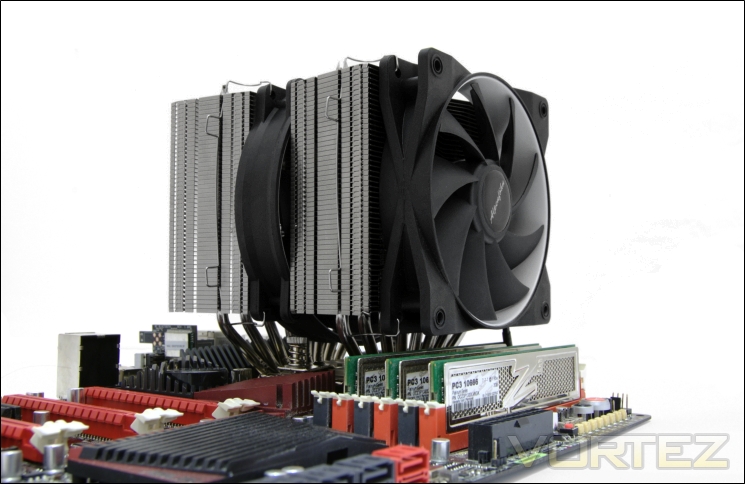
There may be several design features that could be attributed to hindering performance of the K2. The first is that the closed off radiator sides prevent cooler air from being drawn into the cooler, especially by the middle 140mm fan which can only rely on the hot air from the front radiator to cool the second one. The other oversight is the trapezoid shape. Whilst being a great contribution to aesthetics, the shape reduces the overall surface area of the cooler. Alpenföhn claim this specially chosen design is to accommodate adjacent expansion cards and yet the widest cross-section would lead to the same issue anyway. The next possible flaw is the large base and 8 heat piped design. Although good on paper, we found that the two end heat pipes were not overlying the CPU meaning heat wouldn’t be distributed as effectively, and seeing as how we were using one of the largest CPUs around, seems a bit of a waste. Of course, the recently released Sandy Bridge-E CPUs’ larger profile may benefit more from the K2.
My only other complaint is the wire clips. They are fidgety to use, popping out of the fans when trying to place them onto the heatsink or vice versa if you clip the wires into the heatsink first and try to manoeuvre the ends into the fan. A better method would be to be able to safely secure the clips on one component first so you don’t have to handle several things at once when installing.
My conclusion may seem overly harsh but realistically the issues are very minor and I am confident that Alpenföhn will deal with them appropriately. The K2 is still a great cooler by most standards and the fans perform very well at low noise levels. The overall package is fantastic and I would highly recommend it to anyone searching for a combination of aesthetics and performance. Another positive is the sheer range of sockets the K2 will fit; including LGA2011 (you can request one for free). Price-wise, the K2 is on par with the Noctua NH-D14. What you lose in cooling potential, you gain in aesthetics.
**Update**
It came to our attention from Alpenföhn that the sample we received for this review was a prototype rather than a production ready one. Since then, we have received a brand new retail sample and a revised article can be found here:
Alpenföhn K2 CPU Cooler Revisited – Introduction
Alpenföhn K2 CPU Cooler Revisited – Results (Old VS New)
Alpenföhn K2 CPU Cooler Revisited – Results (In-depth analysis)
Alpenföhn K2 CPU Cooler Revisited – Results Overclocked (In-depth analysis)
Alpenföhn K2 CPU Cooler Revisited – Conclusion
The above updated article show results representative of what users can expect but for the purpose of this review, we will keep the results and conclusion the same in this article.
Pros
+Very good performance
+Aesthetics and broad colour appeal
+Very well packaged
+Two quality PWM fans included
+Low noise
+Rich bundle
+Support for Intel and AMD sockets (including free upgrade to LGA2011 mounting kit)
+Ease of installation
+Innovative
+Efficient
+Excellent support
+Support for three fans
Cons
-Cost
-Small clearance for tall memory modules
-Fan wire clips are tedious to install
-Performance not as good as similarly sized and similarly priced competitors
+Very good performance
+Aesthetics and broad colour appeal
+Very well packaged
+Two quality PWM fans included
+Low noise
+Rich bundle
+Support for Intel and AMD sockets (including free upgrade to LGA2011 mounting kit)
+Ease of installation
+Innovative
+Efficient
+Excellent support
+Support for three fans
Cons
-Cost
-Small clearance for tall memory modules
-Fan wire clips are tedious to install
-Performance not as good as similarly sized and similarly priced competitors
Regrettably, the Alpenföhn K2 only earns out Vortez Silver Award. Had it cooled a couple of degrees better, it would have easily earned our Gold Award. Perhaps it would tell a different story with the new hexa-core i7s…


Click here for an explanation of our awards at Vortez.net.


