







The first mechanical keyboard from the makers of the Kone Pure and XTD comes complete with Cherry MX Black switches and at a pretty attractive price to boot.

Product On Review: Ryos MK Mechanical Gaming Keyboard
Manufacturer And Sponsor: ROCCAT
Street Price: ~£90 Inc. V.A.T.
If a major peripheral manufacturer could justifiably be known as peripheral specialists ROCCAT would be on that very short list. Well known for their range of keyboards, mice and headsets, they also have a burgeoning reputation for innovation in cross-device comms which unlock even more potential in as wide a set of gaming titles as possible.
Our most recent ROCCAT review was for the ISKU FX, a membrane keyboard which featured ROCCAT’s Talk FX technology and was heavy in customisation for key bindings and lighting. At that time we mentioned that we were looking forward to the then-upcoming Ryos MK keyboards, which were to be their first release with mechanical switches, and that time is finally here.
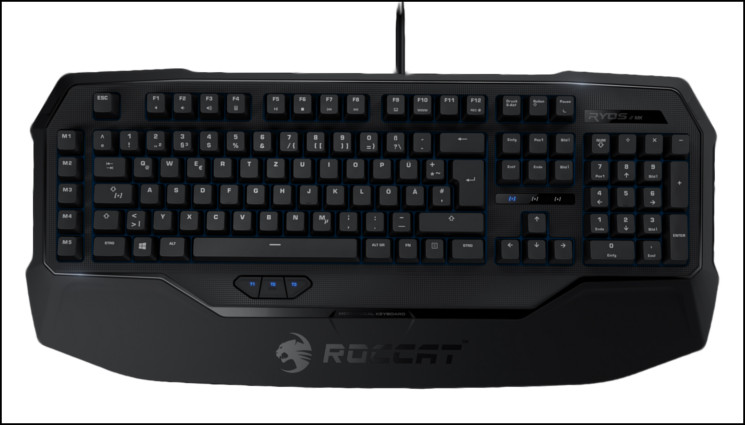
The Ryos MK range includes three different entrants at price points and with feature sets satisfying as many end-users as possible. Our review today focuses on the entry-level member – Ryos MK – which emphasises functionality over aesthetics to keep unwarranted costs down, but ROCCAT are keen to offer more to the discerning gamer higher up the market. The ROCCAT Ryos MK Glow will add LED illumination to the mix for a more rounded product at a commensurately higher price, whilst the Ryos MK Pro is the no-holds barred offering for the most demanding users. Each of these products also offer a choice of Cherry MX key switches, whilst for now the vanilla MK concentrates on performance with one type.
The most advanced, most customizable mechanical keyboard ever – NOBODY comes close! Introducing the ROCCAT™ Ryos MK – advanced mechanical gaming keyboard. With an eye-watering number of configuration options and high-quality CHERRY MX key switches, you can break out – and unleash the gaming beast within.
As you would expect from ROCCAT the Ryos MK is no bog-standard budget mechanical keyboard. In common with many higher priced brands they also offer macro keys – increasingly a must for ever more complex RPGs and MOBA-style titles – and ROCCAT’s own Thumbster keys for even more gaming potential at the users fingertips. Or in this case thumb-tips.
The retail pricing for the Ryos MK is very similar to the membrane-based ISKU FX, which itself features Talk FX-enabled lighting. The end-user therefore is placed under something of a dilemma – membrane switches and RGB lighting, or mechanical and none. Based on the idea that choice is a net positive, that has to be a good thing.
Of course being a ROCCAT device the Ryos MK includes compatibility with their Talk technology, allowing it to communicate with other ROCCAT peripherals and acting as a ‘set bonus’ (or force multiplier). RPG and MMO gamers especially benefit from this effective doubling of potential key bindings, and along with five profiles offer customisation difficult to parallel.
ROCCAT aren’t the only manufacturer in this space and the £85-95 price window contains many extremely creditable products, both mechanical and membrane. The Ryos MK will need to be great indeed to stand out amongst this crowd.
For international readers, the Ryos MK is available in a wide range of layouts which you can peruse here.
Features and Technical Specifications
Features
N-KEY ROLLOVER:- means advanced anti-ghosting
HIGH-POWERED HARDWARE:- 32-bit ARM Cortex processor + 2 MB of flash memory
ROCCAT™ ACHIEVEMENTS DISPLAY:- keep track of your vital statistics
TOP NOTCH KEY SWITCHES:- Mechanical CHERRY MX key switches
SMUDGE-PROOF GLOSSY LOOK:- killer look – with no fingerprints
COMPLETE COMFORT, ROCK SOLID:- jumbo-size integrated wrist rest
CLUTTER-FREE, SUPER-STABLE SUPPORT:- in-built cable channel and five rubber feet
ROCCAT™ TALK® – SET BONUS:- get more out of your ROCCAT™ devices by combining their functions
Technical Specifications
* Advanced anti-ghosting with N-key rollover
* CHERRY MX key switches
* 3 programmable thumbster keys (T1 – T3)
* 5 programmable macro keys (M1 – M5)
* 94 other programmable keys
* 1000 hz polling rate, 1 ms response time
* 1.8 m cable and integrated cable channel
* 510mm x 230mm x 60mm (W x L x H)
Packaging and First Look
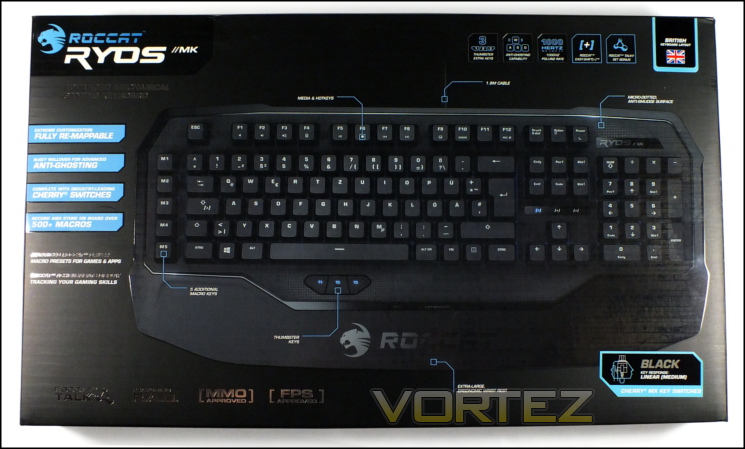
ROCCAT have always been accomplished at presenting any prospective end-user exactly what they need to make an informed purchase, sometimes to the detriment of the packaging aesthetics. For the Ryos MK they have toned down the information overload a little, but continued to present you will the key features including a full look at the keyboard itself.
Unsurprisingly some space is set aside for important gaming functionality such as N-Key Roll Over, fully re-mappable keys and on-board macro storage; the lion’s share of what’s visible is devoted to a full shot of the keyboard itself. Furthermore, key elements of the keyboard which may require a little more than vague description are helpfully pointed. You’ll note that the keyboard imaged has a German layout, but should also see that ROCCAT display the region variant prominently in the top-right.
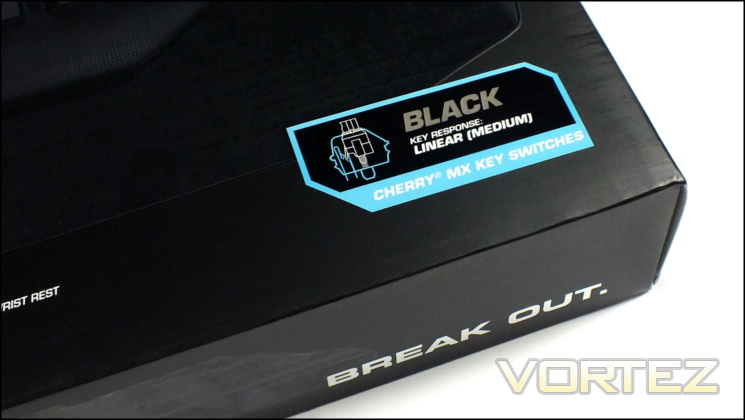
A label for the mechanical switch type, in this case Cherry MX Blacks, is pasted to the front and indicates that other Cherry MX variants for this model may be in the pipeline.
Space around the sides is used only for vanity shots of the board, likely because any information presented there would have to be in such small type as to be fairly tedious to use.
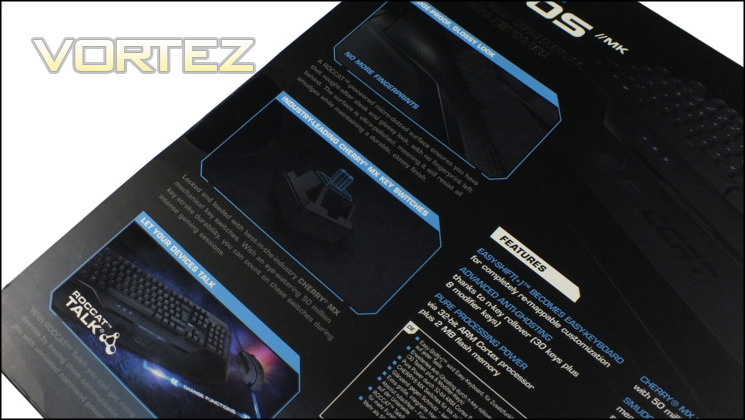
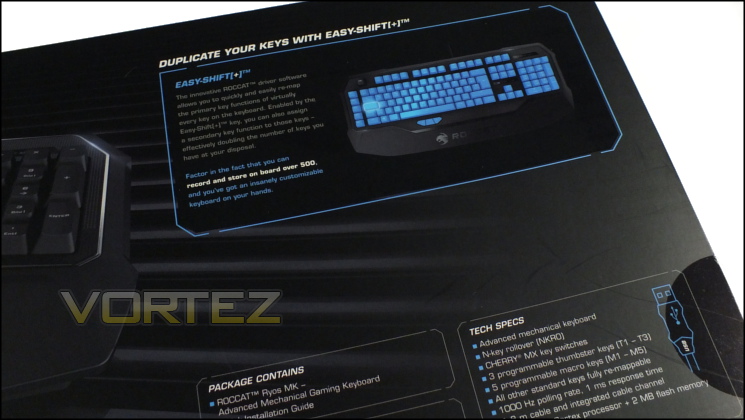
Moving to the rear of the packaging, ROCCAT hurl information at you and leave very little of the area underutilised. Nine elements of the keyboard feature-set are listed centrally and cover the whole range of what’s pertinent: from East-Shift[+] to the glossy finish on the keyboard chassis. They’re then repeated in seven additional languages, speaking to the transcontinental market ROCCAT is targeting with all their peripheral releases.
The left hand side is dedicated to three components which can be fiarly easily represented by images – the Cherry MX switches, ROCCAT Talk and the Ryos MK’s smudge-proof glossy look. On the right are the technical specifications, system requirements and package contents. Finally, at the top ROCCAT include a little more detail on Easy-Shift[+]. That’s quite welcome as the technology itself is quite hard to explain in a simple line of text.
Although it’s not at the premium end of the range, the Ryos MK is still a treat to unbox. Sliding off the exterior sleeve reveals an internal box for the keyboard for which some thought has obviously gone in. Although not much padding is offered, it is held securely and will continue to be useful for transporting to/from events thanks to its compact design.
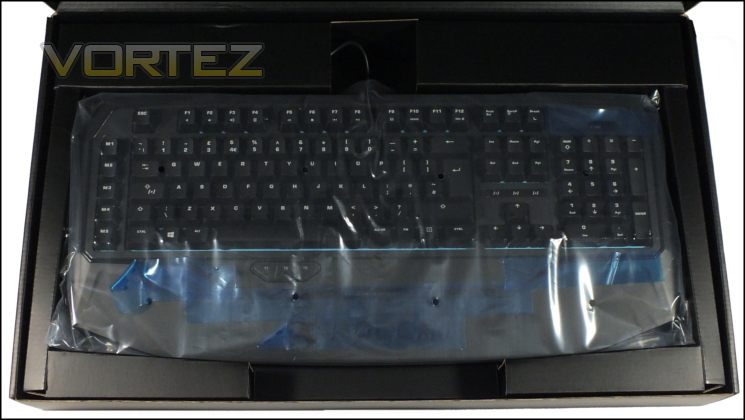
As usual, ROCCAT are sparing in the package contents, including only a quick-start guide in addition to the keyboard itself. That’s due to a quite laudable – and one has to say successful – attempt at keeping end-user costs down, but the lack of a keycap remover will be surprising to some. A further factor from which savings have been made is that no software is included in the bundle. You’ll need to download the Ryos MK configuration software directly from roccat.org, although much of the functionality will operate without it.
Once again ROCCAT have done a bang-up job in initial presentation, conveying all the necessary information and doing it in a stylish manner. Time to take a closer look at the keyboard itself.
A Closer Look
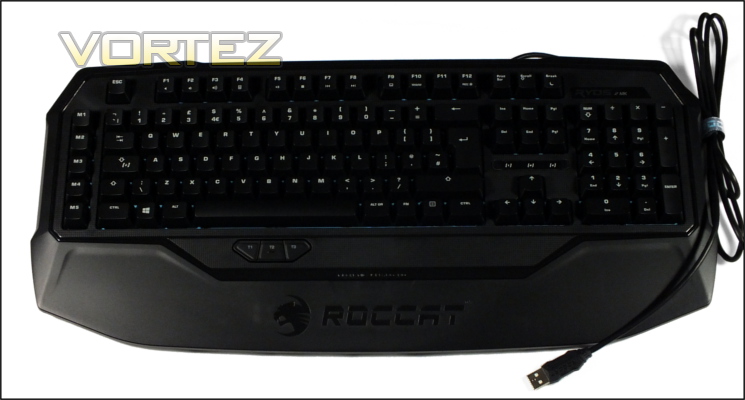
With the Ryos MK now out of its packaging we’re struck by how similar its shape is to that of the Isku, ROCCAT’s premium membrane keyboard. Whilst it’s a little more back-to-basics – no profile indicator LEDs or dedicated media keys – the oversized integrated wrist-rest and key layout is still highly reminiscent of the overall look. This includes the position of the Macro and Thumbster keys, although there are one or two slight differences.
ROCCAT claim a glossy finish for the Ryos MK’s frame, but that’s not quite how we’d describe it. Framing the typing area is a plastic with a satinised surface effect which, if not highly reflective (with the exception of a thin band with runs around the typing area), is significantly smoother and more pleasant to touch than the standard plastic finishes of competitor designs. A matte typing area itself has small glossy dimples which are very slightly reflective. In general the design won’t be hampered by fingerprints, which is certainly a plus, but may not quite satisfy your aesthetic requirements.
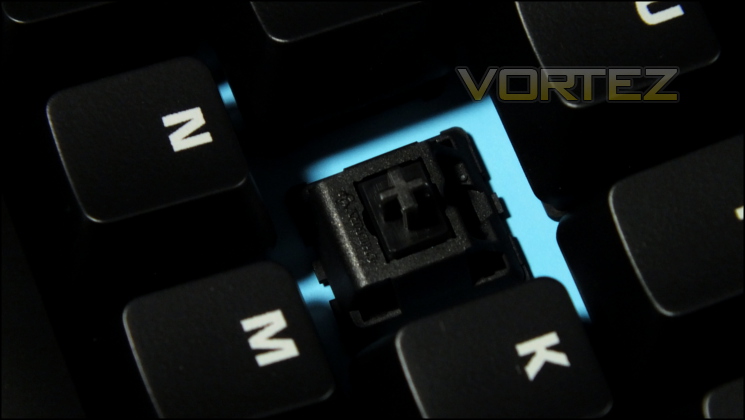
The Ryos MK utilises Cherry MX Black switches and black keycaps with a high-grip painted finish. Unlike most other mechanical gaming keyboards we’ve reviewed to date the Ryos MK doesn’t make use of LED lighting, which has instead been reserved for the MK Glow and MK Pro models. Clear printed characters top each keycap in a coating which doesn’t stand too proud of the key surface and may wear with time. A lack of backlighting and/or UV coating will make the MK a little less suitable for low-light conditions than most other keyboards in its price bracket.
We’ve not come across Cherry MX Black switches for some time, and essentially they are stiffer variant of the linear switch used in the MX Red. Rather than 45cN of actuation force required, MX Blacks need 60cN – 33% more. The upshot is that keys are harder to press whilst also springing back more quickly, making them more suited to competitive gaming. MX Blacks aren’t quite the stiffest linear mechanical switch; the next higher up are MX Dark Greys sitting at 80cN which are often used for spacebars and return keys on MX Black keyboards.
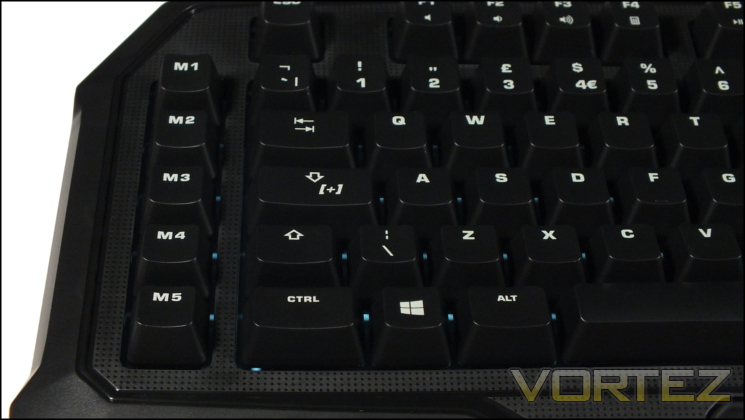
Five macro keys labelled M1-M5 are on the left hand side, as well as the Easy-Shift[+] key. The latter, replacing the Caps-Lock key, is ROCCAT’s modifier for unlocking secondary key assignments for the keyboard as a whole. If unnecessary in a particular configuration it’s possible to revert the behaviour of the key to Caps Lock on a per-profile basis in software, allowing the keyboard to retain core functionality even as it unlocks additional flexibility. A row to the left of the main keyset is the ideal location for macro keys, keeping the stretch from the WASD-zone as low as possible.
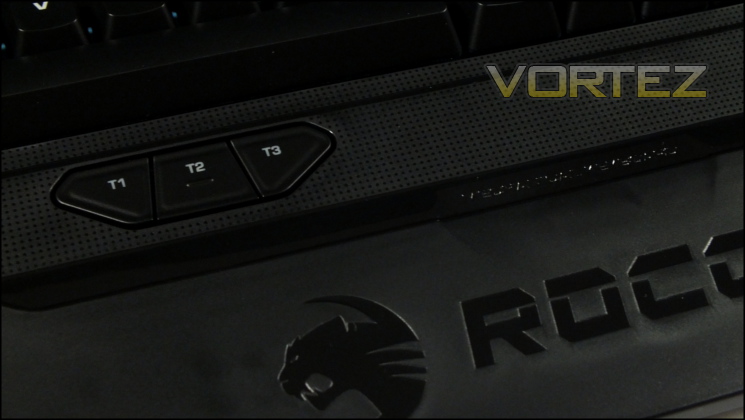
Below the spacebar are the three Thumbster buttons. We first came across these keys in the Isku, but ROCCAT have tweaked their design somewhat to increase the surface area of each button and have them sit flat to the keyboard frame. They’re also quite stiff if not uncomfortably so, preventing them from being pushed by an accidental thumb tap. Reaching from T3 to M1 will be something of a stretch for anyone not blessed with large hands as the diagonal is about 18cm wide, but hitting both T1 and T2 from WASD is trivial. Each Thumbster button is also illuminated, and these are the only illuminated keys on the keyboard.
Moving to the top row we have the F-keys, which double as media keys when pressed with the FN key. A lack of dedicated media keys will disappoint some, and it’s worth noting that this lack us shared by the Ryos MK design higher in the range, but for most gamers it shouldn’t be an issue of any great significance. It’s also possible to remap any key on the keyboard to a multimedia function, so if absolutely necessary dedicating a keyboard profile to media consumption is always an option.
Unlike F1-F10, F12’s secondary function doesn’t mimic a media key or Windows command. Instead it’s used for recording macros live without a software configuration tool, and so is extremely important for the keyboard’s stand-alone use.
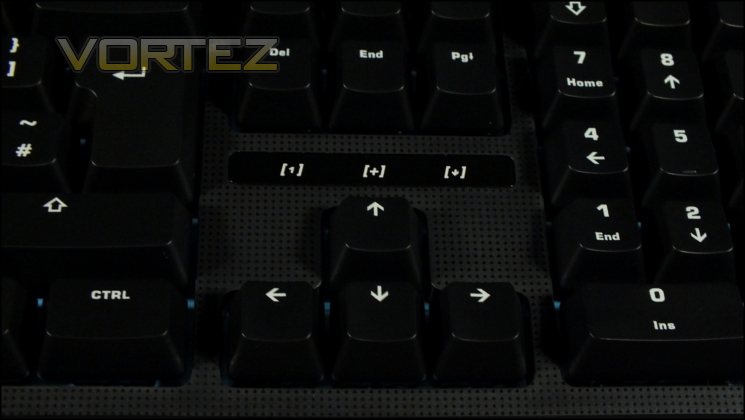
Three indicator LED sit above the arrow keys rather than the number pad. Normally these would just register NumLock, CapsLock and ScrollLock statuses, but as with seemingly every component on this keyboard they pull double-duty. Serving as a CapsLock indicator, [+] also flashes on when the Easy-Shift[+] modifier is active, whilst ScrollLock helps with indicating the status of live macro recording.
By locating the LEDs here ROCCAT keep them within a relatively narrow field of view, making them more valuable during gameplay sessions when the focus in mainly on the monitor and (very rarely) WASD zone.
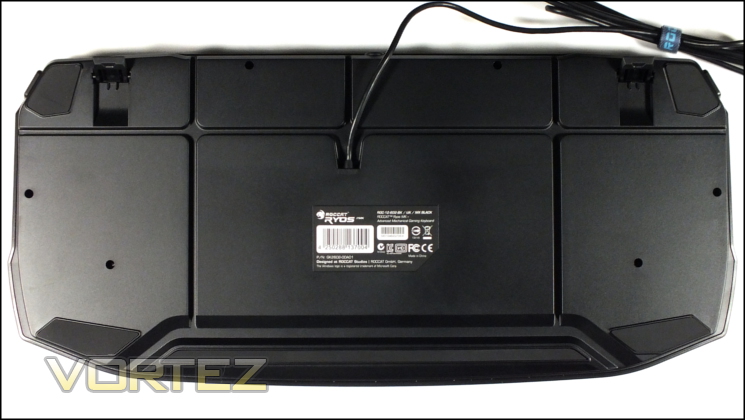
The floor of the Ryos MK is pretty interesting in of itself. Cut into the base are wire channels which act as a cable tidying system for mice, headsets and the like. We have seen these useful designs in the past, and it’s good to note that ROCCAT haven’t taken the misstep of not allocating enough area to the non-slip rubber pads. Five substantial ones border the keyboard with two additional on the bottom of the extendible feet; cable channels run either side of each pad, ensuring that cables can exit from any side of the keyboard.
Finally, the USB cable isn’t braided. ROCCAT have instead chosen a soft plastic finish and included a Velcro cable tie for cable management. Although this will have a minor knock-on impact on long-term durability the more likely complaint will be from an aesthetic point of view.
So, upon closer inspection the Ryos MK is looking like a keyboard which has pared down its feature set in order to fit into a <£90 price point. The most obvious shortcoming is that of illumination, but the lack of USB & Audio passthrough as well as profile indicator LEDs will also serve to keep it firmly out of the premium category when it comes to feature sets.
Customisation
Unlike many around its price point there is no built-in illumination for the Ryos MK. Instead you will have to rely on ambient lighting for gaming sessions going into the night, and you’ll probably want to make sure that any LAN you attend isn’t at night in an unlit basement. Still, without it the keyboard has a refined look and can nonetheless boast an important on-board customisation feature.
Thanks to its 2MB storage and 32 bit ARM Cortex processor the Ryos MK is capable of live macro recording without the need for installed software. This greatly improves the flexibility of the board with the benefit of streamlining peripheral setup for a non-Bring Your Own Computer LAN event. The only snag is a lack of profile indicator, an oversight which can be overcome with liberal use of profile navigation keys.
Live record is enabled by pressing FN+F12, at which point the ScrollLock indicator LED will begin blinking rapidly. You then need to select a specific location to bind the new macro to, choosing a macro key, Thumbster key, or any key’s secondary function. Simply press the key or Easy-Shifted combination (e.g. Easy-Shift[+]+P), and then the ScrollLock LED will change from blinking to a breathing effect. After that input your character string, and finalise with FN+F12.
When live recording a macro all timings are preserved with the exception of truncating pauses at the beginning and end. You’ll need to be pretty swift if you want particularly long macros to be time-efficient, or you can edit them later in software.
Speaking of the software, a macro’s name is automatically created at the same time and is thus present in the ROCCAT configuration utility when the keyboard is attached. It’s formulated from the key that you initially record the macro to, so for example P1-MLR-E-Zone K36 corresponds to a live recorded macro bound to the 36th key (‘P’) of the EasyShift-Zone of Profile 1. Once you get your head around that, navigating the macros becomes straightforward.
—
Apart from macro live recording we’re left out in the cold a little with regards to functionality independent of software. Ideally we’d have liked to have see the ability to disable the Windows key at the very least, but ROCCAT partially redeem themselves by including this in their software utility. At best we’re left with making use of the FN-key for media playback and some simple Windows shortcuts, but to get the very most from the Ryos MK you really need to be using it on a Windows machine with ROCCAT’s tools installed.
Software
ROCCAT has a well-earned reputation for high-quality peripheral software which is above all user-friendly. It accomplishes this by designing it with clear menu systems, highly obvious options and not burdening the end-user with overly complicated terminology. More bespoke configuration is possible, especially in their mouse tools, but above all else it’s about letting the end-user get the most out of their products without needing a degree in computer science to interface with it.
All ROCCAT software is per-device rather than a single unified utility for all the peripherals in their range. The tools are available from their support site, and usually come with the latest firmware revision for updating where necessary. In general they all have the same consistent ‘look and feel’, ensuring that the end-user doesn’t need to learn a new set of skills when transitioning between peripheral config. UIs. Also available for optional download is ROCCAT Talk – now into the second major revision – which allows communication between keyboard and mouse such that EasyShift[+] modifier keys can be shared.
For testing we used the v1.30 driver, firmware 1.24 and ROCCAT Talk v2.1.
—
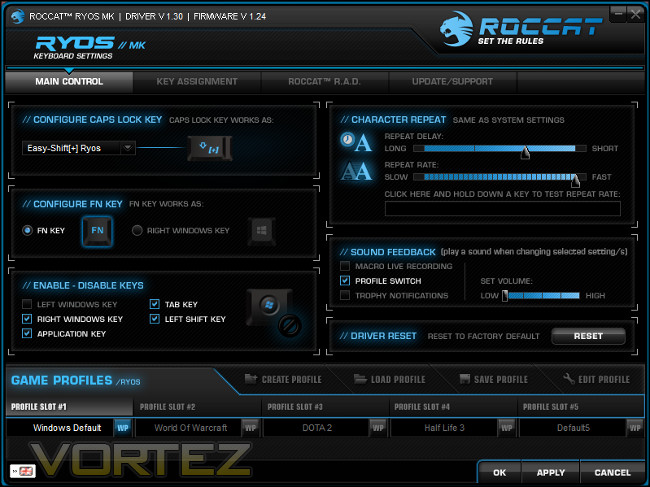
A familiar blue-on-black style confronted us on the launch of the config. utility, with four tab options at the top and profile selectors below. Immediately we’re struck by how few menu options there are; the lack of lighting of any description cuts out a whole potential tab right off the bat. However, even with that accounted for two of the four tabs are dedicated to ROCCAT’s own statistics monitor and support panel, leaving just two for bread-and-butter configuration.
Main Control is designed for modifying core keyboard device settings rather than key assignment or ancillary options. From here you can disable specific keys that may cause problems when gaming including not only the Windows key but also the Tab and Application keys. In addition you can strip out extended on-board functionality by disabling the FN key, set up character repeat rates and even adjust sound feedback.
The latter option is made more important due to the dearth of indicator LEDs on the Ryos MK to differentiate between profiles. Trophies and Macro Live Recording notifications aren’t exactly necessary but still welcome, whilst changing the volume level is essential to prevent minor heart attacks and coffee spills when a new trophy milestone is reached.
The final major feature in Main Control allows us to define how the EasyShift key should behave. One option is a simple remap it to CapsLock, but it’s also possible to EasyShift the keyboards main keyset, EasyShift additional ROCCAT devices, or even activate EasyAim. The latter option allows the EasyShift key (through ROCCAT Talk) to reduce the DPI of an attached mouse, acting as a precision-aiming sniper mode when ROCCAT mice tend not to have such functionality. It’s simple but effective, and allows ROCCAT devices to synergise with one another when the same isn’t typically possible with other brands.
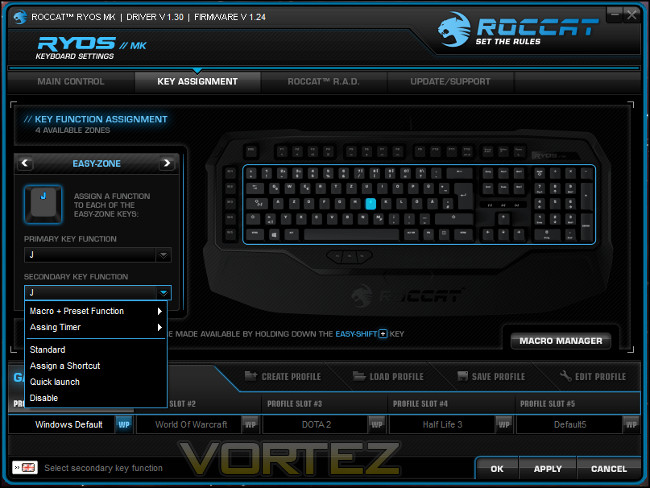
Individual key assignments take place in Key Management, a simple window which somewhat belies it value. ROCCAT divide the keyboard into four zones for simplicities sake – the F-keys, M-keys, Thumbster-keys and Easy-Zone; cycling through each or clicking on a specific key highlights that zone and displays the current assignment for the selected key.
Straight off the bat we can see one potential weakness – there is no indicator for a non-standard assignment. Whilst each key can be selected ROCCAT should really have included a subtle shading for each key that isn’t bound to the default, perhaps a second to indicate when only the secondary (AKA EasyShifted) key function has be altered.
Primary key functions in the Easy-Zone can be set to default, simple-remapping or disabled, whilst secondary key functions can be any macro or pre-set function. F-Keys also have total flexibility as part of their secondary key functionality, whilst primary is a little more restricted (although they can be bound to profile navigation). All bets are off for the Thumbster and Macro Key zones, where essentially any key can be bound to any macro or built-in function.
Apart from the macro system ROCCAT has two other major functions which can be assigned to a key: Timers and Shortcuts. Timers are basic triggered countdowns indicated solely by audio cues and don’t really rival the complexity of that offered by other vendors (including on-screen display and allowing the key to trigger the Timer and begin macro simultaneously). Shortcuts simply allow the input of a keystroke with your choice of ALT, CTRL or Shift modifiers, but without having to record a macro to do it and it being an instantaneous series of keypresses.
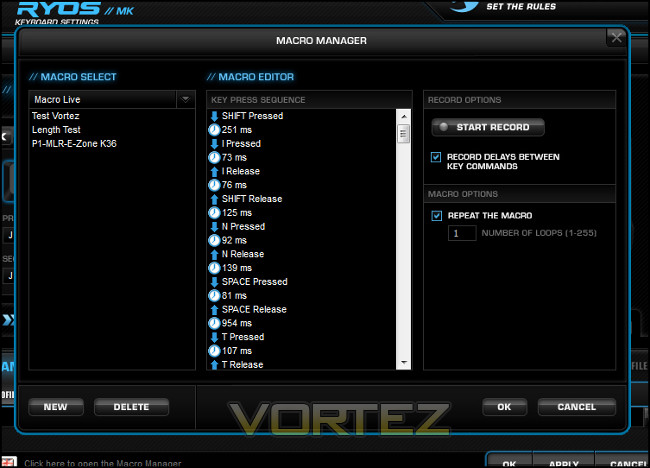
The meat and potatoes of the configuration utility has to be the Macro Manager, which allows recording of keystrokes and then selective editing of characters, timings or inserting mouse events. Interestingly the current version of the macro editor doesn’t include the Advanced Editor which has been part of previous driver releases, perhaps indicating the stage at which the current software is in development. Macros are created by means of a live record button in software, which can optionally store the timings, following which specific keystrokes, delays and mouse events can be input.
One point which is pronounced in its absence is the lack of control for triggering dynamics. Many other keyboards allow control of whether macro execution starts on push or release, for how long it repeats, under what conditions it repeats and more. The ROCCAT software only allows for a flat repeat number on actuation, which isn’t quite up to par.
ROCCAT also include a pre-defined macros for a wide range of games applications. It’s certainly not an exhaustive list, but they also handily pre-organise any macros you create for those programmes in the future, saving a little in terms of time. Note that these are not commands which hook into those applications’ API’s, they’re simply simulated keystrokes.
Currently each macro can be over 50 characters long and include mouse events, but cannot presently be set up to be recursive. There is no way to explicitly back up macros, but they’re currently stored in the //ROCCAT/Ryos Keyboard/Config/Preset_sequence.dat. In theory backing up and restoring that file should serve the same purpose for the entire macro set.
All settings and key bindings are on a per-profile basis, but the pool of macros to choose from is shared by all profiles. Five profiles can be stored on-board, with an unlimited number able to be saved as files and restored to one of these slots as required. They may also be bound as a Windows default profile, or set to launch whenever one of any three applications are launched.
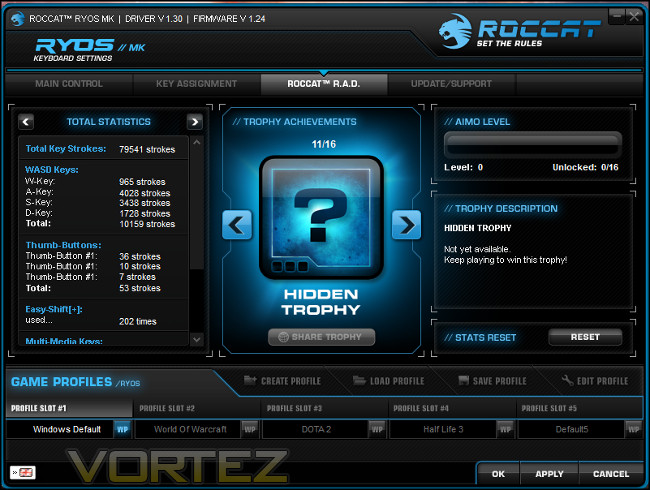
ROCCAT R.A.D. is ROCCAT’s statistics collection section, and right now it’s a neat aggregating tool for keypresses. Although they were pioneers in this field ROCCAT are currently being surpassed by the efforts of their competitors who are not adding detailed keystroke logging (aggregated) and a statistical breakdown including keyboard ‘heat map’. The social aspect of R.A.D., including Trophies AKA achievements for hitting specific benchmarks, is all well and good but doesn’t have the value that other tools have in terms of optimising your use of your keyboard. Ideally ROCCAT could work on this feature.
The final section is ROCCAT’s update page for the software, which includes simple links to the driver download page and support site. Unfortunately the software doesn’t automatically check for updates and relies on you remembering to check back regularly and navigate the ROCCAT website to download and install a new version. A link is also available to the ROCCAT main support page and email for technical assistance, but they’re both a little perfunctory. That said, prominently displaying both driver and firmware versions on this page is a great idea, although it may be useful to also include the ROCCAT Talk version being used too.
ROCCAT’s utility ticks most boxes, but for now it give the impression of cut-down software for a budget keyboard despite the polished presentation. Quite apart from the lack of advanced macro editor, a feature set which may have looked advanced for 2012 doesn’t quite cut it as we’re almost into 2014. If all you need to do is take advantage of the stock functionality of the Ryos MK in standard ways then it will do fine, which to be fair puts in at least on par with most software out there, but deeper analytical tools will have to await an update from ROCCAT.
Performance
During testing we paired the Ryos MK with another mainstay of the ROCCAT range: the Kone Pure. A seven button mouse which can easily be utilised as a standard five-button device, the Kone Pure is one of the best all-round mice we have reviewed this year. It will allow us to assess the performance of the Ryos not only as a keyboard paired with a non-specialist gaming mouse, but as one able to leverage the potential of ROCCAT Talk to the end-user looking to match with other ROCCAT devices.
From the outset the Ryos MK’s rigidity and build quality was impressive. A number of recently reviewed keyboards were let down by an uneven base, but our Ryos MK is perfectly flat and sticks to the desk whether feet are extended or otherwise. A steel backplate ensures that there is effectively no flex to the board, allowing it to maintain a consistent response despite the force required to actuate the mechanical switches.
Across the whole keyset the response of the keys is consistent, and just as importantly pleasant. The choice of Cherry MX Black switches is somewhat unconventional but works well to allow a fast response without quite the same level of noise MX Reds often incur when striking the backplate. We believe that this may be because the switches aren’t travelling quite as quickly due to the greater actuation force required, but equally it may be down to a slightly different keycap composition or the lack of LEDs which might otherwise have been the first point of impact. Whatever the reason, typing for extended periods on the Ryos MK is much less of an aural assault, even if it is a little tiring on the fingers for newcomers.
Unfortunately the lack of illumination did come up in testing and will be a disappointment to those who play in near total darkness for certain game types. There was always going to be something of a trade-off to hit the sub-£90 barrier, and it seems that lighting was it rather than cutting down on on-board features. It may be that modders can come up with an innovative solution, but for now we found that a sensible level of ambient brightness was really required to make use of the Ryos MK in any more than basic terms. At the very least a more vibrant character print on the keycap would have been nice to see, although the print quality itself is excellent.
The macro and profile systems were robust to use, with creation of new bespoke macros trivial for both office applications and gaming titles. Live Macro record greatly sped up the process when in-game, whilst the macro manage was easily up to the task of tweaking the macros to perfection.
One oversight, inevitably linked to the lack of lighting, is the lack of profile indicator. The audio prompt is all well and good, but a visible indicator – either in the form of OSD or onboard LED – would be much more valuable.
Anti-Ghosting/NKRO
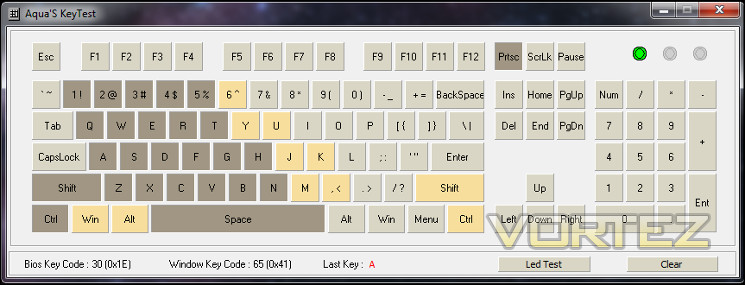
Fully testing for N-Key Rollover and ghosting on a keyboard is difficult (in that it takes an inordinate length of time) but it’s typically sufficient to investigate the behaviour of a dozen or so keys around the WASD zone, with the inclusion of macro keys were necessary. A generally good rule of thumb is to test to ensure that each key is registered independently when held down as a group, which which tools such as Aqua’s Key Test are invaluable. The above image is the output of this test, and shows the behaviour of the keyboard when all the indicated keys are held, and it certainly appears to be a comprehensive win for the Ryos MK.
During testing we didn’t notice any ghosting, and certainly at no point did any of the simultaneous keypress events ghost to register one of the dreaded F-keys. That’s pretty critical, and counts as a pass for the Ryos MK to the possible extent we could test.
Beyond that, and following some mixed experiences with other mechanical keyboards we’ve reviewed recently, we also now take a quick look at how macro key input is parsed when multiple keys in the standard set of pushed. In this situation the M1-M5 keys and Thumbster buttons performed admirably, with no interruption in the registering of key input from the held down keys and also their own input registered correctly. That’s some of the best performance we’ve seen from any keyboard in any price bracket.
ROCCAT Talk
ROCCAT Talk is really an under-discussed function for ROCCAT devices, and here it was most useful for its EasyAim functionality allowing us to at a moments notice change the mouse sensitivity for more accurate firing in Team Fortress 2 and Counterstrike Source. To be sure, it is a little hampered by needing to use one of the five on-board DPI levels rather than an independent EasyAim value, but even so the set-up time was minimal and learning curve pretty flat. For us, it’s a great ‘set bonus’ to take advantage of.
That said, we would love to see ROCCAT Talk and Talk FX begin to be expressed in more complex tools such as linked profiles, adjusting DPI level outside of EasyAim, and using mouse lighting to indicate the active keyboard profile. These may be corner cases would potentially augment both devices in areas where each is weakest.
—
In performance terms, the Cherry MX Black switches allowed for slightly faster response time, but only by fractional amounts which you’re unlikely to see the impact of unless you’re playing at the bleeding edge. More important were the macro keys, of great value in our play sessions of Guild Wars and Dota 2 thanks to the quick response times and the fact that they didn’t interfere with other keyboard input when pushed.
EasyAim once again showed its value in sessions of Team Fortress 2, specifically making up for the Kone Pure’s lack of sniper button to allow a short-lived low DPI mode without having to navigate through the Kone’s own means of reducing and then increasing DPI. Faster response times inevitably lead to more frags and more enjoyment at the cost of a small learning curve. EasyAim also means that you have a slightly more steady mousing platform for twitch gaming, which is important for accuracy even in low DPI modes. EasyAim aside, the Ryos performed about as well as we would hope in FPS titles, for which it has slightly fewer appropriate adaptations.
All in all, we come to the inescapable conclusion that the ROCCAT Ryos MK is a pleasure to use on a day-to-day basis in an office environment, much more so than many of the Cherry MX Red-based keyboard’s we’ve used in the past. Presupposing you have plenty of light and fairly strong fingers it should serve you well indeed, and for a long time too. The software needs work from a practical standpoint, but then that is often the case. Fundamentally however for gaming – both MMO and FPS – as well as more boring office work the the MK is an excellent allrounder.
Conclusion
ROCCAT’s Ryos MK is a study in contrasting impressions. Perhaps that’s a consequence of its cost-conscious design, or simply the newness of the keyboard, but the dichotomy between hardware and software is pronounced.
The choice of Cherry MX Black switches adds yet more choice to the mechanical keyboard market in the UK, where MX Reds were swiftly becoming the de facto standard switch. However that would be for naught were the build quality not so good as it evidently is, resulting in a keyboard which will be a pleasure to use for the vast majority of gamers and professionals canny enough to pick it up. Having used them, we wouldn’t hesitate in recommending the MX Black’s over the more lightweight MX Reds for anyone not actively disadvantaged by stiffer switches.
For some the lack of a backlight will be a deal-breaker. It will very much depend on your own gaming habits, but frankly the Ryos MK will always be a poor choice for low-light conditions. The MK Glow is due soon, but at a premium of £30 over the standard variant that’s quite a mark up. On the other hand lighting will also improve other aspects of the keyboard, most notably profile identification, so it may be valuable enough to sway you. If ROCCAT follow through on the groundwork laid the MK Glow should be very good indeed.
Less likely to be a sticking point in purchasing, but still a disappointment, is the software. Manufacturers are now surpassing ROCCAT in what they offer, and whilst ROCCAT Talk redresses the balance somewhat there’s much more that could be done. It’s quite possible that the configuration utility is simply immature right now and much more is planned, but they need to get back ahead of the game rather than be mid-pack. That said, it’s still a highly polished utility that doesn’t actively interfere with any aspect of the Ryos MK’s function.
Of course Macro keys and the additional Thumbster buttons are exceptional additions at this price point for a mechanical board; and if the Thumbster buttons are a little stiff, that should ease with time. Most noteworthy is some of the best NKRO behavior we’ve seen, especially in the way the main keyset interacts with macro keys, blowing away some keyboards well above this asking price. Once again your own use patterns will determine how significant this is, but for an MMO gamer it should not be underestimated.
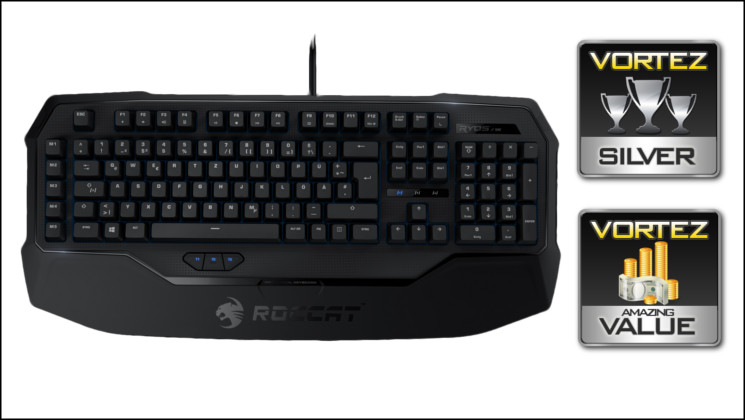
Overall the ROCCAT Ryos MK represents excellent value at the <£90 price point. An impressive on-board feature set, comparable to many motherboards priced far more extravagantly, are built on the fundamental strength of Cherry MX Black switches and great build quality. Equally suitable for MMOs and FPS games, the only downsides will be underdeveloped software-enabled features and the lack of a backlight. Absolute out of the box functionality and quality nets it a Vortez Silver Award, whilst the price point makes it a Amazing Value Award a stone cold certainty.
+ Mechanical keyboard with Cherry MX Black switches
+ 8 Macro Keys
+ 5 Profiles
+ Easy-Shift[+] functionality doubles available keybinds
+ ROCCAT Talk allows greater synergy with other ROCCAT peripherals
+ Excellent NKRO
+ Very competitive price
Cons
+ No illumination
+ Software functionality surpassed by competition
Tips
= Pair with a ROCCAT mouse for even greater flexibility.


