







The new Force LX SSD from Corsair looks to set new standards while retaining its appeal to the budget conscious. See how it gets on in our latest review.

Product On Review: Force LX 256GB
Manufacturer & Sponsor: Corsair
Street Price: £94.27 GBP / $129 USD
The new Corsair Force LX range of SSDs replace the outgoing ‘LS’ models. This means the LX will be the budget SSD in the Corsair range. That isn’t to say the LX is simply a name change, it isn’t but costing a fiver short of £100 and £57 for the 256GB and 128GB models respectively it is clear who Corsair’s target audience is. SSDs have been coming down in price but finding a model capable of providing a suitable amount of storage and not just enough space for a boot drive has been a difficult task, especially considering the price gap between mechanical and solid state drives. So, breaking the magical £100 barrier for a 256GB drive is a fine achievement in itself and should be enough to tempt those looking to give an ageing PC a speed boost. We make no secret to the fact that upgrading a mechanical drive to an SSD is perhaps the single best upgrade that will provide a solid boost to a PCs performance.
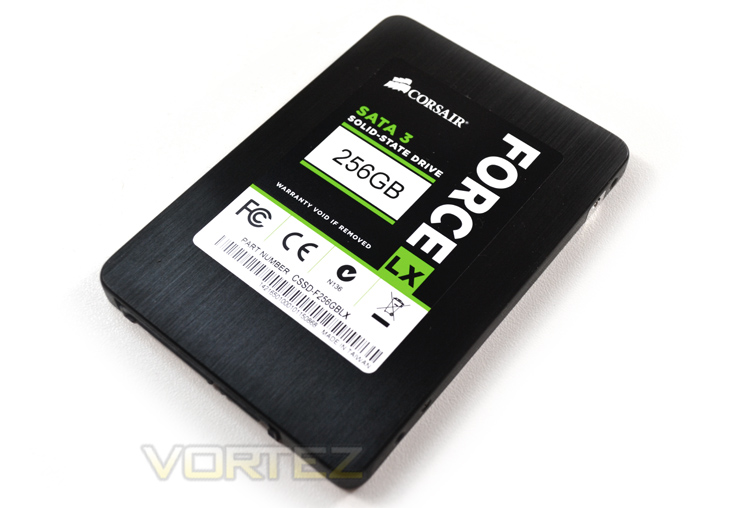
A new low price is not the only refresh between the LS and new LX drive though because Corsair have seen fit to incorporate a Silicon Motion SM2246EN controller and paired this to Micron 20nm ONFI NAND. This should allow the drive to reach 560MB/s read speeds which is plenty fast enough for a drive of this price point. Read speeds are not the be all and end all of a product though and as we have seen in the past. Write speeds are what can separate a good drive from an excellent drive.
About Corsair
Founded as Corsair Microsystems in 1994, Corsair originally developed Level 2 cache modules for OEMs. After Intel incorporated the L2 cache in the processor with the release of its Pentium Pro processor family, Corsair changed its focus to DRAM modules, primarily in the server market. In 2002, Corsair began shipping DRAM modules that were specifically designed to appeal to computer overclocking enthusiasts. From its roots in high-performance memory, Corsair has expanded its award-winning product portfolio to include ultra-efficient power supplies, builder-friendly cases, ground-breaking CPU coolers, blazing-fast solid-state drives, and other key system components.
Specification
SSD Controller: Silicon Motion SM2246EN
NAND: 128Gbit Micron 20nm ONFI MLC NAND, Synchronous
Capacities: 128GB / 256GB
Performance
-Max Sequential Read (ATTO): Up to 560MB/s
-Max Sequential Write (ATTO): Up to 150MB/s (128GB) / Up to 300MB/s (256GB)
-Max Random Read QD32 (Iometer): 68K IOPS (128GB) / 76K IOPS (256GB)
-Max Random Write QD32 (Iometer): 36K IOPS (128GB) / 70K IOPS (256GB)
Form Factor: 7mm high 2.5”
Interface Type: SATA 6.0 Gb/s (SATA 3)
Operating Temperature: 0⁰C to +70⁰C
Storage Temperature: -40⁰C to +85⁰C
Operating Humidity: 90% RH (40° C)
Storage Humidity: 93% RH (40° C)
MTBF: 1 million hours
Warranty: 3 years
NAND: 128Gbit Micron 20nm ONFI MLC NAND, Synchronous
Capacities: 128GB / 256GB
Performance
-Max Sequential Read (ATTO): Up to 560MB/s
-Max Sequential Write (ATTO): Up to 150MB/s (128GB) / Up to 300MB/s (256GB)
-Max Random Read QD32 (Iometer): 68K IOPS (128GB) / 76K IOPS (256GB)
-Max Random Write QD32 (Iometer): 36K IOPS (128GB) / 70K IOPS (256GB)
Form Factor: 7mm high 2.5”
Interface Type: SATA 6.0 Gb/s (SATA 3)
Operating Temperature: 0⁰C to +70⁰C
Storage Temperature: -40⁰C to +85⁰C
Operating Humidity: 90% RH (40° C)
Storage Humidity: 93% RH (40° C)
MTBF: 1 million hours
Warranty: 3 years
Packaging & First Look
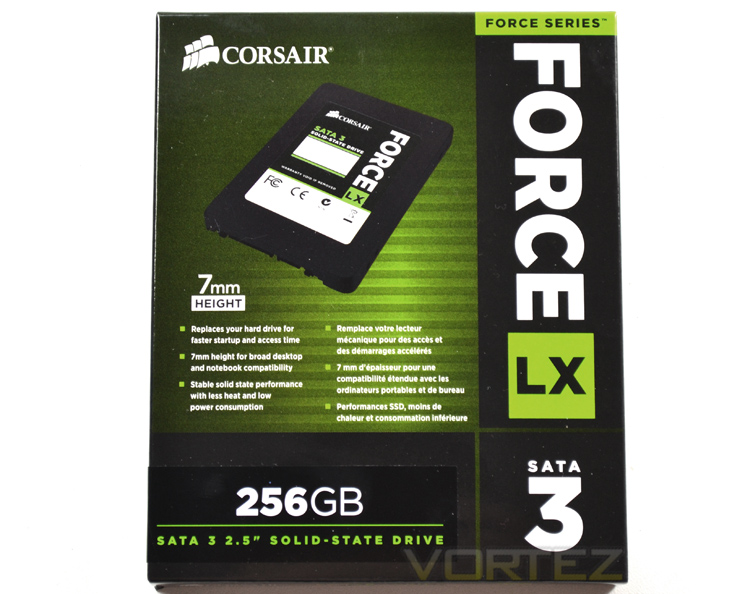
the exterior packaging is typical Corsair with the bold font white font on a black background. The package carries a green hue upon which there are a number of features described with particular attention drawn to the fact that this drive is just 7mm in height.
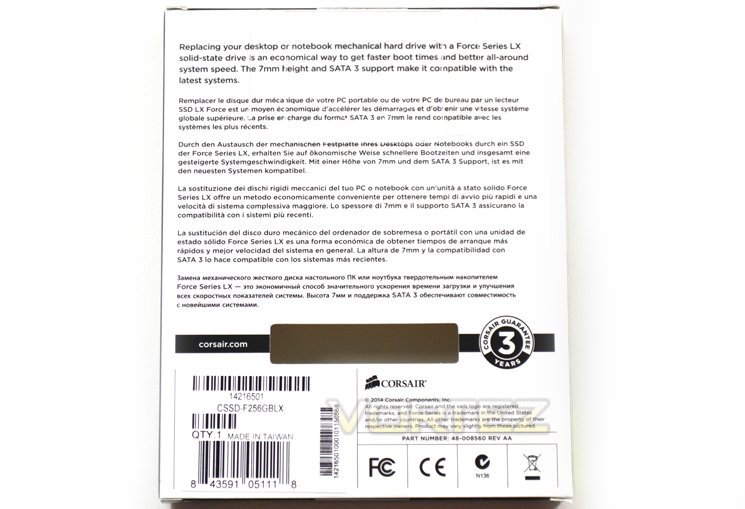
The flipside features a multilingual statement describing the benefits of replacing a mechanical drive with an SSD. Below this is the serial number atop of a sticker and a notification that this product carries a Corsair 3 year Guarantee.
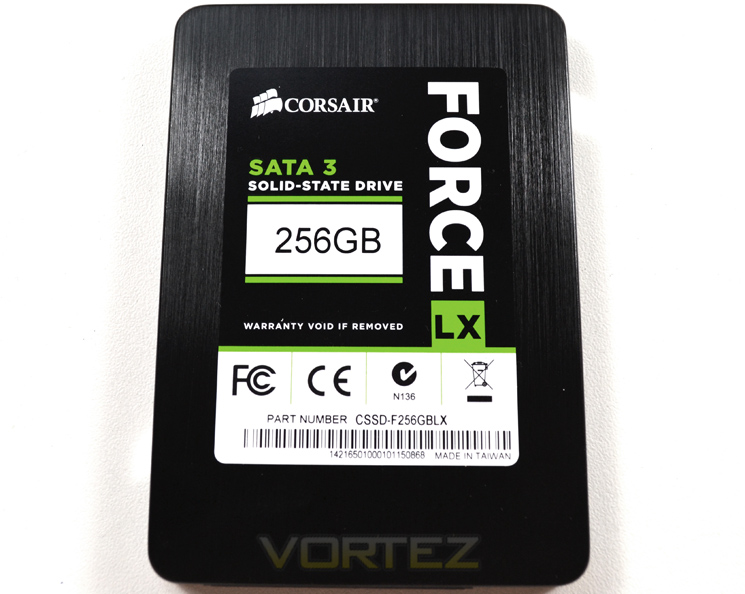
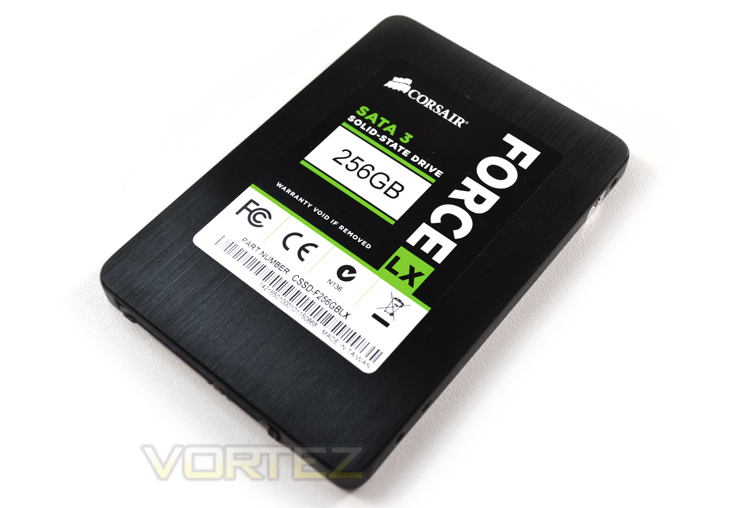
Aside from the exterior card packaging, the SSD inside is protected by a plastic blister pack. The SDD is surprisingly not encased with plastic but with a metal case. The case however does not seem to add much to the weight of the drive because it is still extremely light and thanks to the 7mm height, more than capable of being suited to an Ultrabook. Again we see Corsair have stayed true to their own theme of green and black which looks great especially with the black brushed aluminium casing.
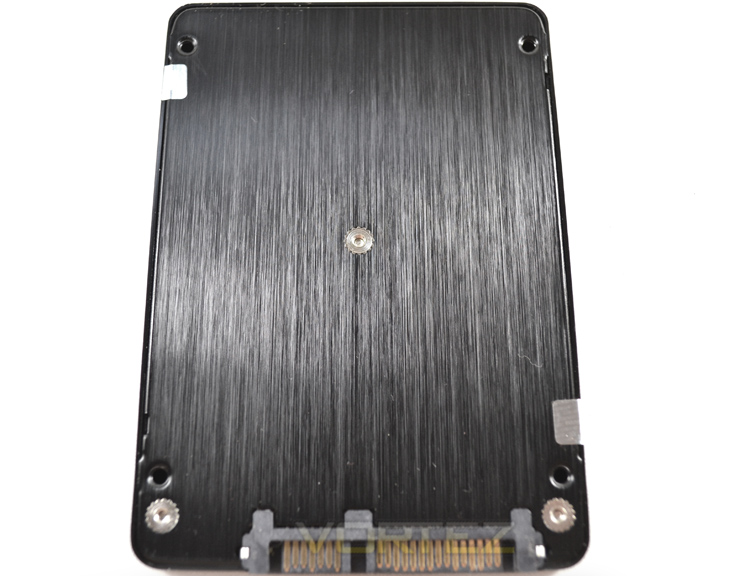
The backside of the drive features nothing other than a recessed nut holding the drive together as that drive features and serial sticker are all on the front of the drive.
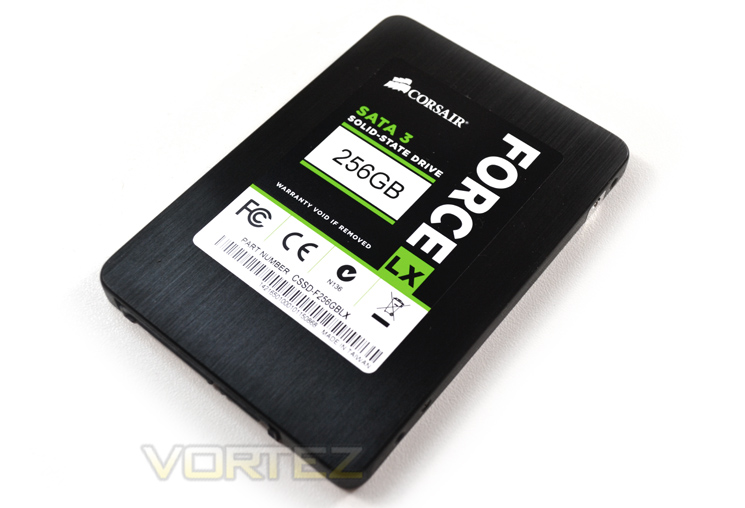
Overall, the drive looks a cut above it’s budget price tag. LX could easily be an acronym for luxury as this drive feels more luxurious than some other, much more expensive offerings we have tested of late. Let’s see if the internals can match the plush exterior.
Closer Look
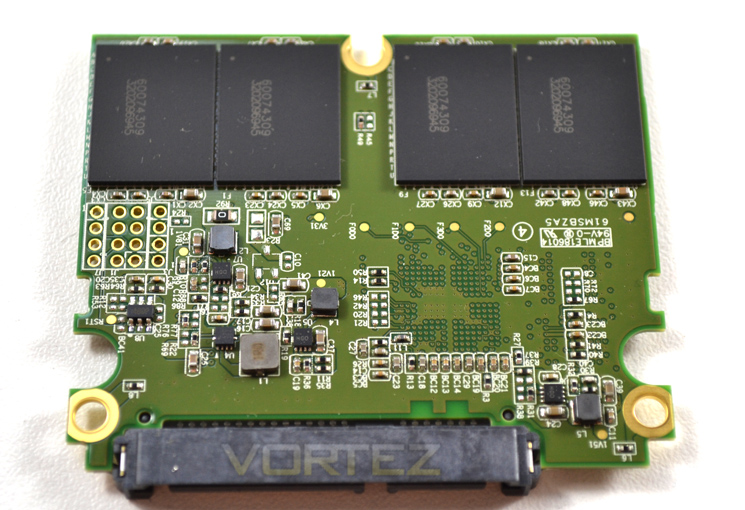
Breaking the two foils seals (and thus voiding the 3 year warranty), we found a half-length PCB. The uppermost side features just 4 flash modules.
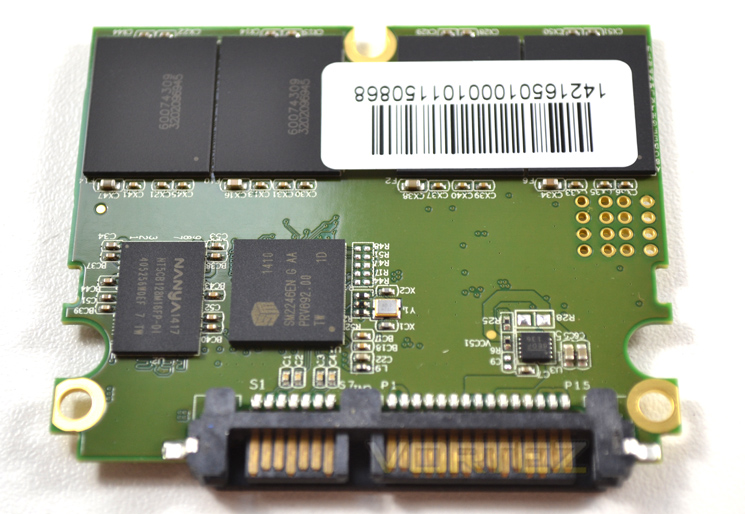
The rear of the PCB features another 4 flash modules, along with the controller and cache.
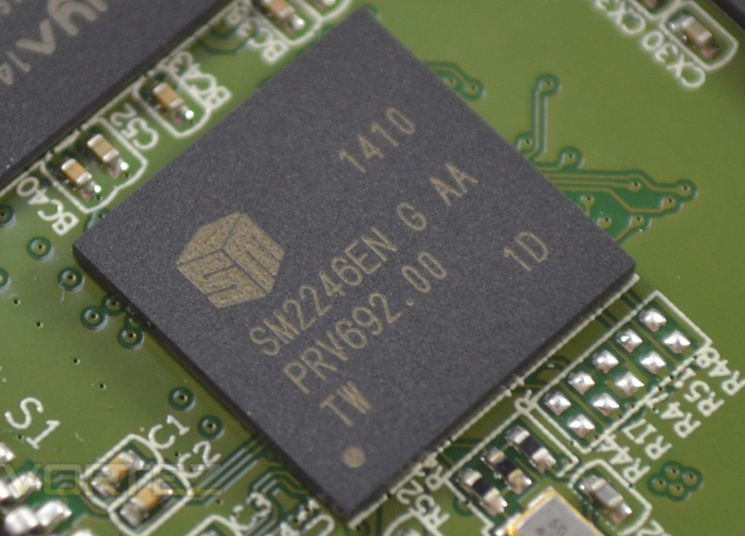
The controller is a new one to us – the SMI SM2246EN. It is a 4-channel controller from Silicon Motion so it will be interesting to see how this compares to some of the more popular controllers equipped on the competition.
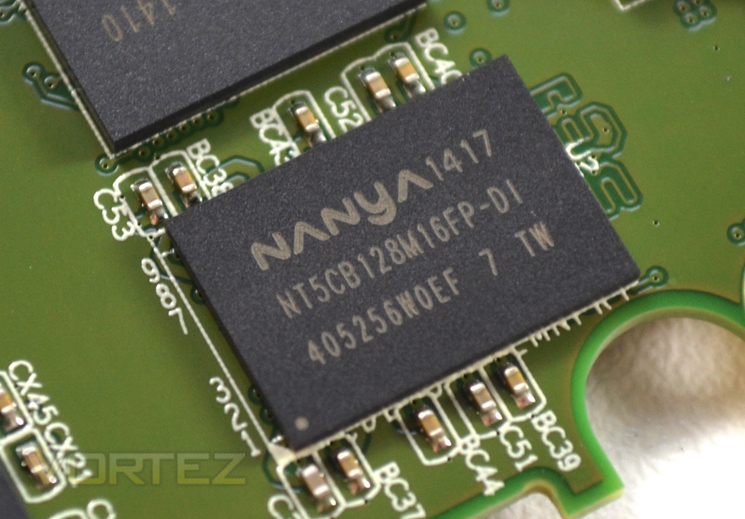
Accompanying the controller is a 128MB Nanya DDR3-1600 DRAM chip.
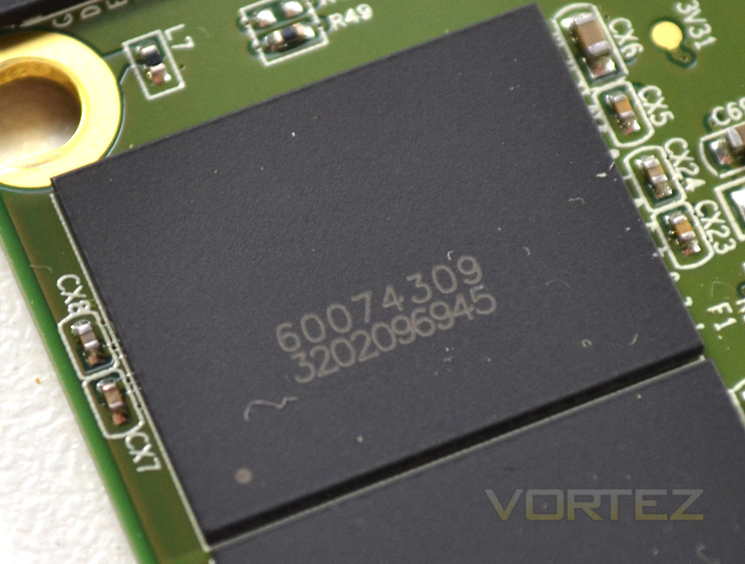
Rounding off the internals are the 8 x 32GB (256GB) Micron L85 20nm die Flash modules.
Test Setup & Methodology
Our test system is formatted and a fresh version of Windows is installed with just drives in place – no additional applications. Windows is then updated to the latest release and the drivers are installed. Included in the list of benchmarks are the following applications:
Benchmarks
ATTO Disk Benchmark v2.46
AS SSD
CrystalDiskMark 3.0
Iometer
SiSoftware SANDRA 2012
HDTune Pro 5.5
AS SSD
CrystalDiskMark 3.0
Iometer
SiSoftware SANDRA 2012
HDTune Pro 5.5
Test system
CPU Intel Core-i7 4770K
Motherboard GIGABYTE Z87X-OC
Graphics MSI R7970 Black Edition
Memory 16GB Corsair Vengeance Pro (2400MHz) CL10
HDD
– Corsair Force LX 256GB (Sata 6Gbps)
– Intel 730 240GB (Sata 6Gbps)
– ADATA Premier Pro SP920SS 256GB (Sata 6Gbps)
– OCZ Vertex 460 240GB (Sata 6Gbps)
– OCZ Vector 150 240GB (Sata 6Gbps)
– Samsung 840 EVO mSATA 500GB (Sata 6Gbps)
– Samsung 840 EVO mSATA 250GB (Sata 6Gbps)
– Kingston HyperX 3K Na’Vi 240GB (Sata 6Gbps)
– OCZ Vertex 450 256GB (Sata 6Gbps)
– Samsung 840 EVO 750GB (Sata 6Gbps)
– Samsung 840 Pro 256GB (Sata 6Gbps)
– Samsung 840 256GB (Sata 6Gbps)
– Toshiba 256GB THNSNH256GCST (Sata 6Gbps)
– OCZ Vector 256GB (Sata 6Gbps)
– Corsair Neutron GTX 240GB (Sata 6Gbps)
– Corsair Force GS 240GB (Sata 6Gbps)
– OCZ Vertex 4 128GB (Sata 6Gbps)
– Kingston HyperX 3K 120GB (Sata 6Gbps)
– Kingston HyperX 240GB (Sata 6Gbps)
– ADATA S510 120GB (Sata 6Gbps)
– Intel 520 480GB (Sata 6Gbps)
– Samsung 830 Series 256GB (Sata 6Gbps)
– Samsung HD103SJ 1TB (Sata 3Gbps)
PSU Corsair HX1050 Gold
OS Microsoft Windows 7 Professional 64-Bit
Motherboard GIGABYTE Z87X-OC
Graphics MSI R7970 Black Edition
Memory 16GB Corsair Vengeance Pro (2400MHz) CL10
HDD
– Corsair Force LX 256GB (Sata 6Gbps)
– Intel 730 240GB (Sata 6Gbps)
– ADATA Premier Pro SP920SS 256GB (Sata 6Gbps)
– OCZ Vertex 460 240GB (Sata 6Gbps)
– OCZ Vector 150 240GB (Sata 6Gbps)
– Samsung 840 EVO mSATA 500GB (Sata 6Gbps)
– Samsung 840 EVO mSATA 250GB (Sata 6Gbps)
– Kingston HyperX 3K Na’Vi 240GB (Sata 6Gbps)
– OCZ Vertex 450 256GB (Sata 6Gbps)
– Samsung 840 EVO 750GB (Sata 6Gbps)
– Samsung 840 Pro 256GB (Sata 6Gbps)
– Samsung 840 256GB (Sata 6Gbps)
– Toshiba 256GB THNSNH256GCST (Sata 6Gbps)
– OCZ Vector 256GB (Sata 6Gbps)
– Corsair Neutron GTX 240GB (Sata 6Gbps)
– Corsair Force GS 240GB (Sata 6Gbps)
– OCZ Vertex 4 128GB (Sata 6Gbps)
– Kingston HyperX 3K 120GB (Sata 6Gbps)
– Kingston HyperX 240GB (Sata 6Gbps)
– ADATA S510 120GB (Sata 6Gbps)
– Intel 520 480GB (Sata 6Gbps)
– Samsung 830 Series 256GB (Sata 6Gbps)
– Samsung HD103SJ 1TB (Sata 3Gbps)
PSU Corsair HX1050 Gold
OS Microsoft Windows 7 Professional 64-Bit
Benchmarks: ATTO
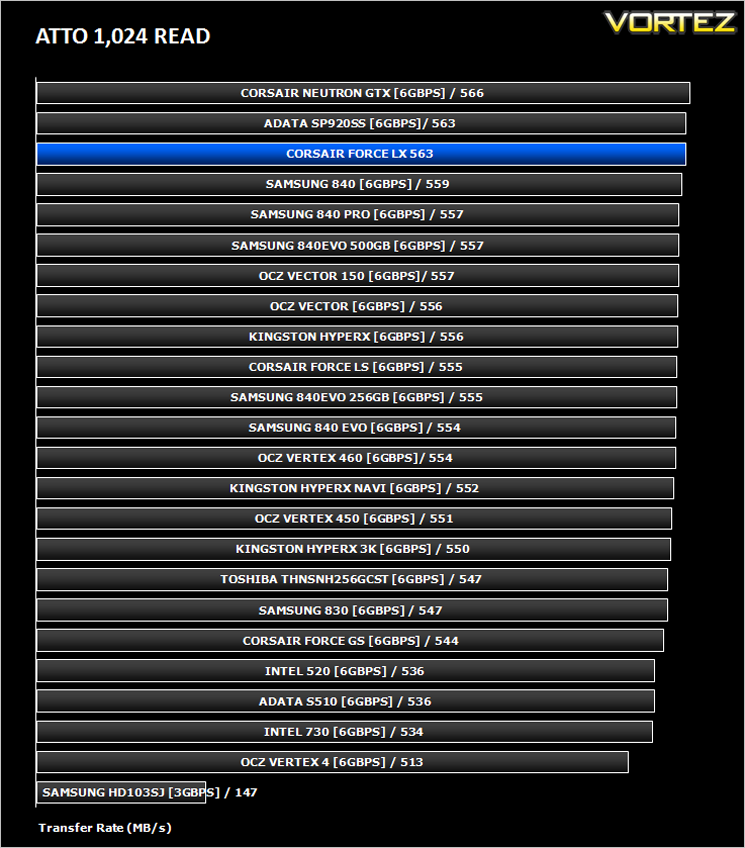
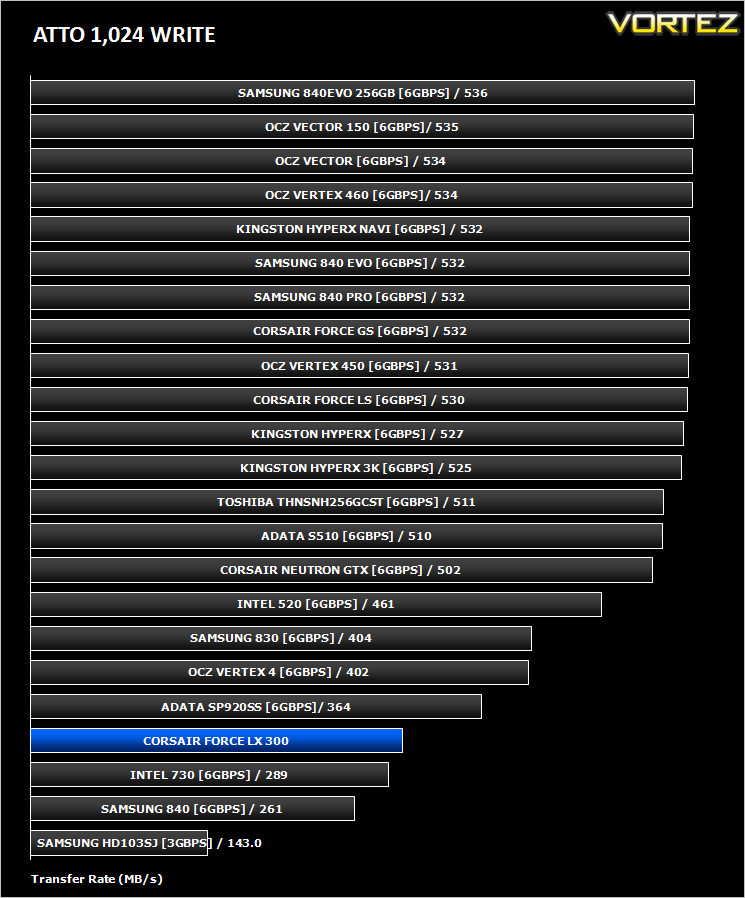
The ATTO Disk Benchmark performance measurement tool is compatible with Microsoft Windows. Measure your storage systems performance with various transfer sizes and test lengths for reads and writes. Several options are available to customize your performance measurement including queue depth, overlapped I/O and even a comparison mode with the option to run continuously. Use ATTO Disk Benchmark to test any manufacturers RAID controllers, storage controllers, host adapters, hard drives and SSD drives and notice that ATTO products will consistently provide the highest level of performance to your storage.
Benchmarks: AS SSD
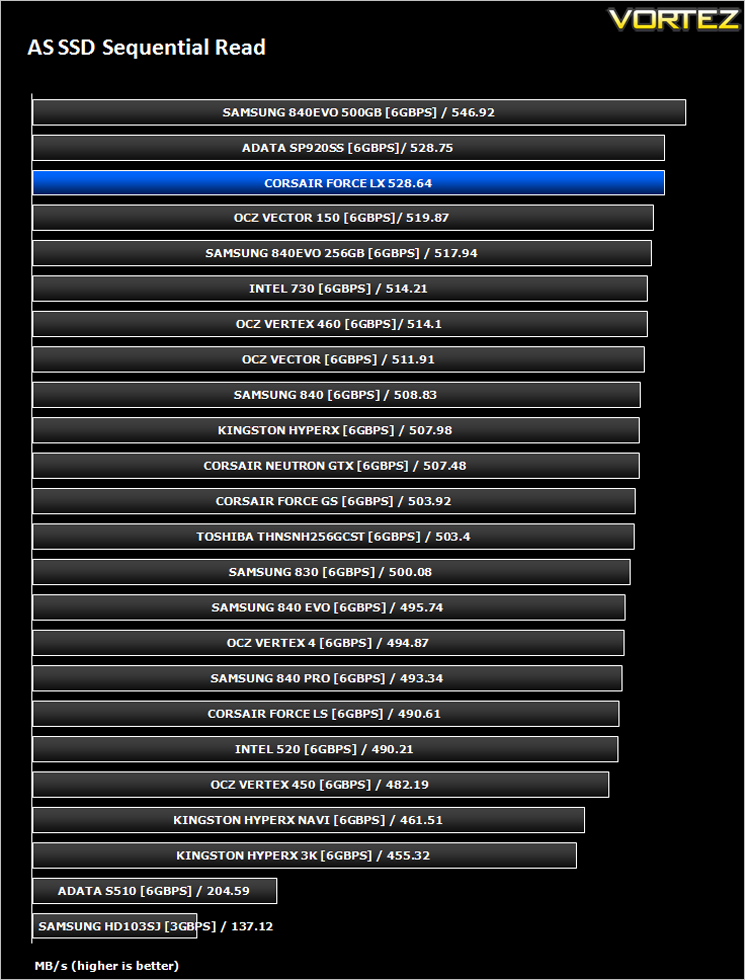
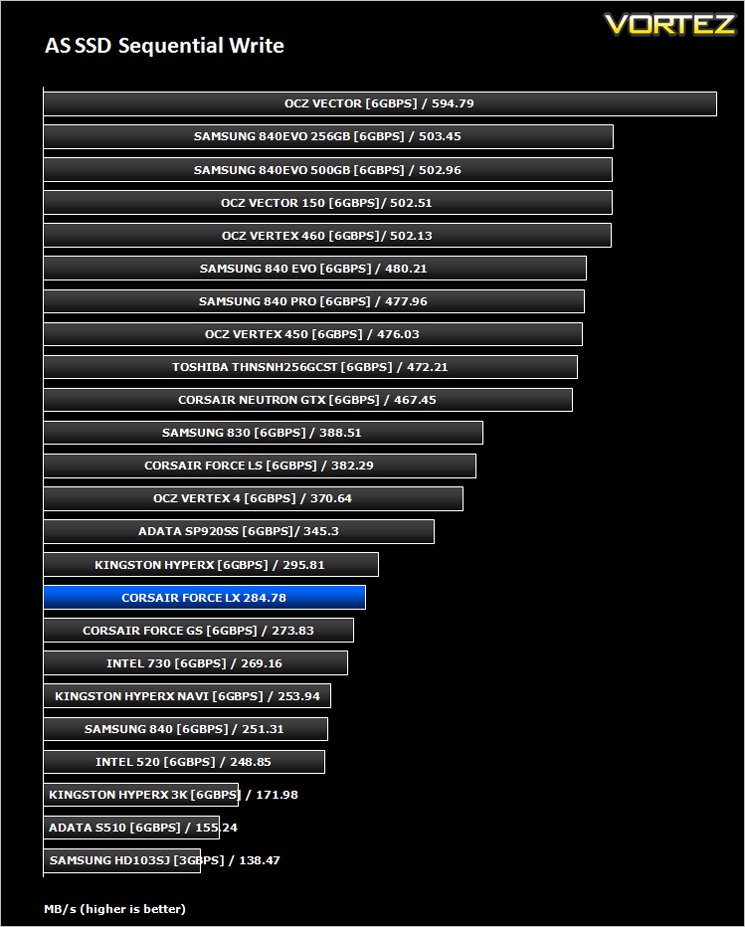
AS SSD Benchmark is a straightforward tool for measuring the speed of your SSD drive.
Simply launch the program, choose your drive, click Start, and it’ll test your SSD’s read and write speed in a variety of ways, delivering a score for each when it’s done. And if that’s not enough, there are also additional file copy and compression-related benchmarks available from the Tools menu. (The author’s support page is German only, but if you need further English explanations then there’s a thread on the program at the OCZ Technology forum.).
Simply launch the program, choose your drive, click Start, and it’ll test your SSD’s read and write speed in a variety of ways, delivering a score for each when it’s done. And if that’s not enough, there are also additional file copy and compression-related benchmarks available from the Tools menu. (The author’s support page is German only, but if you need further English explanations then there’s a thread on the program at the OCZ Technology forum.).
Benchmarks: CrystalDiskMark 3.0
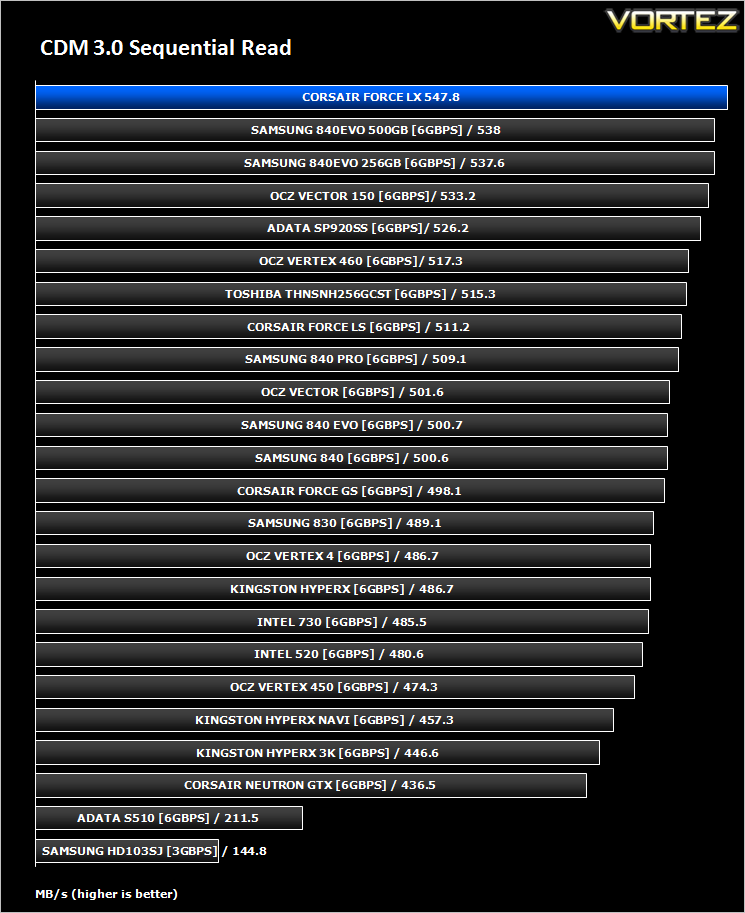
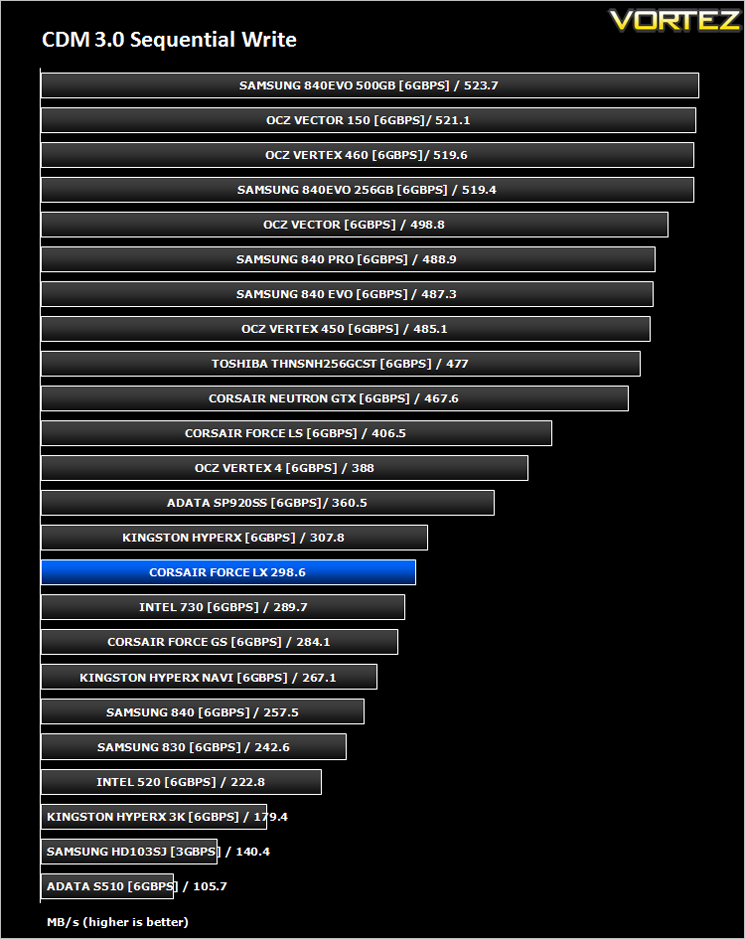
CrystalDiskMark is a disk benchmark software that analyses different types of hard drive. Giving sequential benchmark write and read statistics in MB/s. A simple program that is very useful.
Benchmarks: Iometer
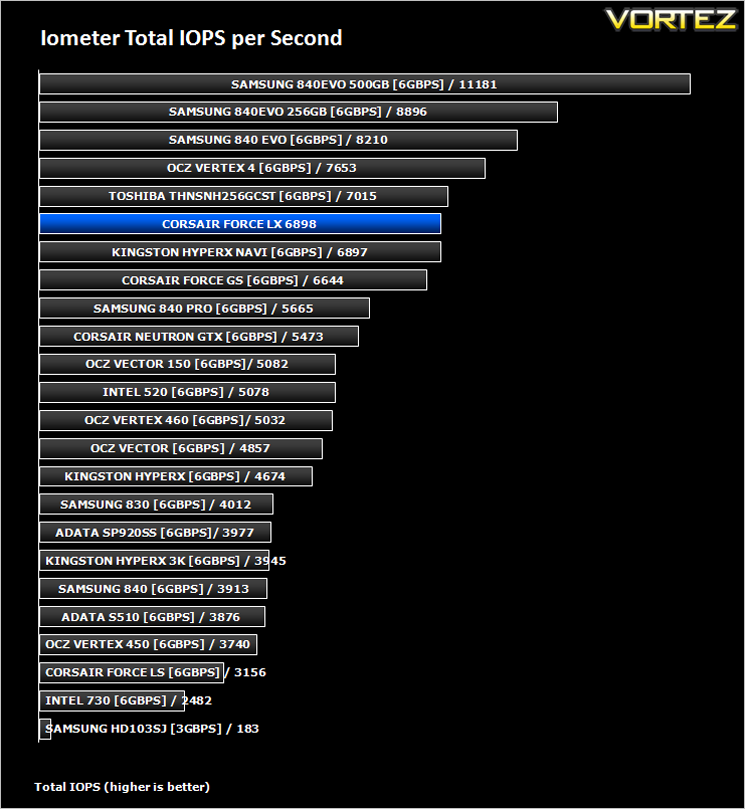
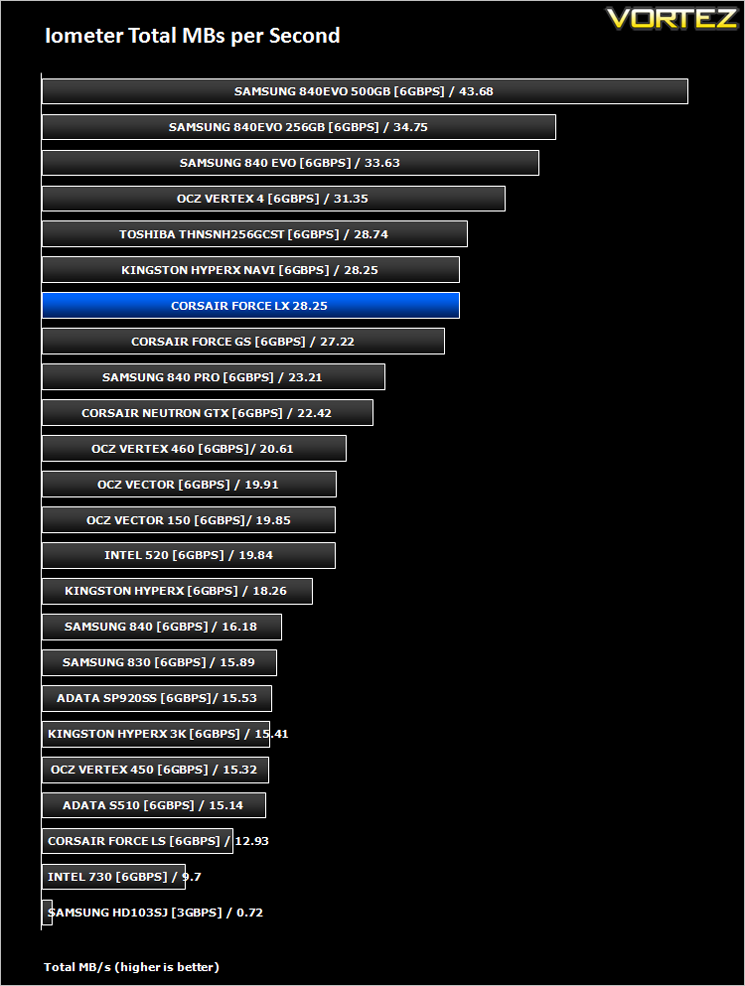
Iometer is based on a client–server model, where one instance of the Iometer graphical user interface is managing multiple ‘workers’ (each one representing a separate Dynamo.exe process) which are doing the I/O. Iometer performs Asynchronous I/O – accessing files or block devices (later one allowing to bypass the file system buffers).
Iometer allows the configuration of disk parameters such as the ‘Maximum Disk Size’, ‘Starting Disk Sector’ and ‘# of Outstanding I/Os’. This allows a user to configure a test file upon which the ‘Access Specifications’ configure the I/O types to the file.
Iometer allows the configuration of disk parameters such as the ‘Maximum Disk Size’, ‘Starting Disk Sector’ and ‘# of Outstanding I/Os’. This allows a user to configure a test file upon which the ‘Access Specifications’ configure the I/O types to the file.
For the purpose of this test. The 4K 50%/50% read/write file will be under the examination with 100% Random Distribution – reporting back on IOPS and MBs per Second.
Benchmarks: Iometer (Sustained Test)
This is a new test for us but we have found that over a period of time, performance of SSDs slows down dramatically. For many of us this won’t be such a problem as it is unlikely we will be dedicating our PCs to small write over such a long period of time on a sustained basis however, it is a very valuable test which shows the sustainable performance of the drives with continuous small (4K)random writes in mind.For this test we again run IOmeter only this time we set it to 4K Random Write but over a 12 hour period. IOP readings are taken at 15 minute intervals throughout the 12 hour test to see how durable and sustainable the performance of the drives on test really are.
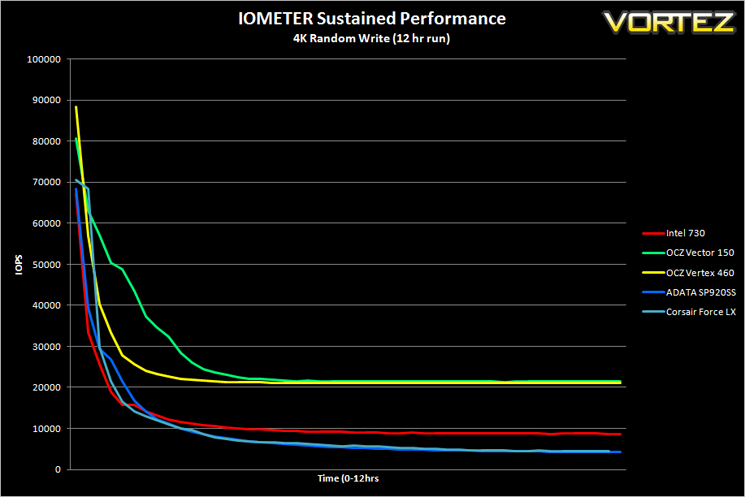
*Note* as this is a new test we have not had time to add all of the drives on test however more drives will be added when time allows.
Benchmarks: SiSoftware SANDRA
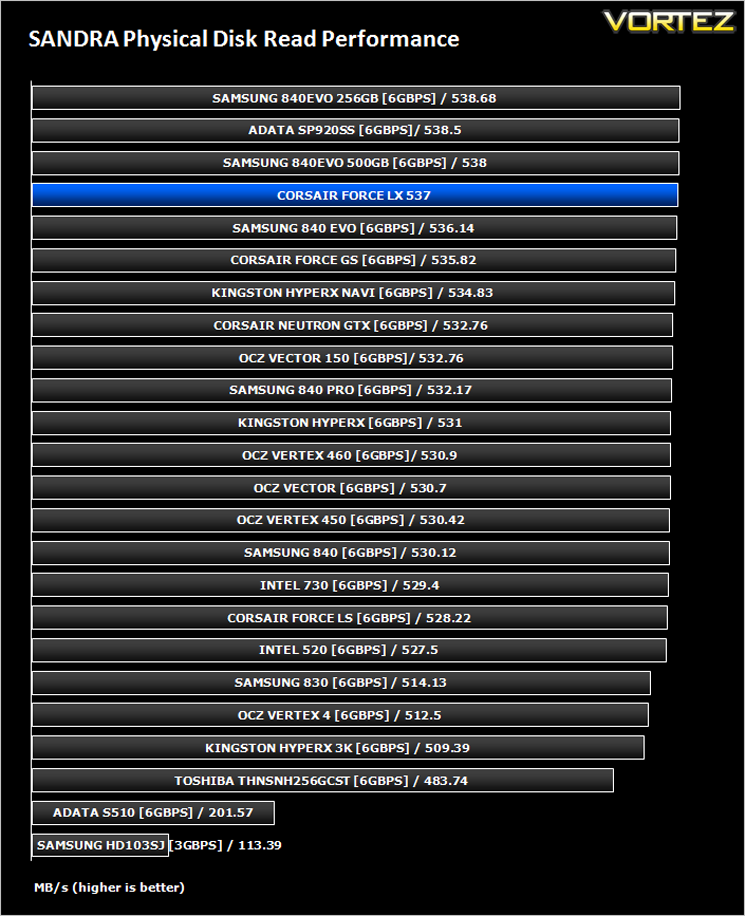
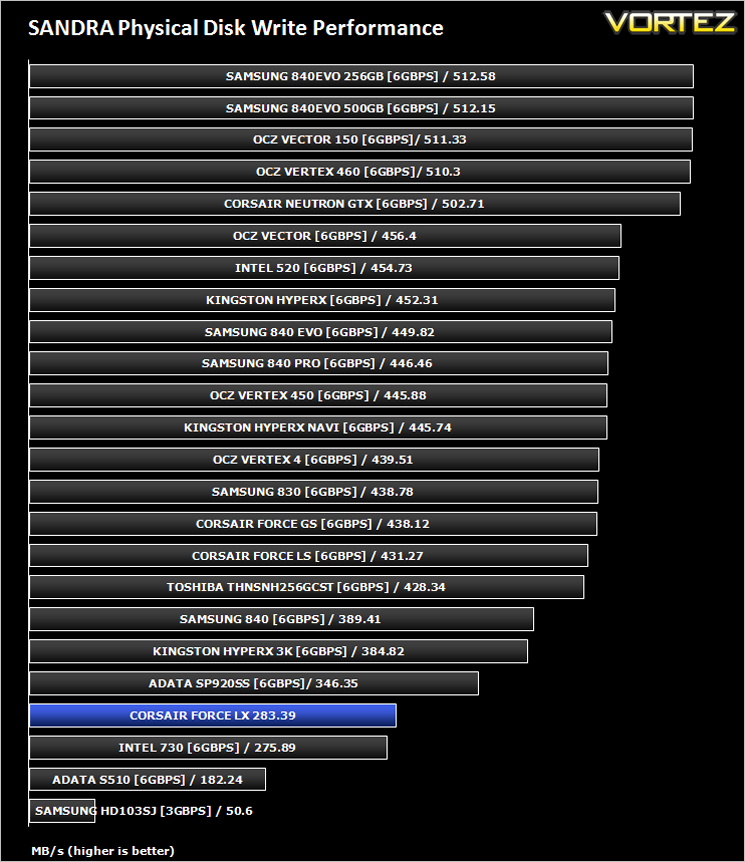
SiSoftware Sandra (the System ANalyser, Diagnostic and Reporting Assistant) is an information & diagnostic utility. It should provide most of the information (including undocumented) you need to know about your hardware, software and other devices whether hardware or software.
Sandra is a (girl) name of Greek origin that means “defender”, “helper of mankind”. We think that’s quite fitting.
It works along the lines of other Windows utilities, however it tries to go beyond them and show you more of what’s really going on. Giving the user the ability to draw comparisons at both a high and low-level. You can get information about the CPU, chipset, video adapter, ports, printers, sound card, memory, network, Windows internals, AGP, PCI, PCI-X, PCIe (PCI Express), database, USB, USB2, 1394/Firewire, etc.
Sandra is a (girl) name of Greek origin that means “defender”, “helper of mankind”. We think that’s quite fitting.
It works along the lines of other Windows utilities, however it tries to go beyond them and show you more of what’s really going on. Giving the user the ability to draw comparisons at both a high and low-level. You can get information about the CPU, chipset, video adapter, ports, printers, sound card, memory, network, Windows internals, AGP, PCI, PCI-X, PCIe (PCI Express), database, USB, USB2, 1394/Firewire, etc.
Benchmarks: HDTune Pro
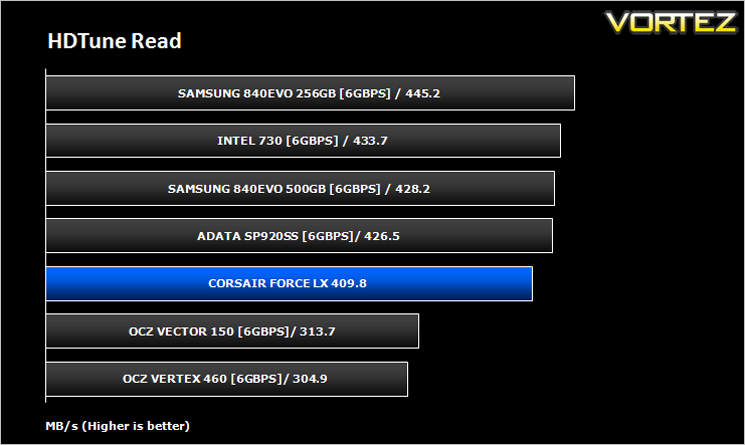
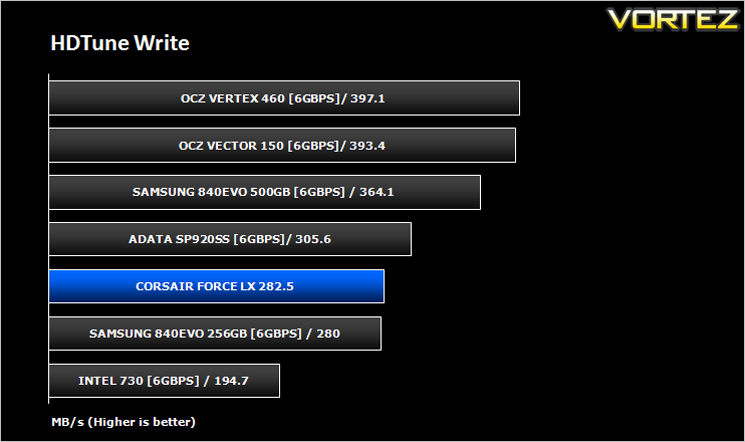
A new utility we have added to our line-up of benchmarks is the ever popular HDTune Pro. HD Tune Pro is a hard disk / SSD utility with many functions. It can be used to measure the drive’s performance, scan for errors, check the health status (S.M.A.R.T.), securely erase all data and much more.
Conclusion
Knowing that the Corsair Force LX was an SSD designed for the budget conscious we weren’t expecting blistering performance but truth be told for the price, we were pleasantly surprised. Not only did the Force LX beat some of the more expensive drives soundly but it also topped the CrystalDiskMark (Synchronous Read speed) benchmark chart. Hitting close to the specified 560MB/s, the Corsair Force LX is certainly no slouch where read performance is concerned. Sadly the same cannot be said when analysing write speeds.
There is so much emphasis put on read speed that it is easy to forget write speeds. Granted, a disk will inevitably read more than it writes but write speeds shouldn’t be wholly discounted. The Force LX didn’t disgrace itself by any stretch of the imagination but it didn’t exactly set new standards either. If write speeds are an important aspect of any potential SSD purchase then you would do well to remember that the bigger the drive, the better the performance so unless you want a drive larger than 256GB, the Force LX may not be for you. This performance was backed up by our 12hr IOPs test where small (4k) chunks of data are written continuously over a 12 hour period. Again, not a poor result but not the best either.
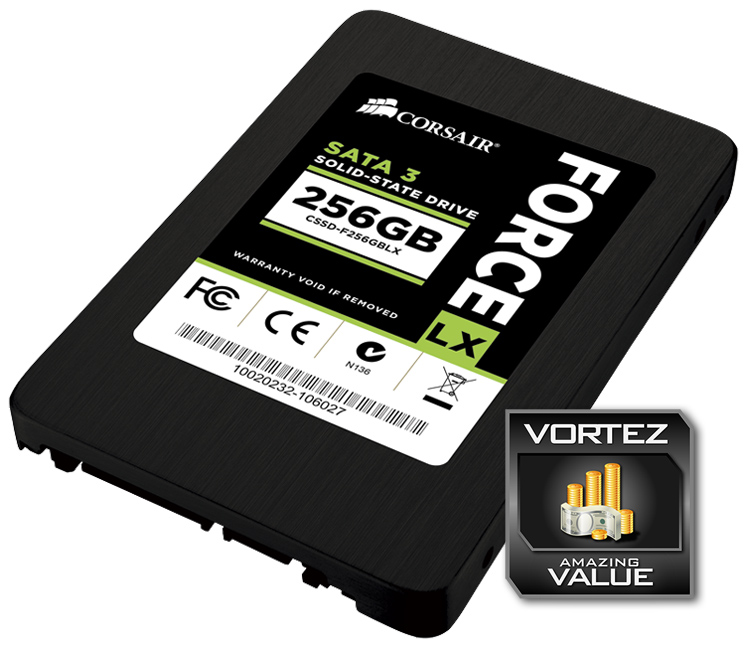
That said, perhaps the most attractive aspect regarding the Corsair Force LX is the price. Today’s review sample costs just £95 GBP / $129 USD and for that you get a very solid performing piece of kit. If you are looking for a performance boost to either your desktop, notebook or indeed an ultra-book thanks to the low profile (7mm) then you could do a lot worse than opt for the Corsair Force LX because for the price, we defy anyone to offer a higher performing SSD with the same amount of storage.
In summary
Embarrassing much more expensive solid state drives, the Corsair Force LX 256GB offers tremendous ‘bang per buck’ which makes it an ideal upgrade choice for those still equipped with mechanical drives.
Pros
+ Aggressively priced
+ Great read speeds
+ 7mm Casing
Cons
– Mediocre Write speed
+ Aggressively priced
+ Great read speeds
+ 7mm Casing
Cons
– Mediocre Write speed

Click here for an explanation of our awards at Vortez.net.


