







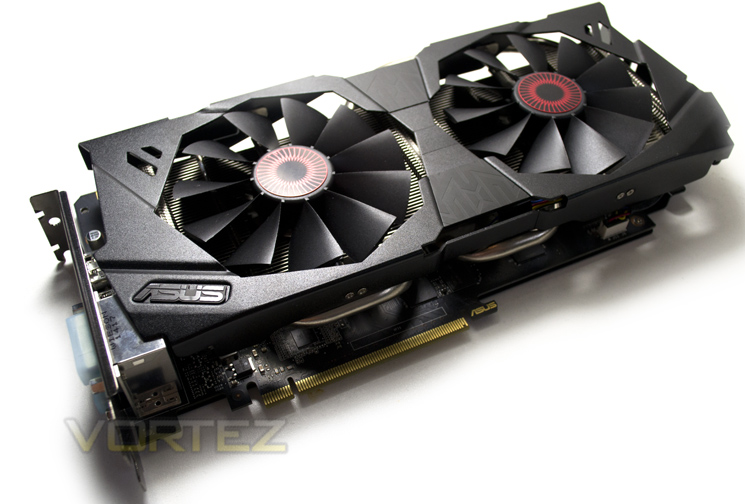
Factory overclocked, Digi+ power and cooled by Direct CU II, ASUS Strix GTX 970 (STRIX-GTX970-DC2OC-4GD5) has all the ingredients for success.

Product on review: STRIX-GTX970-DC2OC-4GD5
Manufacturer & Sponsor: ASUS
Street Price: £299 / $398.99
Take a Maxwell Core, overclock it and then add arguably the best air cooling solution available and what do you get? The ASUS Strix GTX 970 OC. This card appears to have it all, the latest technology from NVIDIA, supreme cooling in the form of the ASUS Direct CU II and a subtle, yet significant factory overclock. This along with the excellent ASUS support makes for a very mouth watering graphics card. The GTX 980 reigns supreme currently, easily bettering the AMD R9-290X so how the GTX 970 will fair remains to be seen but with a slightly lower specification than the GTX 980, ASUS hope to close this deficit somewhat by overclocking the GTX 970 core.
NVIDIA, it seems are aiming this card squarely at the feet of the R9-290 so it is fair to suspect that the GTX 970 will fall somewhere between the performance of the R9-290X and R9-290. However, with AMD’s recent price drops to the R9 range, the R9-290X is now a little cheaper than most overclocked GTX 970’s including this one which makes the battle all the more interesting as the card we have for review today weighs in at £300. It is fair to say that NVIDIA have traditionally been more expensive than their AMD counterpart so perhaps the price differential should come as no surprise but when NVIDIA’s second best is slightly more expensive than AMD’s finest, it had better have the performance to warrant such a price tag.
ASUS on thier Strix range:
Taken from the ancient Roman and Greek word for owl, Strix means the keenest hearing and sharpest eyesight. Strix means feeling your environment so that you detect and react to the slightest movement. Strix means survival on the very edge of instinct. Strix is in your blood, as it is in ours.
Specification
Graphics Engine – NVIDIA GeForce GTX 970
Bus Standard – PCI Express 3.0
Video Memory – GDDR5 4GB
Engine Clock – GPU Boost Clock : 1253 MHz
GPU Base Clock : 1114 MHz
CUDA Core – 1664
Memory Clock – 7010 MHz ( GDDR5 )
Memory Interface – 256-bit
Interface:
DVI Output : Yes x 1 (DVI-I), Yes x 1 (DVI-D)
HDMI Output : Yes x 1 (HDMI 2.0)
Display Port : Yes x 1 (Regular DP)
HDCP Support : Yes
Power Consumption – up to 225W1 additional 8 pin PCIe power required
Software – ASUS GPU Tweak & Driver
Dimensions:
5.5 ” x 11 ” x 1.57 ” Inch
14 x 28 x4 Centimeter
Bus Standard – PCI Express 3.0
Video Memory – GDDR5 4GB
Engine Clock – GPU Boost Clock : 1253 MHz
GPU Base Clock : 1114 MHz
CUDA Core – 1664
Memory Clock – 7010 MHz ( GDDR5 )
Memory Interface – 256-bit
Interface:
DVI Output : Yes x 1 (DVI-I), Yes x 1 (DVI-D)
HDMI Output : Yes x 1 (HDMI 2.0)
Display Port : Yes x 1 (Regular DP)
HDCP Support : Yes
Power Consumption – up to 225W1 additional 8 pin PCIe power required
Software – ASUS GPU Tweak & Driver
Dimensions:
5.5 ” x 11 ” x 1.57 ” Inch
14 x 28 x4 Centimeter
Features
ASUS Strix GTX 970 gaming graphics card is factory-overclocked at 1253 MHz and packed with exclusive ASUS technologies, including DirectCU II to deliver cooler, quieter, and faster performance for incredible action gaming experiences. Strix GTX 970 also features 0dB fan technology to let gamers enjoy total silence during light gameplay as well as Blu-ray movie playback free from distracting background noise. Strix GTX 970 features exclusive ASUS DIGI+ VRM with 6-phase Super Alloy Power components for enhanced durability and cooling, and GPU Tweak for overclocking and online streaming.
Direct CU II
DirectCU II with 0dB Fan Technology
30% cooler. Silent gaming.
Exclusive DirectCU II cooling technology outperforms reference designs with an exclusive 10mm heatpipe that transports 40% more heat away from the GPU — a first for the industry! The design also includes 220%-larger heat-dissipation: this means performance that’s 30% and three-times (3X) quieter than reference for ultra-stable hardcore gaming with very low noise. And Strix ups the ante still further with 0dB fan technology that lets you enjoy games like League of Legends® and StarCraft® in complete silence — because the fan stops completely when the GPU temperature remains below a set level.
Digi+ VRM
DIGI+ VRM with Super Alloy Power
30% less power noise and 2.5X greater durability
Acclaimed DIGI+ VRM has been applied via a 6-phase power design that uses digital voltage regulators to minimize power noise by 30%, enhance power efficiency by 15%, widen voltage modulation tolerance, and improve overall stability and longevity by 2.5 times over reference.
GPU Tweak
GPU Tweak with Streaming
Real-time intuitive graphics tuning
Shows detailed specs and actual card status with GPU-Z
Monitoring widget provides real-time detailed multi-parameter info
Automatically checks and updates drivers and BIOS versions
DSR & MFAA
Dynamic Super-Resolution
Super Sampling Anti-Aliasing (SSAA) isn’t a new concept, but its adoption in games or graphics hardware over the years has been patchy due how processor-intensive the process is. It relies on sampling the scene at a resolution much higher than your native screen resolution and then blending pixels together to output a ‘normal’ resolution frame, reducing ‘jaggies’. It’s often colloquially referred to as the ‘king of AA techniques’, but has given way to MSAA, MLAA and NVIDIA’s own FXAA, each of which are faster and less computationally expensive even if the quality isn’t as good.
Progress in graphics technology and horsepower has meant that a game which would bring a GPU to its knees five years ago can be comfortably played on mid-range hardware these days, whilst top-tier hardware push frame rates well into the hundreds. That’s a lot of horsepower going to waste when it could, if the game supported it, be used to improve image quality significantly.
Relatively recently enthusiasts have used a homebrew technique to increase the resolution which a game engine renders at, and then apply post-processing techniques to reduce the output resolution down to the monitor’s native. Known as downsampling, it’s essentially a form of SSAA. Unfortunately it’s very hit-and-miss, often relying of 3rd-party applications and prone to throwing up OS-level errors; and of course it’s very computationally expensive. However the rewards – beautiful images from older game engines – make the effort worth it.
Today GPUs such as the GTX 780Ti and Titan are being produced which are capable of and designed for 4K resolutions in even modern titles. However most gamers still use 1080p monitors on a day-to-day basis, making a $500+ GPU obscene overkill for all but the most taxing of titles. Because of this NVIDIA are going to start to support downsampling at the driver level through a method they’re calling Dynamic Super-Resolution (DSR).
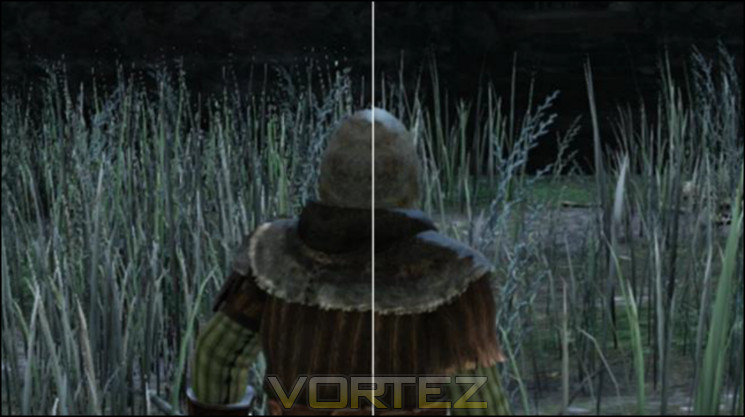
Composite scene, DSR sample on right
Using DSR (which can be enabled automatically through GeForce Experience or the driver application) the game is rendered at a higher resolution and then downscaled to the monitor native resolution. Unlike previous methods however tt’s fully integrated into the driver, meaning not only ubiquitous game support but also a far more stable process than the bespoke solutions previously used.
Whilst the potential image quality benefits are significant it’s also worth noting that DSR would be an excellent measure of assessing whether your setup is capable of supporting a higher resolution monitor in gaming. The performance impact of the downsampling process is apparently only 1-2% (i.e less than a frame per second), so the framerates you get running DSR at 4K on your 1080p monitor should be extremely close to those you get for 4K natively. We’re not sure if NVIDIA intended this, but we’ll certainly take it.
DSR is part of NVIDIA’s launch driver for the GTX 980 and 970, but will also be rolled down to Kepler in the near future. The current implementation is still a little rough around the edges and NVIDIA haven’t supplied a software means of easily showing the downsampled output frame as all in-engine screenshots will be at the supersample resolution, but it shows a great deal of promise.
Multi-Frame Anti-Aliasing
Optimised anti-aliasing techniques is one of the ways GPU manufacturers have sought to differentiate themselves beyond pure frame rates and GFLOP statistics. Recognising that MSAA was insufficient to the needs of shader-based rendering and SSAA was too expensive both AMD and NVIDIA have generated their own methods to combat aliasing, to greater or lesser success. NVIDIA’s most well-known iteration is Fast Approximate Anti-Aliasing (FXAA), initially requiring in-engine implementation but later enabled at the driver level. More recently Temporal Anti-Aliasing was debuted, cleaning up an image based on frame-by-frame changes to pixels around edges. Each has their pros and cons; a good way to get into a fight on enthusiast boards is to claim that one method is flat out better than the other.
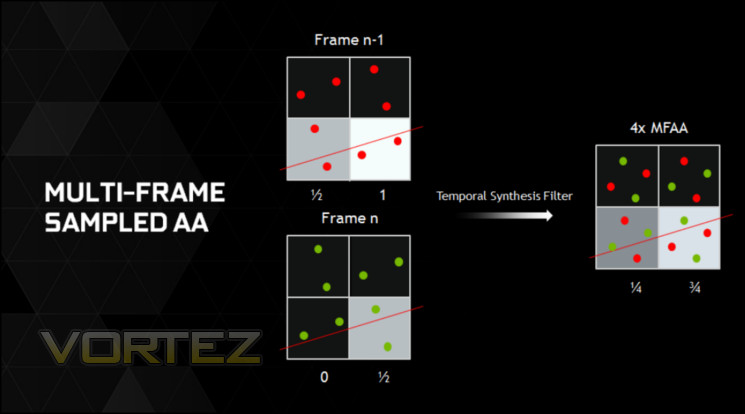
Today Multi-Frame Anti-Aliasing (MFAA, not to be mistaken for AMD’s Morphological Filtering AA) is being announced as a Maxwell-exclusive feature. As the name suggests MFAA is a post-processing anti-aliasing technique which operates by analysing a frame within the context of the previous frame, checking aliasing and rendering colours based on a proprietary algorithm in hardware.
The foundation of MFAA is multi-pixel programmable sampling, a means by which the matrix of sampling positions can be randomised to reduce data processing artefacts caused by repeating the same sample position from frame-to-frame.
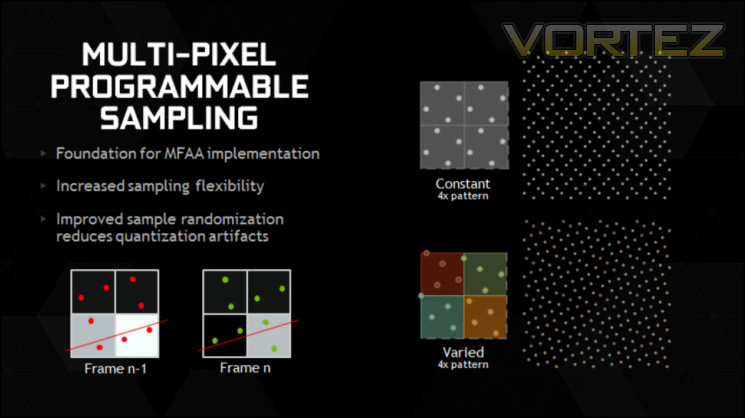
MFAA seeks to be as good as MSAA, but without the performance impact algorithms and with image characteristics that are substantially different from FXAA. The latter has garnered a reputation for slightly blurring images, reducing the overall image quality, and so an effective alternative is probably due at this point.
Sadly MFAA is not quite ready for prime-time and will be issued as part of a driver update at a later date. The obvious question-mark is just how high the image quality presented is, and if it can operate well when the differences between frames is relatively large. However NVIDIA have clarified that the technique will work in tandem with alternate-frame rendering, an SLI mode available when using two or more matched NVIDIA GPUs.
Packaging & Accessories
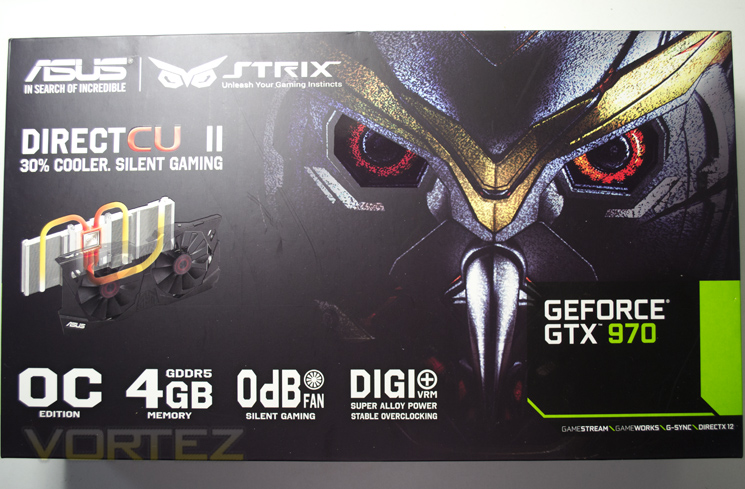
The front of the packaging will look very familiar to those who have purchased an ASUS graphics card previously. The package does however have a Strix flavour featuring the glaring eyes of the owl. Among the features displayed to the lower segment of the packaging is a claim of 0dB. This can only achieved with zero movement and as the display shows us, this card comes with DirectCU II cooling so we can only assume that the fan does not move, at least all of the time.
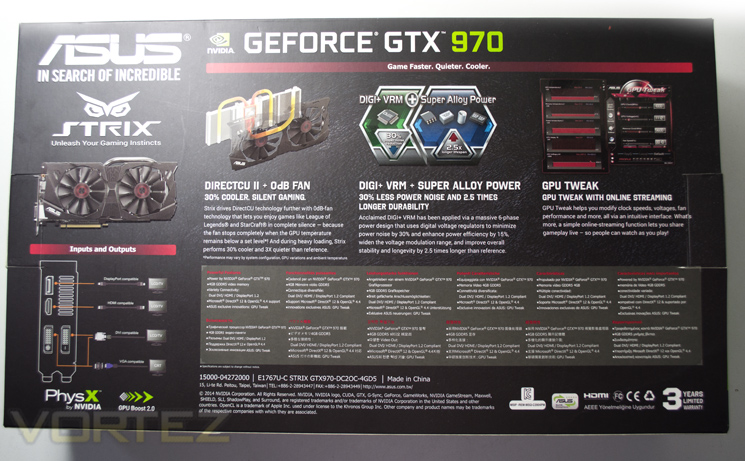
The read of the box goes into greater detail regarding both DIRECT CU II cooling and Digi+ voltage regulation. ASUS it appears are also keen to push their GPU Tweak utility which is strikingly similar to a utility borne from one of ASUS main competitors, MSI with their Afterburner utility. Both do pretty much the same thing so you will not lose out using one over the other but we would of course suggest using GPU Tweak with an ASUS product, if nothing else for uniformity.
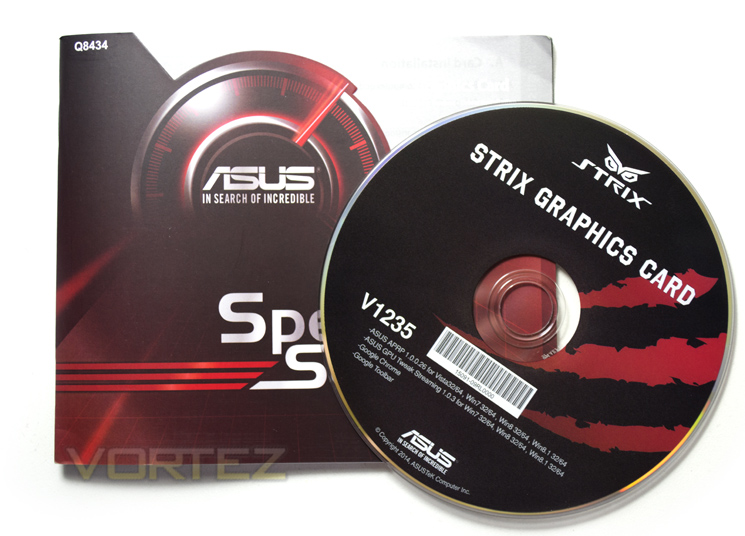
The accessory list is extremely sparse. All we get is an instruction/installation manual and a utility CD. This card requires an 8pin PSU connector so we would have liked to have seen this included in the accessories to allow those who do not have a PSU with an 8pin PCIe power cable to use a 6pin cable instead.
First Look
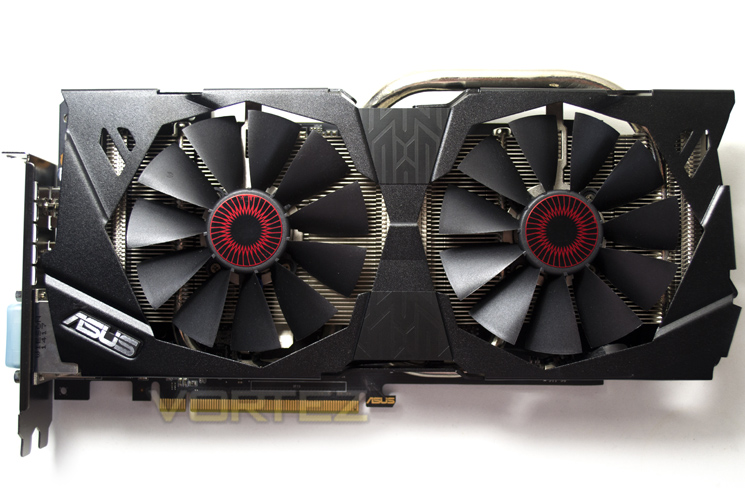
We loved the Direct CU II cooler when we last reviewed it and while this design is a little different, it looks to be no less effective. The angles and louvers carry on the Strix theme as do the iris stickers on each fan centre, replicating two red eyes staring back at you.
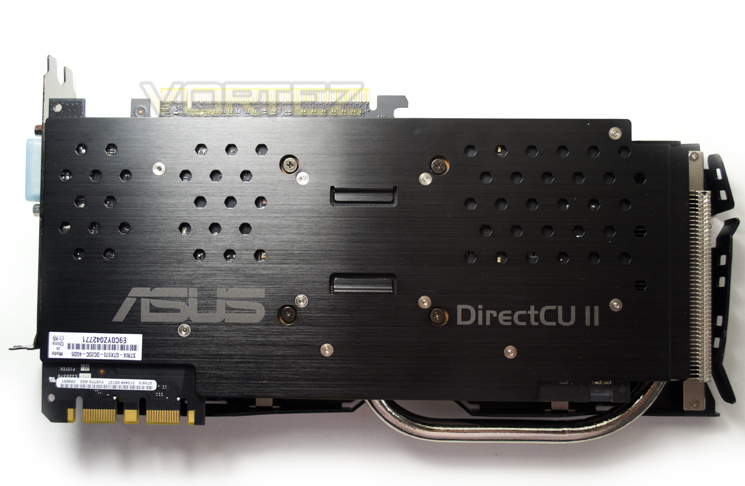
We are happy to see ASUS have included a back plate to the card. While they are not always necessary from a cooling perspective, they do afford a method of protection from damaging the PCB.
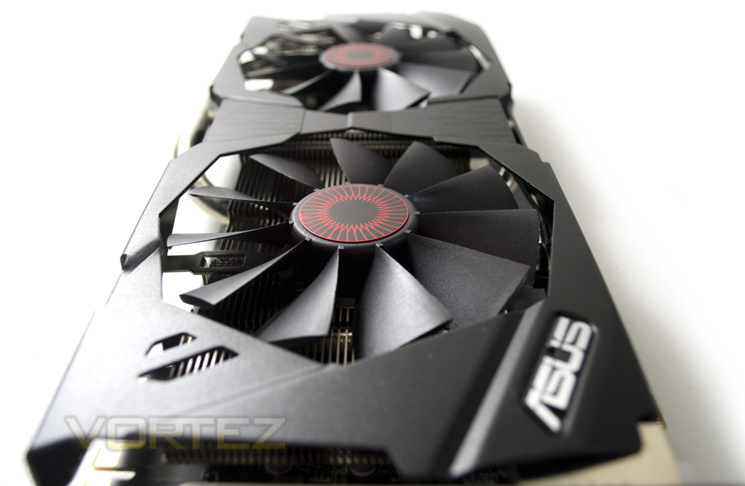
The dimensions of the card are 5.5 ” x 11 ” x 1.57 ” Inches / 14 x 28 x4 Centimetres.
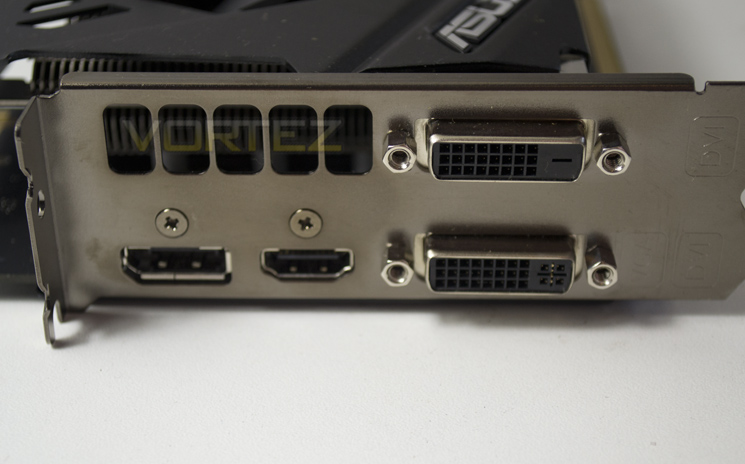
The IO area features the usual array of ports found on NVIDIA graphics cards including DVI-I, DVI-D, HDMI (2.0) and DisplayPort.
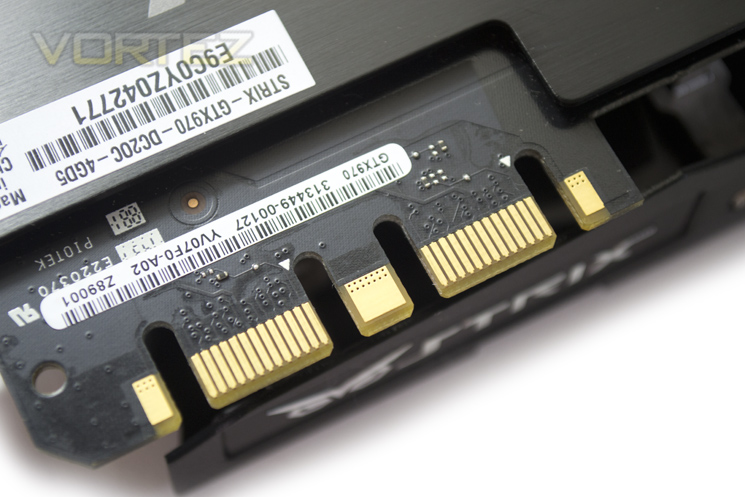
The Strix GTX 970 features twin SLI tabs but it can be linked to any GTX 970 should you wish.
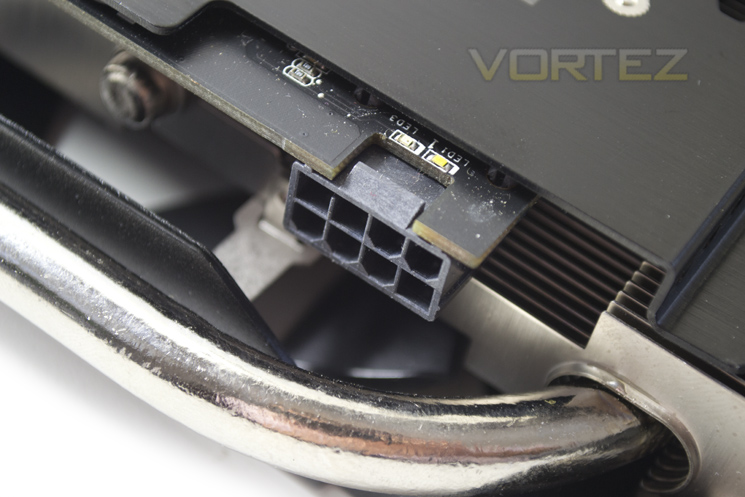
Most interestingly, ASUS have opted to power the card with a single 8pin power port. You will need a PSU capable of delivering 38A with a 500v rating, more so if you intend on using SLI. Don’t forget that an 8pin adaptor will be required if your PSU does not have one.
Should your PSU not be getting enough power and LED will tell you this which is situated next to the power port. If all is fine you will get a white LED.
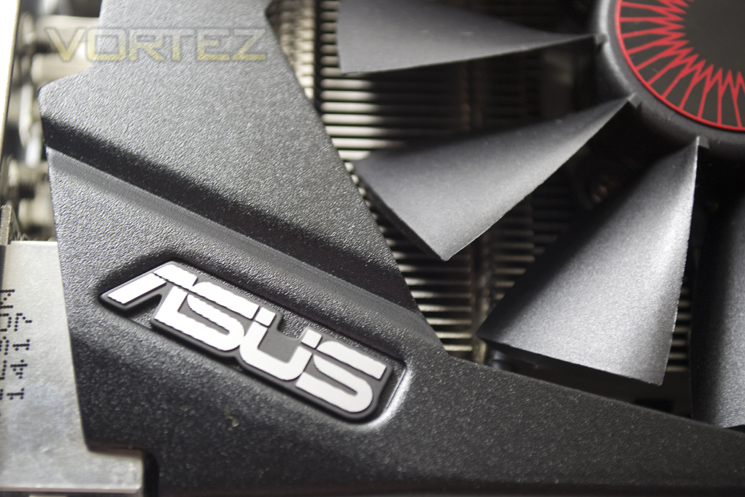
The fans are very aggressively angled and have little curvature to them. IT remains to be seen if this affects acoustics but given that this card is 0dB, we doubt the fans will speed up enough for this to be an issue.
We like the overall look of the card. The little touches such as the ASUS emblem and the way the card resembles the Strix Owl is testament to the thought that has gone into the card.
Closer Look
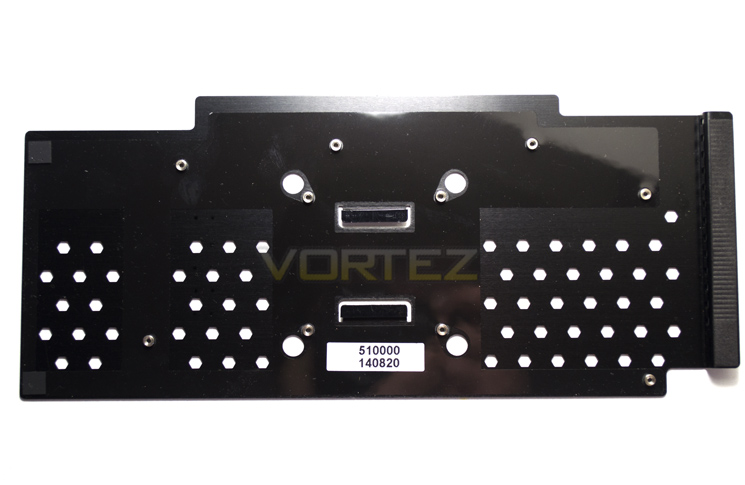
The main cooler will need removing before access is granted to the backplate screws which can then, itself be removed.
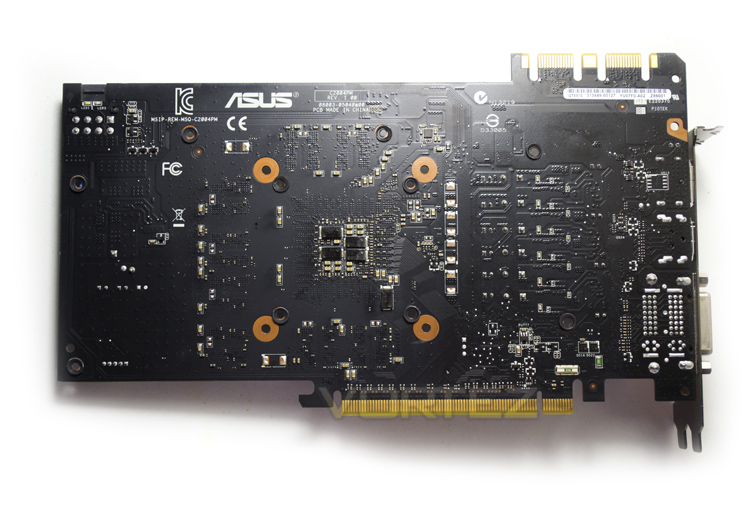
On this particular model, the backplate serves no purpose other than for protection but it does add greatly to the aesthetics of the card.
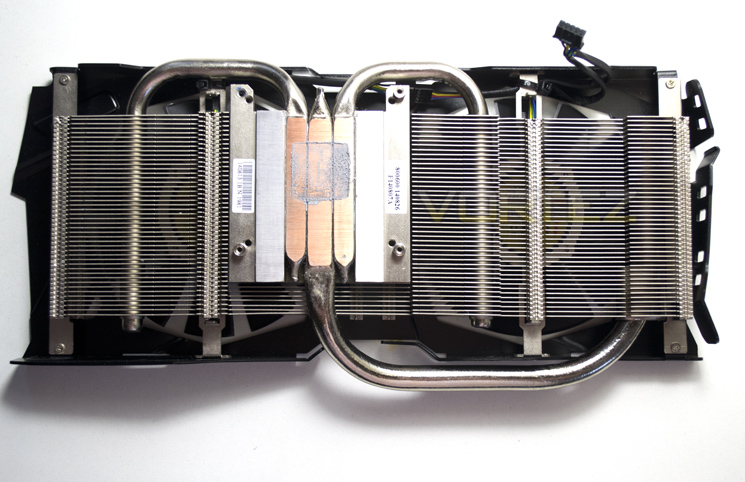
The heatsink cooler features three heatpipes stretch out for the off centre core outwards to dissipate heat amongst the many longitudinal aluminium fins.
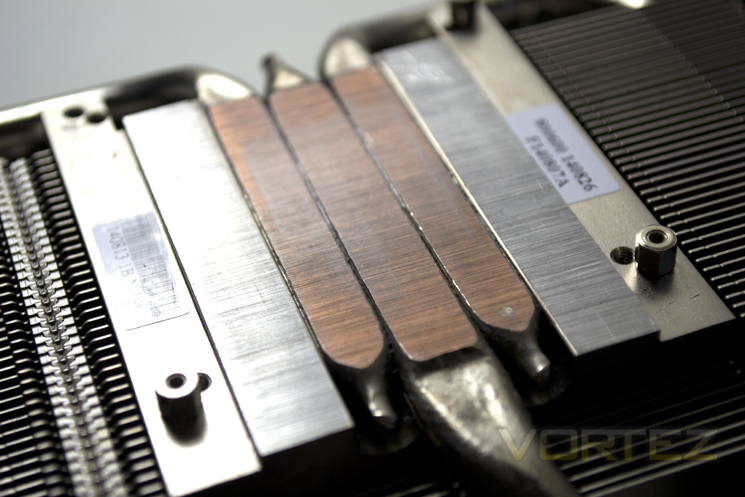
As the name suggests, the copper heatpipes make direct contact with the exposed NVIDIA core. This is the most efficient way of heat transfer available as any material, other than the thermal interface paste, between the core and copper will only reduce the heat transfer.
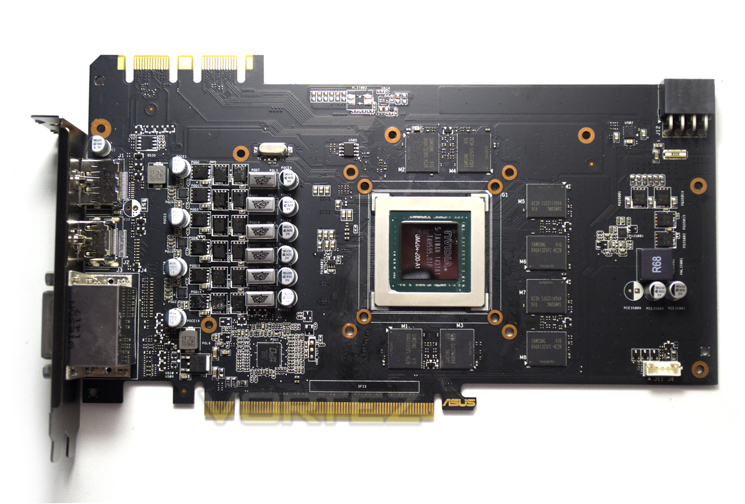
The PCB itself is actually quite small in comparison to the heatsink assembly. It also looks fairly sparse with just 8 512Mb memory chips surrounding the diminutive Maxwell core. ASUS have made a wise decision by colouring the PCB matt black as this perfectly matches the theme of the card.
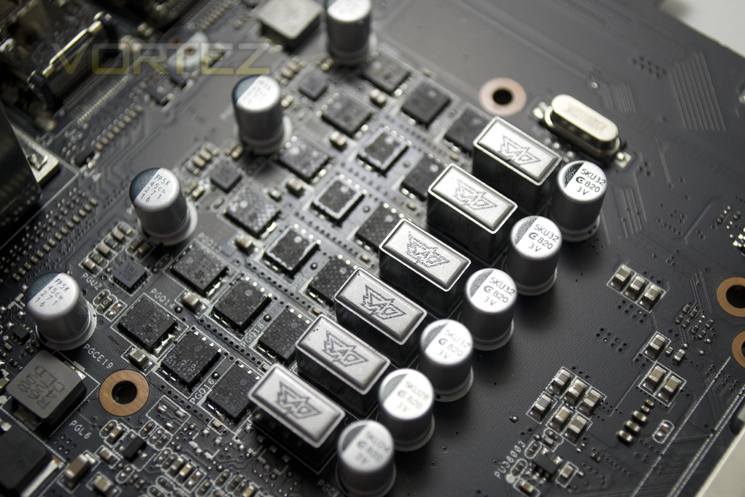
The VRM area features the ASUS Digi+ components comprising of a 6 phase power design. ASUS claim the digital voltage regulators reduce noise by up to 30% while enhancing power efficiency by 15%. Sadly, we do not have the testing kit available to validate these claims but we have no reason to believe this is not the case.
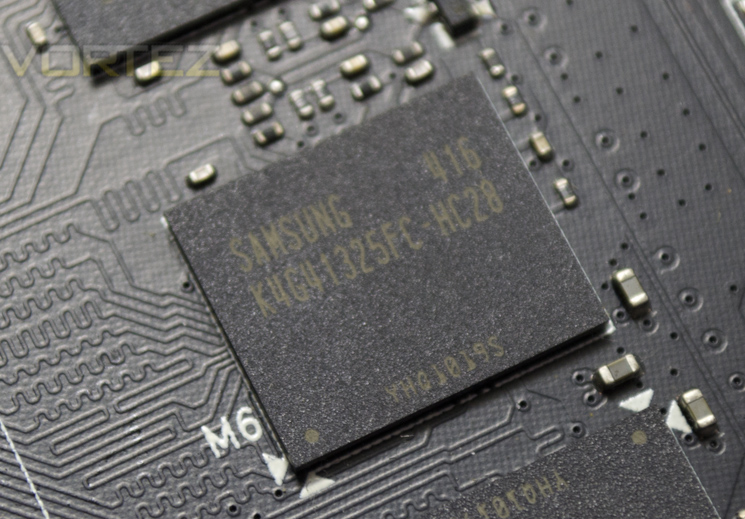
The memory comes courtesy of Samsung and carry the model number K4G41325FC-HC28. These chips are rated to run at 1750 MHz (7000 MHz GDDR5 effective).
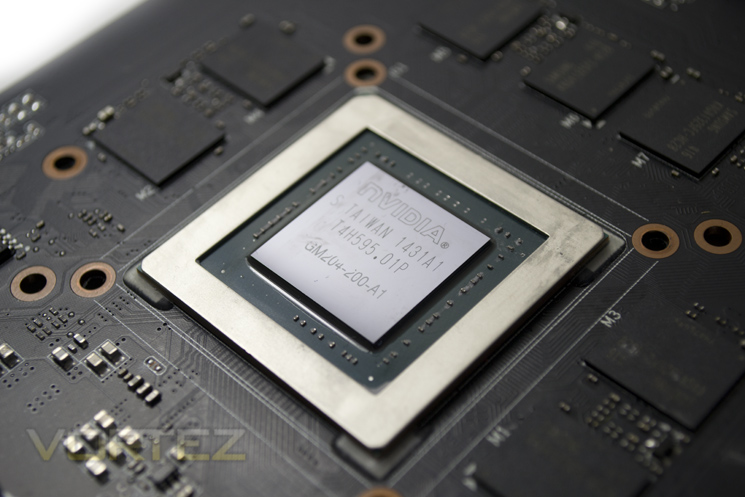
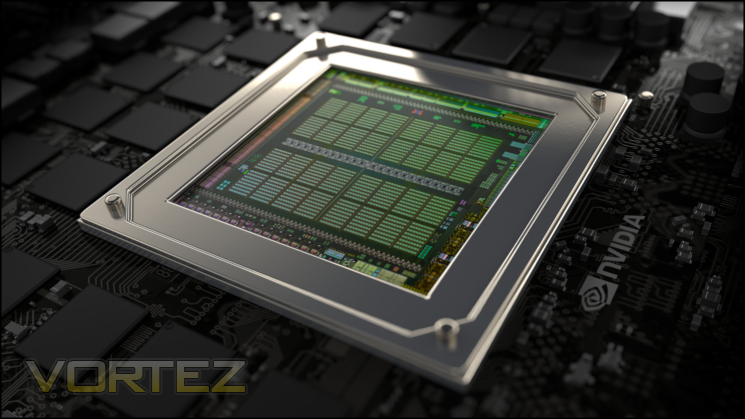
With 5.2 billion transistors crammed into a tiny footprint of 398 mm², the Maxwell core GM204 holds much promise. I think it’s time we put it to the test don’t you?
Test Setup & Methodology
How we test graphics cardsTesting a graphics card is an extremely lengthy process. We sometimes see reviews where a graphic card has been tested using out of date equipment, out of date games and even out of date drivers. While the latter can be excused due to the sheer amount of driver updates making a thorough review impossible we will however notify the reader when we have used a different driver to the normal for example a pre-release driver. For the most part however we will always use the same hardware and latest drivers so this does certainly need to be taken into consideration when viewing our testing results. Each game and benchmark is tested times with the lowest and highest scores omitted out of the 5 results and the average then taken from the three remaining to give us our final result for each resolution and setting used.
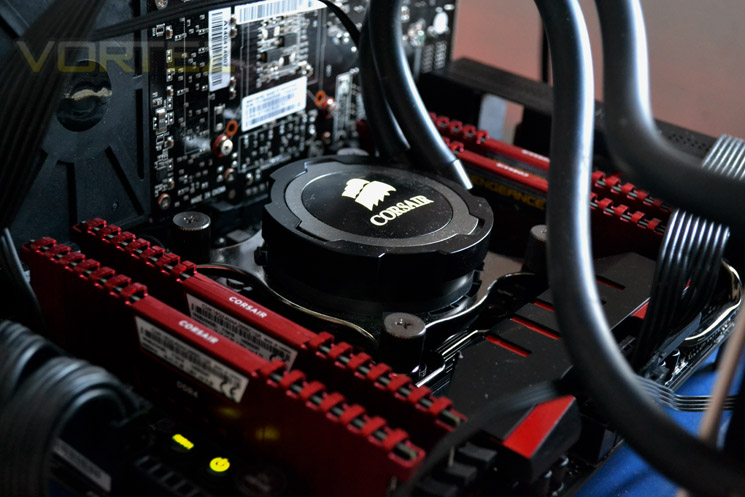
HardwareWith the latest Intel chipset release we decided to update our ageing X79 setup to the very latest X99 chipset. Not only that but we will be using the flagship Core i7-5960X Extreme Edition processor clocked to a realistic, achieveable 4GHz to ensure we have no CPU bottlenecks. With 16GB (4x4GB) of GDDR4 at 2666MHz and a 500GB SSD there should be minimal paging so the benchmarks we run today will hopefully give a true reflection of the graphics card’s performance.
High End Graphics cards on test:
ASUS STRIX GTX 970 4GB GDDR5
(Forceware 340.60) NVIDIA GTX 980 4GB GDDR5(Forceware 340.52)
SAPPHIRE TRI-X R9-290X 4GB GDDR5(Catalyst 14.3)
Special thanks go to Intel, Corsair, MSI and AOC for providing the extreme spec components used for our test bench:
Motherboard: MSI X99S GAMING 9 AC
CPU: Intel Core i7-5960X Extreme Edition @ 4GHz
RAM – 16GB (4x4GB) Corsair LPX Vengeance (Red) DDR3 @ 2666MHz 16-17-17-35 C1
Power Supply – CORSAIR RM Series™ RM1000
Hard Drive – CORSAIR Force Series™ LX 512GB SATA 3 6Gb/s SSD
Cooler – CORSAIR Hydro Series™ H105 240mm Extreme Performance Liquid CPU Cooler
Monitor – AOC 28″ 4K U2868 PQU
CPU: Intel Core i7-5960X Extreme Edition @ 4GHz
RAM – 16GB (4x4GB) Corsair LPX Vengeance (Red) DDR3 @ 2666MHz 16-17-17-35 C1
Power Supply – CORSAIR RM Series™ RM1000
Hard Drive – CORSAIR Force Series™ LX 512GB SATA 3 6Gb/s SSD
Cooler – CORSAIR Hydro Series™ H105 240mm Extreme Performance Liquid CPU Cooler
Monitor – AOC 28″ 4K U2868 PQU
Benchmarks
If you are a regular reader of our reviews you will know we like to test the latest hardware with the latest games and benchmarks on the market. Here are the games we have chosen:
Battlefield 4
Watchdogs
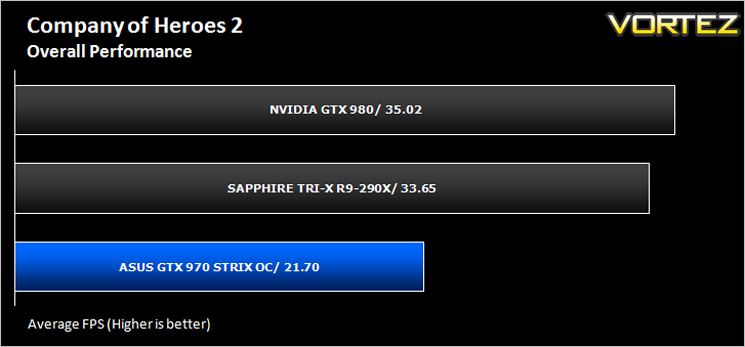
Company of Heroes 2
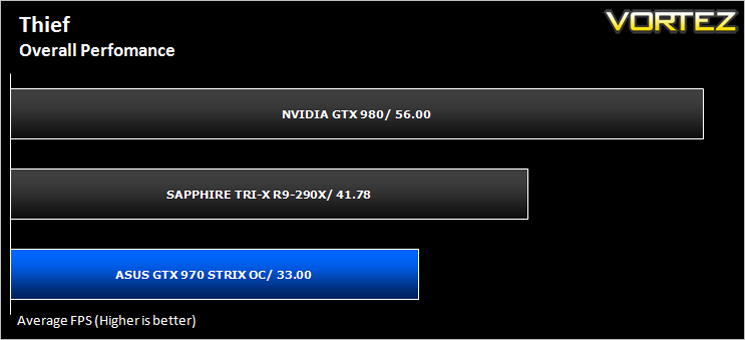
Thief
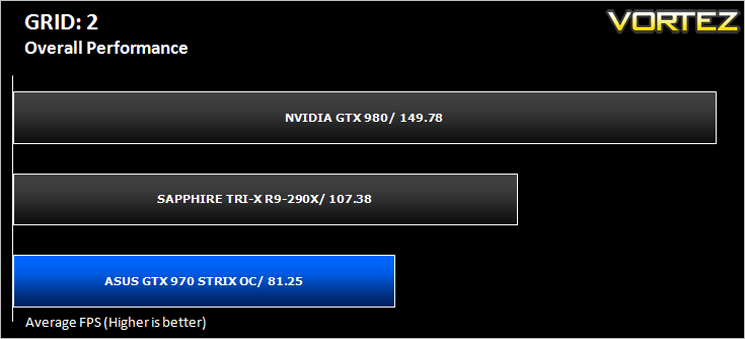
GRID: 2
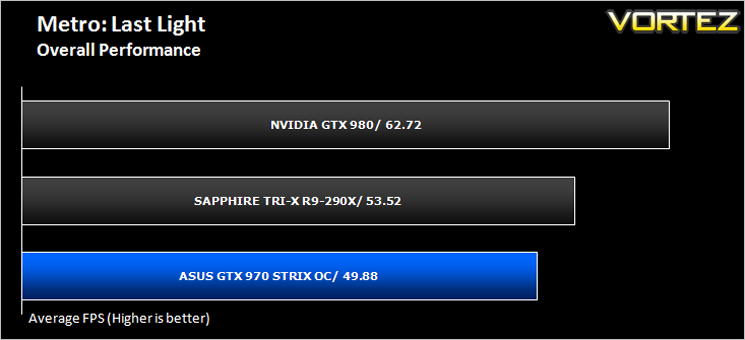
Metro: Last Light
Watchdogs
Company of Heroes 2
Thief
GRID: 2
Metro: Last Light
We also take into consideration the benchmarkers out there so have included 3 of the more popular synthetic benchmarks available:
Unigine: Valley
Unigine: Heaven 4
Futuremark 3DMark Firestrike
Unigine: Heaven 4
Futuremark 3DMark Firestrike
Let’s see how today’s graphics card performed…
Temperature, Acoustics and Power Consumption
Power Consumption
To test for power consumption we take a measurement from the plug socket. It is important to note that the figures below represent total system power use and not just the GPU. The CPU was always in a fixed state (4GHz overclock) so did not affect the additional power load when the GPU was placed under 100% load using Furmark which was ran for 15 minutes at which point a load reading was taken. Idle readings were taken 5 minutes after system boot to ensure any background services and applications had loaded.
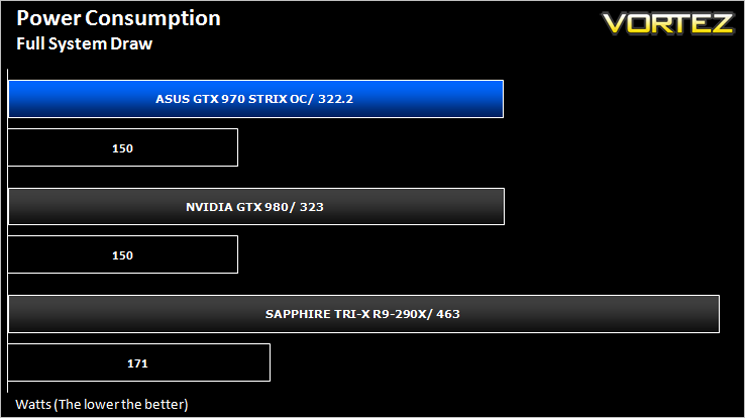
As you can see above, the power figures were fairly good considering this card is overclocked. We would however have liked to see much better figures than the reference GTX 980 as this card produced near identical results to that of the NVIDIA flagship component.
Temperature
To test temperatures we measured idle temperatures after booting windows, letting all applications finish loading and ran a few benchmarks. Once the benchmarks were complete we left the card to reach a cooling plateau where we then took the idle temperatures. For the load tests, we would normally run Furmark for 20 minutes, taking the absolute maximum temperature attained however we found that this throttled the card and resulted in spurious results. So we set Heaven running continuously for 20 minutes and used this as a temperature result.
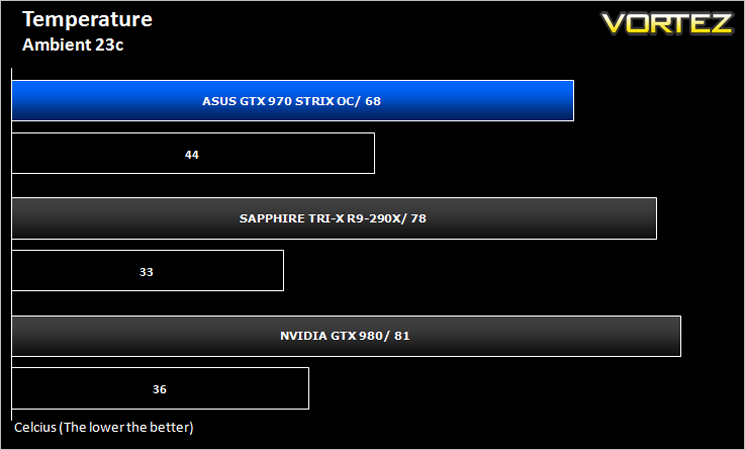
Wow! We already knew that the DirectCU II cooler was amongst the best there is but the card barely budged above 65c during games and to get it to do so meant firing up Furmark. The fans kicked in at 67c which kept the temperatures at 68c or below which is a remarkable achievement.
Acoustics
0dB? ASUS have to be joking right? Well yes and no. The card is indeed a true 0dB component however this is only when idle or doing non-GPU tasks. Fire up a game and you could be forgiven in thinking that that cards fans have broken. We initially thought this too however at 65c the fans will start to spin, first one, then the other. Despite our best efforts we could not get the card to go much higher than 68c so under normal operating conditions, with the fans spinning so low you will not hear this over normal case fans. The only time you will hear it is if you adjust the fan profile which can get a little irritating when raised above 60% but certainly nothing to write home about.
Overclocking
For overclocking today’s sample we will be using ASUS’ GPU Tweak tool as this gives us all of the options we require included the additional voltage controls.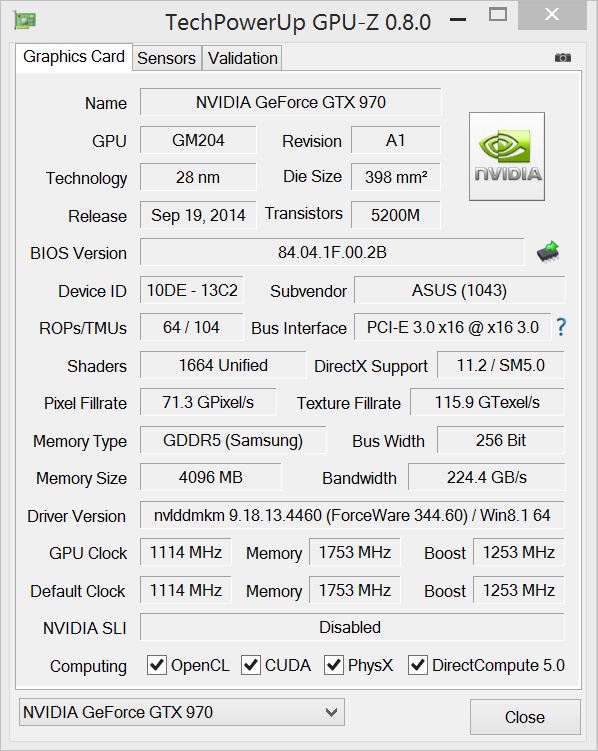
Above is a screenshot of GPU-Z showing the reference (factory overclocked) settings.
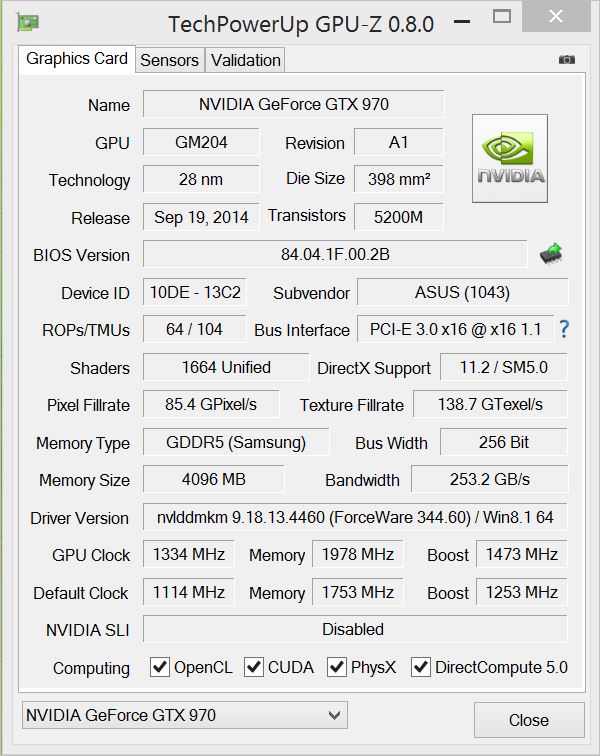
…and manually attained overclock speeds.
Overclocking the ASUS Strix GTX 970 was a pleasure. We first reached our limit when overclocking the memory and then set our sights on the core clockspeed. To be truthful we had looked around to see what other people were getting with this card and dialled those settings in. Not content with these figures though we began increasing, testing and increasing again until our sample topped out at an amazing 1334MHz on the core with a little over 7900MHz attained on the GDDR5. Excellent results!
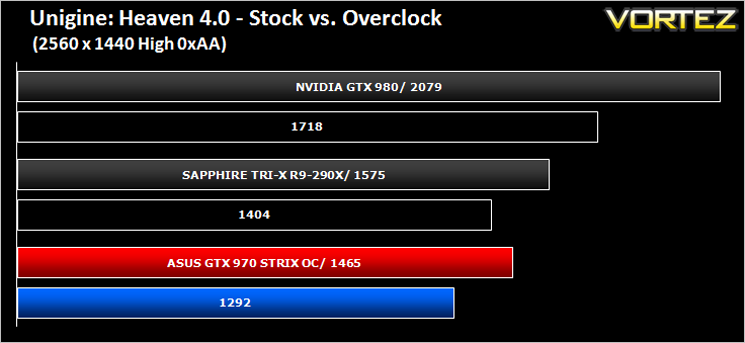
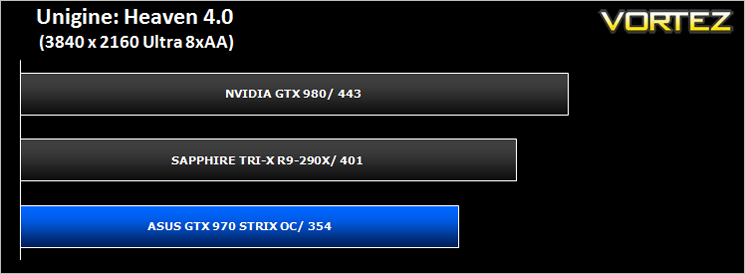
Above we can see the resulting performance increase of the overclock via Unigine Heaven 4.0.
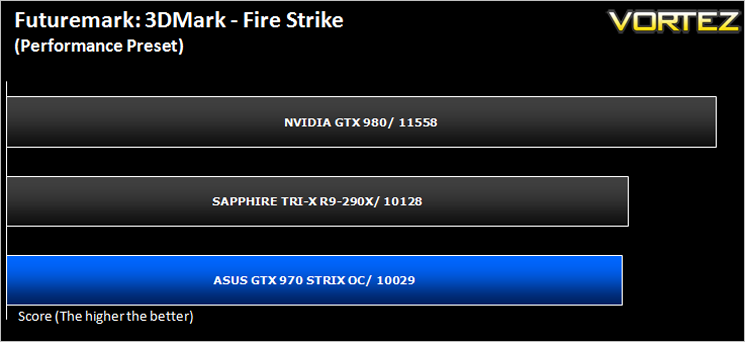
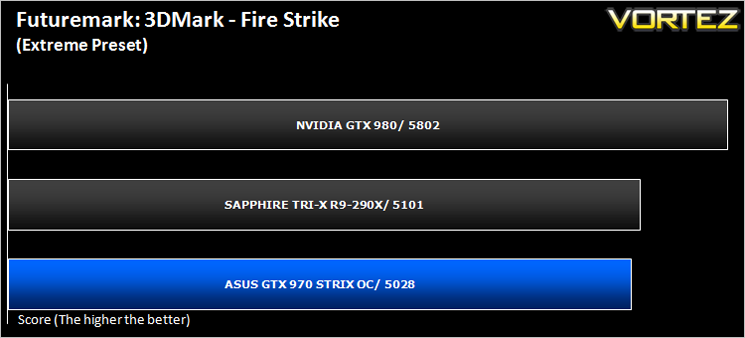
Futuremark 3DMark Fire Strike (Synthetic)
Fire Strike is the new showcase DirectX 11 benchmark designed for high-performance gaming PCs. It is Futuremark’s most ambitious and technical benchmark ever, featuring real-time graphics rendered with detail and complexity far beyond what is found in other benchmarks and games today.
Unigine: Heaven 4 (Synthetic)
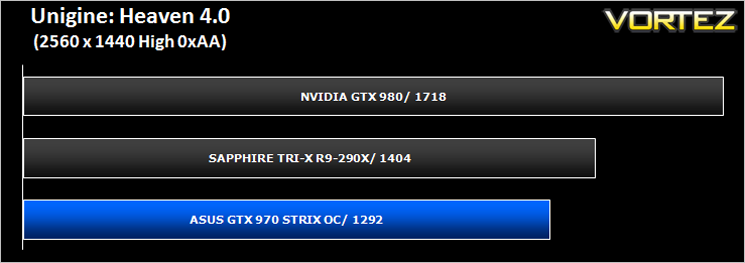
Heaven Benchmark with its current version 4.0 is a GPU-intensive benchmark that hammers graphics cards to the limits. This powerful tool can be effectively used to determine the stability of a GPU under extremely stressful conditions, as well as check the cooling system’s potential under maximum heat output. It provides completely unbiased results and generates true in-game rendering workloads across all platforms.
Unigine: Valley (Synthetic)
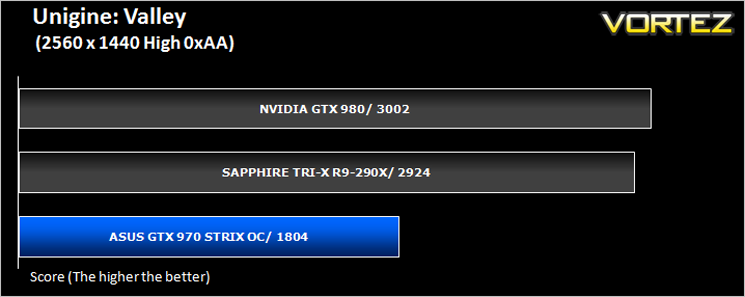
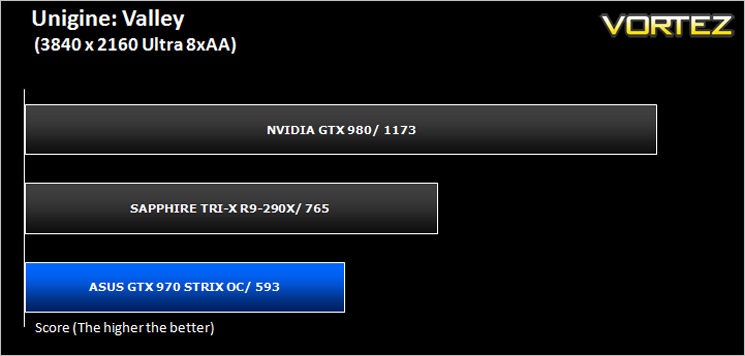
Valley Benchmark is a new GPU stress-testing tool from the developers of the very popular and highly acclaimed Heaven Benchmark. The forest-covered valley surrounded by vast mountains amazes with its scale from a bird’s-eye view and is extremely detailed down to every leaf and flower petal. This non-synthetic benchmark powered by the state-of-the art UNIGINE Engine showcases a comprehensive set of cutting-edge graphics technologies with a dynamic environment and fully interactive modes available to the end user.
Battlefield 4 (FPS)
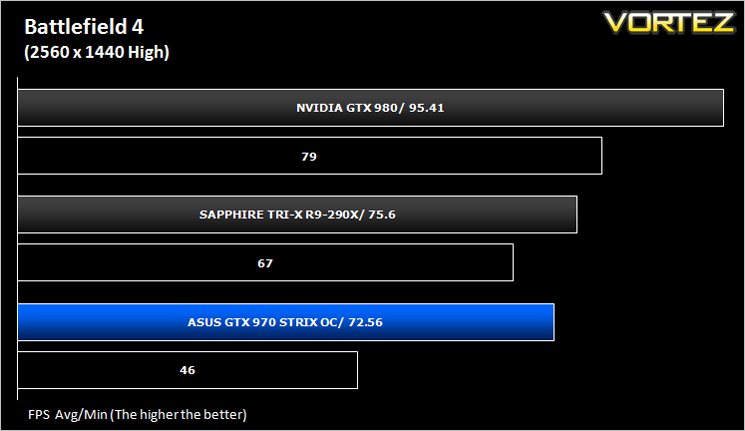
Battlefield 4 is a 2013 first-person shooter video game developed by Swedish video game developer EA Digital Illusions CE (DICE) and published by Electronic Arts. It is a sequel to 2011’s Battlefield 3 and is perhaps currently the most popular online First Person Shooter for PC gamers. It has an extremely powerful gaming engine that will stress components more than most FPS titles available.
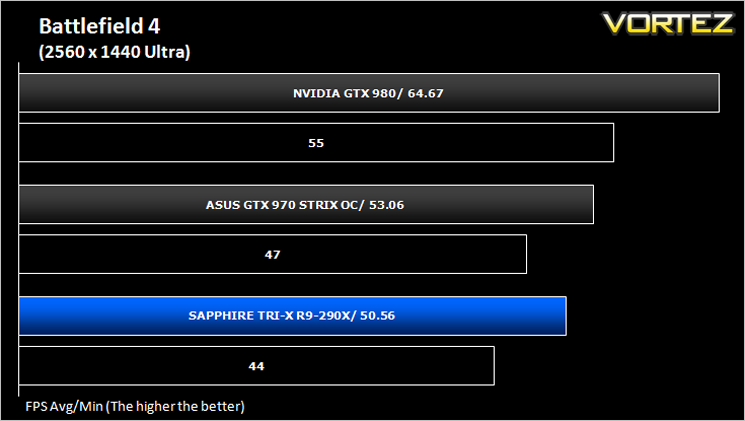
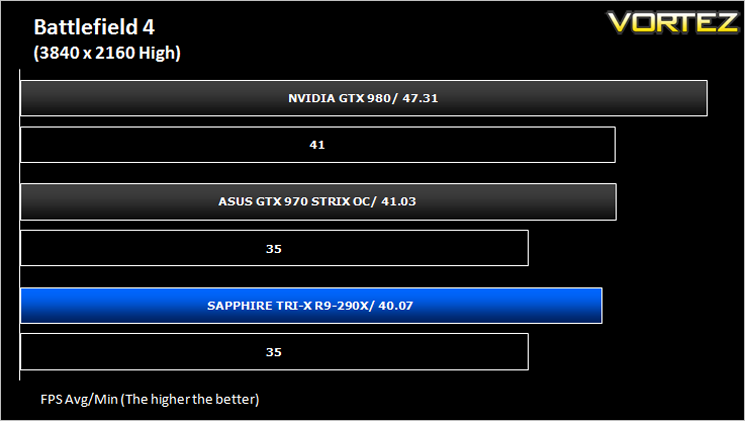
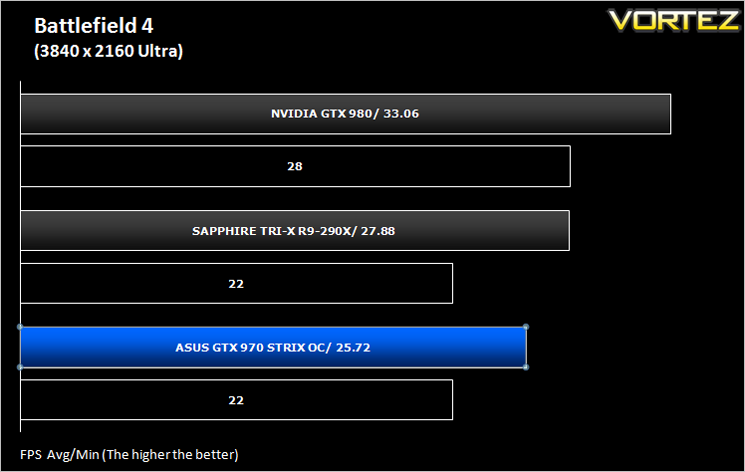
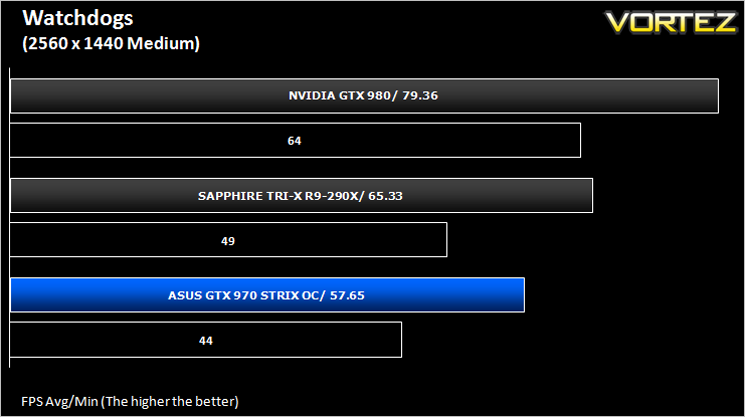
Watchdogs (Action/Adventure)
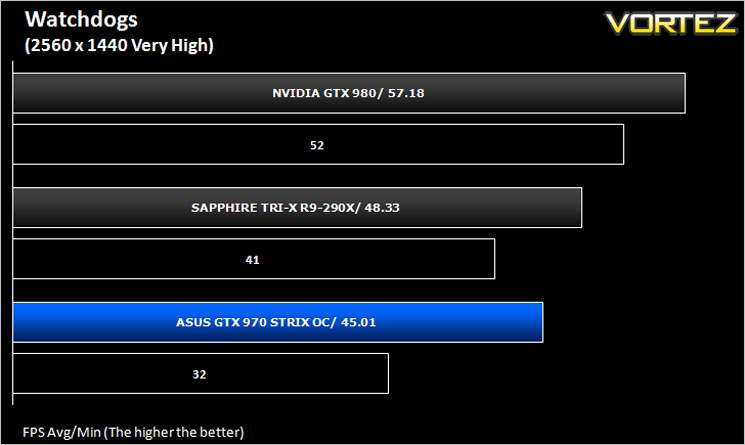
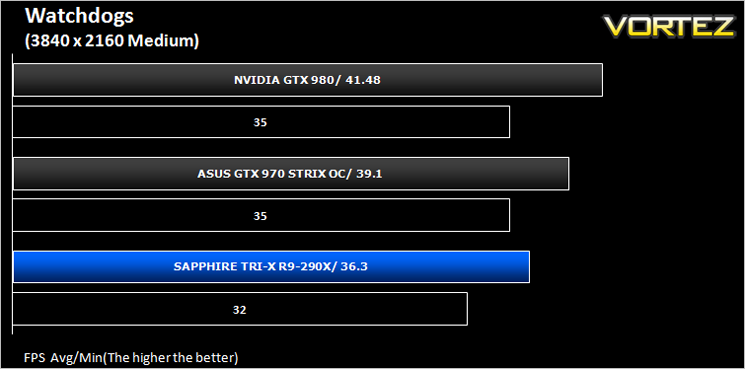
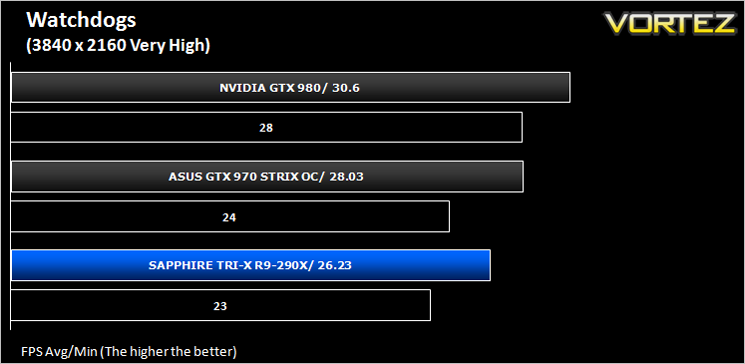
Watch Dogs is a 2014 open world action-adventure video game developed by Ubisoft Montreal and published by Ubisoft. Set within a fictionalized version of Chicago, Illinois, the single-player story follows a hacker and his efforts to seek revenge after the accidental death of his niece. The open world design lets players freely roam Chicago, which includes the urban city, open countryside, and slums. The game is played from a third-person perspective and its world is navigated on-foot or by vehicle. As such this is a very demanding game, especially when graphical options are turned up.
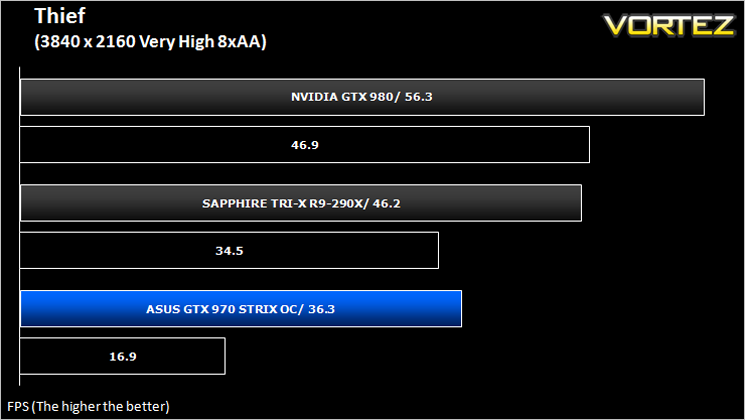
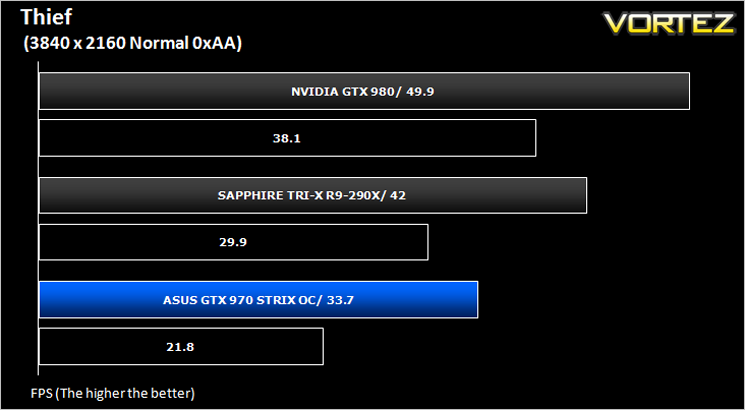
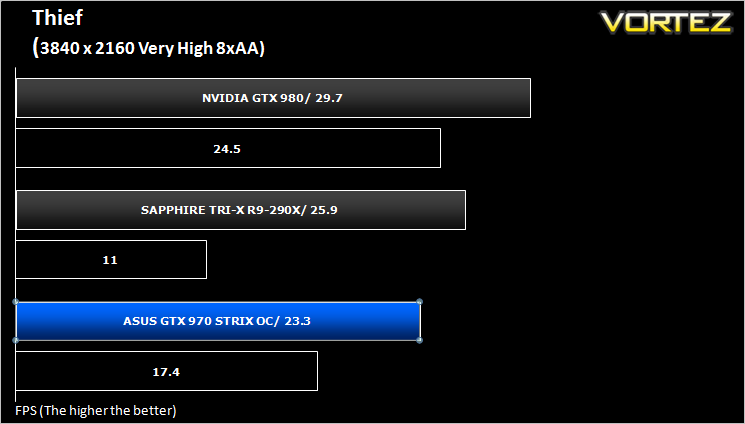
Thief (Stealth)
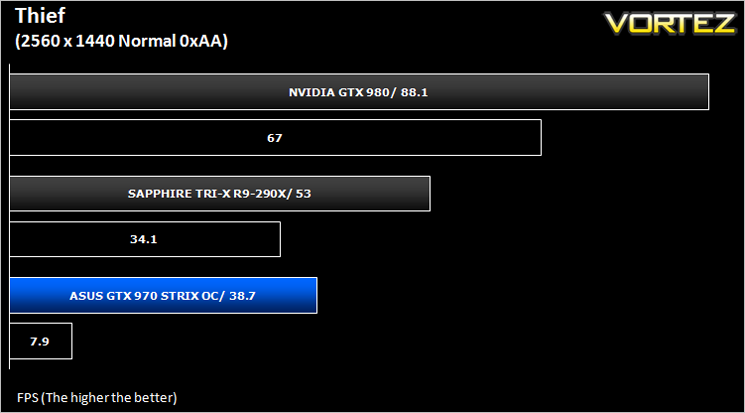
Thief is a stealth video game developed by the Canadian video game developer Eidos Montreal, and published by Square Enix. It is a revival of the cult classic Thief series of stealth games, of which it is the fourth game. Thief is set in a dark fantasy world inspired by Victorian, gothic, and steampunk aesthetics. Using a modified version of the Unreal Engine 3 it makes for a challenging game to pitch against our range of components.
Company of Heroes 2 (RTS)
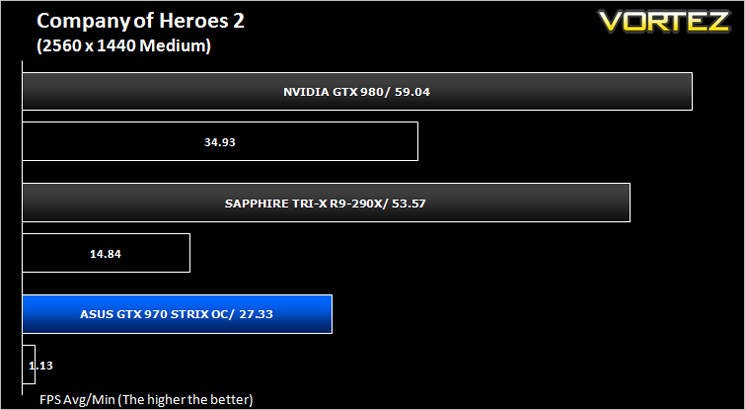
Company of Heroes 2 is a real-time strategy video game developed by Relic Entertainment. It is the sequel to the critically acclaimed 2006 game Company of Heroes.As with the original Company of Heroes, the game is set in World War II but with the focus on the Eastern Front, with players primarily controlling the side of the Soviet Red Army during various stages of the Eastern Front, from Operation Barbarossa to the Battle of Berlin. Company of Heroes 2 runs on Relic Entertainment’s proprietary Essence 3.0 game engine and is extremely demanding of both CPU and GPU.
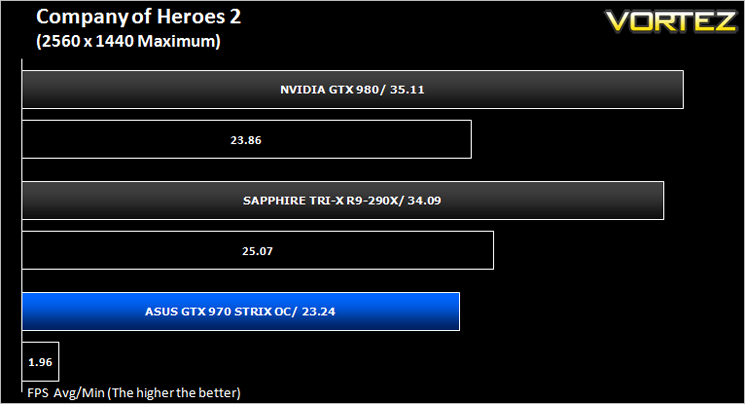
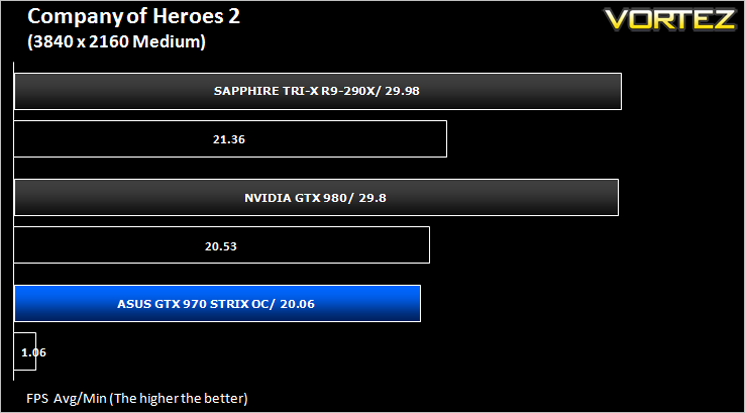
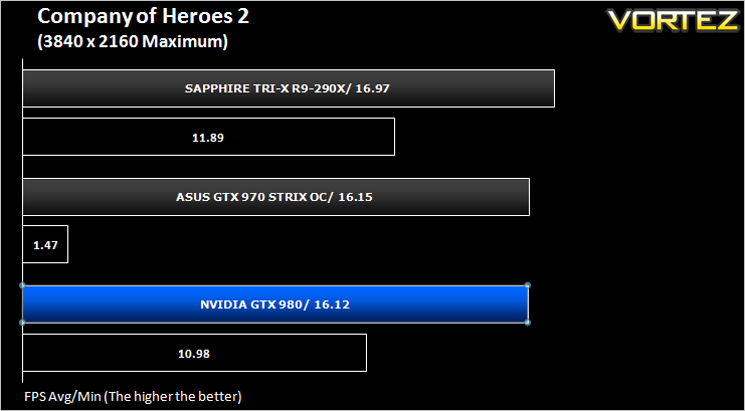
Metro: Last Light (FPS)
Metro: Last Light is a single-player post-apocalyptic-themed first-person shooter video game with stealth and survival horror elements, developed by Ukrainian studio 4A Games and published by Deep Silver. The game is set in a post-apocalyptic Moscow, part of the universe of the novel Metro 2033 and its sequels, written by Russian author Dmitry Glukhovsky. The second of our FPS titles, it runs on the 4A gaming engine which again, has the capability to stress even the best GPU components.
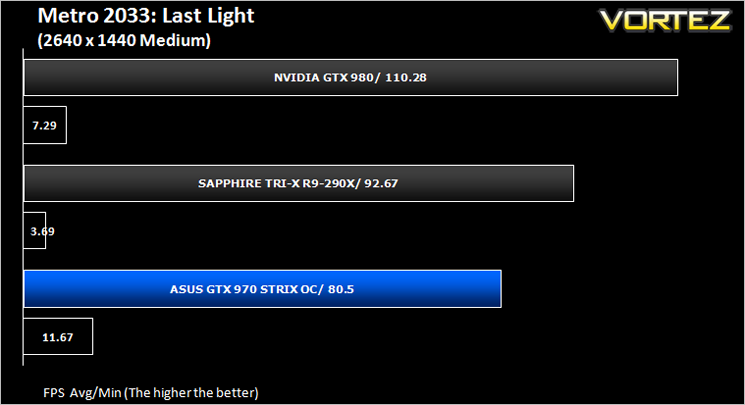

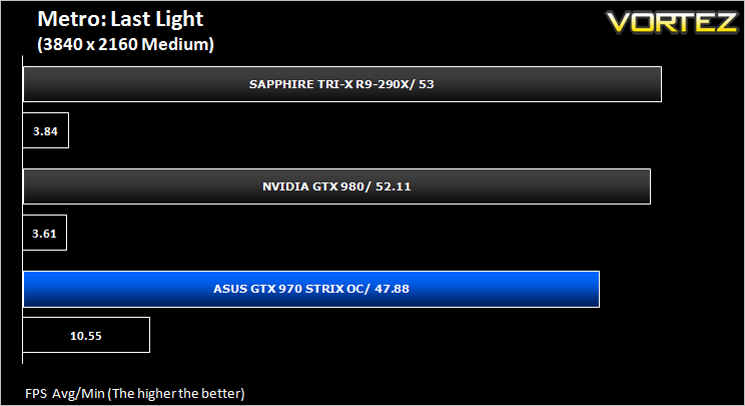
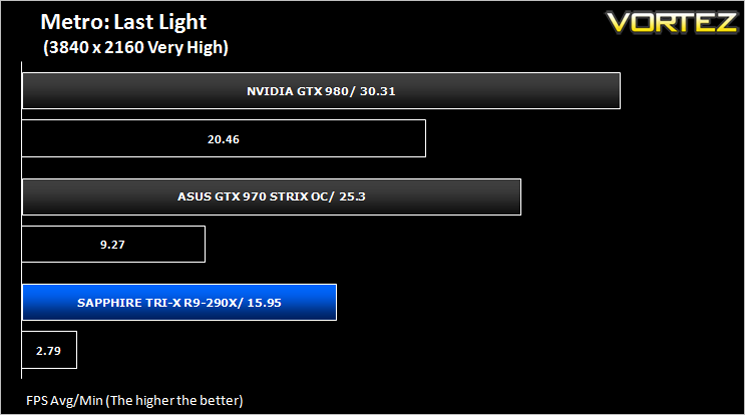
GRID: 2 (Arcade Sim)
Grid 2 (stylised as GRID 2 and known as Race Driver Grid 2 in Japan) is a racing video game developed and published by Codemasters and is the sequel to 2008’s Race Driver: Grid. The game includes numerous real world locations and cities such as Paris. It also includes motor vehicles spanning four decades. In addition, it includes a new handling system that developer Codemasters has dubbed ‘TrueFeel’, which aims to hit a sweet spot between realism and accessibility. It uses the EGO 3.0 engine which while not overly challenging, is representative of games of this genre.
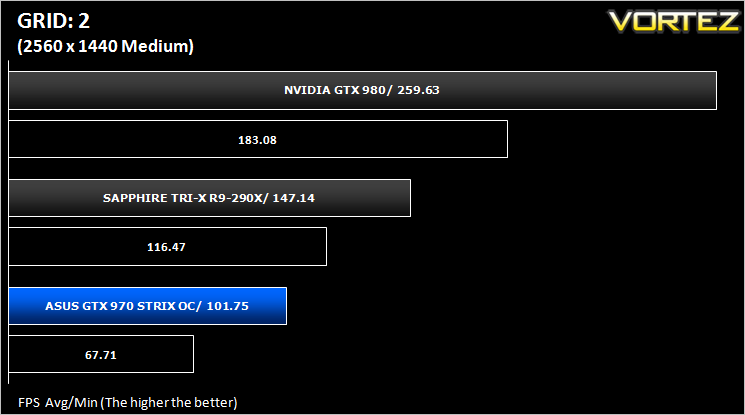
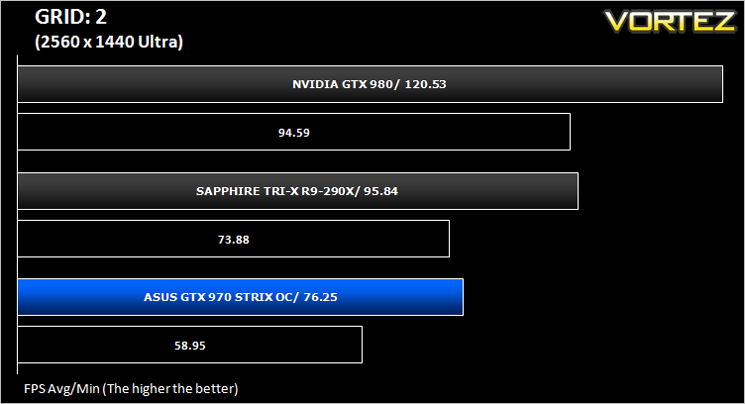
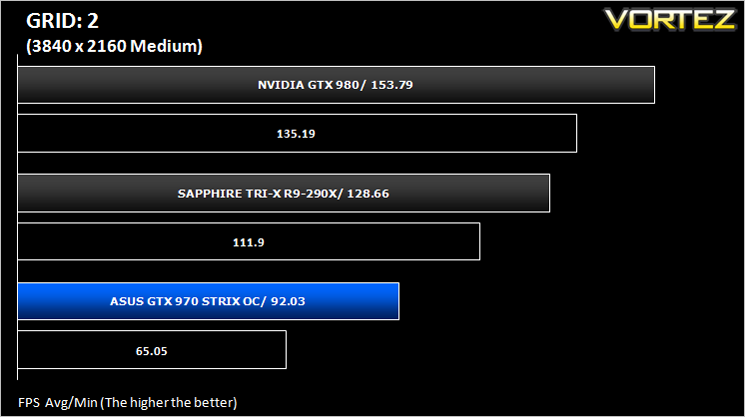
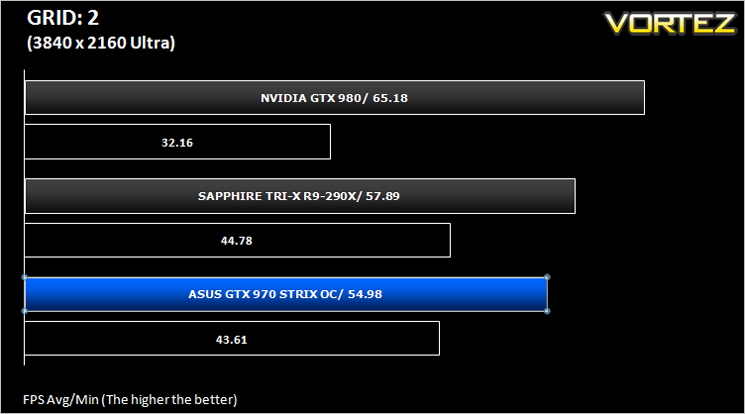
Overall Performance
Here we take a look at the overall performance of the graphics card. This figure is determined by finding the average FPS across all of the settings used in a particular benchmark(game) to give us an overall value.
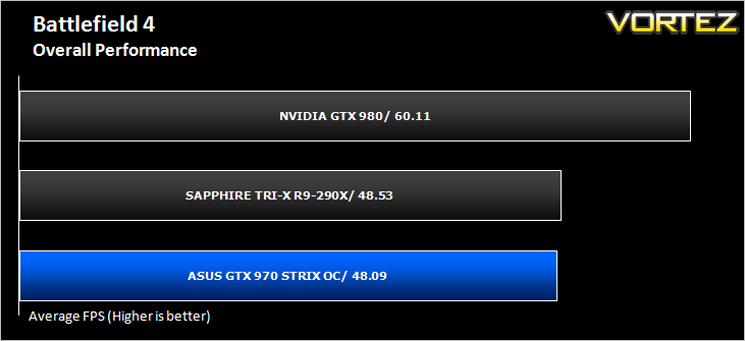
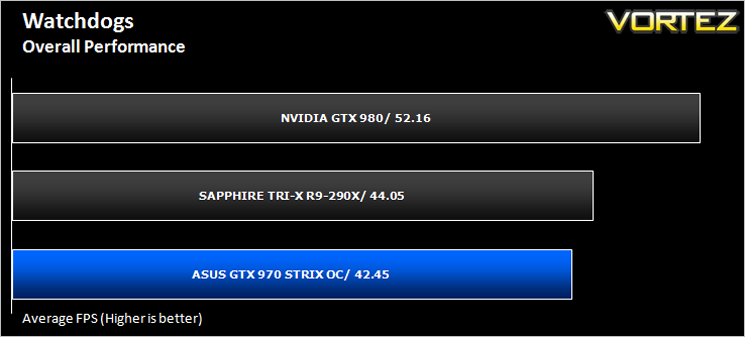
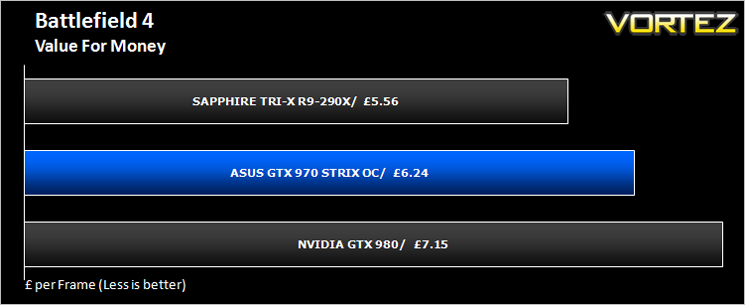
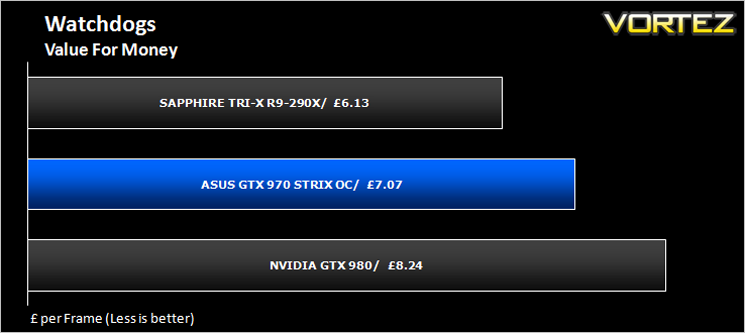
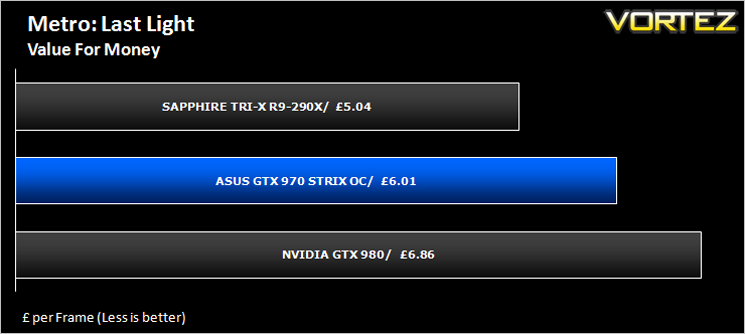
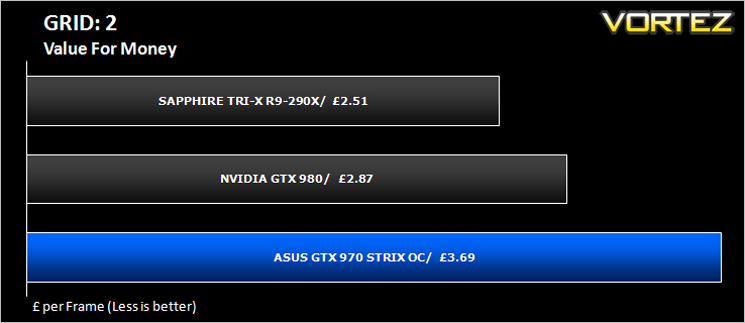
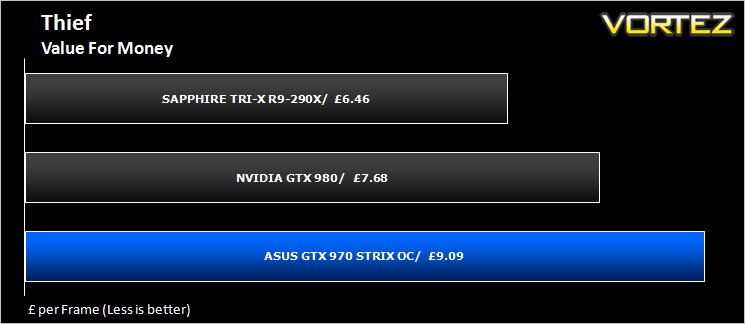
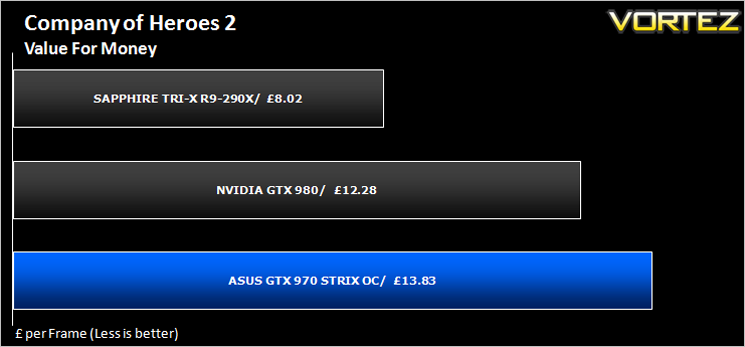
Value For Money
We make a simple calculation for this set of results. For each game we add all of the resulting FPS totals together and then divide by the four sets to give us an overall performance figure. While the figures alone do not give you an accurate picture of how the card will perform in any given scenario, they do tell you, when averaged, which GPU is the more capable across all of the benchmarks and settings tested.
Conclusion
We guess the question you want answering first is whether you should choose this over the AMD 290. Yes is the simple answer, however there is a caveat to that. The 290X is still ever so slightly faster in the majority of scenarios and perhaps just as important is the 290X is also a little cheaper if you shop around. Now that isn’t to say you should buy the 290X over this card as the office was divided on which graphics card they would like in their gaming system. On the one hand you have the ASUS Strix GTX 970. It has to be the most powerful card available when you consider the performance to noise ratio. You simply will not get a quieter card that pumps out the same frames per second and that includes watercooled varieties. ASUS have done a fantastic job with the Direct CU II cooling design so much so we would say it is overkill for this card which is not a hot card by any stretch of the imagination, even with the moderate overclock applied. On the other hand, money and performance talk and to this end the AMD 290X is ever so slightly the better performing card for a little less money.
We expected slightly better performance from the GTX 970 in truth as there is quite a gap between this card and the GTX 980 it supports and had the GTX 970 offered a little more for the money it would be no brainer to buy this card over the competition however that competition remains and as such we really couldn’t say which graphics card should be purchased over the other. We suspect your allegiance will lay with what your preference is, silence, performance or cost. Whichever card you choose there is so little to choose between them we don’t think you will be disappointed.
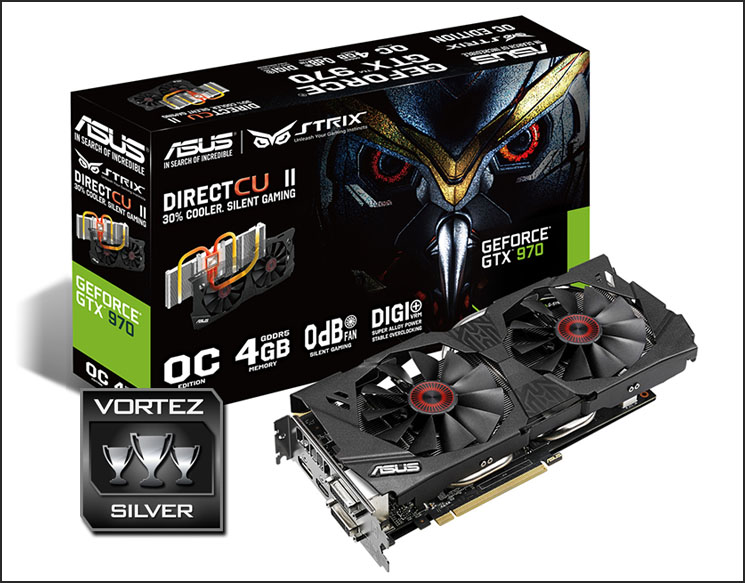
The ASUS STRIX GTX 970 is a great card that’s for sure and for this reason we have no quibbles in awarding it our silver award. The cost of the card is our main criticism as if it were just £20 or £30 cheaper, thereby undercutting the 290X then it would be so much more attractive. Strix after all means reacting to the slightest movement. Shame then that the card has failed to react to the movement in the GPU market that sees a faster card undercut it on price. As it stands it carries the combined cost premium of owning an ASUS and NVIDIA card which when all things are considered is not such a bad thing to have is it?
To summarise:
A very cool, quiet and high performing graphics card that offers great looks in a decision that has few equals.
Pros
+ Class leading Cooling
+ Power efficient
+ Excellent Looks
+ Great overclocking potential
Cons
– Slightly more expensive than a R9-290X
– Slightly slower than a R9-290X
+ Class leading Cooling
+ Power efficient
+ Excellent Looks
+ Great overclocking potential
Cons
– Slightly more expensive than a R9-290X
– Slightly slower than a R9-290X

Click here for an explanation of our awards at Vortez.net.


