Republic of Gamers present the STRIX X470-F GAMING, the budget-enthusiast option for a feature-rich entry into the land of the 2nd Gen. Ryzen processors.

Product on Review: ROG STRIX X470-F GAMING
Manufacturer: Republic of Gamers
Street Price: £175.99 / $194.99 USD / $319 AUD
August last year saw Vortez taking a look at the ROG STRIX X370-F GAMING – it’s stripped back overclocking features and focus on what gamers require earned it the Premium award. Today we look at the ROG STRIX X470-F GAMING, the 2nd Gen. Ryzen version of that very same motherboard.
The previous generation landed at £190, offering incredible performance for the money. The X470-F comes in at £14 less than that; this reduction in launch pricing certainly bodes well for the consumer seeking performance on a budget.
The STRIX X470-F GAMING features a neutral, black and white colour scheme, onto which the usual Aura Sync RGB colours are introduced on the IO shield at the back of the motherboard, illuminating the wedge shape and ROG logo. The graffiti style text on the southbridge heatsink gives an iridescent effect, changing colour depending on the angle of light hitting it.
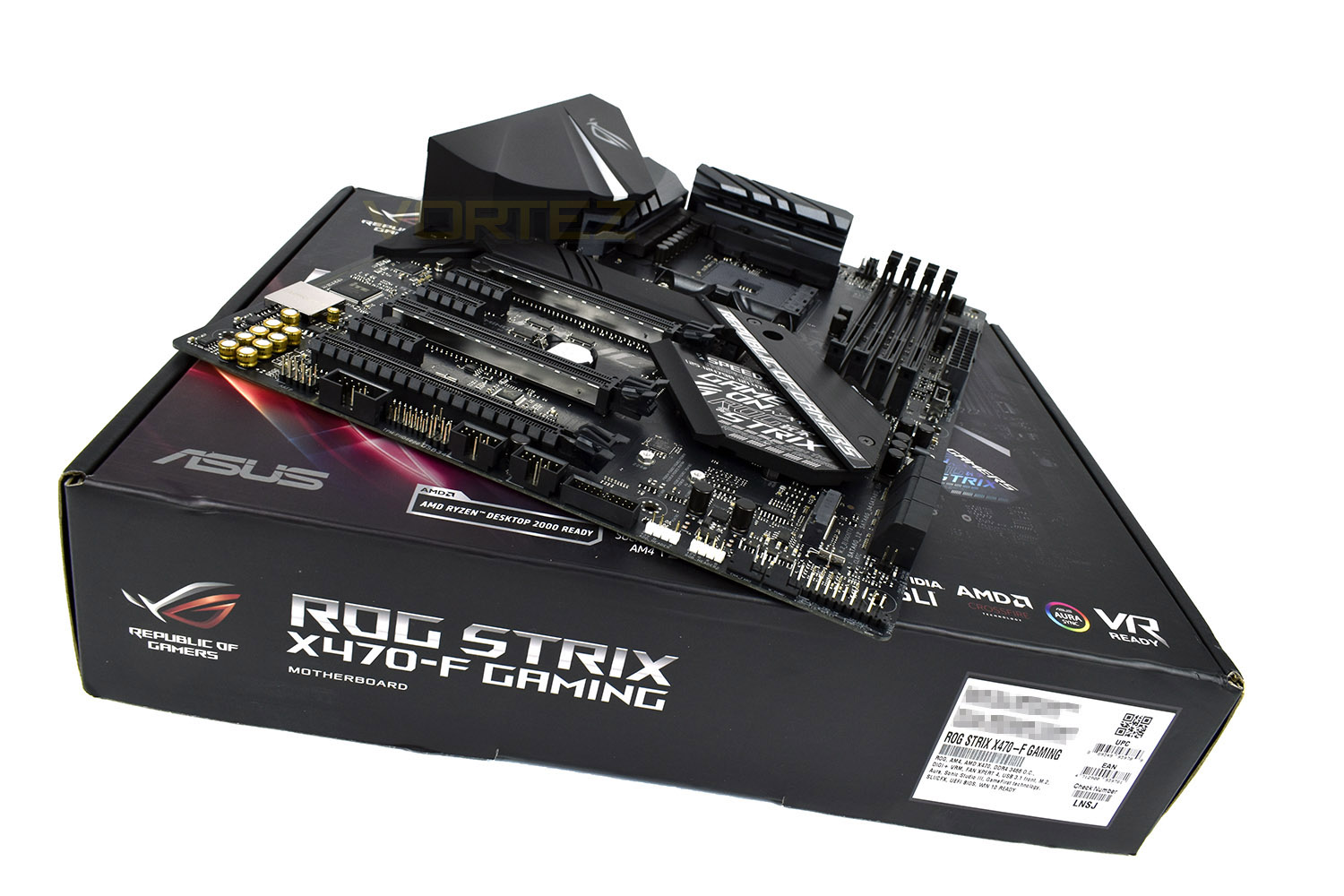
DDR4-3466MHz memory is supported, for maximum performance, as well as both NVIDIA SLI and AMD CrossFire, giving the enthusiast gamer options. Gigabit LAN, USB 3.1 Gen.2 and a pair of M.2 slots provide connectivity for gaming.
Last year’s model particularly impressed us with its focus in the right areas, have Republic of Gamers kept that same simplicity of design and hit the spot again? Read on to find out.
ROG on the STRIX X470-F GAMING:
Technical Specifications
CPU
AMD AM4 Socket AMD Ryzen™ 2nd Generation/Ryzen™ with Radeon™ Vega Graphics/Ryzen™ 1st Generation/7th Generation A-series/Athlon X4 Processors
Supports CPU up to 8 cores
* Refer to www.asus.com for CPU support list
Chipset
AMD X470
Memory
AMD Ryzen™ 2nd Generation Processors
4 x DIMM, Max. 64GB, DDR4 3466(O.C.)/3200(O.C.)/3000(O.C.)/2933(O.C.)/2800(O.C.)/2666/2400/2133 MHz Un-buffered Memory *
AMD Ryzen™ with Radeon™ Vega Graphics/ Ryzen™ 1st Generation Processors
4 x DIMM, Max. 64GB, DDR4 3200(O.C.)/3000(O.C.)/2933(O.C.)/2800(O.C.)/2666/2400/2133 MHz Un-buffered Memory *
AMD 7th Generation A-Series/Athlon X4 Processors
4 x DIMM, Max. 64GB, DDR4 2400/2133 MHz Un-buffered Memory
Dual Channel Memory Architecture
* Refer to www.asus.com for the Memory QVL (Qualified Vendors Lists).
Multi-GPU Support
Supports NVIDIA® 2-Way SLI™ Technology
Supports AMD 3-Way CrossFireX™ Technology
Expansion Slots
AMD Ryzen™ 2nd Generation/ Ryzen™ 1st Generation Processors
2 x PCIe 3.0 x16 (x16 or dual x8)
AMD Ryzen™ with Radeon™ Vega Graphics /7th Generation A-Series/Athlon X4 Processors
1 x PCIe 3.0 x16 (x8 mode)
AMD X470 chipset
1 x PCIe 2.0 x16 (max at x4 mode) *
3 x PCIe 2.0 x1
Storage
AMD Ryzen™ 2nd Generation/ Ryzen™ with Radeon™ Vega Graphics/ Ryzen™ 1st Generation Processors :
1 x M.2 Socket 3, with M key, type 2242/2260/2280/22110 storage devices support (SATA & PCIE 3.0 x 4 mode)
AMD 7th Generation A-series/Athlon™ Processors :
1 x M.2 Socket 3, with M key, type 2242/2260/2280/22110 storage devices support (SATA mode)
AMD X470 chipset :
1 x M.2 Socket 3, with M Key, type 2242/2260/2280 storage devices support (SATA & PCIE 3.0 x 2 mode)
6 x SATA 6Gb/s port(s),
LAN
Intel® I211-AT, 1 x Gigabit LAN Controller(s)
Anti-surge LANGuard
ROG GameFirst Technology
Audio
SupremeFX 8-Channel High Definition Audio CODEC S1220A
– Dual OP Amplifiers
– Impedance sense for front and rear headphone outputs
– Supports : Jack-detection, Multi-streaming, Front Panel Jack-retasking
– High quality 120 dB SNR stereo playback output and 113 dB SNR recording input
– SupremeFX Shielding Technology
– Supports up to 32-Bit/192kHz playback *
Audio Feature :
– Optical S/PDIF out port(s) at back panel
– Sonic Radar III
– Sonic Studio III + Sonic Studio Link
USB Ports
AMD Ryzen™ 2nd Generation/ Ryzen™ with Radeon™ Vega Graphics/ Ryzen™ 1st Generation/7th Generation A-Series/Athlon X4 Processors :
4 x USB 3.1 Gen 1 port(s) (4 at back panel, blue)
AMD X470 chipset :
1 x USB 3.1 Gen 2 front panel connector port(s)
AMD X470 chipset :
4 x USB 3.1 Gen 1 port(s) (2 at back panel, , 2 at mid-board)
AMD X470 chipset :
4 x USB 2.0 port(s) (4 at mid-board)
ASMedia® USB 3.1 Gen 2 controller :
2 x USB 3.1 Gen 2 port(s) (2 at back panel, red, Type-A)
ROG Exclusive Features
ROG RAMCache II
ROG CPU-Z
Overwolf
GameFirst IV
Special Features
5-Way Optimization by Dual Intelligent Processors 5
– Whole system optimization with a single click! 5-Way Optimization tuning key perfectly consolidates TPU, EPU, DIGI+ VRM, Fan Xpert 4, and Turbo App together, providing better CPU performance, efficient power saving, precise digital power control, whole system cooling and even tailor your own app usages.
TPU
– Auto Tuning, TurboV, GPU Boost
Gamer’s Guardian:
– DRAM Overcurrent Protection
– Stainless Steel Back I/O
– Highly Durable Components
– DIGI+ VRM
– SafeSlot
– ESD Guards on LAN, Audio,and USB ports
ASUS EPU :
– EPU
AURA :
– Aura Lighting Control
ASUS Exclusive Features :
– AI Suite 3
– Ai Charger
ASUS EZ DIY :
– ASUS CrashFree BIOS 3
– ASUS EZ Flash 3
ASUS Q-Design :
– ASUS Q-LED (CPU, DRAM, VGA, Boot Device LED)
– ASUS Q-Slot
– ASUS Q-DIMM
Gaming Aesthetics :
– AURA-RGB Lighting
Back I/O Ports
1 x PS/2 keyboard/mouse combo port(s)
1 x DisplayPort
1 x HDMI
2 x USB 3.1 Gen 2 Type-A,
6 x USB 3.1 Gen 1
1 x Optical S/PDIF out
5 x Audio jack(s)
Anti-surge LAN (RJ45) port
Internal I/O Ports
1 x Aura Addressable Strip Header(s)
2 x RGB Header(s)
2 x USB 2.0 connector(s) support(s) additional 4 USB 2.0 port(s)
1 x M.2 Socket 3 with M key, type 2242/2260/2280/22110 storage devices support (SATA & PCIE 3.0 x 4 mode)
1 x M.2 Socket 3 with M Key, type 2242/2260/2280 storage devices support (SATA & PCIE 3.0 X2 mode)
1 x TPM connector(s)
6 x SATA 6Gb/s connector(s)
1 x CPU Fan connector(s)
1 x CPU OPT Fan connector(s)
3 x Chassis Fan connector(s)
1 x AIO_PUMP connector
1 x W_PUMP+ connector
1 x 24-pin EATX Power connector(s)
1 x 8-pin ATX 12V Power connector(s)
1 x Front panel audio connector(s) (AAFP)
1 x Thermal sensor connector(s)
1 x Clear CMOS jumper(s)
1 x System panel connector
1 x COM port header
1 x USB 3.1 Gen 2 front panel connector
1 x USB 3.1 Gen 1 connector(s) support(s) additional 2 USB 3.1 Gen 1 port(s)
Accessories
User’s manual
4 x SATA 6Gb/s cable(s)
1 x M.2 Screw Package
1 x Supporting DVD
1 x Strix door hanger
1 x SLI HB BRIDGE(2-WAY-M)
1 x ROG Strix stickers
1 x Cable ties pack(s)
1 x Extension Cable for RGB strips (80 cm)
1 x Extension cable for Addressable LED
BIOS
256 Mb Flash ROM, UEFI AMI BIOS, PnP, WfM2.0, SM BIOS 3.0, ACPI 6.0, Multi-language BIOS,
ASUS EZ Flash 3, CrashFree BIOS 3, F11 EZ Tuning Wizard, F6 Qfan Control, F3 My Favorites, Last Modified log,
F12 PrintScreen, Secure Erase, User Profile, F4 AURA ON/OFF, F9 Search, and ASUS DRAM SPD (Serial Presence Detect) memory information.
Manageability
WOL, WOR, PXE
Support Disc
Drivers
ASUS Utilities
Anti-virus software (OEM version)
Operating System
Windows® 10 64-bit
Form Factor
ATX Form Factor
12 inch x 9.6 inch ( 30.5 cm x 24.4 cm )
Note
*1 PCIeX16_3 slot shares bandwidth with PCIeX1_1 and PCIeX1_3.
*2 M.2_2 socket shares PCIe clock with PCIeX1_1, when PCIeX1_1 or PCIeX1_3 are occupied, M.2_2 only can support SATA mode.
*3 Due to limitations in HDA bandwidth, 32-Bit/192kHz is not supported for 8-Channel audio.
AMD X470 Chipset Overview
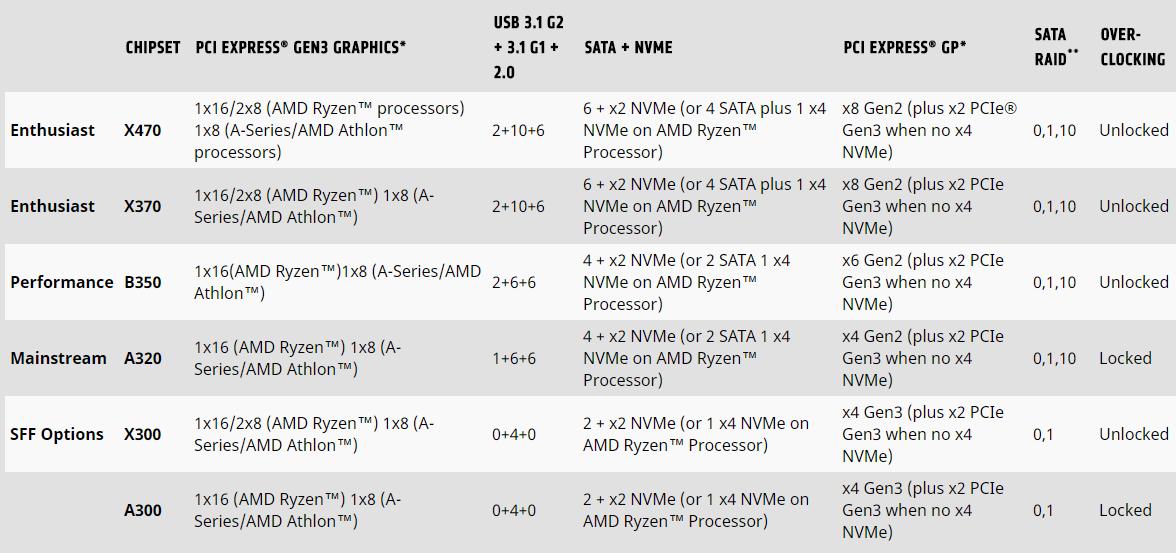
AMD designed the AM4 socket with longevity in mind, focussing on forwards and backwards compatibility. However, even a company like AMD doesn’t possess perfect precognition and some adaptations must be made within each revision. The main difference between the X370 and X470 chipsets are the utilisation of Precision Boost 2 and Extended Frequency Range 2 (XFR2).Check out our AMD Ryzen 7 2700X review for more information on those technologies.
Packaging & First Look
Very typically of a ROG product, the packaging is dark with a colourful aspect, the motherboard is displayed on the front, if a little dark, with the ROG logo lit brightly behind. There’s plenty of logos along the bottom to give you an idea of the technologies included.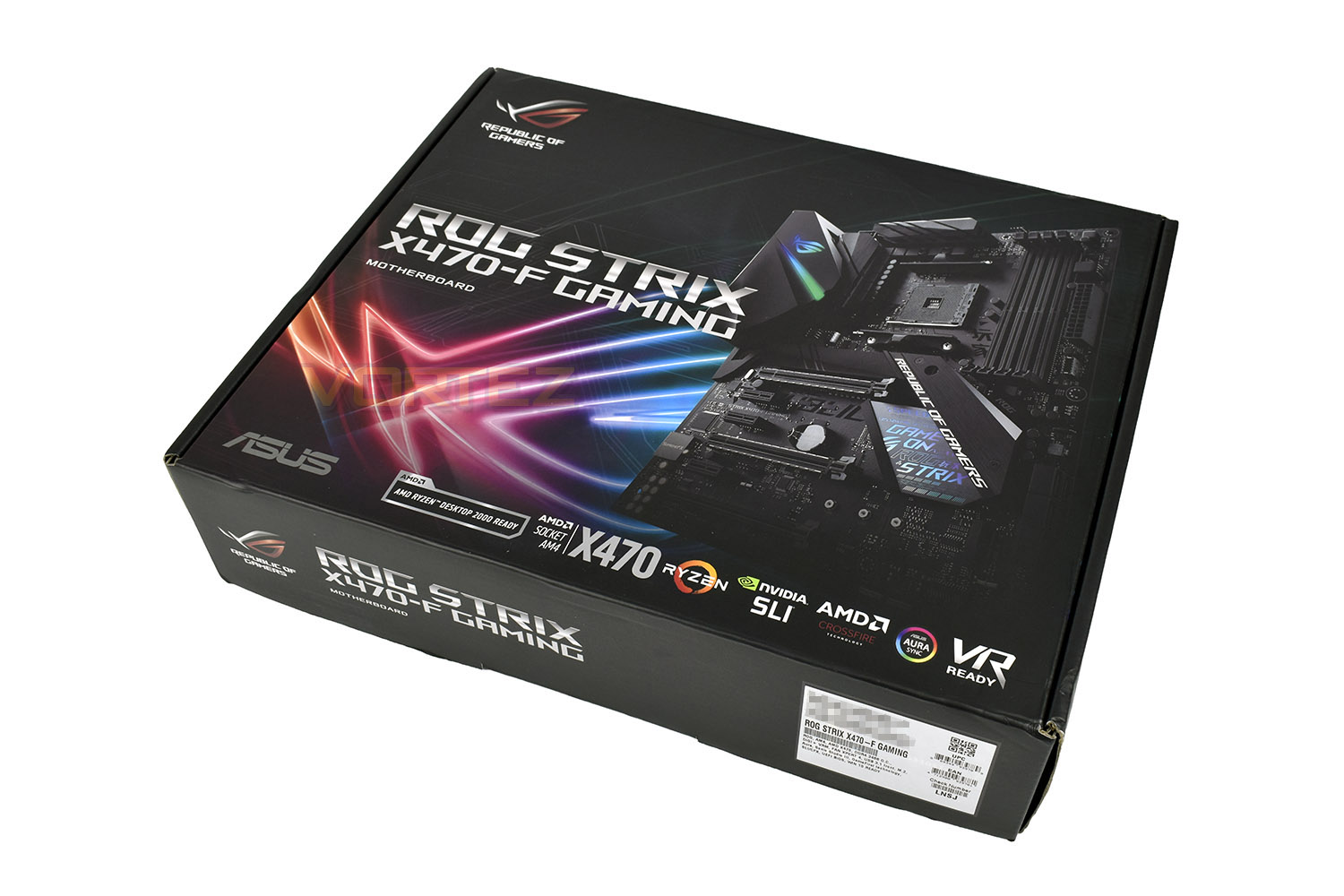
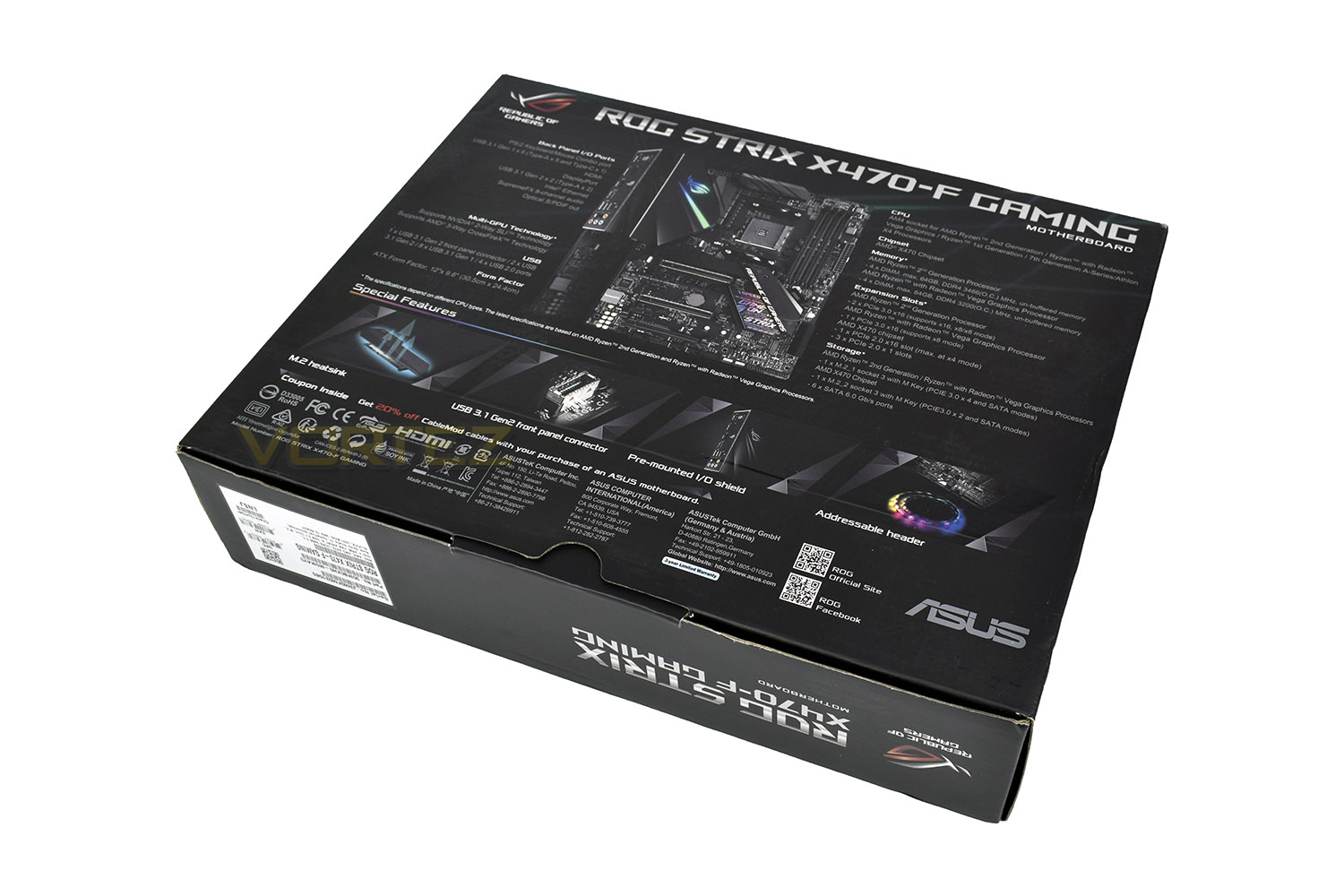
Flipping over the package, the reverse side gives a clear, detailed view of the board, as well as an extensive list of features and input/output options.
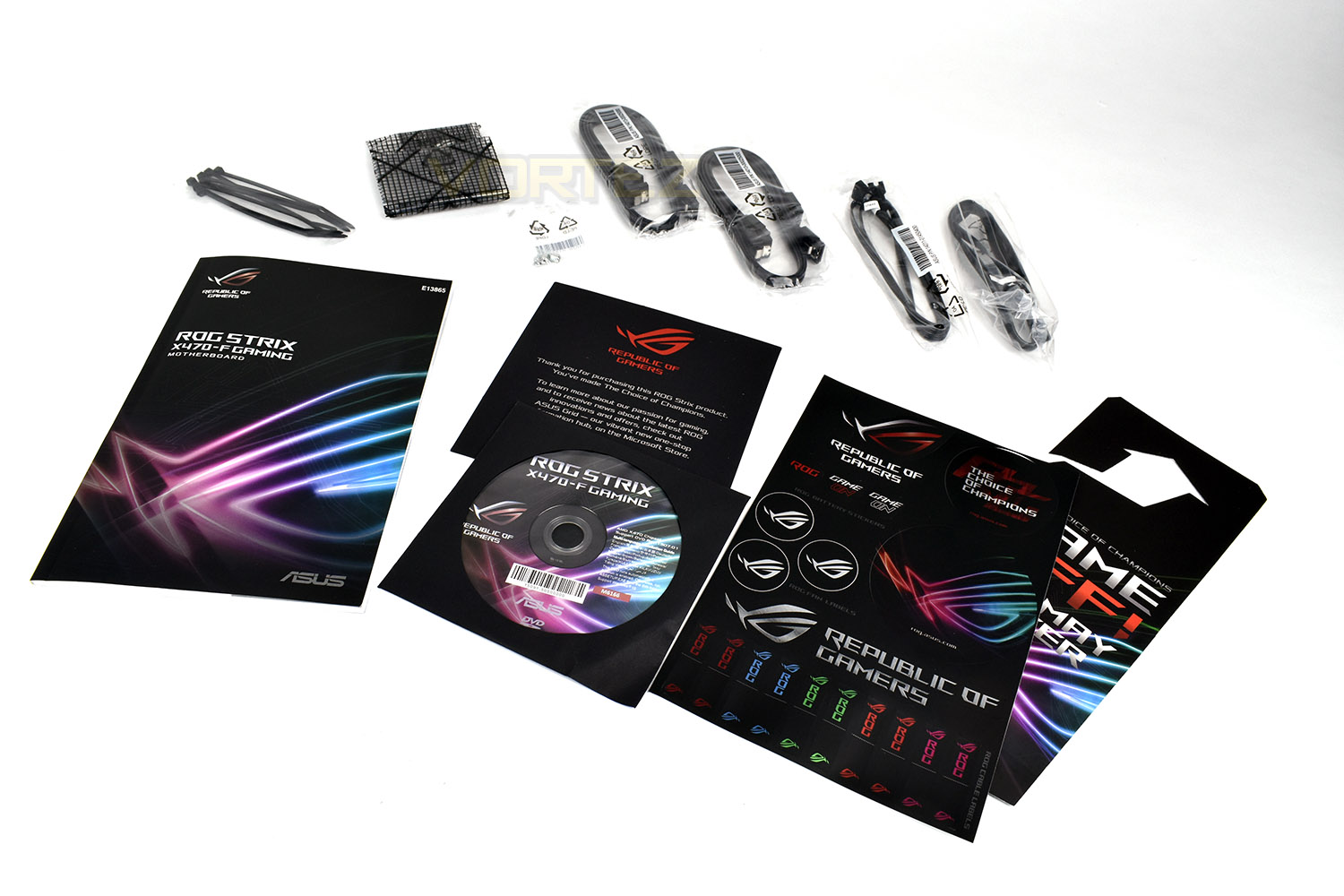
Included in the box is the following:
• User’s manual
• 4 x SATA 6Gb/s cable(s)
• 1 x M.2 Screw Package
• 1 x Supporting DVD
• 1 x SLI Bridge
• 1 x ROG Strix stickers
• 1 x Cable ties pack
• 1 x Extension Cable for RGB strips (80 cm)
• 1 x Extension cable for Addressable LED
• 1 x Strix door hanger
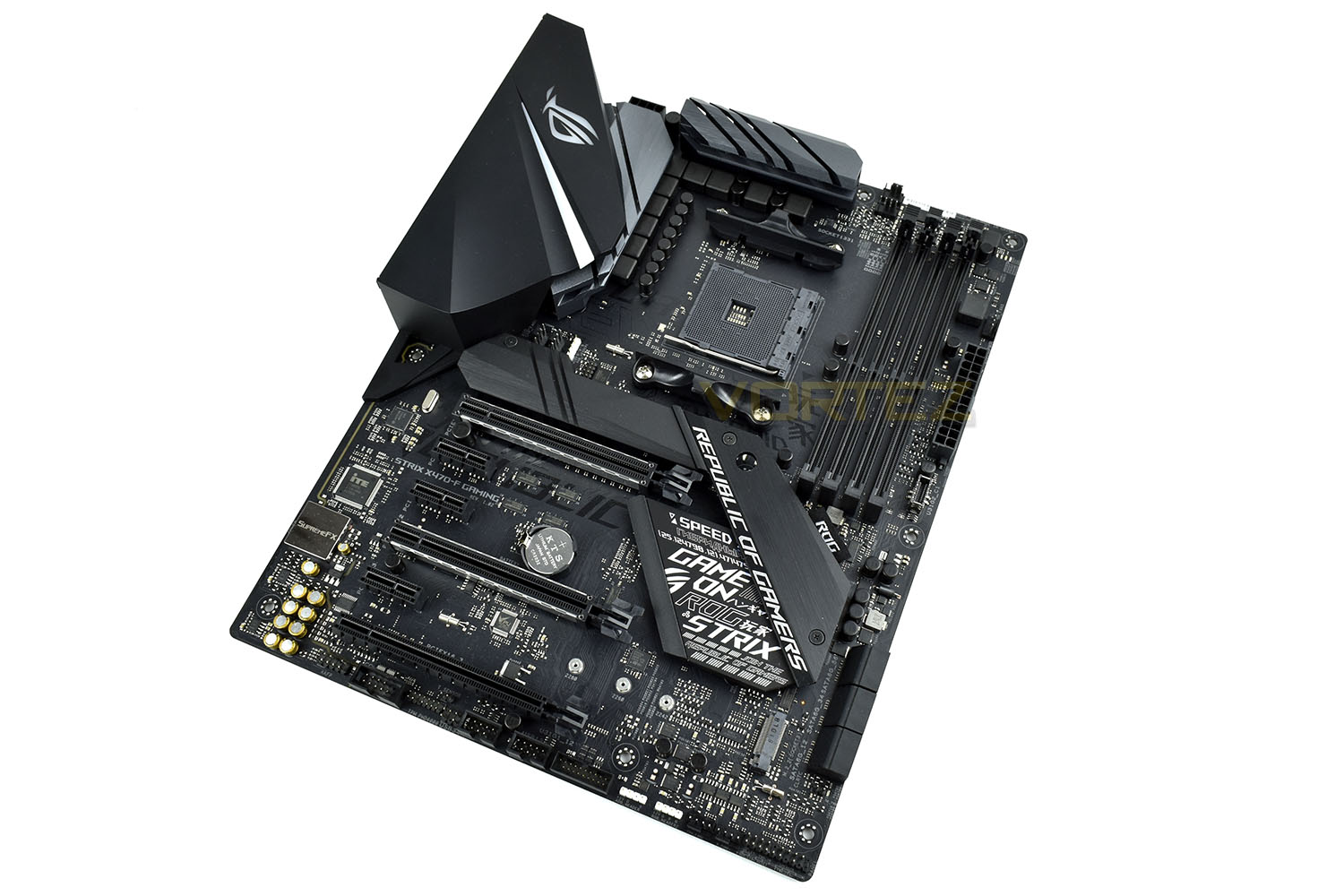
The motherboard, with the black theme and large heatsinks give a premium feel. The ROG STRIX X470-F GAMING adheres to the ATX standard, measuring 244mm wide and 307mm long.
Closer Look
While we’re moving to the X470 chipset, the AM4 socket remains. There are some small differences, which are highlighted on the X470 Chipset Overview page, but all CPUs will be forwards and backwards compatible (BIOS updates may be required). The digital power phase control is provided in a 10+1 format.Additional power technologies include ASUS Digi+ VRM for voltage smoothing, overcurrent protection to prevent damage to your CPU and DRAM and high-quality solid capacitors which are rated from -55°C to +105°C, 110% better than the industry required standard.
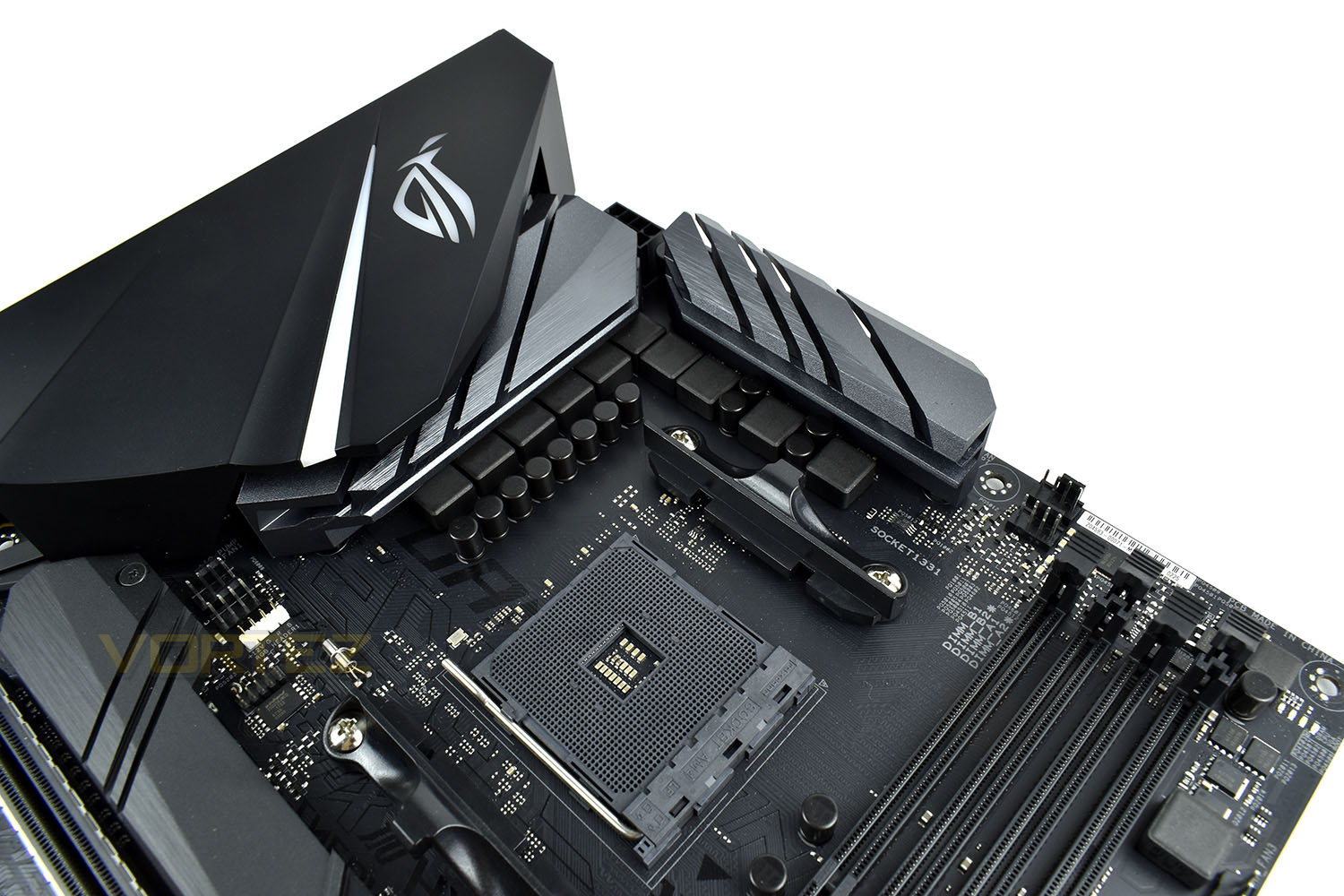
There’s a total of seven PWM fan headers across the board, two of which are located directly above the CPU socket. There’s a pair on the bottom-right of the board, one next to the DIMM slots and another couple just above the M.2 heatsink. You will also find three RGB fan lighting headers, with their white plastic enclosures.
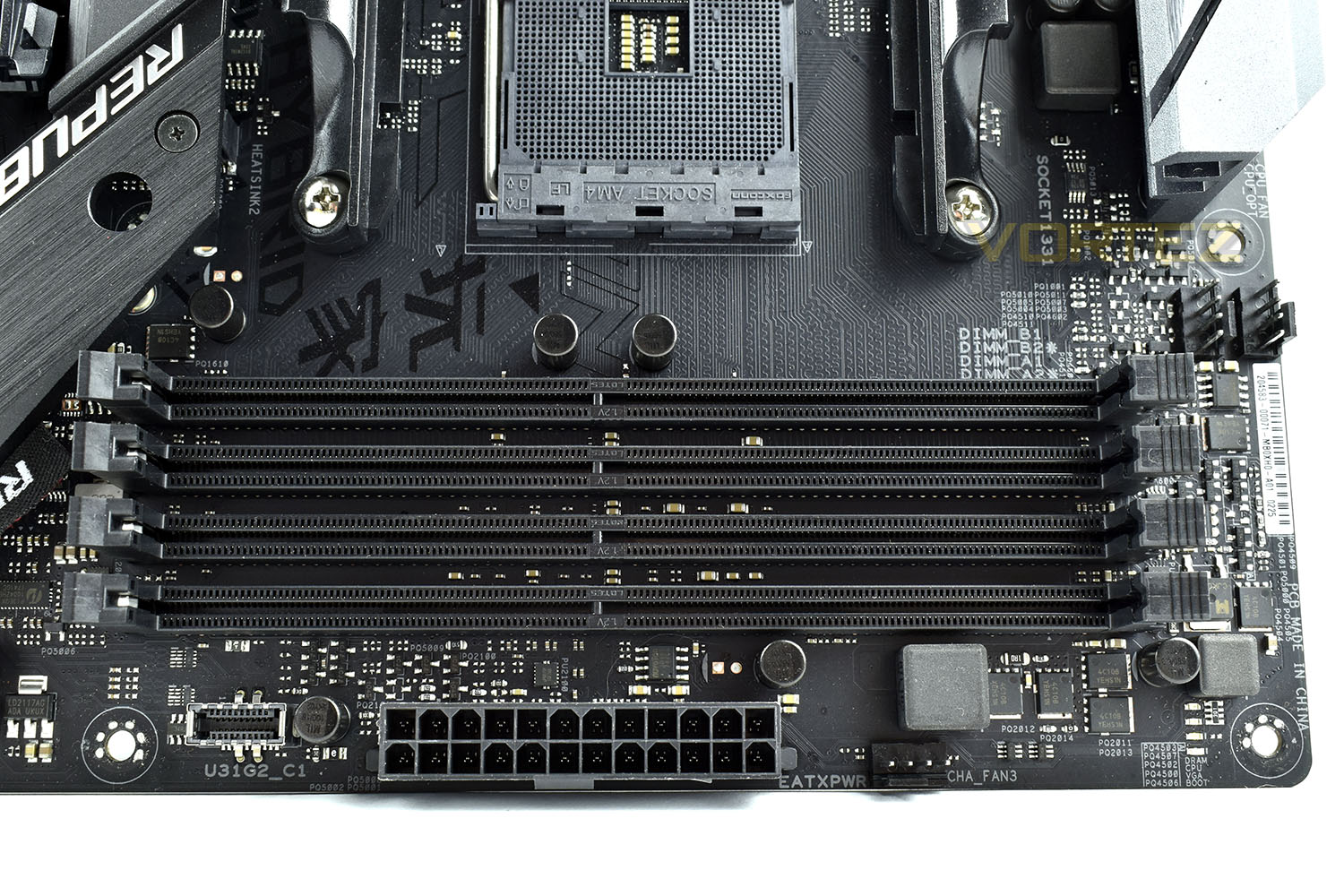
The maximum supported memory speed is DDR4-3466, a good step above the standard 2933 provided by the Ryzen 2nd Gen. chips. There are four DIMM slots capable of supporting 64GB (4x 16GB) total capacity. These only unlock on the top edge, making memory a little more tricky to insert and remove but it does make things easier if your GPU features a hefty backplate.
The DDR4 slots also feature a technology called RAMCACHE II, fully compatible with the latest NVMe drives, it essentially uses a preset DRAM capacity to cache your most used files for rapid access, launching programs at “breakneck speeds”.
As is becoming a standard across enthusiast gaming boards, there are four indicator LEDs, bottom-right, which will identify the cause of any boot up issues. BOOT, DRAM, CPU or VGA. We also see a front panel connector providing USB 3.1 Gen. 2 speeds.
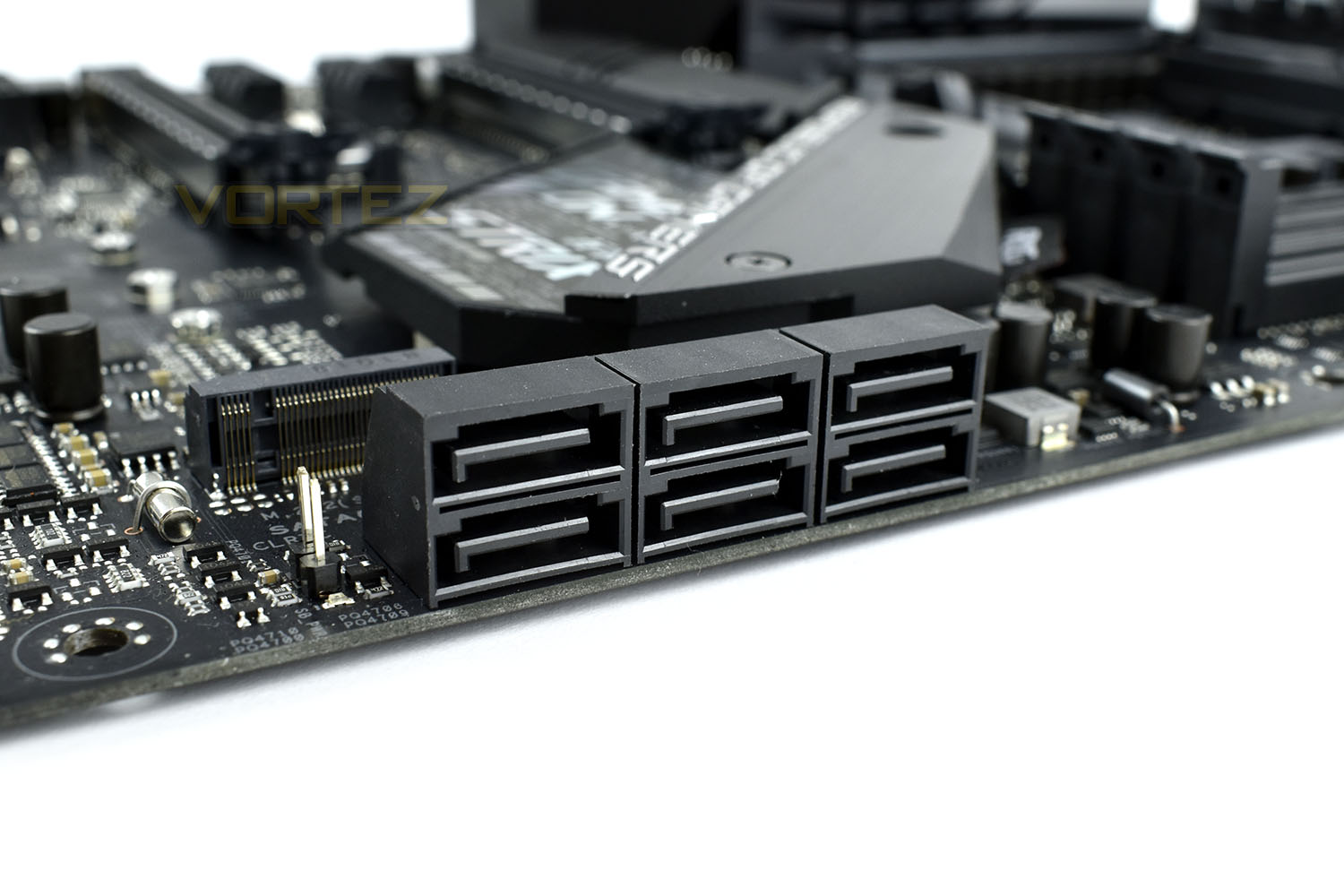
SATA storage connectivity is provided by six right-angled connectors on the right-hand edge of the board. Handy for cable management. The supported speed is SATA 3.0 (6Gbps).
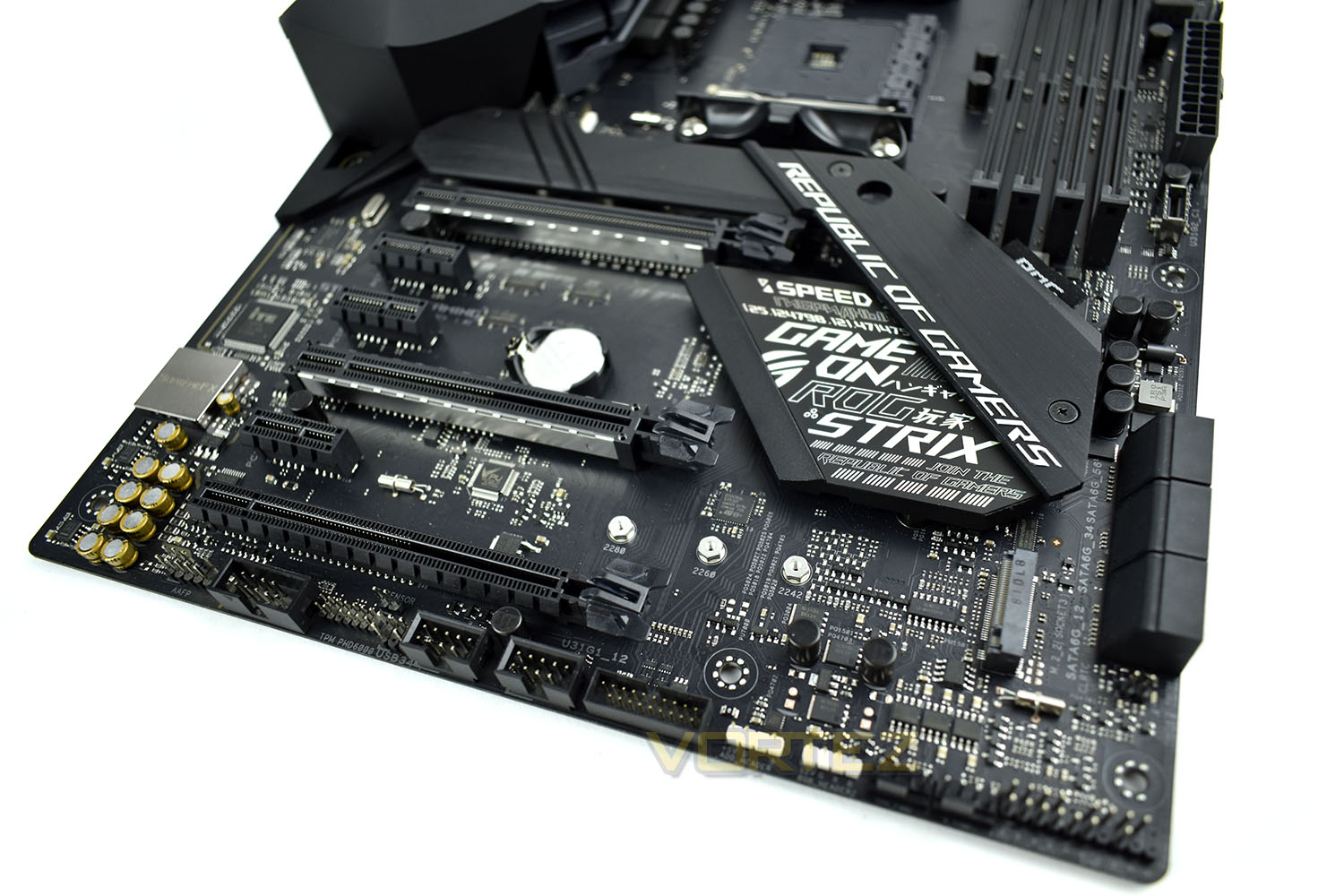
There’s also a pair of M.2 slots available, one of which resides below the iridescent Southbridge heatsink, up to a maximum of 2280. The other is accessed by removing the heat spreader by way of undoing a couple of small screws; this slot is capable of taxing the extended 22110 size drives, as well as 2280, 2260 and 2242.
PCI-E connectivity is plentiful, with both NVIDIA SLI and AMD CrossFire supported on the STRIX X470-F GAMING.
PCI-E Ports are as follow:
• 2x PCI-E 3.0 x16
• 1x PCI-E 2.0 x16
• 3x PCI-E 2.0 x1
External and internal connectivity, along the bottom row from left to right, is as follows:
• Front audio
• Serial port connection
• TPM Module
• 2x USB 2.0 connectors
• USB 3.0 connector
• 2x RGB lighting headers
• 2x PWM fan headers
• Front case connectors
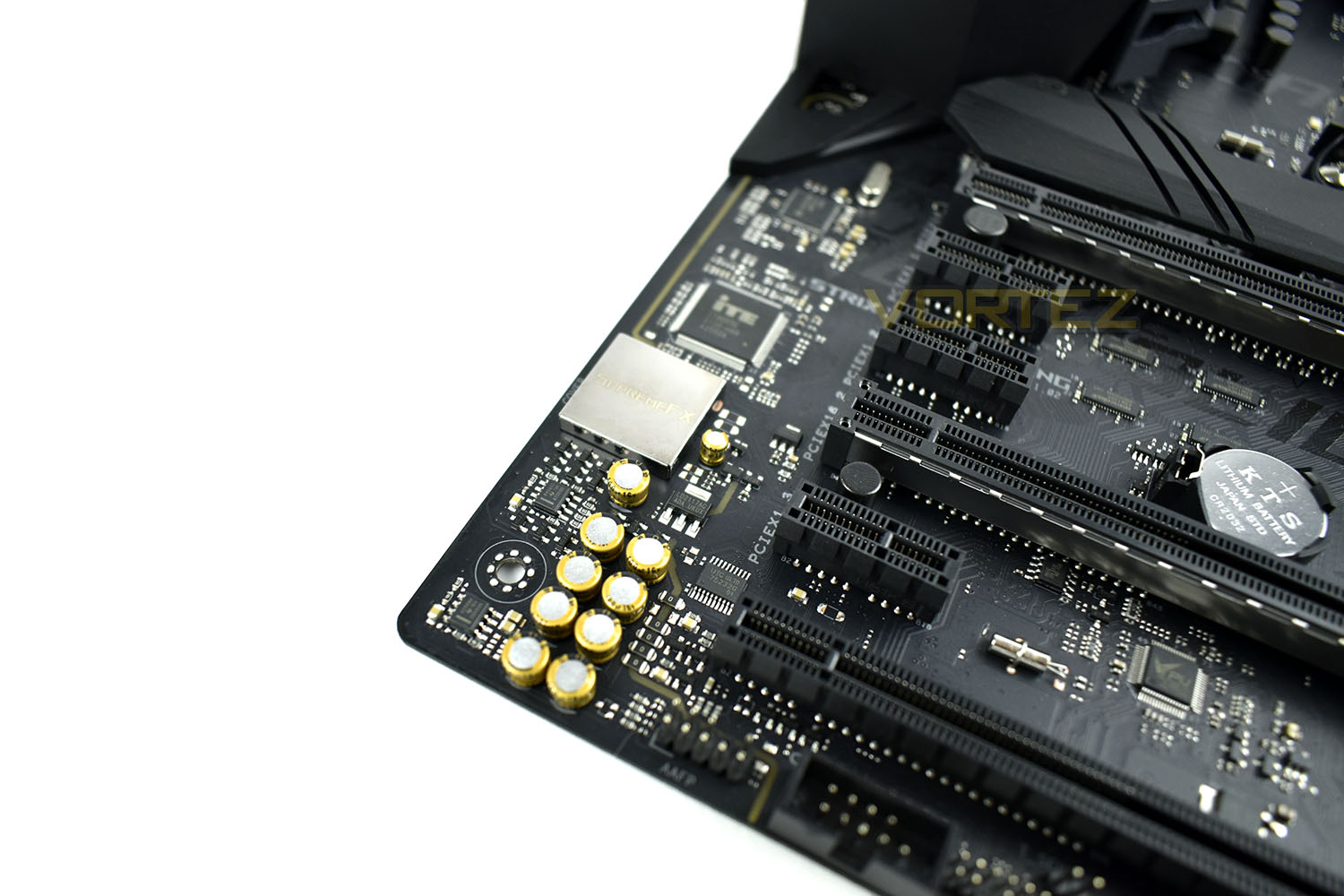
Audio is provided by SupremeFX, utilising the S1220A coded. The audio output is tuned to provide a flat frequency response for a neutral, detailed sound.
The Nichicon audio capacitors, aas well as the SupremeFX audio processor are separated from external circuitry to minimise interference.
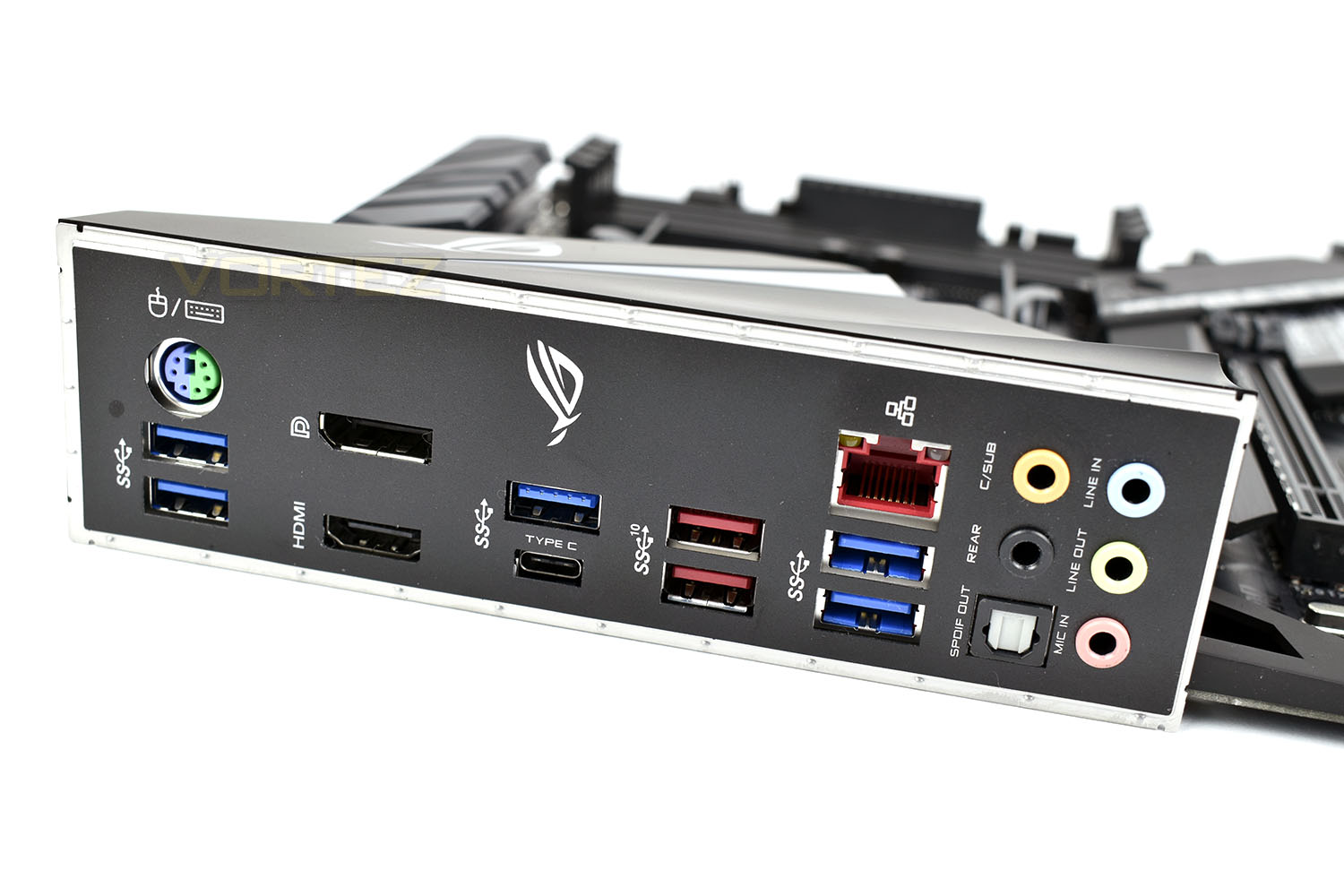
The rear IO panel comes with a pre-mounted IO shield (we’ve all forgotten to put this in place during a build at some point, so having this attached can save a costly, embarrassing mistake from occurring.)
We get a decent selection input/output options:
• PS/2 Device port
• 5x USB 3.1 Gen. 1
• 1x USB 3.1 Gen. 1 Type C
• 2x USB 3.1 Gen. 2 Type A
• HDMI
• DisplayPort
• Anti-surge LAN port
• SPDIF optical out
• 5x 3.5mm audio jacks
ROG having gotten rid of all USB 2.0 ports on the rear is welcomed by us at Vortez. The increase in speed between USB 2.0 and USB 3.1 is an order of magnitude better, which we can all appreciate.
BIOS
The ROG EUFI BIOS Utility is easy to use and provides an extensive, granular experience. You can make the settings as in-depth or as basic as you like, depending on your skill and experience of overclocking and tweaking.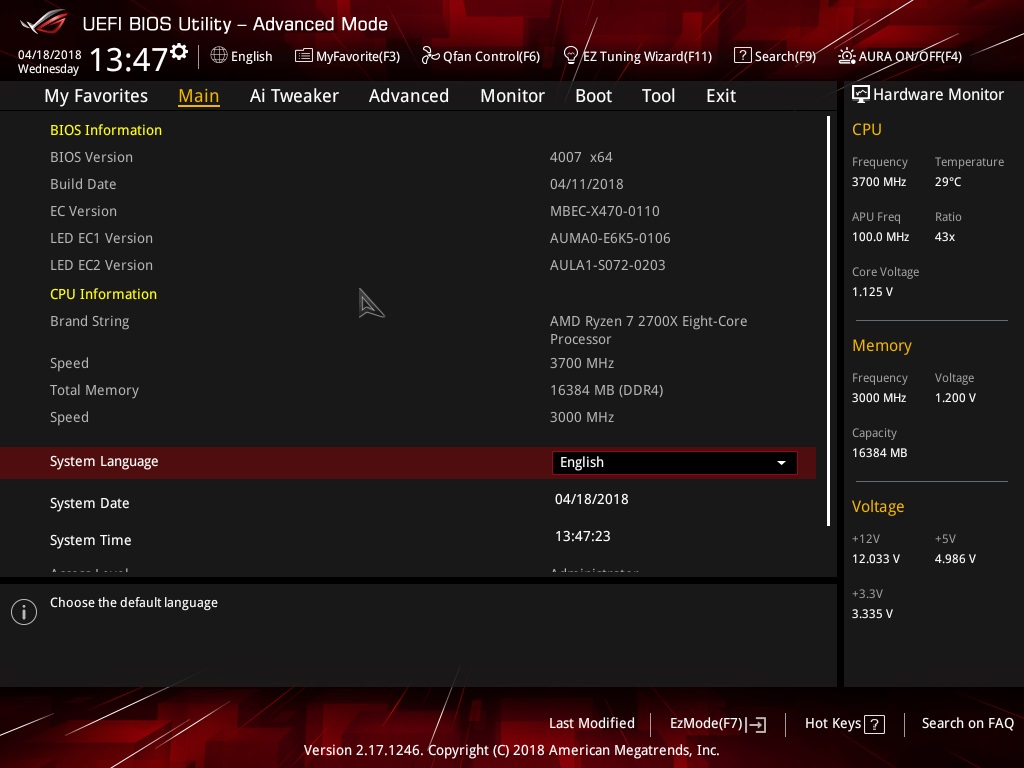
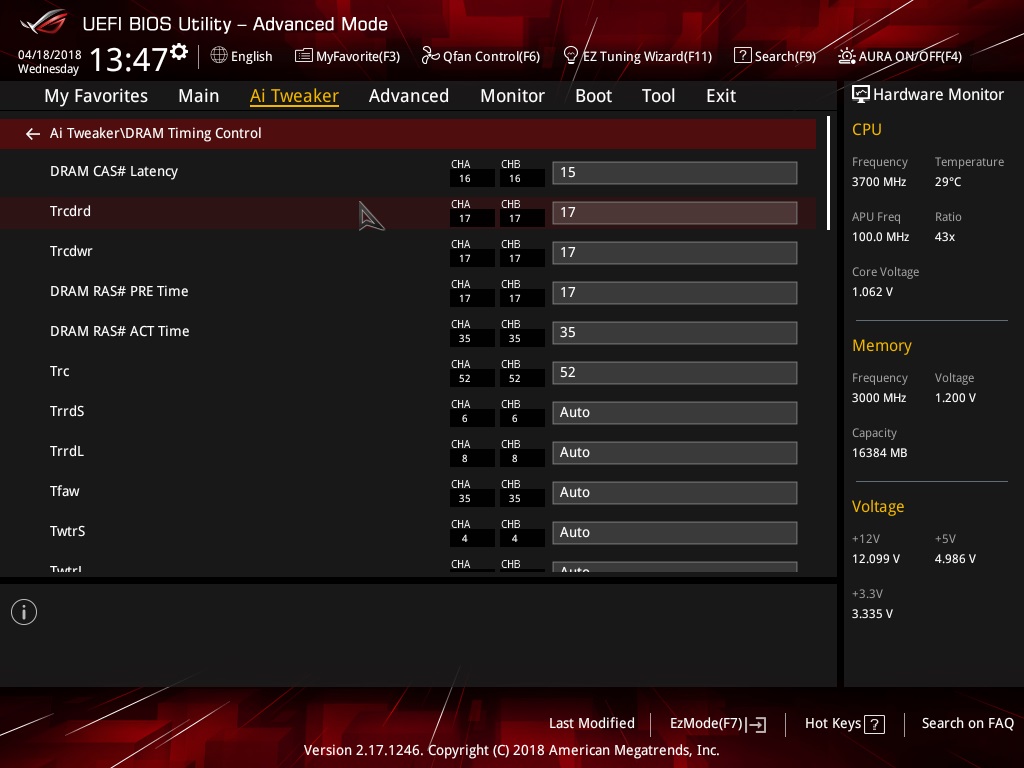
Overclocking the CPU is as simple as increasing the CPU Core Ratio and applying some additional voltage (usually relative to the desired Core Ratio). DRAM overclocking was just as easy, choosing from a drop-down box of options, ranging from 1066 to 4000+.
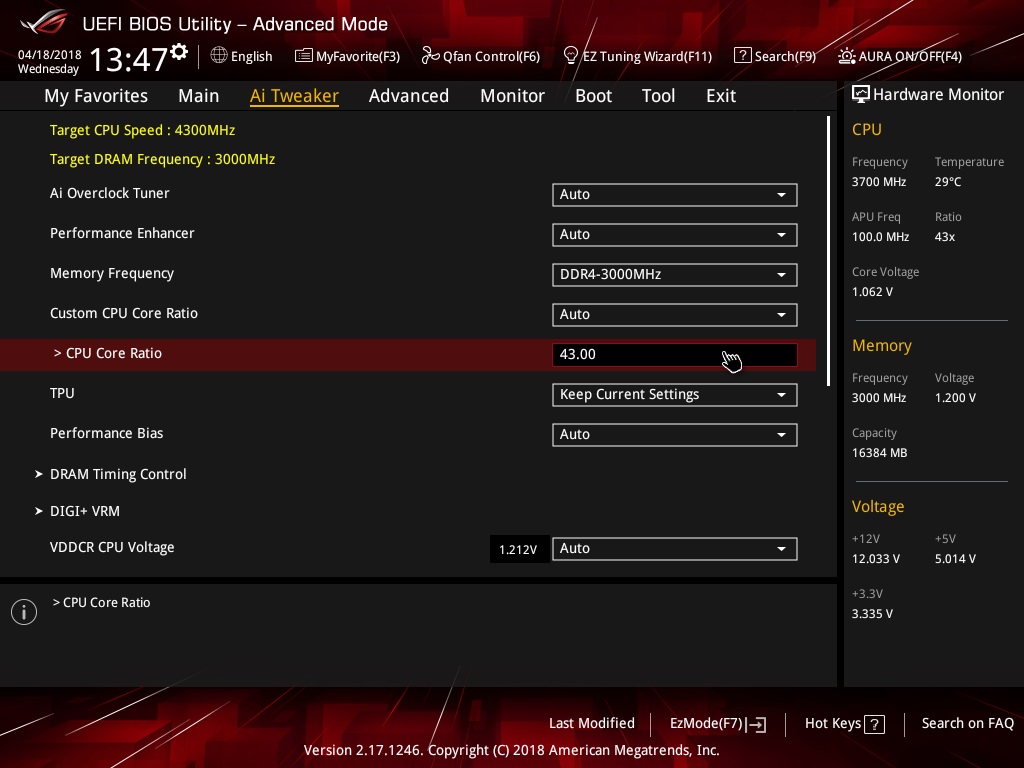
DRAM Timing control was dealt with via the XMP information, though tweaking was equally as easy. We found that we could eek out 3200MHz from this 3000MHz kit, while retaining stock voltage and timings. Not bad for a budget-enthusiast board!
Test Setup & Software
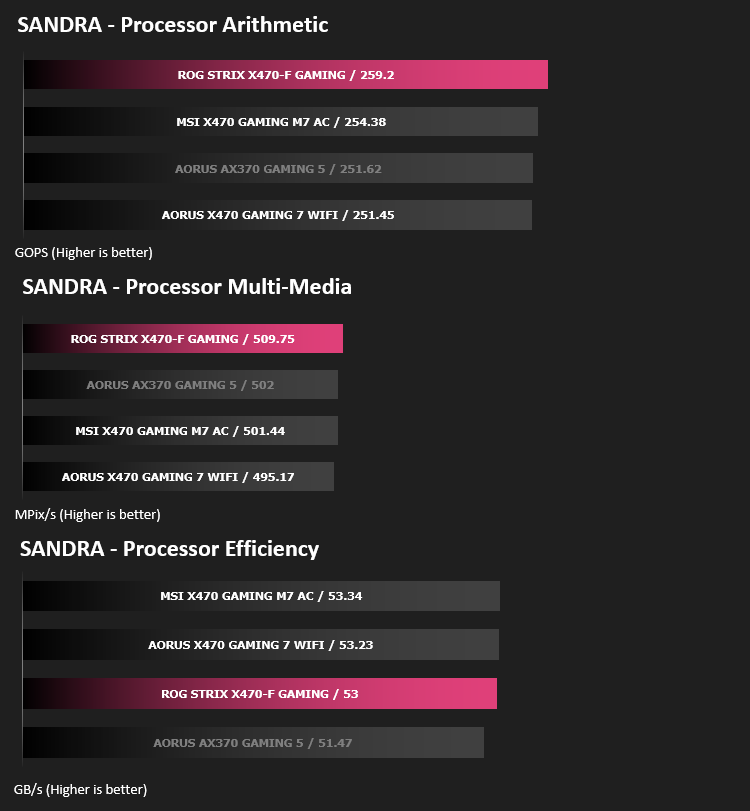
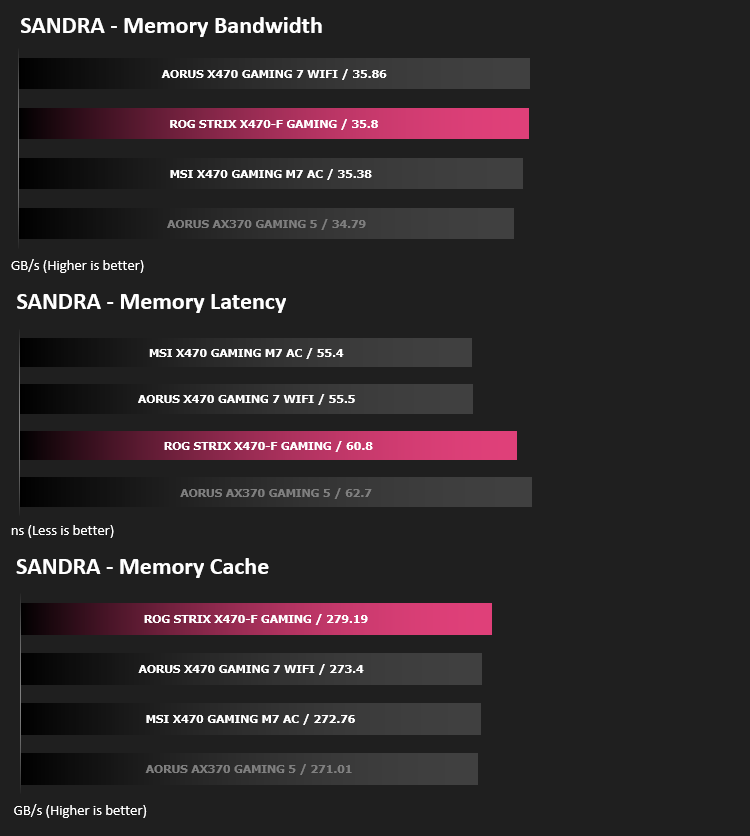
Within our testing, we’ve included the results from an AORUS AX-370 GAMING 5 motherboard, equipped with the exact same memory, processor, SSD, GPU and PSU. This acts as a direct comparison from the X370 and X470 chipsets.Test Setup
Cooling Noctua NH-U12S-SE-AM4
Motherboard ASUS ROG STRIX X470-F GAMING
Memory 16GB Corsair Vengeance LPX 3000MHz @ 3000MHz 15-17-17-38-52-T1
Graphics AMD Radeon RX 480 8GB
Storage Corsair Force LE 480GB
PSU Corsair RM750X 80 Plus Gold Certified PSU
Benchmarks
x264 HD 4.0 – 1st and 2nd pass encoding
SiSoftware SANDRA – CPU & Memory benchmarks
POV-RAY – CPU benchmarks
TrueCrypt – CPU benchmarks
AIDA64 – CPU benchmarks & Memory
PCMark 8 – Home Suite & Photoshop
3DMark FireStrike – 3D Benchmark
Games – Rise of the Tomb Raider & Total War: WARHAMMER
Other Software
Stress Testing Software: AIDA64 Stability Test
CPU Specification Monitoring: CPU-Z
Performance Monitoring: MSI Afterburner
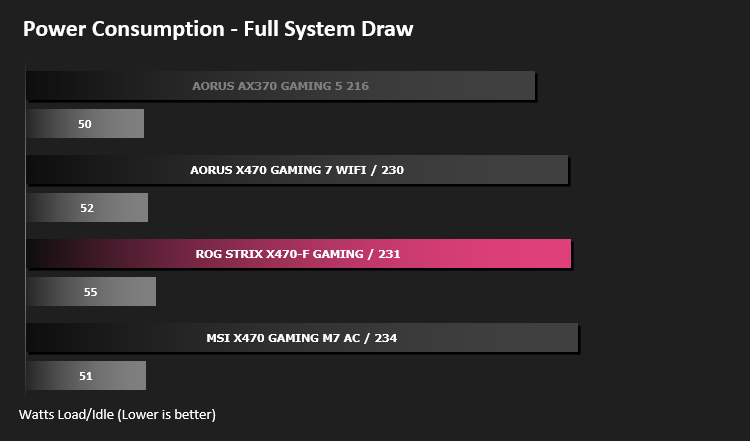
Benchmarks: Power Consumption
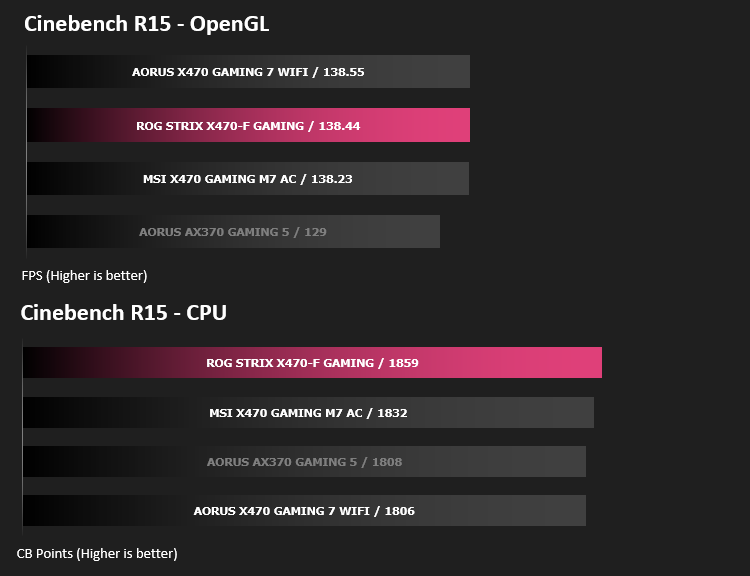
Benchmarks: Cinebench R15
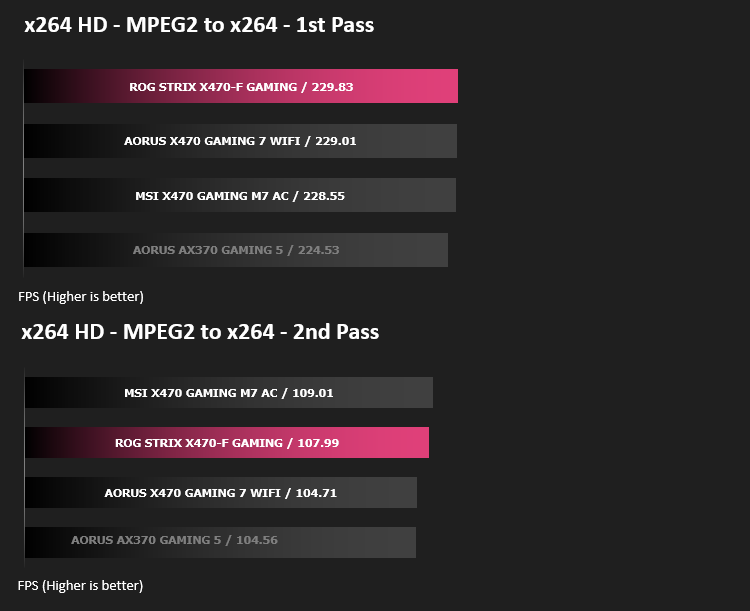
Benchmarks: x264 HD
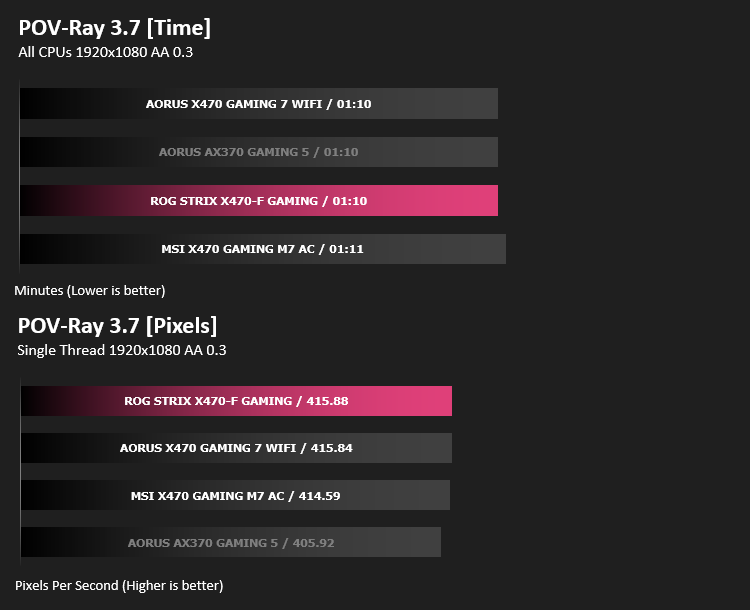
Benchmarks: POV-RAY 3.7
This product allows users to build their custom 3D worlds with excellent quality despite their computer’s hardware. It has adjustable options for levels of radiance, refraction, and reflection. Calculation time may vary depending on the computer model, but PovRay can adapt to many computer builds, and is supported by the open source community.
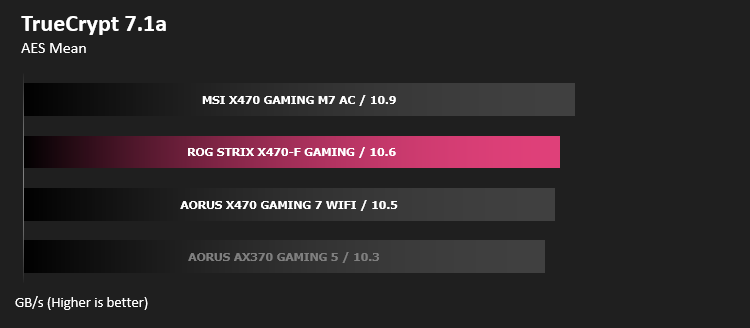
Benchmarks: TrueCrypt
Benchmarks: AIDA64
AIDA64 Product Page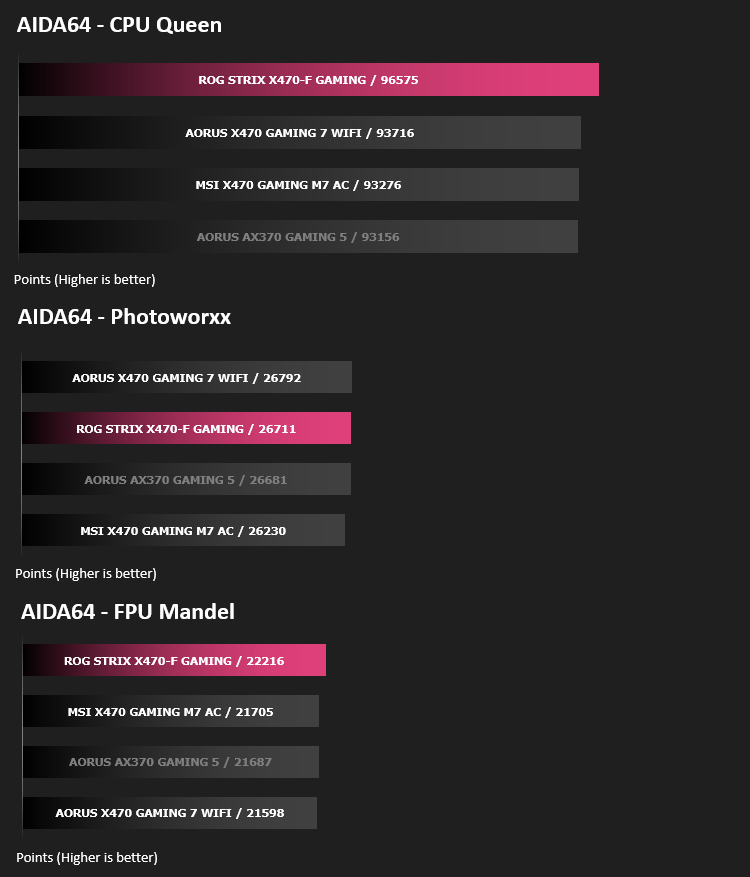
The Memory Latency benchmark measures the typical delay when the CPU reads data from system memory. Memory latency time means the penalty measured from the issuing of the read command until the data arrives to the integer registers of the CPU.
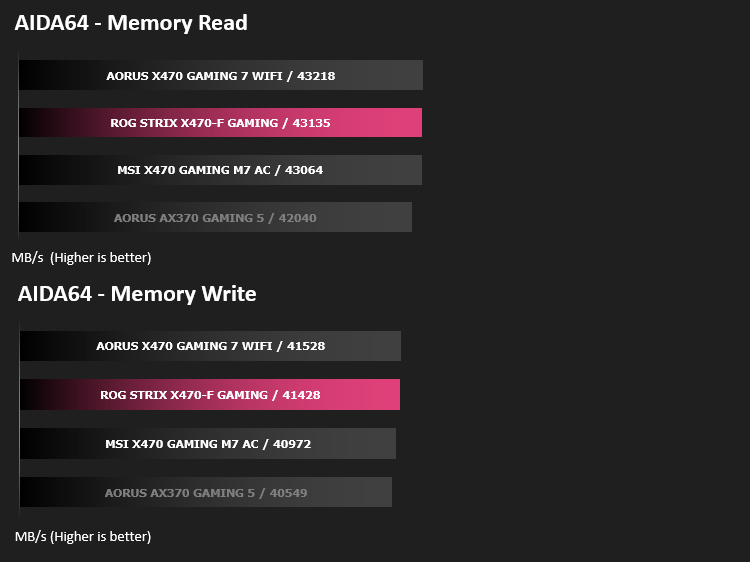
Benchmarks: SiSoftware SANDRA
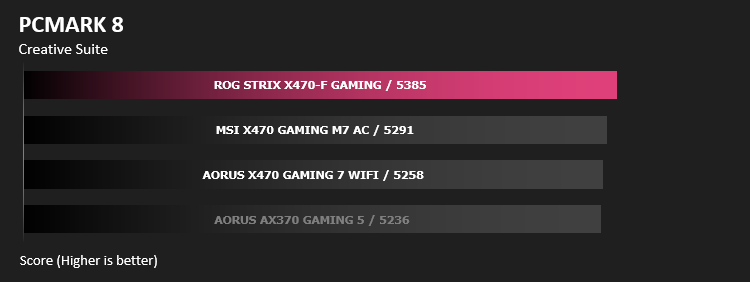
Benchmarks: PCMark 8
Benchmarks: PCMark 8 Photoshop
PCMark 8 Product Page
Benchmarks: 3DMark FireStrike & TimeSpy
3DMark FireStrike Product Page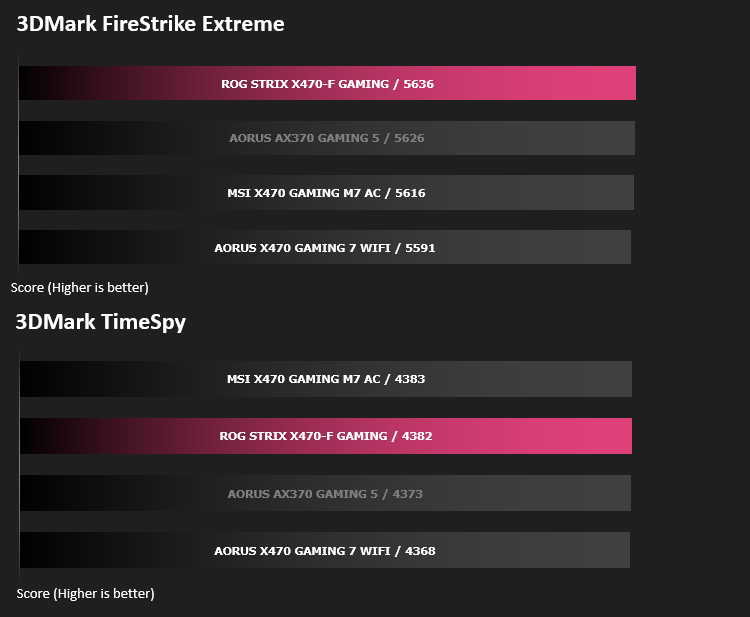
Benchmarks: VRMark
VRMark Product Page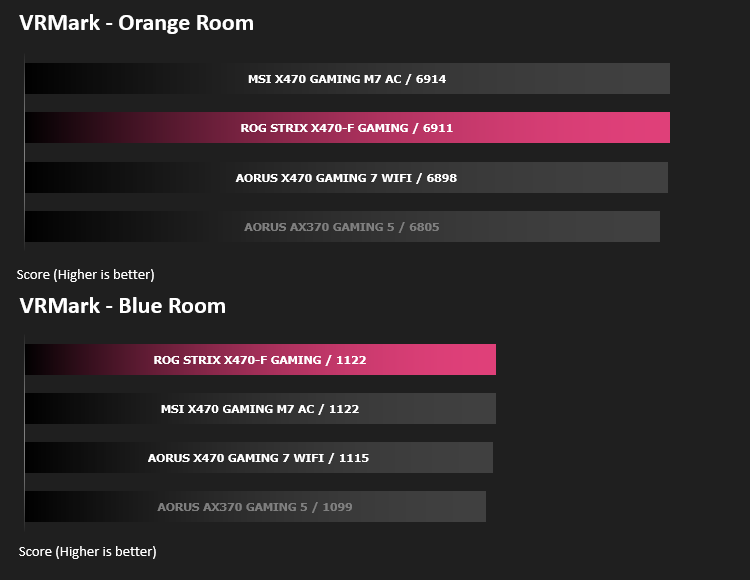
Benchmarks: Rise of the Tomb Raider & Total War: Warhammer

Conclusion
For budding enthusiasts, with some light overclocking in mind, the ROG STRIX X470-F GAMING appears to offer everything you would need.
If you plan to use your machine for some content creation but aren’t hell-bent on achieving the absolute fastest machine on the planet, the ROG STRIX X470-F will likely compliment that approach nicely. The modest features with a reasonable price tag go hand in hand, without sacrificing performance; The X470-F topped out more of our charts than the more expensive competition combined, which we can only commend it for. Sure, we see some features cut back, such as no on-board power buttons, no dedicated overclocking dials and a basic debug LED layout. However, you do get “the basics” which will easily form the basis of a killer gaming/content creation machine. 7 PWM fan headers, a decent power phase, SLI and CrossFire support, a pair of M.2 slots and SupremeFX all form a great little package for your £180 GBP – $319 AUD.
The black and grey colour scheme with a single Aura Sync RGB zone would look great in any modest build. Of course, the board itself isn’t the most striking design we’ve ever seen, but the neutral colours certainly work with the RGB lighting. The iridescence applied to the Southbridge heatsink also looks awesome, if reflecting the light from the right angle. The Aura Sync RGB lighting is also supported by many third-party manufacturers, particularly on RGB fans and RAM modules.
As mentioned previously, on the Closer Look page, the CPU and DRAM feature several technologies with the focus of protecting your expensive CPU and DDR4 memory from overcurrent and supplying a stable, smooth voltage for optimal stability and overclocking. Despite overclocking not being a focus of the board, the potential is certainly there. It kept up with other boards in our overclocking tests, even exceeding their results at times, providing a decent boost to memory speed with no voltage or timing adjustment required.
For your £180 GBP – $319 AUD, it’s difficult to see where the pitfall lies. Overall system performance was excellent, the board looks great and overclocking performance was above expected. If you need a board without the unnecessary bells and whistles, the ROG STRIX X470-F GAMING will fill that role nicely.
It appears the Republic of Gamers have gotten the recipe just right with this motherboard, cutting away features that aren’t required while retaining the necessary options.
+ Board looks great
+ Aura Sync RGB Lighting
+ Good overclocking performance
+ Easy to use BIOS
+ RGB Headers
+ 7 PWM fan headers
+ USB 3.1 Gen. 2 front header
+ No USB 2.0 ports on the rear IO
+ Aggressive pricing
+ DisplayPort and HDMI
+ Fixed IO shield
Cons
– None
Click here for an explanation of our awards at Vortez.net.
Stay connected with the Vortez Social Media pages:
Join in with the discussions on Discord