Designed with the new Intel 9th Generation CPUs, Is this ROG motherboard the ideal platform for the new Core i9-9900K?

Product on Review: ROG STRIX Z390-E Gaming
Manufacturer: ASUS Republic of Gamers
Street Price: £229 GBP – $244 USD – $419 AUD
ASUS ROG Strix motherboards have become increasingly popular amongst the enthusiast and gamers markets, mainly for their unique styling and dedication to the RGB scene. This time around, with the Z390-E Gaming, we get an even darker guise, shedding most of its flashier components.
Under the hood, the Z390 chipset offers support for the new Intel Core i9-9900K, as well as the current 8th Generation Core CPUs. We also get mutli-GPU compatibility with NVIDIA SLI and AMD CrossfireX, a pair of NVMe M.2 slots, with heatsinks, and SupremeFX audio.
The ASUS ROG Strix Z390-E Gaming conforms to the ATX form factor and appears to offer everything a budding enthusiast would require, which includes support for the 8th Gen Intel Core CPUs and the next-gen Intel CPUs.
ASUS on their STRIX Z390-E Gaming
Technical Specifications
Below are the technical specifications concerning the ROG STRIX Z390-E Gaming all of which is supplied directly by ASUS:
CPU
Socket 1151 for 8th Gen Intel® Core™, Pentium® Gold and Celeron® processors
Supports 14nm CPU
Supports Intel® Turbo Boost Technology 2.0*
*Intel® Turbo Boost Technology 2.0 support depends on the CPU type
**Refer to www.asus.com for CPU support list
Chipset Intel® Z390 Chipset
Memory
4 x DIMM, max. 64GB DDR4
4266(OC)*/4133(OC)*/4000(OC)*/3866(OC)*/3733(OC)*/3600(OC)*/3466(OC)*/3400(OC)*/3
333(OC)*/3300(OC)*/3200(OC)*/3000(OC)*/2800(OC)*/2666/2400/2133 MHz, non-ECC, unbuffered
memory
Dual channel memory architecture
Supports Intel® Extreme Memory Profile (XMP)
* Hyper DIMM support is subject to the physical characteristics of individual CPUs. Please refer
to Memory QVL(Qualified Vendors List) for details.
Expansion Slots
Socket 1151 for 9th / 8th Gen Intel® Core™, Pentium® Gold and Celeron® processors
2 x PCIe 3.0 x16 slots (support x16, x8/x8)
Intel® Z390 Chipset
1 x PCIe 3.0 x16 slot (max. at x4 mode)*
3 x PCIe 3.0 x1 slots
*The PCIe x16_3 slot shares bandwidth with SATA6G_56. The PCIe x16_3 is set at x2 mode by
default.
Graphic
Integrated Graphics Processor- Intel® UHD Graphics support
Multi-VGA output support : HDMI/DisplayPort
– Supports DisplayPort 1.2 with max. resolution 4096 x 2304 @ 60Hz
– Supports HDMI 1.4b with max. resolution 4096 x 2160 @ 30Hz
Multi-GPU Support
Supports NVIDIA® 2-Way/Quad-GPU SLI™ Technology
Supports AMD® 3-Way/Quad-GPU CrossFireX™ Technology
Storage
Intel® Z390 Chipset with RAID 0, 1, 5, 10, and Intel Rapid Storage Technology support
– 1 x M.2_1 Socket 3 with M Key, type 2242/2260/2280 (PCIe 3.0 x4 and SATA modes)*
– 1 x M.2_2 Socket 3 with M Key, type 2242/2260/2280/22110 (supports PCIe 3.0 x4 mode)
– 6 x SATA 6Gb/s ports
– Intel® OptaneTM Memory Ready
* When the M.2_1 Socket 3 is operating in SATA mode, SATA port 2 will be disable.
LAN
Intel® I219-V Gigabit LAN- Dual interconnect between the integrated Media Access Controller
(MAC) and physical layer (PHY)
Anti-surge LANGuard
ROG GameFirst V technology
Wireless Data Network
Intel® Wireless-AC 9560
2 x 2 Wi-Fi with MU-MIMO 802.11 a/b/g/n/ac supports dual frequency band 2.4/5 GHz
Supports channel bandwidth: HT20/HT40/HT80/HT160. Up to 1.73Gbps transfer speed
Bluetooth Bluetooth v5.0*
Audio
ROG SupremeFX S1220A 8-Channel High Definition Audio CODEC
– Supports up to 32-Bit/192kHz playback*
– Impedance sense for front and rear headphone outputs
– High quality 120dB SNR stereo playback output and 113dB SNR recording input
– SupremeFX Shielding Technology
– Dual OP Amplifiers
– Jack-detection, Multi-streaming, and Front Panel Jack-retasking
– Optical S/PDIF out port at back panel
Audio Features:
– Sonic Studio III + Sonic Studio Link
– Sonic Radar III
*Due to limitations in HDA bandwidth, 32-Bit/192kHz is not supported for 8-Channel audio.
USB
Intel® Z390 Chipset
– 1 x USB 3.1 Gen 2 front panel connector
– 4 x USB 3.1 Gen 2 ports (3 Type-A [red] and 1 Type-C [black] at back panel)
– 4 x USB 3.1 Gen 1 ports (2 ports at back panel [blue], 2 ports at mid-board)
– 6 x USB 2.0 ports ( 2 ports at back panel [black], 4 ports at mid-board)
ROG Exclusive Features
ROG RAMCache III
ROG GameFirst V
ROG CPU-Z
ROG Overwolf
Special Feature
Aura
– Aura Lighting Control
– Aura RGB Strip Headers
– Aura Lighting Effects Synchronization with compatible ASUS ROG devices
– Aura Addressable Strip Header
ASUS Dual Intelligent Processors 5-Way Optimization by Dual Intelligent Processors 5
– 5-Way Optimization tuning key perfectly consolidates TPU Insight, EPU Guidance, DIGI+ VRM, Fan Expert 4, and Turbo App
Gamer’s Guardian
– Procool
– SafeSlot
– DIGI+ VRM
– DRAM Overcurrent Protection
– ESD Guards on VGA, LAN, Audio and USB3.1/2.0 ports
– Highly Durable Components
ASUS Exclusive Features
– Armoury crate
– Pre-mounted I/O Shield
– ASUS NODE: hardware control interface
– OptiMem II
– 3D Printing Friendly design
– AI Suite 3
– MemOK! II
– AI Charger
ASUS EZ DIY
– ASUS CrashFree BIOS 3
– ASUS EZ Flash 3
ASUS Q-Design
– Q-LED (CPU, DRAM, VGA, Boot Device LED)
– Q-Slot
– Q-DIMM
Back I/O Ports
1 x PS/2 keyboard/mouse combo port
1 x HDMI port
1 x DP port
2 x USB2.0 ports
2 x USB 3.1 Gen1 ports [blue]
4 x USB3.1 Gen2 ports (3 x Type-A [red] and 1 x Type-C ports [black])
1 x Anti-surge LAN (RJ45) port
1 x ASUS Wi-Fi module (Wi-Fi 802.11 a/b/g/n/ac and Bluetooth v5.0.)
5 x Audio jacks
1 x Optical S/PDIF out
Internal I/O Ports
1 x USB 3.1 Gen 2 front panel connector
1 x USB 3.1 Gen 1 header supports additional 2 USB 3.1 Gen 1 ports
2 x USB 2.0 header supports additional 4 USB 2.0 ports
6 x SATA 6Gb/s ports
1 x M.2 Socket 3 with M Key, type 2242/2260/2280 storage devices support (both SATA & PCIe
3.0 x 4 modes)
1 x M.2 Socket 3 with M Key, type 2242/2260/2280/22110 storage devices support (PCIe 3.0 x
4 mode)
1 x 4-Pin CPU FAN connector
1 x 4-Pin CPU_OPT fan connector
2 x 4-Pin Chassis fan connectors
1 x M.2 FAN connector
1 x 4-Pin AIO_PUMP connector
1 x 4-Pin W_PUMP+ connector
1 x EXT_FAN header
1 x Thermal sensor connector
1 x 24-pin EATX power connector
1 x 8-pin EATX 12V power connector
2 x Aura RGB headers
1 x Addressable header
1 x MemOK! II switch
1 x Node connector
1 x Clear CMOS jumper (2-pin)
1 x COM port
1 x TPM header
1 x CPU OV header
1 x Front panel audio connector (AAFP)
1 x System panel connector
Accessories
Support DVD
User guide
1 x 2×2 dual-band Wi-Fi antennas
2 x 2-in-1 SATA 6Gb/s cables
1 x SLI™ HB Bridge (2-WAY-M)
1 x Extension Cable for RGB Strips (80cm)
1 x Extension Cable for Addressable LED Strips (80cm)
1 x 4010 Fan
1 x Fan screws package
1 x M.2 Screw Package
1 x ROG Strix door hanger
1 x ROG Strix Thank you card
1 x cable tie pack
1 x ROG Strix series sticker
BIOS 1 x 128 Mb Flash ROM, UEFI AMI BIOS, PnP, DMI3.0, SM BIOS 3.1, ACPI 6.1
Manageability WOL , PXE
Support DVD
Drivers
ASUS Utilities
EZ Update
Anti-virus software (OEM version)
Operating
System Support Windows® 10 64-bit
Form Factor
ATX Form Factor, 12”x 9.6” (30.5cm x 24.4cm)
Box, Bundle & First Look
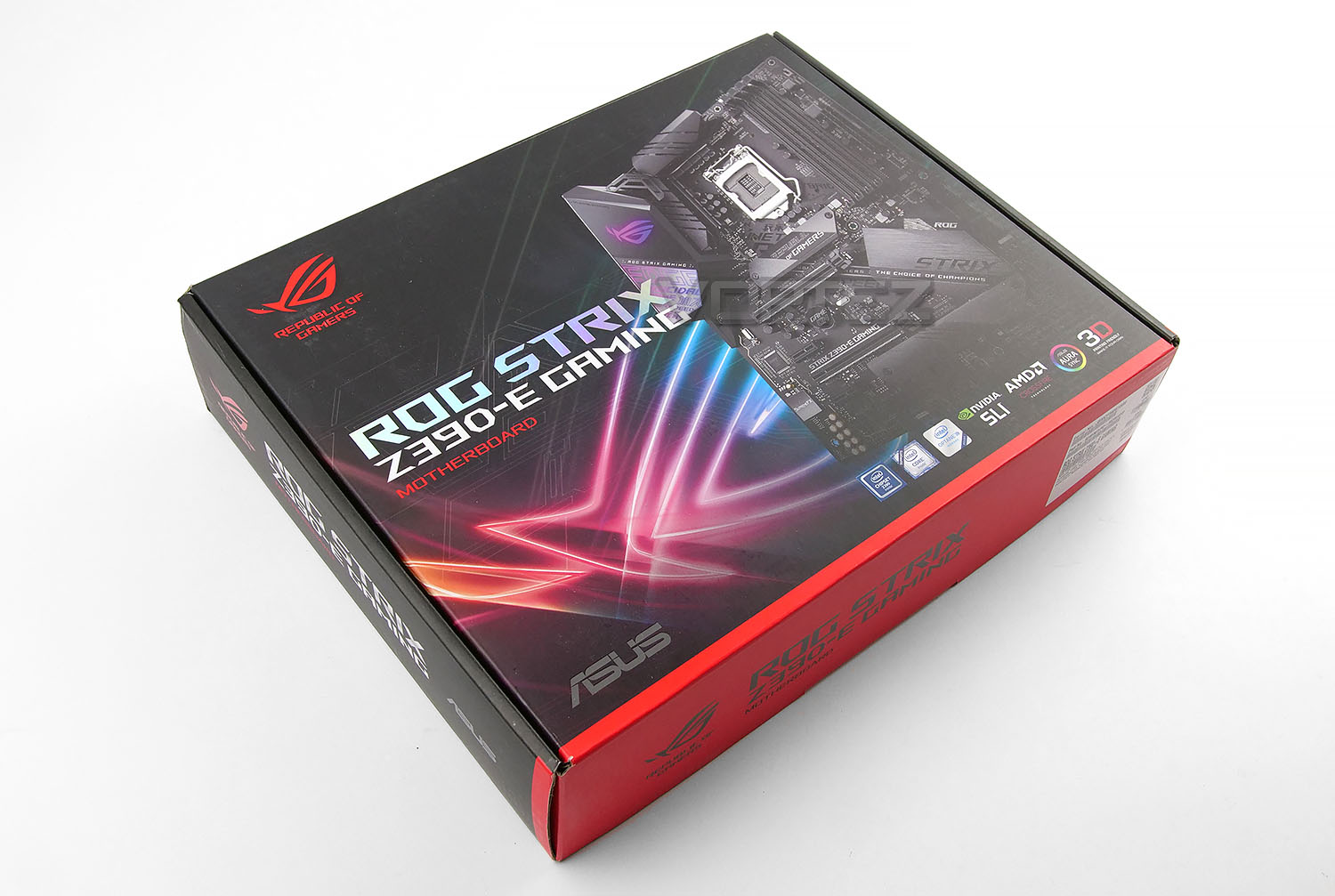
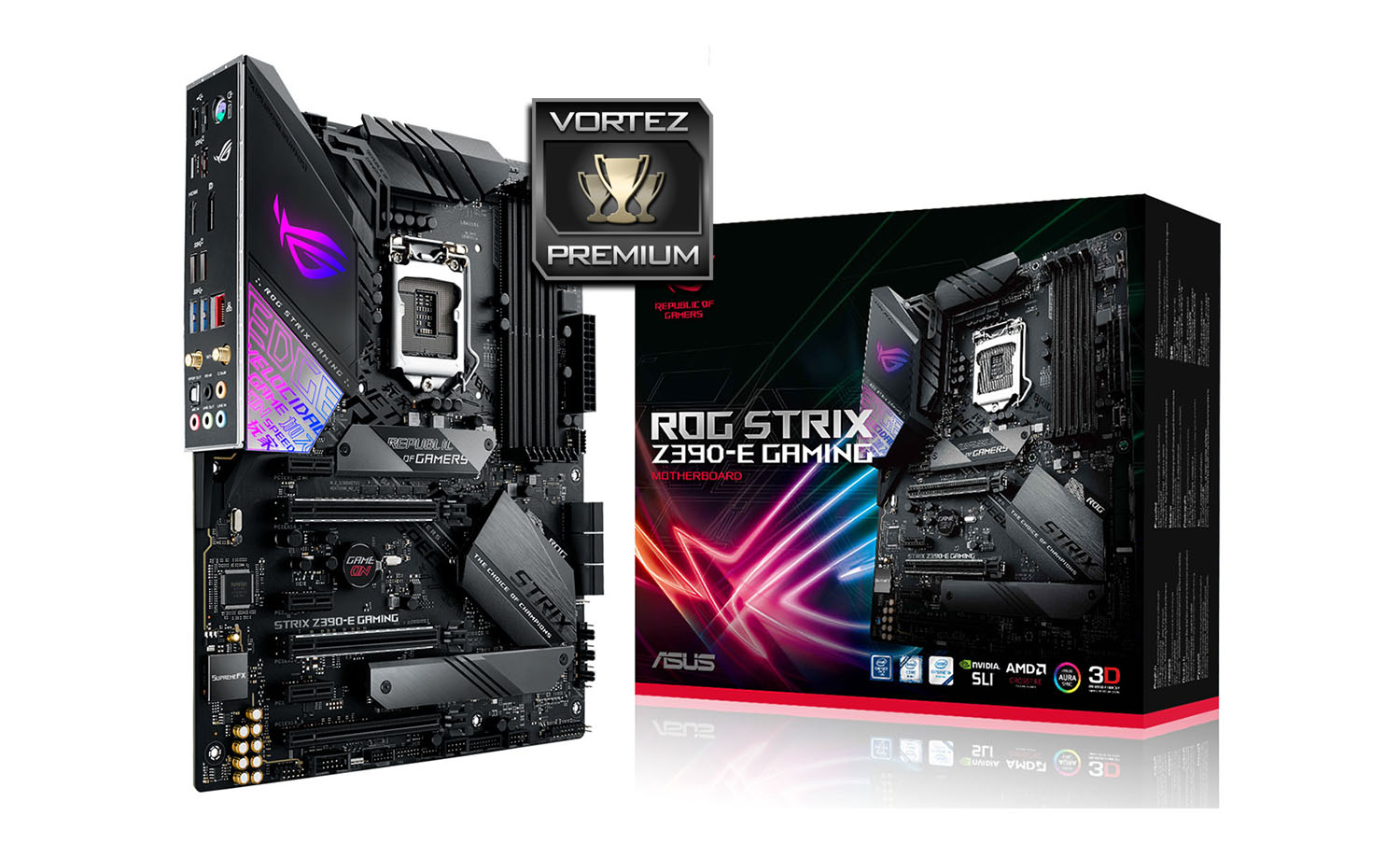
The Z390-E has attractive packaging which is indicative of the ROG portfolio. A depiction of the motherboard can seen on the on the front, along with the supporting technologies, while on the reverse there is a schematic diagram with significant features listed.
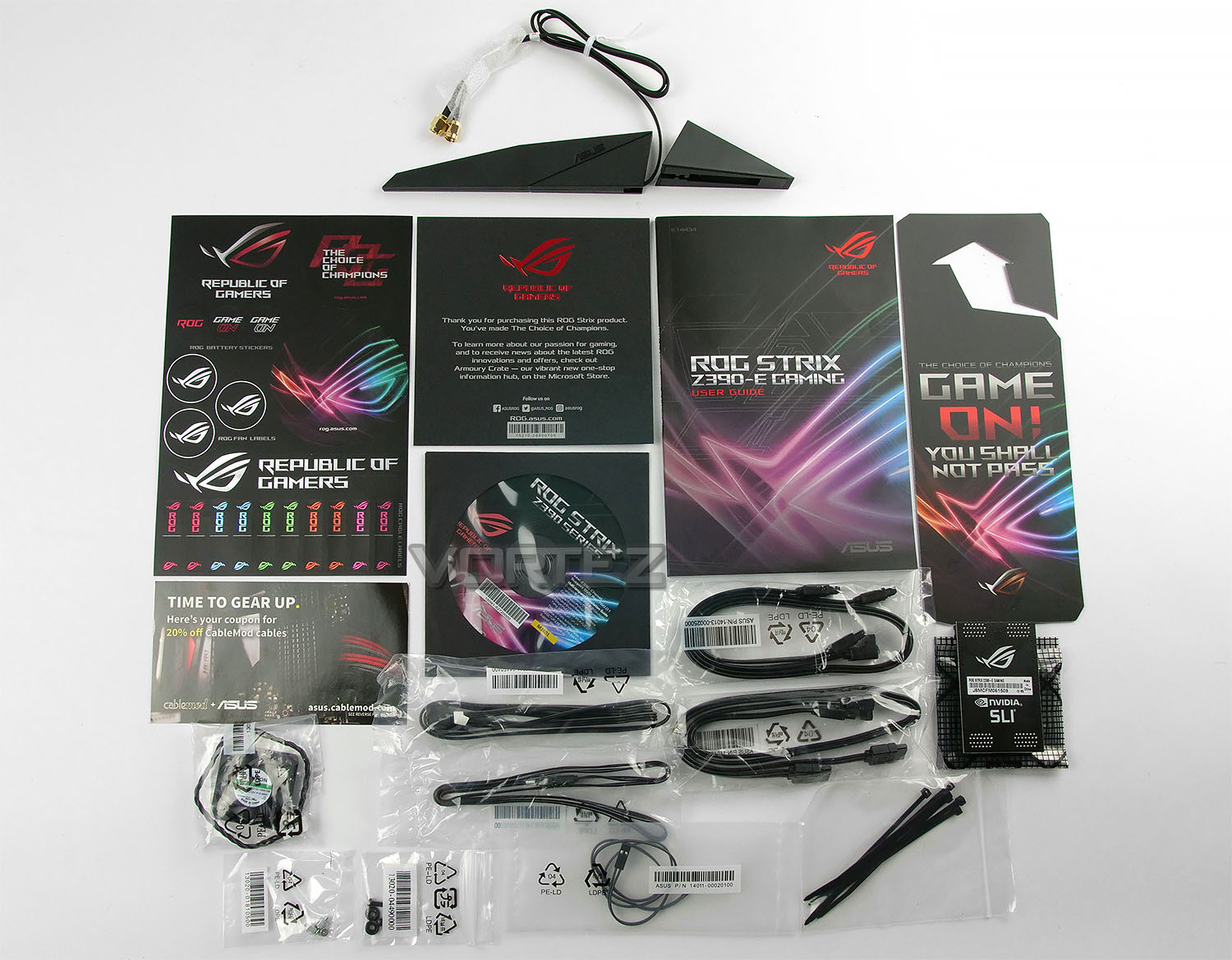
Inside the box all of the accessories are sectioned off into compartment and we receive quite a number of included items. Here is a list of these parts:
• User Guide
• Software/Driver CD
• 1 x 2×2 dual-band Wi-Fi antennas
• 2 x 2-in-1 SATA 6Gb/s cables
• 1 x SLI™ HB Bridge (2-WAY-M)
• 1 x Extension Cable for RGB Strips (80cm)
• 1 x Extension Cable for Addressable LED Strips (80cm)
• 1 x 4010 Fan
• 1 x Fan screws package
• 1 x M.2 Screw Package
• 1 x ROG Strix door hanger
• 1 x ROG Strix Thank you card
• 1 x cable tie pack 1 x ROG Strix series sticker
Although we receive an SLI bridge with this motherboard, it is only compatible with GTX 10-Series graphics cards – such as the GTX 1070, 1080 and 1080 Ti, since it is a HB Bridge. Therefore, the new NVIDIA RTX 20-series graphic cards are not compatible.
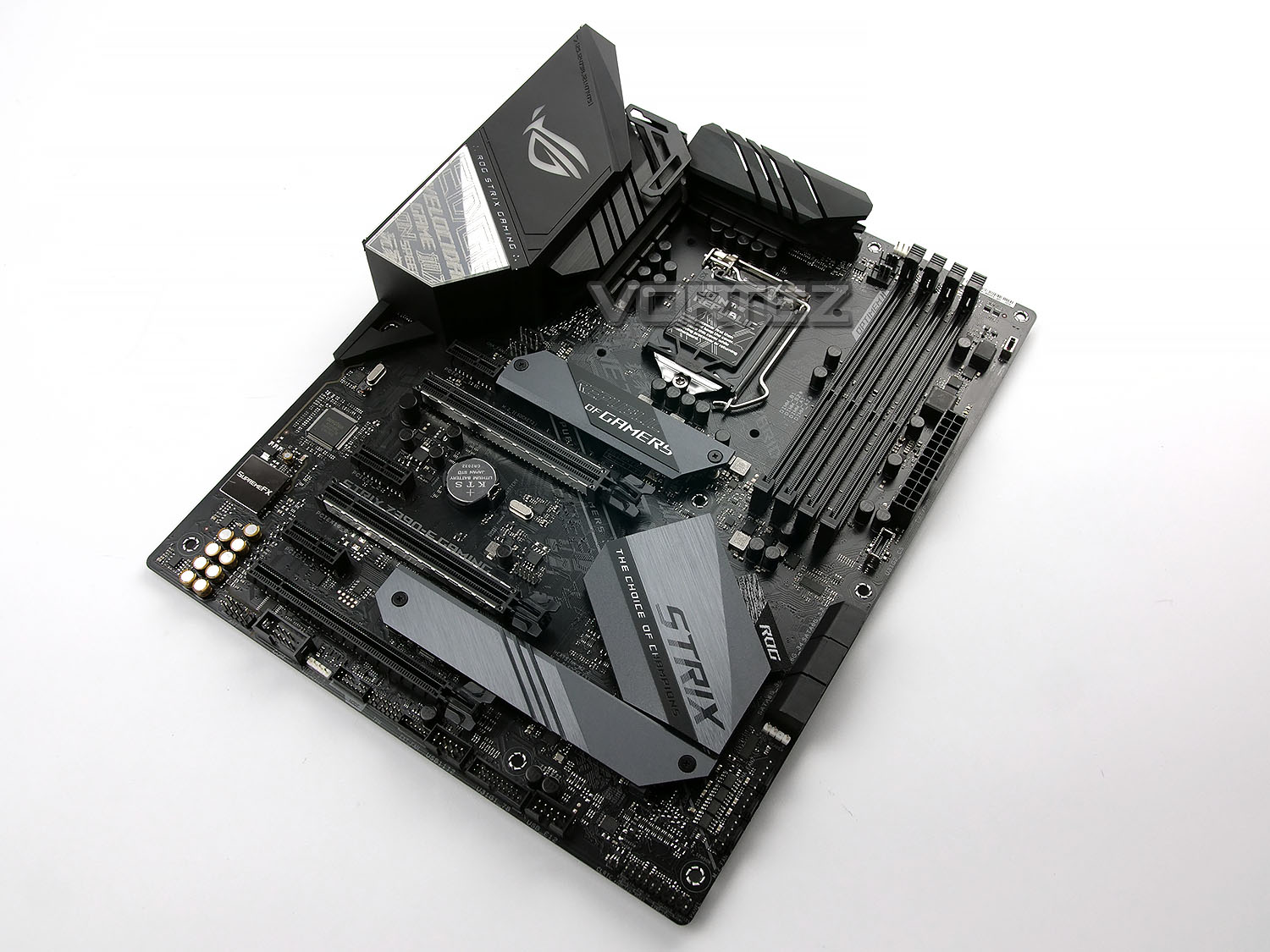
We use to seeing some impressive designs from the ROG team and the Z390-E is no exception. This motherboard oozes style and finesse. So far, it’s our favourite choice – going on looks alone.
The PCB is black but features a semi-matt finish, all of the slots and ports are black and there is a mixture of black/gunmetal heatsinks. With such a neutral theme, it’ll be easy to pair up this motherboard with a whole host of other hardware without colours mismatching.
Z390-E conforms to the ATX form factor, measuring in at 30.5 cm x 24.4 cm.
Closer Look
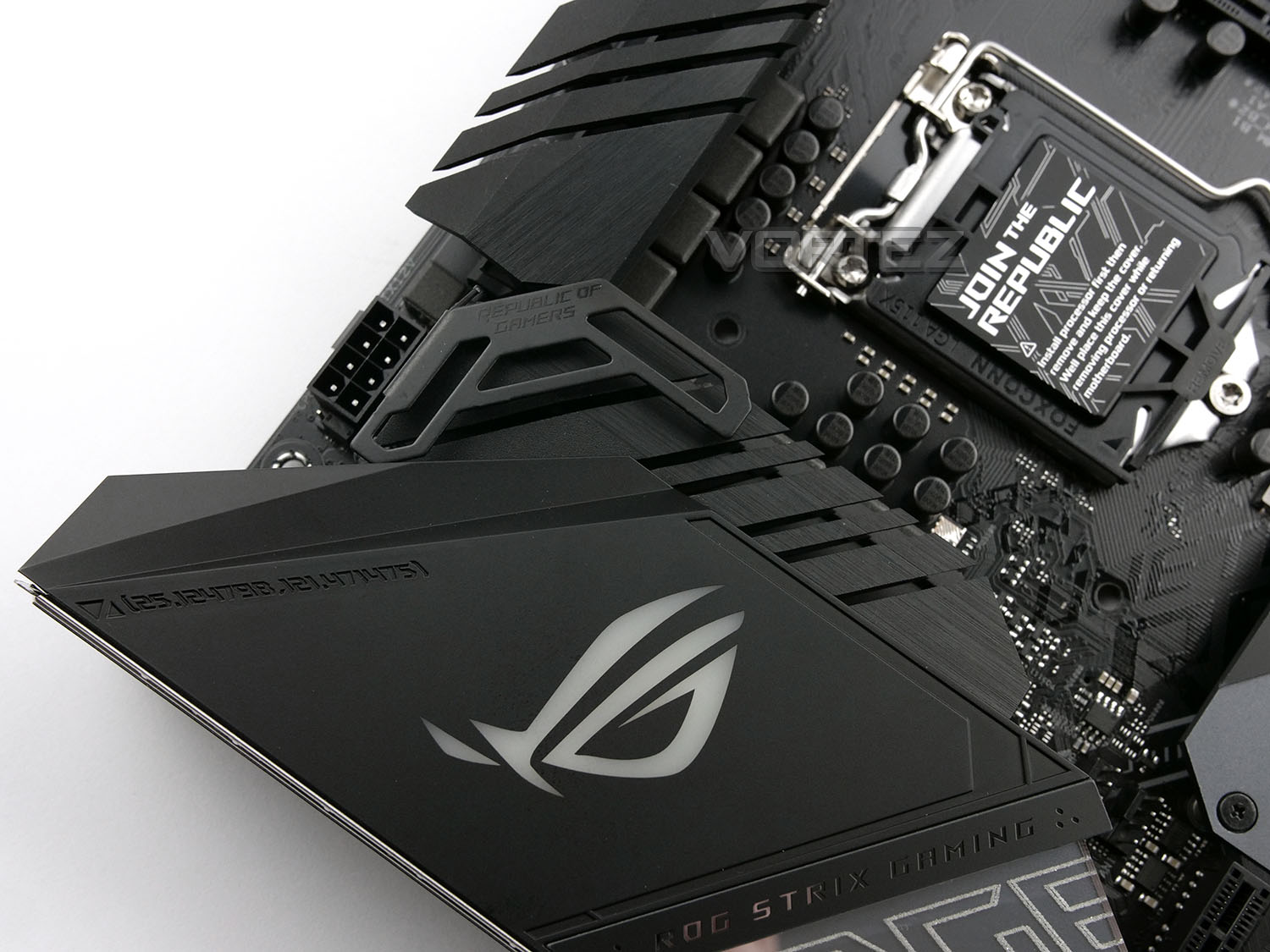
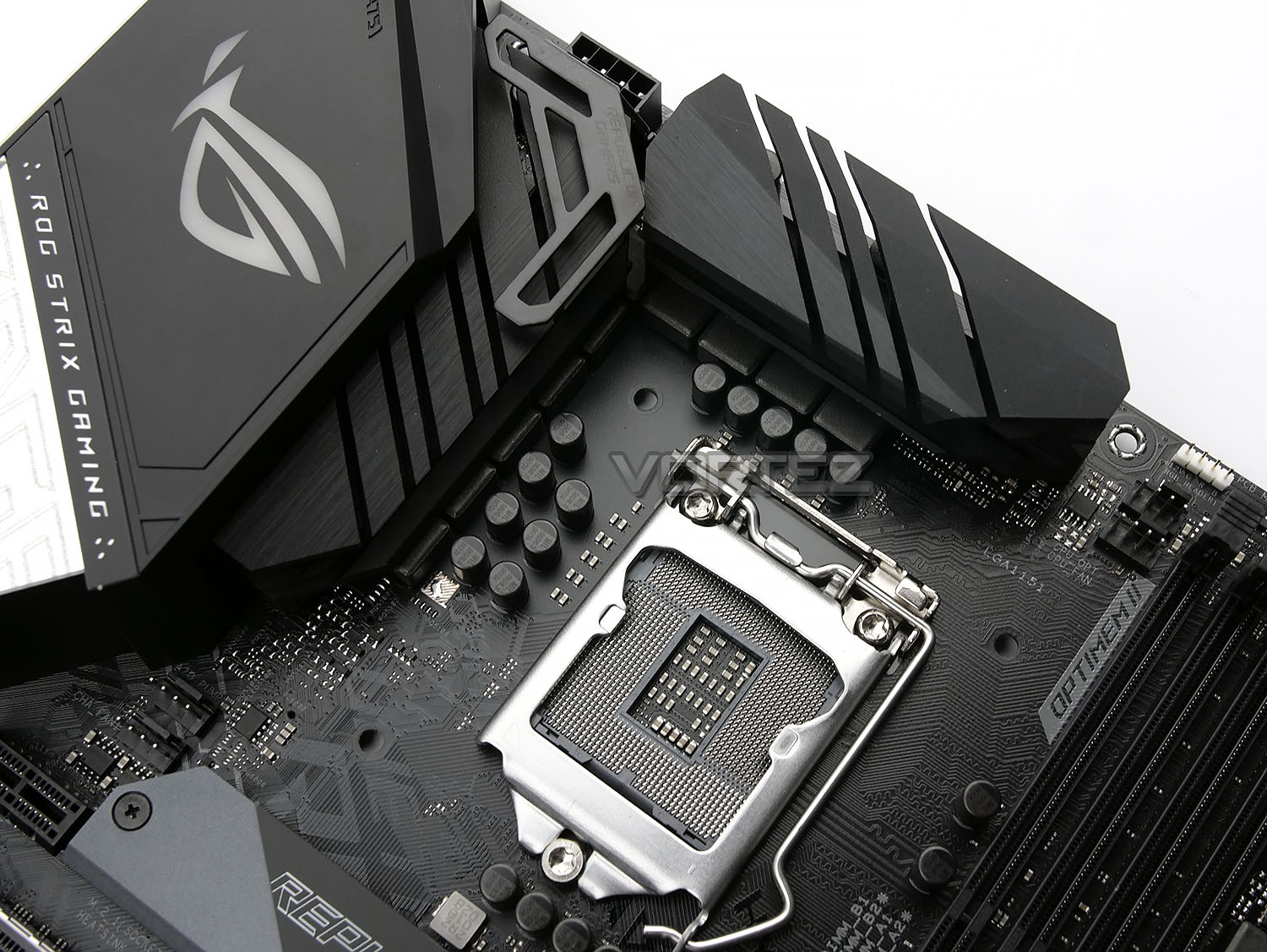
With the switch to Intel’s Z390 chipset, we maintain the same LGA1151 socket, only with beefed up and improved power delivery circuitry. Two separate heatsinks, with a brushed steel appearance, are responsible for keeping temperatures in check; though if some serious overclocking is on the cards, the mount above the left heatsink is there to attach the included 4010 fan, with the aim of improving heat dissipation considerably.
Power delivery is provided by a single 8-pin CPU power connection. We tend to find an 8+4 or even 8+8 on higher end models such as this, but ASUS are obviously confident that a single 8-pin is sufficient.
4-pin PWM fan headers are plentiful in this region, with two to the South-West of the socket and two to the North-East
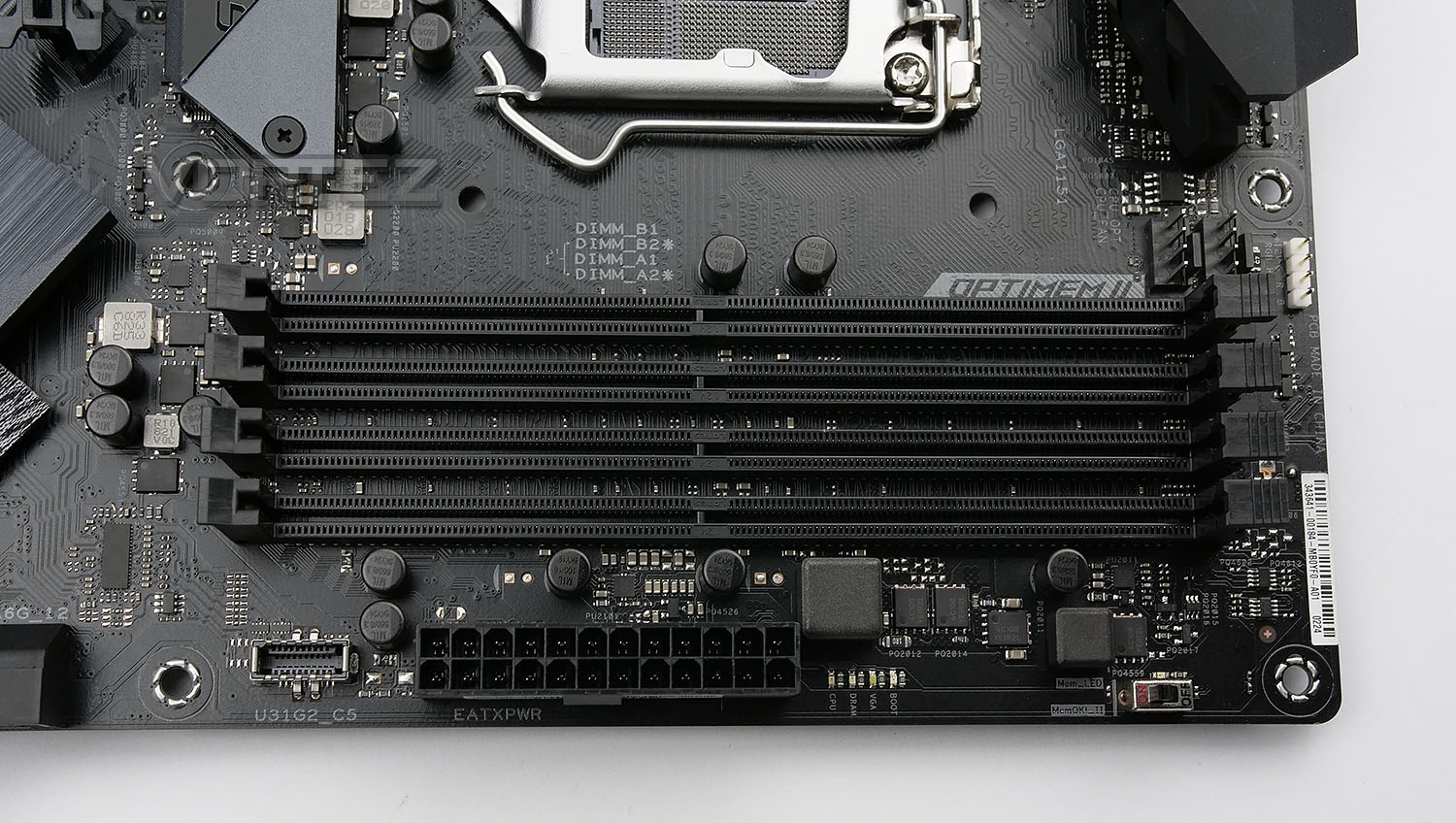
Dual-channel memory is the same on the latest Z390 chipset, when compared to the previous Z370. Four DIMM slots provide a maximum of 64GB with speeds up to 4266MHz (Overclocked). Optimem II is utilised here, with special shielding on the DRAM channels for improved performance and stability.
Here we also see the 24-pin ATX power connector as well as a USB 3.1 Gen. 2 front adaptor.
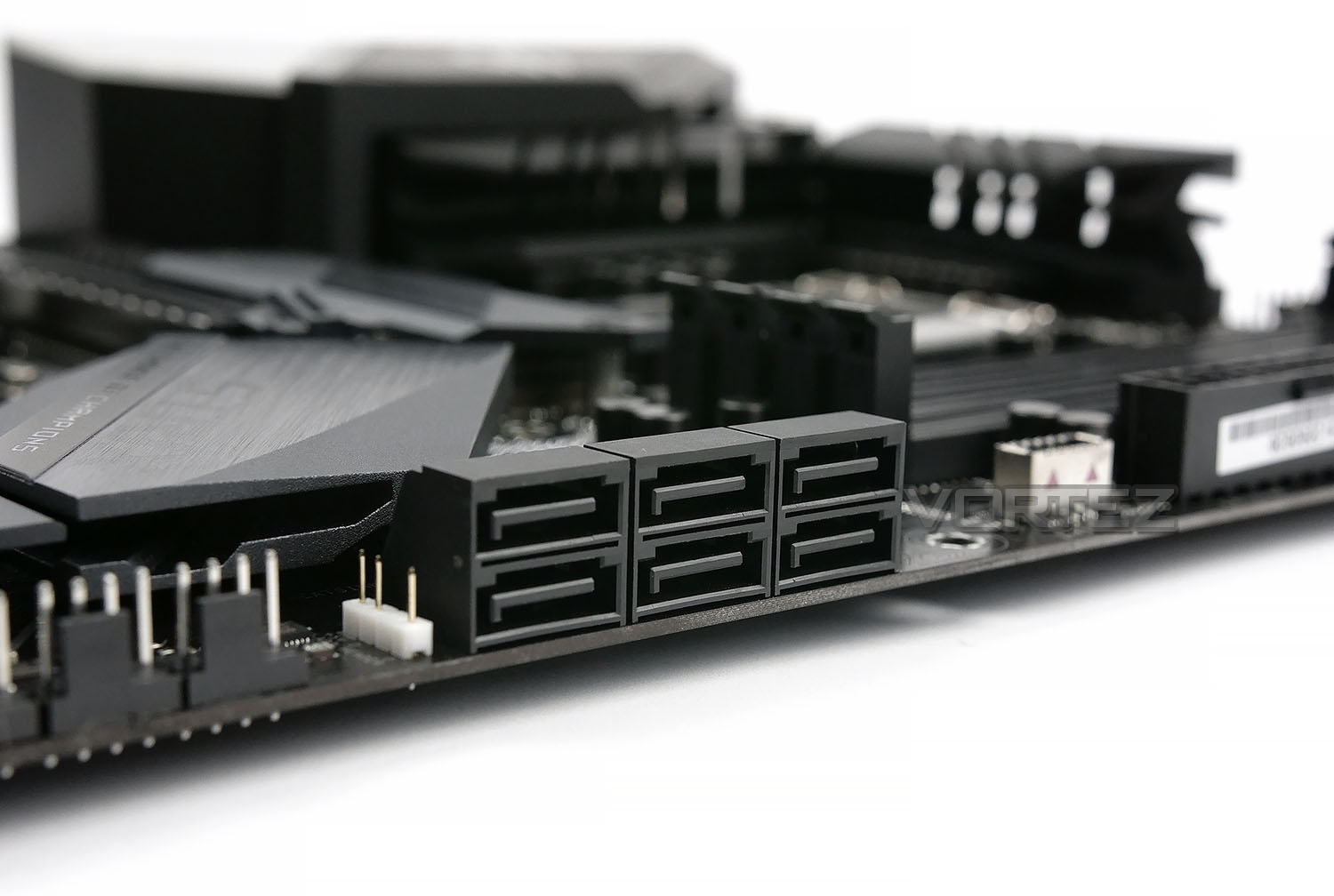
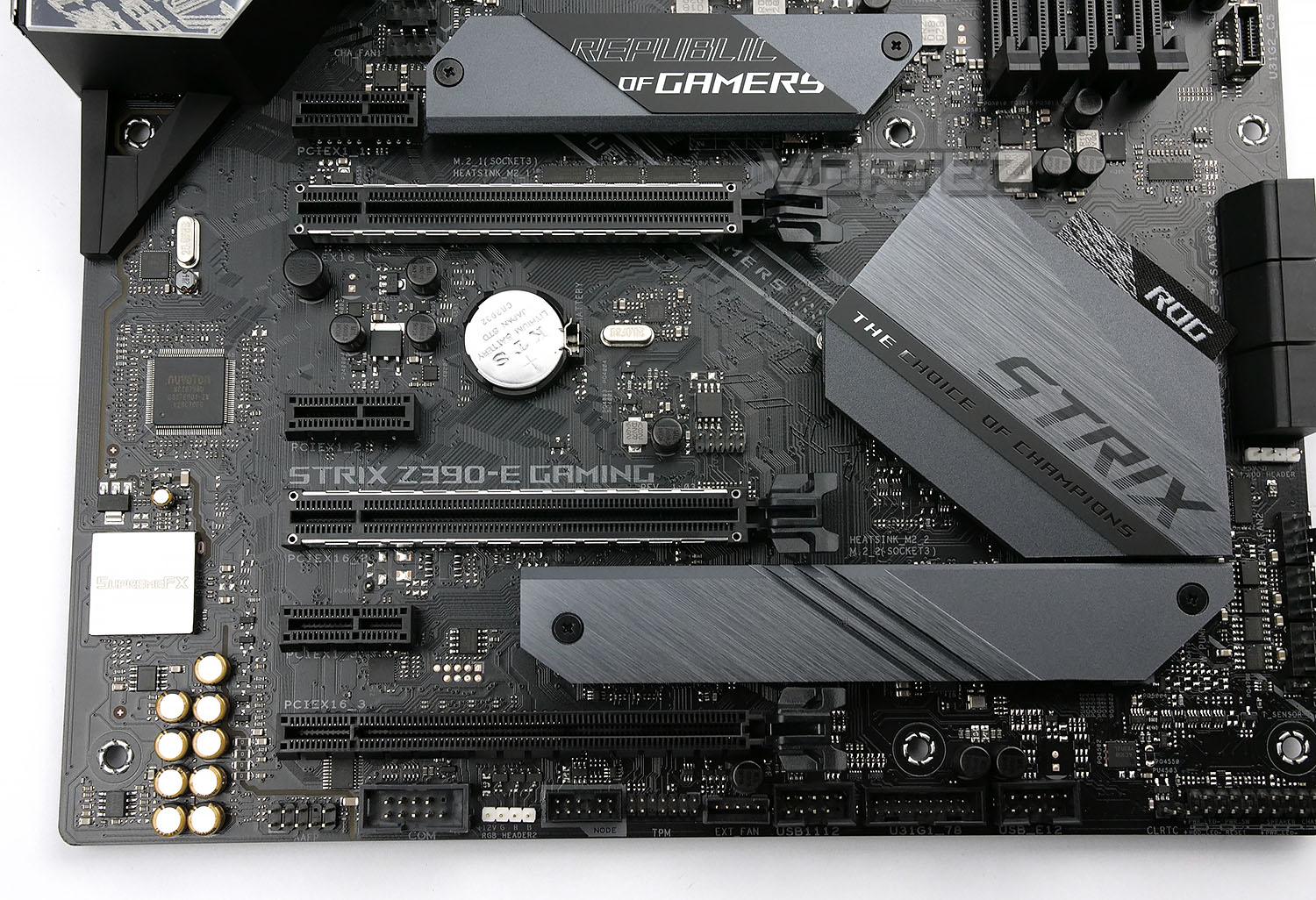
While NVMe M.2 storage becomes more popular, HDDs are still the go-to for large storage platforms. ASUS provide a bank of six SATA 3.0 ports, at a right-angle from the motherboard.
Checking out the PCI slots from above, we can see there are the following:
• 3x PCI-e 3.0 x16 slots (Modes: 16, 8, 4)
• 4x PCI-e 3.0 x1 slots
Along with AMD CrossfireX and NVIDIA SLI, NVIDIA® NVLink is also available – giving support for dual NVIDIA GeForce® RTX series graphics cards.
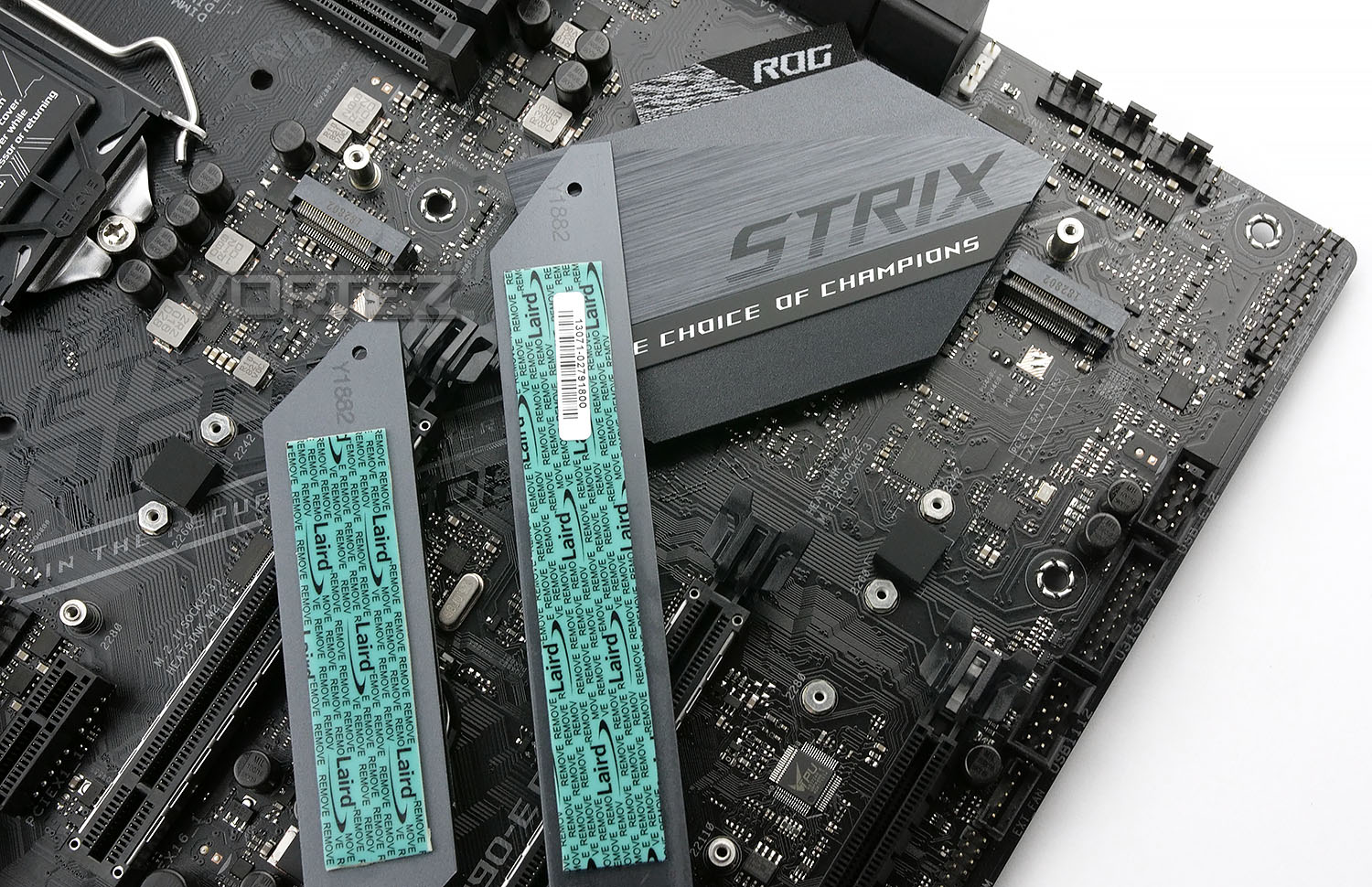
NVMe SSD drives are known for throttling because of their extreme performance and massive heat build up. ASUS ROG have made an attempt to delay, or even entirely prevent, the thermal throttling with the NVMe heatsinks. These heatsinks are on both slots and come with a pre-applied thermal interface material.
Both M.2 ports offer full PCI-E x4 speeds.
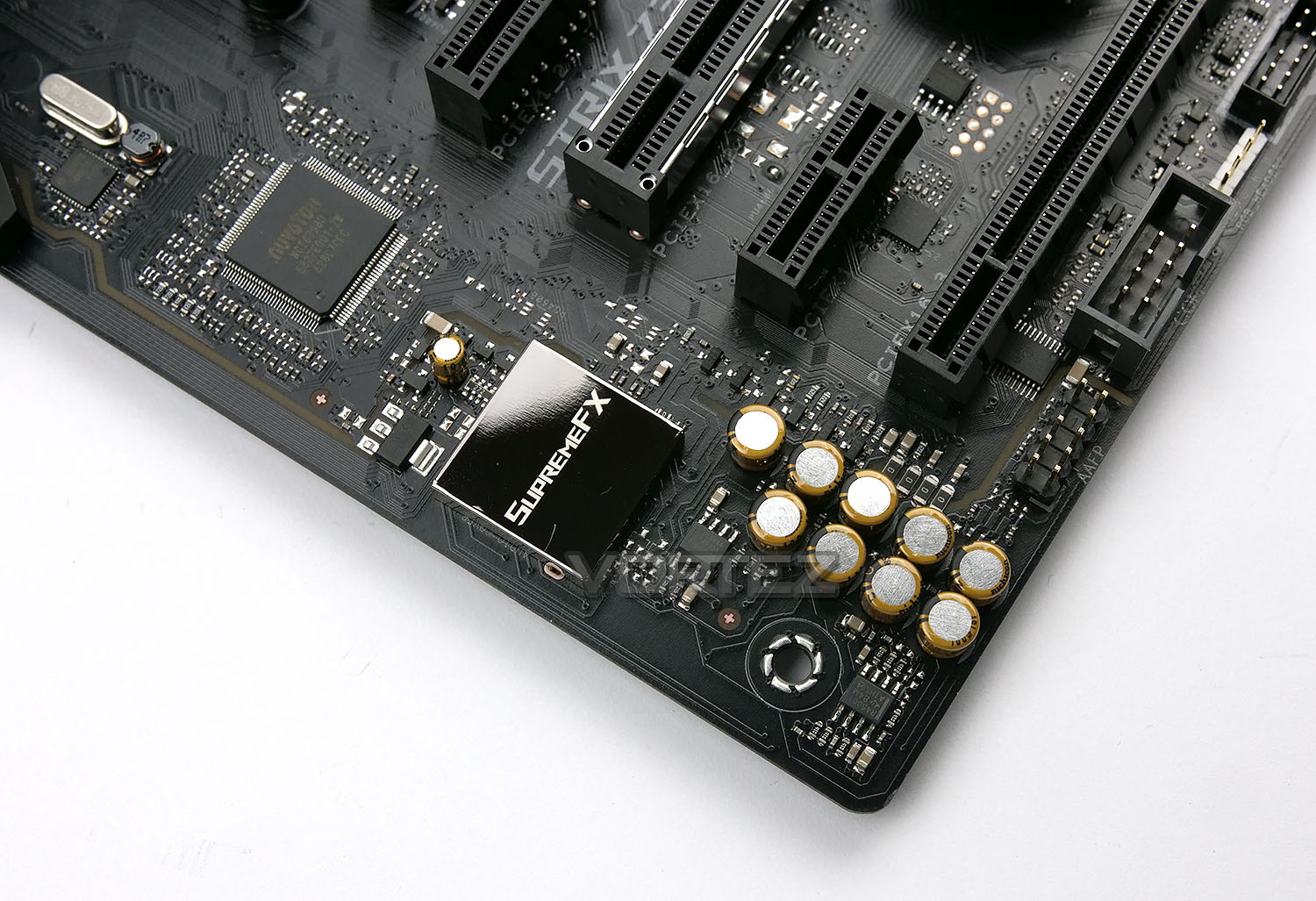
On the bottom-left of the motherboard we find the audio components, isolated from interference by a trace through the board, helping to ensure sounds are clear and heard as they should be. The ROG SupremeFX S1220A 8-channel processor is accompanied by several audio caps.
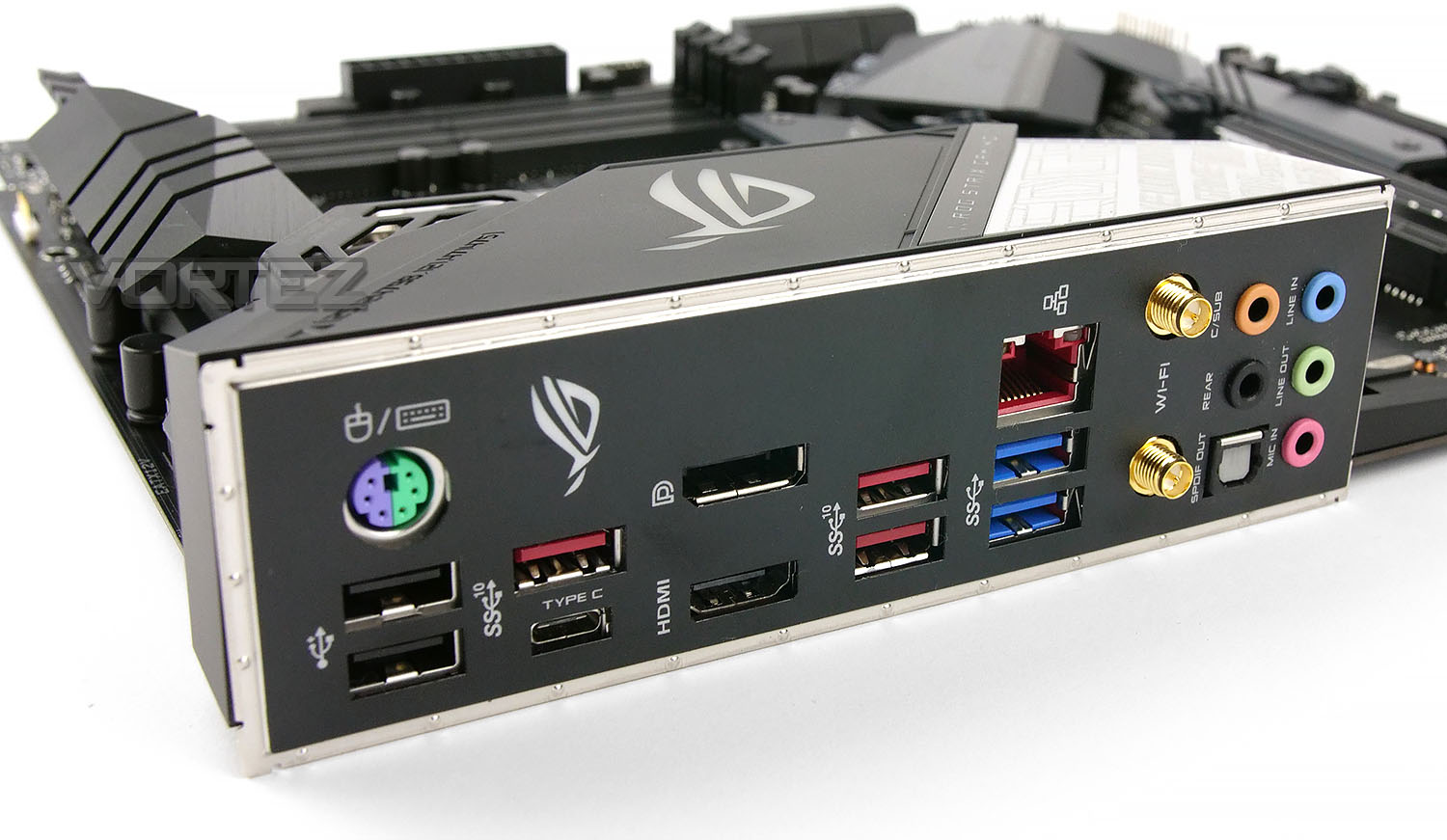
The rear IO shield is pre-attached, saving for any sliced fingers and/or the embarrassment of forgetting to install it.
From left to right, we have the following:
– 1x PS/2 keyboard/mouse port
– 2x USB 2.0 ports
– 2x USB 3.1 Gen. 2 ports (Type A & C)
– 1x DisplayPort
– 1x HDMI Port
– 2x USB 3.1 Gen. 2 ports
– 1x Intel® I219-V Gigabit LAN
– 2x USB 3.1 Gen. 1 ports
– 2x Intel® Wireless-AC 9560 antenna adaptors
– 5x 3.5mm Audio jacks
– 1x Optical SPDIF out
It’s good to see plenty of connectivity on a mid-level board, but it’s about time we saw the back of USB 2.0 ports and moved fully to 3.0 or above.
Test Setup & Methodology
Test Setup
Cooling Corsair H100i GTX
Motherboard ASUS ROG STRIX Z390-E Gaming
Memory 16GB Corsair Vengeance LPX 3000MHz
Graphics AMD Radeon RX480
Storage OCZ Vector 180 240GB SSD
PSU Corsair HX1050 80 Plus Gold Certified PSU
Monitor AOC U2879VF
Capture Device Epiphan AV.iO 4K
Benchmarks
x264 HD 4.0 – 1st and 2nd pass encoding
SiSoftware SANDRA – CPU & Memory benchmarks
POV-RAY – CPU benchmarks
TrueCrypt – CPU benchmarks
AIDA64 – CPU benchmarks & Memory
PCMark 8 – Home Suite & Photoshop
3DMark FireStrike – 3D Benchmark
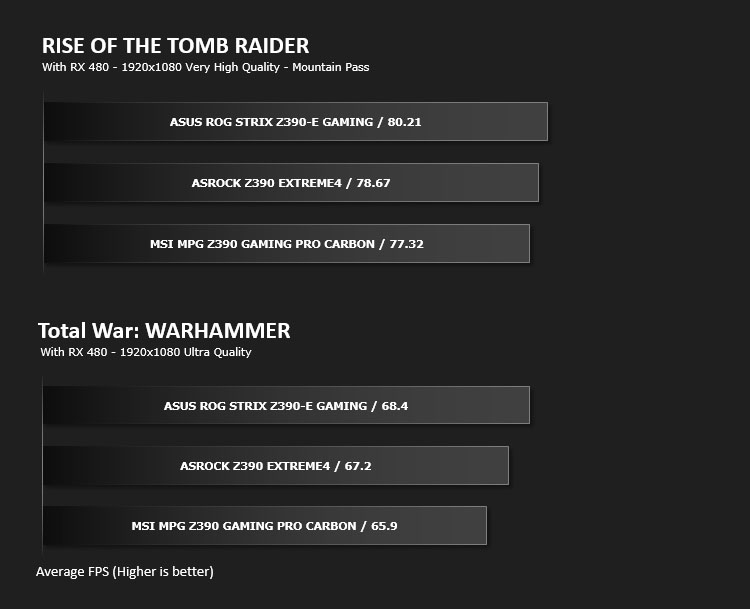
Games – Rise of the Tomb Raider & Total War: WARHAMMER
Other Software
Stress Testing Software: AIDA64 Stability Test
CPU Specification Monitoring: CPU-Z
Overclocking
Benchmarks: Power Consumption
Benchmarks: Cinebench R15
Benchmarks: X264 HD
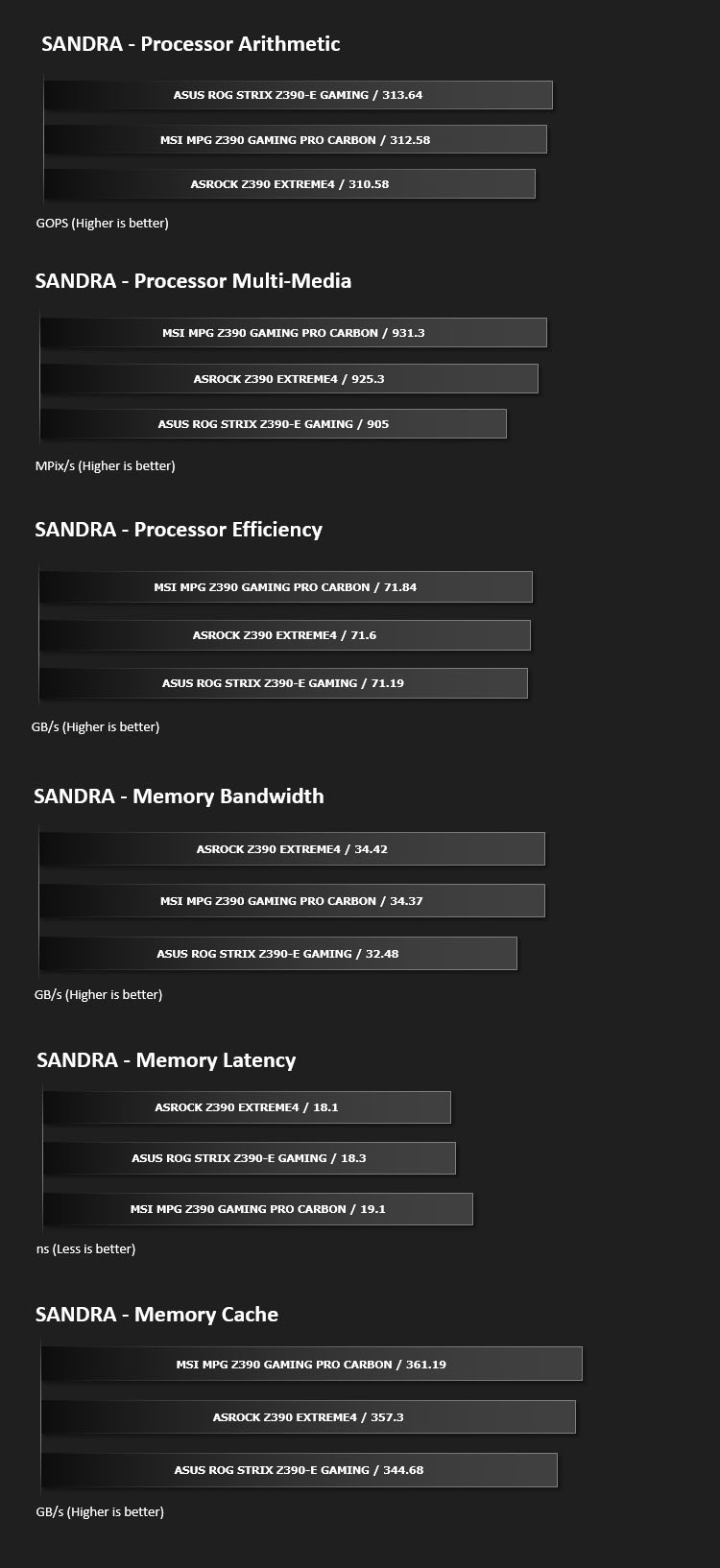
Benchmarks: SiSoftware SANDRA
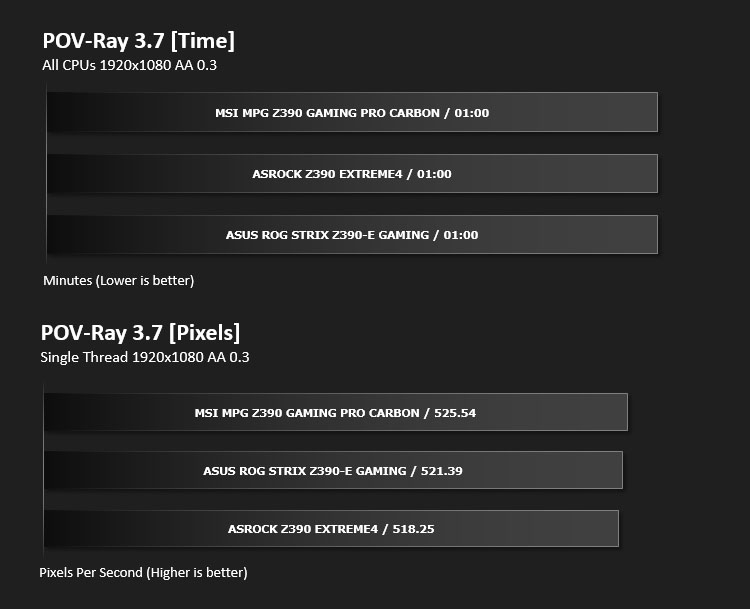
Benchmarks: POV-RAY
This product allows users to build their custom 3D worlds with excellent quality despite their computer’s hardware. It has adjustable options for levels of radiance, refraction, and reflection. Calculation time may vary depending on the computer model, but PovRay can adapt to many computer builds, and is supported by the open source community.
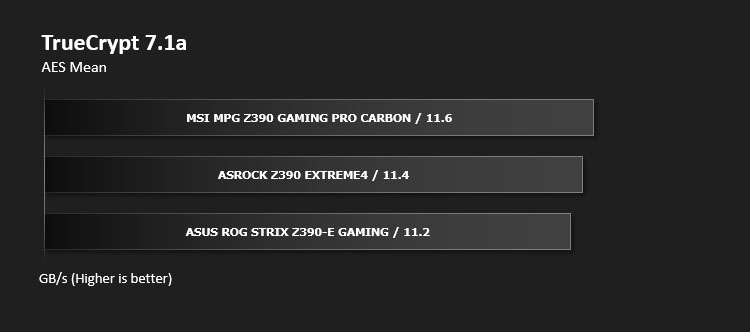
Benchmarks: TrueCrypt
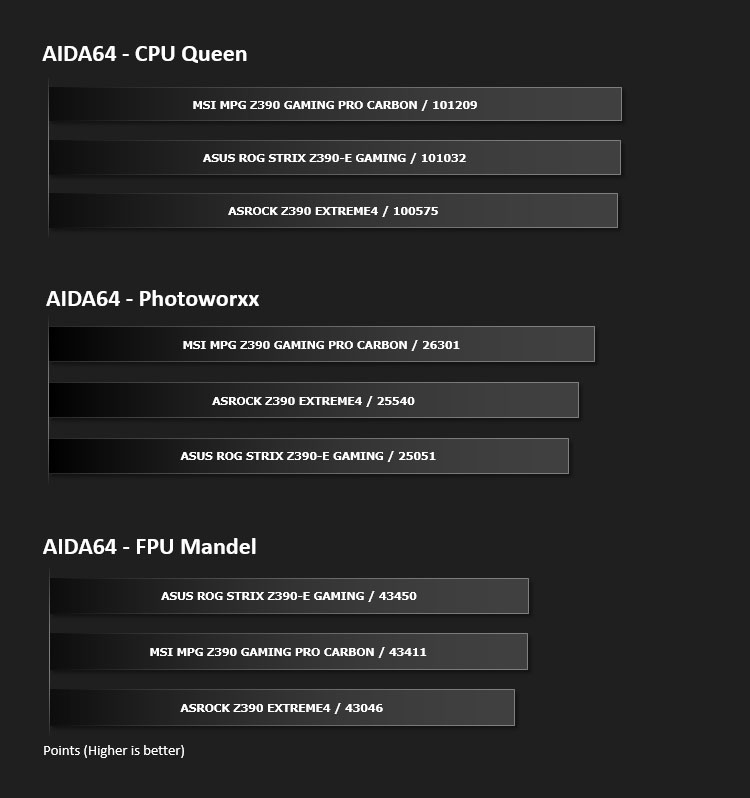
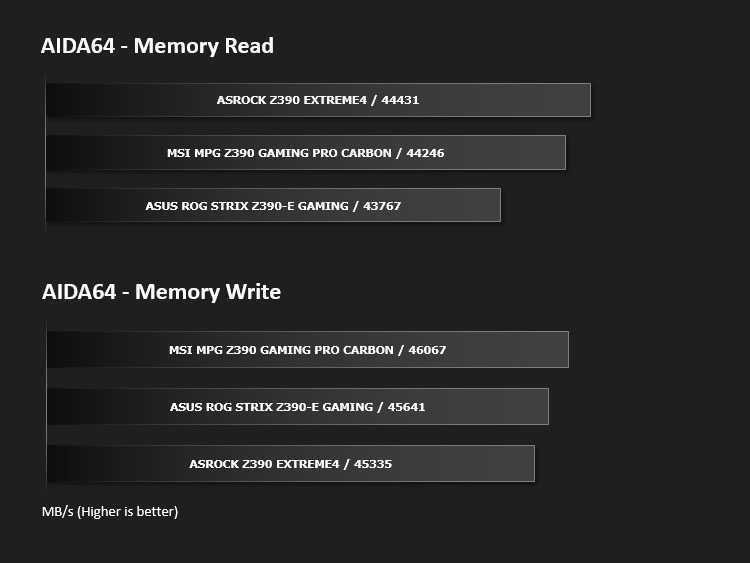
Benchmarks: AIDA64
AIDA64 Product Page
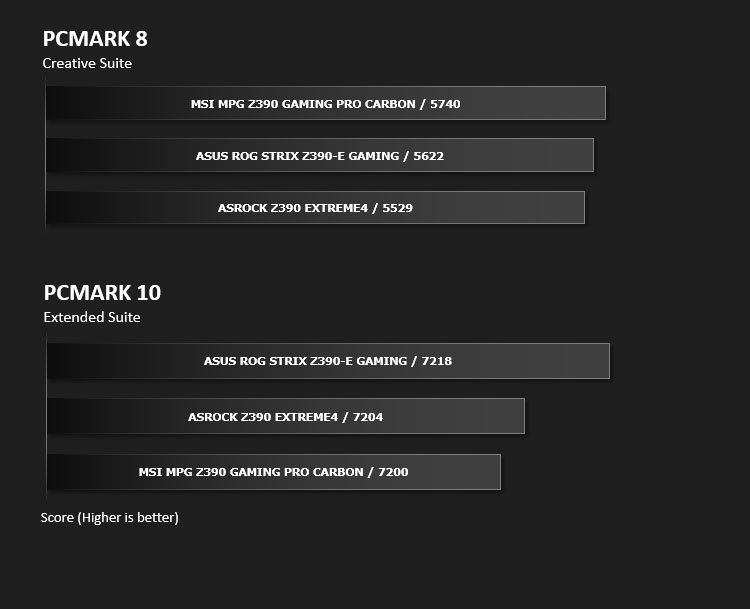
Benchmarks: PCMark 8 & PCMark 10
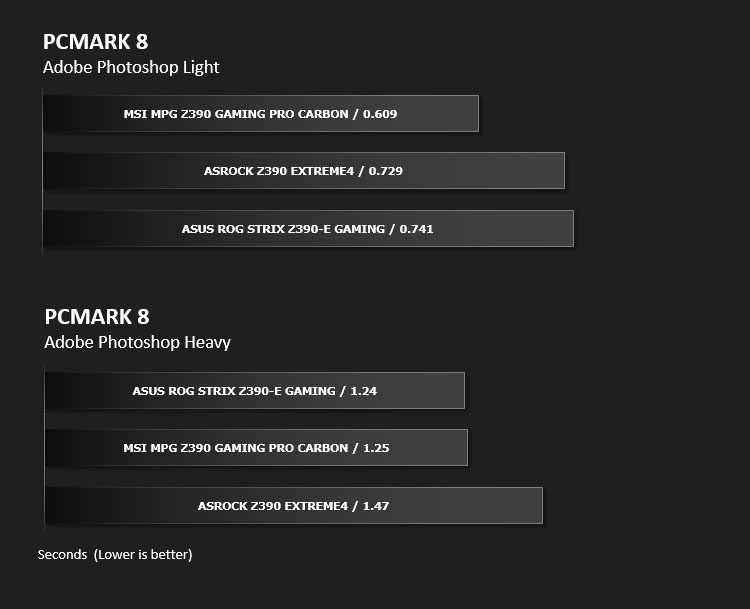
Benchmarks: PCMark 8 Photoshop
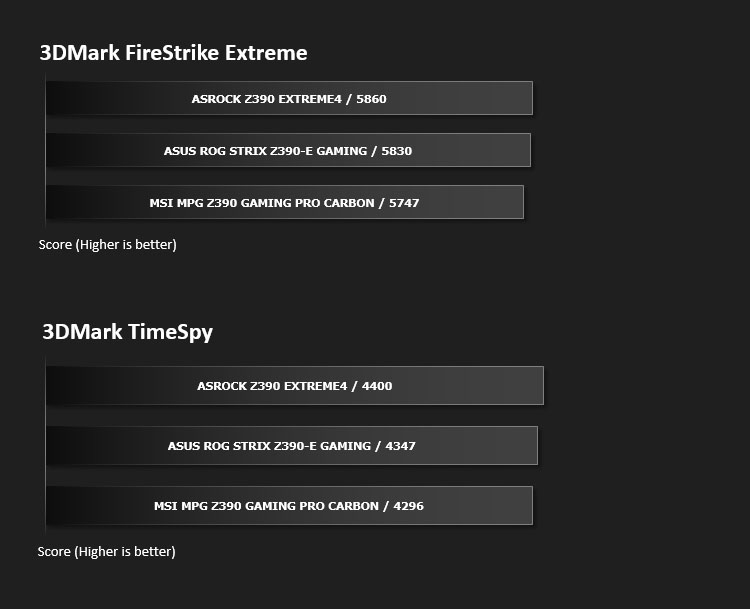
Benchmarks: 3DMark FireStrike & TimeSpy
3DMark FireStrike Product Page
Benchmarks: ROT Tomb Raider & Total War: WARHAMMER
Conclusion
Comparing the new Z390 STRIX lineup to the previous generation of Z370 motherboards, not a lot has changed in terms of tangible features. The main difference being that we now have a USB 3.1 header, native wireless functionality and of course more RGB indulgence.
The STRIX Z390-E Gaming is without a doubt pleasing on the eye. Each generation the ROG team seem to always outshine the competition with their attention to detail and this Z390-E Gaming is no exception. Everything from the PCB to the heatsinks is masterfully designed to make your computer system stunning to behold.
But as we know – looks aren’t everything. But thankfully, Z390-E Gaming also impresses in other departments too. Across the board there is an assortment of features and of course all the hallmarks of a ROG solution such as MemOK II!. It isn’t unusual to find an SSD heatsink included on motherboards nowadays but it’s great to see two included with this offering.
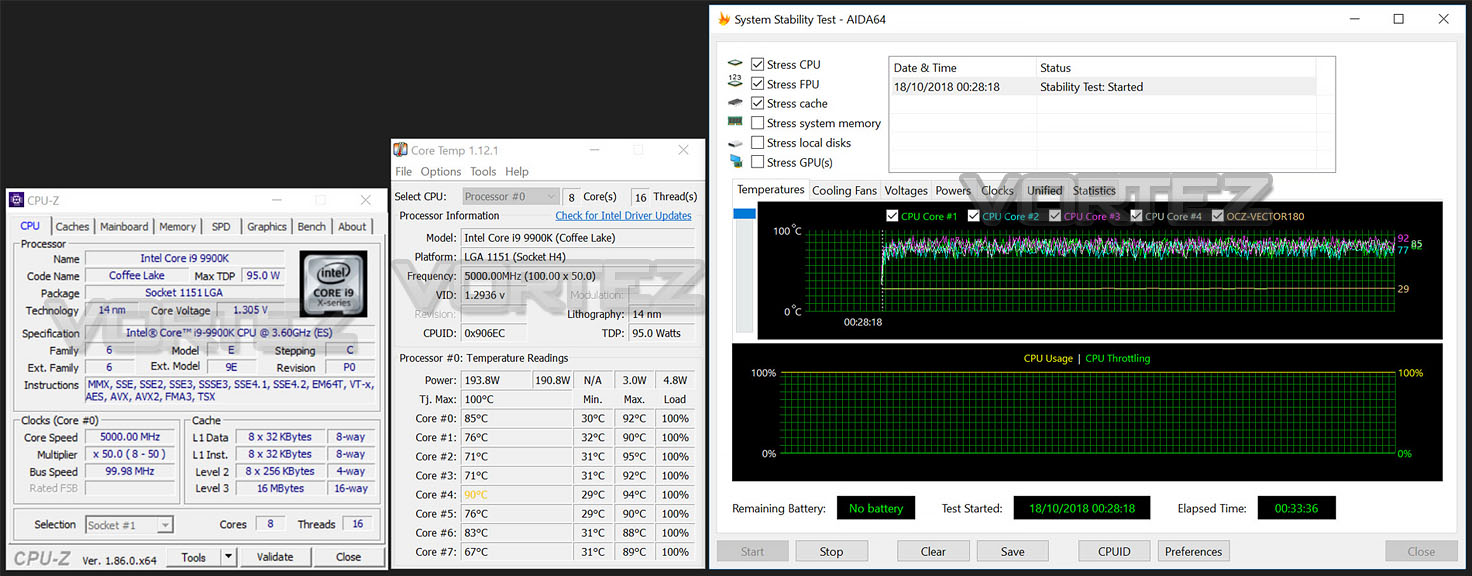
Pitting this ROG motherboard against other familiar Z390 motherboards it’s great to see some outstanding performance figures coming to the table. We were especially impressed by the options inside the UEFI BIOS for overclocking – which are extensive. These tools and the 10-phase Digi+ design allow us to overclock the Core i9-9900K with ease. We managed to shift up the frequency beyond 5GHz and out of all the solutions being tested, this one allowed us to use less voltage – translating to less temperature output.
The cost of moving to Intel Z390 will hit the wallet harder than it did with Z370. Our Z390-E Gaming costs £229 GBP – $244 USD – $419 AUD, which begins to enter the territory of low-end HEDT motherboards. Combine this with flagship 9th Generation Core i9-9900K and the mainstream division is starting to cost a pretty penny.
The Z390-E Gaming is a strong offering from the ROG team. This board carries a solid feature-set and performance is superb.
+ Eye-catching design, stylish
+ Includes extensive RGB features w/ addressable RGB header
+ Excellent performance
+ Great overclocking tools
+ Uses strengthened PCI Express & memory slots
+ Includes integrated rear IO cover
+ Good amount of fan headers
+ Flexible storage options
+ Includes multiple SSD heatsinks
+ Arrives with USB 3.0 and USB 3.1 headers
+ Excellent audio solution
+ Exhaustive UEFI BIOS
Cons
– Should feature more USB ports
Click here for an explanation of our awards at Vortez.net.
Stay connected with Vortez social media pages: