We kick off our AMD B450 chipset reviews with the ASRock B450M Pro4 mATX motherboard, a budget option for those wanting an entry into the world of AMD Ryzen CPUs.

Product on Review: AS Rock B450M Pro4
Manufacturer: AS Rock
Street Price: GBP £79.99 / USD $79.99 / AUD $149.99
Back at the end of July, following on from the X470 chipset, AMD launched their B450 motherboard lineup, offering a more budget-friendly entry point to the AMD Ryzen processors. ASRock were quick off the mark, releasing several new motherboards to cater for different criteria; today we look at the AS Rock B450M Pro4 motherboard.
The B450 chipset is designed to offer a better bang-for-your-buck ratio than the X470 by cutting some non-essential features while still providing a solid base for your Ryzen 2nd Gen CPU.
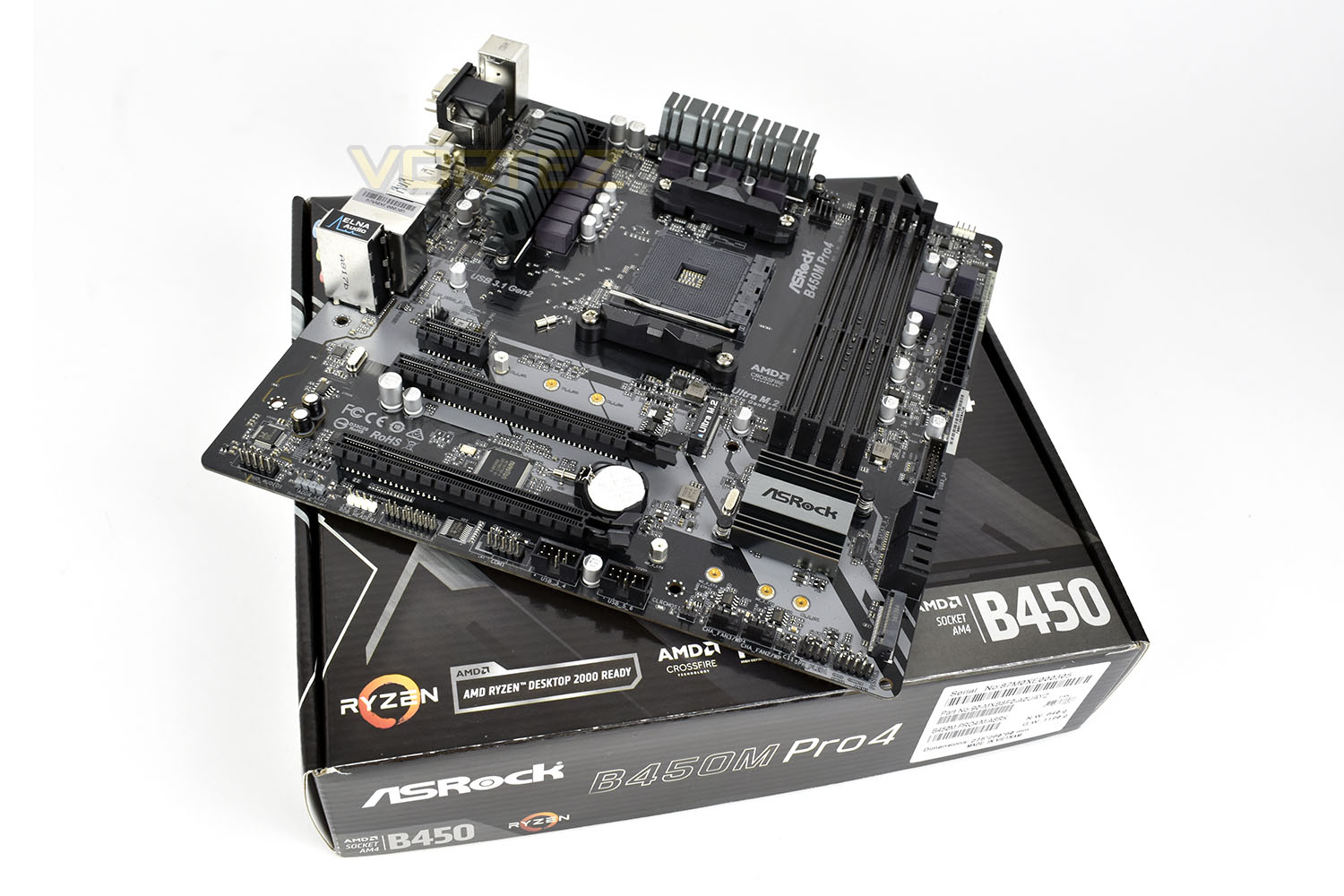
ASRock have retained a pair of M.2 ports, a pair of PCI-E x16 slots, as well as a x1 slot. We also see four SATA 6Gbps and four DDR4 DIMM slots, ensuring the essentials are catered for. All of that is crammed into a smaller mATX form factor, but considering the low pricepoint, things look incredibly promising.
We’ve plugged our AMD Ryzen 2700X CPU into the B450M Pro4 and now we’ll compare it to the X470 line up, let’s see if it can hold its own against the big boys.
ASRock on the StoreMI Technology on the B450M Pro4:
A powerful tool that combines the speed of your SSD with the capacity of your hard disk into a single, fast, easy-to-manage drive. SSDs are fast, but expensive, and offer minimal capacity. Mechanical hard drives boast large capacity for a low price, but are much slower than an SSD. AMD StoreMI technology “combines” these two types of storage into a single drive and automatically moves the data you access the most to the SSD, so you get the best of both worlds: SSD responsiveness, and mechanical hard disk capacity. You can also use up to 2GB of RAM as a last-level cache for ultra-fast data.
Technical Specifications
Unique Feature
ASRock USB 3.1 Gen2
– ASRock USB 3.1 Gen2 Type-A Port (10 Gb/s)
– ASRock USB 3.1 Gen2 Type-C Port (10 Gb/s)
ASRock Super Alloy
– Premium 42A Power Choke
– Sapphire Black PCB
– High Density Glass Fabric PCB
– 2oz Copper PCB
ASRock Ultra M.2 (PCIe Gen3 x4)
ASRock Full Spike Protection (for all USB, Audio, LAN Ports)
ASRock Live Update & APP Shop
CPU
– AMD AM4 Socket
– Digi Power design
– Supports 105W Water Cooling (Pinnacle Ridge); Supports 95W Water Cooling (Summit Ridge); Supports 65W Water Cooling (Raven Ridge)
Chipset
– AMD Promontory B450
Memory
– Dual Channel DDR4 Memory Technology
– 4 x DDR4 DIMM Slots
– AMD Ryzen series CPUs (Pinnacle Ridge) support DDR4 3200+(OC) / 2933/2667/2400/2133 ECC & non-ECC, un-buffered memory*
– AMD Ryzen series CPUs (Summit Ridge) support DDR4 3200+(OC) / 2933(OC) / 2667/2400/2133 ECC & non-ECC, un-buffered memory*
– AMD Ryzen series CPUs (Raven Ridge) support DDR4 3200+(OC) / 2933(OC) / 2667/2400/2133 non-ECC, un-buffered memory*
– Max. capacity of system memory: 64GB**
– 15μ Gold Contact in DIMM Slots
**Due to the operating system limitation, the actual memory size may be less than 4GB for the reservation for system usage under Windows® 32-bit OS. For Windows® 64-bit OS with 64-bit CPU, there is no such limitation.
BIOS
– 128Mb AMI UEFI Legal BIOS with multilingual GUI support
– Supports “Plug and Play”
– ACPI 5.1 compliance wake up events
– Supports jumperfree
– SMBIOS 2.3 support
– DRAM Voltage multi-adjustment
Graphics
– Integrated AMD Radeon™ Vega Series Graphics in Ryzen Series APU*
– DirectX 12, Pixel Shader 5.0
– Max. shared memory 2GB
– Three graphics output options: D-Sub, DVI-D and HDMI
– Supports Triple Monitor
– Supports HDMI with max. resolution up to 4K x 2K (4096×2160) @ 24Hz / (3840×2160) @ 30Hz
– Supports DVI-D with max. resolution up to 1920×1200 @ 60Hz
– Supports D-Sub with max. resolution up to 1920×1200 @ 60Hz
– Supports Auto Lip Sync, Deep Color (12bpc), xvYCC and HBR (High Bit Rate Audio) with HDMI Port (Compliant HDMI monitor is required)
– Supports HDCP with DVI-D and HDMI Ports
– Supports 4K Ultra HD (UHD) playback with HDMI Port
*Actual support may vary by CPU
Audio
– 7.1 CH HD Audio with Content Protection (Realtek ALC892 Audio Codec)*
– Premium Blu-ray Audio support
– Supports Surge Protection
– ELNA Audio Caps
*To configure 7.1 CH HD Audio, it is required to use an HD front panel audio module and enable the multi-channel audio feature through the audio driver.
LAN
– PCIE x1 Gigabit LAN 10/100/1000 Mb/s
– Realtek RTL8111H
– Supports Wake-On-LAN
– Supports Lightning/ESD Protection
– Supports Energy Efficient Ethernet 802.3az
– Supports PXE
Slots
AMD Ryzen series CPUs (Summit Ridge and Pinnacle Ridge)
– 1 x PCI Express 3.0 x16 Slot (PCIE2: x16 mode)*
– 1 x PCI Express 2.0 x16 Slot (PCIE3: x4 mode)
AMD Ryzen series CPUs (Raven Ridge)
– 1 x PCI Express 3.0 x16 Slot (PCIE2: x8 mode)*
– 1 x PCI Express 2.0 x16 Slot (PCIE3: x4 mode)
– 1 x PCI Express 2.0 x1 Slot
– Supports AMD Quad CrossFireX™ and CrossFireX™
*Supports NVMe SSD as boot disks
Storage
– 4 x SATA3 6.0 Gb/s Connectors, support RAID (RAID 0, RAID 1 and RAID 10), NCQ, AHCI and Hot Plug*
– 1 x Ultra M.2 Socket (M2_1), supports M Key type 2242/2260/2280 M.2 PCI Express module up to Gen3 x4 (32 Gb/s) (with Summit Ridge, Raven Ridge and Pinnacle Ridge)**
– 1 x M.2 Socket (M2_2), supports M Key type 2230/2242/2260/2280 M.2 SATA3 6.0 Gb/s module
*M2_2 and SATA3_3 share lanes. If either one of them is in use, the other one will be disabled.
**Supports NVMe SSD as boot disks
Supports ASRock U.2 Kit
Connectors
– 1 x COM Port Header
– 1 x TPM Header
– 1 x Chassis Intrusion Header
– 1 x Power LED and Speaker Header
– 1 x RGB LED Header*
– 1 x Addressable LED Header**
– 1 x AMD Fan LED Header***
– 1 x CPU Fan Connector (4-pin)****
– 1 x CPU/Water Pump Fan Connector (4-pin) (Smart Fan Speed Control)*****
– 3 x Chassis/Water Pump Fan Connectors (4-pin) (Smart Fan Speed Control)******
– 1 x 24 pin ATX Power Connector
– 1 x 8 pin 12V Power Connector
– 1 x Front Panel Audio Connector
– 2 x USB 2.0 Headers (Support 4 USB 2.0 ports) (Supports ESD Protection)
– 1 x USB 3.1 Gen1 Header (Supports 2 USB 3.1 Gen1 ports) (Supports ESD Protection)
*Supports in total up to 12V/3A, 36W LED Strip
**Supports in total up to 5V/3A, 15W LED Strip
***The AMD Fan LED Header supports LED strips of maximum load of 3A (36W) and length up to 2.5M.
****The CPU Fan Connector supports the CPU fan of maximum 1A (12W) fan power.
*****The CPU/Water Pump Fan supports the water cooler fan of maximum 2A (24W) fan power.
******The Chassis/Water Pump Fan supports the water cooler fan of maximum 2A (24W) fan power.
Rear Panel I/O
– 1 x PS/2 Mouse/Keyboard Port
– 1 x D-Sub Port
– 1 x DVI-D Port
– 1 x HDMI Port
– 2 x USB 2.0 Ports (Supports ESD Protection)
– 1 x USB 3.1 Gen2 Type-A Port (10 Gb/s) (Supports ESD Protection)
– 1 x USB 3.1 Gen2 Type-C Port (10 Gb/s) (Supports ESD Protection)
– 4 x USB 3.1 Gen1 Ports (Supports ESD Protection)
– 1 x RJ-45 LAN Port with LED (ACT/LINK LED and SPEED LED)
– HD Audio Jacks: Line in / Front Speaker / Microphone
Software and UEFI
Software
– ASRock A-Tuning
– ASRock Polychrome RGB
– ASRock XFast LAN
UEFI
– ASRock Full HD UEFI
– ASRock Instant Flash
– ASRock Easy RAID Installer
*These utilities can be downloaded from ASRock Live Update & APP Shop.
Support CD
– Drivers, Utilities, AntiVirus Software (Trial Version), Google Chrome Browser and Toolbar
Accessories
– Quick Installation Guide, Support CD, I/O Shield
– 2 x SATA Data Cables
– 2 x Screws for M.2 Sockets
Hardware Monitor
– Temperature Sensing: CPU, CPU/Water Pump, Chassis/Water Pump Fans
– Fan Tachometer: CPU, CPU/Water Pump, Chassis/Water Pump Fans
– Quiet Fan (Auto adjust chassis fan speed by CPU temperature): CPU, CPU/Water Pump, Chassis/Water Pump Fans
– Fan Multi-Speed Control: CPU, CPU/Water Pump, Chassis/Water Pump Fans
– CASE OPEN detection
– Voltage monitoring: +12V, +5V, +3.3V, Vcore
Form Factor
– Micro ATX Form Factor: 9.6-in x 9.6-in, 24.4 cm x 24.4 cm
– Solid Capacitor design
OS
– Microsoft® Windows® 10 64-bit
Certifications
– FCC, CE
– ErP/EuP ready (ErP/EuP ready power supply is required)
ASRock USB 3.1 Gen2
– ASRock USB 3.1 Gen2 Type-A Port (10 Gb/s)
– ASRock USB 3.1 Gen2 Type-C Port (10 Gb/s)
ASRock Super Alloy
– Premium 42A Power Choke
– Sapphire Black PCB
– High Density Glass Fabric PCB
– 2oz Copper PCB
ASRock Ultra M.2 (PCIe Gen3 x4)
ASRock Full Spike Protection (for all USB, Audio, LAN Ports)
ASRock Live Update & APP Shop
CPU
– AMD AM4 Socket
– Digi Power design
– Supports 105W Water Cooling (Pinnacle Ridge); Supports 95W Water Cooling (Summit Ridge); Supports 65W Water Cooling (Raven Ridge)
Chipset
– AMD Promontory B450
Memory
– Dual Channel DDR4 Memory Technology
– 4 x DDR4 DIMM Slots
– AMD Ryzen series CPUs (Pinnacle Ridge) support DDR4 3200+(OC) / 2933/2667/2400/2133 ECC & non-ECC, un-buffered memory*
– AMD Ryzen series CPUs (Summit Ridge) support DDR4 3200+(OC) / 2933(OC) / 2667/2400/2133 ECC & non-ECC, un-buffered memory*
– AMD Ryzen series CPUs (Raven Ridge) support DDR4 3200+(OC) / 2933(OC) / 2667/2400/2133 non-ECC, un-buffered memory*
– Max. capacity of system memory: 64GB**
– 15μ Gold Contact in DIMM Slots
**Due to the operating system limitation, the actual memory size may be less than 4GB for the reservation for system usage under Windows® 32-bit OS. For Windows® 64-bit OS with 64-bit CPU, there is no such limitation.
BIOS
– 128Mb AMI UEFI Legal BIOS with multilingual GUI support
– Supports “Plug and Play”
– ACPI 5.1 compliance wake up events
– Supports jumperfree
– SMBIOS 2.3 support
– DRAM Voltage multi-adjustment
Graphics
– Integrated AMD Radeon™ Vega Series Graphics in Ryzen Series APU*
– DirectX 12, Pixel Shader 5.0
– Max. shared memory 2GB
– Three graphics output options: D-Sub, DVI-D and HDMI
– Supports Triple Monitor
– Supports HDMI with max. resolution up to 4K x 2K (4096×2160) @ 24Hz / (3840×2160) @ 30Hz
– Supports DVI-D with max. resolution up to 1920×1200 @ 60Hz
– Supports D-Sub with max. resolution up to 1920×1200 @ 60Hz
– Supports Auto Lip Sync, Deep Color (12bpc), xvYCC and HBR (High Bit Rate Audio) with HDMI Port (Compliant HDMI monitor is required)
– Supports HDCP with DVI-D and HDMI Ports
– Supports 4K Ultra HD (UHD) playback with HDMI Port
*Actual support may vary by CPU
Audio
– 7.1 CH HD Audio with Content Protection (Realtek ALC892 Audio Codec)*
– Premium Blu-ray Audio support
– Supports Surge Protection
– ELNA Audio Caps
*To configure 7.1 CH HD Audio, it is required to use an HD front panel audio module and enable the multi-channel audio feature through the audio driver.
LAN
– PCIE x1 Gigabit LAN 10/100/1000 Mb/s
– Realtek RTL8111H
– Supports Wake-On-LAN
– Supports Lightning/ESD Protection
– Supports Energy Efficient Ethernet 802.3az
– Supports PXE
Slots
AMD Ryzen series CPUs (Summit Ridge and Pinnacle Ridge)
– 1 x PCI Express 3.0 x16 Slot (PCIE2: x16 mode)*
– 1 x PCI Express 2.0 x16 Slot (PCIE3: x4 mode)
AMD Ryzen series CPUs (Raven Ridge)
– 1 x PCI Express 3.0 x16 Slot (PCIE2: x8 mode)*
– 1 x PCI Express 2.0 x16 Slot (PCIE3: x4 mode)
– 1 x PCI Express 2.0 x1 Slot
– Supports AMD Quad CrossFireX™ and CrossFireX™
*Supports NVMe SSD as boot disks
Storage
– 4 x SATA3 6.0 Gb/s Connectors, support RAID (RAID 0, RAID 1 and RAID 10), NCQ, AHCI and Hot Plug*
– 1 x Ultra M.2 Socket (M2_1), supports M Key type 2242/2260/2280 M.2 PCI Express module up to Gen3 x4 (32 Gb/s) (with Summit Ridge, Raven Ridge and Pinnacle Ridge)**
– 1 x M.2 Socket (M2_2), supports M Key type 2230/2242/2260/2280 M.2 SATA3 6.0 Gb/s module
*M2_2 and SATA3_3 share lanes. If either one of them is in use, the other one will be disabled.
**Supports NVMe SSD as boot disks
Supports ASRock U.2 Kit
Connectors
– 1 x COM Port Header
– 1 x TPM Header
– 1 x Chassis Intrusion Header
– 1 x Power LED and Speaker Header
– 1 x RGB LED Header*
– 1 x Addressable LED Header**
– 1 x AMD Fan LED Header***
– 1 x CPU Fan Connector (4-pin)****
– 1 x CPU/Water Pump Fan Connector (4-pin) (Smart Fan Speed Control)*****
– 3 x Chassis/Water Pump Fan Connectors (4-pin) (Smart Fan Speed Control)******
– 1 x 24 pin ATX Power Connector
– 1 x 8 pin 12V Power Connector
– 1 x Front Panel Audio Connector
– 2 x USB 2.0 Headers (Support 4 USB 2.0 ports) (Supports ESD Protection)
– 1 x USB 3.1 Gen1 Header (Supports 2 USB 3.1 Gen1 ports) (Supports ESD Protection)
*Supports in total up to 12V/3A, 36W LED Strip
**Supports in total up to 5V/3A, 15W LED Strip
***The AMD Fan LED Header supports LED strips of maximum load of 3A (36W) and length up to 2.5M.
****The CPU Fan Connector supports the CPU fan of maximum 1A (12W) fan power.
*****The CPU/Water Pump Fan supports the water cooler fan of maximum 2A (24W) fan power.
******The Chassis/Water Pump Fan supports the water cooler fan of maximum 2A (24W) fan power.
Rear Panel I/O
– 1 x PS/2 Mouse/Keyboard Port
– 1 x D-Sub Port
– 1 x DVI-D Port
– 1 x HDMI Port
– 2 x USB 2.0 Ports (Supports ESD Protection)
– 1 x USB 3.1 Gen2 Type-A Port (10 Gb/s) (Supports ESD Protection)
– 1 x USB 3.1 Gen2 Type-C Port (10 Gb/s) (Supports ESD Protection)
– 4 x USB 3.1 Gen1 Ports (Supports ESD Protection)
– 1 x RJ-45 LAN Port with LED (ACT/LINK LED and SPEED LED)
– HD Audio Jacks: Line in / Front Speaker / Microphone
Software and UEFI
Software
– ASRock A-Tuning
– ASRock Polychrome RGB
– ASRock XFast LAN
UEFI
– ASRock Full HD UEFI
– ASRock Instant Flash
– ASRock Easy RAID Installer
*These utilities can be downloaded from ASRock Live Update & APP Shop.
Support CD
– Drivers, Utilities, AntiVirus Software (Trial Version), Google Chrome Browser and Toolbar
Accessories
– Quick Installation Guide, Support CD, I/O Shield
– 2 x SATA Data Cables
– 2 x Screws for M.2 Sockets
Hardware Monitor
– Temperature Sensing: CPU, CPU/Water Pump, Chassis/Water Pump Fans
– Fan Tachometer: CPU, CPU/Water Pump, Chassis/Water Pump Fans
– Quiet Fan (Auto adjust chassis fan speed by CPU temperature): CPU, CPU/Water Pump, Chassis/Water Pump Fans
– Fan Multi-Speed Control: CPU, CPU/Water Pump, Chassis/Water Pump Fans
– CASE OPEN detection
– Voltage monitoring: +12V, +5V, +3.3V, Vcore
Form Factor
– Micro ATX Form Factor: 9.6-in x 9.6-in, 24.4 cm x 24.4 cm
– Solid Capacitor design
OS
– Microsoft® Windows® 10 64-bit
Certifications
– FCC, CE
– ErP/EuP ready (ErP/EuP ready power supply is required)
Packaging & First Look
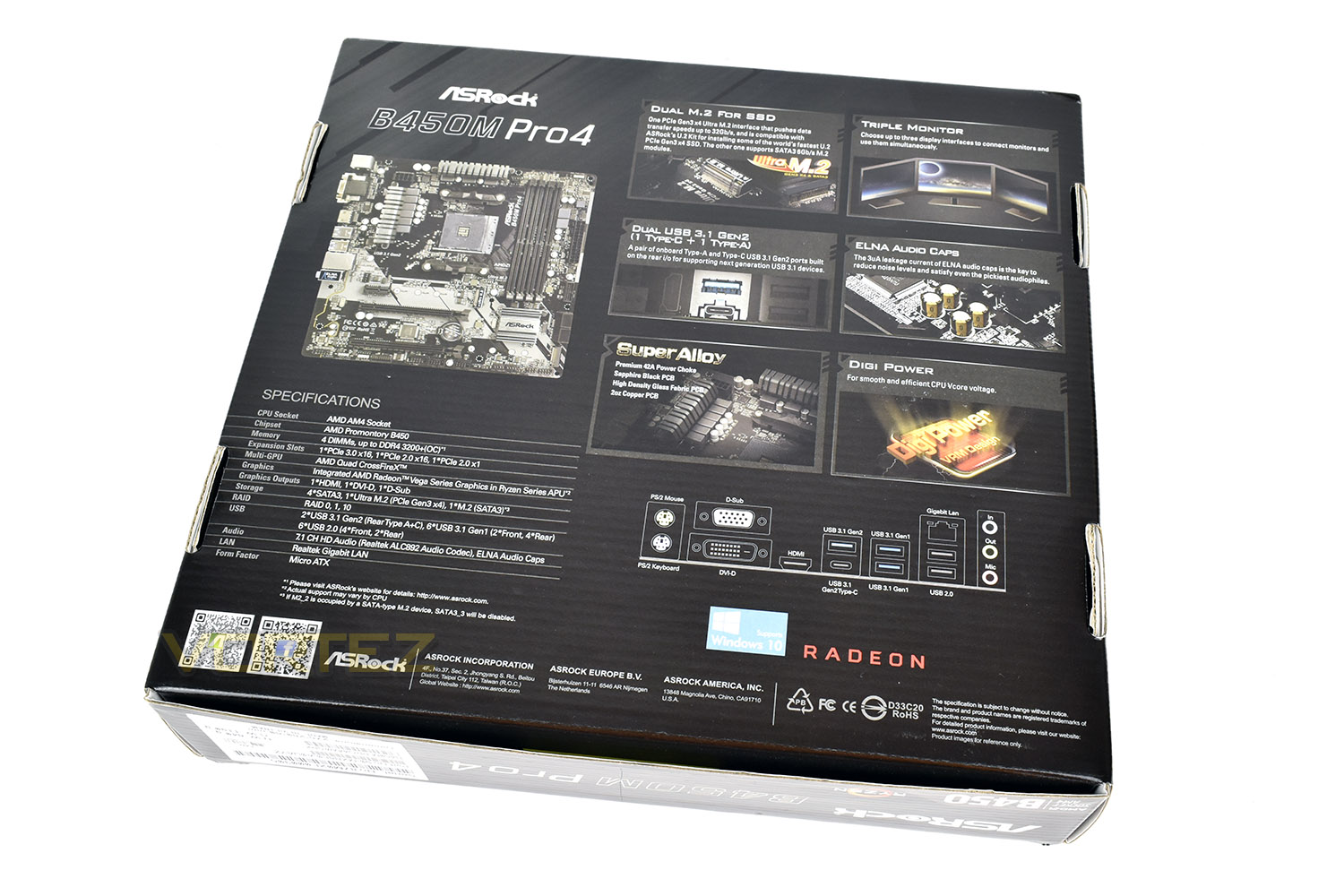
The box the B450M Pro4 arrives in is relatively bland, considering some other designs we’ve seen, but it’s easy to find the right product if searching for this on the shelves of a computer store. Also, less money spent on packaging means more spent on the motherboard itself.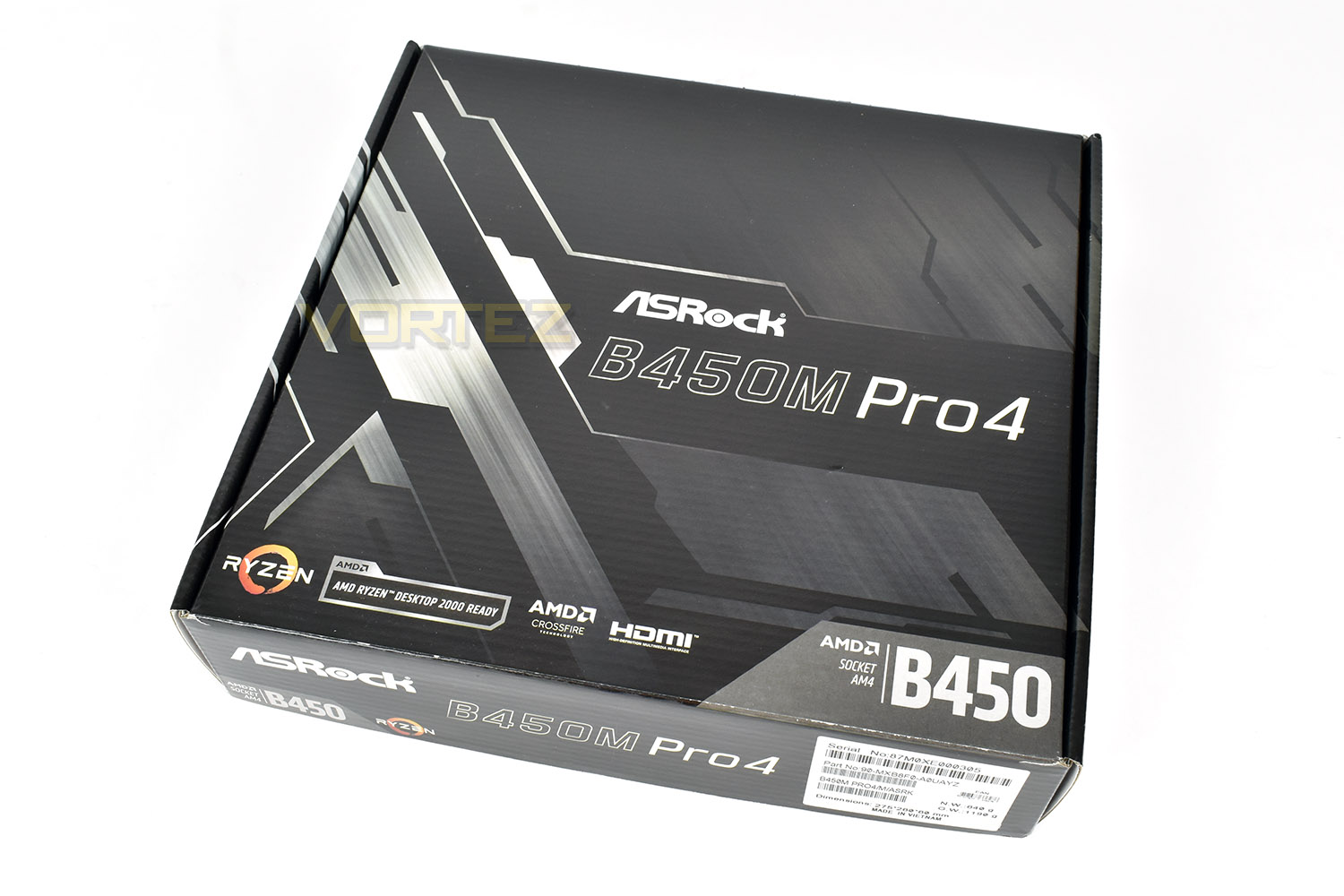
Contrary to the front, the rear is absolutely rammed full of information. ASRock have done a good job of fitting this much onto the rear without it appearing too cluttered.
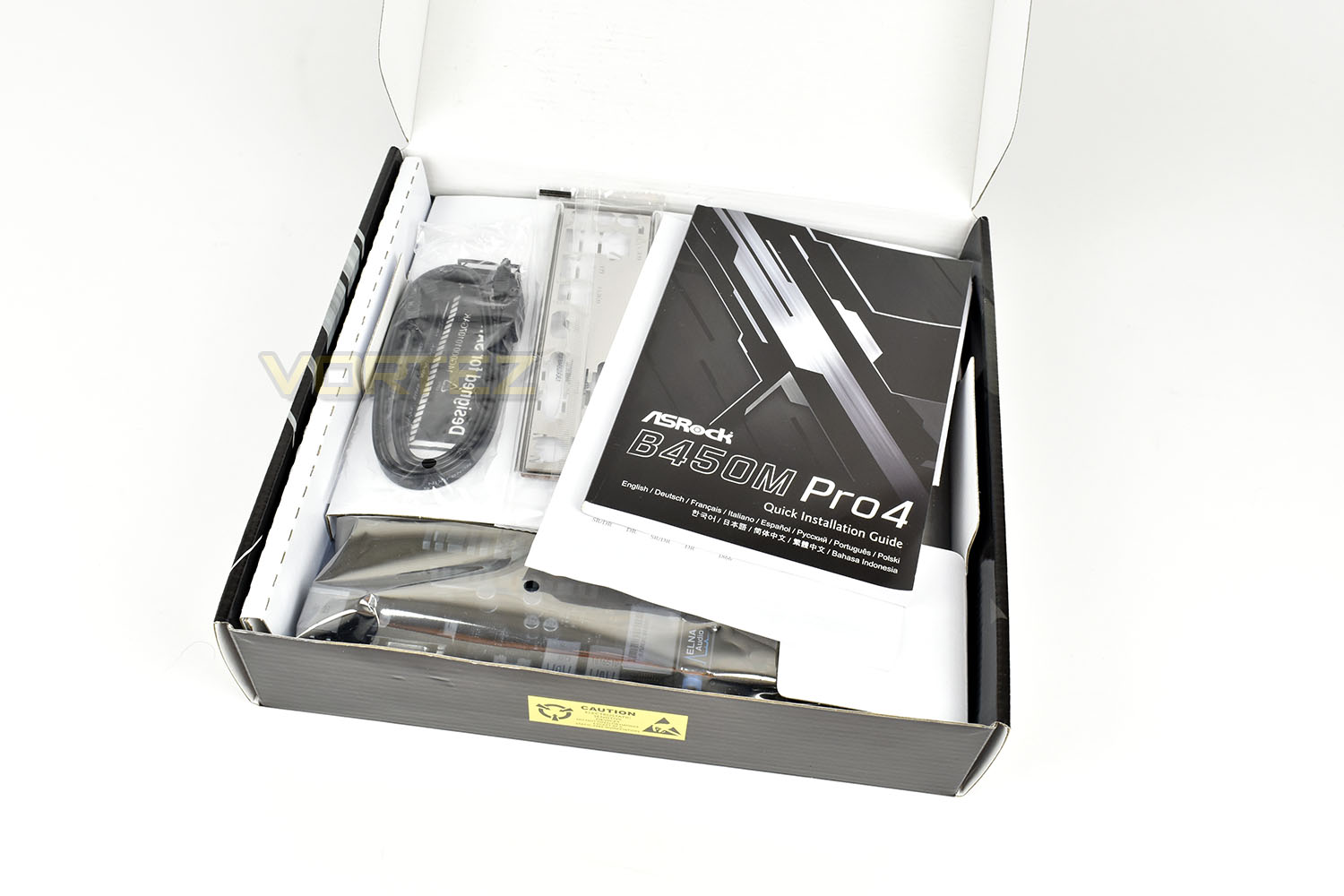
On top of the motherboard, which is wrapped in the anti-static protective bag, is a cardboard tray that holds the bundled extras.
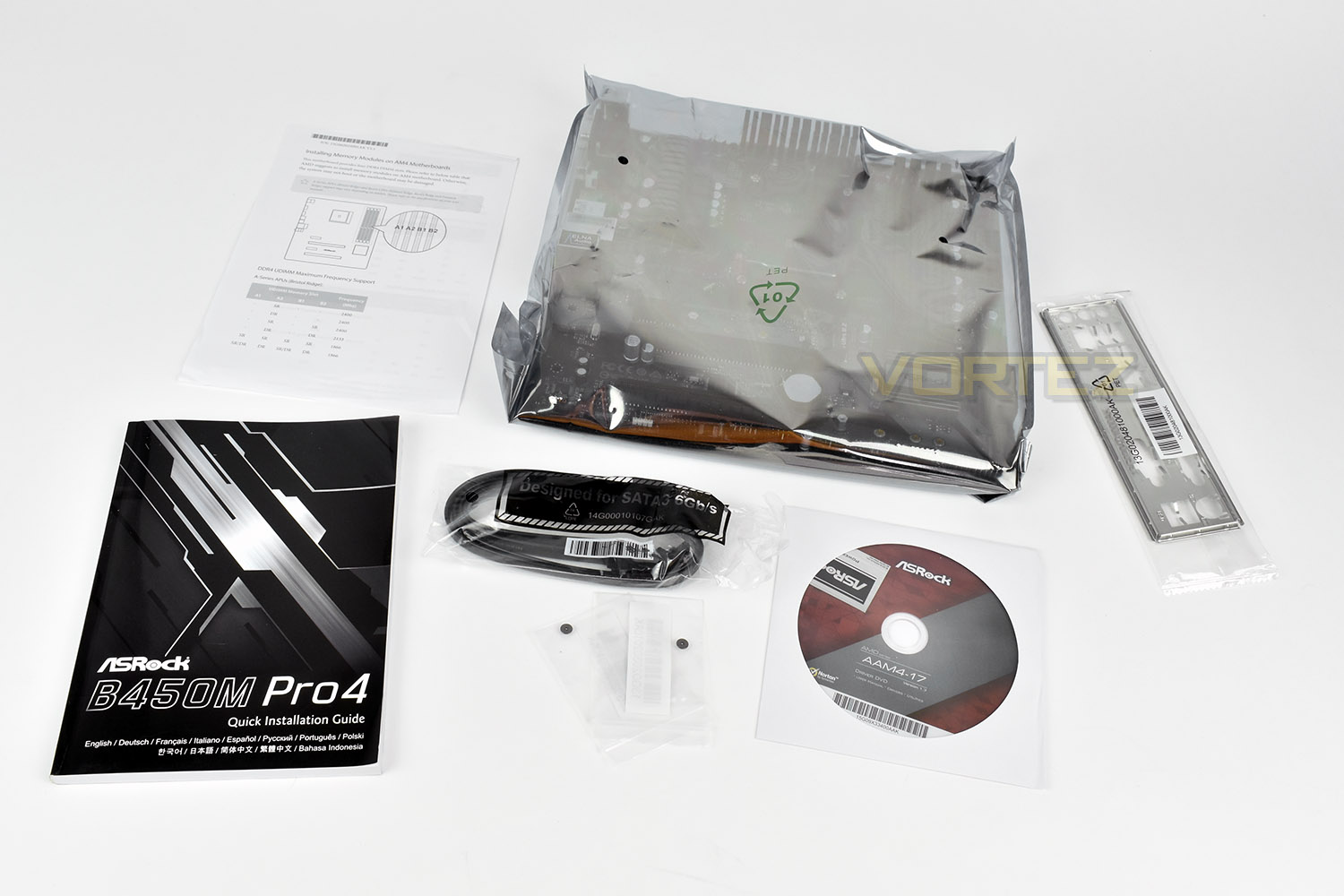
Keeping costs to a minimum again, there’s a quick install guide, a pair of SATA cables, the rear IO shield, a driver CD and a couple of M.2 screws.
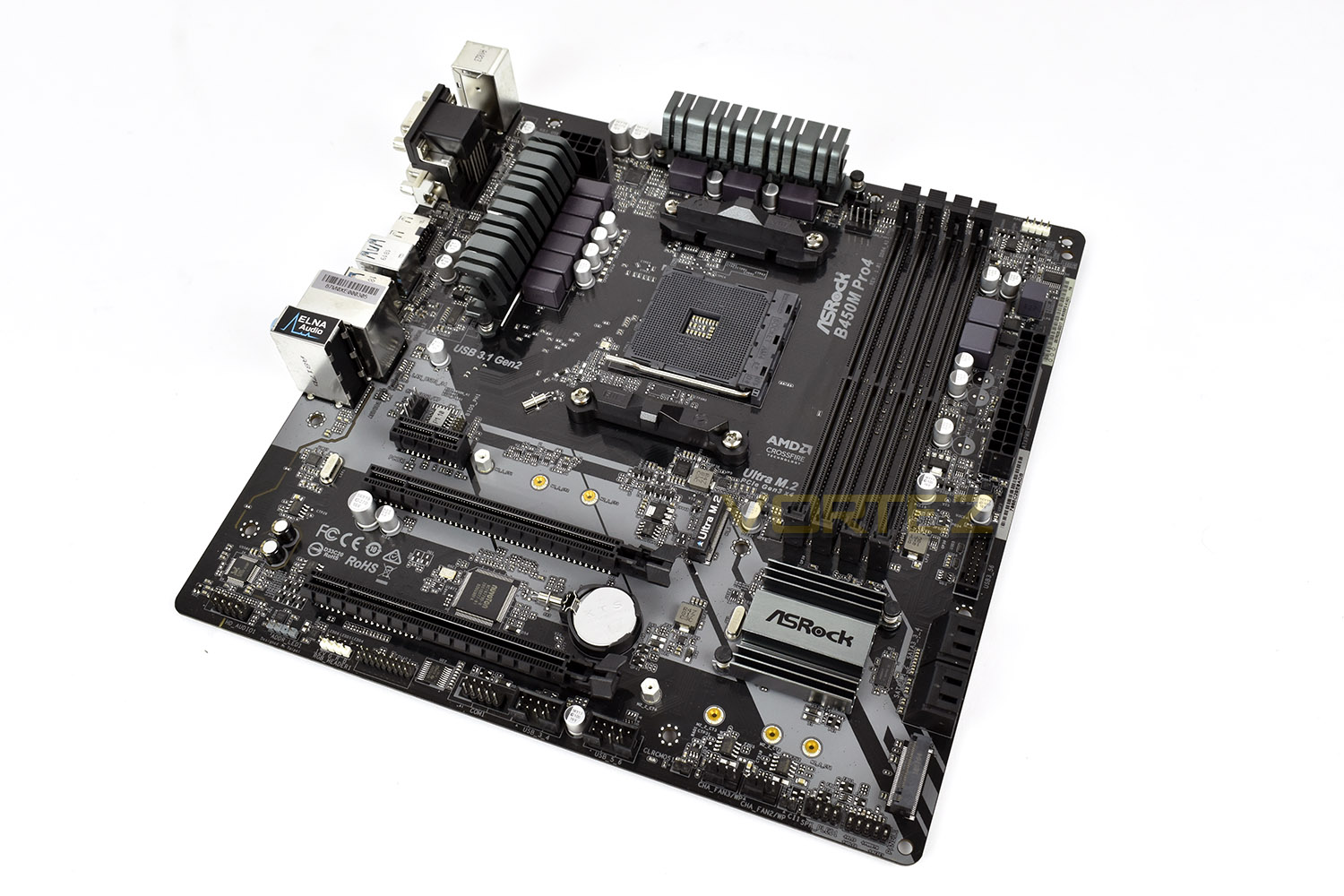
The B450M Pro4 is a little void of colour, but with most machines now being packed with RGB lighting and colourful cables, this isn’t so much of an issue.
Closer Look
Starting with the CPU Socket, it’s obvious that the power phase cooling isn’t enormous, but it’s attached directly to the top and provides plenty of surface area to help cool the ASRock 42A power chokes employed on this model.The 8 pin CPU power is tucked away at the top of the board, helping with cable management using the rear of the motherboard tray for routing in most cases. The cooling connections are also catered for here, with a pair just above the CPU socket, both capable of powering an all-in-one water cooling pump.
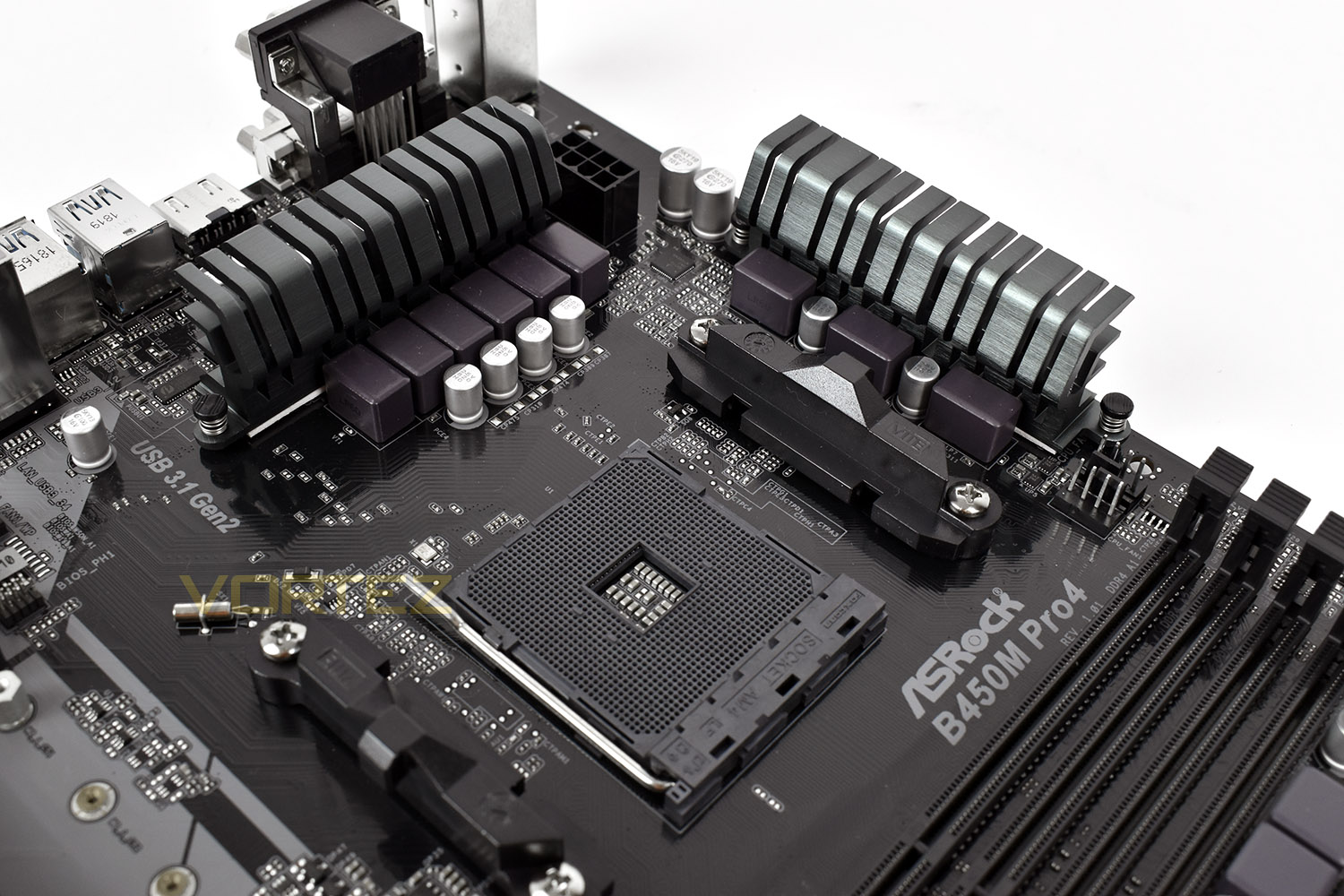
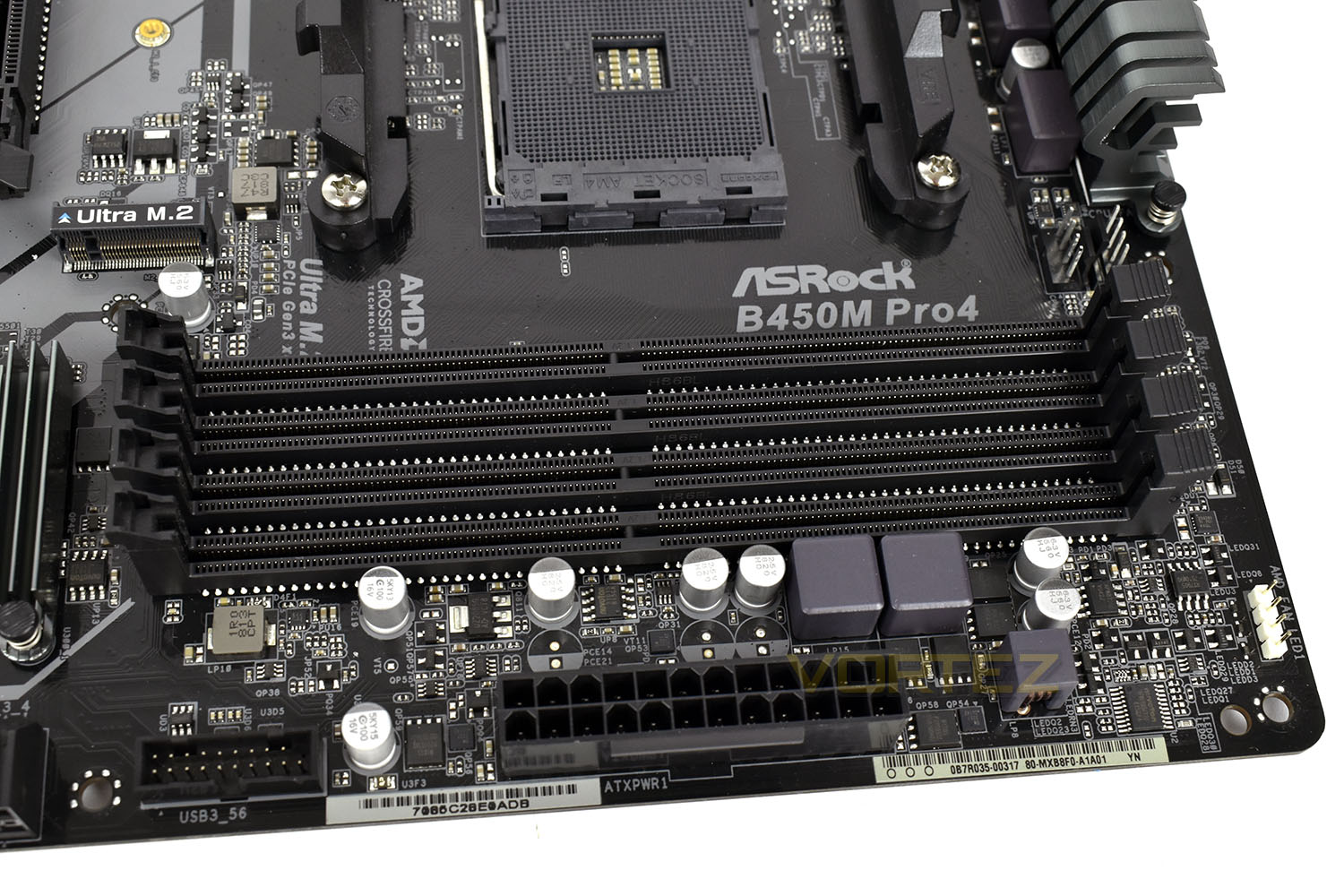
Despite the small stature of the board, we’re still provided with four full DDR4 DIMM slots, capable of supporting up to 64GB of 3200MHz memory (Depending on the model of Ryzen CPU used).
Next to the DIMM slots is the USB 3.0 front panel connector, alongside the 24pin PSU power connection.
Tucked away in the bottom right of the photo is an RGB fan connector, configurable within software in Windows or within the BIOS.
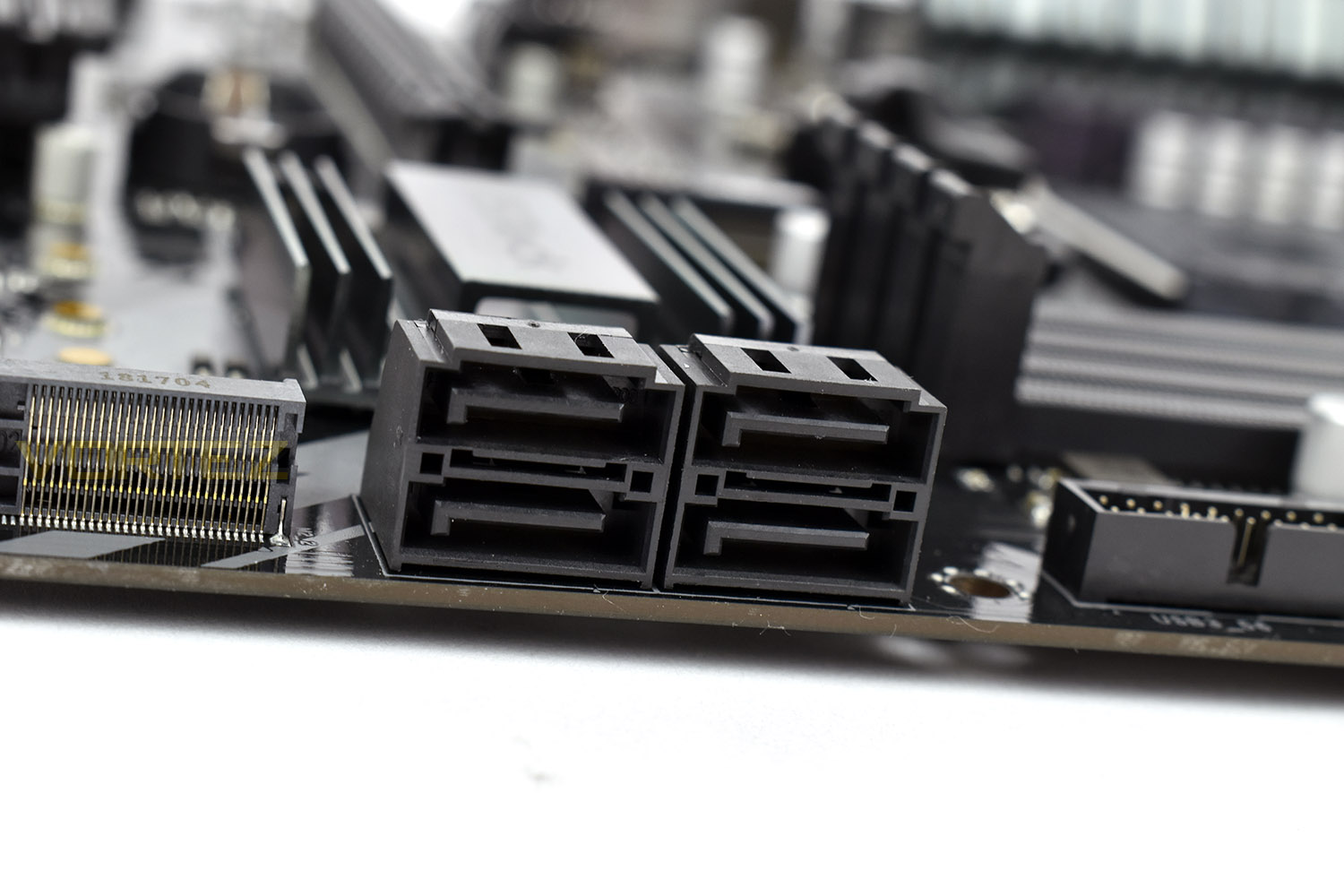
Further south of the front USB 3.0 connector is a quartet of right-angled SATA 3.0 ports, all capable of the SATA 6Gbps standard.
Closer Look (Continued)
Due to an abundance of bandwidth via the PCI-E interface through the Ryzen CPUs, we’re endowed with a pair of PCI-E 4x M.2 ports, useful for rapid file access without the fuss of cables. There’s no built-in heatshields here though, probably a cost saving exercise, keeping the motherboard very accessible to those with smaller budgets.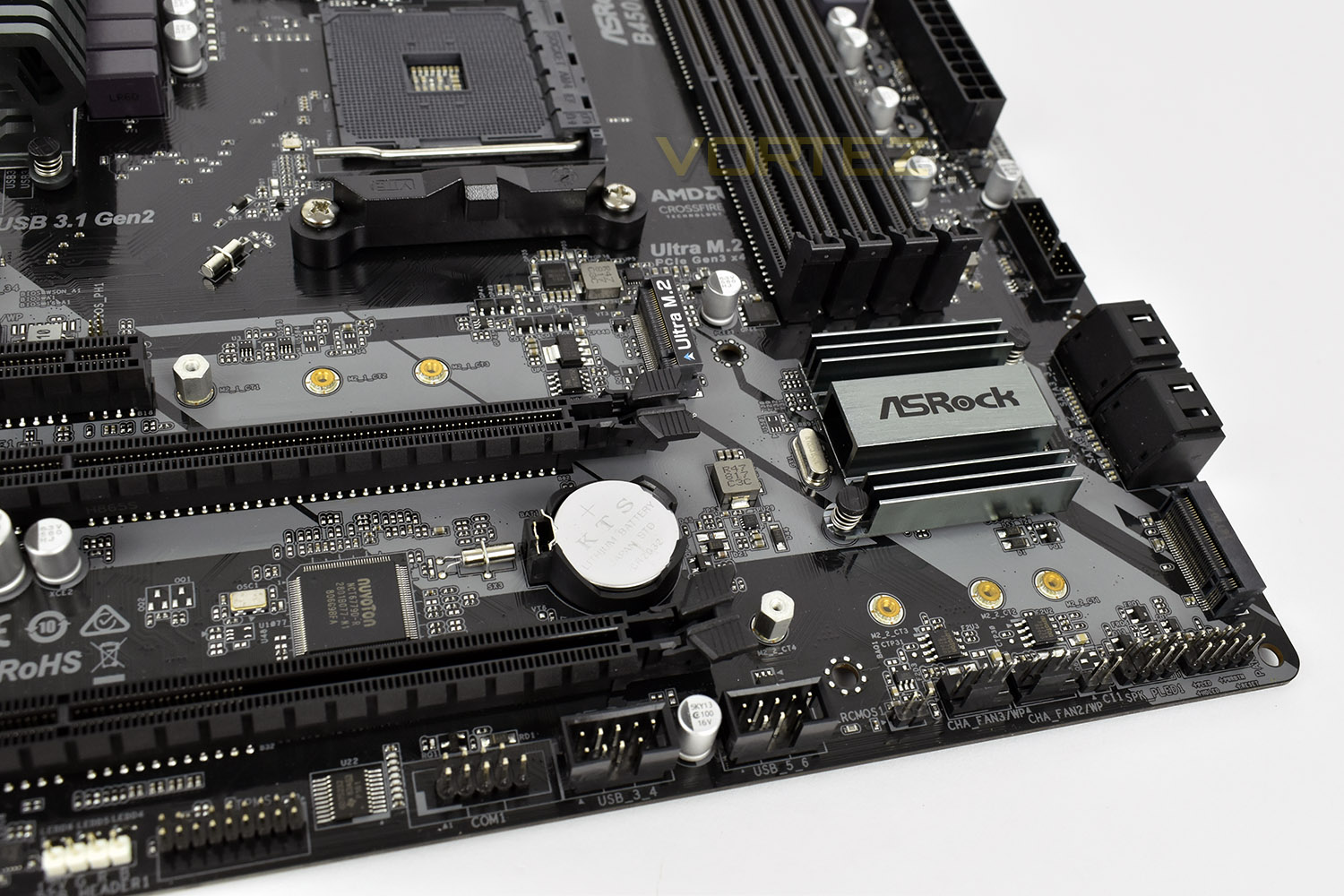
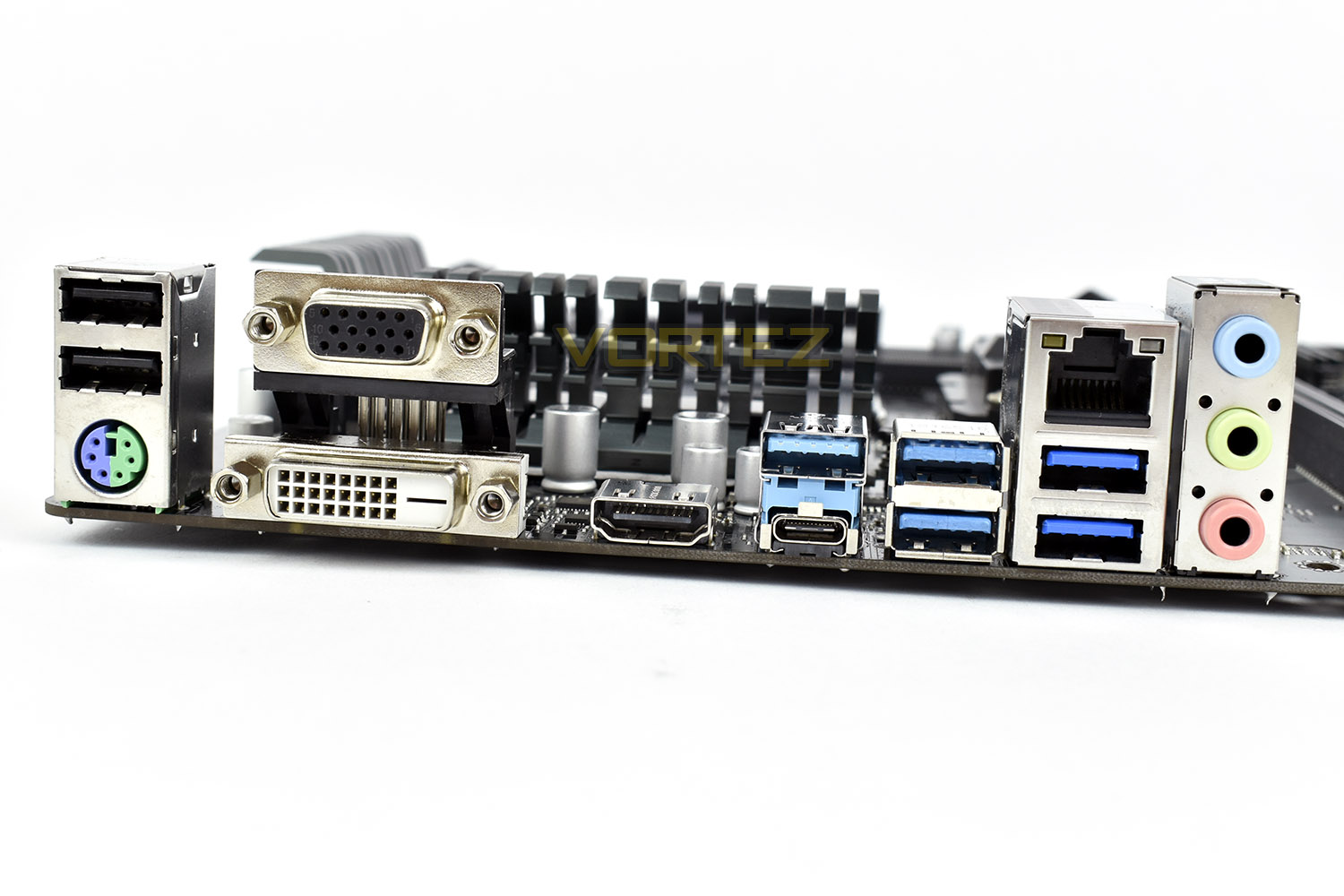
The rear IO is decently equipped, with a PS/2 for a mouse or keyboard, a pair of USB 2.0 ports, VGA, DVI and HDMI video outputs, a USB 3.1 Gen. 2 Type C and Type A port. There’s also four USB 3.0 ports, Gigabit ethernet and audio outputs.
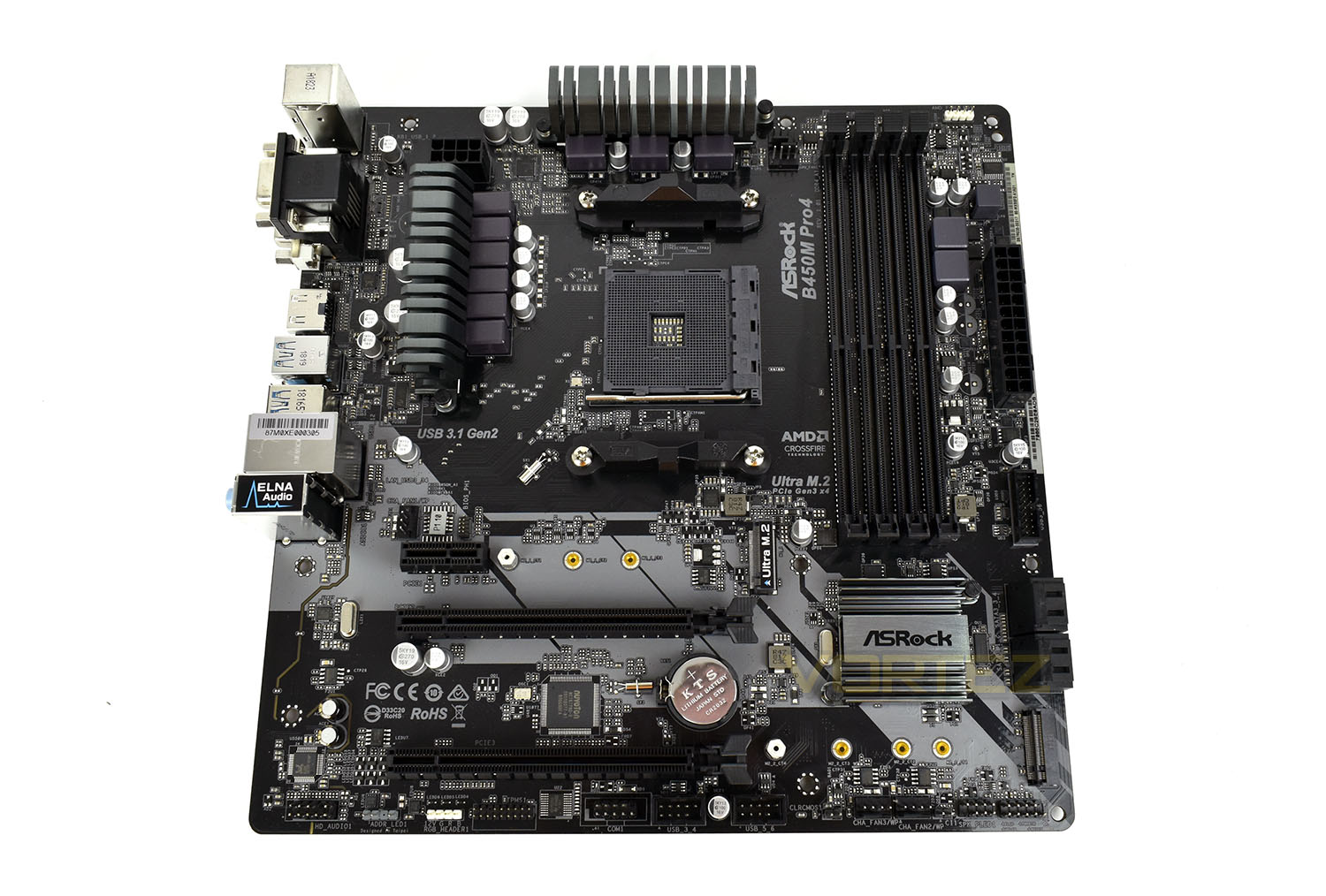
ASRock have included a pair of PCI-E 16x slots and a single PCI-E 1x slot onto the motherboard. Check for clearance between the top Ultra M.2 slot and the PCI-E 1x slot, if your M.2 drive features a large heatsink there may be issues here.
Along the bottom row, from left to right: HD Audio front output, RGB LED output, RGB LED output, PMS1, a pair of front USB 2.0 ports, a pair of PWM 4-pin fan connectors and front LED/switch connections.
BIOS & Overclocking
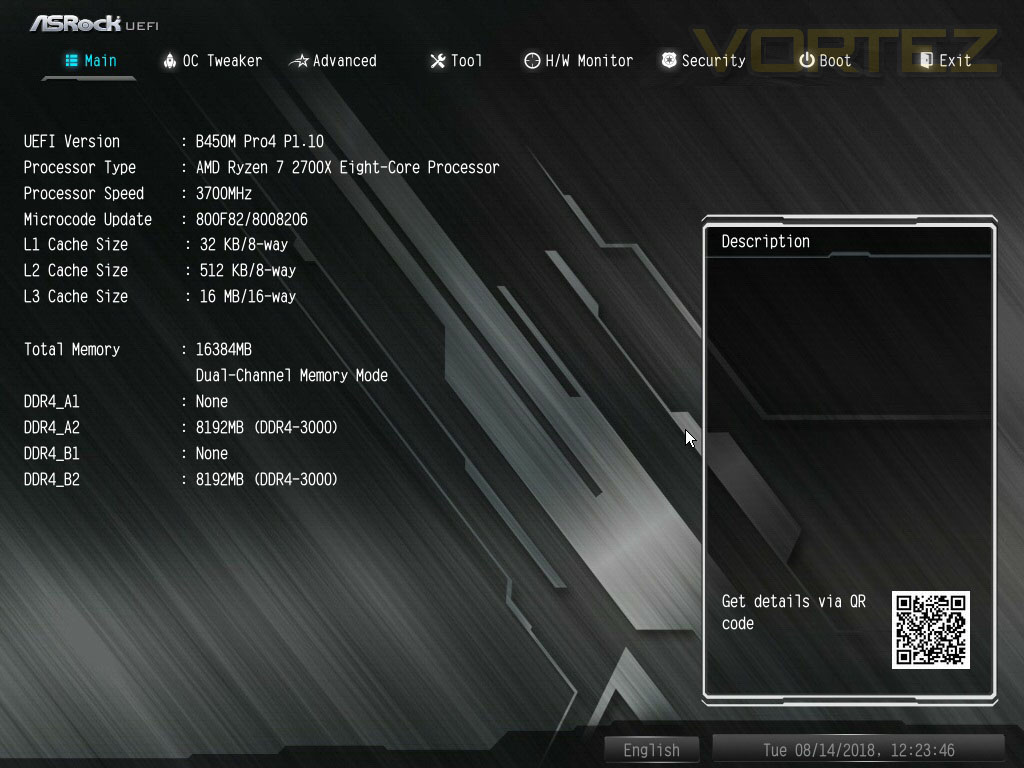
BIOSASRock EUFI is styled just like the motherboard with a monochrome, brushed aluminium style. The Main screen is handy for a quick overview of how your PC is currently working showing current BIOS version and clockspeeds.
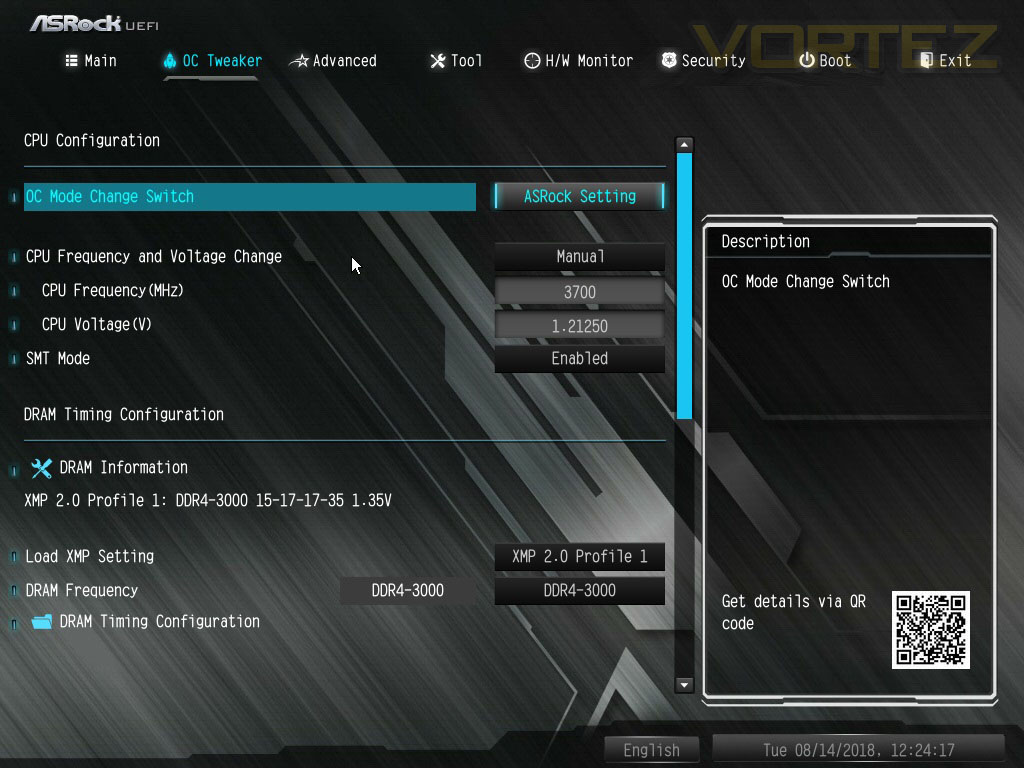
Within the OC Tweaker, things are laid out rather well for basic overclocking, suiting the usage of the B450 chipset. We don’t expect people to push their Ryzen CPU to the limit on this chipset, instead we’d assume consumers would opt for the X470 motherboard range.
Overclocking
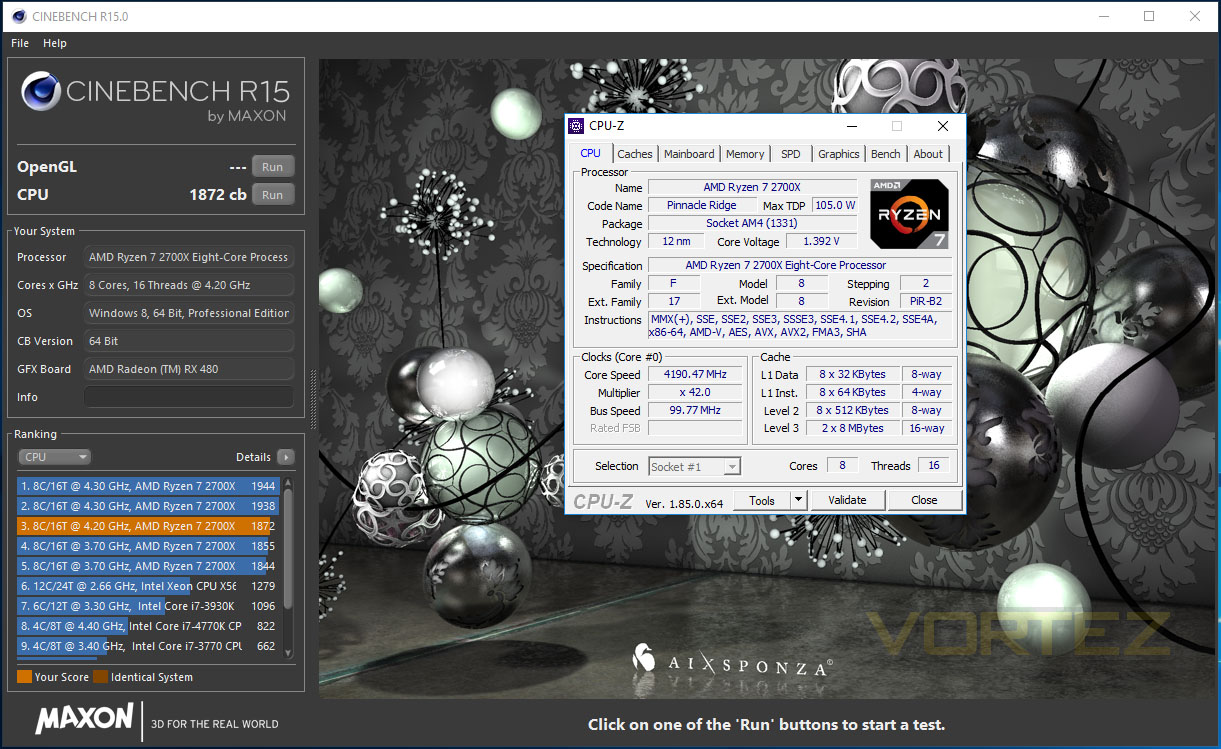
We know from previous tests that our 2700X CPU can achieve 4.35GHz with 1.45v, however, pushing our voltage above 1.42v on the ASRock B450M Pro4 caused issues, limiting us to 1.4v at best. This may be down to the smaller power delivery heatsinks and scaled-back chokes.
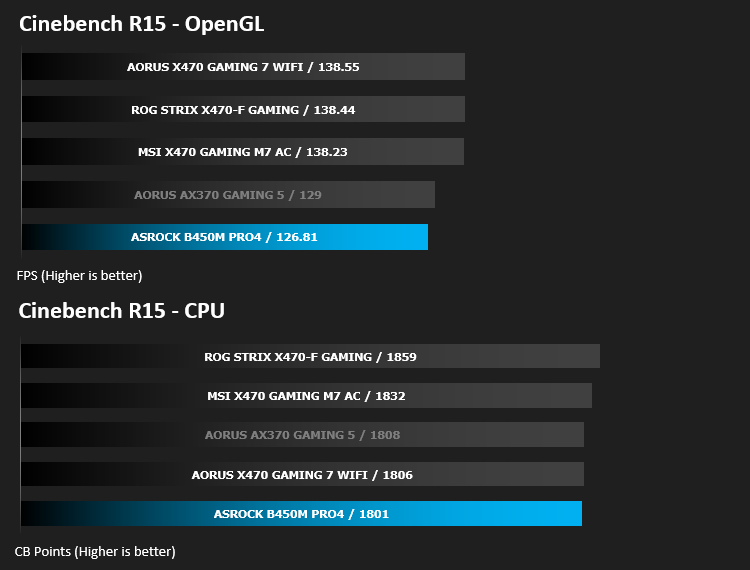
However, we did manage a permanent overclock to the 2700X of 4.2GHz across all 8 cores. This bumped our Cinebench score from 1801 to 1872, though you may find some other applications may perform worse if Precision Boost 2 and XFR2 are able to boost your cores past 4.2GHz.
Test Setup & Software
Test SetupCPU AMD Ryzen 7 2700X
Cooling Corsair H150i Pro RGB
Motherboard ASRock B450M Pro4
Memory 16GB Corsair Vengeance LPX 3000MHz @ 3000MHz @ 15-17-17-37-55
Graphics AMD Radeon RX 480 8GB
Storage Corsair Force LE 480GB
PSU Corsair RM750X 80 Plus Gold Certified PSU
Cooling Corsair H150i Pro RGB
Motherboard ASRock B450M Pro4
Memory 16GB Corsair Vengeance LPX 3000MHz @ 3000MHz @ 15-17-17-37-55
Graphics AMD Radeon RX 480 8GB
Storage Corsair Force LE 480GB
PSU Corsair RM750X 80 Plus Gold Certified PSU
Benchmarks
Cinebench R15 – CPU/OpenGL Score
x264 HD 4.0 – 1st and 2nd pass encoding
SiSoftware SANDRA – CPU & Memory benchmarks
POV-RAY – CPU benchmarks
TrueCrypt – CPU benchmarks
AIDA64 – CPU benchmarks & Memory
PCMark 8 – Home Suite & Photoshop
3DMark FireStrike – 3D Benchmark
Games – Rise of the Tomb Raider & Total War: WARHAMMER
x264 HD 4.0 – 1st and 2nd pass encoding
SiSoftware SANDRA – CPU & Memory benchmarks
POV-RAY – CPU benchmarks
TrueCrypt – CPU benchmarks
AIDA64 – CPU benchmarks & Memory
PCMark 8 – Home Suite & Photoshop
3DMark FireStrike – 3D Benchmark
Games – Rise of the Tomb Raider & Total War: WARHAMMER
Other Software
Temperature Analysis: Aida64 & Ryzen Master
Stress Testing Software: AIDA64 Stability Test
CPU Specification Monitoring: CPU-Z
Performance Monitoring: MSI Afterburner
Stress Testing Software: AIDA64 Stability Test
CPU Specification Monitoring: CPU-Z
Performance Monitoring: MSI Afterburner
Benchmarks: Power Consumption
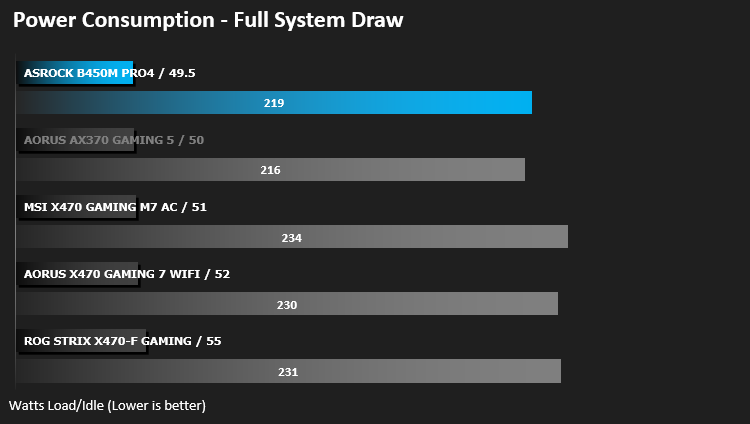
It’s interesting to note the power consumption across all motherboards. Although they are using the same CPU and GPU, energy results can fluctuate between manufacturers due to the features and specifications that are integrated. First of all, for the idle tests the system is cold booted into Windows and no additional applications are executed – the watts are noted on the external energy monitor we use and then the system is loaded with 3DMark FireStrike – watts are again monitored for the duration of the test and the highest rated wattage result is then noted down. Below are the results of this energy test.
Ray Tracing Performance – POV-Ray 3.7
Persistence of Vision Raytracer’s PovRay is a free and open source 3D animator application with versions for computers with different operating systems.
This product allows users to build their custom 3D worlds with excellent quality despite their computer’s hardware. It has adjustable options for levels of radiance, refraction, and reflection. Calculation time may vary depending on the computer model, but PovRay can adapt to many computer builds, and is supported by the open source community.
This product allows users to build their custom 3D worlds with excellent quality despite their computer’s hardware. It has adjustable options for levels of radiance, refraction, and reflection. Calculation time may vary depending on the computer model, but PovRay can adapt to many computer builds, and is supported by the open source community.
AES Encryption Performance – TrueCrypt 7.1a
TrueCrypt is a discontinued source-available freeware utility used for on-the-fly encryption (OTFE). It can create a virtual encrypted disk within a file or encrypt a partition or (under Microsoft Windows except Windows 8 with GPT) the entire storage device (pre-boot authentication).
Encoding Performance – x264 HD
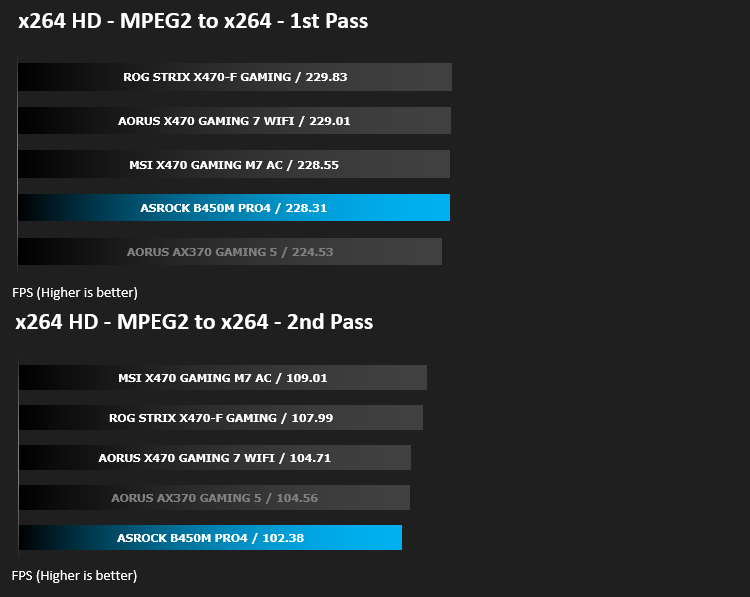
Simply put, this test measures how fast your machine can encode a short, DVD quality MPEG-2 video clip into a high-quality x264 video clip. What’s x264, you ask? It’s more or less the next-generation Xvid/DivX codec. I think it’s ideal for a benchmark because the application (x264.exe) reports fairly accurate compression results (in frames per second) for each pass of the video encoding process, and it uses multi-core processors very efficiently.
Processing Features Performance – AIDA64
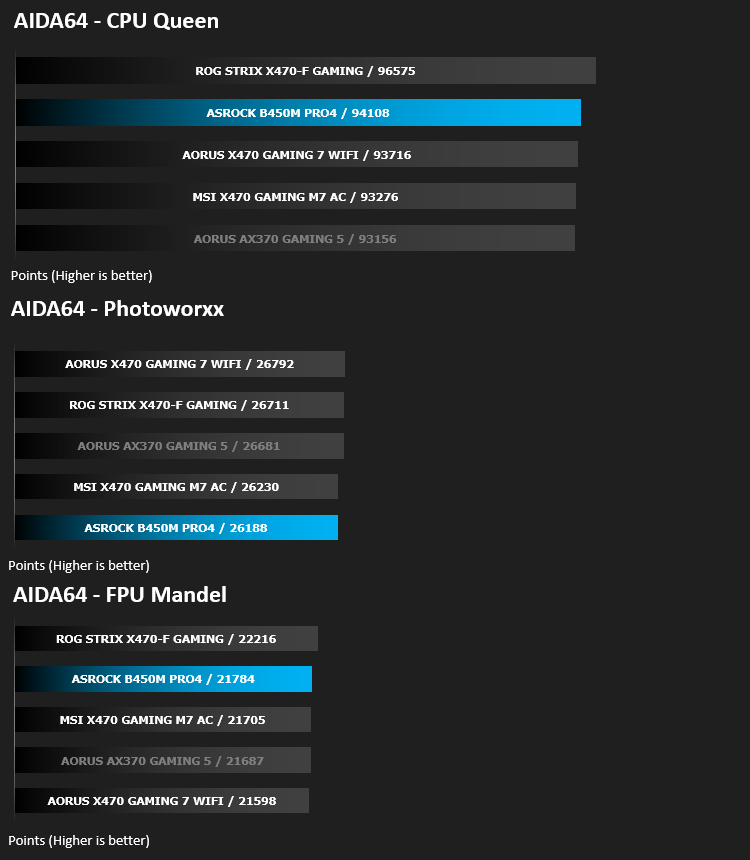
AIDA64 Product PageThis simple integer benchmark focuses on the branch prediction capabilities and the misprediction penalties of the CPU. It finds the solutions for the classic “Queens problem” on a 10 by 10 sized chessboard. At the same clock speed theoretically the processor with the shorter pipeline and smaller misprediction penalties will attain higher benchmark scores. For example — with HyperThreading disabled — the Intel Northwood core processors get higher scores than the Intel Prescott core based ones due to the 20-step vs 31-step long pipeline. CPU Queen test uses integer MMX, SSE2 and SSSE3 optimizations.
Memory Transfer Performance – AIDA64
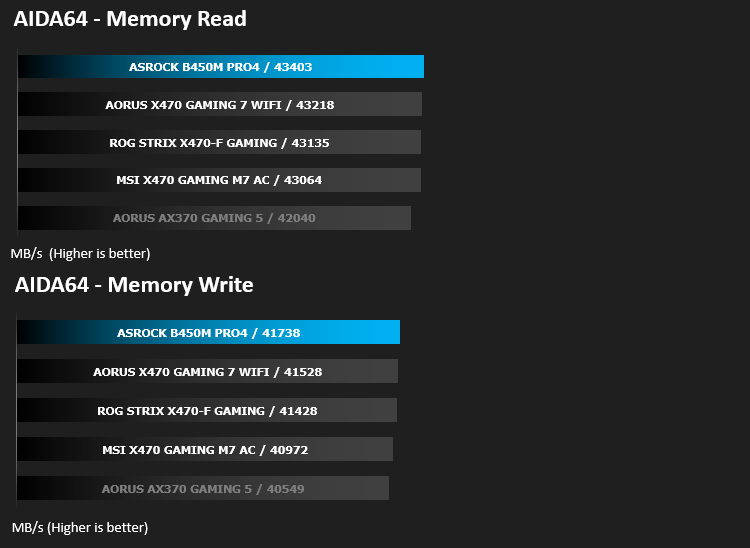
AIDA64 Product PageMemory bandwidth benchmarks (Memory Read, Memory Write, Memory Copy) measure the maximum achiveable memory data transfer bandwidth. The code behind these benchmark methods are written in Assembly and they are extremely optimized for every popular AMD, Intel and VIA processor core variants by utilizing the appropriate x86/x64, x87, MMX, MMX+, 3DNow!, SSE, SSE2, SSE4.1, AVX, and AVX2 instruction set extension.
The Memory Latency benchmark measures the typical delay when the CPU reads data from system memory. Memory latency time means the penalty measured from the issuing of the read command until the data arrives to the integer registers of the CPU.
The Memory Latency benchmark measures the typical delay when the CPU reads data from system memory. Memory latency time means the penalty measured from the issuing of the read command until the data arrives to the integer registers of the CPU.
Processing Power Performance – Cinebench R15
CINEBENCH can measure systems with up to 64 processor threads. This test scene contains approximately 2,000 objects which in turn contain more than 300,000 polygons in total, and uses sharp and blurred reflections, area lights, shadows, procedural shaders, antialiasing, and much more. The result is displayed in points (pts). The higher the number, the faster your processor.
Bandwidth Performance – SiSoftware SANDRA
SANDRA isn’t always a benchmark that is included in hardware reviews but I believe it shouldn’t be ignored. SANDRA provides a vigorous package that tests your system in a rather large array of benchmarks. There are many aspects of benchmark that can be executed. We will be considering – CPU and memory tests.
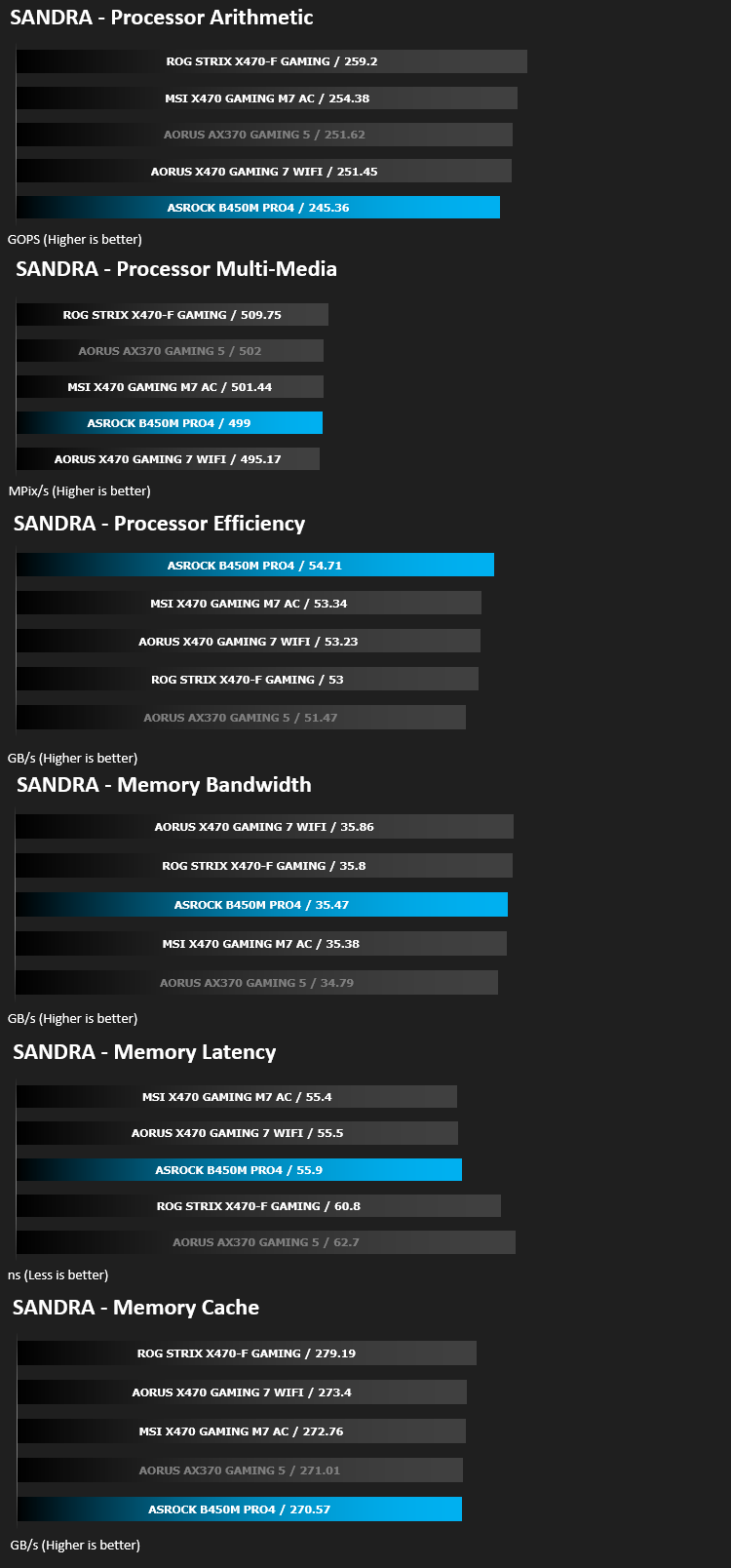
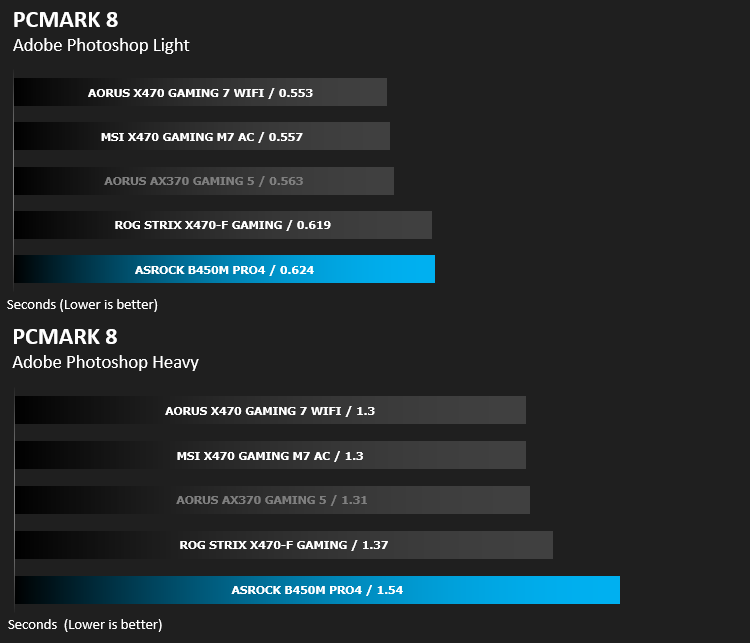
Image Editing Performance – PCMark 8 Photoshop
PCMark 8 Product Page Developed in partnership with Benchmark Development Program members Acer, AMD, Condusiv Technologies, Dell, HGST, HP, Intel, Microsoft, NVIDIA, Samsung, SanDisk, Seagate and Western Digital, PCMark 8 is the latest version in FutureMark’s popular series of PC benchmarking tools. Improving on previous releases, PCMark 8 includes new tests using popular applications from Adobe and Microsoft.
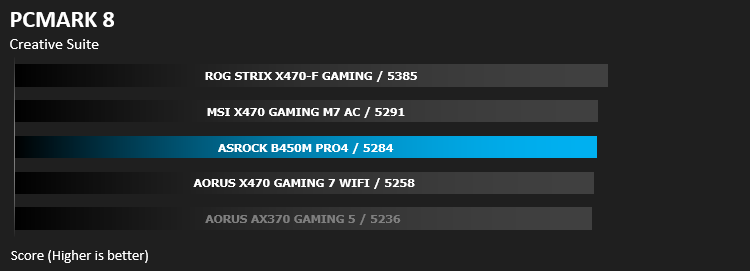
Overall System Performance – PCMark 8
PCMark 8 combines performance benchmarking with battery life measurement and includes tests based on popular Adobe and Microsoft applications. Whether you are looking for long battery life, or maximum power, PCMark 8 will help you find the devices that offer the perfect combination of efficiency and performance for your needs. It’s the complete PC performance benchmark for home and business.
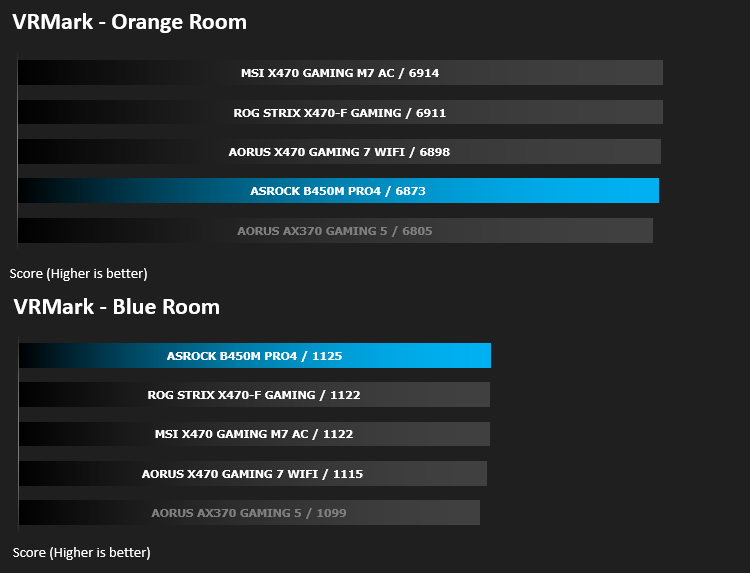
VR Performance – VRMark
VRMark Product PageVRMark includes two VR benchmark tests that run on your monitor, no headset required, or on a connected HMD. At the end of each test, you’ll see whether your PC is VR ready, and if not, how far it falls short.
3D Performance – 3DMark
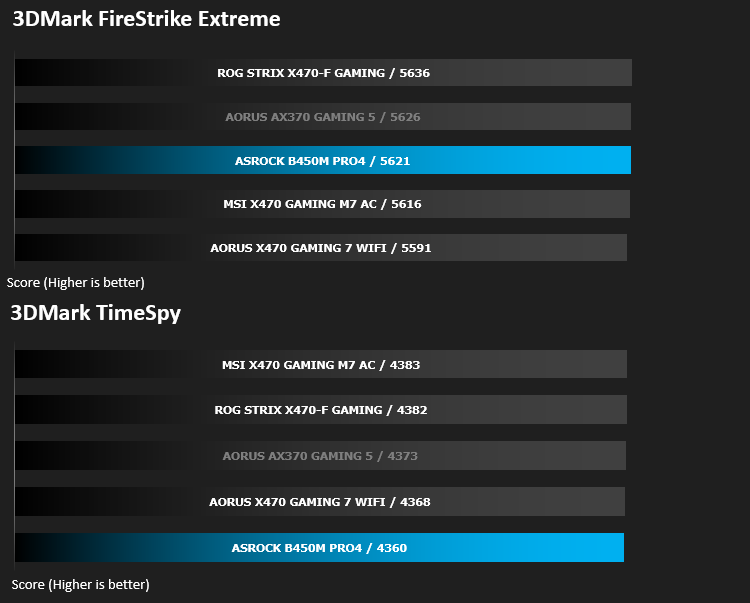
3DMark FireStrike Product PageFire Strike is our new showcase DirectX 11 benchmark designed for high-performance gaming PCs. It is our most ambitious and technical benchmark ever, featuring real-time graphics rendered with detail and complexity far beyond what is found in other benchmarks and games today. Fire Strike will only be available in the Windows editions of 3DMark initially.
Gaming Performance – Rise of the Tomb Raider & Total War: WARHAMMER
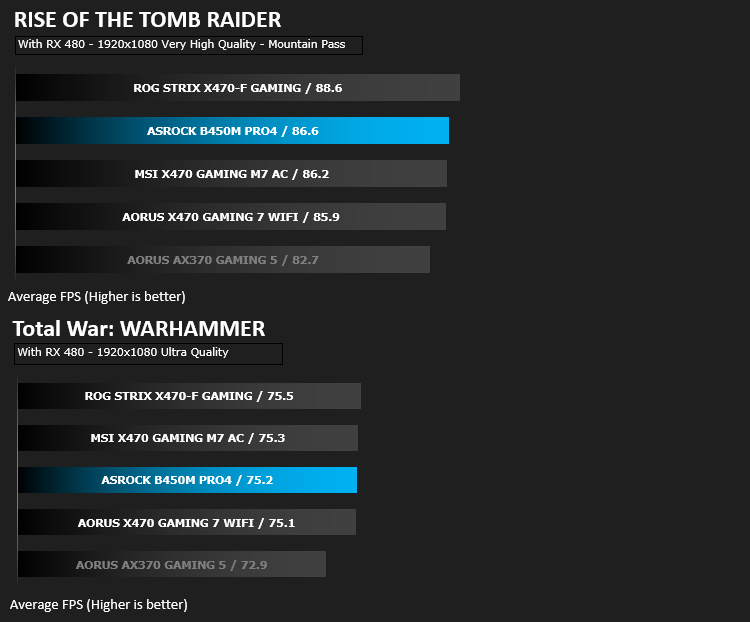
It’s important for us to perform a number of game benchmarks as well as the synthetic tests because gamers will want to know if there are any significant benefits. So here we have two recent gaming titles.
Conclusion
So, as we saw with the X470 chipsets back in April, they offered an incredible entry into high end computing at an affordable price point, however, with the B450 launch we see even better value, seemingly without sacrificing anything of real value for the vast majority of consumers.The appeal of an mATX motherboard is most certainly there, especially one such as this with it’s monochrome styling, lending itself to many different colour schemes.
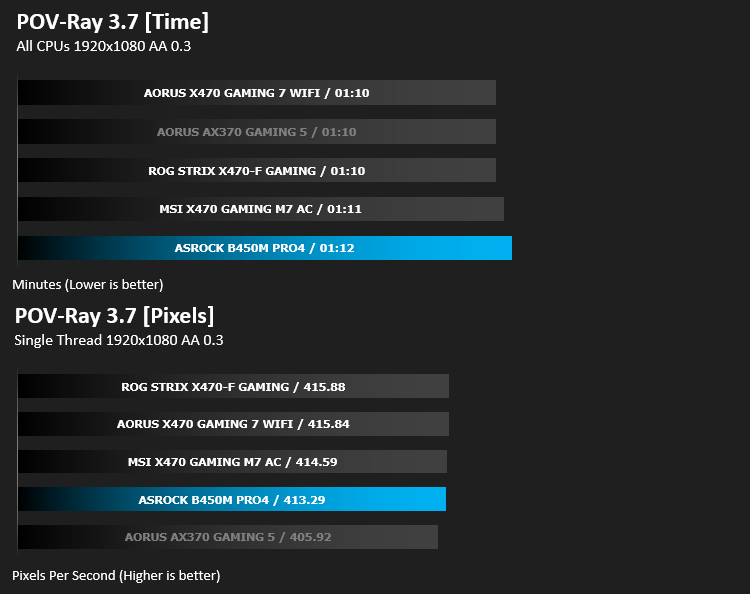
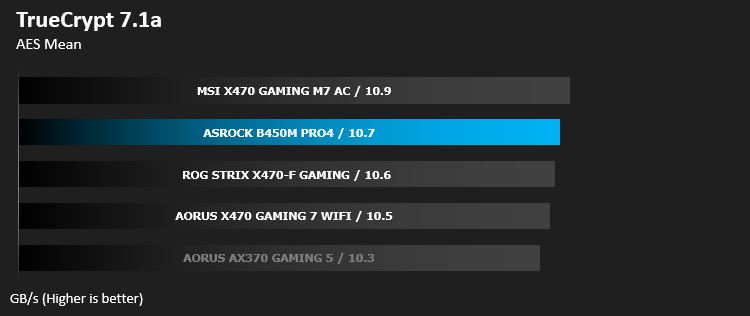
Looking at the base performance figures compared to several X470 boards has proven that, on the face of it, there’s very little to be seen in terms of raw performance, especially when overclocking isn’t a consideration.
Not only is performance almost identical, we also lose very little in terms of connectivity due to the mATX size. A single 16x PCI-E slot is ample for most usage scenarios, so arriving with two is plenty. We also keep a pair of M.2 drive slots, which some larger motherboards still struggle to accommodate, four SATA ports and a full selection of rear IO options.
Priced at GBP £79.99 / USD $79.99 / AUD $149.99, the ASRock B450M Pro4 offers amazing performance for the budget-orientated without sacrificing any essential features.
Power consumption is a strongsuit of the B450M Pro4, compared to similar performance figures on the X470 platform, which drew, on average, 13w more from the plug for the same figures. Overclocking however, wasn’t a strong suit, where the ASRock likely struggled because of the smaller heatsinks and scaled down power delivery.
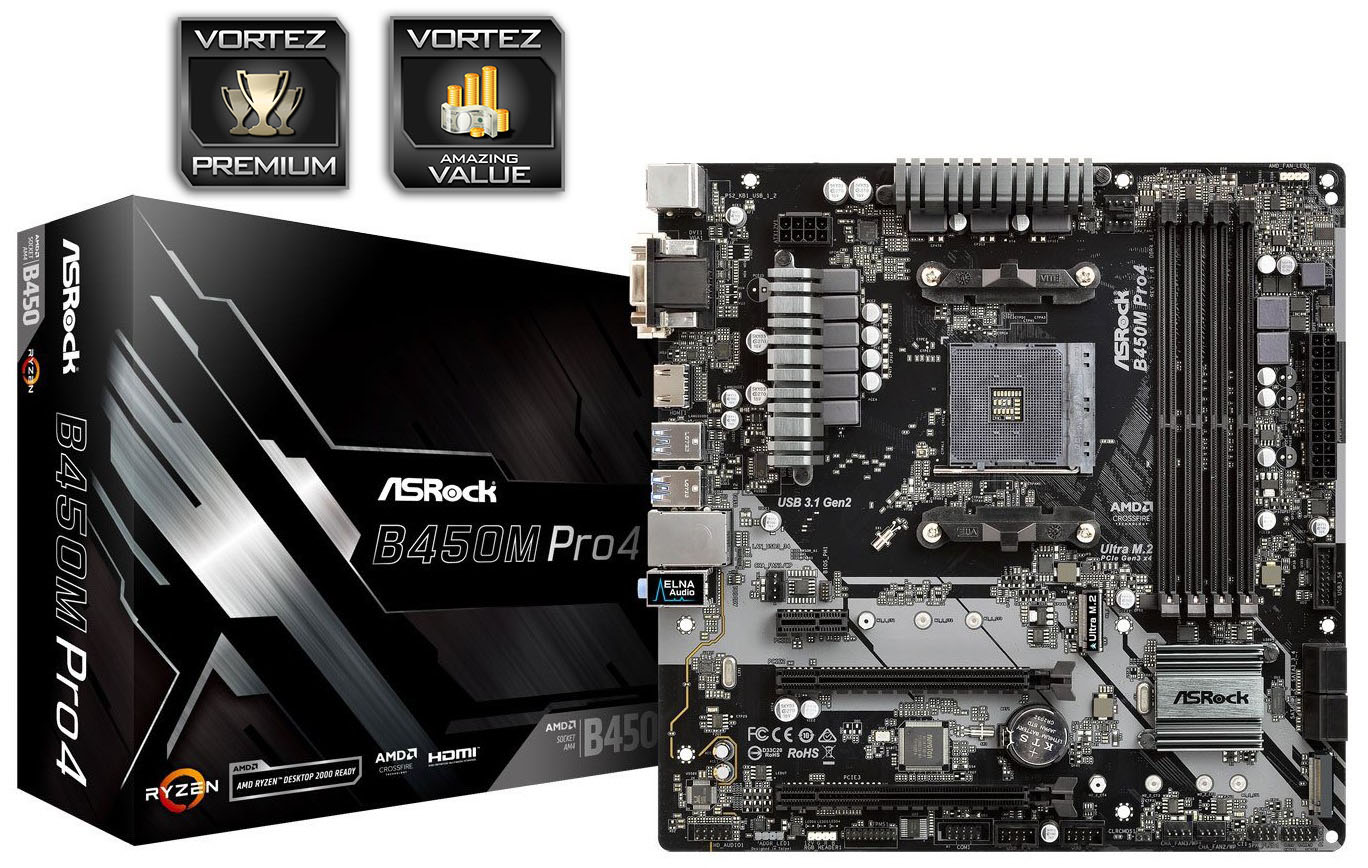
We’re impressed by ASrock’s ability to cram plenty of features onto a relatively small board, without giving up performance. It also doesn’t cost anywhere near as much as the X470 boards we’ve tested while trading blows in our benchmarks.
Pros
+ Motherboard is bland but will suit many colour schemes
+ Great performance
+ As good as X470 boards in many tests
+ Good value for money
+ Twin M.2 slots
+ Simple and easy to use BIOS
+ Good energy efficiency
Cons
– Not the best overclocking
+ Motherboard is bland but will suit many colour schemes
+ Great performance
+ As good as X470 boards in many tests
+ Good value for money
+ Twin M.2 slots
+ Simple and easy to use BIOS
+ Good energy efficiency
Cons
– Not the best overclocking
Click here for an explanation of our awards at Vortez.net.
Stay connected with the Vortez Social Media pages:
Join in with the discussions on Discord