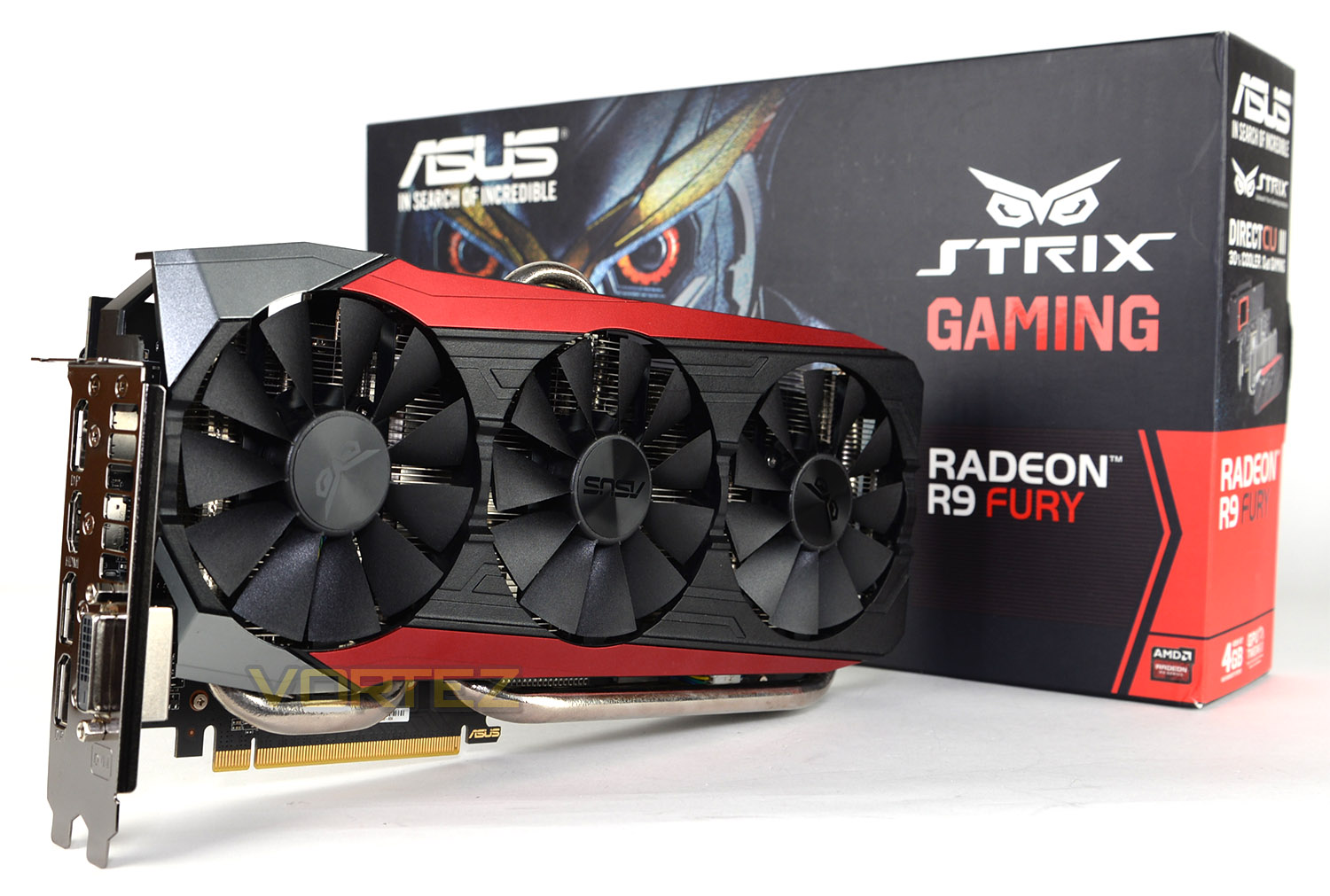
Pitched to tackle NVIDIA’s GTX 980 graphics card, the STRIX R9 FURY is furnished with the new Direct CU III cooler and features a factory overclock.

Product on Review: STRIX R9 Fury DC3 OC Graphics Card
Manufacturer & Sponsor: ASUS
Street Price: £450 GBP
ASUS DirectCU cooling has been a fixture of their high-end graphics cards for a few years now, and it’s never failed to impress. The core concept behind DirectCU’s inception is that intermediary layers between the GPU core and cooler heatpipes by their very nature impedes the heat transfer process, and so having a ‘flattened’ array of copper heatpipes touching the GPU directly would be the most efficient mode.
DirectCU Technology was introduced during the tail-end of the 40nm GPU generation, a generation which encompassed both NVIDIA’s toasty Fermi-class GPUs and AMDs performance-leading dual-GPU 5970 cards. These cards had significantly higher TDP than those designs which came before, and almost every AIB manufacturer needed to come up with their own innovative design which not only improved on reference cooling, but also adapted to the changing demands of users. Low-noise was becoming an increasing focus, at a time when the trend of bigger and more powerful GPUs made things ever more difficult.
Enter DirectCU III, aka DC3. This major upgrade to ASUS’ cooling solution has been fed to a number of recently released cards including: R9 390X, R9 Fury and the graphics card in the spotlight today; R9 FURY. The STRIX R9 FURY DC3 OC arrives with a triple fan configuration which promises to deliver 30% better cooling performance and should be 3X quieter. Not only is this graphics card custom cooled but it’s also factory overclocked to squeeze even more out of AMD’s flagship GPU.
ASUS on their STRIX R9 FURY DC3 OC
Taken from the ancient Roman and Greek word for owl, Strix means the keenest hearing and sharpest eyesight. Strix means feeling your environment so that you detect and react to the slightest movement. Strix means survival on the very edge of instinct. Strix is in your blood, as it is in ours.
ASUS STRIX R9 Fury gaming graphics card packed with exclusive ASUS technologies, including DirectCU III with Patented Triple Wing-Blade 0dB Fan Design for maximum air flow with 30% cooler and 3X quieter performance. This card features exclusive ASUS AUTO-EXTREME Technology with Super Alloy Power II for premium quality and best reliability. It also has GPU Tweak II with Xsplit Gamecaster, provides intuitive performance tweaking and lets you stream your gameplay instantly.
ASUS STRIX R9 Fury gaming graphics card packed with exclusive ASUS technologies, including DirectCU III with Patented Triple Wing-Blade 0dB Fan Design for maximum air flow with 30% cooler and 3X quieter performance. This card features exclusive ASUS AUTO-EXTREME Technology with Super Alloy Power II for premium quality and best reliability. It also has GPU Tweak II with Xsplit Gamecaster, provides intuitive performance tweaking and lets you stream your gameplay instantly.
Technical Specifications
Graphics Engine
AMD Radeon R9 FURY
Bus Standard
PCI Express 3.0
OpenGL
OpenGL®4.4
Video Memory
4GB HBM (High Bandwidth Memory)
Engine Clock
OC Mode: 1020 MHZ , Gaming Mode: 1000 MHz
Memory Clock
500 MHz
Memory Interface
4096-bit
Resolution
Digital Max Resolution: 4096×2160
Interface
DVI Output : Yes x 1 (Native) (DVI-I)
HDMI Output : Yes x 1 (Native)
Display Port : Yes x 3 (Native) (Regular DP)
HDCP Support : Yes
Power Consumption
Up to 375W – 8+8pin required
Accessories
1 x Power cable
1 x STRIX Laser Sticker
Software
ASUS GPU Tweak II & Driver
Dimensions
11.8 ” x 5.4 ” x 1.57 ” Inch
30 x 13.7 x 4 Centimeter
AMD Radeon R9 FURY
Bus Standard
PCI Express 3.0
OpenGL
OpenGL®4.4
Video Memory
4GB HBM (High Bandwidth Memory)
Engine Clock
OC Mode: 1020 MHZ , Gaming Mode: 1000 MHz
Memory Clock
500 MHz
Memory Interface
4096-bit
Resolution
Digital Max Resolution: 4096×2160
Interface
DVI Output : Yes x 1 (Native) (DVI-I)
HDMI Output : Yes x 1 (Native)
Display Port : Yes x 3 (Native) (Regular DP)
HDCP Support : Yes
Power Consumption
Up to 375W – 8+8pin required
Accessories
1 x Power cable
1 x STRIX Laser Sticker
Software
ASUS GPU Tweak II & Driver
Dimensions
11.8 ” x 5.4 ” x 1.57 ” Inch
30 x 13.7 x 4 Centimeter
Packaging & Bundle
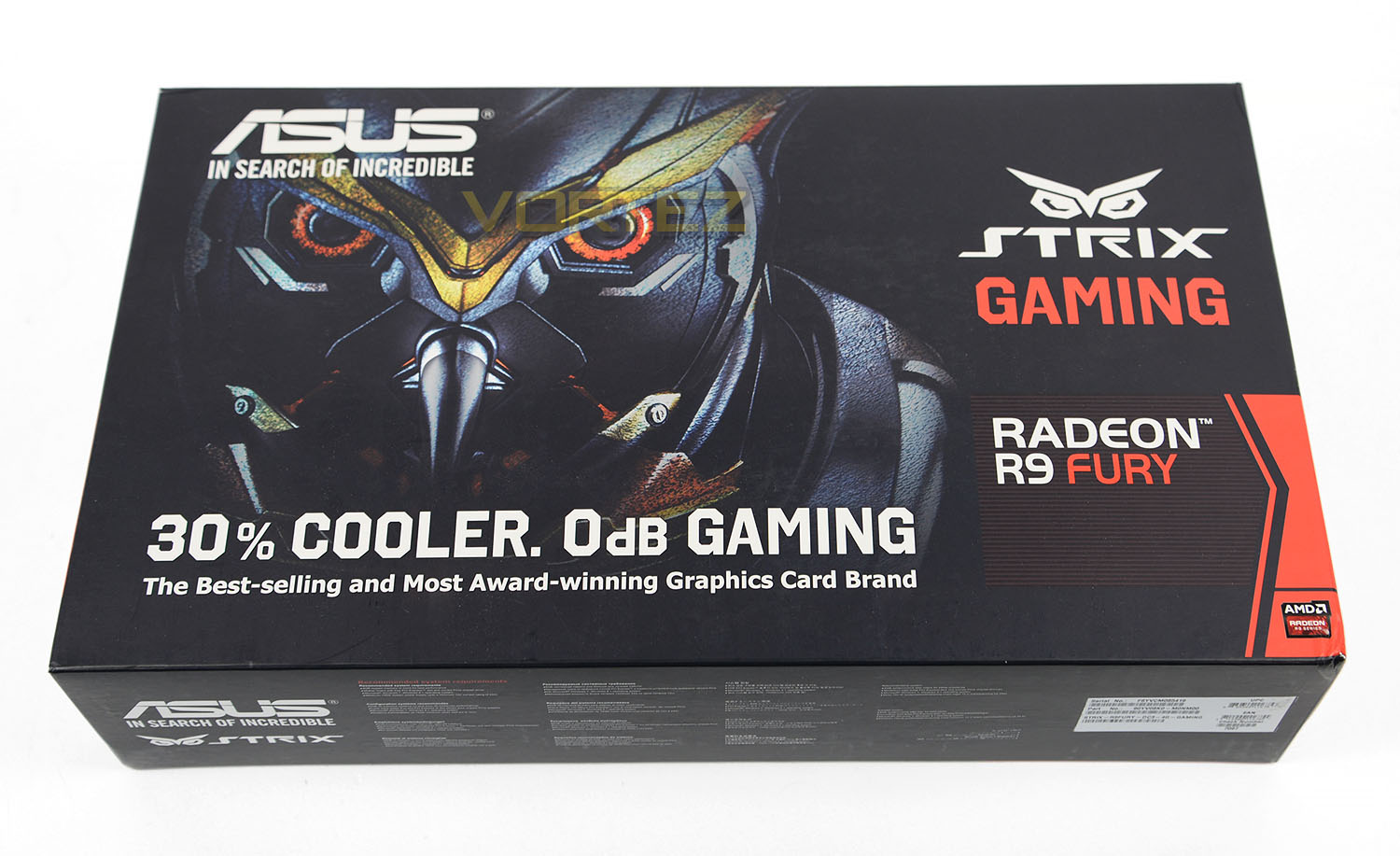
Being from the STRIX line this laden with the owl theme. ASUS are especially keen to emphasise the benefits of their efforts in the cooling department and as we’ll see later on, one of the main talking points with this card is the DirectCU III cooling solution. Over on the reverse of the packaging there is additional information on this cooler and a breakdown of the critical features.
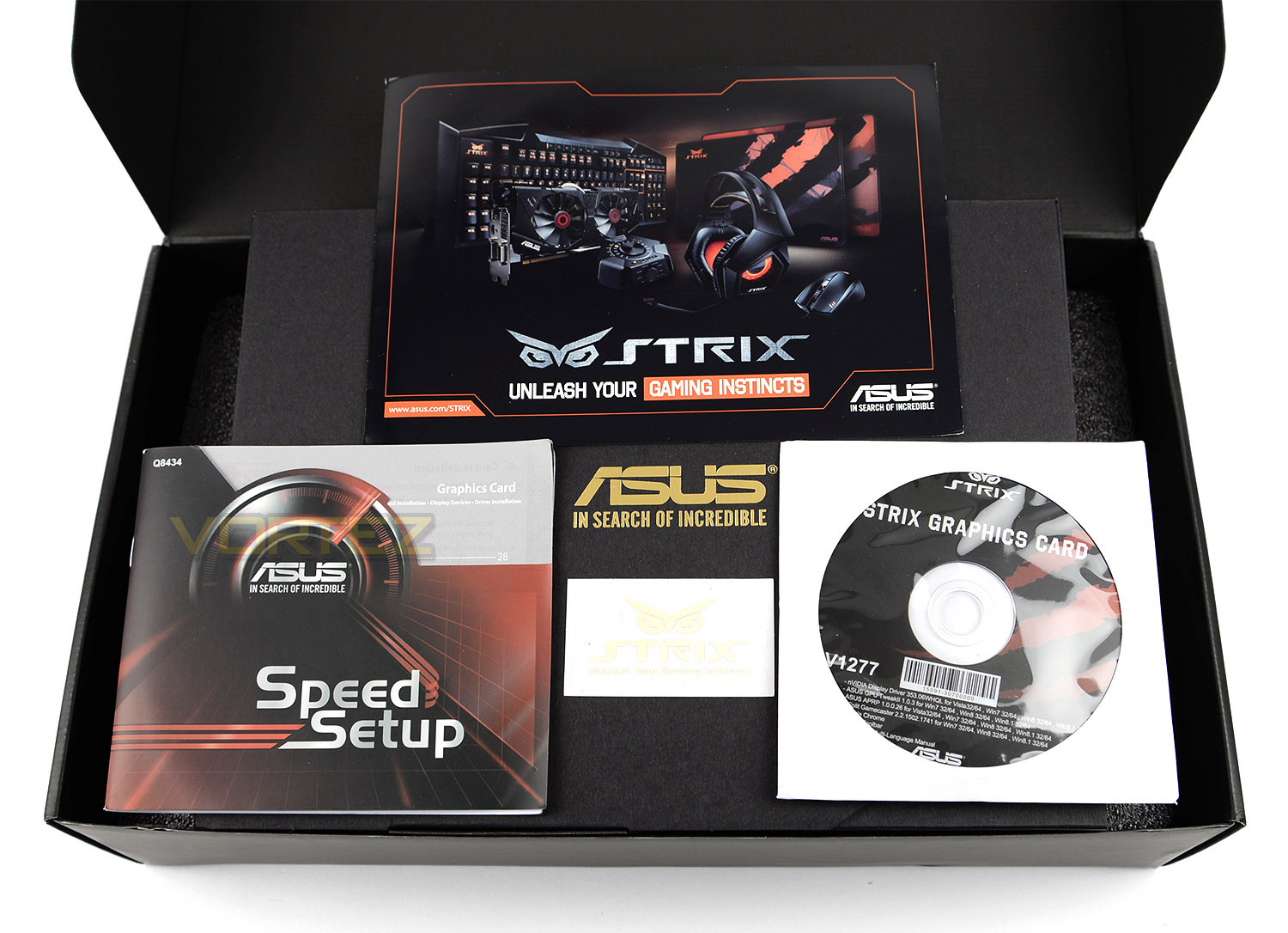
Inside, there is an inner box which contains the card and the accessories. The card is encased with some foam padding and the accessories are placed within a cardboard sleeve. There are just a few items included for the bundle and they are as follows:
• Driver/Software CD
• Power Cable – Y-cable (8pin to dual 6-pin)
• Installation Guide
• STRIX Product Catalogue
Closer Look (With Cooler)
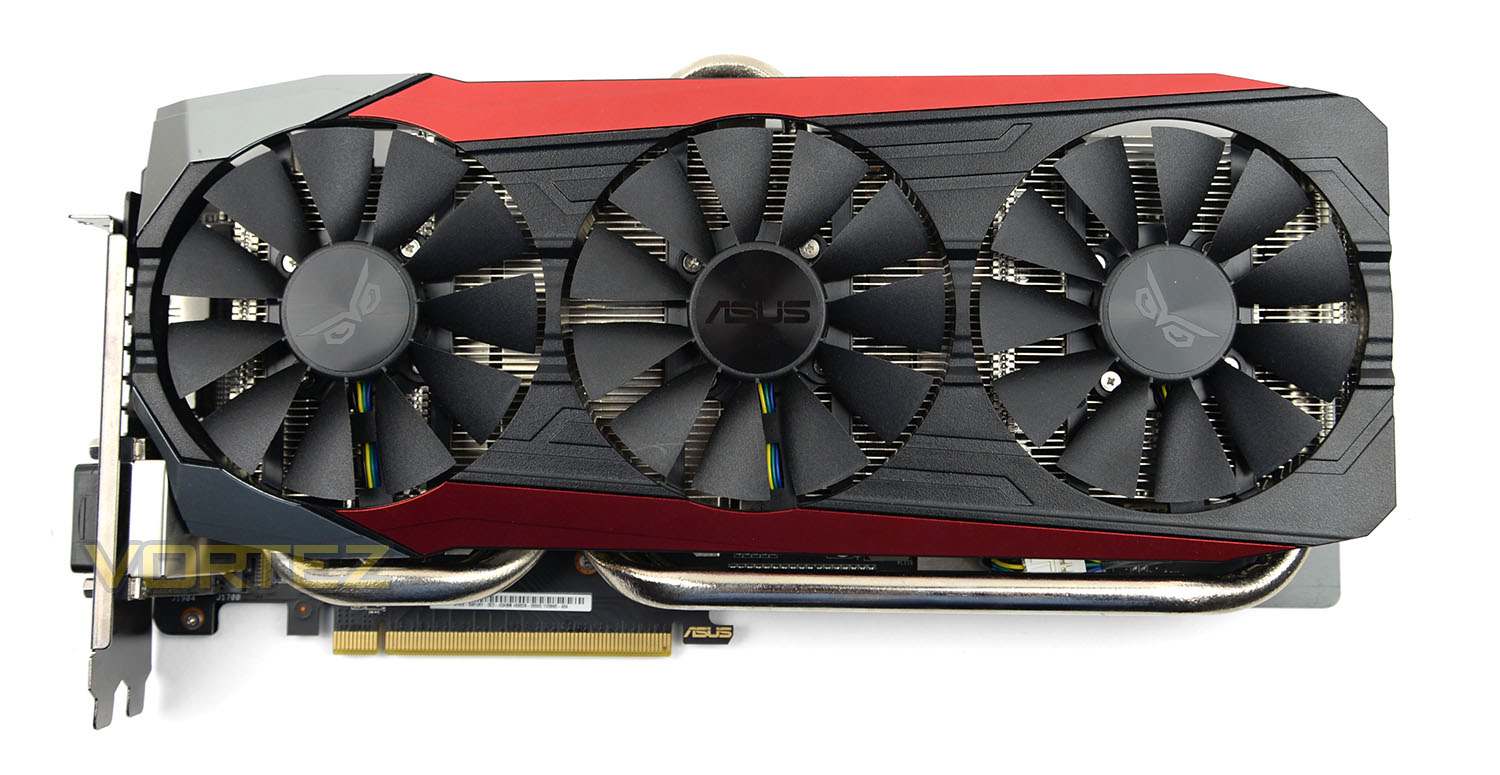
From the get-go ASUS has had their DC3 cooling solution ready for AMD’s R9 Fury and this cooling solution is engulfs the PCB and indeed the entire design of this graphics card. DC3 OC is monolithic in its proportions, measuring a whopping: 30.5 x 15.22 x3.98cm. Over on the next page there is more detail surrounding the implementation of DC3.
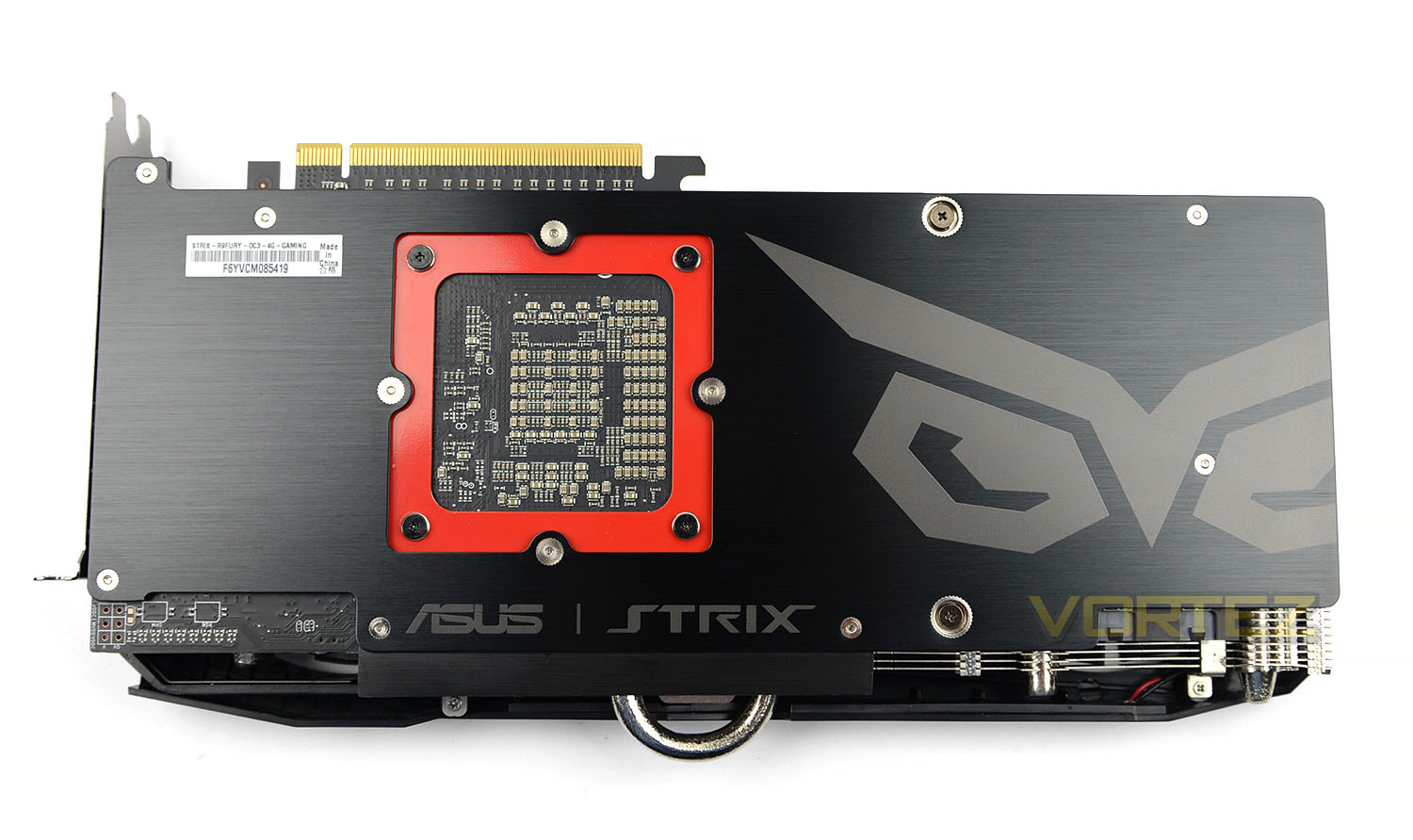
Flipping the card over, on the reverse the design is somewhat different to the GTX 980Ti version which ASUS has produced. A thick, metal plate covers the entire PCB with an extra bracket placed on the underside of the GPU location. Both these items protect the card from bending or getting knocked. It’s becoming common practise on higher-end cards to include backplates as it helps to maintains rigidity.
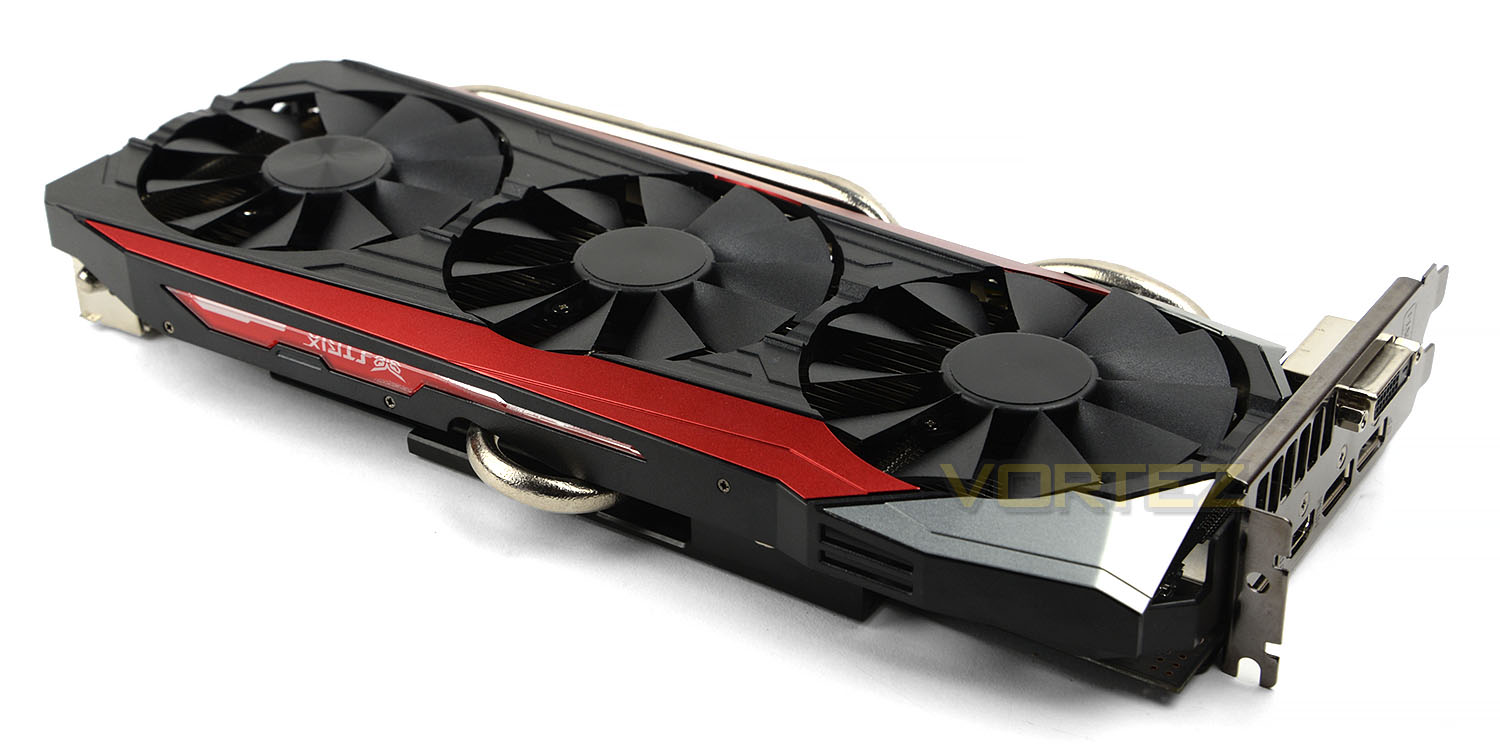
DC3 introduces a trio of cooling fans to the DirectCU family. These 90mm fans use a wing-blade design and will cease spinning if the card remains under 65C – this means that gamers can enjoy silence whilst gaming. When the fans are operational they spin at up to 40%. The principal idea behind the STRIX cards is to design the product to adopt low-noise – therefore the intention is to strike a good balance between performance and silence.
Running down the outer edge of the DC3 OC is a continuation of the metal shroud along with a pulsating STRIX LED – this glows when the system has power.
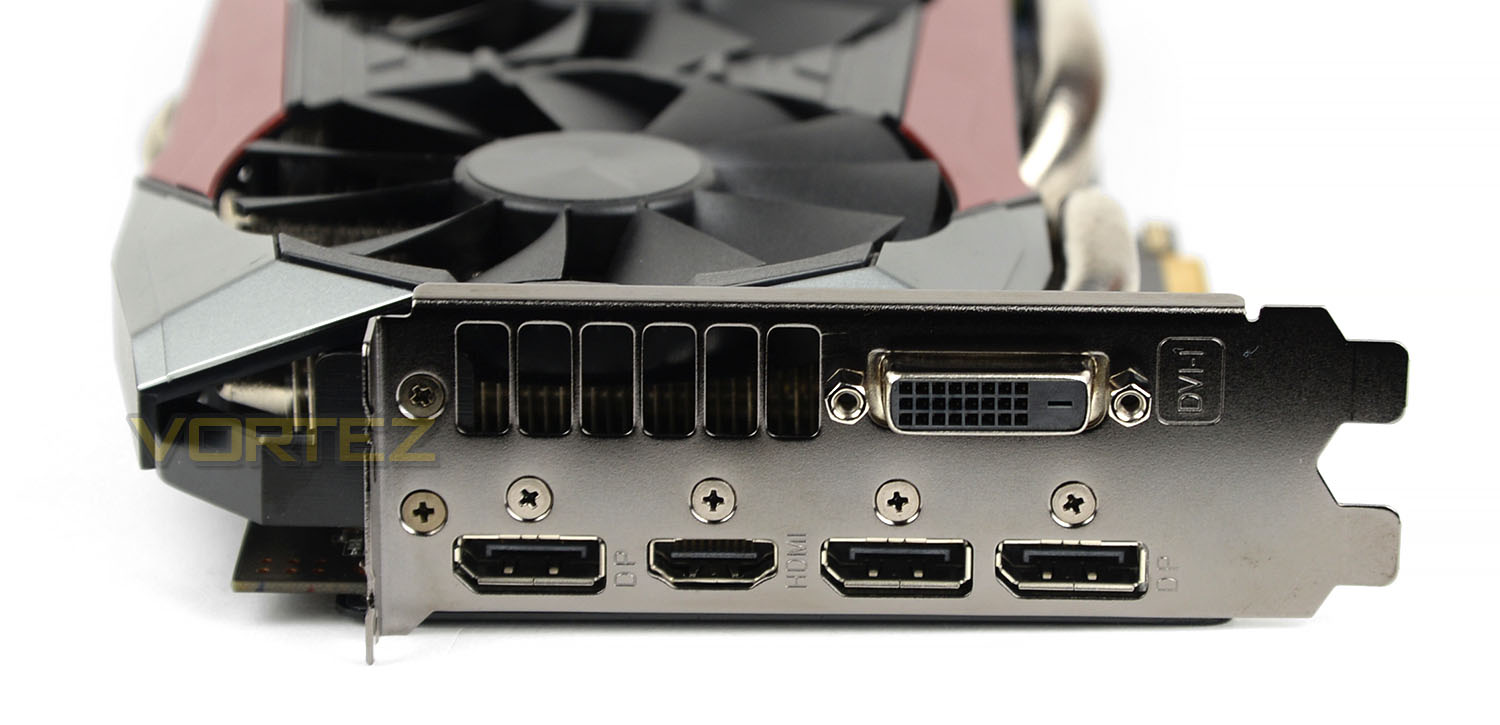
Since DC3 OC is designed for ultra-high resolution gaming such as 4K, there are a plethora of ports on the IO plate. These include the following:
• 1x DVI-I port
• 3x DisplayPort
• 1x HDMI port
So this opens the door for multi-screen configurations and ensures you’re able to run the card at optimum settings but if you’re planning to go for a single 4K screen configuration it’s a good idea to go with DP or HDMI to get the faster refresh rate.
Since this is an AMD card there is no port for the Crossfire – this is all done via software.
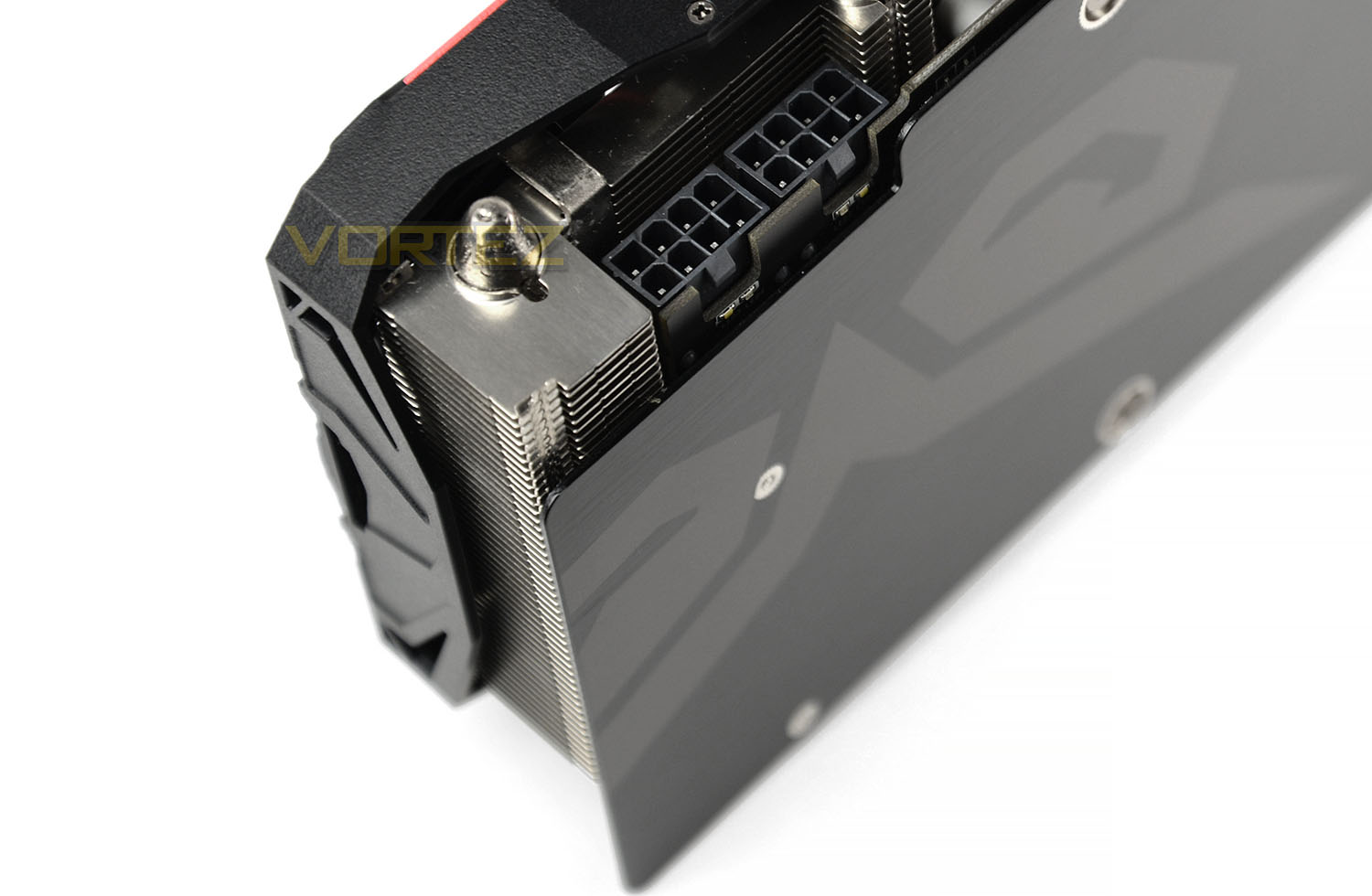
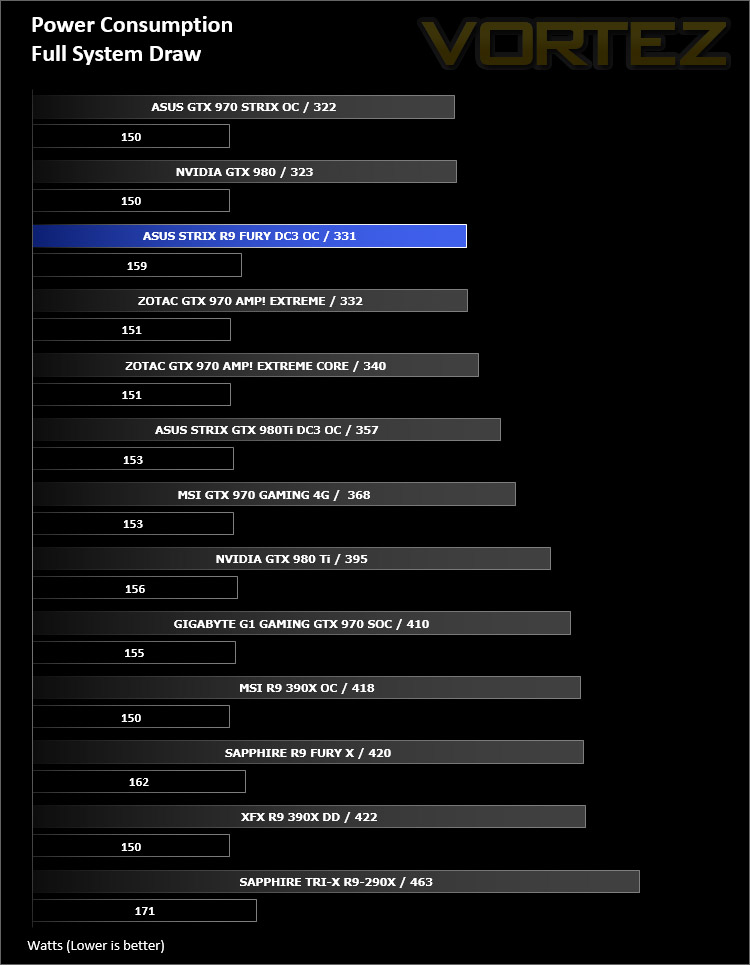
For the power requirements, our Fury card demands 8+8pin. ASUS recommend state that up to 375W is needed for this card. In our benchmark tests the card maxed out at 331W for overall system power.
On the next page we’ll take a close look at the actual cooler and PCB/components.
Closer Look (Without Cooler)
With GPUs becoming ever larger and more power-hungry even the mighty DirectCU II would eventually be out-matched. Not, it must be said, in terms of absolute cooling potential but rather the unacceptable noise level reaching this potential would necessitate. Something had to give, and that has come in the form of the DirectCU III, the first major upgrade to the DirectCU lineup.
In releasing the DirectCU III ASUS improve upon previous models in two core aspects – fan design and heatpipes.
Heatpipe Design
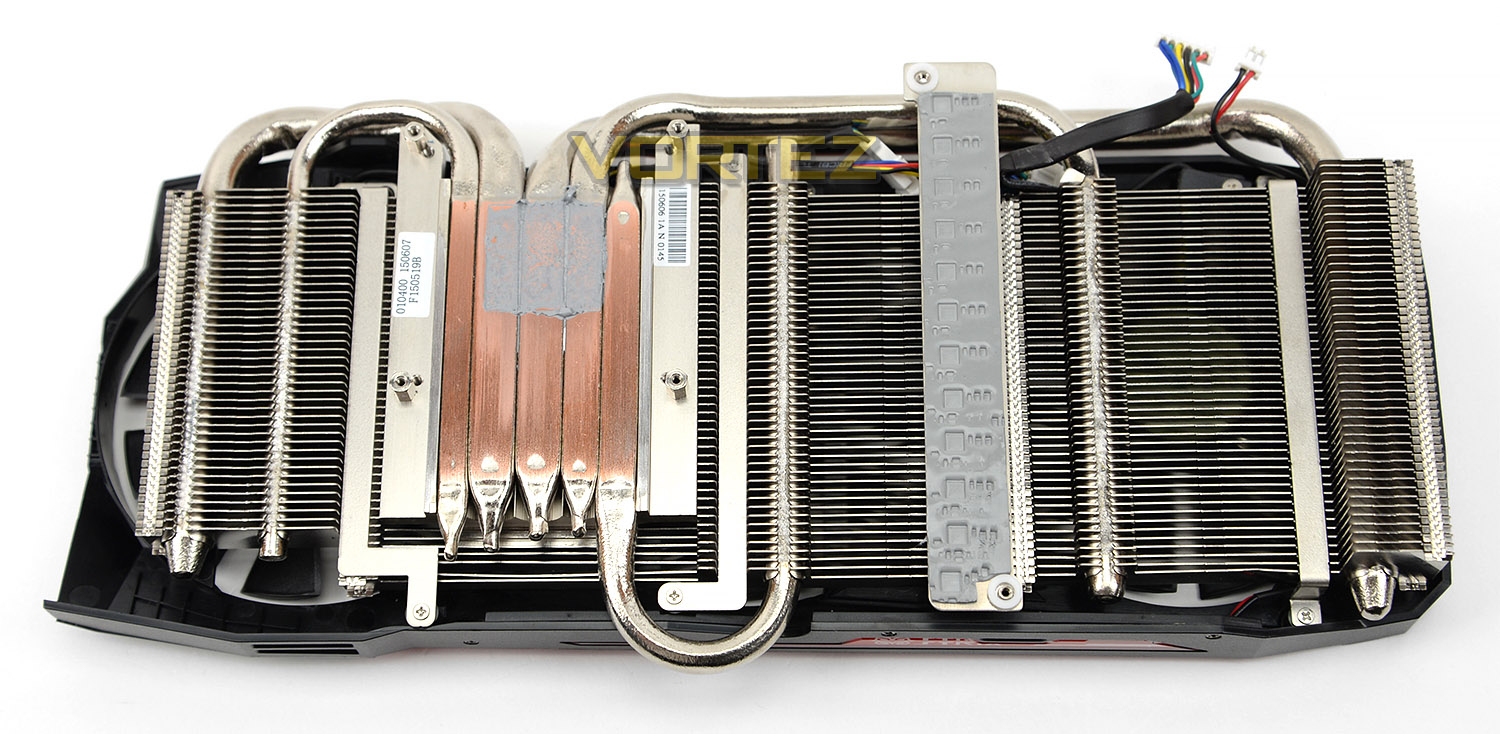
Heatpipes are inherently bi-directional in that vapour travels away from the source of the heat whilst condensed liquid is drawn back to the source. Aiding in this dynamic, especially the speed at which liquid is drawn back to the hotter areas of the pipe (i.e. zones directly above the GPU), boosts the efficiency of the cooler such that it can handle ever higher TDPs.
The rate at which liquid travels within a heatpipe is dictated by the compostion of the heatpipe’s internal surface. There are two major approaches:
– Sintered Power Heatpipe – which is excellent in promoting capillary action but tends to impede liquid when it would flow more naturally.
– Grooved Heatpipe – which doesn’t impede flow back, but has low capillarity and hence gravity is more of an impediment.
A DirectCU heatpipe however utilises a combination of sintered powder and grooves to provide the best of both worlds. For similar 6mm-diameter heatpipes a DirectCU pipe outperforms these types by ~25% and 50% respectively. But that’s not all.
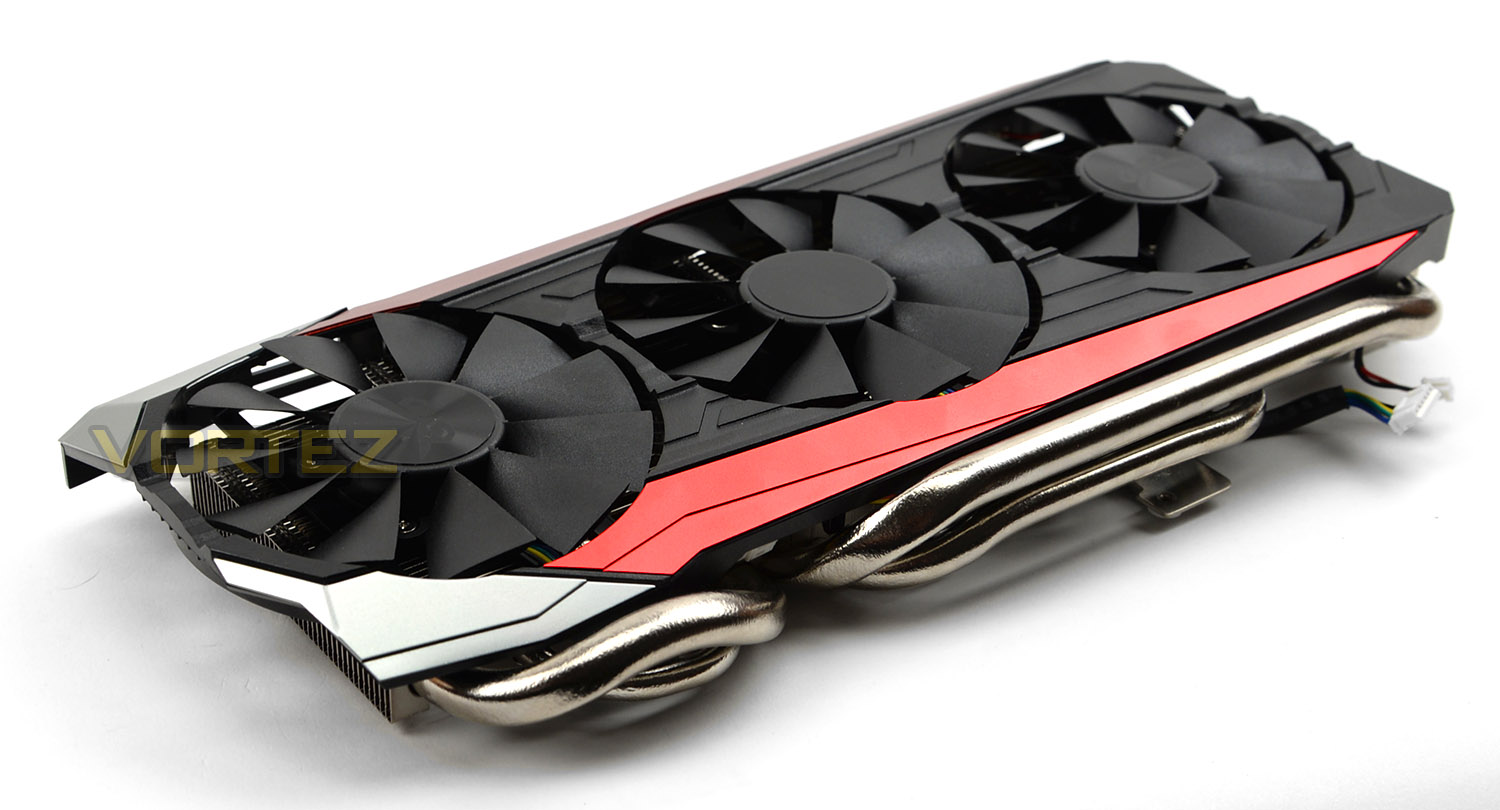
DirectCU III is the first GPU manufacture to utilises two 10mm diameter heatpipes (or ‘superpipe’ if you will), alongside the more common 8mm and 6mm pipes. These superpipes are two of the three directly above the GPU, and hence have a direct bearing on the efficiency of the cooler. The addition of 10mm DirectCU pipes greatly increases the rated TDP of DirectCU III, making it more suitable for large high-TDP GPUs such as AMD’s R9 Fury. However, that’s only one half of the equation.
Wing-Blade 0dB Fan Technology
In addition to modifications to the heatpipe design ASUS also re-engineered their fan, as well as adding a third to the overall cooler design. The result is their patented Wing-blade 0dB fan technology.
Conventional fans blades introduce eddy currents at the very tip as the fan rotates, reduing overall air pressure and flow. Taking inspiration from the US Airforce’s A10 Warthog Attack Jet, ASUS created Wing-Blade 0dB Fan Technology. The design places a small downward stop at the tip of the blade, disrupting this current and thus increasing air pressure; ASUS have measured the effect as improving overall pressure by 105% at these edge zones, no mean feat.
ASUS’s Wing-Blade 0dB Fans are also straighter and wider than comparative models. These larger blades give rise to a 25% larger blade area overall, which improves air flow by ~4%. Similarly larger fans also reduce the gap between each blade (in this case by a whopping 37%) which increases air pressure by 4%. Pretty respectable.
Cherry On Top – Strix Armor Protection
The final component to the R9 FURY’s cooling isn’t strictly part of the DirectCU III formula, but nonetheless is a much-need cooling and aesthetic feature: Strix Armor Protection. Strix Armor Protection is, in essence, a solid GPU backplate which serves a dual-role.
The first, and most important, is to reinforce the regidity of the card and provide greater protection to the GPU socket. The heavy nature of the DirectCU III solution would normally place the card and GPU socket under a lot of stress, not least due to requiring firm and consistent contact with the GPU. The STRIX Armor not only increases the card rigidity, but also provides anchor points for the cooler so weight is more evenly distributed across the PCB. In the long term this should improve reliability, whether kept long-term in a chassis or continually swapped with other GPUs on a test-bench.
The second (and somewhat less vital) purpose of the Strix Armor is to act as an attractive heatspreader for the underside components such as memory chips, components which don’t typically benefit from active cooling. The card also includes a STRIX LED on the top-most edge of the cooling shroud, adding just a little more to the overall premium look and feel to this GPU.
Although the DirectCU III cooling on this GPU does include an exhaust port outside the rear of the chassis much of the heat dissipated will still linger, requiring suitable chassis air-flow to exhaust it out the rear and top of the case. That is unfortunately one of the consequences of high-end cooling within a dual-slot form factor – dissipating heat from the GPU takes priority over expelling it from the chassis.
It’s likely that the DirectCU III will be limited to the flagship AMD and NVIDIA GPUs for some time to come, and may even be broadly unnecessary in its most elaborate incarnation when the industry transitions to 14/16nm. It is however an excellent tool for ASUS to have in their toolbox, and many of the improvements may follow-through into dual-fan DirectCU coolers in the future.
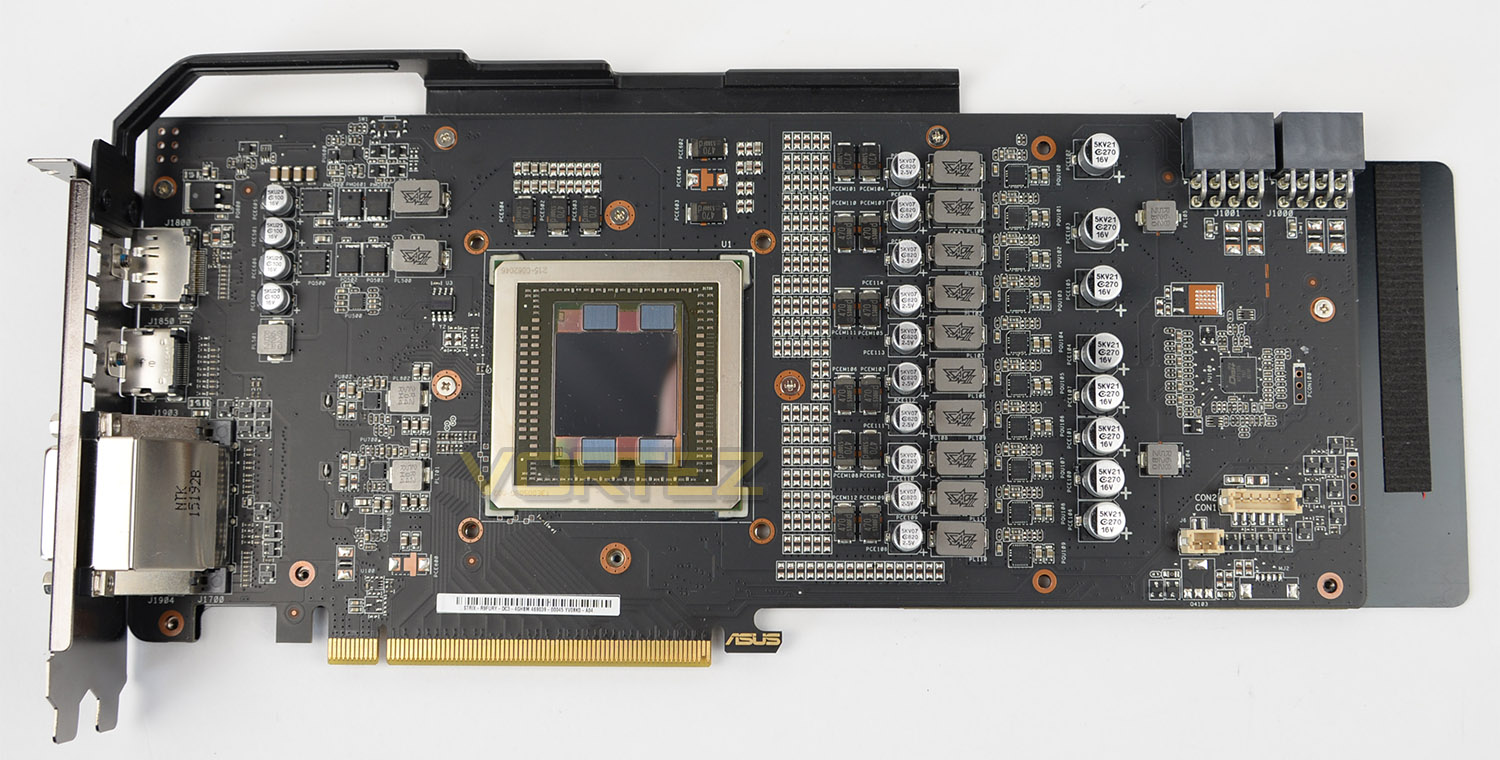
With the DC3 cooler detached from the graphics card we can see take a look at the inner-workings and see the full extent of that monolithic PCB. ASUS has placed a brace support running from the IO plate across the top to supply even more protection to prevent the board from bending.
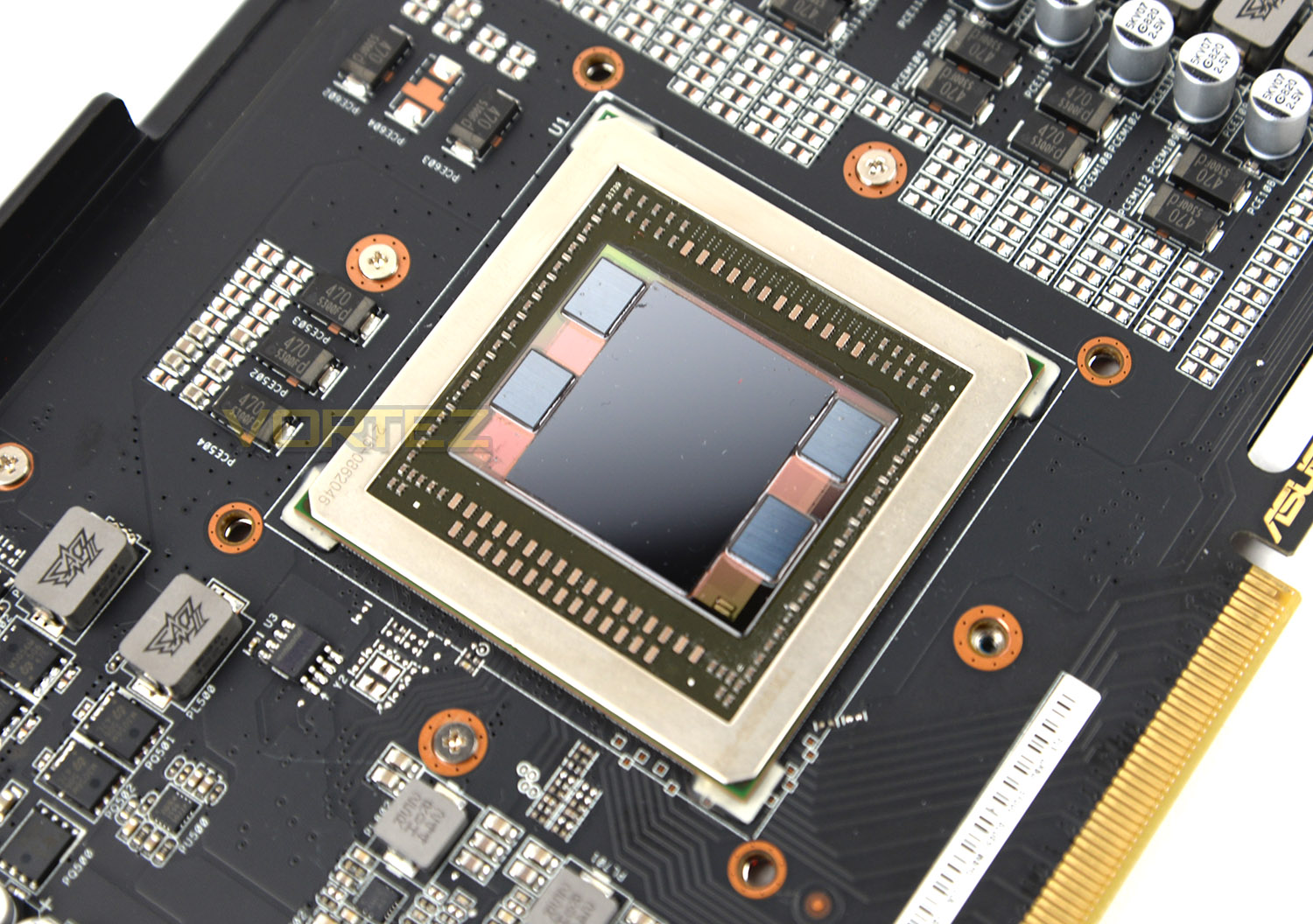
At the very heart of DC3 OC is the R9 Fury GPU aka Fiji. This GPU comprises of 3584 (56 Compute Units) created by the 28nm process. The highlight with AMD’s new Fiji-based GPUs is the introduction of HBM which introduces the 4096-bit memory interface. AMD are able to significantly condense the layout and form factor in this region.
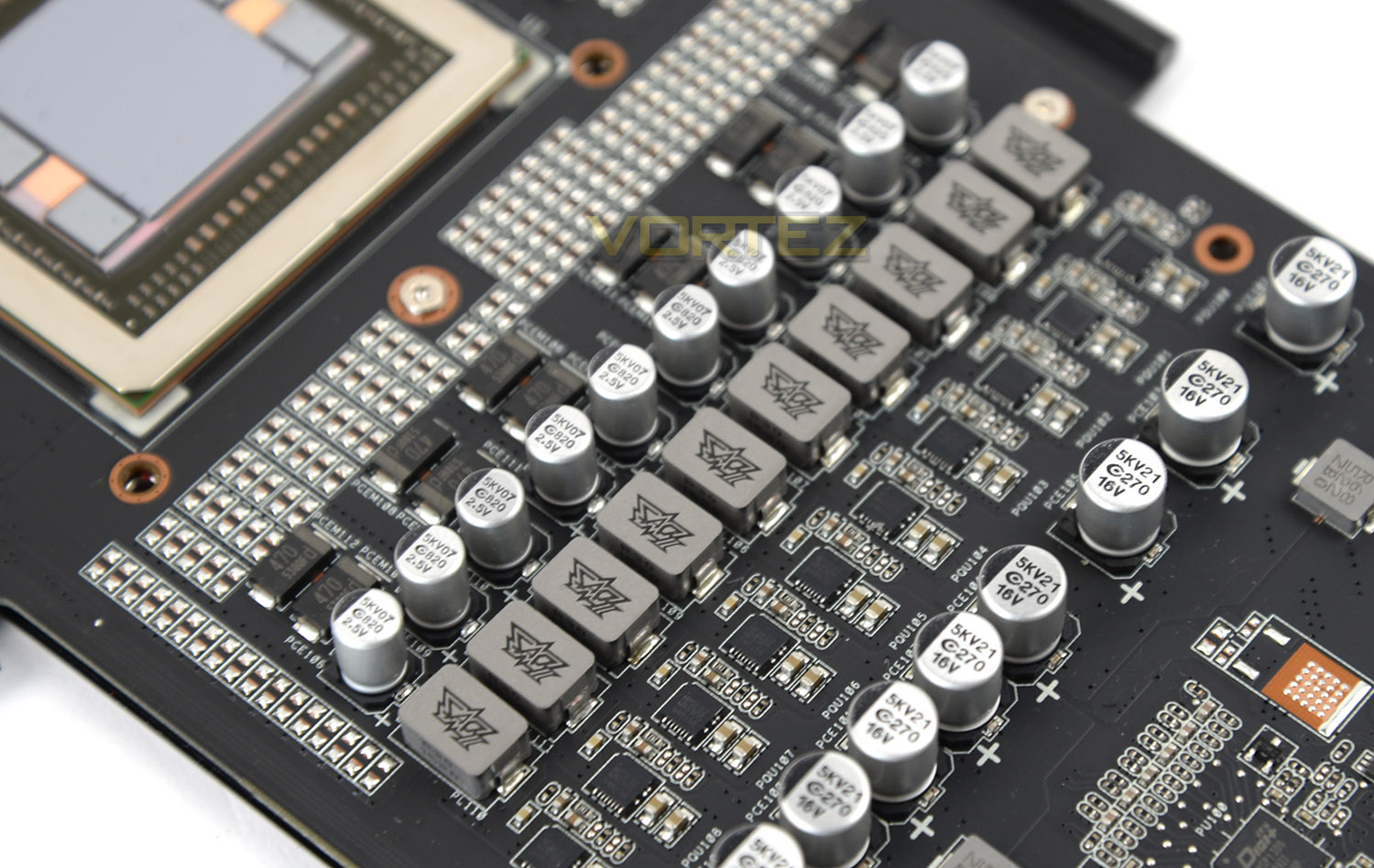
Our graphics card employs a 12+2 phase Super Alloy Power II design, along with Super Alloy II CAPs and chokes too. The end result means better temperatures, longer lifespan and less noise. The construction of this card is built 100% by machine via ASUS Auto-Extreme. Stringent quality control techniques are used and production is executed with absolute precision.
Test Setup & Methodology
How we test graphics cards
Testing a graphics card is an extremely lengthy process. We sometimes see reviews where a graphics card has been tested using out of date equipment, out of date games and even out of date drivers. While the latter can be excused due to the sheer amount of driver updates making a thorough review impossible we will however notify the reader when we have used a different driver to the normal for example a pre-release driver. For the most part however we will always use the same hardware and latest drivers so this does certainly need to be taken into consideration when viewing our testing results. Each game and benchmark is tested times with the lowest and highest scores omitted out of the 5 results and the average then taken from the three remaining to give us our final result for each resolution and setting used.
Hardware
With the latest Intel chipset release we decided to update our ageing X79 setup to the very latest X99 chipset. Not only that but we will be using the flagship Core i7-5960X Extreme Edition processor clocked to a realistic, achievable 4GHz to ensure we have no CPU bottlenecks. With 16GB (4x4GB) of GDDR4 at 2666MHz and a 500GB SSD there should be minimal paging so the benchmarks we run today will hopefully give a true reflection of the graphics card’s performance.
High End Graphics Cards on test:
ASUS STRIX R9 FURY DC3 OC (Catalyst 15.20)
ASUS STRIX GTX 980Ti DC3 OC (Forceware 353.30)
SAPPHIRE R9 Fury X (Catalyst 15.15)
XFX R9 390X Double Dissipation (Catalyst 15.15)
MSI R9 390X GAMING 8G (Catalyst 15.15)
NVIDIA GTX 980 Ti 6GB (Forceware 352.90)
ZOTAC GTX 970 AMP! EXTREME CORE(Forceware 344.75)
ZOTAC GTX 970 AMP! EXTREME(Forceware 344.75)
MSI GTX 970 GAMING 4G(Forceware 344.75)
GIGABYTE G1 GAMING SOC GTX 970(Forceware 344.75)
ASUS STRIX GTX 970 4GB GDDR5(Forceware 340.60)
NVIDIA GTX 980 4GB GDDR5(Forceware 340.52)
SAPPHIRE TRI-X R9-290X 4GB GDDR5(Catalyst 14.3)
Special thanks go to Intel, Corsair, MSI and AOC for providing the extreme spec components used for our test bench:
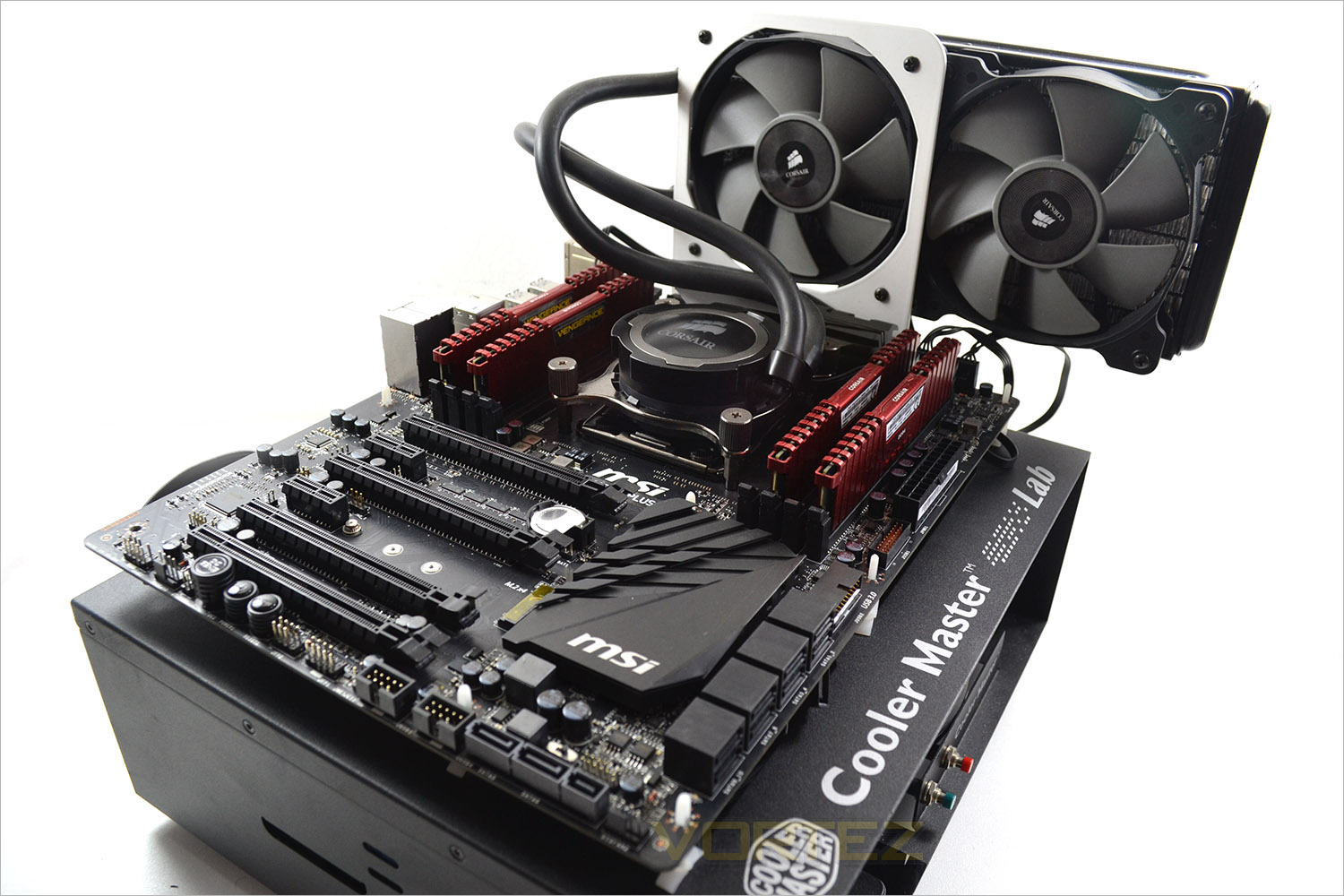
Motherboard: MSI X99S GAMING 9 AC
CPU: Intel Core i7-5960X Extreme Edition @ 4GHz
RAM – 16GB (4x4GB) Corsair LPX Vengeance (Red) DDR3 @ 2666MHz 16-17-17-35 C1
Power Supply – CORSAIR RM Series™ RM1000
Hard Drive – CORSAIR Force Series™ LX 512GB SATA 3 6Gb/s SSD
Cooler – CORSAIR Hydro Series™ H105 240mm Extreme Performance Liquid CPU Cooler
Monitor – AOC 28″ 4K U2868 PQU
CPU: Intel Core i7-5960X Extreme Edition @ 4GHz
RAM – 16GB (4x4GB) Corsair LPX Vengeance (Red) DDR3 @ 2666MHz 16-17-17-35 C1
Power Supply – CORSAIR RM Series™ RM1000
Hard Drive – CORSAIR Force Series™ LX 512GB SATA 3 6Gb/s SSD
Cooler – CORSAIR Hydro Series™ H105 240mm Extreme Performance Liquid CPU Cooler
Monitor – AOC 28″ 4K U2868 PQU
Benchmarks
If you are a regular reader of our reviews you will know we like to test the latest hardware with the latest games and benchmarks on the market. Here are the games we have chosen:
Battlefield 4
Watchdogs
Company of Heroes 2
Thief
GRID: 2
Metro: Last Light
Watchdogs
Company of Heroes 2
Thief
GRID: 2
Metro: Last Light
We also take into consideration the benchmarkers out there so have included three of the more popular synthetic benchmarks available:
Unigine: Valley
Unigine: Heaven 4
Futuremark 3DMark Firestrike
Unigine: Heaven 4
Futuremark 3DMark Firestrike
Let’s see how today’s graphics card performed…
Power, Temperatures, Acoustics
To test for power consumption we take a measurement from the plug socket. It is important to note that the figures below represent total system power use and not just the GPU. The CPU was always in a fixed state (4GHz overclock) so did not affect the additional power load when the GPU was placed under 100% load using Furmark which was ran for 15 minutes at which point a load reading was taken. Idle readings were taken 5 minutes after system boot to ensure any background services and applications had loaded.
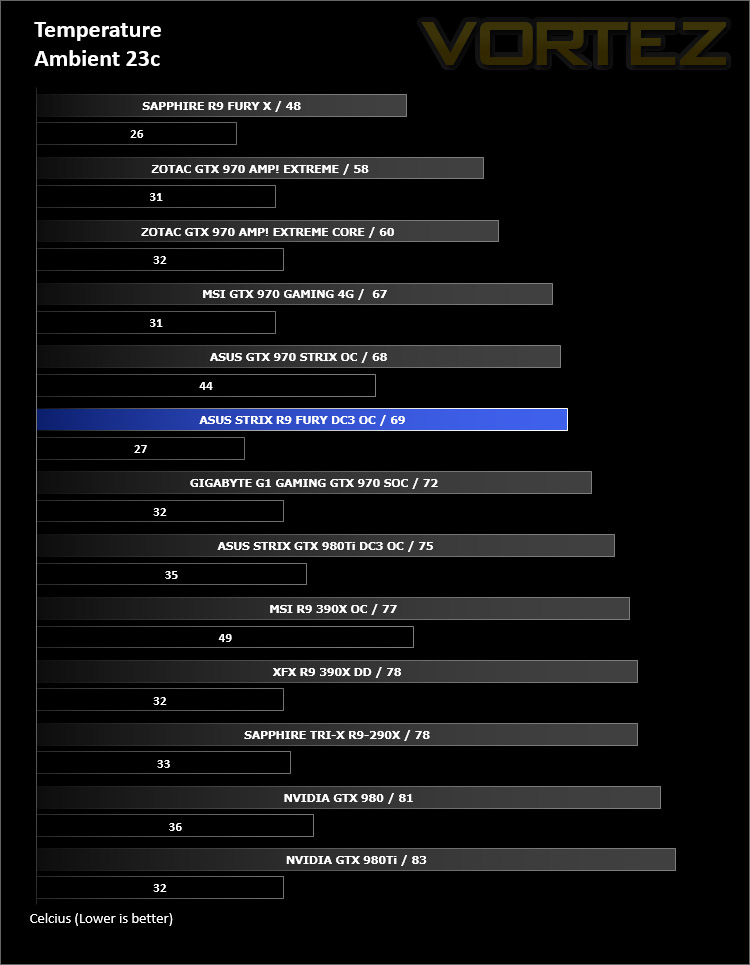
Temperature
To test temperatures we measured idle temperatures after booting windows, letting all applications finish loading and ran a few benchmarks. Once the benchmarks were complete we left the card to reach a cooling plateau where we then took the idle temperatures. For the load tests, we would normally run Furmark for 20 minutes, taking the absolute maximum temperature attained however we found that this throttled the card and resulted in spurious results. So we set Heaven running continuously for 20 minutes and used this as a temperature result.
Acoustics
Noise from the cooling fan isn’t disruptive by any means. If the GPU remains under 65C the fans do not spin, thus rendering the card completely silent – but even with the fans spinning at the default maximum of 40%, there is very little noise to be heard.
Overclocking
In order to overclock the graphics card we used the MSI Afterburner Tool since it gives extensive options for modifying such a device
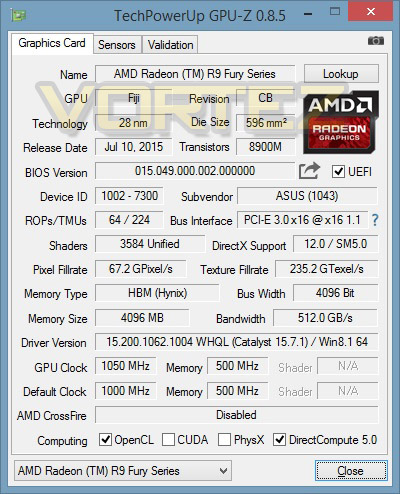
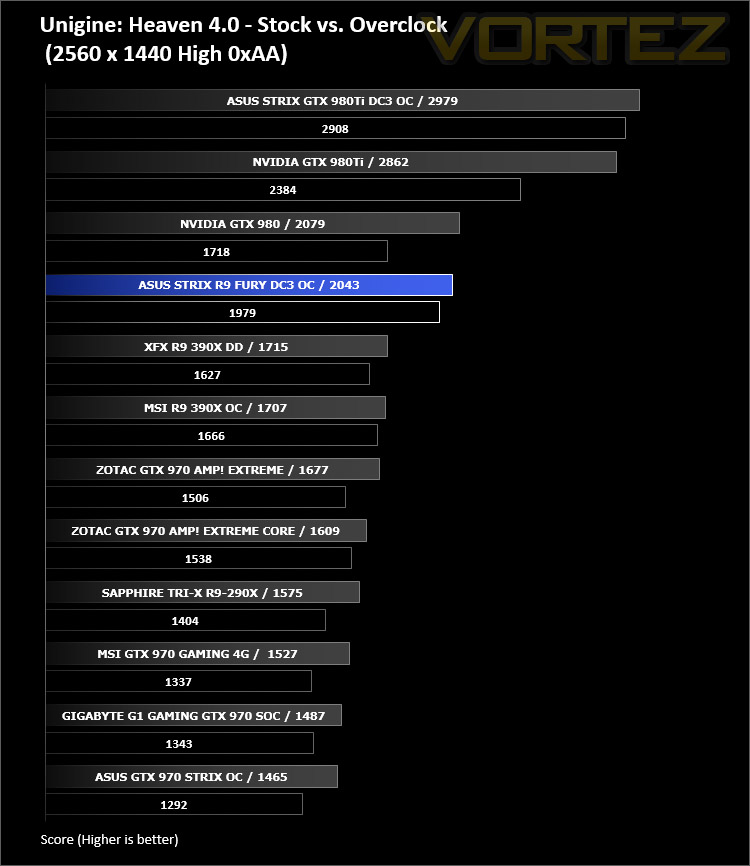
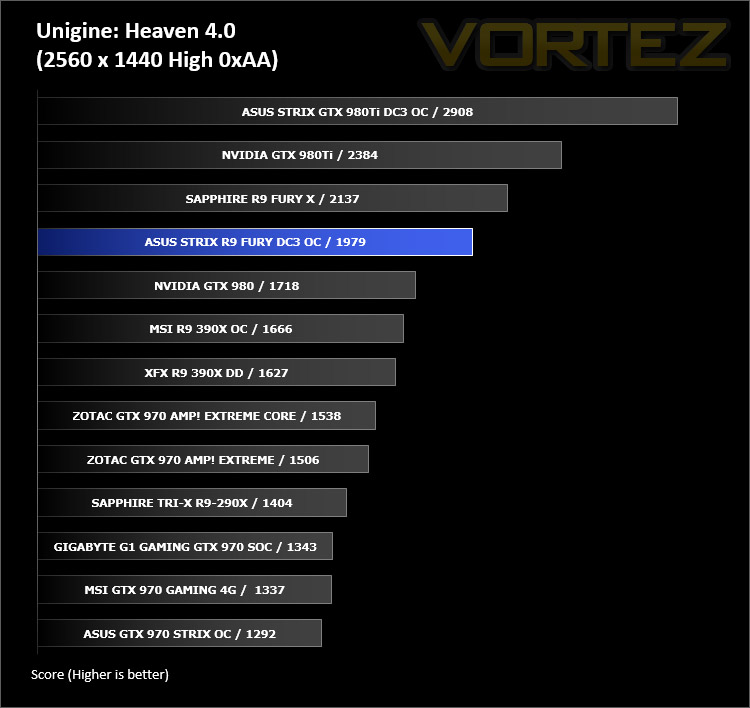
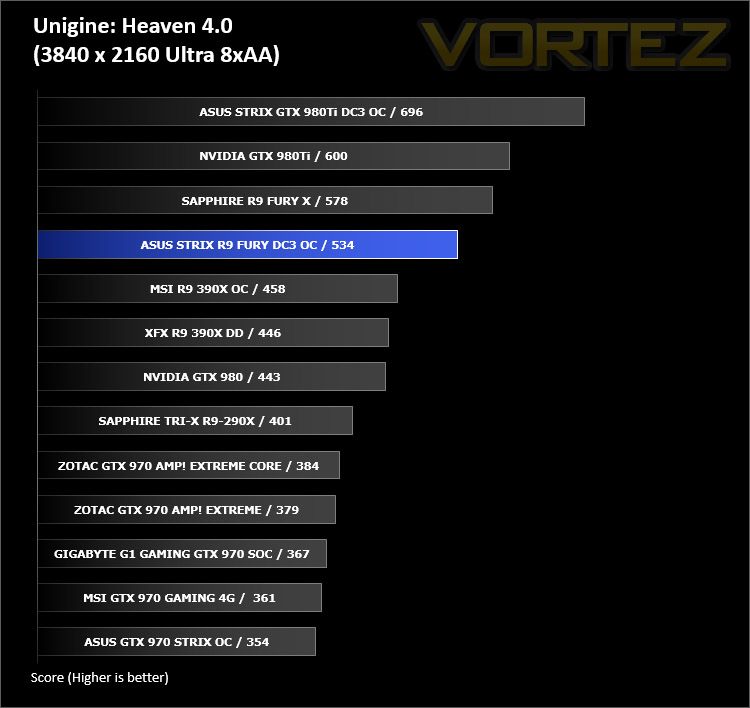
Overclocking realised only a small bump in GPU clock speed up to 1050MHz from 1000MHz. The memory clock speed is restrictive in its customisation due to HBM. With a slight bump in GPU clock speed we received a slight boost in Ungine Heaven 4.0 as shown below.
3DMark FireStrike
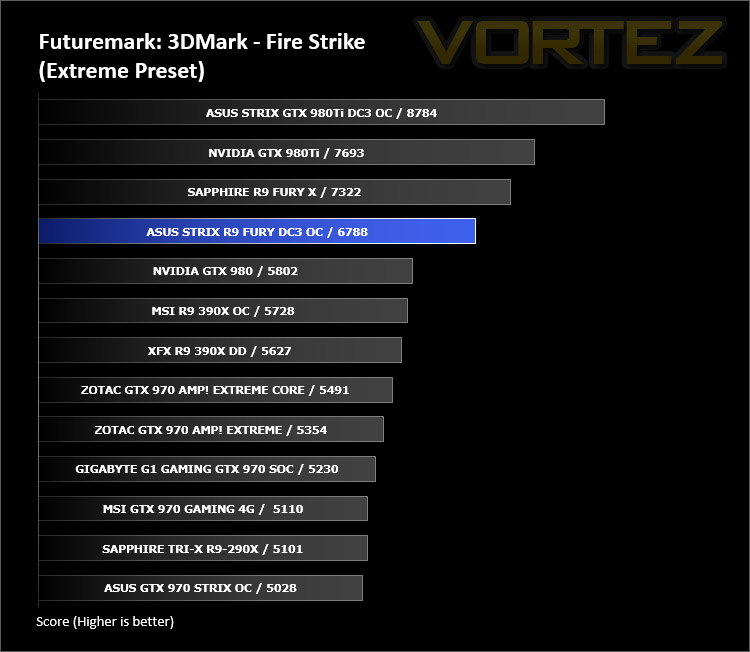
Fire Strike is the new showcase DirectX 11 benchmark designed for high-performance gaming PCs. It is Futuremark’s most ambitious and technical benchmark ever, featuring real-time graphics rendered with detail and complexity far beyond what is found in other benchmarks and games today.

Unigine Heaven 4.0
Heaven Benchmark with its current version 4.0 is a GPU-intensive benchmark that hammers graphics cards to the limits. This powerful tool can be effectively used to determine the stability of a GPU under extremely stressful conditions, as well as check the cooling system’s potential under maximum heat output. It provides completely unbiased results and generates true in-game rendering workloads across all platforms.
Unigine Valley
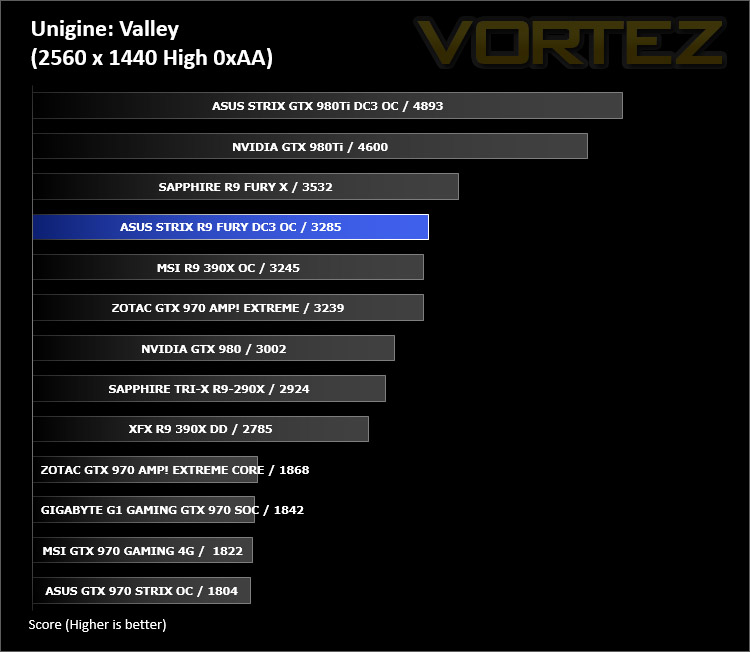
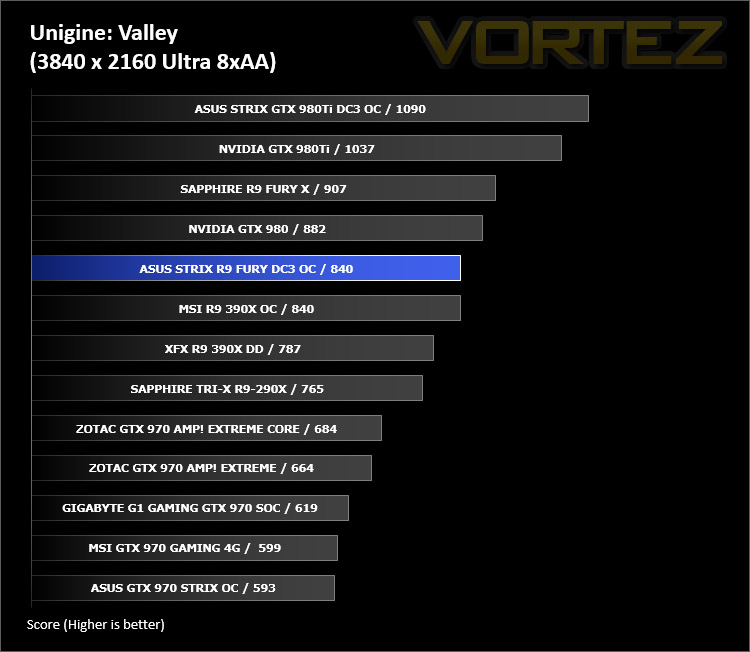
Valley Benchmark is a new GPU stress-testing tool from the developers of the very popular and highly acclaimed Heaven Benchmark. The forest-covered valley surrounded by vast mountains amazes with its scale from a bird’s-eye view and is extremely detailed down to every leaf and flower petal. This non-synthetic benchmark powered by the state-of-the art UNIGINE Engine showcases a comprehensive set of cutting-edge graphics technologies with a dynamic environment and fully interactive modes available to the end user.
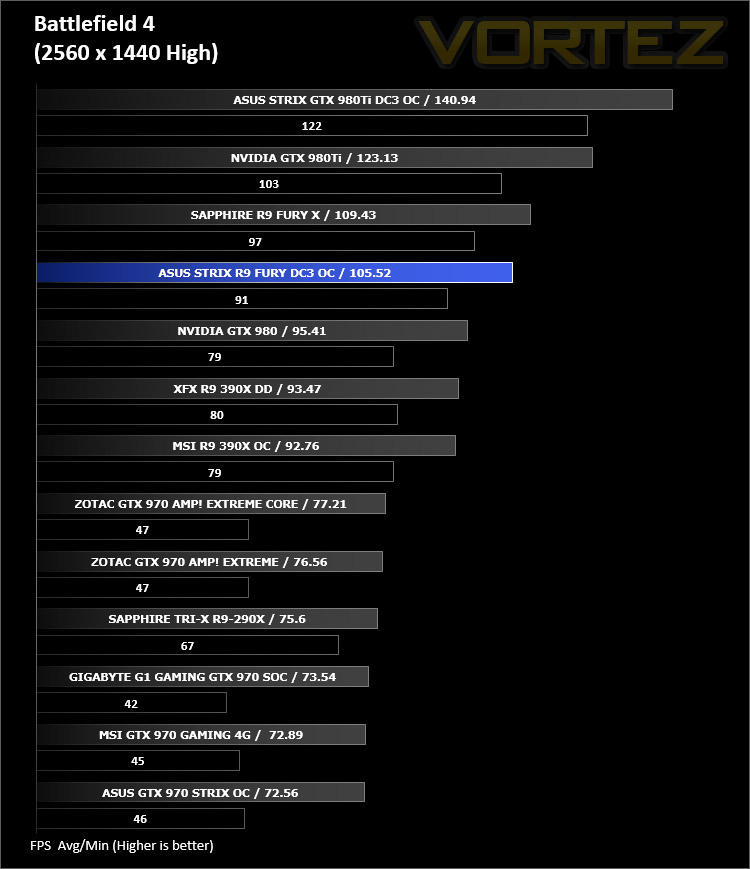
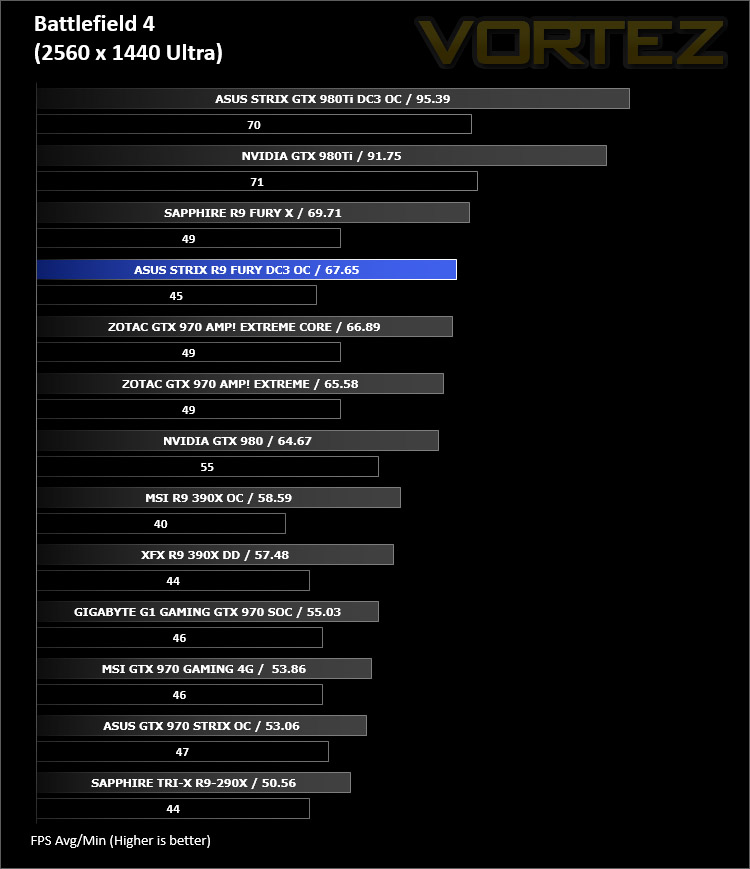
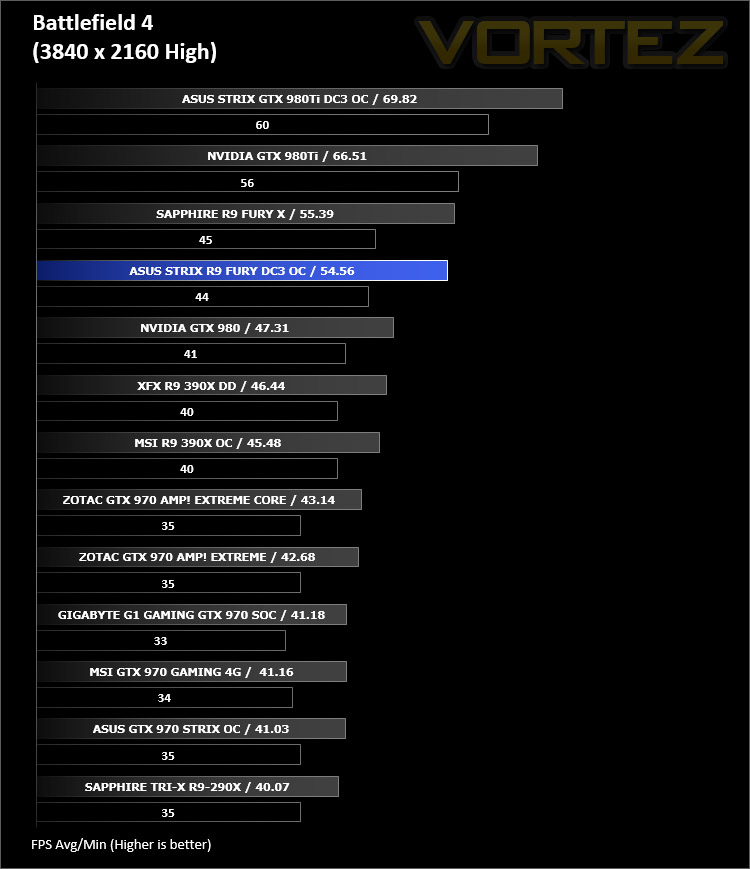
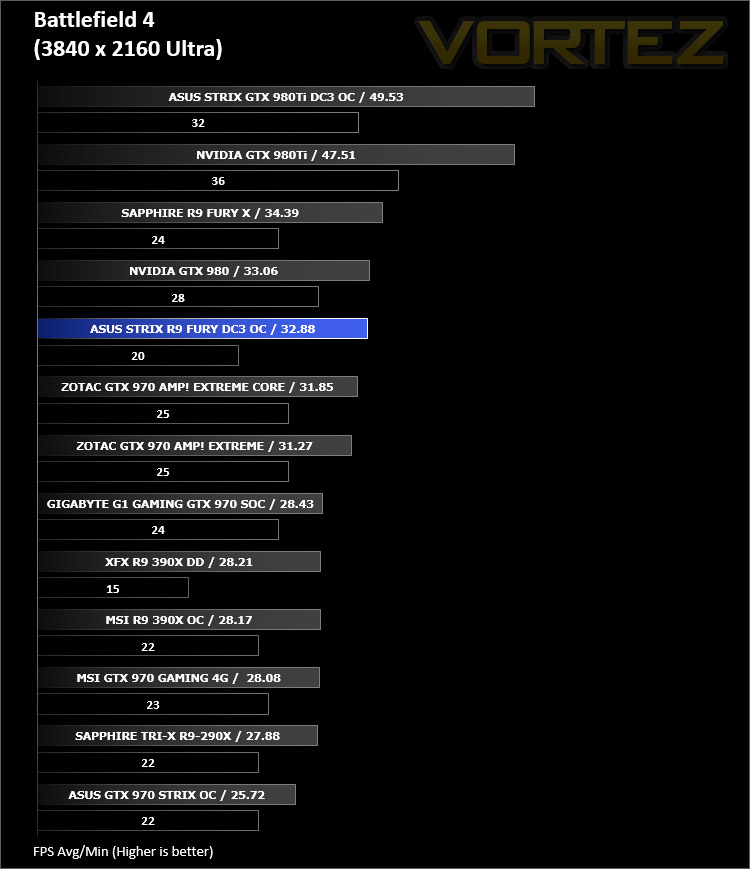
Battlefield 4
Battlefield 4 is a 2013 first-person shooter video game developed by Swedish video game developer EA Digital Illusions CE (DICE) and published by Electronic Arts. It is a sequel to 2011’s Battlefield 3 and is perhaps currently the most popular online First Person Shooter for PC gamers. It has an extremely powerful gaming engine that will stress components more than most FPS titles available.
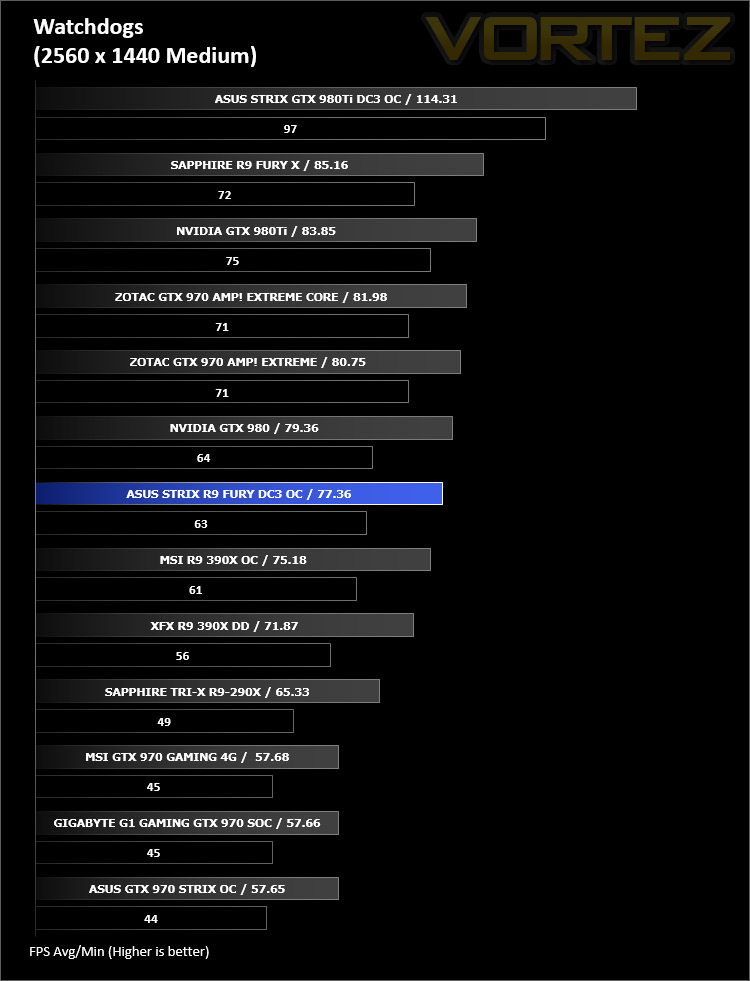
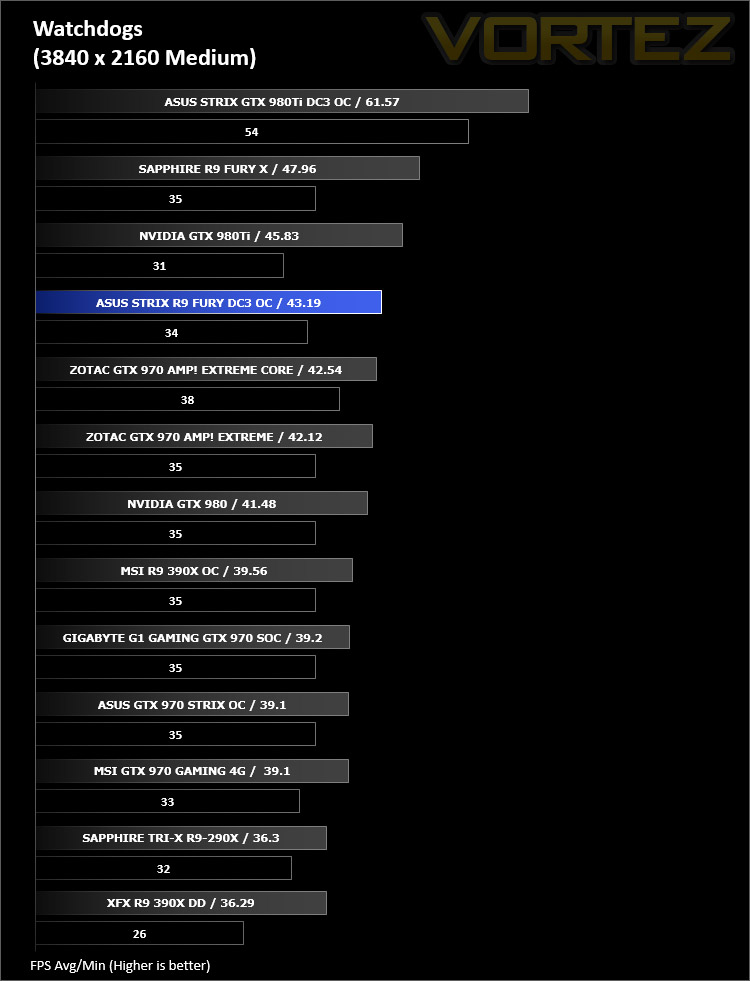
Watchdogs
Watch Dogs is a 2014 open world action-adventure video game developed by Ubisoft Montreal and published by Ubisoft. Set within a fictionalized version of Chicago, Illinois, the single-player story follows a hacker and his efforts to seek revenge after the accidental death of his niece. The open world design lets players freely roam Chicago, which includes the urban city, open countryside, and slums. The game is played from a third-person perspective and its world is navigated on-foot or by vehicle. As such this is a very demanding game, especially when graphical options are turned up.


Thief
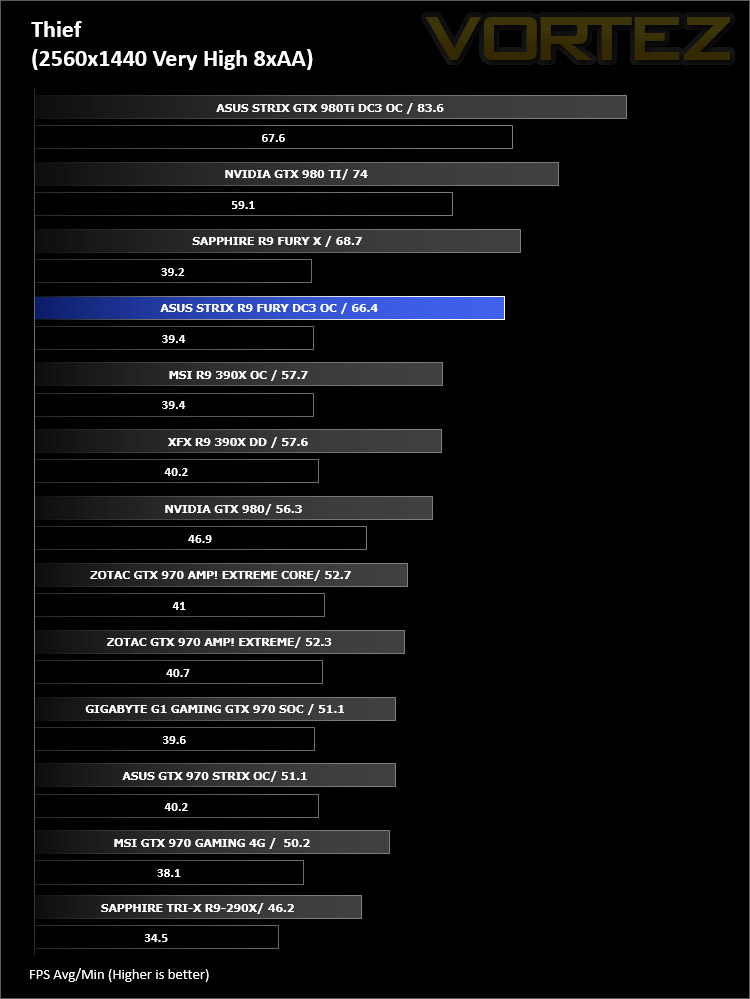
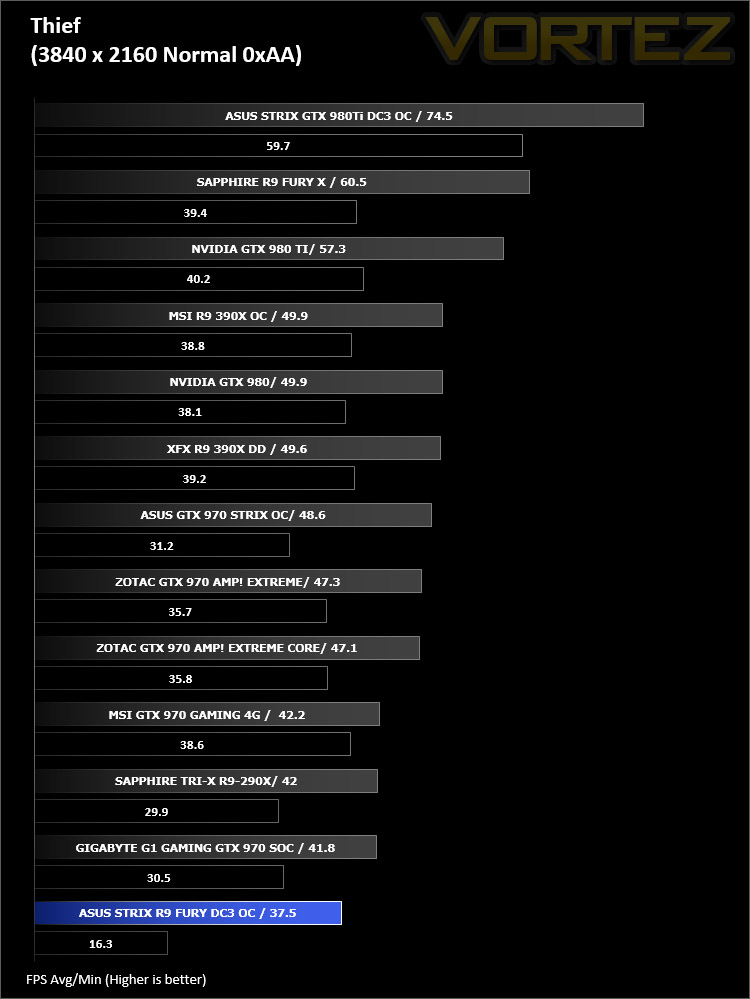
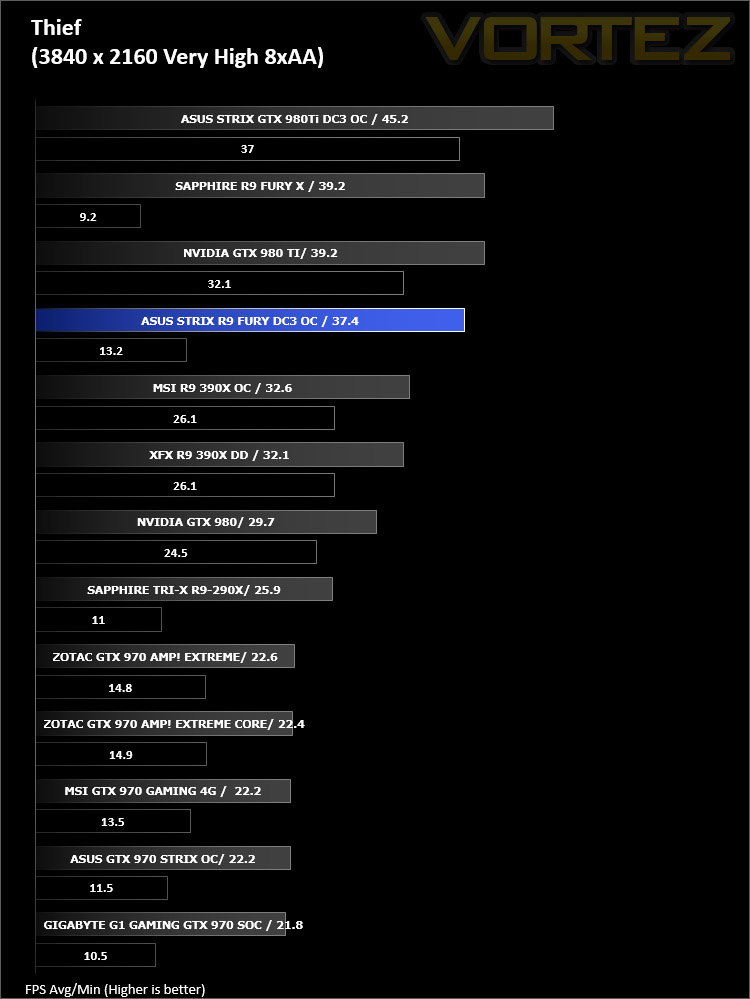
Thief is a stealth video game developed by the Canadian video game developer Eidos Montreal, and published by Square Enix. It is a revival of the cult classic Thief series of stealth games, of which it is the fourth game. Thief is set in a dark fantasy world inspired by Victorian, gothic, and steampunk aesthetics. Using a modified version of the Unreal Engine 3 it makes for a challenging game to pitch against our range of components.

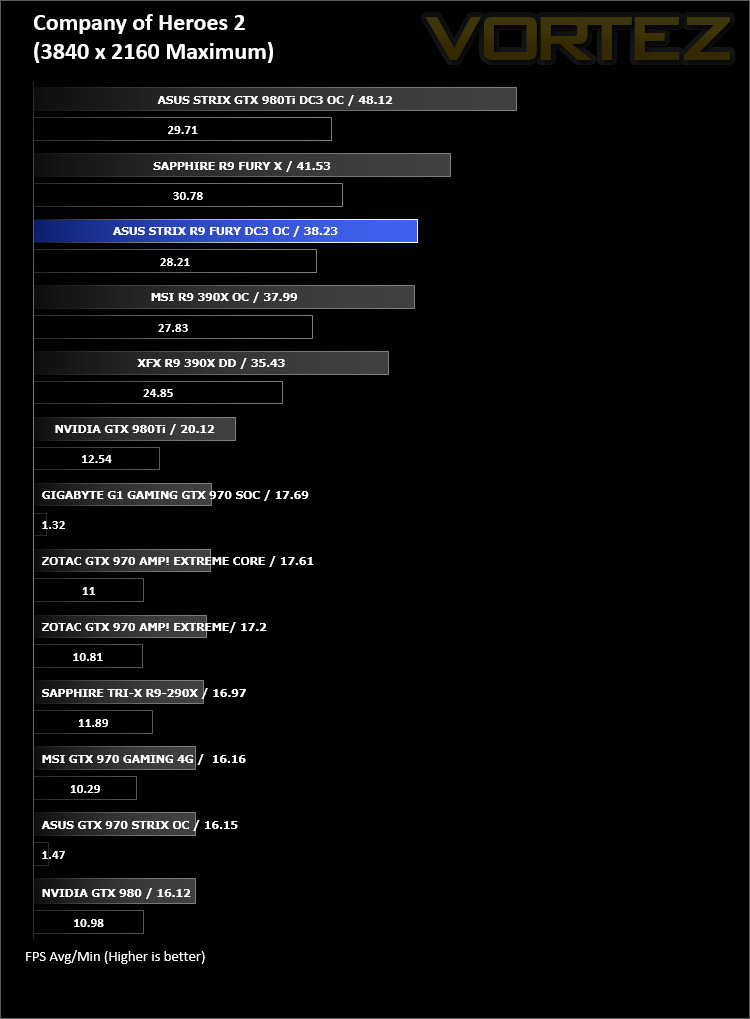
Company of Heroes 2
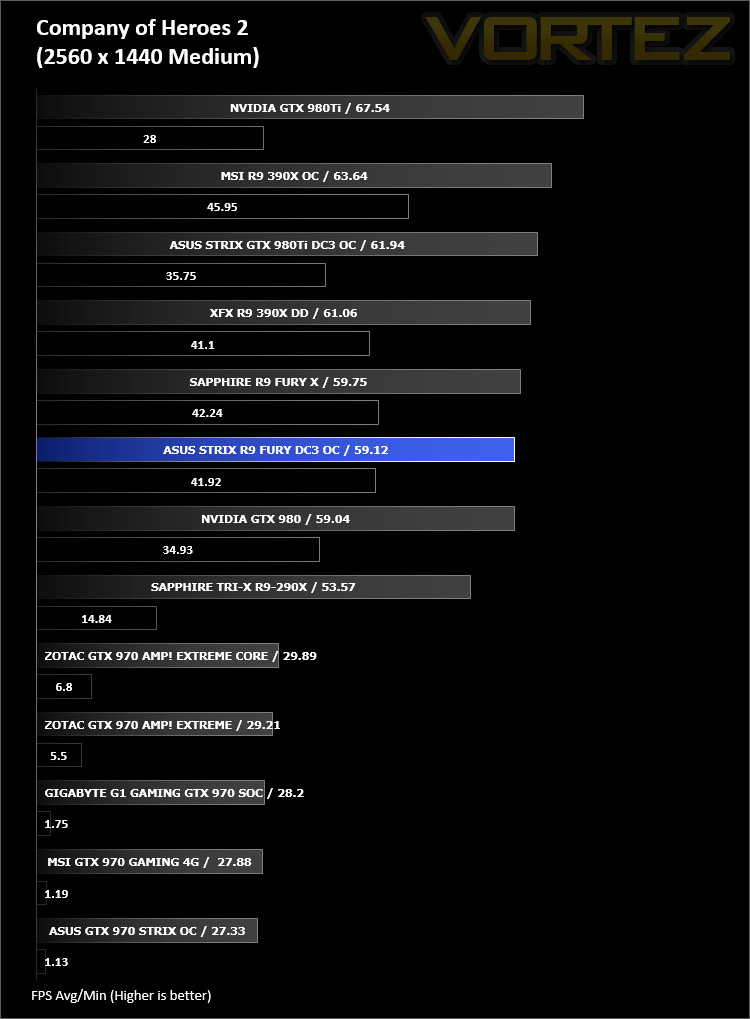
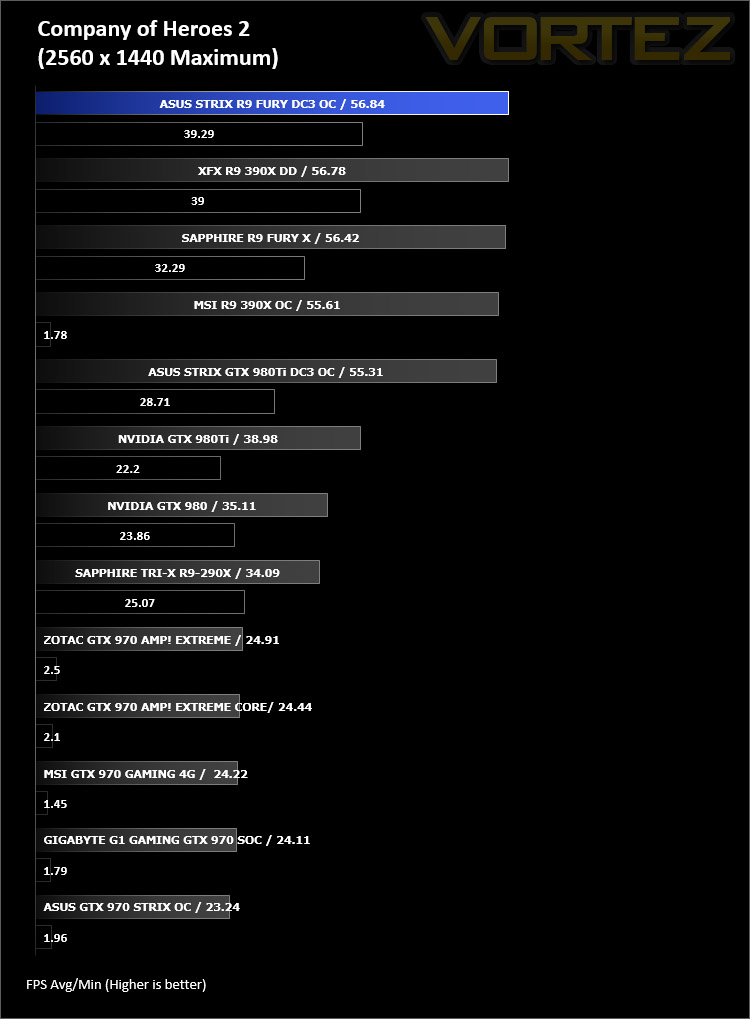
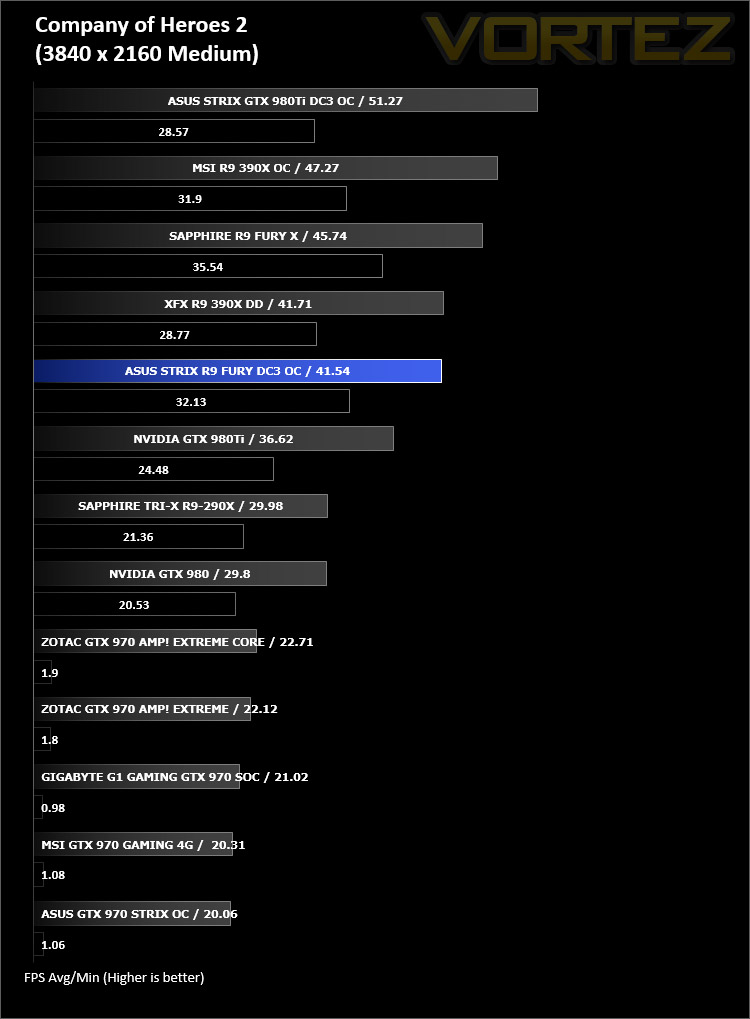
Company of Heroes 2 is a real-time strategy video game developed by Relic Entertainment. It is the sequel to the critically acclaimed 2006 game Company of Heroes.As with the original Company of Heroes, the game is set in World War II but with the focus on the Eastern Front, with players primarily controlling the side of the Soviet Red Army during various stages of the Eastern Front, from Operation Barbarossa to the Battle of Berlin. Company of Heroes 2 runs on Relic Entertainment’s proprietary Essence 3.0 game engine and is extremely demanding of both CPU and GPU.
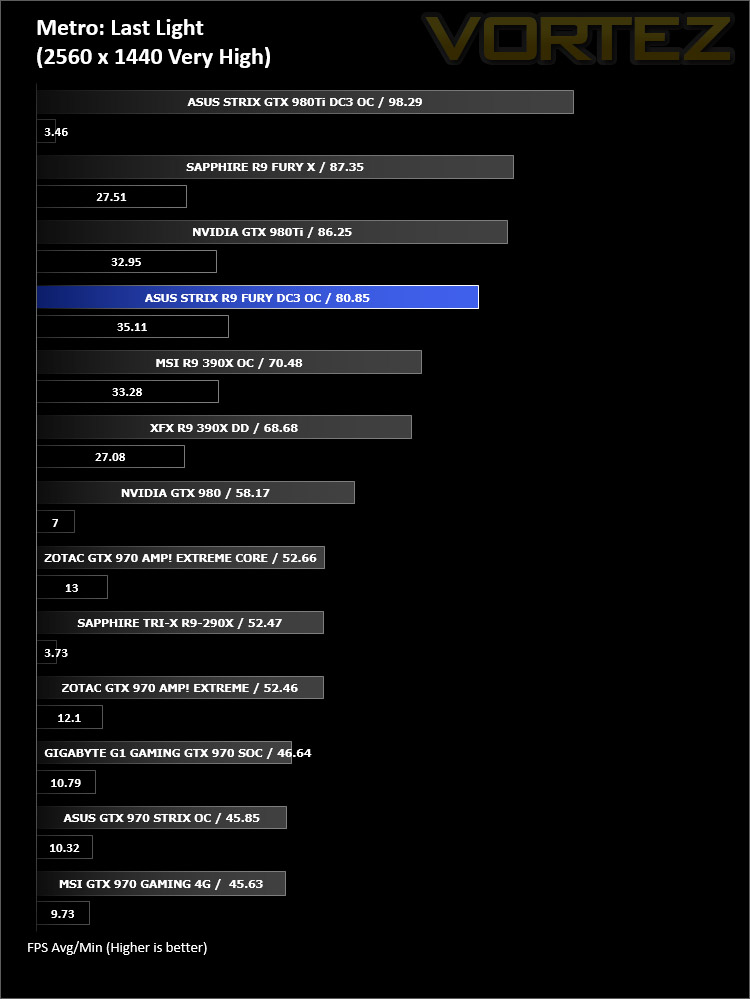
Metro Last Light
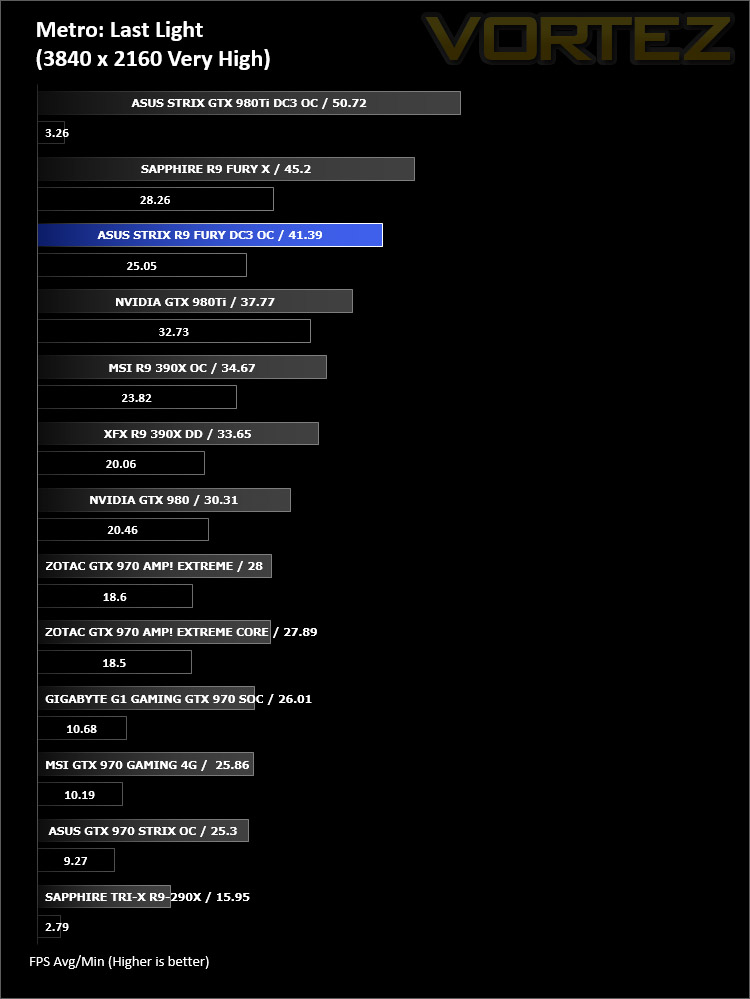
Metro: Last Light is a single-player post-apocalyptic-themed first-person shooter video game with stealth and survival horror elements, developed by Ukrainian studio 4A Games and published by Deep Silver. The game is set in a post-apocalyptic Moscow, part of the universe of the novel Metro 2033 and its sequels, written by Russian author Dmitry Glukhovsky. The second of our FPS titles, it runs on the 4A gaming engine which again, has the capability to stress even the best GPU components.


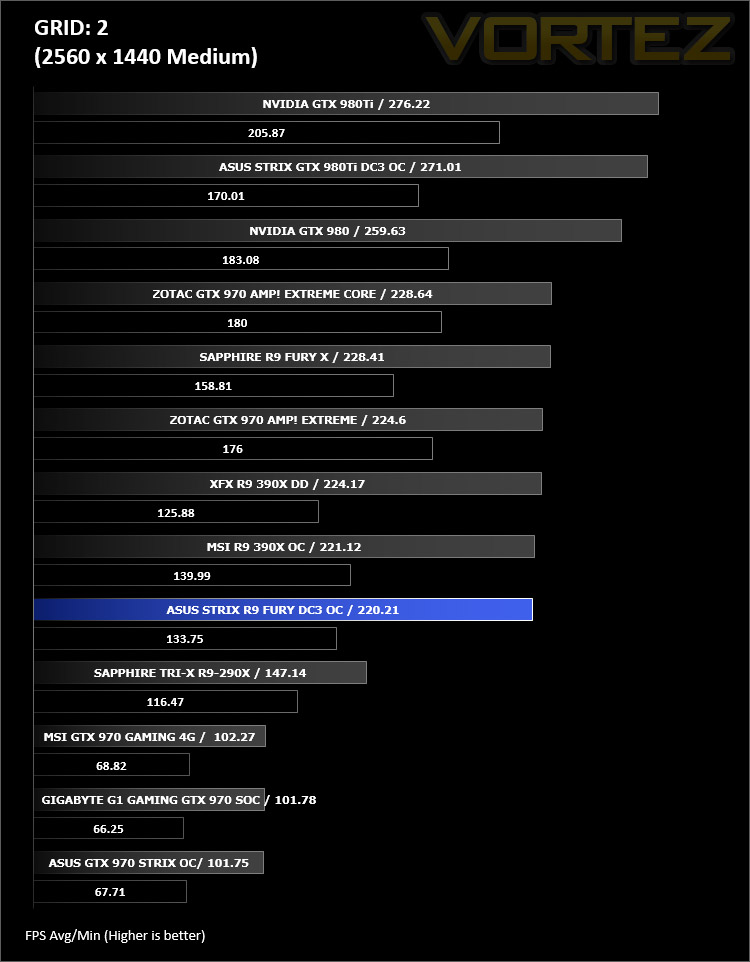
GRID 2
Grid 2 (stylised as GRID 2 and known as Race Driver Grid 2 in Japan) is a racing video game developed and published by Codemasters and is the sequel to 2008’s Race Driver: Grid. The game includes numerous real world locations and cities such as Paris. It also includes motor vehicles spanning four decades. In addition, it includes a new handling system that developer Codemasters has dubbed ‘TrueFeel’, which aims to hit a sweet spot between realism and accessibility. It uses the EGO 3.0 engine which while not overly challenging, is representative of games of this genre.

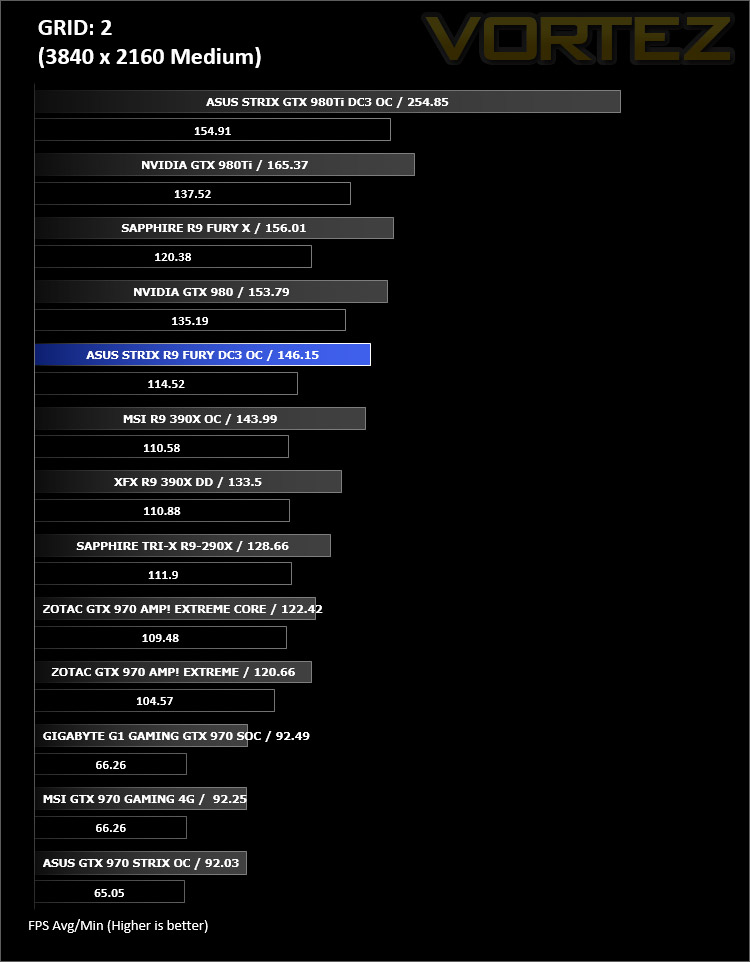

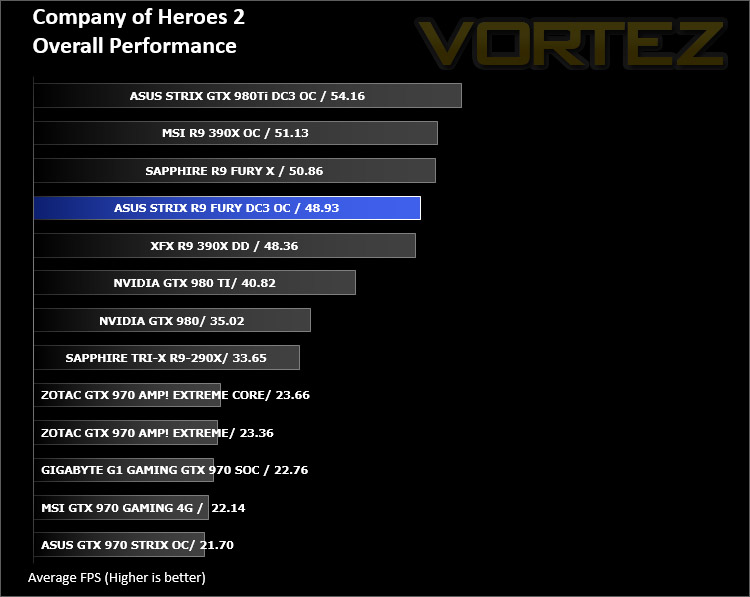
Overall Performance
Here we take a look at the overall performance of the graphics card. This figure is determined by finding the average FPS across all of the settings used in a particular benchmark(game) to give us an overall value.
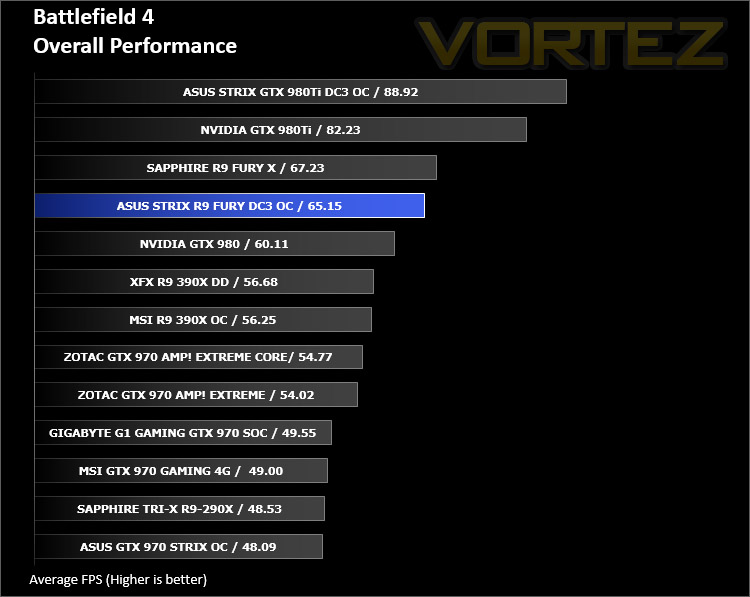
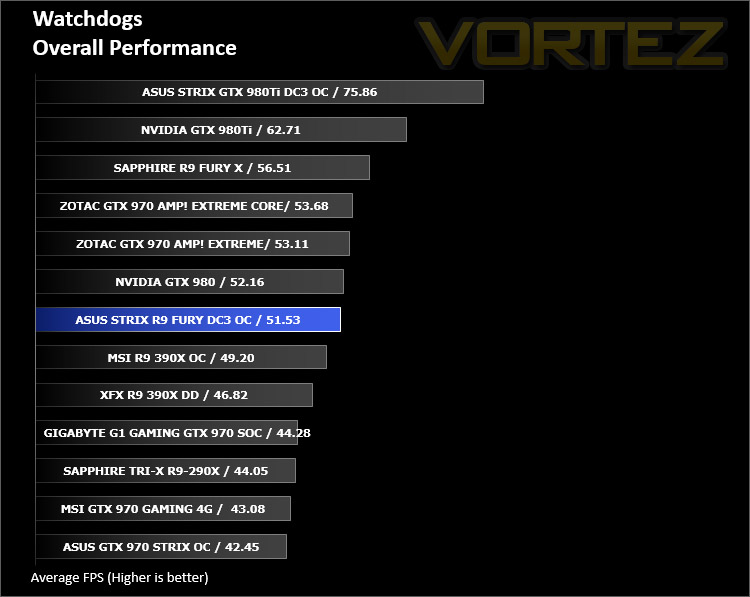
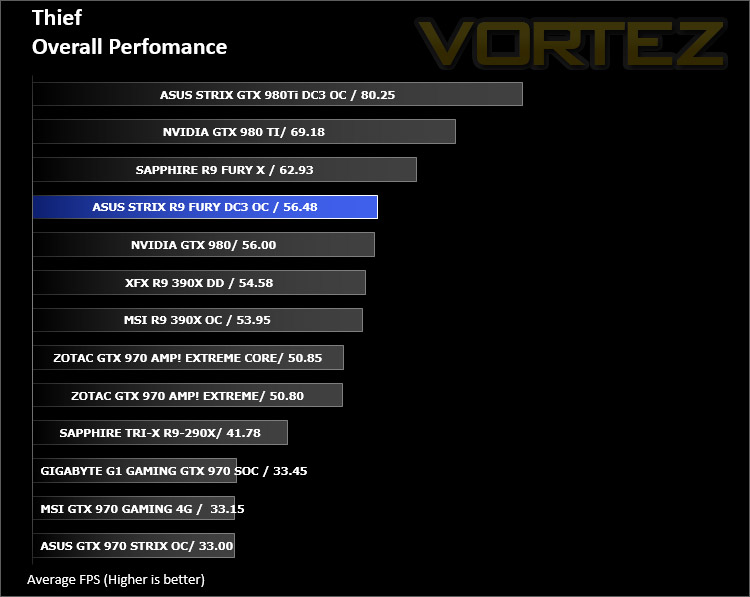

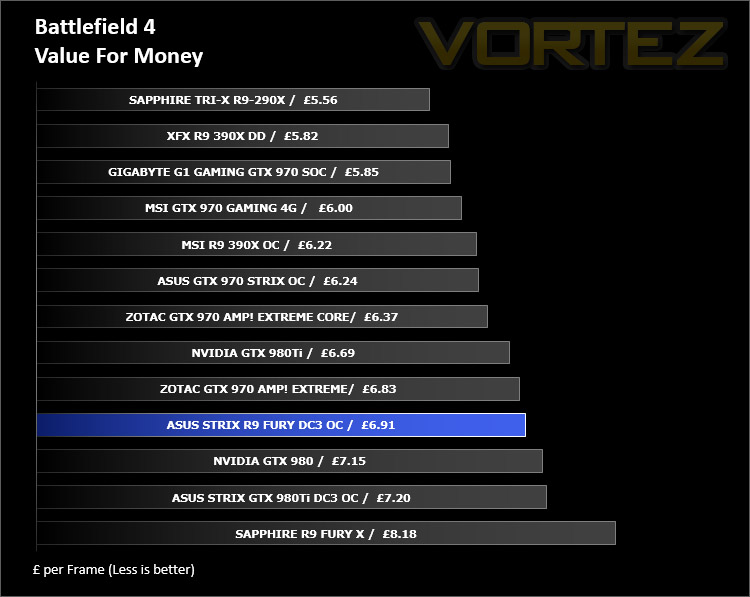
Value For Money
We make a simple calculation for this set of results. For each game we add all of the resulting FPS totals together and then divide by the four sets to give us an overall performance figure. While the figures alone do not give you an accurate picture of how the card will perform in any given scenario, they do tell you, when averaged, which GPU is the more capable across all of the benchmarks and settings tested.
Conclusion
Over the last few months there’s been lots of activity from AMD. The release of their 300 series and R9 Fury/X has provoked plenty of intrigue. While the Fury X wasn’t quite able to triumph over the GTX 980Ti, we’ve seen from today’s battle that a factory overclocked R9 Fury certainly gains the upper-hand against a vanilla GTX 980.
Sporting the new DirectCU III cooling solution, the ASUS R9 Fury DC3 OC not only supplies some impressive temperature figures but it’s also extremely quiet too. One particular highlight for us is the default option for the cooling fans to cease spinning if the GPU fails to exceed 65C – so for standard tasks and light usage the graphics card will emit absolutely no noise at all.
A factory overclock ensures that in almost all benchmarks this R9 Fury the victor in the GTX 980 vs R9 Fury debate. Boasting strong specifications and the freshly devices HBM technology also means that 4K gaming is well-catered for.
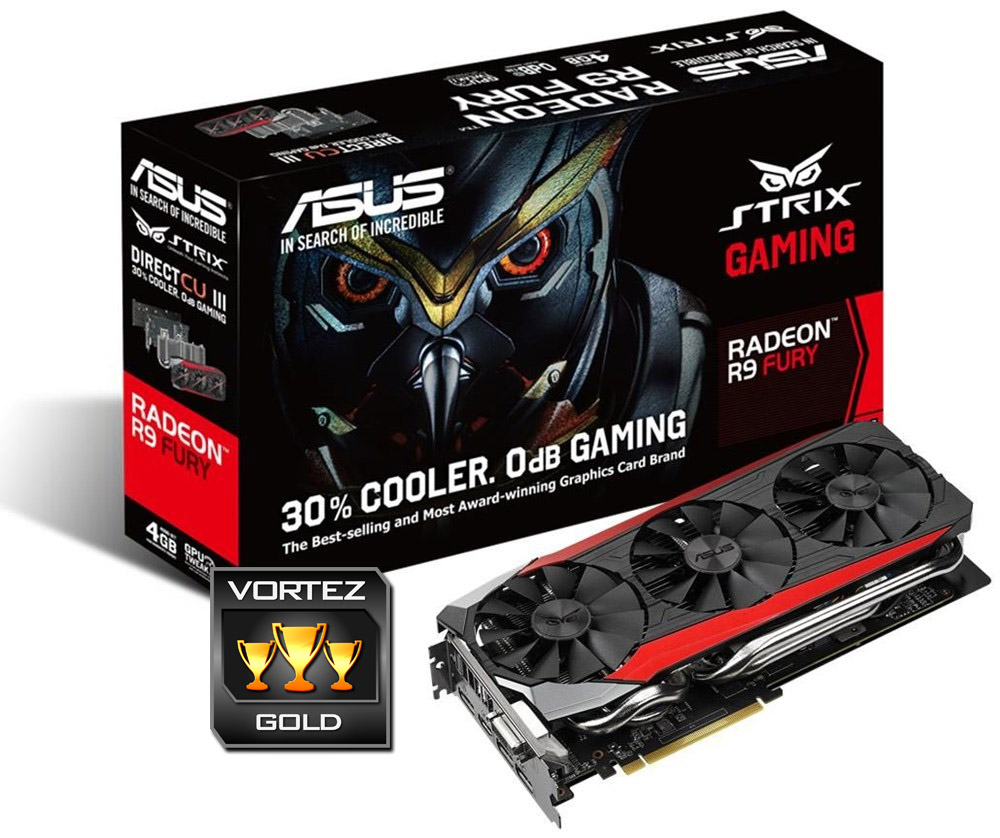
STRIX R9 Fury DC3 OC is priced at £450 GBP / $569 USD – a price point which is very similar to that of the rival GTX 980. Do bear in mind though that, at least for the moment, DC3 is available to only the R9 Fury and GTX 980Ti and along with it come stunning aesthetics, low-noise, decent temperatures, high-quality components, and a 3 year warranty.
For those with a leaning towards the red team, the STRIX R9 Fury DC3 OC is a worthy contender for the high-end. On offer is a stylish, cool and quiet graphics card which will outperform the reference GTX 980 on the battlefield.
Pros
+ Aesthetically stunning
+ Low-noise with silent features inherent
+ Excellent performance
+ DirectX 12 ready
+ 3 years warranty
Cons
– May struggle to fit in some cases
– Heavy
+ Aesthetically stunning
+ Low-noise with silent features inherent
+ Excellent performance
+ DirectX 12 ready
+ 3 years warranty
Cons
– May struggle to fit in some cases
– Heavy
Click here for an explanation of our awards at Vortez.net.