







Midas touch or fools Gold? We take an in-depth look and examine what the enthusiast user can expect from ASUS’ latest X79 platform.
Product on Review: X79 Deluxe

Manufacturer and Sponsor: ASUS
Street Price: £274.98
One of the few new motherboards to arrive on the scene after the launch of the I-BE range of CPUs, the ASUS X79 Deluxe looks to give the enthusiast everything they are looking for from a high end platform. The ASUS Deluxe range has been around for quite some time now and has always been regarded as the all rounder, the motherboard that caters for everyone’s needs whether you’re an overclocker, gamer or for use as a media station. The deluxe has most bases covered and because of this it is perhaps one of the most time served and successful motherboard ranges to date.
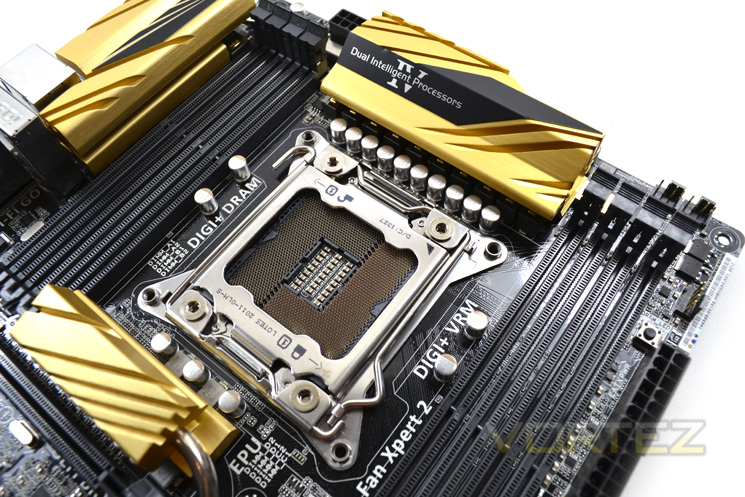
The current model continues this trend of providing everything what 99% of the PC community desire. But is this enough? Most PC users have opted to base their rig around the less complex Z68 chipset so the X79 platform remains a niche platform for those who put performance above anything else, money included!. Now with cost being low down the list of priorities, it could be argued that those buying into the X79 platform will inevitably opt for the high end motherboards such as the ASUS Rampage Extreme. Be under no illusion that the Extreme is a formidable gaming and overclocking motherboard but the deluxe we have for review today can be compared favourably as an all round X79 platform. Some people would rather save the £100 or so pounds more it would cost for the Extreme and instead invest in a better graphics card or SSD. Whichever position you find yourself in, if you are on the lookout for a motherboard which on the face of it at least appears to have it all, read on because this motherboard is well worth your consideration.
About ASUS
ASUS takes its name from Pegasus, the winged horse in Greek mythology that symbolises wisdom and knowledge. ASUS embodies the strength, purity, and adventurous spirit of this fantastic creature, and soars to new heights with each new product it creates.
This visionary approach is the reason ASUS is able to bring high-quality innovation and design to all, and the reason for its widespread acclaim. ASUS products won 4,168 international awards and accolades in 2012 – that’s over 11 a day, every day. ASUS has consistently achieved significant year-on-year growth in terms of consumer notebook units shipped too, and closed 2011 on a high with revenues hitting US$11.9 billion.
This visionary approach is the reason ASUS is able to bring high-quality innovation and design to all, and the reason for its widespread acclaim. ASUS products won 4,168 international awards and accolades in 2012 – that’s over 11 a day, every day. ASUS has consistently achieved significant year-on-year growth in terms of consumer notebook units shipped too, and closed 2011 on a high with revenues hitting US$11.9 billion.
Specification
CPU
Intel® Socket 2011 Core™ i7 Extreme Edition/Core™ i7 Processors
Supports Intel® Turbo Boost Technology 2.0
* Refer to www.asus.com for CPU support list
Chipset
Intel® X79
Memory
8 x DIMM, Max. 64GB, DDR3 2800(O.C.)/2400(O.C.)/2133(O.C.)/1866/1600/1333/1066 MHz Non-ECC, Un-buffered Memory
Quad Channel Memory Architecture
Supports Intel® Extreme Memory Profile (XMP)
* Refer to www.asus.com for the Memory QVL (Qualified Vendors Lists).
* Due to CPU behavior, DDR3 2200/2000/1800 MHz memory module will run at DDR3 2133/1866/1600 MHz frequency as default.
Multi-GPU Support
Supports NVIDIA® 3-Way SLI™ Technology
Supports AMD Quad-GPU CrossFireX™ Technology
Expansion Slots
3 x PCIe 3.0/2.0 x16 (dual x16 or x16/x8/x8) *1
1 x PCIe 3.0/2.0 x16 (x4 mode)
2 x PCIe x1
Storage
Intel® X79 chipset :
2 x SATA 6Gb/s port(s), black
4 x SATA 3Gb/s port(s), black
Support Raid 0, 1, 5, 10
Marvell® PCIe 9230 controller :
4 x SATA 6Gb/s port(s), dark brown
ASMedia® ASM1061 controller :
2 x SATA 6Gb/s port(s), dark brown
2 x Power eSATA 6Gb/s port(s), green
LAN
Intel® 82579V, 1 x Gigabit LAN Controller(s)
Realtek® 8111GR, 1 x Gigabit LAN Controller(s)
Dual Gigabit LAN controllers- 802.3az Energy Efficient Ethernet (EEE) appliance
Intel® LAN- Dual interconnect between the Integrated LAN controller and Physical Layer (PHY)
Wireless Data Network
Wi-Fi 802.11a/b/g/n/ac
Supports dual band frequency 2.4/5 GHz
Bluetooth
Bluetooth V4.0
Audio
Realtek® ALC1150 8-Channel High Definition Audio CODEC
– Supports : Jack-detection, Multi-streaming, Front Panel Jack-retasking
Audio Feature :
– Absolute Pitch 192kHz/ 24-bit True BD Lossless Sound
– DTS Ultra PC II
– DTS Connect
– Optical S/PDIF out port(s) at back panel
– BD Audio Layer Content Protection
USB Ports
Intel® X79 chipset :
12 x USB 2.0/1.1 port(s) (4 at back panel, black, 8 at mid-board)
ASMedia® ASM1042 controller :
8 x USB 3.0/2.0 port(s) (6 at back panel, blue, 2 at mid-board)
Special Features
ASUS Dual Intelligent Processors 4 with 4-Way Optimization :
– The tuning key perfectly consolidates ASUS-exclusive DIGI+ Power Control, TPU, EPU, and Fan Xpert 2 optimize the digital power setting, system performance, power saving and whole system cooling configuration
ASUS 5X Protection :
– ASUS DIGI+ VRM – 8 + 2 Phase digital power design
– ASUS ESD Guards – Enhanced ESD protection
– ASUS High-Quality 5K-Hour Solid Capacitors – 2.5x long lifespan with excellent durability
– ASUS Stainless Steel Back I/O – 3x more durable corrosion-resistant coating
ASUS EPU :
– EPU
– EPU switch
ASUS Digital Power Design :
– Industry leading Digital 8 + 2 Phase CPU Power Design
– Industry leading Digital 2 + 2 Phase DRAM Power Design
– CPU Power Utility
– DRAM Power Utility
ASUS Wi-Fi GO!
– Wi-Fi GO! Function: Cloud GO!, Media Streaming Hub, Smart Sensor Control, Remote Desktop, Remote Keyboard & Mouse, File Transfer, Capture & Send
– Wi-Fi Engine for network sharing and connection: Client Mode, AP Mode
– Wi-Fi GO! & NFC Remote for portable Smartphone/Tablet, supporting iOS & Android systems
ASUS Exclusive Features :
– TurboV EVO
– USB BIOS Flashback
– MemOK!
– AI Suite 3
– Ai Charger+
– Anti-Surge
– Onboard Button : Power/Reset
– Front Panel USB 3.0 Support
– ASUS UEFI BIOS EZ Mode featuring friendly graphics user interface
– ASUS SSD Caching II
– Network iControl
– USB 3.0 Boost
– Disk Unlocker
ASUS Quiet Thermal Solution :
– Stylish Fanless Design Heat-pipe solution
– ASUS Fan Xpert 2
ASUS EZ DIY :
– DirectKey
– Precision Tweaker 2
– ASUS O.C. Tuner
– ASUS CrashFree BIOS 3
– ASUS EZ Flash 2
– ASUS USB BIOS Flashback
– ASUS UEFI BIOS EZ Mode
– Multi-language BIOS
ASUS Q-Design :
– ASUS Q-Shield
– ASUS Q-Code
– ASUS Q-LED (CPU, DRAM, VGA, Boot Device LED)
– ASUS Q-Slot
– ASUS Q-DIMM
– ASUS Q-Connector
Overclocking Protection :
– ASUS C.P.R.(CPU Parameter Recall)
Operating System Support
Windows® 8.1
Windows® 8
Windows® 7
Back I/O Ports
2 x Power eSATA 6Gb/s
2 x LAN (RJ45) port(s)
6 x USB 3.0 (blue)
4 x USB 2.0 (one port can be switched to USB BIOS Flashback)
1 x Optical S/PDIF out
5 x Audio jack(s)
1 x USB BIOS Flashback Button(s)
1 x ASUS Wi-Fi GO! module (Wi-Fi 802.11 a/b/g/n/ac and Bluetooth v4.0/3.0+HS)
Internal I/O Ports
1 x USB 3.0 connector(s) support(s) additional 2 USB 3.0 port(s) (19-pin)
4 x USB 2.0 connector(s) support(s) additional 8 USB 2.0 port(s)
1 x TPM connector(s)
8 x SATA 6Gb/s connector(s)
4 x SATA 3Gb/s connector(s)
1 x CPU Fan connector(s) (1 x 4 -pin)
1 x CPU OPT Fan connector(s) (1 x 4 -pin)
4 x Chassis Fan connector(s) (4 x 4 -pin)
1 x S/PDIF out header(s)
1 x 24-pin EATX Power connector(s)
1 x 8-pin ATX 12V Power connector(s)
1 x Front panel audio connector(s) (AAFP)
1 x System panel(s) (Q-Connector)
1 x Chassis Intrusion connector(s)
1 x DirectKey Button(s)
1 x DRCT header(s)
1 x MemOK! button(s)
1 x TPU switch(es)
1 x EPU switch(es)
1 x Power-on button(s)
1 x Reset button(s)
1 x Clear CMOS button(s)
Accessories
User’s manual
ASUS Q-Shield
4 x SATA 3Gb/s cable(s)
6 x SATA 6Gb/s cable(s)
1 x ASUS 2T2R dual band Wi-Fi moving antennas (Wi-Fi 802.11a/b/g/n/ac compliant)
1 x 3-Way SLI bridge(s)
1 x SLI bridge(s)
1 x Q-connector(s) (2 in 1)
BIOS
64 Mb Flash ROM, UEFI AMI BIOS, PnP, DMI2.7, WfM2.0, SM BIOS 2.7, ACPI 5.0, Multi-language BIOS,
ASUS EZ Flash 2, ASUS CrashFree BIOS 3, My Favorites, Quick Note, Last Modified log, F12 PrintScreen, F3 Shortcut functions, and ASUS DRAM SPD (Serial Presence Detect) memory information
Manageability
WfM 2.0, DMI 2.7, WOL by PME, PXE
Support Disc
Drivers
ASUS Utilities
EZ Update
Anti-virus software (OEM version)
Operating System
Form Factor
ATX Form Factor
12 inch x 9.6 inch ( 30.5 cm x 24.4 cm )
Note
*1. This motherboard is ready to support PCIe 3.0 SPEC. Functions will be available when using PCIe 3.0-compliant devices. Please refer to www.asus.com for updated details.
Intel® Socket 2011 Core™ i7 Extreme Edition/Core™ i7 Processors
Supports Intel® Turbo Boost Technology 2.0
* Refer to www.asus.com for CPU support list
Chipset
Intel® X79
Memory
8 x DIMM, Max. 64GB, DDR3 2800(O.C.)/2400(O.C.)/2133(O.C.)/1866/1600/1333/1066 MHz Non-ECC, Un-buffered Memory
Quad Channel Memory Architecture
Supports Intel® Extreme Memory Profile (XMP)
* Refer to www.asus.com for the Memory QVL (Qualified Vendors Lists).
* Due to CPU behavior, DDR3 2200/2000/1800 MHz memory module will run at DDR3 2133/1866/1600 MHz frequency as default.
Multi-GPU Support
Supports NVIDIA® 3-Way SLI™ Technology
Supports AMD Quad-GPU CrossFireX™ Technology
Expansion Slots
3 x PCIe 3.0/2.0 x16 (dual x16 or x16/x8/x8) *1
1 x PCIe 3.0/2.0 x16 (x4 mode)
2 x PCIe x1
Storage
Intel® X79 chipset :
2 x SATA 6Gb/s port(s), black
4 x SATA 3Gb/s port(s), black
Support Raid 0, 1, 5, 10
Marvell® PCIe 9230 controller :
4 x SATA 6Gb/s port(s), dark brown
ASMedia® ASM1061 controller :
2 x SATA 6Gb/s port(s), dark brown
2 x Power eSATA 6Gb/s port(s), green
LAN
Intel® 82579V, 1 x Gigabit LAN Controller(s)
Realtek® 8111GR, 1 x Gigabit LAN Controller(s)
Dual Gigabit LAN controllers- 802.3az Energy Efficient Ethernet (EEE) appliance
Intel® LAN- Dual interconnect between the Integrated LAN controller and Physical Layer (PHY)
Wireless Data Network
Wi-Fi 802.11a/b/g/n/ac
Supports dual band frequency 2.4/5 GHz
Bluetooth
Bluetooth V4.0
Audio
Realtek® ALC1150 8-Channel High Definition Audio CODEC
– Supports : Jack-detection, Multi-streaming, Front Panel Jack-retasking
Audio Feature :
– Absolute Pitch 192kHz/ 24-bit True BD Lossless Sound
– DTS Ultra PC II
– DTS Connect
– Optical S/PDIF out port(s) at back panel
– BD Audio Layer Content Protection
USB Ports
Intel® X79 chipset :
12 x USB 2.0/1.1 port(s) (4 at back panel, black, 8 at mid-board)
ASMedia® ASM1042 controller :
8 x USB 3.0/2.0 port(s) (6 at back panel, blue, 2 at mid-board)
Special Features
ASUS Dual Intelligent Processors 4 with 4-Way Optimization :
– The tuning key perfectly consolidates ASUS-exclusive DIGI+ Power Control, TPU, EPU, and Fan Xpert 2 optimize the digital power setting, system performance, power saving and whole system cooling configuration
ASUS 5X Protection :
– ASUS DIGI+ VRM – 8 + 2 Phase digital power design
– ASUS ESD Guards – Enhanced ESD protection
– ASUS High-Quality 5K-Hour Solid Capacitors – 2.5x long lifespan with excellent durability
– ASUS Stainless Steel Back I/O – 3x more durable corrosion-resistant coating
ASUS EPU :
– EPU
– EPU switch
ASUS Digital Power Design :
– Industry leading Digital 8 + 2 Phase CPU Power Design
– Industry leading Digital 2 + 2 Phase DRAM Power Design
– CPU Power Utility
– DRAM Power Utility
ASUS Wi-Fi GO!
– Wi-Fi GO! Function: Cloud GO!, Media Streaming Hub, Smart Sensor Control, Remote Desktop, Remote Keyboard & Mouse, File Transfer, Capture & Send
– Wi-Fi Engine for network sharing and connection: Client Mode, AP Mode
– Wi-Fi GO! & NFC Remote for portable Smartphone/Tablet, supporting iOS & Android systems
ASUS Exclusive Features :
– TurboV EVO
– USB BIOS Flashback
– MemOK!
– AI Suite 3
– Ai Charger+
– Anti-Surge
– Onboard Button : Power/Reset
– Front Panel USB 3.0 Support
– ASUS UEFI BIOS EZ Mode featuring friendly graphics user interface
– ASUS SSD Caching II
– Network iControl
– USB 3.0 Boost
– Disk Unlocker
ASUS Quiet Thermal Solution :
– Stylish Fanless Design Heat-pipe solution
– ASUS Fan Xpert 2
ASUS EZ DIY :
– DirectKey
– Precision Tweaker 2
– ASUS O.C. Tuner
– ASUS CrashFree BIOS 3
– ASUS EZ Flash 2
– ASUS USB BIOS Flashback
– ASUS UEFI BIOS EZ Mode
– Multi-language BIOS
ASUS Q-Design :
– ASUS Q-Shield
– ASUS Q-Code
– ASUS Q-LED (CPU, DRAM, VGA, Boot Device LED)
– ASUS Q-Slot
– ASUS Q-DIMM
– ASUS Q-Connector
Overclocking Protection :
– ASUS C.P.R.(CPU Parameter Recall)
Operating System Support
Windows® 8.1
Windows® 8
Windows® 7
Back I/O Ports
2 x Power eSATA 6Gb/s
2 x LAN (RJ45) port(s)
6 x USB 3.0 (blue)
4 x USB 2.0 (one port can be switched to USB BIOS Flashback)
1 x Optical S/PDIF out
5 x Audio jack(s)
1 x USB BIOS Flashback Button(s)
1 x ASUS Wi-Fi GO! module (Wi-Fi 802.11 a/b/g/n/ac and Bluetooth v4.0/3.0+HS)
Internal I/O Ports
1 x USB 3.0 connector(s) support(s) additional 2 USB 3.0 port(s) (19-pin)
4 x USB 2.0 connector(s) support(s) additional 8 USB 2.0 port(s)
1 x TPM connector(s)
8 x SATA 6Gb/s connector(s)
4 x SATA 3Gb/s connector(s)
1 x CPU Fan connector(s) (1 x 4 -pin)
1 x CPU OPT Fan connector(s) (1 x 4 -pin)
4 x Chassis Fan connector(s) (4 x 4 -pin)
1 x S/PDIF out header(s)
1 x 24-pin EATX Power connector(s)
1 x 8-pin ATX 12V Power connector(s)
1 x Front panel audio connector(s) (AAFP)
1 x System panel(s) (Q-Connector)
1 x Chassis Intrusion connector(s)
1 x DirectKey Button(s)
1 x DRCT header(s)
1 x MemOK! button(s)
1 x TPU switch(es)
1 x EPU switch(es)
1 x Power-on button(s)
1 x Reset button(s)
1 x Clear CMOS button(s)
Accessories
User’s manual
ASUS Q-Shield
4 x SATA 3Gb/s cable(s)
6 x SATA 6Gb/s cable(s)
1 x ASUS 2T2R dual band Wi-Fi moving antennas (Wi-Fi 802.11a/b/g/n/ac compliant)
1 x 3-Way SLI bridge(s)
1 x SLI bridge(s)
1 x Q-connector(s) (2 in 1)
BIOS
64 Mb Flash ROM, UEFI AMI BIOS, PnP, DMI2.7, WfM2.0, SM BIOS 2.7, ACPI 5.0, Multi-language BIOS,
ASUS EZ Flash 2, ASUS CrashFree BIOS 3, My Favorites, Quick Note, Last Modified log, F12 PrintScreen, F3 Shortcut functions, and ASUS DRAM SPD (Serial Presence Detect) memory information
Manageability
WfM 2.0, DMI 2.7, WOL by PME, PXE
Support Disc
Drivers
ASUS Utilities
EZ Update
Anti-virus software (OEM version)
Operating System
Form Factor
ATX Form Factor
12 inch x 9.6 inch ( 30.5 cm x 24.4 cm )
Note
*1. This motherboard is ready to support PCIe 3.0 SPEC. Functions will be available when using PCIe 3.0-compliant devices. Please refer to www.asus.com for updated details.
Features
A New Gold Standard
ASUS X79-DELUXE motherboard glisten with gold, representing the gold standard in quality, performance, and innovation for which ASUS is renowned. The metallic-gold heatsinks, dark grey and black expansion and DIMM slots are color-matched for a striking design that truly stands out from the motherboard crowd.
Dual Intelligent Processors 4
Dual Intelligent Processors 4 with 4-Way Optimization
One click for better performance, efficiency, digital power control, reduced noise, and improved cooling.
Wi-Fi GO!
ASUS Wi-Fi GO! with Bluetooth v4.0 makes enjoying home entertainment and remotely controlling your PC easier than ever! It integrates Wi-Fi hardware and a host of useful connectivity functions in a single intuitive app that anyone can use an one-stop utility that links your desktop with smart devices, which can be used to remotely control your PC for a truly connected lifestyle. X79-DELUXE also features WHQL-certified Bluetooth v4.0.
ASUS SSD Caching II
ASUS SSD Caching II has been upgraded with a multiple caching function, adding four extra SATA 6Gb/s connectors onboard. This feature offers performance upgrades by using multiple installed SSDs as a cache for frequently accessed data. It also allows user to choose the combination that suits their needs. For example, you can choose three SSDs matched with one HDD or two SSDs with two HDDs. Harness a combination of SSD-like performance and response and hard drive capacity with a single click, without the need to reboot for instant activation and complete ease of use. As an added bonus, it can even prevent data loss with the included backup function, so you can rest easy knowing your data is secure. Despite its power, there’s nothing complicated about SSD Caching II – once enabled, everything works automatically. Indeed, we’re proud to boast that our users tell us that they find it far simpler to use than similar technologies from our competitors.
New UEFI BIOS – Friendlier and more Intuitive
Media-renowned UEFI BIOS from ASUS provides the smoothest mouse-controlled graphical BIOS, and now features more intuitive functions to quickly take you to favorite BIOS pages and frequently-accessed settings through custom shortcuts. You can even write quick notes in-BIOS for future reference, view an activity log of setting changes and modifications, and rename SATA ports. EZ Mode has a whole new look, upgraded with extra-friendly capabilities like detailed fan controls, XMP profile settings, SATA information, and fast clock adjustment. Together, these perfect your BIOS experience.
USB 3.0 Boost (UASP Support)
ASUS USB 3.0 Boost technology supports UASP (USB Attached SCSI Protocol) USB 3.0 in Windows 8. With USB 3.0 Boost technology, a USB device’s transmission speed is significantly increased up to 170%, adding to already fast USB 3.0 performance. ASUS software automatically accelerates data rates for compatible USB 3.0 peripherals without any user interaction.
AI Suite 3
ASUS AI Suite 3 offers a brand new user experience through a clearer and more attractive interface with support for larger monitors. It consolidates all exclusive ASUS features into one simple-to-use package, allowing you to supervise overclocking, energy consumption, fan speeds, voltages and more. This all-in-one app offers diverse and easy to use functionality, with no need to switch back and forth between different utilities.
DirectKey
Designed for those requiring frequent BIOS access, users can easily enter the BIOS when the PC is on standby power with a simple press of a button. It saves you time during boot-up as you don’t have to repeatedly press the DEL key. Convenience and ease at their best!
ASUS 5X Protection
ASUS motherboards guard your PC with 5X Protection. We use quality components like DIGI+ VRM digital power design for precise CPU power on demand, ESD units tested to strict standards that eliminate electrostatic interference, and resettable fuses around DRAM slots to prevent overcurrent and short-circuit damage. We also use corrosion-resistant back I/O shields, all examples of ASUS providing the best possible reliability and durability.
GreenASUS
Motherboards are EU Energy-related Products (ErP) ready, which requires products meet high efficiency standards with regards to energy consumption. This is in line with the ASUS vision of creating environmentally-friendly and energy-efficient products through design and innovation that reduce the carbon footprint of products and thus mitigate ecological impact.
ASUS X79-DELUXE motherboard glisten with gold, representing the gold standard in quality, performance, and innovation for which ASUS is renowned. The metallic-gold heatsinks, dark grey and black expansion and DIMM slots are color-matched for a striking design that truly stands out from the motherboard crowd.
Dual Intelligent Processors 4
Dual Intelligent Processors 4 with 4-Way Optimization
One click for better performance, efficiency, digital power control, reduced noise, and improved cooling.
Wi-Fi GO!
ASUS Wi-Fi GO! with Bluetooth v4.0 makes enjoying home entertainment and remotely controlling your PC easier than ever! It integrates Wi-Fi hardware and a host of useful connectivity functions in a single intuitive app that anyone can use an one-stop utility that links your desktop with smart devices, which can be used to remotely control your PC for a truly connected lifestyle. X79-DELUXE also features WHQL-certified Bluetooth v4.0.
ASUS SSD Caching II
ASUS SSD Caching II has been upgraded with a multiple caching function, adding four extra SATA 6Gb/s connectors onboard. This feature offers performance upgrades by using multiple installed SSDs as a cache for frequently accessed data. It also allows user to choose the combination that suits their needs. For example, you can choose three SSDs matched with one HDD or two SSDs with two HDDs. Harness a combination of SSD-like performance and response and hard drive capacity with a single click, without the need to reboot for instant activation and complete ease of use. As an added bonus, it can even prevent data loss with the included backup function, so you can rest easy knowing your data is secure. Despite its power, there’s nothing complicated about SSD Caching II – once enabled, everything works automatically. Indeed, we’re proud to boast that our users tell us that they find it far simpler to use than similar technologies from our competitors.
New UEFI BIOS – Friendlier and more Intuitive
Media-renowned UEFI BIOS from ASUS provides the smoothest mouse-controlled graphical BIOS, and now features more intuitive functions to quickly take you to favorite BIOS pages and frequently-accessed settings through custom shortcuts. You can even write quick notes in-BIOS for future reference, view an activity log of setting changes and modifications, and rename SATA ports. EZ Mode has a whole new look, upgraded with extra-friendly capabilities like detailed fan controls, XMP profile settings, SATA information, and fast clock adjustment. Together, these perfect your BIOS experience.
USB 3.0 Boost (UASP Support)
ASUS USB 3.0 Boost technology supports UASP (USB Attached SCSI Protocol) USB 3.0 in Windows 8. With USB 3.0 Boost technology, a USB device’s transmission speed is significantly increased up to 170%, adding to already fast USB 3.0 performance. ASUS software automatically accelerates data rates for compatible USB 3.0 peripherals without any user interaction.
AI Suite 3
ASUS AI Suite 3 offers a brand new user experience through a clearer and more attractive interface with support for larger monitors. It consolidates all exclusive ASUS features into one simple-to-use package, allowing you to supervise overclocking, energy consumption, fan speeds, voltages and more. This all-in-one app offers diverse and easy to use functionality, with no need to switch back and forth between different utilities.
DirectKey
Designed for those requiring frequent BIOS access, users can easily enter the BIOS when the PC is on standby power with a simple press of a button. It saves you time during boot-up as you don’t have to repeatedly press the DEL key. Convenience and ease at their best!
ASUS 5X Protection
ASUS motherboards guard your PC with 5X Protection. We use quality components like DIGI+ VRM digital power design for precise CPU power on demand, ESD units tested to strict standards that eliminate electrostatic interference, and resettable fuses around DRAM slots to prevent overcurrent and short-circuit damage. We also use corrosion-resistant back I/O shields, all examples of ASUS providing the best possible reliability and durability.
GreenASUS
Motherboards are EU Energy-related Products (ErP) ready, which requires products meet high efficiency standards with regards to energy consumption. This is in line with the ASUS vision of creating environmentally-friendly and energy-efficient products through design and innovation that reduce the carbon footprint of products and thus mitigate ecological impact.
Packaging & Accessories
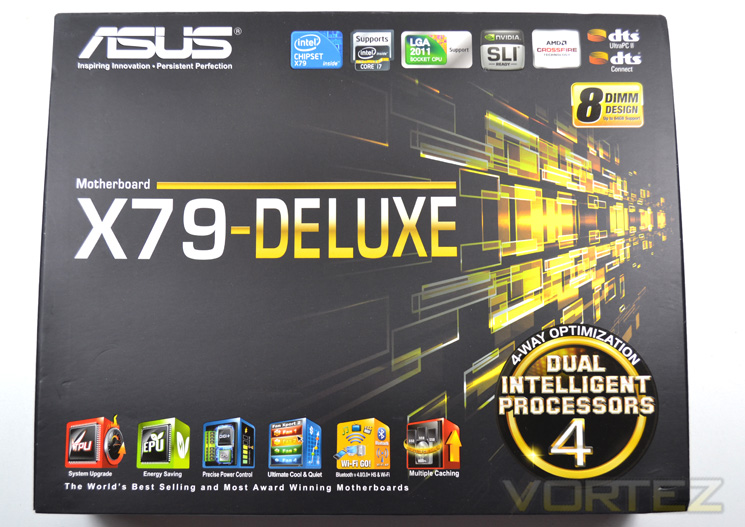
The box the Deluxe is packaged in is a standard size motherboard box, much smaller than the box that say the Rampage range of motherboards are packaged in. This is quite surprising considering the amount of kit included which we can see at the bottom of this page. The overall theme of the box is Gold as you can see. The gold however is no embossed nor shiny with the finish of the packaging being matt not glossy.
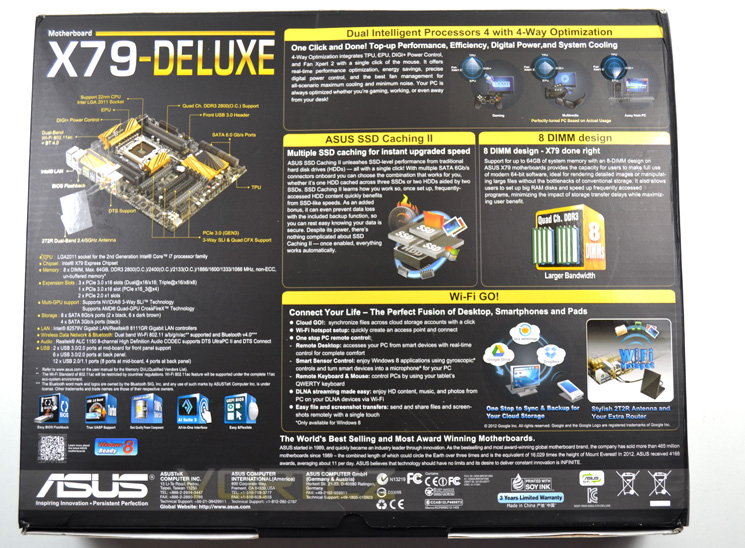
To the rear of the packaging ASUS go to great lengths to tell us about their latest product. All of the key features are there along with a nice 3D diagram of the mainboard which gives us a further breakdown of the on board feature set. ASUS also go one step further by having a flip lid which has a window showing the mainboard along with further explanation of the motherboard features.
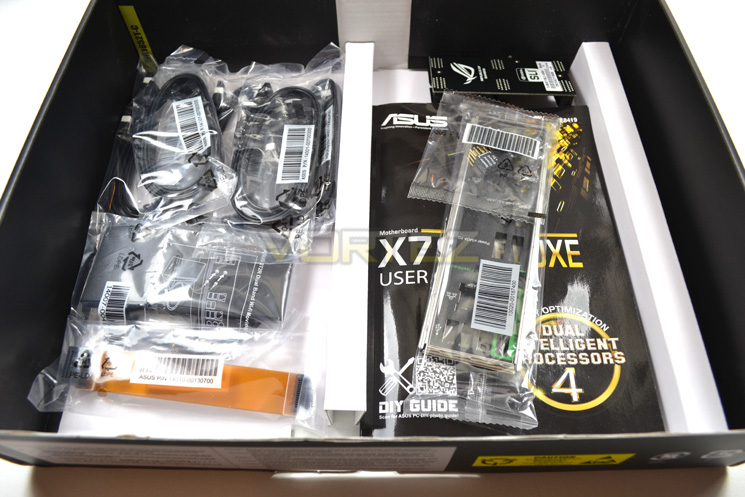
the internal packaging is quite good with the mainboard sat uppermost in a cardboard tray, part concealed in an anti-static wrap. Beneath this we find a split tray design housing both accessories (of which there are many) and the obligatory manual and driver CD.
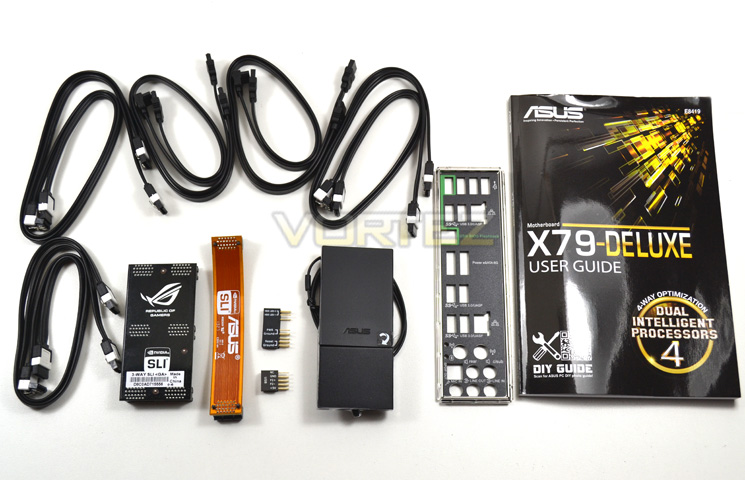
The following accessories are included: User’s manual, ASUS Q-Shield, 4 x SATA 3Gb/s cable(s), 6 x SATA 6Gb/s cable(s), 1 x ASUS 2T2R dual band Wi-Fi, 1 x 3-Way SLI bridge, 1 x SLI bridge, 1 x Q-connector (2 in 1). So, everything to get you started and more. Being greedy, we would like to see in addition to the driver CD, a small USB pen drive loaded with the driver set as many modern PCs now do not have a CD/DVD player. A pen drive is invaluable for BIOS updates so could also be used for this purpose. Obviously this will increase the price a little but it is a cost many will happily absorb as the cost of a small USB drive is now very small.
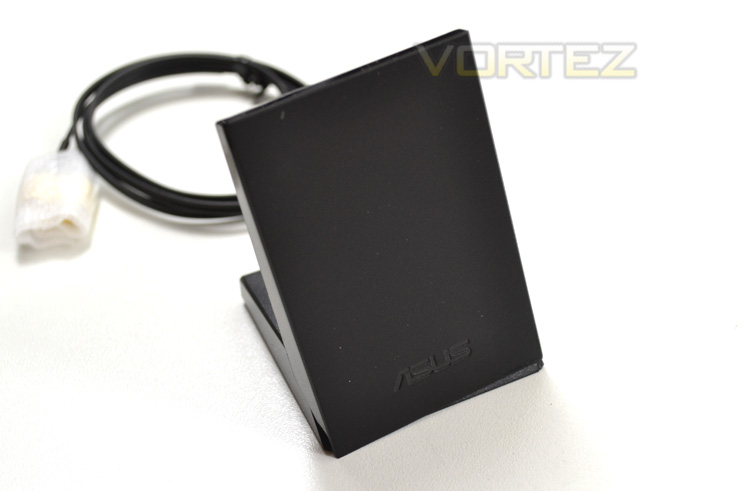
The Wi-Fi antenna impressed us. Rather than having the antenna poking out from the rear of your PC, this antenna can be positioned for best reception, away from interference. During testing, this worked very well and while we prefer a LAN connection for our gaming, we can appreciate the usefulness of this device for other users.
First Look
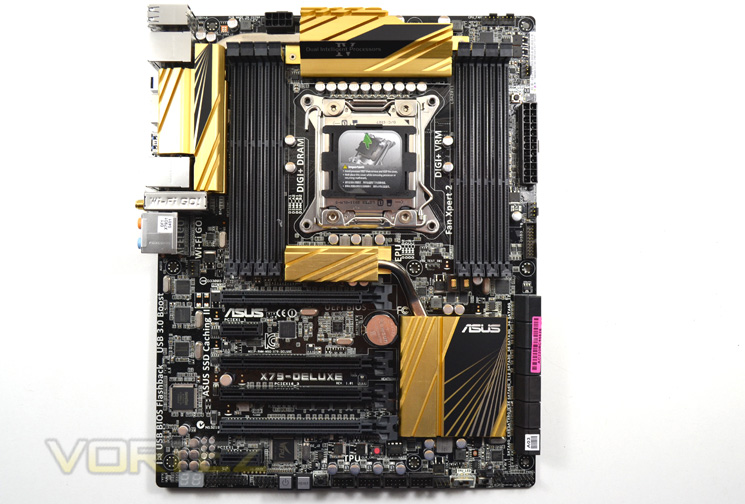
We really liked the colour scheme ASUS have chosen to use here. Black and Gold go together like hand in glove and thankfully ASUS have not spoiled the effect by having coloured capacitors. The ram slots and PCI(e) ports alternate from black to very dark grey with the remaining ports found on the motherboard all being black.
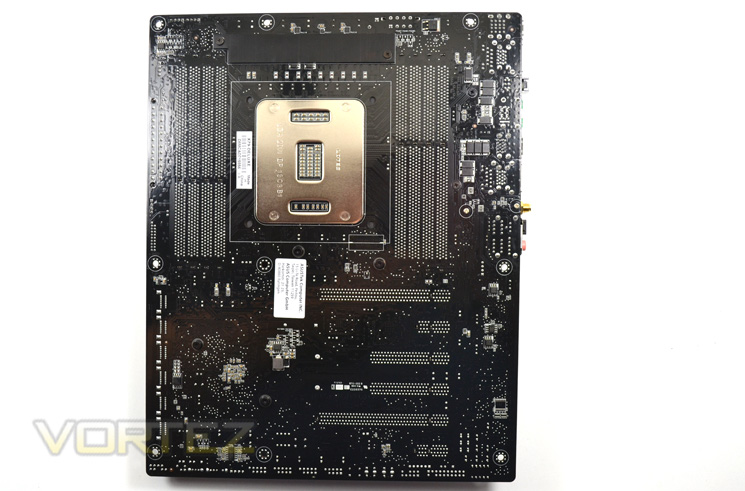
Flipping the board over we can see that the PCB is actually glossy in appearance. While we would have preferred a matt effect, it cannot really be noticed on the business side because of all the components so it is nothing major. There are only one set of holes for a heatsink so a skt1366 heatsink will not fit without an adaptor. Instead only an LGA2011 size cooler can be used. Each hole also has a thin membrane which needs to be pierced.
The socket area, like most LGA2011 is cramped. ASUS have however tried to negate this by thoughtfully curving the heatsinks away from the socket area but the proximity of the memory slots mean that fitting an oversized CPU cooler may prove troublesome, even with low profile memory.
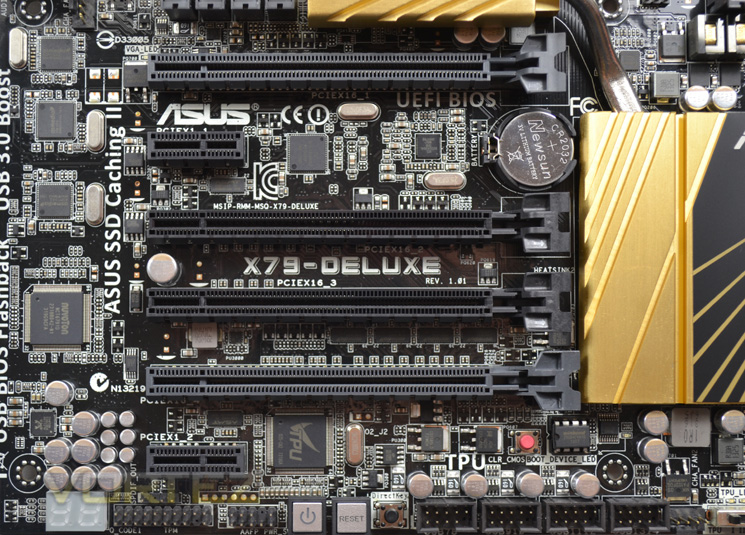
The expansion port area is fairly well designed allowing up to three double slot graphics cards to be used. The labelling on the ports is a little confusing as not all the ports have 16 lanes available. Only the top and bottom PCIe ports (grey) are full PCIe 16x. The two black ports are 8x. In total there are 3 x PCIe 3.0/2.0 x16 (dual x16 or x16/x8/x8) slots, 1 x PCIe 3.0/2.0 x16 (x4 mode), 2 x PCIe x1.
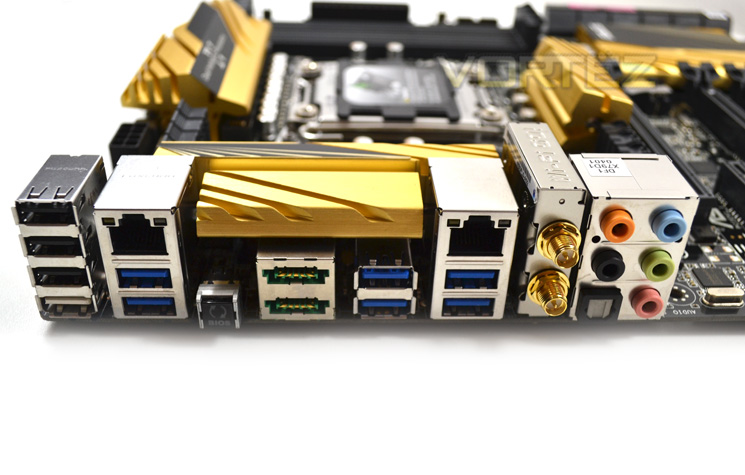
The backplate features the following ports: 2 x Power eSATA 6Gb/s, 2 x LAN (RJ45) port(s), 6 x USB 3.0 (blue), 4 x USB 2.0, 1 x Optical S/PDIF out, 5 x Audio jack(s), 1 x USB BIOS Flashback Button(s), 1 x ASUS Wi-Fi GO!.
Closer Look
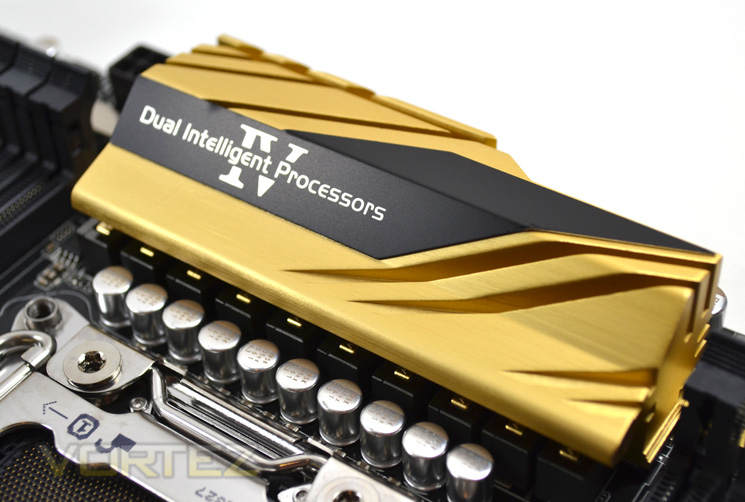
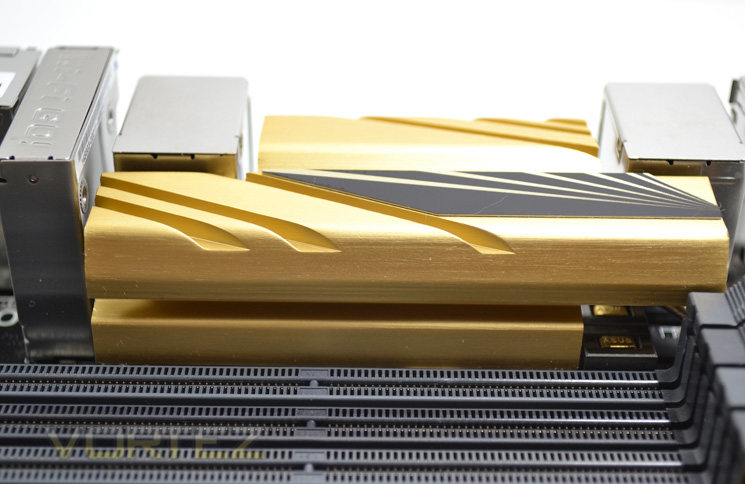
The heatsinks on the ASUS X79 Deluxe are all aluminium. The VRM heatsinks are both connected via heatpipes but only the uppermost heatsink provides direct contact to the VRM.
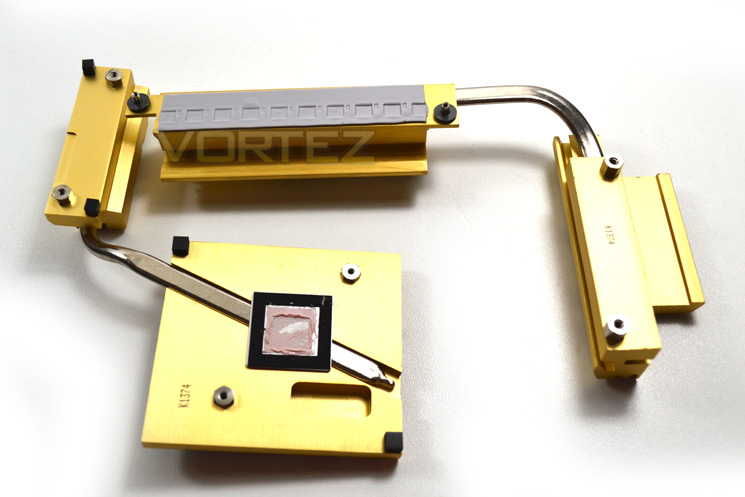
Removal of the heatsinks is simple affair of just unscrewing them from the back of the motherboard. From this angle you can see that only the PCH and uppermost VRM provide direct cooling with the additional heatsinks providing a wider surface area with which to dissipate heat.
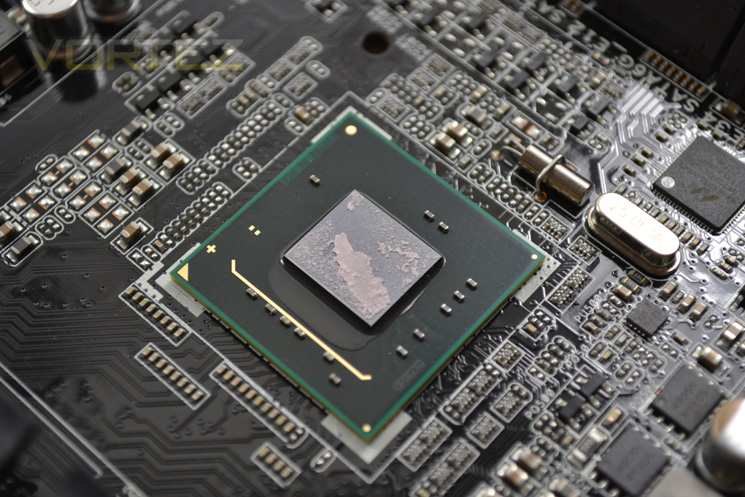
Contact with the X79 chipset was very good. The TIM used was not a type we have come across before, resembling chewing gum rather than a liquid TIM! It was however relatively easy to remove and replace with our favoured brand however we believe this may void the warranty so you would be advised against doing this.
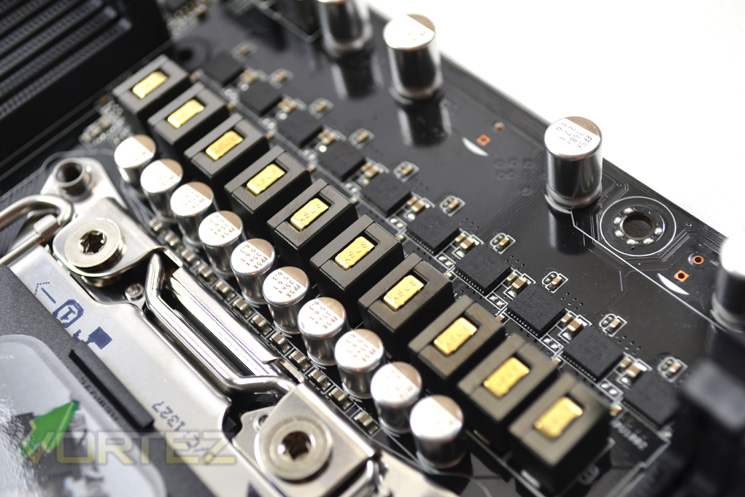
The VRM area is an 8+2+2+2 digital power phase design and features DIGI+ power control. This coupled with solid capacitors, ESD guard ICs, overcurrent protection and a stainless steel I/O area is what ASUS refers to as 5x Protection.
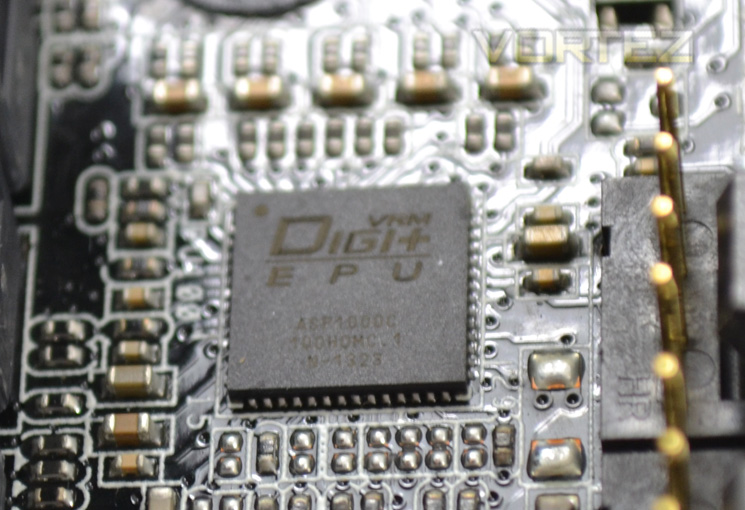
Above is the chip which controls the precise voltage for each component. In testing the voltages were fairly accurate from what we actually set. vDroop on both CPU and VCSAA was very good and can be adjusted to your preference too. The UEFI BIOS has a massive array of voltage adjustments available, more than the average overclocker will use. If however the settings are a little daunting you will be pleased to hear that they can all be left on their default state of AUTO.
Detailed Look
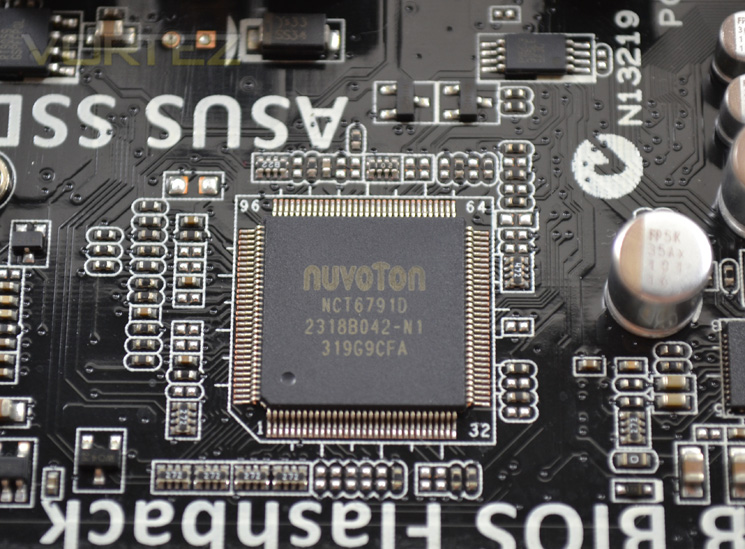
A wealth monitoring options are available in the BIOS and through PC software in real-time thanks to the NUVOTON NCT6791D Super IO chip.
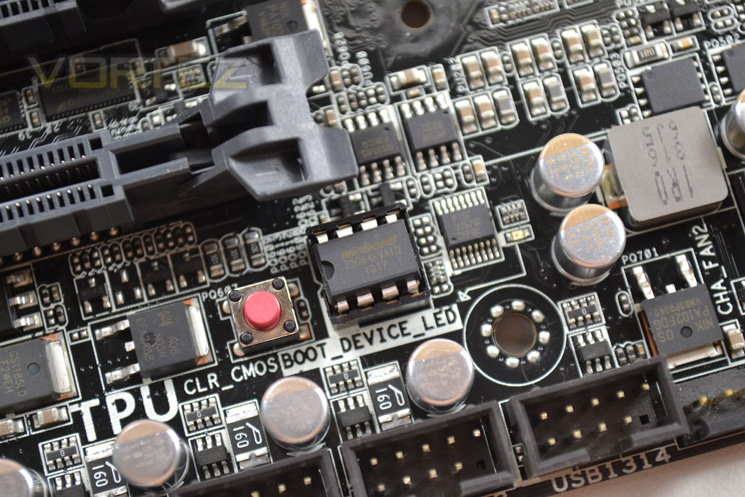
A single BIOS chip is provided which if corrupt during the flashing process can be removed and sent for a re-flash rather than sending the whole board. Next to this is the on-board CMOS clear button.
We loved the feature of being able to flash the BIOS with nothing more than a PSU and flash drive. This is done with another on-board button and is perfect for those who do not have the latest BIOS installed for the new I-BE CPU’s. So in essence, you no longer need a working PC to flash the BIOS!
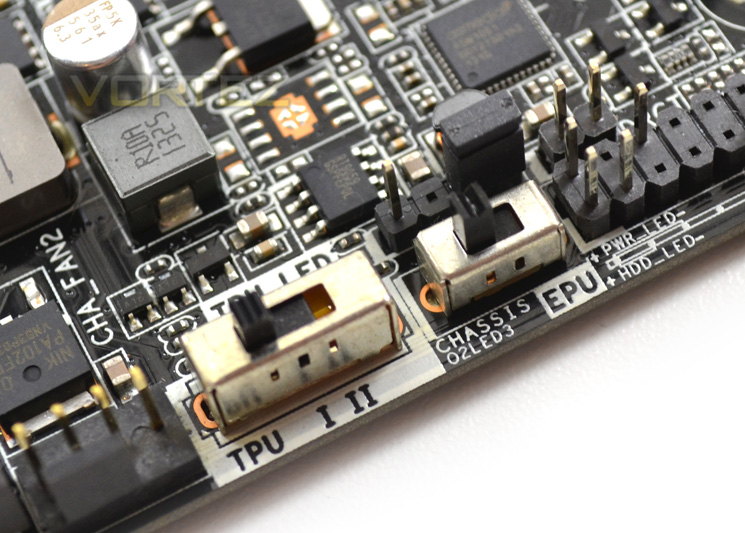
The TPU switch is an automatic overclocking switch. There are three positions, off, I and II. The first setting will overclock the CPU ratio while the second will also increase the CPU baseclock. Neat if you do not like to fiddle with a BIOS.
The second switch is for the EPU setting of which there are two options: Off (default) and on. With the switch turned to on, the motherboard will ‘intelligently monitor power consumption’. Being a ‘green’ device we can only assume this may interfere with our overclocking efforts but if you leave your PC idling then this switch will certainly appeal to you as it may save your electricity bill and in turn, prevent the polar ice caps from melting.
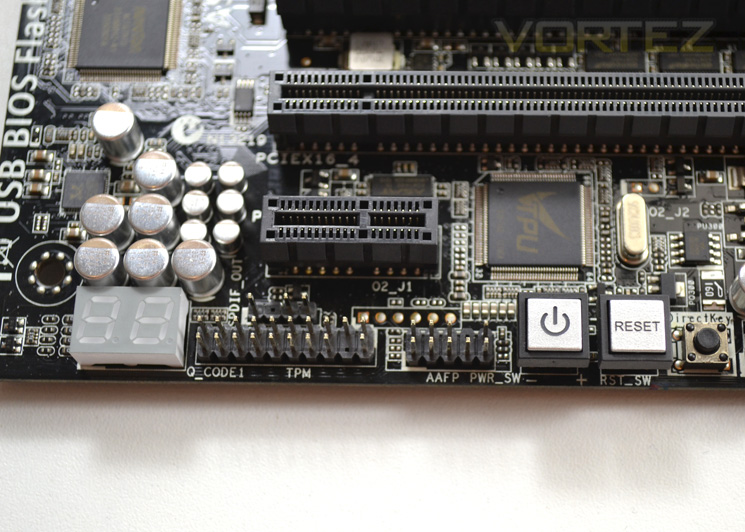
The very useful digital readout display is included on this model which is invaluable when trying to fault find. Also included are on-board power and reset buttons and furthest left is the direct key BIOS re-flash button we discussed earlier.
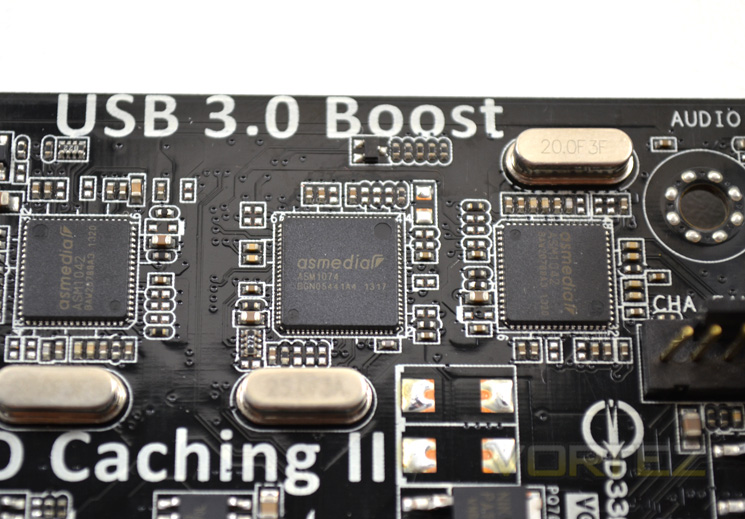
Among the wealth of other on-board chips we found the majority to be biased towards ASMEDIA. Above we can see twin USB 3.0 controllers along with the PCIe 3.0 controller sandwiched between. There is also a further smattering of the 1042 controllers around the board controlling both internal and external USB 3.0.
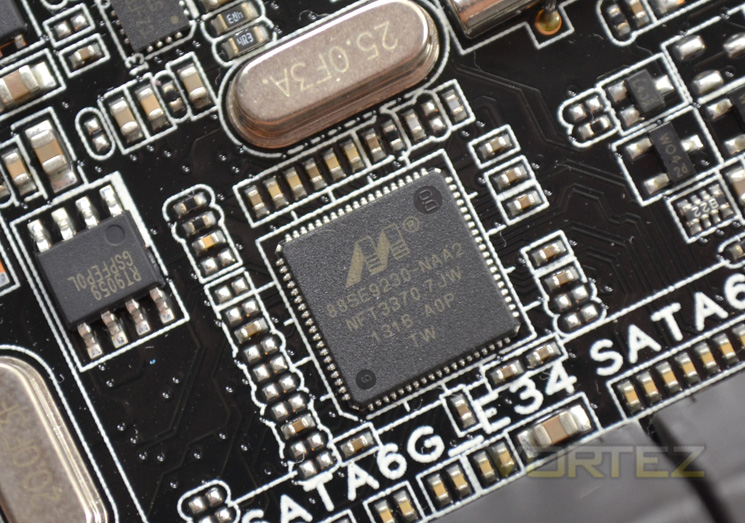
Along with the 6 Intel SATA ports (2 x SATA 6Gb/s ports, 4 x SATA 3Gb/s ports) There are further SATA ports made available by both MARVEL (4 x SATA 6Gb/s ports) and ASMEDIA (2 x SATA 6Gb/s ports &
2 x Power eSATA 6Gb/s ports).
Finally, Audio is provided by the REALTEK ALC1150 8-Channel High Definition Audio CODEC and the wireless by the Broadcom chipset.
Test Setup & Methodology
When we decided to put the test bench together for X79 we wanted a system that would not only perform well but also last the test of time given that X58 has been around for some 3 years now so we saw no reason to believe that its successor, X79 would not be able to do the same.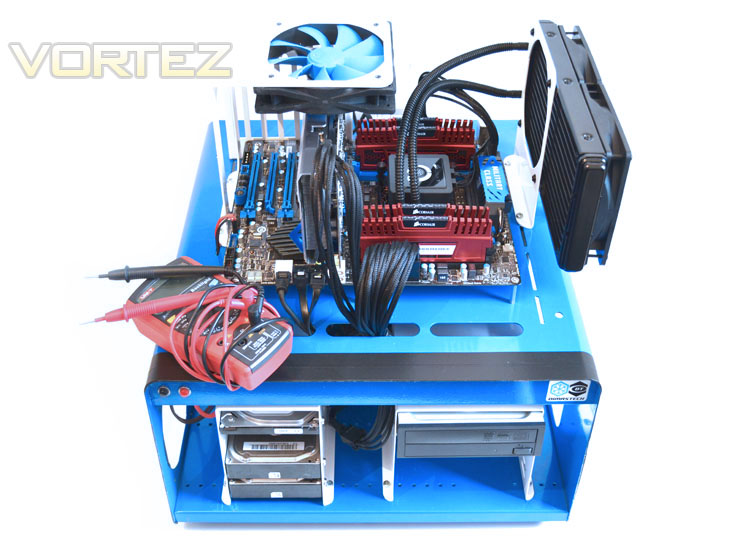
Some of the components for our test bench were kindly donated by CORSAIR who provided the majority of components without whom we would not have been able to bring you this review so a big thanks to them. Thanks also go to MSI who donated their NVIDIA GTX560Ti.
Motherboards on test:
ASUS X79 Deluxe
GIGABYTE X79-UP4
MSI X79A-GD45 8 D
ASRock Extreme6 GB
GIGABYTE X79-UD3
MSI X79 Big Bang XPower II
ASRock X79 Extreme4-M
GIGABYTE X79-UD5
MSI X79A-GD65 8 D
X79 Test Setup
CPU: Intel Core i7-3960X Extreme Edition
Graphics Card: NVIDIA GTX560Ti
RAM – 16GB (4x4GB) Corsair Vengeance (Red) DDR3 @ 1866MHz 9-10-9-27
Power Supply – Corsair TX750M 750W
Hard Drive – Hitachi SATA II 250GB
Samsung F3 1TB
Cooler – Corsair H100
CPU: Intel Core i7-3960X Extreme Edition
Graphics Card: NVIDIA GTX560Ti
RAM – 16GB (4x4GB) Corsair Vengeance (Red) DDR3 @ 1866MHz 9-10-9-27
Power Supply – Corsair TX750M 750W
Hard Drive – Hitachi SATA II 250GB
Samsung F3 1TB
Cooler – Corsair H100
Benchmarks
Cinebench 11.5 – CPU Score
x264 HD 4.0 – 1st and 2nd pass encoding
SiSoftware SANDRA 2011 – CPU benchmarks
AIDA64 – CPU benchmarks
PCMark 7 – System Benchmark
3DMark 11 – Performance and Extreme preset
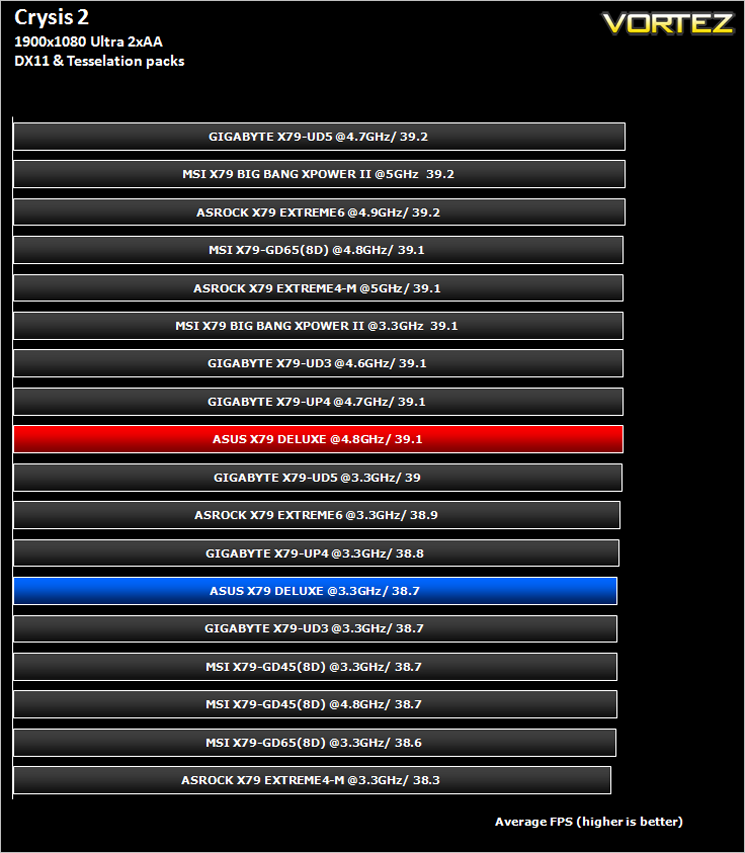
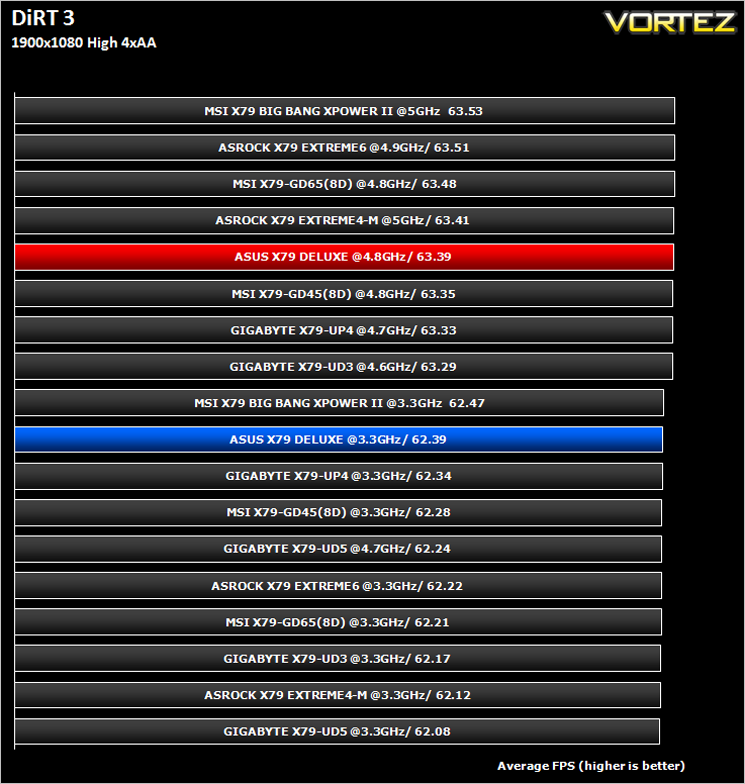
Games – Crysis 2 & DiRT3
Other Software
Core Temp 0.99.5
LinX stress Test
CPUID HWMonitor
Overclocking
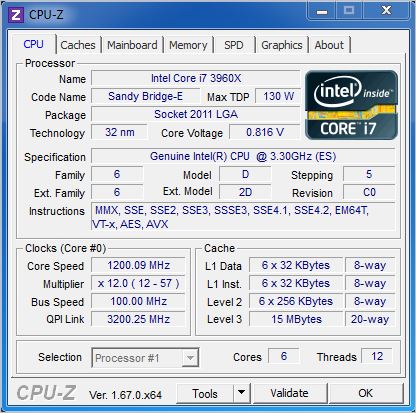
Above you can see the default settings through CPU-Z.
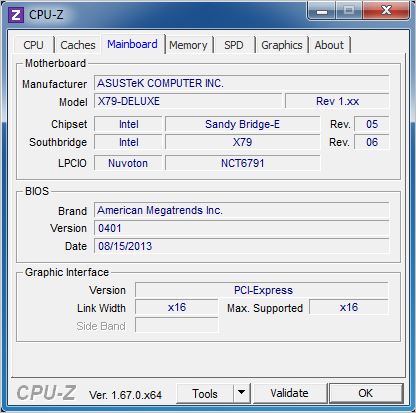
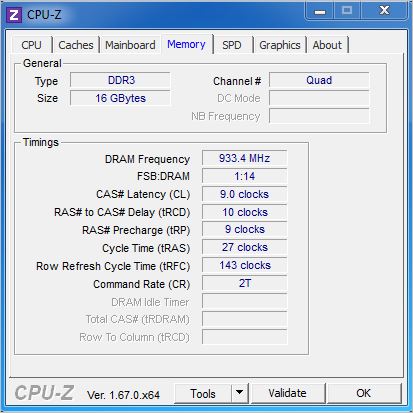
Overclocking the motherboard can be done one of three ways: Via the on-board switches, via Windows software or via the last option which is the method we prefer and the one we recommend is overclocking via the BIOS. The UEFI BIOS is presented in two flavours, basic and enhanced. Either setting can be forced to be loaded upon boot with an option in the BIOS but for most it will be easier to simply press F7 to enter the advanced state once into the BIOS.
Once in the advanced area a wealth of options are presented to you, not least the massive array of voltage adjustment options available. This can appear a little daunting at first but given a little investment of time and effort it all becomes fairly straight forward.
After half a day testing out the variety of options we managed a bench clockspeed of 4.9GHz. Unfortunately our CPU does not like base clock adjustments but we would normally either adjust the divider and then the baseclock, sadly for the test CPU we used this was not an option. So then we were limited to multiplier overclocking. We knew our chip is capable of speeds in excess of 5GHz with a toasty 1.5v to the CPU (not recommended).
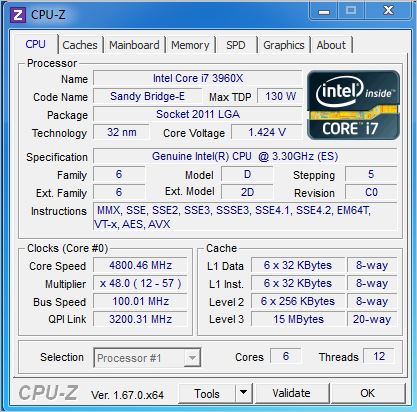
The 4.9GHz we achieved would run the basic tests such as SuperPI but fell over when we ran more stressful applications such as Prime95 so we reduced the multiplier by a factor of one to x48 which gave us our rock solid 24/7 stable frequency of 4.8GHz This is not a bad effort at all for a motherboard which is not at the extreme end nor designed solely for overclocking but compared to the prowess of other motherboards, 4.8GHz is average. It has to be said though that the BIOS was a joy to use and very intuitive. Everything was found where you would expect it to be and many of the settings you would expect on a motherboard which a much higher overclocking calibre than this. With that in mind we believe that with more time, we could have stabilised the 4.9GHz we attained but sadly with time against us, we had to settle for less.
Power Consumption
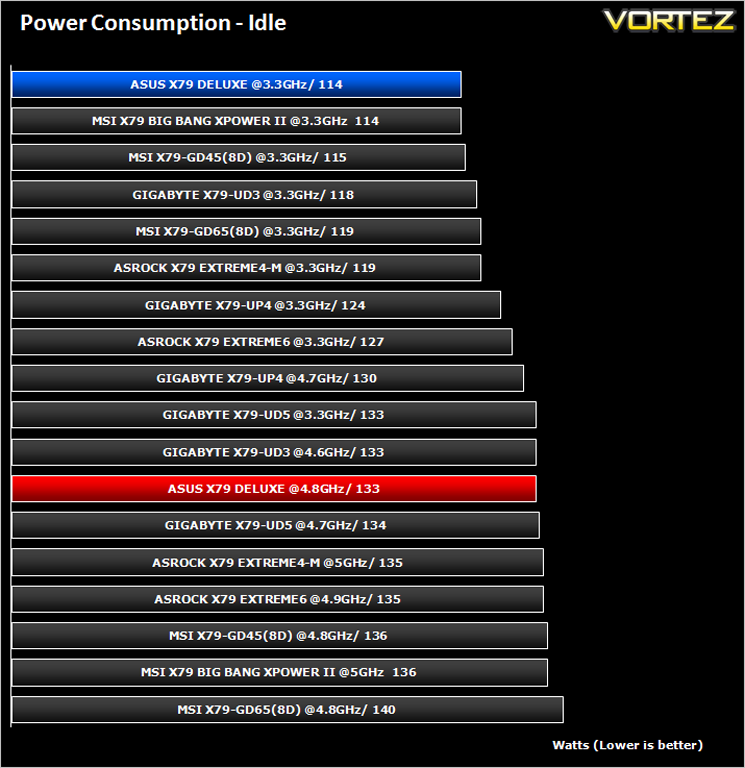
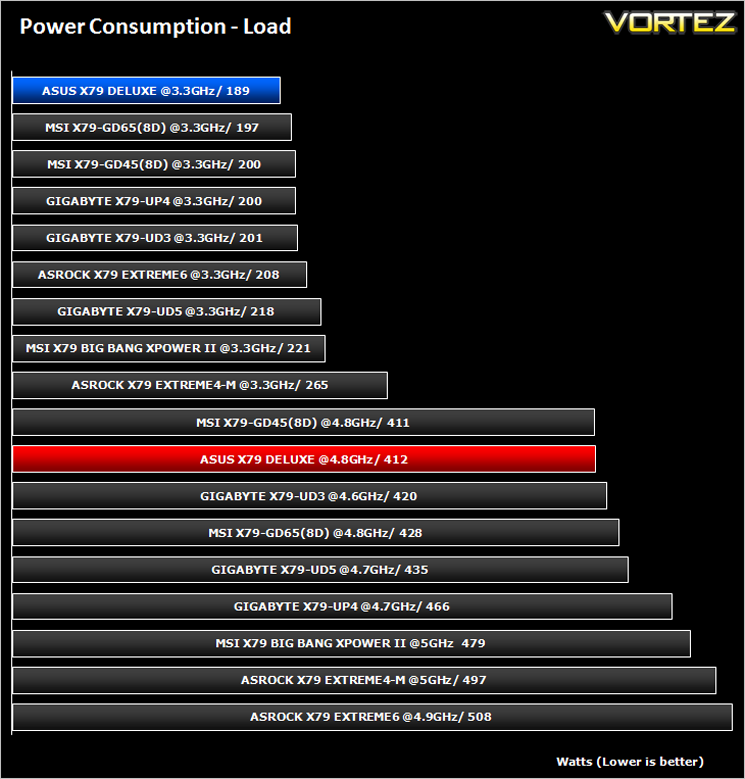
The ASUS X79 Deluxe was the clear winner here consuming less power on average than the other motherboards on test.
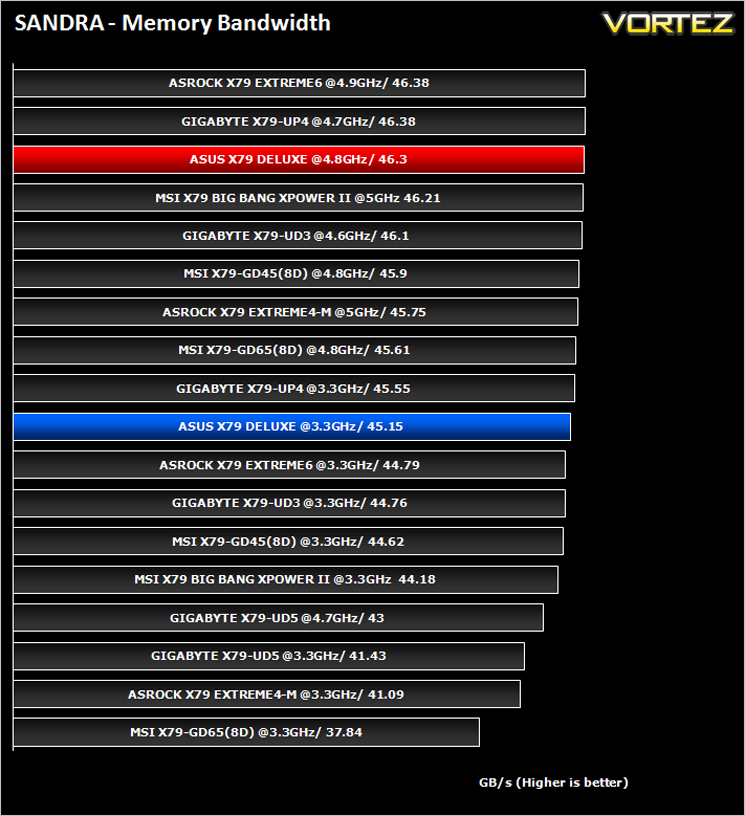
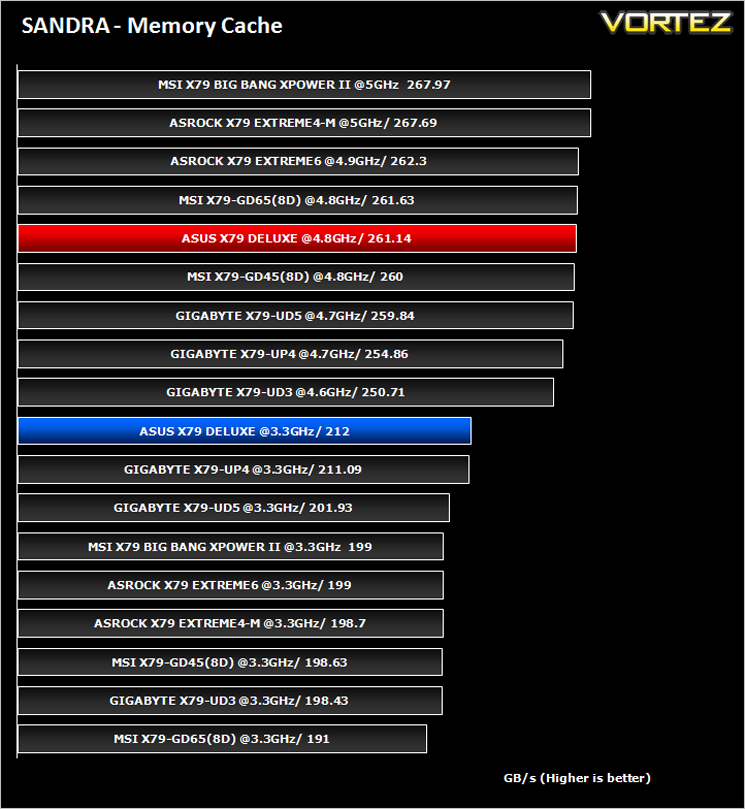
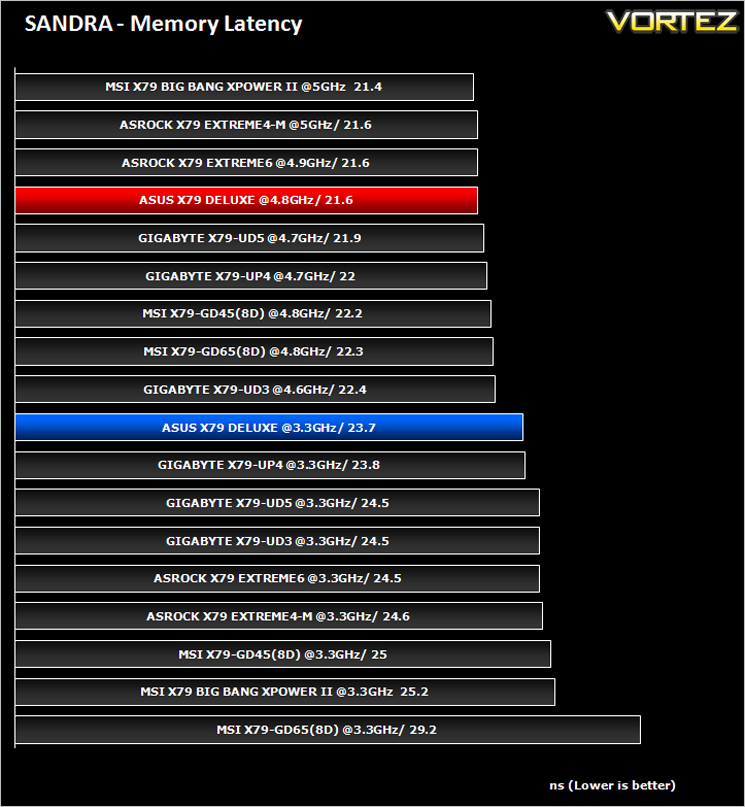
Sisoft Sandra 2012
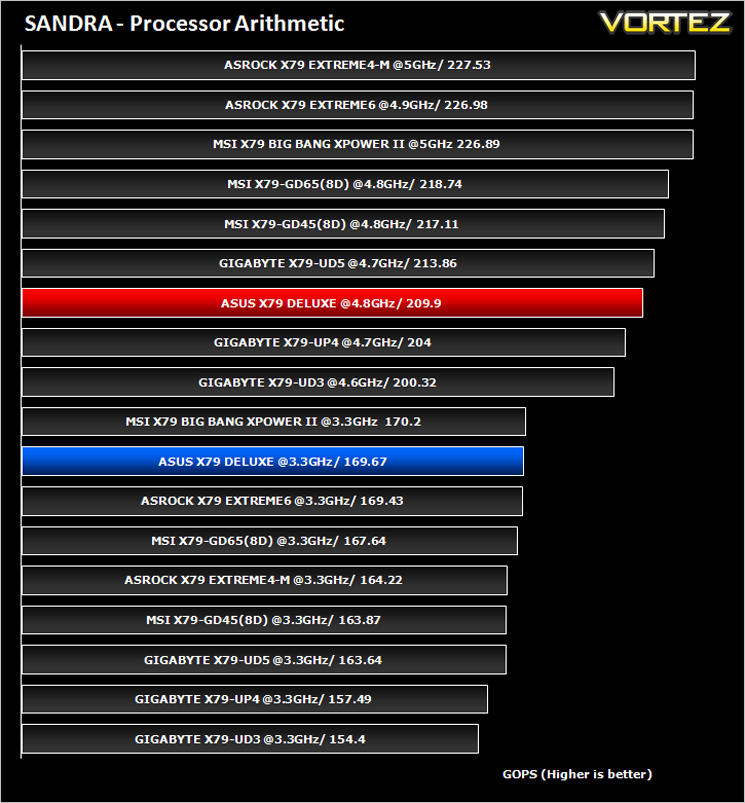
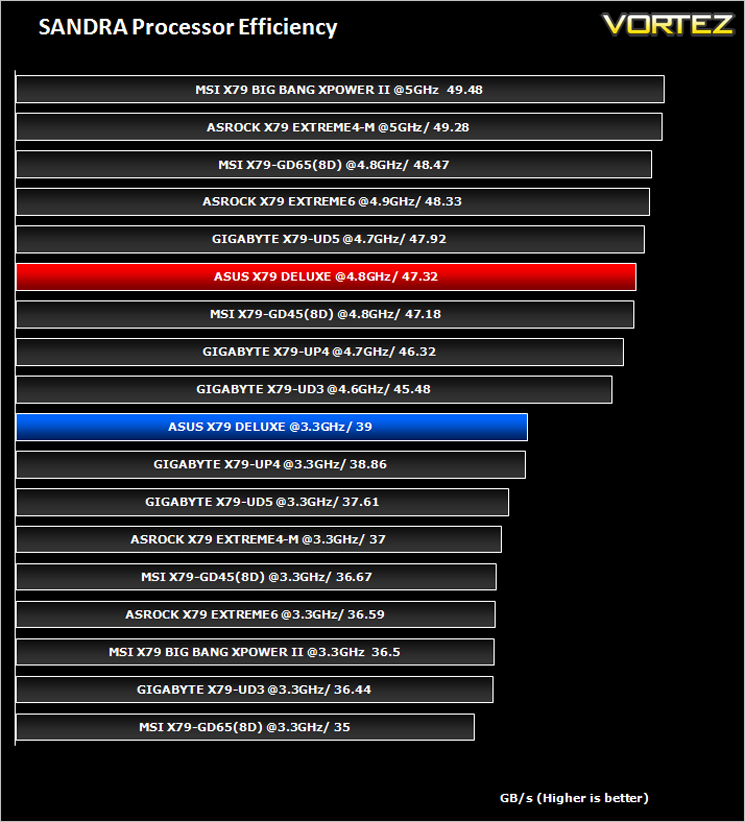
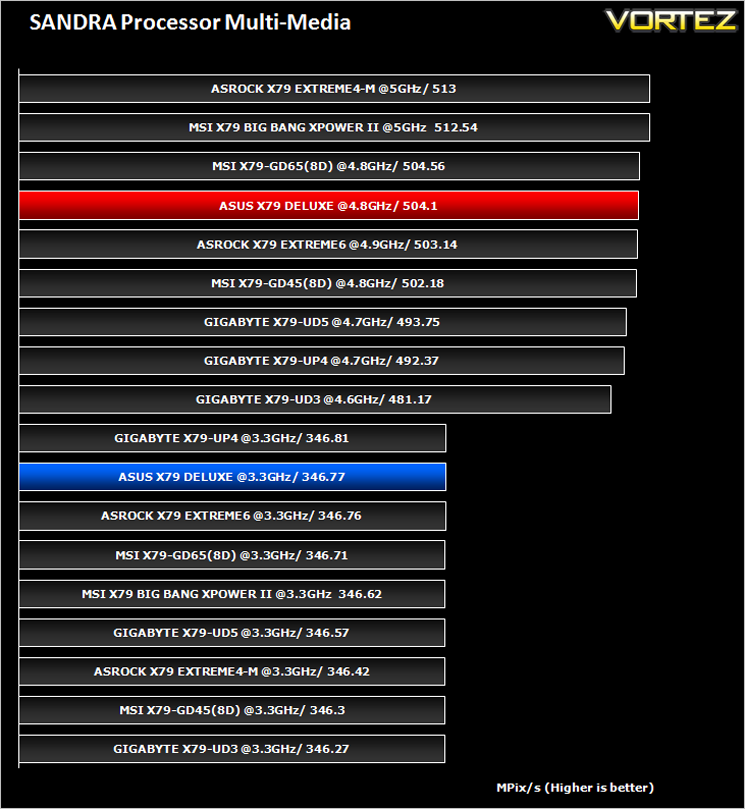
SANDRA isn’t always a benchmark that is included in hardware reviews but I believe it shouldn’t be ignored. SANDRA provides a vigorous package that tests your system in a rather large array of benchmarks. There are many aspects of benchmark that can be executed. We will be considering – CPU and memory tests.
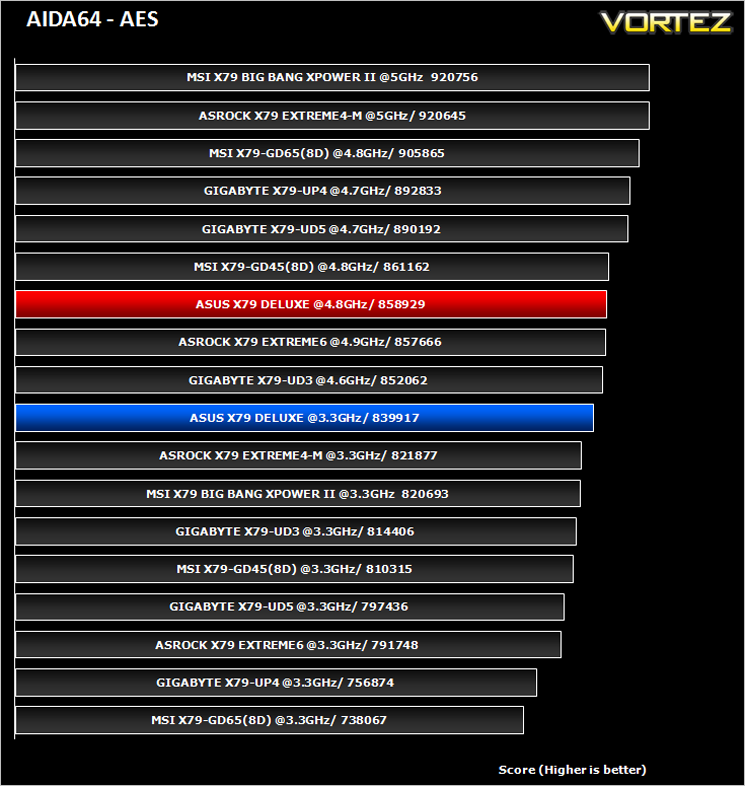
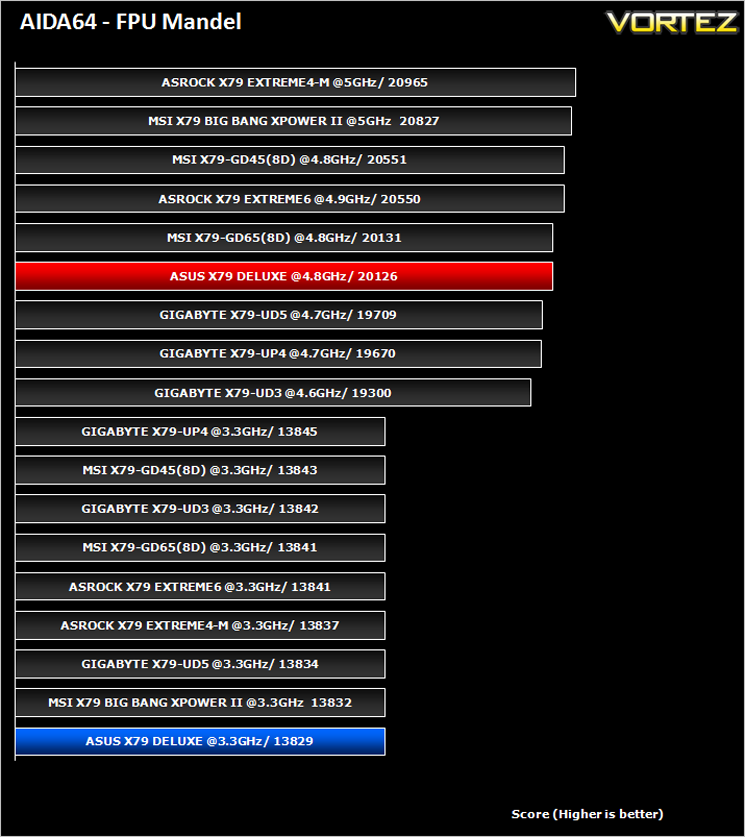
AIDA64
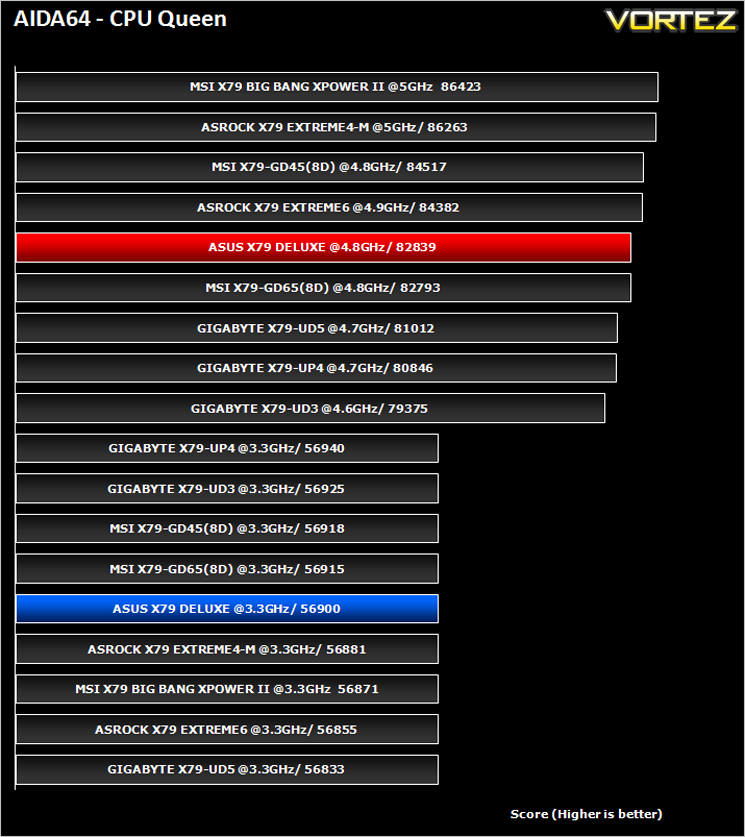
This simple integer benchmark focuses on the branch prediction capabilities and the misprediction penalties of the CPU. It finds the solutions for the classic “Queens problem” on a 10 by 10 sized chessboard. At the same clock speed theoretically the processor with the shorter pipeline and smaller misprediction penalties will attain higher benchmark scores. For example — with HyperThreading disabled — the Intel Northwood core processors get higher scores than the Intel Prescott core based ones due to the 20-step vs 31-step long pipeline. CPU Queen test uses integer MMX, SSE2 and SSSE3 optimizations.
[fullimage=24233]
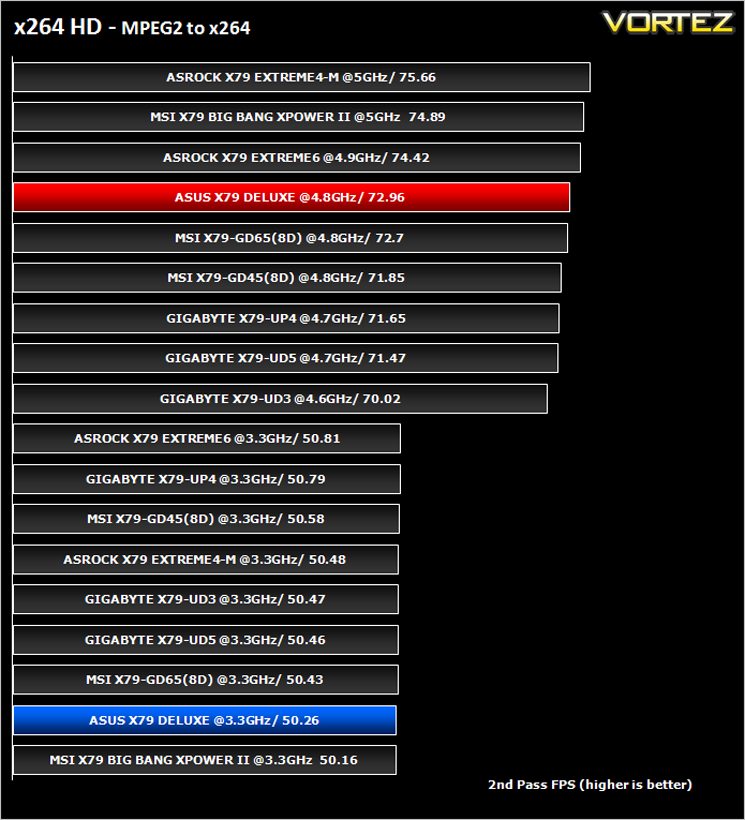
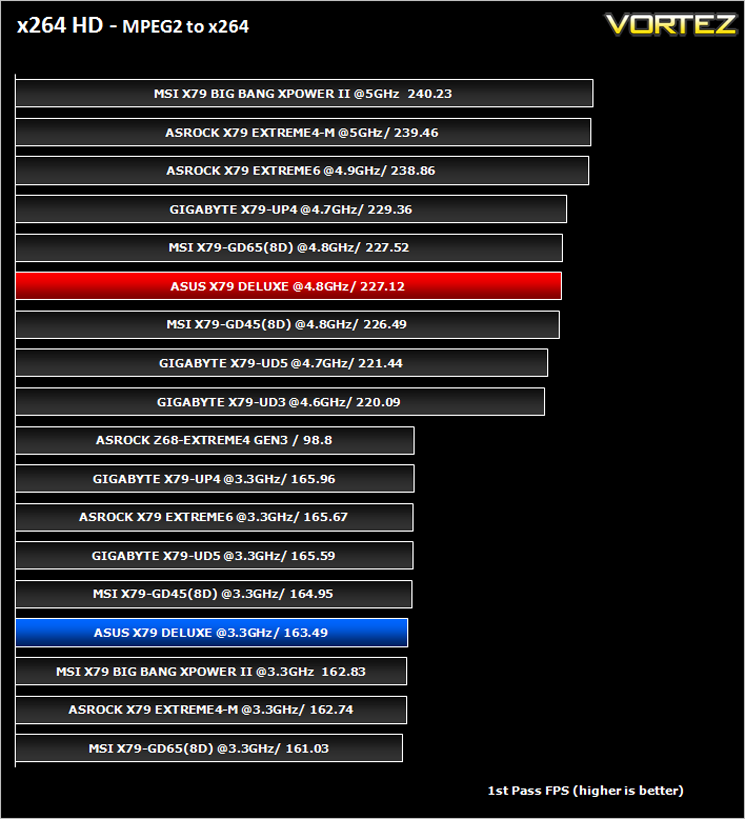
x264 HD V4.0
Simply put, this test measures how fast your machine can encode a short, DVD quality MPEG-2 video clip into a high-quality x264 video clip. What’s x264, you ask? It’s more or less the next-generation Xvid/DivX codec. I think it’s ideal for a benchmark because the application (x264.exe) reports fairly accurate compression results (in frames per second) for each pass of the video encoding process, and it uses multi-core processors very efficiently. The test uses multiple cores efficiently to give a good representation of real world performance.
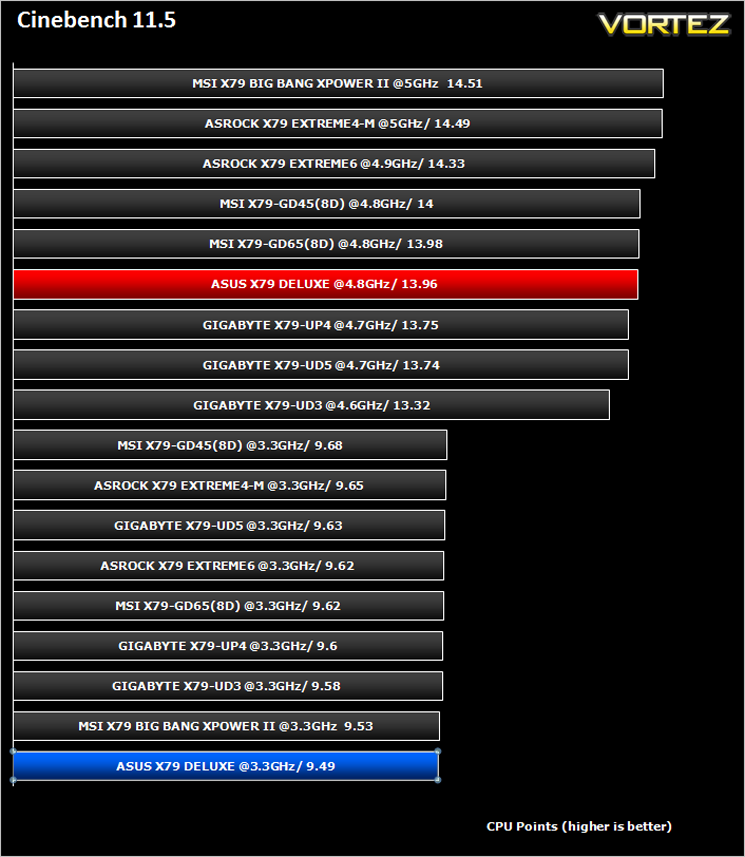
Cinebench 11.5
Based on the MAXON animation software CINEMA 4D, Cinebench is a test suite that uses the system’s processing power to render a photorealistic 3D scene. This makes it an excellent benchmark to measure CPU and motherboard performances.
CINEBENCH can measure systems with up to 64 processor threads. This test scene contains approximately 2,000 objects which in turn contain more than 300,000 polygons in total, and uses sharp and blurred reflections, area lights, shadows, procedural shaders, antialiasing, and much more. The result is displayed in points (pts). The higher the number, the faster your processor.
CINEBENCH can measure systems with up to 64 processor threads. This test scene contains approximately 2,000 objects which in turn contain more than 300,000 polygons in total, and uses sharp and blurred reflections, area lights, shadows, procedural shaders, antialiasing, and much more. The result is displayed in points (pts). The higher the number, the faster your processor.
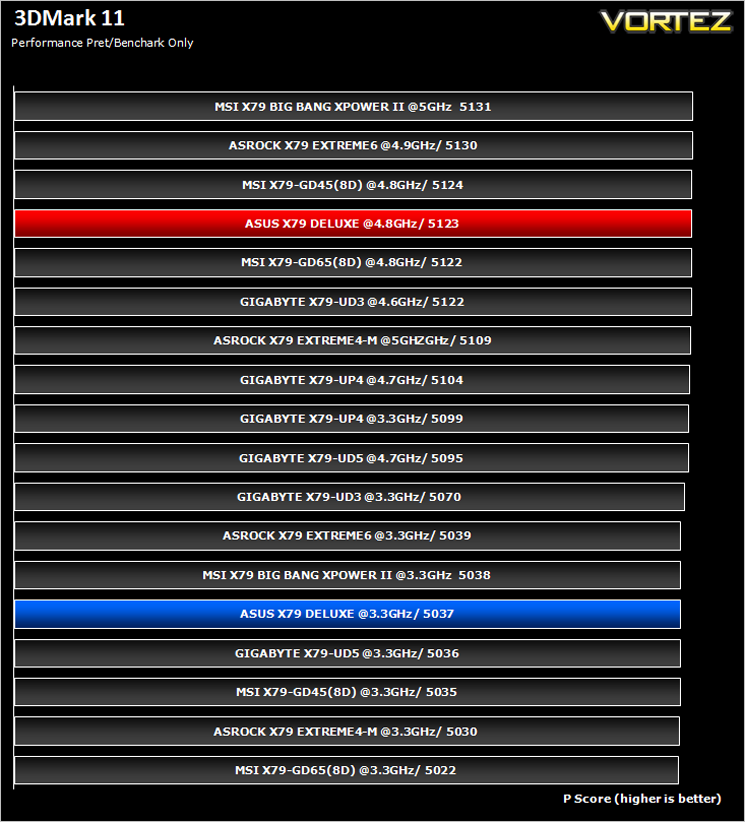
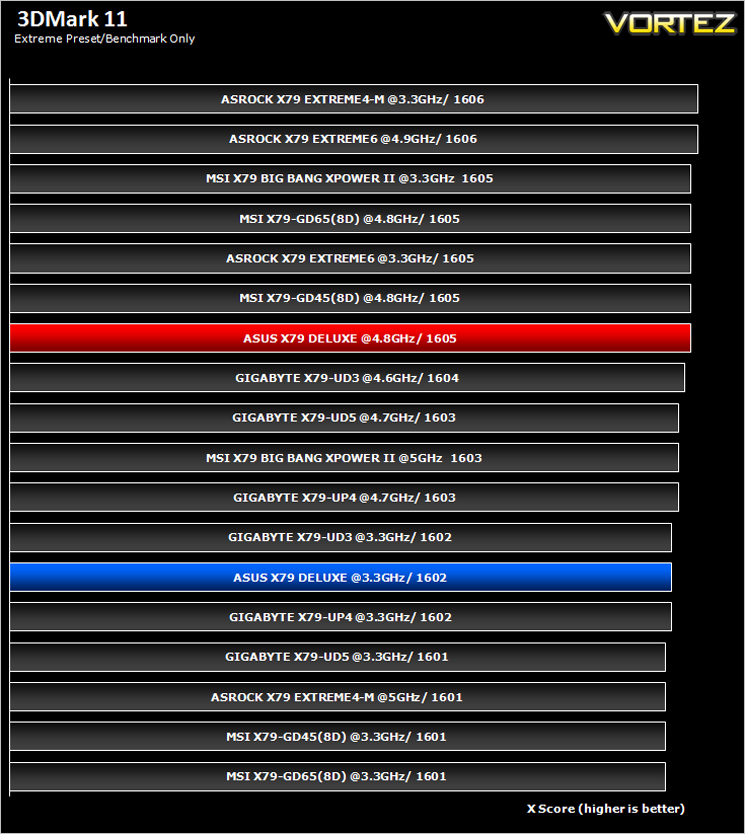
Futuremark 3DMark 11
Designed to measure your PC’s gaming performance 3DMark 11 makes extensive use of all the new features in DirectX 11 including tessellation, compute shaders and multi-threading. Trusted by gamers worldwide to give accurate and unbiased results, 3DMark 11 is the best way to consistently and reliably test DirectX 11 under game-like loads.
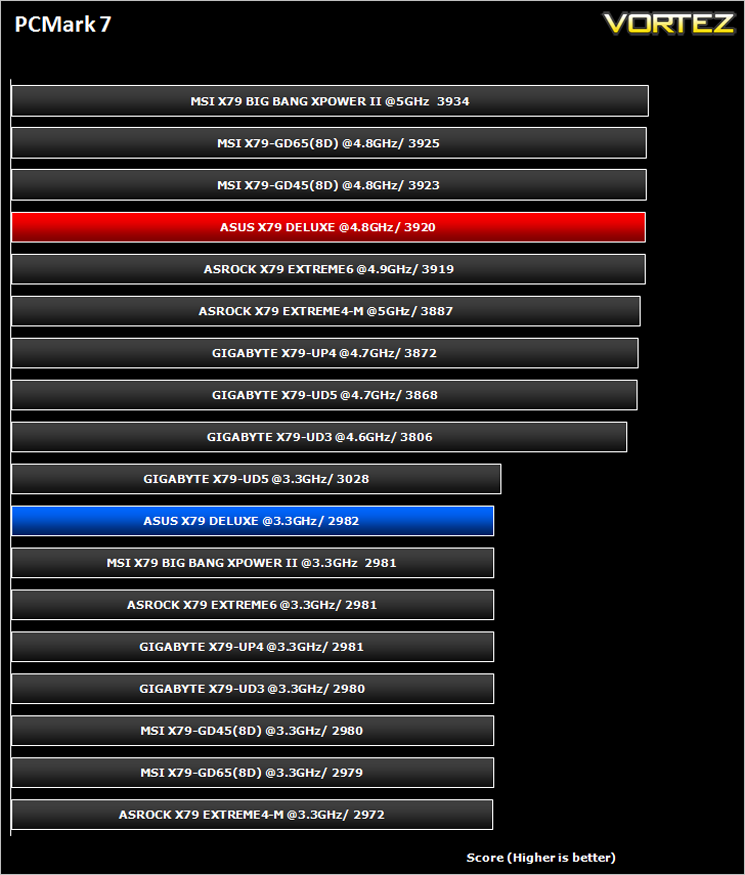
Futuremark PCMark 7
PCMark 7 is a tool provided by FutureMark that tests the PCs ability in general office and everyday use. It produces a number that reflects the all-round performance of the PC and is useful to compare between differing setups. For more information, visit the FutureMark website.
Gaming Benchmarks
Crysis 2
Crytek took an internet beating from its loyal fans due to the fact that they pandered to the console masses and dumbed down the graphics to DirectX 9. Fortunately, fans of the PC version of Crysis managed to force Cryteks hand and they have since developed a DX11 patch and have also enhanced the textures with added tesselation. It is for this reason that we have decided to include it in our suite of benchmarks.
Crytek took an internet beating from its loyal fans due to the fact that they pandered to the console masses and dumbed down the graphics to DirectX 9. Fortunately, fans of the PC version of Crysis managed to force Cryteks hand and they have since developed a DX11 patch and have also enhanced the textures with added tesselation. It is for this reason that we have decided to include it in our suite of benchmarks.
DiRT3
As players race to elevate their global standing, DiRT 3 is back delivering mud, sweat and gears world over: from the intense weather-beaten rally stages of Europe, Africa and the US, to executing performance driving showcases and career challenges where car control is pushed to spectacular limits.
As players race to elevate their global standing, DiRT 3 is back delivering mud, sweat and gears world over: from the intense weather-beaten rally stages of Europe, Africa and the US, to executing performance driving showcases and career challenges where car control is pushed to spectacular limits.
Conclusion
It’s been a year since we last sampled anything new from the X79 stable and so it was left to who else but ASUS to quench our thirst for a new X79 motherboard. With the quietly introduced Ivybridge-E ushered in we expected a flurry of activity in the motherboard market but sadly this simply has not been the case with most manufacturers content to simply update the BIOS on their now 2 year old mainboards.
The ASUS X79 Deluxe doesn’t add anything startlingly fresh to the platform but what it does give us is a complete platform that leaves you wanting for nothing unless you are looking for ultra high end overclocking ability. The feature set of the motherboard is fantastic, the included accessories are numerous and the aesthetics are sublime. We found it very hard to fault this motherboard, so much so that our only valid complaint is that it cannot do 16x 16x 16x in a triple card configuration, slowing down to 16x 8x 8x. Such extravagances are left to the flagship Rampage Extreme motherboard which coincidently, ASUS have unleashed a new Rampage black edition, a motherboard that we hope to sample in the very near future.
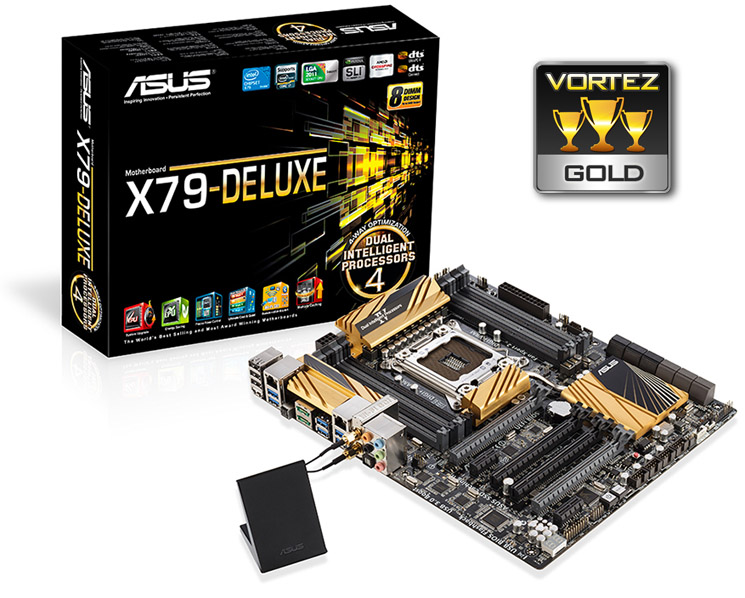
The X79 Deluxe performed well throughout our range of tests, occasionally excelling which made up for some of the not so good results but for the most part it was above mid table. Overclocking the mainboard was very good despite not being touted as an overclocking motherboard; again, there are higher specified motherboards for this purpose costing significantly more. What the ASUS X79 deluxe offers is a very solid, all round motherboard suitable for 99% of PC users and while it may not be the outright master of any particular task, it can do more tasks and has more features than most motherboards available on the market. For this reason we are giving it our Gold award because there are few motherboards which can offer so much, look so good and perform quite as well as the motherboard we have sampled today.
NOTE: If you buy this motherboard or already own a gold-themed ASUS motherboard you can enter their latest competition – ASUS Gold Rush and have the chance to win some cool swag!
Pros:
+ Great Aesthetics
+ Fantastic range of BIOS options
+ Excellent feature set
+ Robust power delivery
Cons:
– Limited PCIe lanes for 3x SLI/Crossfire
– Cramped CPU socket area
+ Great Aesthetics
+ Fantastic range of BIOS options
+ Excellent feature set
+ Robust power delivery
Cons:
– Limited PCIe lanes for 3x SLI/Crossfire
– Cramped CPU socket area

Click here for an explanation of our awards at Vortez.net.


