







An Intel Z97 motherboard which offers plenty of features for the budding system builder and arrives with a generous price-tag for those on a budget.

Product on Review: HI-FI Z97WE
Manufacturer and Sponsor: BIOSTAR
Street Price: £75 GBP / $125 USD
BIOSTAR has been manufacturing motherboards since the mid-80s, yet their focus has been in countries other than Europe and many enthusiasts will probably be unfamiliar with their products. Whilst they may not be deemed a top-tier motherboard manufacturer for the enthusiast market, they do offer a combination of solid features and good value for money.
Today we will be taking a look at BIOSTAR’s HI-FI Z97WE motherboard which among other things promises to offer great audio quality. This model gives system builders the bridge to Intel Z97 without having to spend large amounts of money.
About BIOSTAR
In 1980, the IT industry was growing at a phenomenal rate. With wide experience in buying and selling electronic parts as well as researching on future demands for mainboards and add-on cards , the founder of BIOSTAR GROUP, established BIOSTAR MICROTECH INTERNATIONAL CORP in 1986.
In the early years, BIOSTAR concentrated on the manufacture of mainboards built for XT form factor. To maintain steady business growth, BIOSTAR managed to keep a large portion of its capital and manpower invested on the design and development of new products, which at the same time has enabled it to stay competitive in the rapid evolution of the computer industry.
In the early years, BIOSTAR concentrated on the manufacture of mainboards built for XT form factor. To maintain steady business growth, BIOSTAR managed to keep a large portion of its capital and manpower invested on the design and development of new products, which at the same time has enabled it to stay competitive in the rapid evolution of the computer industry.
Technical Specifications
Chipset
Intel Z97
CPU SUPPORT
Intel Core i7 LGA 1150 Processor
Intel Core i5 LGA 1150 Processor
Intel Core i3 LGA 1150 Processor
Intel Pentium LGA 1150 Processor
Ready for Intel 4th Gen. unclocked CPU (codename Devil’s Canyon)
Ready for Intel next enthusiast-class CPU(codename Broadwell)
Support CPU Bclk overclock
MEMORY
Support Dual Channel DDR3 2800(OC)/ 2600(OC)/ 2400(OC)/ 2200(OC)/
2133(OC)/ 1866(OC)/ 1800(OC)/ 1600/ 1333/ 1066 MHz
Support non-ECC memory modules
Support Extreme Memory Profile(XMP) memory modules
4 x DDR3 DIMM Memory Slot
Max. Supports up to 32GB Memory
EXPANSION SLOT
2 x PCI-E x16 3.0 Slot (x8 + x8, support CrosfireX)
2 x PCI-E x1 2.0 Slot
2 x PCI Slot
STORAGE
6 x SATA3 Connector
Support SATA RAID: 0,1,5,10
Support both Legacy and AHCI Mode
Support Hot-Plug in AHCI mode
Support Intel Smart Response Technology
1 x M.2(N.G.F.F.) Connector up to 1000MB/s
Support both PCIE NAND for PCIE SSD and SATA NAND for SATA SSD
USB
4 x USB 3.0 Port
1 x USB 3.0 Header
2 x USB 2.0 Port
2 x USB 2.0 Header
LAN
Realtek RTL8111G – 10/100/1000 Controller
Support Wake-On-LAN
Support PXE
Dual GbE, support Teaming
MULTI GRAPHICS
AMD CrossFireX
INTEGRATED VIDEO
By CPU model
Supports DX11.1/ 11/ 10.1/ 10/ 9
Supports HDCP
Support DirectX Video Acceleration(DXVA) for accelerating video processing
Full AVC/VC1/MPEG2 HW Decode
Support Advanced Scheduler 2.0, 1.0, XPDM
Support OpenGL 4.0
Support HDMI, 1.4a specification compliant with 3D
Support 3 Displays(HDMI + DVI + VGA)
CODEC
Realtek ALC892 8-Channel Blu-ray Audio
Support Blu-ray Audio
Support HD Audio
Support 2/4/6/8-channel
Support SPDIF_out
Support Biostar Hi-Fi
REAR I/O
1 x PS/2 Keyboard
4 x USB 3.0 Port
2 x USB 2.0 Port
1 x HDMI Connector, resolution up to 4096×2160@24Hz, 24bpp / 2560×1600@60Hz, 24bpp / 1920×1080@60Hz, 36bpp
1 x DVI Connector, resolution up to 1920×2000@60Hz @24bpp
1 x VGA Port, resolution up to 1920×2000@60Hz @24bpp
2 x RJ-45 Port
5 x Audio Connector
1 x S/PDIF Out Port
INTERNAL I/O
1 x USB 3.0 Header
2 x USB 2.0 Header
6 x SATA3 6Gb/s Connector
1 x M.2(N.G.F.F.) Connector
1 x Front Audio Header
1 x Front Panel Header
2 x CPU FAN Header
4 x System FAN Header
1 x Serial Header
1 x CIR Header
1 x TPM Header(TPM V1.2)
H/W Monitoring
CPU / System / PCH / DDR Temperature Monitoring
CPU / System Fan Monitoring
Smart / Manual CPU / System Fan Control
System Voltage Monitoring
Overvoltage
CPU VCC_IN/ Vcore/ Vring/ VGT/ VSA/ VIOA/ VIOD/ DRAM/ DDR Ch-A CA Verf/ DDR Ch-B CA Verf/ DDR Ch-A/B DA Verf/ CPU DRAM Vref/ PCH/ PCH PLL
DIMENSIONS
ATX Form Factor Dimension: 30.5cm x 24.4cm ( W x L )
OS SUPPORT
Support Windows 7 / 8 / 8.1
FEATURES
Windows 8 Ready
Supports PURO Hi-Fi
Supports 100% Solid capacitor
Supports Rapid Switch2
Supports Rapid Debug3
Supports Charger Booster
Supports BIOS Online Update
Intel Z97
CPU SUPPORT
Intel Core i7 LGA 1150 Processor
Intel Core i5 LGA 1150 Processor
Intel Core i3 LGA 1150 Processor
Intel Pentium LGA 1150 Processor
Ready for Intel 4th Gen. unclocked CPU (codename Devil’s Canyon)
Ready for Intel next enthusiast-class CPU(codename Broadwell)
Support CPU Bclk overclock
MEMORY
Support Dual Channel DDR3 2800(OC)/ 2600(OC)/ 2400(OC)/ 2200(OC)/
2133(OC)/ 1866(OC)/ 1800(OC)/ 1600/ 1333/ 1066 MHz
Support non-ECC memory modules
Support Extreme Memory Profile(XMP) memory modules
4 x DDR3 DIMM Memory Slot
Max. Supports up to 32GB Memory
EXPANSION SLOT
2 x PCI-E x16 3.0 Slot (x8 + x8, support CrosfireX)
2 x PCI-E x1 2.0 Slot
2 x PCI Slot
STORAGE
6 x SATA3 Connector
Support SATA RAID: 0,1,5,10
Support both Legacy and AHCI Mode
Support Hot-Plug in AHCI mode
Support Intel Smart Response Technology
1 x M.2(N.G.F.F.) Connector up to 1000MB/s
Support both PCIE NAND for PCIE SSD and SATA NAND for SATA SSD
USB
4 x USB 3.0 Port
1 x USB 3.0 Header
2 x USB 2.0 Port
2 x USB 2.0 Header
LAN
Realtek RTL8111G – 10/100/1000 Controller
Support Wake-On-LAN
Support PXE
Dual GbE, support Teaming
MULTI GRAPHICS
AMD CrossFireX
INTEGRATED VIDEO
By CPU model
Supports DX11.1/ 11/ 10.1/ 10/ 9
Supports HDCP
Support DirectX Video Acceleration(DXVA) for accelerating video processing
Full AVC/VC1/MPEG2 HW Decode
Support Advanced Scheduler 2.0, 1.0, XPDM
Support OpenGL 4.0
Support HDMI, 1.4a specification compliant with 3D
Support 3 Displays(HDMI + DVI + VGA)
CODEC
Realtek ALC892 8-Channel Blu-ray Audio
Support Blu-ray Audio
Support HD Audio
Support 2/4/6/8-channel
Support SPDIF_out
Support Biostar Hi-Fi
REAR I/O
1 x PS/2 Keyboard
4 x USB 3.0 Port
2 x USB 2.0 Port
1 x HDMI Connector, resolution up to 4096×2160@24Hz, 24bpp / 2560×1600@60Hz, 24bpp / 1920×1080@60Hz, 36bpp
1 x DVI Connector, resolution up to 1920×2000@60Hz @24bpp
1 x VGA Port, resolution up to 1920×2000@60Hz @24bpp
2 x RJ-45 Port
5 x Audio Connector
1 x S/PDIF Out Port
INTERNAL I/O
1 x USB 3.0 Header
2 x USB 2.0 Header
6 x SATA3 6Gb/s Connector
1 x M.2(N.G.F.F.) Connector
1 x Front Audio Header
1 x Front Panel Header
2 x CPU FAN Header
4 x System FAN Header
1 x Serial Header
1 x CIR Header
1 x TPM Header(TPM V1.2)
H/W Monitoring
CPU / System / PCH / DDR Temperature Monitoring
CPU / System Fan Monitoring
Smart / Manual CPU / System Fan Control
System Voltage Monitoring
Overvoltage
CPU VCC_IN/ Vcore/ Vring/ VGT/ VSA/ VIOA/ VIOD/ DRAM/ DDR Ch-A CA Verf/ DDR Ch-B CA Verf/ DDR Ch-A/B DA Verf/ CPU DRAM Vref/ PCH/ PCH PLL
DIMENSIONS
ATX Form Factor Dimension: 30.5cm x 24.4cm ( W x L )
OS SUPPORT
Support Windows 7 / 8 / 8.1
FEATURES
Windows 8 Ready
Supports PURO Hi-Fi
Supports 100% Solid capacitor
Supports Rapid Switch2
Supports Rapid Debug3
Supports Charger Booster
Supports BIOS Online Update
Packaging & First Look
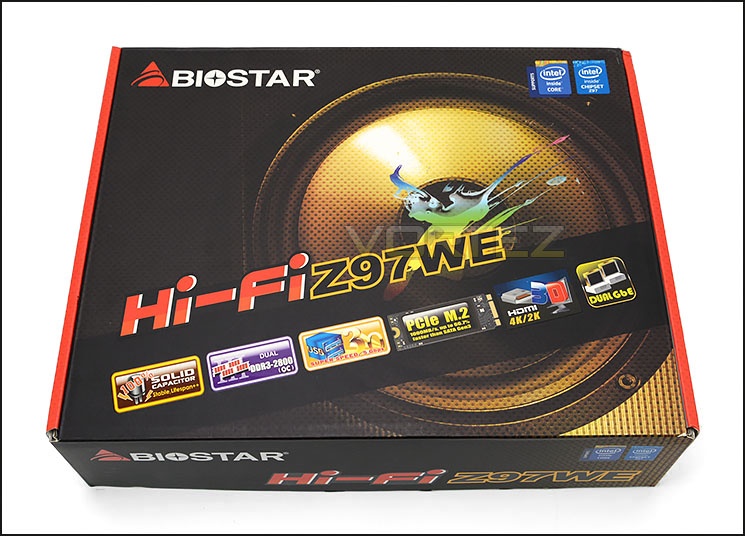
Packaging for Z97WE
Z97WE arrives in a rather eye-catching box. The typography, design and use of colour is quite erratic – the artwork lacks the finesse we have seen from other brands which opt for a professional palette and design.
The front of the box details the significant features which accompany the motherboard and the reverse goes into further detail to explain the technical specification.
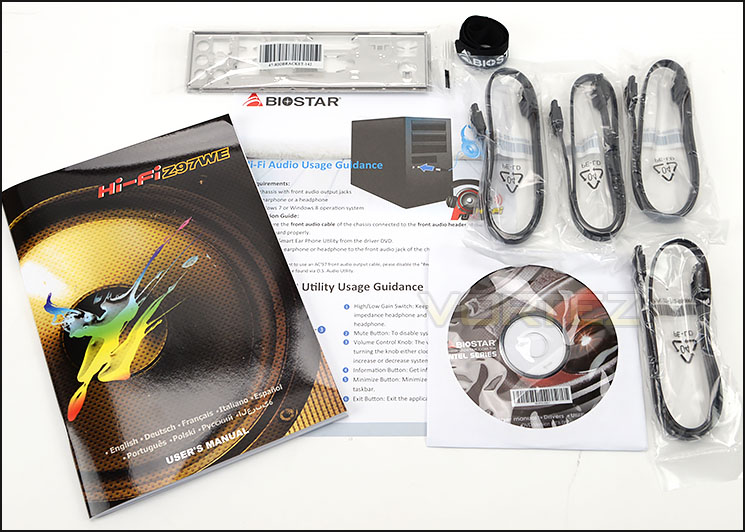
The bundled items included
Accompanying the motherboard are a number of accessories which make up the bundle. These items include:
• User’s Manual
• Guidance Leaflet
• Software/Drivers CD
• Rear IO Shield
• 4x SATA III Cables
• Velcro Cable Tie
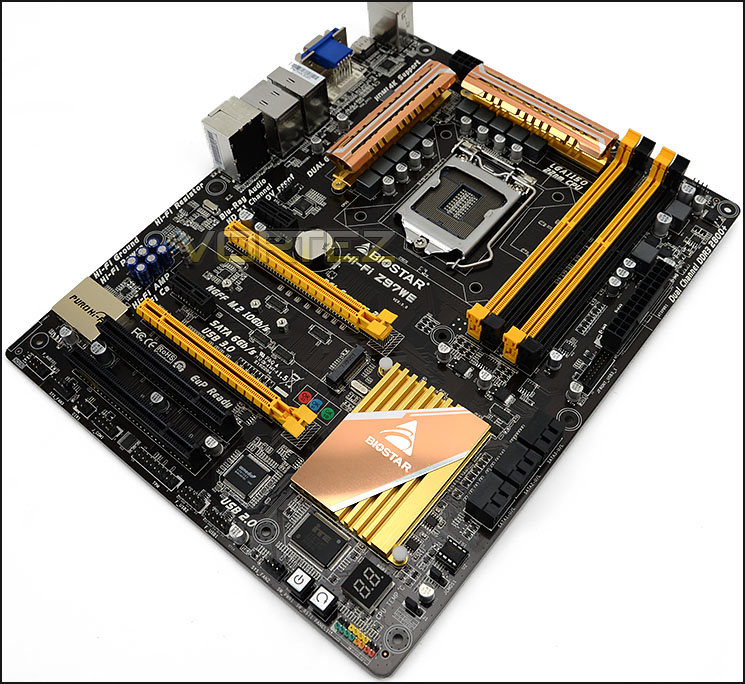
An overview of the motherboard
With the packaging now out of the way we can get our first glimpse of the motherboard itself. Once again, in similar vein to that of the packaging the colour of the heatsinks do not match the DRAM/PCI-E slots. The current theme lacks consistency and whilst it may be a big improvement over previous BIOSTAR motherboard designs, the motherboard designers still have a long way before they reach the zenith of styling.
BIOSTAR has recently unveiled their Z9727 which is a step in the right direction – this highlights there is still hope. It’s just disappointing the rest of their motherboard range hasn’t been given the same facelift.
For those who aren’t at all bothered by the aesthetics on a motherboard the above will be of little importance – Z97WE follows the standard ATX form factor and is: : 30.5cm x 24.4cm.
Closer Look
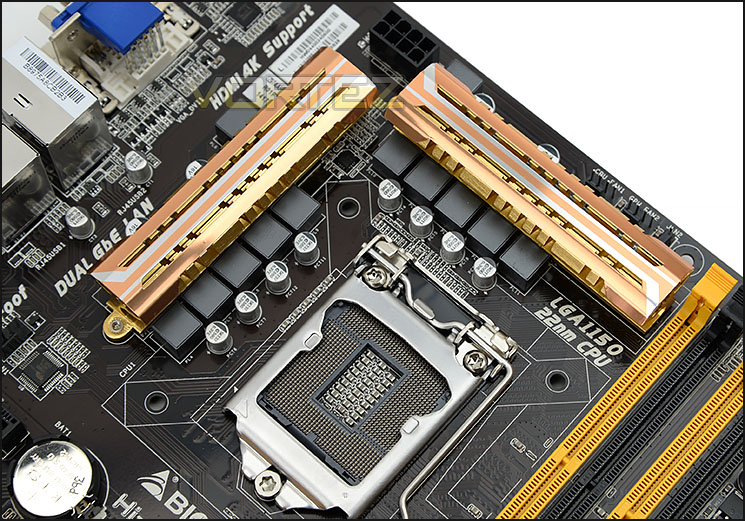
The socket area
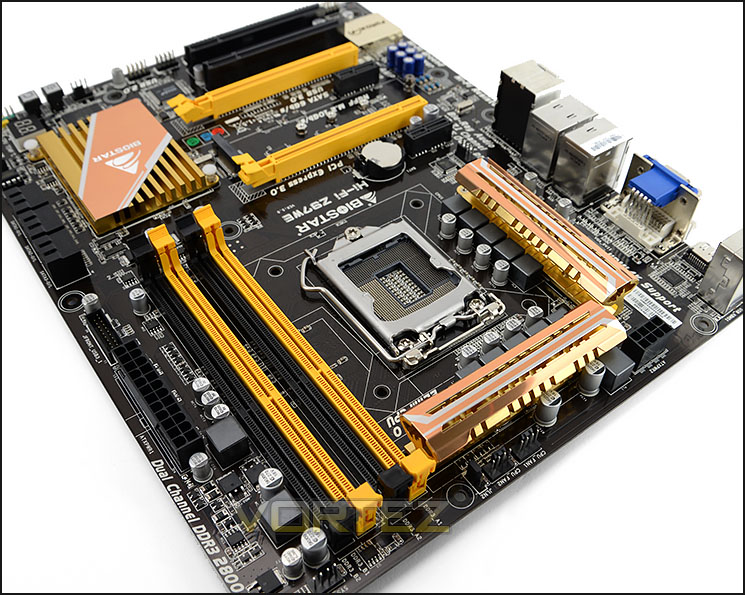
Z97WE uses an 10+2 Phase power design. Over the MOSFETs sit thin, golden heatsinks which, unlike many designs are not interconnected by a copper heatpipe. Just behind the heatsinks resides an 8-pin CPU power socket and adjacent to this socket are dual CPU fan headers.
Z97WE uses Socket 1150 and supports Intel’s 4th and 5th Generation Processors.
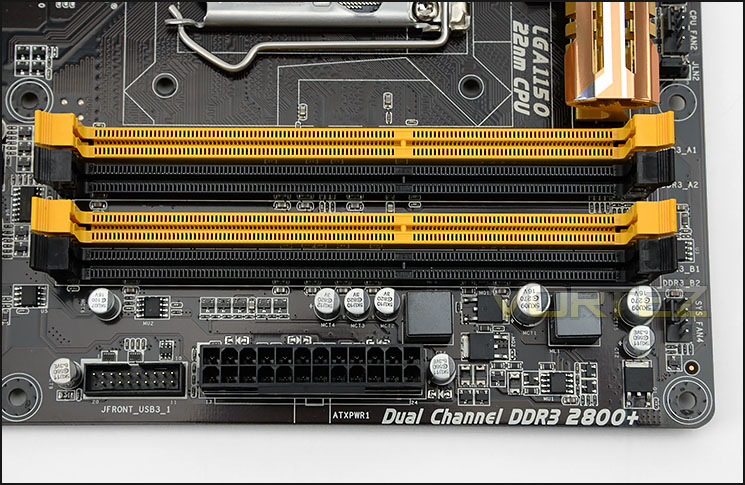
Dual Channel DDR3 support
Z97WE supports dual channel DDR3 – up to DDR3 2800+ and 32GB of capacity. From the above, you can clearly see the contrasting colour between the memory slots and the heatsinks, they don’t match particularly well.
Around the memory there is the obligatory 24-pin ATX power, a system fan header and a single USB 3.0 header to get connectivity for the front panel of your computer case.
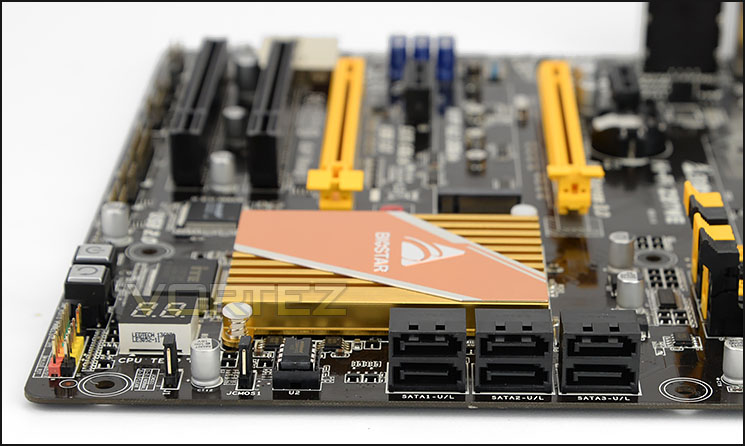
Up to six SATA III ports
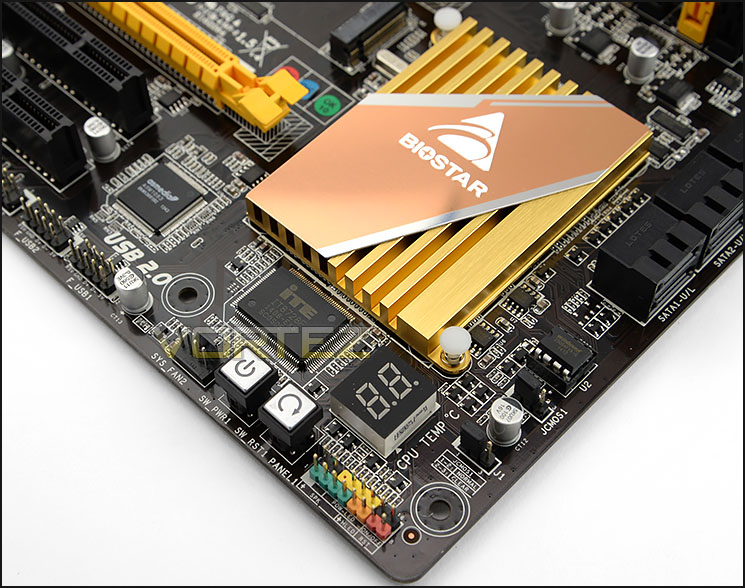
Advanced features in the lower region
Positioned further along there are six SATA III (6GB/s) ports for HDD storage.
In the same area of the motherboard there is an LED debug panel for diagnosing any potential problems at POST (a code is displayed which corresponds to the user manual key). BIOSTAR has also placed an onboard power and reset button for easy access to such controls.
Behind these features sits the heatsink covering the Intel Z97 chip.
Expansion slot options and audio
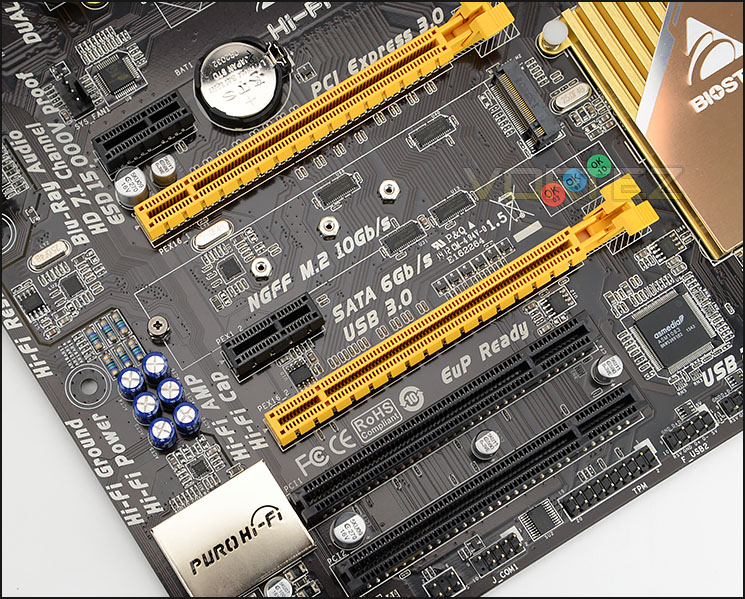
Z97WE has a variety of different slots which consist of the following:
• 2 x PCI-E x16 3.0 Slot (Top x16, Lower x8)
• 2 x PCI-E x1 2.0 Slot
• 2 x PCI Slot
For users who are planning to use a single card on Z97WE it’s advisable to use the top yellow PCI express slot since this operates at x16. Since the lower yellow PCI express slot runs at x8 then using two cards means the overall speed will drop to x8. We’re surprised to see two legacy PCI slots on the motherboard since devices using this interface are obsolete.
In the middle of the PCI express slots BIOSTAR has placed an M.2 connector for installing a drive of this form factor. Transfer rates of up to 1000MB/s can be taken advantage of here.
The audio capacitors and heatsink are located to the left of the expansion slots. The audio components on Z97WE are all backed by BIOSTAR’s HI-FI series and at the heart of the audio lineup is Realtek ALC892.
The capacitors used are Non-Polarized Electrolysis Electric audio capacitors which deliver low distortion properties.
USB 3.0 ports and other features
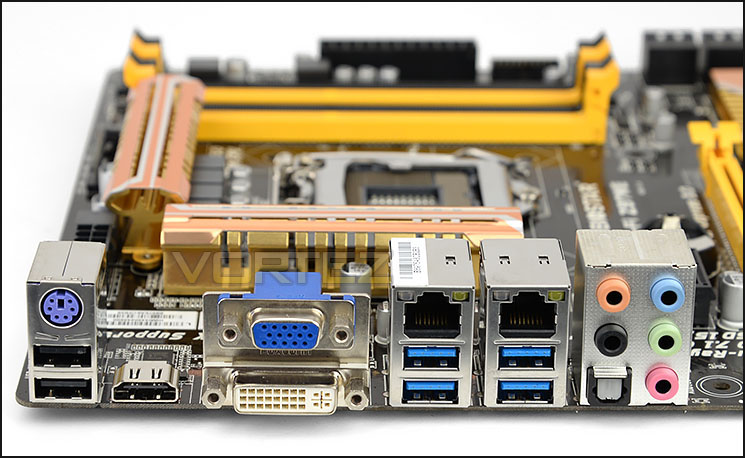
Last of all we arrive at the rear IO panel which has a wealth of varying ports and functionality. Included here are the following:
• 1 x PS/2 Keyboard
• 4 x USB 3.0 Port
• 2 x USB 2.0 Port
• 1 x HDMI Connector, resolution up to 4096×2160@24Hz,
• 1 x DVI Connector, resolution up to 1920×2000@60Hz @24bpp
• 1 x VGA Port, resolution up to 1920×2000@60Hz @24bpp
• 2 x RJ-45 Port
• 5 x Audio Connector
• 1 x S/PDIF Out Port
BIOSTAR Z97 BIOS Video Tour
Below is a video tour showing the interface of BIOSTAR’s BIOS and the options which are available. As you can see, the interface isn’t the most attractive but it gets the job done and all options are located in familiar places.
Test Setup, Methodology & Overclocking
Test Setup
CPU Intel Core i7-4790K (Devil’s Canyon)
Cooling Corsair Hydro Series H105
Motherboard ASUS Maximus VII Gene
Memory 16GB Corsair Vengeance Pro 2800MHz CL12 DDR3
Graphics XFX R7970 Black Edition
Storage Corsair Neutron GTX 480GB
PSU Corsair HX1050 80 Plus Gold Certified PSU
Cooling Corsair Hydro Series H105
Motherboard ASUS Maximus VII Gene
Memory 16GB Corsair Vengeance Pro 2800MHz CL12 DDR3
Graphics XFX R7970 Black Edition
Storage Corsair Neutron GTX 480GB
PSU Corsair HX1050 80 Plus Gold Certified PSU
Benchmarks
Cinebench R15 – CPU/OpenGL Score
x264 HD 4.0 – 1st and 2nd pass encoding
SiSoftware SANDRA 2014 – CPU & Memory benchmarks
AIDA64 – CPU benchmarks
PCMark 8 – Home Suite
3DMark FireStrike – DX11 3D Benchmark
Games – Tomb Raider, THIEF
x264 HD 4.0 – 1st and 2nd pass encoding
SiSoftware SANDRA 2014 – CPU & Memory benchmarks
AIDA64 – CPU benchmarks
PCMark 8 – Home Suite
3DMark FireStrike – DX11 3D Benchmark
Games – Tomb Raider, THIEF
Other Software
Temperature Analysis: Core Temp
Stress Testing Software: LinX
CPU Specification Monitoring: CPU-Z
Stress Testing Software: LinX
CPU Specification Monitoring: CPU-Z
Overclocking
Since the introduction of Z87 back in 2013, there has been a return to BCLK overclocking. This type of functionality ensures flexibility for Overclockers compared to previous generations were the BCLK was locked to 100MHz and only the ratio could be adjusted. As many of you will know, Haswell CPUs get very hot with little voltage increase therefore the flexibility and headroom for overclocking can be limited. For all testing we are now using the Intel Core i7-4790K (Devil’s Canyon).
Since 4.8GHz is the maximum overclock for 4790K our investigation takes us to trying to achieve this or a reasonably close achievement. Sadly we had significant issues getting the Z97WE to overclock. Even with a substantial boost in CPU voltage (1.44v) our motherboard wouldn’t even budge 300MHz. We could enter the OS but as soon as any load was applied to the CPU BSODs and instability occurred. This is rather disappointing!
Benchmarks: Power Consumption
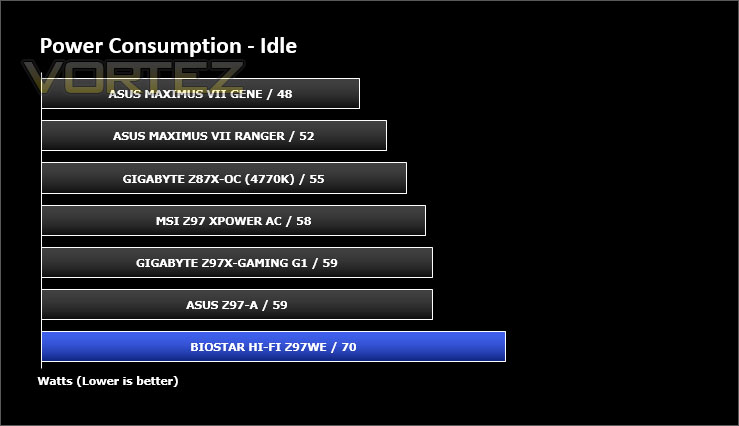
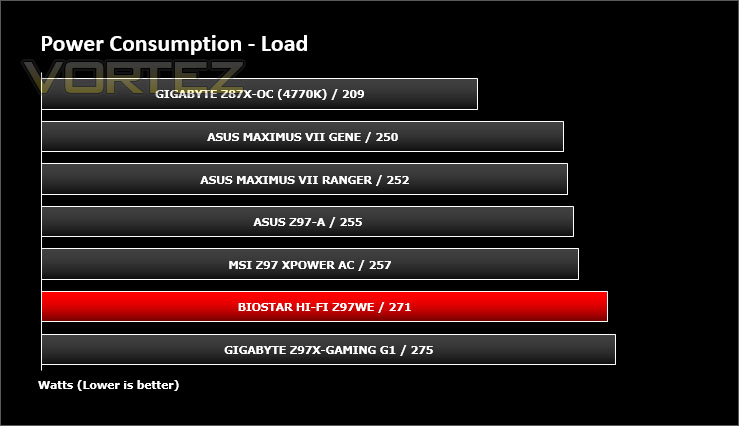
It’s interesting to note the power consumption across all motherboards. Although they are using Z97 chipsets, energy results can fluctuate between manufacturers due to the features and specifications that are integrated. First of all, for the idle tests the system is cold booted into Windows and no additional applications are executed – the watts are noted on the external energy monitor we use and then the system is loaded with 3DMark FireStrike – watts are again monitored for the duration of the test and the highest rated wattage result is then noted down. Below are the results of this energy test.
Benchmarks: X264 HD
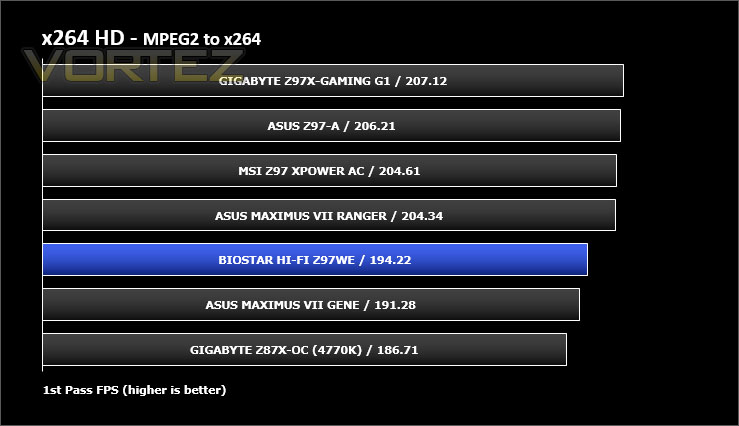
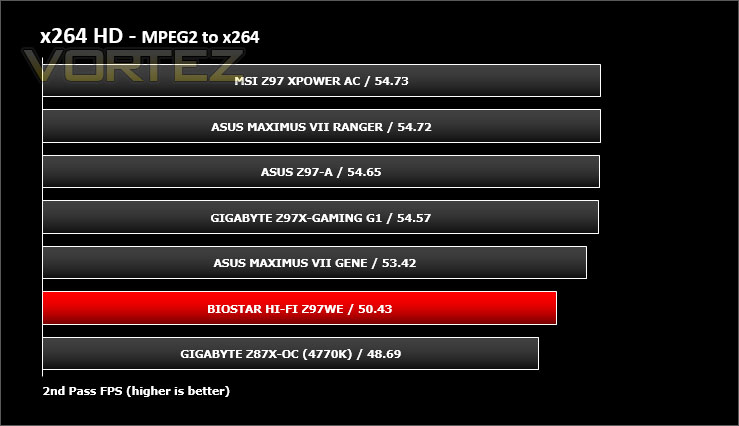
Simply put, this test measures how fast your machine can encode a short, DVD quality MPEG-2 video clip into a high-quality x264 video clip. What’s x264, you ask? It’s more or less the next-generation Xvid/DivX codec. I think it’s ideal for a benchmark because the application (x264.exe) reports fairly accurate compression results (in frames per second) for each pass of the video encoding process, and it uses multi-core processors very efficiently.
Benchmarks: AIDA64
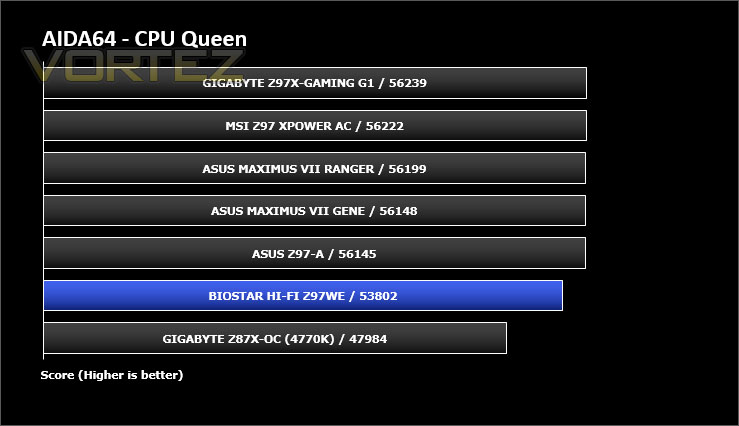
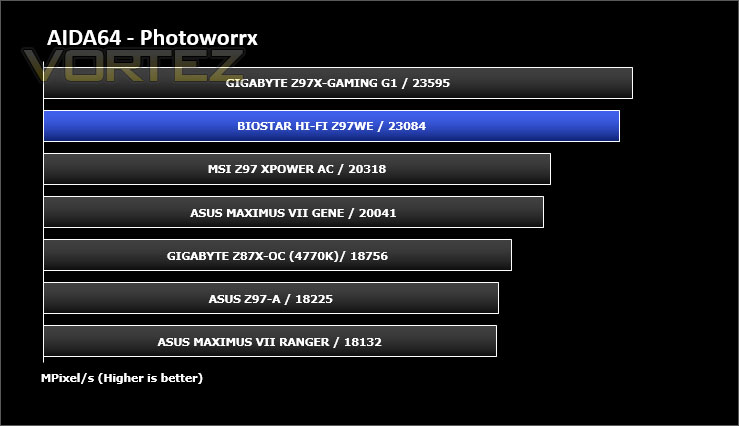
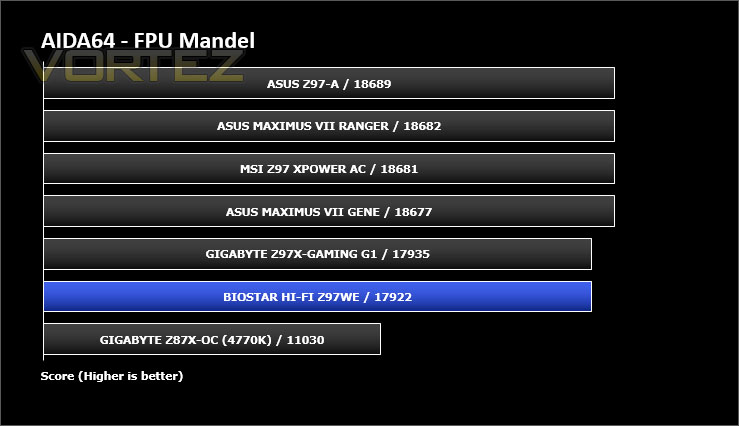
AIDA64 Product PageThis simple integer benchmark focuses on the branch prediction capabilities and the misprediction penalties of the CPU. It finds the solutions for the classic “Queens problem” on a 10 by 10 sized chessboard. At the same clock speed theoretically the processor with the shorter pipeline and smaller misprediction penalties will attain higher benchmark scores. For example — with HyperThreading disabled — the Intel Northwood core processors get higher scores than the Intel Prescott core based ones due to the 20-step vs 31-step long pipeline. CPU Queen test uses integer MMX, SSE2 and SSSE3 optimizations.
Benchmarks: Cinebench
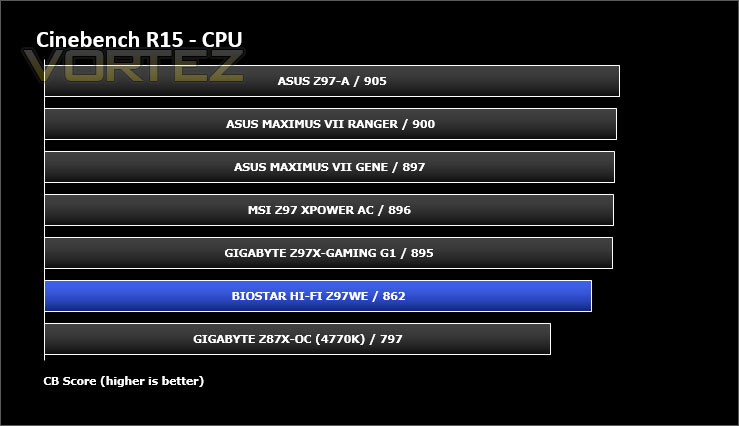
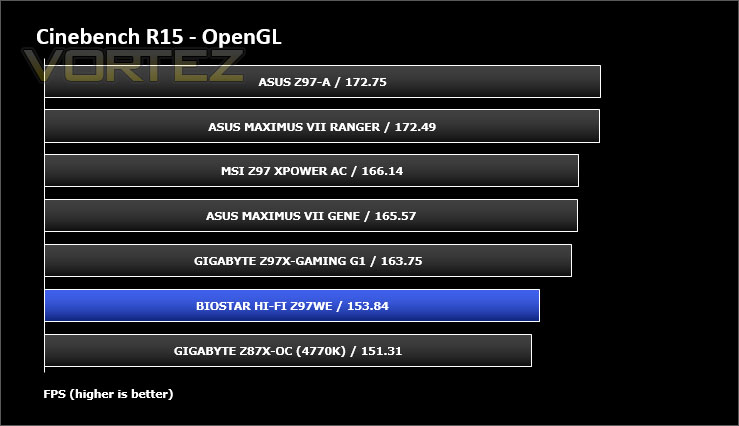
CINEBENCH is a real-world cross platform test suite that evaluates your computer’s performance capabilities. CINEBENCH is based on MAXON’s animation software CINEMA 4D 3D content creation.
Benchmarks: SiSoftware SANDRA
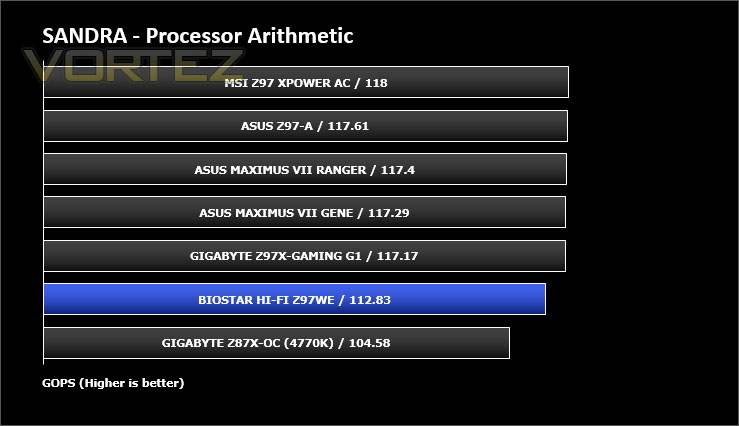
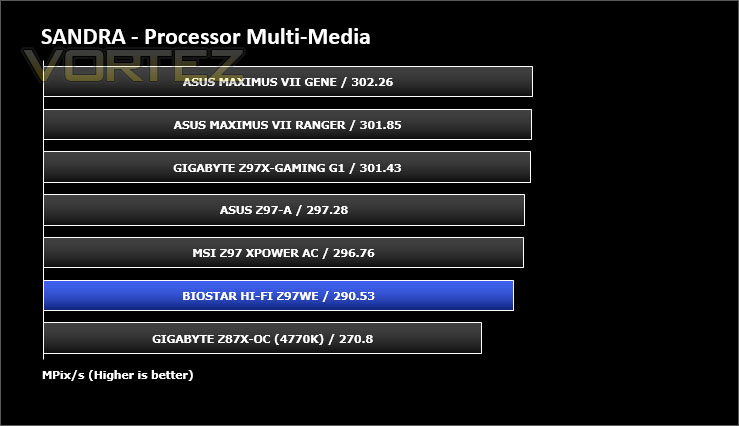
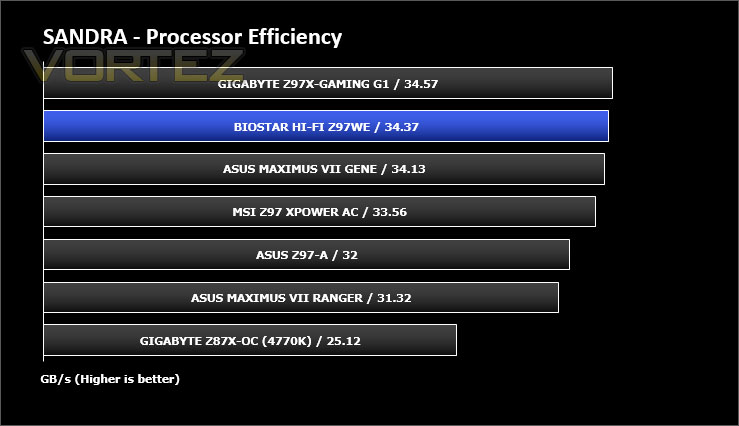
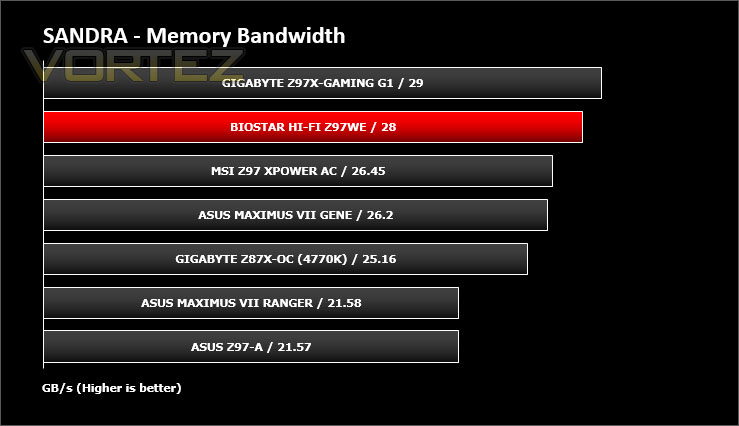
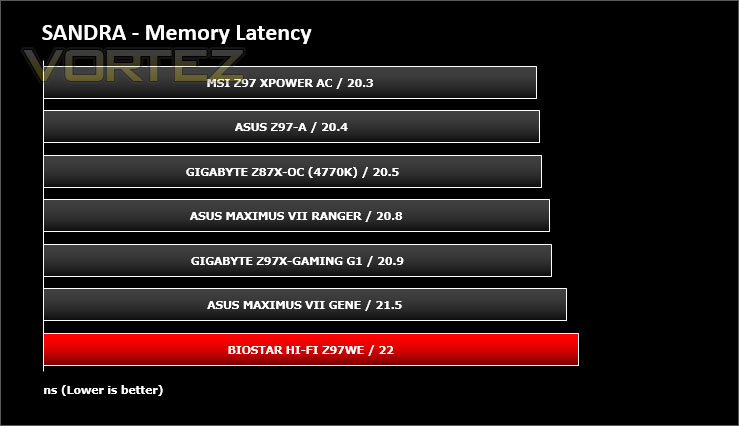
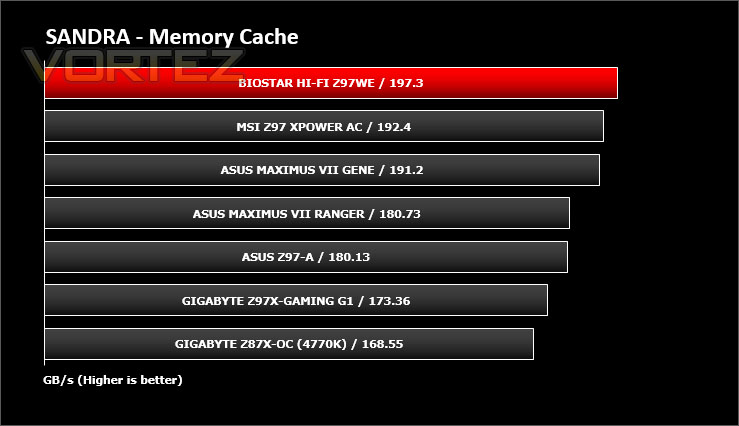
SANDRA isn’t always a benchmark that is included in hardware reviews but I believe it shouldn’t be ignored. SANDRA provides a vigorous package that tests your system in a rather large array of benchmarks. There are many aspects of benchmark that can be executed. We will be considering – CPU and memory tests.
Benchmarks: 3DMark
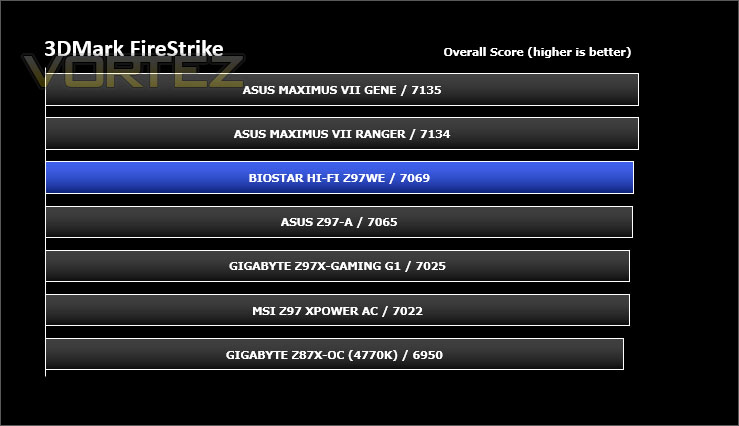
3DMark FireStrike Product PageFire Strike is our new showcase DirectX 11 benchmark designed for high-performance gaming PCs. It is our most ambitious and technical benchmark ever, featuring real-time graphics rendered with detail and complexity far beyond what is found in other benchmarks and games today. Fire Strike will only be available in the Windows editions of 3DMark initially.
Benchmarks: PCMark 8
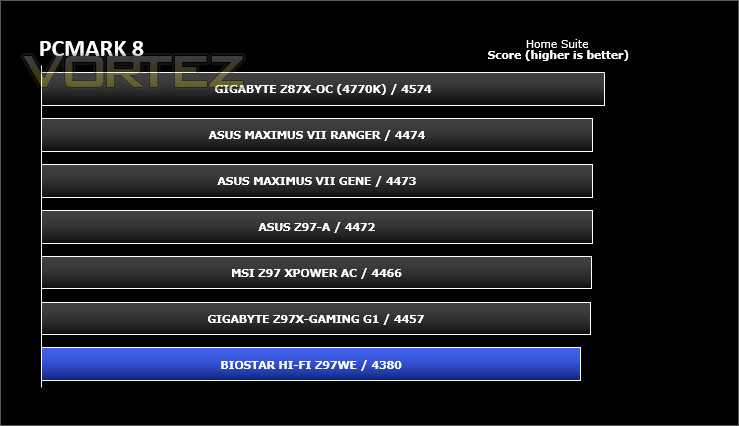
PCMark 8 combines performance benchmarking with battery life measurement and includes tests based on popular Adobe and Microsoft applications. Whether you are looking for long battery life, or maximum power, PCMark 8 will help you find the devices that offer the perfect combination of efficiency and performance for your needs. It’s the complete PC performance benchmark for home and business.
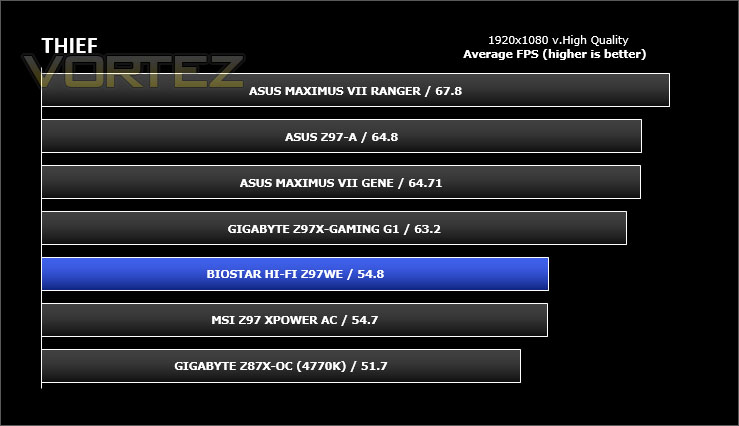
Benchmarks: Tomb Raider & THIEF
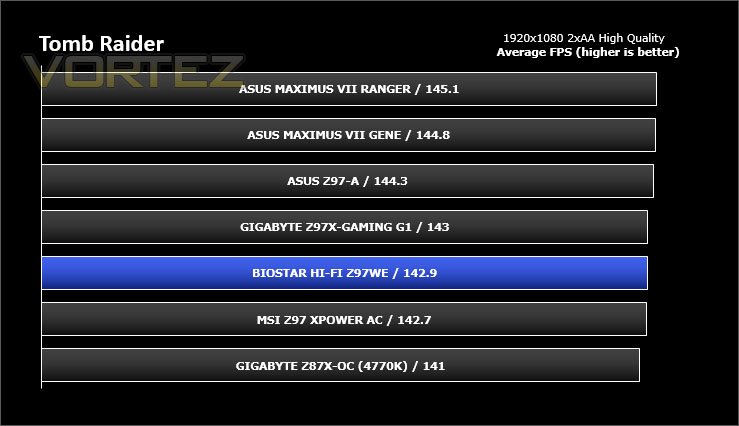
It’s important for us to perform a number of game benchmarks as well as the synthetic tests because gamers will want to know if there are any significant benefits. So here we have two popular and recent gaming titles which feature a dedicated benchmark tool within them to display results.
Conclusion
We’ve already tested a number of exemplary Intel Z97 offerings from a selection of different brands but this is our first look at anything from BIOSTAR.
With the standard set for this particular platform, expectations are high. BIOSTAR’s Z97WE delivers good performance out of the box – at stock/default settings. In the range of benchmarks we ran this entry level model maintained its consistency. The disappointment came when trying to overclock – which yielded inconclusive results. We struggled to even push our Intel Core i7-4790K a mere 300MHz, regardless of the core voltage we put through the chip.
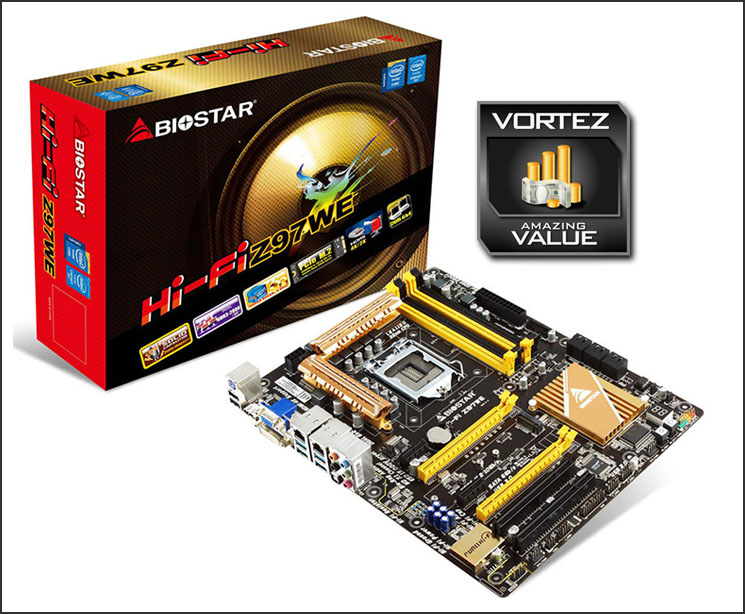
Those with a thirst for a system or motherboard with style really care about how their hardware looks and BIOSTAR’s Z97WE stands out… but for the wrong reasons. Comparing this board to other options it’s quite clear that Z97WE lacks the finesse we are now accustomed with.
Aside from these criticisms, the price is a particular highlight. Z97WE comes in at £75 UK / $125 USD which translates to good value for money if you aren’t planning to overclock.
BIOSTAR’s Z97WE brings some great features and decent performance under stock conditions. If you aren’t principally intending to overclock and aren’t desirous of sleek liveries then this motherboard delivers good value for money.
Pros
+ Good stock performance
+ Includes M.2 support
+ Clean & easy to use BIOS
+ Good value
Cons
– Lack lustre appearance
– Poor overclocking
+ Good stock performance
+ Includes M.2 support
+ Clean & easy to use BIOS
+ Good value
Cons
– Lack lustre appearance
– Poor overclocking

Click here for an explanation of our awards at Vortez.net.


