







The final member of CM Storm’s new AL-series peripheral range comes with 8200dpi Avago laser sensor, 1000Hz polling, on-board memory and more besides.

Product On Review: Reaper
Manufacturer & Sponsor: Cooler Master / CM Storm
Street Price: £50.18 (Inc. V.A.T.)
In the final of a series of three reviews we’re taking a look at the final product in CM Storm’s new AL-Series, the Reaper. You’ve hopefully already read our thoughts on the Pulse-R Headset and MECH keyboard, and the strong theme of aluminium design features continues into the final member of the new range. It occupies the high end of the CM Storm mouse range, toppling the Sentinel Advanced II from its long-held position.
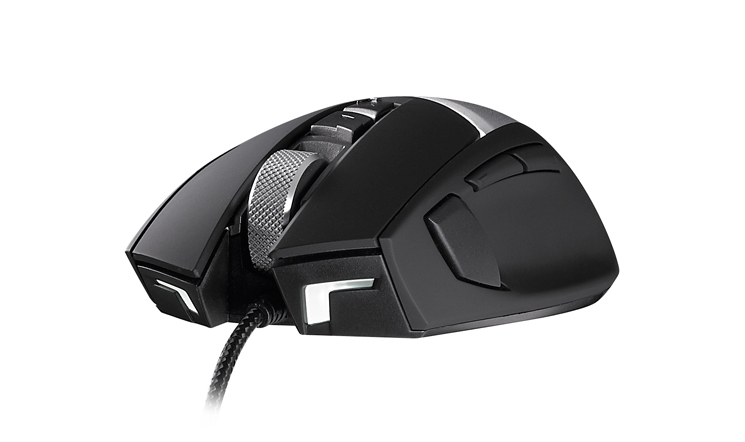
Deviating from the unorthodoxy of the MECH, the Reaper is of slightly more regular design based around a 8-button layout. Justifying its chops as part of the AL-series is a large aluminium panel that forms the rear palm rest of the chassis and is removable and replaceable. These relatively refined looks belie internal components which on paper match up against some of the best currently available.
About The Reaper
Built with premium features in mind, Reaper is constructed with a powerful and high precision 8200 DPI Avago laser sensor. Take full advantage of its wide DPI range with on-the-fly DPI switching via its dedicated Clutch key. 128KB of onboard flash memory means storing eight programmable key functions within four separate profiles. Each button has been intelligently placed throughout the Reaper’s ergonomic design to be quickly and easily activated during game play.
Built with premium features in mind, Reaper is constructed with a powerful and high precision 8200 DPI Avago laser sensor. Take full advantage of its wide DPI range with on-the-fly DPI switching via its dedicated Clutch key. 128KB of onboard flash memory means storing eight programmable key functions within four separate profiles. Each button has been intelligently placed throughout the Reaper’s ergonomic design to be quickly and easily activated during game play.
By including a clutch button, located under the thumb on the side of the mouse, CM Storm attempt to add flexibility and suitability for a wider range of game genre’s and gameplay styles than it would otherwise have. Furthermore, whilst some manufacturers are moving away from the expense of on-board memory in favour of software-based macro solutions at the driver level the Reaper bucks the trend, including 128kB of memory with 32kB allocated to each profile. Although not the first manufacturer to implement these features, CM Storm have brought it in at an attractive price point which could undermine the positioning of their competitors.
However, as with the rest of the AL-series, the Reaper’s party piece is the shaped and embossed rear aluminium panel. We praised this innovation on the MECH, which allowed modding-oriented users vastly more flexibility then than other keyboards, and so it will be interesting to see how the Reaper holds up in this respect. But first and foremost, it needs to work well as a gaming mouse.
Features And Technical Specifications
Features
* Avago 9800 High Precision Laser Sensor
* Aluminium and rubberized coating body structure
* 1000Hz polling with 1ms response time
* 32kB flash onboard memory per profile
* Four on-board profiles
* 8 Fully Programmable Buttons
* 1.8m Braided Cable with Gold Plated USB Connector
* White LED Accents inc Front LED Beam
* Customisable, Removable Aluminium Plate
* Aluminium and rubberized coating body structure
* 1000Hz polling with 1ms response time
* 32kB flash onboard memory per profile
* Four on-board profiles
* 8 Fully Programmable Buttons
* 1.8m Braided Cable with Gold Plated USB Connector
* White LED Accents inc Front LED Beam
* Customisable, Removable Aluminium Plate
Tech. Specs.
Part Number:- SGM-6002-KLLW1
Design:- Palm Design
Body:- Plastic / Aluminum / Rubber
Sensor:- Avago 9800
DPI:- 8200
Switch:- Omron 5 million clicks
Onboard Memory:- 128k
Inch Per Second:- 150
Max. Acceleration:- 30g
LED color:- White
Cable length:- 1.8m/ 5.75 feet Braided cable
Dimensions:- 73.9 x 127.2 x 37.24mm
Weight:- 145g
Application software:- Yes, download from http://www.cmstorm.com/en/products/peripherals/Reaper/?tab=support
Design:- Palm Design
Body:- Plastic / Aluminum / Rubber
Sensor:- Avago 9800
DPI:- 8200
Switch:- Omron 5 million clicks
Onboard Memory:- 128k
Inch Per Second:- 150
Max. Acceleration:- 30g
LED color:- White
Cable length:- 1.8m/ 5.75 feet Braided cable
Dimensions:- 73.9 x 127.2 x 37.24mm
Weight:- 145g
Application software:- Yes, download from http://www.cmstorm.com/en/products/peripherals/Reaper/?tab=support
Packaging And First Look
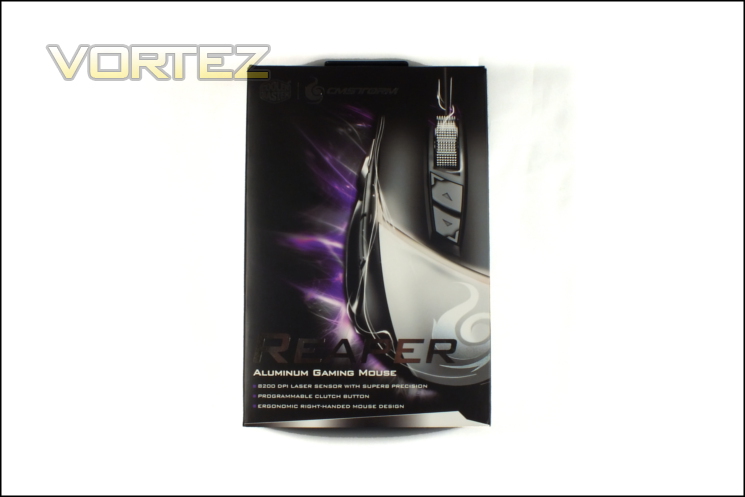
The Reaper’s packaging bears more than a passing resemblance to that of the CM Storm MECH, with strong imagery of the peripheral on the front and a brief glimpse of the major buttons. In essence it’s attempting to straddle the line between appealing to gamers and those with more refined aesthetic sensibilities, which is something of a first for the AL-Series. Three core features are listed which should be of interest to anyone tempted by a mid-to-high range mouse: 8200dpi Laser Sensor, Programmable ‘Clutch’ Button, and Ergonomic Right-Handed Design. The latter point in particular is important because it doesn’t come across in any of the imagery on the packaging.
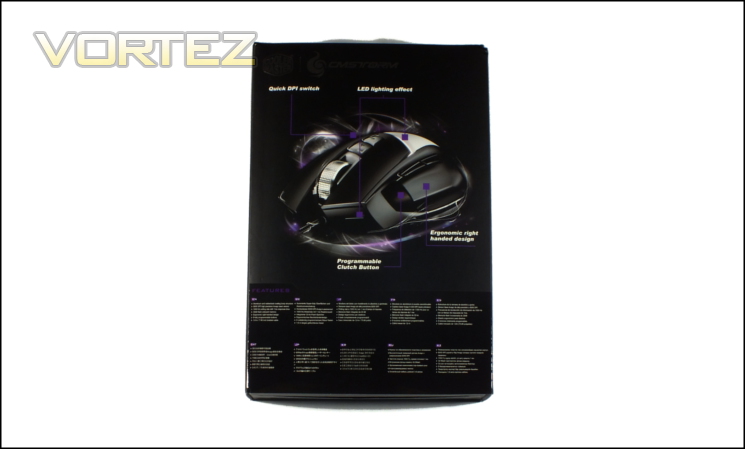
On the packaging rear you’re presented with an image of the Reaper at an angle, including the positioning of all the buttons and lighting. We should note that although ‘Quick DPI Switch’ is listed for the two buttons below the mouse wheel these are in fact programmable, a feature they share with every other button on the mouse.
Below the main image and in extremely small text is a features list, repeated in nine other languages; your eyesight will need to be keen to read them however as the font size is extremely small. This list explains the most important features in a little more detail although one or two such as the use of Omron switches and that the aluminium panel is removable, are curiously omitted.
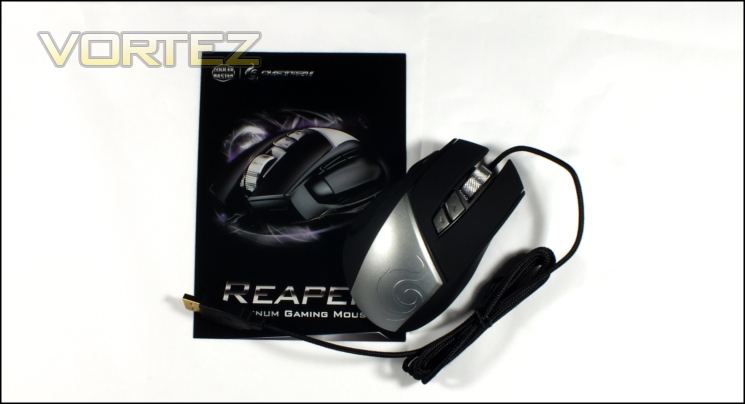
Sliding off the exterior sleeve reveals a compact case containing the mouse and user guide which is easily rigid enough to protect the peripheral during transit. The case is small enough to be usable when taking it to an event if desired, although you may want to use something a little more compact.
The Reaper’s bundle is pretty minimal for a high-end mouse in the current market, with only the mouse and user guide presented. Unlike the MECH no tool is included to remove the aluminium panel, indicating that it’s either toolless or requires something much more common in the average toolkit than a hex key. In common with most gaming mice released today there is no driver CD included. Instead you are referred to the website from which you can download the latest version of the software, although the mouse itself doesn’t require any to operate out-the-box.
There’s really not an awful lot to say abut the Reaper’s packaging. It’s essentially functional, keeping the Reaper well protected in transit, but without some of the paraphernalia often included in mice at this price range. The savings here may add up to more value in the final reckoning.
A Closer Look
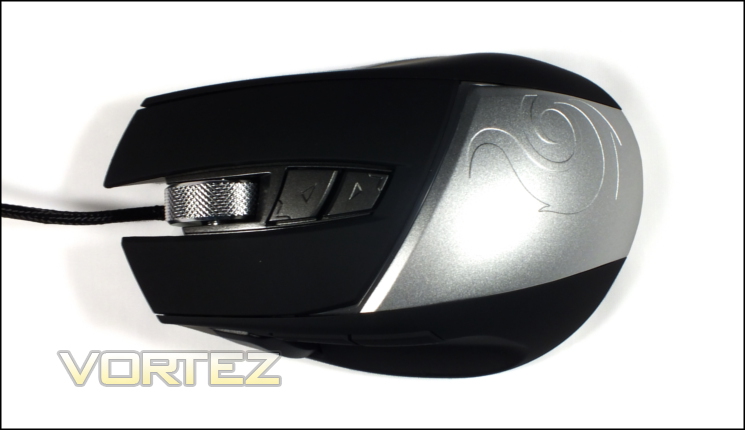
Taking our first look at the mouse on its own the subtle ergonomic shape is immediately apparent. Some mice tend to exaggerate this design but the Reaper only ventures a little more than is absolutely necessary. The matte black surface is rubberised throughout, allowing the user to keep a firm grip under all circumstances. Located on the top are the usual suspects on an 8-button design: main left and right buttons, mouse wheel and general DPI change buttons.
Eyes are immediately drawn to the silvered and textured mouse wheel, something of a premium feature where one might have expected a plastic or rubberised finish. When rotating it has a ratcheted motion which provides moderately strong input feedback when scrolling. Those who spend a lot of time using the mouse for gaming will approve, whilst more general PC users may find it a little heavy for free-scrolling documents, spreadsheets and web pages.
As noted before, although they are determined to be DPI selectors in the feature list the Up/Down buttons below the wheel are configurable to macros and other built-in functionality.
Below the DPI selector buttons is the Reaper’s aluminium panel, a feature which is replicated thematically in each of the members of the AL-series. Here the effect is subtle, such that you almost wouldn’t note that it’s removable with being notified of the fact. Embossed into the plate is CM Storm’s flame logo, although conceivably there’s no reason why you couldn’t swap this panel out for a more personalised design.
The length and pronounced curvature of the mouse lends credence to it being most suitable for palm grips and users with larger than average hands. It’s also heavy, weighting in at a portly 145g and considerably more than some featherweight competition which top out at less than 100g.
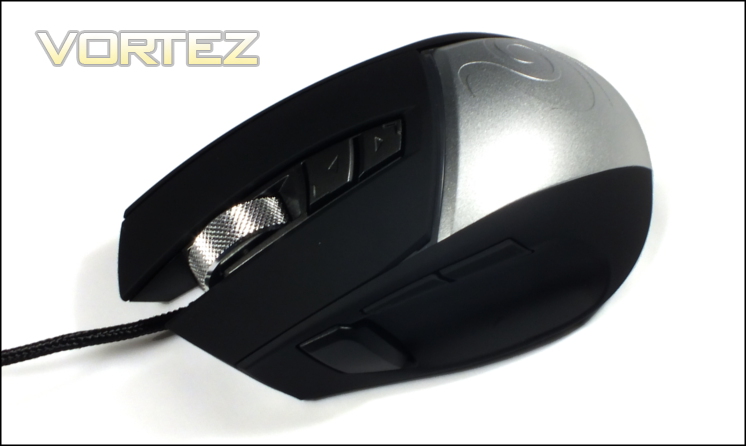
The left side of the mouse is the zone where the remainder of the buttons reside as the right is devoid of feature of any sort. Two main thumb buttons are positioned on the Reaper’s shoulder and are fairly standard inclusions on modern mice. The clutch button, forward of these and much larger in size, is much more rare. Smaller hands should just about be able to reach it whilst the thumb is resting on the small plateau at the mouse base, allowing them to flick the button with the tip; those with larger hands will be able to get a firmer purchase on the button. In most cases only the front thumb button will be able to be pushed whilst simultaneously pushing the clutch.
In common with the DPI selector buttons the clutch button is bindable to a wide range of pre-defined functions and user macros. Its default behaviour is as a low-DPI toggle, typically known as a ‘sniper button’, which thanks to the layout should be easy to use without destabilizing your grip.
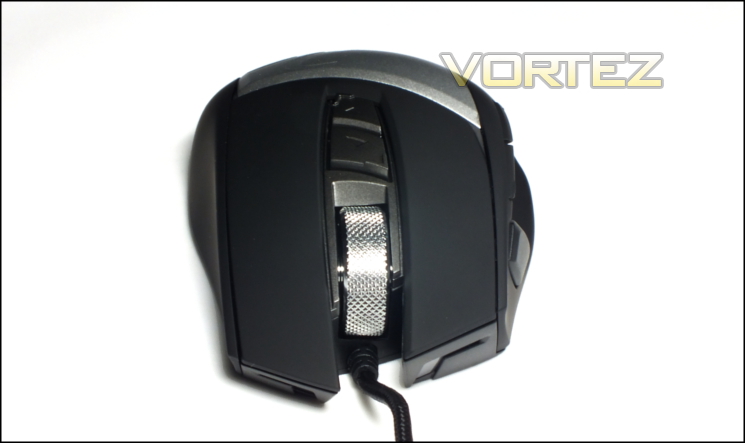
You’d be forgiven for thinking that the front of the mouse was featureless. However the translucent plastic ¬’s are in fact additional points of LED illumination which will project a beam in front of the mouse.
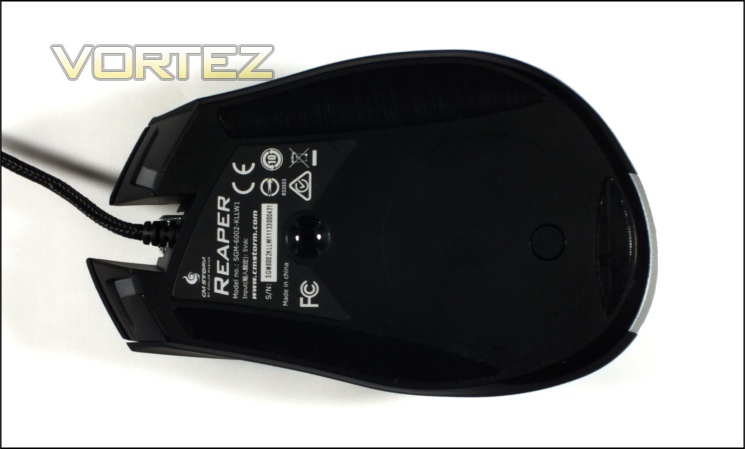
At the base of the mouse the Reaper is almost without feature. The laser sensor is aligned with the extrusion point of the cable, which is generally where most users would expect it. Three large Teflon pads should help the mouse slide over cloth and hard surface, but at the best of times keeping these even can be tricky until they have gone through the initial wear period. Towards the bottom of the mouse is a rubber cap, protecting the screw which holds the aluminium panel in place.
Finally, CM Storm have braided the Reaper’s USB cable for better durability. It’s a small thing, but we did note the lack of braiding on the MECH’s cable and it’s good to see it on the Reaper. The braid is lightweight, and combined with the weight of the mouse won’t move it if you’re not holding it in place.
The Reaper does lack weight distribution control, a feature that you often see to a greater or lesser extent on premium mice. It’s also heavy, perhaps indicating that the weight control was really swamped by the weight of the Aluminium panel. Even so, the balance appears to be neutral, which must have be fairly difficult with the weight naturally distributed towards the rear.
Lighting And Customisation
Lighting
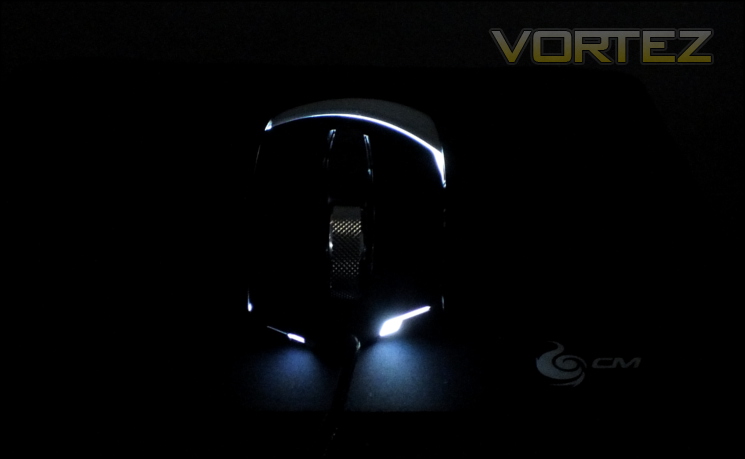
The Reaper has two lighting zones: a stylised lightning bolt on the top, and two other points of illumination on the front. LEDs in these zones are controlled through software for both brightness and one of four lighting modes.
Always On – All LEDs remain lit at all times.
Always Off – All LEDs remain off at all times.
Breathing – Lighting repeatedly increases in brightness up to a predetermined brightness level and them dims back down.
Rapid Fire – When idle, the lighting is on. However when any button is pushed the lights deactivate for the duration of that push.
Always Off – All LEDs remain off at all times.
Breathing – Lighting repeatedly increases in brightness up to a predetermined brightness level and them dims back down.
Rapid Fire – When idle, the lighting is on. However when any button is pushed the lights deactivate for the duration of that push.
Perhaps the best word you can use to describe these options is ‘solid’. Many other mice, even at this price point, offer multiple LED colours and modes and/or finer control over individual LEDs or lighting zones. In the Reaper’s defence the lighting is wholly in keeping with its general aesthetic, and it also has the benefit of being bound to specific profiles which allows some form of visual feedback for the current active profile. Independent control over the two lighting zones would have been nice, but isn’t really necessary.
Removable Panel
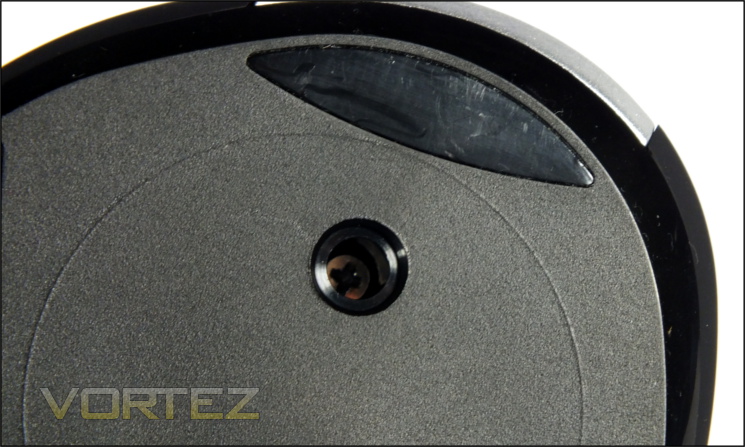
In common with the rest of the AL-series the Reaper includes an aluminium panel, supporting some modding by providing a blank (-ish) canvas to work on. Extracting it involves removing the rubber plug at the base of the mouse and then unscrewing the panel from the housing.
Although in theory simple enough in many respects it turned out to be quite problematic, especially compared to the similar feature on the MECH. Firstly, there are no instructions in the manual, user guide or website on removing the panel*; for many the first instinct will be to slide it off. The screw head is also small and the shaft down to the head narrow enough that only the thin ‘engineering’ screwdriver types will tend to fit. Any damage to the driver head or a particularly tight fit (perhaps caused by an attempt to slide off the panel) could cause the screw head to be stripped. We would not be surprised if CM Storm were hit with a number of RMA requests for user error because of this design.
We very much preferred the solution on the MECH which utilised a hex screw head and key that was included in the packaging. It’s more elegant, easier to unscrew and you can control the quality of the tools which your user is using. For a relatively trivial cost compared to the ticket price of the mouse it feels like a significant omission.
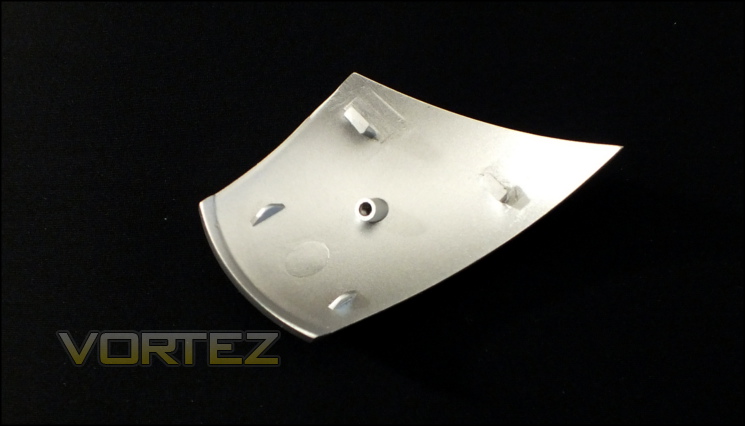
Although an interesting feature which is beautifully cut and shaped, it’s much harder to see the customisation potential than it was for the MECH. This is thanks in part to the intricate nature of the engineering involved to cut the panel, but also the very tight fit in the overall chassis. Users will probably have to rely on CM Storm providing specific panel designs or blanks which can then have their own design painted on them. Mitigating that is the excellent fit and finish on the included panel, which is in keeping with the mouse’s smart looks.
*UPDATE:
CM Storm have released the video below, which shows exactly how to remove the panels from each member of the AL-Series. Also demoed are some bespoke fascia designs for the Reaper, as well as the MECH and Pulse-R, and are great examples of what might be possible.
Software
CM Storm currently have individual per-peripheral configuration suites rather than a unified downloader/installer, which is also true of the Reaper and other members of the AL-series. We’ll refer to it as ‘Reaper AP’ on this page, matching MECH AP from the keyboard in the AL-series, although for now it’s only as the ‘Reaper application software’ on the official website. CM Storm ask the user to download the utility directly but the mouse can be used without software installed thanks to its 128kB on-board if default button functionality is adequate. Macro editing and lighting control will all necessitate installing the software as you would expect, but the functionality you apply to the mouse can later be made use of on any machine.
Version 1.0.0 of Reaper AP is the most current, as well as version 1.3.4 of the mouse firmware. There is no means of automatically updating the software and firmware as yet, but we wouldn’t be surprised to see that in a later revision.
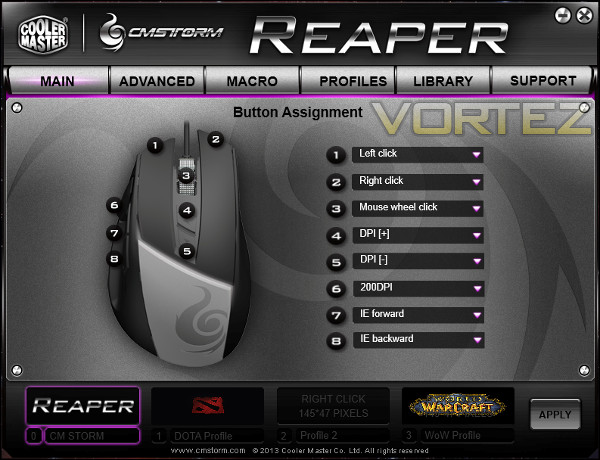
The configuration software matches the simulated brushed aluminium console aesthetic seen in the MECH AP, but this time the main window has functionality split between five different tabs – Main, Advanced, Macros, Profiles and Support. Slight cosmetic flaws such as the font style and spelling mistakes indicate that its still fairly early in it development cycle despite being approved for release, but a cursory examination indicates however that all the important configuration options present.
Main
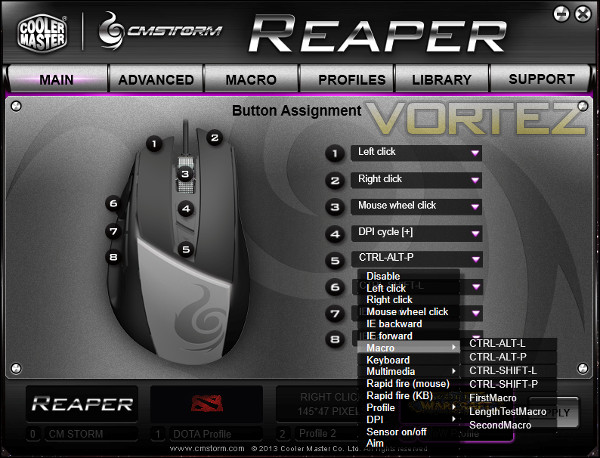
Main is the tab visible on application launch, and is where all buttons assignments are made. Each bindable location has a dedicated slot, and the selection of commands in the drop-down list is comprehensive. In addition to every standard mouse button you can also choose specific macros, multimedia functions, and simulated keyboard keystrokes.
The binding list also includes a various functions which are either rare or new to us entirely. Among them are the ability to simulate a rapid succession of either keystrokes or left/right mouse button activations and even selectively disable the mouse sensor. The latter in particular is not a factor in day-to-day use but there are almost certain to be some niche cases where it would be of significant value.
When binding a macro to a button the macro name is listed, not merely that it’s bound to a macro, which immediately puts its a cut above the MECH AP software in our eyes. Assigning specific keys or key combinations won’t be explicitly stated in the information, but that it’s a keystroke will be indicated as ‘Keyboard’. Interestingly CM Storm have recognised a need for an ‘Apply’ button and included it; this again was sorely lacking on the MECH AP, and will make experimenting with button assignments much more straightforward.
Changes made in this panel are on a per-profile basis. Four profiles are shown, each of which is stored in on-board memory. An image (for which dimensions have been given) can be associated with the profile for quick recognition in the software, and of course switching profiles can be performed with a command on the mouse – either profile cycling (useful if DPI cycle is also needed) or straight up/down.
Advanced
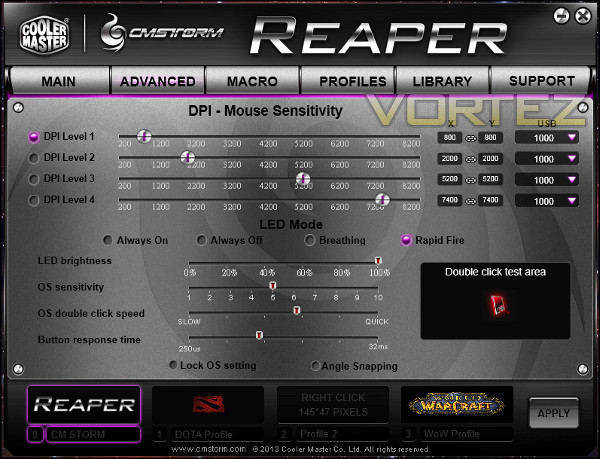
The Advanced tab is where you’ll find controls for DPI levels, lighting and mouse configurations. Four independent DPI levels are provided with increments of 100, which generally plenty. We would have liked to see a means of disabling each of the DPI levels to make cycling through a subset more simple, but as it stands it’s not a bad set of functions. CM Storm also allow the varying of USB polling rate on a per-DPI level basis, which is a first for mice we have reviewed.
We discussed LED lighting earlier, but suffice it to say that it’s not exactly the fullest of options due to the mono-coloured LEDs in the Reaper. It’s notable that the lighting is adjustable on a per-profile basis, which allows you to distinguish the active profile with a glance at the mouse, something which is often underrated.
As sensitivity options are effectively based on the OS settings, the one final option of note is the ability to enable/disable angle snapping. Snapping is disabled by default, as it should be, but some users who prefer this level of predictive input from the mouse will appreciate it.
Once again, all settings are on a per-profile basis.
Macro
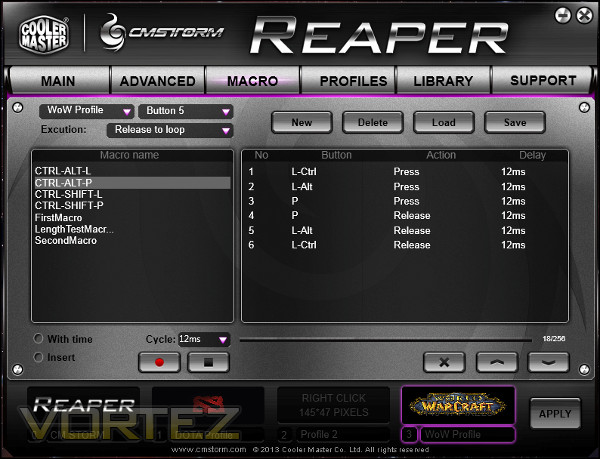
The Macro tab controls the creation and editing of all macros. Unlike other solutions CM Storm explicitly create a file for each macro created, and a macro can be bound to a profile and mouse button at creation or at a later date. Macros can be up to 86 actions in length, or 43 key strokes. Inserting or removing keystrokes is simple using the provided tools.
Keystokes can be recorded with set delays or the delay recorded as you input the macro keystrokes. Mouse button presses can be included in the macro, and each can be set up to begin and repeat during different button events, i.e. push and release. When recording the macro you will be required to bind it to a particular button and profile, but that or other macros can be loaded and applied to other buttons in other profiles as required.
Due of the mechanism of explicitly creating a file locally for each macro backups are implicitly simple to perform by copying the //Cooler Master/CM Storm/Reaper/Macro folder. It may not be exactly elegant or automatic but it is at least present, unlike some competing solutions.
Profiles
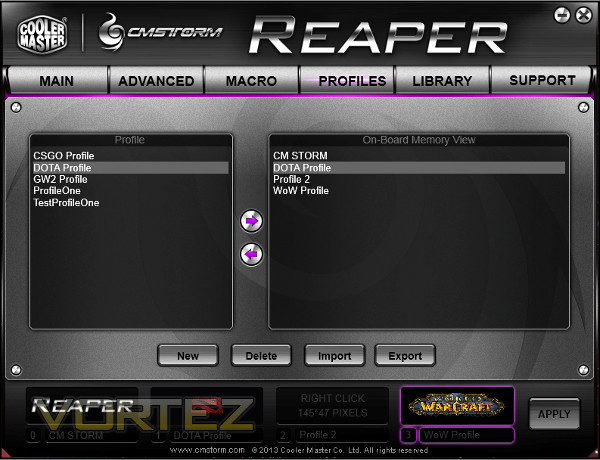
The Profiles tab manages which profile is stored in on-board memory and which is held on the PC. Profiles are stored in the //Cooler Master/CM Storm/Reaper/Profile folder with a .pof suffix. Any stored only on the mouse can be backed up locally by selecting the Profile and clicking the left-arrow, whilst those stored locally can overwrite on-board profiles by selecting it and the profile to replace. Note that there is no prompt to save a profile before being replaced, so care needs to be taken not to overwrite crucial settings. Import and Export buttons perform the same function.
Profiles can be created by selecting ‘New’ and likewise deleted. On creation, much like macros, a file is explicitly created from which the Profile Name is derived.
This is by far the most explicit means of profile handling as files we’ve seen in mouse or keyboard software. Some prefer this layer to be invisible, but for others knowing where profiles are stored and being able to back up where appropriate is immensely important, especially if their user-defined configurations are highly complicated.
Library
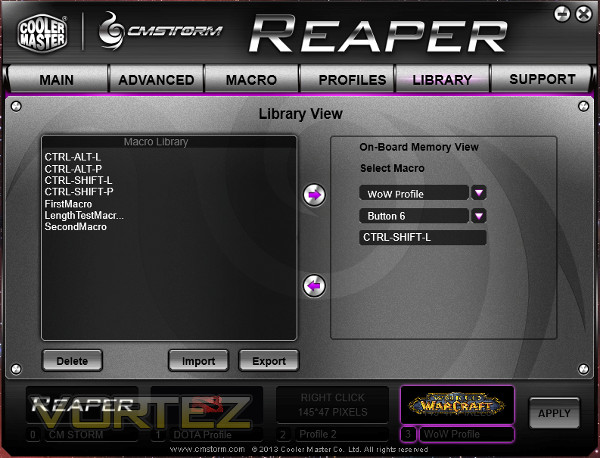
The Library tab is yet another location for assigning macros to specific buttons within profiles, but it also has another important function. From here, macros may be exported from on-board memory to a local drive. This allows you to easily move macros (as well as profiles) between systems in addition to backing up macros to a local drive.
Support
The final tab is the Support tab, which provides software and firmware version information as well as the location to check for updates. There is no live update at this time.
In summary, the Reaper AP software is extremely functional if a little unpolished. A few buttons could afford more detailed descriptions, especially those just labelled Import & Export, but with that exception pretty much everything we would want to see for a mouse with the Reaper’s functionality is there to exploit. For release version 1.0.0 it’s close to excellent, and will hopefully only get better.
Performance
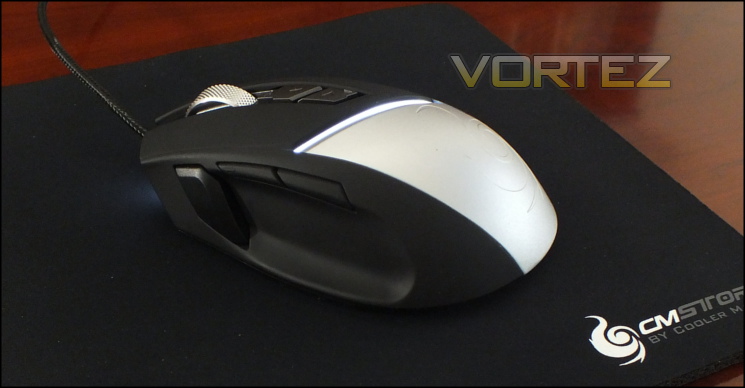
When assessing the performance of the Reaper we made use of the matching MECH keyboard and a Speed RX S mouse pad, also from CM Storm. The latter is a small cloth weave mousepad with 5mm thick rubber backing, and just the sort of pad most gamers who purchase this mouse will be picking up or already using. It’s also typically a very good fit for high DPI laser sensor mice, even if personal preference may cause you to lean in a different direction.
General Performance
The feel of the mouse in your hand is natural, and all the major buttons are well in reach. We found the rubberised finish to the plastic is comfortable, unlike some competing solutions which have a finish which is an unpleasant blackboard-like surface. Finishes such as these tend to superficially discolour relatively quickly with prolonged use, but a quick wipe with a lint-free sloth tends to eliminate sweat smears and fingerprints quickly.
It’s clear very early on that the Reaper is heavy and feels more weighty because of its size. This makes lifting it a little awkward, and although the sides of the mouse are grippy you’ll need to keep a pretty tight hold in order to do so. Despite its weight however there is very little comparable drag when mousing across a pad, indicating very good non-stick surfaces on the skates that compensate both for their size and the 140g they have to propel.
Something which we noticed immediately was that when pressing the main buttons, especially the right-hand button, can cause the mouse to pitch forward a little. The reason is pretty obvious: the main buttons overhang the base by some distance, and more so the teflon skates – by out two centimetres. They obviously cannot support much force on the front of the main buttons, and so more pressure needs to be placed towards the rear either by resting your palm there or moving your fingertips back further. The impact varies greatly depending on your grip and hand size, but it’s the first specific flaw we can identify in the mouse’s design. Rectifying it would be as simple as extending the teflon feet further up the base, so it’s a very odd thing to overlook.
Obviously the Reaper is a gaming mouse, but it will in many cases also be used in wordprocessing, office work and more advanced IT workloads. Macro keys for those are obviously useful, but more so each button needs to be solid and dependable to prevent frustration. We found them in the main to be just that, although the rear-most of the thumb buttons has a slight amount of movement before it hits a point of resistance where the underlying switch begins to be actuated. The wheel is an excellent compromise between relatively clicky for precise gaming and yet smooth enough for fast scrolling. The wheel was at first a little slippery, but after a few days of use stopped being an issue.
Gaming Performance
For general gaming the Reaper performed well, the shortcomings with regards to pitching forward notwithstanding. Button responses were consistent, with only the rear thumb button feeling out of place thanks to the issue stated above. The front-most DPI selector is just about within easy reach for in-game use with most grips, a factor which isn’t always the case. The overall finish of the matte surface aided in keeping the mouse stable and well in hand, even when moving quite expansively.
For first-person shooters the inclusion of a low-DPI modifier on the mouse is always a boon, and it was once again the case with the Reaper’s ‘Clutch’ button. Precise aiming was augmented by the sensor Avago 9800 which always felt accurate and never jumped. We were also pleased to note that the low-DPI mode is both independent of the mouse’s previous DPI levels and user configurable.
MMO and RPG titles will find the Reaper to be slightly less specialised to the hot-key prevalent form of gameplay, but nonetheless the fact that each button on the Reaper is rebindable will be crucial. Pairing it with an MMO-suitable keyboard – i.e. one with extensive macro functionality – will probably see it being more than suitable in the main. If nothing else, rebinding the clutch button to a macro for most used skills will be an excellent use, especially as it’s possible to simulate specific keystrokes which can then be immediately mapped in-game.
The mouse wheel is sufficiently ratcheted (i.e. clicky) to be suitable for gaming – esp weapon switching – and is not tiring even during long gaming sessions. It’s also just about heavy enough that using the middle mouse button is possible without simultaneously scrolling by accident, a problem which can occur on mice with very light weight or freescrolling wheels.
Multiple profiles are obviously excellent when hopping across games or even skill-sets in games. CM Storm didn’t forget the ability to swap between profiles on the fly through mouse bindings, but in the current software iteration it’s not possible to associate a profile with an application such that they both launch at the same time. We expect such functionality to be added eventually – it’s something of an industry standard – but even without it profile management is trivial compared to many competing devices.
In terms of specific synergy with the MECH, there was little in evidence. Other manufactures have begun to allow a level of interoperability between branded peripherals, but these have been developing software drivers to facilitate this functionality. Given the slightly unfinished state on the CM Storm AP software for both the MECH and Reaper it’s unsurprising that the manufacturers have yet to delve into this level of complexity.
In the main we were impressed with the Reaper. It was stable and the added weight of the aluminium panel and high-end components didn’t impact how it felt to use nearly as much as could be expected. The idea of the Aluminium panel being an aid to gameplay – something of a palm cooler if you will – is a little more of a tough sell; it may help, but we struggled to notice a difference. Apart from the slight issues with the forward-pitching – a flaw which will impact to varying degrees depending on the grip style used – and our nitpicking over the rear thumb buttons, the Reaper was extremely difficult to fault.
Conclusion
When all is said and done, what was our opinion of the Reaper? Well, just as we described the feature set as solid so we would have to apply the same label to the mouse overall. You cannot really reinvent the wheel with mice and expect to come up with anything resembling sensible, and so the more experimental features we saw with the MECH cannot really be replicated. However if you’re seeking a matching set or assembling the whole AL-series package the Reaper will serve you exceptionally well.
As an 8-button mouse we can report that it performed admirably. CM Storm didn’t fall into the trap of creating a mouse with fixed button functionality, and so in the theme common throughout the AL-series every one can be customisable. This makes it both ideal for FPS gaming and significantly above average for any other game in which you can leverage the use of the ‘Clutch’ thumb button for best effect. MMO and action-RPG gamers, wary of the complexities of elaborate MMO mice, should find the Reaper an ideal compromise with minimal learning curve but a lot of potential.
As with the MECH components, CM Storm have made excellent choices with the Reaper. The 8200DPI Avago 9800 laser sensor is becoming a fixture of high-end gaming mice and it once again performs admirably without a skip in tracking. On-board memory is also well worth its place on a spec list if LANs or simply playing on someone else’s PC figures highly in your usage. Four on-board profiles and ever-reliable Omron switches are just gravy.
We’re also pleased to report that the software is in a very good, if unpolished, state. The functionality is all there and it’s much more usable than its corresponding software on the MECH. We were a little disappointed that there are no synergies to be had between the keyboard and mouse. Both work well independently and together, but it’s not yet possible to use one to affect a state on another, a feature that’s been on one or two competitor lines.
Perhaps the one factor which is a let down is the removable aluminium panel. For the MECH it was a very strong feature with bags of potential, but it’s difficult to see how well the average enthusiast will be able to leverage that flexibility in the Reaper. The panel is a precision engineered piece with complicated shaping and intricacy which by its very nature will be relatively difficult to replicate. A very snug panel fit will make covering the panel with a vinyl surface difficult to apply and hold. Finally, its screw-based removal method is also set to be problematic, and we’d advise that you ensure your screwdrivers are in tip-top condition before tackling it.
CM Storm reached out to us to let us know their plans in supporting this feature in the future. Perhaps the most important point is that blank fascias will be available from their dedicated EU online shopfront, allowing users to mod a replacement panel in any way they see fit whilst preserving the excellent finish on the original. Custom designs may begin to appear later but those with a little initiative will be able to crack on regardless. With that said the stock aesthetics of the mouse are excellent, especially for any mouse at the £50 price point.
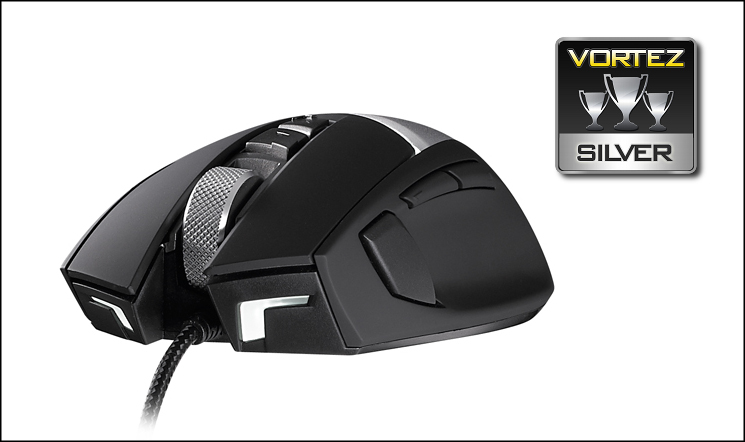
CM Storm have come back down to earth with the Reaper, the final member of their AL-Series peripheral range. Attractive aesthetic design is backed up with excellent component choices and good feature set, adding up to a mouse which is a match for most at the price. The first software release is still solid, and with on-board memory and profiles the Reaper more than holds its own as a competition mouse for gaming events where access to configuration software isn’t guaranteed. Customisation options are a little lacking, but this can be rectified by a strong selection of fascias from CM Storm. We award it a Silver, with particular note that it’s most suited to those who prefer larger, heavier mice.
Pros
+ Great aesthetics
+ Solid construction
+ Very good component choices
+ On-board memory for macros and profiles
+ All programmable buttons
+ Clutch button for low-DPI mode where desired
Cons
+ Large and Heavy
+ Aluminium plate removal method ill thought out
+ No weight redistribution
+ 1.0 version of the software could use some polish
+ Slight imbalance on the mouse if pressing on the very end of the main mouse buttons
Tips
= Aesthetic design matches that of the MECH and Pulse-R, but silver and matte-black really go with anything.
+ Great aesthetics
+ Solid construction
+ Very good component choices
+ On-board memory for macros and profiles
+ All programmable buttons
+ Clutch button for low-DPI mode where desired
Cons
+ Large and Heavy
+ Aluminium plate removal method ill thought out
+ No weight redistribution
+ 1.0 version of the software could use some polish
+ Slight imbalance on the mouse if pressing on the very end of the main mouse buttons
Tips
= Aesthetic design matches that of the MECH and Pulse-R, but silver and matte-black really go with anything.

Click here for an explanation of our awards at Vortez.net. Thanks to CM Storm for providing this review sample.


