







The next installment of the popular CM 690 Series is here. The CM 690 III Mid Tower retains many characteristics from its predecessor but will it be a success?

Manufacturer and Sponsor: Cooler Master
Street Price: £80
Cooler Master’s CM 690 series has always been a popular choice for enthusiasts and gamers. Its middle of the road styling has satisfied both camps by remaining largely subtle in its aesthetic approach. It was way back in 2011 that 690 II received a refresh with the advanced edition, but today CM are back with their next instalment, namely 690 III.
690 III is a mid-tower which isn’t that dissimilar to its counterpart and predecessor the 690 II. It’s never an easy task introducing the successor to a popular product and rather than journey into unfamiliar territory by completely redesigning this new case, CM have chosen to refine the classic looks and we have to admit, this is a wise move.
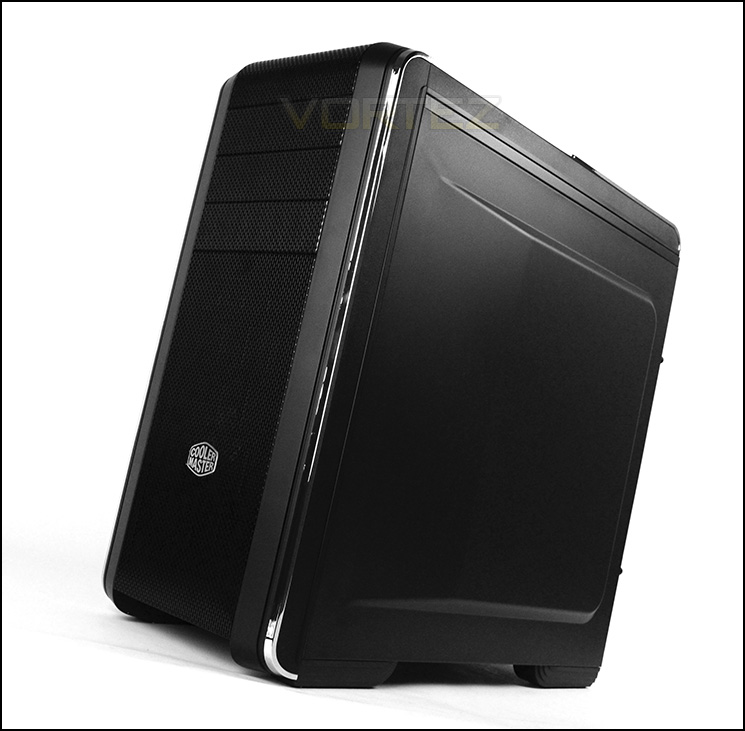
Cooler Master on their CM 690 III
CM 690 III is a revolutionary update to the popular CM 690 II mid-towers. The exterior retains the curved metal mesh look the series is known for. The interior has been completely updated – the HDD/SSD combo cage can be switched between 3.5-inch or 2.5-inch drives by adjustable trays without any screw. There’s enough room for a 240mm liquid cooling radiator at the top or front, 120mm in the rear and supports up to 9 fans, including 3 large 200mm fans for extreme airflow. And cleaning is hassle free thanks to the multiple dust filters at the bottom, top, and front.
Technical Specifications
Available Color
Midnight Black
Material
Polymer, mesh front bezel
Dimension (W / H / D)
230 x 507 x 502 mm / 9.1 x 20.0 x 19.8 inch
Weight
8.7 kg / 19.2 lbs
M/B Type
microATX, ATX
5.25″ Drive Bay 3 (exposed)
3.5″ Drive Bay 7 (hidden)
2.5″ SATA HDD Drive Bay 10 (hidden; 7 from the HDD/SSD combo cages
1 under the ODD cage, 1 behind the M/B tray,
1 at the bottom)
I/O Panel
USB 3.0 x 2, USB 2.0 x 2, Audio In & Out (supports AC97 / HD Audio)
Expansion Slots
7+1
Cooling System
Top: 120/140mm fan x 2, or 200mm fan x 1 (optional)
Front: 200mm fan x 1 (installed), or 120/140mm fan x 2, 180mm fan x 1 (optional)
Rear: 120mm fan x 1 (installed)
Side: 120mm fan x 2 or 180/200mm fan x 1 (optional)
Bottom: 120mm fan x 1 (optional) HDD cage: 120mm fan x 1 (optional)
LiquidCooling System
Top/ Front: 240mm radiator x 1 (optional)
Rear: 120mm radiator x 1 (optional)
Power Supply Standard ATX PS2 (optional)
Maximum Compatibility VGA card length: 423mm / 16.6 inch
CPU cooler height: 171mm / 6.7 inch
Midnight Black
Material
Polymer, mesh front bezel
Dimension (W / H / D)
230 x 507 x 502 mm / 9.1 x 20.0 x 19.8 inch
Weight
8.7 kg / 19.2 lbs
M/B Type
microATX, ATX
5.25″ Drive Bay 3 (exposed)
3.5″ Drive Bay 7 (hidden)
2.5″ SATA HDD Drive Bay 10 (hidden; 7 from the HDD/SSD combo cages
1 under the ODD cage, 1 behind the M/B tray,
1 at the bottom)
I/O Panel
USB 3.0 x 2, USB 2.0 x 2, Audio In & Out (supports AC97 / HD Audio)
Expansion Slots
7+1
Cooling System
Top: 120/140mm fan x 2, or 200mm fan x 1 (optional)
Front: 200mm fan x 1 (installed), or 120/140mm fan x 2, 180mm fan x 1 (optional)
Rear: 120mm fan x 1 (installed)
Side: 120mm fan x 2 or 180/200mm fan x 1 (optional)
Bottom: 120mm fan x 1 (optional) HDD cage: 120mm fan x 1 (optional)
LiquidCooling System
Top/ Front: 240mm radiator x 1 (optional)
Rear: 120mm radiator x 1 (optional)
Power Supply Standard ATX PS2 (optional)
Maximum Compatibility VGA card length: 423mm / 16.6 inch
CPU cooler height: 171mm / 6.7 inch
Packaging & First Look
690 III is packaged within a large double-reinforced cardboard box. Rather than go down the eco route Cooler Master have given this case professional packaging. There is a depiction of 690 III on the front and a short list of major features. Around the back there is a schematic diagram pinpointing all significant features. Within the box itself, the case is covered in a clear plastic sheet and held in place via dual polystyrene pillars.
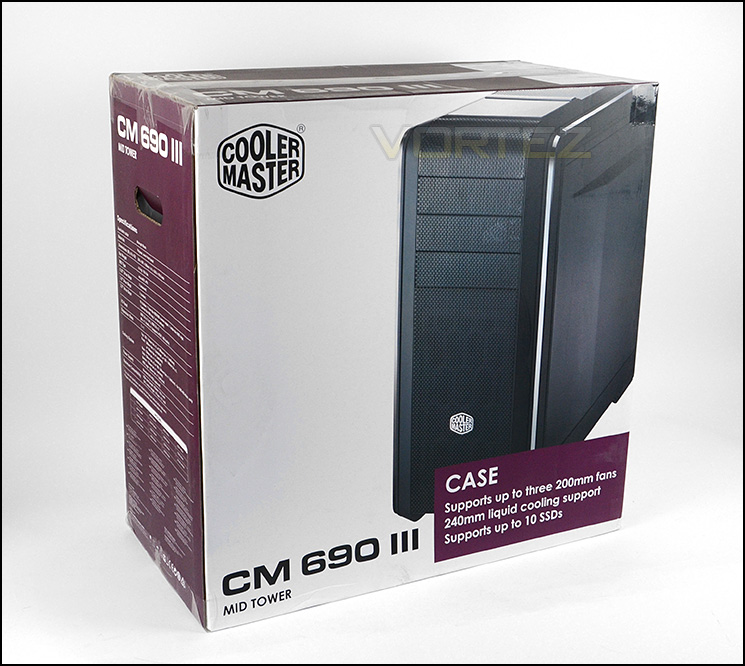
Packaging for 690 III
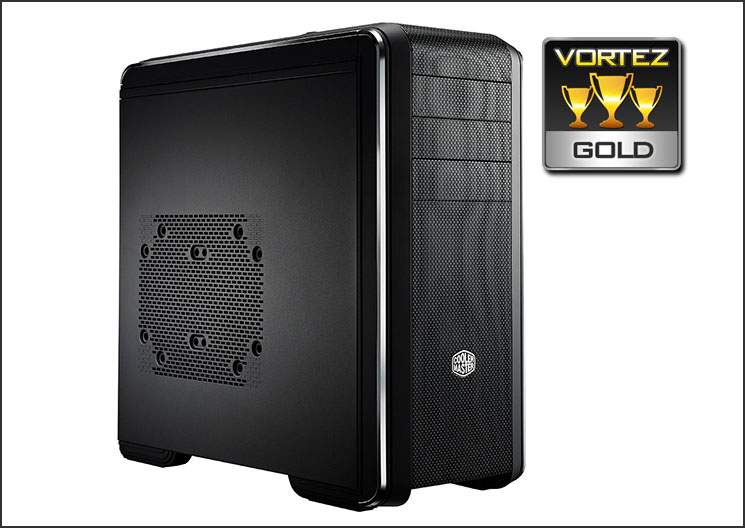
Unveiling 690 III we can see that the styling is very much in keeping with the previous 690 II; its predecessor. The external design continues with a curved mesh aesthetic from the front and over the top but along the edge is a mirror finish strip on both sides.
The prominent side panel features a perforated mesh section allowing 2x 120mm or 1x 180/200mm cooling fan, whilst on the alternate side there is another steel panel which is solid and features a convex design to allow more clearance for cable management.
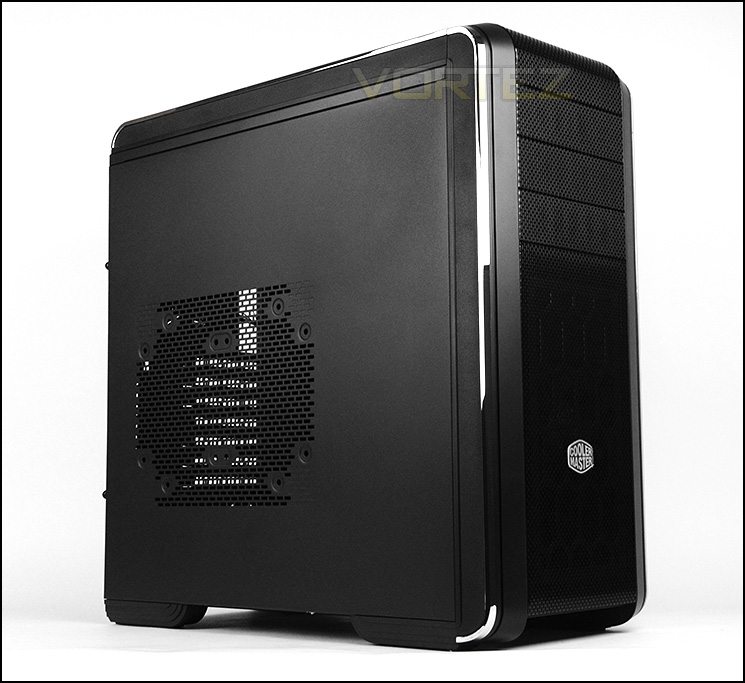
Prominent side features mesh for attaching cooling fan
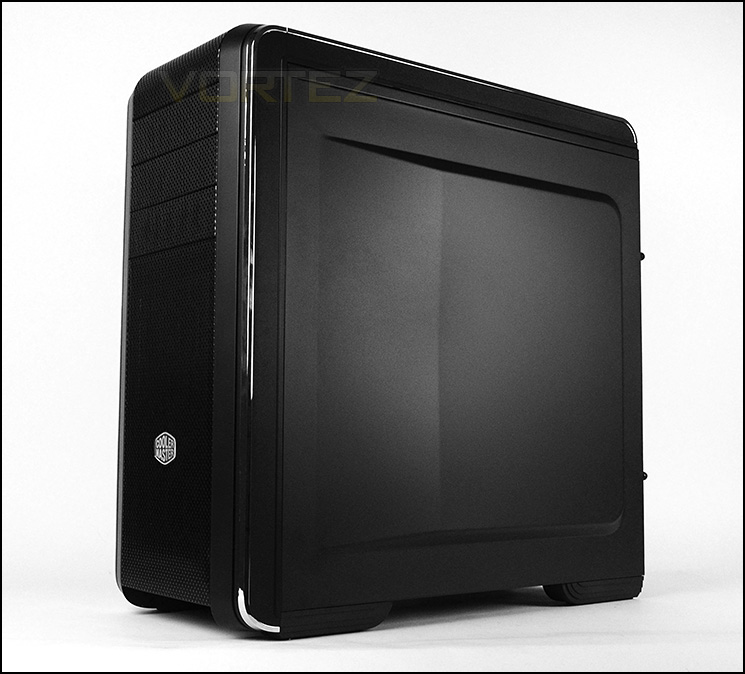
Styling not that dissimilar to 690 II
Exterior
The front of 690 III features a front fascia consisting of a plastic outer edge and steel perforated mesh running down the centre. Along the outer edge CM have given 690 III a mirror finish strip that spans the bottom right to the top. Behind the logo resides a 200mm intake cooling fan which has a removable dust filter, there mounting holes at the front for attaching a 240mm radiator (more on this later). The top section includes a trio of 5.25” drive bay covers which are removable from the inside of the case.
Around the back of 690 III we have a traditional layout. At the bottom there is an opening for mounting the PSU, immediately above this there are seven PCI expansion slot covers which have ventilation, there is also an additional vertically aligned PCI expansion slot cover. In the upper region there are three circular rubber grommets and a 120mm rear exhaust cooling fan.
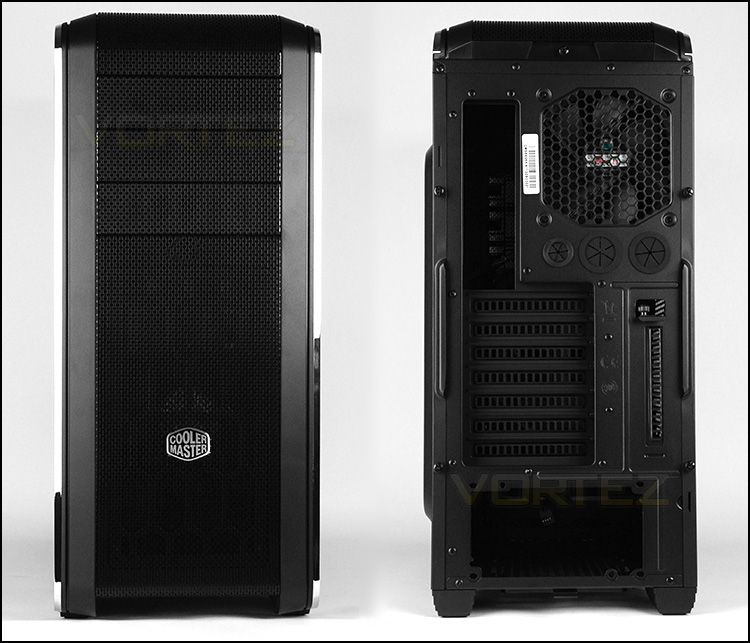
The front and back of 690 III
Up at the top of the case is the front panel connectivity. There are a number of ports towards the front and a sliding cover moves back to reveal a storage compartment. The options at the front consist of the following:
• 2x USB 3.0 ports
• 2x USB 2.0 ports
• Headphone and Microphone jacks
• Power and Reset buttons
The sliding cover which CM have used is highly reflective and therefore smudges easily. This cover also uses an unconventional method to attach itself to the case. It doesn’t appear to be as robust or substantial as it could be, we would rather see something using a hinge rather than having to carefully slide a piece of plastic over a gap every time we need access.
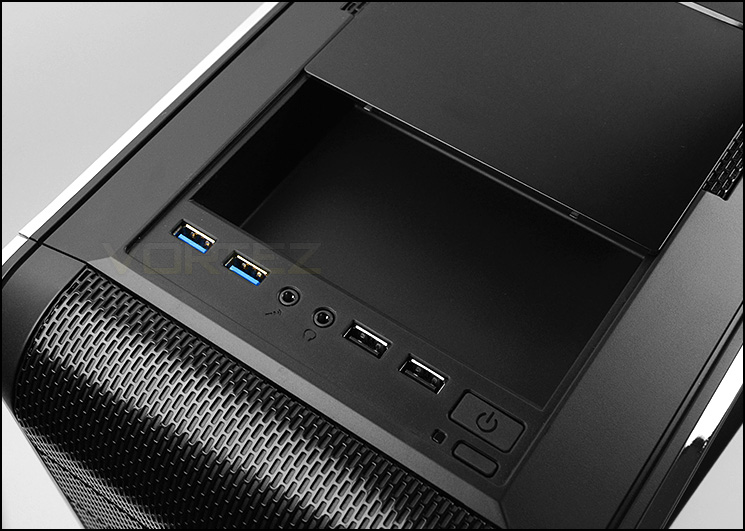
The front panel allocation
Further back, the top section of 690 III features a perforated mesh panel which is removable. This panel does contain a dust filter but it is integrated into the panel.
At the top there are no included fans but this case can accommodate 2x 120/140mm or 1x 200mm cooling fan. This also means we can mount a 240mm radiator – more on this later.
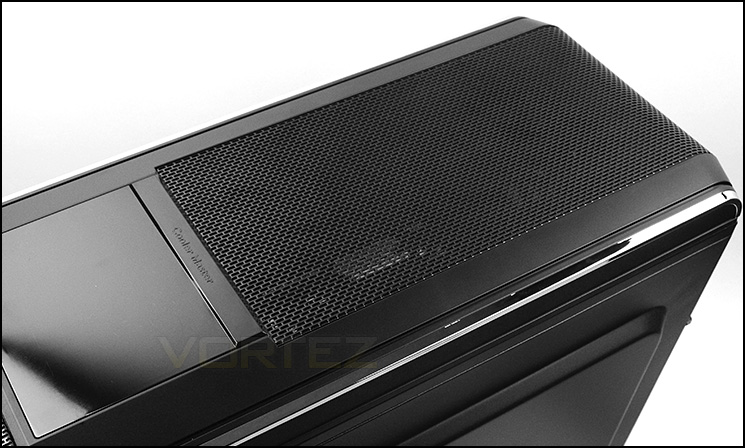
The top section of 690 III
Flipping the case over, we see that the underside has four rubber strips to help ensure 690 III does not slip on smooth surfaces. Also on the underside is a large, removable dust filter for the PSU and optional fan position.
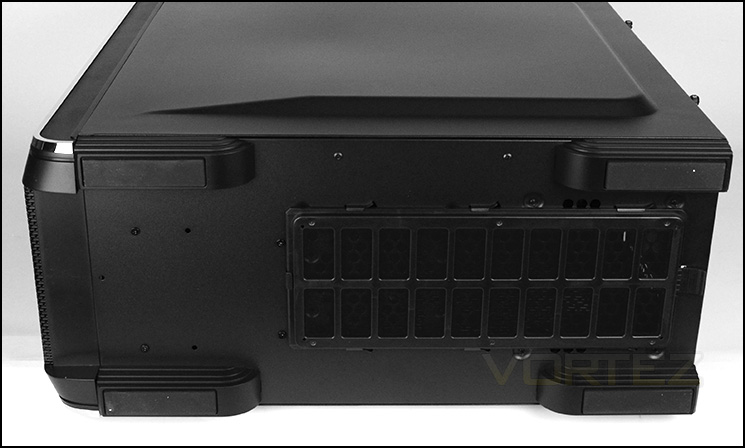
Rubber feet and removable dust filter at bottom
Interior
Both side panels are fixed into place with two thumbscrews on either side. The inside of 690 III is where the significant changes have been made, our case now has adjustable storage HDD and SSD trays.
The prominent side reveals a powder coated interior which supports ATX and M-ATX form factors. There are tool-less mechanisms used throughout and cut-outs for cable management and CPU cooler support. Unfortunately there are no rubber grommets for the cable management cut-outs which is somewhat of a disappointment.
Around the back, behind the motherboard tray CM have cleverly utilised available space to allow a single SSD to be mounted to the motherboard tray.
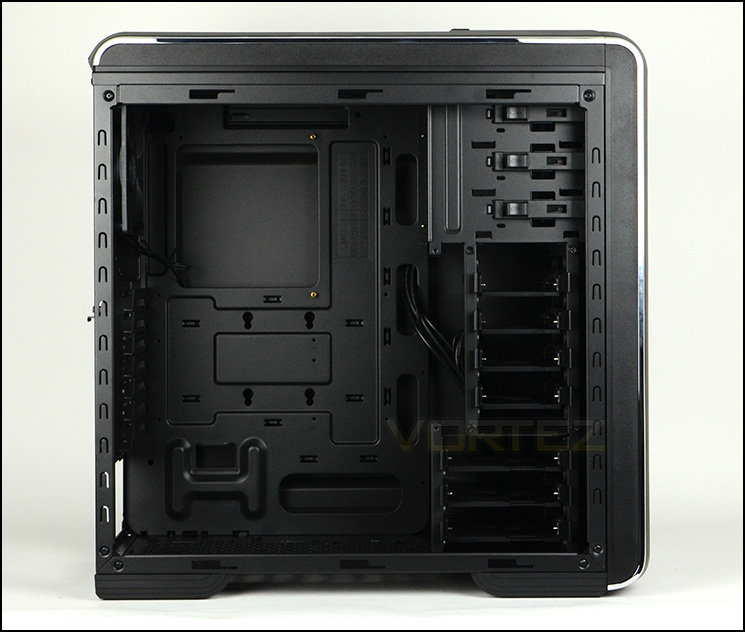
An overview of the layout
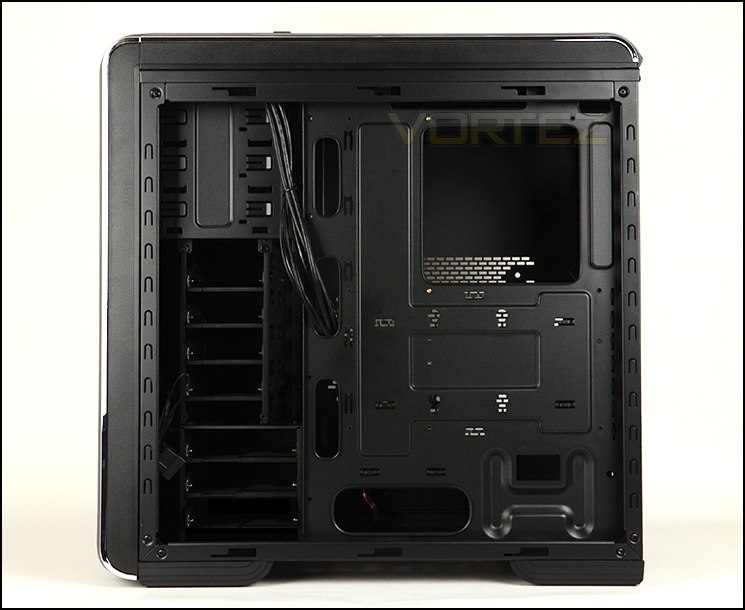
Behind the motherboard tray – position to mount SSD
Located at the bottom of 690 III is the area for mounting the PSU. We’re pleased to see that there are rubber pads for the PSU to sit on and that there is a removable dust filter at the bottom of the case. Next to the PSU area there is also space for mounting a single 120mm cooling fan.
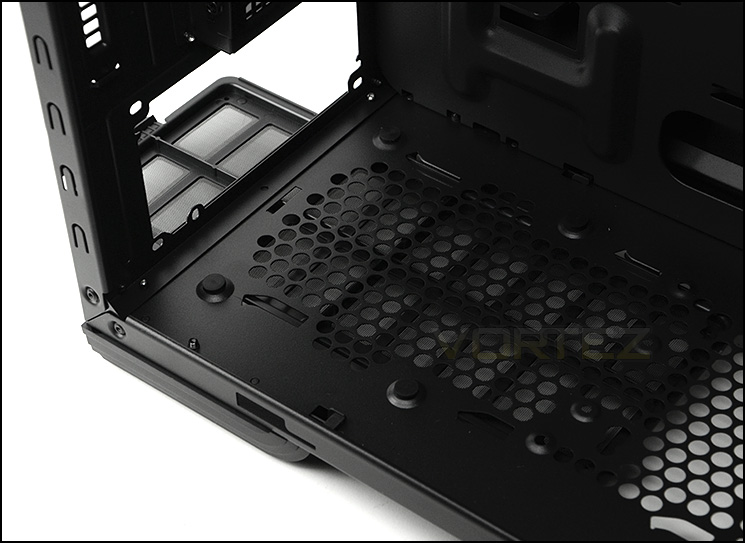
Anti-vibration pads for PSU
Further up inside 690 III, there are seven PCI expansion slot covers which have ventilation for better airflow. Rather than give this case thumbscrews for these covers, CM have decided to use standard screws which is an odd decision. Immediately to the left there is a vertically aligned PCI cover for mounting alternative devices such as a fan controller etc.
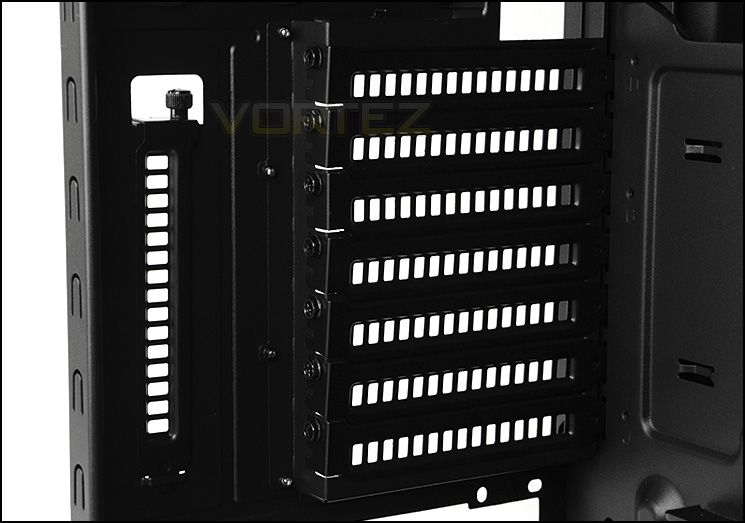
Plenty of PCI slots for multi-GPU configurations
Interior (Continued)
CM have given 690 III a 120mm rear exhaust fan for expelling unwanted heat. At the top there are no included fans but space to mount 2x 120/140mm fans or a single 200mm. This allows such coolers like the popular H100 to be installed, thus giving accommodation for 240mm radiators.
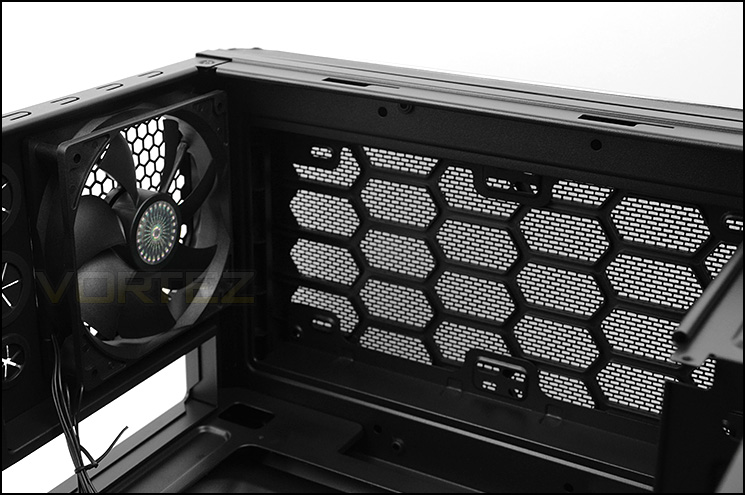
Cooling options at the rear and top
Over on other side of the case there are a trio of 5.25” drive bays, each having tool-free mechanisms for fixing the drive into place.
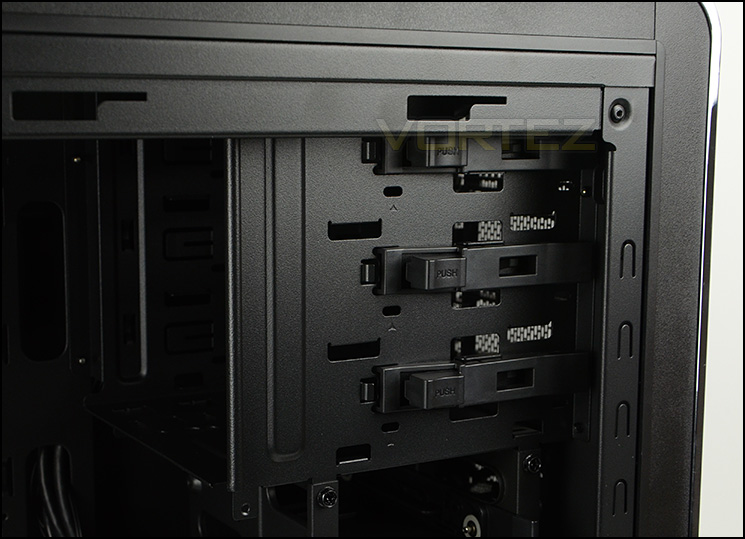
Tool-free mechanisms for optical drives
Storage is where 690 III excels. There are two cages which can house a total of seven drives. The beauty with the storage options inside this case is that CM have incorporated a new concept with the ‘EZ tray’. The EZ tray can switch between two different sizes to accommodate 2.5” or 3.5” drives.
Both cages can also be removed to make way for additional GPU clearance and water cooling support.
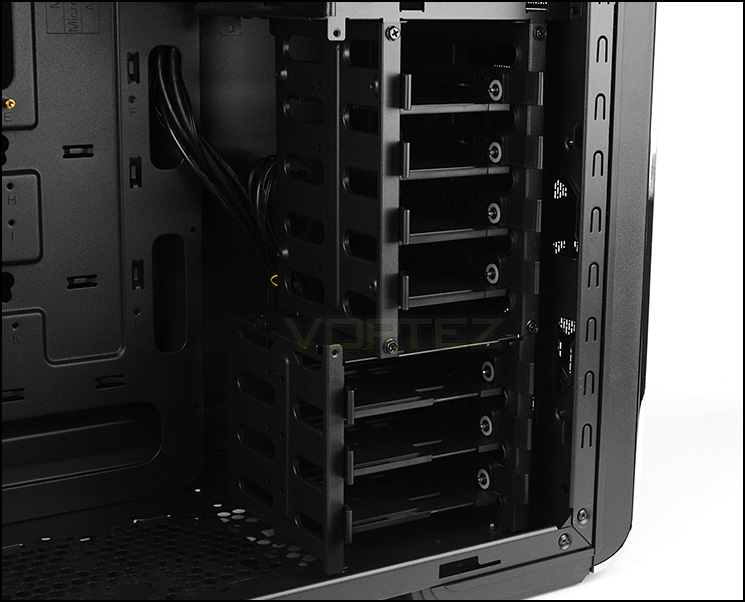
Two cages featuring EZ trays
Installation
It has to be said, the installation process with 690 III is without any hassles. From the start to the finish working with this case is a breeze. Space and clearance meant that our ATX test system managed to slot into the case with no major issues.
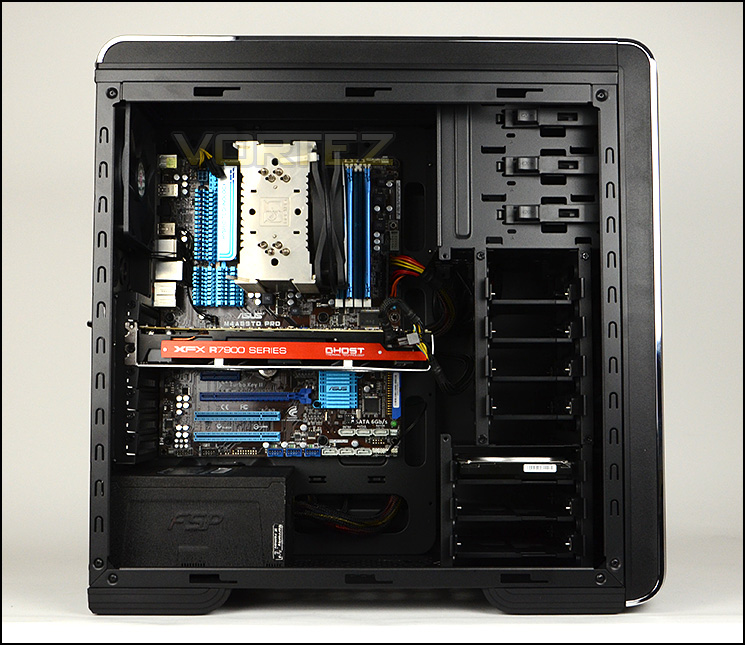
Installation is a breeze
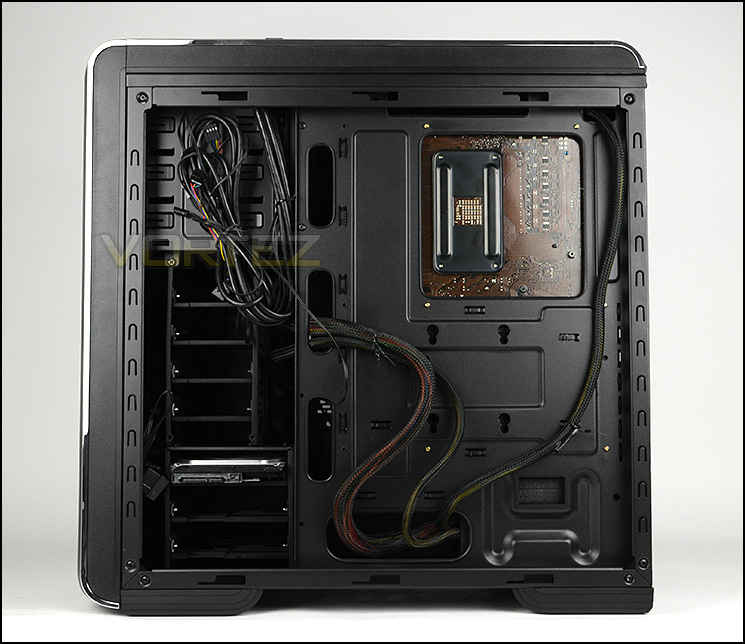
Cable management is easy to control
The EZ tray can adjust to fit 2.5” and 3.5” drives – the tray simply needs to be pulled/pushed to extend/reduce. We really like how practical this is and the tray itself feels robust and great quality.
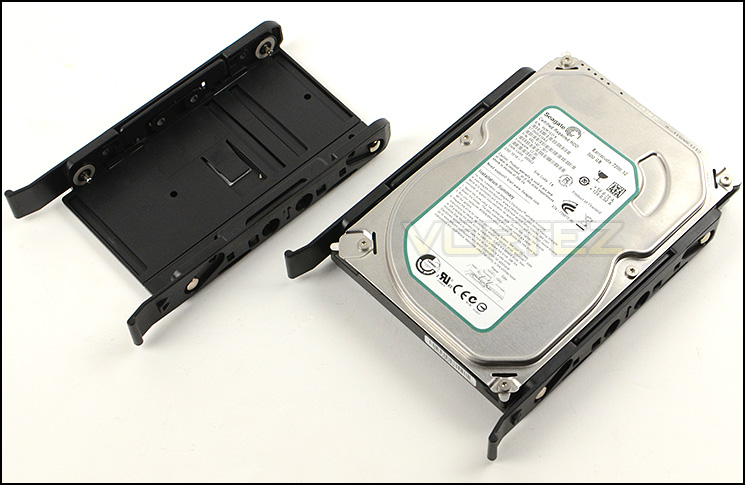
The EZ tray – can house 2.5” and 3.5” drives
Clearance – CPU Cooler, GPU, WC, Cable Management
Now clearance is a factor which many enthusiasts need to know about. Revealing the clearance options within a case will identify whether certain hardware will fit or not.
690 III has lots of space in the CPU cooler department. Pictured below is Noctua NH-U12P which is 158mm in height – our case can accommodate coolers up to 170mm in height, covering Noctua NH-D14 and other popular coolers.
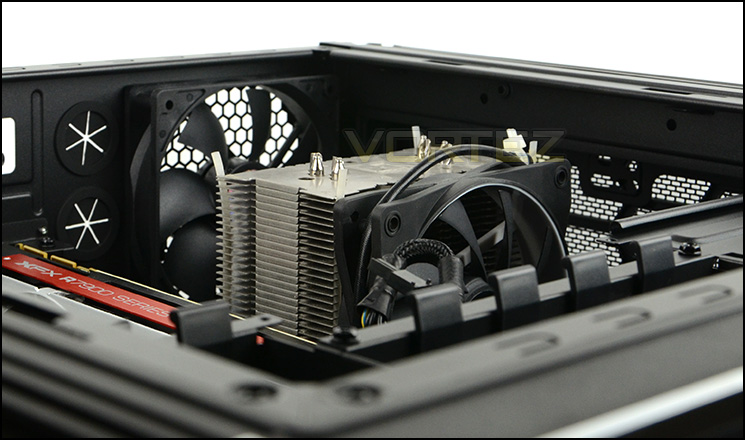
Lots of space for tall CPU coolers
The graphics card clearance with the upper case attached to the chassis presents us with enough clearance for a card of 11” in total length. The card pictured below is XFX 7970 DD Black Edition which is 10.5” in length. Taking out the upper storage cage provides unlimited clearance for anything currently on the market.
If you are planning to go with a dual card configuration, the lower cage may conflict with the lower card – this has a limitation of up to 10.5” in length depending on the motherboard slot and position.
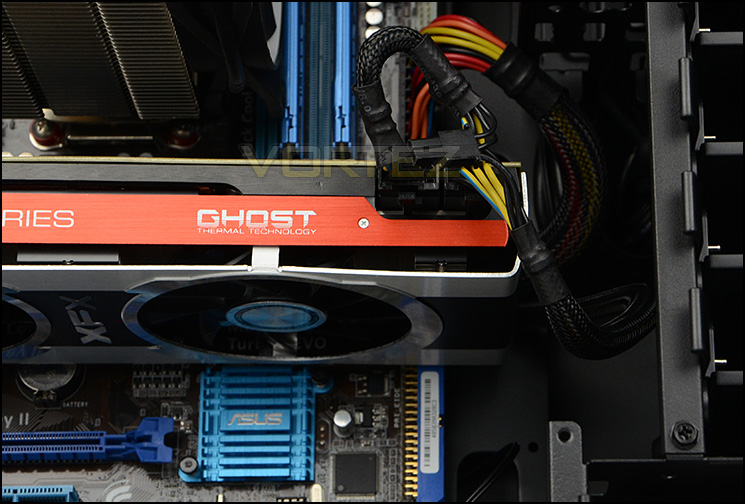
Support for high-end graphics cards
At the front of 690 III, both storage cages can be removed to make way for a 240mm radiator. The thickness of the radiator is critical – those found accompanying an ALC such as Corsair H100 will fit without any problem but radiators like ours pictured below (Phobya G-Charger 240) which are over 3cm will struggle to fit.
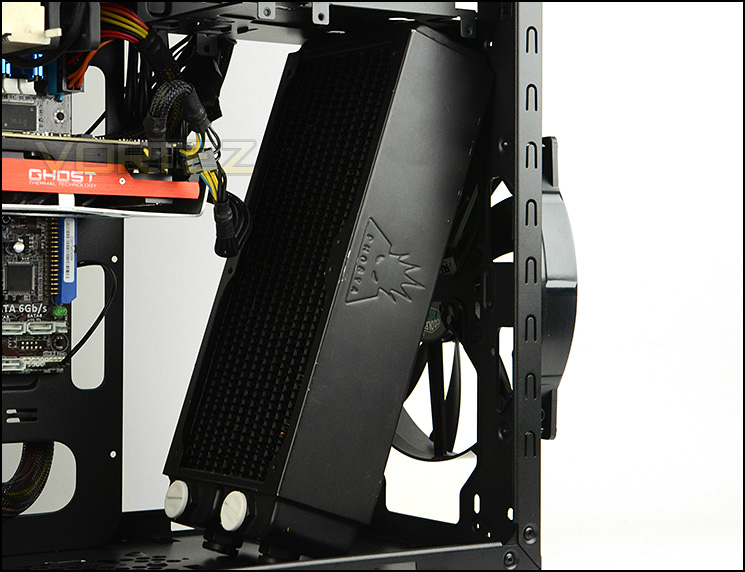
ALC radiators will fit at front but thicker options will struggle
At the top of 690 III there is allocation for 240mm radiators too. Again, just like the front, anything over 3cm will struggle to fit but a standard type, such as the one found with Corsair’s H100 as pictured below.

Corsair H100 – 240mm radiator fits at the top
For cable management there is approximately 1.6cm of clearance behind the motherboard tray but it’s important to note the motherboard tray is concave and the side panel convex – adding additional space to that 1.6cm. As you can well imagine, this figure provides plenty of opportunity to implement good cable management.
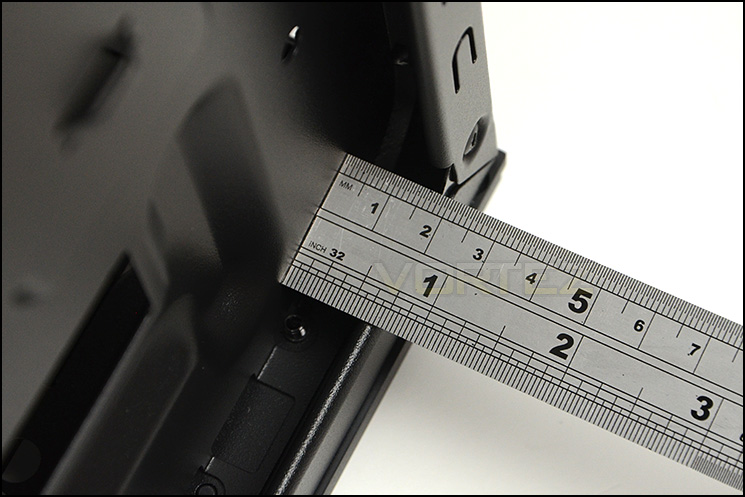
Clearance behind the motherboard tray
Thermal Performance Testing
690 III has an arrangement of two cooler fans. A front intake measuring 200mm and a rear exhaust which is 120mm. This push/pull configuration is a popular one and has proven track record for giving good results.
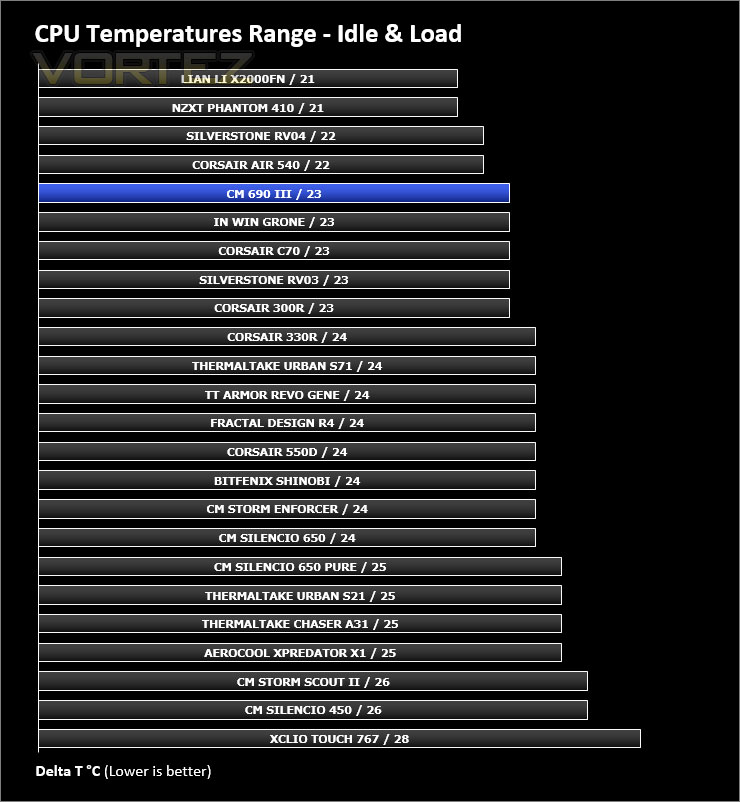
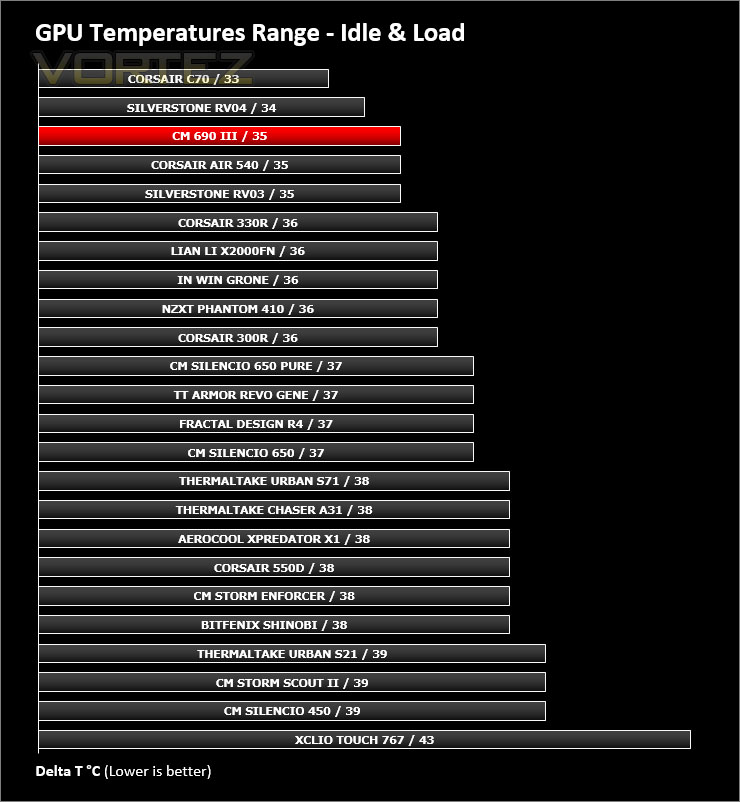
To discover the thermal performance of the 690 III we will record idle temperatures after 20 minutes from a cold boot. We will then stress the system and temperatures will again be monitored after 30 minutes have elapsed.
For the purpose of accurate analysis the idle and load temperatures for CPU and GPU will be recorded and the range between idle and load will be calculated to determine how efficient cooling is. Fan controller will be set to “high”.
NOTE: Ambient temperature is 20C
System Components
CPU AMD Phenom II X6 1055T 2.8GHz
Motherboard ASUS M4A89TD PRO
Graphics NVIDIA GTX 480 (Different from card pictured)
Memory 4GB Kingston HyperX DDR3
HDD Samsung Spinpoint 500GB SATA-II
PSU FSP AURUM GOLD 650M
Motherboard ASUS M4A89TD PRO
Graphics NVIDIA GTX 480 (Different from card pictured)
Memory 4GB Kingston HyperX DDR3
HDD Samsung Spinpoint 500GB SATA-II
PSU FSP AURUM GOLD 650M
Noise
Having a larger fan at the front means 690 III has less noise emitted when compared to a case which has 120mm fans instead. The noise levels coming from this case when loaded is actually quite tolerable and by no means disruptive.
Conclusion
It’s never an easy feat bringing to market the successor to a popular product and there are usually two avenues that manufacturers take; a complete overhaul and redesign or a subtle facelift. Today’s review of CM 690 III drops into the latter.
Choosing to modify specific elements of its predecessor, CM have made a wise decision with 690 III. The main differences with this case are found within the chassis and we can report that these changes, such as the ones made to the storage area, are welcomed.
From a visual standpoint 690 III is pleasing to the eye, being neither gaudy nor minimalist in its styling. Inside, our case uses a trusted layout with various tool-free mechanisms for installing kit.
Flexibility is where 690 III excels, it can accommodate a plethora of hardware including big CPU coolers, long graphics cards and cable management is easy to maintain. CM have ensured that water cooling support remains a top priority with allocation at the front, rear and top of the chassis. Popular all-in-one liquid CPU coolers such as Corsair’s H100 can therefore be housed in different locations.
We really like the idea of the EZ tray which has been introduced with 690 III. The ability to adjust a storage tray between 2.5” and 3.5” provides a convenient method for installing different sized drives.
Aspects which come as a disappointment are the lack of rubber grommets on cable management cut-outs, standard screws for PCI slot covers and the sliding cover for the front panel ports which would be better with a hinge type design. These elements are only minor drawbacks and do not deflect from a great product.
Priced at £80 has been given a slight nudge up from the 690 II at launch. At this cost our case is good value for money though we would have liked to see an optional fan controller to allow it to compete with other candidates in the same price-range.
Cooler Master have refined a classic with CM 690 III. It retains similar attributes but brings an improved feature-set which is very much welcomed. As a result of our experience we are pleased to give it our gold award.
Pros
+ Pleasing to the eye
+ Classic design with improvements
+ Great clearance options
+ Easy to maintain cable management
+ Can accommodate 240mm radiators
+ EZ trays are an excellent idea for storage
+ Good build quality
Cons
– No robber grommets for cut-outs
– Standard screws for PCI covers
– Sliding cover for front panel controls could be better
+ Pleasing to the eye
+ Classic design with improvements
+ Great clearance options
+ Easy to maintain cable management
+ Can accommodate 240mm radiators
+ EZ trays are an excellent idea for storage
+ Good build quality
Cons
– No robber grommets for cut-outs
– Standard screws for PCI covers
– Sliding cover for front panel controls could be better

Click here for an explanation of our awards at Vortez.net.


