







H5 Universal is an affordable mid-range CPU cooler which features Hive Fin technology, an XT140 (140mm cooling fan) and four copper heatpipes.

Product on Review: H5 Universal CPU Cooler
Manufacturer & Sponsor: CRYORIG
Street Price: £35 GBP / $46.99 USD
Newcomer CRYORIG has certainly been busy since they first arrived on the scene. Their debut CPU cooler saw this cooling brand dive straight in at the deep end with the impressive, flagship product R1 Ultimate.
After already making a good impression with the R1 Ultimate, CRYORIG are back again but this time with a cooling solution which will sit in the mid-range of CPU coolers.
H5 Universal is a large, single-tower CPU cooler which makes use of CRYORIG’s exclusive Hive Fin technology. H5 also utilises a single 140mm cooling fan (XT140) and four copper heatpipes and arrives at an attractive price-point of just £35 GBP / $46.99 USD.
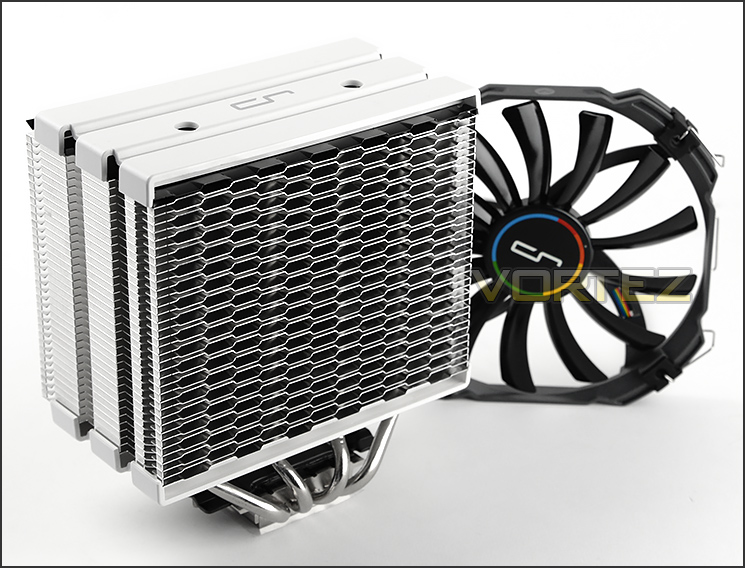
CRYORIG on their H5 Universal
CRYORIG H Series coolers feature our proprietary Hive Fin™ structure. This design allows for a combination of Jet Fin Acceleration™ and Turbulence Reduction, as well as strengthening structural strength of the fin stacks. Combined together, the Hive Fin™ design brings cool innovation.
Technical Specifications
HEATSINK SPECIFICATION
Dimension ( with fan ): L98 mm x W143 mm x H160 mm
Weight ( with fan ): 853 g
Weight ( without fan ): 764 g
Heat pipes: 6mm heatpipe x 4 units
Fin: T = 0.4 mm ; Gap = 2.8 mm
Fin Pcs: 38 pcs
Copper Base: C1100 Pure copper nickel plated
RAM Height Limit: Limitless
XT140 SPECIFICATION
Dimension: L140 mm x W140 mm x H13 mm
Weight: 89 g
Rated Speed: 700 ~ 1300 RPM ±10 %
Noise Level: 20 ~ 24 dBA
Air Flow: 65 CFM
Dimension ( with fan ): L98 mm x W143 mm x H160 mm
Weight ( with fan ): 853 g
Weight ( without fan ): 764 g
Heat pipes: 6mm heatpipe x 4 units
Fin: T = 0.4 mm ; Gap = 2.8 mm
Fin Pcs: 38 pcs
Copper Base: C1100 Pure copper nickel plated
RAM Height Limit: Limitless
XT140 SPECIFICATION
Dimension: L140 mm x W140 mm x H13 mm
Weight: 89 g
Rated Speed: 700 ~ 1300 RPM ±10 %
Noise Level: 20 ~ 24 dBA
Air Flow: 65 CFM
Packaging, Bundle & Fans
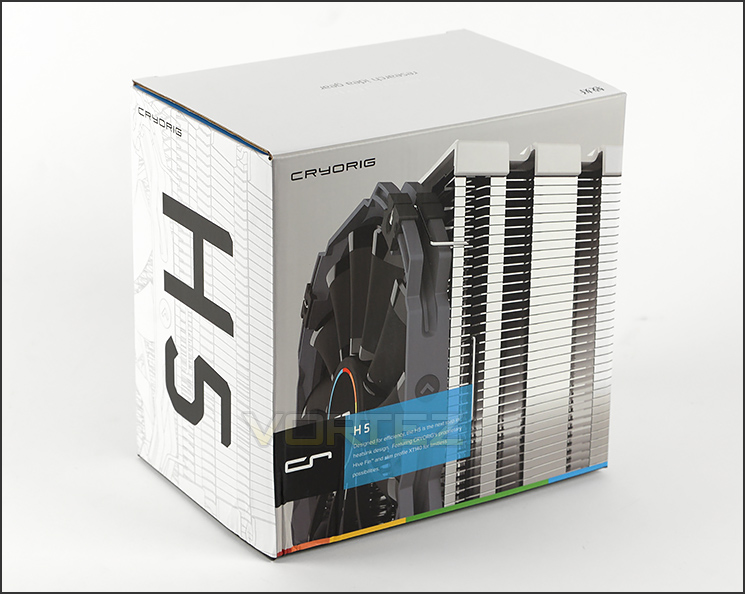
Packaging for H5 Universal
H5 arrives in a small and neatly designed box. On the front of this box there is a depiction of the cooler along with a short description of what to expect from H5. Around the back and sides, CRYORIG presents sufficient information surrounding the features and the technical specification so that users can understand some of the decisions which have been made whilst designing and producing this cooler.
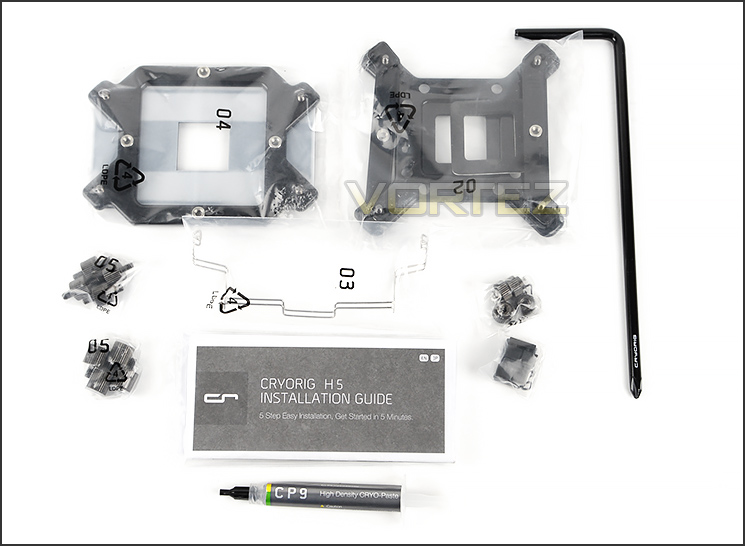
Components for installing on different sockets
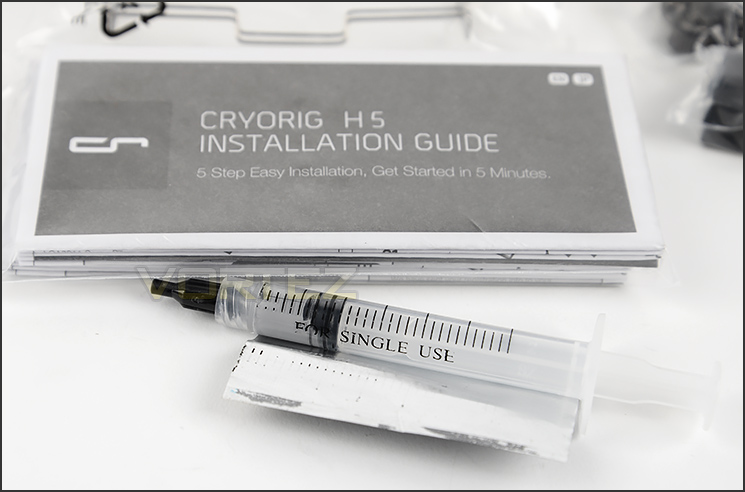
Single use thermal paste
Inside, CRYORIG include components for installing the H5 cooler on a variety of different socket types – this kit includes their ‘MultiSeg Quick Mount System’. There is support for the following sockets:
Intel: LGA 2011, 1366, 1150, 1155/56, 775
AMD: FM1, FM2+, AM2+, AM3+
Also bundled with the mounting kits is a handy instructions guide, a long screwdriver and a tube of thermal compound paste. Peeling the sticker back on this tube reveals just a single application – this is somewhat unfortunate as other brands tend to supply a tube full of paste for multiple uses.
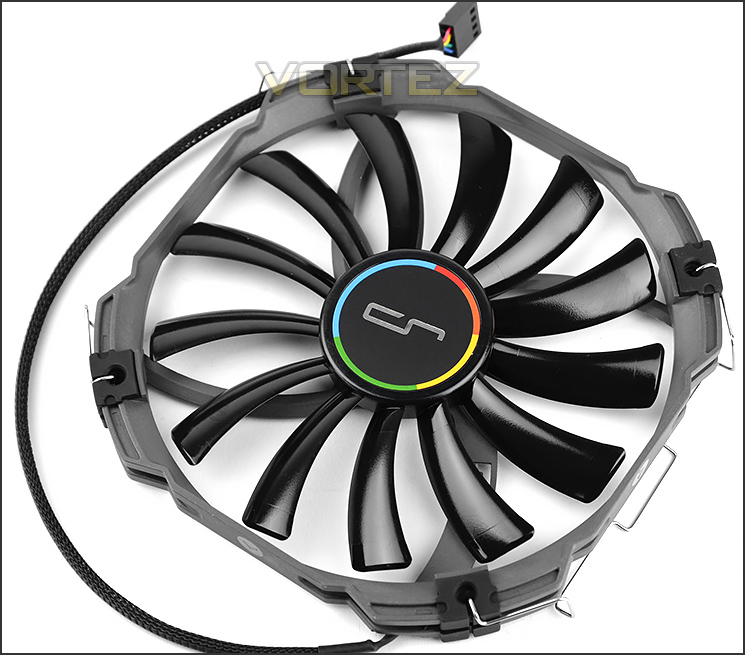
140mm cooling fan included
Along with the mounting kit there is also a 140mm cooling fan included – an XT140 slim profile. This fan is just 13mm thick, has a 13-blade design and is PWM ready – allowing for speeds of up to 1400RPM.
It’s great to see that CRYORIG has braided the cable to retain the sleek appearance of H5.
Closer Look
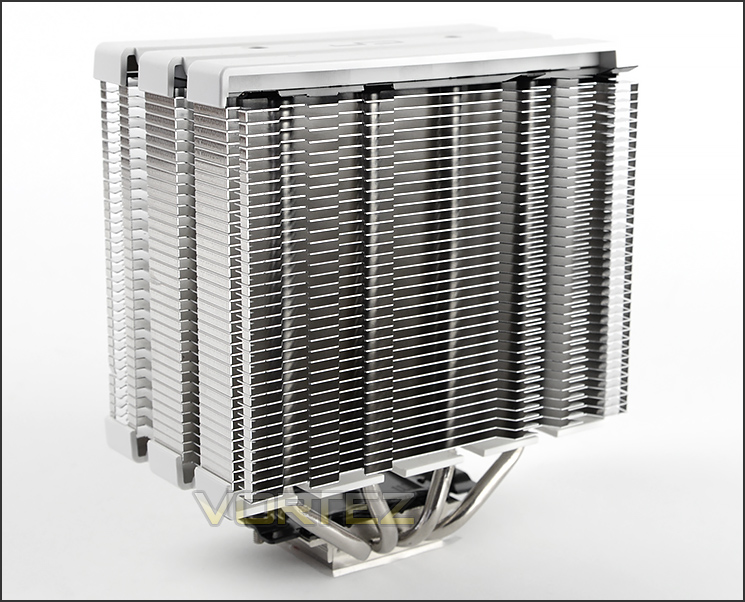
An impressive looking CPU cooler
H5 uses a single heatsink design and weighs 764g. The overall height of the heatsink is 160mm – which should fit inside a majority of cases currently on the market.
Aesthetically the H5 cooler is very pleasing to the eye. CRYORIG has dressed the heatsink with white plastic mounts at the top and bottom and there is a 38 aluminium fin arrangement for the basis of the cooler.
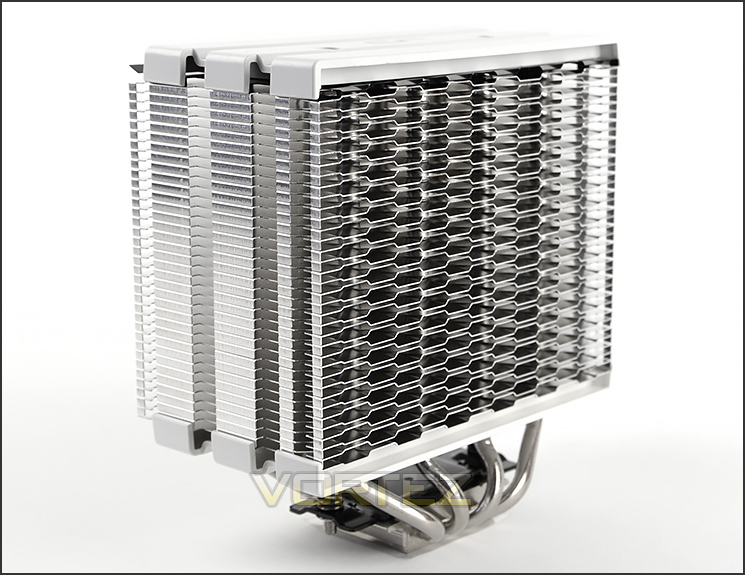
Hive Fin design on prominent side
Either side of the H5 heatsink there are differing fin arrangements. Over on the prominent side, H5 features CRYORIG’s trademark design called Hive Fin. Below is an explanation of Hive Fin by CRYORIG themselves:
CRYORIG H Series coolers feature our proprietary Hive Fin™ structure. This design allows for a combination of Jet Fin Acceleration™ and Turbulence Reduction, as well as strengthening structural strength of the fin stacks. Combined together, the Hive Fin™ design brings cool innovation.
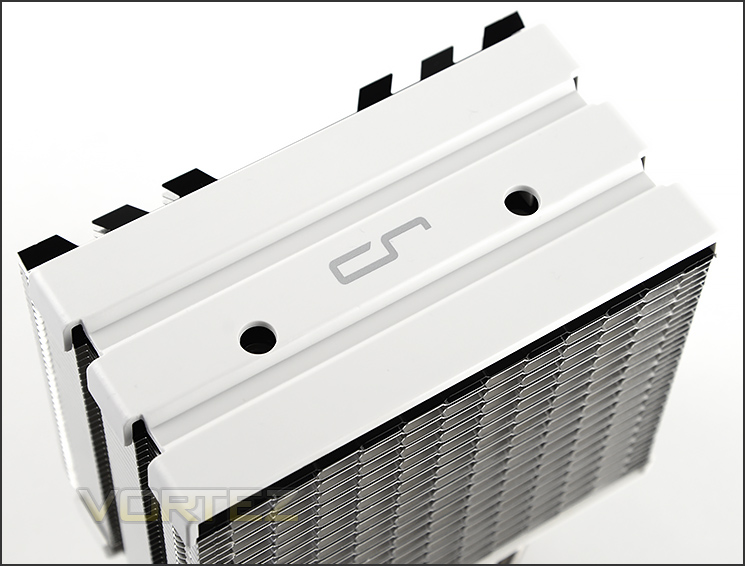
Plastic fascia at the top
At the top of H5 there is a plastic fascia which has been coated white. This panel is simply for cosmetics and will help to retain a level of sleekness within your computer chassis.
The fascia has two circular holes which work in conjunction with the included screwdriver – these holes line up to the mounting screws which are pre-attached to the base of H5.
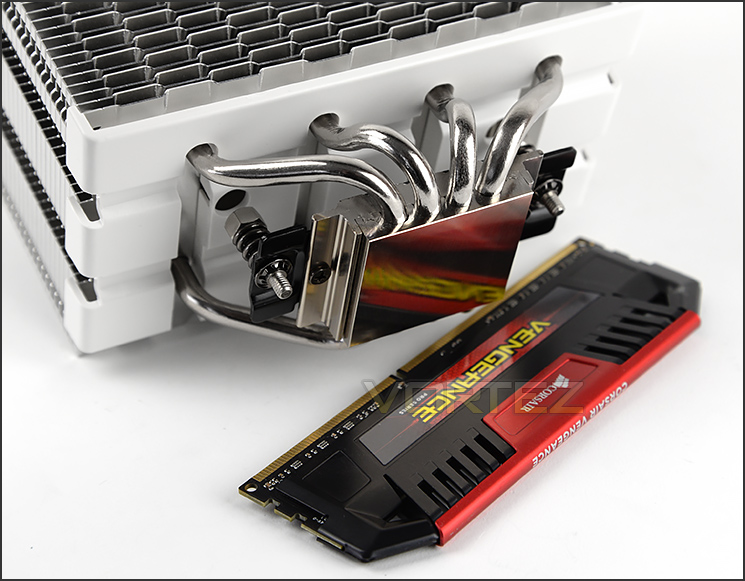
The base of H5
At the bottom of H5 we have the baseplate which consists of copper. This baseplate is reflective and has 4x 6mm copper heatpipes which all pass through it.
H5 already has mounting screws attached to it – there is also a retention springs to ensure sufficient pressure is applied.
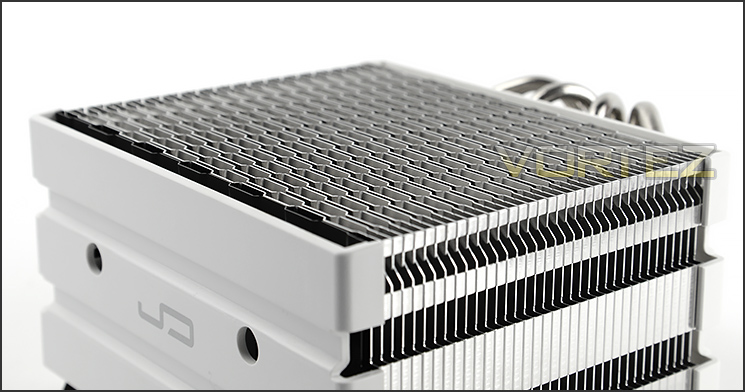
Protruding fins on one side
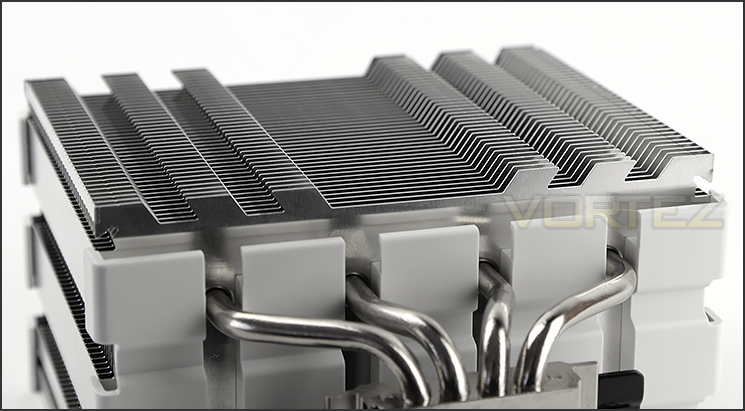
The profile on the Hive Fin side
As previously mentioned, either side of the H5 heatsink is different in its arrangement. Observing the profile of either side reveals the significant variances. One side has protruding fins whilst the Hive Fin remains flat – CRYORIG package H5 with the cooling fan attached to the Hive Fin side.
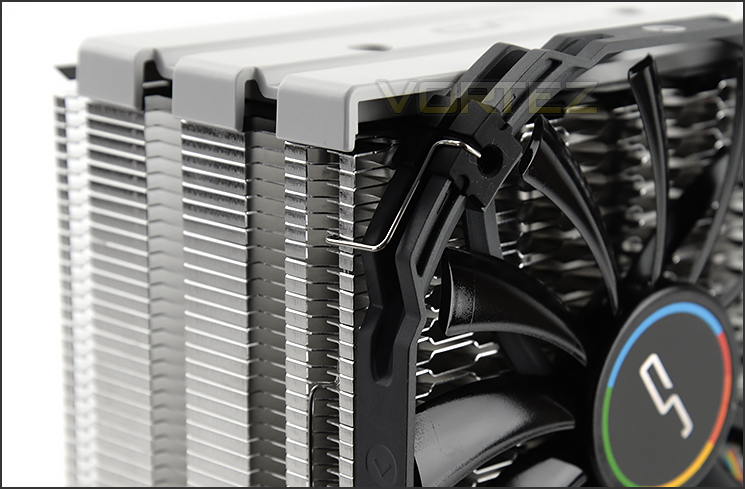
Two clips for attaching cooling fan
Attaching the fan to H5 is very easy thanks to the rubber blocks on the cooling fan and the tailored clips. Fitting the fan clip behind the supplied fin cavity causes the fan to fit snug to the heatsink and prevents any significant movements.
Installation Process
In order to demonstrate the installation process for H5 we are installing the cooler on the Intel LGA2011 socket.
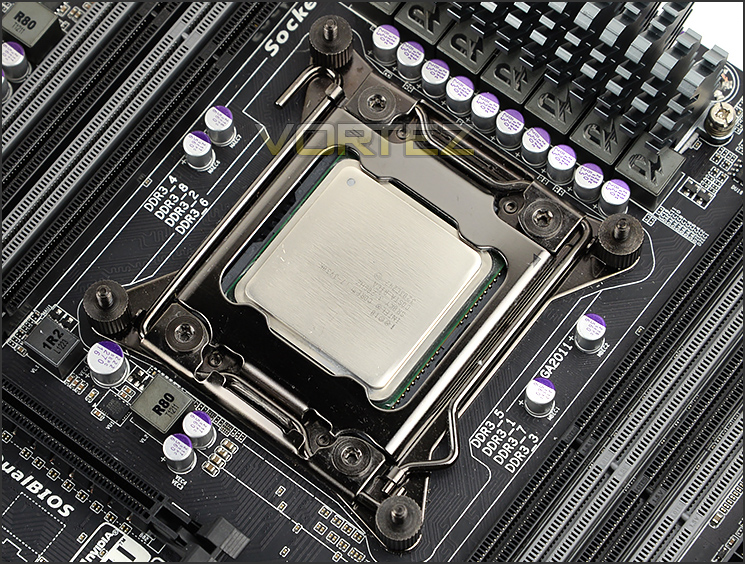
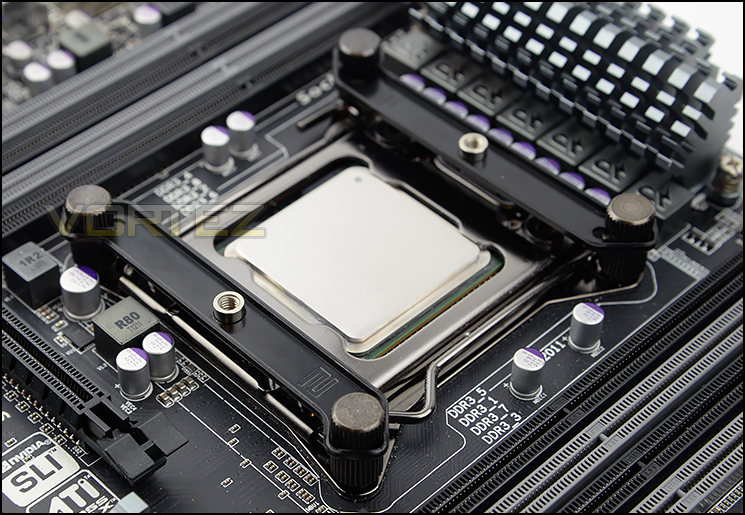
The first step in the installation of H5 is to apply four standoff screws to the corners of the socket. Once these are tight, two brackets need to be place over the top and respective thumbscrews need to be screwed into place as pictured. In order to achieve traditional orientation of having the cooling fan facing and blowing heat through the rear exhaust of a computer chassis its necessary to have the brackets aligned as per below. Lastly, thermal paste is applied to the CPU, the heatsink is placed over the CPU and then two screws/nuts are tightened with the supplied screwdriver. Care should be taken when tightening both of these screws as it’s important to apply even pressure to the CPU – apply one or two turns to one screw, then one or two turns to the other and complete till tightened.
This process and the components used are altogether very easy to use and we can vouch for it being a secure method of attaching a CPU cooler to the motherboard. Tightening the mounting screws on a CPU cooler can sometimes be quite painstaking but it was simple on the H5.
Installed – Memory Clearance
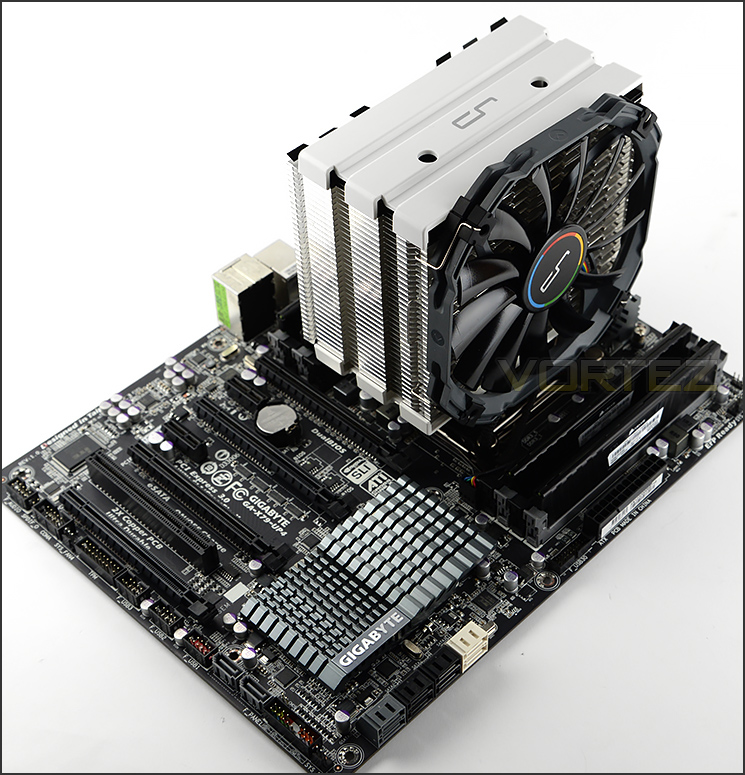
H5 installed on the motherboard
Having installed H5 onto our motherboard it’s clear to see that this CPU cooler coordinates very well with motherboard and system configurations which follow a neutral palette
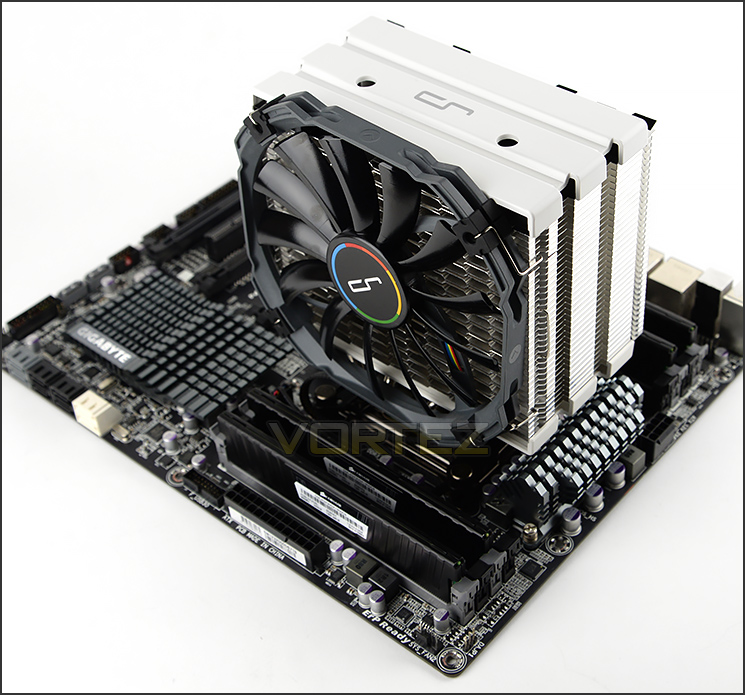
H5 pairs up well with other hardware
Although there is excellent clearance for the memory modules on the far-side of the motherboard (where the 24-pin ATX socket is located) there is some interference for motherboards which have memory slots on both sides of the CPU socket.


For LGA 2011 the first memory slot is obstructed if a fan is installed – as shown in the picture. There is approximately 4cm for the heatspreader in this particular configuration. This will likely be a rare situation but even so – it’s worth noting.
Test Setup & Methodology
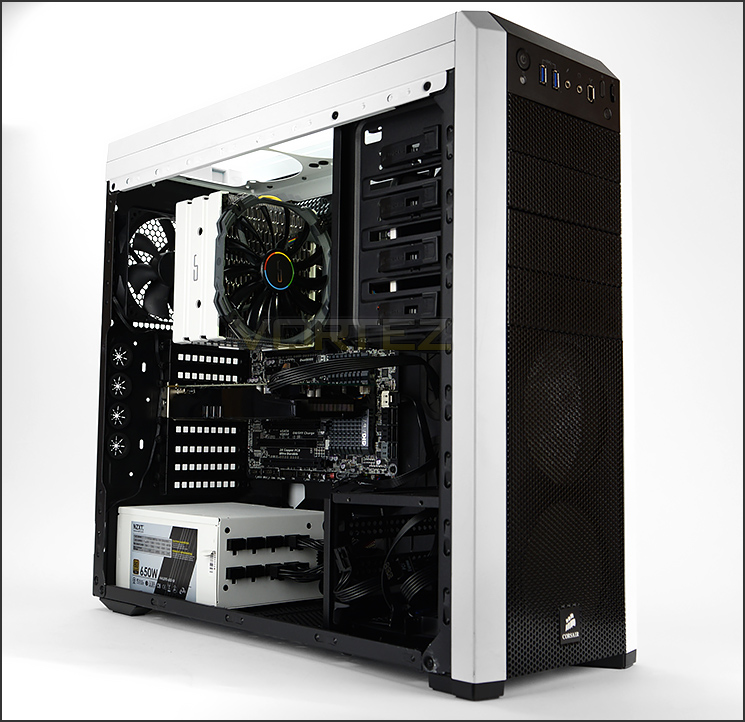
Test System
CPU – Intel Core i7-3930K (3.6GHz)
Motherboard – GIGABYTE X79-UP4
Memory – 8GB Corsair Vengeance LP 1600MHz CL9
Graphics – Sapphire Radeon HD 6850 1GB
PSU – NZXT Hale90 650W
Hard Drive – Kingston HyperX 240GB SATA III SSD
Case – Corsair Carbide 500R White
Motherboard – GIGABYTE X79-UP4
Memory – 8GB Corsair Vengeance LP 1600MHz CL9
Graphics – Sapphire Radeon HD 6850 1GB
PSU – NZXT Hale90 650W
Hard Drive – Kingston HyperX 240GB SATA III SSD
Case – Corsair Carbide 500R White
CPU Coolers
Alpenföhn Matterhorn Pure(120mm Wingboost: 300-1200RPM)
Alpenföhn K2 (120mm Wingboost: 500-1500RPM, 140mm Wingboost: 300-1100RPM)
Alpenföhn Gotthard (140mm Wingboost: 300-1100RPM)
Noctua NH-D14 (120mm NF-P12 PWM + 140mm NF-P14 PWM: up to 1200RPM)
Thermalright SilverArrow SB-E Extreme (Dual TY-143 fans – 600-2500RPM)
Corsair Hydro H100 (Dual 120mm fans – low: 1300RPM, mid: 2000RPM, high: 2600RPM Push Config)
SilverStone HE01 (140mm PWM fan – 500RPM-1200RPM – 500RPM-2000RPM)
be quiet! Dark Rock Pro 2 (135mm + 120mm PWM Fans – up to 1500RPM and 1700RPM)
Thermaltake Water 2.0 Pro (Dual 120mm PWM fans – up to 2000RPM)
Corsair Hydro Series H100i (Dual 120mm fans – up to 2700RPM Push Config)
Be Quiet! Shadow Rock TopFlow(1x 135mm PWM fan – up to 1500RPM)
SilverStone HE02 (Passive – optional fan used: Noctua NF-F12 120mm PWM)
Corsair H55 (Single 120mm fan – 1700RPM Exhaust Push)
Cooler Master Seidon 120M (Single 120mm fan – Up to 2500RPM Exhaust Push)
Zalman CNPS11X Extreme (Single 120mm fan – Up to 1950RPM)
Phanteks PH-TC12DX (Dual 120mm fans – 600-1800RPM)
Noctua NH-U14S (Single 140mm cooling fan – 300-1500RPM)
SilverStone TD03 (Dual 120mm fans – 1500-2500RPM)
Thermaltake]Thermaltake NiC C5 (Dual 120mm fans – 1000RPM – 2000RPM)
Raijintek EreBoss (Single 140mm fan – 1100RPM – 1600RPM)
GamerStorm Lucifer (Single 140mm fan – 800-1500RPM)
Cooler Master V8 GTS (Dual 140mm fans – 600-1600RPM)
Antec KUHLER H2O 1250 (Dual 120mm cooling fans – 600-2400RPM)
Corsair H75 (Dual 120mm cooling fans – 600-2000RPM)
CRYORIG R1 Ultimate (Dual 140mm cooling fans – 700-1400RPM)
Corsair Hydro Series H105 – (Dual 120mm fans – up to 2700RPM Push Config)
Noctua NH-D15 (Dual 140mm cooling fans – 300-1500RPM)
LEPA LV12 (Single 120mm cooling fan – 300-2200RPM)
CRYORIG H5 Universal (Single 140mm cooling fan – 600-1400RPM)
Program Suite
Real Temp – Maximum temperature analysis
LinX 0.6.4 – Applies thorough stress test to CPU
CPU-Z – Confirmation of CPU frequency/voltage
AIDA64 Extreme Edition – Confirmation of temperatures/fan speeds
Testing methodology
Testing will be based on temperatures recorded by Real Temp after 20 passes of LinX stress test. The maximum absolute temperatures will be recorded after the test and averaged over the 6 cores. The delta is then calculated by subtracting the temperature recorded near the intake fans from the average temperature calculated. Tests are conducted with the Intel i7 3930K at its default 3.6GHz stock speed and overclocked to 4.6GHz @ 1.42V. The tests are done inside the Corsair Carbide 500R chassis to simulate real world conditions. To keep the tests standardised we are using Noctua’s NT-H1 thermal paste on all coolers.
CPU coolers are reviewed as they come out of the box – with their factory cooling fans, as the manufacturer intended and as the consumer expects.
Additional tests include a passive test where the cooling fans are taken away from the heatsink and a comparison between the cooler used with stock thermal paste against our Noctua NT-H1 paste. Note: This test will be omitted from this review since the D15 already comes with Noctua NT-H1
A kind thank you to Noctua for supplying us with NT-H1 thermal compound.
Results – Stock Performance
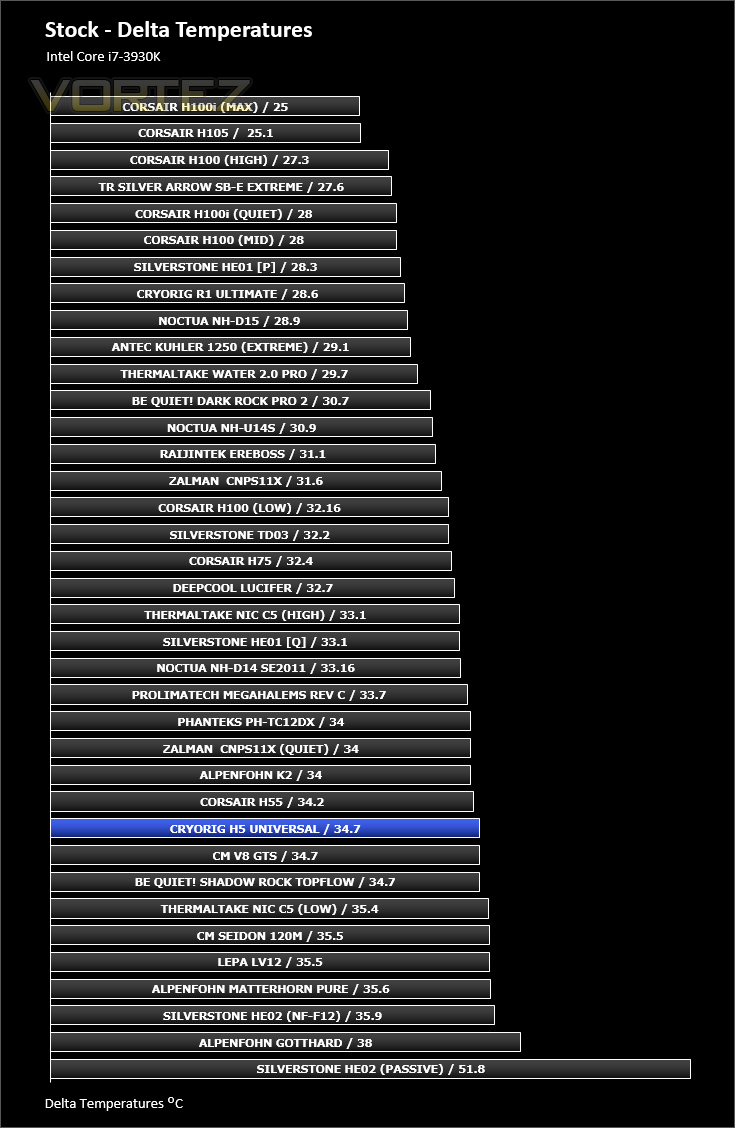
Having the 3930K sat at stock settings, H5 does an admirable job at cooling the chip. The cooler would obviously perform better if the fan speed were to be operating at a higher speed and also adding in an extra fan onto the other side.
Fan Speed: Remained at 1250RPM throughout stock testing – noticeable but by no means disturbing.
Results – Overclocked Performance
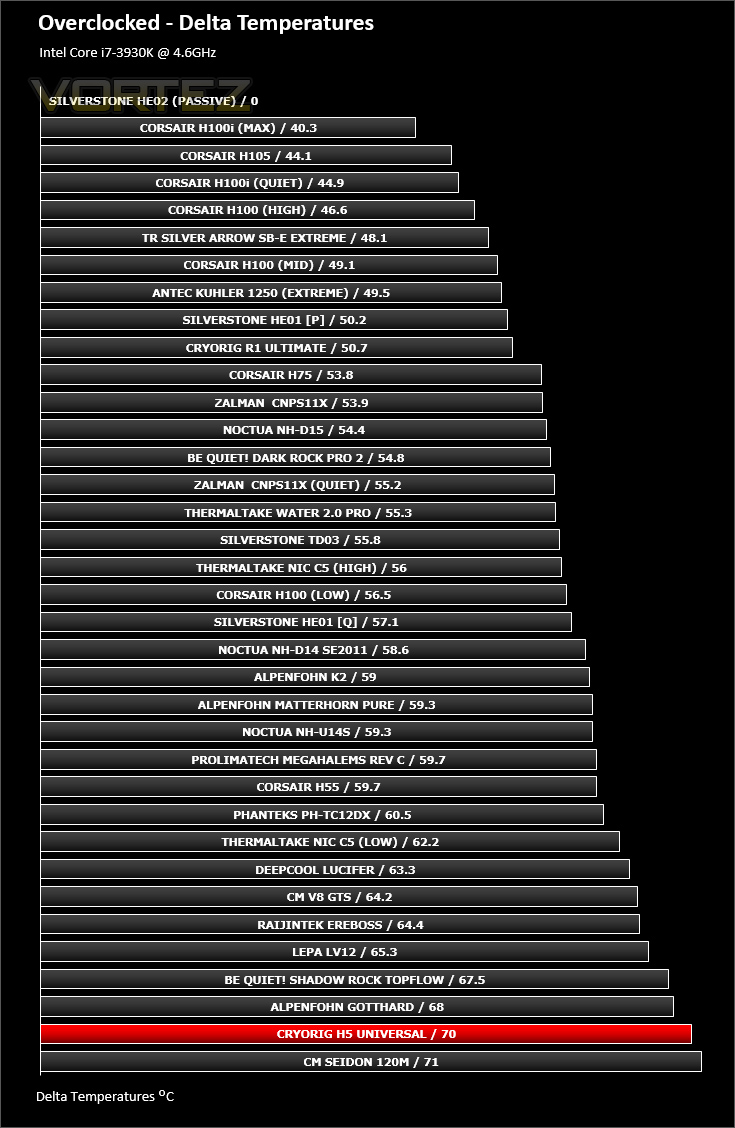
After applying a substantial overclock to the CPU things change quite dramatically. Performance dips and the CPU almost drops into the realms of being disturbingly hot (95C+). In order to handle a significant overclock H5 really needs faster cooling fans attached – 1400RPM isn’t sufficient.
Fan Speed: Remained at 1400RPM throughout overclocked testing – Noise level still remained low.
Results – Passive Performance
The passive test is an interesting one as it relies heavily upon heatsink design and airflow within the computer chassis. Since H5 has just four copper heatpipes and a single tower design it struggled to compete versus some of the dual-tower designs but still managed to do a sufficient job without any cooling fans attached.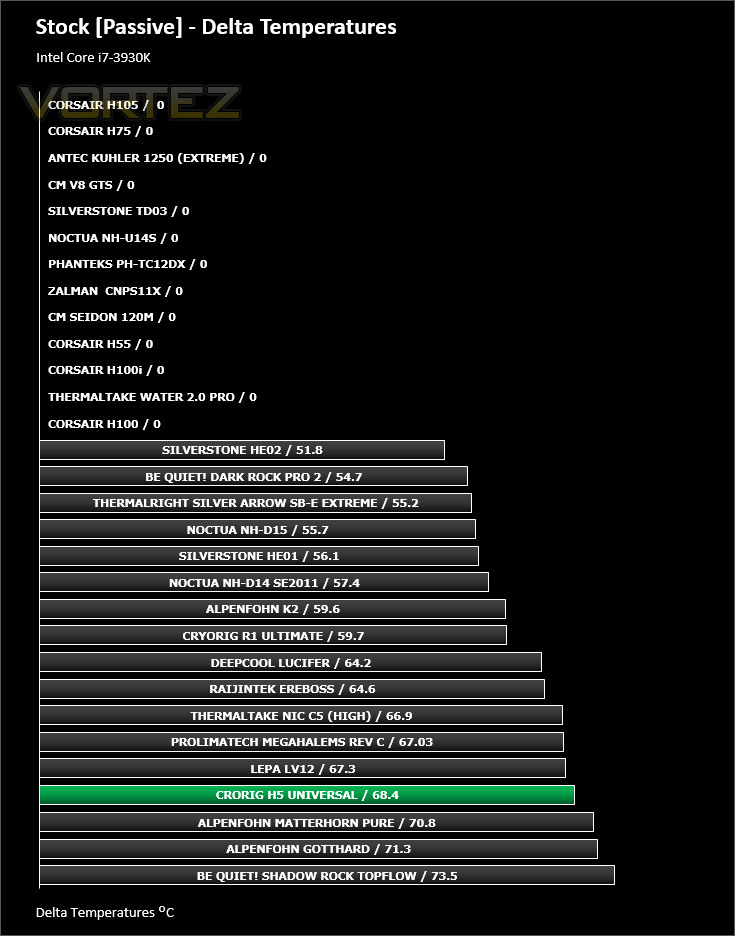
Results – Thermal Paste Comparison
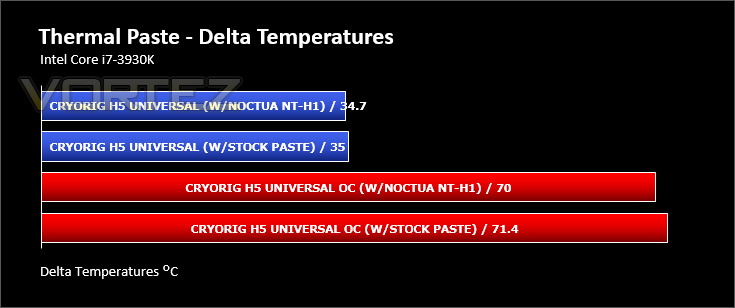
Most CPU coolers come accompanied with thermal paste provided by the manufacturer. For our CPU cooling tests we use Noctua’s NT-H1, so to offer up some interesting analysis we test the thermal paste given with H5 against NT-H1 to see which gives the best results during stock and overclocked performance and the results really aren’t that much different, the Noctua paste is only ever so slightly better – the results are nominal.
Conclusion
Since their arrival last year – CRYORIG has already made a lasting impression in the cooling segment with the R1 Ultimate. The Ultimate was CRYORIG’s debut cooler and was a dive into the deep end with a flagship offering – today’s product steps back from this to provide a cheaper option for the mid-range.
H5 Universal manifests the sleek and sophisticated style which CRYORIG has already presented in their current portfolio. It’s rare to see such care in the packaging and the aesthetics of a product from a company which is still only very new but we’re really pleased to see this consistency. Due to the nature of H5’s visual appearance, pairing the cooler up with other hardware will be easy – especially if you have components which follow a neutral colour-scheme.
We found the installation process particularly easy thanks to the clear instructions, high-quality parts and efficient technique to attach the cooler to the motherboard. Though we were a little dismayed at the fact there is only a single application thermal paste tube – usually brands will include a full tube for future use and multiple applications.
On the performance front H5 did an admirable job with the CPU at stock settings. H5 finds itself amid a number of strong contenders and yet is lower in cost. But unfortunately ramping the intensity up with a substantial overclock creates some rather big obstacles for H5. We found the cooler to really struggle in this scenario – the single 1400RPM cooling fan and four copper heatpipes were insufficient to effectively keep the high-temperatures down and we almost had to cease testing with the temperatures exceeding 93C. To tackle this issue, we really need to use a dual-fan configuration and use fans which offer between 1800-2000RPM as a maximum PWM rating.
At a cost of just £35 GBP / $46.99 USD – H5 is a worthwhile consideration for those who don’t have the cash to spend on a high-end cooling solution, but do bear in mind that H5 is only really suitable in it’s out of the box condition to handle stock settings.
H5 Universal is another nicely presented product from CRYORIG. Care has been taken in the development of this CPU cooler – it looks great, performs reasonably at stock settings, is easy to install and doesn’t cost a great deal.
Pros
+ Nicely designed aesthetics
+ Coordinates well with other hardware
+ Good clearance for memory
+ Easy to install
+ Low-cost cooling solution
+ 6-year warranty
Cons
– Single application thermal paste
– Poorly equipped for big overclocks
+ Nicely designed aesthetics
+ Coordinates well with other hardware
+ Good clearance for memory
+ Easy to install
+ Low-cost cooling solution
+ 6-year warranty
Cons
– Single application thermal paste
– Poorly equipped for big overclocks

Click here for an explanation of our awards at Vortez.net.


