Finally something to rival Lian Li at a much more affordable cost. We take a look at Cubitek’s new gargantuan HPTX Tank. Supporting XL-ATX, Quad SLI & WC.
Product on Review: Cubitek HPTX Tank (CB-TKE-B510)
Manufacturer & Sponsor: Cubitek
MSRP: 180 GBP / 235 EUR / 310 USD (At time of review)

For any hardware enthusiast or those with a passion for computer cases, Lian Li will stand out as being one of the best quality aluminium case manufacturers around. Their product range is highly respected, sought after and even revered. There isn’t anyone to rival them in this regard either, that is, until now. Today we will be taking a look at a new range of cases from a company called Cubitek. Cubitek was founded in 2002 but were mainly concerned with OEM type products, last year they broke out of this and now have their own case factory – thus enabling them to produce aluminium computer cases.
The Tank series features 3 different designs we will be taking a look at the biggest of the 3 today – HPTX Tank. As with all the cases in this series, the HPTX Tank is fully aluminium. It is wide, allowing up to 190mm tall CPU coolers to be installed and can house XL-ATX motherboards such as GIGABYTE’s G1 Assassin and EVGA’s SR-2. Being able to house such big hardware also means long graphics cards can also be installed within the HPTX Tank, in fact up to 340mm of clearance is available! With lots of cooling, lots of space and lots of features I’m expecting some good results from this case, Lian Li ought to be very afraid.

Cubitek’s take on HPTX Tank:
The Tank Series is designed for high-end gaming PC users with space for large CPU coolers and long VGA cards, lots of storage space, superb cooling performance, inversion of the PSU, excellent heat distribution, and liquid cooling ready. The Tank Series is available in three designs: Mini Tank, XL Tank, and HPTX Tank.
Technical Specifications
Model Name
– HPTX Tank
Model Number
– CB-TKE-B510
Drive Bay
External – 5.25” x 5 ( one 5.25” to 3.5” converter included )
Internal – 3.5” x 9 + 2.5” x 2
Size
– 230 x 600 x 610mm ( W, H, D)
Material
– Anodized 5052 aluminum
M/B Type
– EVGA SR-2, EATX, CEB, ATX, Micro-ATX, Mini-ITX
PCI slots
– 10
Front I/O
– USB 3.0 x 2 / E-SATA / HD+AC-97 audio
PCI Space
– Maximum Graphics Card length: 340mm
CPU Cooler Height
– Maximum CPU Cooler height: 190mm
PSU Space
– Maximum PSU length: 220mm
Cooling fans
– Front: 230mm fan x 1
– Rear: 140mm fan x 1
– Top: 140mm x 1
Side Panel
– Aluminum
Internal Finishing
– Aluminum
Packaging & First Look
The HPTX Tank comes in a very large, eco-friendly box. There are no mistaking that this case means business. The tank being depicted on the front of the box for a firm stamp of authority, this case is described on the box as “all aluminium Ultimate HPTX-ATX case”. Technical specifications are printed on the sides and back and our case inside is given the usual comfort whilst in transit – polystyrene pillars keep it in place and a clear plastic cover keeps dirt/dust from touching the case.
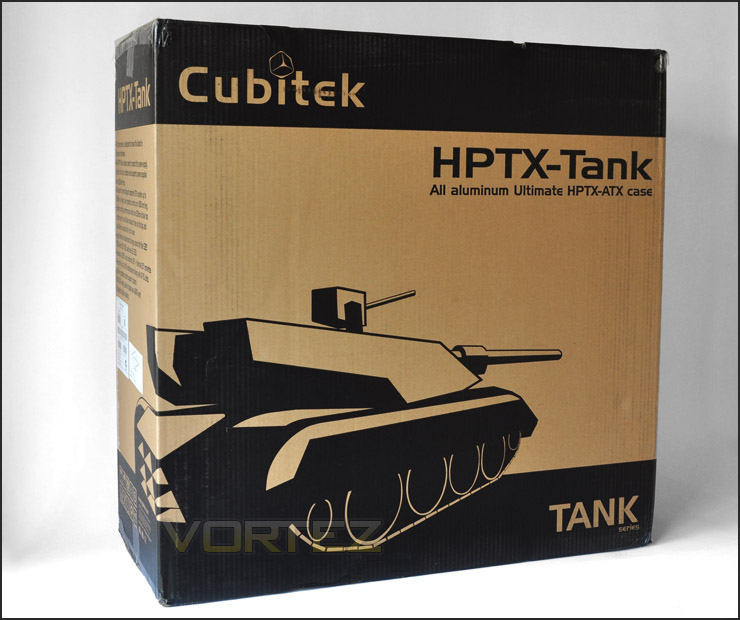
HPTX Tank packaging with bold graphics
Our first glimpse of the HPTX Tank reveals a very large case with discreet styling. The exterior shell looks rather basic, but we know that this type of case styling is more sort-after by the hardware enthusiast. Personally, I think the exterior looks great, quality and finish appears to be very good.
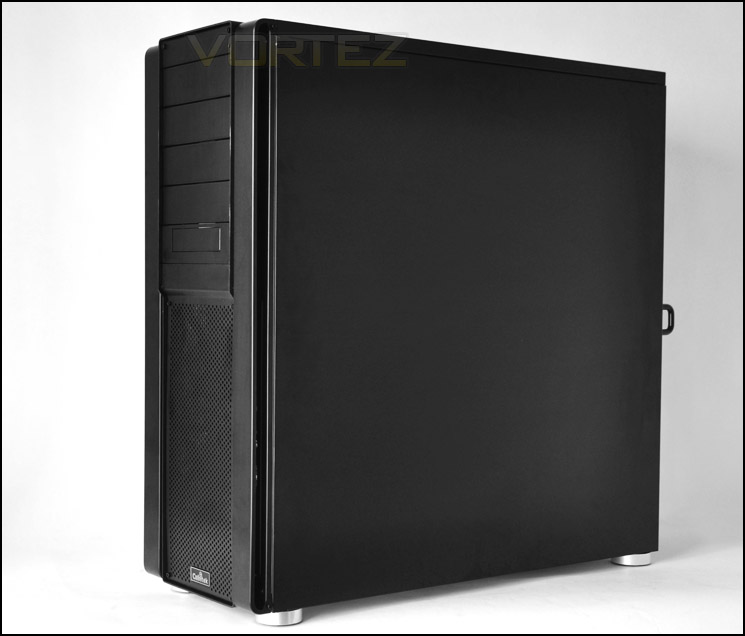
A first look at HPTX Tank – sleek, elegant, discreet styling
Exterior
At the front of HPTX Tank are 5 x 5.25″ drive bay covers. The bottom cover having support for a smaller device such as floppy/card reader to be mounted. We also have a large mesh panel at the front which acts as an intake solution for the 230mm fan on the underside of this panel. I really like the finish of the front panel, it feels robust and it looks great. There is a Cubitek badge at the very bottom of the case.
Moving our attention to the rear of the case, at the bottom we have space to install a PSU. Thumbscrews hold an aluminium plate in place, this can be removed to slide the PSU in from this position. Above this region we have an extensive range of expansion slots, 10 in total – all the covers featuring perforated holes for encouraging better airflow. To the side of this we have 2 rubber grommets for water-cooling. Moving up, we have a grill that covers the rear exhaust fan that is 140mm in specification – because HPTX Tank is wide we are able to house a large fan. At the very top there is another section similar to the PSU plate we saw at the bottom. Here we can mount a reservoir – there are rubber grommets and ventilation, or we can even place the PSU at the top should the top orientation be preferred or a 2-PSU configuration required for quad-GPU.
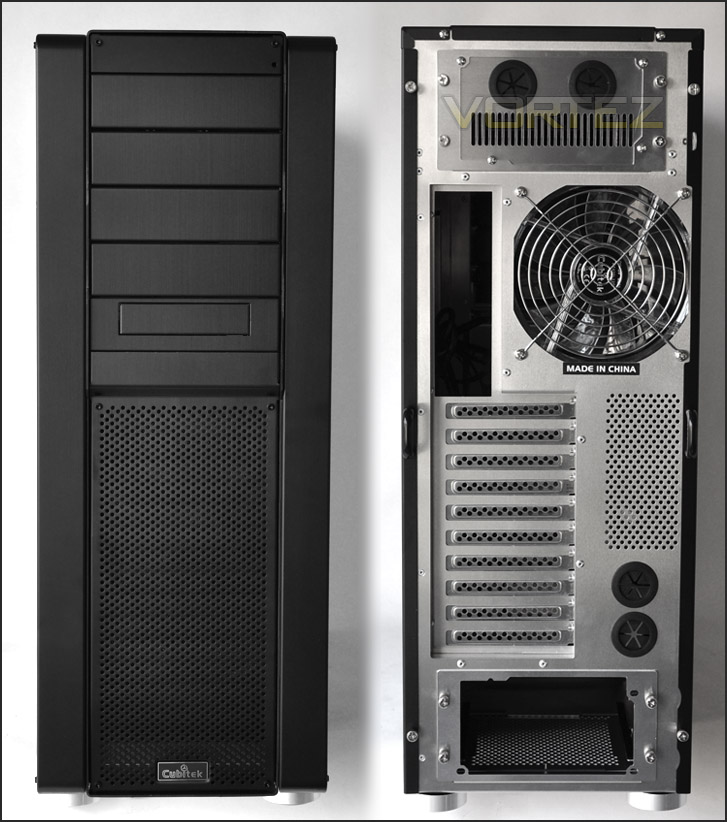
The front and back of HPTX Tank
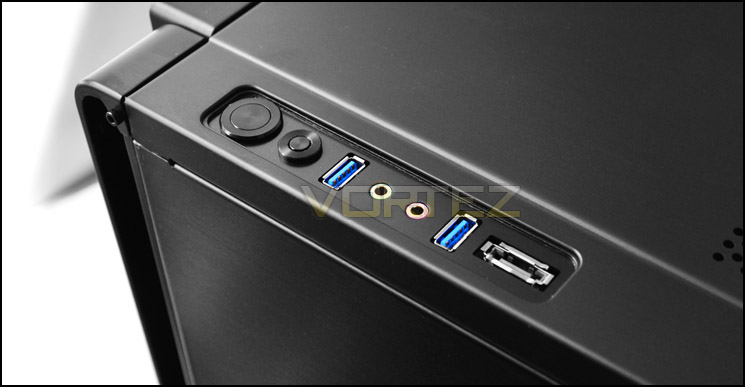
The front panel has been positioned down the right side of the case rather than in the middle or on the front fascia. The controls here sit inside a section that has been carved out of the case, a nice touch indeed. Here we have a power button, reset button, 2 x USB3.0 ports, headphone and microphone jack and an eSATA port.
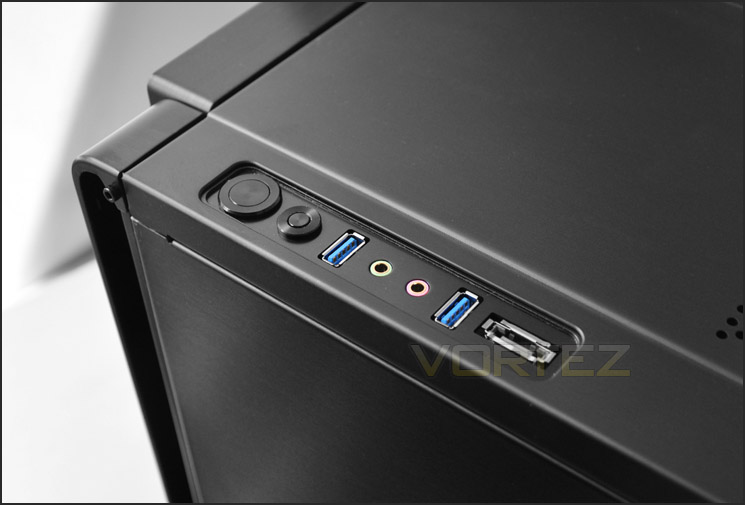
The front panel, positioned down the right side
Further back, the top of the HPTX Tank features a large pane of mesh. On the underside of this mesh we have 2 x 140mm fans. So you will appreciate the HPTX Tank has some serious air cooling going on. Plenty of large fans to push air in and out of the case. A little later we will test how effective these fans really are.
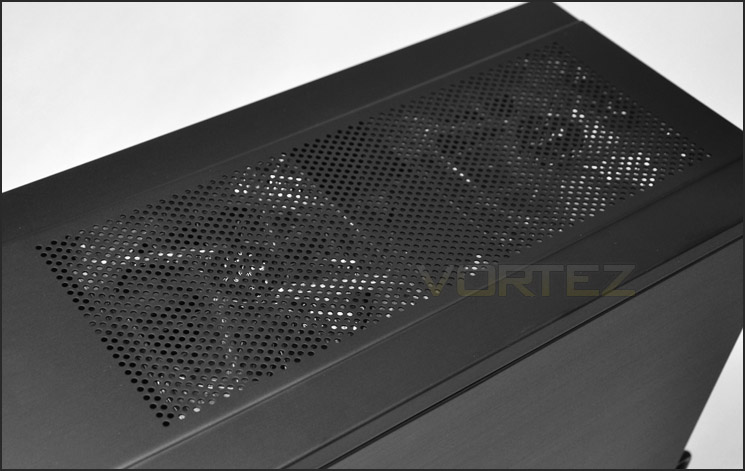
A mesh panel with 2 x 140mm fans mounted underneath
Interior
Removing the side panels we can finally see the spacious expanse inside. The interior is rather reminiscent of the Lian Li PC-A77F that we reviewed last year. The HTPX-Tank probably does lend some of the ideas from this case, albeit different mounting techniques. The motherboard tray has lots of cut-outs for cable management. HPTX Tank is able to house XL-ATX motherboards such as the new GIGABYTE G1 Assassin and EVGA SR2. With so many different sized boards available for installation it is needful to have various cable management cut-outs. As you will appreciate, installing a large graphics card within this case shouldn’t be a problem at all. There is even a pillar positioned in the middle to allow for graphics card stability support.
Around the back, again plenty of space for cable storage behind the motherboard tray although there are no brackets for clipping cables and around the HDD storage rack there are no cavities to hide messy cabling.
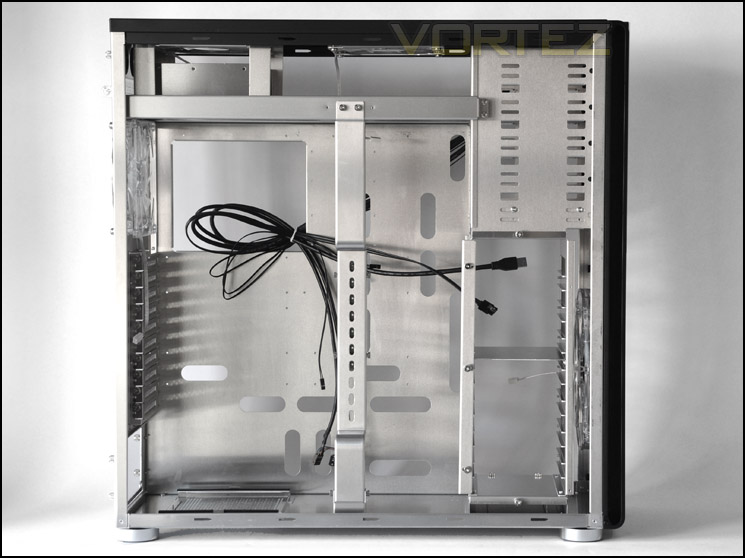
Prominent side panel off showing lots of space
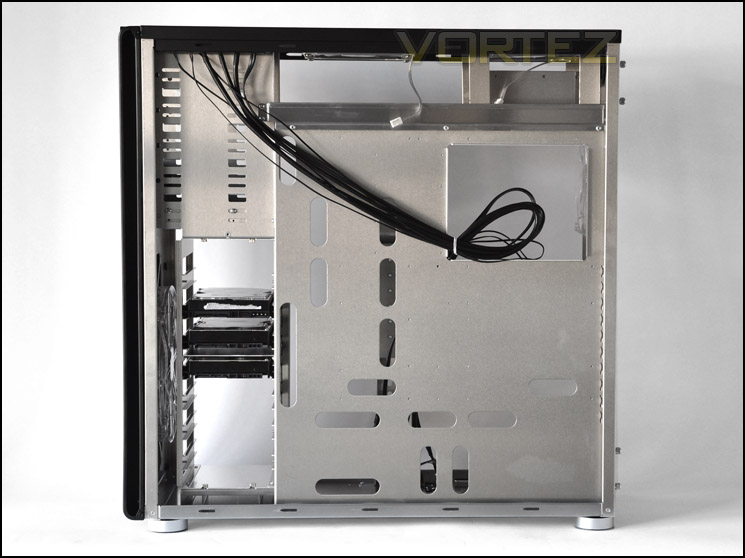
Behind the motherboard tray
Taking a closer look at the interior, at the bottom is a seating area for the PSU to drop in. Here we have mesh and anti-vibration strips for keeping noise down and preventing metal-on-metal scratching. The bonus with HPTX Tank is that we can also accommodate long PSUs, those that extend to 220mm.
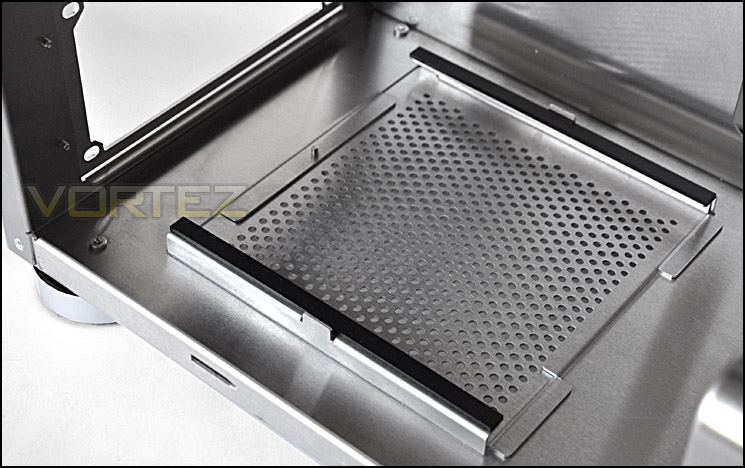
PSU mounting at the bottom of HPTX Tank[/i
Moving up, we have the 10 expansion slot covers. Each of these covers is polished aluminium, perforated and fixed in place via thumbscrews.
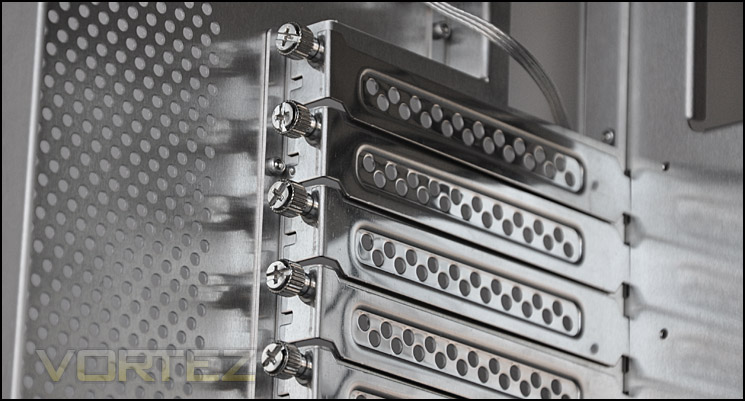
10 expansion slot brackets for multi-GPU options
Above this we have the 140mm red LED fan that acts as a rear exhaust. This fan has a 3-pin connector for plugging directly into a motherboard fan header.
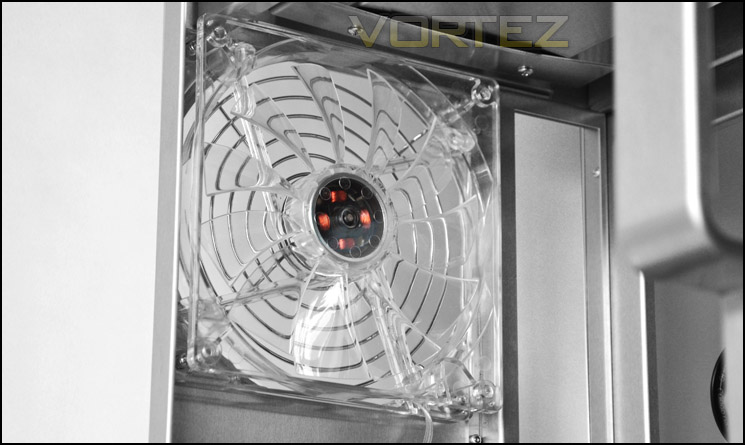
140mm rear exhaust fan – with red LED
Interior (Continued)
Continuing our tour of the interior, at the top of the HPTX Tank is a shelf that is perfect for mounting a water-cooling radiator. From another view we can see that there are 2 x 140mm red LED fans pre-installed. These also have 3-pin connectors. Cubitek certainly have cooling at the top of the agenda, as well as multiple options for installing devices.
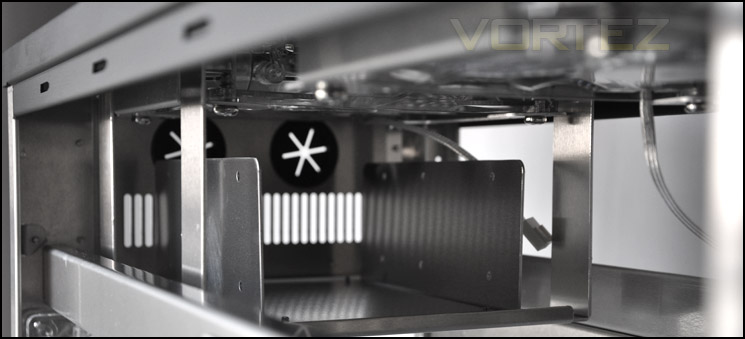
Pre-installed shelf at the top of HPTX Tank
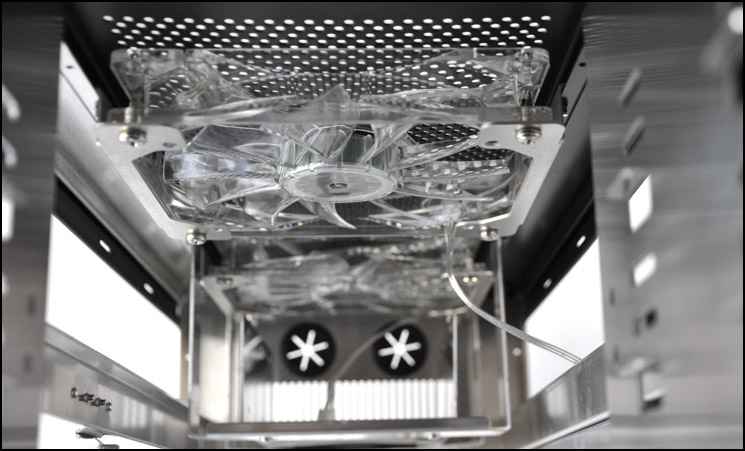
2 x 140mm fans pre-installed at the top, each with red LED
The optical drive bay (5.25″) can house up to 5 drives, the bottom drive has an adapter for 3.5″ devices. Installing devices here falls back to traditional methods of using the screw and screwdriver. Be careful not to scratch the aluminium.
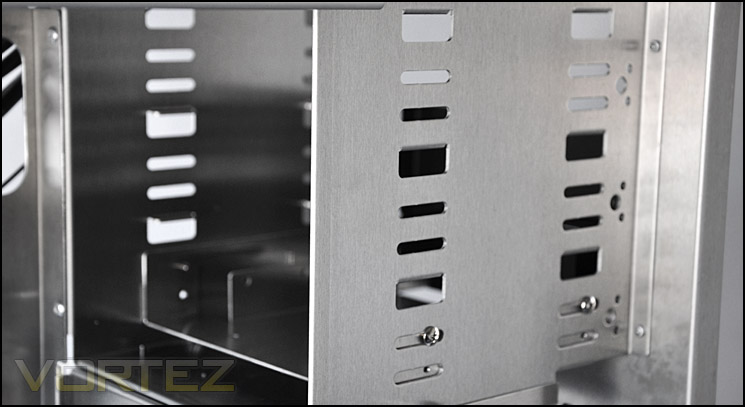
The optical drive bay
There is an abundance of options for media storage inside HPTX Tank. The HDD cage can actually be removed for HDD installation – 3 screws just need to be removed. Inside this aluminium cage 7 x 3.5″ HDDs can be installed. With the cage out, we can then gain access to the massive 230mm fan. This has a padded filter that can be taken out from the other side and cleaned. Looking at the fan cabling, you might be concerned about the length – as indeed it will not reach the motherboard. But Cubitek have included extension cables with HPTX Tank as well as a splitter for powering 2 fans from 1 header.
With the cage removed there is space to fix down a 2.5″ drive such as an SSD.
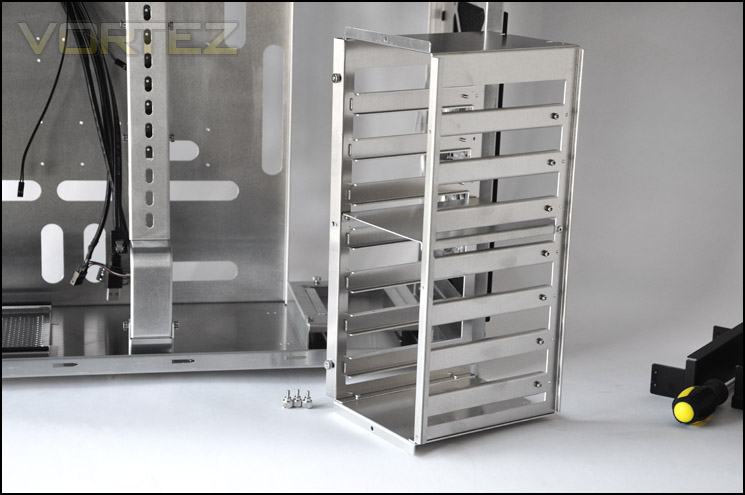
HDD cage is removable
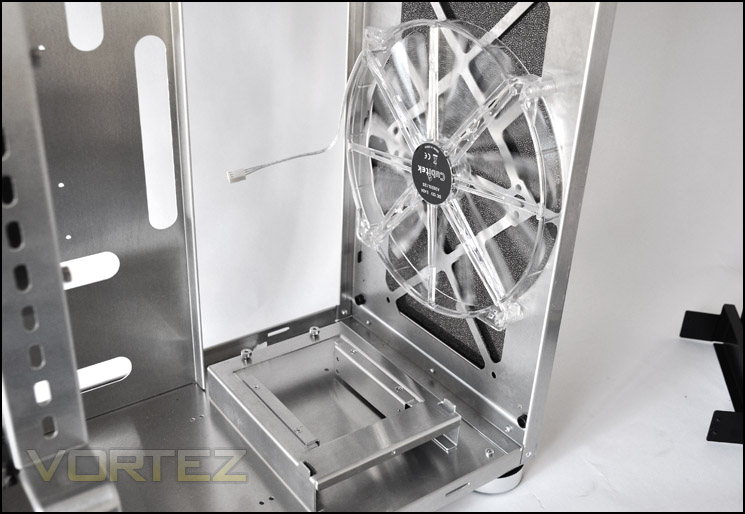
Massive 230mm front mounted fan
Installation
Installing kit into the HPTX Tank is, as you would very well imagine, easy. Due to the masses of space organising cables doesn’t take long. Of course, clearance compatibility with CPU cooler and GPU is a thing of the past. The HPTX Tank will accommodate anything currently on the market.
This case makes my ATX motherboard look like its M-ATX!
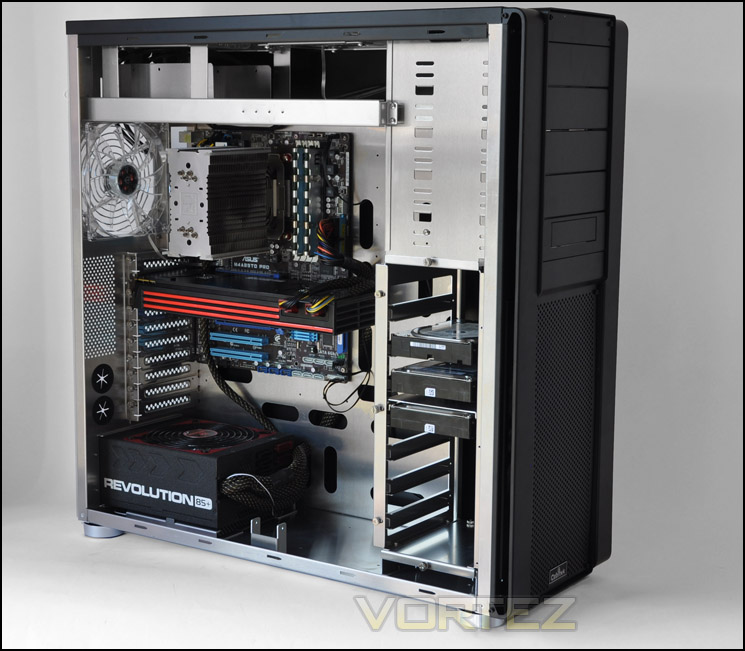
Installation complete, everything very tidy and easy to get inside
Included with HPTX Tank is an accessories kit that includes various screw types that are highlighted within the instructions sheet for easy installation. Included in the accessories kit are some cable extensions and a cable splitter. Cubitek have deviated from the traditional screw in many areas of the case and so have provided an allen key tool for removing some of the screws.
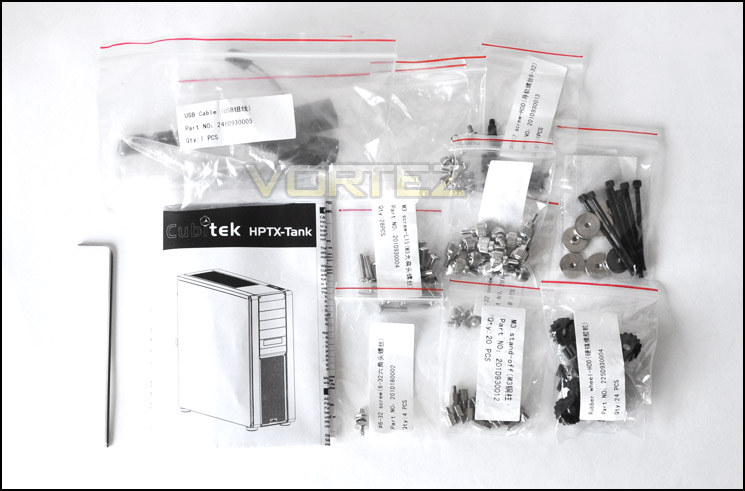
Included accessories
To install a HDD within the HDD cage its quite simple. Place 4 rubber wheels over the screw holes on the drive, making sure that the logo is facing outwards – as this provides a countersunk edge for concealing the screw face. If you put it the other way around the screw head will scratch the inside of the cage. With the rubber wheels attached, the drive will slide right into the cage.
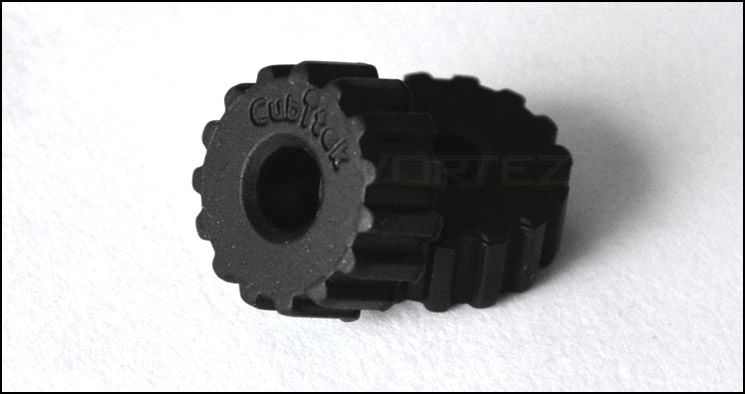
Rubber wheels for attaching to HDD – ant vibration and anti-scratch
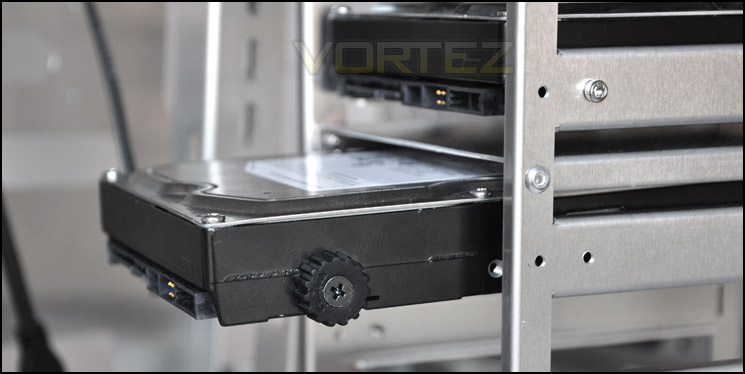
Installing a HDD into the cage
CPU cooler and GPU clearance isn’t a problem at all with the HPTX Tank. Usually I would include a picture of the CPU cooler clearance but since there was so much space I didn’t feel the necessity for this. The Noctua NH-U12P that was installed within the HPTX Tank is 158mm in height, this case will accommodate CPU coolers with a maximum height of 190mm.
As you can see from the photo below, there is plenty of space for even the biggest of graphics cards. Installed here I have the mammoth HD6990 which measures 12″ in length. Even if our card did exceed 13/14″ in length we could still remove the HDD cage to accommodate this and move the HDDs up to the optical drive bay.
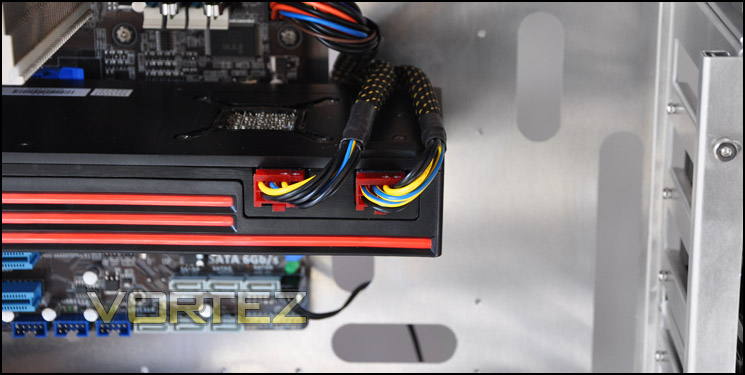
GPU clearance is not a problem. HD 6990 fits in with ease
Installation (Continued)
As always, I like to report the clearance behind the motherboard tray for bundling cables. I hadn’t mentioned this before but many thanks to ‘ehume’ who frequents OCN/Vortez he was the one who pointed out this would be a good thing to include in our case reviews. It’s nice to have feedback from our readers and we would always encourage this.
The clearance behind the motherboard tray is approximately 0.8cm. This may not seem like a great deal, but remember there is greater space at the top and sides of the motherboard tray should you need extra clearance. The side panel fitted on without any problems at all, the thick 24-pin ATX motherboard cable presented no problems in this regard.
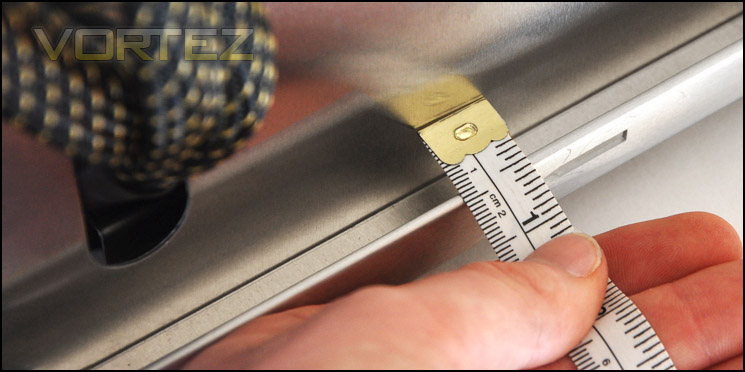
Clearance isn’t fantastic behind the motherboard tray
Due to the HD 6990 having PCIe power connectors on the outer edge this is unfortunately in the exactly the same position the middle pillar resides. So with this particular graphics card installed, we have to remove the pillar that runs down the middle of the HPTX Tank.
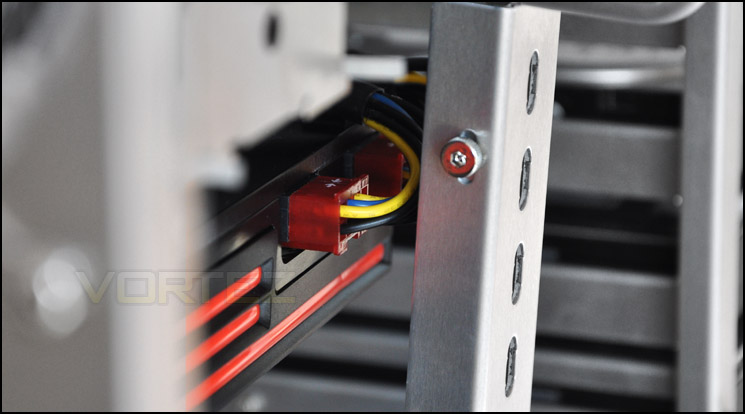
Middle pillar touches PCI-e connectors on HD 6990
To remove this pillar you will need to have the provided Allen key, you cannot remove these screws and many others within the HPTX Tank with just a screwdriver. I’m not entirely sure why Cubitek have chosen to go down this avenue, it seems very strange. Common sense would suggest using the traditional cross-head screw is standard and most frequently used. For the average consumer, loosing this tool would mean a trip to a tool shop.
Removing the pillar reveals some terrible, metal-on-metal scratching that could easily be avoided by simply attaching some soft rubber to the inside arm of the pillar. For such a high-end case like HPTX Tank and the quality of materials used, I would have expected Cubitek to take a little more care for small, obvious things like this.
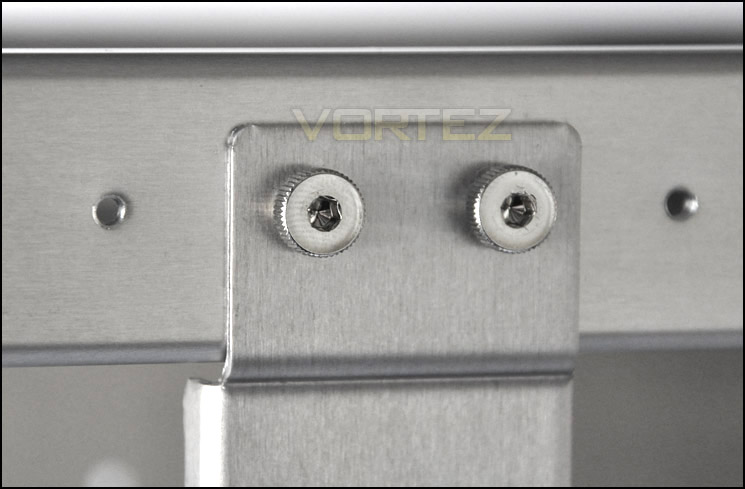
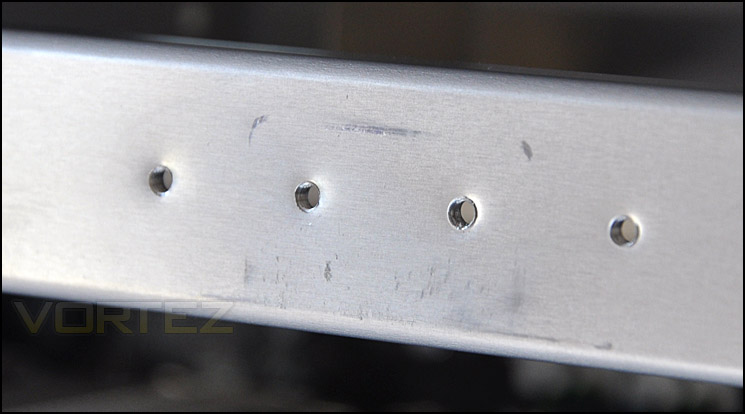
Scratching left from the removed pillar – metal on metal
Behind the motherboard tray you can see that threading cables through is very easy. Lots of space and plenty of cable management holes. The CPU backplate cut-out is very forgiving – for the AM3 socket see in the picture below, there is more than adequate space to remove the CPU coolers without having to remove the motherboard.
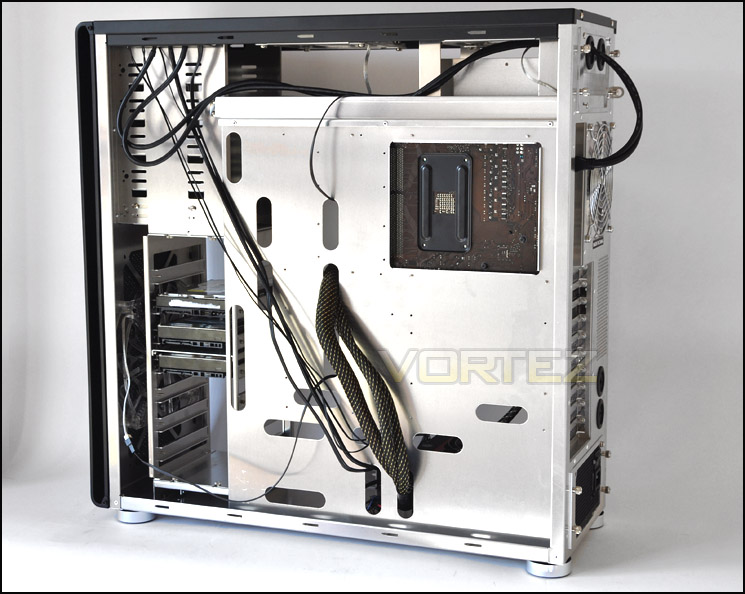
Large CPU cooler backplate around the back
Powered UP (Lighting)
The Cubitek HPTX Tank features 4 LED case fans. Each of these emit a warm red glow and will certainly add character and atmosphere to wherever it is placed. Over the next page we will be taking a look at how effective these case fans are when we put the HPTX Tank into our thermal performance test.
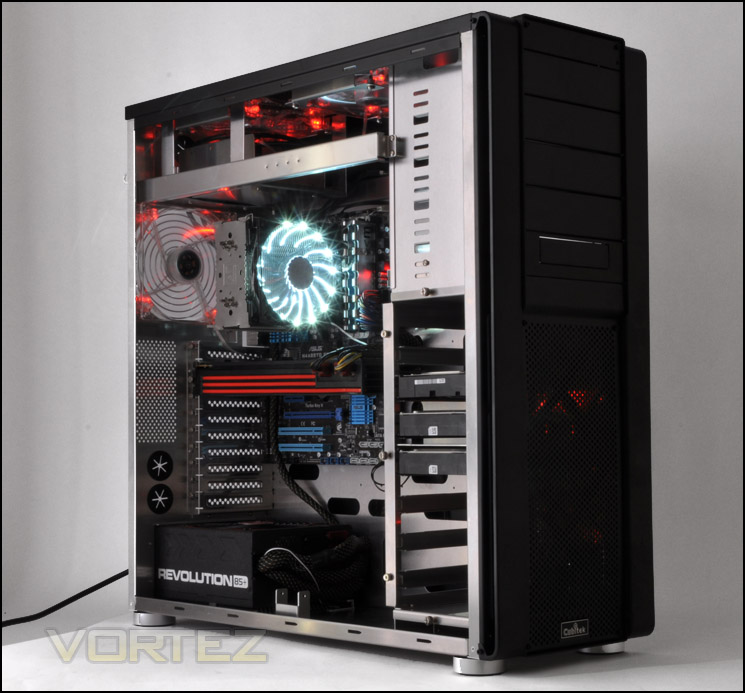
Powered up and ready to go!
Thermal Performance
The Cubitek HPTX Tank has 4 pre-installed fans – 3 x 140mm and 1 x 230mm. On paper, this case should perform well in our thermal tests since the larger fans can push more air whilst being quieter. With such a strong concentration of fans within the HPTX Tank it will be very interesting to see the results.
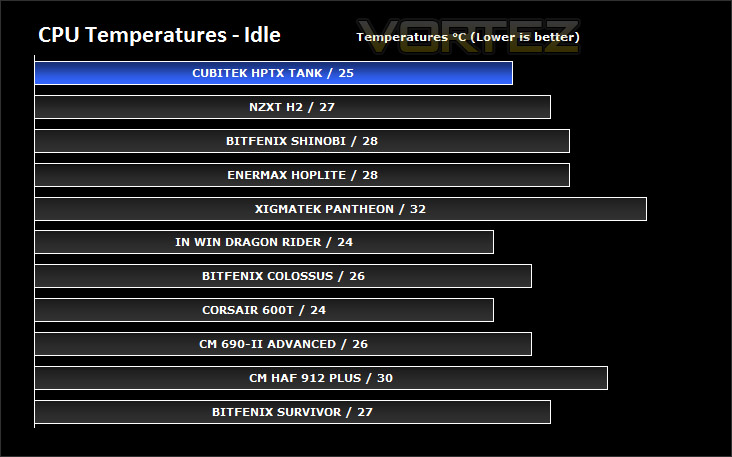
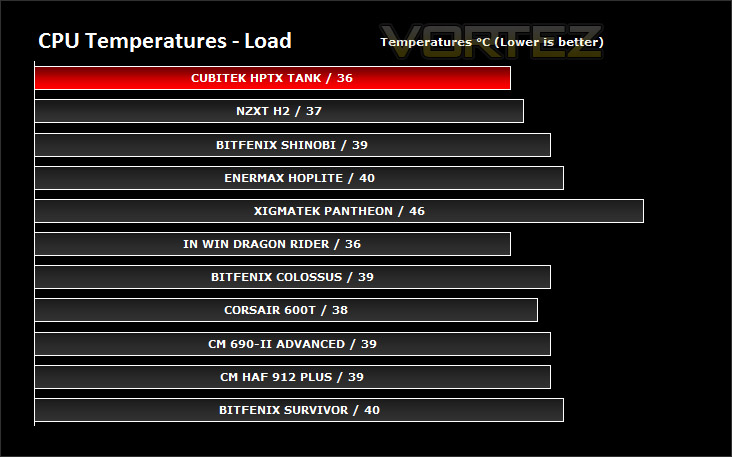
To discover the thermal performance of the HPTX Tank I will record idle temperatures after 20 minutes from a cold boot. I will then stress the system and temperatures will again be monitored after 30 minutes have elapsed.
System Components
CPU AMD Phenom II X6 1055T 2.8GHz
Motherboard ASUS M4A89TD PRO
Graphics ZOTAC NVIDIA GTX 480
Memory 4GB Mushkin EM3-10666 DDR3
HDD Samsung Spinpoint 500GB SATA-II
PSU Enermax Revolution 85+ 850W
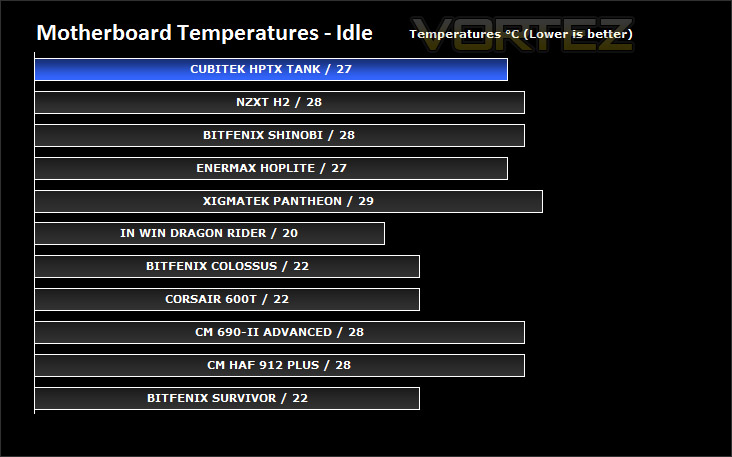
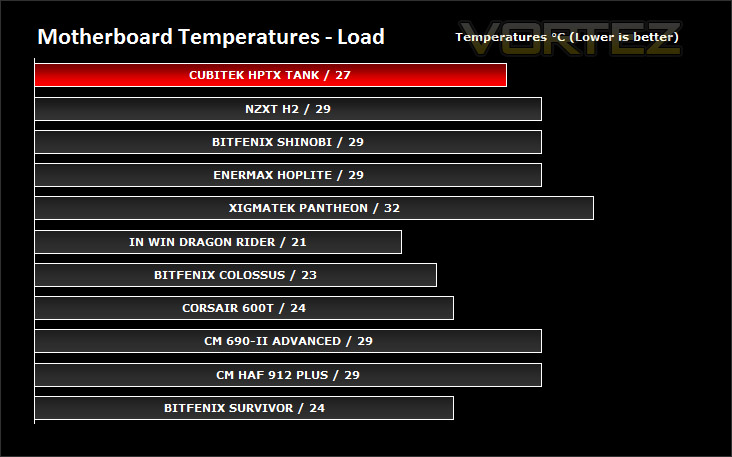
As expected, HPTX Tank does very well in the thermal performance tests. Its really no surprise since Cubitek installed the quantity of case fans inside the case and the size of them allows for increased performance. Due to the size inside HPTX Tank its much easier to fit larger fans inside the chassis.
Conclusion
So is this a nail in the coffin for Lian Li? Not quite. Cubitek have designed a brilliant set of cases in the Tank series and for a first attempt at a fully aluminium series they have done a great job.
Certainly the HPTX Tank we have looked at today has been a brilliant case. It carries with it some very sleek styling, the Aluminium used throughout gives it a professional high-quality finish and feel. The real highlight is inside the HPTX Tank, the space is just incredible. It will accommodate any CPU cooler on the market due to the maximum height restriction of 190mm and it will house the HD 6990 with ease.
Having so much space to move around, install kit and route cables through to the back is a big advantage. It makes the entire process of building a system inside the HPTX Tank much easier. With most other cases come limitations but with the HPTX Tank, there literally are none. If you have an XL-ATX motherboard, no problem. If you have Quad-SLI, no problem. If you want to mount the PSU at the top, no problem. I’m sure you understand the point I am making here!
What makes the Tank series so appealing is the price. Compare the 3 cases in the series to respective Lian Li examples and you are looking at almost half the price in some cases. The HPTX Tank arrives with us at 180 GBP, 200 EUR, 310 USD which for a case of this stature is a great deal. You will struggle to find a fully aluminium case with the space and features this case has.
We’ve seen that Lian Li aren’t the only company that can create excellent aluminium cases, I’m sure that with enough exposure Cubitek can create quite a stir with the Tank series. I am looking forward at seeing what other products Cubitek bring to the table over the coming year, they have made a brave move with the Tank series and for me it has come off very well.
Pros
+ High quality construction
+ Subtle, discreet styling
+ Abundance of space: XL-ATX, Quad SLI, tall CPU coolers, Water-cooling ready
+ Great thermal performance
+ Very affordable
Cons
– Some screws require specialised Allen key
– No rubber between metal on metal objects
+ High quality construction
+ Subtle, discreet styling
+ Abundance of space: XL-ATX, Quad SLI, tall CPU coolers, Water-cooling ready
+ Great thermal performance
+ Very affordable
Cons
– Some screws require specialised Allen key
– No rubber between metal on metal objects