







In our first review for Fractal Design. We take a look at a new Midi Tower Case. Introducing the new Arc Series. A burly mid tower with plenty of punch.
Product on Review: Arc Midi Tower
Manufacturer: Fractal Design

Street Price: £65 inc. VAT
The chassis market is indeed a competitive arena and Fractal Design have so far left a firm stamp with their Define series taking a strong hold within hardware circles world-wide. It is today that marks our first review with Fractal Design and the start of a promising journey. So far, FD have designed countless elegantly styled cases for the hardware professional and today sees much of the same.
Today we will be taking a look at Fractal Design’s Arc Mid Tower case. This burly enclosure promises to combine rich looking aesthetics, good thermal performance and plenty of features to ensure installation processes are complete without a hitch.
So without any further delay. Let’s commence our analysis of Fractal Design’s Arc Midi Tower Case.

Fractal Design’s take on Arc:
The new Fractal Design Arc Series of cases create a niche of their own; a combination of stellar performance and cooling options with stylish, minimalistic looks and an overall understated elegance.
Some words on Fractal Design’s ethos:
The concept of Fractal Design is to provide products with an extraordinary design level, without compromising the important factors of quality, functionality and pricing. The computer of today has come to play a central role in most people’s home, creating a demand for appealing design of the computer itself and its accessories. Our main product areas are computer enclosures, power supplies, cooling, and Media Center-products, such as Home Theatre-enclosures, keyboards and remote controls.
Techncial Specificatons
– 8x 3,5 inch HDD trays, compatible with SSD!
– 2x 5,25 inch bays, with 1x 5,25>3,5 inch converter included
– On top of front panel: 2x USB 2.0, 1x USB 3.0 and Audio I/O
– No PSU included (removable filter below PSU)
– M/B compatibility: Mini ITX, Micro ATX and ATX
– 7+1 expansion slots with sleek white painted brackets
– Supports graphic card lengths up to 290mm when removable HDD-Bay is in place
– Supports graphic card lengths up to 470mm without removable HDD-Bay
– Supports CPU coolers with height of 180mm
– Supports PSU’s with a depth of maximum circa 170mm, when using bottom 120/140mm fan location. When not using the bottom 120/140mm fan location, the case supports also longer PSU’s, typically 270mm.
– Case size (WxHxD): 230x460x515mm with front and top bezel in place
– Net weight: 10kg
Packaging & First Look
The Arc did come in a designed case box but since its arrival from Taiwan it sustained quite a bruising and had various courier labels covering up significant spots – thus I have declined to include any pictures of the box. Essentially, it has various named features and follows a similar design pattern to their previous offerings. Inside, the Arc is found with a clear plastic covering and held in place with polystyrene pillars to ensure its safe arrival in transit.
Here is our first glimpse of the Arc out of its packaging. From both angles the chassis looks very stylish, it has a very subtle design that will surely hold fast to those who have a soft spot for cases with a minimalist, discreet approach to styling. The side panels are almost identical if it were not for the mesh found on the prominent side panel. This marks out an area for mounting a 140/180mm fan, typically above were the graphics card would be.
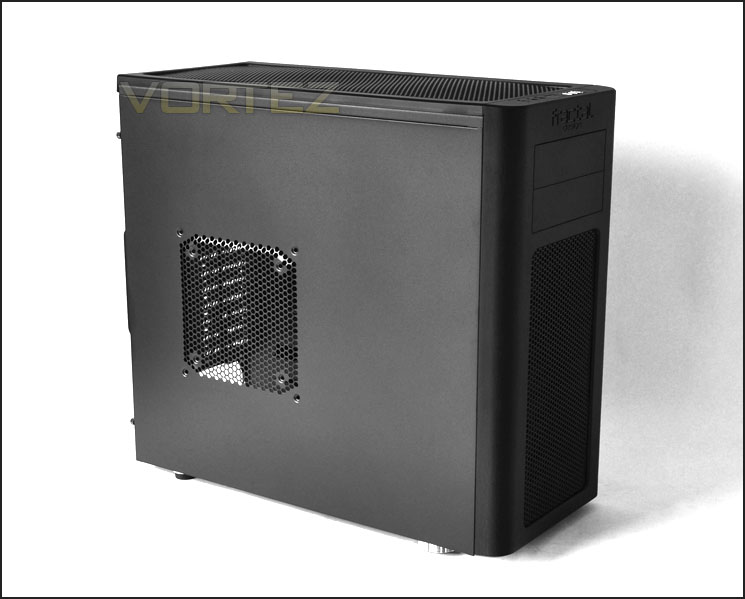
The prominent side with markings for 180/140mm fan
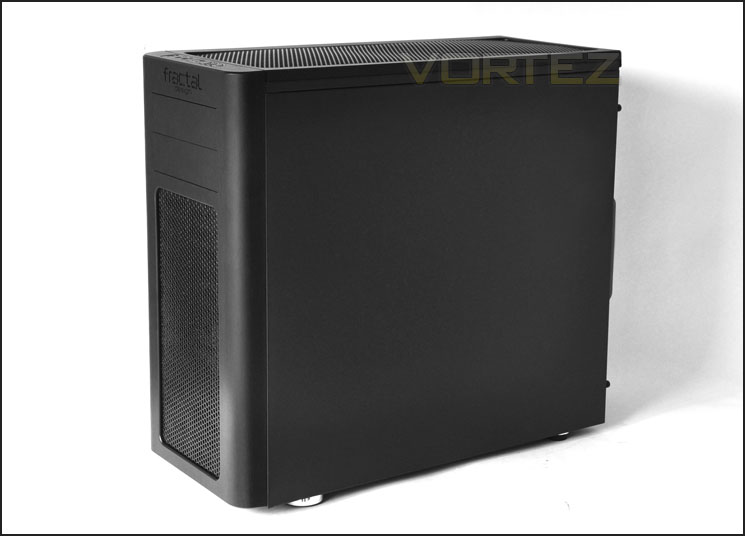
Styling is kept discreet and minimalist
Exterior
Moving in for a closer look at the Arc we can see that the front has a large perforated mesh panel at the front. Behind the top of this section is a 140mm fan, hence the reason for this opening – it will act as an intake. Above this we have 2 x 5.25” drive bay covers and the Fractal Design insignia stamped right in the middle. This front fascia has a brushed aluminium look to it but in fact its only plastic. We can fully remove this front panel to clean fan filters on the underside and attach another fan. See below.
Around the back we have an opening at the bottom for mounting a PSU. Above this 7 x PCI expansion slot covers, each with ventilation holes for better airflow. To the side a vertically aligned PCI expansion cover – here you can mount a fan controller (there is one included).
Above this we can see the mesh opening that hosts the 140mm rear exhaust fan and at the very top 2 x rubber grommets to assist with water-cooling projects. The Arc, even though small, can accommodate water-cooling radiators.
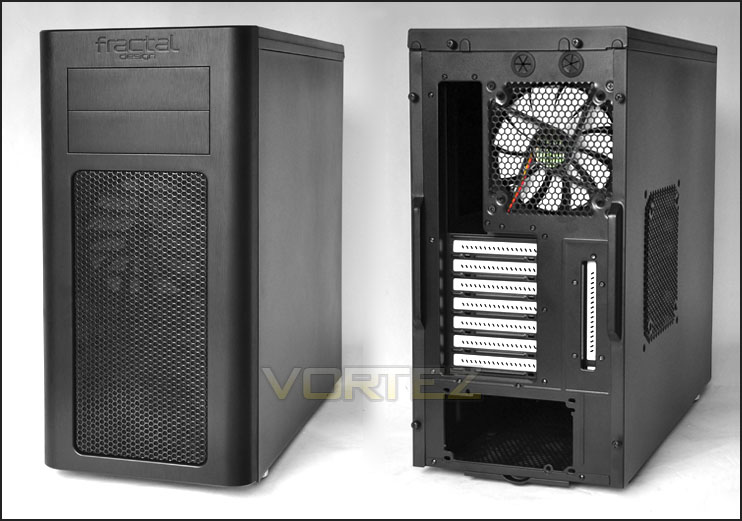
The front and back of the Arc Midi Tower
As previously mentioned, the front panel fascia can be removed quite easily. Behind this fascia we have fan filters and of course the front mounted 140mm intake fan. Fans on this front fascia aren’t mounted via screws but are clipped into place. Inside the Arc we can see the HDD cages do block some of the airflow, these HDD cages can be removed though – we will see this a little later.
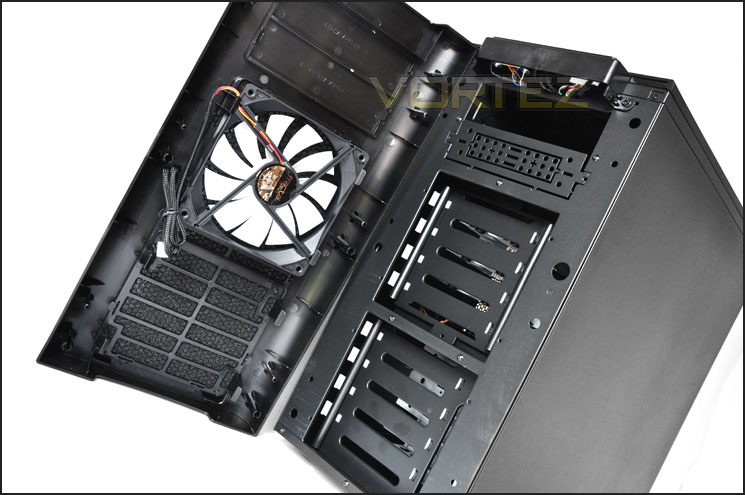
The front fascia is removable – behind it, a 140mm fan
At the top of our Arc we have the front panel connectivity. From left to right we have a reset button, microphone and headphone jack, power button , 2 x USB ports and 1 x USB3.0 port. The USB3.0 port here has a USB header connector rather than the USB connector – so you will be able to plug this straight into your motherboard if you have a USB3.0 header.
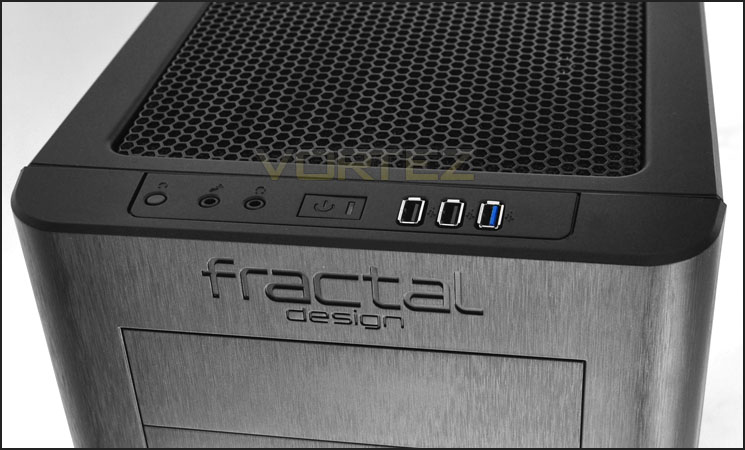
Front panel connectivity with USB3.0
At the top of Arc, similar to the front fascia we have a large perforated mesh section. Underneath this there is a pre-installed 140mm fan and a space for another 140mm fan. We will take a closer look at these later. One thing to note, the mesh located at the top of the case here is slightly warped and you can recognise there is slight bubbling though this isn’t a big problem I think it needs addressing.
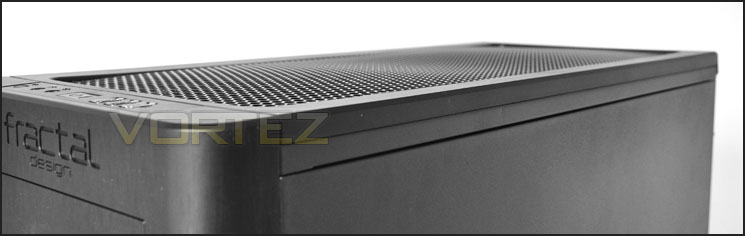
The top of Arc
On the underside we have 4 rubber feet. The front feet are larger than the rear. A strange choice – perhaps this is due to obstruction with the fan filter that is situated in the middle. This fan filter is removable and can be cleaned easily.
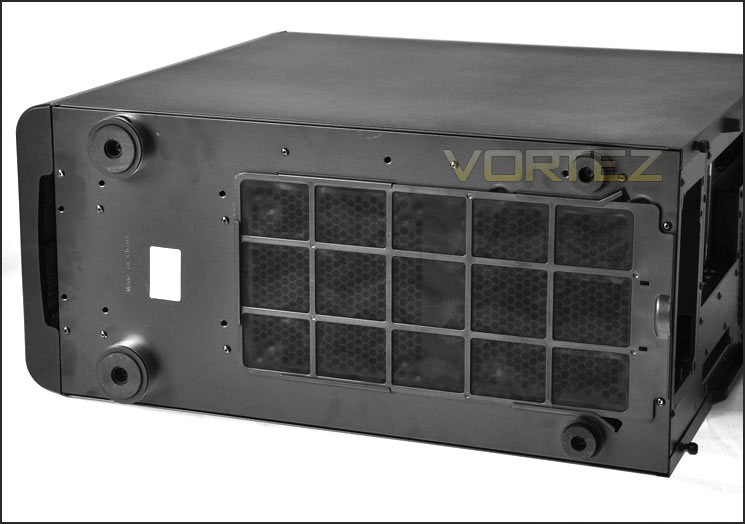
The underside with removable fan filter
So far the Arc looks to be a very distinguishing chassis. Let’s go inside the case now for a closer look.
Interior
Removing the side panels is easy – thumbscrews secure them in place and they simply slide off as expected. With the side panels removed we can see the interior is spacious, with plenty of cable management grommets, large CPU backplate opening and some tool-less mechanisms in various spots. The contrast of white and black work very well. PCI expansion covers, HDD cages and fan blades all have that distinguishing white accent making them clearly stand out.
Note: there are even rubber grommets at the top of the motherboard tray – allowing you to easily thread through E-ATX/P4 cables behind the motherboard tray. Excellent!
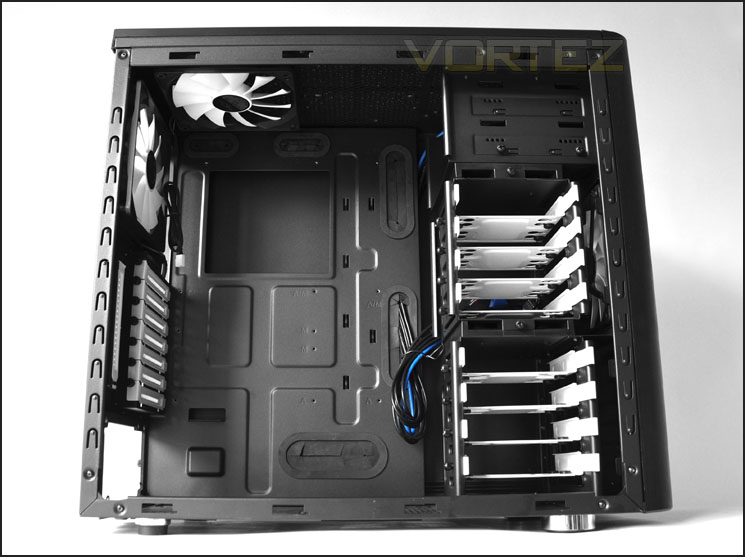
A feature-laden interior with great contrast – white and black
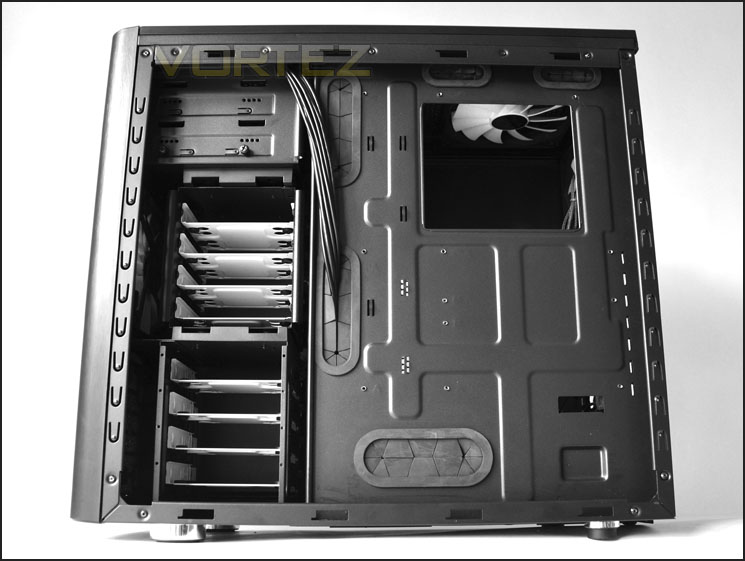
Behind the motherboard tray – lots of cable management options
Let’s move in for a closer look. First of all the PSU mounting area, here we have rubber platforms to assist with reducing vibration and avoiding scratching. There is nothing worse than seeing a case without anti-vibration in this region, metal-on-metal is something we want to avoid – so it’s good to see we have rubber here.
At the bottom we also have mounting holes for a 120/140mm fan. Of course, the underside here has a filter to ensure dust/dirt is easily cleaned.
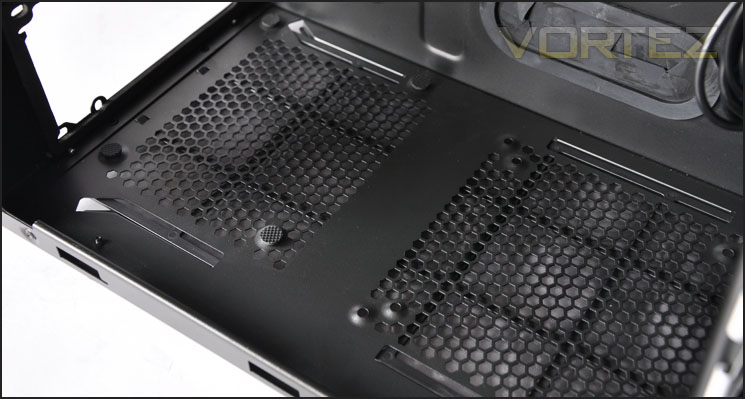
The PSU area with anti-vibration and spot for additional fan mounting
Moving up, we have 7 x PCI expansion slot covers with ventilation for better airflow inside the Arc. To the left, a vertically aligned PCI expansion cover can be found. Here we can attach a fan controller. All of the PCI expansion slot covers are secure via thumbscrews.
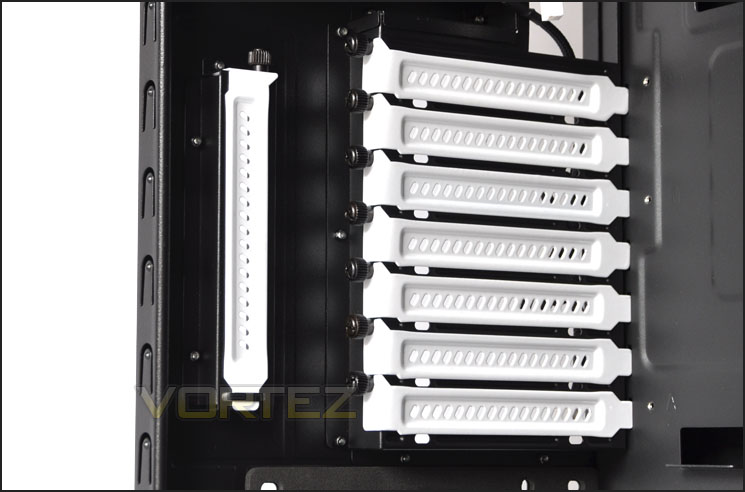
Lots of options for PCI expansion cards
Above this we have dual 140mm fans. One mounted as the rear exhaust and the other a top mounted exhaust. Both have cable sleeves to keep the black/white theme consistent. All of the fans within Arc are 3-pin motherboard header types. There is an additional spot next to the top mounted fan for mounting another 140mm.
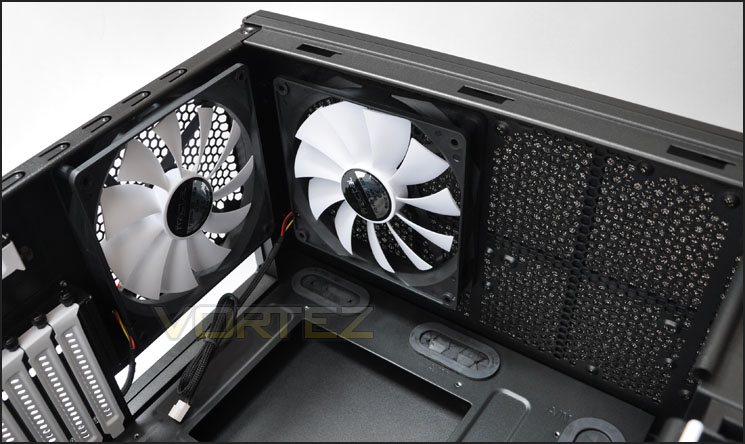
Dual 140mm fans for rear exhaust and top exhast
Interior (Continued)
Over on the other side, the 2 x optical drive bays have no tool-less mechanism as such but are fixed in place via thumbscrews. The lower bay has a 3.5” adapter to allow smaller devices to reside here.
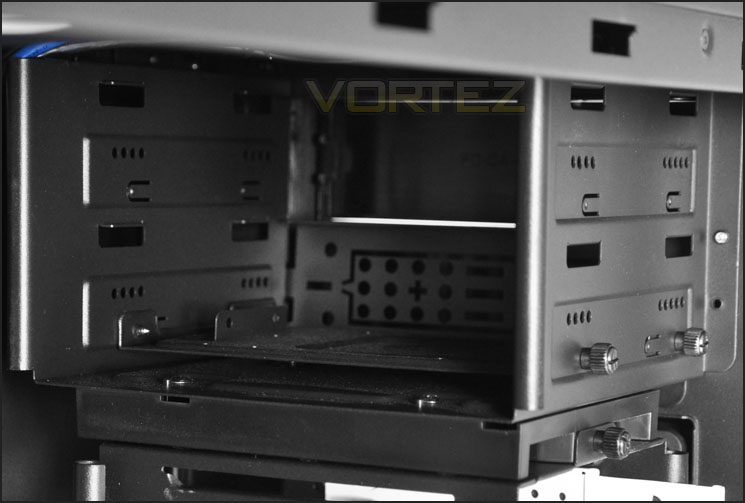
Inside the optical drive bay
Beneath this we have the HDD storage area. The 2 large cages are removable and each contain 4 white HDD brackets. Removing the top HDD cage opens things out in terms of air cooling. The front mounted intake fan can now freely blow across the motherboard and bring air in. The removability here benefits those who have longer graphics cards as this top cage can cause obstruction if the card is over 11.5” in length. One thing that is of concern is the HDD brackets that slide out of the HDD cages, they seem to have a tight fit – both the bracket and cage are metal and pulling them out does cause scratching on either surface.
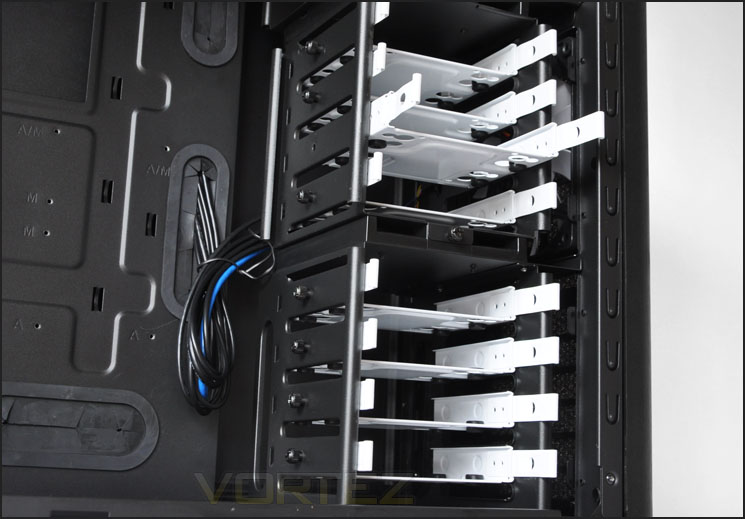
HDD storage is well catered for
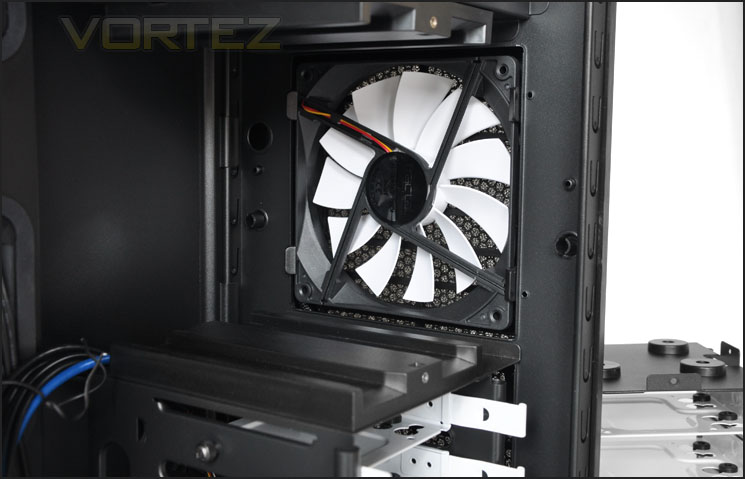
HDD cages are removable to improve airflow and accommodate long GPUs
Lastly, the USB3.0 port that is found on the front panel of the Arc has a header connector. Allowing you to plug this directly into the motherboard. It’s good to see that more and more manufacturers are beginning to do this. Most motherboards developed as of January 2011 should have a USB3.0 header.
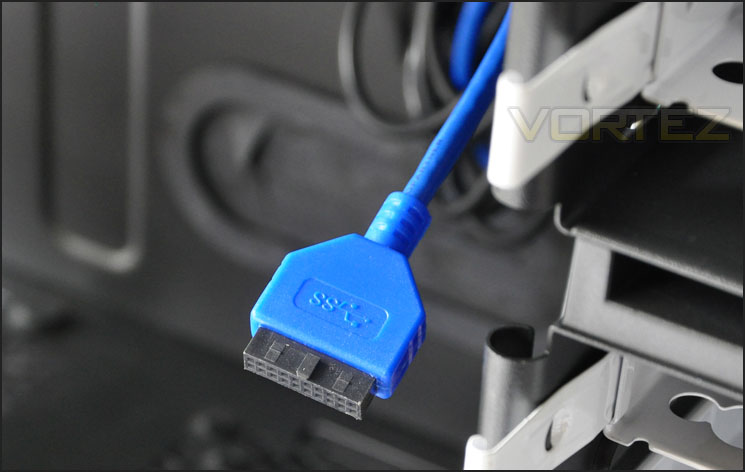
USB3.0 header running from the front panel
Installation
Installing kit inside Arc is very easy. As you can see from the below images, everything looks tidy and there is plenty of space behind the motherboard tray to feed thick cabling out of sight. The E-ATX/P4 can run behind the motherboard tray and up through the top without any problem. From start to finish, the installation process was a breeze.
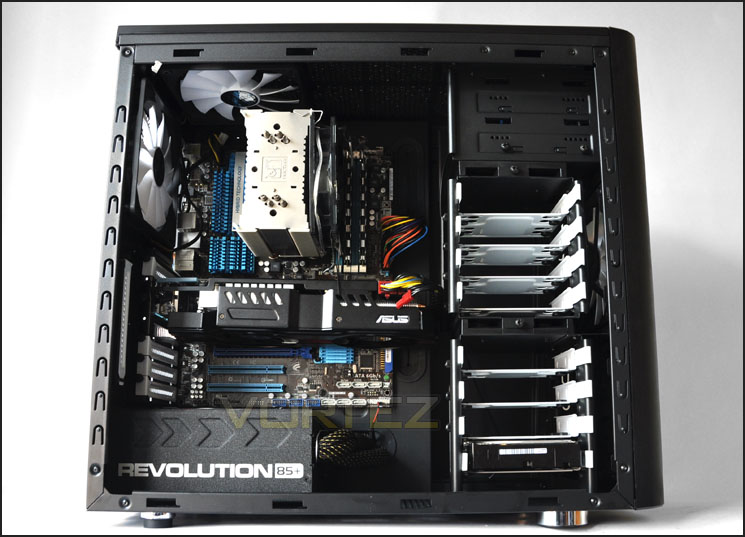
Lots of space even for an ATX motherboard and big components
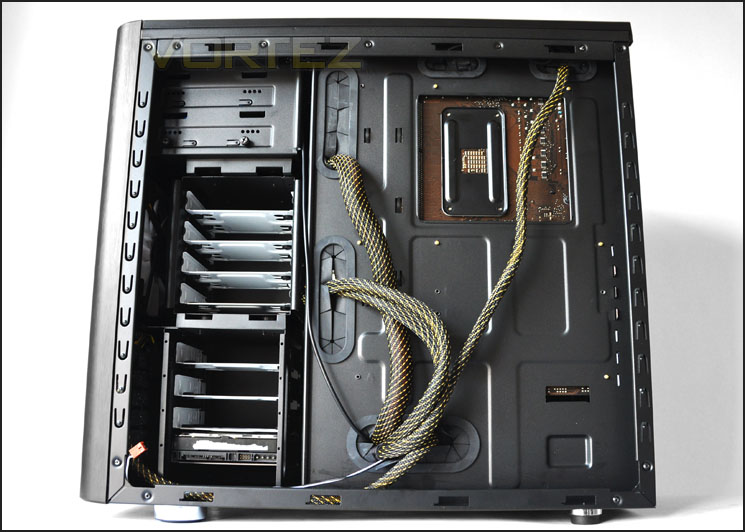
Behind the motherboard tray thick cables can be hidden[
Bundled with the Arc is an accessories kit that features many items. An instructions manual, 5.25” to 3.5” bay cover, cable ties, screws and even a fan controller.
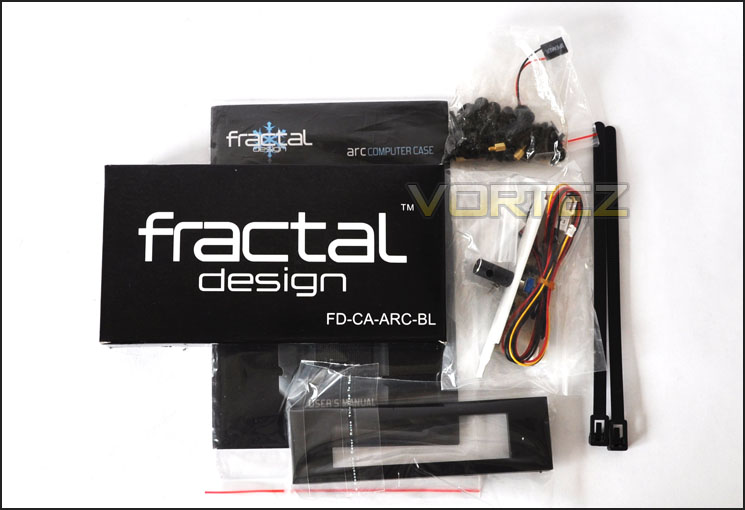
Accessories kit bundled with Arc
Installing HDDs into Arc is quite simple, all you have to do is remove a bracket, place the drive onto the bracket and fasten 4 screws into the underside. Each screw has soft rubber between the bracket and cage.
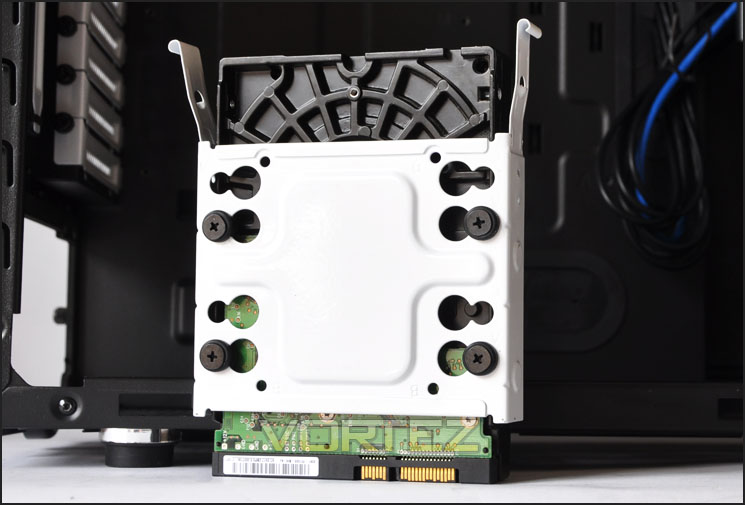
HDD installed within a bracket
In terms of clearance, if you have a CPU cooler that is 160mm tall you will be able to fit it inside the Arc without a problem. Pictured below is the Noctua NH-U12P, this is 158mm in height.
• Thermalright Archon: Height 170mm
• Thermalright Silver Arrow: Height 160mm
• Thermalright Venomous X: Height 160mm
• Noctua NH-D14: Height 160mm
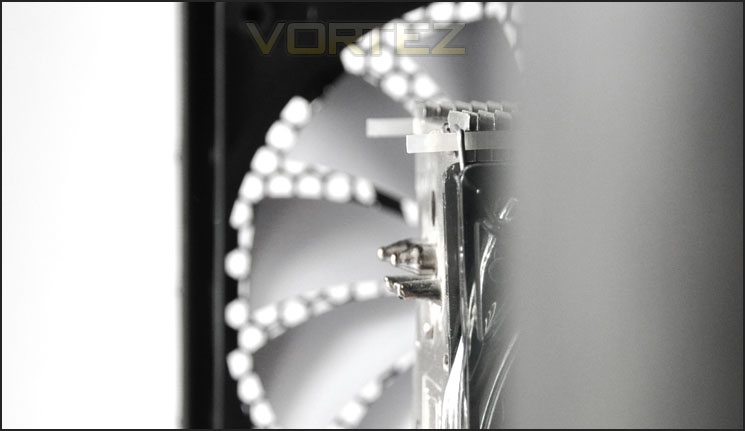
CPU cooler clearance is generous
Simiarily the Arc will also accommodate long graphics cards. With the top HDD cage installed we can manage up to 11.5”. If the graphics card is longer, the HDD cage will need to be removed – this actually is probably a good idea anyway as it will help to improve airflow.
Pictured below is the ASUS HD 6950 Direct CU II. This is 11.3” in length.
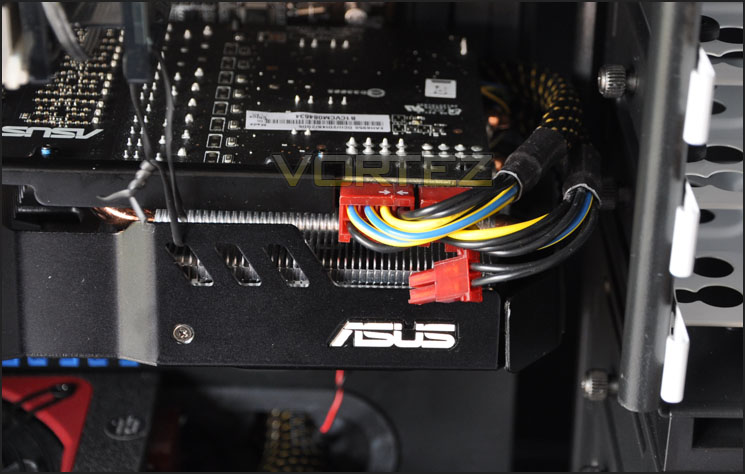
Graphics card clearance is very good
Behind the motherboard tray there is 2.2cm of clearance between the motherboard tray and side panel. This is very generous and it allows all of the necessary cables – including the thick 24-pin to run around the back without any hassle getting the side panel back on.
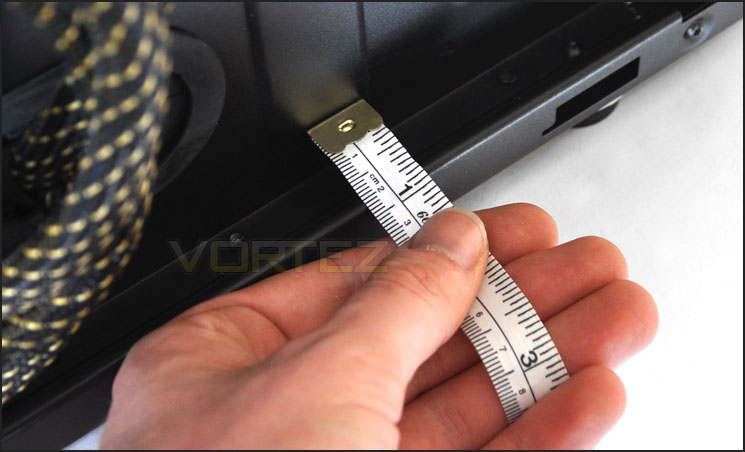
Behind the motherboard tray 2.2cm of clearance
Photoshoot – Finished Product
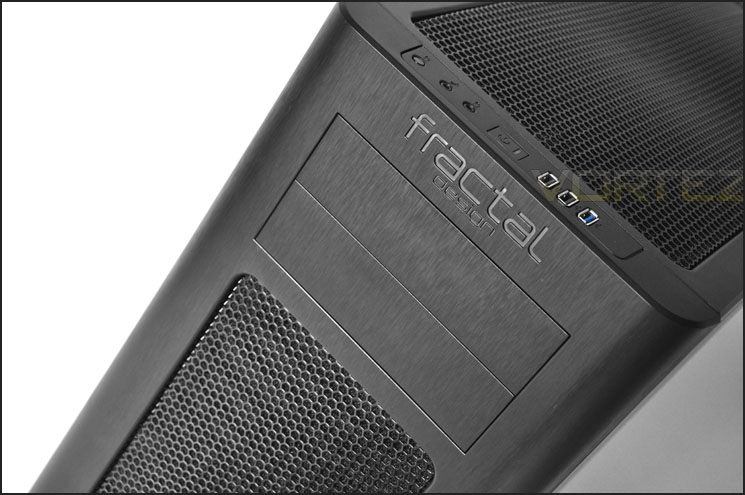
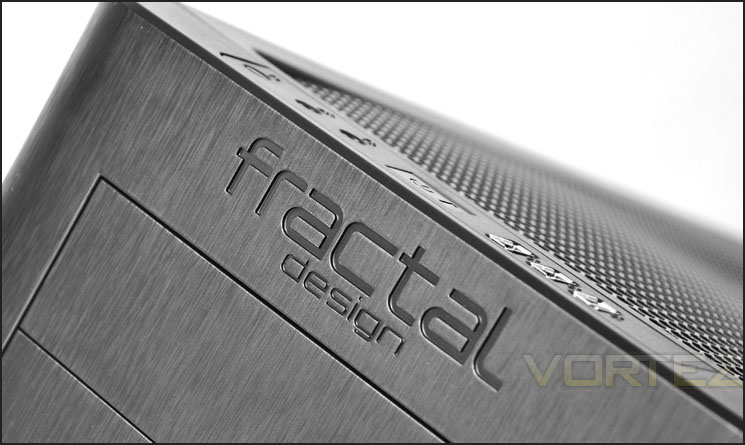
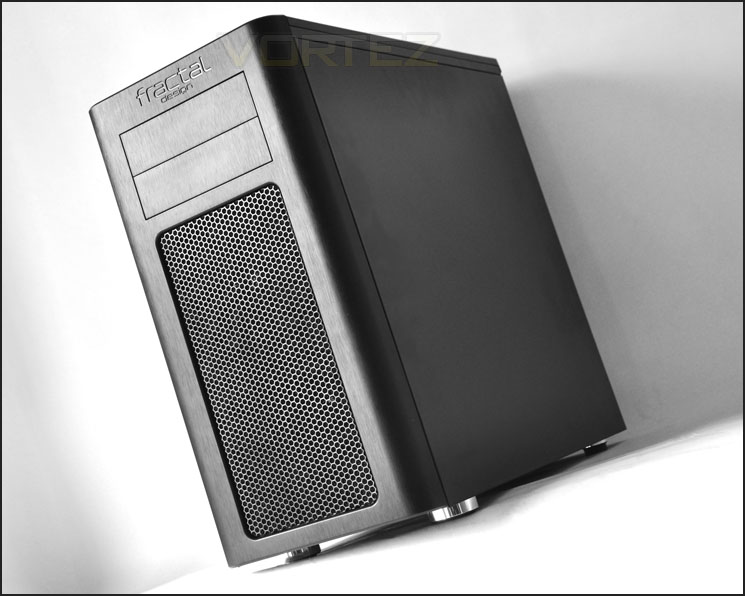
Usually in this section we would title it “Powered Up” and show the lighting effects emitted from a case but since the Fractal Design Arc doesn’t have any such LED fans or side window, lets admire its smooth, elegant aesthetics.
Thermal Performance Testing
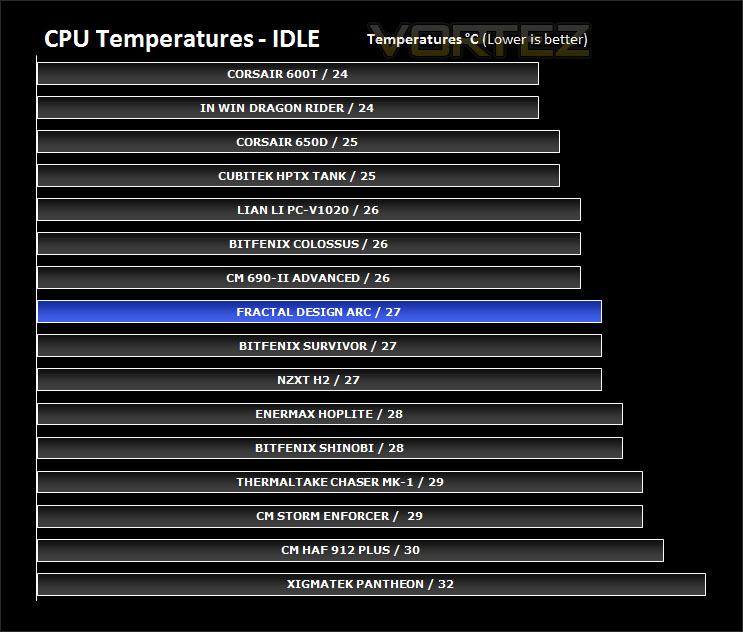
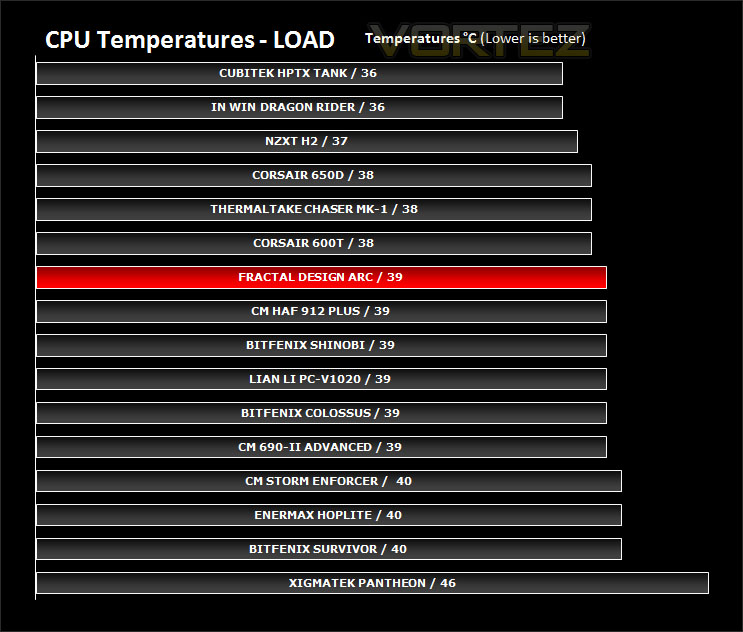
The Fractal Design Arc has 3 x 140mm fans. The front acts as an intake that draws in air across the motherboard, whilst the rear and top mounted fans act as exhausts – taking air out of the case. This is a traditional layout for airflow design and should result in good overall thermal performance. All fans are connected to motherboard headers and all HDD cages will remain installed.
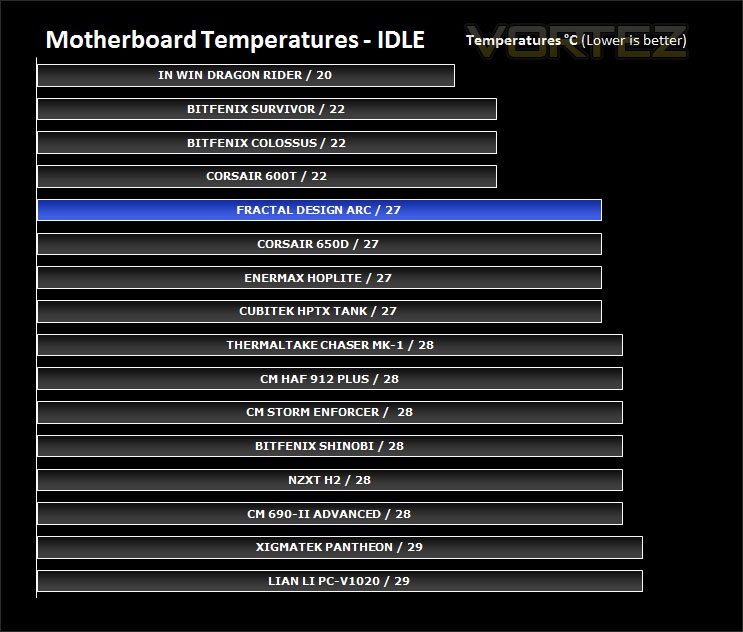
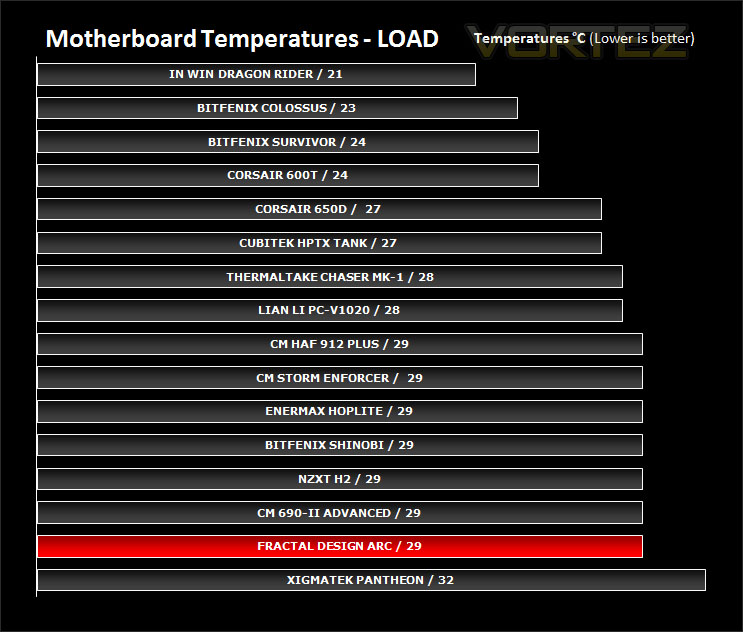
To discover the thermal performance of the Arc I will record idle temperatures after 20 minutes from a cold boot. I will then stress the system and temperatures will again be monitored after 30 minutes have elapsed.
System Components
CPU AMD Phenom II X6 1055T 2.8GHz
Motherboard ASUS M4A89TD PRO
Graphics ZOTAC NVIDIA GTX 480
Memory 4GB Mushkin EM3-10666 DDR3
HDD Samsung Spinpoint 500GB SATA-II
PSU Enermax Revolution 85+ 850W
The Arc provides some admirable performance with its 140mm case fans. The motherboard temperatures suggest that removing the HDD cages would improve airflow. Certainly from looking back at the clearance the front mounted fan has when the HDD cage is installed shows that there is lots of obstruction here. I would recommend removing the cage for better overall airflow.
Conclusion
Being our first Fractal Design review at Vortez and hearing nothing but good news from others regarding this brand I was filled with plenty of anticipation. The Define series has been held in high repute amongst many of the hardware communities in various parts of the globe. Does the Arc series carry with it a similar reverence?
The Arc is clearly marketed at those who prefer a cleaner, professional look. From the exterior it looks great. Inside, again we have the black and white contrasted to highlight significant devices/areas. In terms of styling, Fractal Design has hit the nail on the head. So visually the Arc Midi Tower is iridescent and flavoursome.

Observing the Arc’s functionality, it’s clear that it has been tailored towards accommodating high-end hardware. Additional cooling is available should you wish to install more fans, a bundled fan controller can be attached to the rear of the case and the front panel has that USB3.0 header that most case manufacturers are still missing out 6 months into 2011. Fractal Design have done a great job in future-proofing Arc – it even has the removable HDD cages for longer graphics cards.
Priced at £75 inc. VAT the Arc is up against the likes of CM Enforcer, CM Silencio 550 and Antec’s DF30. Although it does differ quite considerably from most of the cases in its price range. For a case of its stature I would have liked to see more USB3.0 ports up front, and perhaps fan control at the front. The price we have been given is an approximate, if it is found for less than £70 then it should definitely be considered.
The bottom line: Fractal Design’s Arc Midi Tower is a stylish, well designed enclosure that has a satisfying visual appearance both inside and outside. Those wanting a clean looking case to house their high-end components should consider the Arc.
Vortez.net Video Review – Fractal Design Arc:
Pros
+ Smooth, professional looks
+ Great cable management
+ Accommodates high-end hardware
+ Included fan controller
+ USB3.0 header
Cons
– Mesh on top has bubble
– HDD brackets can rub/scratch HDD cages
+ Smooth, professional looks
+ Great cable management
+ Accommodates high-end hardware
+ Included fan controller
+ USB3.0 header
Cons
– Mesh on top has bubble
– HDD brackets can rub/scratch HDD cages


