







In Win’s new full tower gaming chassis is in our midst. Can this E-ATX ready case deliver on performance, value and features in an already competitive market?

Product on Review: GRone
Manufacturer and Sponsor: In Win
Street Price: £85 Inc. VAT
Although founded in 1985, In Win may not be a familiar brand to many but they are a rising force over here in the UK and parts of Europe. In Win have significant involvement with one of the UK’s biggest gaming LANs – Multiplay Insomnia, regularly attending and exhibiting some of their hottest products.
Previously, In Win have been responsible for bringing to market some of the most affordable options inside a variety of divisions. With some of their products the price has reflected the quality but just recently In Win have upped the ante and have a number of new products which hope to raise the bar and encourage favour for the brand.
Today we will be taking a look at a fresh new release for In Win. They recently launched a new full tower gaming chassis named GRone which has enough space to handle E-ATX and a plethora of high-end components. The computer chassis market is furnished with lots of brands and products; can In Win salvage a spot for themselves with GRone? Let’s find out!
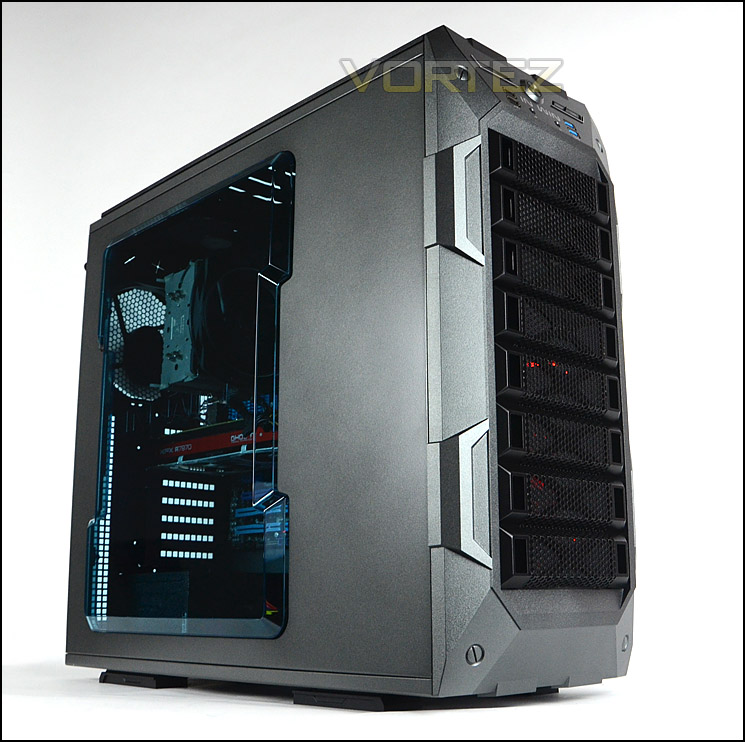
In Win on GRone
An excellent new choice among mid-range, the IN WIN GRone delivers competitive performance and appealing aesthetics in an ATX Full Tower chassis. Hardcore gamers demand excellent thermal solution, highly expandable architecture and easy installation provided by IN WIN GRone. Discerning users are delighted with the stately appearance, large area transparent side panel and user-friendly accessibility. A top-loading 2.5″/3.5″ EZ-Swap dock make HDD data exchange an easy-going pleasure. The IN WIN GRone White is the smart choice for your next PC project.
Technical Specifications
Case Size
Full Tower Chassis
Material
0.8mm SECC Steel
Drive Bays
External 5.25” x 3
Internal 3.5” x 8 or 2.5” x 8
M/B Form Factor
E-ATX (12” x 13”) / ATX / Micro-ATX
Power Supply
ATX 12V, PSII Size and EPS
I/O Expansion Slots
PCI-E / PCI / AGP Slot x 8 (Supports up to 365mm)
Front Ports
1. USB 3.0 x 2 (Internal Connector)
2. USB 2.0 x 2
3. HD/AC’97 Audio
4. Fan Speed Controller
Top Ports
3.5”/2.5” SATA HDD EZ-Swap x 1
Thermal Solution
1. Front: Supports up to 120 or 140mm Red LED Fan x 2
2. Rear: Supports up to 120 or 140mm Fan x 1
3. Side: Supports up to 120 or 140mm Fan x 1
4. Top: Supports up to 120 or 140mm Fan x 3
5. Bottom: Supports up to 120 or 140mm Fan x 2
6. HDD Cage: Supports 120 or 140mm Red LED HDD Fan x 1
Water-Cooling
1. Top: Supports Water-Cooling Radiator up to 360mm
2. Bottom: Supports Water-Cooling Radiator up to 240mm
(Bottom HDD Cage Must be Removed)
3. Rear: Water-Cooling Hole Ready
Fan Technical Data
GRone Metallic Grey
Fan Specifications
14cm Red LED Fan (140*140*25mm)/ 1200RPM ± 10%/ 23 ~27.8dBA
14cm Black Fan (140*140*25mm)/ 1200RPM ± 10%/ 23 ~27.8dBA
Dimensions
(H x W x D) 562 x 245 x 593mm (22.1” x 9.6” x 23.4”)
Full Tower Chassis
Material
0.8mm SECC Steel
Drive Bays
External 5.25” x 3
Internal 3.5” x 8 or 2.5” x 8
M/B Form Factor
E-ATX (12” x 13”) / ATX / Micro-ATX
Power Supply
ATX 12V, PSII Size and EPS
I/O Expansion Slots
PCI-E / PCI / AGP Slot x 8 (Supports up to 365mm)
Front Ports
1. USB 3.0 x 2 (Internal Connector)
2. USB 2.0 x 2
3. HD/AC’97 Audio
4. Fan Speed Controller
Top Ports
3.5”/2.5” SATA HDD EZ-Swap x 1
Thermal Solution
1. Front: Supports up to 120 or 140mm Red LED Fan x 2
2. Rear: Supports up to 120 or 140mm Fan x 1
3. Side: Supports up to 120 or 140mm Fan x 1
4. Top: Supports up to 120 or 140mm Fan x 3
5. Bottom: Supports up to 120 or 140mm Fan x 2
6. HDD Cage: Supports 120 or 140mm Red LED HDD Fan x 1
Water-Cooling
1. Top: Supports Water-Cooling Radiator up to 360mm
2. Bottom: Supports Water-Cooling Radiator up to 240mm
(Bottom HDD Cage Must be Removed)
3. Rear: Water-Cooling Hole Ready
Fan Technical Data
GRone Metallic Grey
Fan Specifications
14cm Red LED Fan (140*140*25mm)/ 1200RPM ± 10%/ 23 ~27.8dBA
14cm Black Fan (140*140*25mm)/ 1200RPM ± 10%/ 23 ~27.8dBA
Dimensions
(H x W x D) 562 x 245 x 593mm (22.1” x 9.6” x 23.4”)
Packaging & First Look
GRone arrives in a large double-reinforced cardboard box which is recyclable. The design which is printed on the box is very appealing to the eye, having an illustration of the case on the front whilst the back is simply blank. The sides feature the technical specifications for those who want more details on the structure of GRone.
Inside, the chassis is covered in a clear sheet of plastic and protected with dual polystyrene pillars.
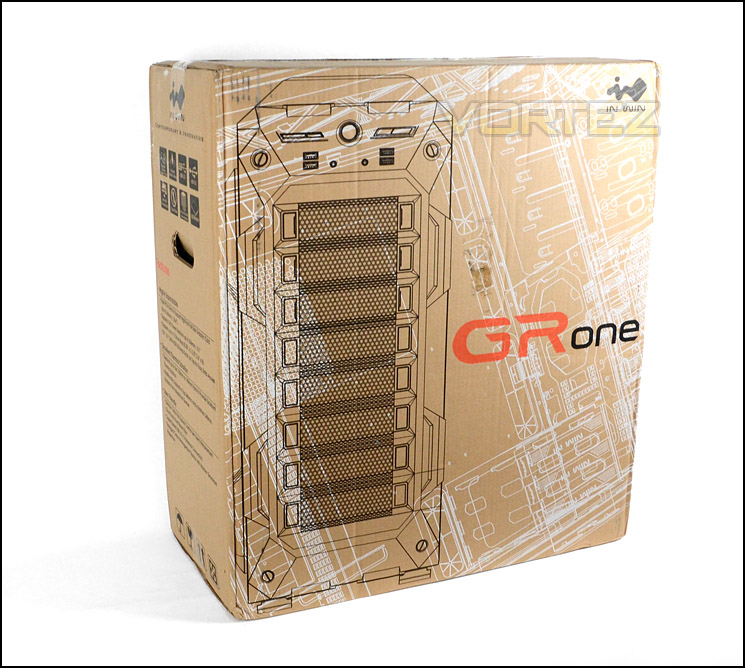
Packaging for GRone
GRone is a full tower computer chassis capable of handling E-ATX. Its design and styling is more tailored towards the gamer due to the rugged front fascia, side window and LED fans. GRone is available in three different colours, black, grey or white. We have the grey configuration for review.
The prominent side panel has a large Perspex window with “In Win” inscription. This window has been given a cool blue tint and is convex to help with further CPU cooler clearance. The alternate side panel is solid apart from a perforated mesh area which is situated nearby the CPU socket. This mesh area can accommodate 1×120/140mm cooling fan.
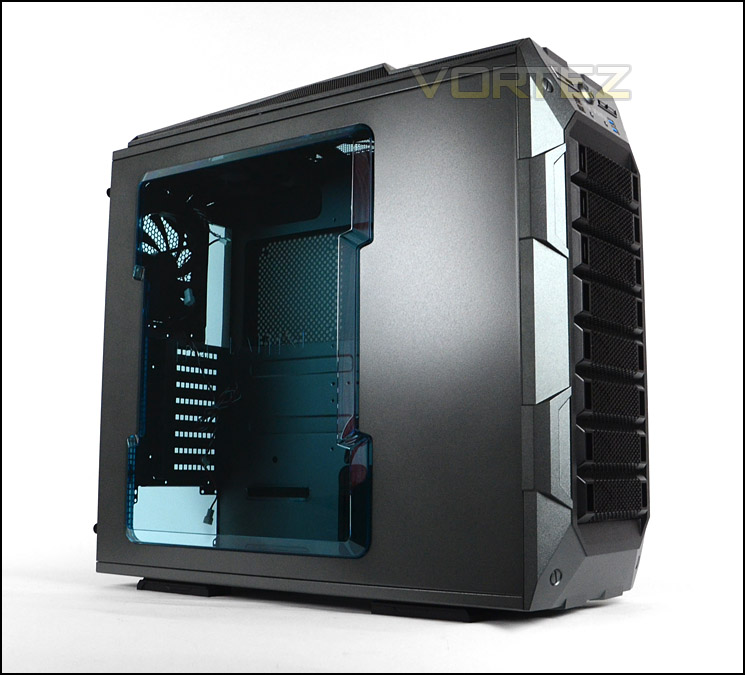
Tinted Perspex side window
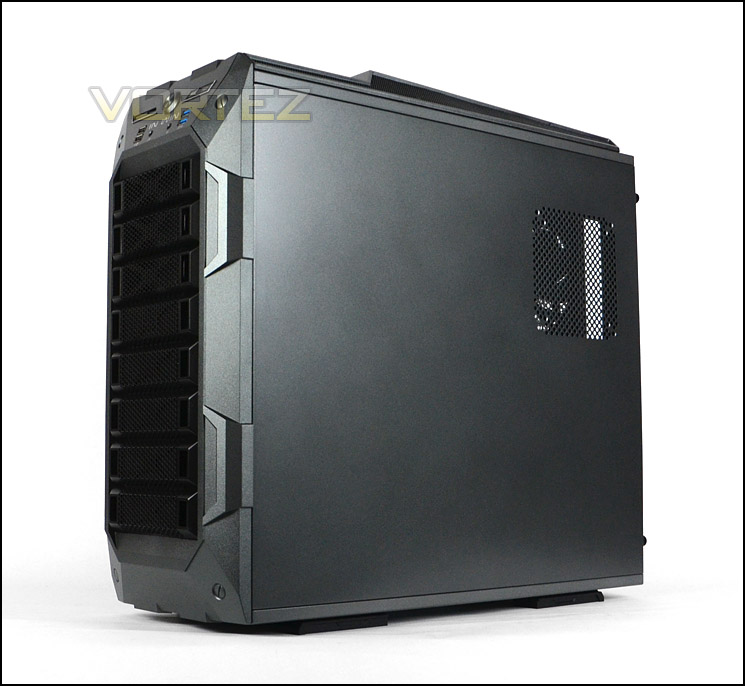
A burly full tower chassis
Exterior
The front of GRone features a plastic fascia with a slightly gritty texture, throughout the centre is perforated mesh – the lower section is removable and gives access to the dual 140mm LED fans which are already installed, there are thin dust filters which can be cleaned. Further up there are 3x 5.25” drive bay covers which are styling in exactly the same manner as the removable cover.
Around the back there is an opening at the bottom of the chassis for mounting the PSU, ventilation runs up the right-hand side to a midway point whilst on the left there are 8x PCI expansion slot covers. Each have ventilation and thumbscrews for easy removal. In Win have installed a 140mm rear exhaust fan inside GRone and placed four rubber grommets directly above for tubing/cables.
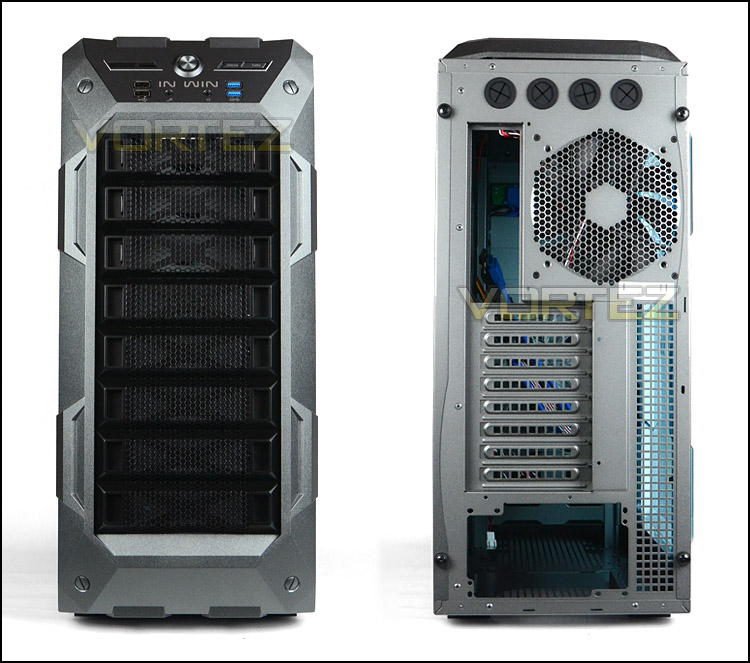
The front and back of GRone
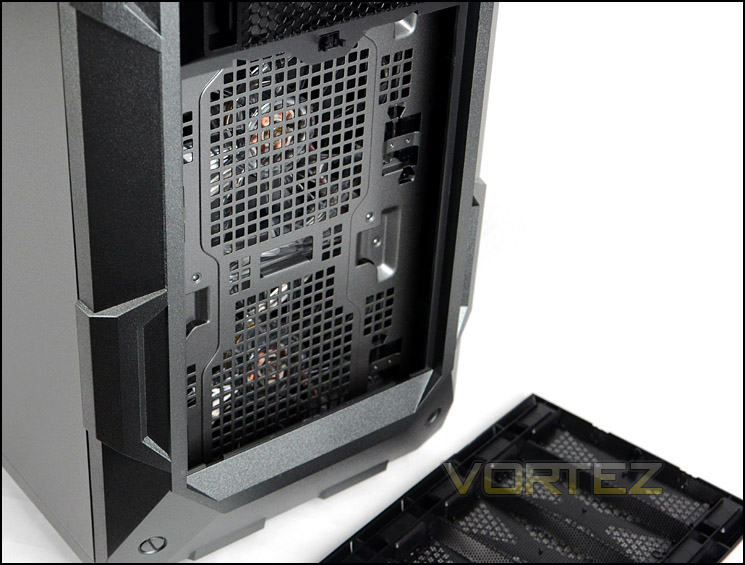
Detachable front cover and dual 140mm LED cooling fans
Up at the top of GRone facing the front is the front panel connectivity consisting of the following:
• LED activity lights
• Power Button
• Two-speed fan controller
• 2x USB 2.0 ports
• Headphone/microphone jacks
• 2x USB 3.0 ports (via internal motherboard header)
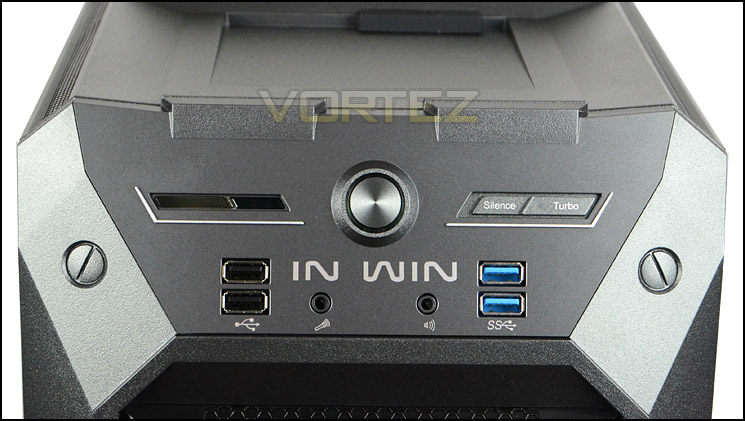
The front panel connectivity
At the top of GRone, towards the front, is a hot-swap point for HDD storage. This can provide access to 2.5” or 3.5” drives and has a rubber cover which conceals the ports when not in use – a nice feature to prevent dust/dirt buildup.
The top of GRone is predominantly plastic with some ventilation strips to correspond with the cooling fans underneath. The gaps on these strips are only very small because they are to only offer secondary heat dissipation – the primary spot where heat will disperse is out the sides due to the depth of the top fascia. In Win have given the sides perforated mesh in order to achieve this.
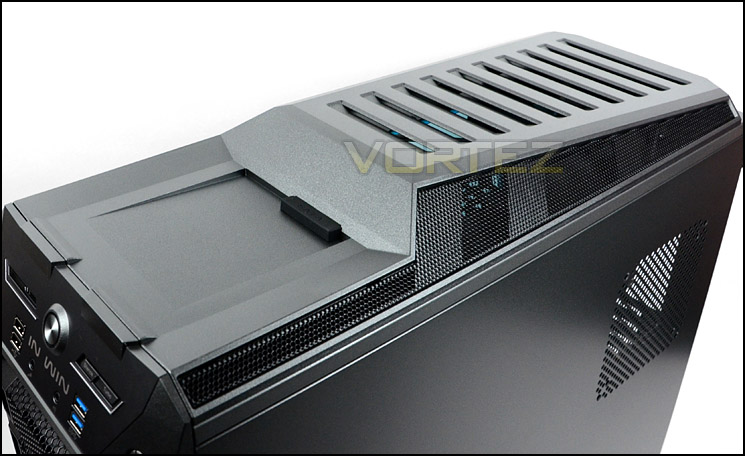
The top of GRone with hot-swappable HDD functionality
On the underside of GRone there are four plastic feet, unfortunately these feet do not have any rubber properties meaning the case could potentially slip on smooth surfaces. Both the PSU section and cooling fan mounts on the bottom of the chassis have been given thin strips of fan filter material. The case would need to be flipped onto its side in order to get these strips out, a better method of implementation is to have self-contained filters with handles so that the filter can be removed without having to turn it on its side. These dust filters aren’t the best quality.
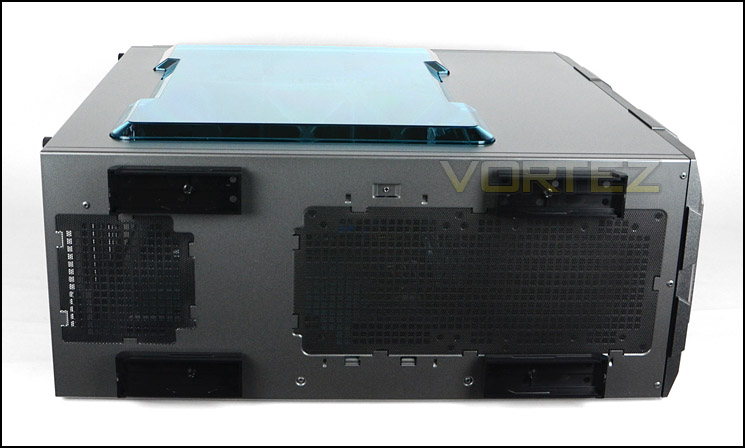
The underside of GRone
Interior
Both side panels are fixed in place via two thumbscrews on either side. After removing the side panels we can gage an overall impression of the internal layout and features of GRone. Inside, both ATX and E-ATX form factor is supported with the mounting holes being significantly shifted down to allow for greater clearance at the top of the chassis. Other aspects that are immediately noticeable are the inclusion of numerous cooling fans, sheer space and tool-less design mechanisms. Cable management appears to be taken care of also, a little later we will investigate how effective this truly is.
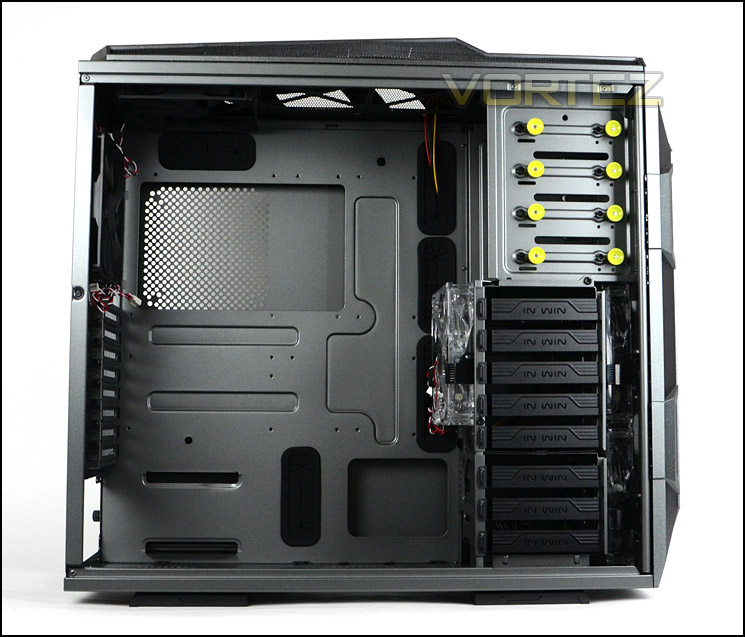
A spacious full tower awaits
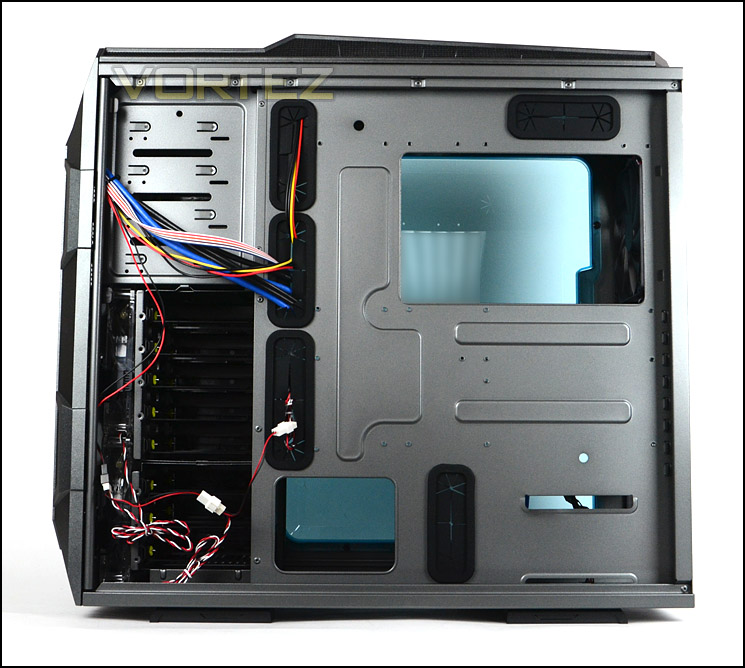
Gun metal grey throughout
Moving in for a closer look, we first come to the PSU area. Sadly this hasn’t been given any rubber padding which we regard as obligatory nowadays for case design. Without any rubber scratching can occur and vibration could be a potential problem too. It’s a simple feature implementation and In Win should have included this. At the bottom we can attach dual 120/140mm cooling fans.
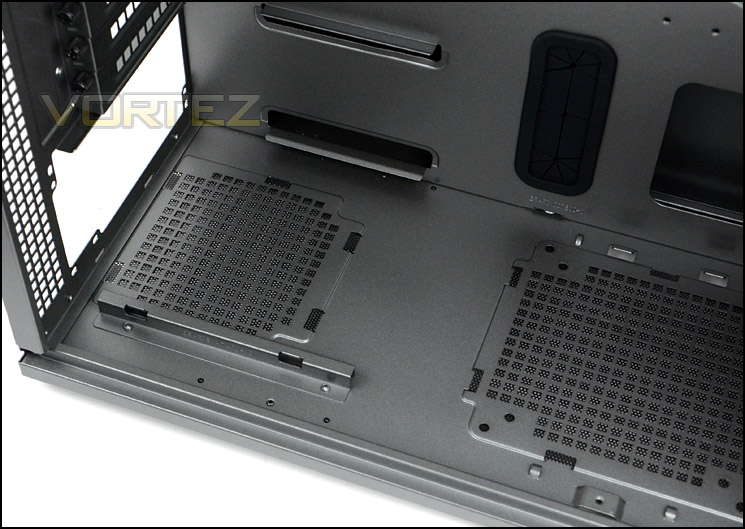
The area for PSU mounting
Above there are a total of eight PCI expansion slot covers, each come with ventilation and thumbscrews for easy removal.
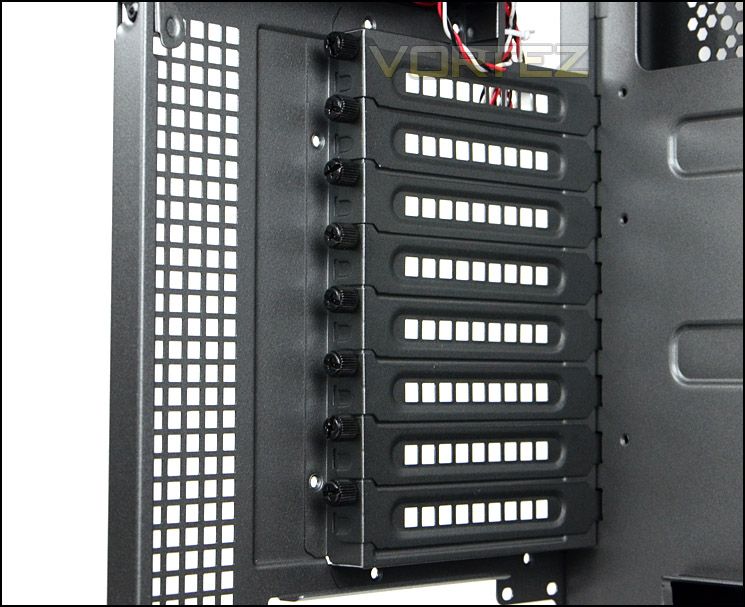
Eight PCI expansion slot covers
Interior (Continued)
Continuing our tour of the inside of GRone, towards the rear of the case features two exhaust fans, these are both 140mm and capable of up to 1200RPM. As a side note it would have been a nice touch to have the cables on these fans black rather than multi-coloured as it can detract from a presentable computer system. There are also two additional spots at the top for adding in 120/140mm fans.
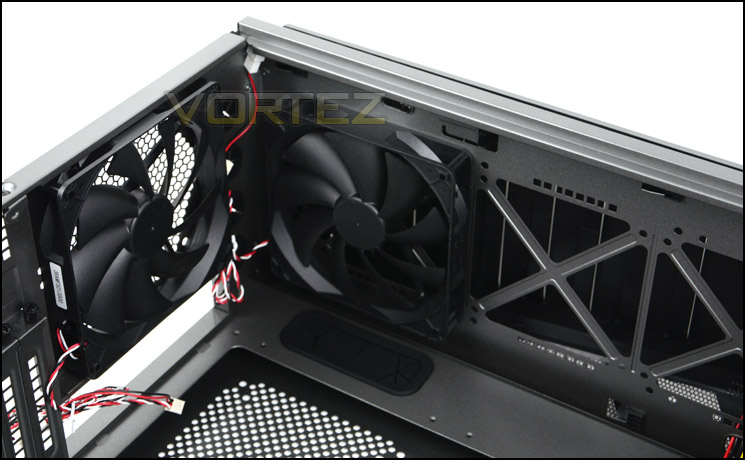
140mm exhaust fans for cooling
Over on the other side the three optical drive bays have been given the tool-less design treatment. Plugs are pulled out when sliding the drive in and then released to allow a set of pins, fixing the drive into place. A simple method that makes installation quick and easy.
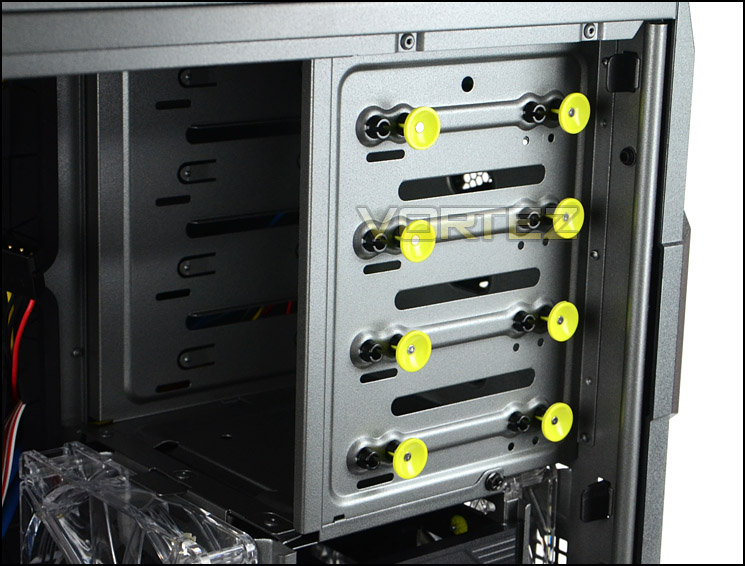
Tool-less design mechanisms for attaching 5.25” drives
Below there is a plethora of HDD storage and features. There are two HDD cages providing a total of eight options for housing 2.5” and 3.5” drives, the drive simply slots into one of the provided trays. The upper cage and lower cage can be removed to allow for water-cooling (something we will cover later). Behind the HDD cages are dual 140mm LED fans, bringing air into the case and a 140mm LED fan has been attached to the inside of the HDD cage to help encourage air across the system in a much more aggressive fashion. With GRone being furnished with so many cooling fans, all of which are in key areas – the cooling ability of this case is looking promising.
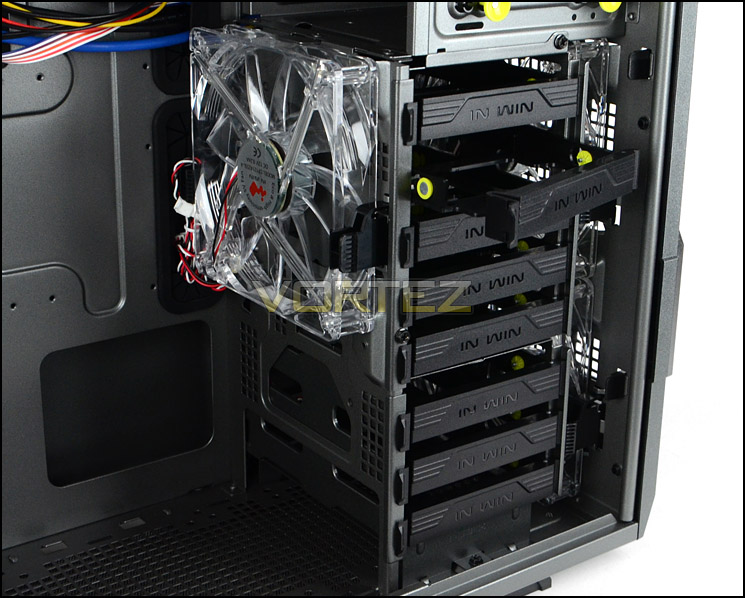
HDD storage and more cooling fans
Installation
An empty case only tells half the story so in this section we install our ATX system within GRone to determine strengths and weaknesses.
The installation process is easy thanks to the tool-less design options and cable management routes available. Notice the huge amount of space at the top of the motherboard, this should serve as a region for accommodating water-cooling without any hassles. The only thing we would have liked to see at the back of the motherboard tray are a series of cable management hooks for neatly arranging cables – this would have allowed for a much tidier arrangement.
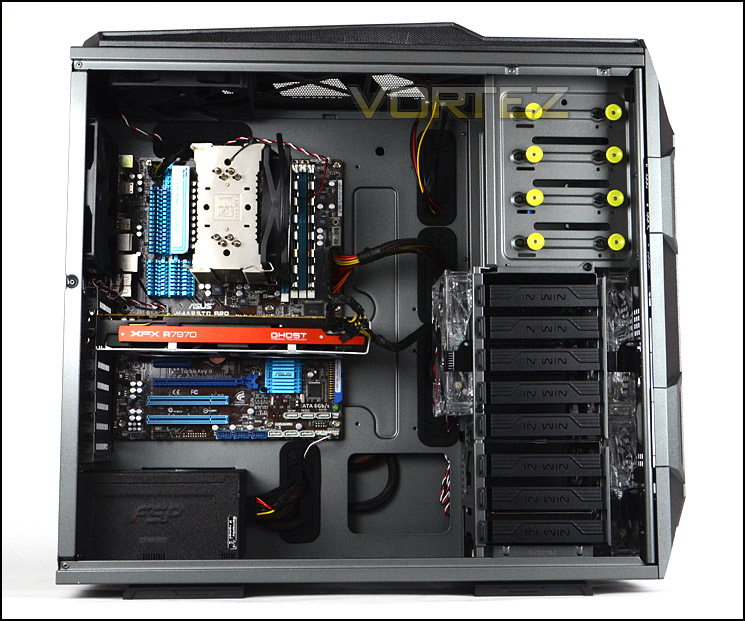
Installation complete, a very spacious chassis indeed
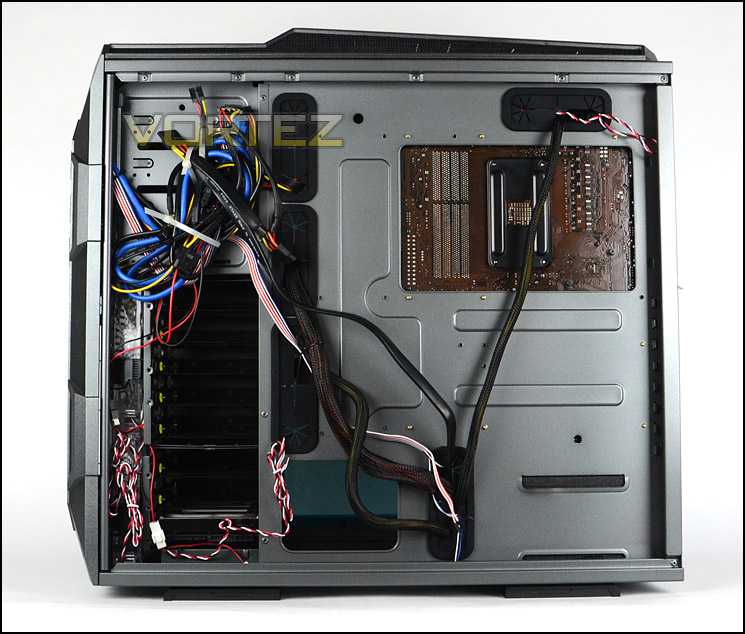
Cable management clearance is good
To install a HDD inside GRone the 2.5” or 3.5” drive must be placed inside one of the provided trays, for 3.5” drives the four pins slot into the drives mounting holes so you will not need a screwdriver at all, whereas with the 2.5” drive screws must be attached to the underside.
This is a method we have seen many times before and is proven to be good – it means we can get storage inside the case in a short space of time.
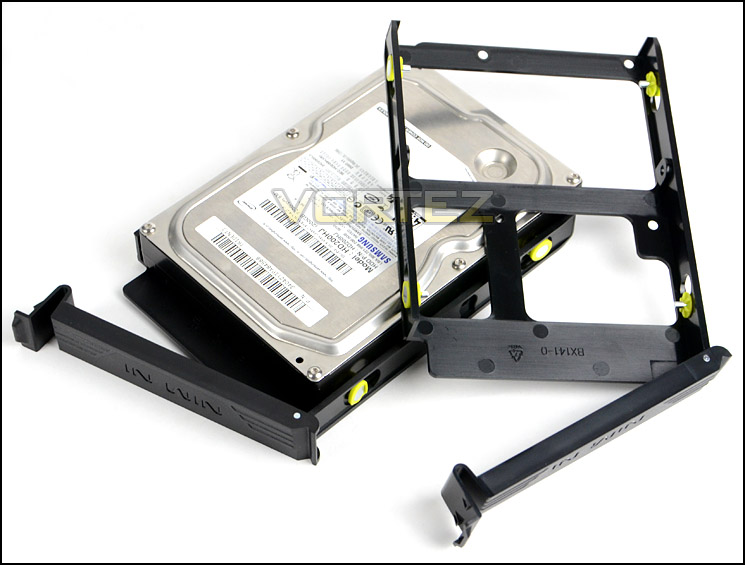
How to install a HDD inside GRone
Clearance – CPU Cooler, GPU, WC, Cable Management
Clearance is an important aspect of case design for the enthusiast as it establishes whether certain hardware will be compatible with a chassis or not.
Due to the sheer width of GRone we can house flagship CPU coolers without any problems, there is lots of space. Installed inside GRone is Noctua’s NH-U12P which is 158mm in height. GRone can entertain up to 200mm.
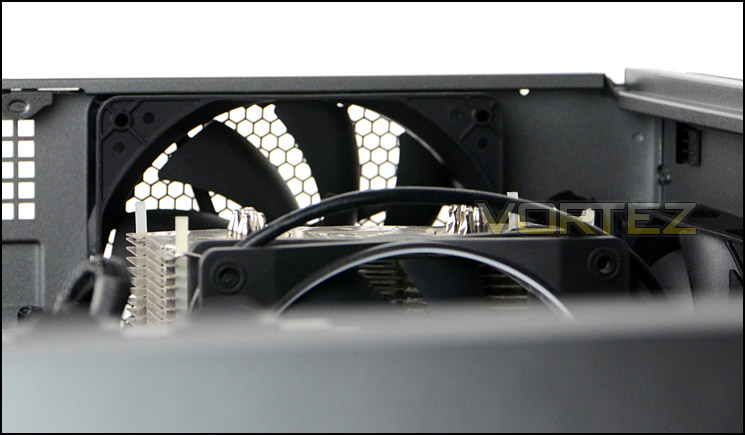
CPU cooler clearance is very good
There is a possibility of removing the upper HDD cage to allow for unlimited graphics card clearance but with the HDD cage in its default position there is over 12” in length for the graphics card. Pictured is XFX HD7970 DD which is 10.5” in length and there is an additional 2” before it touches the HDD cage fan.
So we know we can house high-end graphics cards including HD 7970 and GTX 680.
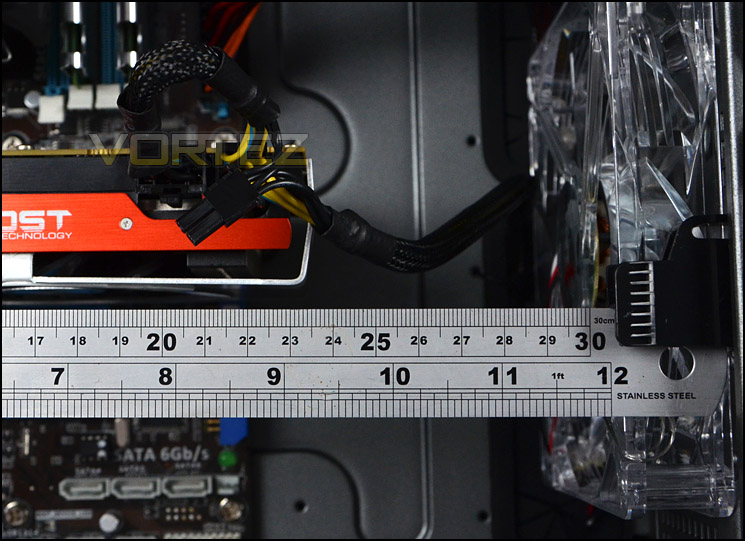
Space for high-end graphics cards
Having lots of space inside GRone makes way for water-cooling options too. At the bottom of the chassis are dual 120/140mm cooling fans mounts and sufficient space for the radiator. Unfortunately, this radiator needs to be less than 6cm thick since the oversized radiator pictured (Phobya G-Charger 240) doesn’t fit. In order to get the radiator installed at the bottom of the chassis the HDD cages must be removed. The structure is actually riveted and so this isn’t removable without the correct tools.
At the top of GRone there is a generous helping of clearance between the top of the motherboard and the top of the chassis. Here we can fit the oversized type240mm radiator which are 6cm thick. (We would have installed the radiator but the top fascia was being awkward and wouldn’t remove in order to swap out the cooling fan). The top also has the ability to house the popular Corsair H100.
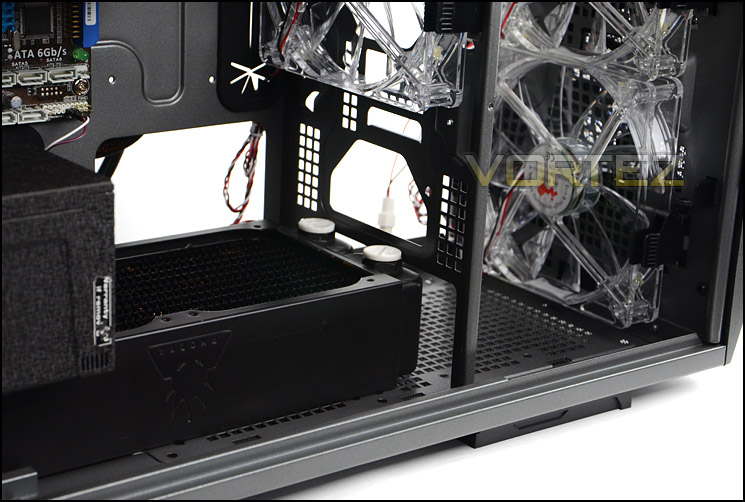
Space at the bottom for radiators (slimmer type)
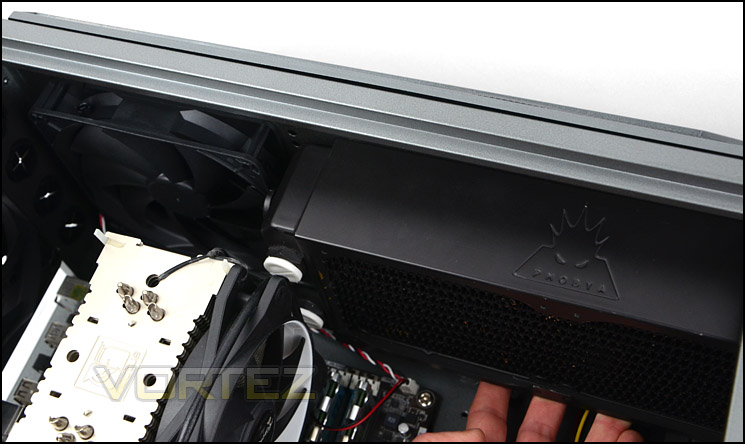
Space at the top for oversized (6cm) radiators
Clearance behind the motherboard tray is essential for good cable management, here there is approximately 2cm of clearance between the tray and side panel, allowing for adequate space to maintain good cable management practises. The thicker 24-pin power and other redundant cables can route into this space without any problems getting the side panel back on.
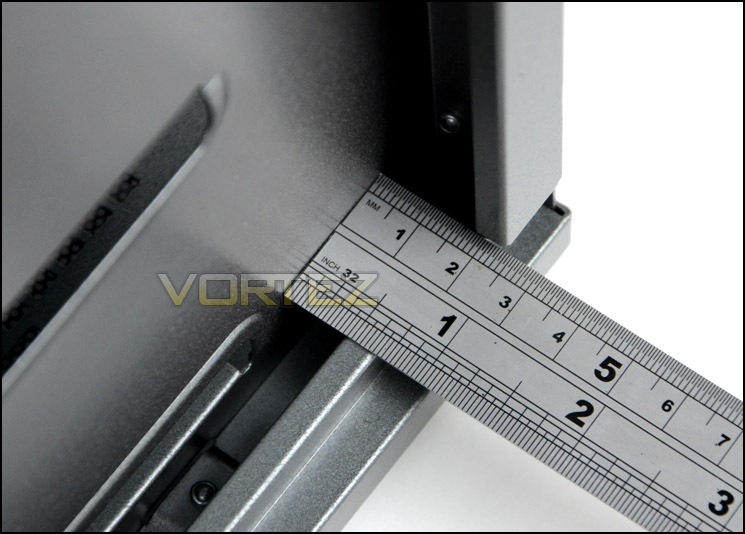
Generous clearance behind the motherboard tray for cable management
Thermal Performance Testing
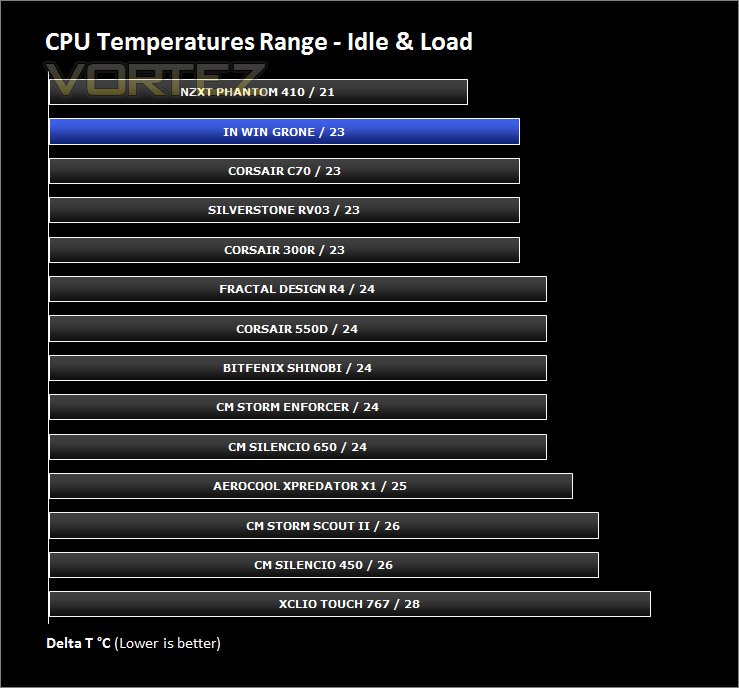
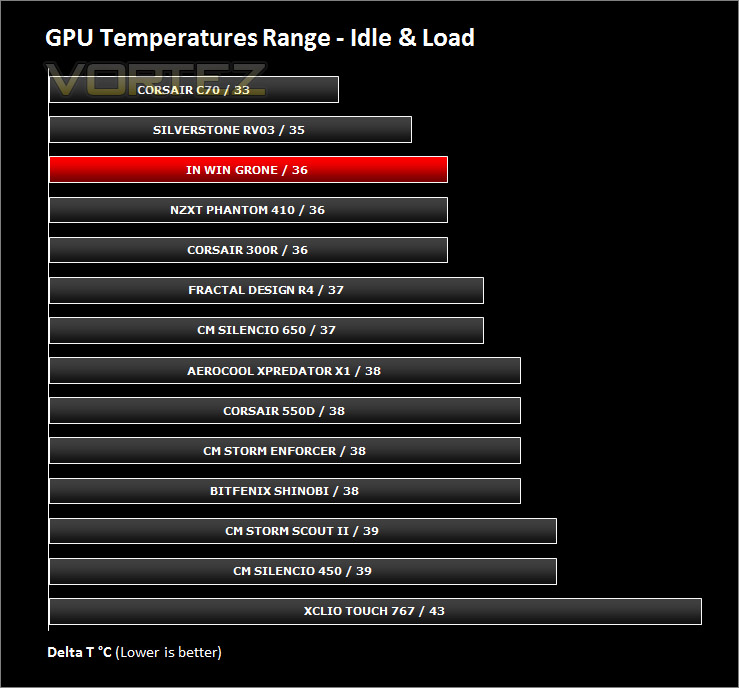
Placed inside GRone are five 140mm cooling fans, two as front intakes, another as an intake on the other side of the HDD cage and then two as exhausts at the rear and top of GRone. With an abundance of cooling fans and with them being placed in traditional airflow spots the results in theory should be good.
To discover the thermal performance of the GRone I will record idle temperatures after 20 minutes from a cold boot. I will then stress the system and temperatures will again be monitored after 30 minutes have elapsed. Fan controller will be set to highest setting (Turbo).
For the purpose of accurate analysis the idle and load temperatures for CPU and GPU will be recorded and the range between idle and load will be calculated to determine how efficient cooling is.
NOTE: Ambient temperature is 20C
System Components
CPU AMD Phenom II X6 1055T 2.8GHz
Motherboard ASUS M4A89TD PRO
Graphics NVIDIA GTX 480 (Different from card pictured)
Memory 4GB Mushkin EM3-10666 DDR3
HDD Samsung Spinpoint 500GB SATA-II
PSU FSP AURUM GOLD 650M
Motherboard ASUS M4A89TD PRO
Graphics NVIDIA GTX 480 (Different from card pictured)
Memory 4GB Mushkin EM3-10666 DDR3
HDD Samsung Spinpoint 500GB SATA-II
PSU FSP AURUM GOLD 650M
Noise
GRone has a fan controller which allows the speed of up to four fans to be controlled. With the intakes all hooked up and the exhausts plugged into the motherboard headers the resulting noise levels are certainly noticeable even on the “Silence” setting. If the setting is changed to “Turbo” noise levels become disruptive and would generally only be used if the user had a headset on whilst gaming.
Conclusion
We review a lot of computer cases at Vortez and the standard is very high because of the candidates passing through. In the past In Win have been known for bringing to market ‘cheap and cheerful’ products, so the real question is: Does GRone establish its own place in a competitive marketplace?
From the outset we were impressed by GRone’s design and styling. Case design is a personal thing but we can appreciate both sides of the coin, GRone is tailored more towards the gamer than anything else, so its rugged and gaudy appearance might not suit everyone but its colour, quality and flair are very good.
As we mentioned, in times past In Win have been responsible for budget products and some would disregard them for this very point but GRone improves on this ideal. Build quality is an area which has been improved upon, both inside and outside the chassis. Inside there are numerous features which are useful, as is the norm for case design – tool-less mechanisms are included to aid in efficient system building. Combine this with oodles of space and clearance and the recipe for success is on the cards. You can house high-end components inside GRone, whether they are big CPU coolers, long graphics cards or a fully-fledged water-cooled configuration, it has the space and flexibility to entertain such products.
One are which surprised us was the inclusion of so many cooling fans. Included are a total of 5x 140mm fans – something which is rarely seen for a case in its price-range. Some cases barely have just one cooling fan. In Win are to be commended for this and for placing them in effective spots too. As you can well imagine having such a strong line-up of fans and in key regions means the cooling can achieve what it sets out to – effectively cool the system. The only downside to the fans used is that they are noisy, even on the ‘silence’ setting they do emit a fair bit of noise.
At £85 the GRone is fairly priced considering the build quality, features and size of this chassis. You will be hard pushed to find such a product for this kind of price nowadays.
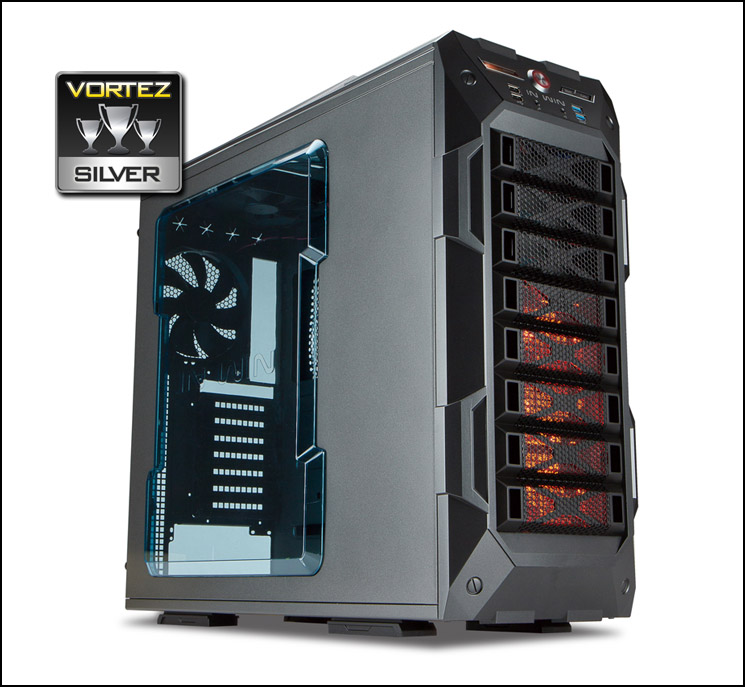
In Win are improving their repertoire steadily. GRone is an achievement worth celebrating for the brand, its quality and feature-set place it in direct competition with cases which are much higher in price, so if In Win can expand availability we are quite sure this chassis will be a success. For these reasons we are pleased to give GRone our silver award.
Pros
+ Good looking gaming chassis
+ Good build quality
+ Five cooling fans included
+ Good thermal performance
+ Excellent clearance options, spacious
+ Competitively priced
Cons
– No padding for PSU
– Cooling fans are noisy
+ Good looking gaming chassis
+ Good build quality
+ Five cooling fans included
+ Good thermal performance
+ Excellent clearance options, spacious
+ Competitively priced
Cons
– No padding for PSU
– Cooling fans are noisy

Click here for an explanation of our awards at Vortez.net.


