







An Intel Z87 motherboard with sleek looks and armed to give avid overclockers the tools they need to push the boundaries for Intel Haswell. It’s time to MAX up!
Product on Review: Z87 MPOWER MAX

Manufacturer and Sponsor: MSI
Street Price: £200
It goes without saying that overclocking has vast become a popular practise for devoted hardware enthusiasts. Hardware vendors specifically design their products to be tweaked in this fashion nowadays and today we are to take a look at a motherboard which plans to project enthusiasts to overclocking stardom.
MPOWER MAX is an attractive high-end Intel Z87 motherboard which focusses primarily on overclocking as a key attribute. Boasting a burly 20 phase digital power design, do we have a record breaker in our hands?
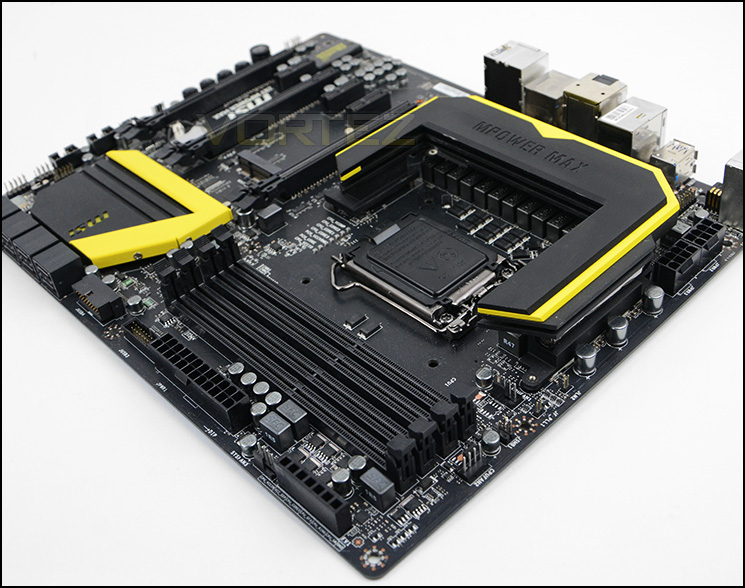
MSI on their MPOWER MAX
The MSI Z87 MPOWER MAX motherboard is equipped with all the necessary features to make sure you get the most out of your system. From the Enhanced PWM and Thermal Design that give you the best stability to all the easy features that ensure that you don’t have to perform a lot of tricks to get great stability in your quest for performance.
Technical Specifications
CPU
• 4th Generation Intel® Core™ i7 / Core™ i5 / Core™ i3 / Pentium® /Celeron® processors for LGA 1150 socket
Chipset
• Intel® Z87 Express Chipset
Main Memory
• Support four DDR3 DIMMs 1066/1333/1600/1866*/2000*/2133*/
2200*/2400*/2600*/2666*/2800*/3000*(OC) DRAM, 64GB Max
– Supports Dual-Channel mode
– Supports non-ECC, un-buffered memory
– Supports Intel® Extreme Memory Profile (XMP)
Slots
• 3 x PCIe 3.0 x16 slots (support x16, x8/x8, x8/x4/x4 modes)
• 4 x PCIe 2.0 x1 slots
On-Board SATA
• SATAIII controller integrated in Intel® Z87 chipset
– Up to 6Gb/s transfer speed.
– 1 x mSATA 6Gb/s port*
– Supports six SATA ports (SATA1~6) by Z87
• SATAIII controller integrated in ASMedia® ASM1061 chipset
– Up to 6Gb/s transfer speed.
– Supports two SATA ports (SATA7~8) by ASM1061
*The SATA5 port will be unavailable when a SSD installed in the mSATA port.
** Supports Intel Core processors on Windows 7 and Windows 8.
• RAID
– SATA1~6 ports support Intel Rapid Storage Technology enterprise (AHCI / RAID 0/1/5/10) by Intel Z87
USB
• Intel Z87 Express Chipset
– 4x USB 3.0 ports (available through the internal USB connectors)
– 6x USB 2.0 ports (2 ports on the back panel, 4 ports available through the internal USB connectors**)
• ASMedia ASM1074 Chipset
– 4 x USB 3.0 ports on the back panel
• Renesas uPD720202 Chipset
– 2 x USB 3.0 ports on the back panel
Audio
• Realtek® ALC1150 Codec
– 7.1-Channel High Definition Audio
– Supports S/PDIF output
LAN
• Supports one PCI Express LAN 10/100/1000 Fast Ethernet by Killer® E2205 Gigabit LAN controller*
*The Killer Network Manager is only available for Windows 7 and Windows 8 currently. The supported drivers for other operating systems would depend on the vendor providing or not.
Multi-GPU
• Supports 3-Way AMD CrossFireTM Technology*
• Supports 2-Way NVIDIA® SLITM Technology
• Supports Lucid Virtu MVP 2.0*
*Supports Windows 7 and Windows 8.
Internal I/O Connectors
– ATX 24-Pin power connector
– 2 x 8-pin ATX 12V power connector
– 2 x 4-pin CPU fan connectors
– 3 x 4-pin System fan connectors
– 8 x SATA 6Gb/s connectors
– 2 x USB 2.0 connectors (supports additional 4 USB 2.0 ports)
– 2 x USB 3.0 connectors (supports additional 4 USB 3.0 ports)
– 1 x Discharge jumper
– 1 x Multi BIOS Switch
– 1 x Front Panel Audio connector
– 2 x System panel connectors
– 1 x Chassis Intrusion connector
– 14 x V-Check points (7x V-Check connectors, 7x V-Check spots)- 1 x Power button
– 1 x GO2BIOS button
– 1 x OC Genie button
– 1 x Reset button
– 2 x Base Clock control buttons
– 1 x Clear CMOS jumper
– 1 x Power button
– 1 x OC Genie mode switch
– 1 x 2-Digit Debug Code LED
– 1 x Wi-Fi/ Bluetooth module connector
Back Panel I/O Ports
– 1 x PS/2 keyboard/mouse combo port
– 1 x Clear CMOS button
– 1 x Optical S/PDIF-out port
– 2 x USB 2.0 ports
– 6 x USB 3.0 ports
– 1 x RJ45 LAN jack
– 1 x 6 in 1 OFC audio jack
– 1 x DisplayPort with max. resolution up to 4096×2160@24Hz, 24bpp/ 3840×1600@60Hz, 24bpp
– 2 x HDMI ports with max. resolution up to 4096×2160@24Hz, 24bpp/2560×1600@60Hz, 24bpp/ 1920×1080@60Hz, 36bpp
Dimension
• 30.4cm(L) x 24.4cm(W) ATX Form Factor
Mounting
• 9 mounting holes
• 4th Generation Intel® Core™ i7 / Core™ i5 / Core™ i3 / Pentium® /Celeron® processors for LGA 1150 socket
Chipset
• Intel® Z87 Express Chipset
Main Memory
• Support four DDR3 DIMMs 1066/1333/1600/1866*/2000*/2133*/
2200*/2400*/2600*/2666*/2800*/3000*(OC) DRAM, 64GB Max
– Supports Dual-Channel mode
– Supports non-ECC, un-buffered memory
– Supports Intel® Extreme Memory Profile (XMP)
Slots
• 3 x PCIe 3.0 x16 slots (support x16, x8/x8, x8/x4/x4 modes)
• 4 x PCIe 2.0 x1 slots
On-Board SATA
• SATAIII controller integrated in Intel® Z87 chipset
– Up to 6Gb/s transfer speed.
– 1 x mSATA 6Gb/s port*
– Supports six SATA ports (SATA1~6) by Z87
• SATAIII controller integrated in ASMedia® ASM1061 chipset
– Up to 6Gb/s transfer speed.
– Supports two SATA ports (SATA7~8) by ASM1061
*The SATA5 port will be unavailable when a SSD installed in the mSATA port.
** Supports Intel Core processors on Windows 7 and Windows 8.
• RAID
– SATA1~6 ports support Intel Rapid Storage Technology enterprise (AHCI / RAID 0/1/5/10) by Intel Z87
USB
• Intel Z87 Express Chipset
– 4x USB 3.0 ports (available through the internal USB connectors)
– 6x USB 2.0 ports (2 ports on the back panel, 4 ports available through the internal USB connectors**)
• ASMedia ASM1074 Chipset
– 4 x USB 3.0 ports on the back panel
• Renesas uPD720202 Chipset
– 2 x USB 3.0 ports on the back panel
Audio
• Realtek® ALC1150 Codec
– 7.1-Channel High Definition Audio
– Supports S/PDIF output
LAN
• Supports one PCI Express LAN 10/100/1000 Fast Ethernet by Killer® E2205 Gigabit LAN controller*
*The Killer Network Manager is only available for Windows 7 and Windows 8 currently. The supported drivers for other operating systems would depend on the vendor providing or not.
Multi-GPU
• Supports 3-Way AMD CrossFireTM Technology*
• Supports 2-Way NVIDIA® SLITM Technology
• Supports Lucid Virtu MVP 2.0*
*Supports Windows 7 and Windows 8.
Internal I/O Connectors
– ATX 24-Pin power connector
– 2 x 8-pin ATX 12V power connector
– 2 x 4-pin CPU fan connectors
– 3 x 4-pin System fan connectors
– 8 x SATA 6Gb/s connectors
– 2 x USB 2.0 connectors (supports additional 4 USB 2.0 ports)
– 2 x USB 3.0 connectors (supports additional 4 USB 3.0 ports)
– 1 x Discharge jumper
– 1 x Multi BIOS Switch
– 1 x Front Panel Audio connector
– 2 x System panel connectors
– 1 x Chassis Intrusion connector
– 14 x V-Check points (7x V-Check connectors, 7x V-Check spots)- 1 x Power button
– 1 x GO2BIOS button
– 1 x OC Genie button
– 1 x Reset button
– 2 x Base Clock control buttons
– 1 x Clear CMOS jumper
– 1 x Power button
– 1 x OC Genie mode switch
– 1 x 2-Digit Debug Code LED
– 1 x Wi-Fi/ Bluetooth module connector
Back Panel I/O Ports
– 1 x PS/2 keyboard/mouse combo port
– 1 x Clear CMOS button
– 1 x Optical S/PDIF-out port
– 2 x USB 2.0 ports
– 6 x USB 3.0 ports
– 1 x RJ45 LAN jack
– 1 x 6 in 1 OFC audio jack
– 1 x DisplayPort with max. resolution up to 4096×2160@24Hz, 24bpp/ 3840×1600@60Hz, 24bpp
– 2 x HDMI ports with max. resolution up to 4096×2160@24Hz, 24bpp/2560×1600@60Hz, 24bpp/ 1920×1080@60Hz, 36bpp
Dimension
• 30.4cm(L) x 24.4cm(W) ATX Form Factor
Mounting
• 9 mounting holes
Packaging, Bundle & First Look
Being within MSI’s flagship product-line the MPOWER MAX has been given the special treatment for its packaging. The front has a folding “M” which opens out to reveal detail on the features whilst giving a preview of the motherboard through a transparent cover. Around the back the fundamental features are covered in more detail.
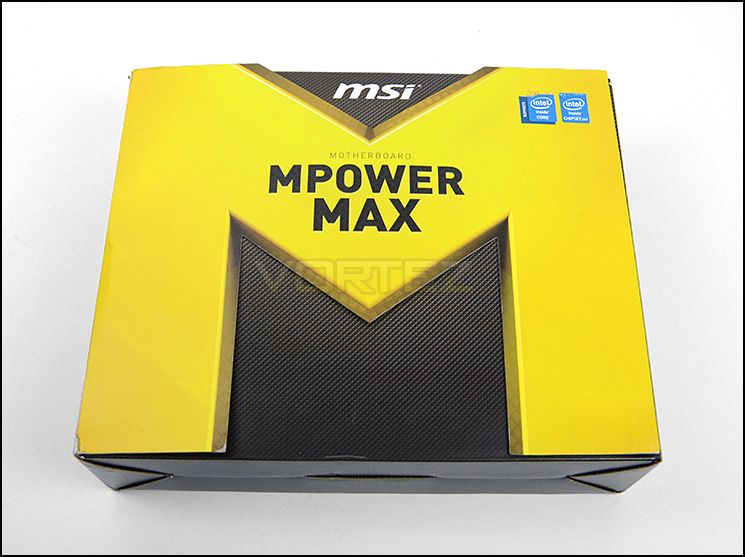
Large, attractive packaging
The bundled accessories are contained within a separate box to the motherboard and consist of the following:
• Docummentation: User guide, software guide, OC certificate
• Software CDs
• Door hanger
• 6x SATA 6GB/s cables
• Rear IO shield
• Flexible NVIDIA SLI bridge
• WiFi/Bluetooth antenna + adapter
• USB 3.0 hub
• Voltage check cables
• Easy connect adapter
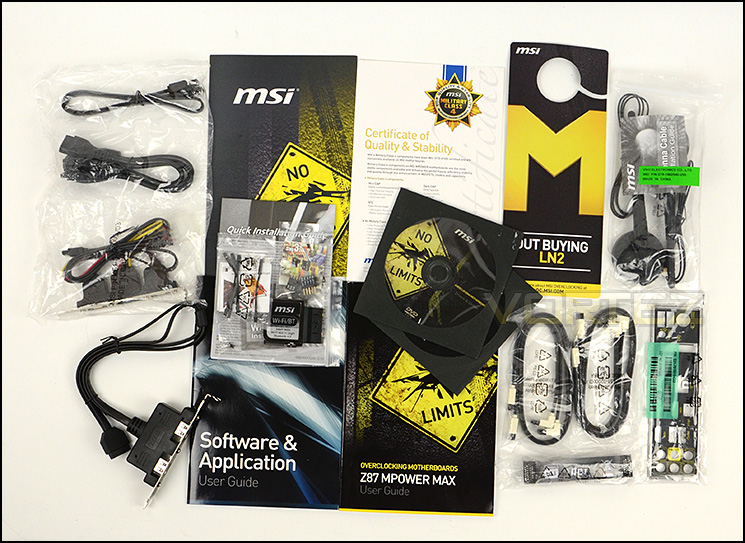
Plenty of items in the bundled accessories
Unveiling the motherboard for the first time it’s hard to fault the aesthetics and styling. MSI have chosen to furnish the PCB in matt black and have kept all ports and slots black too. Only the respective heatsinks have a splash of zesty yellow colour.
MPOWER MAX is likely to pair up with other hardware very well from a visual perspective. Top marks to MSI and their designers.
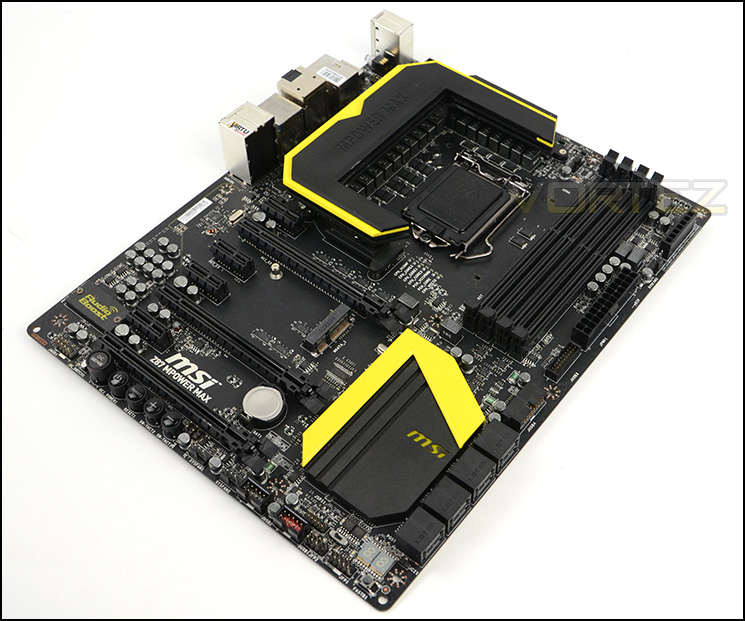
An overview of MPOWER MAX
On the next page we will move in for a closer look at the different elements and features of MPOWER MAX.
Closer Look
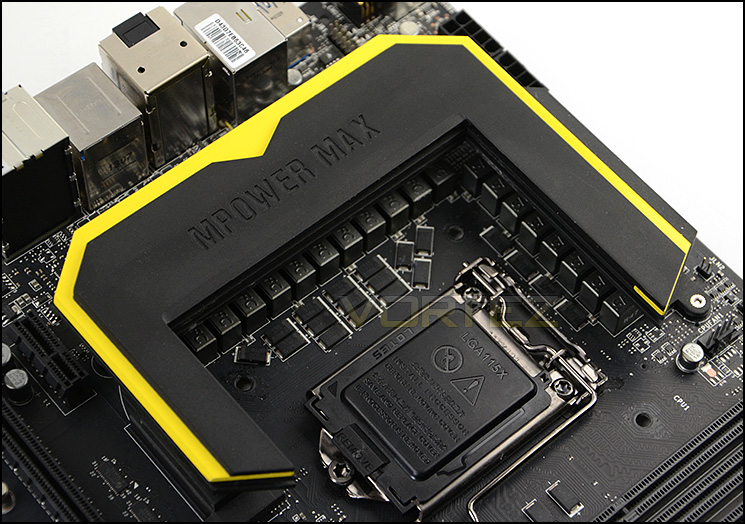
This motherboard is of course designed to work with Intel’s 4th Generation of processors – Haswell. The socket is LGA1150 but has the mounting holes for LGA115X so if you have a cooler that has been used on another socket such as LGA1155 then it will work fine here too. MSI have also included dual fan headers for the CPU cooler just beside the top heatsink which is very handy for coolers which use dual fan configurations.
MPOWER MAX makes use of a 20 Phase DigitALL Power Design which is ideal for substantial overclocking and LN2 usage. Covering the MOSFETs is a sleek heatsink which is more than capable of alleviating heat whilst under load.
Capable of sizeable overclocks
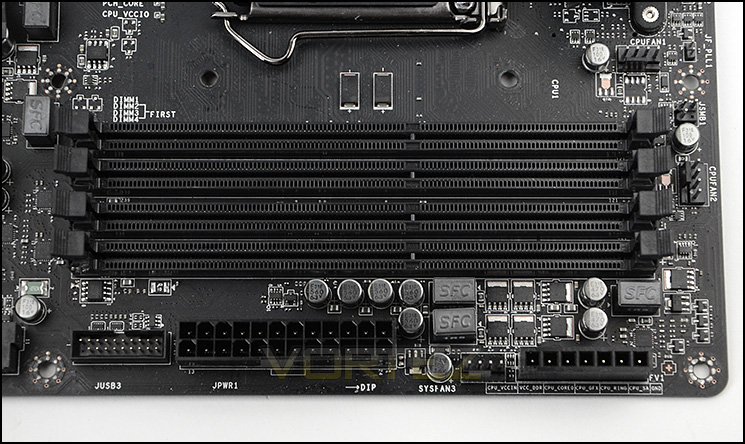
MPOWER MAX has support for dual channel DDR3. MSI specify there is up to 64GB compatibility and XMP support. The follows frequencies are compatible: 1066/1333/1600/1866*/2000*/2133*/2200*/2400*/2600*/2666*/2800*/3000*(OC).
Also in this region are the voltage-check points for advanced users to take advantage of. Real-time voltages can be obtained when used with the provided cables and a multi-metre.
Dual channel DDR3 slots
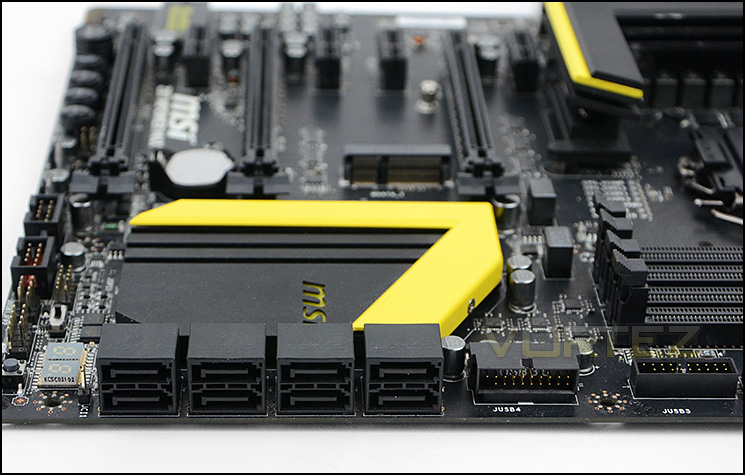
Our motherboard also has storage completely covered with eight SATA 3 (6GB/s) ports which are all supplied by the Intel Z87 chip situated behind the ports. MSI have also given MPOWER MAX dual USB 3.0 ports which is great to see!
Plenty of storage options and dual USB 3.0 ports
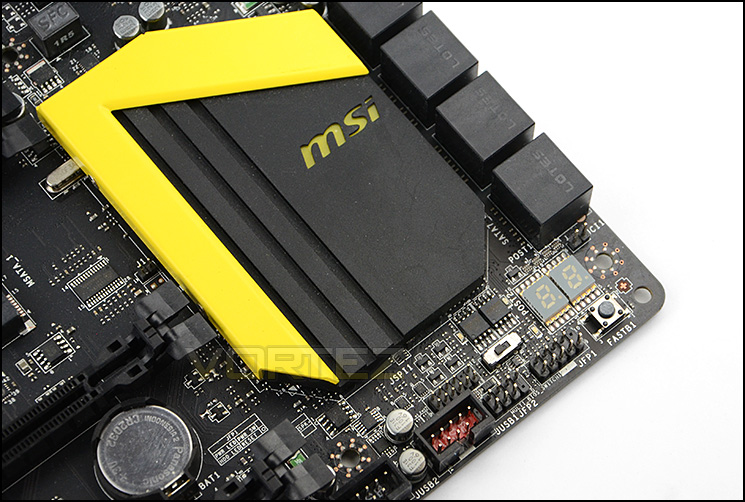
At the bottom of MPOWER MAX MSI have placed an LED debug panel for helpful diagnostic purposes and a fast boot button to boot straight into BIOS without having to hit the “DEL” button. Since our motherboard has a dual BIOS (Multi BIOS II), there is a switch in this region too which you can choose to jump to two different BIOS.
Behind the SATA ports and these features sits the large Intel Z87 heatsink.
Useful features at the bottom of the motherboard
Closer Look (Continued)
Over on the graphics front, there are an assortment of options available for multi-GPU configurations. The ports offered are as follows:
• 3 x PCIe 3.0 x16 slots (support x16, x8/x8, x8/x4/x4 modes)
• 4 x PCIe 2.0 x1 slots
NVIDIA SLI and AMD Crossfire are both supported.
Sat beneath the lower PCI-E slot there are combination of buttons for onboard functionality and easy access. MSI have placed the following on the bottom edge:
• OC Switch
• OC Genie button
• Power / Reset buttons
• + / – buttons for incremental CPU base clock adjustment
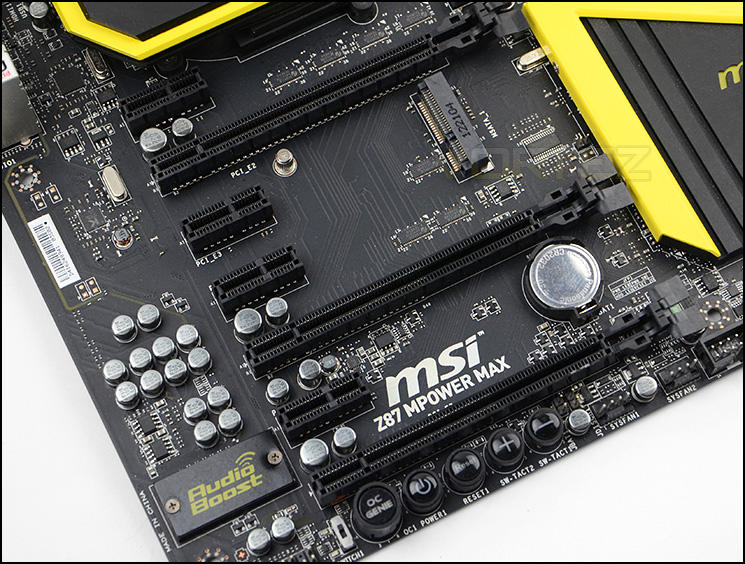
Multi-GPU support
MPOWER MAX comes with enhanced audio features via Audio Boost (via ALC1150). Here is what MSI have to say about this feature:
Reward your ears with true quality. Get ready for ear-drum shattering sound, with MSI Audio Boost! With Audio Boost we’re delivering the highest audio quality so you can enjoy crystal clear sound and music in games. Reward your ears with true quality. Get ready for ear-drum shattering sound, with MSI Audio Boost! With Audio Boost we’re delivering the highest audio quality so you can enjoy crystal clear sound and music in games.
Amongst other things Audio boost comes with the following benefits:
• Studio level integrated 600Ω headphone amplifier
• Golden audio jacks for pure audio signals
• EMI shielded audio codec
• High quality audio capacitors
• Illuminated audio PCB separation
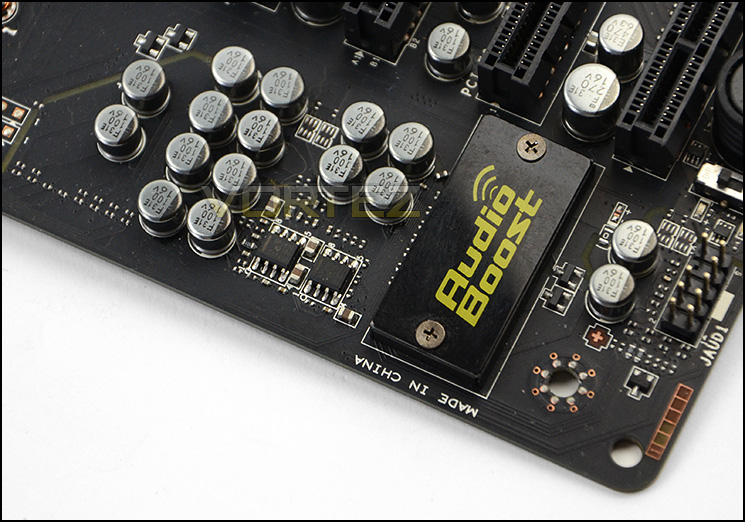
Audio Boost brings enhanced audio
The rear IO panel on MPOWER MAX have a wide selection of options which include:
– 1 x PS/2 keyboard/mouse combo port
– 1 x Clear CMOS button
– 1 x Optical S/PDIF-out port
– 2 x USB 2.0 ports
– 6 x USB 3.0 ports
– 1 x RJ45 LAN jack
– 1 x 6 in 1 OFC audio jack
– 1 x DisplayPort with max. resolution up to 4096×2160@24Hz, 24bpp/ 3840×1600@60Hz, 24bpp
– 2 x HDMI ports with max. resolution up to 4096×2160@24Hz, 24bpp/2560×1600@60Hz, 24bpp
The space in between the PS2 hub and first USB 3.0 stack is the location for attaching the WiFi/Bluetooth module.
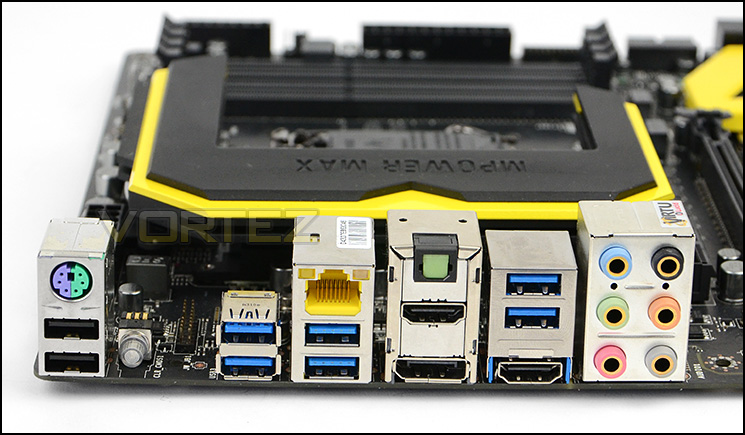
A plethora of options on the Rear IO panel
Military Class 4 Features
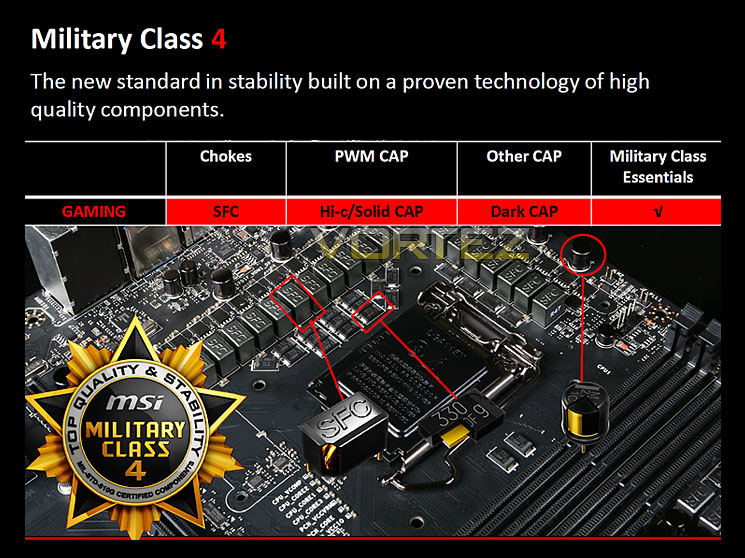
MSI have included Military Class 4 components on MPOWER MAX and many will be familiar with its highly regarded feature-set. The 4th instalment includes Dark CAPs as a new addition. These capacitors are resilient and can ensure stability even with temperatures soaring up to 260°C!!
There is a return to some trusty components which MSI have used in previous generations of Military Class also, these include:
Super Ferrite Chokes
Super Ferrite Chokes deliver 60 Amp or 20-50% more current than chokes used by other brands to deliver better overclockability.
Hi C-Caps
Traditional capacitors use a rubber coating that seriously impacts life expectancy under heavy loads od to Oxidation and UV exposure. This is why Hi-C CAPs are the best choice for high-temp overclocking.
• 10x higher life expectancy under load than normal capacitors
• Ultra-low Form Factor
• High thermal stability
• 93.4% lower leakage than an aluminum capacitor
• Self-healing Tantalum
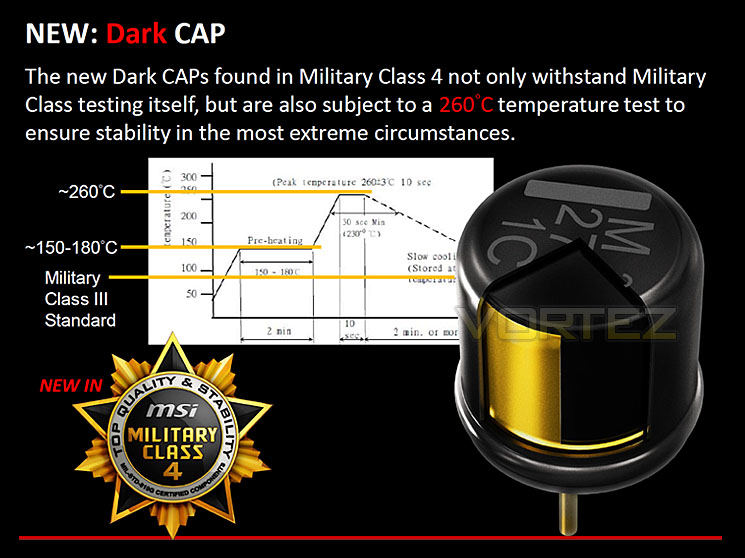
Test Setup & Methodology
Test Setup
CPU Intel Core i7 4770K (Haswell) 3.50GHz
Cooling Noctua NH-U14
Motherboard MSI MPOWER MAX
Memory 16GB Corsair Vengeance Pro 2400MHz CL10 DDR3
Graphics XFX R7970 Black Edition
Storage Kingston HyperX 240GB SSD
PSU Corsair HX1050 80 Plus Gold Certified PSU
Cooling Noctua NH-U14
Motherboard MSI MPOWER MAX
Memory 16GB Corsair Vengeance Pro 2400MHz CL10 DDR3
Graphics XFX R7970 Black Edition
Storage Kingston HyperX 240GB SSD
PSU Corsair HX1050 80 Plus Gold Certified PSU
Benchmarks
Cinebench 11.5 – CPU Score
x264 HD 4.0 – 1st and 2nd pass encoding
SiSoftware SANDRA 2013 – CPU & Memory benchmarks
AIDA64 – CPU benchmarks
3DMark FireStrike – DX11 3D Benchmark
3DMark 11 – DX11 3D Performance and Extreme preset
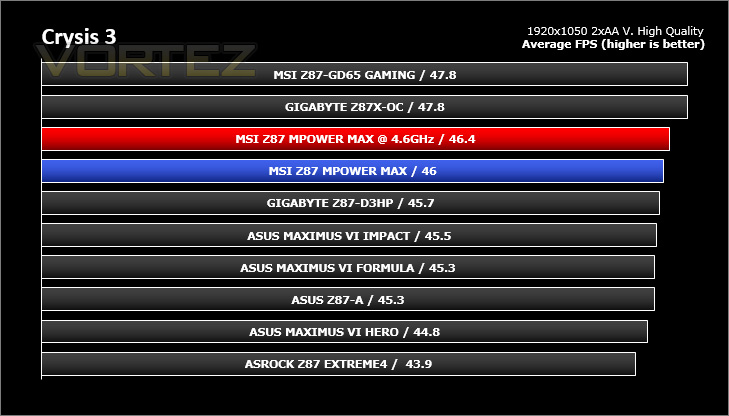
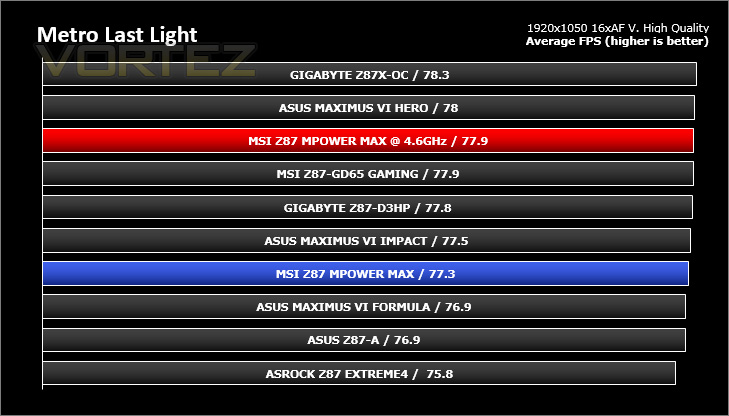
Games – Tomb Raider, Crysis 3, Metro Last Light
x264 HD 4.0 – 1st and 2nd pass encoding
SiSoftware SANDRA 2013 – CPU & Memory benchmarks
AIDA64 – CPU benchmarks
3DMark FireStrike – DX11 3D Benchmark
3DMark 11 – DX11 3D Performance and Extreme preset
Games – Tomb Raider, Crysis 3, Metro Last Light
Other Software
Temperature Analysis: Core Temp
Stress Testing Software: LinX
CPU Specification Monitoring: CPU-Z
Stress Testing Software: LinX
CPU Specification Monitoring: CPU-Z
Overclocking
The introduction of Z87 brings a return to BCLK overclocking. This will in turn deliver more flexibility for Overclockers compared to previous generations where the BCLK was locked to 100MHz and only the ratio could be adjusted. As many of you will know, Haswell CPUs get very hot with little voltage increase therefore the flexibility and headroom for overclocking can be limited.
MPOWER MAX managed to take our Intel Core i7-4770K to 4.6Hz @ 1.29v. Anything above 4.6GHz, even with substantial boost in voltage resulted in instability and BSODs. This appears to be a limitation with our chip. Having the 4770K at 4.6GHz with just 1.29v for the vcore is the lowest result we have had and this presented lower temperatures at the same speed compared to other motherboards we have tested.
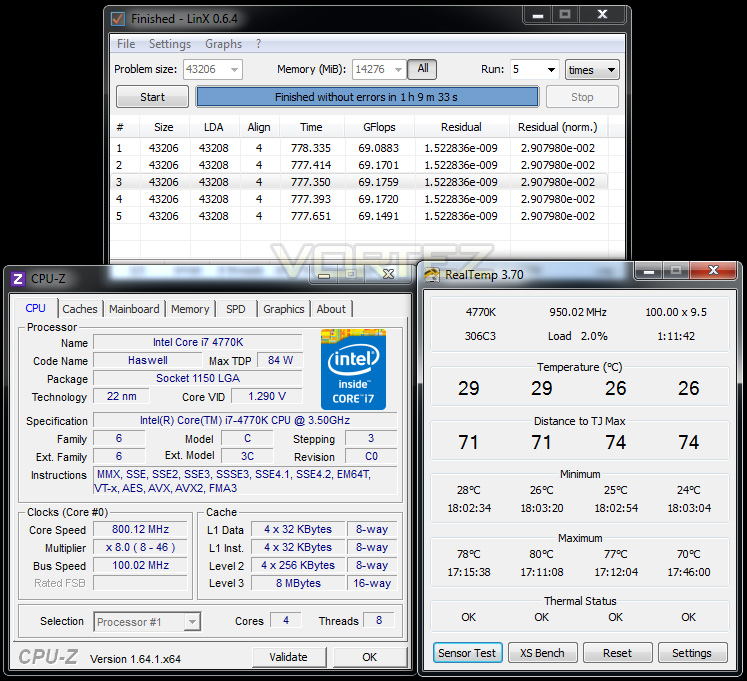
With the 4.6GHz overclock being our best, we will take this into our benchmark suite and test both stock and overclocked results on the subsequent pages.
Power Consumption
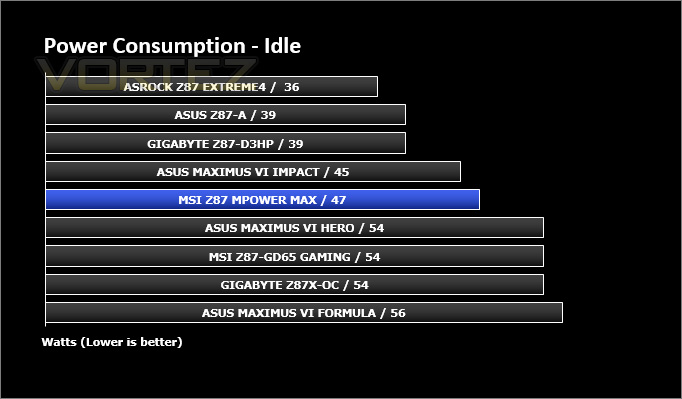
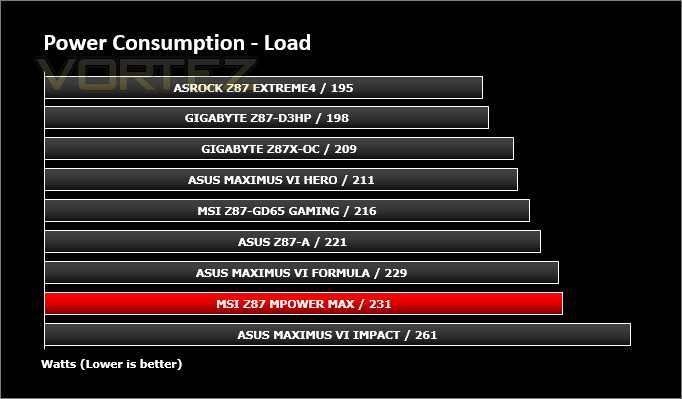
It’s interesting to note the power consumption across all motherboards. Although they are using Z87 chipsets, energy results can fluctuate between manufacturers due to the features and specifications that are integrated. First of all, for the idle tests the system is cold booted into Windows and no additional applications are executed – the watts are noted on the external energy monitor we use and then the system is loaded with 3DMark FireStrike – watts are again monitored for the duration of the test and the highest rated wattage result is then noted down. Below are the results of this energy test.
Benchmarks: X264 HD
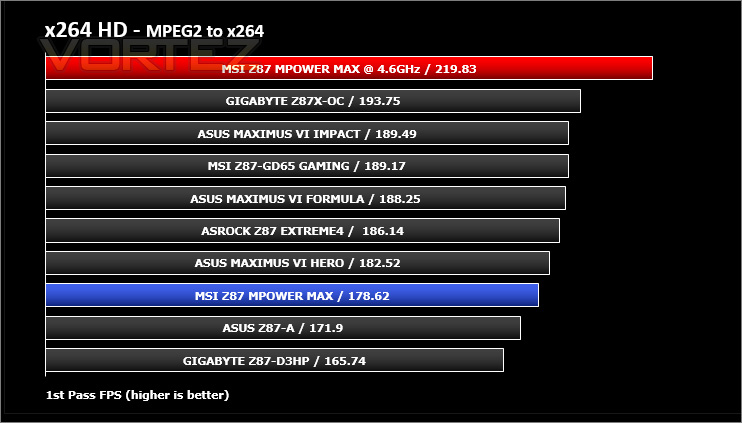
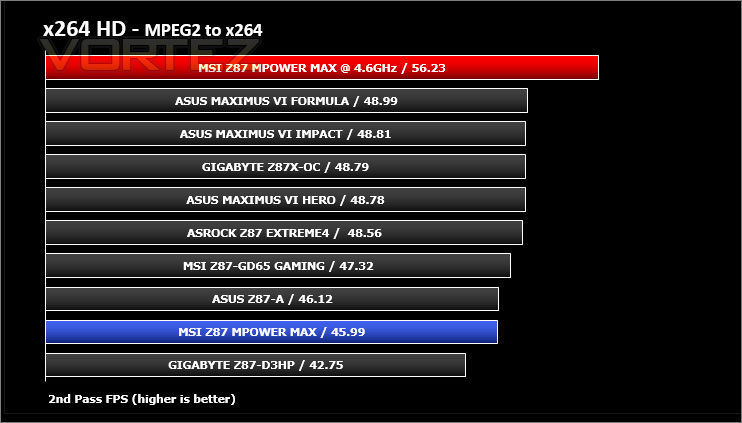
Simply put, this test measures how fast your machine can encode a short, DVD quality MPEG-2 video clip into a high-quality x264 video clip. What’s x264, you ask? It’s more or less the next-generation Xvid/DivX codec. I think it’s ideal for a benchmark because the application (x264.exe) reports fairly accurate compression results (in frames per second) for each pass of the video encoding process, and it uses multi-core processors very efficiently.
Benchmarks: AIDA64
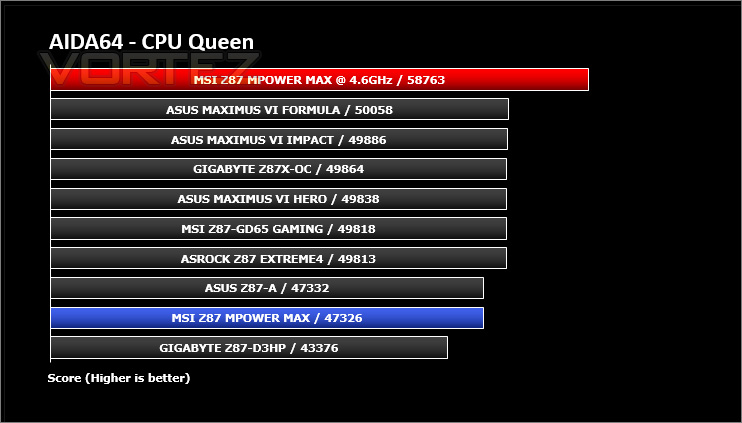
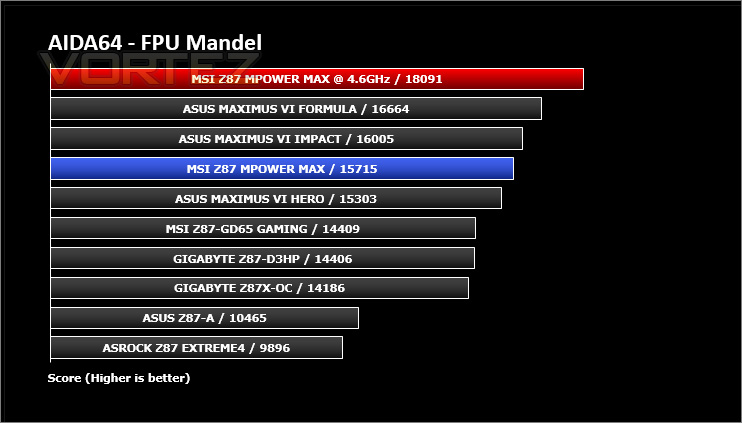
AIDA64 Product PageThis simple integer benchmark focuses on the branch prediction capabilities and the misprediction penalties of the CPU. It finds the solutions for the classic “Queens problem” on a 10 by 10 sized chessboard. At the same clock speed theoretically the processor with the shorter pipeline and smaller misprediction penalties will attain higher benchmark scores. For example — with HyperThreading disabled — the Intel Northwood core processors get higher scores than the Intel Prescott core based ones due to the 20-step vs 31-step long pipeline. CPU Queen test uses integer MMX, SSE2 and SSSE3 optimizations.
Benchmarks: Cinebench
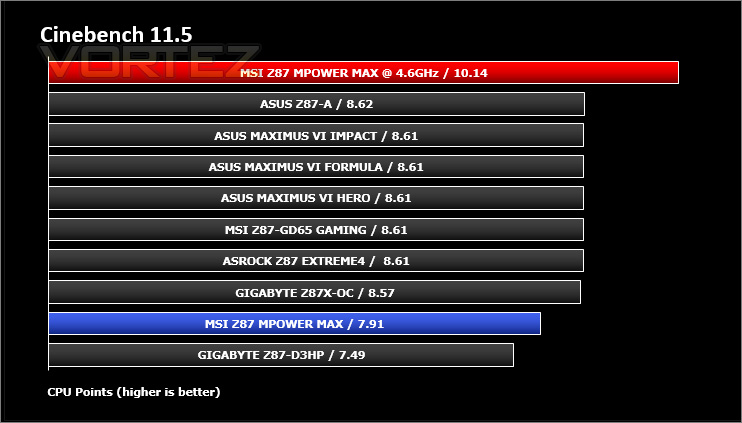
CINEBENCH can measure systems with up to 64 processor threads. This test scene contains approximately 2,000 objects which in turn contain more than 300,000 polygons in total, and uses sharp and blurred reflections, area lights, shadows, procedural shaders, antialiasing, and much more. The result is displayed in points (pts). The higher the number, the faster your processor.
Benchmarks: SiSoftware SANDRA
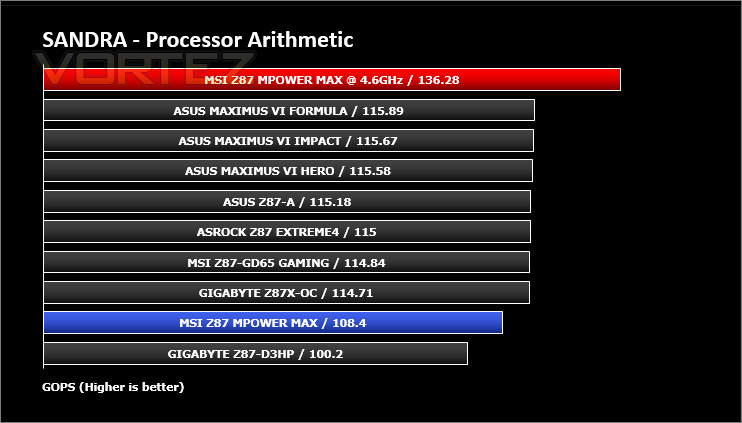
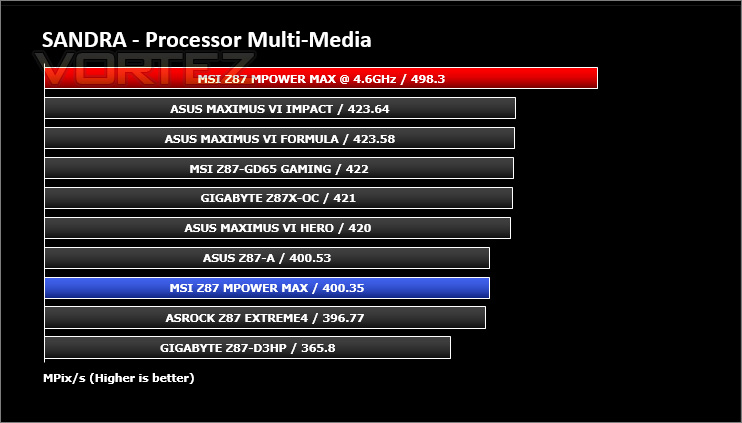
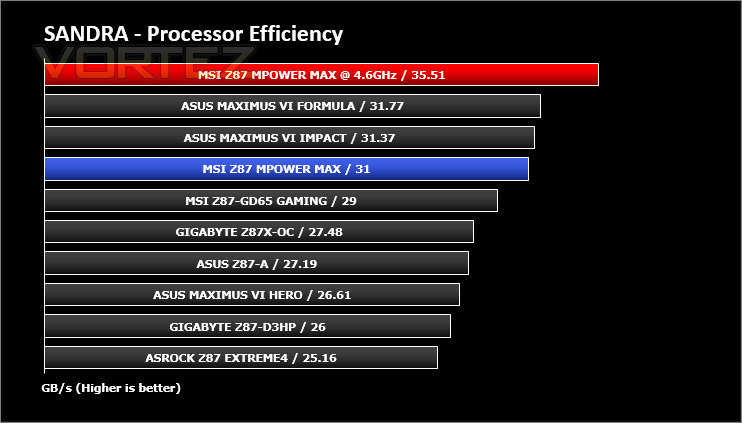
3DMark 11 Product PageSANDRA isn’t always a benchmark that is included in hardware reviews but I believe it shouldn’t be ignored. SANDRA provides a vigorous package that tests your system in a rather large array of benchmarks. There are many aspects of benchmark that can be executed. We will be considering – CPU and memory tests.
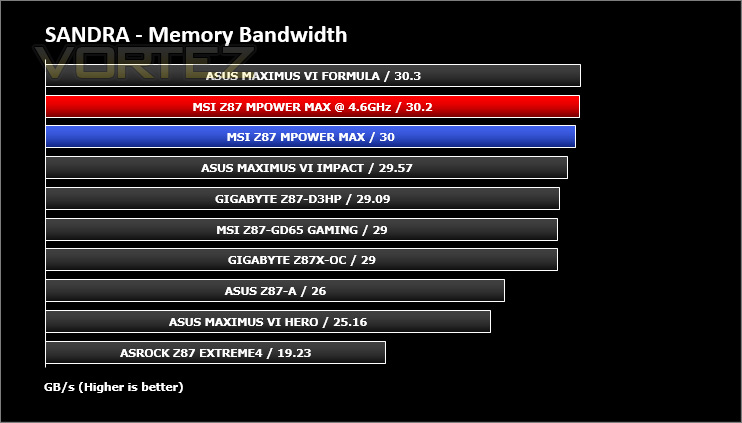
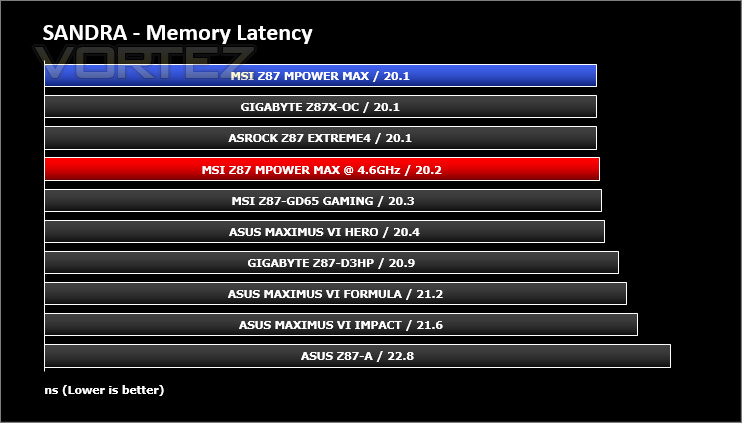
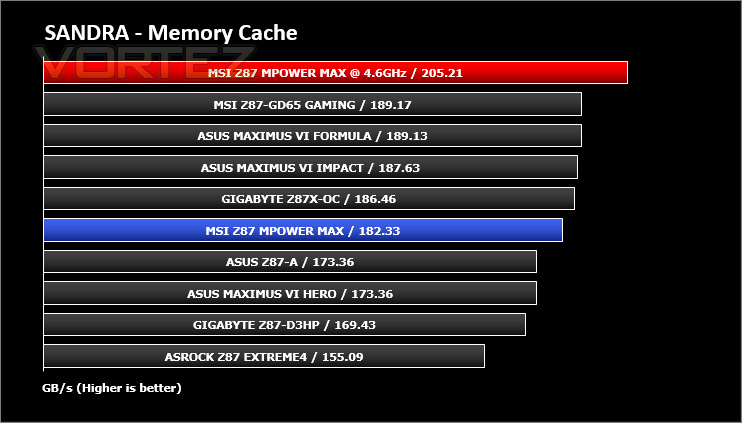
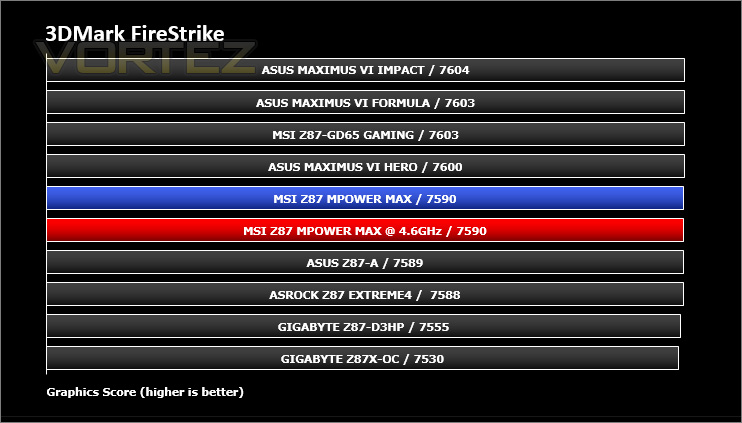
Benchmarks: 3DMARK FireStrike
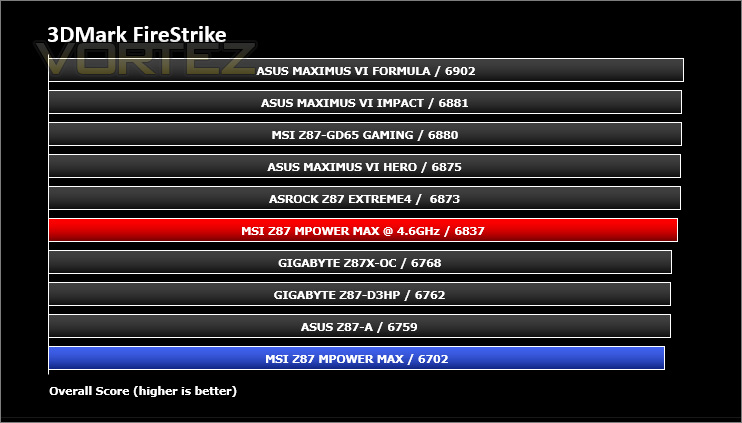
3DMark FireStrike Product PageFire Strike is our new showcase DirectX 11 benchmark designed for high-performance gaming PCs. It is our most ambitious and technical benchmark ever, featuring real-time graphics rendered with detail and complexity far beyond what is found in other benchmarks and games today. Fire Strike will only be available in the Windows editions of 3DMark initially.
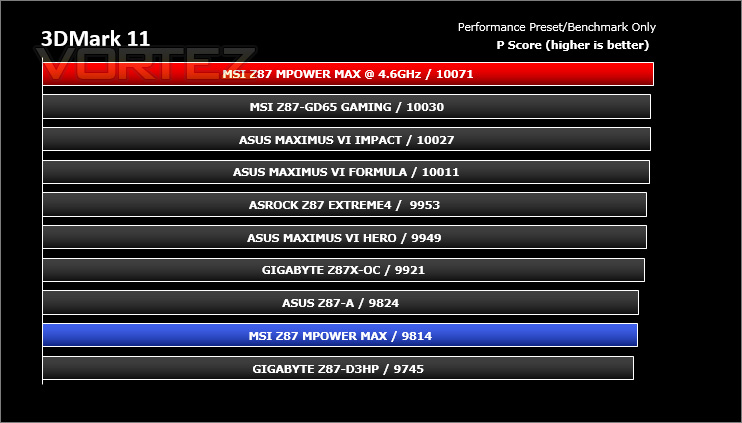
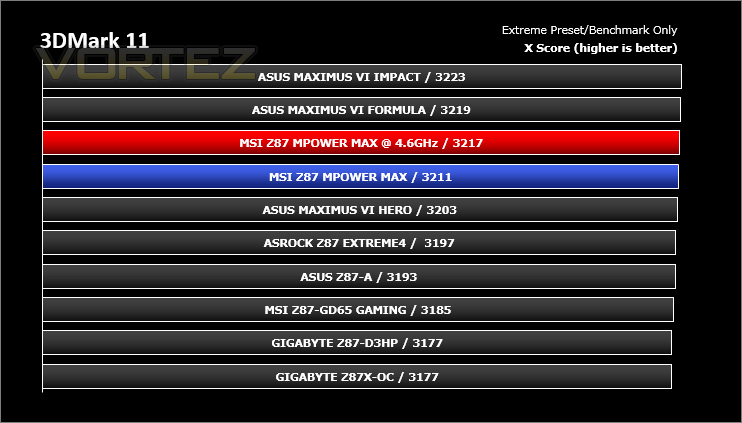
Benchmarks: 3DMARK 11
Designed to measure your PC’s gaming performance 3DMark 11 makes extensive use of all the new features in DirectX 11 including tessellation, compute shaders and multi-threading. Trusted by gamers worldwide to give accurate and unbiased results, 3DMark 11 is the best way to consistently and reliably test DirectX 11 under game-like loads.
3DMark 11 is a very popular 3D performance benchmark suite and needs little introduction. For the test settings both Performance and Extreme presets are run with ‘benchmark only’ being selected. This provides good analysis. Many will only test the performance preset, using the extreme mode we can examine the board under much more severe stressing – at 720p and 1080p.
Benchmarks: Tomb Raider, Crysis 3, Metro Last Light
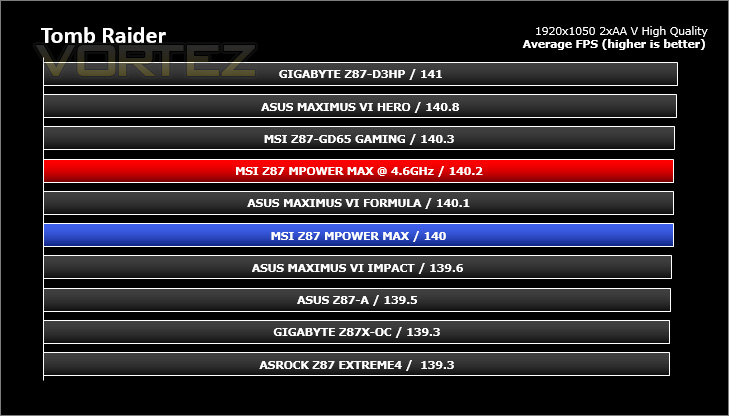
It’s important for us to perform a number of game benchmarks as well as the synthetic tests because gamers will want to know if there are any significant benefits. So here we have a selection of popular gaming titles, critically acclaimed and action-packed.
Settings
Tomb Raider
– 1920×1050 2xAA – Very High Quality *Benchmark tool*
Crysis 3
– 1920×1050 2xAA – Very High Quality *FRAPS – 1st scene/gameplay*
Metro Last Light
– 1920×1050 16xAF – Very High Quality *FRAPS – 1st scene/gameplay*
The gaming titles selected demand GPU power over CPU power – in each test the difference is rather marginal. VSync is disabled in all titles.
Conclusion
MSI first introduced the MPOWER line under the Z77 chipset and have had plenty of success so it makes total sense to expand this product range with the successor – Z87.
The MPOWER MAX is clearly designed to meet overclockers needs. Only essential features have been integrated and our efforts in this particular department yielded great results. We were able to effectively lower the CPU voltage at our best frequency overclock for the 4770K. Compared to other motherboards the MPOWER MAX requires significantly less voltage which thus gave lower temperatures. But we did find the stock performance to be quite average in a range of the benchmarks we ran – therefore, overclocking should be a fundamental concern when investing in this motherboard.
Aesthetically, MSI have produced a stunning motherboard. The styling hits the nail on the head with a sleek matt black PCB and black slots, ports and lanes. Due to its neutral theme MPOWER MAX will more than likely pair up with an assortment of different hardware, which is always a bonus when trying to create an eye-catching system.
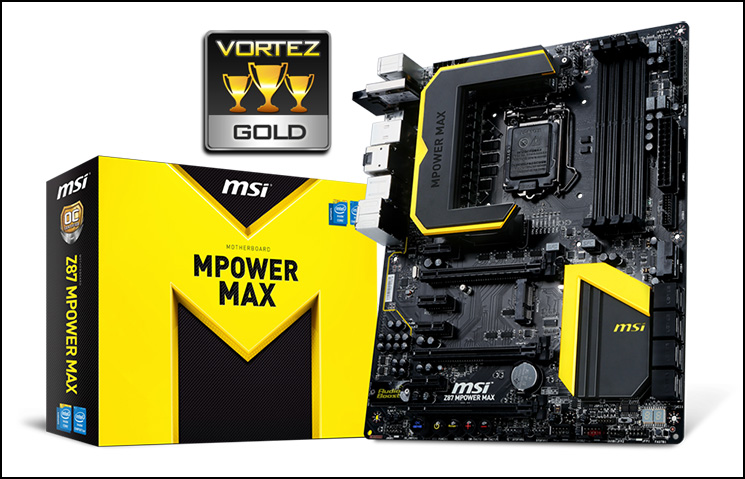
In terms of the feature-set MPOWER MAX ticks all the boxes by giving advanced users the buttons and ports which are now obligatory to get the best overclocking experience. We especially like the Fast BIOS button which takes you directly into the BIOS upon pressing.
Being priced at £200 means MPOWER MAX is at the upper-end of the Z87 segment. This motherboard is more expensive than some of the mid and high-end offerings but it must be stressed that MPOWER MAX is justified at this price point for overclocking purposes.
Avid overclockers will be truly satisfied by MPOWER MAX’s extensive feature-set. MSI have designed a spectacular motherboard and it’s easy to see why there is so much talk about the MPOWER series.
Pros
+ One of the best looking Z87 motherboards
+ Great overclocking results
+ Easy to overclock (advanced features too)
+ Excellent features layout and choices
+ Lots of bundled accessories
+ WiFi/Bluetooth module
Cons
– Average stock results
+ One of the best looking Z87 motherboards
+ Great overclocking results
+ Easy to overclock (advanced features too)
+ Excellent features layout and choices
+ Lots of bundled accessories
+ WiFi/Bluetooth module
Cons
– Average stock results

Click here for an explanation of our awards at Vortez.net.


