







Armed with Indilinx Barefoot 3, the Vector Solid State Drive promises excellent performance and unmatched reliability. How will it compare to other SSDs?

Product on Review: Vector Series
Manufacturer & Sponsor: OCZ Technology
Street Price: £199inc. VAT (GBP)
Back in 2009 OCZ introduced the first-generation Vertex and Agility SSDs which were based on the Indilinx Barefoot Controller. Since then OCZ have brought to market various drives using SandForce and Marvell Controllers but for their new Vector Series they have returned with the Indilinx Barefoot 3 Controller. Having acquired Indilinx in 2011 the company has been hard at work developing their 3rd generation Barefoot Controller and the fruits of this labour are now shown forth in our review sample today.
In the spotlight today is OCZ’s new Vector Series SSD. Available in three sizes; 128GB, 256GB and 512GB – we will be taking a look at the 256GB model which boasts 550MB/s read and 530MB/s write transfer rates. Vector seeks to deliver a ground-breaking all-round performance at affordable pricing and with an impressive 5 years warranty.
OCZ on Vector Series
The Vector Series delivers a new industry-leading solid state storage solution for the high-end consumer and workstation user. Meet the storage expectations you didn’t know you had.
Technical Specifications
Available Capacities
128GB, 256GB, 512GB
NAND Components
MLC
Interface
SATA III / 6Gbps
Form Factor
2.5 inch; ultra-slim 7mm
Dimensions
99.7 (L) x 69.75 (W) x 7mm (H)
Weight
115g
Controller
Indilinx Barefoot 3
Performance Optimizations
TRIM, Idle Time Garbage Collection
Power Consumption
Idle: 0.9W Active: 2.25W
OS Compatibility
Windows, Linux, Mac OSX
Included Contents
Acronis cloning software registration key*;
3.5″ desktop adapter
Warranty
5-years
128GB, 256GB, 512GB
NAND Components
MLC
Interface
SATA III / 6Gbps
Form Factor
2.5 inch; ultra-slim 7mm
Dimensions
99.7 (L) x 69.75 (W) x 7mm (H)
Weight
115g
Controller
Indilinx Barefoot 3
Performance Optimizations
TRIM, Idle Time Garbage Collection
Power Consumption
Idle: 0.9W Active: 2.25W
OS Compatibility
Windows, Linux, Mac OSX
Included Contents
Acronis cloning software registration key*;
3.5″ desktop adapter
Warranty
5-years
Packaging & Closer Look
Vector is presented in a small but rather attractive box. The front has a depiction of the drive and details significant features which come as standard with Vector. The capacity of the drive we are testing today is 256GB and it uses the Indilinx Barefoot 3 Controller.
Opening the box up reveals the included items which make up the bundle. These items include screws, drive inside anti-static packet and documentation detailing warranty and usage requirements.
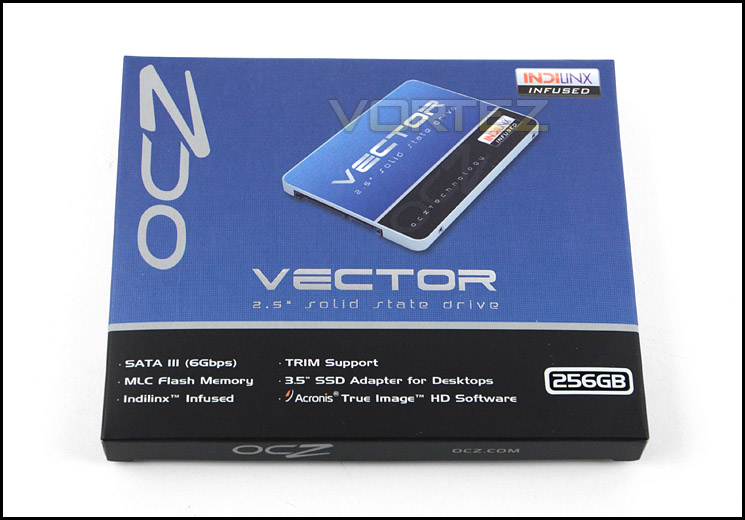
Attractive packaging catches the eye
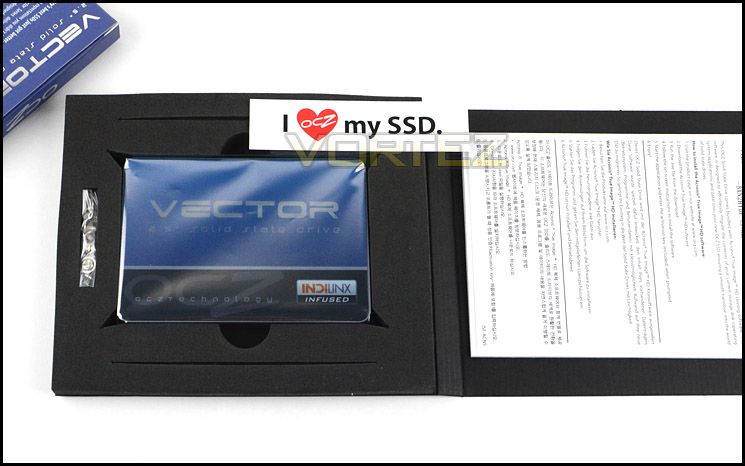
Bundle – including screws, drive and documentation
Just on the appearance and physical design alone, Vector is a great looking SSD. Reflecting the packaging, Vector is blue. As is typical for such a drive the size is 2.5” and features mounting holes on the sides and underside for mounting within a c computer chassis.
Vector uses steel casing to protect the inner PCB. Its outer shell is robust and sturdy. The underside of the drive contains a label detailing serial number, QR code (which didn’t return an address) and other technical details.
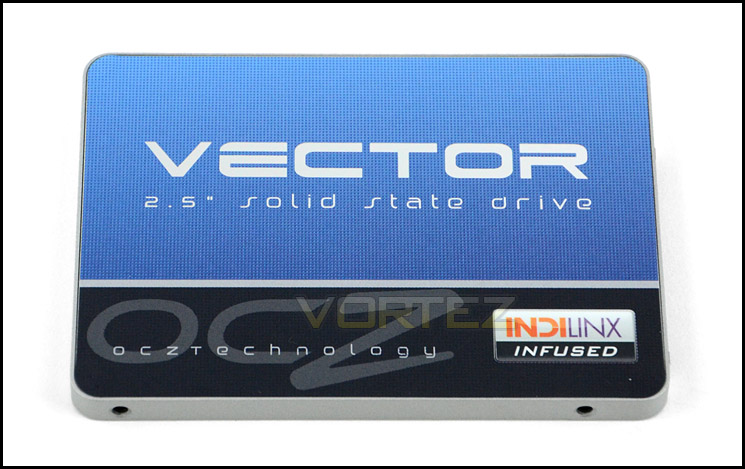
Sleek design is pleasing to see
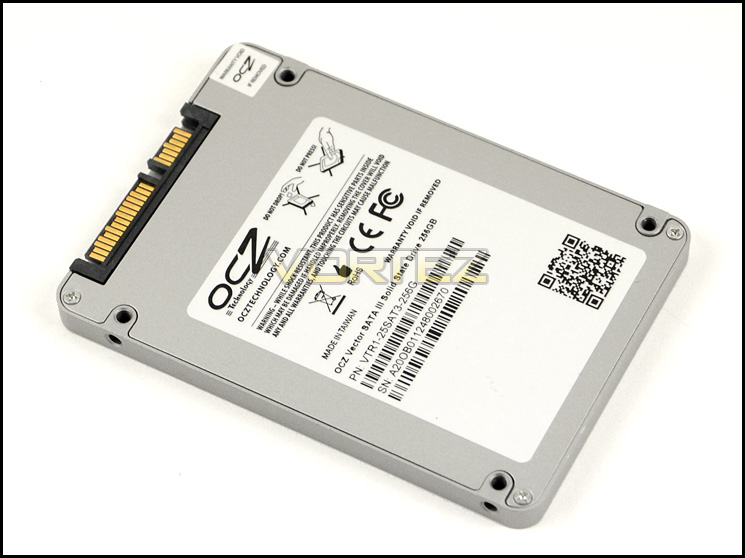
Steel casing ensures external durability
Removing the outer casing reveals the inner-workings for Vector. Our SSD uses the Indilinx Barefoot 3 Controller which is the first outing for such a chip, especially one developed in-house. Surrounding the controller is 16 flash chips which are produce by Intel/Micron. Also accompanying the controller are two DDR3L-1600 DRAMs.
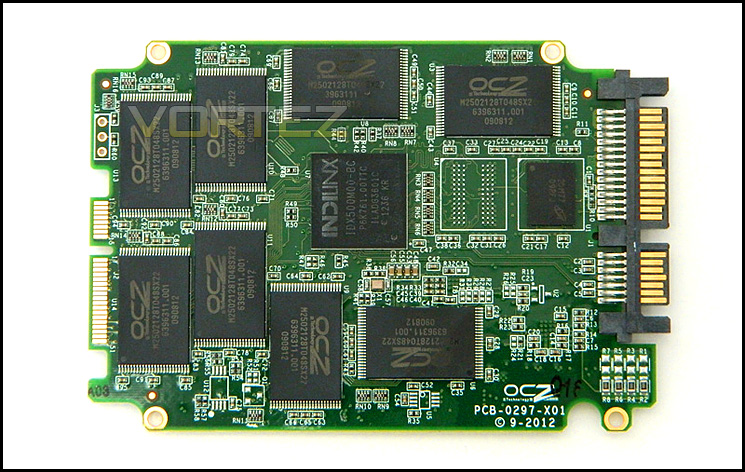
An overview of the PCB
Test Setup & Methodology
Our test system is formatted and a fresh version of Windows is installed with just drives in place – no additional applications. Windows is then updated to the latest release and the drivers are installed. Included in the list of benchmarks are the following applications:
Benchmarks
ATTO Disk Benchmark v2.46
AS SSD
CrystalDiskMark 3.0
Iometer
SiSoftware SANDRA 2012
Windows 7 Boot Time Test
AS SSD
CrystalDiskMark 3.0
Iometer
SiSoftware SANDRA 2012
Windows 7 Boot Time Test
Test system
CPU Intel Core i5 2500K
Motherboard MSI Z77A-GD65
Graphics MSI R7970 Black Edition
Memory 8GB Corsair Vengeance 2133MHz
HDD
– OCZ Vector 256GB (Sata Gbps)
– Corsair Neutron GTX 240GB (Sata 6Gbps)
– Corsair Force GS 240GB (Sata 6Gbps)
– OCZ Vertex 4 128GB (Sata 6Gbps)
– Kingston HyperX 3K 120GB (Sata 6Gbps)
– Kingston HyperX 240GB (Sata 6Gbps)
– ADATA S510 120GB (Sata 6Gbps)
– Intel 520 480GB (Sata 6Gbps)
– Samsung 830 Series 256GB (Sata 6Gbps)
– Samsung HD103SJ 1TB (Sata 3Gbps)
PSU OCZ 750W Fatal1ty
OS Microsoft Windows 7 Professional 64-Bit
Motherboard MSI Z77A-GD65
Graphics MSI R7970 Black Edition
Memory 8GB Corsair Vengeance 2133MHz
HDD
– OCZ Vector 256GB (Sata Gbps)
– Corsair Neutron GTX 240GB (Sata 6Gbps)
– Corsair Force GS 240GB (Sata 6Gbps)
– OCZ Vertex 4 128GB (Sata 6Gbps)
– Kingston HyperX 3K 120GB (Sata 6Gbps)
– Kingston HyperX 240GB (Sata 6Gbps)
– ADATA S510 120GB (Sata 6Gbps)
– Intel 520 480GB (Sata 6Gbps)
– Samsung 830 Series 256GB (Sata 6Gbps)
– Samsung HD103SJ 1TB (Sata 3Gbps)
PSU OCZ 750W Fatal1ty
OS Microsoft Windows 7 Professional 64-Bit
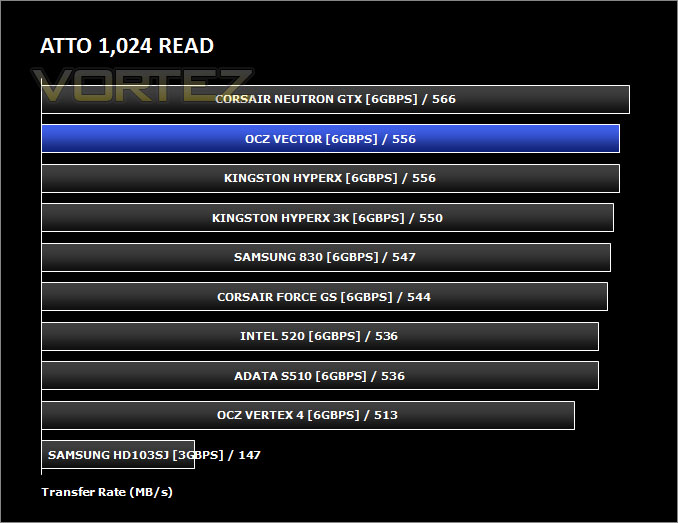
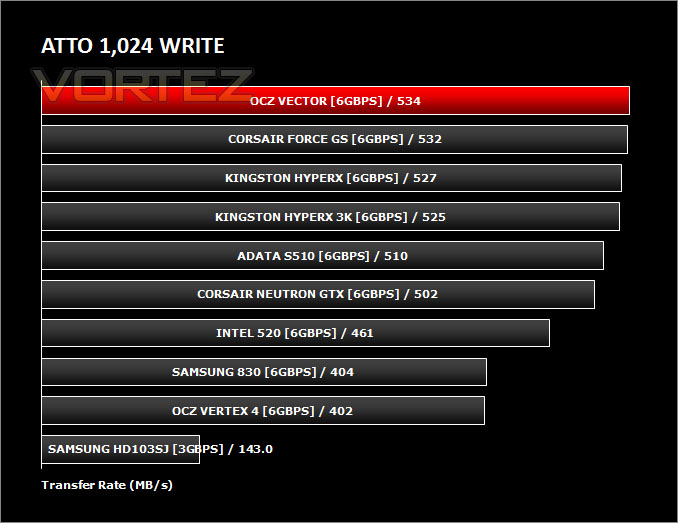
Benchmarks: ATTO Disk Benchmark v2.46
The ATTO Disk Benchmark performance measurement tool is compatible with Microsoft Windows. Measure your storage systems performance with various transfer sizes and test lengths for reads and writes. Several options are available to customize your performance measurement including queue depth, overlapped I/O and even a comparison mode with the option to run continuously. Use ATTO Disk Benchmark to test any manufacturers RAID controllers, storage controllers, host adapters, hard drives and SSD drives and notice that ATTO products will consistently provide the highest level of performance to your storage.
Benchmarks: AS SSD
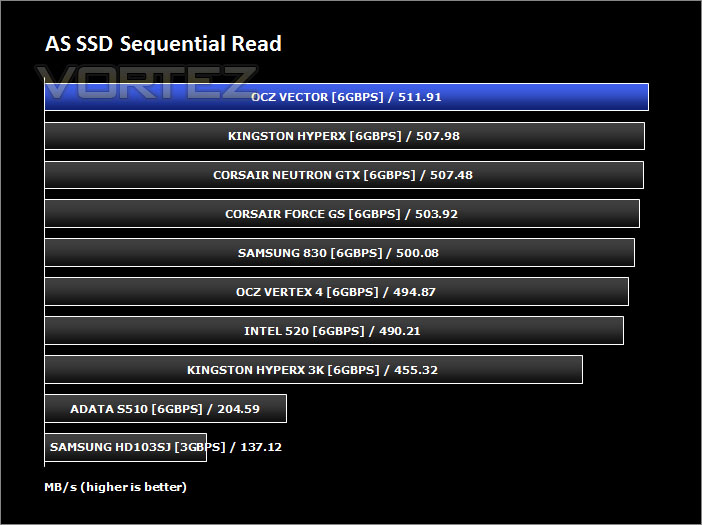
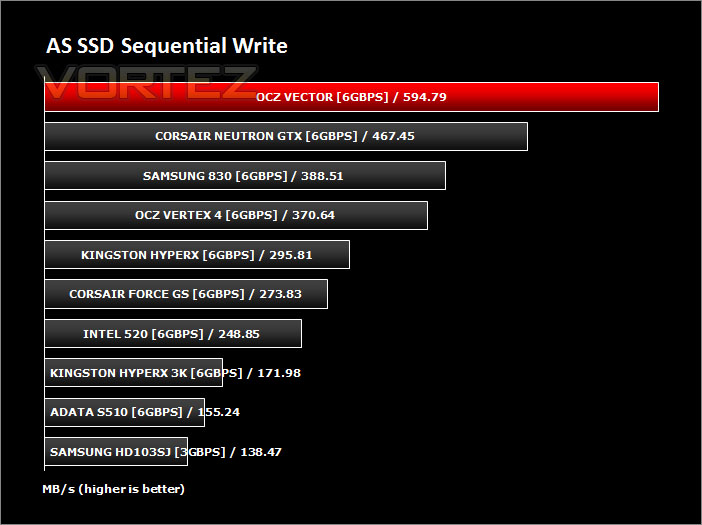
AS SSD Benchmark is a straightforward tool for measuring the speed of your SSD drive.
Simply launch the program, choose your drive, click Start, and it’ll test your SSD’s read and write speed in a variety of ways, delivering a score for each when it’s done. And if that’s not enough, there are also additional file copy and compression-related benchmarks available from the Tools menu. (The author’s support page is German only, but if you need further English explanations then there’s a thread on the program at the OCZ Technology forum.).
Simply launch the program, choose your drive, click Start, and it’ll test your SSD’s read and write speed in a variety of ways, delivering a score for each when it’s done. And if that’s not enough, there are also additional file copy and compression-related benchmarks available from the Tools menu. (The author’s support page is German only, but if you need further English explanations then there’s a thread on the program at the OCZ Technology forum.).
Benchmarks: CrystalDiskMark 3.0
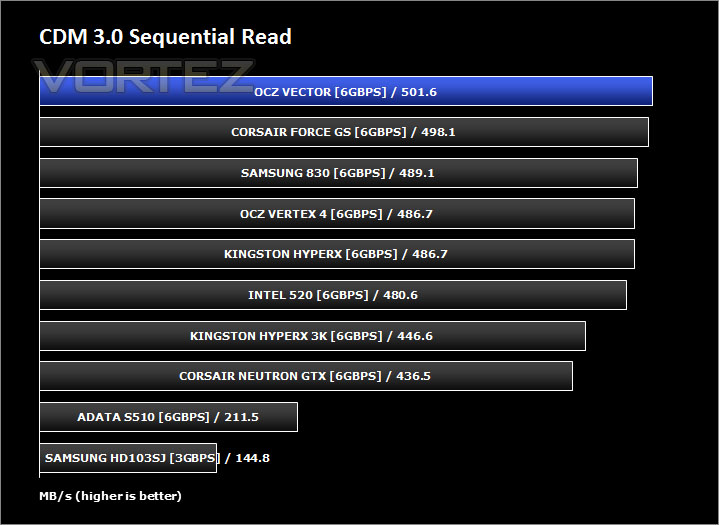
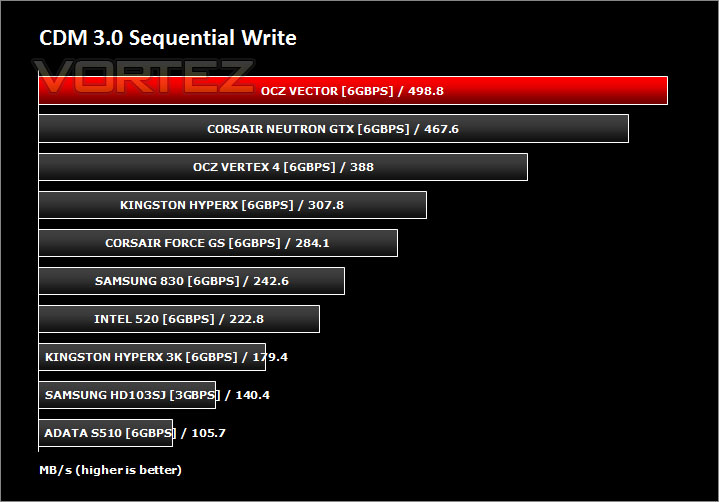
CrystalDiskMark is a disk benchmark software that analyses different types of hard drive. Giving sequential benchmark write and read statistics in MB/s. A simple program that is very useful.
Benchmarks: IOMeter
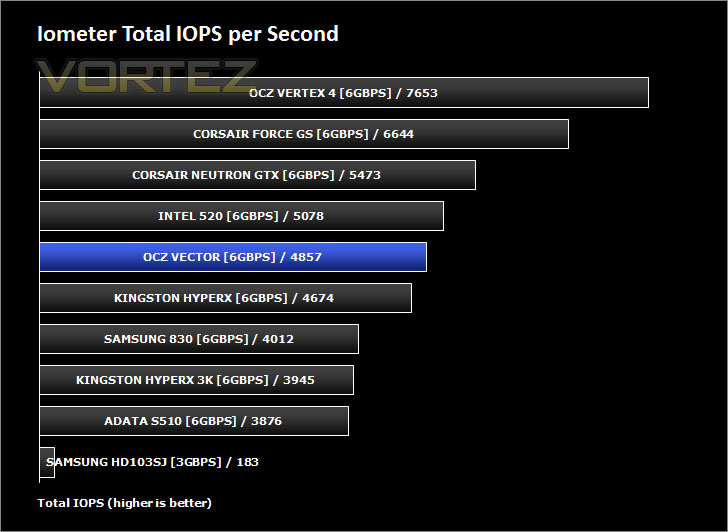
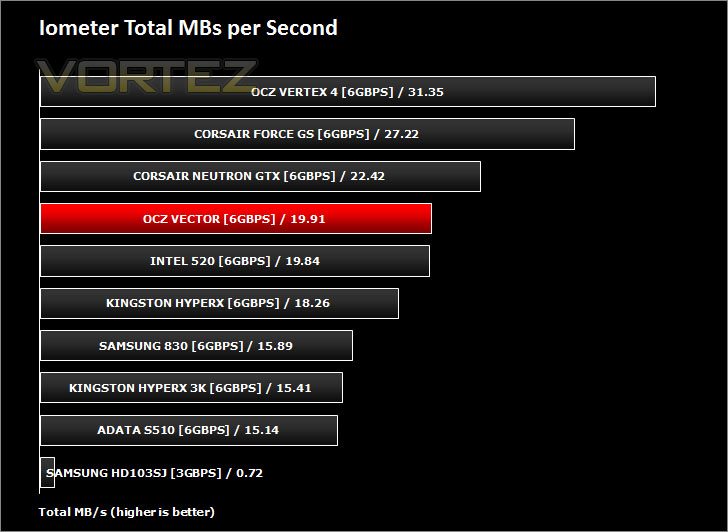
Iometer is based on a client–server model, where one instance of the Iometer graphical user interface is managing multiple ‘workers’ (each one representing a separate Dynamo.exe process) which are doing the I/O. Iometer performs Asynchronous I/O – accessing files or block devices (later one allowing to bypass the file system buffers).
Iometer allows the configuration of disk parameters such as the ‘Maximum Disk Size’, ‘Starting Disk Sector’ and ‘# of Outstanding I/Os’. This allows a user to configure a test file upon which the ‘Access Specifications’ configure the I/O types to the file.
Iometer allows the configuration of disk parameters such as the ‘Maximum Disk Size’, ‘Starting Disk Sector’ and ‘# of Outstanding I/Os’. This allows a user to configure a test file upon which the ‘Access Specifications’ configure the I/O types to the file.
For the purpose of this test. The 4K 50%/50% read/write file will be under the examination with 100% Random Distribution – reporting back on IOPS and MBs per Second.
Benchmarks: SiSoftware SANDRA 2012
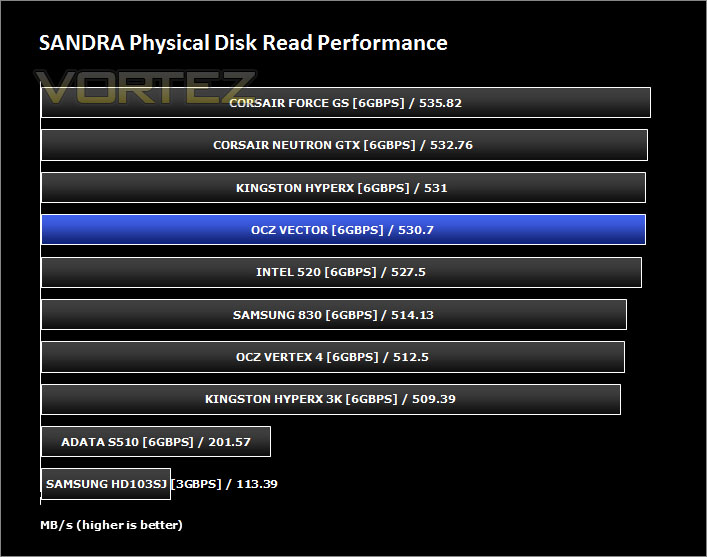
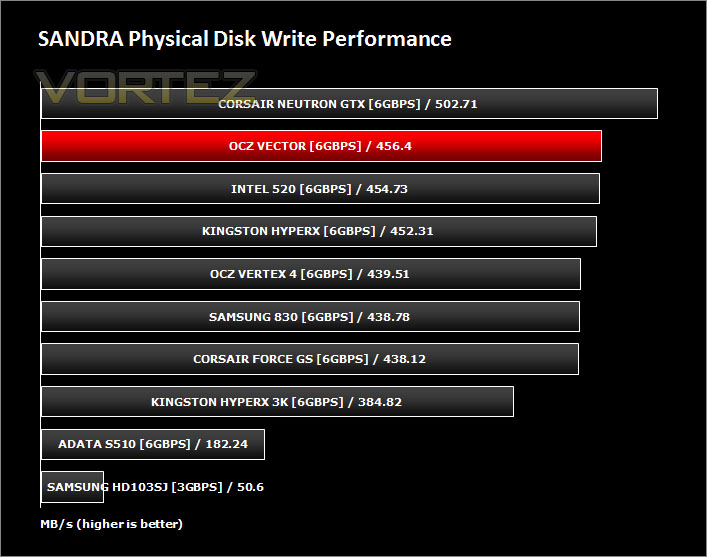
SiSoftware Sandra (the System ANalyser, Diagnostic and Reporting Assistant) is an information & diagnostic utility. It should provide most of the information (including undocumented) you need to know about your hardware, software and other devices whether hardware or software.
Sandra is a (girl) name of Greek origin that means “defender”, “helper of mankind”. We think that’s quite fitting.
It works along the lines of other Windows utilities, however it tries to go beyond them and show you more of what’s really going on. Giving the user the ability to draw comparisons at both a high and low-level. You can get information about the CPU, chipset, video adapter, ports, printers, sound card, memory, network, Windows internals, AGP, PCI, PCI-X, PCIe (PCI Express), database, USB, USB2, 1394/Firewire, etc.
Sandra is a (girl) name of Greek origin that means “defender”, “helper of mankind”. We think that’s quite fitting.
It works along the lines of other Windows utilities, however it tries to go beyond them and show you more of what’s really going on. Giving the user the ability to draw comparisons at both a high and low-level. You can get information about the CPU, chipset, video adapter, ports, printers, sound card, memory, network, Windows internals, AGP, PCI, PCI-X, PCIe (PCI Express), database, USB, USB2, 1394/Firewire, etc.
Benchmarks: Windows 7 Boot
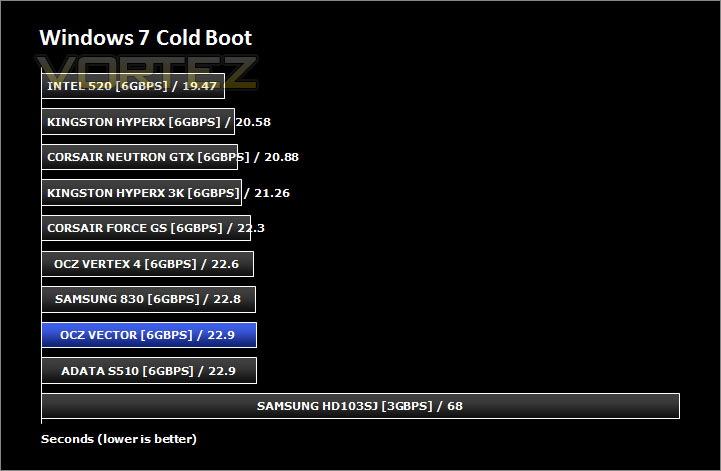
Synthetic testing is valuable in the examination of Solid State Drives. But some of the tests may not mean all that much to some readers so the final test in this review is a real world test showing the Windows 7 boot time.
In order to perform this test (and indeed all other benchmarks), a fresh install of Windows 7 Professional was installed on the Vector – the image of this install with no additional applications or drivers was exported for importing onto each drive at the time of testing. This will provide a clean and fair environment for comparing the boot times on each of the drives. The times were monitored using a stopwatch.
In order to perform this test (and indeed all other benchmarks), a fresh install of Windows 7 Professional was installed on the Vector – the image of this install with no additional applications or drivers was exported for importing onto each drive at the time of testing. This will provide a clean and fair environment for comparing the boot times on each of the drives. The times were monitored using a stopwatch.
Conclusion
OCZ Vector incorporates the first implementation of Indilinx Barefoot 3 – OCZ’s in-house development. The real question is; does it provide any improvement over rival SATA 3 SSDs?
The performance gains offered up by OCZ Vector are obviously evident by the benchmark results on the preceding pages. Vector consistently pushes other SSDs out of the way and asserts itself as the clear winner. Sequential read and write performance results rarely maintain the stated transfer rates by the manufacturers, even more so with the write transfer rates; these are usually much lower than what Vector revealed. Seldom do we find such good performance in a vast range of scenarios but the Vector drive certainly achieved this and more.
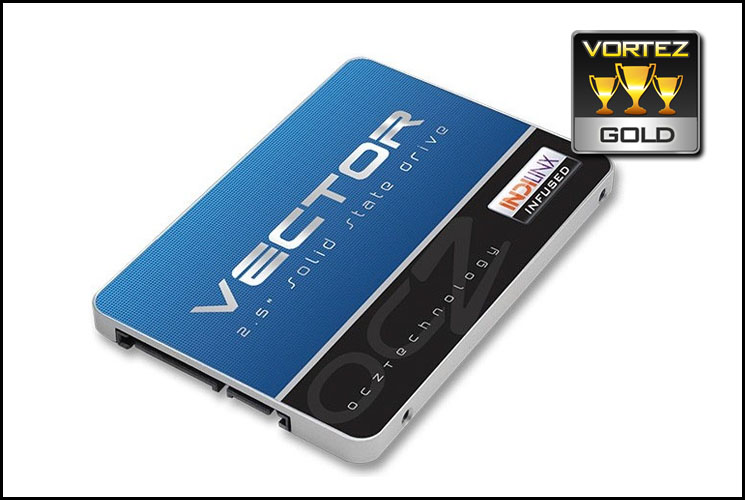
The 256GB version of Vector can be found for approximately £199 which is in line with most other drives using the SATA 3 interface of similar capacity and offering respective read/write speeds. What makes Vector so appealing is the strong commitment of 5 years warranty.
OCZ’s hard work in developing their very own Controller has paid off, Vector pushes the boundaries for SSD performance. Sleek looks, good build quality and a generous 5 years warranty all point to an impressive product.
Pros
+ Good build quality
+ Excellent performance
+ Affordable
+ 5 years warranty
Cons
– New controller, long-term reliability unknown
+ Good build quality
+ Excellent performance
+ Affordable
+ 5 years warranty
Cons
– New controller, long-term reliability unknown

Click here for an explanation of our awards at Vortez.net.


