







Prolimatech are looking to take on the mighty Thermalright and Noctua. Do they have what it takes?
Product on Review: Prolimatech Super Mega
Manufacturer and Sponsor: Prolimatech courtesy of CaseKing
MSRP: N/A
Street Price: 69,90EUR/ £49.19
The cooling market is one of the most competitive ones out there. From previous reviews, it was becoming clear that to get better performance, manufacturers had to upscale and create larger coolers. The most successful results came in the form of the Silver Arrow by Thermalright and the NH-D14 by Noctua. The problem is that in a world fuelled with marketing by RAM manufacturers to adopt their over the top memory heat spreaders, cooler compatibility has become a growing issue. As such, dual tower heatsinks are not always the ideal solution and cooler manufacturers become compromised in their design. On the positive side, it gives rise to innovation. For the most part, traditional single tower coolers will always play a key role in the cooling market. They have been tried and tested, proving nearly as effective as dual tower heatsinks in some cases. Improving performance is no longer a matter of simply going bigger but instead optimising fin design and heatsink shape have to be factored in. This is where Prolimatech come in with their Super Mega.

It’s not often that we find a new company entering a highly competitive market, only to go straight into the top league. But this shouldn’t come as much of a surprise when the engineers in question originated from another highly regarded manufacturer. Prolimatech first came into the market with their Megahalem using a very original dual tower that came in a package the same size as other traditional tower heatsinks such as the Thermalright Ultra Extreme. It proved to be highly successful amongst enthusiasts but from our own results it failed to keep up with Thermalright’s offering, its closest competitor. Moving on three years from then, Prolimatech have made tweaks to their design and are ready to take on the top coolers once again with their new ultimate Super Mega iteration, this time facing the Noctua NH-D14, Thermalright Silver Arrow and Venomous X.
A bit about Prolimatech
Prolimatech,founded in 2008 is headquartered in Taiwan, led by a team of dedicated experts with 22 years of accumulated experience in the field of computer thermal solutions.
Prolimatech stands for Professionalism exceeding beyond all Limits. We are here to challenge any limits that stand in our way to achieve what was thought to be impossible.
Prolimatech incorporates integration of the aerospace resource-saving technology and advanced heat conduction technology to create the best heat absorption and dissipation solutions while pertaining to the science of aesthetics.
Our never-ending quest is to satisfy every computer overclocker’s and every enthusiast’s needs for high quality and performance oriented thermal solutions for their high-end computer components.
Prolimatech stands for Professionalism exceeding beyond all Limits. We are here to challenge any limits that stand in our way to achieve what was thought to be impossible.
Prolimatech incorporates integration of the aerospace resource-saving technology and advanced heat conduction technology to create the best heat absorption and dissipation solutions while pertaining to the science of aesthetics.
Our never-ending quest is to satisfy every computer overclocker’s and every enthusiast’s needs for high quality and performance oriented thermal solutions for their high-end computer components.
With world leading expertise in cooling solution, our expectations of Prolimatech have grown, so let’s see how it compares.
Features & Specifications
Following the huge success of Megahalems comes the super edition, the SUPER MEGA!!It’s a hybrid of copper and aluminium for an unmatched level of performance while still keeping it under one kilogram. We have also included an option to install extra pounds of pressure for an even tighter contact between the heatsink base and the CPU.
Just when you think air cooling has reached its bottleneck, Prolimatech goes and pulls another one out of the hat.
The Mega Trio: First the Megahalems, then the Mega Shadow and now the Super Mega!
Just when you think air cooling has reached its bottleneck, Prolimatech goes and pulls another one out of the hat.
The Mega Trio: First the Megahalems, then the Mega Shadow and now the Super Mega!
Features
•Copper and Aluminium Hybrid for best heat collection and dissipation ratio
•Copper fins strategically positioned for better heat dissipation
•Top fin made of scratch resistant stainless steel to preserve shine
•Minimal air resistance between fins allowing best balance between noise and performance for fans in the range of 800-1200RPM. For all out performance, fan RPM at 1600 or above is recommended
•Vertically adjustable 120/140mm universal fan clips redesigned for better installation compatibility
•The black screws are included to provide extra pressure for better contact with CPU and heatsink.
Specifications
Physical Specifications
•Dimensions: 130 x 74 x 158.7 mm (L x W x H)
•Weight: 945.3g
•Heat pipe: 6mm diameter x 6 units
•Heatsink material: Copper and Aluminium
•Suggest Fan speed: 1000-1200RPM
•CPU Platform: Intel Socket LGA 775/1366/1156/1155
•Fan Compatibility: 120x120x25mm & 140x140x25mm
•Copper and Aluminium Hybrid for best heat collection and dissipation ratio
•Copper fins strategically positioned for better heat dissipation
•Top fin made of scratch resistant stainless steel to preserve shine
•Minimal air resistance between fins allowing best balance between noise and performance for fans in the range of 800-1200RPM. For all out performance, fan RPM at 1600 or above is recommended
•Vertically adjustable 120/140mm universal fan clips redesigned for better installation compatibility
•The black screws are included to provide extra pressure for better contact with CPU and heatsink.
Specifications
Physical Specifications
•Dimensions: 130 x 74 x 158.7 mm (L x W x H)
•Weight: 945.3g
•Heat pipe: 6mm diameter x 6 units
•Heatsink material: Copper and Aluminium
•Suggest Fan speed: 1000-1200RPM
•CPU Platform: Intel Socket LGA 775/1366/1156/1155
•Fan Compatibility: 120x120x25mm & 140x140x25mm
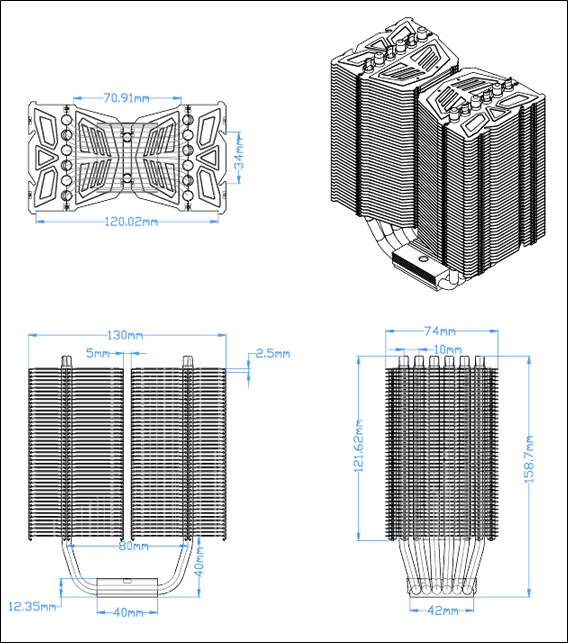
The Super Mega looks be a very versatile cooler, considering it supports both 120 and 140mm fans which not many other coolers can claim. This makes it ideal for a high performance but silent operation as it was designed to be. The size of the heatsink is slightly larger than the Thermalright Venomous X. It is 3mm longer, 11mm wider but 1.3mm shorter than the latter. The wider dimension may have implications when it comes to memory compatibility. Compared to the Venomous X, the Super Mega uses a similar 6 heat pipe design for efficient heat dissipation. The fins have been designed in such a way as to reduce air resistance meaning that low RPM fans are very well suited to the cooler and high static pressure is not absolutely necessary but nonetheless still welcomed. Unfortunately, the Super Mega only supports Intel CPUs, which traditionally run hotter. The copper and aluminium hybrid is unique to the cooler and the claims that the copper ones are strategically placed seem dubious but our results will no doubt reveal the truth.
Packaging and Content
The packaging
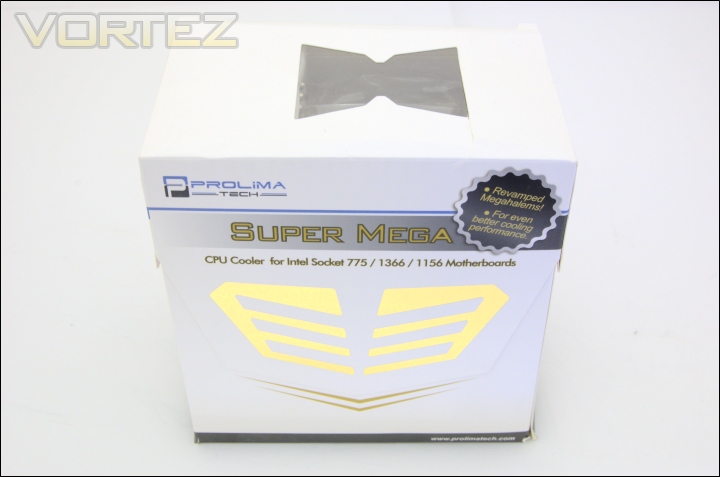
The packaging in which the Prolimatech Super Mega comes in is fairly minimal. Using a thin cardboard construction, it isn’t the robust of packaging but the heatsink is still well secured inside. Prolimatech have moved away from their distinct blue cardboard housing which they initially used for the original Megahalem. Aside from the features and specifications on either side of the box, the name has been printed on the front with a badge indicating that it is an improved version of the original Megahalem. The gold emblem on the front is also reminiscent of Optimus Prime from Transformers and the cooler itself follows the same theme as we will see later on. Opening the box is a simple matter of removing the top lid.
Opening the box
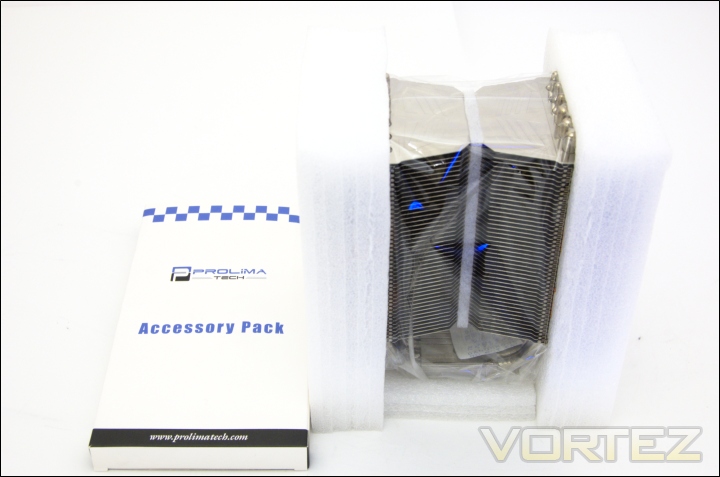
Going inside, there is one accessory pack containing all the necessary installation parts and thermal paste, and the heatsink is nicely enclosed in foam so it is protected from damage.
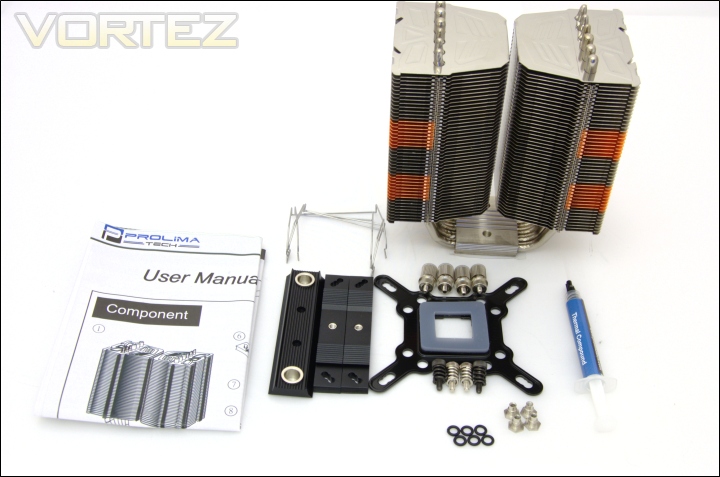
The bundle
All the necessary kit is provided for installation on Intel systems. Unfortunately only sockets LGA775/1366/1156/1155 are supported but an additional kit can be bought for AMD socket support. Bundled in the package are:
-Heatsink Body
-Intel backplate
-Custom LGA775 backplate spacer
-4x rivet nuts
-6x O-rings
-2x aluminium strip adapter
-4x double end studs with nut
-4x screw nuts
-Aluminium mounting plate
-4x spring loaded screws
-4x black spring loaded screws with extensive 70lbs pressure
-4x 120/140mm fan wire clips
-Prolimatech PK-1 thermal paste
-User manual
The installation components are constructed solidly to ensure that the cooler can be installed securely despite its weight. A nice addition is the thermal paste which again is a very good performer. Interestingly, there are two types of spring loaded screws provided, the black ones applying up to 70lbs pressure similar to Thermalright’s adjustable anchor. I would personally recommend against using these due to reports of users damaging their CPU sockets with too much pressure. Realistically, the normal spring loaded screws are enough for more than adequate pressure. A user manual has also been bundled in the form of a fold out sheet of paper.
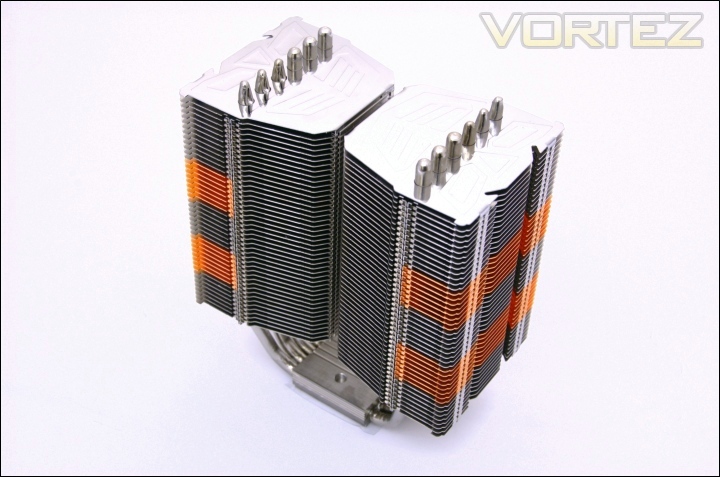
The cooler
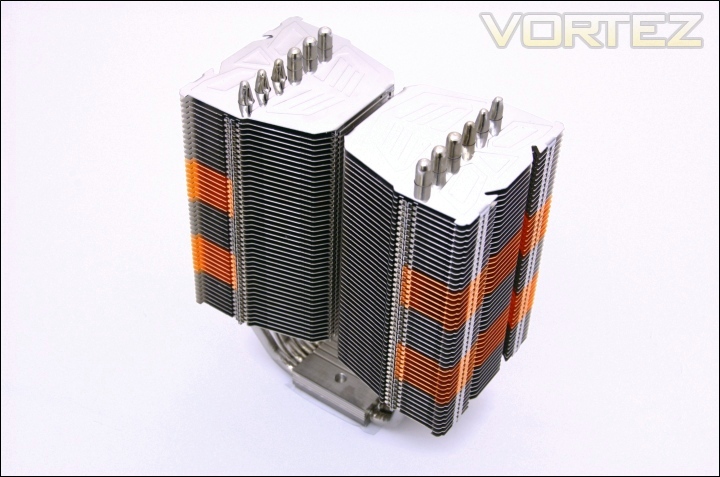
The Super Mega is a very striking heatsink, more so for its unique styling and distinct design. The heatsink has a very shiny finish compared to the matt finish on the Noctua NH-D14. In terms of shape, the Super Mega is comprised of two towers which stand next to each other as opposed to having one in front of the other. This means that fans blow through both towers simultaneously. Each tower is supported by the either ends of the U-shaped heat pipes which transfer heat from a common base. Compared to single tower designs such as the Thermalright VX, the two towers are separated by a narrow 5mm gap in the middle to lower resistance. The heat pipes are arranged to be in line to give even support to the towers but unfortunately it means that airflow to the heat pipes is hindered by the one closest to the push fan.
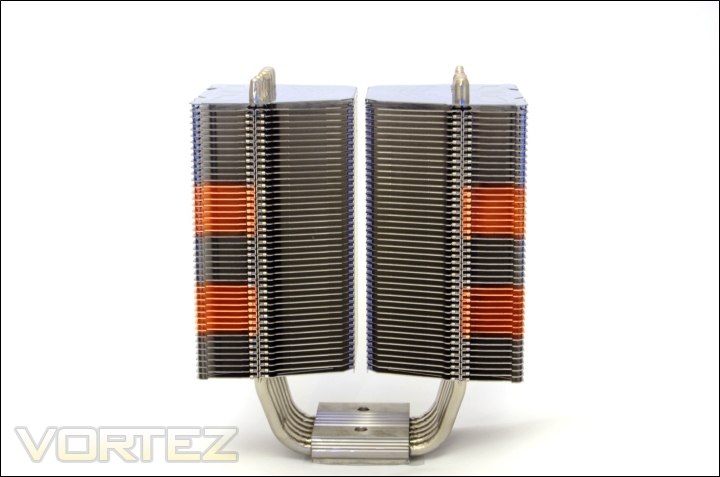
The front of the cooler
From the front view, the dual tower design is more apparent and the symmetry adds to the appeal of the Super Mega. In total, there are 45 fins separated by a 2.5mm gap. The fin spacing is fairly large compared to some other coolers we have reviewed and the reason is to reduce resistance making it better suited to low RPM fans. Ideally, more turbulence is better for heat dissipation but it comes at the cost of needed high RPM fans with higher static pressure, resulting in louder operation. The Super Mega is more suited to lower RPM fans and quieter operation but it will still perform better with higher RPM ones. On top of that, the fins are planar with no alterations to increase surface area or turbulence.
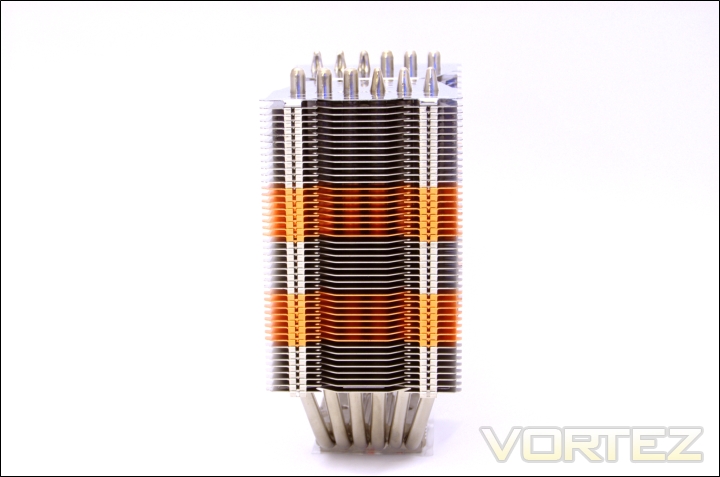
The side profile
From the side, there is still symmetry in the shape of the cooler. At 74mm wide, the Super Mega is 11mm wider than the Venomous X meaning that it may coincide with tall heatsink modules with a front push fan installed.
Closer Look
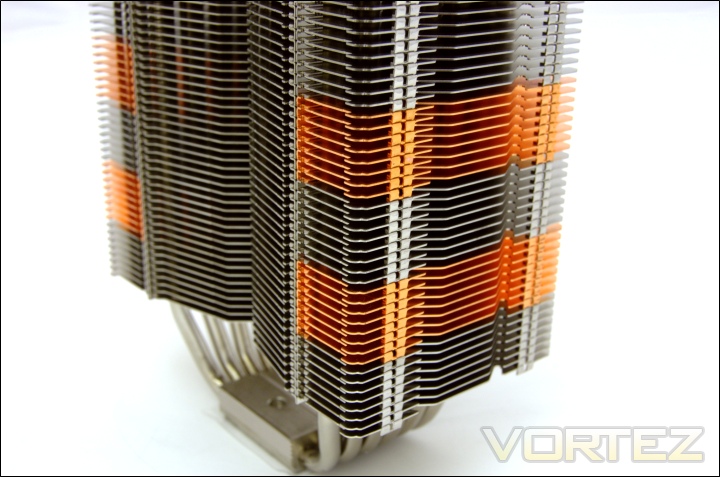
The copper fins
One aspect of the cooler we have not touched on is the distinct copper and aluminium hybrid construction. On each tower are 16 fins made of copper that are grouped in blocks of 8. The copper fins don’t span all the way across laterally and instead they are to one side of the heat pipes. Copper’s higher thermal conductivity makes it a better solution for transferring heat but its lack of widespread use is attributed to its high density and subsequently mass. Prolimatech uses this design effectively to ensure better heat conductivity without adding too much mass to the already heavy heatsink.
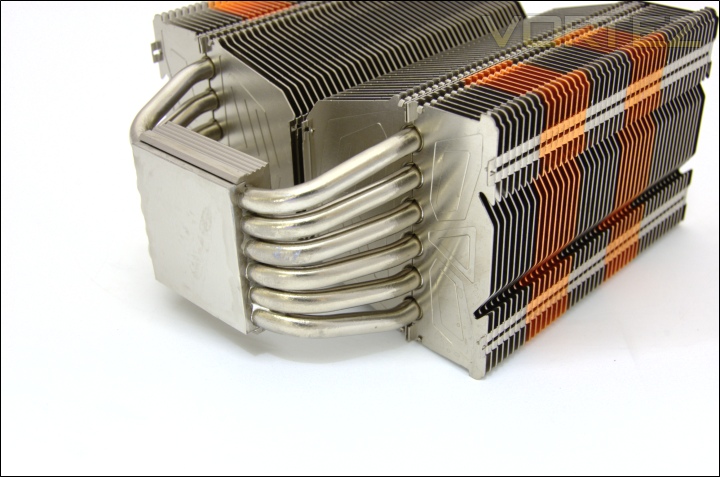
The heat pipes
The Super Mega has kept to the same 6 heat pipes concept as found on the Megahalem, no doubt because it works very well. All 6 heat pipes are 6mm in diameter and are in direct contact with the copper base to ensure that heat is dissipated quickly and effectively. The U-shape is split between both towers.
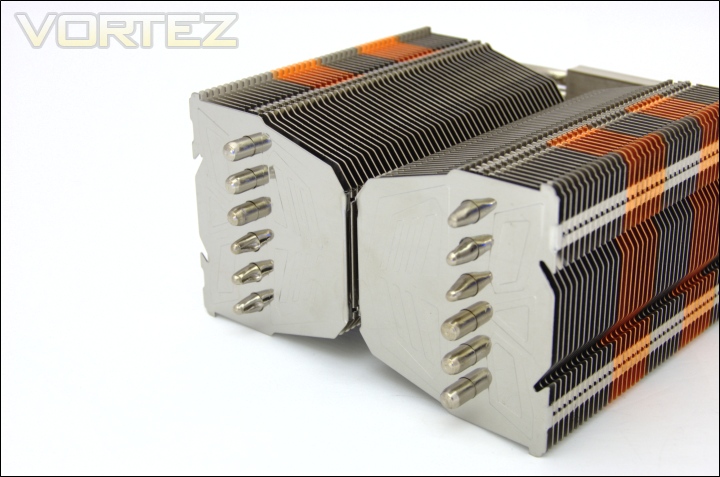
The top of the heat pipes
At the top, we can see the configurations of the heat pipes. On each side, there are three rounded tops and three slightly grooved ends. The Prolimatech Transformers like emblem is engraved onto the top. To give the top the shiny look, Prolimatech have gone for a stainless steel top fin. The other advantage is that it is scratch proof, which was problem I encountered on the Thermalright Silver Arrow when trying to install the fan wire clips.
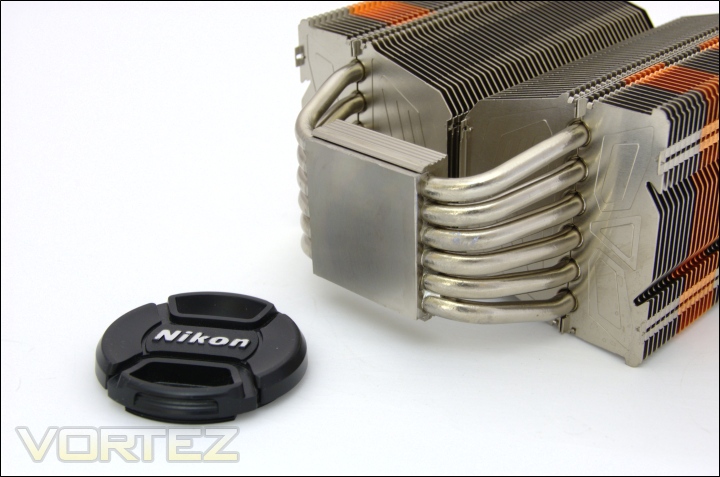
The base of the heatsink
The base of the heatsink is made of copper for optimal heat conductivity. It lacks a mirror finish but it is fairly flat and should provide good contact with the CPU. The heat pipes are in direct contact with the copper block and this is in turn housed in another outer block.
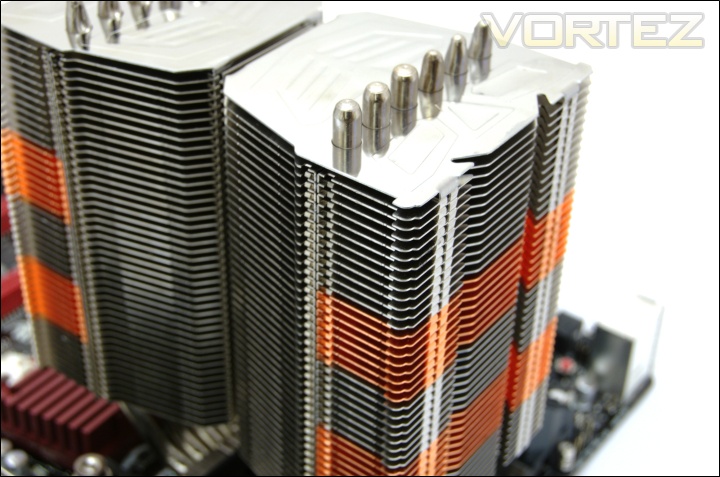
The fan notches
At the ends of the fins there is a slight groove that runs down the heatsink in order to house 120mm fans. However it is still possible to place 140mm fans on top of the grooves.
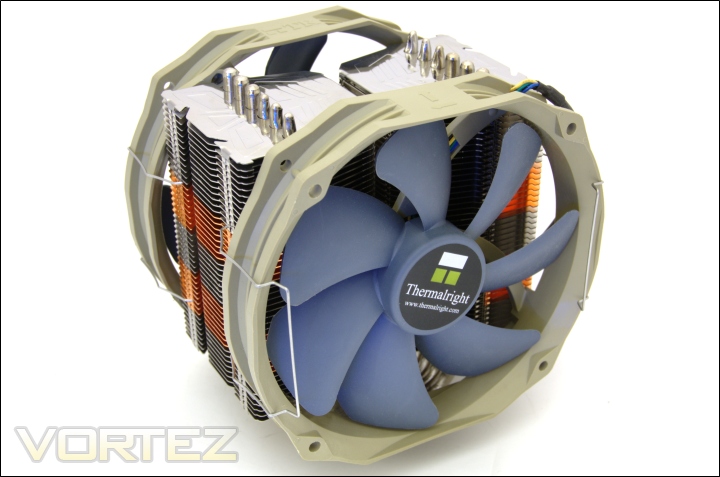
nstalling a fan
As demonstrated, the heatsink and bundled wire clips can accommodate the strangest of fans, which in this case are Thermalright’s 140mm TR TY-140s.
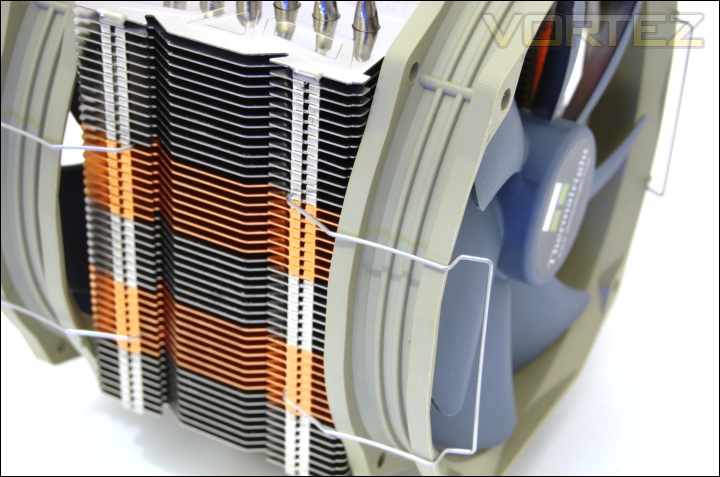
The wire clips
The wire clips are very unique but they are also very effective and versatile. The simply clip to the side of the heatsink and rotate to keep the fans in place. They are only designed for 25mm thick fans but in the case of 140mm fans that can’t fit snugly within the groove on the face of the heatsink, the additional depth can still be accommodated thanks to the flexibility of the wires. My only complaint is that they can be very fiddly when trying to install a fan to the heatsink inside a case.
Closer Look (Continued)
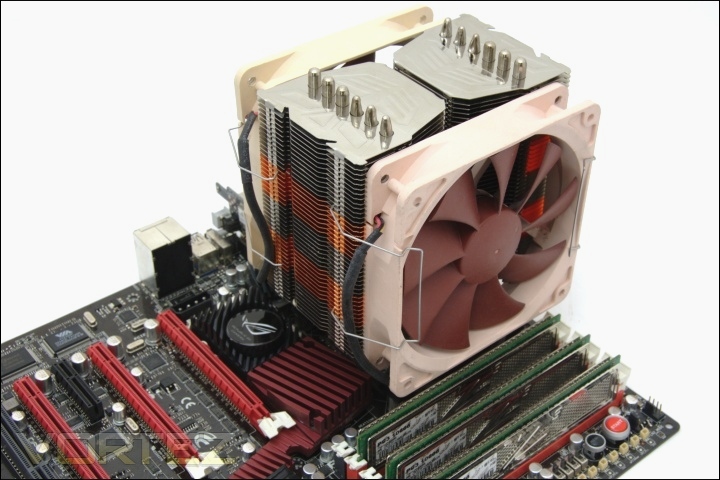
The Super Mega installed
The cooler looks fairly compact compared to the likes of the Noctua NH-D14 or Thermalright Silver Arrow but in itself, it is still a fairly big heatsink with a majestic look when installed. No anti-vibration strips are provided for the fans but the wire clips are secure enough to prevent that from happening.
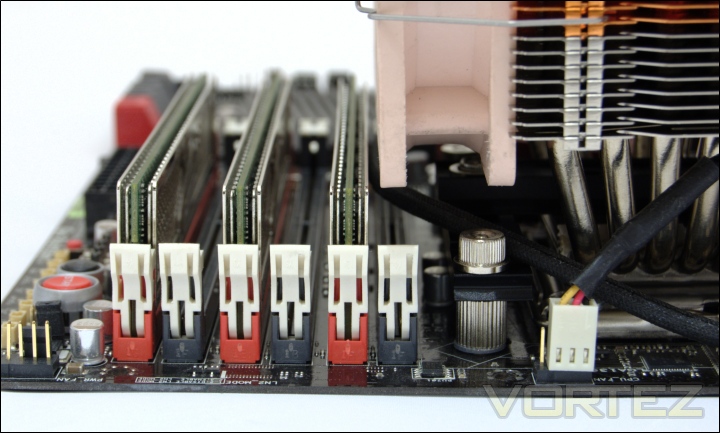
Memory clearance
Most importantly, the cooler is narrow enough to allow three modules of any size to be installed. Users have to watch out if they are planning to populate all the slots as the one closest to the CPU as there will be conflicts with tall memory modules. It is possible to shift the fan upwards but it might end up with the fan blowing air above the fin array rather than through it.
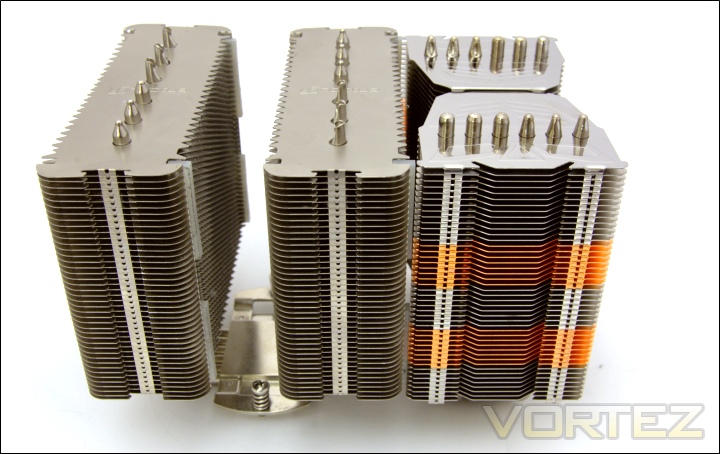
Prolimatech Super Mega VS Noctua NH-D14
For size comparisons, the Super Mega is only 130mm in length instead of 140mm in the Noctua’s case.
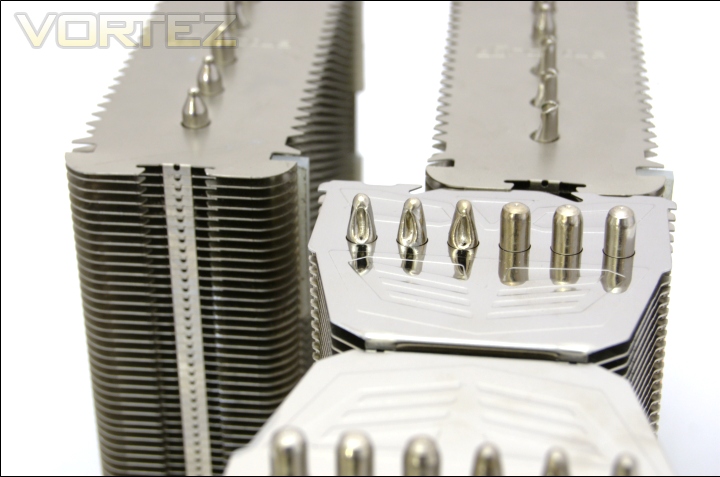
Prolimatech Super Mega VS Noctua NH-D14 part 2
In terms of width, the Noctua has two radiators both 50mm wide whereas the Super Mega is 74mm wide.
Test Setup
CPU – Intel Core i7 920 – 2.66/4.0GHz
RAM – 6GB (3x2GB) OCZ Platinum DDR3 1333MHz
Motherboard – ASUS Rampage III Extreme
Graphics card – Inno3D GTX570 1280MB
Power Supply – Enermax Revolution 85+ 850W
Hard Drive – OCZ Vertex 2E 120GB
Samsung F1 320GB
Samsung F3 1TB
Drivers – Nvidia ForceWare 266.66
CPU Coolers:
Prolimatech Super Mega including tests using 2 Noctua NF-P12s/NF-P14s, 2 SWiF2-120Ps and 2 Prolimatech Blue Vortex 14s
Noctua NH-C14 (U.L.N.A and default speed) including tests using 2 SWiF2-120Ps Thermalright Silver Arrow including passive and tests using 2 Noctua NF-P12s and 2 SWiF2-120Ps
Thermalright HR-02 including passive and tests using Noctua NF-12/NF-P14s and Thermalright TR TY-140
Thermaltake Frio (Low/med/high speed) including tests using 2 Noctua NF-P12s
Corsair H50 including tests using 2 Noctua NF-P12s and 2 SWiF2-120Ps
CoolIT ECO A.L.C including tests using 2 Noctua NF-P12s and 2 SWiF2-120Ps
Thermalright Venomous X using 2 Noctua NF-P12s and 2 SWiF2-120Ps
Coolink Corator DS including tests with dual fan setups
Tuniq Propeller 120(High speed fan)
Noctua NH-C12P SE14
Prolimatech Megahalem
Noctua NH-D14 (U.L.N.A and default speed)
Noctua NH-U12P SE1366
Thermolab Baram (with 2 Noctua NF-P12 fans)
CoolIT Domino A.L.C
Sunbeam Core Contact Freezer
Coolermaster Hyper 212 Plus including test with 2 Noctua NF-P12 fans
Alpenföhn Nordwand including test with 2 Noctua NF-P12 fans
Tuniq Tower 120 Extreme (Low/med/high speed)
Program Suite:
Core Temp 0.99.5
LinX stress Test
AIDA 64 Extreme Edition
CPUID HWMonitor
How I tested:
Testing will be based on temperatures recorded by Core Temp and PC wizard after 20 passes of LinX stress test. The absolute temperatures recorded in the tables are averages of the 4 cores and the delta value provided for a fair comparison, taking into account ambient temperatures. The test will be run at stock speed and at an overclocked speed of 4GHz.
Installation
Installation is a very process despite the number of small components present. Even inside a case, installation is straight forward as long as the backplate is installed into place.
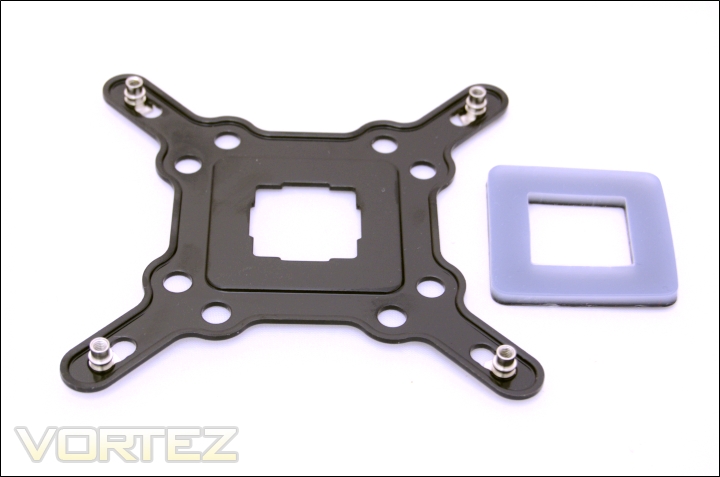
1. The first step is to insert the rivets into the appropriate backplate holes. The outermost ones correspond to LGA1366 and going inwards, there are the LGA 1156/1155 holes followed by the LGA775 ones. For LGA 775 systems, the spacer has to be placed onto the backplate.
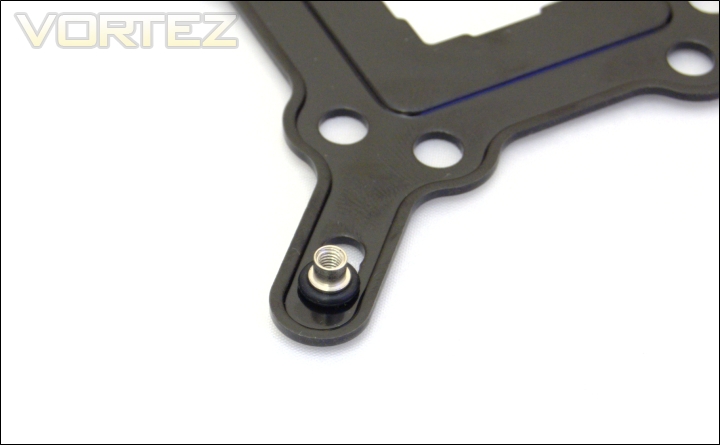
2. Place the O-rings on each rivet to secure them.
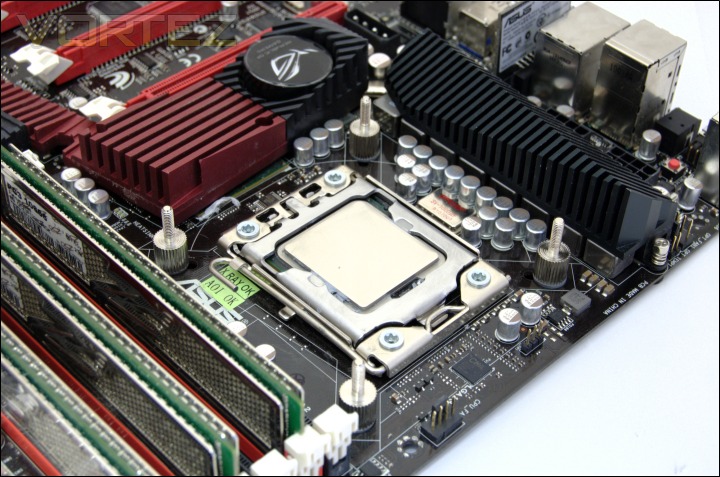
3. Place the backplate behind the motherboard and screw in the shorter end of the double end stud from the top side of the motherboard.
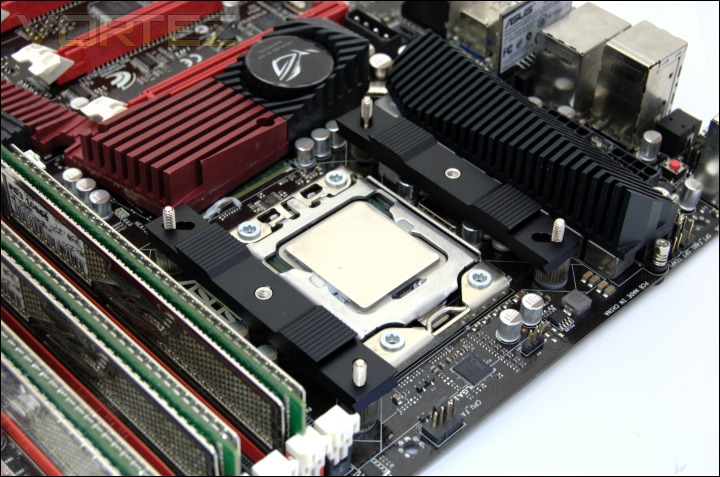
4. Put the aluminium strip adapters on each side of the heatsink using the corresponding holes. Make sure that the innermost holes face towards the middle of the socket.
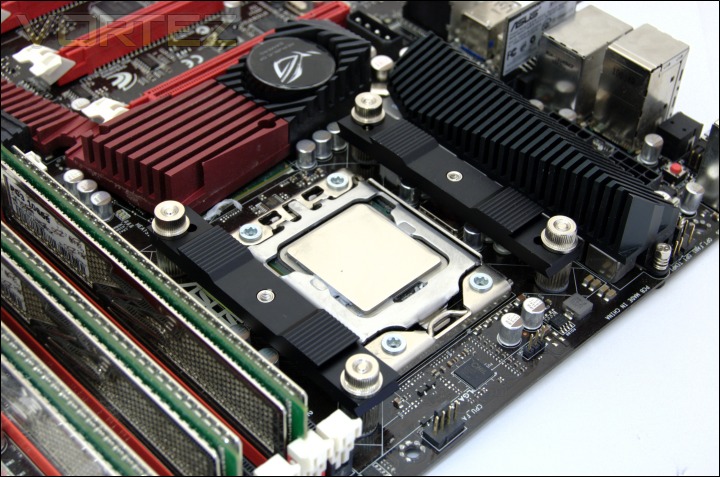
5. Secure the aluminium strip adapters using the screw nuts.
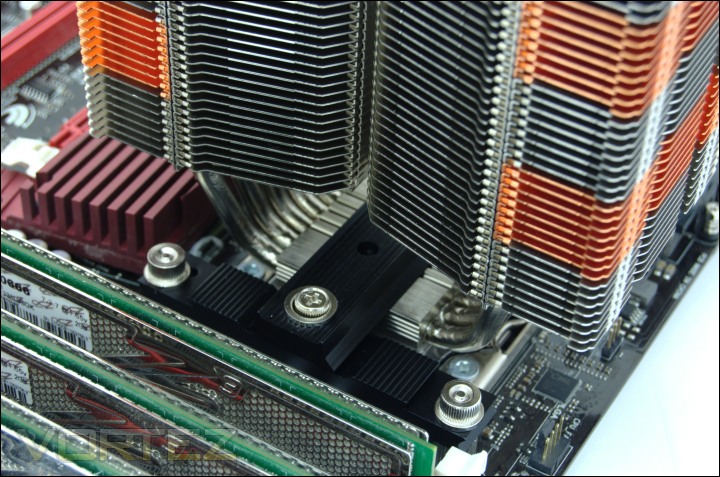
6. Apply a blob of thermal paste on the CPU and place the heatsink on top. Slide in the aluminium mounting plate so that the middle is inserted into the heatsink itself and the ends line up with the holes on the strip adapters. Use the silver spring-loaded screws to secure the mounting plate into place.
The installation is very straight forward and the aluminium construction of the mounting kit ensures that the system is robust without fear of the cooler dislodging. One important when using the spring-loaded screws is that the black ones exceed Intel’s recommended pressure and may cause damage over time so users should install these at their own discretion.
Results
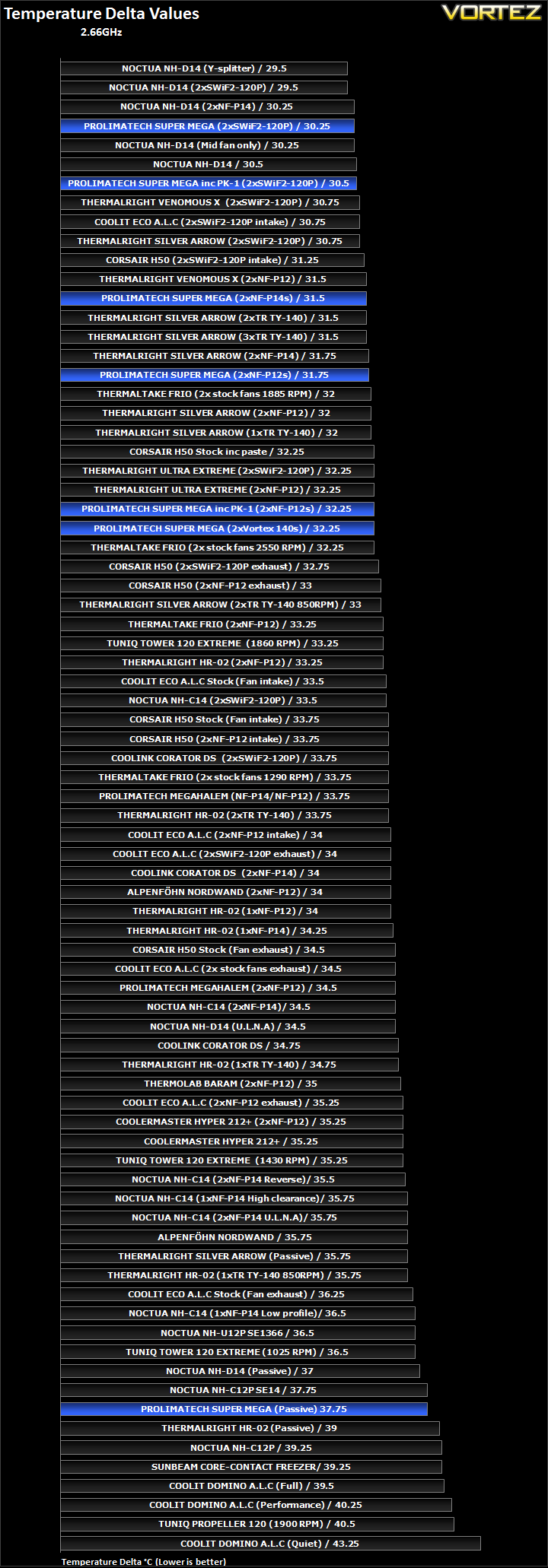
The results have been arranged in terms of the fan configuration that yields the best results for each cooler. However, it is important to take into account that many coolers come with their own fans and changing those increases the costs significantly, so the “out of the box” cooler configurations have been highlighted in red in each group.
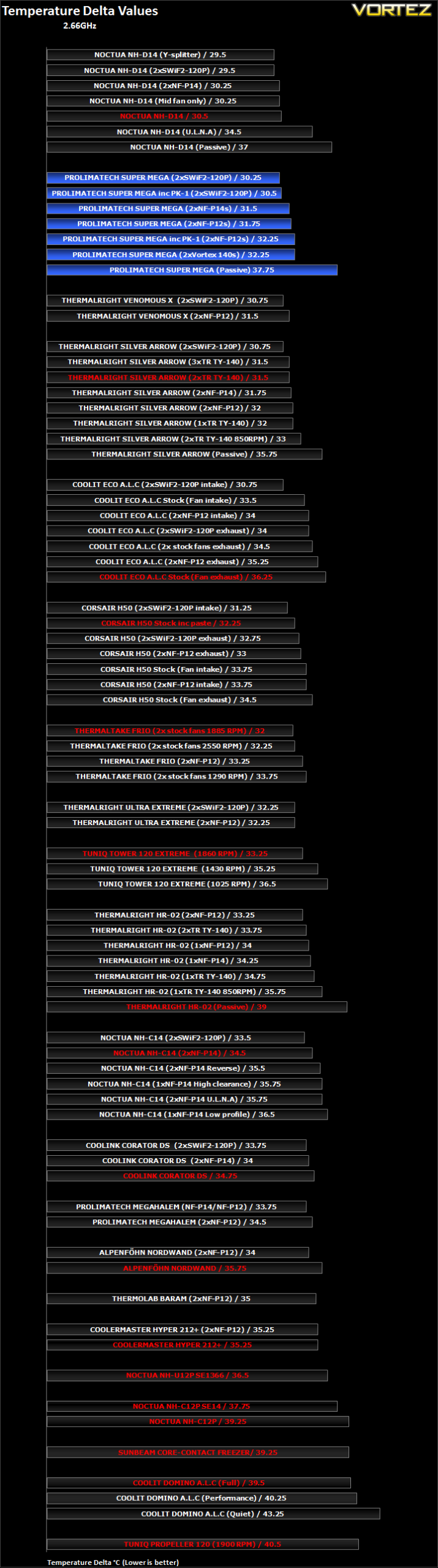
The Super Mega gets off to a very promising start by smashing its way into second place. There are a number of results we can analyse here in more depth. Firstly, the Super Mega was teamed up with 2 Coolink SWiF2-120P fans operating at 1800RPM. With these fans, the load temperature delta was a mere 30.25C, a marginal 0.5C cooler than the Thermalright Venomous X and Silver Arrow using the same fans. Only the Noctua NH-D14 proved more efficient with a lead of 0.75C relative to the Prolimatech.
Using the lower RPM Noctua NF-P12s, as the cooler was designed for, the delta temperature was 31.75C. This time it fell behind the Venomous X by 0.25C but kept ahead of the Silver Arrow by the same difference. Compared to the original Megahalem, the Super Mega proved superior by a more noticeable 2.75C.
Since the heatsink supports 140mm fans, I decided to test how efficient it would be teamed up with the NF-P14s and Prolimatech’s own Blue Vortex 14s. The Noctua NF-P14s proved more effective than the Blue Vortex and the NF-P12s making them an ideal but expensive choice for high performance with low acoustics. The lower performance of the Blue Vortex 14s can be attributed to its 1000RPM rotational speed.
The gains attained by moving from the low RPM NF-P12s to the higher RPM SWiF2-120P fans was 1.5C whereas the same change on the Thermalright VX only resulted in a 0.75C change. It leads me to think that although the Super Mega was tuned for lower RPM fan, higher RPM ones are more favoured.
Results (Continued)
Results (Overclocked)
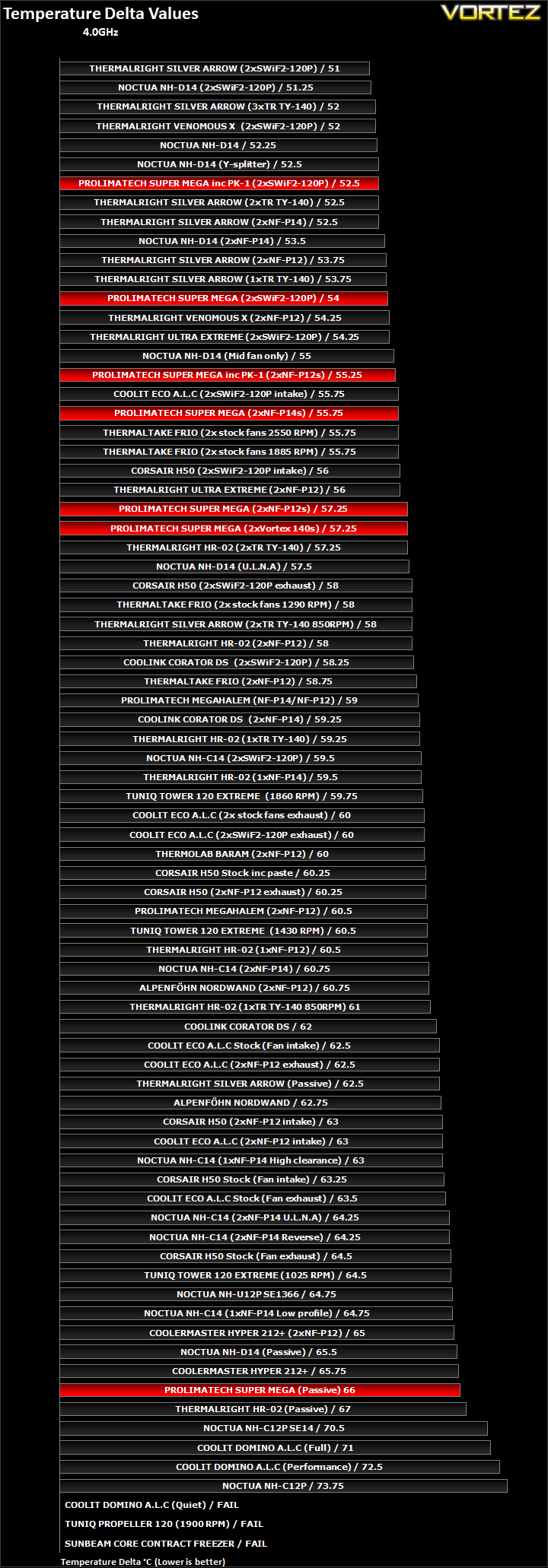
The results have been arranged in terms of the fan configuration that yields the best results for each cooler. However, it is important to take into account that many coolers come with their own fans and changing those increases the costs significantly, so the “out of the box” cooler configurations have been highlighted in red in each group.
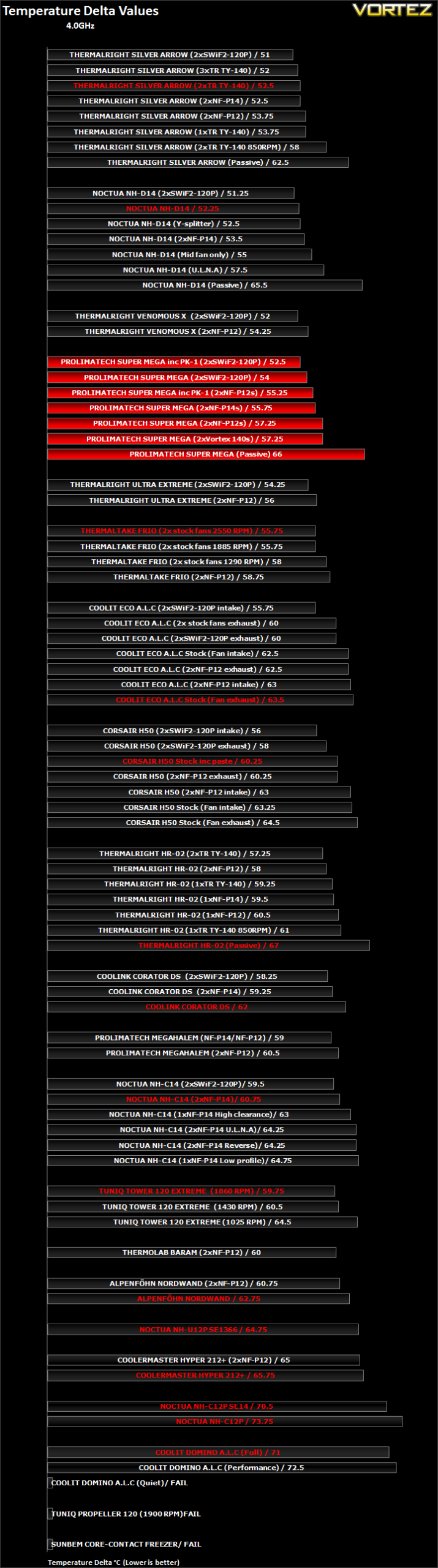
Onto the overclocked CPU results, we see that the Super Mega remains a solid performance as expected. Coupled with the SWiF2-120P fans, it yields a delta temperature of 54C, 2C behind the Venomous X. Similarly, with two NF-P12s, it ends up 3C behind the Venomous X and 1.25C behind the Ultra Extreme. In those two cases, I tested using Thermalright’s ChillFactor II thermal paste which is the standard compound I for all the coolers to reflect on the fact that many users tend to opt for aftermarket thermal paste. Nonetheless, it is still important to take into account the fact that sometimes thermal paste bundled by manufacturers aren’t mere generic offerings. Prolimatech demonstrates this very well and the results with their own PK-1 thermal paste are more favourable. Whilst the Super Mega’s heatsink efficiency may not be as good as the Venomous X’s using the same fans configurations and thermal paste, it works much better when coupled with its own bundled PK-1 compound.
Again, we find that moving to the higher RPM fans is more favourable on the Super Mega yielding 3C cooler operation over the Noctua NF-P12s. Comparatively, we see smaller gains when moving to the higher RPM fans on the Thermalright Venomous X and Ultra Extreme.
The 140mm NF-P14s produces 2C better results than the 120mm NF-P12s variant so the Super Mega benefits greatly from larger fans. The Prolimatech Vortex 14s were not as effective due to the lower 1000RPM at which they operate, although it ensures quieter operation.
Results (Overclocked Continued)
Other Observations
Thermal Paste Comparison
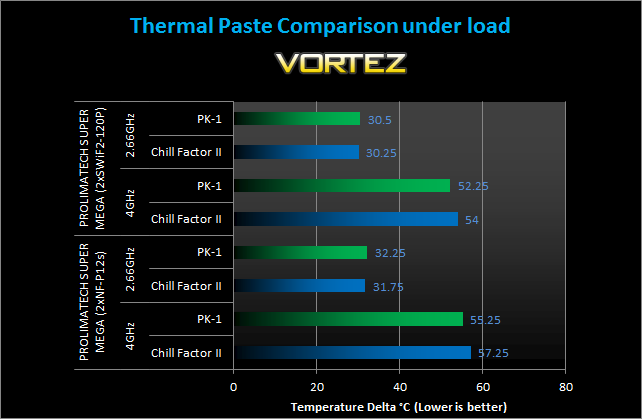
Here, we can take a closer look at how the PK-1 thermal paste compares with my own personal favourite, the Thermalright ChillFactor II. At stock CPU speeds, the ChillFactor II ends up marginally ahead using both fan configurations. Surprisingly, at 4GHz the PK-1 ends up the superior thermal paste with quite a margin. With the SWiF2-120P, the difference is 1.75C and when coupled with the NF-P12s, the difference is 2C. The difference is quite significant when we take into account that the ChillFactor II bests even the likes of the Arctic MX-3/MX-4. Prolimatech deserve to be commended there.
Passive tests
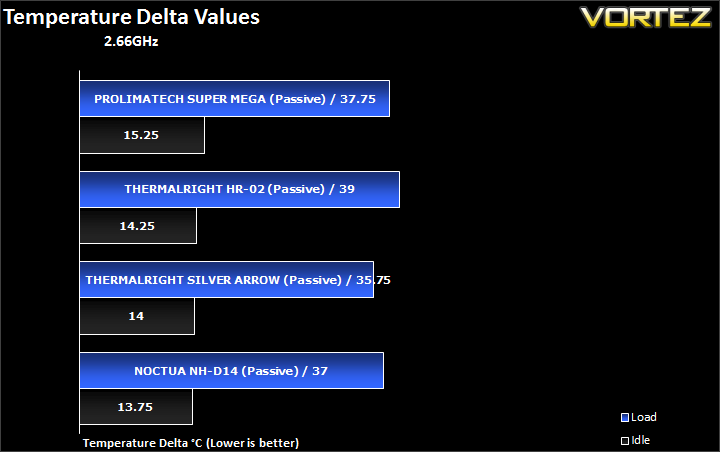
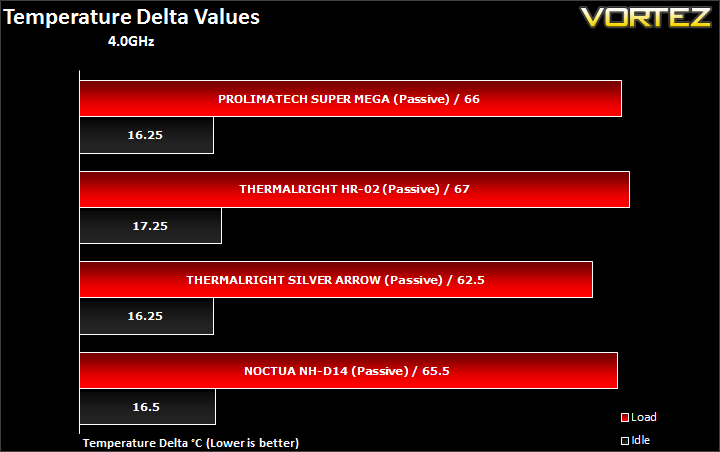
The Prolimatech Super Mega performed very well as a passive cooler beating even the HR-02, which it was purposefully built for. It didn’t match up to the Silver Arrow or the Noctua NH-D14 but given that its general performance was below theirs, nothing more could be expected. Nonetheless, the Super Mega was only a mere 0.5C behind the NH-D14 at 4GHz and 0.75C behind at 2.66GHz.
Conclusion
I’ll start with a confession. When I first tested the Prolimatech Megahalem, I was left somewhat underwhelmed considering Thermalright’s Ultra Extreme still held its crown at the time. On first impressions, I couldn’t see how the Super Mega would offer much more as it appeared to be the same as the Super Mega with some added copper fins. Boy was I wrong. The Super Mega demonstrates why Prolimatech have become such a revered name in the cooling market. Its performance was amongst the best at stock CPU speeds being either on par or ahead of its closest competitor, the Venomous X. At 4GHz, it didn’t prove to be as good as the Thermalright alternatives but it wasn’t far off. Prolimatech’s own PK-1 thermal paste was a very beneficial addition and helped improved cooling performance. Although designed with low RPM fans in mind, the Super Mega saw significant gains when moving from the 1300RPM NF-P12s to the 1800RPM SWiF2-120P fans, more so than on the Venomous X or the Ultra Extreme which sports tighter fin spacing. It may be that the Super Mega isn’t taking advantage of the high static pressure of the Noctua fans due to its larger 2.5mm fin spacing. The best compromise in this situation is to use 140mm fans that can deliver high airflow at low rotational speeds. Support for such fans is one advantage that the Super Mega boasts over its rivals and many other tower heatsinks on the market. On the whole, the Super Mega is very well designed, and the installation kit is trouble free and robust.

The Super Mega isn’t without its flaws and the most notable one is its price. At near £50, it is over £10 more than the equivalent Venomous X. Add the fact that it doesn’t bundle any fans and it begins to look like poorer value for money. For only a few pounds more, the Thermalright Silver Arrow and Noctua NH-D14 come bundled with their own fans. Another shortcoming of the cooler is its width. 11mm wider than the Venomous X means that memory compatibility becomes an issue and as we saw, the front fan overhangs the RAM slot closest to the CPU.
There’s no doubt that the Super Mega is up there with the best coolers on the market. However, it’s up against very stiff competition and at its current price point, it becomes less easy to recommend.
Pros
+Very Good performance
+Compatible with all Intel Sockets
+Very easy to install
+Attractive finish
+Support for 120 & 140mm fans
Cons
-Cost
-Possible compatibility issue with tall memory modules if all slots are populated
-No fans provided
-No out of the box AMD support
+Very Good performance
+Compatible with all Intel Sockets
+Very easy to install
+Attractive finish
+Support for 120 & 140mm fans
Cons
-Cost
-Possible compatibility issue with tall memory modules if all slots are populated
-No fans provided
-No out of the box AMD support
The Prolimatech Super Mega deserve a respectable Silver Award.


