Samsung hasn’t missed a beat in their last few SSD launches, but this latest one is a bit different, introducing a "Plus" range of the EVO SSDs. Is it really anything extra? Let’s find out.

Product on Review: Samsung 970 EVO Plus
Manufacturer: Samsung
Street Price:
250GB – GBP £83.99 / USD $89.99 / AU $92.38
500GB – GBP £121.99 / USD $129.99 / AU $133.45
1TB – GBP £233.99 / USD $249.99 / AU $256.64
2TB – GBP £457.99 / USD $499.99 / AU $513.28
In April of 2018, we looked at the Samsung 970 EVO, the budget option of the 970-series SSDs with slightly less excellent speeds and wear ratings than its somewhat more powerful big brother, the 970 PRO, however the price difference between the two was vast.
Well, today we’re looking at something which should slot nicely between those two models, the 970 EVO Plus. This new drive promises slightly improved read speeds but drastically better write speeds across all capacities. We reviewed the 250GB 970 EVO which offered read and write speeds of 3400MB/s and 1500MB/s respectively, the EVO Plus improves on that with 3500MB/s and 2300MB/s at the same capacity.
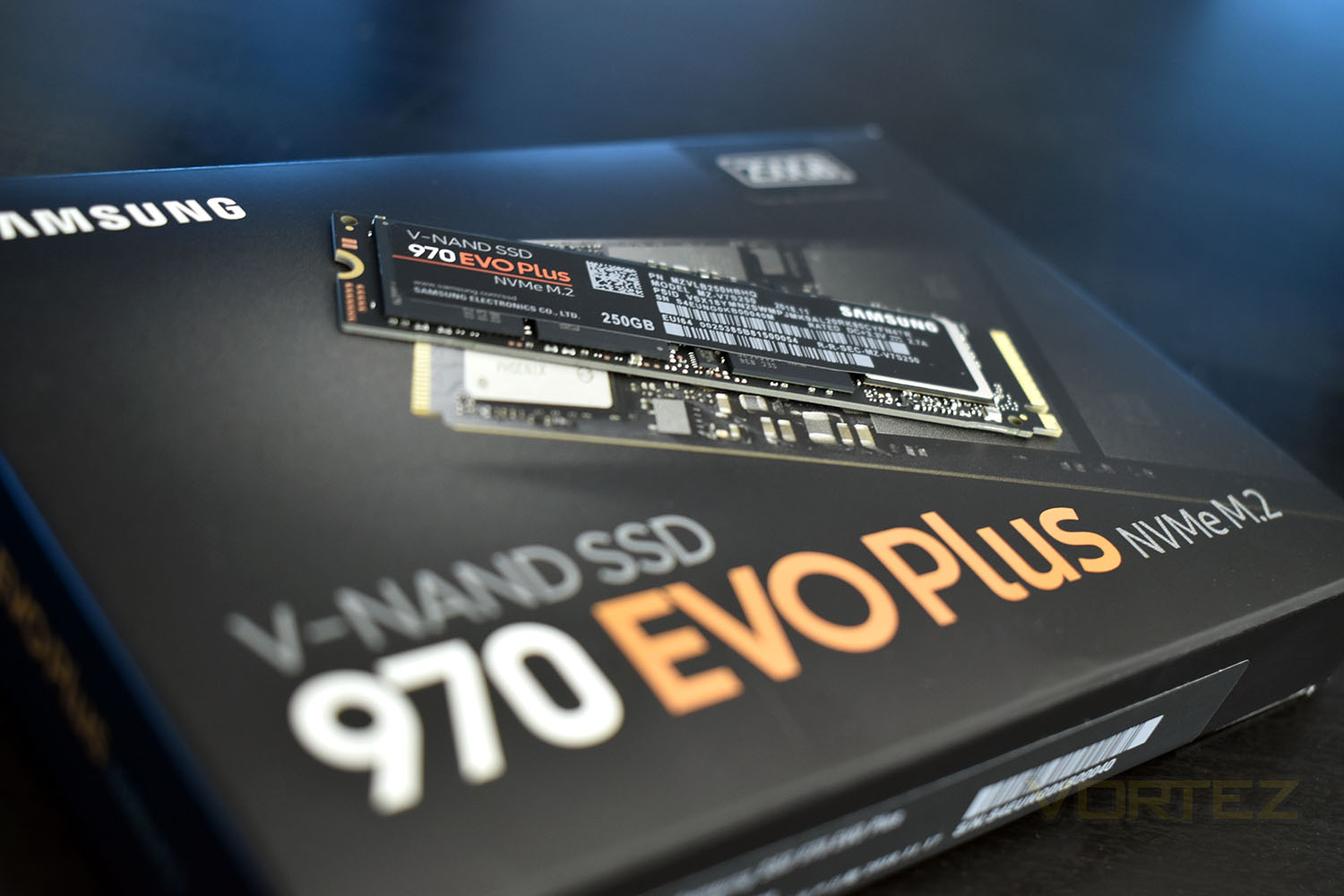
These speeds are made possible via a new Phoenix controller, an evolution of the previous model, as well as Samsung’s 3D V-NAND improvements over the last 8 months.
At launch in April, the 250GB model was priced at around £100. This 970 EVO Plus aims to hit the shelves at £15 less than that, with improved performance. Capacities available today are 250GB, 500GB and 1TB with a 2TB model due to arrive mid-April though pricing on that model is yet to be announced.
Let’s chuck this 970 EVO Plus through the same testing procedure as the 970 EVO and see if Samsung’s improvements ring true.
Samsung on the 970 EVO Plus:
In combination with the latest Samsung V-NAND technology and firmware optimization, the 970 EVO Plus achieves random write speeds up to 57% faster than the 970 EVO. Also, it offers industry-leading sequential performance among NVMe SSDs with read/write speeds of up to 3,500/3,300 MB/s, respectively. The 970 EVO Plus performance will be the industry-leading and maximum within the current PCIe Gen3 interface.
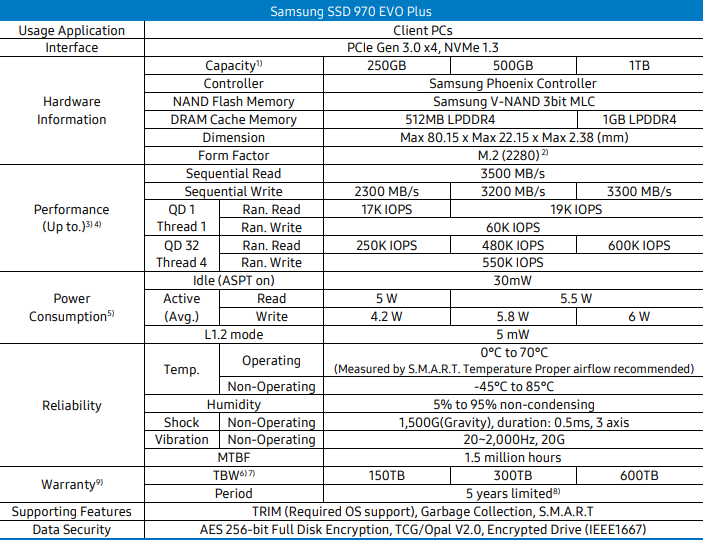
Technical Specifications
Packaging, Bundle & Closer Look
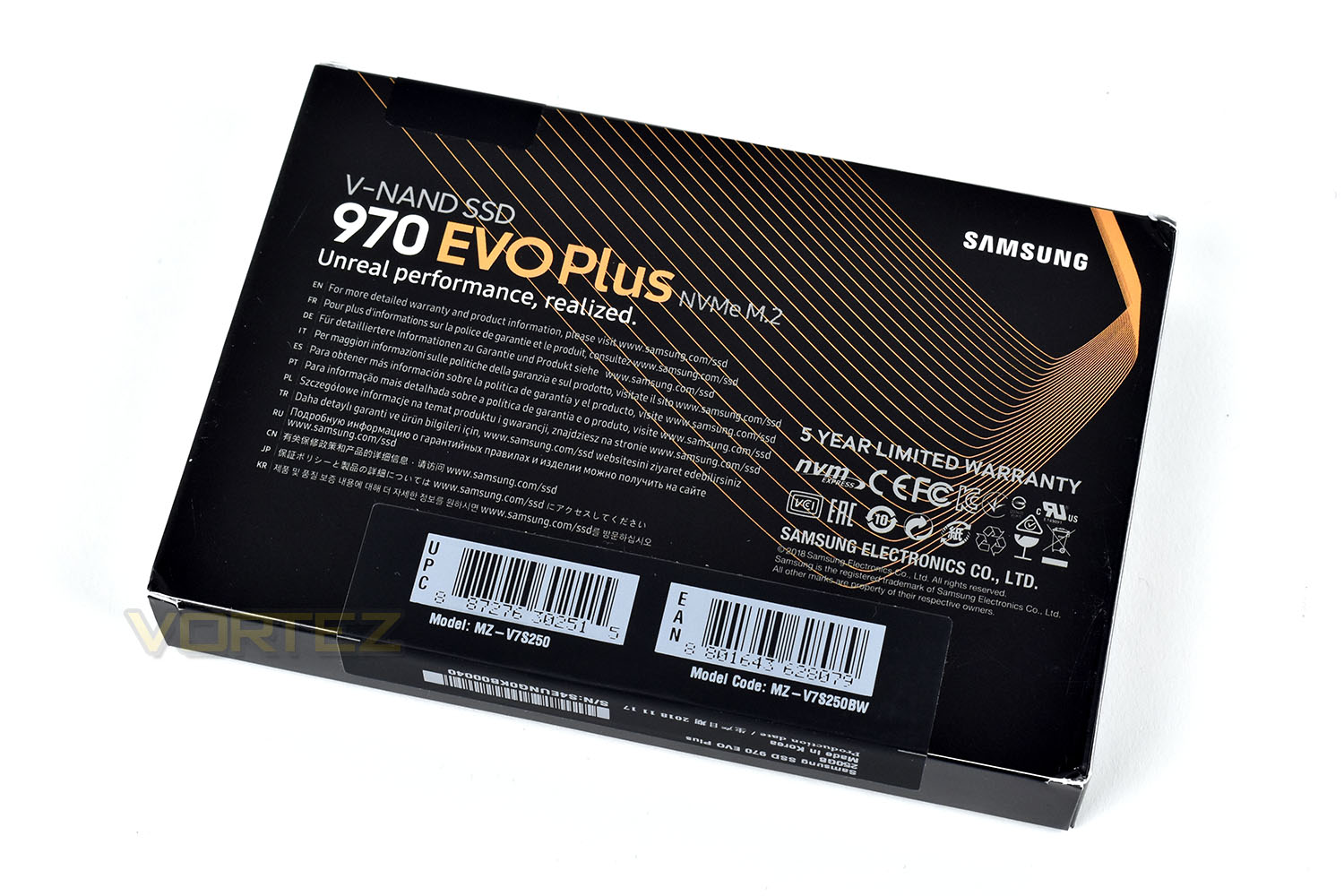
The 970 EVO Plus packaging is identical in every way to the previous model, except for the word “Plus”. It serves its purpose just fine though.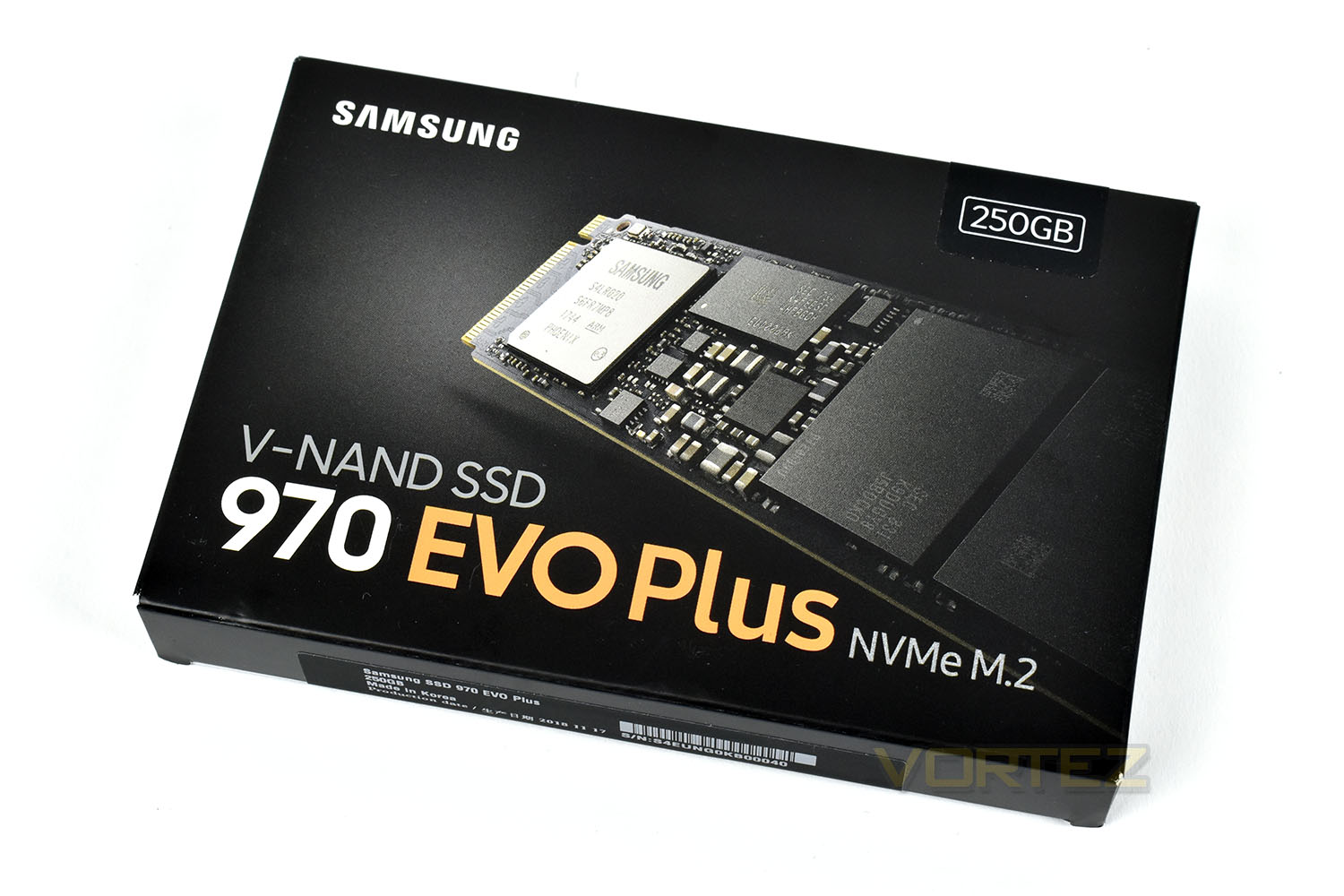
The rear doesn’t give any more information than the front. Samsung ask you to visit their website for more information on the SSD.
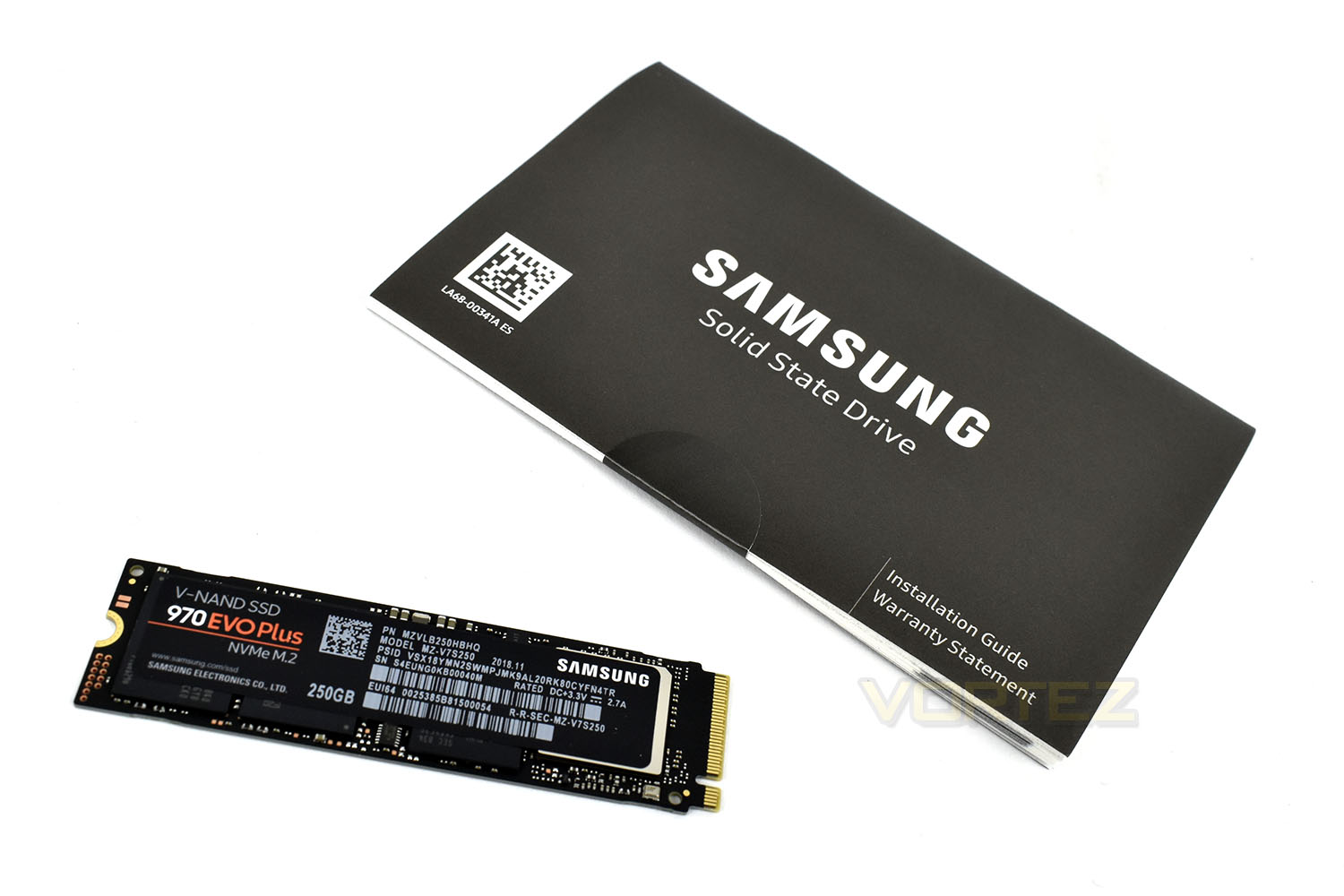
Alongside the 970 EVO Plus is a warranty guide but nothing else. There’s nothing more you need though, so that’s fine.
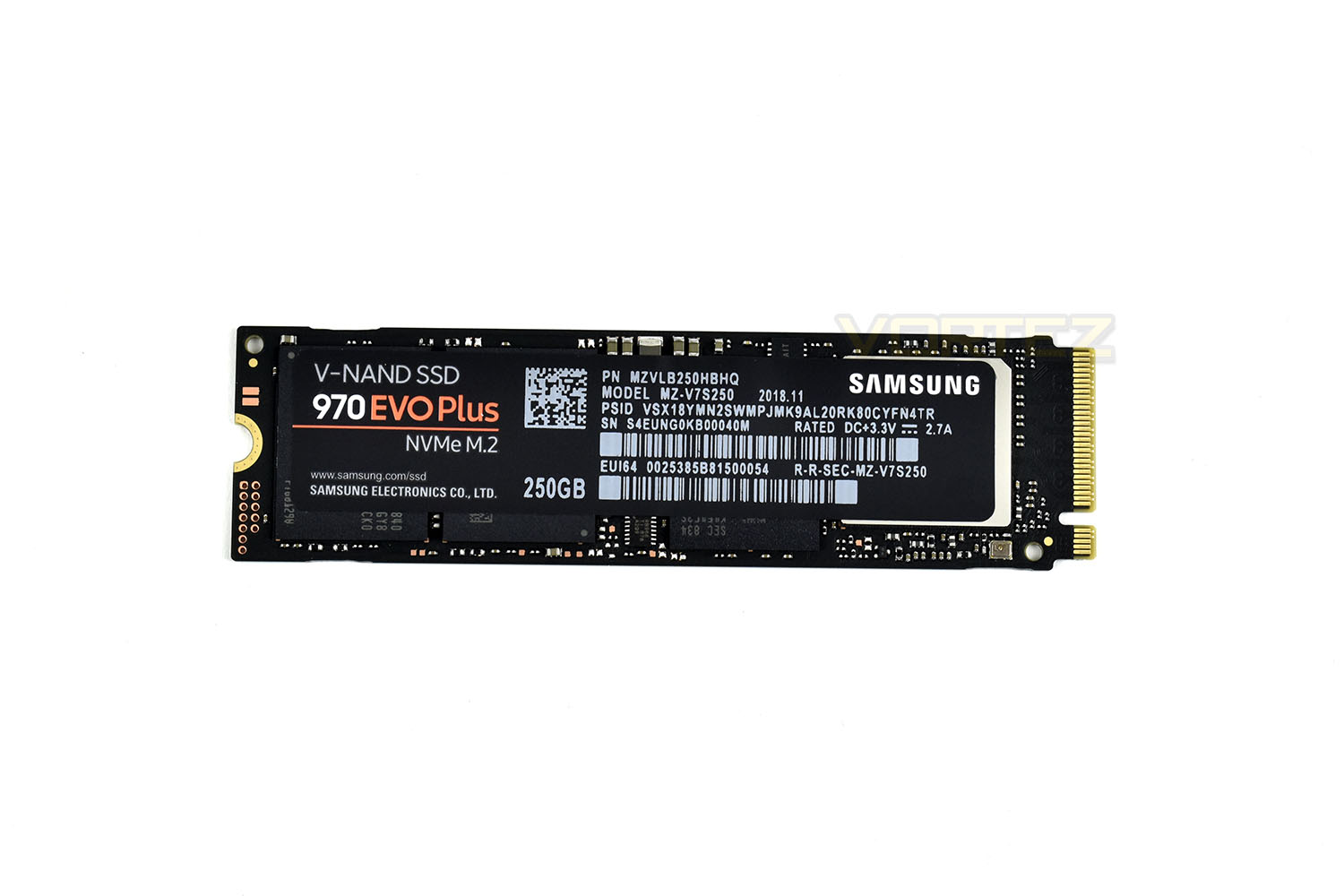
Things are awfully familiar here. The only change, as was the same with the packaging, is the addition of the lengthier title. The sticker is also metallic to help spread the heat from the controller.
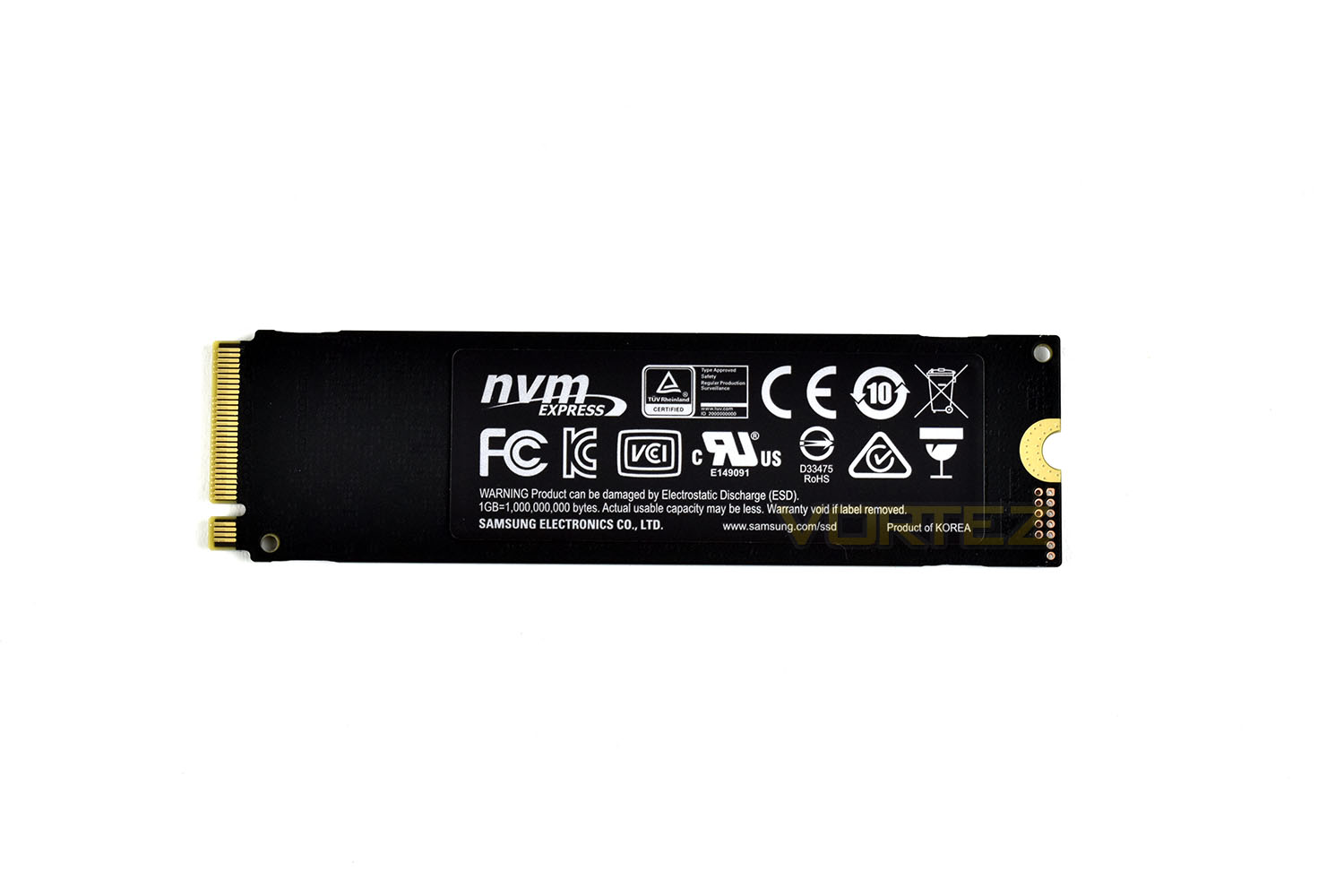
Helping keep things cool, all of the V-NAND is located on the front leaving the rear, which usually where most heat buildup issues can occur because of the close proximity to the motherboard and lack of airflow.
Test Setup & Methodology
Our test system is formatted and a fresh version of Windows is installed with just drives in place – no additional applications. Windows is then updated to the latest release and the drivers are installed.Included in the list of benchmarks are the following applications:
Benchmarks
Anvil Pro
AS SSD
ATTO Disk Benchmark v2.46
Futuremark PCMark 8
AIDA64
AS SSD
ATTO Disk Benchmark v2.46
Futuremark PCMark 8
AIDA64
Test system
CPU: Intel Core i7 7700K
Motherboard: MSI Z270 Gaming M7
Graphics: EVGA GTX 1070 SC
Memory: 16GB CORSAIR Vengeance LPX 3200MHz DDR4
SAMSUNG SM961 256GB NVMe
Crucial MX500 500GB SSD
PSU: BeQuiet Straight Power 11 650W
OS: Microsoft Windows 10 Pro 64-Bit
Monitor: ASUS ROG PG279Q
Motherboard: MSI Z270 Gaming M7
Graphics: EVGA GTX 1070 SC
Memory: 16GB CORSAIR Vengeance LPX 3200MHz DDR4
SAMSUNG SM961 256GB NVMe
Crucial MX500 500GB SSD
PSU: BeQuiet Straight Power 11 650W
OS: Microsoft Windows 10 Pro 64-Bit
Monitor: ASUS ROG PG279Q
Benchmarks: Anvil Pro
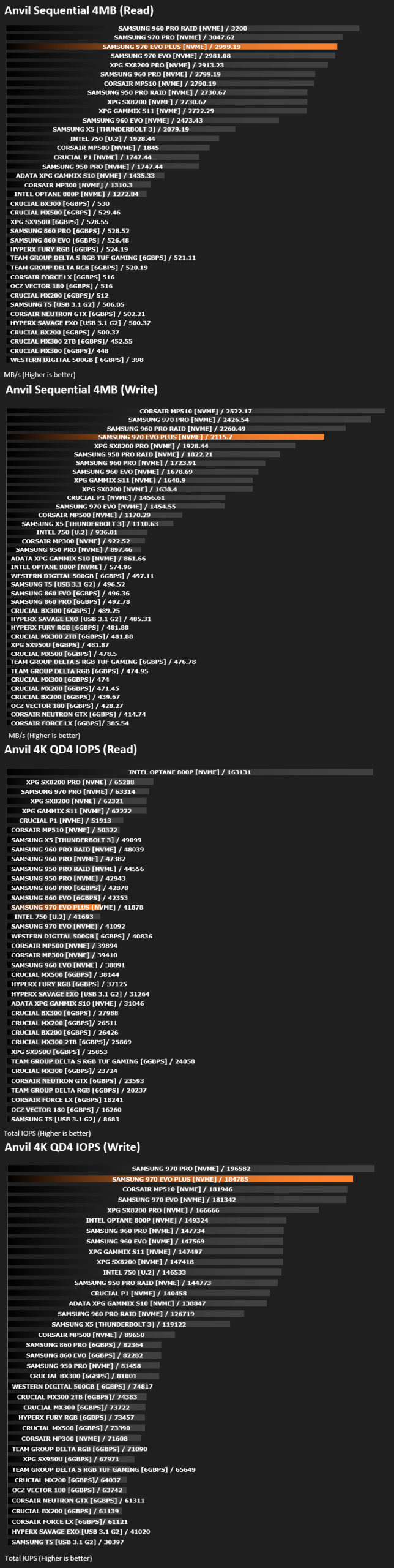
Anvil Pro from Anvil Storage utilities is one of the most popular storage benchmarking utilities today thanks to the large suit of tests available. You can test pretty much anything from Read/write Speed to IOPs with many variables to tweak allowing you to get either a single or host of results to compare with other likeminded enthusiasts. In our test we ran the standard suite 5 times, subtracting both the highest and lowest scores and determined the final result from the average of the remaining three results.
Benchmarks: AS SSD
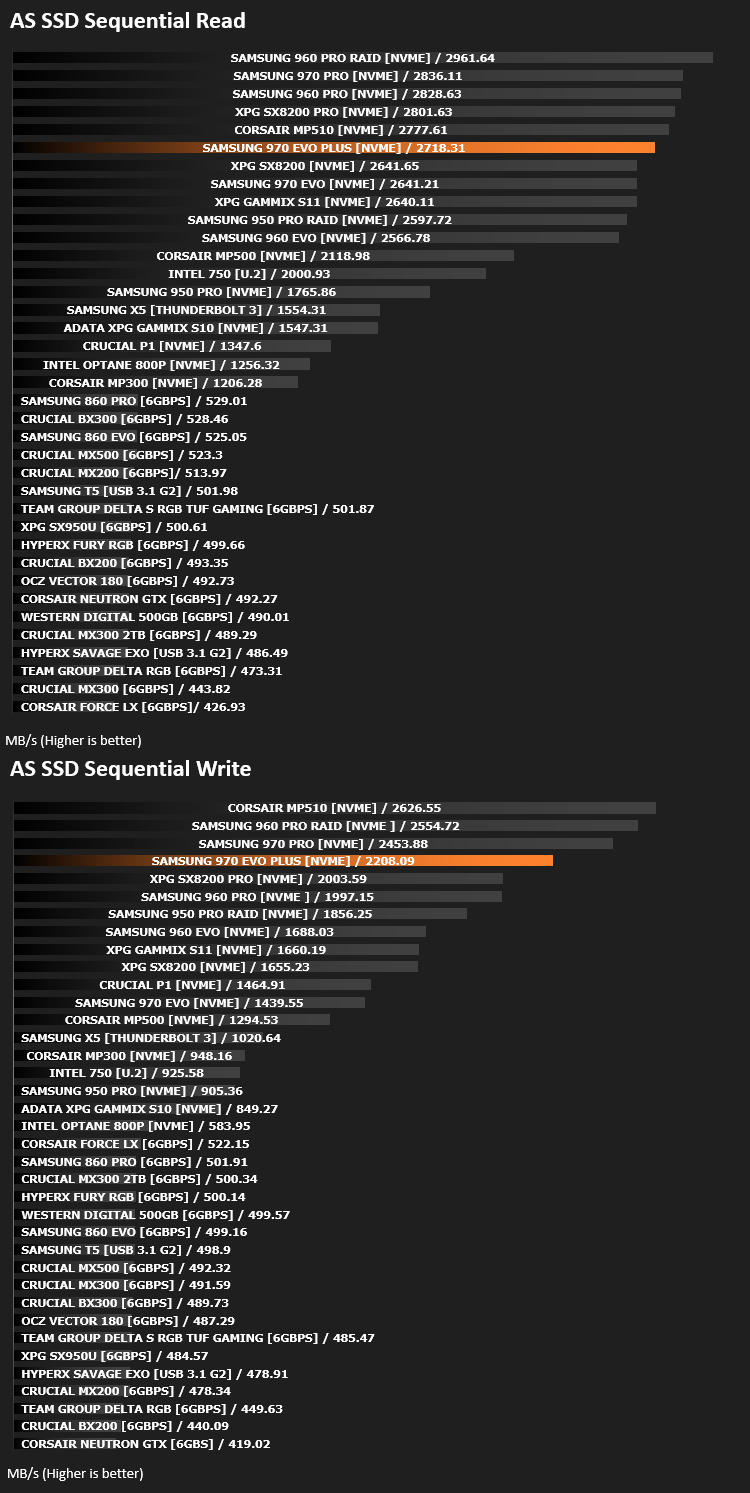
AS SSD Benchmark is a straightforward tool for measuring the speed of your SSD drive.
Simply launch the program, choose your drive, click Start, and it’ll test your SSD’s read and write speed in a variety of ways, delivering a score for each when it’s done. And if that’s not enough, there are also additional file copy and compression-related benchmarks available from the Tools menu. (The author’s support page is German only, but if you need further English explanations then there’s a thread on the program at the OCZ Technology forum.).
Simply launch the program, choose your drive, click Start, and it’ll test your SSD’s read and write speed in a variety of ways, delivering a score for each when it’s done. And if that’s not enough, there are also additional file copy and compression-related benchmarks available from the Tools menu. (The author’s support page is German only, but if you need further English explanations then there’s a thread on the program at the OCZ Technology forum.).
Benchmarks: ATTO
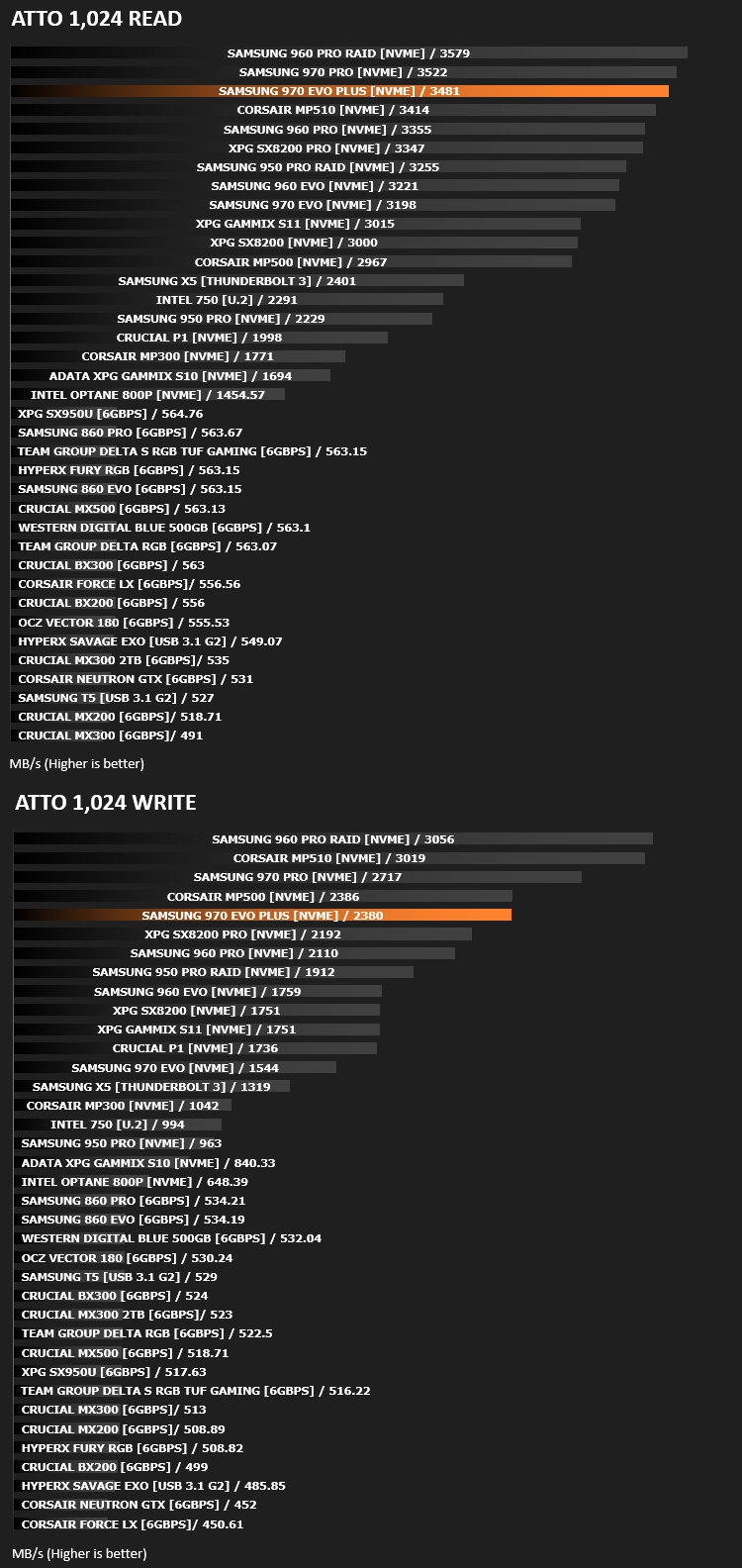
The ATTO Disk Benchmark performance measurement tool is compatible with Microsoft Windows. Measure your storage systems performance with various transfer sizes and test lengths for reads and writes. Several options are available to customize your performance measurement including queue depth, overlapped I/O and even a comparison mode with the option to run continuously. Use ATTO Disk Benchmark to test any manufacturers RAID controllers, storage controllers, host adapters, hard drives and SSD drives and notice that ATTO products will consistently provide the highest level of performance to your storage.
Benchmarks: AIDA64
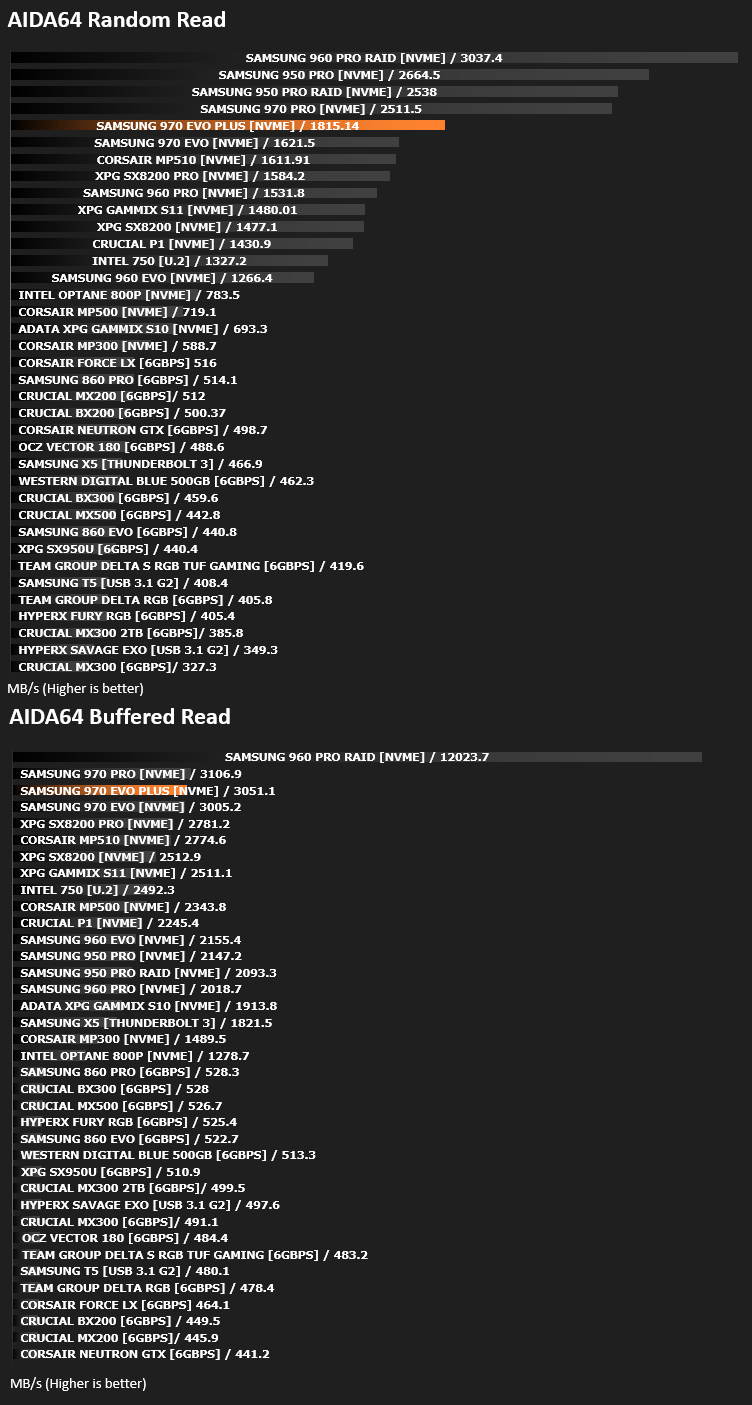
With this module, we can measure the performance of the PC’s storage devices, including (S)ATA or SCSI hard disk drives, RAID arrays, optical drives, solid-state drives (SSD), USB drives and memory cards. It also allows us to perform write tests, which helps us detect fake products and errors on the devices. In order to attain reliable benchmark results we have to make sure to close all background applications.
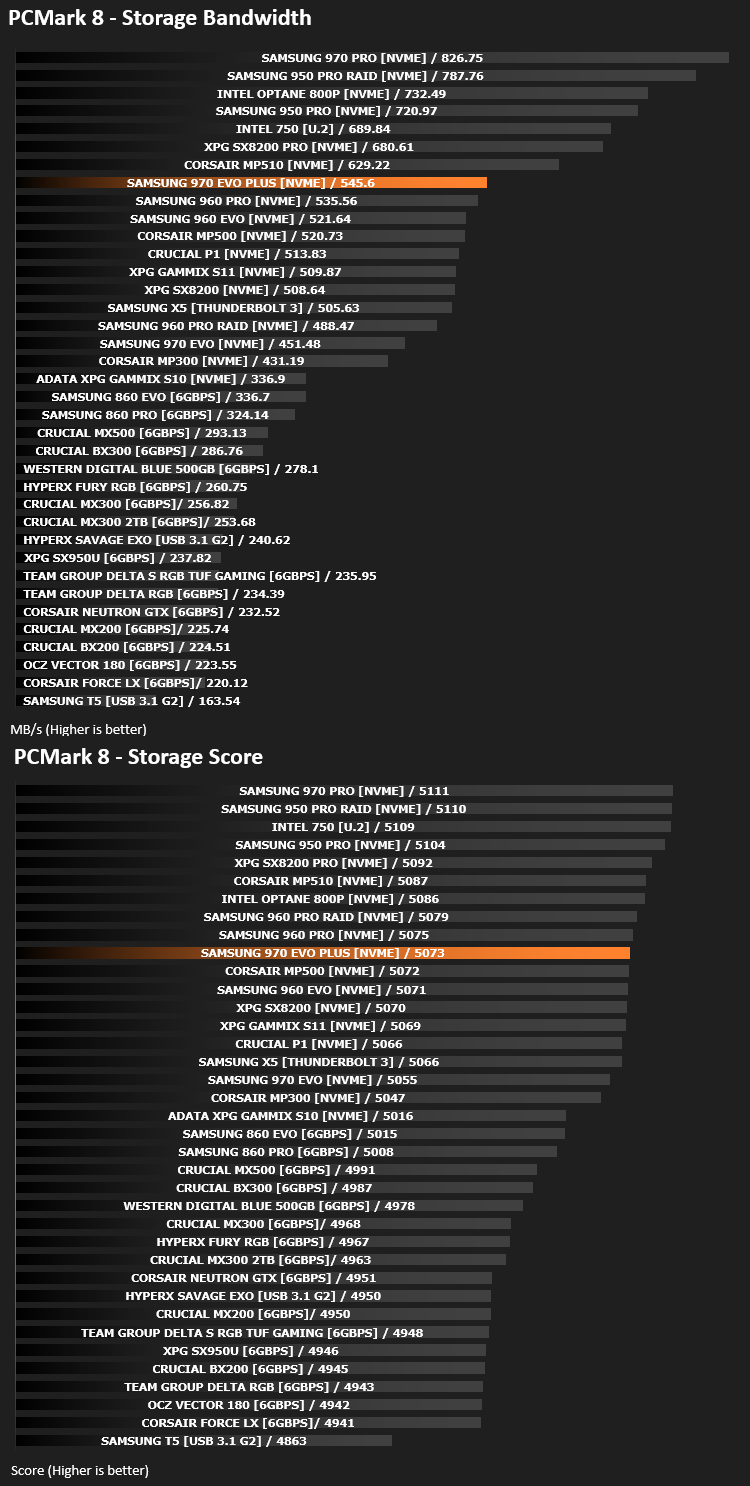
Benchmarks: PCMark 8
We use the Futuremark PCMark 8 utility to measure storage via Photoshop performance under both light and heavy loading conditions. Accelerated (open CL) is used to perform this test. The test is measured in seconds to complete.
Conclusion
It’s only 8 months since the initial release of the 970 EVO but already Samsung have somehow managed to push write speeds through the roof. We found an increase in all of our tests for the same capacity, some increases were smaller than others, but an increase across the board shows that Samsung haven’t made any sacrifices in areas to benefit others.Pricing, too, is largely improved, with each drive launching at around 20-25% less than the 970 EVO launched at; sure, this is mostly down to the falling cost of producing NAND flash but it’s good news for the consumer.
While this is purely speculation, we do believe that this drive has been somewhat handicapped to ensure it doesn’t get too close to the 970 PRO. We obviously don’t have any proof for this, but it does seem to sit suspiciously in the middle of the EVO and PRO drives.
The 970 EVO Plus offers the same TBW rating as the drive it supersedes and also carries the same 5-year warranty giving the user a great peace-of-mind.
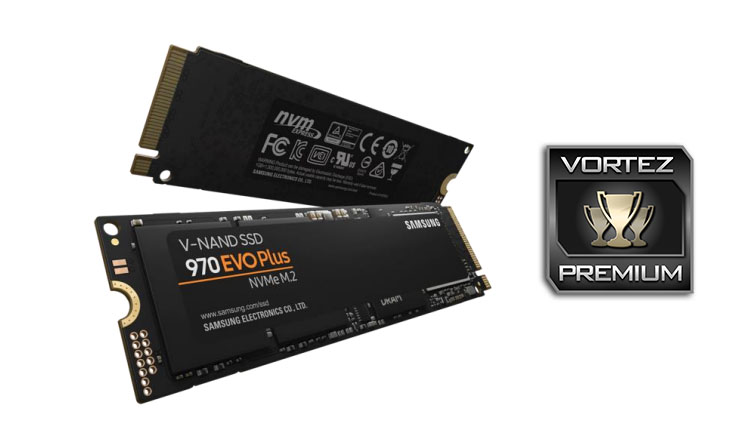
Finally, there’s the appearance of the drive. On a lot of motherboards, the first NVMe slot usually takes its place just above the first PCI-E slot where, traditionally, the GPU will sit. Today, especially, with the rise of glass-sided cases and the want to show off good cable management and RGB components, the looks of the drive matter. We find the black PCB and the “Samsung 970 EVO Plus” branding to be quite appealing in a subtle kind of way.
The 970 EVO Plus offers better performance than the 970 EVO in every test, at a similar cost. Looking at it from a potential customer’s point of view, that can only be seen as a good thing.
Pros
+ Better than the already great 970 EVO in every test
+ Looks good
+ Competitive price
+ Easy to install
+ 5-year warranty
Cons
– None
+ Better than the already great 970 EVO in every test
+ Looks good
+ Competitive price
+ Easy to install
+ 5-year warranty
Cons
– None
Click here for an explanation of our awards at Vortez.net.
Stay connected with the Vortez Social Media pages:
Join in with the discussions on Discord