







Redefining case design, we take a look at SilverStone’s 3rd installment of the RAVEN computer chassis series. Will RV03 impress with its innovation?

Product on Review: Raven RV03.
Manufacturer and Sponsor: SilverStone
MSRP: £95 inc.VAT (GBP)
SilverStone need little introduction when we are on the topic of computer chassis. They have been in existence for almost a decade and remain one of the forerunners in this category. Regardless of which series you take a look at, their portfolio of cases have won multiple awards and been a top pick for the avid enthusiast. The RAVEN Series has an assortment of products under its belt but when specifically looking at computer cases they have rather a big following. RAVEN RV02 first came to prominence in 2009 and presented the enthusiast with the platform for installing computer kit inside a chassis that is not only under a 90 degree rotation but also switched over onto the other side of the case. This case was a particular favourite and as a result SilverStone introduced a variety of different colours to satisfy the fans.
So here we are with the 3rd rendition inside the RAVEN Series – RV03. This case was introduced to the market last year and as the model name suggests is the next instalment. Rather than flip the motherboard tray over SilverStone has kept it traditional but has still given a 90 degree orientation. RV03 features a fresh design, some new features and of course a totally unique approach to how we look at building a computer system, so I am looking forward to giving my full verdict on this case today.
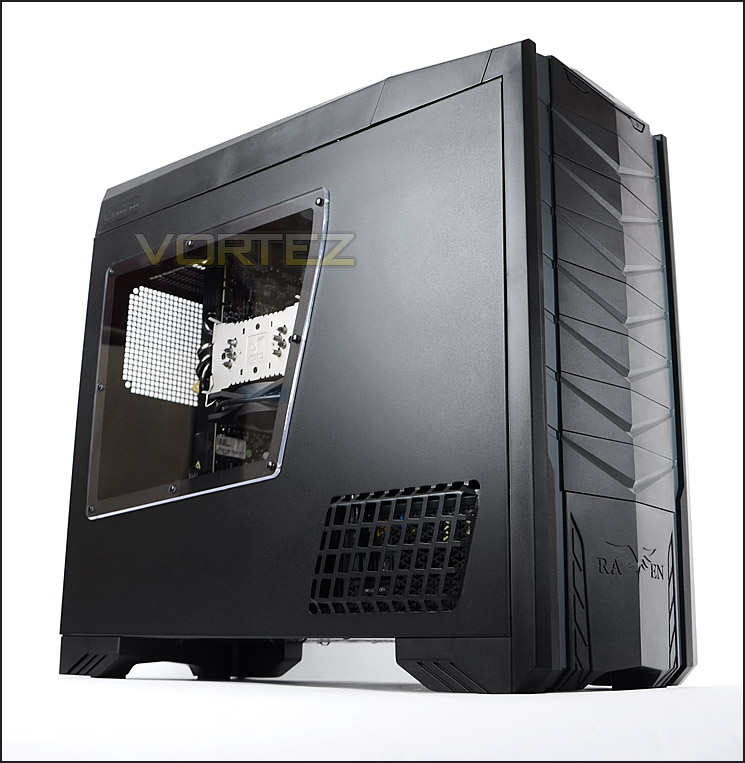
SilverStone’s take on RV03
The RAVEN team’s continued push to redefine and perfect the enthusiast tower chassis has resulted in yet another benchmark in the RAVEN RV03. With world-class cooling performance from the previous RAVEN chassis models retained by the included 180mm Air Penetrator fans, a rethinking of the interior layout enabled dramatic reduction in overall depth of the chassis compared to RAVEN RV02 while still matching RAVEN RV01’s ability to accommodate Extended ATX motherboard and graphics cards longer than 13 inches. Cable management was also improved with a new 5cm thick hard drive compartment to allow nearly all cables to be connected behind the motherboard tray with ease. An unconventional power supply compartment located in the lower front part of the chassis further add to facilitate cable routing so anyone can assemble a pristine looking system with maximum airflow efficiency.
Technical Specifications
• Revolutionary 90 degree motherboard mounting from RAVEN RV01
• Includes two Air Penetrator 180mm fans for superb performance and quietness
• Support up to seven 120mm fans for exceptional cooling flexibility
• Motherboard back plate opening behind CPU area for quick cooler assembly
• Supports Extended ATX motherboard
• Supports eight expansion slots and graphics cards of any length
• Mandatory cable management design for clean looking system on every build
• Hard drive compartment with independent cooling zone
• Upscale and aggressive styling with dual-purpose front panel bezels
Model No.
SST-RV03B (black, champagne trimming)
SST-RV03B-W (black, champagne trimming + window)
SST-RV03B-WA (black, grey trimming + window)
Material Reinforced plastic outer shell, 0.8mm Steel body
Color Matte black
Motherboard SSI-EEB, SSI-CEB, Extended ATX, ATX, Micro-ATX
Drive Bay
External 5.25″ x 7
Internal 3.5″ x 10 (6 from 5.25” adapters), 2.5” x 2 for SSD
Cooling System
Front 4 x 120mm fan slot (Optional)
Rear 1 x 120mm fan slot (Optional)
Side 1 x 120mm fan slot (Optional)
Top 1 x 120mm exhaust fan, 900rpm, 18dBA
Bottom 2 x 180mm AP181 fan 700/1200rpm, 18/34dBA (compatible with 3 x 120mm fan)
Expansion Slot 8
Front I/O Port
USB 3.0 x 2 (backwards compatible with USB 2.0)
Audio x 1
MIC x 1
Power Supply 1 x optional standard PS2(ATX), depth limit 180mm
Expansion Card Compatible with expansion cards up to 13.58 inches
Limitation of CPU cooler 163mm
Limitation of PSU 180mm
Net Weight 11.4kg
Dimension 235mm (W) x 522mm (H) x 570mm (D)
SST-RV03B (black, champagne trimming)
SST-RV03B-W (black, champagne trimming + window)
SST-RV03B-WA (black, grey trimming + window)
Material Reinforced plastic outer shell, 0.8mm Steel body
Color Matte black
Motherboard SSI-EEB, SSI-CEB, Extended ATX, ATX, Micro-ATX
Drive Bay
External 5.25″ x 7
Internal 3.5″ x 10 (6 from 5.25” adapters), 2.5” x 2 for SSD
Cooling System
Front 4 x 120mm fan slot (Optional)
Rear 1 x 120mm fan slot (Optional)
Side 1 x 120mm fan slot (Optional)
Top 1 x 120mm exhaust fan, 900rpm, 18dBA
Bottom 2 x 180mm AP181 fan 700/1200rpm, 18/34dBA (compatible with 3 x 120mm fan)
Expansion Slot 8
Front I/O Port
USB 3.0 x 2 (backwards compatible with USB 2.0)
Audio x 1
MIC x 1
Power Supply 1 x optional standard PS2(ATX), depth limit 180mm
Expansion Card Compatible with expansion cards up to 13.58 inches
Limitation of CPU cooler 163mm
Limitation of PSU 180mm
Net Weight 11.4kg
Dimension 235mm (W) x 522mm (H) x 570mm (D)
Packaging & First Look
Raven RV03 is presented in a large eco-friendly box. The Raven typography is clearly seen on the front with a depiction of the chassis and a short description. Around the back Silverstone have been careful to detail key features with images of RV03 without side panels.
Inside, RV03 is covered in a clear plastic sheet and held in place via dual polystyrene pillars to ensure the case arrives in great condition.
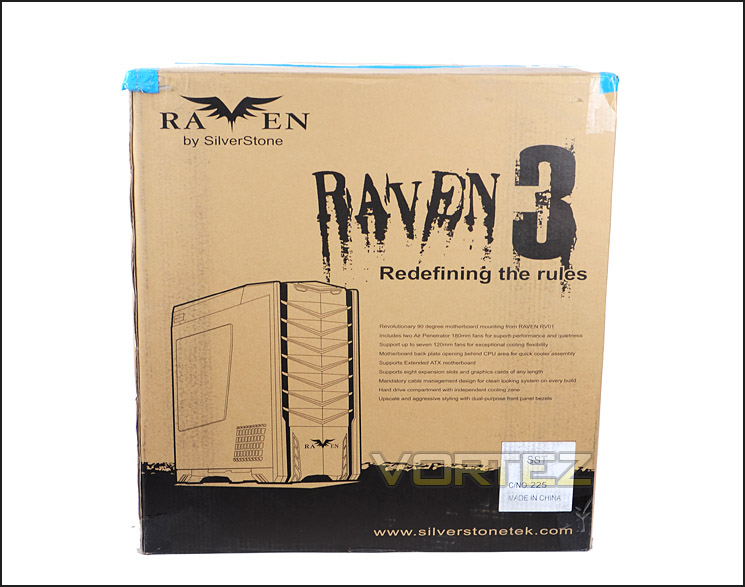
Packaging for Raven RV03
Removing Raven RV03 from its packaging we can finally cast our eyes on this elusive chassis. Today we are reviewing the SST-RV03B-WA – Black with grey trim and Perspex window. There are alternative options such as gold trim and no side window.
In terms of styling this case lends itself to a rather professional finish whilst also catering for the gamer. Usually with computer cases you can easily determine which way the manufacturer has gone down – minimalist, elegant or garish and gamer. SilverStone have taken ideas from both camps and devised RV03. From an initial look, I really like the aesthetics, following a similar layout the recently reviewed Fortress FT03 by having the PCI expansion slots at the top and having support for ATX this means that Raven RV03 requires a significantly deeper structure.
The prominent side panel features a Perspex window allowing the user to see their hardware inside. Towards the front is a ventilation panel for the PSU – which is mounted at the front of RV03.
Over on the other side RV03 has a solid side panel with 120mm mesh panel cut-out for attaching a cooling fan behind the CPU socket. There is also ventilation that runs parallel to the panel on the prominent side, for the PSU.
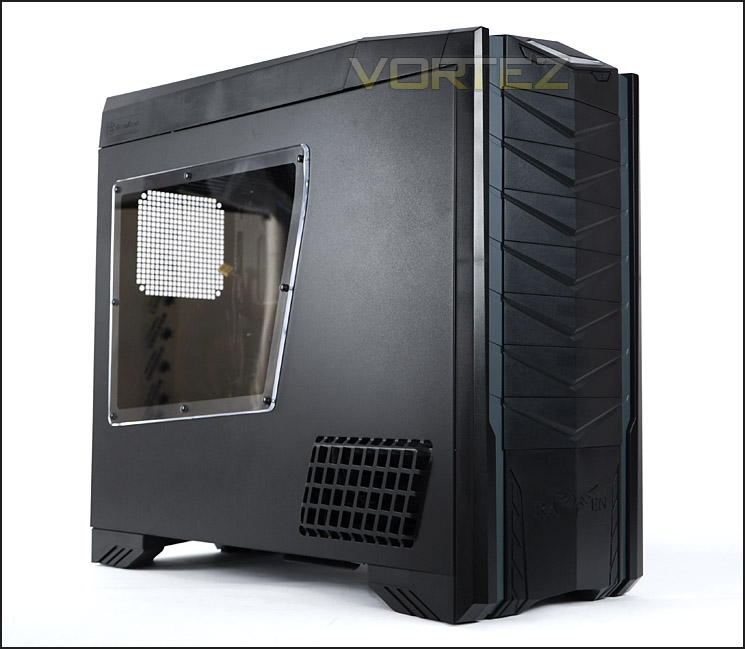
Sleek design with Perspex window
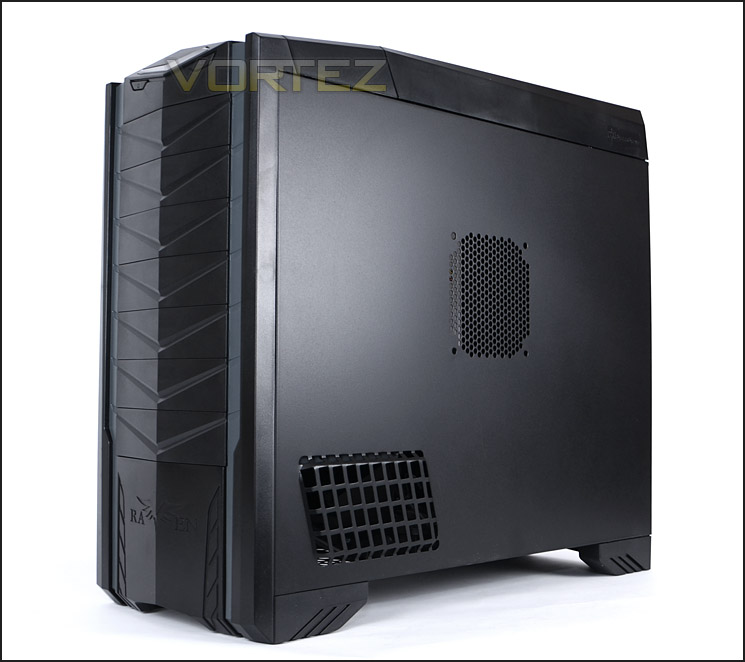
Ventilation for PSU and mounting for cooling fan
With our initial look complete, let’s move in for a closer look at the external elements of RV03 on the next page.
Exterior
The exterior of RV03 features high quality materials though the front is predominantly plastic. The front has the Raven motif at the bottom and 7x 5.25” drive bay covers – each are removable from the outside of the case. Two strips run along the sides of RV03, being SST-RV03B-WA – these strips are grey. At the top are the front panel controls.
Spinning the case around to the rear identifies the unique orientation of RV03. There are no PCI expansion slot covers or cooling fans as would be expected with the common computer chassis, though there is a mesh panel for mounting an optional 120mm fan – this panel will sit near to the graphics cards with a full system installed.
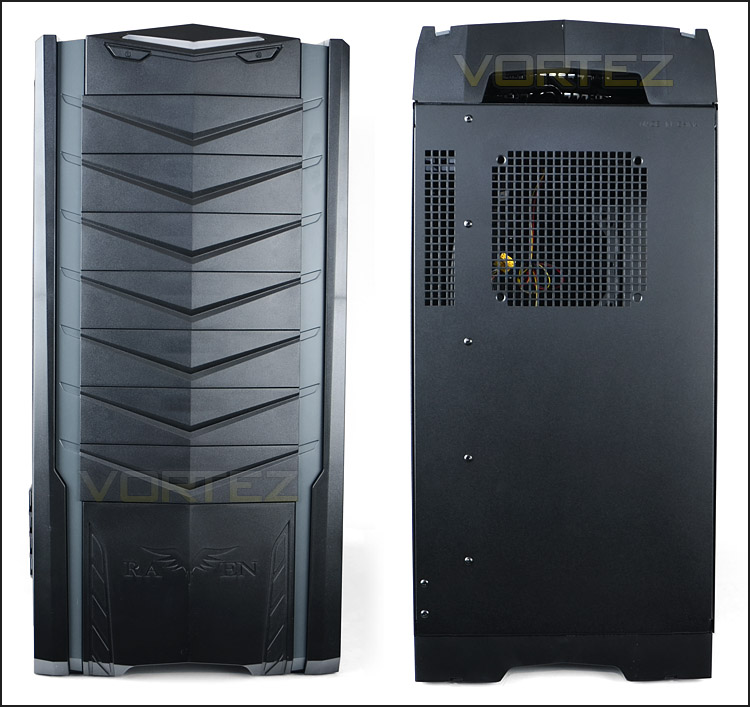
The front and back of RV03
Behind each of the optical drive bay covers is a dust filter, these can be removed and cleaned. These drive bays can be used for mounting HDD or optical drives.
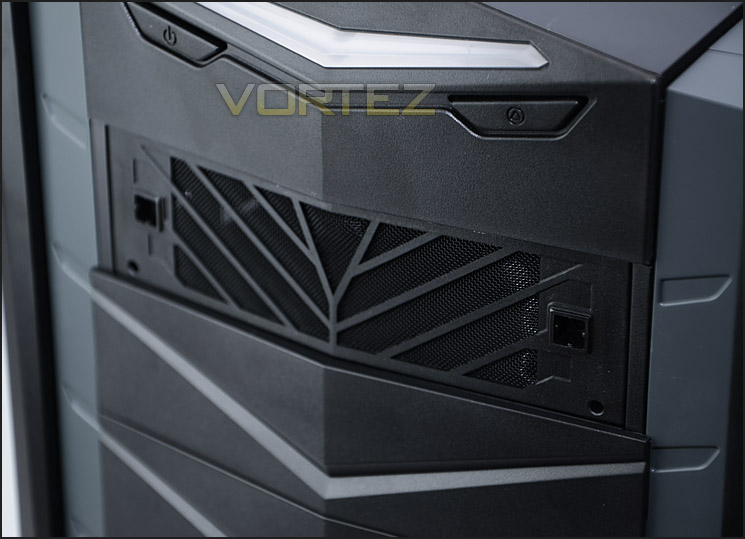
Filters behind optical drive covers
At the top of RV03 are the front panel controls. Almost on the edge of the front panel is the power and reset buttons with a large power LED whilst the USB and other ports are concealed within a section that has a swinging lid. Inside here there are 2x USB 3.0 ports (via USB cables) and headphone/microphone jacks.
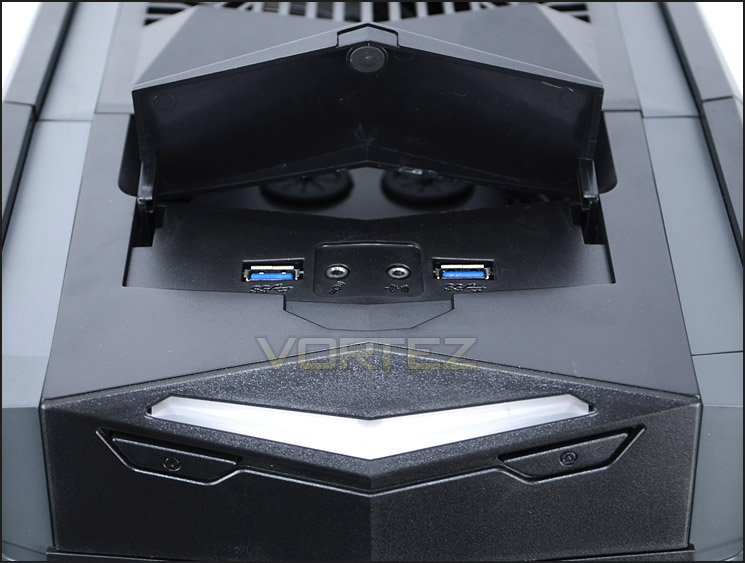
Front panel connectivity on RV03
On the next page we will continue our tour of the outside of RV03.
Exterior (Continued)
The top of RV03 has a plastic fascia with ventilation. This panel is removable and upon removing allows access to what would typically be the rear of a computer chassis.
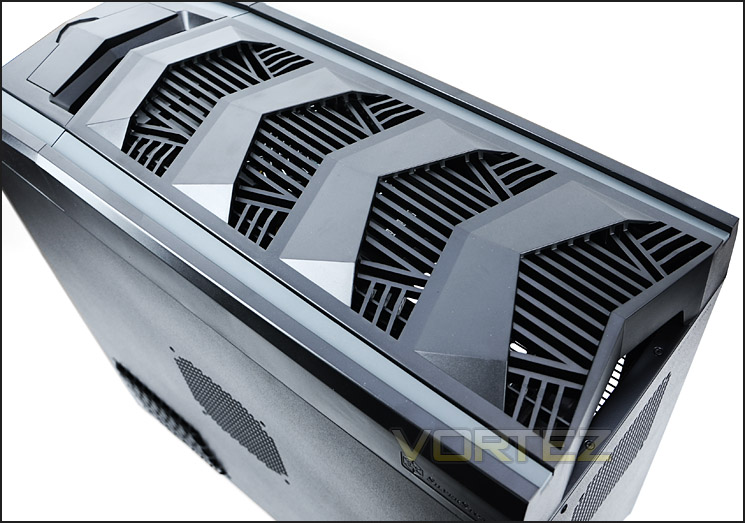
The top of RV03
When removed we can see where the rear IO ports will sit. With the case in this orientation the heat should rise and provide a more efficient way of cooling components.
Pictured below there is a handle at the bottom for moving the case around easily. It would have been nice to have two handles at the top here as only having one doesn’t provide full stability. Above this are 8x PCI expansion slot covers, all of these have ventilation slots.
Something worth noting about this section of RV03 is the width of the gap between the side panel and the PCI expansion slot covers. SilverStone has given plenty of clearance around the back of the motherboard tray for better cable management and the ability to install storage devices (more on this later). Next to the rear IO port gap is a 120mm exhaust fan. This will help dissipate heat out of the chassis through the top. There are also dual rubber grommets for water-cooling tubes just above the cooling fan.
Those with a keen eye to detail will notice the thumbscrews for the side panels are found at the top of RV03. In order to remove the side panels the top fascia must be removed too.
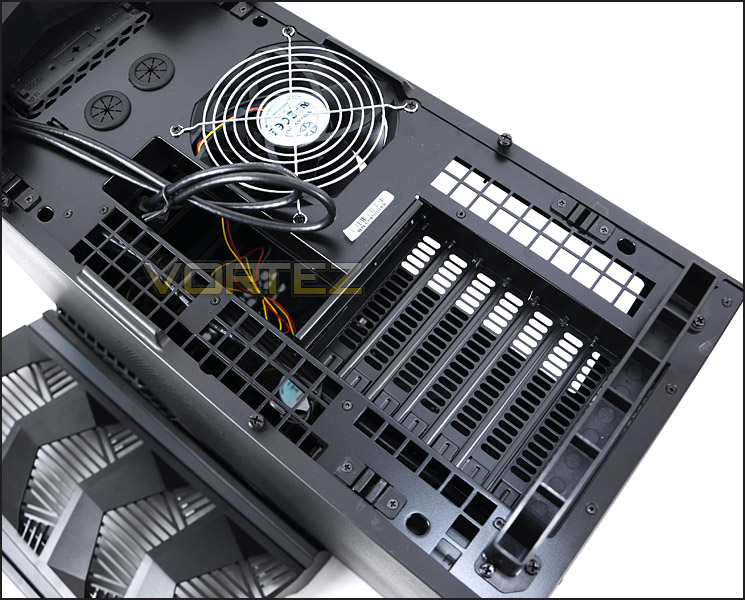
At the top – PCI expansion slot covers
Towards the front at the top of RV03 is a fan controller. This allows for the front and rear fans to have their speeds changed from low (700RPM) to high (1200RPM). This fan controller is accessible whilst the top fascia is still attached.
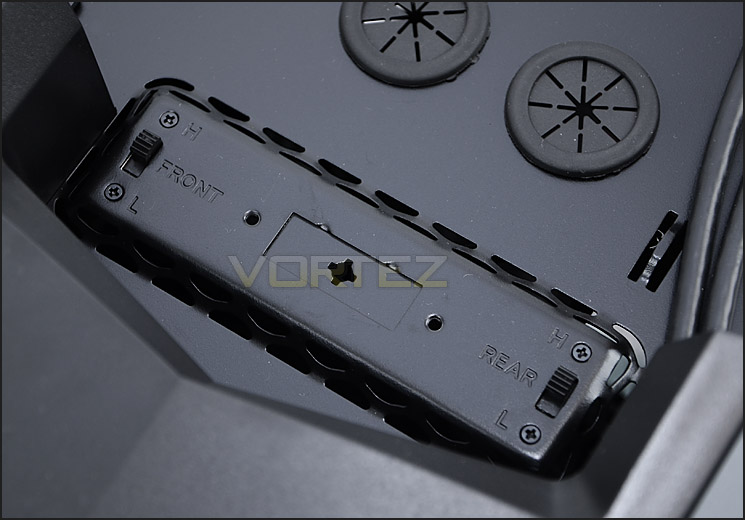
A fan controller for managing the speed of fans within RV03
Lastly we come to the underside of RV03. SilverStone has given RV03 4x rubber (padded) feet to prevent any slipping on smooth surfaces. Covering the entire section of the underside of RV03 are two removable air filters. These filters are magnetic and unfix from the chassis easily.
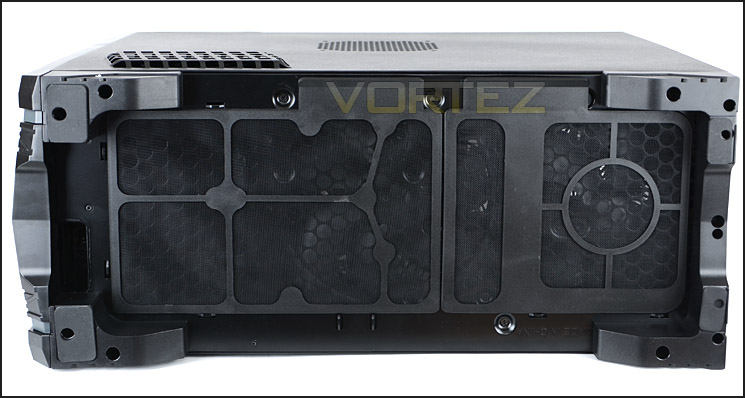
The underside of RV03 with removable – magnetic dust filters
In the next section we will be taking a look at the inside of RV03.
Interior
As mentioned previously, to remove the side panels and get inside RV03 the top fascia must be removed to get access to the thumbscrews. So with the side panels removed we can finally take a look inside and see how SilverStone have furnished RV03.
As would be expected, the inside has been fully coated in black and the build quality is extremely good. Due to the fact SilverStone have gone with their unique layout in RV03 some features are in different locations such as the PSU which sits at the front of the case and as we have already said – PCI expansion slot covers with exhaust fan are at the top. RV03 has support for form factors up to E-ATX.
Around the back of the case, behind the motherboard tray there are a variety of areas for mounting storage devices and an interesting assortment of cavities for tucking away cables. I’d be lying if I said I wasn’t looking forward to getting the test system into here!
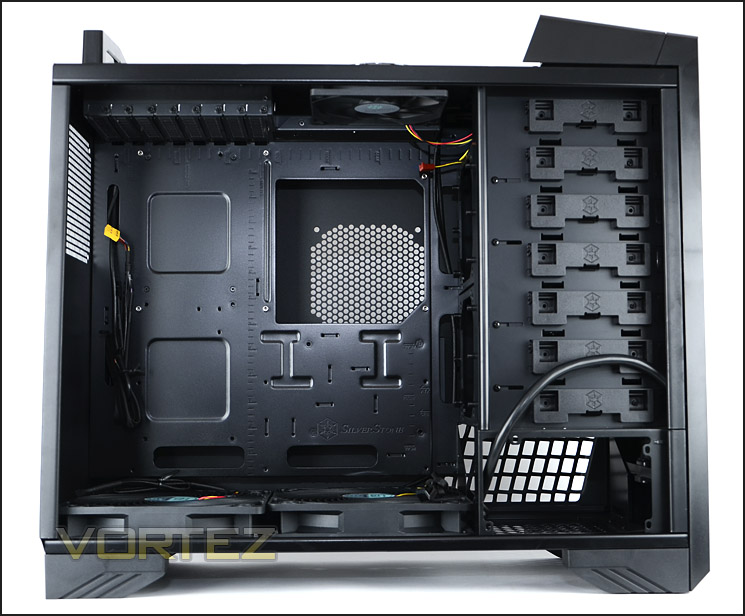
A unique layout sets this case apart
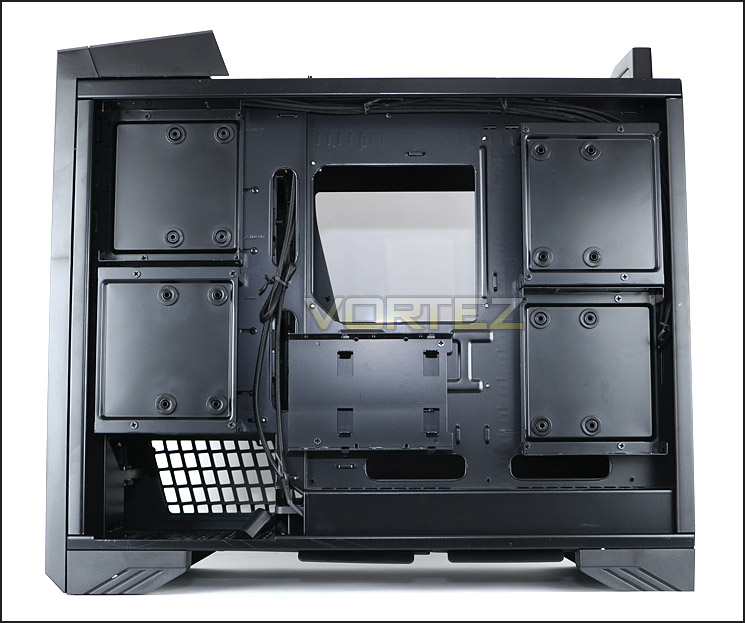
Storage placements behind motherboard tray
Moving in for a closer look at the various aspects of RV03 we come to the PSU placement. SilverStone have provided a spot at the front of the case and have given an extension cable so that the PSU does not sit outside of the case at all. This extension cable slots into the PSU and runs to a slot at the bottom of the case – so to give the PSU power the power cable will need to plug into a slot on the underside of RV03. It’s good to see that there is plenty of ventilation for the PSU and that dust filters have been supplied too.
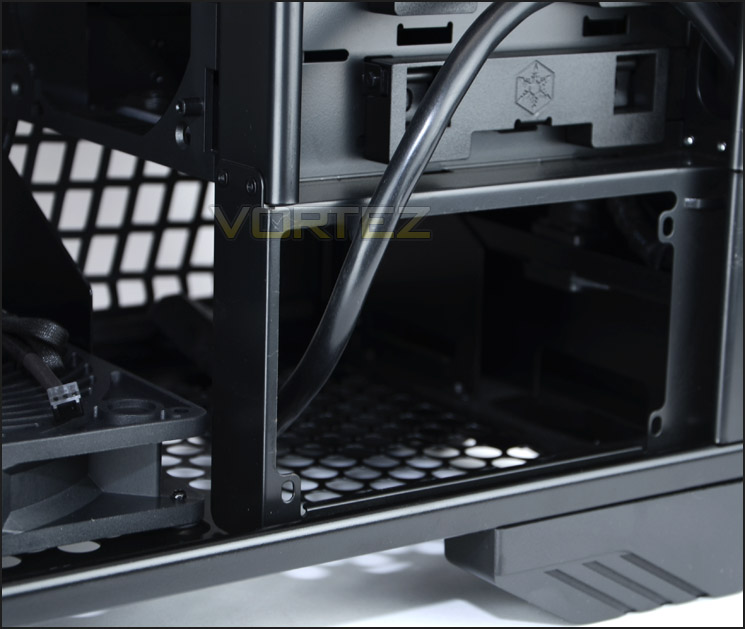
PSU placement with extension cable
At the bottom of RV03 there are two cooling fans. This is where the real calibre of airflow is derived. Though these fans may appear to be different sizes, they aren’t. Both are 180mm Air Penetrators, one just sits further into the motherboard tray than the other. These cooling fans take air across the system and out, up through the top of the chassis – driving airflow in a vertical manner. Both fans are able to run at either 700RPM or 1200RPM via the fan controller.
A 240mm water-cooling radiator can be fitted at the bottom but it must be the thinner type that does not exceed 3-4cm in width.
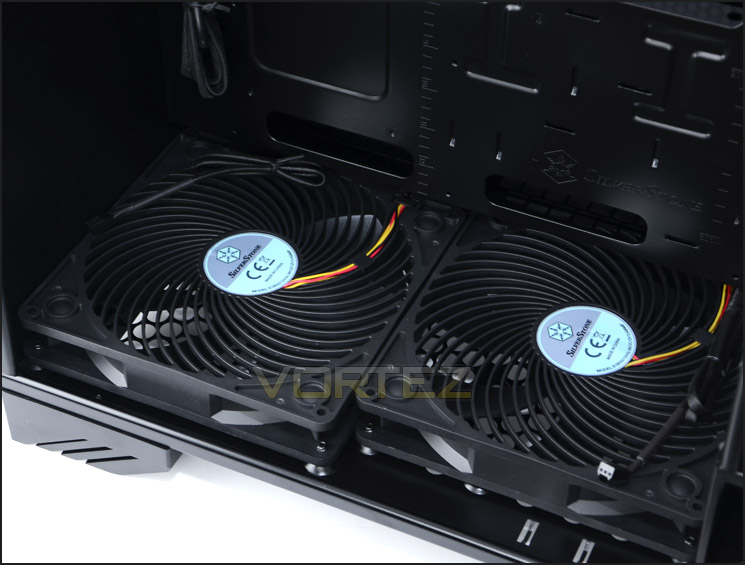
Dual 180mm fans at the bottom of RV03 are fundamental to airflow
At the opposite end – the top of RV03 are the PCI expansion slot covers and exhaust fan. There are 8x PCI expansion slot covers, each of these come with ventilation holes for better airflow inside RV03 (air will rise and dissipate out of these slots) but oddly there are no thumbscrews, just standard screws which will require a screwdriver. The cooling fan next to these slots is a 120mm exhaust.
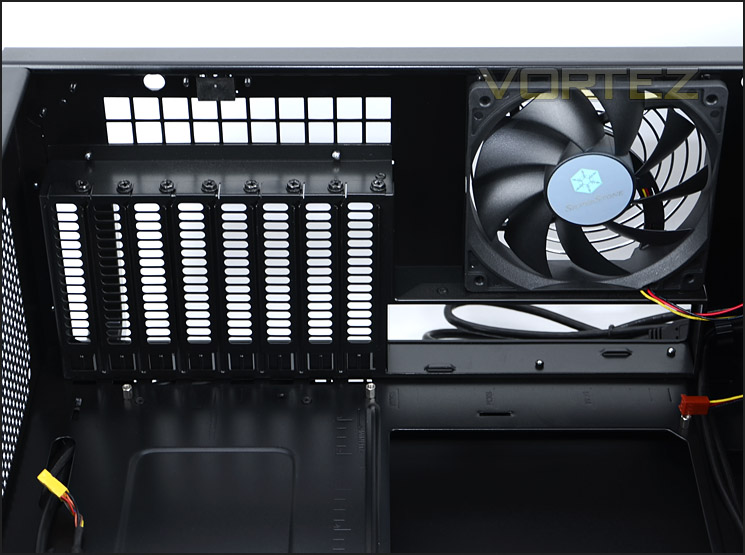
PCI expansion slot covers at the top of RV03
Aside from the mounting positions behind the motherboard tray there are also a variety of slots for mounting HDD or optical drives at the front of RV03. Each cage incidentally has a fan bracket so that a cooling fan can be attached. Cooling fans can actually be attached to either side – thankfully the optical drive bay covers have dust filters too, in order to aid this. Each slot within the cages has a tool-less design mechanism allowing the device of choice to be fixed in place with a simple latch system.
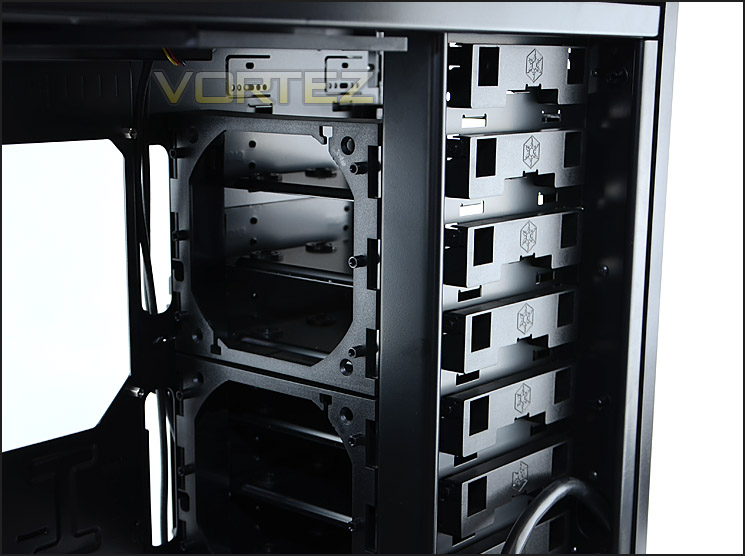
Bays for additional HDD storage or optical drives – with fan attachment bracket
Installation
Looks can be deceiving – this is why it is important for us to observe the installation process to identify any potential problems with RV03, especially as this chassis redefines the way we look at building a computer system. I’m happy to report there are no problems whatsoever.
Building a computer system inside RV03 is obviously different but it is surprisingly easy too. There is lots of space inside and maintaining good cable management standards is a doddle.
I really like the design and layout of RV03 and I personally love the fresh approach to how SilverStone has looked at case design. It’s unique, exciting and very interesting.
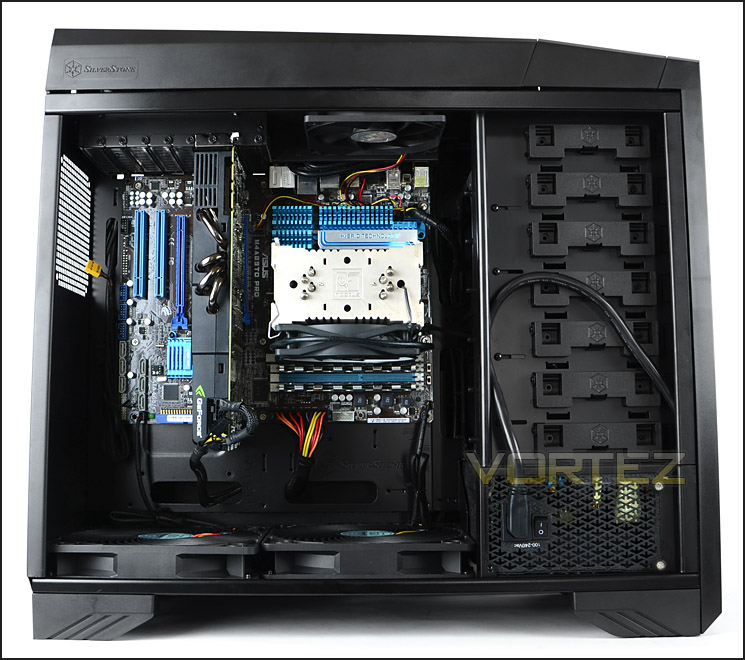
Installation complete – interesting and unique
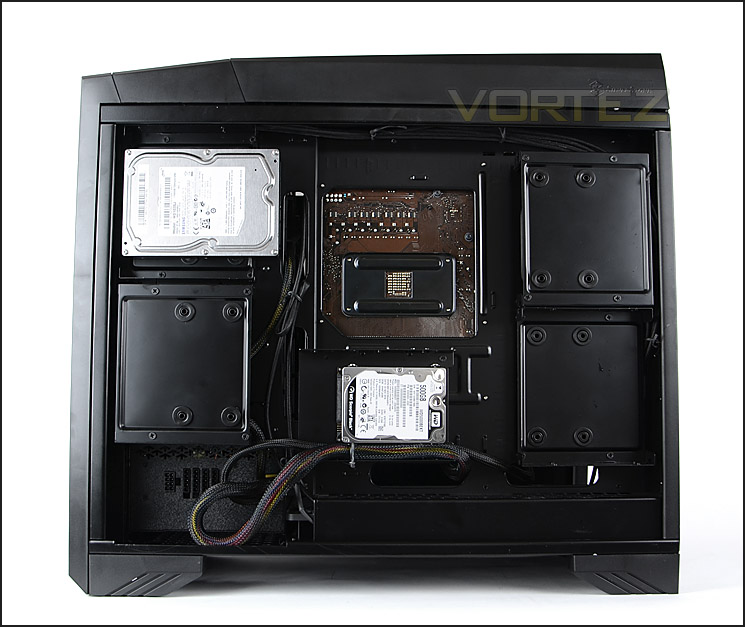
Cable management is under control
There are numerous ways in which HDD storage can be installed within RV03 and so rather than install the HDDs in the bays (which is typical to other computer cases) I decided to install the drives behind the motherboard tray.
To install a 3.5” drive various screws need to be removed from one of the trays. When this tray has been removed the drive can then be attached as pictured below – screws attach to the underside of the drive.
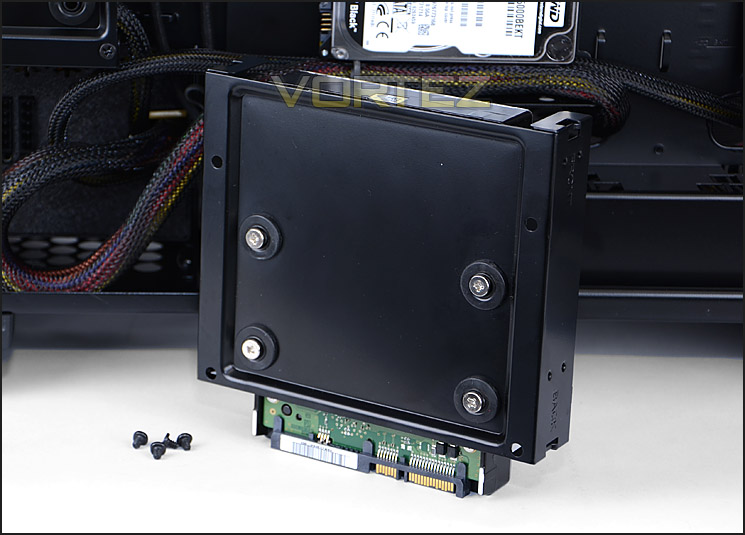
Attaching a 3.5” drive to a tray
With the drive attached to a tray we then attach the tray back to the chassis. This keeps all HDD storage tucked away behind the motherboard tray.
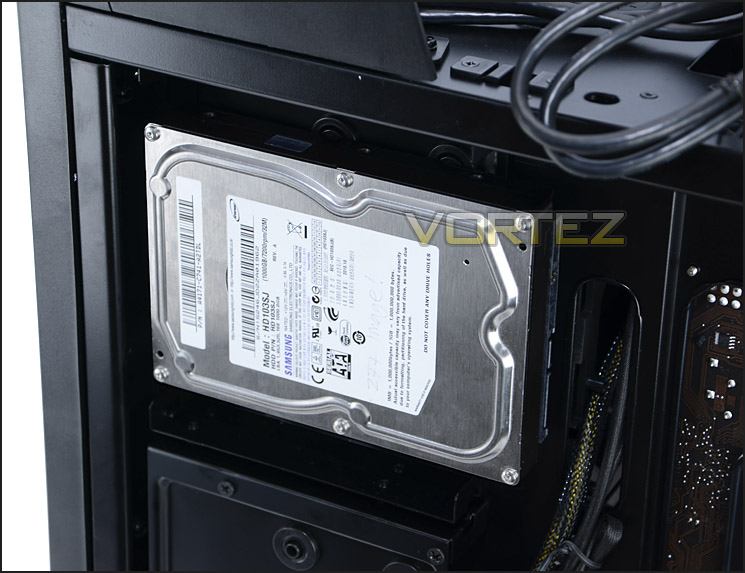
3.5” drive installed behind the motherboard tray
2.5” drives can also be attached; in the example below I attached a drive to the middle position. Screws simply slot into the sides of the drive, fixing it in place.
You can also notice in the picture that cable management can be kept on top form thanks to the channels and cavities SilverStone have created with RV03. Overall, I am very pleased with all areas. Next we will be taking a closer look at the clearance inside our Raven case.
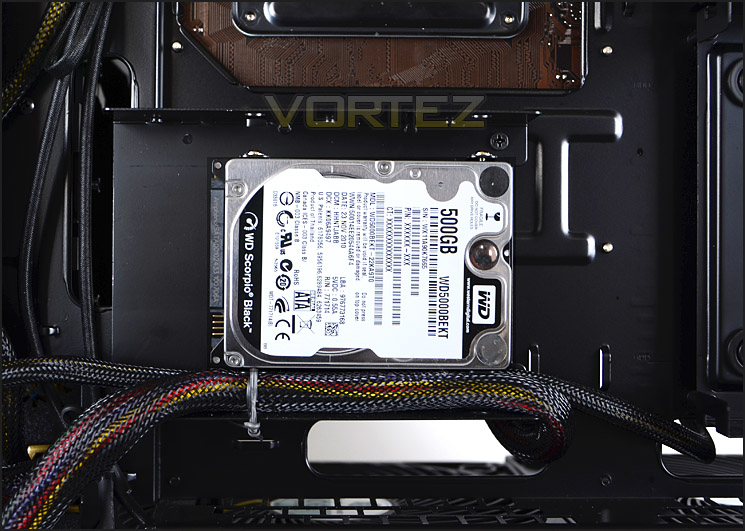
2.5” drives can also feature behind the motherboard tray
Clearance – CPU, GPU, WC, Cable Management
Onto the topic of clearance – this is of supreme importance to the enthusiast. It identifies what hardware will fit inside the chassis and reveals how flexible RV03 really is.
Whilst RV03 is rather wide in its dimensions part of this has been given to the generous clearance behind the motherboard tray and so as a result there isn’t lots of space for the CPU cooler. That said, it will accommodate the bigger flagships like Noctua NH-D14 which is 160mm in height. Pictured is Noctua NH-U12P which is 158mm.
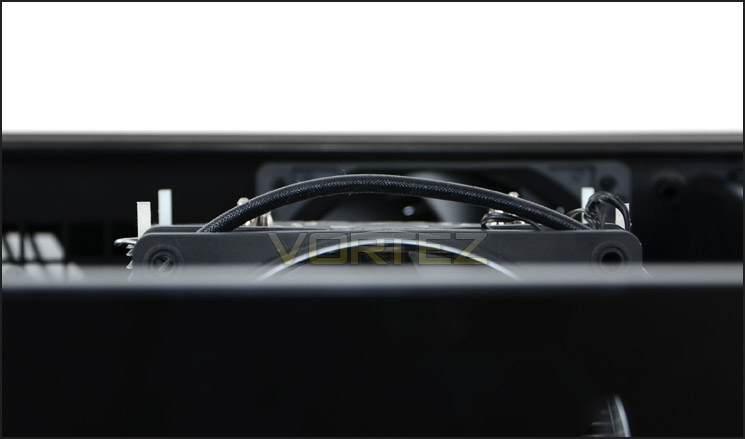
Just enough space for flagship CPU coolers
The end of the graphics card points in the direction of the bottom of the RV03 and there is enough space here for up to 12” and beyond. Pictured is NVIDIA GTX 480 which is 11” in length.
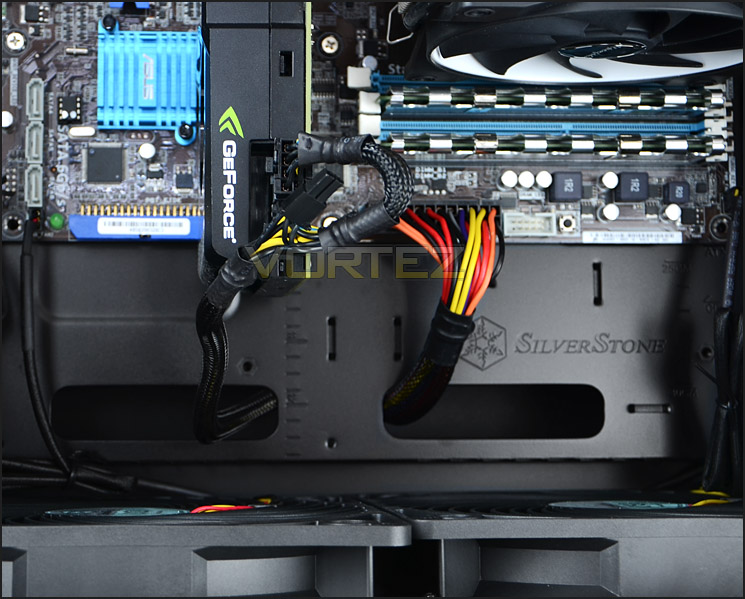
Clearance for long graphics cards
In terms of radiator support for water-cooling RV03 will accommodate standard radiators at the bottom but the thicker type that are approx. 6cm thick like Phobya G-Charger could well struggle to fit due to clearance issues.
Lastly onto the clearance behind the motherboard tray. As you would expect this area is especially generous with approx. 5cm between the motherboard tray and the side panel. This allows for excellent cable management – as you have seen on the previous page, keeping a clean, tidy internal layout isn’t a problem at all.
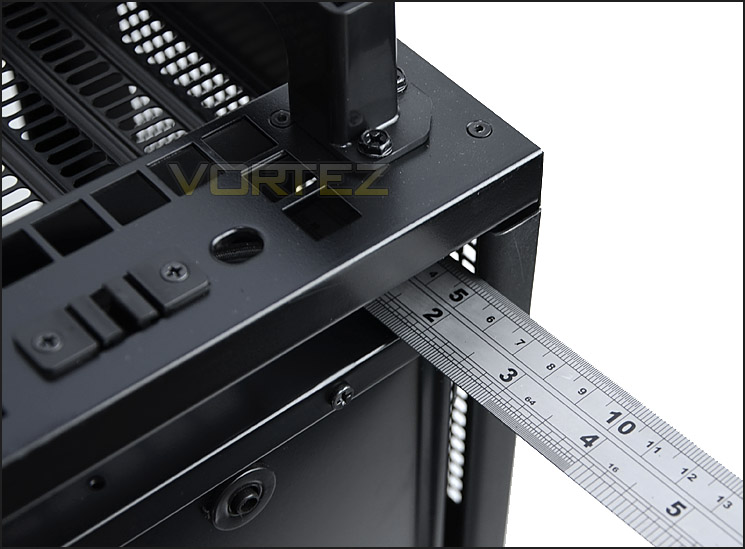
Up to 5cm of clearance behind the motherboard tray
Thermal Performance Testing
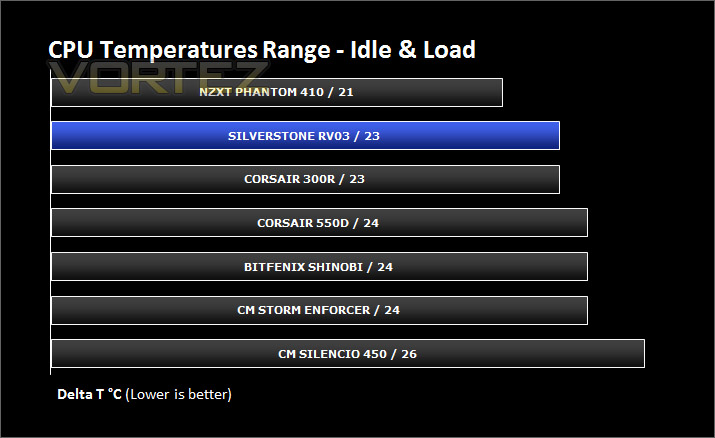
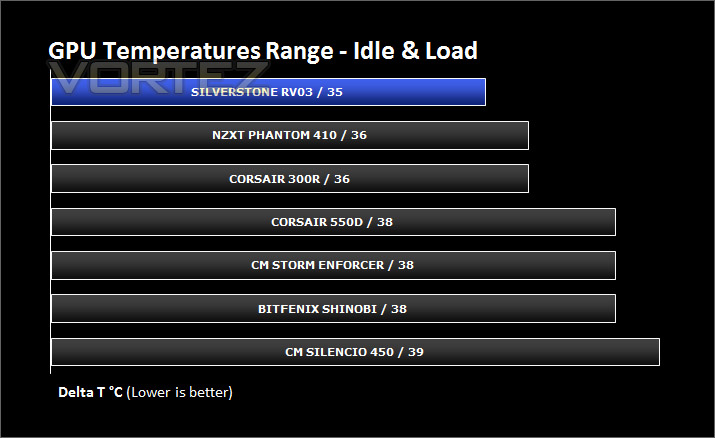
Our thermal performance testing has recently been revised and therefore the list of comparable results is for the moment limited. But as we progress through cases the results list will expand.
Inside RV03 there are 3 pre-installed cooling fans positioned at the top and bottom of the chassis. As you will have read, at stock airflow is designed to generate from the bottom and push out through the top. So in essence we should have some good results because heat rises. Inside RV03 there are Dual 180mm intake fans at the bottom and a 120mm exhaust positioned at the top.
To discover the thermal performance of the RV03 I will record idle temperatures after 20 minutes from a cold boot. I will then stress the system and temperatures will again be monitored after 30 minutes have elapsed. Fan controller will be set to “high” for both sets of fans – 1200RPM.
For the purpose of accurate analysis the idle and load temperatures for CPU and GPU will be recorded and the range between idle and load will be calculated to determine how efficient cooling is.
NOTE: Ambient temperature is 20C
System Components
CPU AMD Phenom II X6 1055T 2.8GHz
Motherboard ASUS M4A89TD PRO
Graphics ZOTAC NVIDIA GTX 480 AMP
Memory 4GB Mushkin EM3-10666 DDR3
HDD Samsung Spinpoint 500GB SATA-II
PSU FSP AURUM GOLD 650M
Motherboard ASUS M4A89TD PRO
Graphics ZOTAC NVIDIA GTX 480 AMP
Memory 4GB Mushkin EM3-10666 DDR3
HDD Samsung Spinpoint 500GB SATA-II
PSU FSP AURUM GOLD 650M
Noise
RV03 has a fan controller which allows all of the fans within the chassis to have their speed managed. With the fans on low speed (700RPM) the noise is barely audible. With all fans on the high setting (1200RPM) noise is noticeable but thankfully – not disruptive. The panels on RV03 are thick and closed off. The only ventilation is at the bottom and top of the chassis and of course at the optional mounting holes but this helps to keep the noise levels down.
Conclusion
The Raven has always been a symbol synonymous with intelligence and independence. Over the years many have look to the Raven as a symbol of wisdom and a bird that is able to single-handedly deliver messages of mystery and the RV03 fits perfectly into this ideal.
RV03 has a unique design that sets it apart from almost every case currently on the market. From the external appearance you would be forgiven for thinking RV03 is yet another stylish standard ATX chassis but you couldn’t be any further from the truth. SilverStone has given RV03 a unique layout design meaning hardware is rotated by 90 degrees. The PCI expansion slot covers are at the top of the case and the intake cooling fans that are typically at the front of a computer chassis are found at the bottom. Thanks to this exclusive design thermal performance is distinctly better than the traditional computer chassis. As we all know, heat rises and so this design of having the hardware in its required orientation and large – dual 180mm cooling fans driving air up, over the components and out through the top is superior and very effective.
SilverStone has given the RV03 a substantial width and taken a generous segment of this to aid clearance behind the motherboard tray, lending itself to ample space for cable management. Behind the motherboard tray RV03 can accommodate an assortment of 2.5” and 3.5” storage devices and the brackets used to storage these drives creates channels and cavities for the cables to hide behind. This means that the entire system on both sides can be kept tidy and airflow can remain unrestricted resulting in better overall temperatures.
Experience with RV03 is largely positive but there are a few niggles that are probably worth mentioning. The strength of the magnets found on the air filters on the underside of the case are challenged when the case is moved around. The air filters detach from the case far too easily. The other point that restrains me from awarding RV03 the gold award is that there is a lot of plastic used for the external elements – the front and top fascias cheapen the look and feel, especially when compared to the RV02 which has left very high standards in this area.
RV03 can be found for around £90-100inc. VAT which is quite good value for money when you consider what has gone into the construction of this case. It has 2x 180mm fans, 1x 120mm fan, USB 3.0 ports and a fan controller. It’s also hard to put a price on something so unique.
VIDEO REVIEW – VORTEZ TV
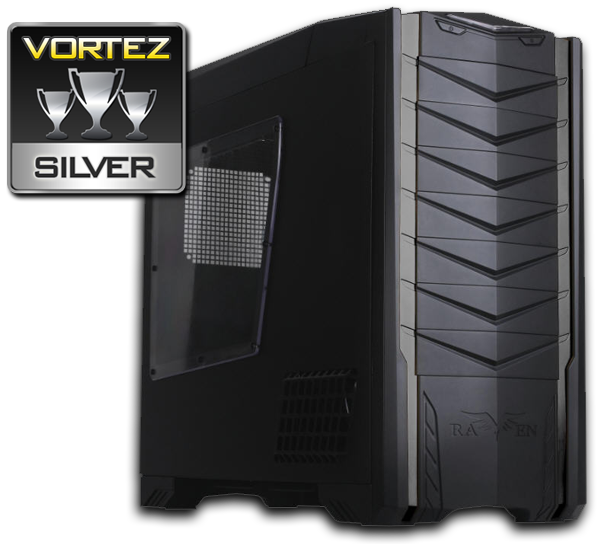
SilverStone has delivered yet another unique product in the Raven RV03. It steps outside of the box, redefines the way we look at computer cases and I’ve been thoroughly impressed with the results. It comes highly recommended by Vortez and attains our much coveted Silver award for excellence.
Pros
+ Unique design sets it apart
+ Looks very stylish
+ Great thermal performance
+ Excellent cable management potential
+ Two-speed fan controller
+ Dual 180mm fans drive airflow
+ Good value for money
Cons
– Air filters at bottom fall off easily
– Lots of plastic
+ Unique design sets it apart
+ Looks very stylish
+ Great thermal performance
+ Excellent cable management potential
+ Two-speed fan controller
+ Dual 180mm fans drive airflow
+ Good value for money
Cons
– Air filters at bottom fall off easily
– Lots of plastic

Click here for an explanation of our awards at Vortez.net. Thanks to SilverStone for providing today’s review sample.


