







Thermaltake has a new series called Galaxy Episode. We take a look at the first chassis to be included – Chaser MK-I.
Product on Review: Chaser MK-I VN300M1W2N
Manufacturer and Sponsor: Thermaltake
Street Price: £80-90 inc. VAT (At time of review)

Thermaltake have been designing cases since 1999 and have provided the market with some interesting products over the years. Their chassis series range alludes to this. The Chaser MK-I we will be taking a look at today features within the new Galaxy Episode series and is the first case to enter this new category. On paper, it seems that Thermaltake have thought about every possible option with the Chaser MK-I. It has countless features to supply the new-age gamer with the capabilities they need to house the best hardware on the market to date. I’ve been looking forward to getting this case in review, so lets waste no further time and begin our analysis…

Thermaltakes take on Chaser MK-I
The Galaxy Episode Chaser MK-I is clearly one of its kind. ColorShift LED fans and the breathing logo on the front top lend it battlefield fierce looks. An oversized interior gives users room for aggressive upgrades of this XB ATX Tower (extra big). Highly advanced ventilation, USB 3.0 SuperSpeed ports can be directly connected to the motherboard. Ready for any galactic combat.
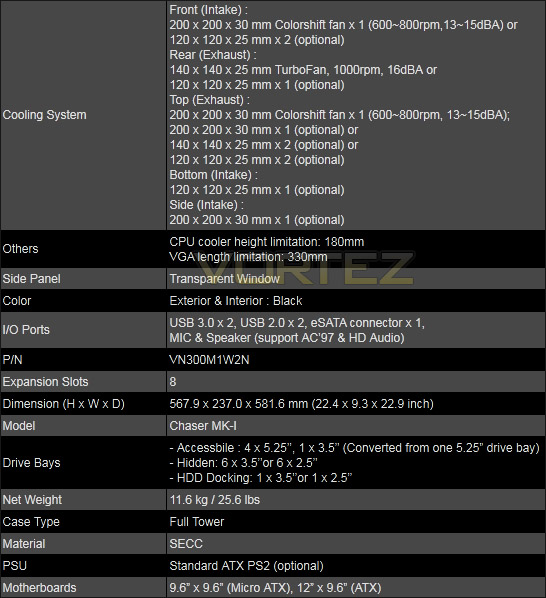
Technical Specifications
Packaging & First Look
The Chaser MK-I is presented in a very colourful, eye-catching box. The box itself is massive and very heavy too – giving you an idea that this case is going to be a big one. In fact the packaging has printed on it “Extra Big ATX Tower”. An impression of the Chaser MK-I can be seen on the front of the box, you can clearly tell this case is targeted towards the gamer.
Inside, the case is covered in a clear plastic bag and supported with 2 polystyrene pillars to protect the Chaser MK-I during transit.
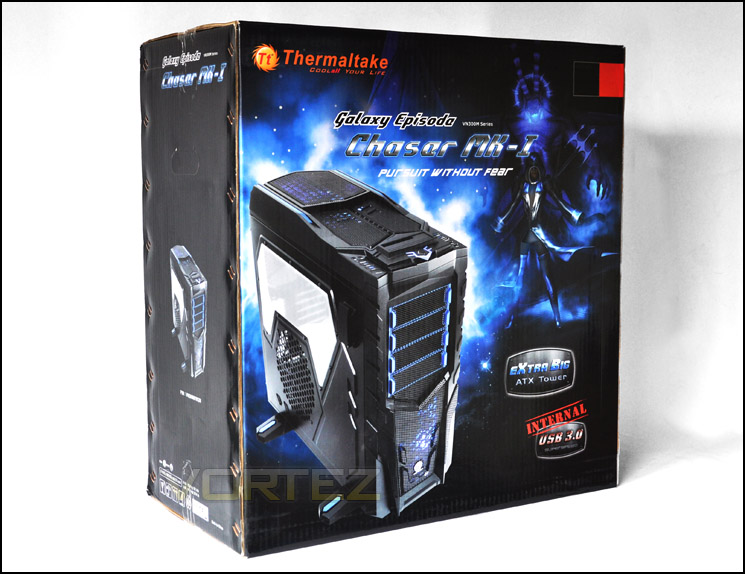
The packaging certainly catches the eye
Removing the case from its packaging we can see the Chaser MK-I for the first time. As the packaging intimated, this case is undoubtedly focussed on one type of user. The shape, size, styling, aesthetics all scream ‘gamer’. The prominent side has a windowed side panel allowing you visibility inside the case, just beneath the Perspex there is a 200mm honey-comb mesh area with a filter behind it for mounting an optional fan. Notice there are also 4 feet on the Chaser MK-I. These feet raise the case 35mm above the floor – great for keeping even more dust/dirt from entering the case if you do have it positioned below the desk.
On the other side there are some funky lines engraved on the side panel but no distinct features. Both side panels are of decent thickness and quality – good characteristics for keeping noise levels down to a minimum.
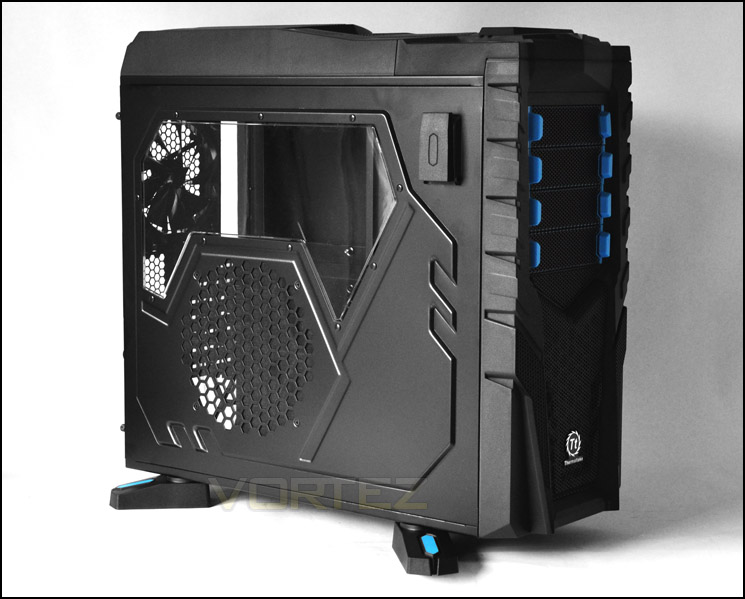
Chaser MK-I with side window
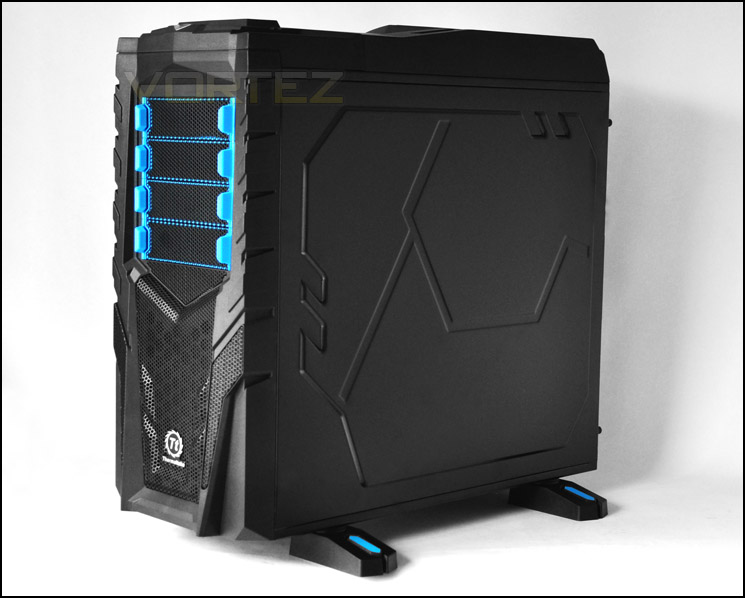
Distinct features that will surely carry with it the “love it or hate it” stereotype
Taking a closer look at the side panel with window there is actually a clip that pulls out to reveal a hanger for storing headphones.
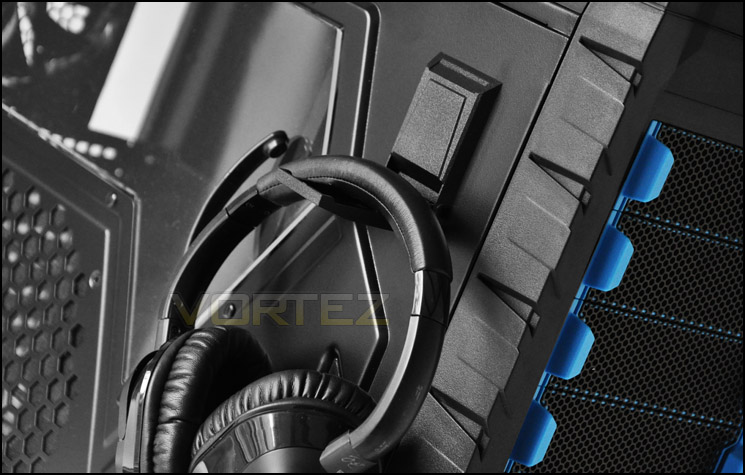
Headphone hanger on the side panel is very handy
Exterior
Let’s move in for a closer look. The front has a very aggressive fascia. This Chaser MK-I features within the “Galaxy Episode” series and models itself on galatical warfare with its strong black lines and rugged exterior. Since dealing the Chaser MK-I I wasn’t too keen on its visual appearance but I must say the styling has grown on me and I now think it looks rather good. Certainly if you lean towards the rugged, aggressive gamer styling then this is going to be one that stands out. Those with a liking towards elegant, clean, smooth looking chassis should look away – this isn’t something you are going to like. The mesh panel at the front bears a metallic Thermaltake emblem and behind this badge is a large 200mm intake fan that is LED ready. Moving up, there are 4 x 5.25” drive bay covers – each having the ability to be removed externally without even going inside the case. The blue accents that you can see in the image below mark the clips that are squeezed together to remove a drive bay cover.
Looking at the rear of the Chaser MK-I there is an opening at the bottom of the case for a bottom mounted PSU. 8 PCI expansion slot covers feature on our case, each having ventilation cut-outs for better airflow. Above this, a perforated mesh region covers the pre-installed 140mm fan that acts as a rear exhaust. Of course, due to the size of Chaser MK-I it isn’t any surprise that water-cooling is an option and we have 3 rubber grommets above the rear exhaust for feeding any tubes through.
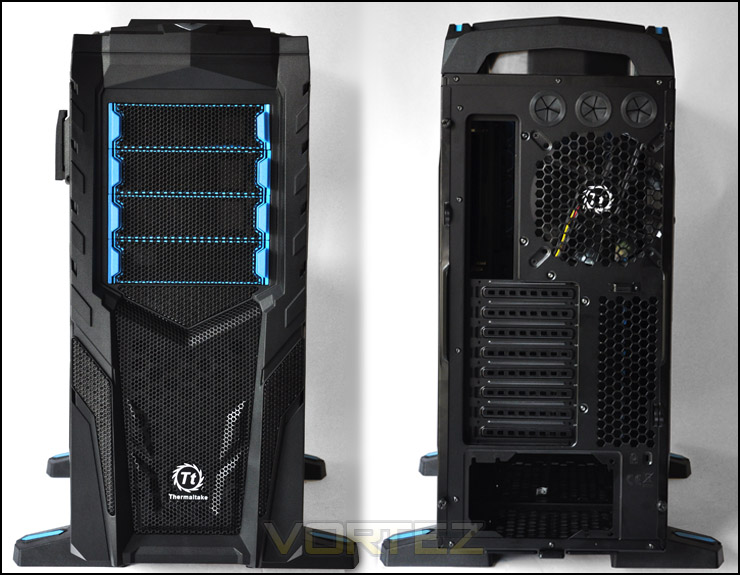
The front and back of Chaser MK-I
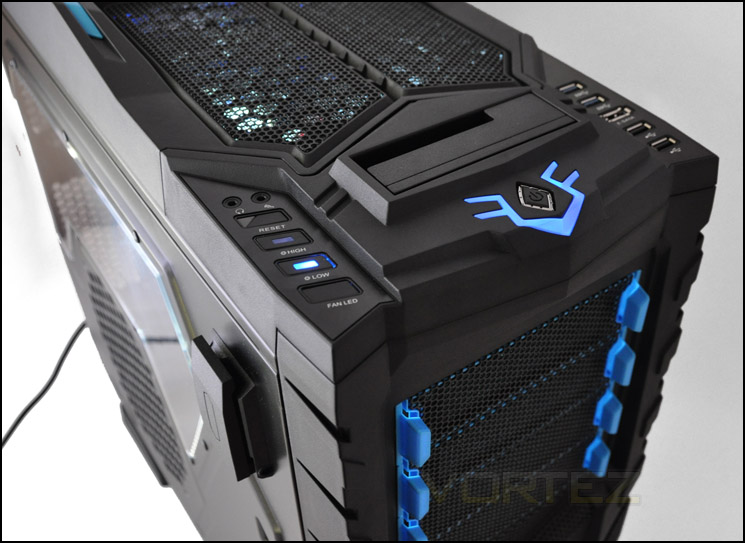
The front panel has a multitude of features embedded within it. Far more than any case I’ve ever looked at. First of all down the left side:
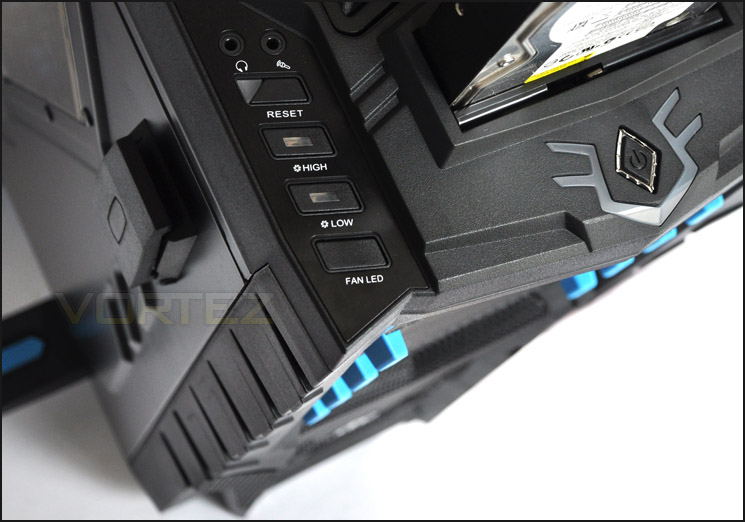
• FAN LED – Change the colour of the 200mm fans at front and top.
• LOW – Force the 200mm fans to run at 600RPM
• HIGH – Force the 200mm fans to run at 800RPM
• RESET – Resets the system
• Headphone and microphone jacks
In the middle we have the power button that has an LED curving around it. This LED will pulsate when powered up. Above the power button there is a HDD docking station for 3.5” and 2.5” SATA drives. This allows you to quickly and easily access data.
Over on the right side we have:
• 2 x USB2.0 ports
• 1 x E-SATA port
• 2 x USB3.0 ports (using USB3.0 header cable)
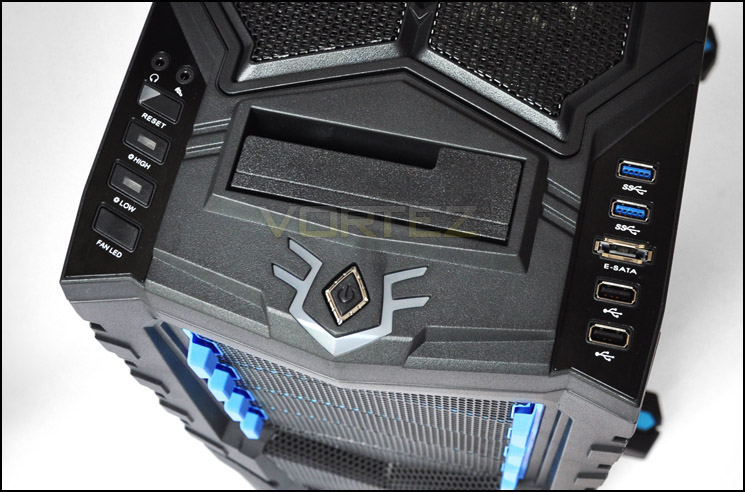
The front panel has lots of options, almost like a cockpit!
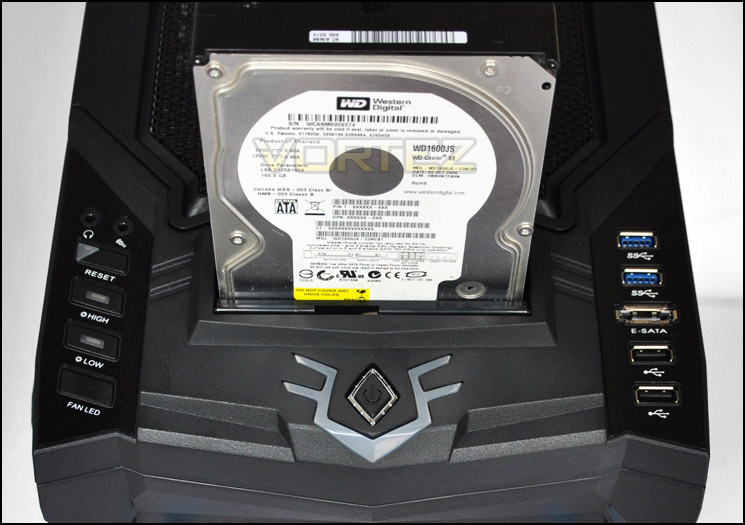
A 3.5” drive slots in very comfortably, giving easy access to data without cables
Lastly, the top of Chaser MK-I has 3 sections of mesh panelling, underneath this there is a top mounted 200mm LED fan towards the back and then enough space to mount an optional 200mm fan or even 2 x 140/120mm fans. So even on an exterior inspection we can appreciate the Chaser MK-I has plenty of cooling potential. This top section can be removed easily by simply pulling it in an upwards fashion. We can then get access to fan mounting.
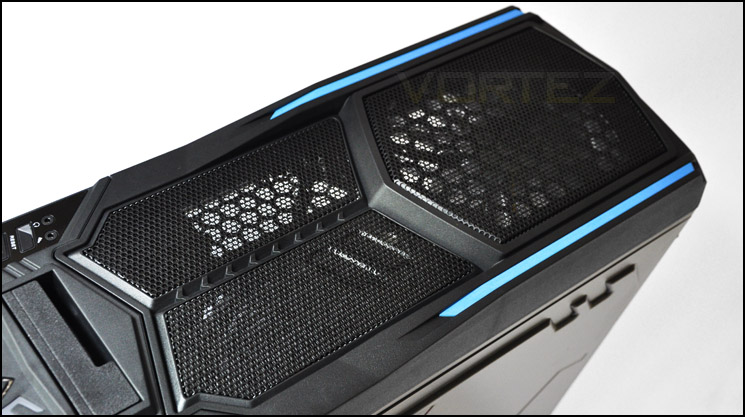
Top is removable and features space for dual 200mm fans
Interior
We’ve had a look at the outside, now it’s time to look at the inside. The Chaser MK-I is a big case, so it should have the features and space to reflect this. Taking the thick steel side panels off via the useful thumbscrews we get our first glimpse of the inside of Chaser MK-I. Coated in black, the internals reveal plenty of cable management cut-outs with soft rubber to easily thread through cables. This inside of Chaser MK-I will accommodate MATX and ATX motherboards and even has a large CPU cooler backplate cutout for successfully installing/removing the cooler from your motherboard without the need to unmounts the board. There are tool-less mechanisms for mounting optical drives, HDDs and PCI cards and so far, a very presentable interior.
Spinning the case round to the other side, behind the motherboard tray there is again a very clean layout here. Cables are neatly arranged to trail down the side of the HDD cages. Thanks to the covers on the other side, cabling running down here shouldn’t be seen anyway.
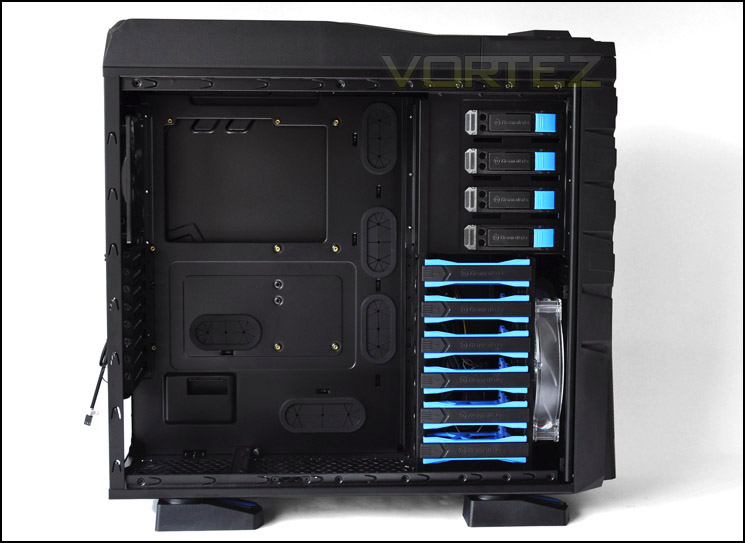
The side panel off to show a very tidy, spacious interior
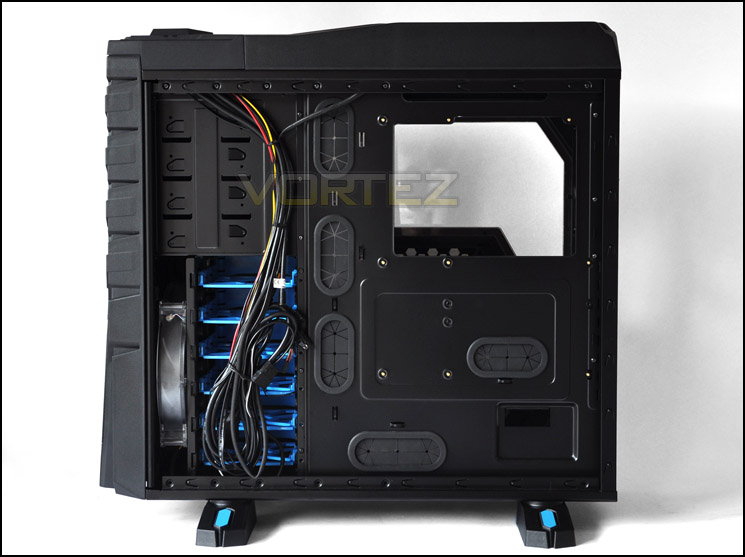
Lots of cable management options for those who keep their systems tidy
Until only very recently case manufacturers have begun to include USB3.0 headers running from the front panel of their products. Unfortunately though, a vast majority are still implementing standard USB3.0 cables running from the front panel all the way to the I/O. This is not only untidy but it also takes up the few USB3.0 ports that are found on current motherboards.
To my delight, Thermaltake have implemented the USB3.0 header onto the USB3.0 ports on the front panel. The great thing about this is if you don’t have a USB3.0 header you can still use USB2.0 ports at the front anyway until you do move to a board with a USB3.0 header. Some cases only have USB3.0 ports up front so in that instance you would be scarpered if you didn’t have a USB3.0 header on your motherboard. It seems that Thermaltake have planned this case very well in terms of functionality here.
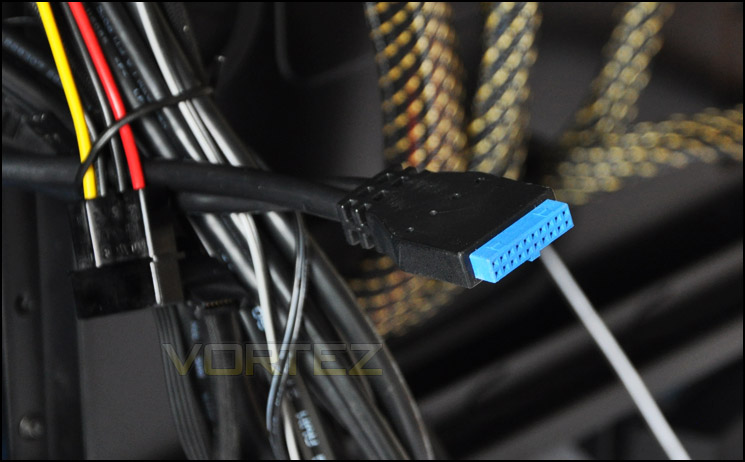
USB3.0 header is great to see – no more trailing USB3.0 cables!
Interior (Continued)
We’ll now move in for a closer look at each element within Chaser MK-I. First up, we have the PSU mounting area. Here we have a bar that can be moved to cater for different sized PSUs. Sadly though, there are no anti-vibration pads on either shelves that the PSU will sit on, so it’s going to be metal on metal – not a good combination! Beside the PSU seating area there is also the option to install a 120mm fan at the bottom of Chaser MK-I. The underside of the case has a dust filter.
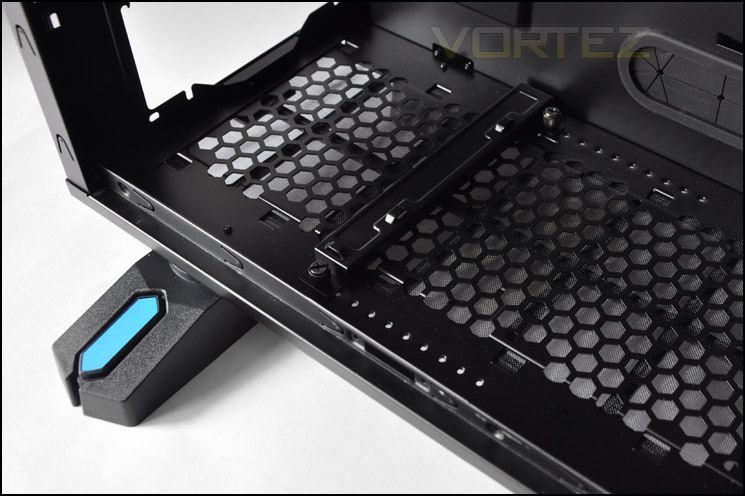
PSU seating area with dust filter underneath
We have 8 PCI expansion slot covers inside the case, each have a thumbscrew holding them in place for each removal and each have ventilation holes for better airflow within the case.
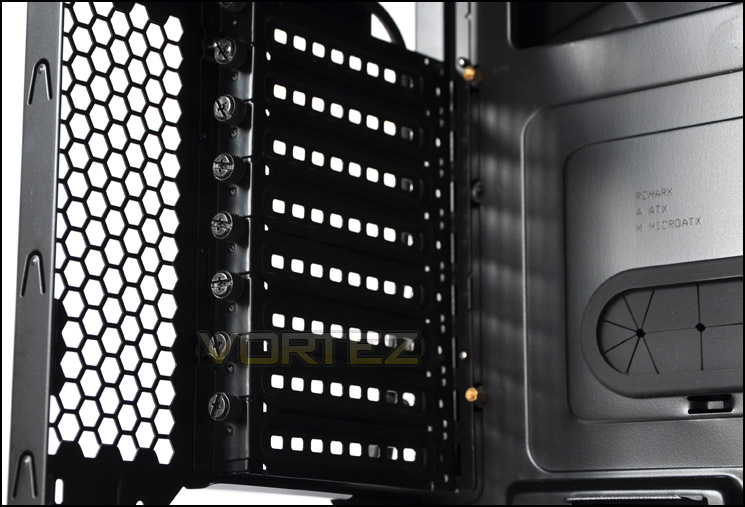
8 PCI expansion slot covers – multi GPU options
In regards to cooling, the Chaser MK-I has a 140mm rear exhaust fan (TurboFan) that operates at 1000RPM – 16dBA. Additionally you can swap this out for a 120mm fan but it makes more sense to take advantage of the larger fan as generally this will pull more air. Above this there is a top mounted 200mm fan that is multi-LED ready – Colorshift. This can operate at either 600RPM (low) or 800RPM (high) depending on the setting you have it on at the front panel. Both fans here have their cables within a nice black sleeve to coincide with the black interior. Beside the 200mm fan there is also the option to include another 200mm fan or 2 x 140/120mm fans.
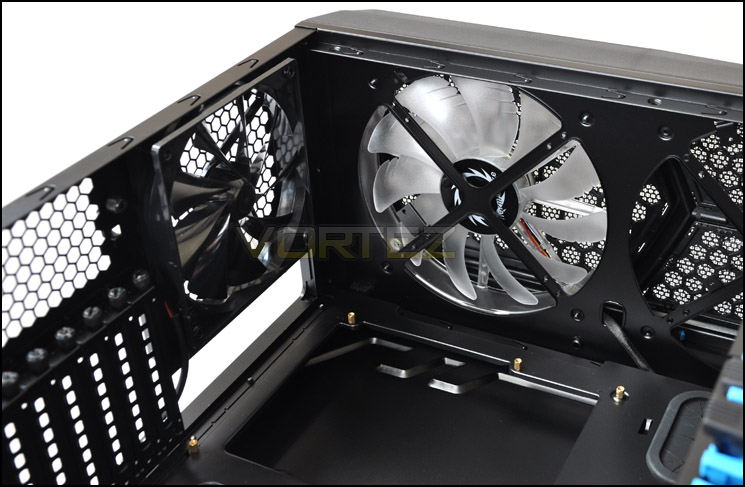
Cooling options at the back of Chaser MK-I
Over on the other side we have the tool-less mechanisms for optical drive placement. There are 4 x 5.25” drive bays and Thermaltake have implemented a useful device here that locks the drive into place when it is slid back into the bay.
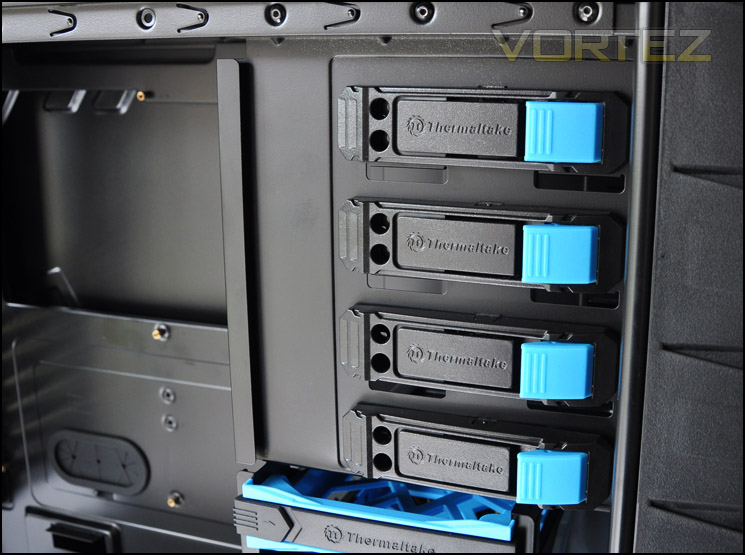
Useful tool-less mechanisms for installing 5.25” devices
Lastly, the HDD stack. Here we have 6 x HDD cages that can accommodate either 3.5” or 2.5” drives. Attaching a drive is very simple (we will go into this in the next section) and the materials used here are strong. Personally I think the method and build quality that Thermaltake have used for HDD storage is fantastic.
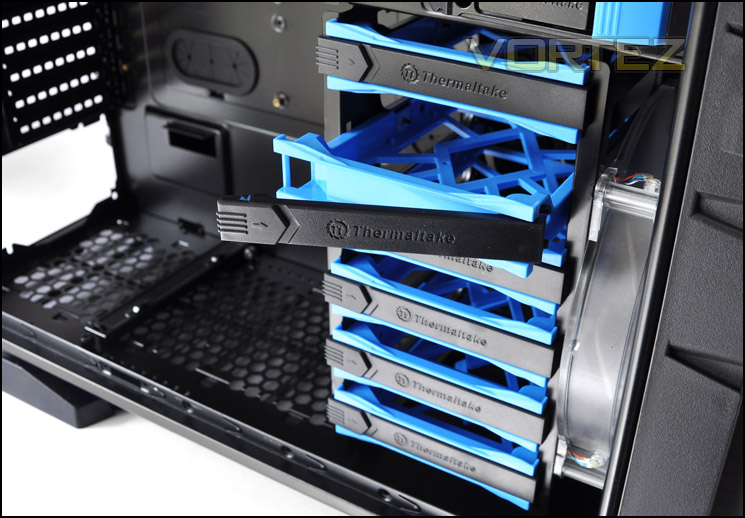
HDD storage is sturdy and caters for 3.5” and 2.5” drives
Installation
From start to finish, getting kit inside Chaser MK-I is very easy. As you can see, there is plenty of space around the motherboard, cable management is very good and I am pleased with the overall outcome. The only gripe I have is the lack of anti-vibration on the PSU seating area. The PSU is metal and so are the brackets that it rests on, so naturally there is the likelihood that things will scratch.
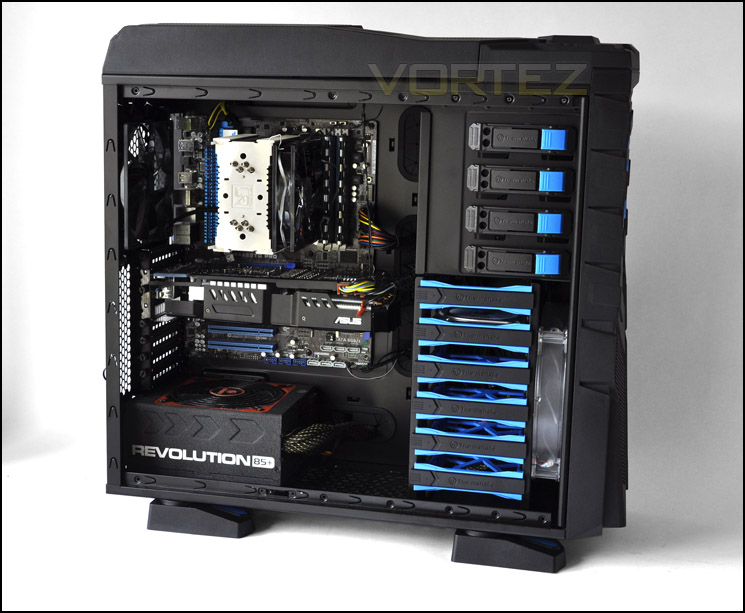
Install finished – a very tidy setup. Great cable management
When we begin installation, we are given an accessories kit that includes various items such as: 5.25” to 3.5” drive bay cover, instructions manual, cable ties, PCI-e adapters, various screws and a 3.5” adapter for 5.25” bay.
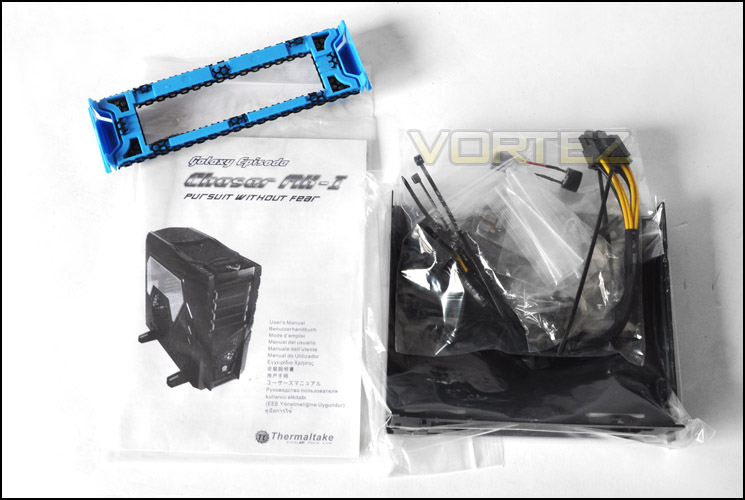
The accessories kit provided
Installing HDDs inside the Chaser MK-I is very easy. Simply remove a cage from the HDD stack, remove the black pegs on either side (pictured), drop the drive into the cage, and slide the pegs into the mounting holes on the drive. Push the case back into the stack and you are done. Very simple, and the cages used are of good quality and thus sturdy.

Installing a 3.5” HDD into the cage
In terms of clearance, both the CPU cooler and GPU have good distance. The CPU cooler is the Noctua NH-U12P that stands at 158mm in height. The Chaser MK-I is quite a wide case and can accommodate CPU coolers under 180mm in height. So expect to be able to house the following:
• Thermalright Archon: Height 170mm
• Thermalright Silver Arrow: Height 160mm
• Thermalright Venomous X: Height 160mm
• Noctua NH-D14: Height 160mm
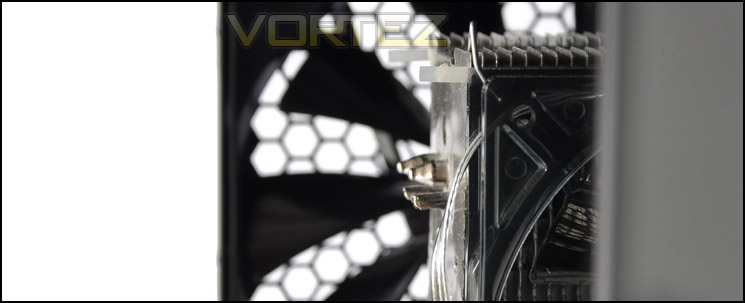
Up to 180mm in clearance for CPU coolers
Chaser MK-I will also accommodate high-end graphics cards. Installed within the case I have the ASUS HD 6950 Direct CU II. This is 11.3” in length, I have measured the distance here and Chaser MK-I can fit the largest graphics card currently on the market AMD HD 6990 (12”).
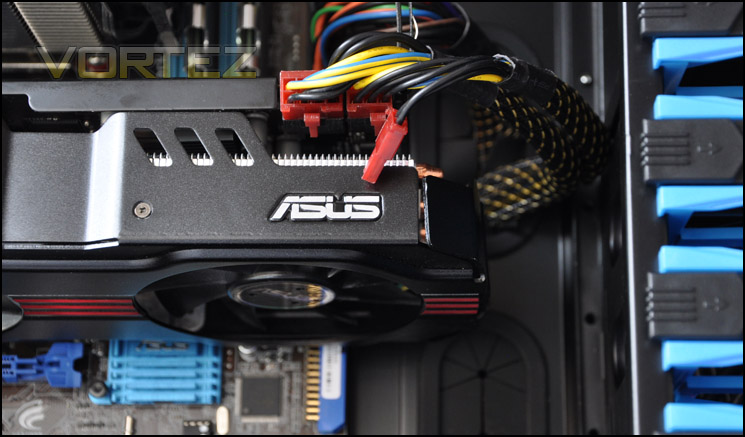
Good GPU clearance, Chaser MK-I will accommodate AMD HD 6990
Behind the motherboard tray there is 1.2cm of clearance between the motherboard tray and side panel. This allows the thick 24-pin ATX PSU cable to thread behind the tray and other cables without having trouble getting the side panel secured in place.
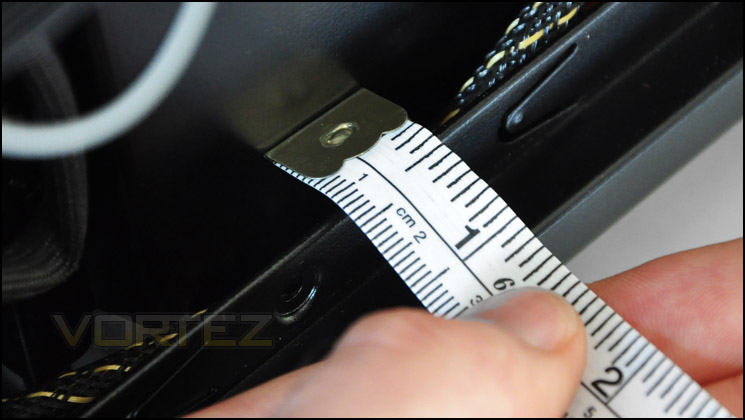
Clearance behind the motherboard tray – 1.3cm
Powered UP (Lighting)
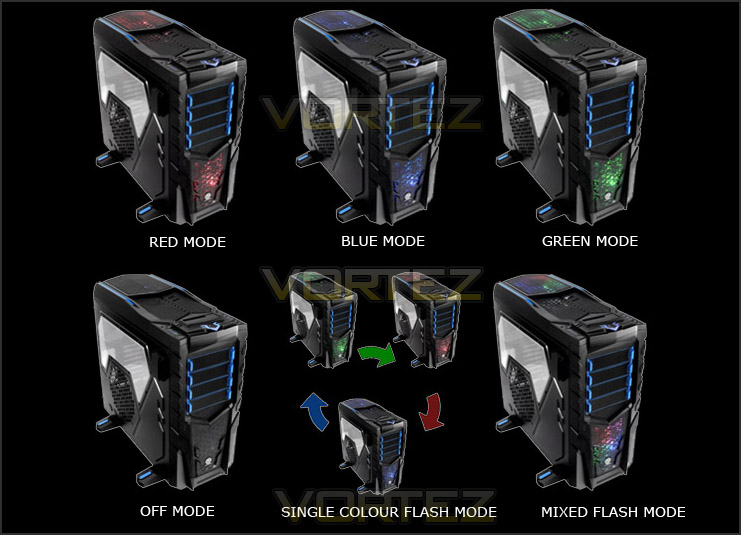
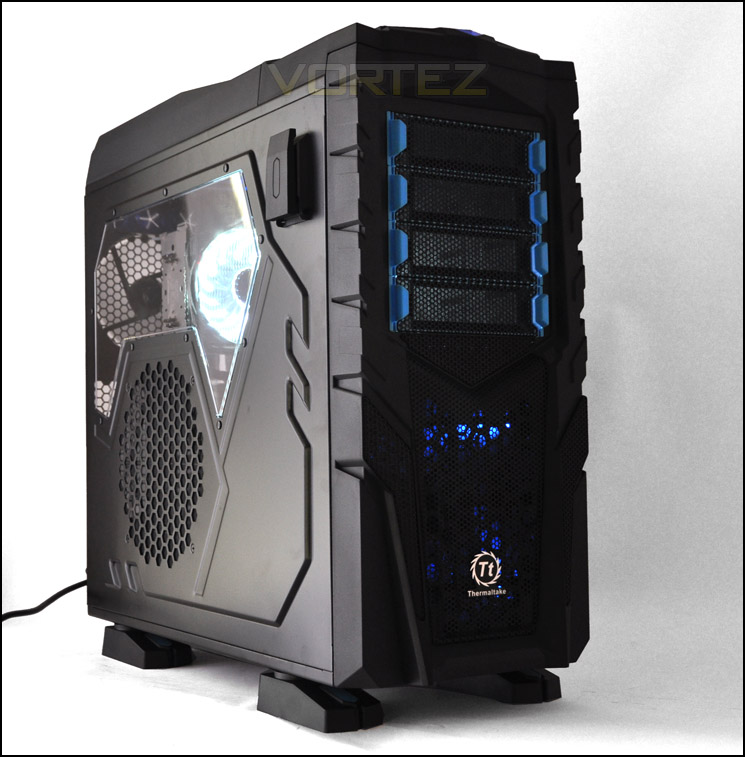
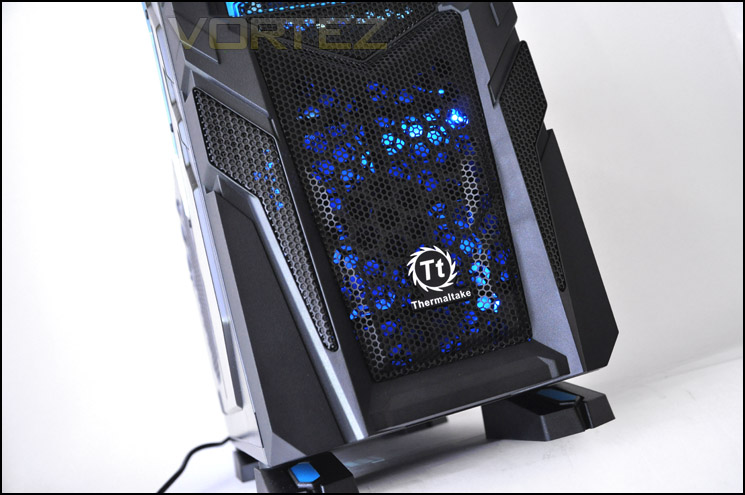
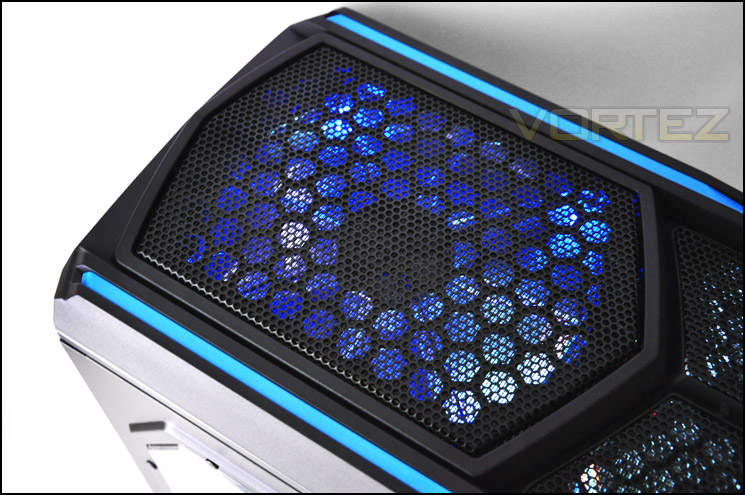
The Chaser MK-I has 2 x 200mm fans positioned at the front and top of the case, these offer multi LED options to the user. You can switch between blue, red and green and even have the colours rotate. The LED found by the power button has the breathing affect. This does not change colour but will pulsate blue.
Here are some pictures of the lighting configuration on Thermaltake’s Chaser MK-I.
Thermal Performance Testing
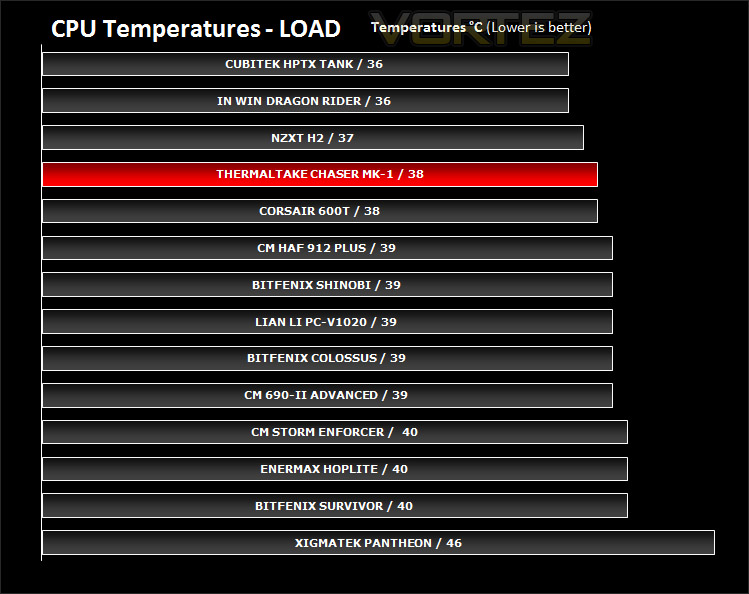
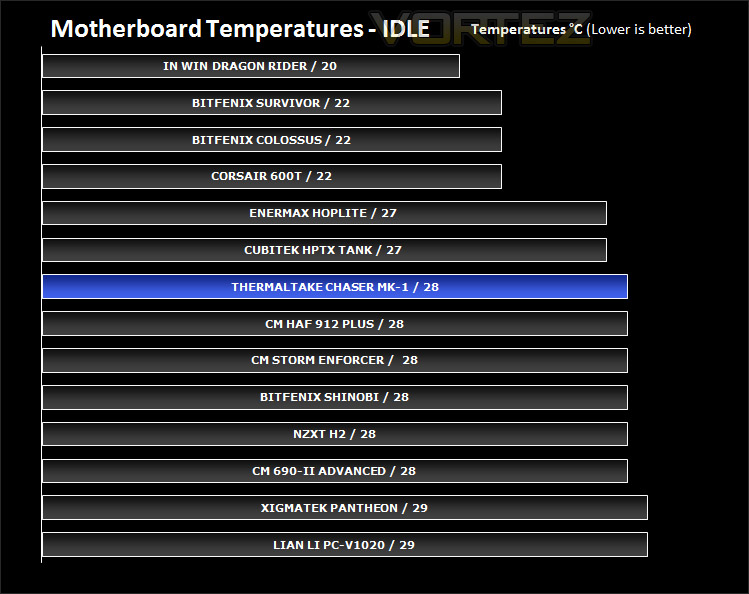
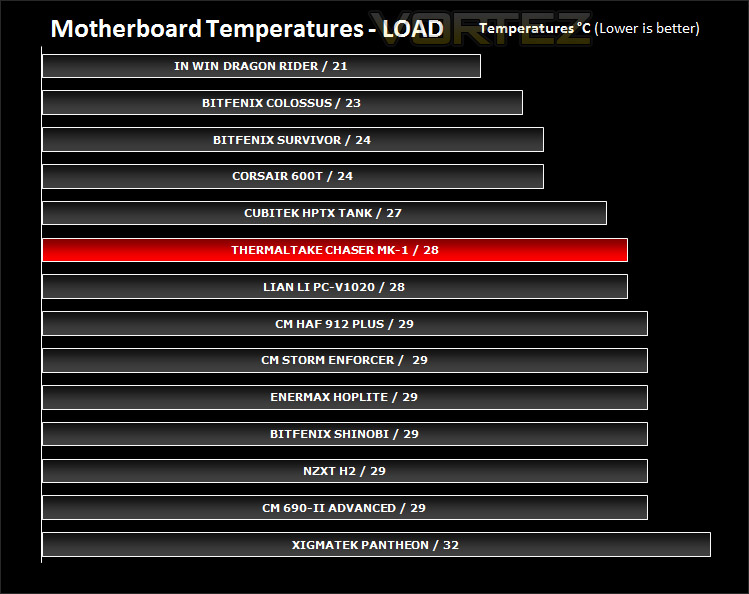
The Thermaltake Chaser MK-I has 3 rather aggressive cooling fans. 2 x 200mm and 1 x 140mm. In traditional cooling spots, these fans surely will provide some excellent thermal performance figures? Well there’s only one way to find out!
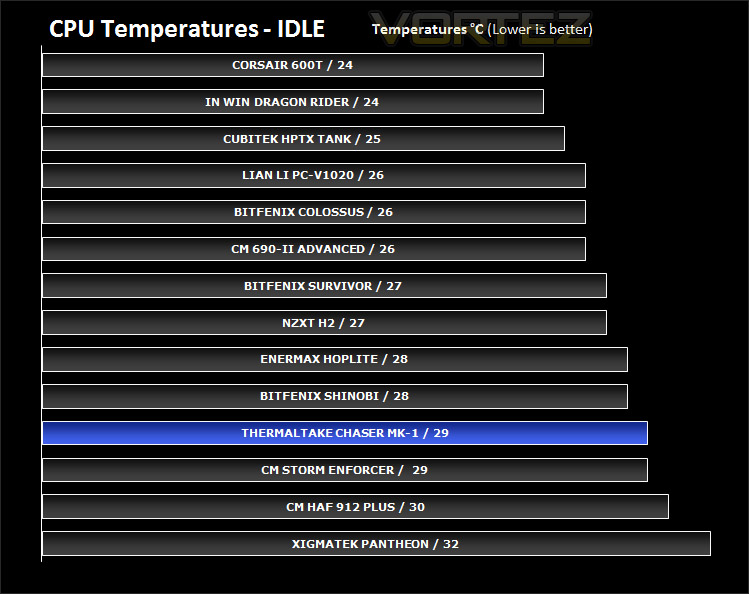
To discover the thermal performance of the Thermaltake Chaser MK-I I will record idle temperatures after 20 minutes from a cold boot. I will then stress the system and temperatures will again be monitored after 30 minutes have elapsed. Fans will be set to “Low” for the front and top mounted 200mm fans, causing them to spin at 600RPM.
System Components
CPU AMD Phenom II X6 1055T 2.8GHz
Motherboard ASUS M4A89TD PRO
Graphics ZOTAC NVIDIA GTX 480
Memory 4GB Mushkin EM3-10666 DDR3
HDD Samsung Spinpoint 500GB SATA-II
PSU Enermax Revolution 85+ 850W
The Chaser MK-I does indeed offer some great cooling performance. The results below clearly show that the fans within the case do their job well, even with the 200mm fans running at 600RPM. With an increase, they will surely provide even better performance albeit at the cost of noise. That said, the noise from the 200mm fans spinning at both 600RPM and 800RPM offer a fairly quiet cooling solution. They are in no way disruptive. Chaser MK-I remains a good case for cooling and noise levels are kept to a minimum.
Conclusion
Since seeing Chaser MK-I at CeBIT earlier this year I was intrigued by this new case and keen on taking a closer look at it. Finally, that time has come and I’ve been very impressed by what Thermaltake have developed here. In times past we have been less impressed by certain Thermaltake cases that have come in for review at Vortez but the Chaser MK-I is a totally different affair.
It’s fair to say that the visual appearance will turn the stomach of quite a few. It sure doesn’t look attractive, but the market here is the gamer – so the rugged, aggressive styling will compare to the likes of the HAF series. In fact, pricing and size would put the Chaser MK-I up against the largest Cooler Master case, the HAF-X.
Whilst looks may not be Chaser MK-I’s strong points, the features and build quality certainly are. The interior will give more than adequate spacing for multi-GPU configurations greater than 12” length, CPU coolers taller than 170mm and a total of 8 spots for HDD storage. If you have looked over this review you will be aware that the cable management within Chaser-MK1 is excellent, it’s easy to conceal cables and keeping the interior free from airflow obstruction is customary. Build quality-wise, the case is very well made, side panels are thick, HDD cages are sturdy and for plastic, are the best I have come across so far with case evaluation.
Additional features such as USB3.0 header, headphone holder, HDD docking station and fan control all contribute to putting the icing on the cake. Chaser MK-I goes beyond what most cases provide by offering some helpful features that aren’t by any means “gimmicky”.
Official pricing is unconfirmed at this moment but expect the Chaser MK-I to have a price-tag of under £100 inc. VAT. This makes it a good option for those looking for a chassis that will house anything currently on the market, including water-cooling kit.
Bottom line: It may not suit everyone’s taste but Chaser MK-I is a case with multitudinous features and very good build quality. If you are looking for large case, with plenty of good features including good cable management and that is a little bit quirky then Chaser MK-I might just be the one!
Pros
+ Countless well executed features
+ Fan control
+ Excellent cable management options
+ Great build quality
+ Good cooling performance
+ USB3.0 internal header
Cons
– Marmite looks – love it or hate it
– No anti-vibration for PSU mounting
+ Countless well executed features
+ Fan control
+ Excellent cable management options
+ Great build quality
+ Good cooling performance
+ USB3.0 internal header
Cons
– Marmite looks – love it or hate it
– No anti-vibration for PSU mounting


