







Can the mid-range Knucker keyboard with Plunger technology, designed to simulate mechanical switches, really pull off this feat of mimicry?

Product On Review: Knucker
Manufacturer and Sponsor: Tt eSPORTS
Street Price: £39.99 inc. VAT at time of review
It’s been a significant quarter for peripheral manufacturer Tt eSPORTS, the gaming sub-division of Taiwanese components giant Thermaltake. The Level 10M was an instant taking point not just for its style but also its gaming chops, whilst the last month saw an almost top to bottom product refresh of their previous peripheral line-up with new colours, lighting and other improvements. New coloured mirror finish options to the Theron RTS mouse range and aesthetic updates to the Meka G-Unit keyboard range are particularly good examples. Furthermore, Tt eSPORTS are also pushing new audio products: the Isurus in-ear headset and Bahamut external USB sound card are both set to take the pro-gaming world by storm in the coming months. The months following CES and CeBIT are likely to be extremely important for the brand as a whole.
Still, they’re not neglecting their core peripheral market, nor those with more modest sums to spend. To accommodate these value-focussed gamers Tt eSPORTS are continuing to release more suitable products, the latest of which is the Knucker keyboard.
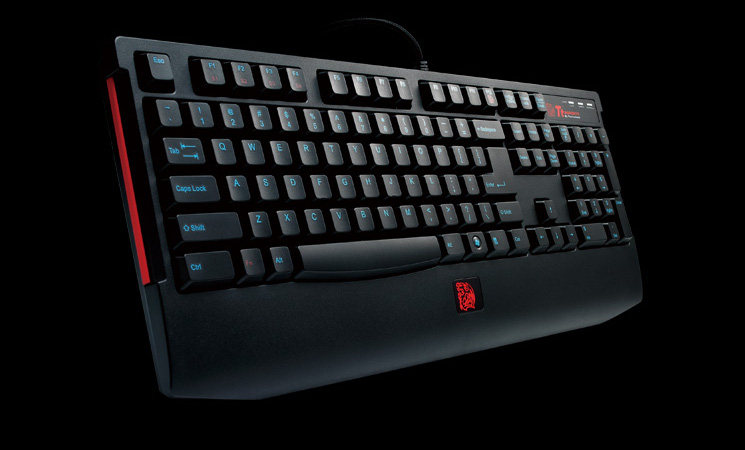
But before we get to the keyboard, lets briefly talk about the name. We’re not exactly sure of the source of the inspiration, but a Knucker is a little known part of English folklore – a long-lived dragon which dwells in rivers and is lives for 1200-years. Co-incidence perhaps, but you never know…
About The Knucker
KNUCKER pro-gaming keyboard is designed with Tt eSPORTS’ brilliant research in keycap switch development, successfully installing the plunger-switch into KNUCKER keyboard. Aiming for outstanding keystroke experience and amazing gentle feedback, KNUCKER is critically tested to make sure each key press meets the expectation.
KNUCKER pro-gaming keyboard is designed with Tt eSPORTS’ brilliant research in keycap switch development, successfully installing the plunger-switch into KNUCKER keyboard. Aiming for outstanding keystroke experience and amazing gentle feedback, KNUCKER is critically tested to make sure each key press meets the expectation.
We would typically expect to see a mid-range membrane gaming keyboard at this price point, yet the KNUCKER spurns mere membrane switches. Instead Tt eSPORTS are utilising what they call a Plunger design – a hybrid of traditional membrane and mechanical mechanisms intended to generate a much more consistent and tactile response than typical membrane keyboards. The design should also increase keyboard durability significantly – they are rating each plunger switch for a life expectancy of up to 15 million keystrokes, a vast improvement over standard membrane keyboards.
The e-sports specialists add adjustable repeat rate functionality to the mix, allowing pressing and holding to register as more individual presses per second, and the vastly more important functionality of up-to 16-key anti-ghosting. Throw in a little accent lighting in and theory you have a good value, durable gaming keyboard with just enough to mark you out from the crowd.
Features and Technical Specifications
KNUCKER gaming keyboard gives you unprecedented keycap experience.
KNUCKER gaming keyboard is designed with Plunger Switch technology that simulates key response from a mechanical keyboard, but much quieter and easier to press.
Keyswitch Development Center in Tt eSPORTS is proud to present the latest innovative development in gaming keyboard keyswitch that is capable of delivering incredible 15 million keystrokes of elasticity, and quite audible feedback. Yet, each time you press, you immediately experience that solid, steady key-press response with slight force from your finger tip
S4Key-Function Design, accelerates your repeat rate switch in 4 modes
KNUCKER gaming keyboard is designed specifically for game genres that require constant switching in repeat rate, a gaming behavior also known as Repeat-Rate Rotating Movement, or R3M in short. This behavior motivates the initial creation of KNUCKER, and to apply in gaming environment, the keyboards acts as a gaming solution to allow gamers to switch the mode rapidly.
*Simply press Fn key + S keys together, the repeat rate is immediately switched from rate 1x to the highest of rate 8x. Requires PS2 adapter to experience
Design Concept of KNUCKER gaming keyboard
Each key cap of KNUCKER keyboard is meticulously designed by Tt eSPORTS’ Industrial Painting Workshop crews to select the most durable yet visually vibrant Electric Cyan silk-print technique to stand out from the commonly seen white paint in other keyboards.
Battle Dragon logo has been well-recognized as a representation of Tt eSPORTS by the e-Sports community. KNUCKER gaming keyboard designs F12 key as the Battle Dragon key, locating at the center of keyboard’s palm rest, seemingly floating between you and KNUCKER.
*To awake up the Battle Dragon, simply press Fn + F12 keys together.
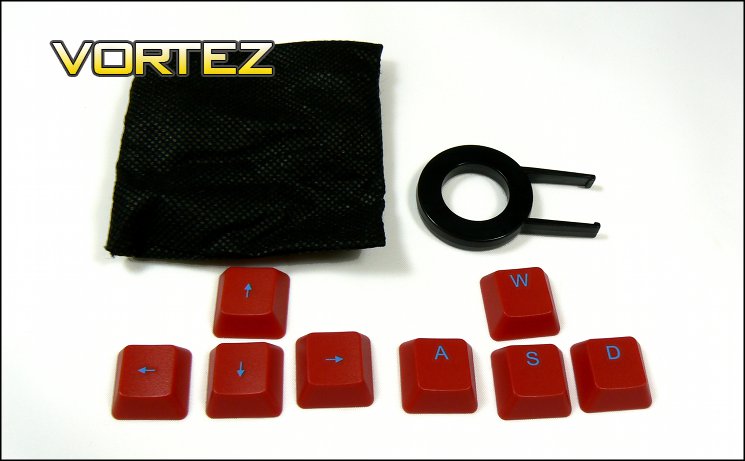
KNUCKER keyboard also gives you 8 replaceable red caps for gaming visual convenience. The most used keys: WASD & 4 directions.
KNUCKER gaming keyboard is designed with Plunger Switch technology that simulates key response from a mechanical keyboard, but much quieter and easier to press.
Keyswitch Development Center in Tt eSPORTS is proud to present the latest innovative development in gaming keyboard keyswitch that is capable of delivering incredible 15 million keystrokes of elasticity, and quite audible feedback. Yet, each time you press, you immediately experience that solid, steady key-press response with slight force from your finger tip
S4Key-Function Design, accelerates your repeat rate switch in 4 modes
KNUCKER gaming keyboard is designed specifically for game genres that require constant switching in repeat rate, a gaming behavior also known as Repeat-Rate Rotating Movement, or R3M in short. This behavior motivates the initial creation of KNUCKER, and to apply in gaming environment, the keyboards acts as a gaming solution to allow gamers to switch the mode rapidly.
*Simply press Fn key + S keys together, the repeat rate is immediately switched from rate 1x to the highest of rate 8x. Requires PS2 adapter to experience
Design Concept of KNUCKER gaming keyboard
Each key cap of KNUCKER keyboard is meticulously designed by Tt eSPORTS’ Industrial Painting Workshop crews to select the most durable yet visually vibrant Electric Cyan silk-print technique to stand out from the commonly seen white paint in other keyboards.
Battle Dragon logo has been well-recognized as a representation of Tt eSPORTS by the e-Sports community. KNUCKER gaming keyboard designs F12 key as the Battle Dragon key, locating at the center of keyboard’s palm rest, seemingly floating between you and KNUCKER.
*To awake up the Battle Dragon, simply press Fn + F12 keys together.
KNUCKER keyboard also gives you 8 replaceable red caps for gaming visual convenience. The most used keys: WASD & 4 directions.
Specifications
Color:- black
Interface:- USB
Switch Type:- Plunger
On-Board Fan Device:- No
Anti-Ghosting Keys:- 12 (USB) / 16 (PS2)
On-Board Memory Size:- 0
No. of Game Profile:- 0
No. of Macro Key:- 0
Polling Rate:- 250 Hz
Back-Light:- No
Wrist Rest:- Yes, undetachable
Graphical UI:- Yes
On-Board Audio Jacks:- No
Smart Cable Management:- No, just SR
Gold-Platted USB:- Yes
USB Cable Detachable:- No
Multimedia Keys:- 0
On-Board USB Port:- 0
Keystroke Lifecycle:- 15 million
Cable Length:- 1.8m braided
Dimension (LxWxH):- 450 x 185 x 28.5mm
Other Features – Plunger CHERRY Black switch feels like mechanical switch.
– Repeat Rage Adjustment: 1x/2x/4x/8x in PS/2 modeI
– Ideal for FPS game genre
Interface:- USB
Switch Type:- Plunger
On-Board Fan Device:- No
Anti-Ghosting Keys:- 12 (USB) / 16 (PS2)
On-Board Memory Size:- 0
No. of Game Profile:- 0
No. of Macro Key:- 0
Polling Rate:- 250 Hz
Back-Light:- No
Wrist Rest:- Yes, undetachable
Graphical UI:- Yes
On-Board Audio Jacks:- No
Smart Cable Management:- No, just SR
Gold-Platted USB:- Yes
USB Cable Detachable:- No
Multimedia Keys:- 0
On-Board USB Port:- 0
Keystroke Lifecycle:- 15 million
Cable Length:- 1.8m braided
Dimension (LxWxH):- 450 x 185 x 28.5mm
Other Features – Plunger CHERRY Black switch feels like mechanical switch.
– Repeat Rage Adjustment: 1x/2x/4x/8x in PS/2 modeI
– Ideal for FPS game genre
Packaging And First Look
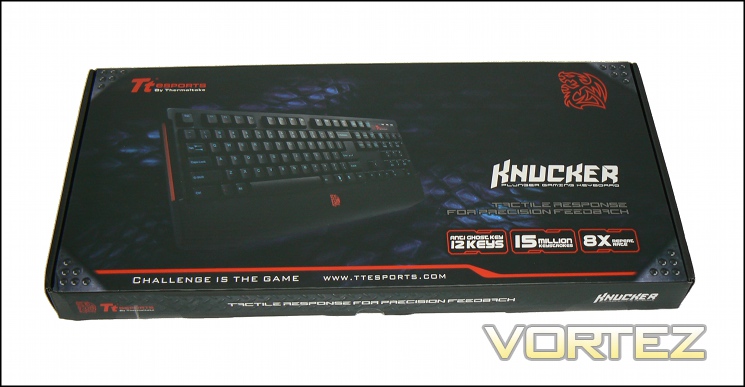
Tt eSPORTs certainly know how to present a keyboard. Although clearly designed with cost in mind, the packaging does exactly what it needs to do in showing off the keyboard and main features. The Knucker, in this case a US variant, is displayed clearly along with features every potential user should be interested in: anti-ghosting, long-term durability and repeat rate adjustment.
The front bears the legend: KNUCKER – Plunger Gaming Keyboard, which is immediately intended to have anyone looking at the keyboard immediately wonder what it means by ‘Plunger’. Tactile Response and Precision Feedback provides some explanation, but perhaps not as technical as some might desire.
Note that although the keyboard imaged will be the US variant, localised variations are available and sold in near identical packaging. The specific model can be determined by looking up the model number on the rear – the UK has an SKU of KB-KNK008UK, US/EU variants should be identified similarly.
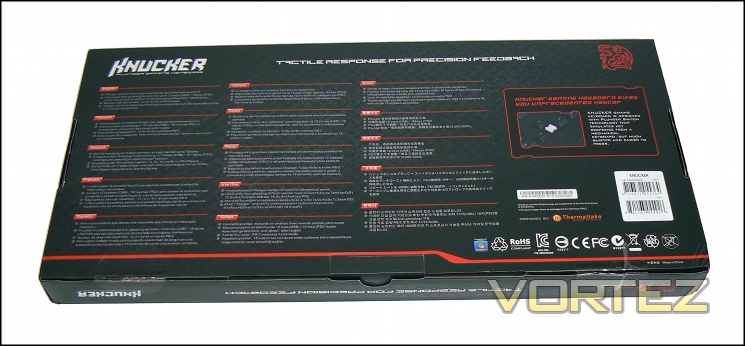
If the rear is anything to go by, the Knucker should be pretty widely available. The major features are described in no less than fifteen different languages and should cater to most different markets. Tt eSPORTS also add a little additional detail on the Plunger switch, describing it as a ‘key which simulates the response of a mechanical keyboard, but much quieter and easier to press’. We’ll assess those bold claims later.
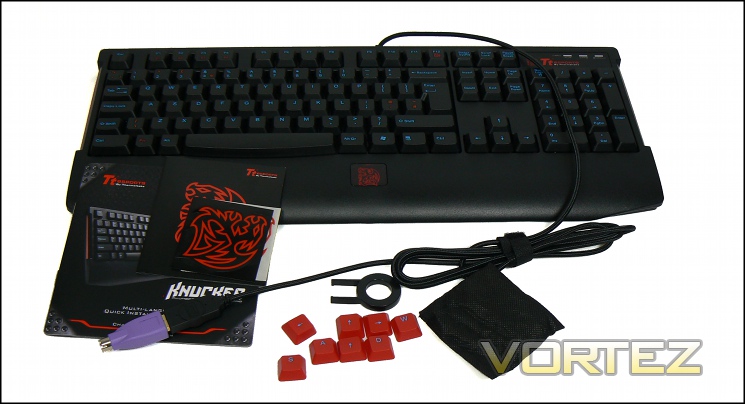
Our first look at the Knucker ‘in the flesh’ so to speak. The layout of this SKU is very close to UK standard with one exception – switched position for the Windows key. In its place is the Fn key, typically utilised for hardware adjustments independent of software and most usually located on the right of the main keyboard. The Windows key on the Knucker takes it place on the right, to the right of Alt Gr.
The Knucker comes with a few more accessories than you would typically expect from a mid-range keyboard. Most surprising is a keycap remover and a set of red keycaps held in a cloth bag, whilst those who outfit their PC chassis in branded decals of the components they use may be interested in the Tt eSPORTS ones in the bundle. A multi-language quick installation guide describes the plug-and-play starting procedure and operating instructions for Knucker-specific keyboard features.
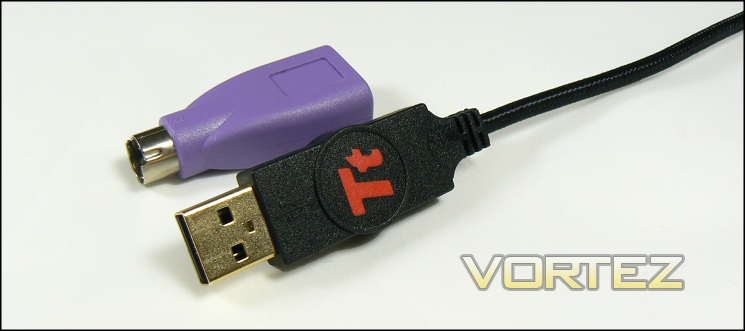
Note that the keyboard comes with a USB-PS2 adapter, in case the slightly faster response time and anti-ghosting of PS2 is your preference. The cable is braided with a quite dense and soft weave which should be to the benefit of long-term durability, a velcro cable-tidy should also help keep desk clutter to a minimum.
So, that’s a fully fleshed out package. Product-specific drivers are not required, so there’s no need to acclimatise yourself to software-specific idiosyncrasies. So far, if you’re looking for a low learning curve keyboard to use at home, in the office and take to LANs, the Knucker is fitting the bill admirably.
A Closer Look
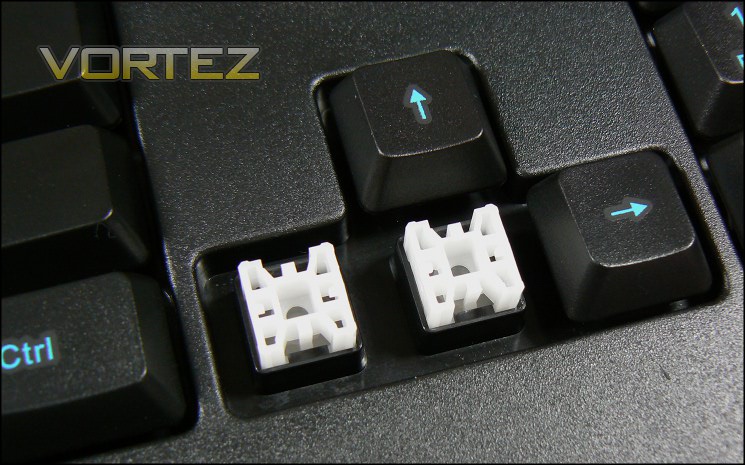
Raising a Knucker keycap exposes the switch underneath. Dubbed a ‘Plunger’ switch, the design appears to be intended to equalise the pressure over a membrane-esq dome, improving consistency and long-term durability. The white ‘slider’ component is shaped to be guided by groves in the switch surround, whilst keycaps attach to the top of the slider via two prongs.
Keycaps themselves are a standard smooth matt black smooth plastic finish, quite unlike the sometimes unpleasant finish on mechanical keycaps which can be black-board like. The characters are printed rather than laser-etched, which likely reduces cost somewhat. Note that these keycaps are not compatible with standard Cherry MX switch keycaps and visa/versa. The print used is a little raised on the keycap surface, but not by much this face shouldn’t impact day to day use.
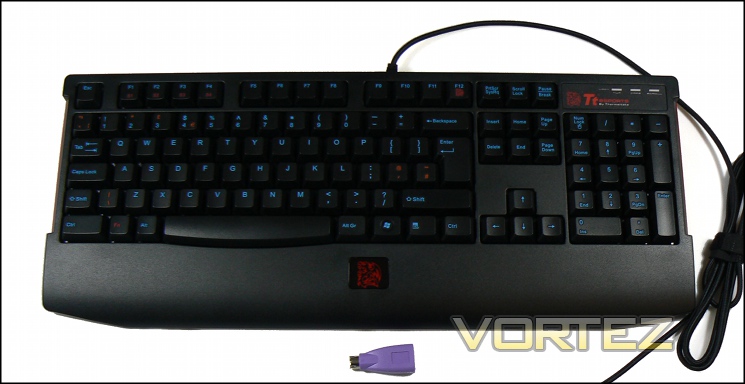
You’ll note the red text on certain keys, and at first glance this could be a little confusing. However you should swiftly realise that S1-S4 and the Dragon symbol on F12 refer specifically to keyboard-specific functionality; whereas other red print indicates keys which have specific regional variations such as ” rather than @ for SHIFT+2. It’s a good QA policy for them, and adds a little more colour to the design for the end user; we can’t cry foul here.
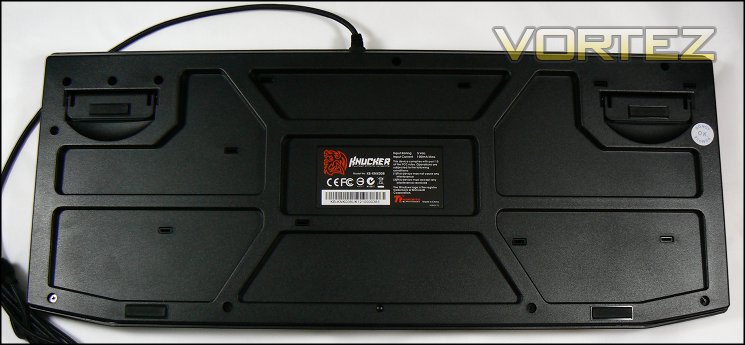
The floor of the Knucker has two levered feet, angling the keyboard up slightly from the floor. These feet have two rubber pads, which when coupled with two pads on the built-in wrist-rest do an exceptional job fixing the keyboard in place on your typical PC desk.
The Knucker features neither macro nor media keys, making it very much a focussed gamer ‘board. It does however include a Function (Fn) modifier for specialised functionality specific to this keyboard.
Customisation Options
Given the price of the Knucker, you might expect no customisation options at all. However the keyboard has a few tricks up its sleeve which may prove intriguing.
The first is the removable keycaps. Taking nods from mechanical switch design, Tt eSPORTS has designed the Knucker to allow keycaps to be switched with other compatible ones, and have supplied eight additional in red for WASD and arrow keys. This should also help pick out keys in low-light conditions where more expensive keyboards could have backlighting. In addition, if modding your keys were tempting this would also allow you to do it much more easily.
Another rare feature the Knucker utilises is that of being able to accelerate key repeat rates in hardware. Sometimes when scrolling through text or in a few games a higher repeat rate – that is the more times the OS will register a keypress when a key is being held down – will increase the rate at which these actions are performed. The Knucker allows up to 8x normal speed, a mode activated by simultaneously pressing Fn and S4. S2 and S3 modes increase the rate to 2x and 4x respectively, whilst S1 return it to the nominal rate.
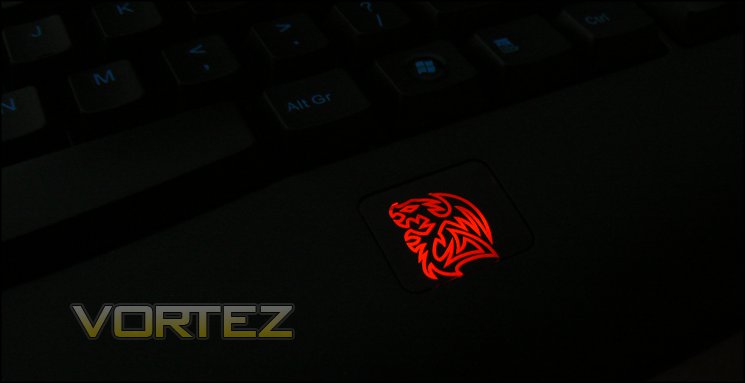
What would a Tt eSPORTS peripheral be without a little bit of bling? If that’s your thing then be sure to active the Battle dragon logo by holding down Fn with F12.
Performance
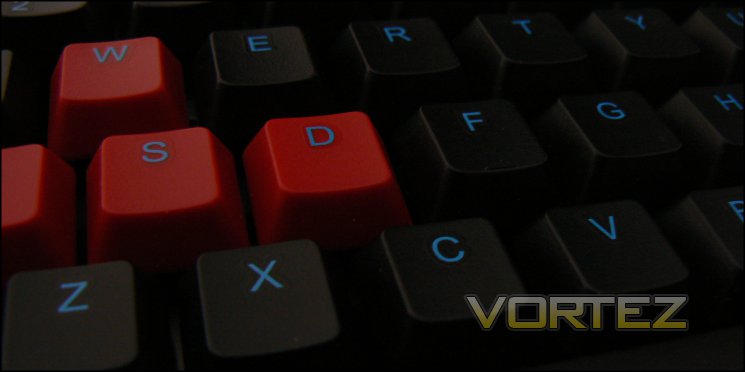
Our first port of call in assessing the overall performance of the Knucker should without doubt be the keys, or more precisely the switches. The keys are quite light-weight and wide, which means that striking them accurately is very simple. It also seems like Tt eSPORTS have gone for a low profile in order to minimise the actuation distance and make the initial push seem like overcoming the bump of a tactile mechanical switch, whilst in reality you’re overcoming the initial deformation of a rubber dome. Following that the amount of force required is low, as one would expect from both switch types.
The effect is somewhat mixed. Although intended to mimic tactile mechanical switches such as the Cherry MX Blue, the switch dynamics don’t resemble those of a mechanical switch type in operation apart from a point of heavy resistance and then semi-linear thereafter. Blue’s have a linear initial action which the Plunger types do not, the best comparison being ‘similar to Blues once you meet the initial point of tactile feedback’. As advertised however it’s also lot quieter, exhibiting none of the distinctive click of a mechanical switch at either tactile point of when it hits the backplate. Despite note quite living up to expectations it’s much more satisfying than a typical membrane switch, which to be fair is the keyboards chief competition. As with most membrane keyboards, actuation is upon virtually depressing the key to its fullest extent rather that at an intermediate point.
One exception to this was the Spacebar. Exhibiting lower resistance to get over the initial bump, and exhibiting different points of actuation depending on the side of Spacebar struck, this key was by some margin the least reliable and lead to a few missed strikes before began to adapt. Given the even nature of the rest of the key set – including the larger Enter and R-Shift – this was a little disappointing.
The Knucker lacks both macro and media keys, so the choice of USB or PS2 connector generally comes down to a mix of personal preference and the need for ever greater levels of Anti-Ghosting. We did most of our testing in PS2 mode.
Typing and word-processing on the Knucker is very good, although speed for touch-typists will be a little hampered compared to mechanical keyboards due to slightly less key spring-back. On the other hand keystrokes are much quieter, lending themselves to an office or other group environment where the repetitive clicking of a switch could grow to frustrate colleagues. Compared to standard membrane rubber-dome switches the keys are much more responsive, resulting in the potential for faster speeds and better precision.
Increasing key repeat rates, previously the main domain of OS settings which the average office worker may be locked out from, can in many cases aid productivity, especially in spreadsheet manipulation when cycling through cells. We wouldn’t say that it left such a significant impression that it would sway any purchasing decisions, but it does represent a pleasant bonus.
Speaking of bonuses, the removable keycaps make cleaning the keyboard far more easy than typical membrane keyboards.
Anti-Ghosting / NKRO
The Knucker lists up-to 16 key anti-ghosting in the technical specifications, which with the exception of a number of extreme outlier cases is plenty for a gaming keyboard. The most important keys to have anti-ghosting features is of course the keys around WASD, generally one key either side plus L-Shift and L-Control.
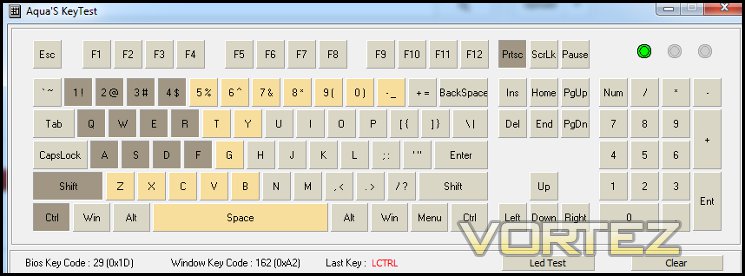
Once again, Aquakey or Microsoft’s web-based java app are good first ports of call for anti-ghosting testing in the absence testing every possible 16-key combination in game. Using these tools we were able to assess the anti-ghosting capability as fair-to-good: Knucker PS2 anti-ghosting is capable of determining individual keypresses for the keys SHIFT+CTRL+WASD+QE12345RTFG, but not ZXC (which are mutually exclusive with 123 when six or more relevant keys are pressed) and the diagonal line consisting of BHU8. Slightly more troubling is that certain keys are unresponsive with only three keys in the crucial WASD zone held down, including number and symbol keys in the top row often crucial for MMO’s.
Now, keep in mind that this is nowhere near poor as far as gaming keyboards go. Most only claim 6-key rollover, so to provably demonstrate 16 is very good. It does mean however that your keybindings will need to take our results into account in certain titles, most specifically MMO and RTS genres. If possible, offloading borderline functions to a mouse macro would be sensible.
Gaming Performance
As is usual, we tested the Knucker with three different titles representing three gaming genres which have markedly different key usage patterns. This time around we have plumped for Borderlands 2, Torchlight 2 and Starcraft 2.
Borderlands 2
2012’s critically acclaimed FPS is first up, and encapsulates the need for dependable keystrokes to accommodate fast-paced action. The Knucker turned out to be quite ably suited to the game in most instances thanks to the short actuation length and predictable response, with anti-ghosting features never failing during gameplay.
A frustration was the spacebar – as previously identified the left-side does not actuate in the same way as the right, and so requires much more force than you’d expect. This isn’t quite so noticeable in typing as in gaming due to a personal typing style which strikes the right of the spacebar, whilst in gaming only the left is hit. The result is that sometimes a jump wouldn’t be registered when intended, although over time it was possible to adapt. Obviously this is less than ideal, and may be a specific issue with a batch of which this was a member.
Starcraft 2 And Torchlight 2
Torchlight 2 and Starcraft represent genres where your fingers tend to migrate across the keyboard a little more than an average FPS. Response, precision and fast successive keypresses are all crucial, whilst anti-ghosting is also of particular aid in the absence of an advanced macro mouse. In the case of Starcraft, developing a rhythm through a predictable and regular response from the key aids in developing muscle memory.
Plunger switches on the Knucker were well up to the task. Compared to typical membrane switches the low actuation distances and improved consistency did make a surprising difference at times, although they don’t compare too well to the much more expensive mechanical switches we’ve seen recently. The spacebar one again misbehaved in Starcraft, but Torchlight never really requires the use of that key.
Hardware-based keyboard repeat rate increases (through the use of the S1->S4 functionality) were surprisingly noticeable in Starcraft 2, especially when spawning large numbers of zerg larvae. If you spend the majority of your time in this game or genre the 8x repeat rate functionality could have a significant impact on your macro, whilst the uniform response should not impede your micro.
Finally, moving the Windows key is a godsend. Other manufacturer’s do allow you to disable the key temporarily, but there’s elegance to the concept of moving it out the way entirely. Baring adding such firmware complications – no doubt also increasing development times and cost – it seems like an ideal compromise.
We should also note that despite initial concerns the inherent chassis flexibility didn’t pose a problem, indicating positioning of support and reinforcement on the feet when angling the keyboard. Similarly, the wrist-rest also adds some palm support, but it’s quite minimal. Those who suffer particularly from wrist may want to also purchase an additional rest to alleviate pressure.
For a mid-range keyboard the Knucker was pretty impressive. Time to conclude with out overall thoughts…
Conclusion
We’ve had some time with the Knucker now, so it’s time to give you our overall thoughts.
It’s important to recognise from the outset that this is not a full-on mechanical keyboard like some recently reviewed, but nor is it costed as such. At £35-40 it’s firmly in the mid-range, competing against membrane keyboards without the plunger mechanism yet otherwise featuring a similar specification with the exception of macro and media keys. To a large extent therefore value hinges on the switches themselves.
In that regard… we’re pretty happy. We should say that despite the marketing they don’t feel too similar to mechanical switches, but they share similarly consistent and predictable responses. The keys are slightly softer and considerably quietly, making the keyboard a little more suitable in communal environments. Apart from the slightly lopsided feel and less than 100% reliable response of the Spacebar we can’t really criticise the Plunger mechanism very much, and would have to admit that it’s preferable to many standard membrane keyboards sold at a similar price.
Inclusion of 12/16-key NKRO – depending on your choice of USB/PS2 – is in our view essential for gaming keyboards, but not always a given at this price bracket. Whilst the anti-ghosting wasn’t perfect around the crucial WASD zone, it was more than adequate for our purposes in testing. It is certainly far more essential than tailoring key repeat rates, although that does have extremely valid gaming applications we hadn’t initially considered. For some the lack of macro and media keys will be pronounced, but we must admit that we rarely find ourselves using over binding complex macros to mouse buttons.
With the above taking into account, our only reservation from a day to day perspective is the flexibility of the chassis. You’re often tempted to use a little more force in typing than usual with the Knucker and the very slight flex is noticeable, though sensible support placement means that it’s not a deal-breaker. It’s worth noting that most membrane keyboards also suffer from this, in some cases to a much greater extent.
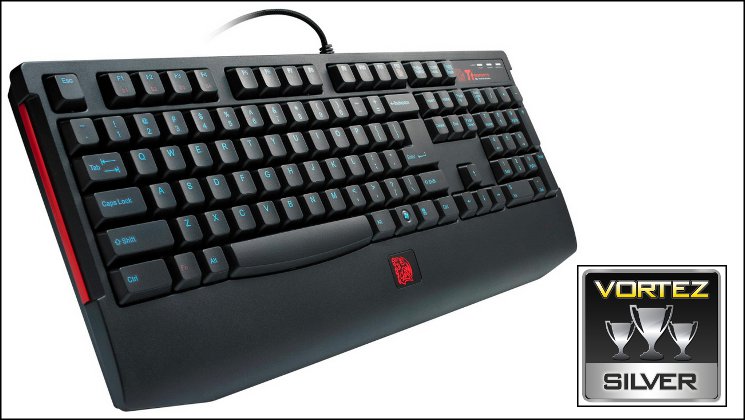
There’s no backlighting, but the blue print and potential for red keycaps sets it apart from the competition, and if you fancy a spot of modding then painting some spare caps isn’t beyond the pale. In low-light conditions the red keycaps will help to orientate your hands and located keys used less often, but it’s not a substitute for actual illumination. LAN gamers should also note the lightweight design with compact footprint for transport purposes.
Tt eSPORTS are pushing the envelope with their Knucker keyboard, pinning hopes on the value of the plunger hybrid switch which provides good response characteristics superior to the standard membrane design. Whilst lacking some ‘mod cons’ such as keyboard backlighting and macro functions, the minimum of 12-key rollover is an essential gaming feature which is seen on the Knucker yet not quite so comprehensive on the competition. As a solid mid-range entry we value it enough it give it a firm Silver Award.
Pros
+ Durable switch design
+ Quieter than typical mechanical keyboards
+ 12 or 16-key anti-ghosting
+ Replaceable keycaps
Cons
– No Backlighting
– No Macro Keys
– Slightly inconsistent spacebar
Tips
= Better anti-ghosting performance with supplied PS2 connector
+ Durable switch design
+ Quieter than typical mechanical keyboards
+ 12 or 16-key anti-ghosting
+ Replaceable keycaps
Cons
– No Backlighting
– No Macro Keys
– Slightly inconsistent spacebar
Tips
= Better anti-ghosting performance with supplied PS2 connector

Click here for an explanation of our awards at Vortez.net.


