







NZXT have bravely entered the ever competitive CPU cooler market. Is the Havik ready to take on Noctua and Thermalright?
Product on Review : NZXT Havik 140
Manufacturer and Sponsor : NZXT
MSRP : $74.99/69.99 Euros
Street Price : N/A at time of review

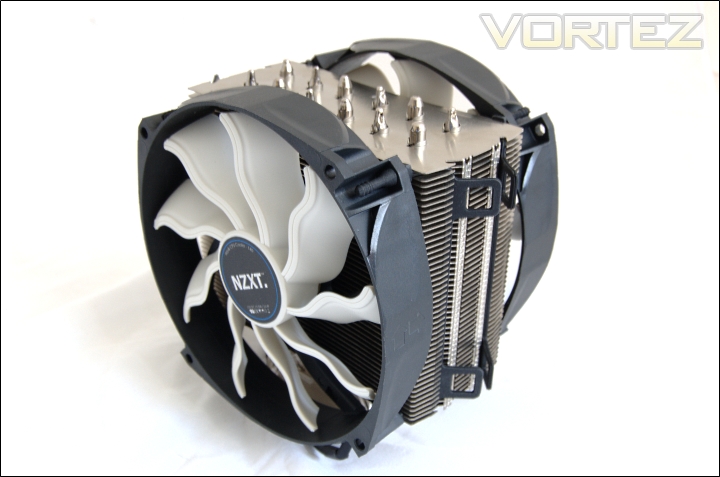
The Havik 140 is a completely new and fresh design to come out of NZXT’s lab. As the name instigates, it is designed to take advantage of better performing but quieter operating 140mm fans. Thermalright and Noctua have been the first to introduce such concepts and given the rising popularity of 140mm fans into the mainstream, it wasn’t long till consumers were going to see these on CPU coolers. Perhaps the closest competitor to the NZXT is the Thermalright Archon which also comes with its own 140mm fan. The Havik looks like a very traditional heatsink on initial impressions. It boasts six 6mm heat pipes, uses an aluminium and copper construction, has a densely packed laminar fin array and dimensions comparable to other towers such as the Venomous X. As such, we expect performance to be comparable. The highlight is of course the inclusion of two uniquely shaped 140mm fans, a first for tower coolers. The overall package from NZXT is a complete one but can NZXT compete outside of their comfort zone?
A few words about NZXT:
NZXT, a company built upon gamers dreams, hopes to create products that put consumers first. With the objective of designing unique products catered for hardware enthusiasts and gamers, NZXT has grown into a globally renowned brand recognized for dedication towards creating the next great gaming product. NZXT has won numerous awards from media and publications from across the globe with a product line spanning from gaming chassis, power, and gaming input devices. As a corporation formed by gamers, NZXT continues to expand into new horizons and push the limits further with each product unveiling.
Our dedicated sales and customer service team will work diligently to earn your trust and loyalty. All our products are built with high quality material and engineered in the best conditions.
NZXT products are designed and engineered in the United States and manufactured overseas in China and Taiwan.
NZXT was established in 2004 in Los Angeles, California.
Our dedicated sales and customer service team will work diligently to earn your trust and loyalty. All our products are built with high quality material and engineered in the best conditions.
NZXT products are designed and engineered in the United States and manufactured overseas in China and Taiwan.
NZXT was established in 2004 in Los Angeles, California.
Next page please.
Features & Specifications
NZXT’s take on the Havik
The CPU is one of the most important components of the PC for smooth performance, and keeping it cool is the way to achieve flawless performance. NZXT presents Havik CPU Cooler, the one to achieve maximum cooling, optimal performance for your CPU, and epic wins for you. Havik possesses six 6mm heat pipes with dual standard 140mm fans along with 100% soldered, quality nickel plated copper base and aluminum fins for the efficient conductivity. The unique fan blades provide excellent airflow and quiet operation while the newly patented heatsink fins exceptionally slice passing air for increased ventilation and reduced noise. Don’t let the cpu wreak havoc in your pc – wreak havoc in game.
Features
•Six 6mm heat pipes with standard dual 140mm fans for the most efficient conductivity
•Unique fan blades provide quiet operation and highly effective airflow of 90.3 CFM
•Newly patented fins exceptionally slice passing air for increased ventilation and reduced noise
•100% soldered copper base and aluminium fins with nickel plating to ensure resilience against deterioration, quality, and long life
•Includes sturdy Intel/AMD mounting kits to accommodate a variety of motherboards and secure the heatsink during transportation
•Universally compatible to Intel Socket 1366, 1155, 1156, 775, and AMD socket AM3, AM2+, AM2.
Specifications
Material: Aluminium/Copper Nickel-Plated
Dimensions with 2 fans: 140x166x120mm (WxHxD)
Dimensions w/o fans: 135x160x60mm (WxHxD)
Weight: 1035g (Including dual 140mm fans), 760g (heatsink)
Mounting pressure: 55-60lbs
Fan size: Dual 140x140x25mm
Fan bearing: Long Life (Oil-Leaking Prevention) + Shaft with copper sleeve
Fan Speed: 1200+/- 10% RPM
Noise level: 27.8 dBA
Air flow: 90.3CFM
Connector: 3-Pin
Input power: 3.6W
Life: 30,000 hours
Compatibility: Intel Socket 1366, 1155, 1156, 775, and AMD socket AM3, AM2+, AM2
NZXT’s Havik appears to be very good on paper. The dimension of the heatsink alone is similar to the Venomous X. The Havik is 8mm wider but less thick by 3mm. As such it also weighs quite little at 760g where the Thermalright is 755g. The sheer size of the fan means that users need to take into account the extra dimensions when they are installed. At 166m tall, it should fit in most modern mid-tower cases but those with side panel fans need to be wary. The mounting pressure is also the same as Thermalright coolers with the vault bracket system left in its default position. The construction is fairly standard and uses the same aluminium and copper found on other coolers. Like most high end air coolers, the Havik uses six 6mm heat pipes soldered on to a nickel plated copper base for better conductivity and aesthetics.
The specifications of the fans are very impressive if not very optimistic. It aims to shift a lot of air quietly which at 1200RPM makes it a direct competitor to Noctua’s NF-P14. NZXT rate the fan to generate similar airflow to their higher speed FX-140LB 140mm fan whilst doing so at much lower noise levels. These are very bold claims but the unique blade design might be the reason. The lifespan of the Havik fan is also much higher than the FX-140LB but not comparable to the immense 150,000 hours the Noctua NF-P14 comes rated at.
Packaging and Content
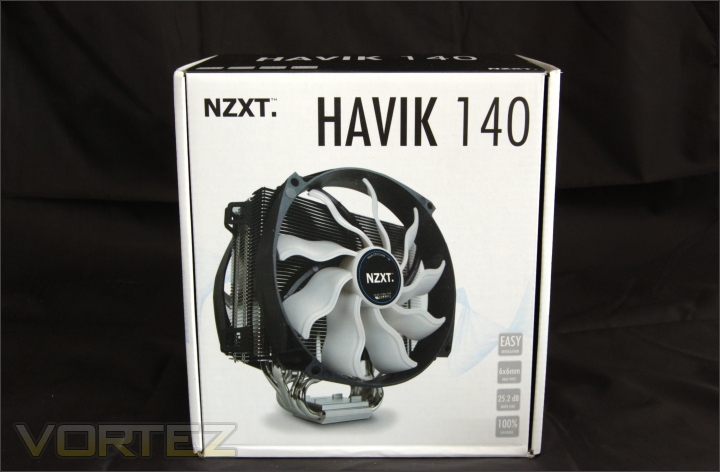
The front of the box
The NZXT Havik 140 comes packaged in a fairly standard cardboard box that follows an attractive black and white colour scheme. It is fairly minimalistic but works well to appeal to users. As always, it is more welcoming to see a simple design rather than an overwhelmingly flamboyant design. On the front is an illustration of the heatsink and fan with 4 of its key features listed at the bottom right. The model name is printed boldly across the top. Overall, a promising start.
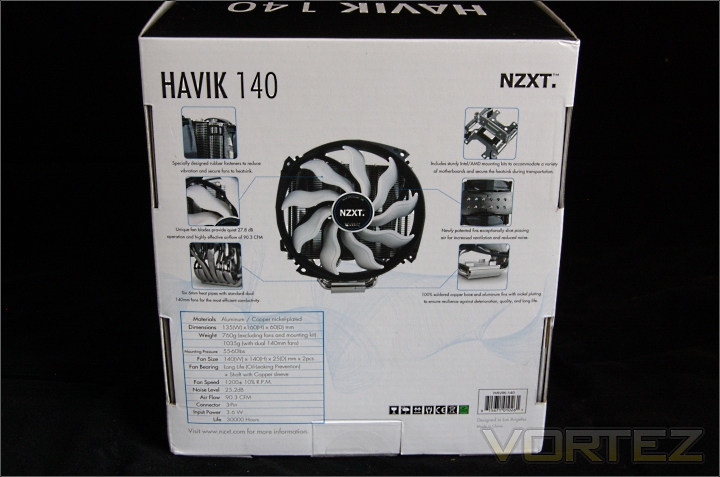
The back of the box
Turning to the back are small pictures illustrating a number of features such as the heat pipes, dual fan support, rubber fan fasteners, easy installation and copper base. There is also an official specifications table which on paper boasts very good numbers. It also gives potential buyers an excellent view of what to expect.
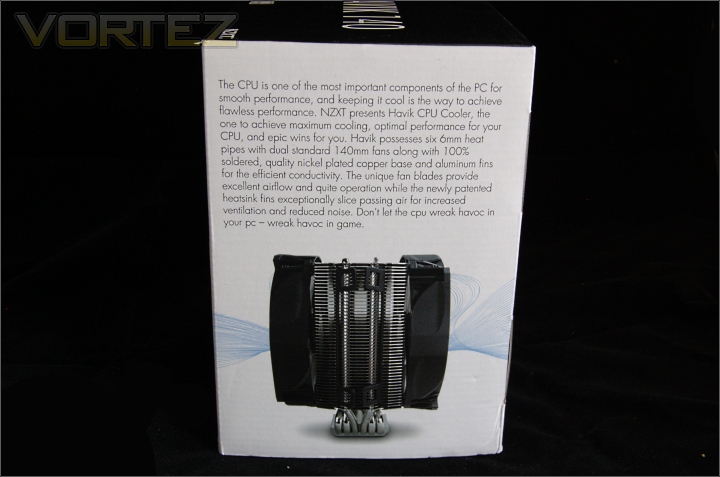
NZXT blurb
On the side, NZXT provide a blurb of what their Havik aim to deliver and how their Havik is designed to cope with the heat generated by current CPUs. The picture also shows a side view of the cooler with both fans installed so buyers have an idea of what it looks like from all angles.
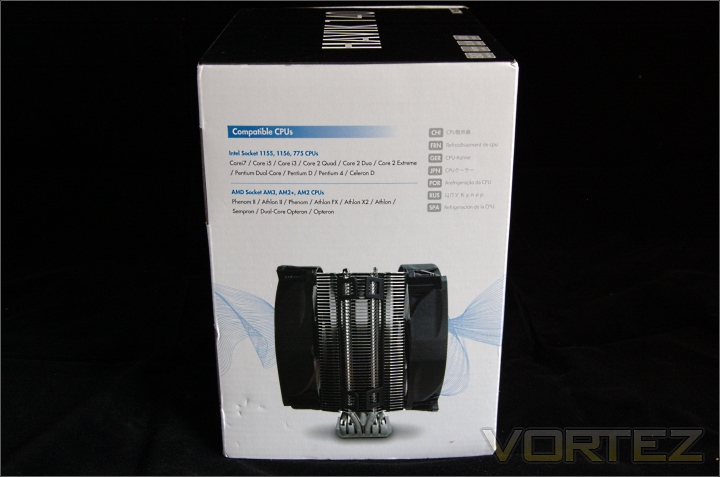
Socket compatibility
On the other side, NZXT list all the sockets and CPUs the Havik is compatible with. It supports all current Intel and AMD sockets going back to LGA775 and AMD AM2.
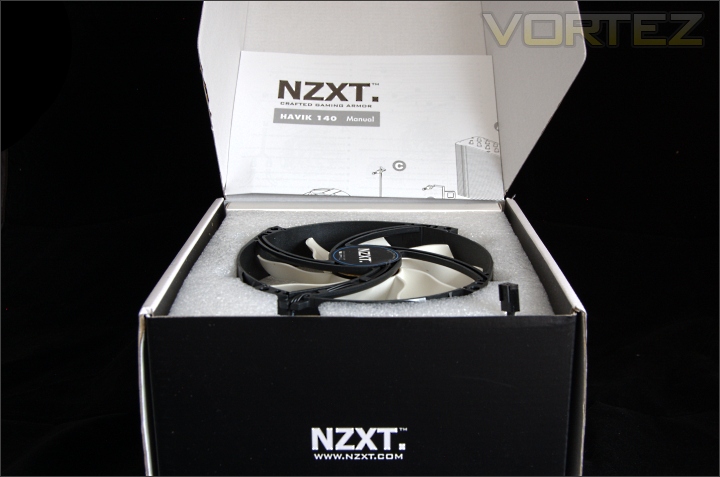
Opening the box
Opening the box and lifting the lid reveals the first fan and the Havik manual. The manual simply folds out for all the instructions. The fan itself is enclosed in foam for protection.
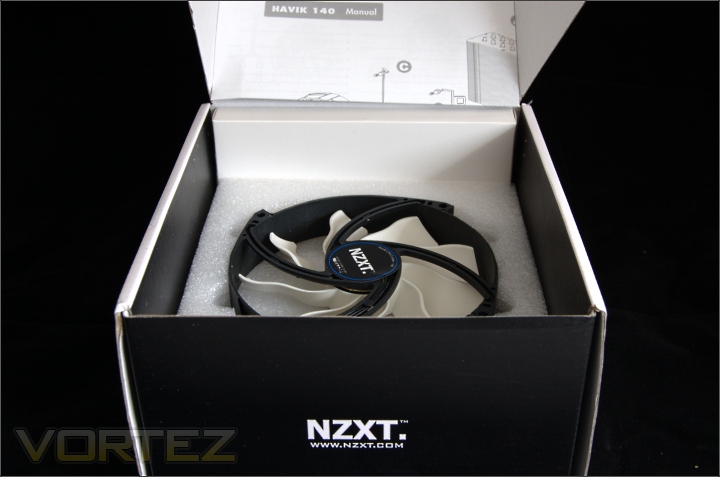
The second fan
Removing the first fan, we go deeper and meet the second bundled fan. At the back, the white box contains all the mounting kit and accessories.
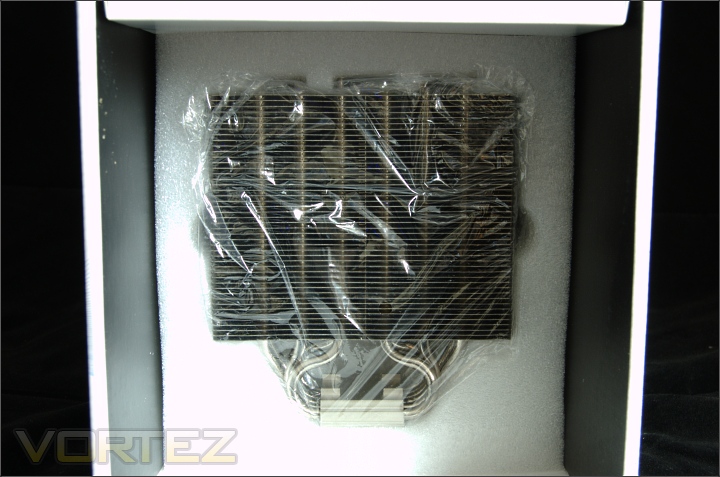
The heatsink at the end
And finally we have the heatsink wrapped in a plastic bag and secured in foam cut out. The sides have thumb grooves to ease removal of the heatsink.
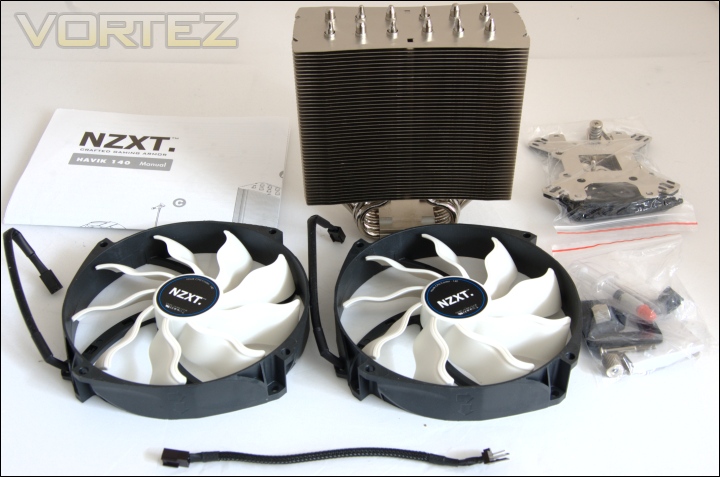
The bundle
The whole package includes:
-NZXT Havik heatsink
-NZXT Havik manual
-NZXT 140mm fans x2
-3-pin fan y-splitter
-Intel mounting kit
-AMD mounting kit.
It’s good to see NZXT bundling two of their specially designed fans with their heatsink as it saves potential buyers the trouble of buying other fans. However, it can be argued that some people may want to use their own fans or have the choice to do so. We will see later if the NZXT fans have the performance to warrant settling with them.
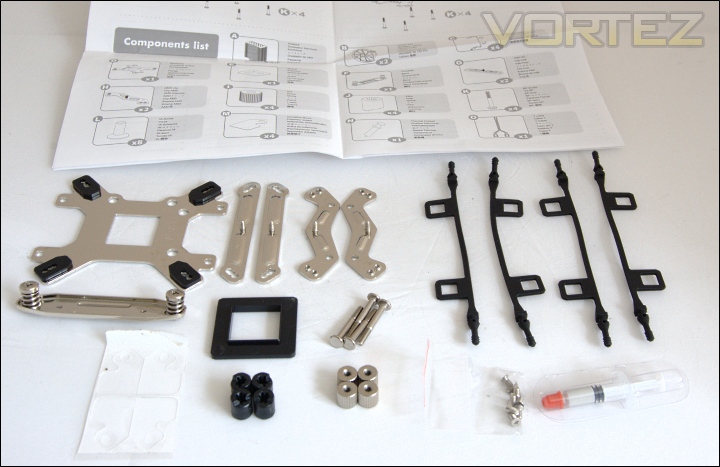
The installation kit
Taking a closer look at the mounting kit, we have the:
-Universal Intel and AMD backplate
-Intel clips x2
-AMD clips x2
-Crossbar
-LGA775 spacer
-BP-screw x4
-Pillars x4
-Nuts x4
-Insulation films x4
-Rubber fasteners x4
-IA-screws x4
-Thermal grease
After my complaint that the Alpenföhn Matterhorn had several installation back plates, it is refreshing to see NZXT opt for a universal back plate as it reduces the number the components required needed for installation. We will see later that it makes the whole process much easier.
Closer Look
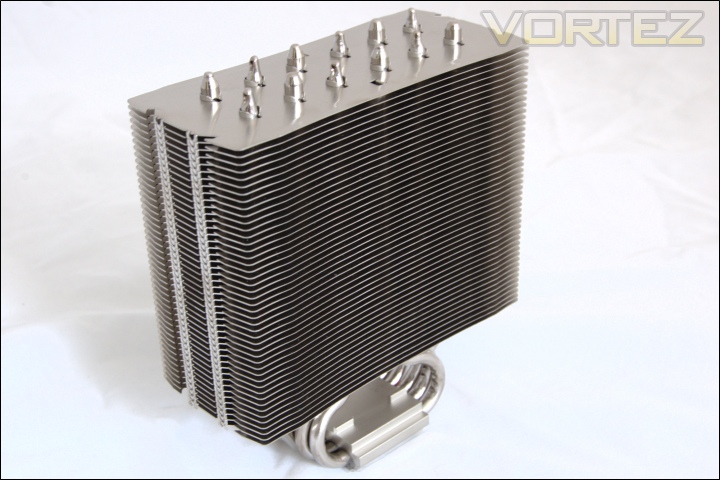
The heatsink
The NZXT Havik 140 has a very plain design on initial impressions, sticking to the tried and tested tower heatsink with laminar fins. The finish adds to the overall appeal and the clean finish further makes the Havik an attractive choice for anyone looking to spruce up their computer internals. In all, the Havik has style and promises to deliver substance. It is certainly very robust but at the same time not as heavy as the previously reviewed Alpenföhn Matterhorn. In terms of dimensions, it closely matches the likes of the Thermalright VX. It is less deep to maximise RAM compatibility and compensates by being wider.
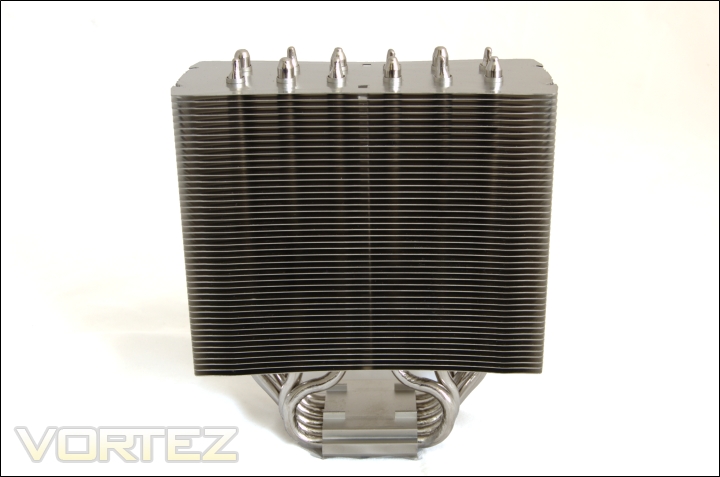
The front face
Unlike more established CPU cooler manufacturers such as Noctua or Thermalright, NZXT have opted for straight fins stacked parallel to each other. They claim it is a patented design that “slices” passing air for increased ventilation but there’s little to no difference compared to the Frio. This is not a bad thing because it is a tried and tested design, one that is ideal for a company breaking into this market. Each fin is broadly rectangular with a slight curvature towards the centre and boasts an approximate surface area of 8100mm squared. A total of 46 fins make the total surface area 372600mm squared. For comparison, the Silver Arrow has 50% more surface area whereas that of the Venomous X is only marginally higher at 384000mm squared. The fin separation is 2.5mm.
The side profile
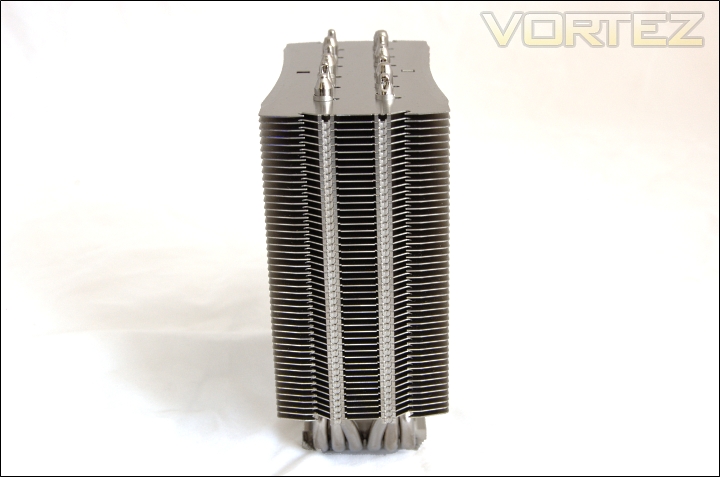
The side profile shows that the heatsink is fairly narrow, a mere 5mm more than the Thermalright Archon. Again, we see that the fin array is laminar and two grooves running down either side of the heatsink are for the rubber fan adapters.
The heatsink base
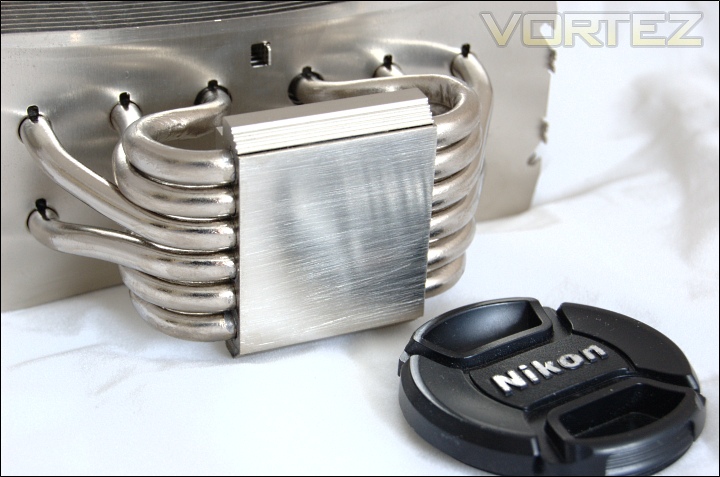
The base uses a copper construction for better conductivity that is nickel plated to keep in theme with the rest of the aluminium finish. It also increases the durability of the base. The base is flat but lacks a perfectly mirror finish. Instead, we can see slightly streaks running across but this is where thermal paste comes in handy. The flatness meant that thermal paste spread easily through the heatsink pressure alone when a small blob was applied.
The heat pipes
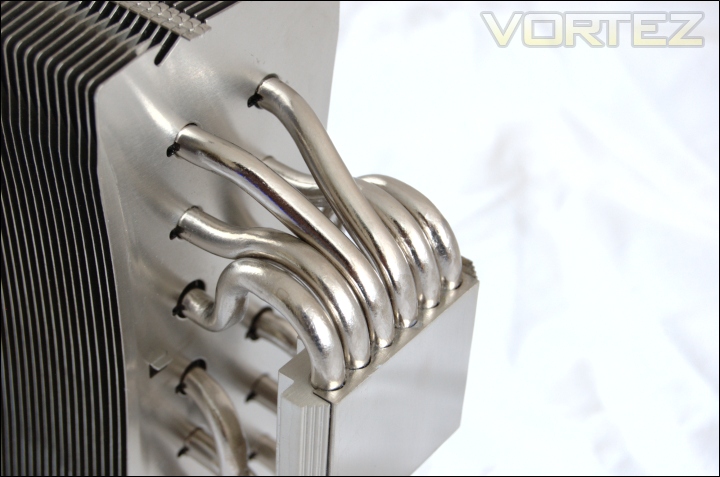
The six 6mm heat pipes are soldered to the copper base for the most efficient heat transfer. The heat pipes are shaped to form two rows of 6 heat pipe ends, not dissimilar to the Archon.
The top of the heat pipes
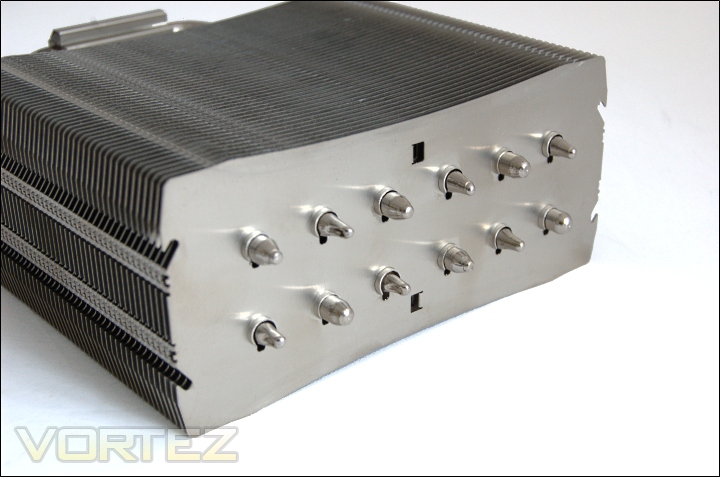
At the top we can see the arrangement of the heat pipes. Having two rows running parallel means that the airflow can cool more heat pipes, unlike on the Prolimatech Super Mega where the front heat pipe effectively blocks the other 5 behind it.
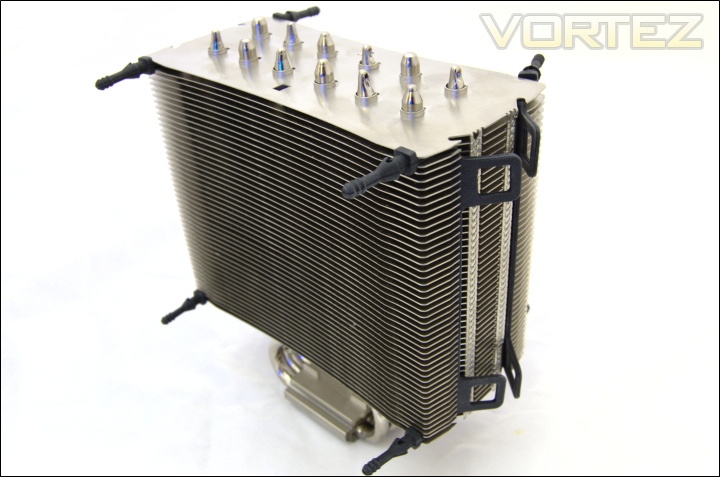
Rubber fan adapters
The Havik uses a very unique fan mounting mechanism. The adapters are made of rubber so not only are they flexible, but they also reduce vibrations. Since the rubber strips are straight, they need to be stretched and bent at the end. The strip slot nicely into the side fin grooves whereas the ends go through the fins. They are surprisingly secure even if left in the above position so installation is very easy.
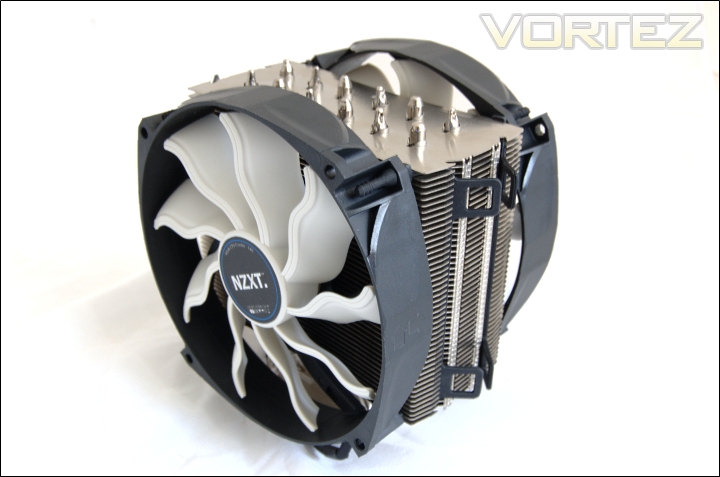
Installing both fans
The end of the rubber adapters simply have to be inserted in the fan mounting holes to secure them on to the heatsink. The mechanism is very flexible and makes a brilliant alternative to metal clips.
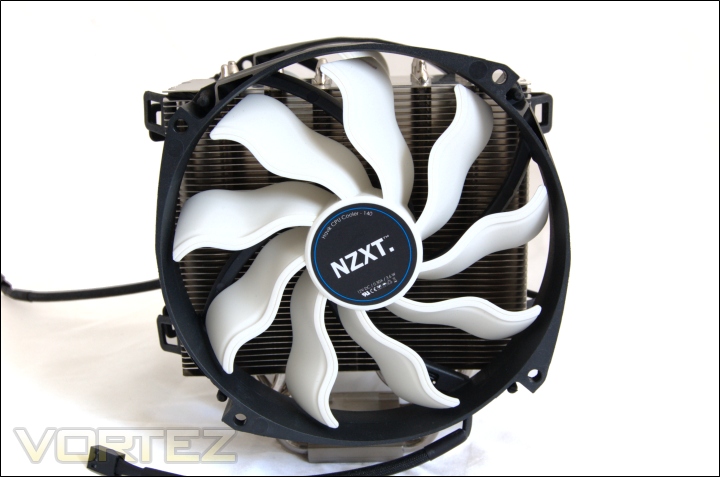
The front of the cooler
From the front, we can see that the fan extends the dimensions in height and width. The sheer size of the 140mm fan means that the blades cover the whole area of the heatsink to maximise airflow.
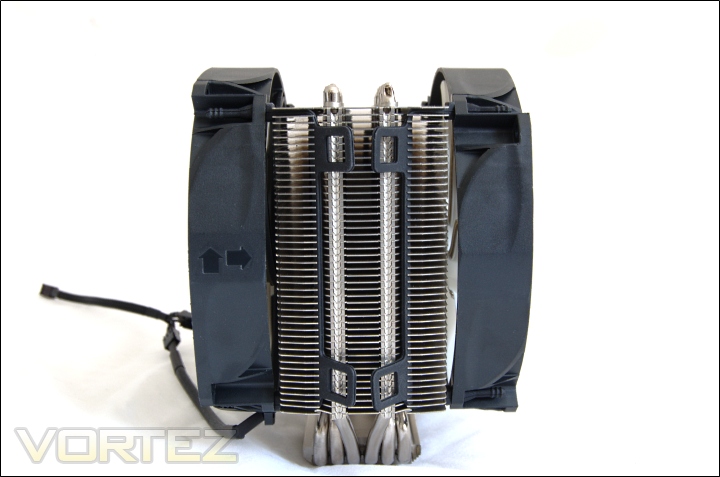
The side of the cooler with fans
From the side we can see that the rubber fan adapters fit nicely along the side grooves so there’s no fear of the fans becoming loose. The design of the adapter ends means that some force is needed to remove them from the fan. The alternative method is to install the adapters into the fans first and then secure them onto the heatsink by latching them on as we will see on the next page.
Closer Look (Continued)
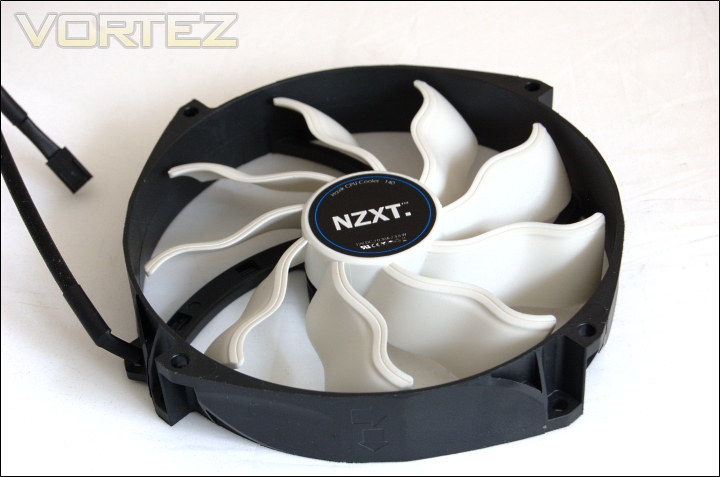
The NZXT fan
The Havik fan boasts very impressive specifications. The rated 90.3CFM of airflow is achieved by the unique ripple like design of the 9 blades. It also reduces noise and ensures great airflow even at 1200RPM. The only downside is the low apparent rated lifespan of less than 3.5 years. Noctua’s NF-P14 is an order of magnitude more.
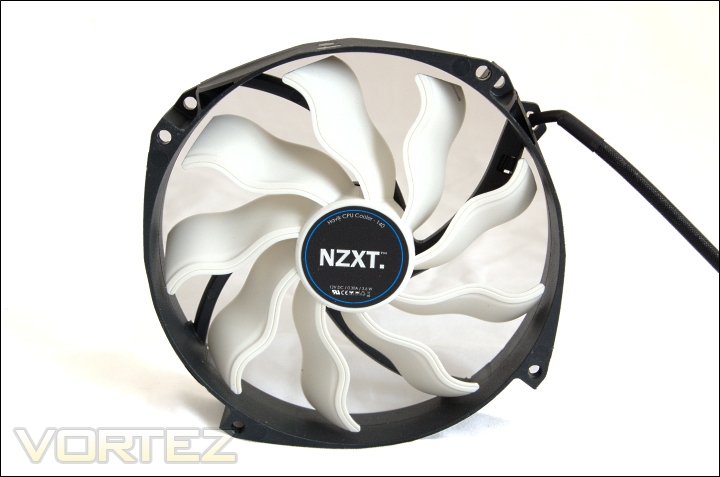
Shuriken?
The fan is 140mm diameter but like the NF-P14 uses 120mm mounting holes. The plastic fan casing feels very sturdy and the black and white theme would go well inside an NZXT Phantom, which NZXT are no doubt aiming for. The fan has a shuriken like design. NZXT have popularised pre-braided extension cables over the past year and they haven’t failed to give their own fan the same treatment. The fan cables themselves are black and have a rubberised wrap around them. The cables are only 16cm in length to avoid clutter but those that require longer cables can always use the bundled y-splitter.
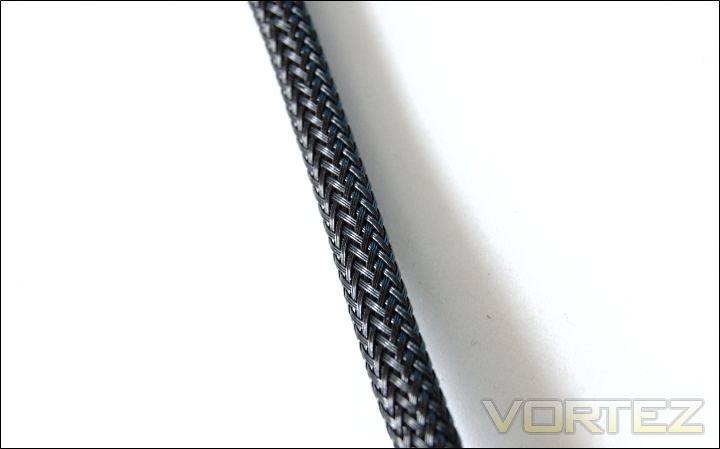
Braided y-splitter
The y-splitter comes pre-braided in more traditional material and the dense weave hides the cables inside very well. The splitter is 3 pinned so PWM functionality is not supported.
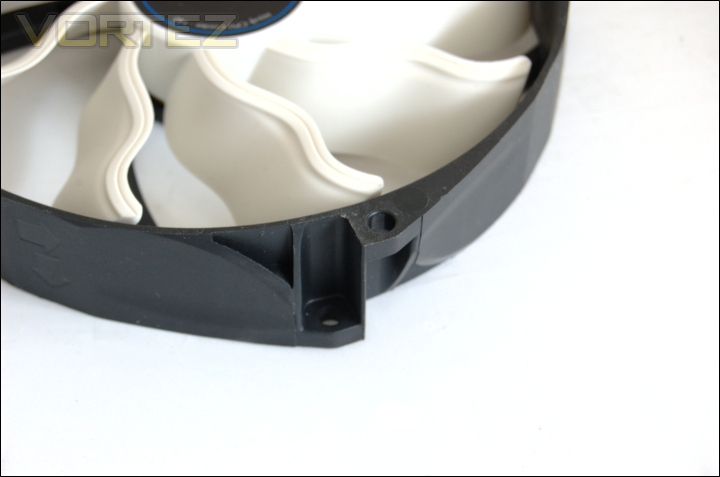
The fan mounting holes
The Havik fan has mounting holes that are not aligned to each other. Instead, one set of mounting holes are rotated slightly relative to the ones opposite. It allows the ends of the rubber adapters to be fed through and pulled without anything else getting in the way.
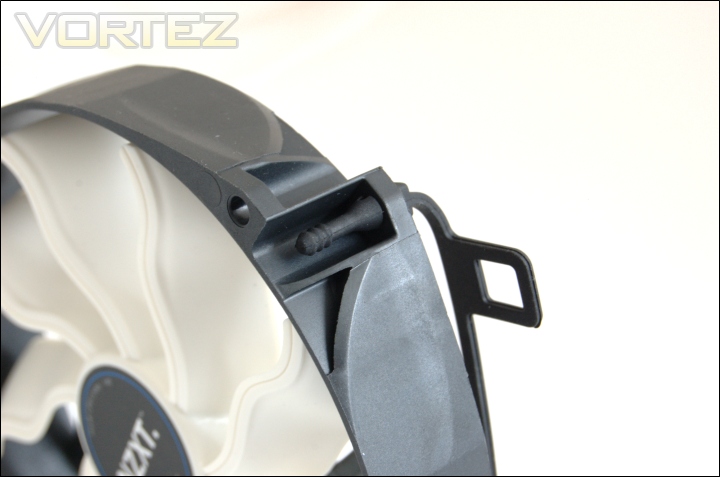
Inserting the rubber ends through
And here we have a demonstration of what it looks like.
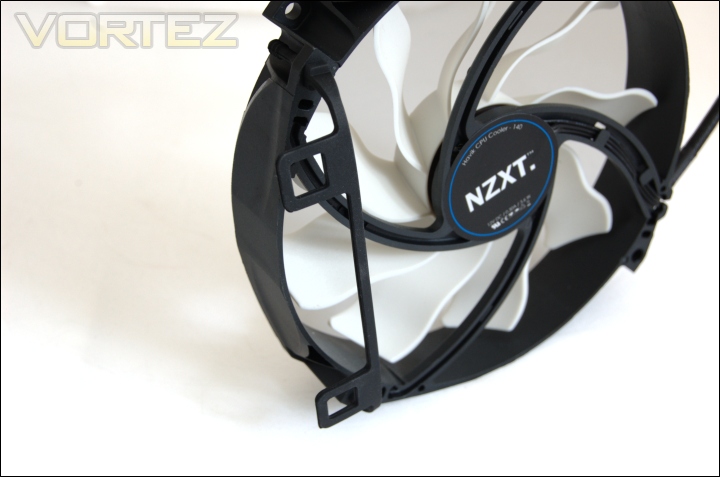
Rubber strip installed
The rubber adapter is flexible to it can be stretched to a certain degree when installing the fan onto the heatsink.
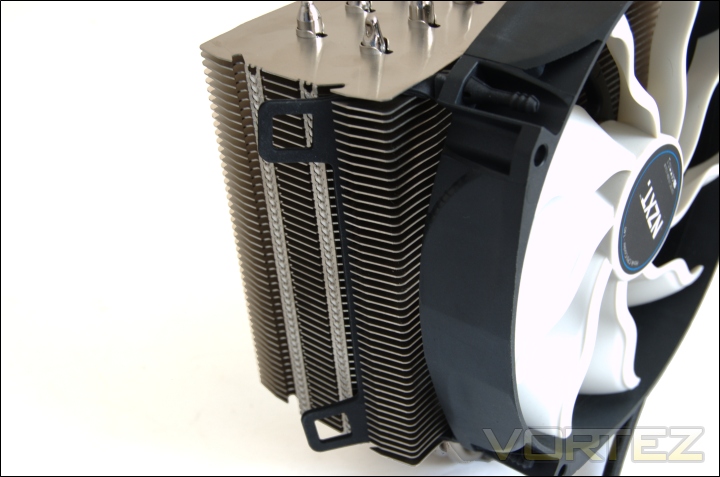
Installing the fans
Previously, we showed that the rubber strips can be installed on the heatsink first and then lining up the fans with the ends of the adapters. The other, easier alternative is to insert the rubber strips into the fans first and then simply slide them onto the heatsink. On the whole, I was highly impressed by the fan mounting mechanism and would definitely like to see other manufacturers adopt a similar method.
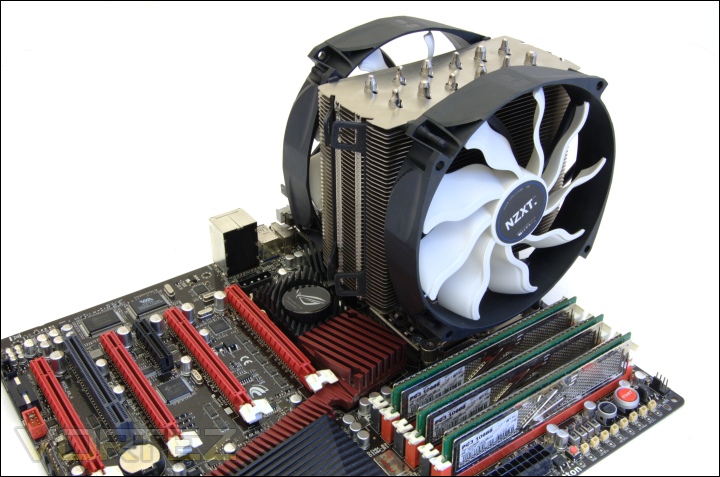
The Havik installed on the motherboard
And finally we have the NZXT Havik 140 installed. The two 140mm fans dominate the overall appearance of the cooler.
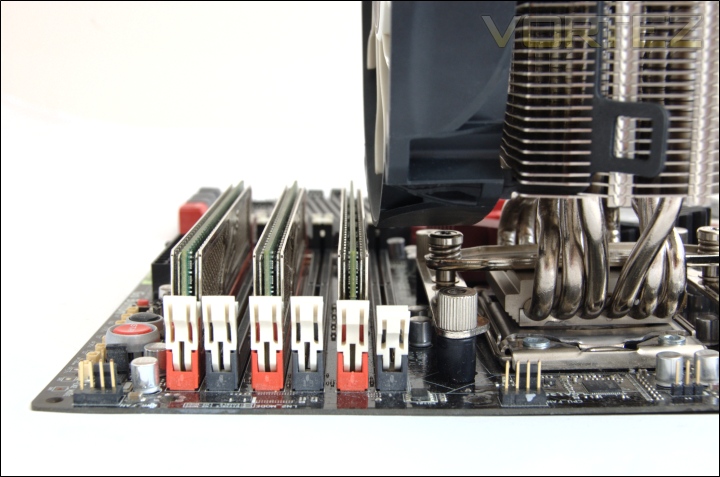
Memory clearance
In terms of memory compatibility, the front fan overhangs the adjacent slot on the motherboard so that particular slot limited to low profile modules. Those not looking to populate all the slots can use any sized modules they want.
Comparison Shots
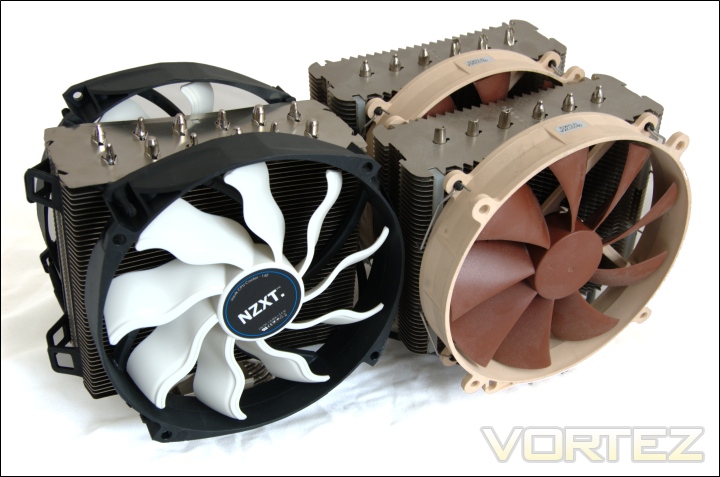
NZXT Havik VS Noctua NH-D14
Next to each other, the NZXT and Noctua are very distinguishable, the main common feature being the use of 140mm fans albeit completely different in design.
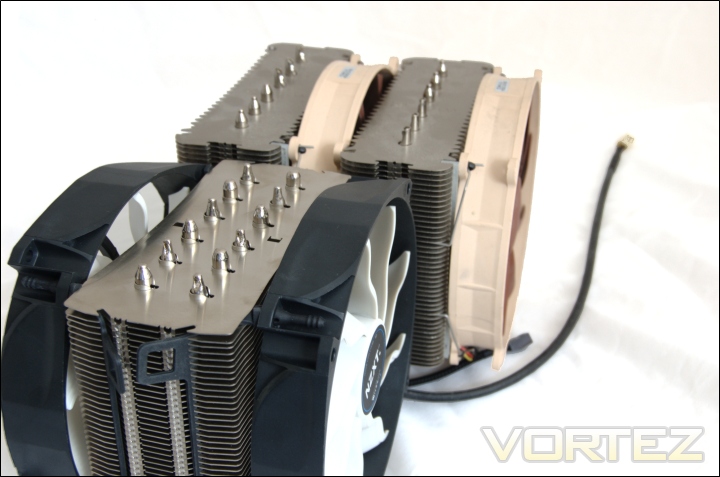
NZXT Havik VS Noctua NH-D14 side
The NZXT is much narrower than the Noctua and does not face the same memory compatibility issues as a result.
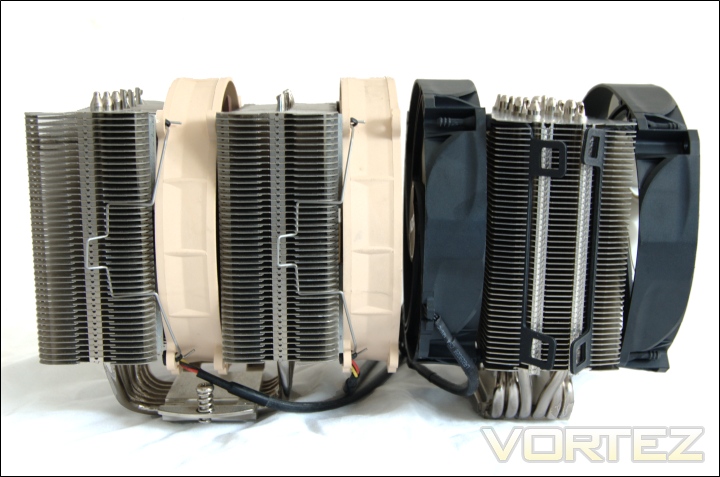
NZXT Havik VS Noctua NH-D14 side height
Height-wise, both are the same due to the fan protruding slightly higher than the heatsink. Both coolers allow the position of the fans to be adjusted, more so on the Noctua.
Test Setup
CPU – Intel Core i7 920 – 2.66/4.0GHz
RAM – 6GB (3x2GB) OCZ Platinum DDR3 1333MHz
Motherboard – ASUS Rampage III Extreme
Graphics card – XFX HD5870 1024MB
Power Supply – Enermax Revolution 85+ 850W
Hard Drive – OCZ Vertex 2E 120GB
Samsung F1 320GB
Samsung F3 1TB
Drivers – ATI Catalyst 10.10
CPU Coolers:
NZXT Havik 140 including tests using 2 NZXT fans, 2 Noctua NF-P12s/NF-P14s and 2 SWiF2-120Ps
Alpenföhn Matterhorn including tests using 2 Noctua NF-P12s/NF-P14s, 2 SWiF2-120Ps and 2 Föhn 120 Wing Boost fans
Prolimatech Super Mega including tests using 2 Noctua NF-P12s/NF-P14s, 2 SWiF2-120Ps and 2 Prolimatech Blue Vortex 14s
Noctua NH-C14 (U.L.N.A and default speed) including tests using 2 SWiF2-120Ps
Thermalright Silver Arrow including passive and tests using 2 Noctua NF-P12s and 2 SWiF2-120Ps
Thermalright HR-02 including passive and tests using Noctua NF-12/NF-P14s and Thermalright TR TY-140
Thermaltake Frio (Low/med/high speed) including tests using 2 Noctua NF-P12s
Corsair H50 including tests using 2 Noctua NF-P12s and 2 SWiF2-120Ps
CoolIT ECO A.L.C including tests using 2 Noctua NF-P12s and 2 SWiF2-120Ps
Thermalright Venomous X using 2 Noctua NF-P12s and 2 SWiF2-120Ps
Coolink Corator DS including tests with dual fan setups
Tuniq Propeller 120(High speed fan)
Noctua NH-C12P SE14
Prolimatech Megahalem
Noctua NH-D14 (U.L.N.A and default speed)
Noctua NH-U12P SE1366
Thermolab Baram (with 2 Noctua NF-P12 fans)
CoolIT Domino A.L.C
Sunbeam Core Contact Freezer
Coolermaster Hyper 212 Plus including test with 2 Noctua NF-P12 fans
Alpenföhn Nordwand including test with 2 Noctua NF-P12 fans
Tuniq Tower 120 Extreme (Low/med/high speed)
Program Suite:
Core Temp 0.99.5
LinX stress Test
AIDA 64 Extreme Edition
CPUID HWMonitor
How I tested:
Testing will be based on temperatures recorded by Core Temp and PC wizard after 20 passes of LinX stress test. The absolute temperatures recorded in the tables are averages of the 4 cores and the delta value provided for a fair comparison, taking into account ambient temperatures. The test will be run at stock speed and at an overclocked speed of 4GHz.
Installation
Installing the NZXT Havik is a very easy process thanks to a mechanism akin to Thermalright’s and Prolimatech’s. The Havik supports both Intel and AMD sockets, making use of the same back plate. They need to be in slightly different orientations depending on the socket.
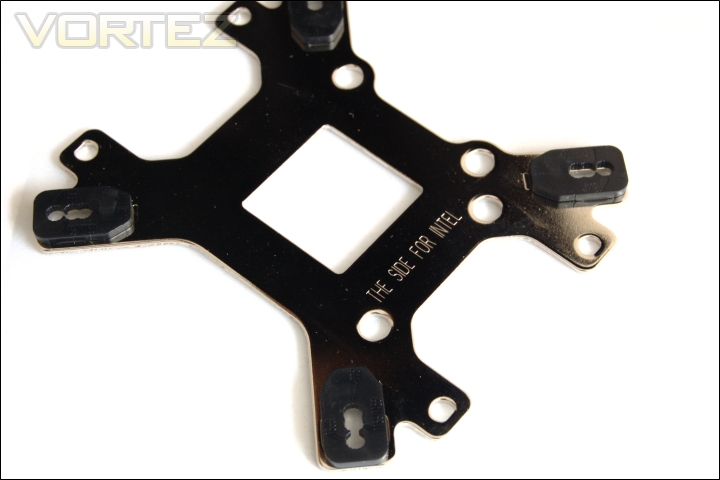
For Intel sockets, the back plate is engraved with the label which should be facing the back of the motherboard. There are rubber insulators/aligning tabs on all four corners and mounting holes for LGA775, 1155/1156 and 1366. For LGA775, an additional spacer needs to be placed in the centre.
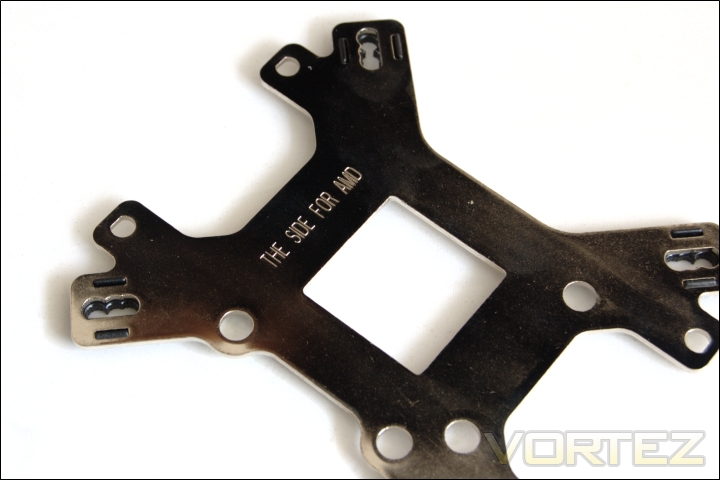
For AMD systems, the back plate needs to be turned over but the Intel aligning tabs have to be removed. Instead, 4 insulation films need to be stuck in each corner as well as the spacer in the middle.
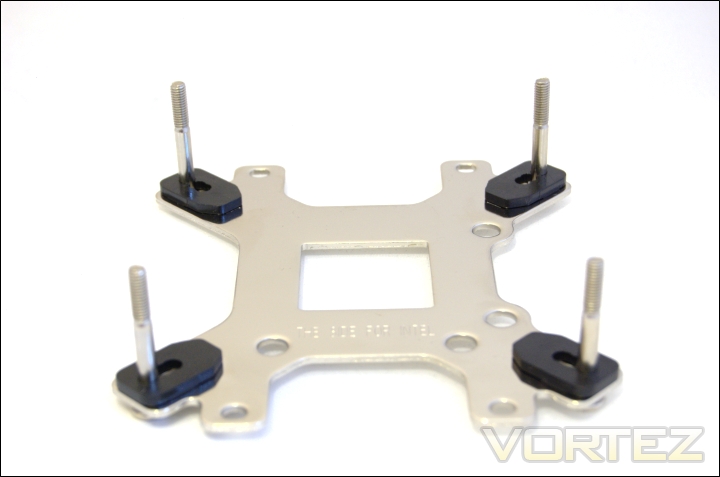
1. Since we are using an LGA1366 system, our installation guide will focus on that but NZXT provide clear installation steps in their manual. The first step is to insert the BP-screws in the appropriate holes in each corner.
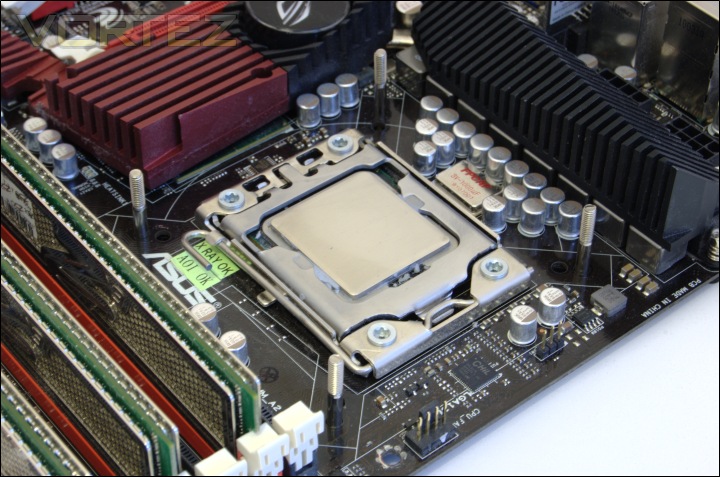
2. Install the back plate on the motherboard.
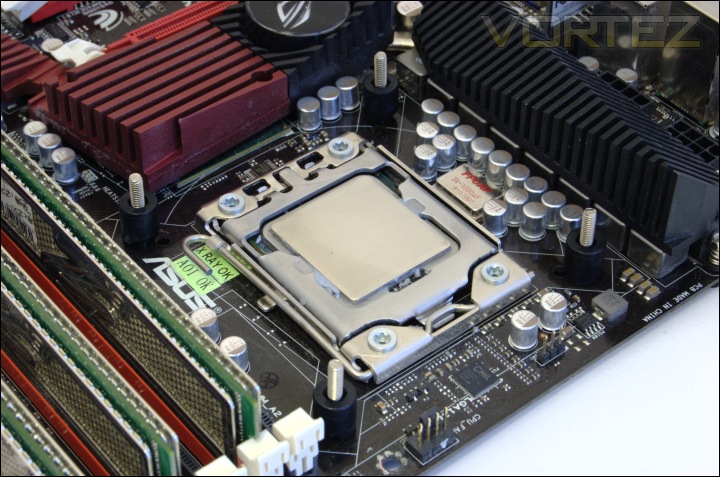
3. Secure the back plate using the black pillars.
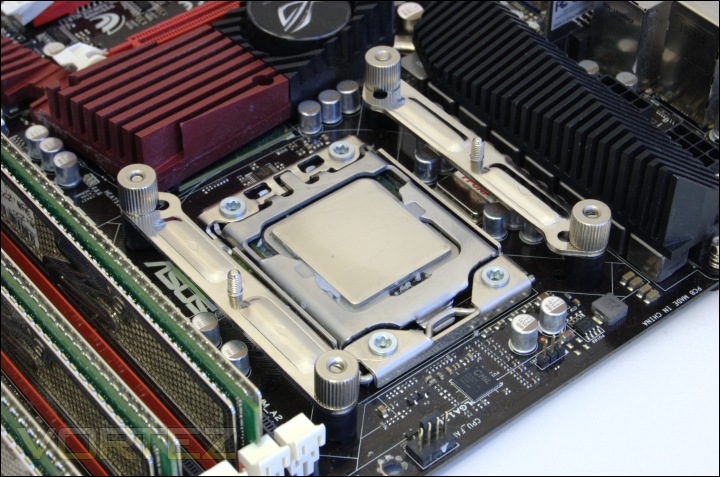
4. Install the Intel brackets making sure the arrows on them face towards the CPU and secure with the 4 nuts.
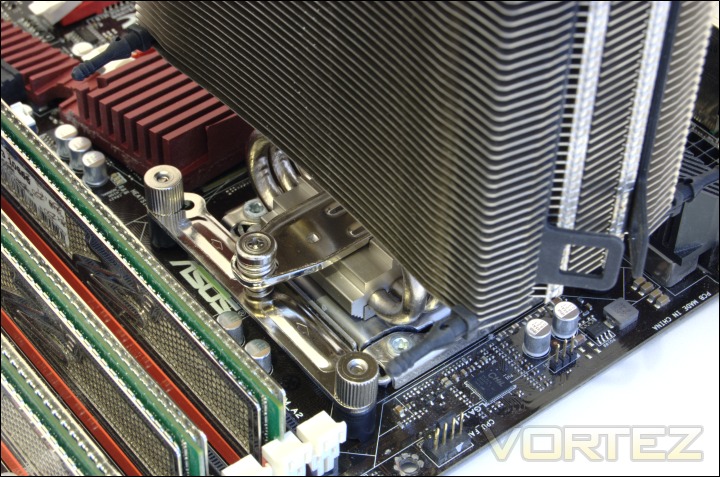
5. After removing the protective film from the base of the heatsink and applying thermal paste on the CPU, place the heatsink on top and feed the Intel crossbar through. Tighten both ends to the brackets.
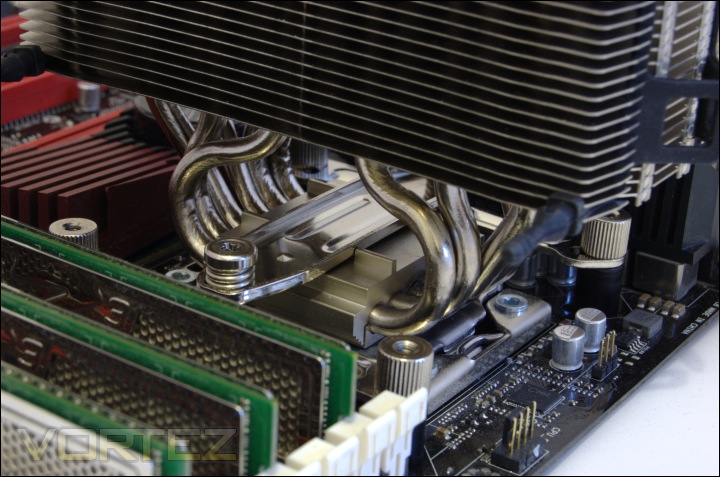
Thermalright and Prolimatech both use similar mechanisms. In Thermalright’s case, the heatsink is still free to pivot about the centre so NZXT have raised bars on top of the heatsink base that holds the crossbar in place. It means that the heatsink cannot be moved.
The mechanism provides 55-60lbs of pressure which is the same as other high end coolers. Otherwise, I have nothing but praise for NZXT’s attempt. It may be familiar to many but works very effectively.
Results
2.66GHz
The results have been arranged in terms of the fan configuration that yields the best results for each cooler. However, it is important to take into account that many coolers come with their own fans and changing those increases the costs significantly, so the “out of the box” cooler configurations have been highlighted in red each group.
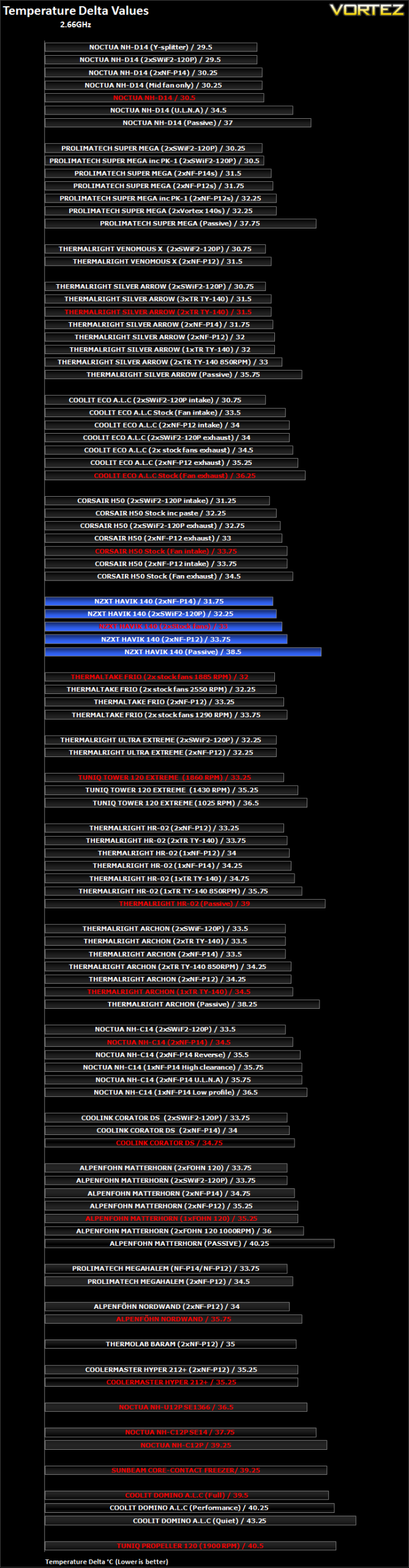
The Havik gets off to a very good start. In its stock configuration, the delta temperature is 33C, 0.75C better than the 120mm Noctua NF-P12. Coupled with the SWiF2-120Ps, temperatures improve by another 0.75C thanks to the higher rotational speed. The most significant improvement comes from the NF-P14s which is surprising because like they stock 140mm NZXT fans, they operate at 1200RPM and produce similar noise levels. It suggests that the NZXT fans are not quite as efficient as Noctua’s offerings.
The Havik’s main competitions are the Thermaltake Frio and Thermalright Archon. In their default configurations, the Frio wins thanks to its higher RPM fan but lowering it to the same level as the NZXT’s reduces performance. The Archon’s single TY-140 fan is not enough to beat the Havik with its two fans.
Results (Continued)
2.66GHz
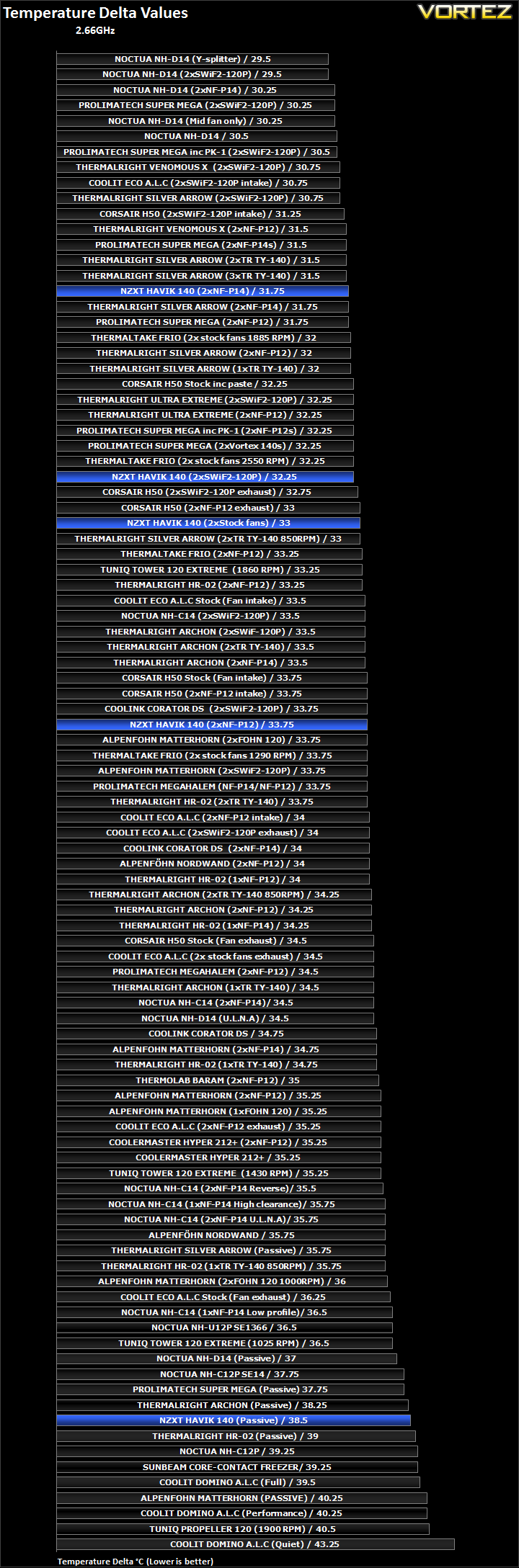
Comparing the Havik against the vast numbers of cooler setups we have tested here, it performs just as well as the Thermalright Silver Arrow when the speed of the latter’s fans is reduced. It is comfortably ahead of the Archon, HR-02, Noctua NH-C14 and the Matterhorn but fails to match the Super Mega, Thermalright Venomous X and our two champions; the NH-D14 and Silver Arrow. However, it fares really well when teamed with two NF-P14s allowing it to come close to even the Silver Arrow.
Results (Heatsink efficiency)
2.66GHz
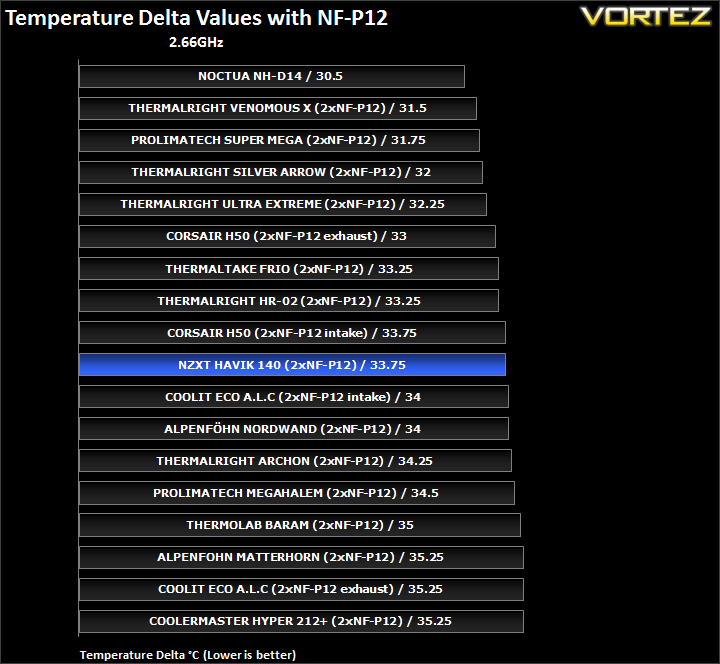
This chart shows the results of various heatsinks using 2 Noctua NF-P12 fans. In this case, the NH-D14 wasn’t tested with two such fans since it comes bundled with one NF-P12 and one NF-P14 by default. Nonetheless, it still makes for an interesting comparison for the rest of the heatsinks. The Havik proves to be more efficient than the Archon in this case which is impressive, but lacks the performance of the other Thermalright towers.
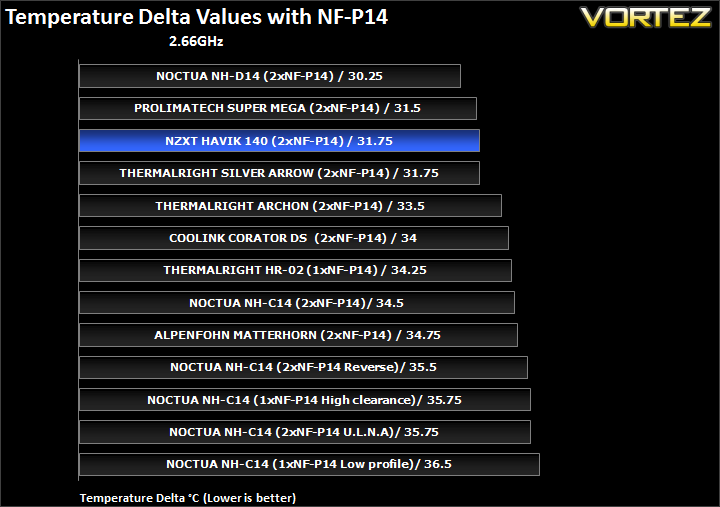
With the NF-P14s, it successfully jumps to third place, demonstrating its efficiency with 140mm fans and even outperforming the Silver Arrow at stock speeds.
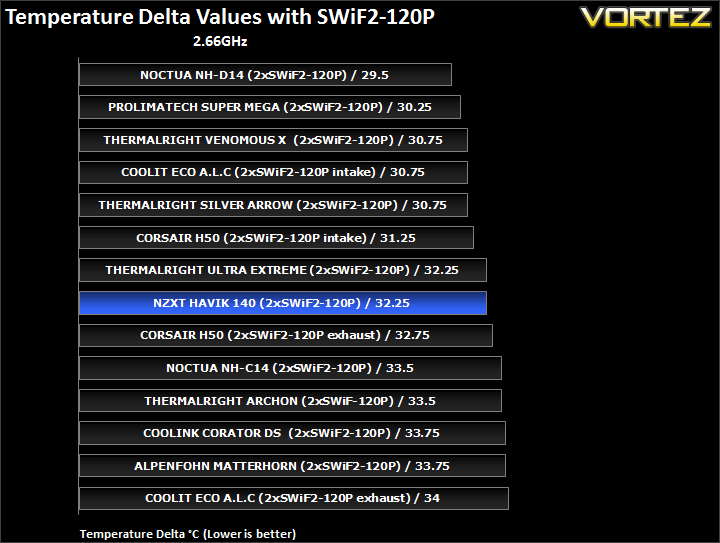
With high RPM 120mm fans, the Havik is comparable to the well-aged Thermalright Ultra-Extreme and stays ahead of the Archon.
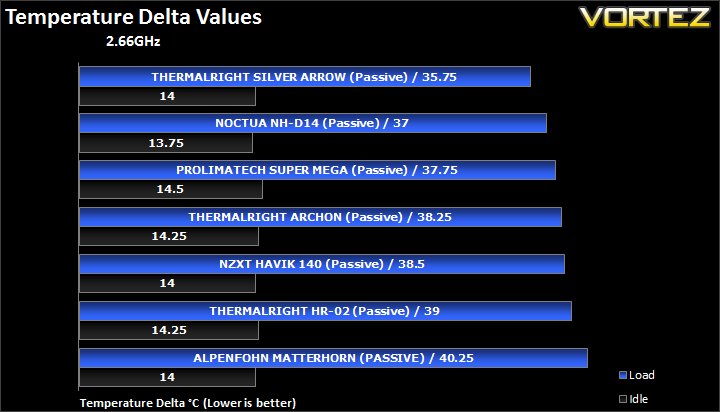
Passively, the Havik is less impressive than the Archon but stays ahead of the HR-02.
Results Overclocked
4GHz
The results have been arranged in terms of the fan configuration that yields the best results for each cooler. However, it is important to take into account that many coolers come with their own fans and changing those increases the costs significantly, so the “out of the box” cooler configurations have been highlighted in red each group.
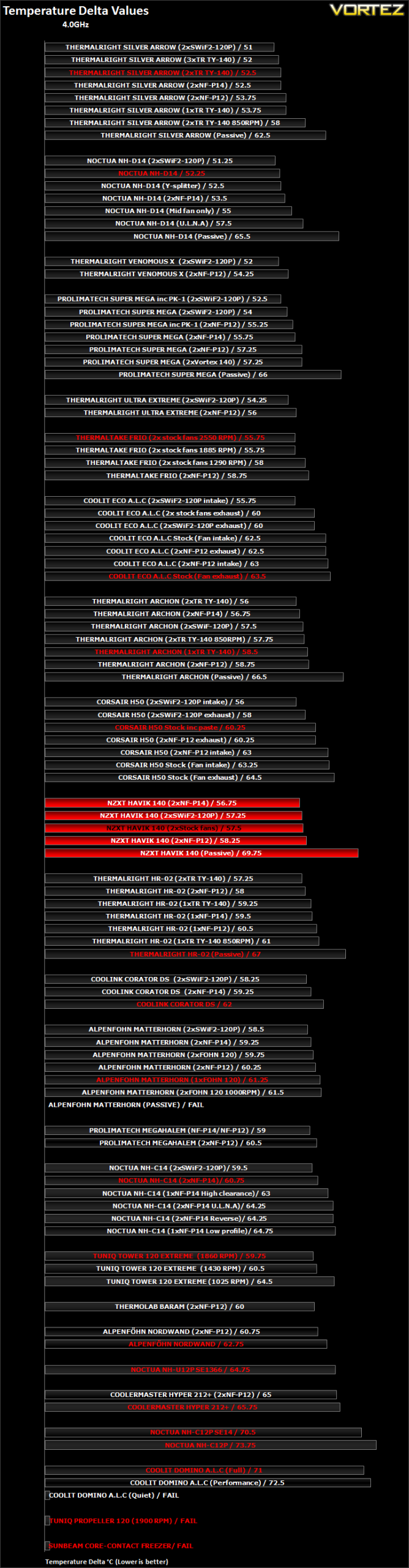
Overclocked, the Havik produces good results. A 57.5C temperature delta with two of the stock fans makes it one of the best out of the box coolers, bettering the Thermalright Archon with its single fan by 1C. Like before, changing the fan configuration on the Havik improves performance. With the same fans, the Havik outperforms the Archon. The Archon’s advantage is that another TR TY-140 can simply be added for optimal performance whereas the NZXT would require both fans to be changed, a costly effort.
Results Overclocked (Continued)
4GHz
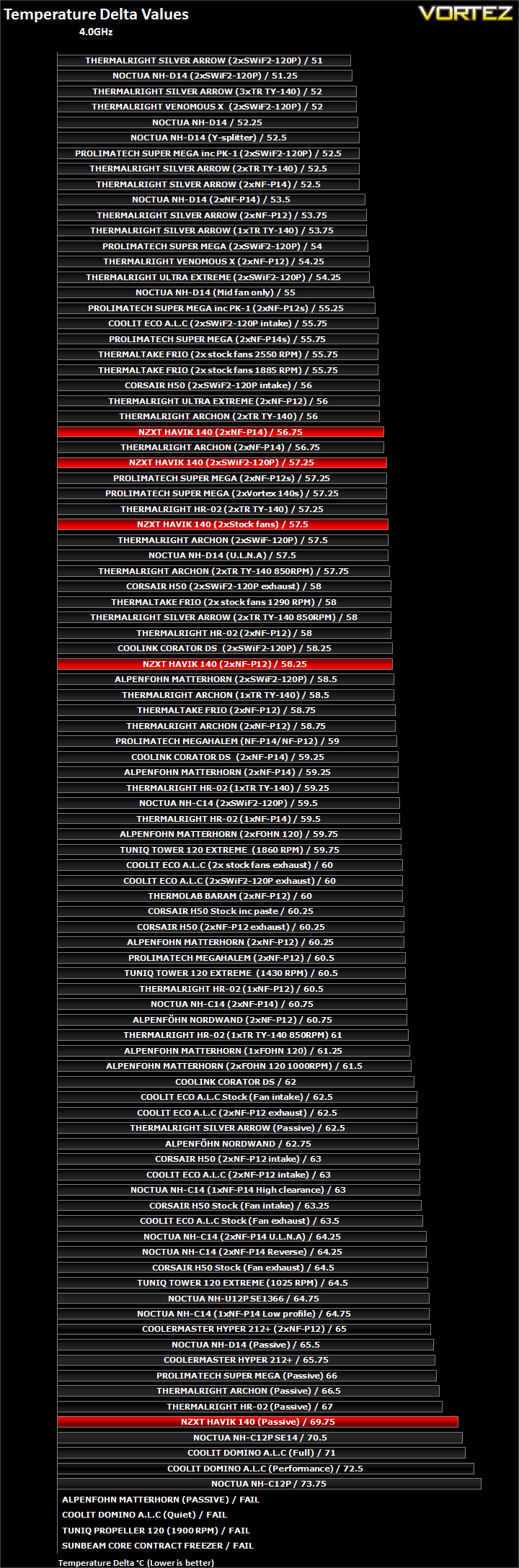
The Havik finds itself in the upper half of our table and its stock fans help put it ahead of a number of coolers. In its best configuration with the two NF-P14s, it is on par with the same fan setup on the Archon and stays ahead of the HR-02.
Results Overclocked (Heatsink efficiency)
4GHz
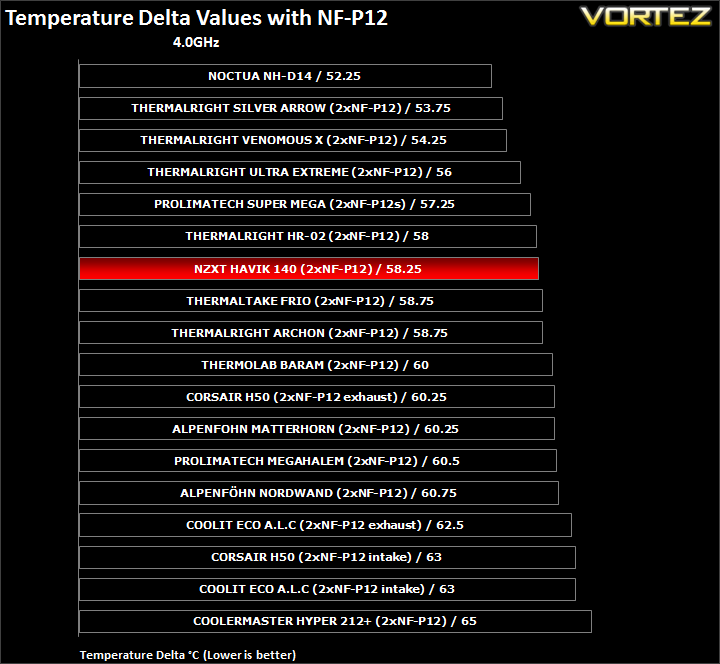
Using two NF-P12s, the Havik is more efficient than the Frio and Archon but remains in a league below the Venomous X and Ultra Extreme despite their similar designs and dimensions.
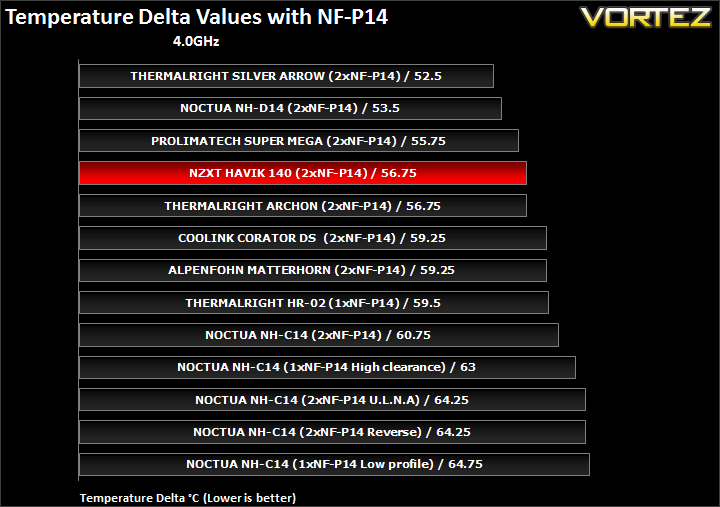
With NF-P14s, it is comparable to the Archon. Unfortunately, the other two Thermalright heatsinks do not support 140mm fans, giving the Havik an advantage when it comes to quieter operation.
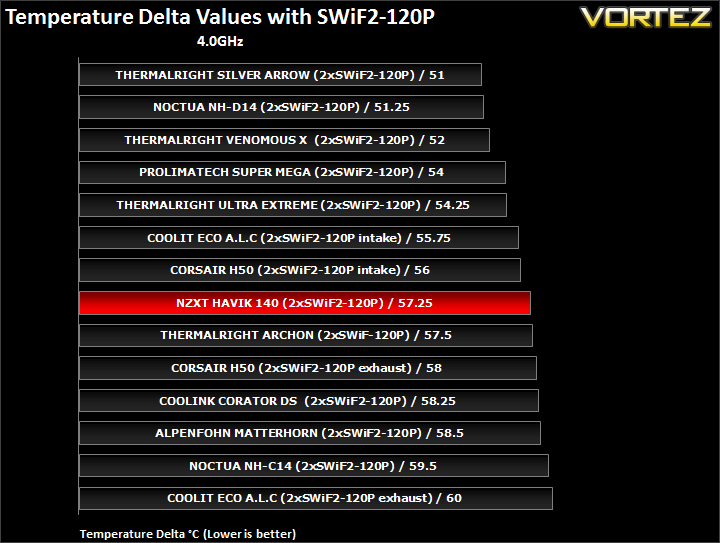
Again, the Havik proves to be more efficient than the Archon but not as good as the ageing Venomous X or TRUE.
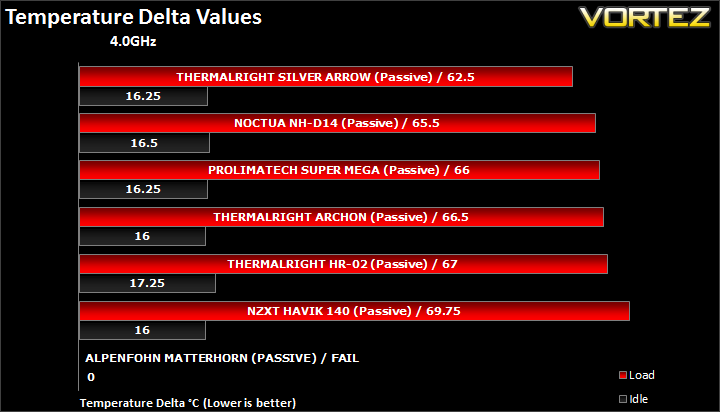
In passive mode, the Havik still coped with the overclocked i7 despite the hot weather. Admittedly, I was not comfortable with the high temperatures. Without fans, it lagged behind all the other high end coolers.
Other Observations
Thermal paste comparison
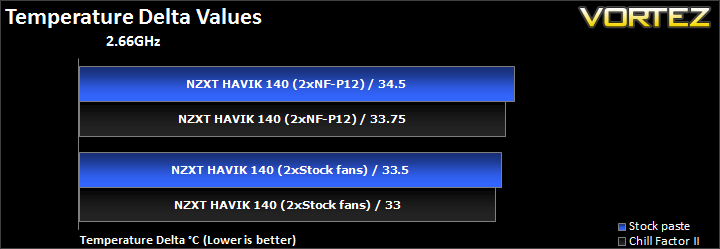
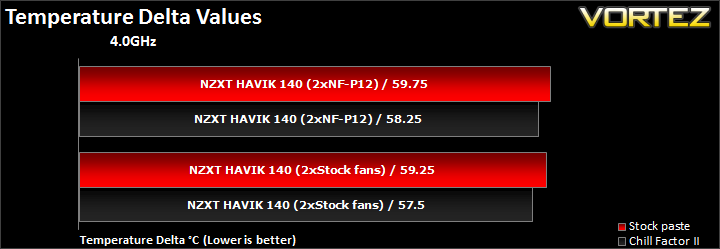
As always, we tend all coolers using the same Thermalright ChillFactor II thermal paste. It is interesting to note the quality of thermal paste that come bundled from different manufacturers. In NZXT’s case, the tube looked generic and the performance reflects that. The stock thermal paste reduces performance by more than 1C when overclocked so my advice would be to get some after-market thermal paste.
Conclusion
NZXT have done a tremendous job with their Havik 140. They have settled on a relatively simple heatsink design that has proven to be effective countless times. While most manufacturers do tweak the fins to maximise airflow, NZXT have gone for a planar array of fins akin to the Thermaltake Frio. As such, the heatsink is reminiscent of many other successful single tower heatsinks. The six heat pipes are arranged very similarly to the Thermalright Archon and the dimensions are strikingly similar to the Venomous X. Like the Archon, the Havik also supports 140mm fans that come with 120mm mounting holes. The mounting mechanism resembles those employed by both Prolimatech and Thermalright so NZXT have drawn inspiration from the right people.
In reality, the design paid off. NZXT have to be commended for bundling two very unique fans with their heatsink so users are not left the trouble of having to source some themselves. They are quiet and perform decently, enough to allow the Havik to beat the Archon in their stock configurations. Even changing the fan configurations demonstrate that the heatsink is more efficient than the Thermalright Archon. Choosing between the two requires more than a performance break down though because both solutions have their pros and cons. The Havik is shorter and thus faces less compatibility issues in mid tower cases. On the other hand, the Archon is cheaper and can easily be upgraded by adding a second fan, allowing it to beat the Havik and still remain the cheaper solution. Memory compatibility is the same for both, overhanging only the adjacent slot on our X58 platform.

All in all, performance was very good. It failed to match the Venomous X or the Super Mega but it still boasts many features that will appeal to buyers. The two fans operate very quietly, and installation was second to none. The inclusion of the rubber adapters instead of metal clips proved to be a wise step as it made fan installation quick and painless, and furthermore helping to reduce vibrations. And lastly, the Havik 140 is one of the best looking coolers to have landed in our hands, following NZXT’s trend of delivering very stylish cases.
The only two downsides are the cost and fan performance. The Havik fan fell behind Noctua’s popular NF-P14, which itself is less favourable than Thermalright’s TR TY-140. At $74.99/69.99 Euros/ £60, the Havik retails at the upper end of the traditional air cooler price bracket, a market that is out of reach to most users. Enthusiasts who seek coolers in this bracket can opt for the superior Silver Arrow at £50 or the NH-D14 for around £65. Those interested in single tower heatsinks will find the Venomous X for under £40, and the Archon with an additional 140mm fan ends up less than £55. For the Havik 140 to be more competitive, NZXT need to price it at £50.
**Pricing update**
After having a browse on American etailors, the NZXT Havik appears to be cheaper than its main competitors and more in line with what we were expecting. If the UK/European pricing can come down, it will be more easily accepted into the market.
To summarise, NZXT have done a fine job on their first attempt at an entering the enthusiast air cooling market. It is certainly a highly competitive market that many fail to break into successfully and NZXT have taken a very comfortable first step. I look forward to seeing more high-end solutions from them in the future.
Pros
+Very good performance
+Quiet
+Bundled 140mm fans
+Ease of installation
+Well packaged
+Attractive finish
+Support for 120 & 140mm fans
+Out of the box AMD and Intel support
Cons
-Price in the UK/Europe
-Unable to match our top coolers
-Fan performance
+Very good performance
+Quiet
+Bundled 140mm fans
+Ease of installation
+Well packaged
+Attractive finish
+Support for 120 & 140mm fans
+Out of the box AMD and Intel support
Cons
-Price in the UK/Europe
-Unable to match our top coolers
-Fan performance
NZXT earn themselves a very deserved Vortez Silver Award.


