The SX8200 impressed reviewers all over the internet but do they manage to improve on the formula with the SX8200 Pro? Read on to find out.

Product on Review: XPG SX8200 Pro
Manufacturer: XPG
Street Price:
256GB – GBP £62.99 / USD $74.99 / AU $109.99
512GB – GBP £100.99 / USD $117.99 / AU $179.99
1TB – GBP £197.99 / USD $214.99 / AU $309.99
Earlier in the year we thoroughly enjoyed reviewing the XPG SX8200, an M.2 NVMe drive with epic performance at a price which, no-doubt, made other manufactures think again about their pricing structure. The SX8200 offered most of the performance of the big-hitters, but today we’re looking at the evolution of that drive; the XPG SX8200 Pro.
What’s new with the SX8200 Pro? Firstly, we get increased speeds, bumping up to 3500MB/s and 3000MB/s, read and write, respectively. The SX8200 was limited to 3200MB/s and 1700MB/s. IOPS are also vastly improved, with 390,000 and 380,000 read and write, representing around a 30% increase on the previous. Speed isn’t the only improvement, capacity also gets a little bump, with each tier being stepped up slightly, with the 480GB model now arriving with 512GB, for example.
Those tremendous speeds are made possible by the usage of the NVMe 1.3 protocol, a DRAM Cache buffer with SLC Caching and 3D NAND flash; all the while, backed up with LDPC Error Correction Code.
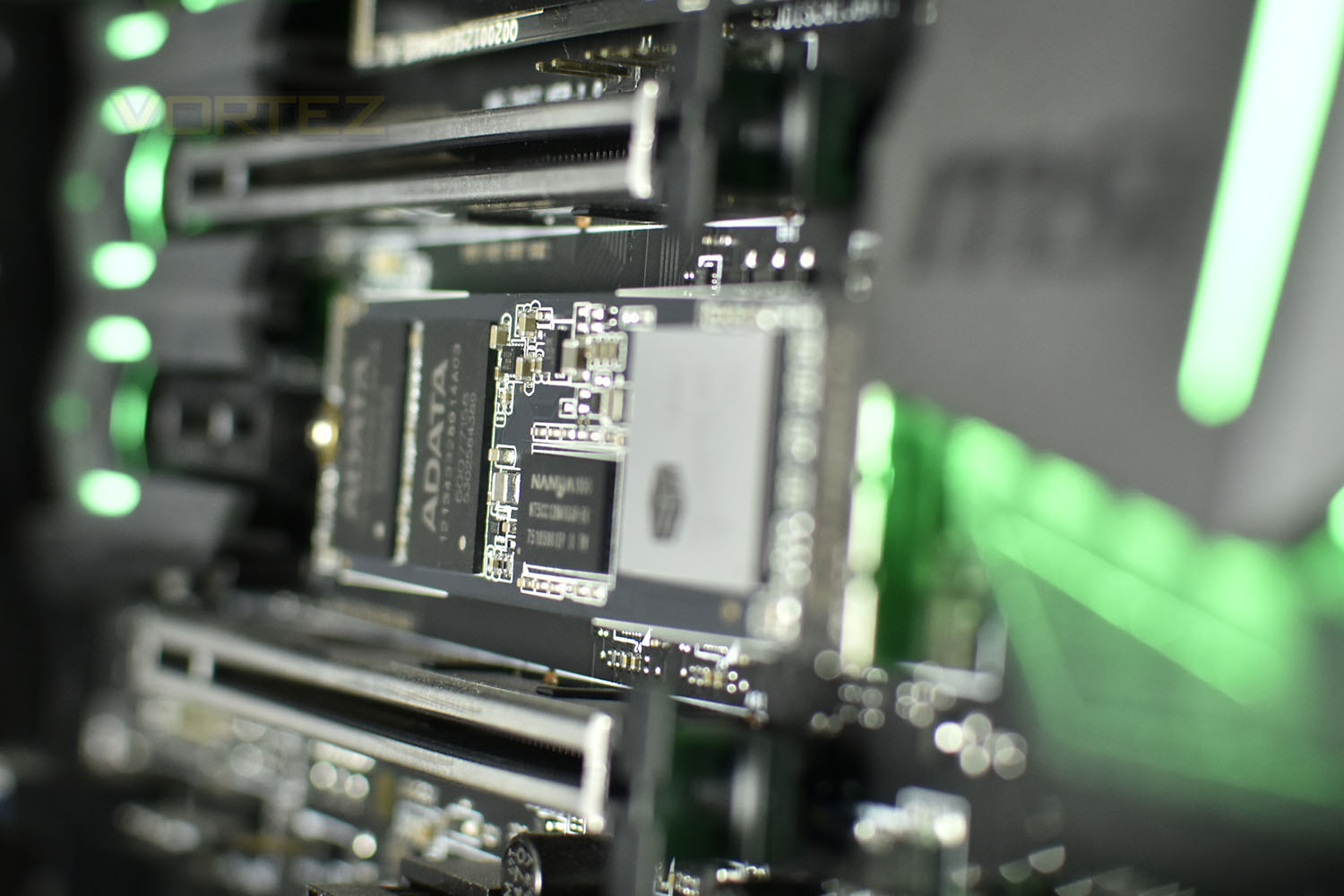
Keeping up with other offerings in the same category, XPG offers the SX8200 Pro with a 5-year warranty for the ultimate peace of mind. Pricing, however, is the key point in this sector, for a lot of prospective buyers, where the SX8200 Pro offers great value, if the claims hold true.
But without further ado, let’s get stuck into the SX8200 Pro and see if XPG have managed to improve an already awesome recipe. We’re testing the 512GB model, so our results can be directly compared to the 480GB SX8200.
XPG on the SX8200 Pro:
The SX8200 Pro M.2 2280 SSD is XPG’s fastest SSD to date and is designed for avid PC enthusiasts, gamers, and overclockers. It features an ultra-fast PCIe Gen3x4 interface that offers sustained peak read/write speeds of 3500/3000MB per second, outpacing SATA 6Gb/s by a wide margin. Supporting NVMe 1.3, the SX8200 Pro delivers excellent random read/write performance and multi-tasking capabilities. With SLC caching, a DRAM Cache buffer, E2E Data Protection, and LDPC ECC, it maintains high speeds and data integrity, even during highly intensive applications such as gaming rendering, and overclocking.
Technical Specifications
Capacity: 256GB / 512GB / 1TB / 2TB
Form Factor: M.2 2280
NAND Flash: 3D TLC
Controller: SMI
Dimensions (L x W x H): 22 x 80 x 3.5 mm
Weight: 8g / 0.28oz
Interface: PCIe Gen3x4
Performance(Max): Read 3500MB/s, Write 3000MB/s
Maximum 4K random read/write IOPS: up to 390K/380K
* Performance may vary based on SSD capacity, host hardware and software, operating system, and other system variables.
Operating temperature: 0°C – 70°C
Storage temperature: -40°C – 85°C
Shock resistance: 1500G/0.5ms
MTBF: 2,000,000 hours
Warranty: 5 years
Form Factor: M.2 2280
NAND Flash: 3D TLC
Controller: SMI
Dimensions (L x W x H): 22 x 80 x 3.5 mm
Weight: 8g / 0.28oz
Interface: PCIe Gen3x4
Performance(Max): Read 3500MB/s, Write 3000MB/s
Maximum 4K random read/write IOPS: up to 390K/380K
* Performance may vary based on SSD capacity, host hardware and software, operating system, and other system variables.
Operating temperature: 0°C – 70°C
Storage temperature: -40°C – 85°C
Shock resistance: 1500G/0.5ms
MTBF: 2,000,000 hours
Warranty: 5 years
Packaging & Closer Look
If you read our review on the SX8200, you’ll see a distinct similarity between the two packages. The capacity, form factor, connection type and other particulars are all listed concisely with an image of the drive.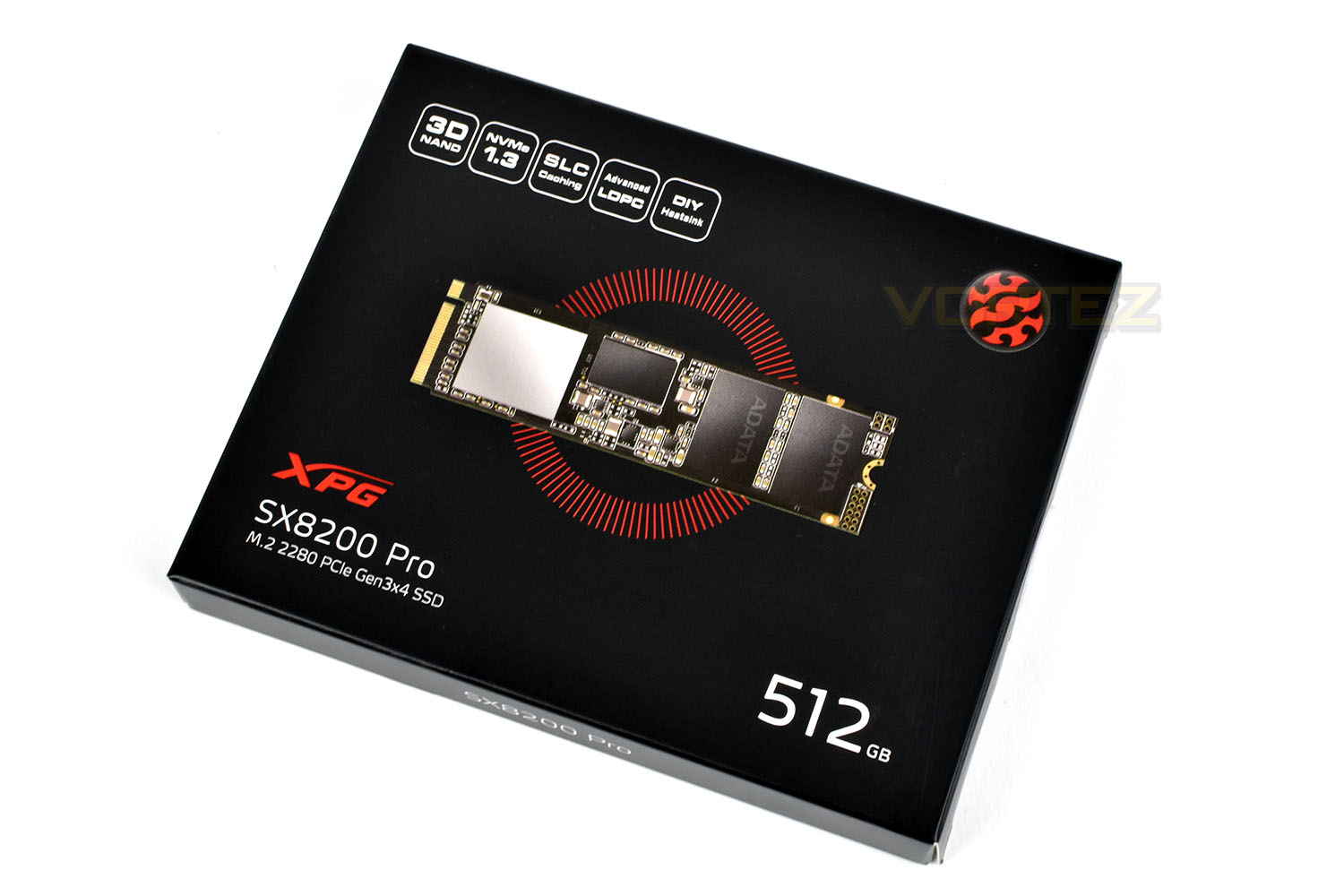
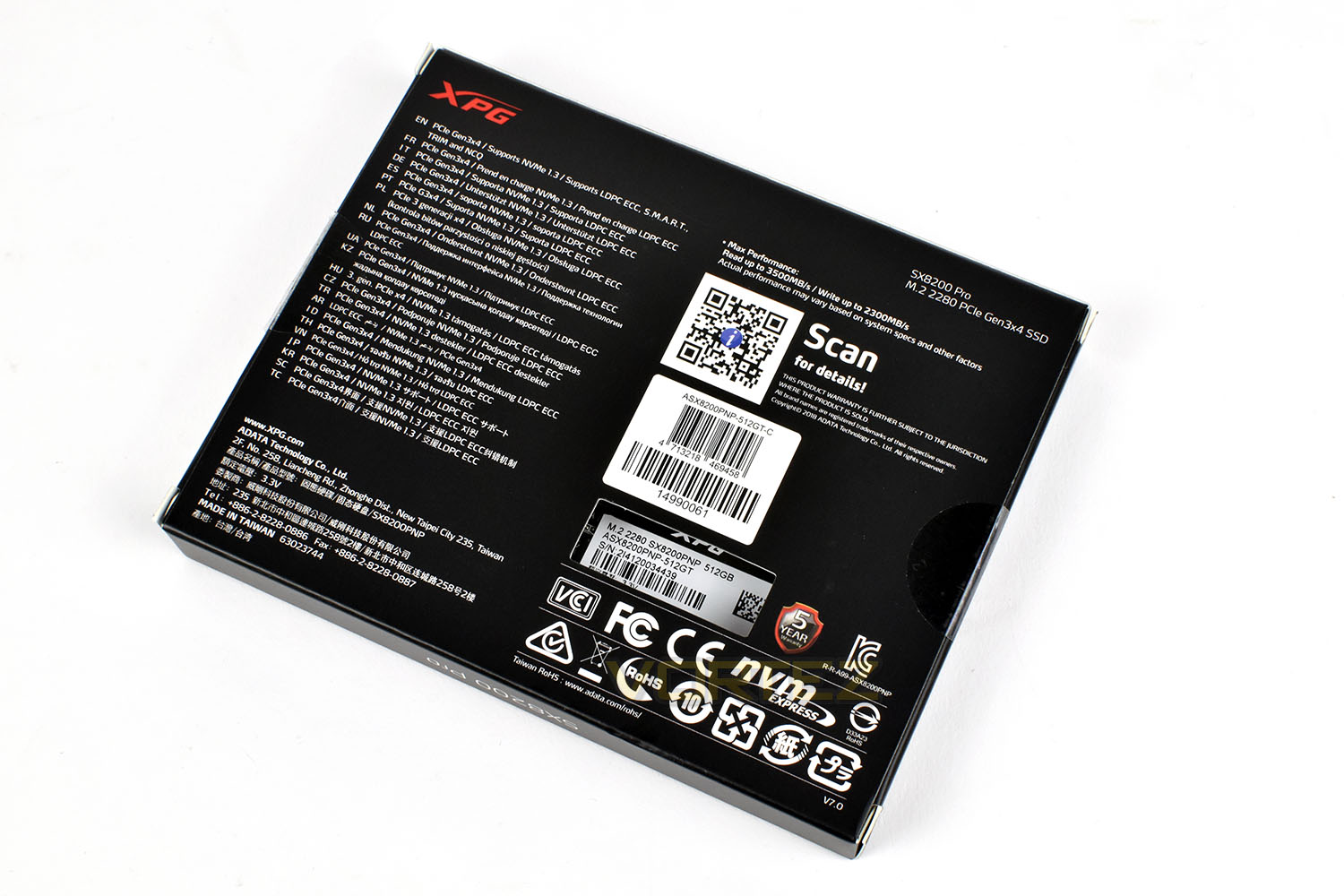
The reverse side gives specific details relating to the warranty period and performance figures but due to the multiple languages, the actual amount of information is relatively small.
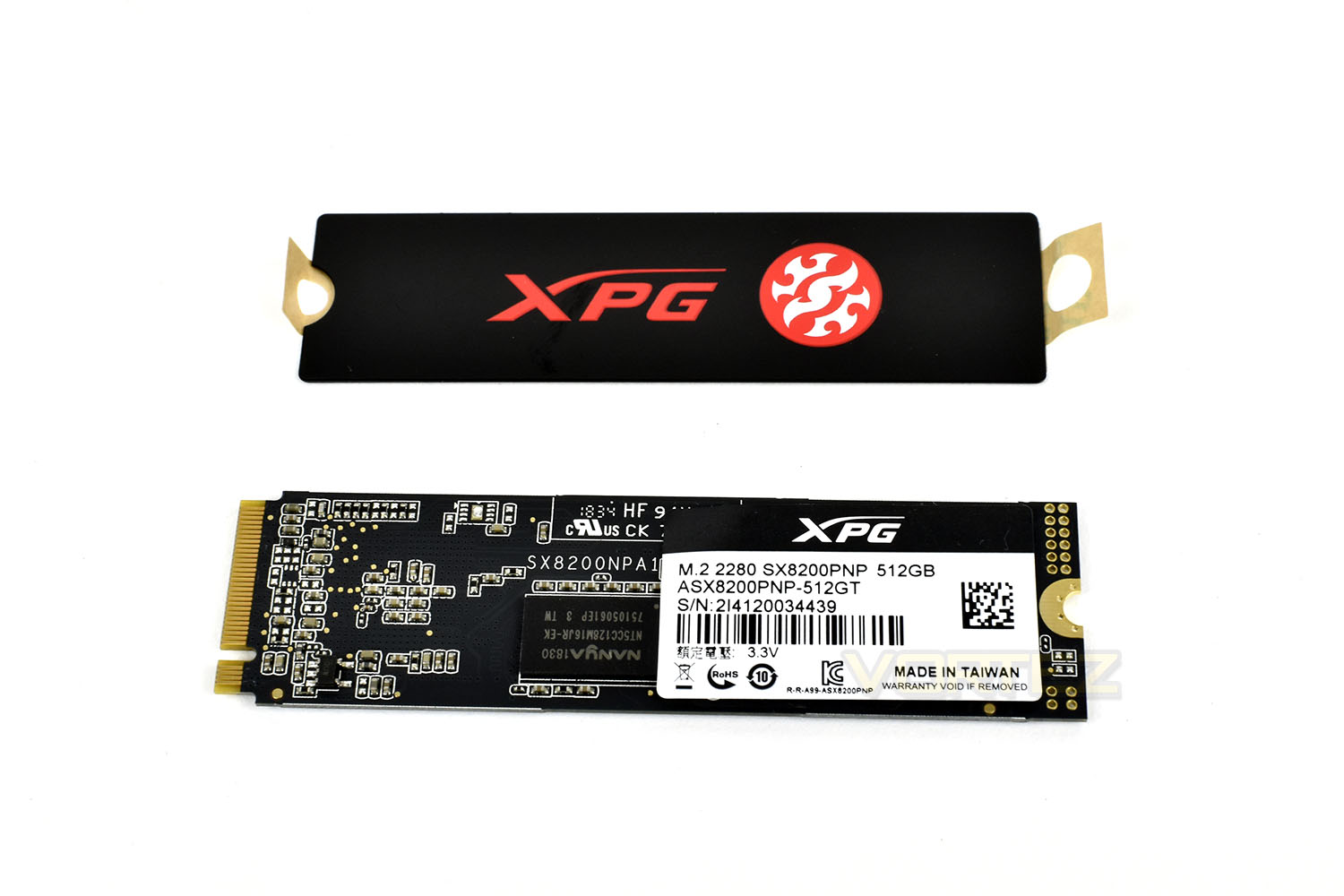
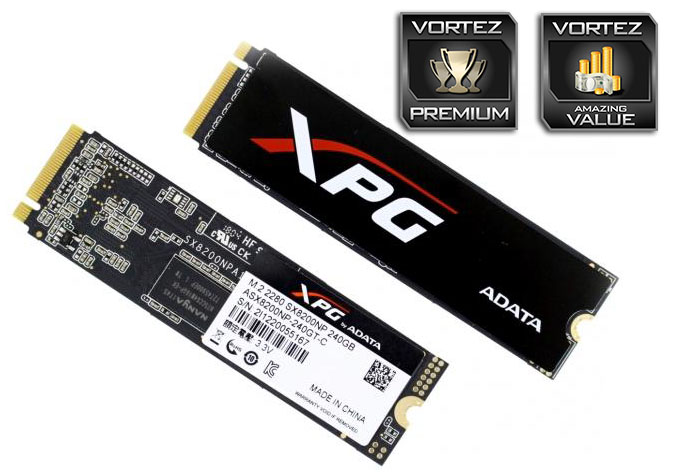
XPG appear to have re-used the same PCB for the Pro version, which is likely a result of trying to keep the cost of the drive as low as possible. The controller, DRAM cache and NAND are all upgraded versions of the previous model. XPG also provide a heatsink sticker, which can apply if you wish.
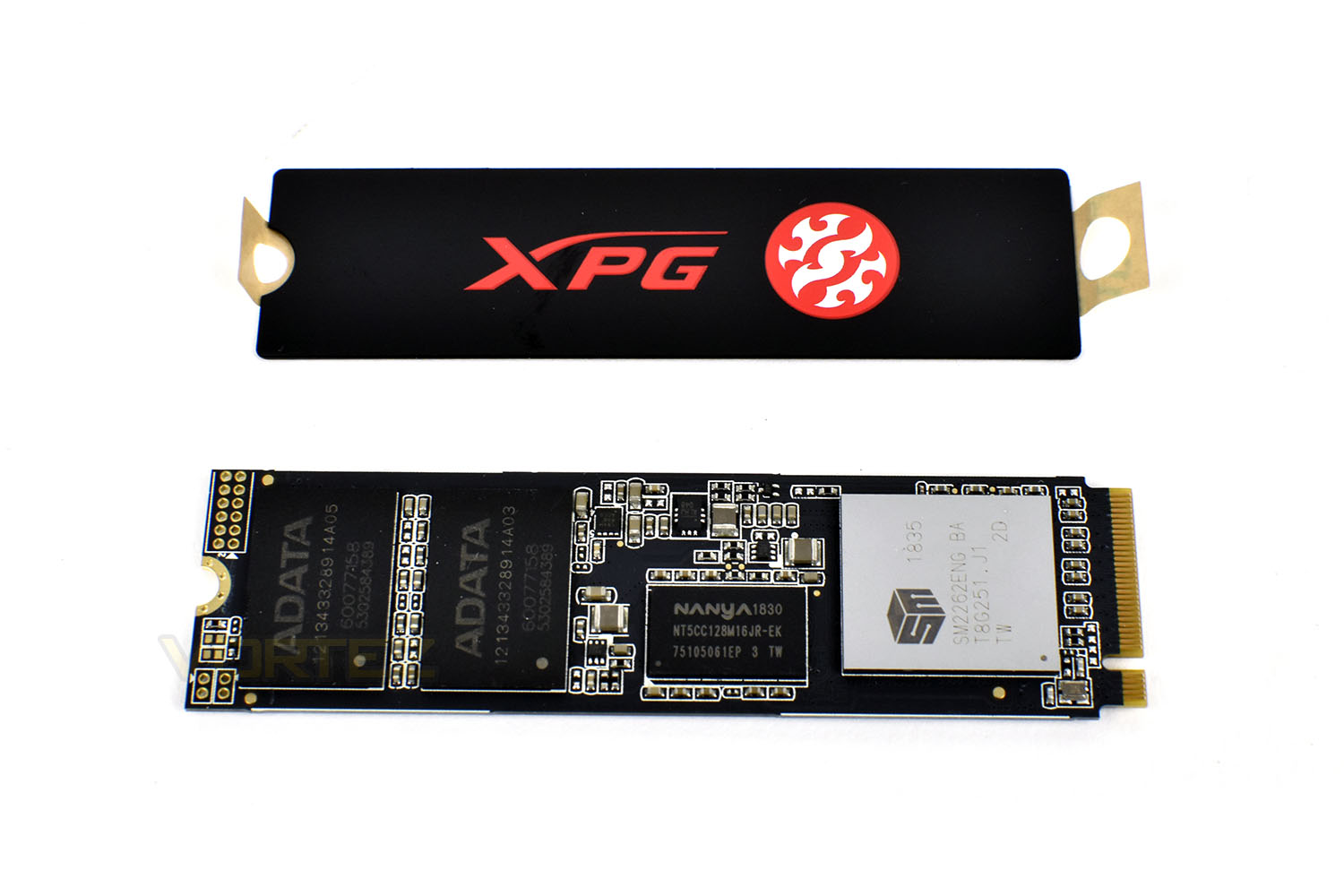
The reverse side is populated with DRAM modules, making the cooling aspect a little trickier, though, typically, most of the heat is generated within the controller so we shouldn’t see too much of an issue here.
Test Setup & Methodology
Our test system is formatted and a fresh version of Windows is installed with just drives in place – no additional applications. Windows is then updated to the latest release and the drivers are installed.Included in the list of benchmarks are the following applications:
Benchmarks
Anvil Pro
AS SSD
ATTO Disk Benchmark v2.46
Futuremark PCMark 8
AIDA64
AS SSD
ATTO Disk Benchmark v2.46
Futuremark PCMark 8
AIDA64
Test system
CPU: Intel Core i7 7700K
Motherboard: MSI Z270 Gaming M7
Graphics: EVGA GTX 1070 SC
Memory: 16GB CORSAIR Vengeance LPX 3200MHz DDR4
SAMSUNG SM961 256GB NVMe
XPG SX8200 Pro 512GB
PSU: BeQuiet Straight Power 11 650W
OS: Microsoft Windows 10 Pro 64-Bit
Monitor: ASUS ROG PG279Q
Motherboard: MSI Z270 Gaming M7
Graphics: EVGA GTX 1070 SC
Memory: 16GB CORSAIR Vengeance LPX 3200MHz DDR4
SAMSUNG SM961 256GB NVMe
XPG SX8200 Pro 512GB
PSU: BeQuiet Straight Power 11 650W
OS: Microsoft Windows 10 Pro 64-Bit
Monitor: ASUS ROG PG279Q
Benchmarks: Anvil Pro
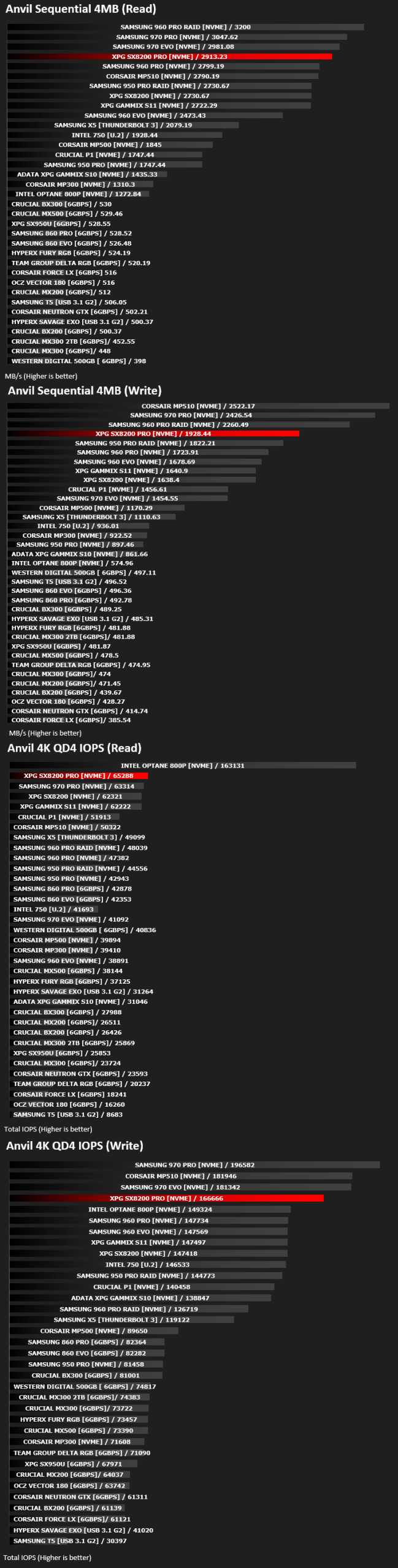
Anvil Pro from Anvil Storage utilities is one of the most popular storage benchmarking utilities today thanks to the large suit of tests available. You can test pretty much anything from Read/write Speed to IOPs with many variables to tweak allowing you to get either a single or host of results to compare with other likeminded enthusiasts. In our test we ran the standard suite 5 times, subtracting both the highest and lowest scores and determined the final result from the average of the remaining three results.
Benchmarks: AS SSD
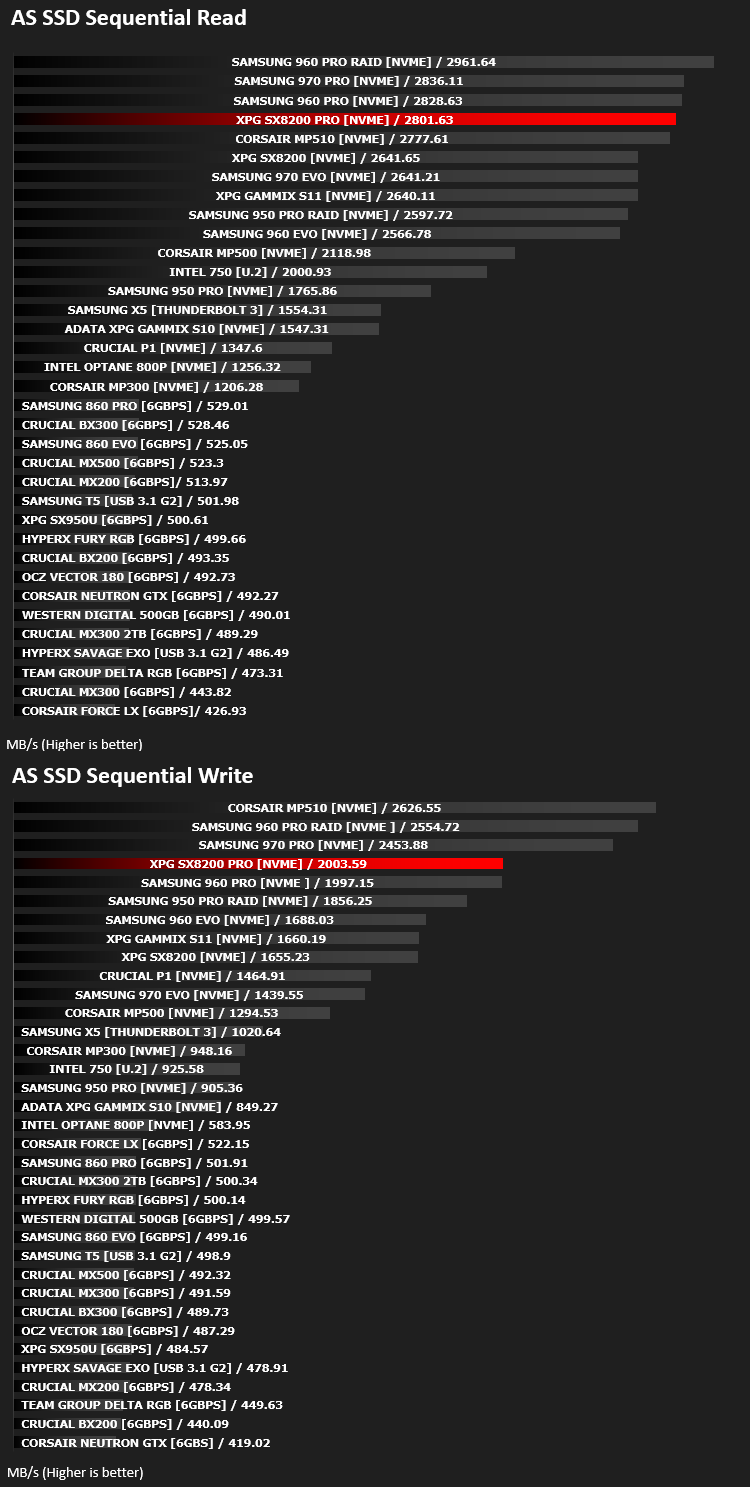
AS SSD Benchmark is a straightforward tool for measuring the speed of your SSD drive.
Simply launch the program, choose your drive, click Start, and it’ll test your SSD’s read and write speed in a variety of ways, delivering a score for each when it’s done. And if that’s not enough, there are also additional file copy and compression-related benchmarks available from the Tools menu. (The author’s support page is German only, but if you need further English explanations then there’s a thread on the program at the OCZ Technology forum.).
Simply launch the program, choose your drive, click Start, and it’ll test your SSD’s read and write speed in a variety of ways, delivering a score for each when it’s done. And if that’s not enough, there are also additional file copy and compression-related benchmarks available from the Tools menu. (The author’s support page is German only, but if you need further English explanations then there’s a thread on the program at the OCZ Technology forum.).
Benchmarks: ATTO
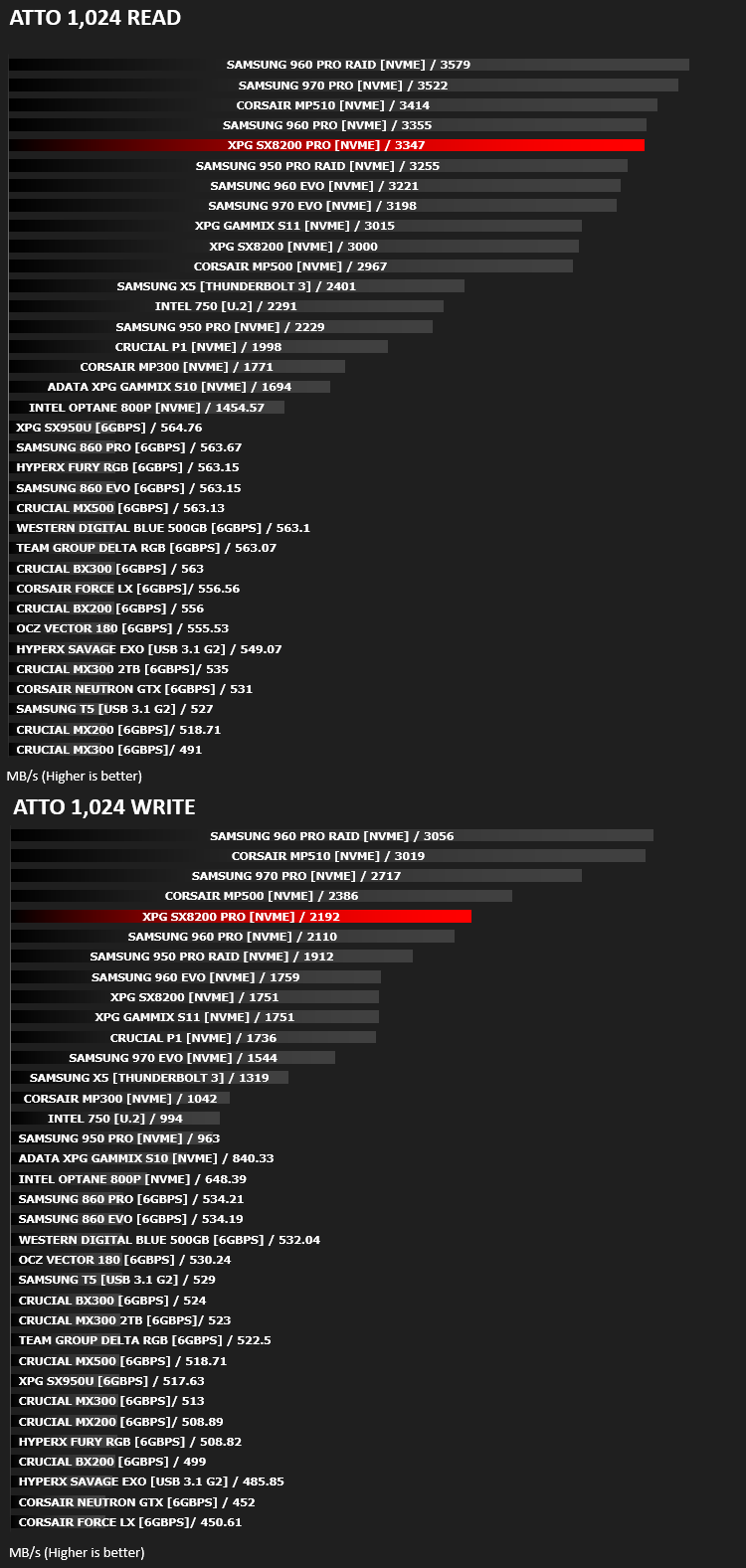
The ATTO Disk Benchmark performance measurement tool is compatible with Microsoft Windows. Measure your storage systems performance with various transfer sizes and test lengths for reads and writes. Several options are available to customize your performance measurement including queue depth, overlapped I/O and even a comparison mode with the option to run continuously. Use ATTO Disk Benchmark to test any manufacturers RAID controllers, storage controllers, host adapters, hard drives and SSD drives and notice that ATTO products will consistently provide the highest level of performance to your storage.
Benchmarks: AIDA64
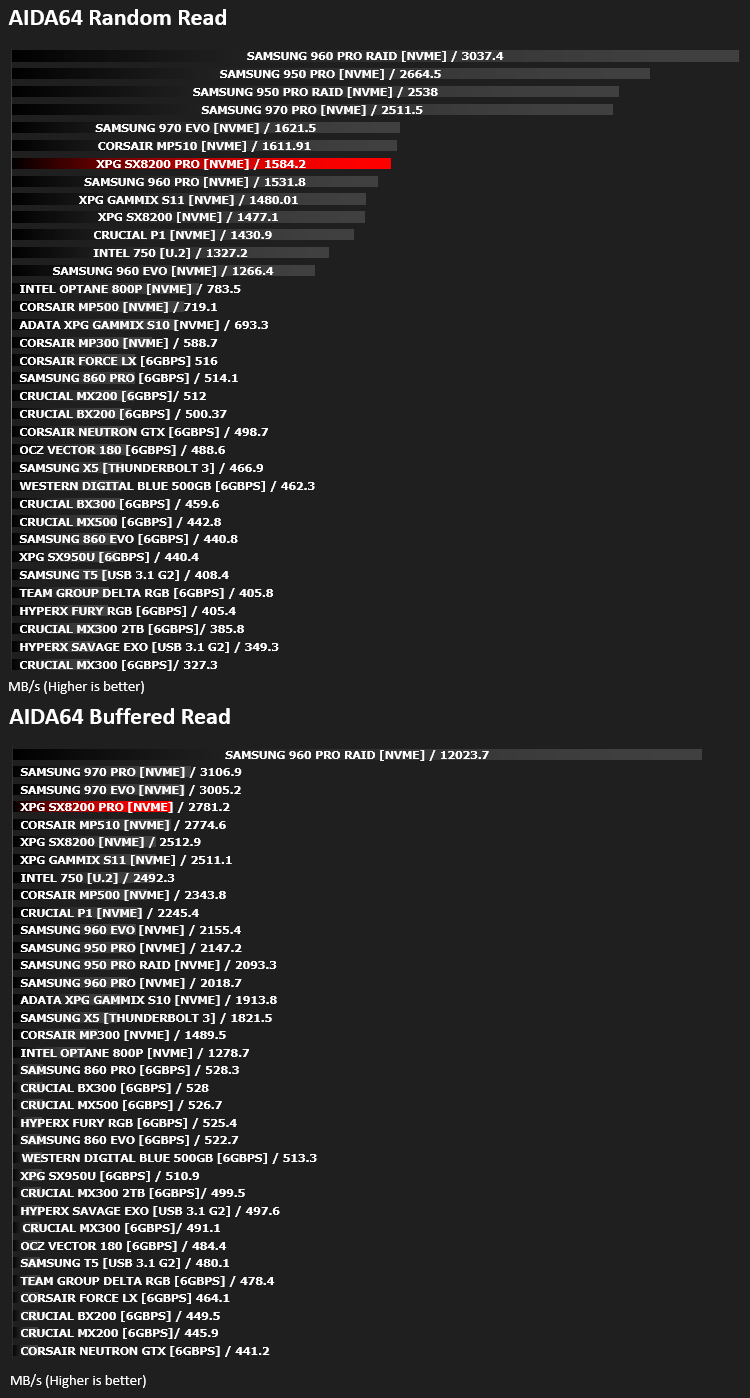
With this module, we can measure the performance of the PC’s storage devices, including (S)ATA or SCSI hard disk drives, RAID arrays, optical drives, solid-state drives (SSD), USB drives and memory cards. It also allows us to perform write tests, which helps us detect fake products and errors on the devices. In order to attain reliable benchmark results we have to make sure to close all background applications.
Benchmarks: PCMark 8
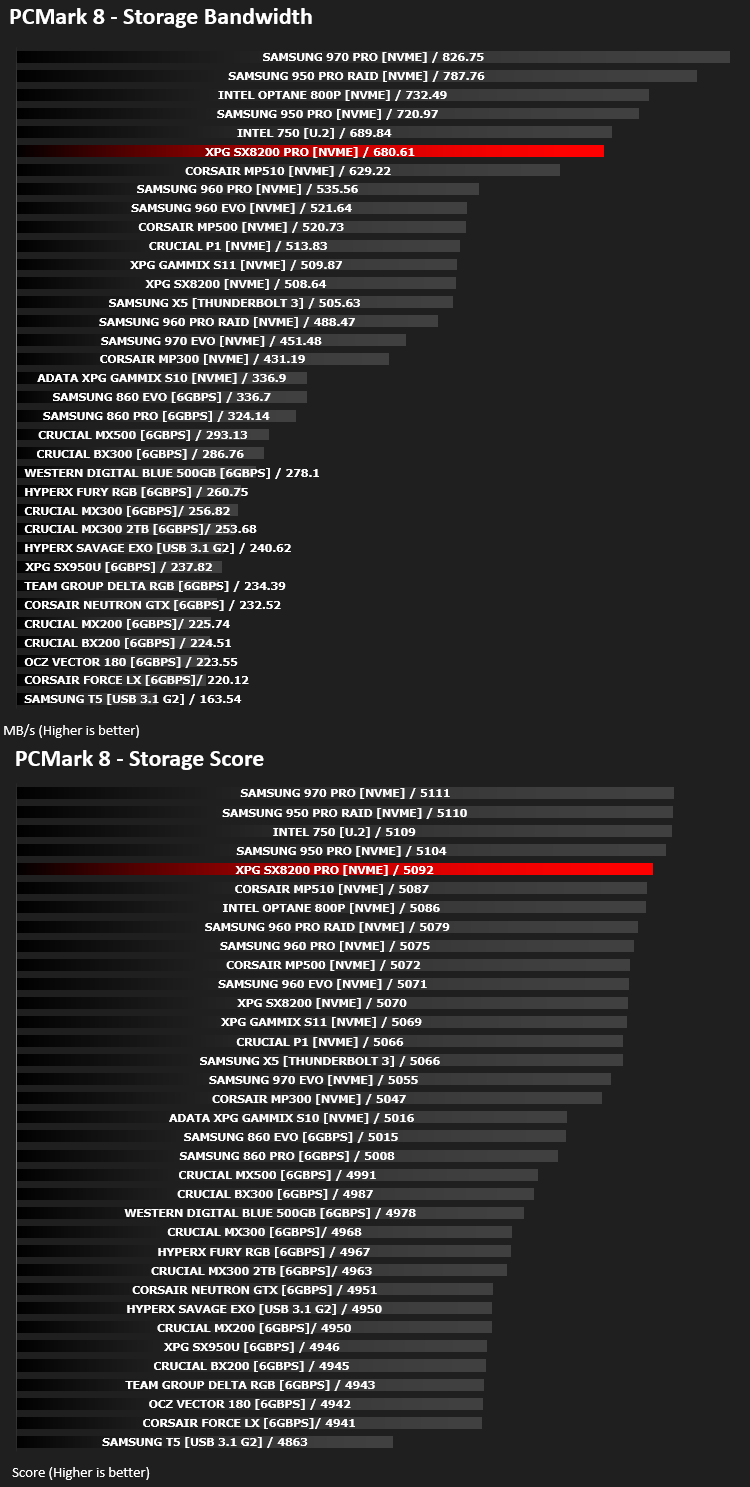
We use the Futuremark PCMark 8 utility to measure storage via Photoshop performance under both light and heavy loading conditions. Accelerated (open CL) is used to perform this test. The test is measured in seconds to complete.
Conclusion
We’ve reviewed several drives from XPG in the last year or so and always found them to be punching well above their weight as far as cost:performance is concerned. They may not, quite, achieve the absolute fastest drive in our tests, but the actual real-world difference would be extremely difficult to notice.With capacities ranging from 256GB to 2TB (though we’re not actually able to find a 2TB model for sale anywhere at the time of writing), XPG cater to all budgets and needs. A 256GB drive is still ample for a modest user, installing a few key applications and only using the system for light tasks, but seeking a responsive and fast system, whereas a 1TB or 2TB drive is ideal for your games library, allowing rapid access and quick loading times in all of your favourite titles.
The likes of the Crucial P1, Corsair MP510 and Samsung 970 EVO need be very worried, as far as we’re concerned. If you were considering any of those drives, we think you’d be hard-pressed to justify buying any of them over the XPG SX8200 Pro, especially when considering the optional heatsink and 5-year warranty, alongside very competitive TBW ratings.
If you’ve considered buying an NVMe drive to help speed up your system, or even just rid the wires of a SATA based alternative, this should absolutely be top of your list.
Pros
+ Rapid performance
+ 5-year warranty
+ High TBW ratings
+ Optional heatsink sticker
+ Price
Cons
– None
+ Rapid performance
+ 5-year warranty
+ High TBW ratings
+ Optional heatsink sticker
+ Price
Cons
– None
Click here for an explanation of our awards at Vortez.net.
Stay connected with the Vortez Social Media pages:
Join in with the discussions on Discord