







The champion of budget coolers is back, this time to tackle the most demanding of CPUs. Let’s see what the Freezer Extreme Rev. 2 has to offer.

Manufacturer and Sponsor: Arctic
MSRP: $49.95/37.65 Euros
Street Price: £23.70
ARCTIC are no stranger to the world of cooling, being pioneers in the field and having served enthusiasts for more than 10 years. If the name hadn’t already implied their roots, their origin started with cooling but their recent diversification into new product lines, including peripherals and speakers, has seen ARCTIC COOLING become a subset under the ARCTIC brand umbrella. One would hope that such a move hasn’t changed their focus from what they do best and today we find out if that is the case or not. For review today, we have a cooler that is by no means new; the Freezer Extreme Rev.2. As the name suggests, the cooler has undergone various revisions, the latest being support for all the latest motherboards and CPUs such as LGA1155 on the Intel side, and AM3+ and FM1 on the AMD side. Most noteworthy is its support for LGA1366 processors. While this may not seem significant, and indeed LGA2011 support is currently lacking, I have to highlight at this point that like the recently reviewed Cooler Master TX3 EVO, the Freezer Extreme Rev. 2 is a lightweight cooler featuring no mounting back plates. So with that, let’s talk a bit more about the actual cooler.
To start off, the Freezer Extreme is a dual tower cooler like many of the most high end coolers currently available. Arguably, the ARCTIC cooler is much smaller but it only highlights ARCTIC’s goal which is to bring efficiency in a much smaller, more practical package for new users and enthusiasts alike. Featuring four heat pipes 6mm in diameter, a 120mm fan, a mere weight of 608g and max cooling capacity of 160w, the Freezer Extreme has the making of the perfect mid-range cooler at budget pricing. Backed by a six years warranty, ARCTIC are also keen to demonstrate their commitment to product quality and after sales support, a point that very few companies reliably deliver on.
A bit about ARCTIC:
As an internationally active company, ARCTIC’s expertise ranges from noise suppression for PCs, audio, peripheral equipment and power supplies, right through to entertainment products. ARCTIC is the umbrella brand for the COOLING, SOUND, EQUIPMENT, POWER, HOBBY and Living product ranges.
ARCTIC is now a leading manufacturer of CPU coolers, GPU coolers and case fans. In recent years we acquired a far-ranging expertise in the field of consumer electronics. The company’s product range has been further enhanced by new lines unrelated to PC cooling which was the reason behind the 2010 change in our brand name and logo: ARCTIC COOLING became the ARCTIC brand umbrella.
Compared to our competitors, we aim to offer the best value for money, innovation, brand development, as well as cost and capital efficiency and excellent customer service relationships with our partners.
As an internationally active company, ARCTIC’s expertise ranges from noise suppression for PCs, audio, peripheral equipment and power supplies, right through to entertainment products. ARCTIC is the umbrella brand for the COOLING, SOUND, EQUIPMENT, POWER, HOBBY and Living product ranges.
ARCTIC is now a leading manufacturer of CPU coolers, GPU coolers and case fans. In recent years we acquired a far-ranging expertise in the field of consumer electronics. The company’s product range has been further enhanced by new lines unrelated to PC cooling which was the reason behind the 2010 change in our brand name and logo: ARCTIC COOLING became the ARCTIC brand umbrella.
Compared to our competitors, we aim to offer the best value for money, innovation, brand development, as well as cost and capital efficiency and excellent customer service relationships with our partners.
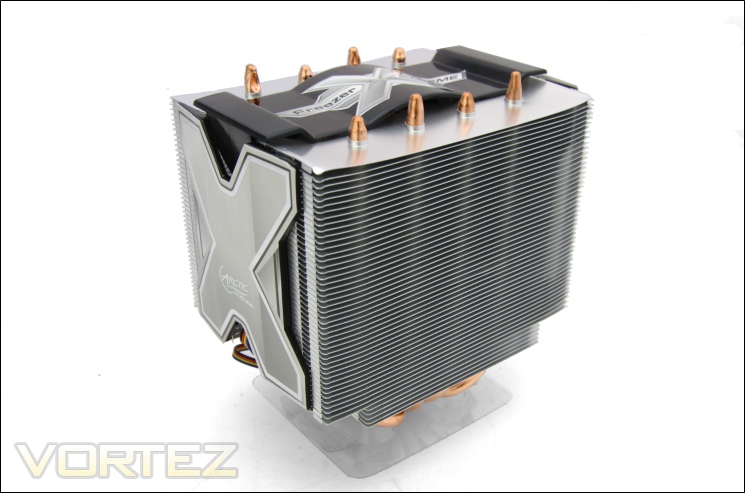
Backed by years of expertise, the Freezer Extreme Rev. 2 faces stiff competition from the likes of Cooler Master who have built up an arsenal of budget offerings such as the notorious Hyper 212 EVO. Let’s see how the Freezer Extreme Rev. 2 fares under the most stressing of conditions.
Features and Specifications
What ARCTIC have to say about their cooler:
To offer enthusiasts an ultimate CPU cooler for extreme overclocking the Freezer XTREME Rev. 2 is especially designed to fulfil the highest requirements and needs.
To offer enthusiasts an ultimate CPU cooler for extreme overclocking the Freezer XTREME Rev. 2 is especially designed to fulfil the highest requirements and needs.
Features:
•Unmatched cooling performance – 160 watts
•Unique twin tower 102-fin heatsink design
•Effective heat dissipation via 4 double sided heat pipes
•1 ultra-quiet 120mm PWM fan
•Patented fan holder eliminates the buzzing sounds
•Pre-applied MX-2 thermal compound
•Easy installation with push pins
Efficient Cooling
The unique heatsink design, consisting of 102 fins and 4 double-sided heat pipes offers a cooling performance far beyond the stock cooler. It can cool down CPUs with a heat dissipation of up to 160 Watts.
Minimum Noise
The central-mounted 120 mm fan with low noise impeller and a patented fan holder ensures quiet operation. Controlled by PWM, the fan runs between 800 and 1,500 RPM and runs silently even at full speed.
Easy Installation
The unique mounting system via push pins offers excellent stability and is applicable within a few minutes. The pre-applied ARCTIC MX-2 thermal compound makes the installation a quick and clean process.
Wide Compatibility
With the flexible mounting design, Freezer XTREME Rev.2 is compatible with Intel Socket 1366, 1155, 1156 and 775 as well as AMD Socket FM1, AM3+, AM3, AM2+, AM2, 939 and 754.
•Unmatched cooling performance – 160 watts
•Unique twin tower 102-fin heatsink design
•Effective heat dissipation via 4 double sided heat pipes
•1 ultra-quiet 120mm PWM fan
•Patented fan holder eliminates the buzzing sounds
•Pre-applied MX-2 thermal compound
•Easy installation with push pins
Efficient Cooling
The unique heatsink design, consisting of 102 fins and 4 double-sided heat pipes offers a cooling performance far beyond the stock cooler. It can cool down CPUs with a heat dissipation of up to 160 Watts.
Minimum Noise
The central-mounted 120 mm fan with low noise impeller and a patented fan holder ensures quiet operation. Controlled by PWM, the fan runs between 800 and 1,500 RPM and runs silently even at full speed.
Easy Installation
The unique mounting system via push pins offers excellent stability and is applicable within a few minutes. The pre-applied ARCTIC MX-2 thermal compound makes the installation a quick and clean process.
Wide Compatibility
With the flexible mounting design, Freezer XTREME Rev.2 is compatible with Intel Socket 1366, 1155, 1156 and 775 as well as AMD Socket FM1, AM3+, AM3, AM2+, AM2, 939 and 754.
Specifications
Socket Compatibility: AMD AM2/3/3+/FM1/939/754, Intel LGA 1155/1156/1366/775
Product Dimensions: 130 x 100 x 131 mm (L x W x H)
Package Dimensions with fan: 170 x115 x 180 mm (L x W x H)
Weight: 608g
Heat pipes: 4mm x 6pcs
Heatsink material: Aluminium fins x 102 – thickness 0.3mm, copper base and heat pipes
Fan dimensions: 120mm
Fan Speed: 800-1500R.P.M +/-10%
Air flow: 35.7CFM / 60.7mc/h
Bearing Type: Fluid Dynamic bearing
Fan Noise Level: 0.5 Sone
Connector: 4-pin PWM
Rated Voltage: 3.8-12 VDC
Limited warranty: 6 years
The ARCTIC Freezer Extreme Rev.2 boasts a number of features that are further testaments to the company’s goal. The 120mm fan is catered towards silence thanks to its PWM functionality and modest rotational speed of 800-1500RPM. The fan is also rated at 0.5 Sone. Conventionally, noise is measure by sound pressure in decibels but ARCTIC have gone for a more subjective measurement whereby the Sone represents a measurement of perceived loudness. Unfortunately, this cannot be easily or directly converted to the normal measurement in of sound pressure due to the way it is measured in the first place but as a rough estimate, 0.5 Sone is around 24dBA. The Freezer Extreme is a mere 131mm which impressively is 5mm shorter than the Cooler Master Hyper TX3! Its efficiency relies on 102 aluminium fins spread over two stacked arrays which in turn make the heatsink 100mm deep. Since the fan is positioned in the middle of the two stacks, users should have no issues with memory compatibility as we will see later on.
Other key highlights of the features list are its weight at a mere 608g and the wide compatibility with motherboards despite its push-pin mechanism.
Packaging and Content
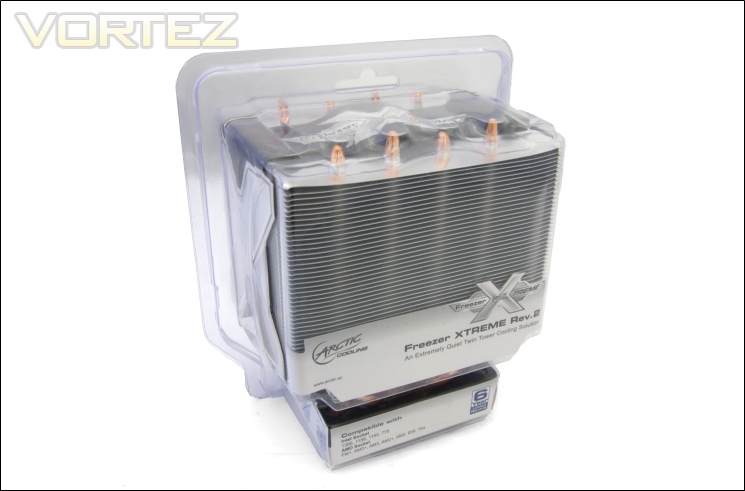
The front of the box
ARCTIC have packaged their flagship cooler inside a plastic blister pack, a change from the traditional cardboard box we tend to encounter. While excellent at showcasing the actual cooler, my first impression was that it cannot be good at protecting the cooler during transit. Thankfully, my doubts were quickly settled when I realised that the plastic used is very tough and durable. My main problem however, is that there is little room inside the packaging to hold the rest of the accessories. It is clear that the product will fit right at home in a retail store which is conveniently more appropriate to its target market. At the front, we see a small cut out with the ARCTIC name printed on and at the base is the list of motherboard sockets supported.
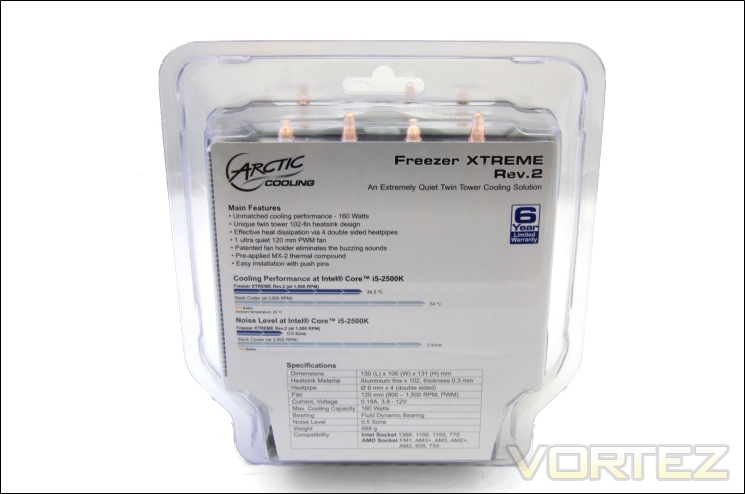
The back of the box
At the back, all the features and specifications are listed along with some charts to indicate the cooler’s performance relative to a stock cooler with an Intel Core i5 2500K. ARCTIC have also made it clear that the noise level is a priority hence the demonstration of its performance against a stock cooler in that department. Also highlighted is the 6 year limited warranty available with the cooler.
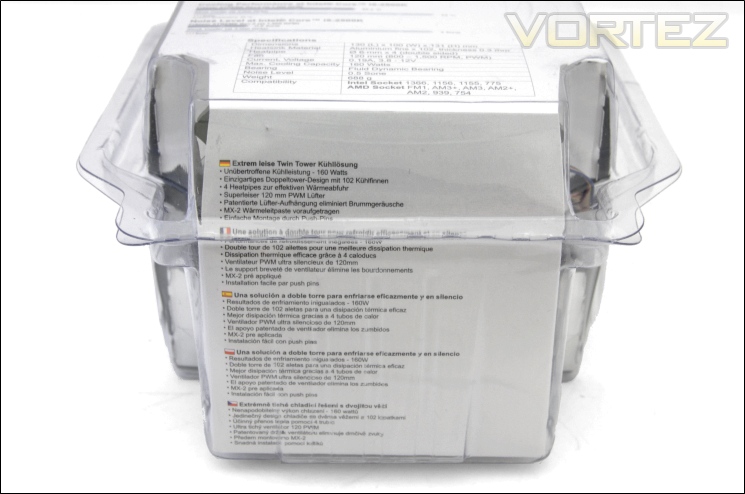
The base of the box
At the bottom, the features are printed in 5 more languages.
The bundle
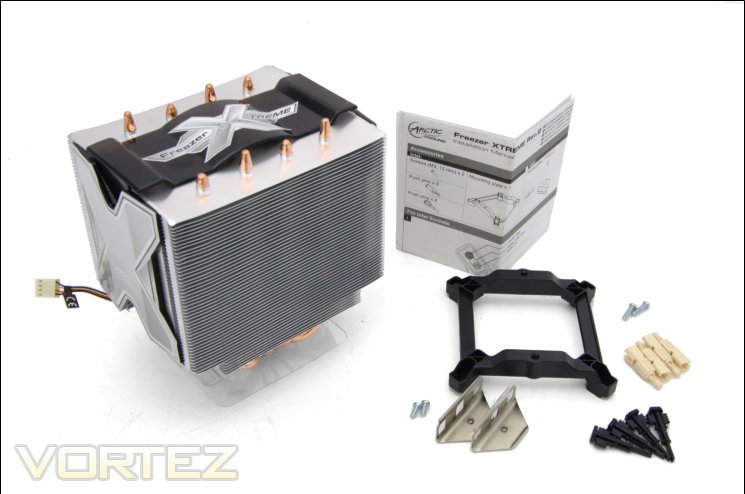
Inside the packaging, it is remarkable to see so few components for the mounting bracket given its support for motherboards as old as AMD’s 754 and 939, and Intel’s LGA775. ARCTIC have included:
-Heatsink & fan x1
-Manual x1
-Mounting plate x1
-Screws (12mm) x2
-Screws (7mm) x2
-Push pins x4
-Push pin inserts x4
-Lugs x2
Like the Cooler Master TX3, the Freezer Extreme also uses push pins making it more accessible to buyers looking to change their stock cooler without having to resort to changing the motherboard.
The cooler
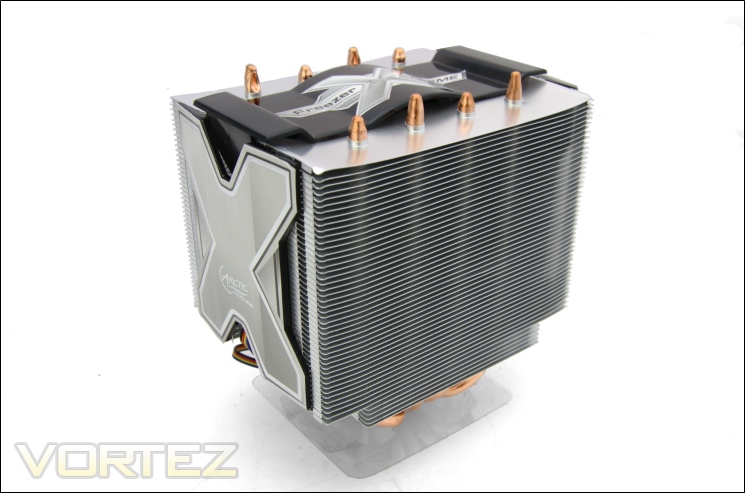
The cooler is a dual tower heatsink coupled with a single 120mm fan positioned in the middle. Unlike the behemoths from Noctua, Thermalright, Phanteks and Alpenföhn, the Freezer Extreme Rev. 2 is very compact and measures a mere 131mm in height. This is immediately apparent when we look at the cubed shape cooler. To improve the aesthetics, ARCTIC have integrated to large X shaped panels on either side of the cooler, and a plastic shroud at the top which is combined with the 120mm fan. The main advantage of such a design is that it makes fan installation and removal much easier without having to resort to fan clips. In terms of design, the Freezer Extreme Rev. 2 is more akin to the Tuniq Tower 120 Extreme. By having the fan in the middle, it means that it isn’t visible giving the cooler a clean, purposeful finish and on top of that, there is little chance of somehow damaging the fan or getting your finger caught.
The front of the cooler
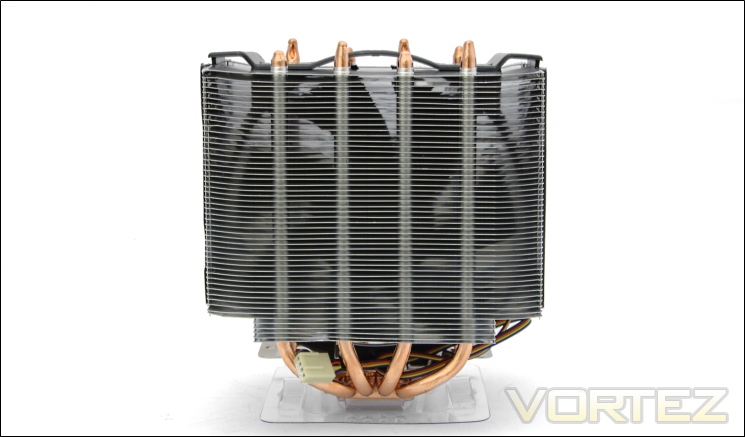
From the front, we can see the 120mm fan through the 51 fins and the four heat pipes rising side by side end evenly distributed. Due to the compact size of the cooler, the 120mm fan is able to cover the whole surface area, making it a very effective solution. The contrasting colours between the heat pipes and the fins highlight the copper and aluminium construction respectively.
Closer Look
The front of the heatsink
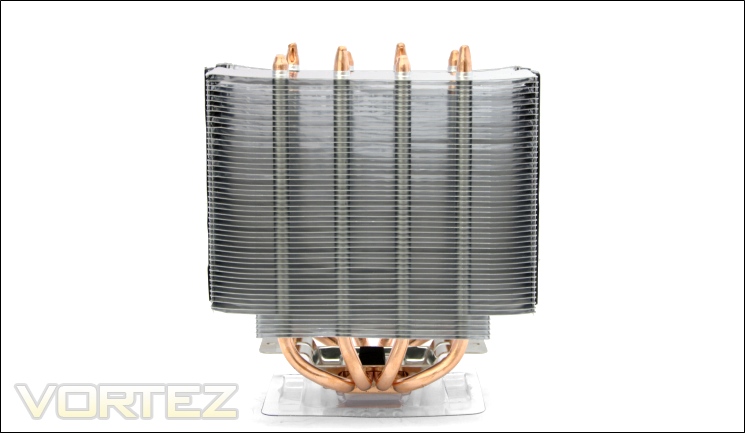
The heatsink makes use of two radiators both featuring 51 fins for a total of 102. To fit so many fins in such a small package, the fin spacing is a mere 1.5mm making this a densely packed heatsink favouring high static pressure. The fins themselves are laminar and are stacked in parallel without any distinct characteristics. In the centre, the fins are all flat curving upwards towards the edges. This simple touch may increase turbulence but not significantly. The bottom five fins are shorter in length.
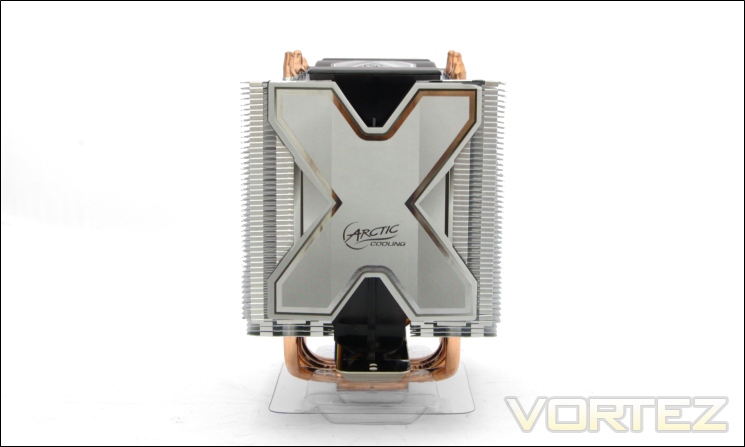
The side of the cooler
From the side, we can see that ARCTIC have placed a large X shaped façade to hide the fan. It serves to make the cooler more aesthetically pleasing but also as a mechanism to lock the fan mount. This is merely stuck on but I wouldn’t recommend removing it. Prior to the rebranding, the cover was colour black and silver rather than white.
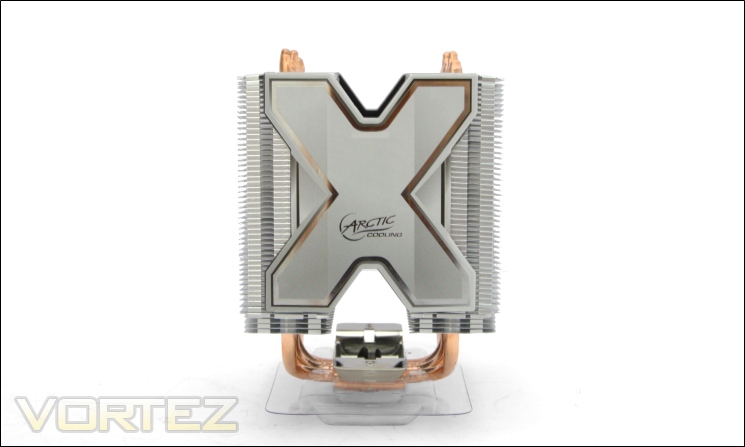
The side of the cooler without the fan installed
The depth of the cooler is 100mm, 12mm less than the Tuniq Tower 120 Extreme and over 40mm less than our super high-end dual tower coolers. This allows the Freezer Extreme Rev. 2 to remain compact and provide no issues regarding capability, a point ARCTIC keenly want to emphasise. The U-shaped heat pipes are distributed such that either end goes up its own radiator for better efficiency. Regarding the fins, those are partially closed by bent interlocking tabs. This means that the amount of air entering from the sides is limited
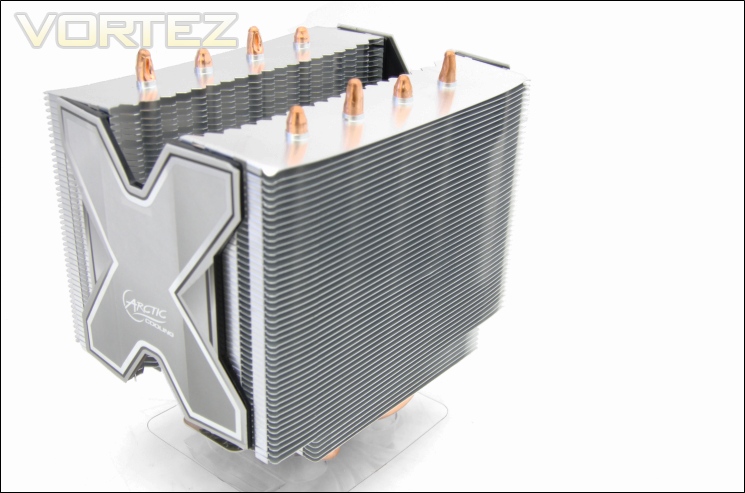
Flat fin edges
A closer look at the fins, we see that on the front side, they have smooth straight edges. On the inside, the story is different.
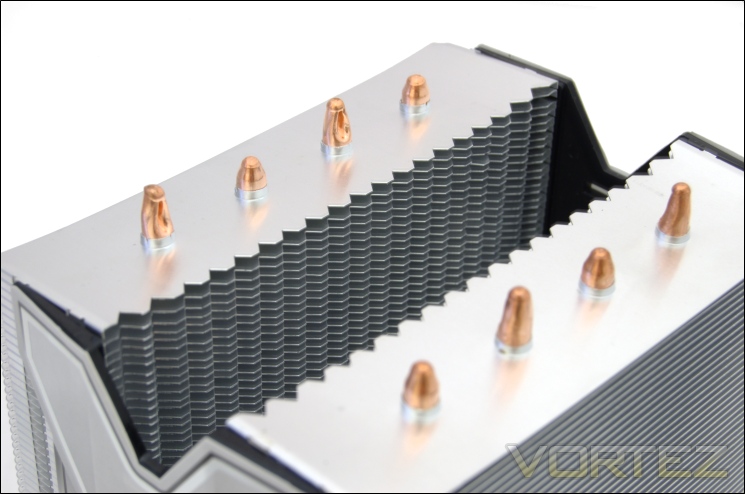
Serrated fin edges
On the inside, the fins have a serrated edge which is thankfully flat at the tips to avoid any casualties or damage to the fans during installation or removal. This design is not dissimilar to the Alpenföhn K2.
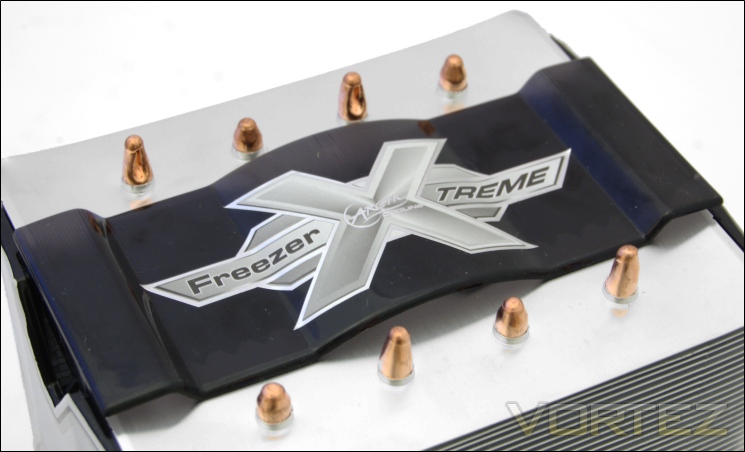
The top fan shroud
The fan is attached to the top cover which when installed displays the Freezer Extreme emblem proudly. This cover is rounded in the middle to accommodate the fan and flat with a slight lip towards the sides.
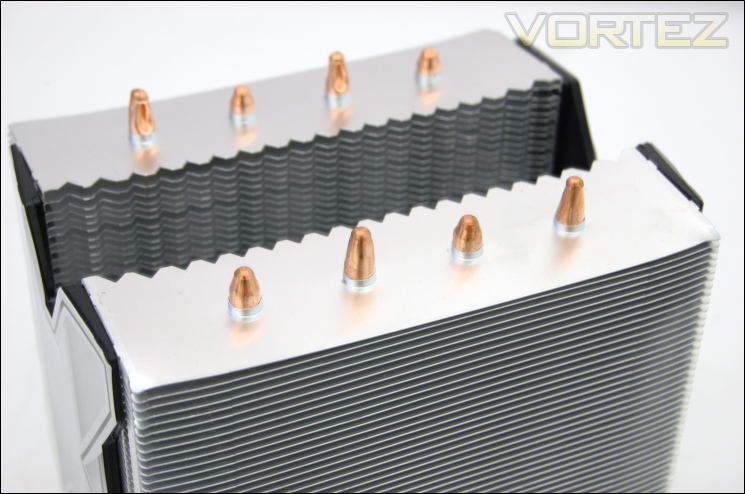
The heat pipes
The Freezer Extreme boasts four 6mm heat pipes, with each end of one heat pipe going through its own radiator. They are evenly spaced and distributed far enough apart for excellent heat dissipation. By having them side by side, all the heat pipes receive adequate airflow without blocking each other, hence the improved efficiency.
Closer Look (Continued)
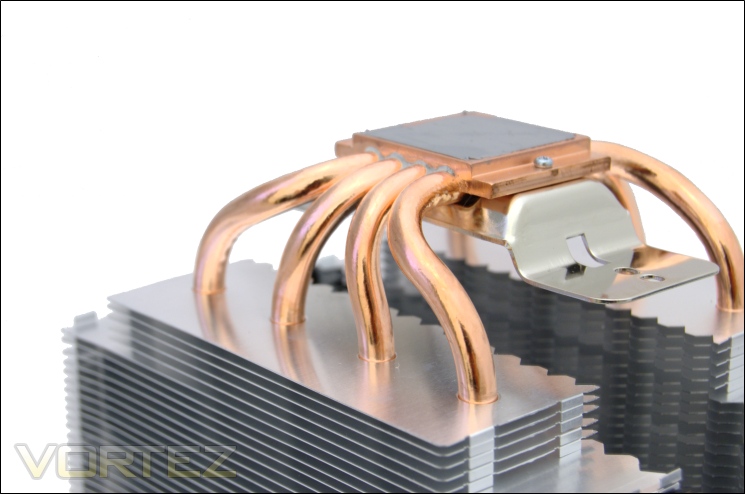
The four 6mm heat pipes
The heat pipes all meet at the copper base plate. They all bend outwards such that they are separated when distributed across the radiators. Although the base gives the illusion of
Direct Touch technology, this isn’t the case, perhaps a first amongst budget coolers. Nonetheless, this isn’t something that necessarily brings benefits if the base plate does a good job transferring heat from the CPU to the heat pipes. One thing I noticed is that the contact between the heat pipes and the base plate was filled by a concrete like residue coloured the same as the thermal paste. It indicates the use of some sort of glue rather than proper soldering.
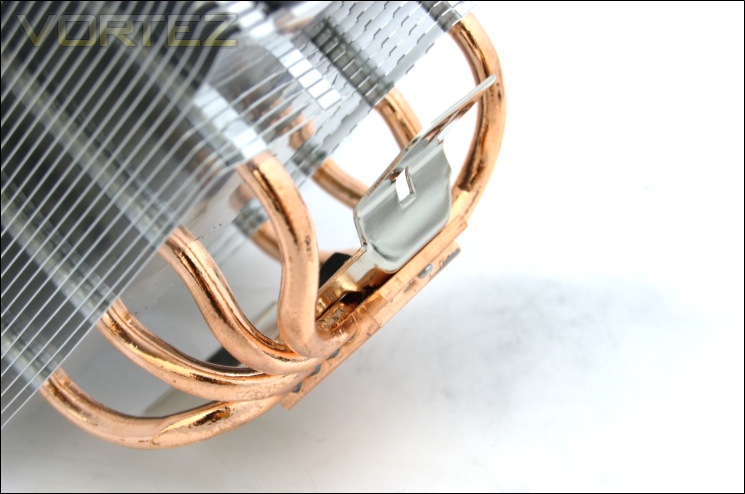
The cooler mounting bracket
There is an additional mounting bracket attached to the base for installation. In the centre of the bracket is a small black mount onto which the fan can sit.
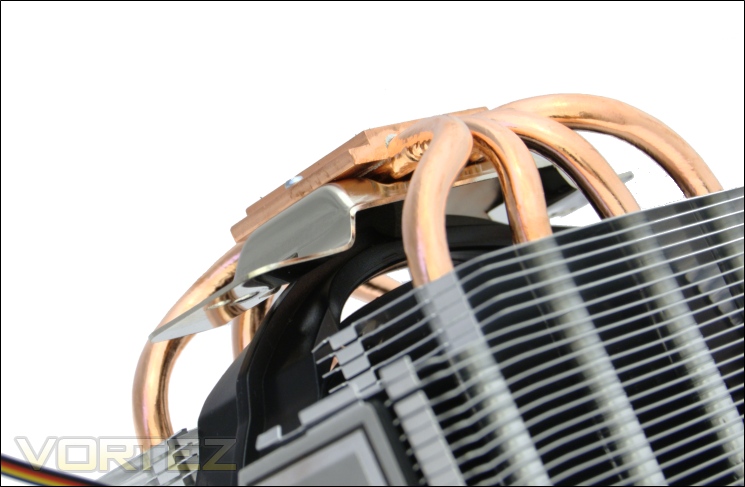
The bottom fan mount
And here we can see how the fan can be perfectly positioned into place with the help of the plastic mount.
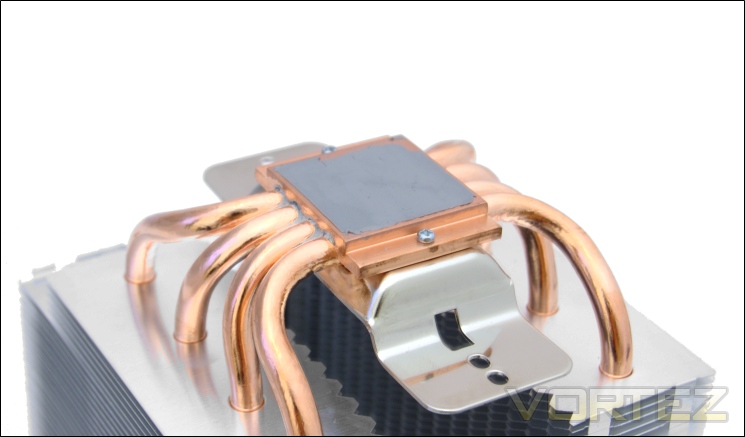
The base of the cooler with ARCTIC MX-2 pre-applied
The base comes pre-applied with ARCTIC MX-2. It seems strange that ARCTIC don’t pre-apply their latest MX-3 or MX-4 offerings on their flagship cooler but what is provided is still of premium quality compared to generic compounds often bundled with other coolers. It helps that the thermal paste is evenly spread and thus causes fewer head-aches during installation.
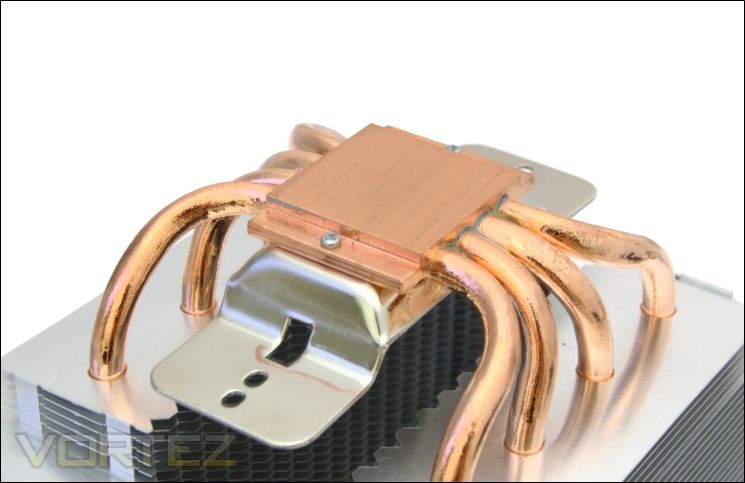
The base of the cooler
Without the thermal paste, the actual based is revealed. Although flat, it doesn’t have a perfectly smooth finish. The base measures 24.5mm by 24.5mm which is significantly smaller than the IHS on the i7 920 measuring 32mm by 34mm.
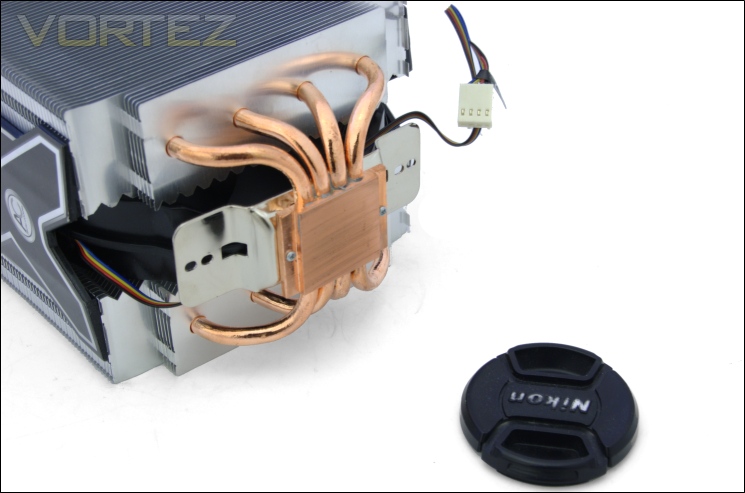
The smoothness of the base
The lack of a smooth finish is demonstrated by its low reflectivity. Thankfully, we can still rely on a perfect thermal paste application for efficient thermal transfer.
Closer Look (Continued)
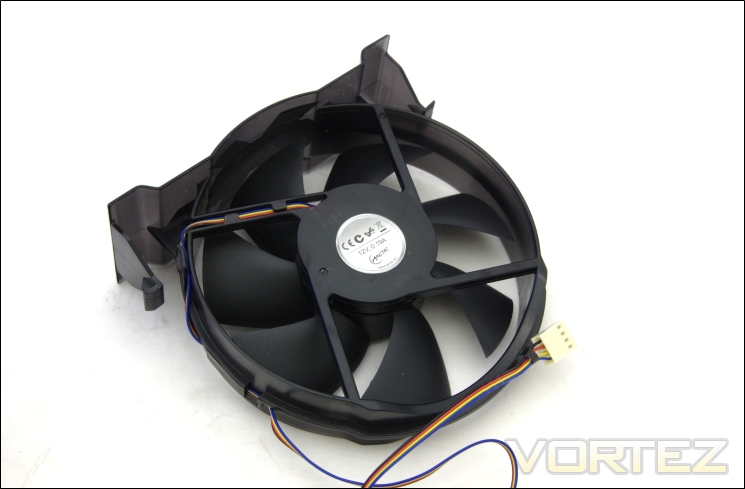
The front of the fan
The 120mm fan is rated to operate at 800-1500RPM thanks to PWM functionality. The fan itself however is unique in design. The arms holding the rotor and propeller to the circular shroud is actually on the front of the fan rather than the back where it should typically be found. To make sure that this was definitely the front of the fan, I checked the direction of airflow and it was certainly strange to see such a strange design feature. The fact that ARCTIC themselves don’t indicate the direction of airflow on the fan means that users may get confused and mount it incorrectly. The fan is also integrated to the top cooler cover so it is impossible to use other fans.
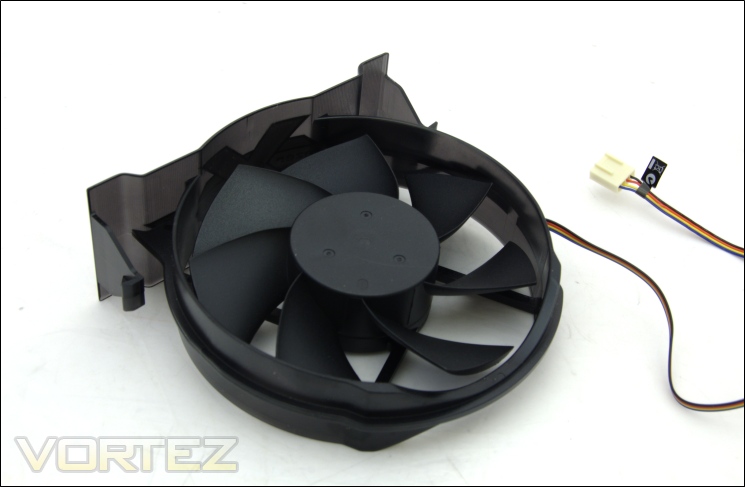
The back of the fan
On initial impressions, this side of the fan looks like the front but we can see that the fan blades are orientated the wrong way.
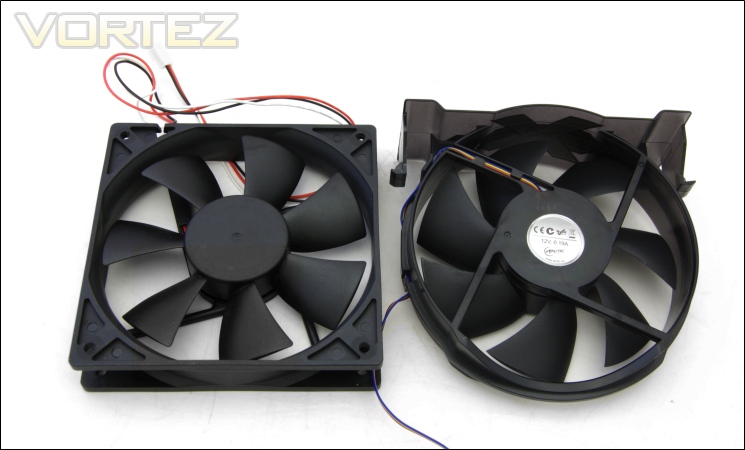
Standard fan VS ARCTIC fan
On the right, we have a standard fan for comparison. Unlike conventional fans, the ARCTIC fan rotates clockwise rather than anti-clockwise due to the opposing orientation of the blades.
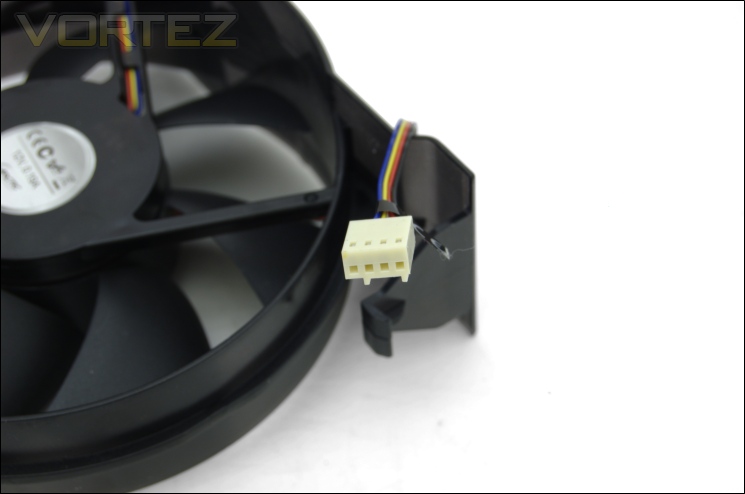
The 4 pin PWM enabled header
The fan features a 4pin header for added PWM functionality. Unfortunately, the cable isn’t pre-braided like their standalone fans, and therefore less visually attractive. It’s nothing a bit of cable management can’t sort out.
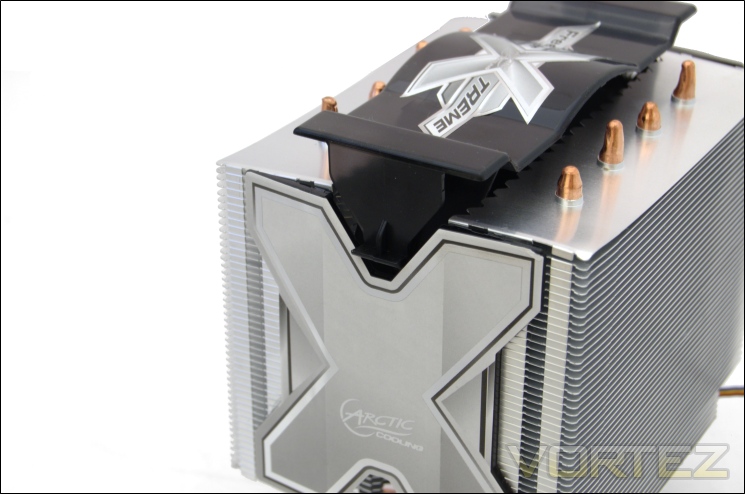
Installing the fan
The top cover has tabs on either side which simply slip into the side of the cooler when installing. Removing requires those tabs to be pressed and for the fan to be simply lifted out. The method is much easier than using fan clips and there is no need movement from the fan itself that may lead to unnecessary cooler vibrations.
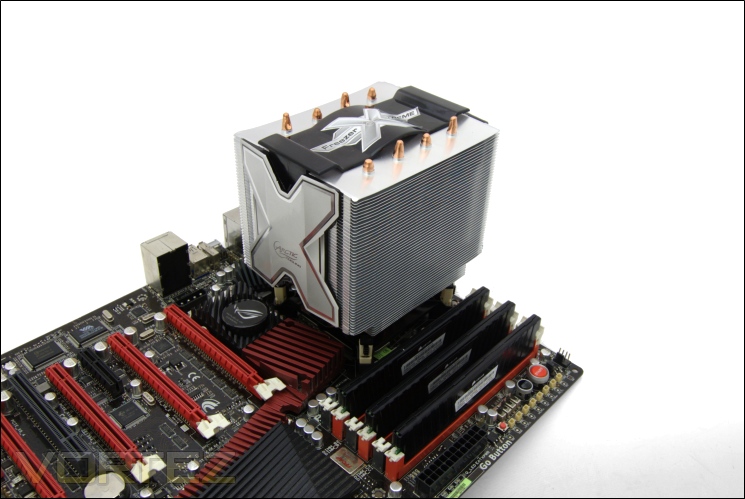
The cooler installed
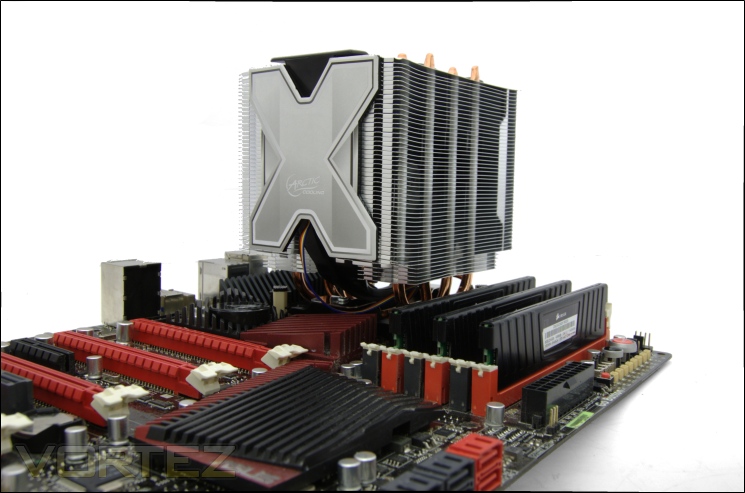
The Freezer Extreme Rev.2 looks very compact once installed and certainly doesn’t have the same towering look of the higher end coolers we usually encounter. It makes the cooler ideal in smaller cases and situations where space isn’t readily available.
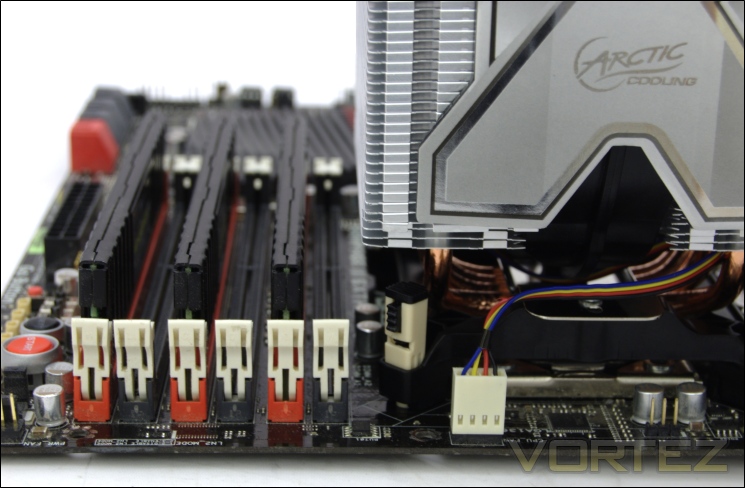
Memory compatibility
At only 100mm wide, there are no memory compatibility issues. There is a small gap present between the heatsink and the adjacent memory slot so users are free to choose any sized memory modules.
Test Setup
CPU – Intel Core i7 920 – 2.66/4.0GHz
RAM – 6GB (3x2GB) OCZ Platinum DDR3 1333MHz
Motherboard – ASUS Rampage III Extreme
Graphics card – Inno3D GTX570 1.25GB
Power Supply – Enermax Revolution 85+ 850W
Hard Drive – OCZ Vertex 2E 120GB
Samsung F1 320GB
Samsung F3 1TB
Case – Lian Li B25B
Drivers – Nvidia ForceWare 285.38
CPU Coolers:
ARCTIC COOLING Freezer Extreme Rev.2 including test using 1 stock fan
Cooler Master Hyper TX3 EVO including test using 1 stock fan
Cooler Master Hyper 212 EVO including tests using 1 stock fan, 2 Noctua NF-P12s/NF-P14s and 2 SWiF2-120Ps
Retail Alpenföhn K2 including tests using 2 stock fans, 2 Föhn 120, 2/3 Noctua NF-P12s/NF-P14s and 2 SWiF2-120Ps
Zero Infinity Free Flow+ including passive and tests using 1/2/3 stock fans, 2 Noctua NF-P12s/NF-P14s and 2 SWiF2-120Ps
Enermax ETS-T40-TA including tests using 1 stock fan, 2 Noctua NF-P12s and 2 SWiF2-120Ps
Alpenföhn Himalaya including tests using 1/ 2 Föhn 140, 2 Noctua NF-P12s/NF-P14s and 2 SWiF2-120Ps
Cooler Master Hyper 612S including tests using 1 stock fan, 2 Noctua NF-P12s/NF-P14s and 2 SWiF2-120Ps
Corsair H100 including tests using 2/4 stock fans, 2 Noctua NF-P12s and 2 SWiF2-120Ps
Phanteks PH-TC14PE including tests using 3 Phanteks PH-F140TS, 2 Noctua NF-P12s/NF-P14s and 2 SWiF2-120Ps
Alpenföhn Triglav including tests using 1 stock fan, 2 Noctua NF-P12s/NF-P14s and 2 SWiF2-120Ps
Antec KÜHLER H2O 620 including tests using 1 stock fan, 2 Noctua NF-P12s and 2 SWiF2-120Ps
Antec KÜHLER H2O 920 including tests using 2 stock fans, 2 Noctua NF-P12s and 2 SWiF2-120Ps
Prolimatech Genesis including tests using 2 Noctua NF-P12s/NF-P14s, 2 SWiF2-120Ps and 2 Prolimatech Blue Vortex 14s
NZXT Havik 140 including tests using 2 NZXT fans, 2 Noctua NF-P12s/NF-P14s and 2 SWiF2-120Ps
Alpenföhn Matterhorn including tests using 2 Noctua NF-P12s/NF-P14s, 2 SWiF2-120Ps and 2 Föhn 120 Wing Boost fans
Prolimatech Super Mega including tests using 2 Noctua NF-P12s/NF-P14s, 2 SWiF2-120Ps and 2 Prolimatech Blue Vortex 14s
Noctua NH-C14 (U.L.N.A and default speed) including tests using 2 SWiF2-120Ps
Thermalright Silver Arrow including passive and tests using 2 Noctua NF-P12s and 2 SWiF2-120Ps
Thermalright HR-02 including passive and tests using Noctua NF-12/NF-P14s and Thermalright TR TY-140
Thermaltake Frio (Low/med/high speed) including tests using 2 Noctua NF-P12s
Corsair H50 including tests using 2 Noctua NF-P12s and 2 SWiF2-120Ps
CoolIT ECO A.L.C including tests using 2 Noctua NF-P12s and 2 SWiF2-120Ps
Thermalright Venomous X using 2 Noctua NF-P12s and 2 SWiF2-120Ps
Coolink Corator DS including tests with dual fan setups
Tuniq Propeller 120(High speed fan)
Noctua NH-C12P SE14
Prolimatech Megahalem
Noctua NH-D14 (U.L.N.A and default speed)
Noctua NH-U12P SE1366
Thermolab Baram (with 2 Noctua NF-P12 fans)
CoolIT Domino A.L.C
Sunbeam Core Contact Freezer
Cooler Master Hyper 212 Plus including test with 2 Noctua NF-P12 fans
Alpenföhn Nordwand including test with 2 Noctua NF-P12 fans
Tuniq Tower 120 Extreme (Low/med/high speed)
Program Suite:
Core Temp 0.99.5
LinX stress Test
CPUID HWMonitor
How I tested:
Testing will be based on temperatures recorded by Core Temp and HWMonitor after 20 passes of LinX stress test. The maximum absolute temperatures will be recorded after the test and averaged over the 4 cores. The delta is then calculated by substituting the ambient temperature recorded near the intake fans. All tests are conducted with the i7 920 at its default 2.66GHz stock speed and overclocked to 4GHz. As always, the tests are done inside my own Lian Li B25B case to simulate real world conditions. To keep the tests standardised and based on people’s tendency to use their own thermal paste, we apply Thermalright’s ChillFactor II thermal paste to all coolers unless specified in the result entries (where the bundled thermal paste performs better).
Installation
The Freezer Extreme Rev.2 relies on a push pin mechanism for installation which on first thought doesn’t seem a particularly robust idea. The compact lightweight construction of the cooler does mean that it is still appropriate, especially for users not willing to remove their motherboard to install back plates. On the positive side, the mechanism still relies on a front mounted bracket to secure the cooler better.
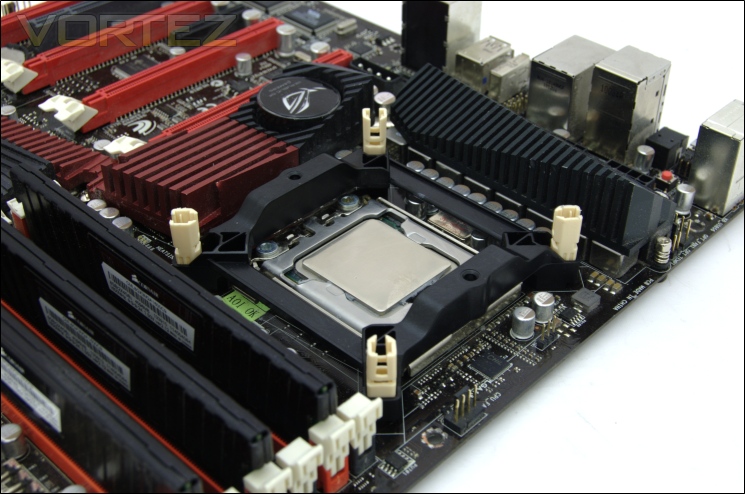
1. Position the mounting plate above the motherboard mounting holes and insert the beige push pins in each corner until you hear a click. Make sure the open side of the push pins face inwards.
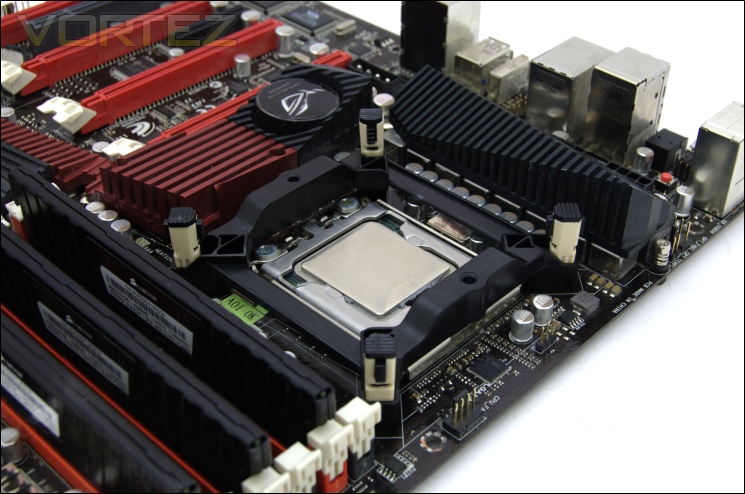
2. Fully secure the mounting plate by placing the black push pin inserts into the grey push pin, again making sure it clicks.
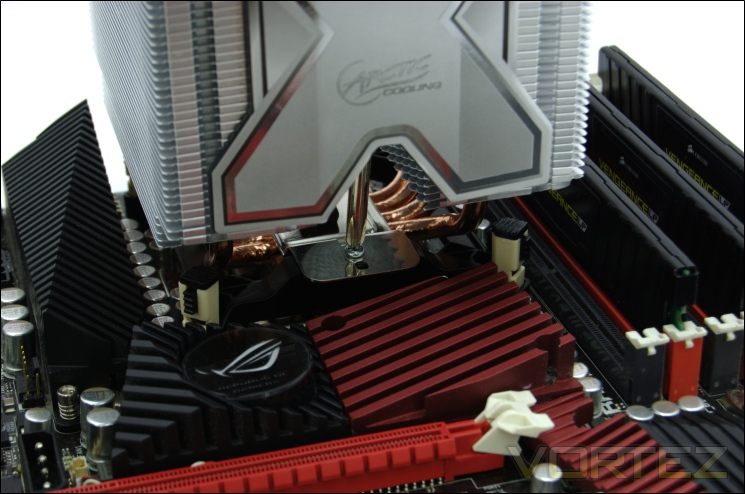
3. Place the heatsink on top and secure it to the mounting bracket using the 12mm screws. I recommend inserting the screws into the cooler bracket first before placing it on the motherboard.
Although straightforward, there are a few annoyances I encountered. The plastic components are not as robust as metal brackets that high end coolers tend to rely on, making the whole thing feel quite cheap. Removing the black push pin inserts if you ever need to also requires a lot of effort, prompting me to use some pliers. Finally, it is very tough to line up the 12mm screws with the mounting bracket, especially when doing so inside a case, that’s assuming you don’t drop the screw first… In the end, it proved easier to just do it by removing the motherboard thereby making the push pin method somewhat redundant
Results (Grouped)
The results have been arranged in terms of the fan configuration that yields the best results for each cooler. However, it is important to take into account that many coolers come with their own fans and changing those increases the costs significantly, so the “out of the box” cooler configurations have been highlighted in red each group.
Stock

At the stock CPU clock speed, the Freezer Extreme Rev. 2 fails to deliver performance to match its key competitors such as the Cooler Master Hyper 212 EVO. The single fan at full speed of 1500RPM delivers a delta temperature of 37.25C. Changing the thermal paste to our standard Thermalright ChillFactor II sees performance drop by 0.25C. This isn’t necessarily due to the paste’s poorer performance but mostly down to the perfect application of the MX-2 by ARCTIC.
Results (Ascending order)
Stock

The cooler finds itself delivering the same performance as our passively run high end coolers. It also outperforms the KUHLER 920 using two fans in silent mode. However, its key competitors in the same price bracket perform a few degrees better. If we take the size of the cooler into account, more specifically its height, we see it fares much better compared to similarly sized offerings. It outperforms the Noctua NH-C12P, the Cooler Master TX3 and Tuniq Propeller. The Noctua NH-C14 is still the best cooler below the 130mm height but a significant price premium has to be paid above the Freezer Extreme’s cost.
Results (In-depth analysis)
In the next comparison, we look at the default cooler performance as they come out of the box with their bundled fans. Coolers that come with no fans have been coupled with Noctua’s NF-P12 or fans that the manufacturers intended their coolers to be used with.
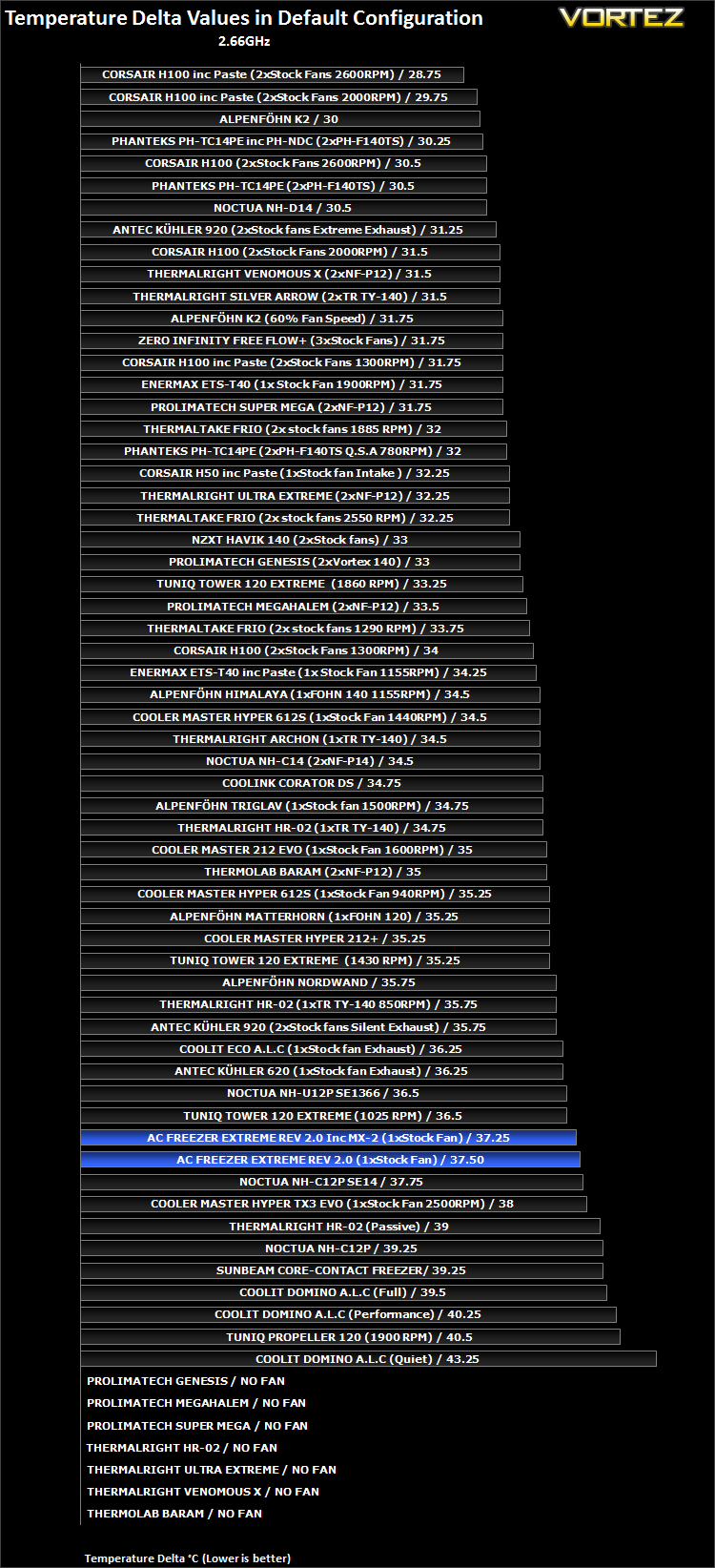
Results Overclocked (Grouped)
The results have been arranged in terms of the fan configuration that yields the best results for each cooler. However, it is important to take into account that many coolers come with their own fans and changing those increases the costs significantly, so the “out of the box” cooler configurations have been highlighted in red each group.
4GHz

In terms of ranking, the ARCTIC cooler moves up a few places with the overclocked CPU. The Freezer Extreme Rev. 2 proves to be superior to the taller Cooler Master Hyper 212+ and even the Noctua NH-U12P. The cooler yields a delta of 64.5C, and 64.75C when using ChillFactor II thermal paste. As mentioned before, this is due to ARCTIC’s perfect application of their MX-2 paste.
Results Overclocked (Ascending order)
4GHz

With the overclocked CPU, the Freezer Extreme Rev. 2 proves to be more efficient. It produces the same result as the Cooler Master Hyper 212 EVO in its default configuration and outperforms the Enermax ETS-T40, impressive considering the latter two have fans operating at higher RPM. For a small quiet cooler, it proves a good alternative to using high end coolers passively. The NH-C14 is still the superior cooler at the same height being 3.75C cooler.
Results Overclocked (In-depth analysis)
In the next comparison, we look at the default cooler performance as they come out of the box with their bundled fans. Coolers that come with no fans have been coupled with Noctua’s NF-P12 or fans that the manufacturers intended their coolers to be used with.
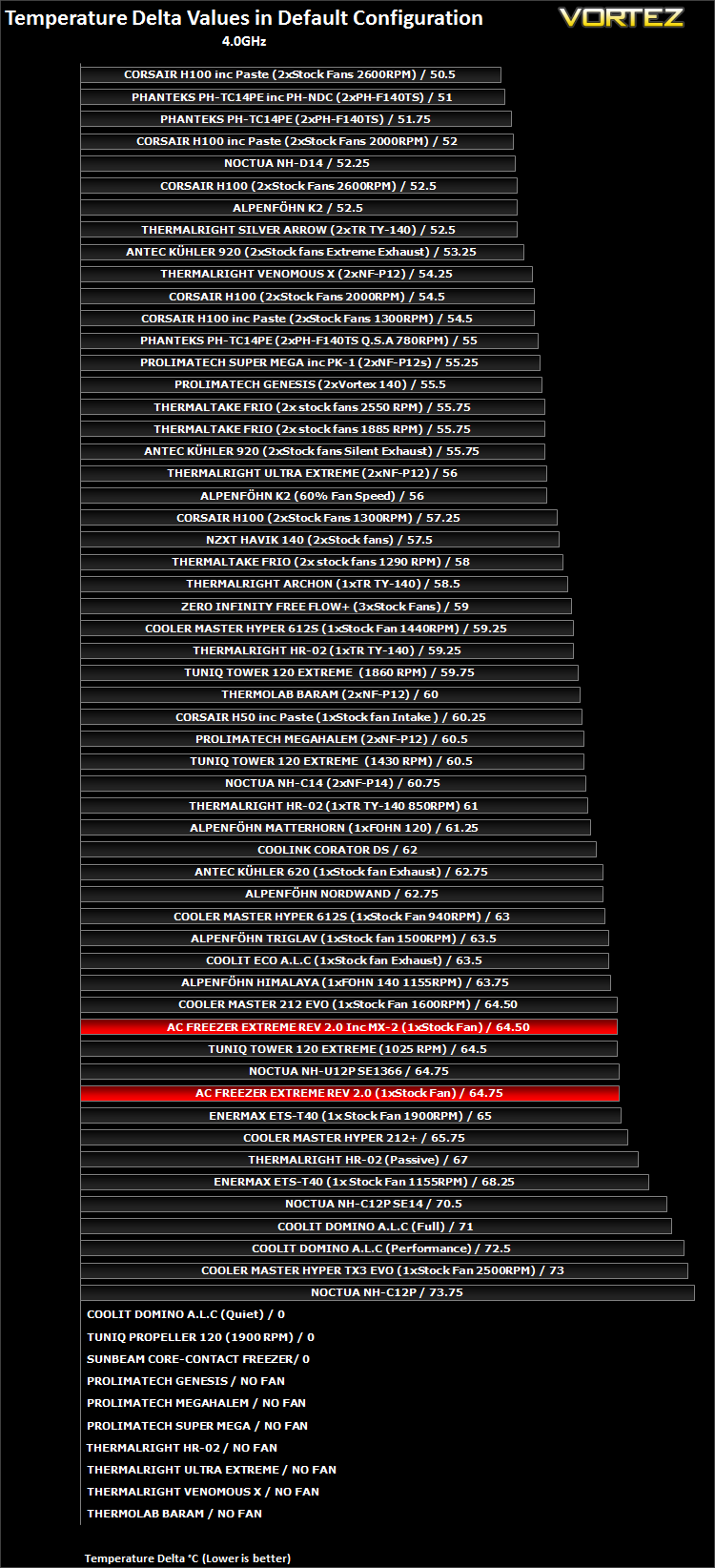
Again, we see that the ARCTIC cooler is more efficient under high load. It outperforms the much more expensive Noctua NH-U12P and the louder Enermax ETS-T40.
Conclusion
The ARCTIC Freezer Extreme Rev. 2’s mix of features makes it a very unique product making it very hard to pick a direct competitor. So let’s look at it from various perspectives. Starting with its price point, the ARCTIC cooler is readily available for around £25 where its main competition comes from the Cooler Master Hyper 212 EVO. If budget is your only consideration and size is of no issue, the latter is undeniably the better option and is only a touch louder than the ARCTIC. Take size into account for HTPCs or M-ATX cases, then the Freezer Extreme Rev. 2 faces competition from other coolers 130mm or less in height such as the Noctua NH-C12P, Noctua NH-C14, other top down coolers or low profile ones. Even the Cooler Master Hyper TX3 ends up taller. In this scenario, the ARCTIC cooler is a much better proposition whereby only the Noctua NH-C14 can outperform it but for a significant premium. So if price and size are key factors to your choice of cooler, then the Freezer Extreme Rev. 2 is the perfect option, if not your only option.
In terms of performance, the Freezer Extreme Rev. 2 is by no means ground-breaking and certainly on initial impressions, a dual tower cooler is suggestive of better cooling potential. But then when we realise that the Freezer Extreme Rev. 2 features a very compact design, it makes sense that the dual tower design was employed to improve efficiency. The result is a cooler that is shorter than the Cooler Master TX3, able to compete with the likes of the Enermax ETS-T40 and poses no issues regarding memory compatibility. And unlike other cooler that rely on higher RPM fans, the ARCTIC cooler still delivers acceptable results at low noise levels. We have to remember that in our review, the cooler was under load of an overclocked i7 920 which can output up to 230W of heat whereas the cooler is only rated to dissipate 160W of heat effectively, so its ability to handle such high loads is testament to its cooling potential. Additionally, the perfect pre-applied MX-2 thermal paste helps maintain decent performance.
There are a few negatives I would like to highlight before doing a final summary. The base of the cooler is small in comparison to the 920’s IHS which may explain why the cooler didn’t fare better. Although the base may be adequate for smaller and consequently less power hungry CPUs, it is important that ARCTIC address this issue for higher end CPUs. Afterall, one of ARCTIC’s key selling points is widespread compatibility. It makes little sense to simply design the bracket for high end motherboards but not make the cooler itself apt for the CPUs that will go in them. Another annoying niggle I encountered was during installation. Trying to secure the heatsink to the mounting bracket using the small screws proved to be difficult but a simple way to overcome this is to place the screws into the heatsink bracket first rather than placing the cooler on the motherboard and then trying to reach down with the screws.
Overall, the ARCTIC Freezer Extreme Rev. 2 is a decent cooler. It is perfect for small systems where large tower coolers will not fit and for users who can’t tolerate noise. Looking past some of it negatives, it is also an excellent choice for the new Sandy Bridge and Ivy Bridge CPUs.
Pros:
+Handles high CPU loads
+Good performance for size
+Aesthetics
+Pre-applied thermal paste
+Price
+Bundled PWM fan
+Support for all Intel and AMD sockets excluding LGA2011
+Memory compatibility
+Compact size
+Lightweight
+Low noise
+Convenient mounting mechanism
Cons:
-Low efficiency at stock CPU speed
-Installation method
-No support for third party 120mm fans
-Small base plate not large enough to cover LGA1366 based CPUs
-Similar priced alternatives are better if size is not a concern
-Unintuitive fan design
+Handles high CPU loads
+Good performance for size
+Aesthetics
+Pre-applied thermal paste
+Price
+Bundled PWM fan
+Support for all Intel and AMD sockets excluding LGA2011
+Memory compatibility
+Compact size
+Lightweight
+Low noise
+Convenient mounting mechanism
Cons:
-Low efficiency at stock CPU speed
-Installation method
-No support for third party 120mm fans
-Small base plate not large enough to cover LGA1366 based CPUs
-Similar priced alternatives are better if size is not a concern
-Unintuitive fan design
The ARCTIC Freezer Extreme Rev. 2 earns itself our Vortez Bronze award and the Amazing Value Award.


