Is Foxconn’s new Rattler P67 motherboard a force not to be reckoned with? A new addition to the Quantum Force Series is upon us.
Product on Review: Quantum Force Rattler P67
Manufacturer: Foxconn
Street Price: £149.99 inc. VAT (At time of review)

The Quantum Force Series has lent itself to plenty of discussion over the years with an exciting range of motherboards within this division. Way back in the Summer of 2007 they launched their first Quantum Force motherboard – Mars. Its clear that whilst Foxconn may not be the biggest they are seeking to be the best. Over the years we have seen boards such as the Flaming Blade and Bloodrage attract lots of attention for their striking looks and feature-rich layouts.
Rumours surrounding the Quantum Force Series having a new P67 addition have been circulating around the internet for many months now and today, we finally get our hands on a motherboard named Rattler which incorporates that Intel P67 chipset.
On the surface, it packs in plenty of features – SATA 6G, USB3.0, CrossfireX, onboard power/reset and overclock buttons and up to 16GB of 2100MHz (OC) but will it be enough to project Foxconn into the high-end motherboard market that is extremely competitive?
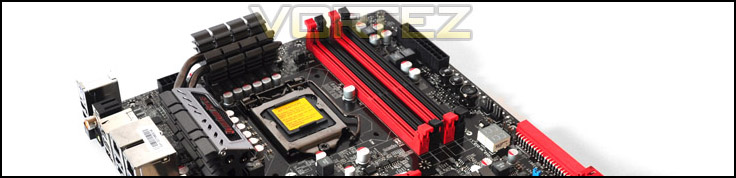
Foxconn’s take on Rattler:
Foxconn Quantum Force aims to deliver high performance computing, connectivity and digital entertainment. With more options for accessing and managing other devices, enhanced reliability features and new PC multimedia technologies. Rattler is the ideal choice for extreme performance or quantum force. This motherboard is based on the Intel® P67 chipset – providing ultimate performance for today’s desktop computers. The Rattler supports the latest industry technologies – Intel® sandybridge series processors and DDR3 2133MHz(via overclocking) memory. 100% SOLID Capacitor design, Ferrite Choke power delivery and Cool Pipe design help to maximize performance and increase reliability. And at the same time, provided the digital audio outputs via S/PDIF OUT. guarantees the highest quality fidelity for games and movies
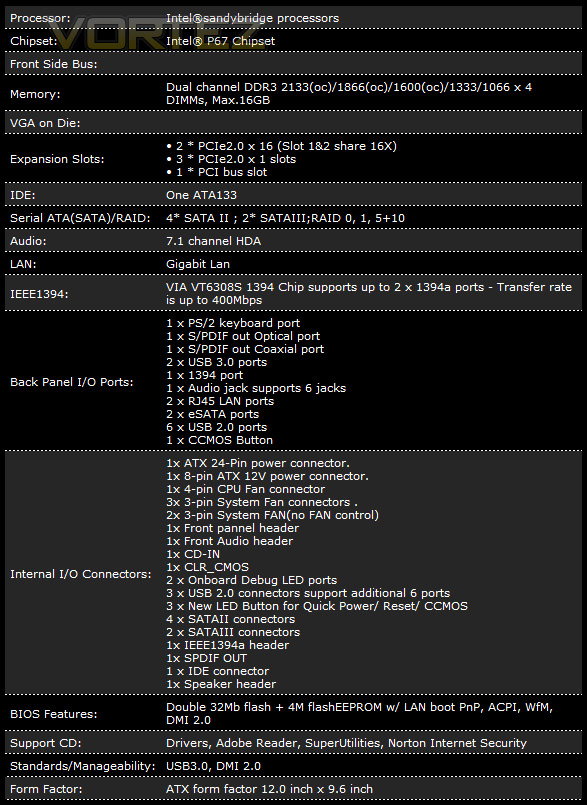
Technical Specifications
Packaging & Bundle
Rattler is presented to us in an eye-catching box. The theme here is an rather confusing. Rattler appears to be marketed at a much younger age-group with something that resembles a “Hot Wheels” theme. Graphics, typography all reflects this. However, the information printed on the rear of the box is very informative – showing all significant features and their usage.
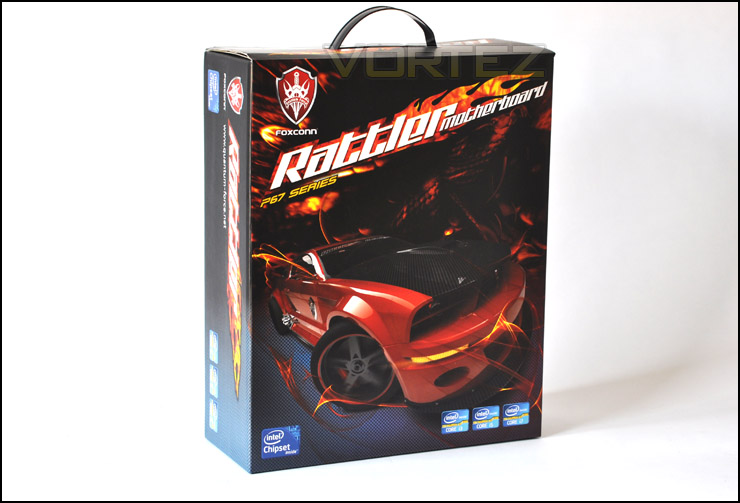
Rattler packaging is targeting children?
Within the box are another 2 smaller boxes containing the Rattler motherboard, concealed inside an anti-static bag. The other box has the Quantum Force emblem on the front and inside a range of accessories.
The included accessories are:
• USB 2.0 bracket
• 2 x Molex-to-SATA
• Quick start guide
• Instructions manual
• Drivers CD
• I/O case panel
• IDE cable
• 2 x SATA 6G cables (red)
• 3 x SATA 3G cables (yellow)
Why have Foxconn decided to include yellow SATA cables? There appears to be no consistency with the colour-scheme here. It would have been much better to include black cables instead. Its likely that with these cables attached things will look rather odd and possibly untidy. I would have liked to see black/black or red/black cables.
Its nice to see the USB2.0 adapter, not all brands include things like this. It’s a shame though we don’t have a USB3.0 version, the reason this is absent is due to a lack of USB3.0 header on the motherboard.
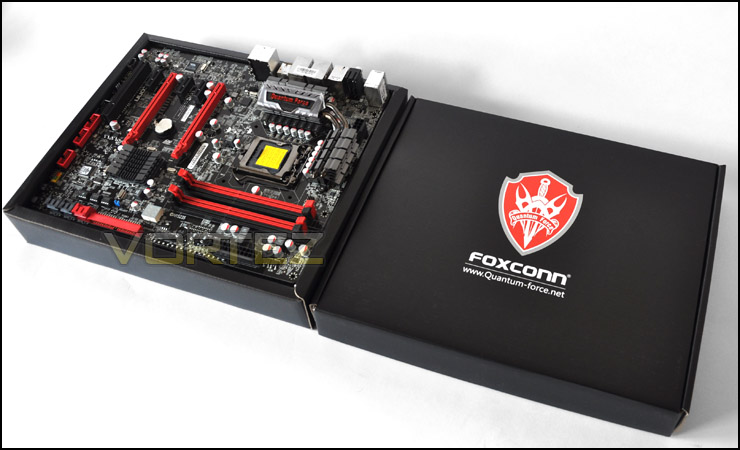
Innerboxes with motherboard and accessories
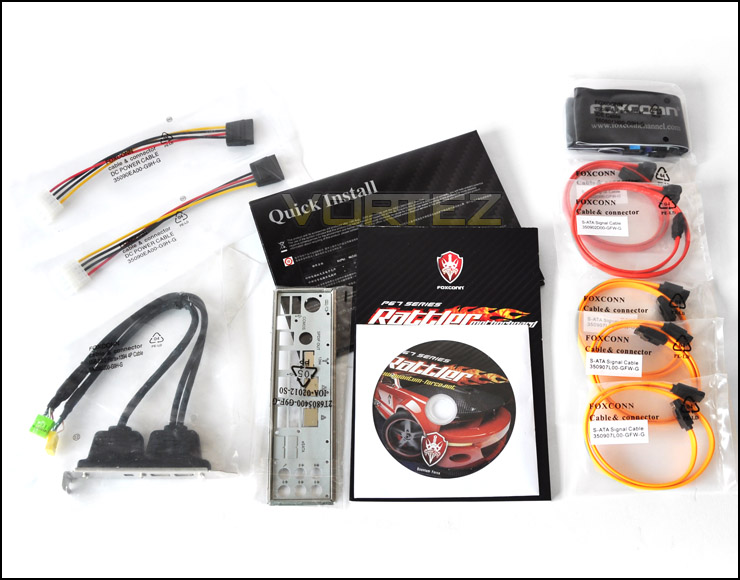
Rattler bundle
Rattler is an attractive looking board. Blue seems to be the most frequently used colour of late so its nice to see something different. It reminds me of the RoG series from ASUS. The red and black accents throughout the board highlight key areas very well. Its certainly a step up from the P67A-S.
There are 5 x 4-pin fan headers on Rattler, including CPU fan header. So there are plenty of options for those who thrive on case cooling.
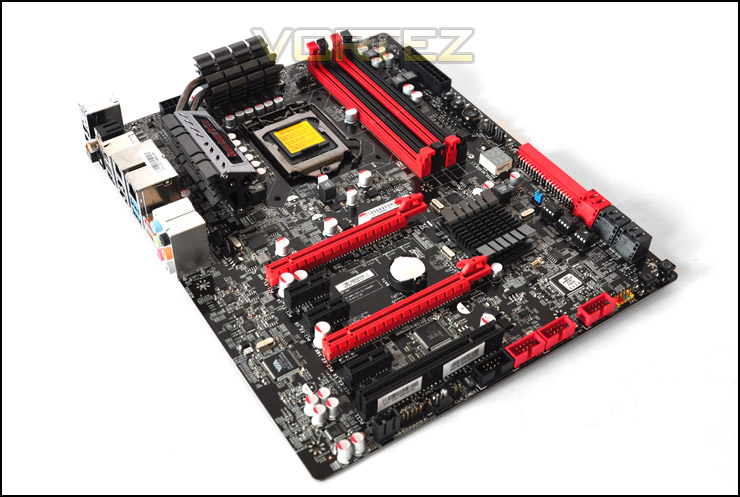
An overview of Rattler
Closer Look
The first thing apparent with the Rattler motherboard is the gunmetal heatsink that covers the MOSFETs and shields the 12 chokes, signifying a 12-phase VRM power design. It looks very aggressive and robust.
Being LGA1155, Rattler will accommodate all Intel 6 Series processors, its more beneficial to use a “K” chip on this board since this is Intel P67 and will allow CPU tuning. The K chips are of course those of the 6 series that have an unlocked multiplier. We can mount either LGA1155 or LGA1156 CPU coolers onto the socket since both use the same alignment.
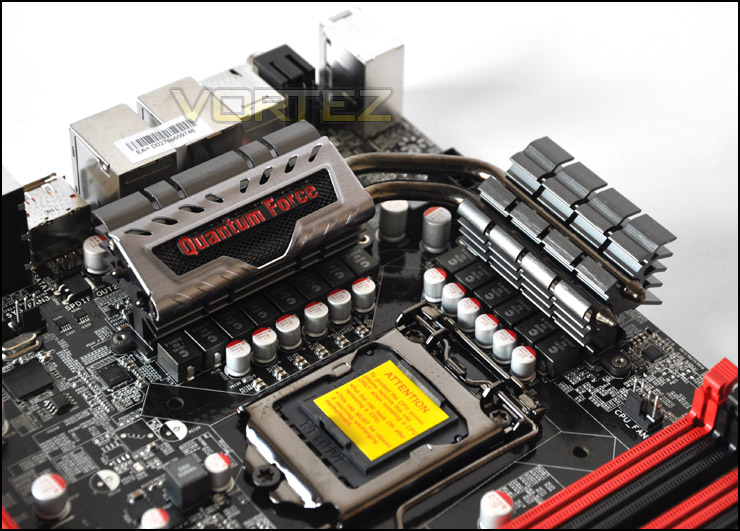
12-phase power and aggressive looking heatsinks
Over at the DIMM slots we have dual channel – 4 slots capable of up to 16GB of DDR3 rated at 1066MHz all the way up to 2133MHz (OC).
Next to our memory slots are the onboard OC buttons. Strangely, these buttons allow the BCLK to be modified on the CPU. Since Sandy Bridge BCLK should remain at 100MHz and the multiplier should only be altered to adjust CPU clock speed this is a very peculiar feature. Really, this button should be programmed to adjust multiplier rather than BCLK. As it is, this is pointless. It would be much more effective if these controls where to adjust the multiplier.
Regardless of this significant flaw, pressing the OC button whilst the system is booted will cause all 3 buttons to illuminate. The LED indicator to the left will then signal “00” (100 BCLK) and pressing the up button will cause the LED to display 0.1 meaning 101 BCLK. Pressing down the down arrow does the reverse.
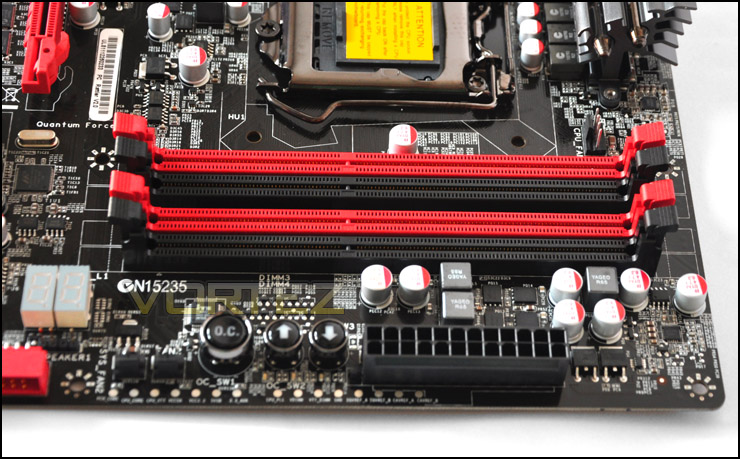
DIMM slots – 16GB dual channel – 1066MHz to 2100MHz (OC) support
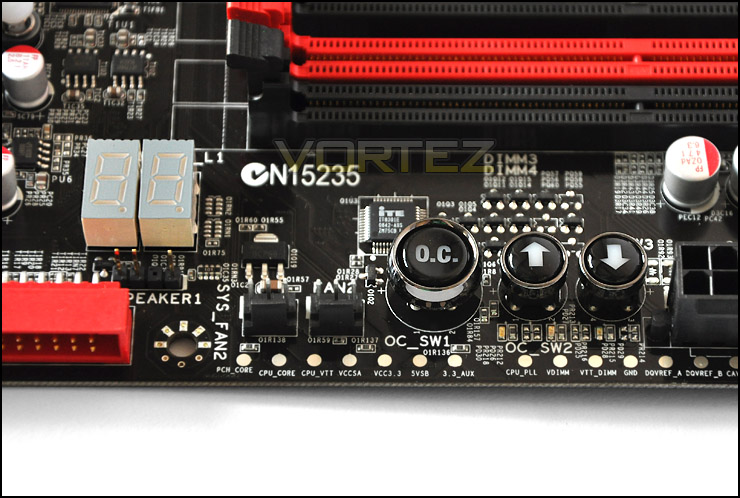
OC buttons on the Rattler
In regards to storage, Rattler gives 2 x SATA 6G ports which are highlighted in red whilst the black ports offer SATA 3G support and there are 4 of those. Many will be puzzled to see the old IDE port make a comeback, I have no idea why Foxconn have chosen to implement this on the board its a strange decision indeed. IDE drives cannot be bought anymore and they have been superseded by SATA due to sheer speed. Therefore this slot would only be useful to those with a 7 years old+ IDE drive. It would have been far more valuable to include another SATA controller for additional SATA ports.
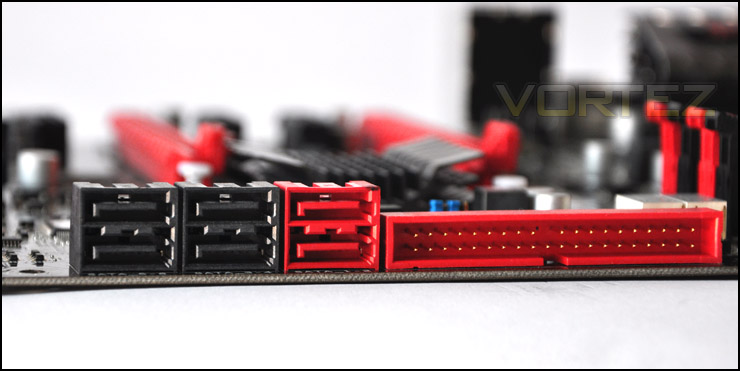
Storage options including SATA 3G/6G and IDE
Closer Look (Continued)
Rattler has onboard power and reset buttons which are extremely useful if you have a test bench/open air case. It means that you don’t need to have chassis cables connected to the front panel connectors on the board.
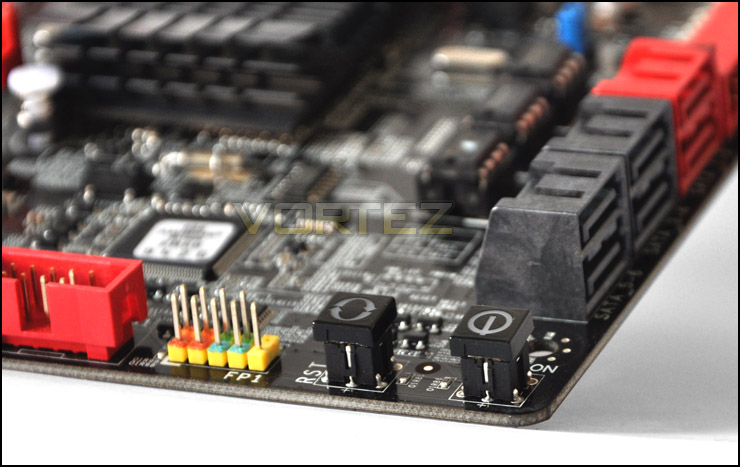
Onboard power and reset buttons
At the bottom of the Rattler motherboard are 3 x USB2.0 headers. These give you up to 8 x USB2.0 ports. Combined with the I/O we have up to 12 x USB2.0 available.
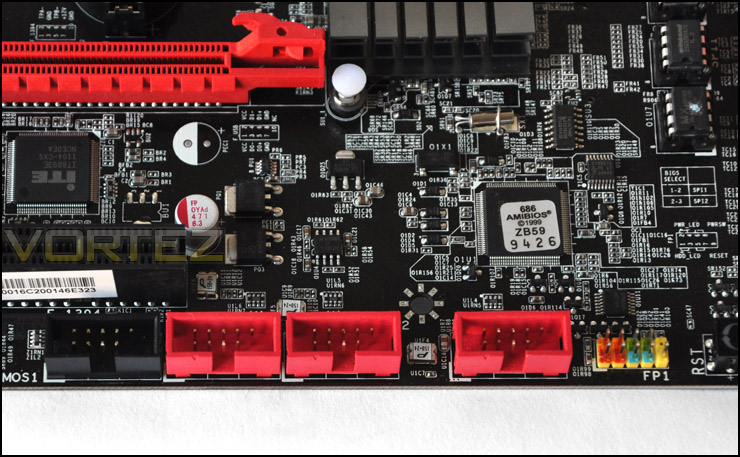
3 x USB2.0 headers for up to 8 USB2.0 ports
Turning out attention to the PCI Express region, we have 2 x PCIe2.0 x16 for CrossfireX. If a dual card configuration is used, both slots will give x8. We also have 3 x PCIe2.0 that are x1 and finally at the very bottom a legacy PCI for older devices.
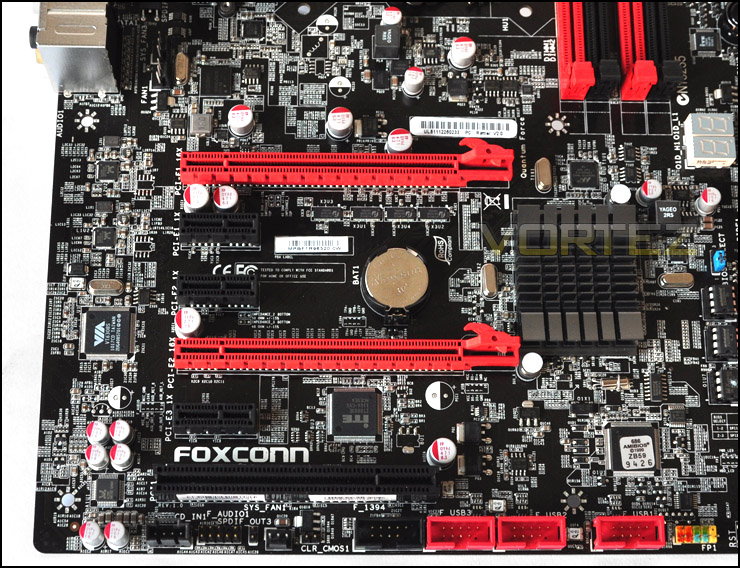
CrossfireX support
The I/O panel on the Rattler has plenty of functionality. From left to right – PS2 keyboard, 2 x USB2.0, Onboard clear CMOS button, S/PDIF coaxial and optical, 1394 port, 2 x USB2.0, Dual gigabit LAN, 2 x USB2.0, 2 x USB3.0, 2 x eSATA, 6 channel audio.
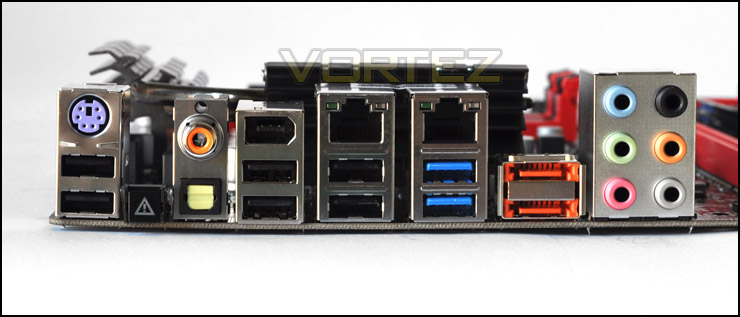
The I/O has plenty of features including onboard clear CMOS button
Test Setup & Overclocking
CPU Intel Core i5 2500K (3.3GHz)
Motherboards
– Foxconn Rattler P67
– ASUS Sabertooth P67
– ASUS P8P67 (LGA1155)
– Foxconn P67A-S
– ECS P67H2-A (Black Extreme)
Memory 4GB OCZ Reaper 1600MHz 8-8-8-26
CPU Cooler Alpenfohn Matterhorn
Graphics ZOTAC GTX 460
PSU OCZ Fatal1ty 750W
All P67 Sandy Bridge motherboards will be benchmarked against each other using the Intel Core i5 2500K. The maximum overclock will also be included within the proceeding benchmark tests to identify performance gains as a result of tweaking CPU clock speed via the multiplier.
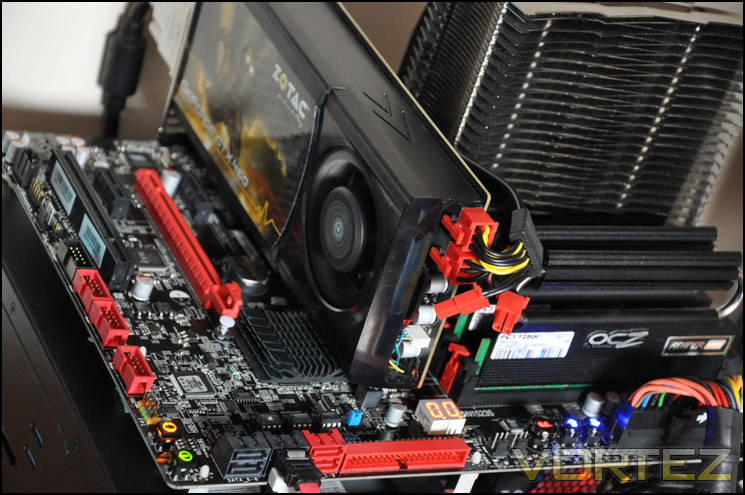
Overclocking
As previously mentioned in our Intel Core i5 Sandy Bridge Roundup – overclocking is achieved by altering the multiplier rather than the BCLK. So the BCLK stays at 100MHz and the multiplier is modified. So if we have 100MHz on the BCLK and 40 for the multiplier this will obviously output 4GHz. We chose to use the Intel Core i5 2500K across each of the motherboard tests and indeed for the overclocking due to its unlocked multiplier.
With overclocking simplified on Sandy Bridge, this means that achieving the best overclock couldn’t be easier. CPU voltage and multiplier just need to be modified accordingly. I began slowly nudging up the multiplier from 33 (3.3GHz). Ultimately I managed to overclock the 2500K by 1000MHz giving a clock-speed of 4.3GHz. We have now tested the 2500K on a number of motherboards and it will not move past 4.3GHz, so we are certain that the CPU is limiting the overclock. For the moment, Intel have not responded to this – until then our motherboard reviews will only feature a max overclock of 4.3GHz. At least this will compare all of the boards overclocking performance benchmarks fairly and be interesting to compare scores at the same level etc.
Power Consumption
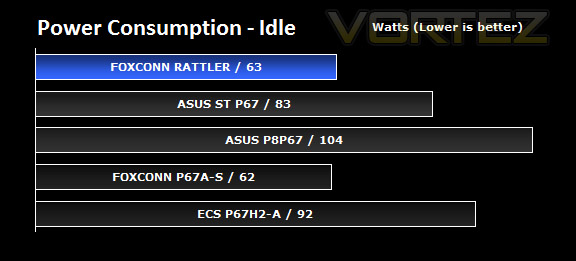
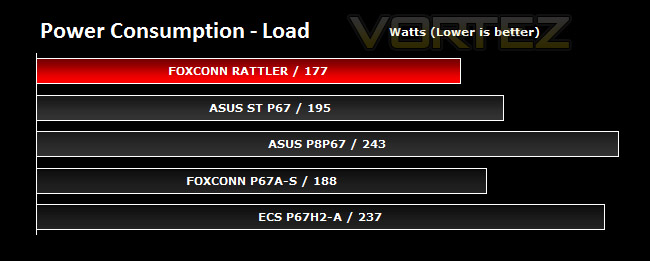
It’s interesting to note the power consumption across all motherboards. Although they are all using the P67 chipset, energy results can fluctuate between manufacturers due to the features and specifications that are integrated. First of all, for the idle tests the system is cold booted into Windows and no additional applications are executed – the watts are noted on the external energy monitor we use and then the system is loaded with 3DMark 11 – watts are again monitored for the duration of the test and the highest rated wattage result is then noted down. Below are the results of this energy test.
It’s great to see that Rattler is the most efficient of all the motherboards we have tested – using the Intel P67 chipset. Just look at the comparative results between the ASUS P8P67 and Foxconn Rattler. The difference in power consumption is very significant.
Synthetic: AIDA64
CPU Queen
This simple integer benchmark focuses on the branch prediction capabilities and the misprediction penalties of the CPU. It finds the solutions for the classic “Queens problem” on a 10 by 10 sized chessboard. At the same clock speed theoretically the processor with the shorter pipeline and smaller misprediction penalties will attain higher benchmark scores. For example — with HyperThreading disabled — the Intel Northwood core processors get higher scores than the Intel Prescott core based ones due to the 20-step vs 31-step long pipeline. CPU Queen test uses integer MMX, SSE2 and SSSE3 optimizations.
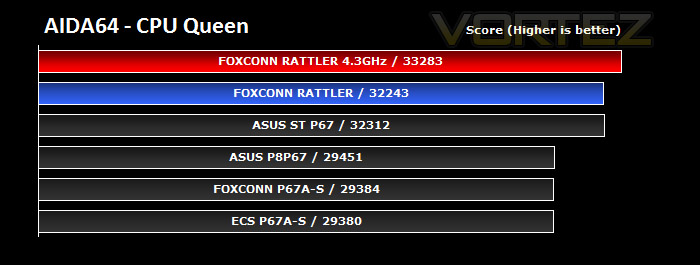
There isn’t a great deal to seperate the motherboards being tested below, but its pleasing to see that the Rattler motherboard is competing with one of ASUS flagship motherboards – Sabertooth. Overclocking gives a decent boost to CPU performance, as may be expected.
CPU Photoworrx
This benchmark stresses the integer arithmetic and multiplication execution units of the CPU and also the memory subsystem. Due to the fact that this test performs high memory read/write traffic, it cannot effectively scale in situations where more than 2 processing threads used. For example, on a 8-way Pentium III Xeon system the 8 processing threads will be “fighting” over the memory, creating a serious bottleneck that would lead to as low scores as a 2-way or 4-way similar processor based system could achieve. CPU PhotoWorxx test uses only the basic x86 instructions, and it is HyperThreading, multi-processor (SMP) and multi-core (CMP) aware.
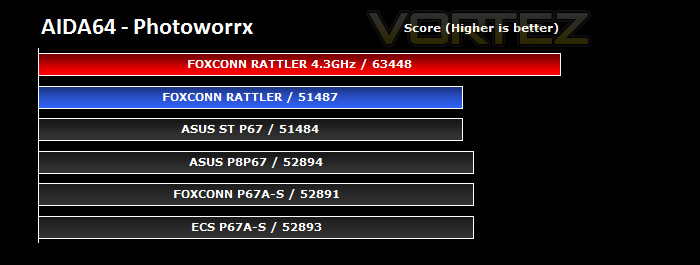
The Rattler falls behind in this benchmark, being the worst of the bunch. It’s worth noting though that the difference is only marginal. With an overclock, this changes things considerably and the score is catapulted forward.
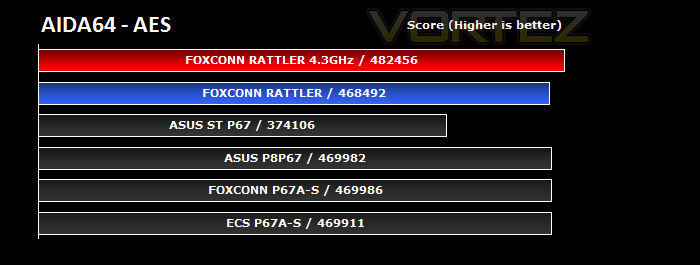
CPU AES
This benchmark measures CPU performance using AES (Advanced Encryption Standard) data encryption. In cryptography AES is a symmetric-key encryption standard. AES is used in several compression tools today, like 7z, RAR, WinZip, and also in disk encryption solutions like BitLocker, FileVault (Mac OS X), TrueCrypt.
CPU AES test uses only the basic x86 instructions, and it’s hardware accelerated on VIA PadLock Security Engine capable VIA C3, VIA C7 and VIA Nano processors; and on Intel AES-NI instruction set extension capable processors. The test is HyperThreading, multi-processor (SMP) and multi-core (CMP) aware.
CPU AES test uses only the basic x86 instructions, and it’s hardware accelerated on VIA PadLock Security Engine capable VIA C3, VIA C7 and VIA Nano processors; and on Intel AES-NI instruction set extension capable processors. The test is HyperThreading, multi-processor (SMP) and multi-core (CMP) aware.
This test may be relevant to those who zip or compress large files, and once again, the stock Rattler results reveal that the motherboard is consistently good. Overclocking only provides a small performance gain.
FPU Mandel
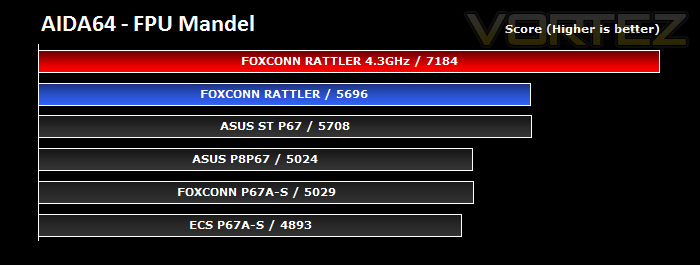
This benchmark measures the double precision (also known as 64-bit) floating-point performance through the computation of several frames of the popular “Mandelbrot” fractal. The code behind this benchmark method is written in Assembly, and it is extremely optimized for every popular AMD, Intel and VIA processor core variants by utilizing the appropriate MMX, MMX+/SSE, SSE2, SSSE3, or AVX instruction set extension. FPU Mandel test is HyperThreading, multi-processor (SMP) and multi-core (CMP) aware.
Foxconn’s Rattler shines in the FPU Mandel test, beating the notorious Sabertooth and other rivals in the benchmarks. Overclocking really pushes the score up, showing that fine tuning on Sandy Bridge and especially on Rattler will encourage good overall performance.
Synthetic: x264 HD
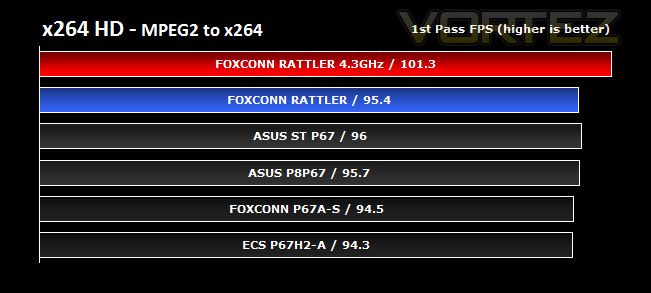
Simply put, this test measures how fast your machine can encode a short, DVD quality MPEG-2 video clip into a high-quality x264 video clip. What’s x264, you ask? It’s more or less the next-generation Xvid/DivX codec. I think it’s ideal for a benchmark because the application (x264.exe) reports fairly accurate compression results (in frames per second) for each pass of the video encoding process, and it uses multi-core processors very efficiently.
x264 HD gives results for 2 passes when compressing an MPEG-2 clip into x264. It presents 4 seperate results for each pass giving a total of 8 – all results are given in FPS. For each pass I have averaged out the results.
The ASUS P8P67, Sabertooth and Foxconn Rattler are all neck ‘n neck. Results show that there is very little to divide these stalwarts. Overclocking the CPU via Rattler allows a distinct win, especially for the 2nd pass. Video encoding is a breeze with this board, it has shown that against its foes, the Rattler can provide some great performance for the end user.
Synthetic: Cinebench 11.5
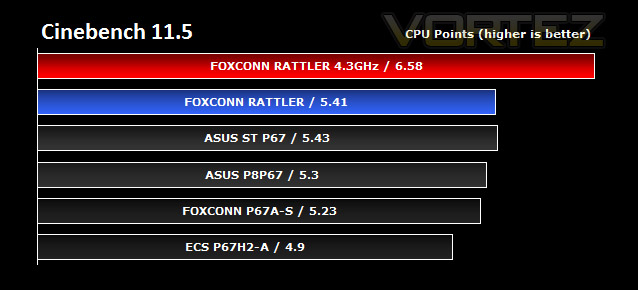
CINEBENCH can measure systems with up to 64 processor threads. ThIS test scene contains approximately 2,000 objects which in turn contain more than 300,000 polygons in total, and uses sharp and blurred reflections, area lights, shadows, procedural shaders, antialiasing, and much more. The result is displayed in points (pts). The higher the number, the faster your processor.
Cinebench produces neat and easy to understand results, giving a quite representative overall CPU performance. Here it indicates that the Rattler is able, once again, to settle at the higher planes – set by our ASUS P67 flagships. Overclocking gives a very good boost in performance. With overclocking so simple on the Sandy Bridge platform its highly advisable to do this. The benefits are there to be had.
Synthetic: SiSoftware SANDRA 2011
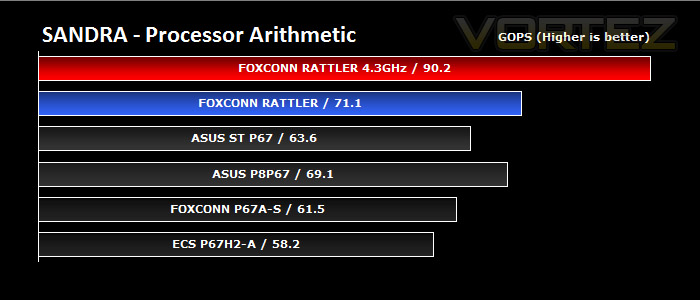
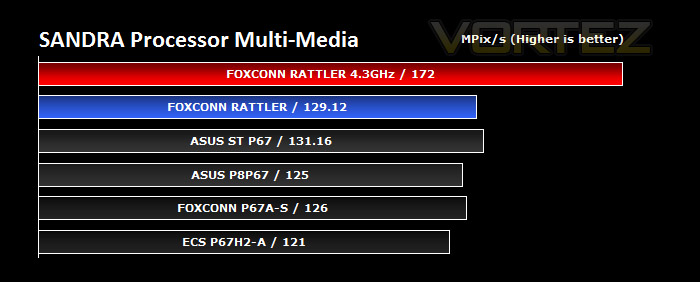
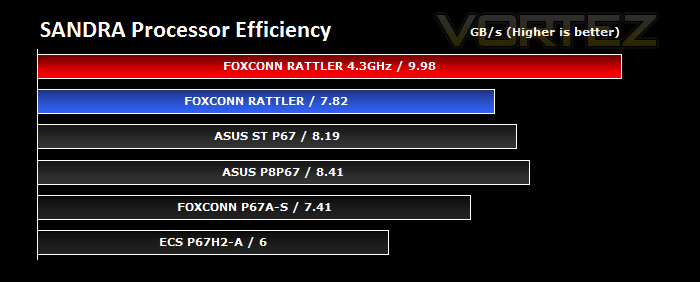
Processor tests – ASUS held the crown in our SANDRA tests with their P8P67 and Sabertooth motherboards but now Foxconn has been added to the mix, remaining at the top isn’t an easy job for them. Rattler offers similar, and even better performance in the arithmetic test. Whilst overclocking gives a boost of over 30%
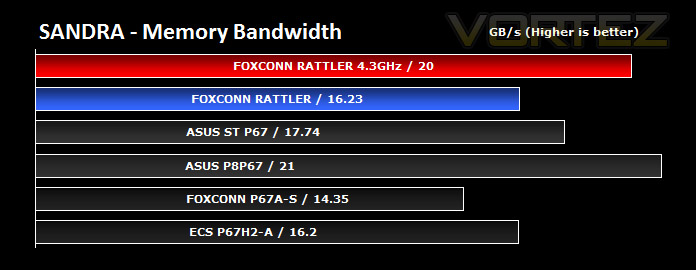
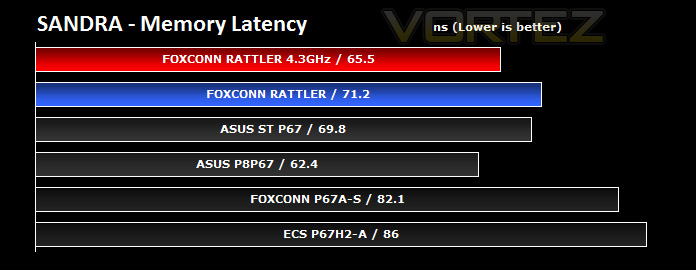
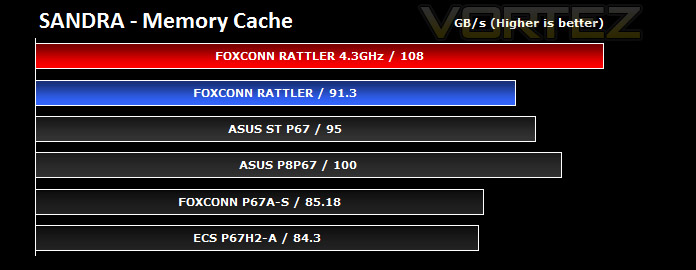
Memory tests– Rattler doesn’t perform as greatly as it has done in other benchmarks. Even with an overclock it is still struggling to keep up with the P8P67.
Synthetic: 3DMark 11
3DMark 11 is the latest version of the world’s most popular benchmark. Designed to measure your PC’s gaming performance 3DMark 11 makes extensive use of all the new features in DirectX 11 including tessellation, compute shaders and multi-threading. Trusted by gamers worldwide to give accurate and unbiased results, 3DMark 11 is the best way to consistently and reliably test DirectX 11 under game-like loads.
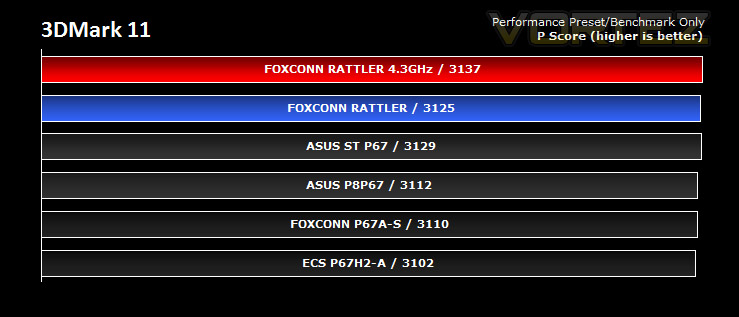
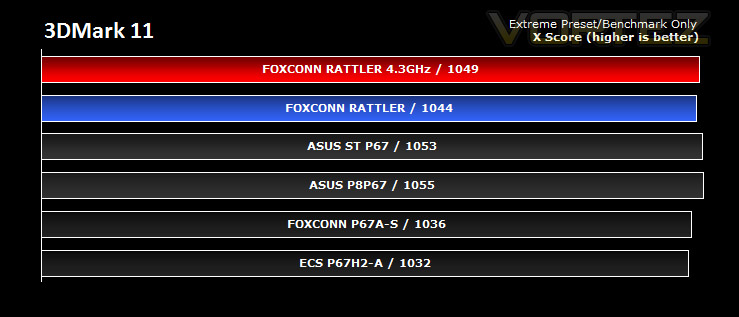
3DMark 11 was released at the end of last year and needs little introduction. For the test settings both Performance and Extreme presets are run with ‘benchmark only’ being selected. This provides good analysis. Many will only test the performance preset, using the extreme mode we can examine the board under much more severe stressing.
There isn’t much to separate the motherboards in both our performance and extreme 3DMark 11 benchmarks. Even an overclock doesn’t really provide much of an advantage.
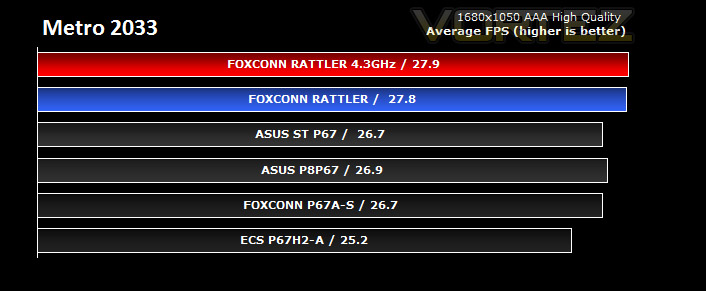
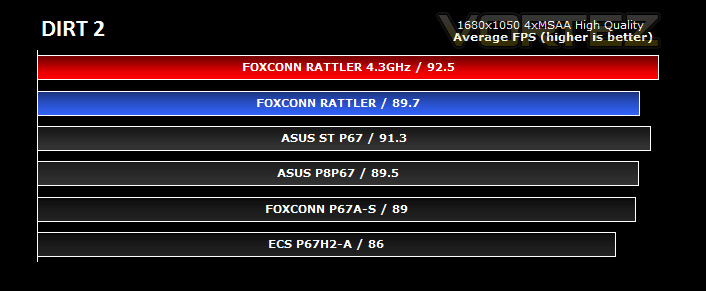
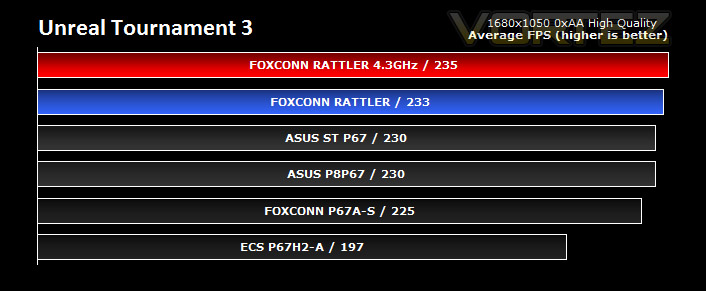
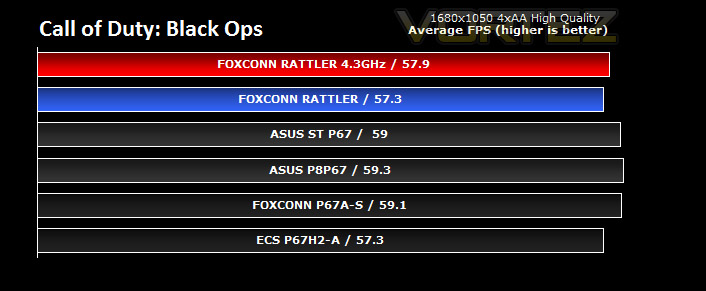
Gaming: Metro 2033, Dirt 2, UT3, Black Ops
It’s important for us to perform a number of game benchmarks as well as the synthetic tests because many of our motherboards on the test bench have features which market them directly at gamers. So here we have a selection of popular gaming titles, critically acclaimed and action-packed.
Gaming performance across each of the motherboards is marginal. FPS remains very much the same, even with a modification to CPU clock speed. Nevertheless it gives you an idea of typical performance that can be experienced from this set of components.
Conclusion
Foxconn’s Quantum Force Series has been highly anticipated, hardware enthusiasts throughout many of the communities across the internet have been waiting to see what this new series will bring to the table. Our motherboard under the microscope today certainly offers some excellent performance figures but I won’t deny it has some questionable features.
Rattler looks great. Black and red colour-schemes have always been very popular for motherboards yet most of the manufacturers, especially for LGA1155 have gone with a blue colour-scheme so its good to see Foxconn use this configuration. Feature-wise, Rattler has all of the elements you would expect. SATA 6G, USB3.0, onboard power/reset buttons, CrossfireX support and so on. Strangely though, there are some peculiar design choices on Rattler. An IDE slot, when we are in SATA’s 3rd phase of develop seems very unwise to me. Very few still use IDE since it has been superseded by the superior transfer rates of SATA. Furthermore, the IDE slot on Rattler takes up unnecessary space – over 2 inches to be exact. More SATA ports would have been a more suitable feature to implement rather than a standard that has already been phased out.
The big talk prior to Sandy Bridge being launched this year was UEFI BIOS. Some of the most popular manufacturers – ASUS, ASRock and MSI have all incorporated UEFI BIOS onto their LGA1155 motherboards yet with the Rattler, Foxconn are using a standard BIOS. Using UEFI frequently and going back to a standard BIOS is like driving a Mercedes, crashing it, and getting a Nissan Micra for a courtesy car. Tweaking the BIOS is fast, easy and pleasant with UEFI. Why hasn’t Foxconn gone with this? It makes managing elements of the board so easy, especially overclocking. Speaking of which, Foxconn have integrated overclock buttons on the actual PCB – a great feature that many are incorporating onto most high-end solutions thesedays. These overclock buttons are extremely useful for amateur overclockers, if they are programmed correctly. The overclock buttons on the Rattler are pointless. Pressing the overclock button initiates the ability to only alter the BCLK. Those with even a basic understanding of Sandy Bridge and how it operates will know that the BCLK should remain at 100MHz whilst the multiplier should be modified to increase clock speed yet this overclock button only allows the BCLK to move up or down. Why would anyone want to do that? I understand that the BCLK can be altered within a very small margin such as – 0.2MHz but this isn’t recommended. It would have been far better for Foxconn to allow the multiplier to be tweaked via these overclock buttons rather than BCLK.
Moving these niggles to the side, Rattler performs extremely well. If you have seen the benchmark results on the previous pages you will be aware that it remains consistently strong against some tough competition from ASUS. Overclocking our 2500K to 4.3GHz allows for a significant lead against the ever popular P8P67 and Sabertooth motherboards – what’s more is Rattler is the most efficient of all the motherboards we have yet tested. It’s power consumption figures whilst under load were very encouraging. Those on a campaign for a greener planet should definitely consider Rattler!
Priced at £150 inc. VAT Rattler is up against some stiff competition from its rivals. Performance-wise it is up there with some of the flagship P67 motherboards but feature-wise I can’t help but feel slightly disappointed. With better implementation of features there is no reason why Rattler cannot be improved.
Pros
+ Excellent performance
+ Great looking
+ Very efficient – power consumption
+ Onboard power/reset buttons
+ 5 fan headers
+ Dual BIOS
Cons
– No UEFI
– Overclock buttons only tweak BCLK
– IDE slot
+ Excellent performance
+ Great looking
+ Very efficient – power consumption
+ Onboard power/reset buttons
+ 5 fan headers
+ Dual BIOS
Cons
– No UEFI
– Overclock buttons only tweak BCLK
– IDE slot