







Looking for an affordable Intel Z68 motherboard? GIGABYTE have just released the Z68AP-D3 motherboard that hopes to offer ‘bang for buck’.

Product on Review: GA-Z68AP-D3
Manufacturer and Sponsor: GIGABYTE
Street Price: £80inc. VAT (At time of review)
In our Z68 quest we have been graced with looking at the top-end of the market. Being top-end and offering the best features and performance means that this comes at a cost. Today we break out of this trend by looking to the lower-end of the market at a new motherboard from GIGABYTE. Not everyone has the cash to upgrade to the Intel Z68 chipset and especially in these difficulty times with the economy taking a severe hit all aspects of our lives have to be taken into account and in some cases budgeted. The Intel Z68 chipset has, since its release found its way to each brand at a higher price-tag compared to its predecessor Intel P67, but our product under review today hopes to change this altogether.
Enter the GA-Z68AP-D3 – a budget Z68 motherboard with a price tag just short of £80. Performance is said to be very good on this motherboard and reports show that it is capable of overclocking very well indeed. Those of you out there who are seeking to get onto the Sandy Bridge bandwagon might well consider this new motherboard from GIGABYTE so let’s begin our analysis and discover what all the fuss is about!
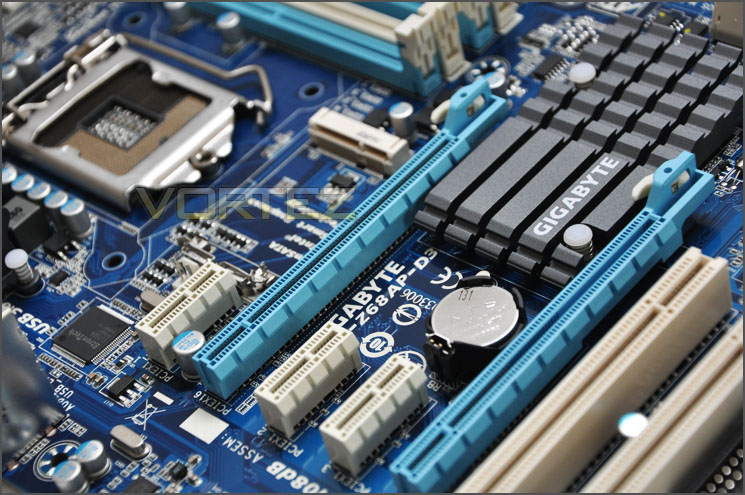
GIGABYTE’s take on GA-Z68AP-D3
Technical Specifications
CPU
Support for Intel® Core™ i7 processors/Intel® Core™ i5 processors/ Intel® Core™ i3 processors/Intel® Pentium® processors/Intel® Celeron® processors in the LGA1155 package
Chipset
Intel® Z68 Express Chipset
Memory
4 x 1.5V DDR3 DIMM sockets supporting up to 32 GB of system memory
Dual channel memory architecture
Support for DDR3 2133/1866/1600/1333/1066 MHz memory modules
Support for non-ECC memory modules
Support for Extreme Memory Profile (XMP) memory modules
Onboard Graphics
Integrated Graphics Processor
1 x HDMI port, supporting a maximum resolution of 1920×1200
Audio
Realtek ALC889 codec
High Definition Audio
2/4/5.1/7.1-channel
Support for S/PDIF Out
LAN
1 x Realtek RTL8111E chip (10/100/1000 Mbit)
Expansion Slots
1 x PCI Express x16 slot, running at x16 (PCIEX16)
1 x PCI Express x16 slot, running at x4 (PCIEX4)
3 x PCI Express x1 slots
2 x PCI slots
Multi-Graphics Technology
Support for AMD CrossFireX™ technology
Storage Interface Chipset
2 x SATA 6Gb/s connectors (SATA3_0, SATA3_1) supporting up to 2 SATA 6Gb/s devices
4 x SATA 3Gb/s connectors (SATA2_2~SATA2_5) supporting up to 4 SATA 3Gb/s devices
* The SATA2_5 connector will become unavailable when the mSATA connector is installed with a solid state drive.
Support for RAID 0, RAID 1, RAID 5, and RAID 10
USB Chipset:
Up to 10 USB 2.0/1.1 ports (4 ports on the back panel, 6 ports available through the internal USB headers)
Etron EJ168 chip:
Up to 2 USB 3.0/2.0 ports on the back panel
Internal I/O Connectors
1 x 24-pin ATX main power connector
1 x 4-pin ATX 12V power connector
2 x SATA 6Gb/s connectors
4 x SATA 3Gb/s connectors
1 x mSATA connector
1 x CPU fan header
2 x system fan headers
1 x power fan header
1 x front panel header
1 x front panel audio header
1 x S/PDIF Out header
3 x USB 2.0/1.1 headers
1 x clearing CMOS jumper
1 x Trusted Platform Module (TPM) header
Back Panel Connectors
1 x PS/2 keyboard/mouse port
1 x parallel port
1 x serial port
1 x optical S/PDIF Out connector
1 x HDMI port
4 x USB 2.0/1.1 ports
2 x USB 3.0/2.0 ports
1 x RJ-45 port
3 x audio jacks (Line In/Line Out/Microphone)
I/O Controller
iTE IT8728 chip
H/W Monitoring
System voltage detection
CPU/System temperature detection
CPU/System/Power fan speed detection
CPU overheating warning
CPU/System/Power fan fail warning
CPU/System fan speed control
BIOS
2 x 32 Mbit flash
Use of licensed AWARD BIOS
Support for DualBIOS™
PnP 1.0a, DMI 2.0, SM BIOS 2.4, ACPI 1.0b
Unique Features
Support for @BIOS
Support for Q-Flash
Support for Xpress BIOS Rescue
Support for Download Center
Support for Xpress Install
Support for Xpress Recovery2
Support for EasyTune
Support for Smart 6™
Support for Auto Green
Support for eXtreme Hard Drive (X.H.D)
Support for ON/OFF Charge
Support for Cloud OC
Support for 3TB+ Unlock
Support for TouchBIOS
Support for Q-Share
Bundle Software
Norton Internet Security (OEM version)
Intel® Smart Response Technology
LucidLogix Virtu
Operating System
Support for Microsoft® Windows® 7/Vista/XP
Form Factor
ATX Form Factor; 30.5cm x 21.5cm
Packaging & First Look
GIGABYTE have placed the D3 in the budget range and so it therefore carries with it the type of packaging found on all of their budget motherboards. The box is white and lists various features on all sides. The front has emphasis on the onboard mSATA functionality.
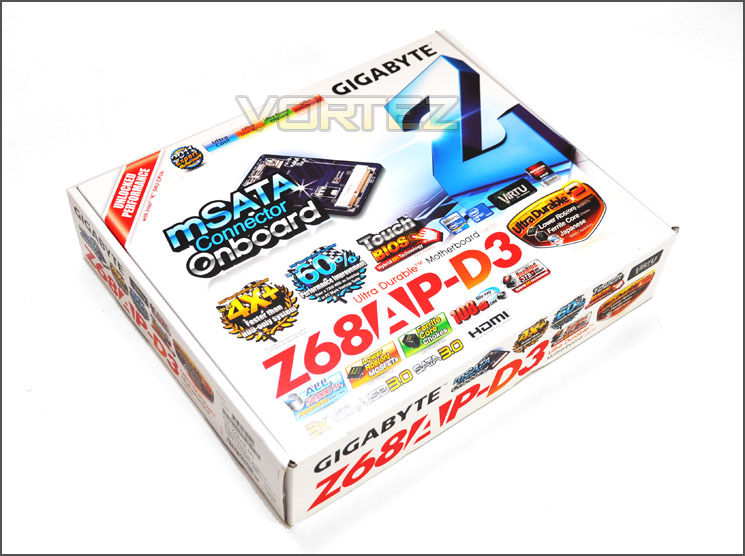
The GA-Z68AP-D3 packaging is very eye-catching
Within the box there are plenty of items within the bundle. The motherboard as you would expect is covered in an anti-static bag and the SATA cables are also sealed in plastic bags. Within the bundle you get the following items:
• Documentation: User manual, Intel Smart Response Guide, Quick Start Guide
• Cables: 2x SATA 2 (3Gbps) and 2x SATA 3 (6Gbps)
• I/O Shield
• Motherboard
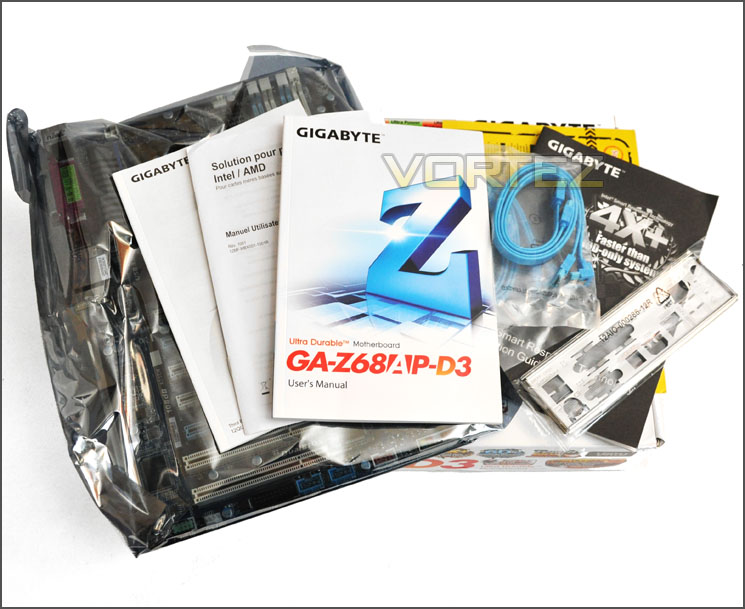
Plenty of items within the bundle
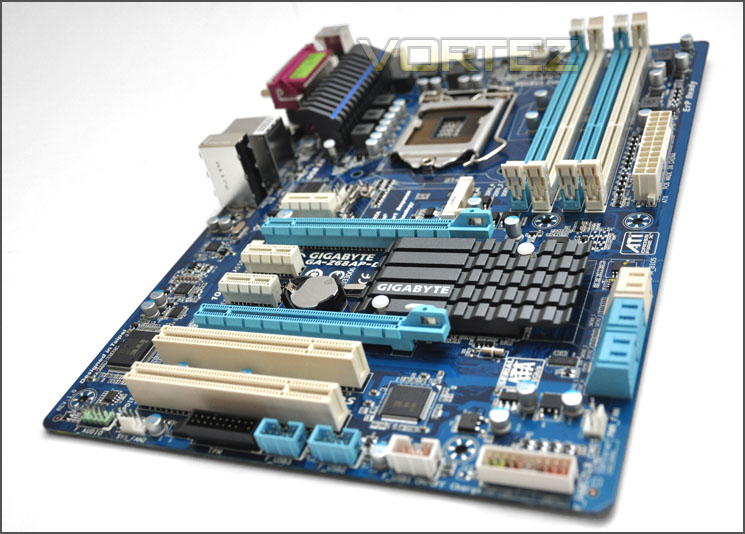
Packaging aside it’s time to look at what we’re here for – the motherboard. Though many enthusiasts will have become accustomed to seeing GIGABYTE’s revised colour-scheme of black and gun-metal on their performance motherboards the lower end offerings still use the blue and white configuration. I’ll admit that the revised look does look better but this blue and white colour-scheme still looks good also. For a low-end motherboard the D3 does look capable. When you first remove the board from its anti-static bag you notice something straight away, the size is different. Though it does conform to ATX standards the D3 is smaller than the typical ATX motherboard. Motherboards like UD4, UD3P and many others are 30.5cm x 24.4cm but the D3 is 30.5cm x 21.5cm just under 3cm thinner.
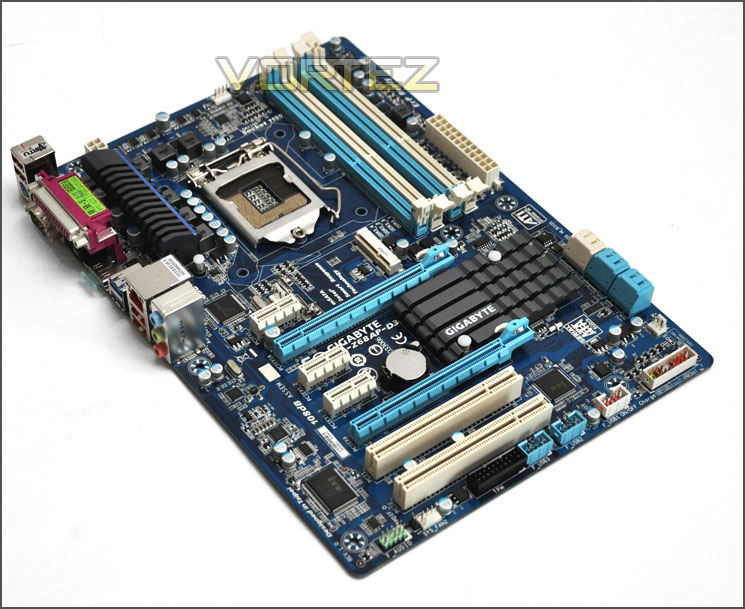
An overview of GA-Z68AP-D3
With the packaging and first look out of the way lets move in for a closer look at the D3 over the page.
Closer Look
The first aspect of D3 we will consider is the CPU socket area. Unlike other Z68 motherboards we have seen, the D3 only has a single heatsink running vertically over the MOSFETs. The D3 has a 5+1 Phase Power Design and only 4-pin CPU power – significantly less grunt than what you would typically expect from a Z68 motherboard. It will be interesting to see a little later how far we can push the 2500K we will be testing this board with. Being LGA1155 the D3 will use Intel’s 2nd Generation Core i7/i5 and i3 Processors.
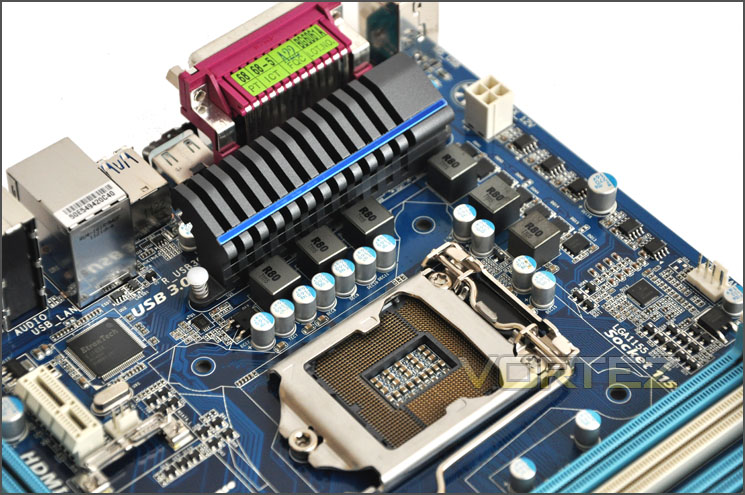
Slightly less Phase Power than other motherboards we have tested
Next up we have the memory slots. Being LGA1155 we have dual channel DDR3 slots for up to 32GB. There is support for kits from 1066MHz up to 2133MHz and there is also support for Intel XMP memory modules.
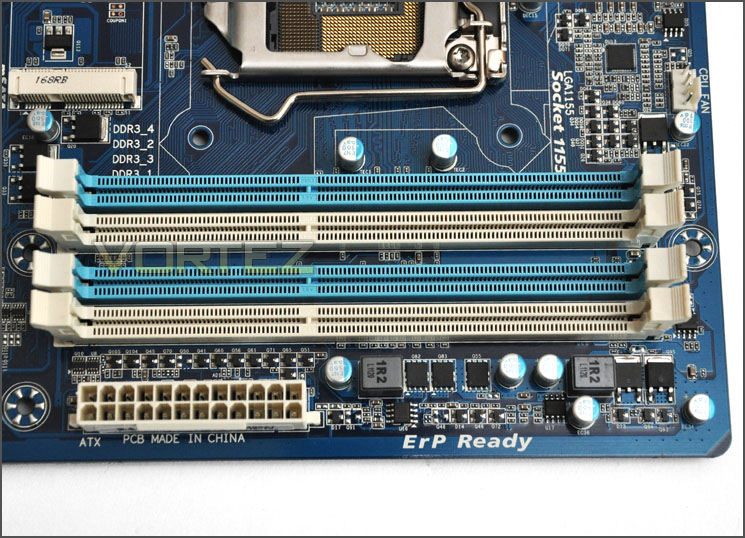
Supporting up to 32GB Dual Channel DDR3
Moving to the storage we have 4x blue SATA 2 (3Gbps) and 2x white SATA 3 (6Gbps). Having only 2x SATA 3 ports means that these ports are supplied via the Intel Z68 chipset, alas we have no SATA 3 ports via the Marvell Controller which could be a blessing to some!
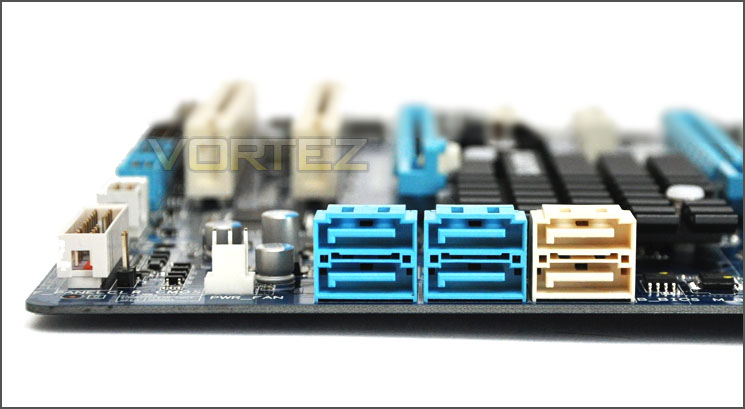
4x SATA 2 (3Gbps) and 2x SATA 3 (6Gbps) storage ports
Over at the PCI-E lanes there are 3 x PCI Express x1 slots, 2 x PCI x16 slots. The top slot runs at x16 whilst the lower slot runs at x4. Having dual x16 slots means we can run a multi-GPU configuration but the D3 only accommodates ATI CrossfireX not NVIDIA SLI. If we did set up CrossfireX then both cards would drop down to x4. GIGABYTE actually state:
Additionally there are 2x PCI legacy slots for older devices such as sound cards.
Also pictured at the very top of the PCI-E section there is an mSATA connector. Finding any information on GIGABYTE’s website about mSATA is actually quite a difficult task but here is what they have to say about it:
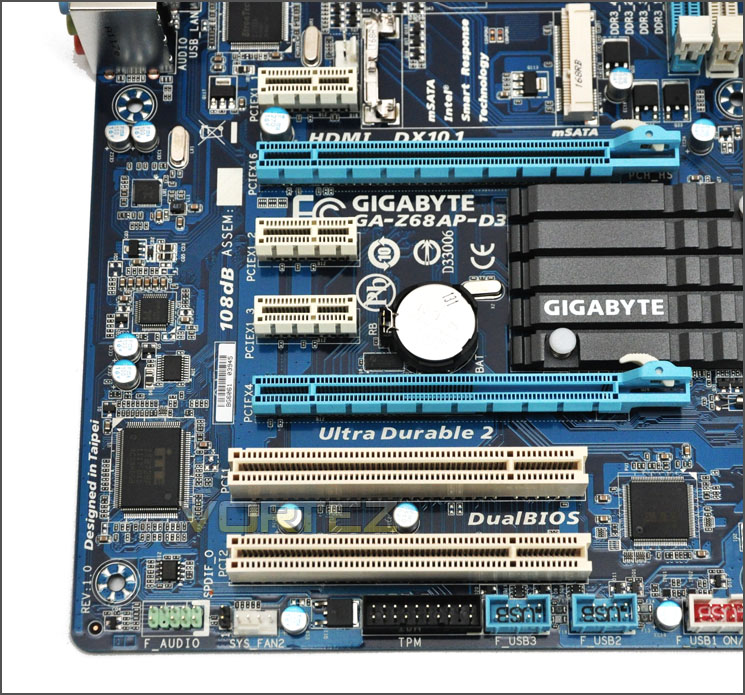
PCI-E can take advantage of ATI CrossfireX
Finally onto the I/O panel of the D3 we see there is quite a reduction in functionality against the higher-end models such as the UD4/UD3P. From left to right we have:
• 2x USB 2.0 ports
• PS2 Keyboard/Mouse
• Parallel port
• Serial port
• S/PDIF Optical
• HDMI port
• 2 x USB 3.0 ports
• Gigabit LAN (RJ45)
• 2 x USB 2.0 ports
• Audio via Realtek ALC889 codec
Those of you who are puzzled at the Parallel/Serial ports are right to do so, GIGABYTE believe that end-users are still using this type of port for their daily usage. Personally, I think these end-users are few and far between – it might have been better to integrate a DVI and VGA port to accompany the lonely HDMI to deliver all video output options instead.
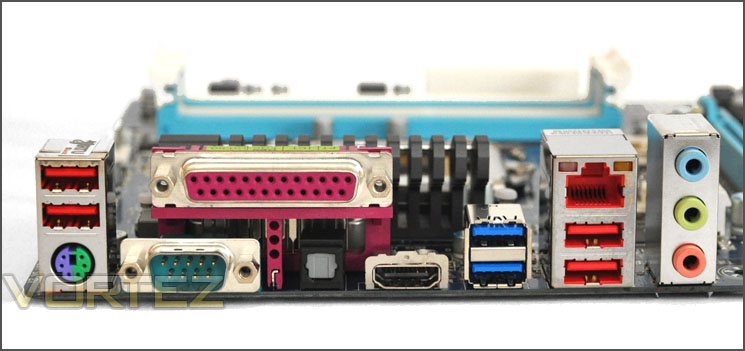
I/O panel with various ports of functionality
Test Setup & Overclocking
CPU Intel Core i5 2500K (3.3GHz)
Motherboards
– GIGABYTE Z68AP-D3
– ASRock Fatal1ty Z68 Professional Gen3
– GIGABYTE Z68XP-UD3P
– GIGABYTE G1 Sniper 2
– ASRock Extreme4 Gen3
– MSI Big Bang Marshal
– ASUS Maximus IV Extreme
– GIGABYTE Z68-UD4
– Foxconn Rattler P67
– ASUS Sabertooth P67
– ASUS P8P67 (LGA1155)
– Foxconn P67A-S
– ECS P67H2-A (Black Extreme)
Memory 4GB Kingston HyperX Genesis CL9 1600MHz
CPU Cooler Noctua NH-D14
Graphics ZOTAC GTX 460
PSU OCZ Fatal1ty 750W
All P67 Sandy Bridge motherboards will be benchmarked against each other using the Intel Core i5 2500K. The maximum overclock will also be included within the proceeding benchmark tests to identify performance gains as a result of tweaking CPU clock speed via the multiplier.
Overclocking
As previously mentioned in our Intel Core i5 Sandy Bridge Roundup – overclocking is achieved by altering the multiplier rather than the BCLK. So the BCLK stays at 100MHz and the multiplier is modified. So if we have 100MHz on the BCLK and 40 for the multiplier this will obviously output 4GHz. We chose to use the Intel Core i5 2500K across each of the motherboard tests and indeed for the overclocking due to its unlocked multiplier.
With overclocking simplified on Sandy Bridge, this means that achieving the best overclock couldn’t be easier. CPU voltage and multiplier just need to be modified accordingly. The ultimate milestone is 5GHz on air cooling for the Intel Core i5 2500K and so I began overclocking – first of all nudging the multiplier up to 46, disabling power saving options and increasing the core voltage to give it headroom. I soon found that 46 – 4.6GHz was stable and so I moved up to 4.8GHz, in similar fashion this was again stable. With a little more confidence I then moved up to 50 – the 5GHz milestone but even with 1.5v running through it failed in the last leg of stress testing. 1.5v is quite a large amount of voltage to be putting through a Sandy Bridge CPU – for a test run to ascertain what the chip is capable of this is fine but for day to day use the chip would not last very long at all.
So with 5GHz being unattainable I dropped down to 49 – 4.9GHz with the voltage of 1.45v which for a low-end budget Z68 motherboard is quite an achievement indeed. Below is the screen capture with LinX stress test.
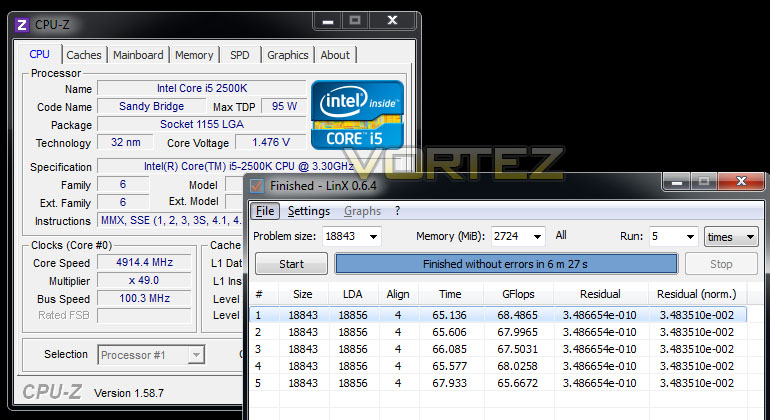
Power Consumption
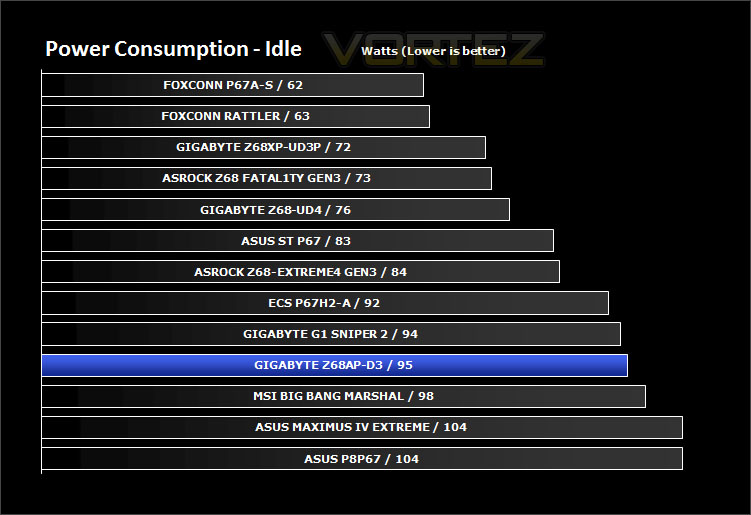
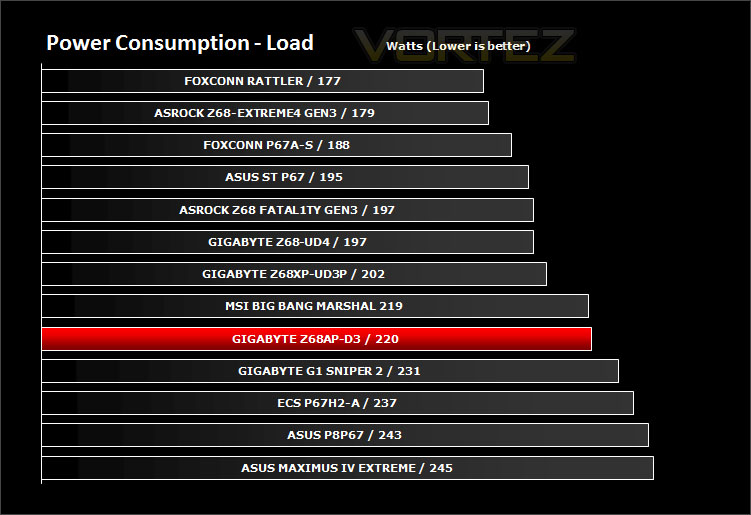
Being a cut-down of the other candidates I expected the power consumption to reflect this but I was quite surprised to find that the D3 isn’t the most energy efficient of the motherboards we have tested.
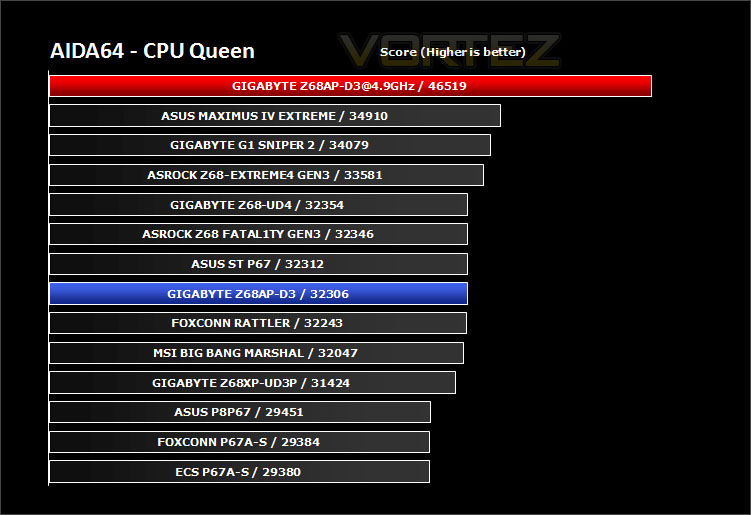
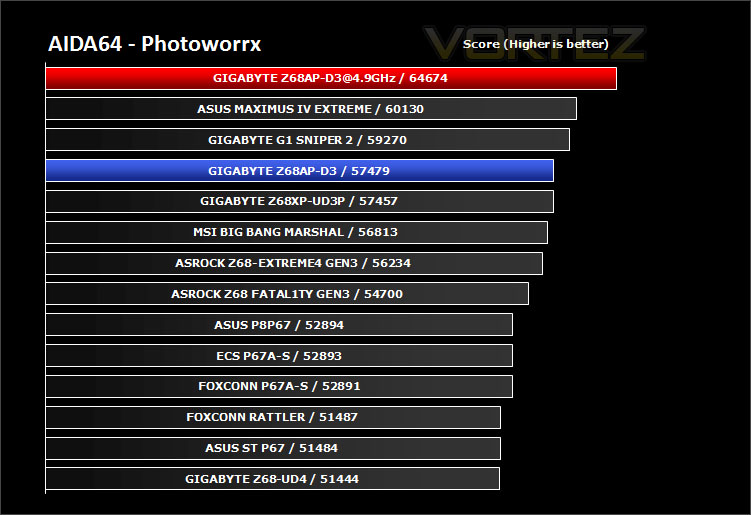
Synthetic Benchmarks: AIDA64
Get your copy of AIDA64 here!CPU Queen
CPU Photoworrx
Synthetic Benchmarks: x264 HD
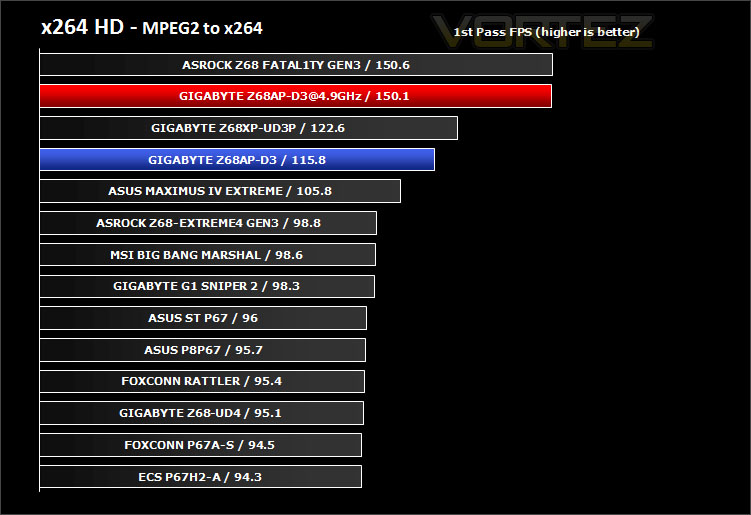
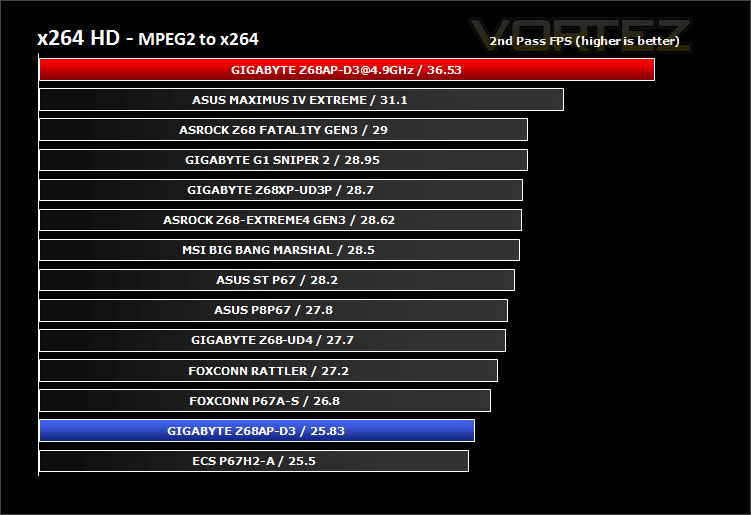
x264 HD gives results for 2 passes when compressing an MPEG-2 clip into x264. It presents 4 separate results for each pass giving a total of 8 – all results are given in FPS. For each pass I have averaged out the results.
The D3 does an admirable job in the 1st pass but drops in the 2nd pass at stock speeds. Ultimately, overclocking ensures the very peak of performance.
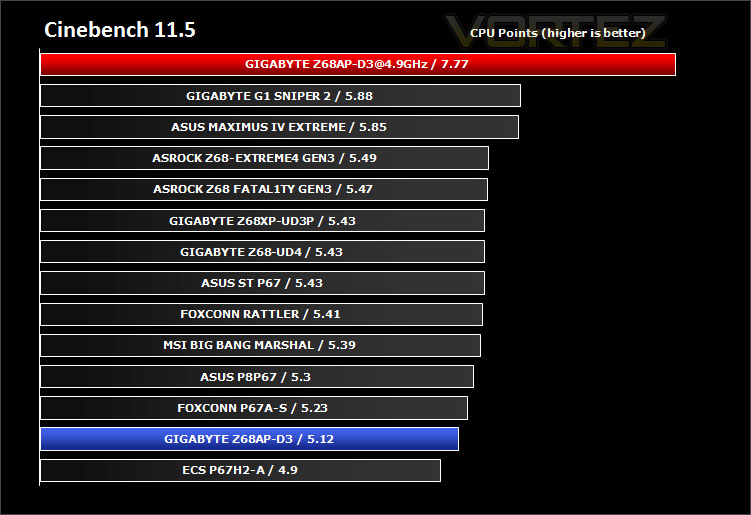
Synthetic Benchmarks: Cinebench
For the CPU score the D3 is at the very bottom of the list for stock speed and as we found in other reviews with an overclock that score is significantly boosted.
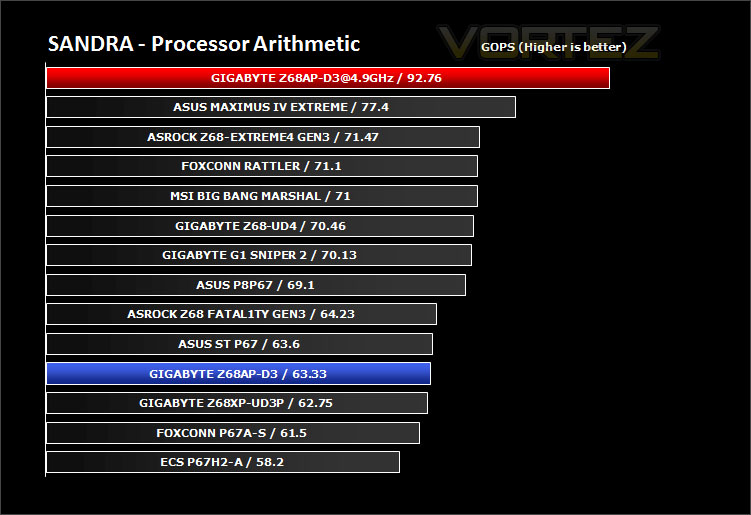
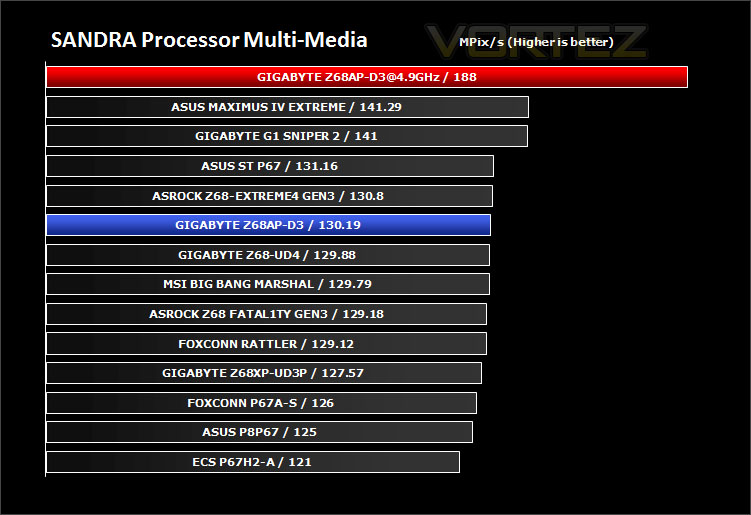
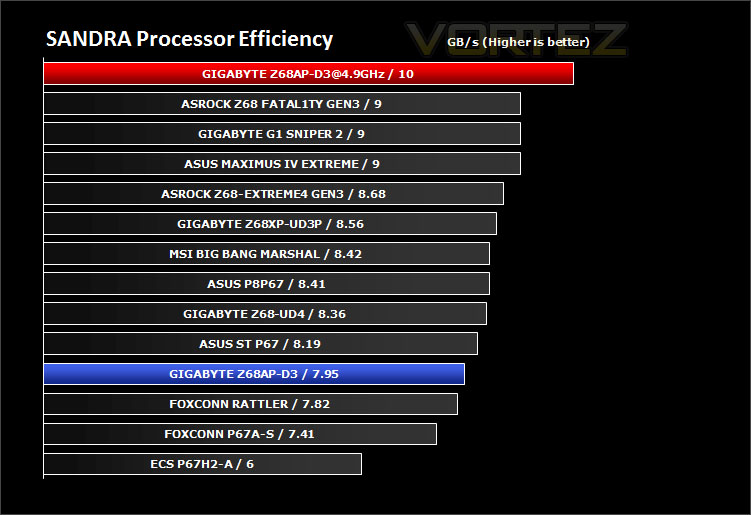
Synthetic Benchmarks: SiSoftware SANDRA 2011
Processor tests – In these tests the D3 delivers a mixed bag of performance. It is important to remember though the cost of this board and its position in the market-place. Compared to some of the top-end offerings the performance is actually quite good.
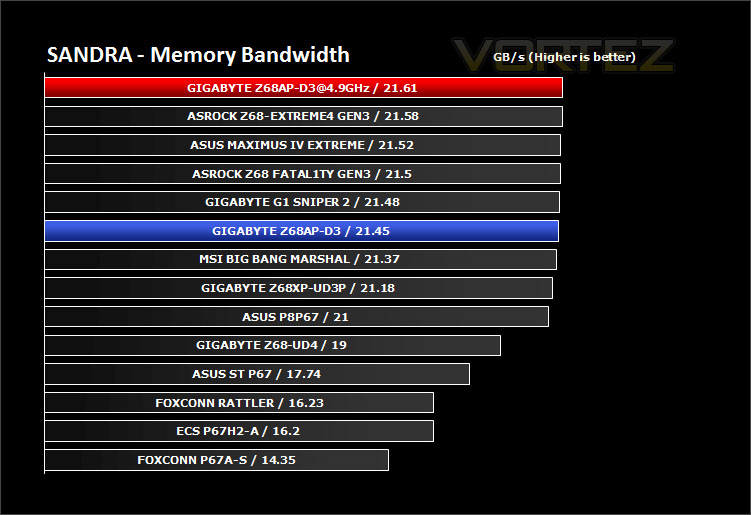
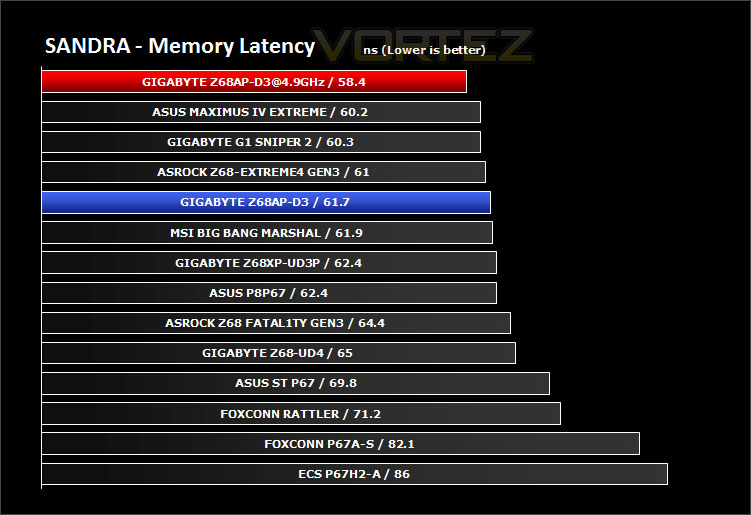
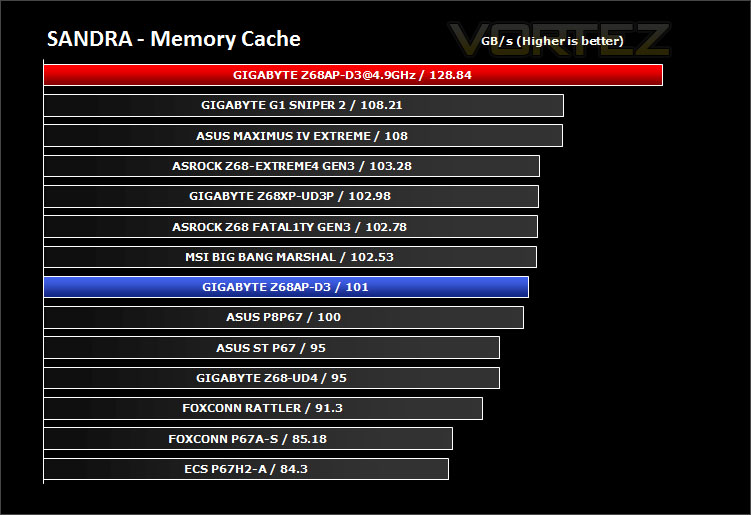
Memory tests– The D3 offers good, solid performance in the memory tests.
Synthetic Benchmarks: 3DMark 11
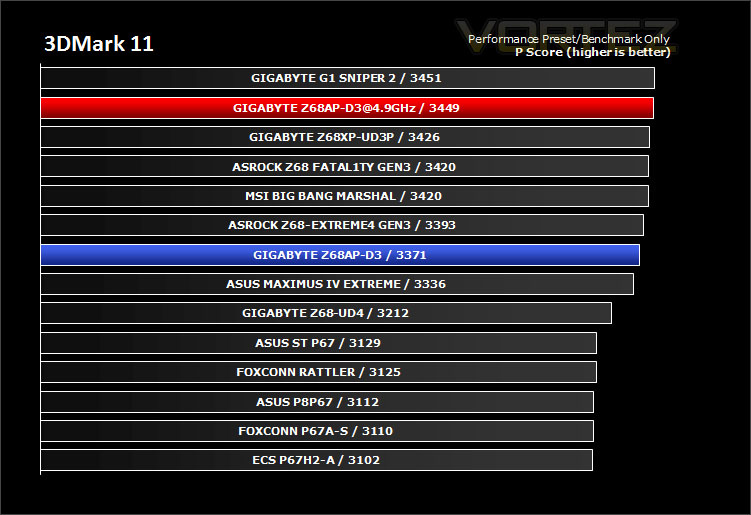
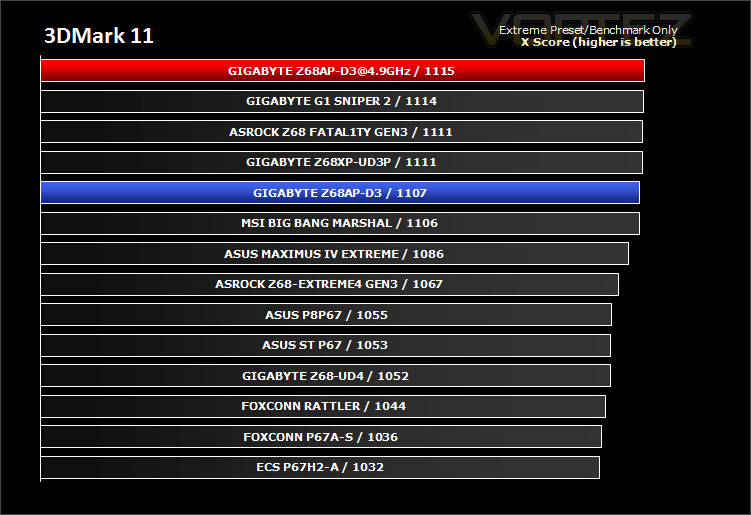
3DMark 11 was released at the end of last year and needs little introduction. For the test settings both Performance and Extreme presets are run with ‘benchmark only’ being selected. This provides good analysis. Many will only test the performance preset, using the extreme mode we can examine the board under much more severe stressing.
Surprisingly the D3 offers up some impressive points score in 3DMark 11, it manages to beat some top-end motherboards and even matches the performance of a flagship.
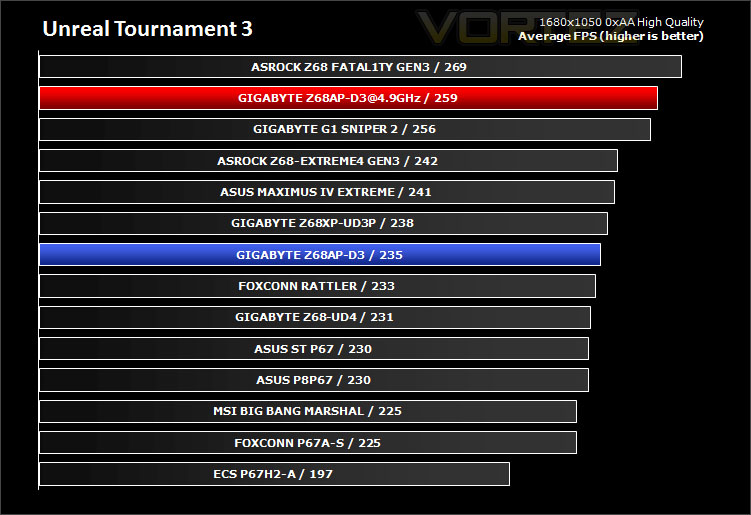
Game Benchmarks: DIRT 2, Black Ops, Metro 2033, UT3
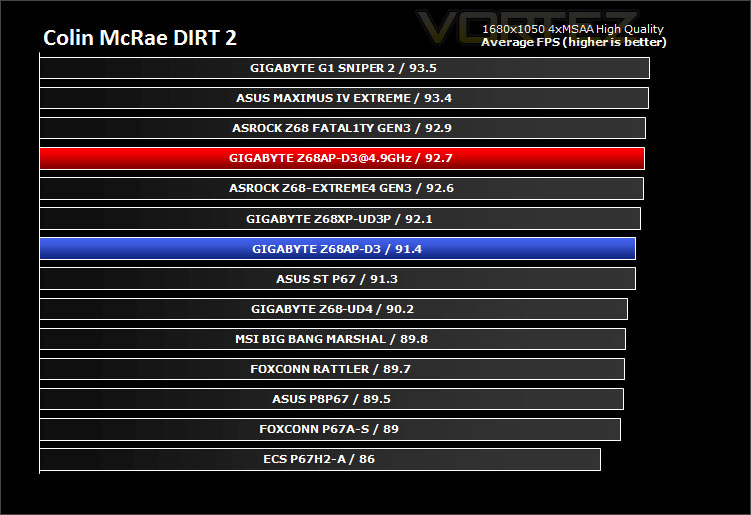
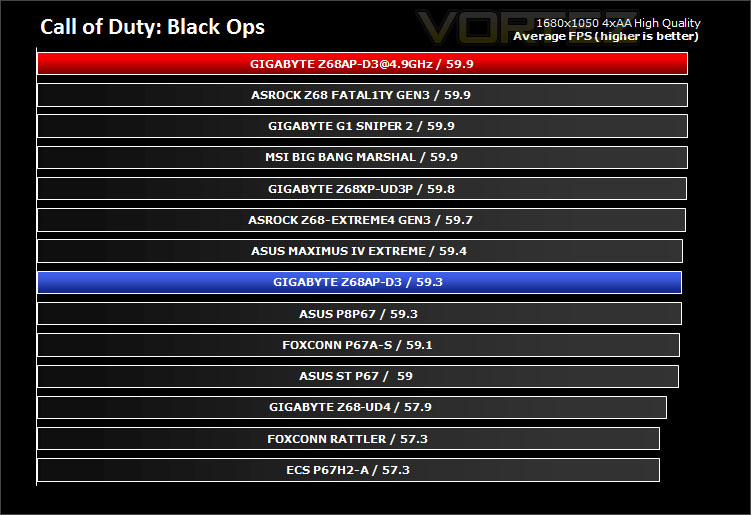
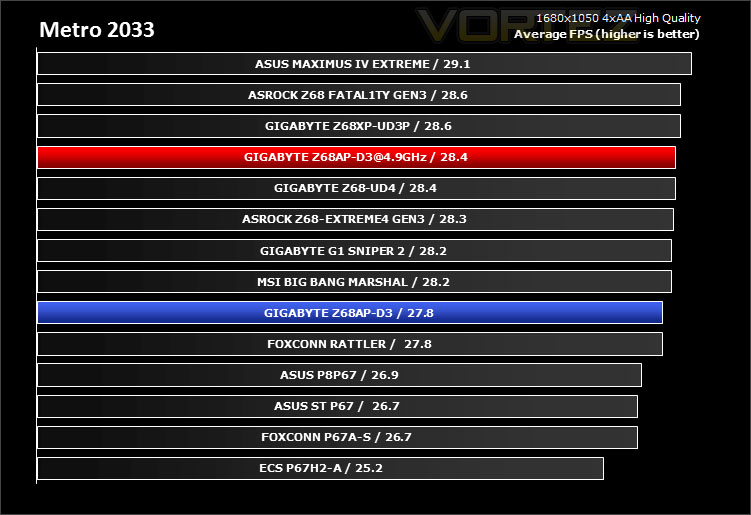
Gaming performance across each of the motherboards is marginal, nevertheless this still indicates that it is a strong performer.
Conclusion
We’ve experienced the full force of what Z68 is truly capable of from a variety of flagships up and to this point but we haven’t really considered that lower end of the market until today. GIGABYTE’s Z68AP-D3 is the talk of the town at the moment with retailers really pushing it into the market-place but is it worth your consideration?
Looks might not suit but lower end motherboards don’t always have the flamboyance of higher-end offerings. I actually think it doesn’t look too bad for a budget motherboard. It does have some strange layout designs though – first of all it is slimmer than the typical ATX motherboard and it has the inclusion of a Parallel/Serial ports on the I/O, something rarely used these days. Instead, with Z68 you expect more than just HDMI for the video outputs – we should have DVI/VGA.
In terms of performance it was a mixed bag from the D3. It’s great at some things and good at others, that said the actual results we have shown in this review are compared against high-end offerings and flagships – against these motherboards the D3 actually did admirably and can be commended. You wouldn’t expect a board of its calibre to overclock so well either, 4.9GHz was possible under air cooling – those with doubts that this motherboard can overclock well can be reassured that it can be pushed further than you would imagine.
And now we come to the key selling point, the price – the D3 can be had for less than £80. Consider the performance, overclocking and features and you have yourself some real ‘bang for buck.
It might not have the features that high-end motherboards deliver such as uprated sound, onboard buttons, lots of SATA storage ports, support for NVIDIA SLI etc but the D3 will be ideal for someone seeking to find that stepping-stone to the realms of Z68 goodness.
The bottom line is GIGABYTE’s Z68AP-D3 stands out as a great value for money offering. Those who just need a Z68 motherboard that performs great for a low cost should consider the D3, you will be hard pushed to find something for such a low cost.
+ Offers good performance
+ Overclocks to 4.9GHz
+ Very affordable
Cons
– Aesthetics – isn’t the best looker
– No need for Parallel/Serial


Click here for an explanation of our awards at Vortez.net.


