







The first of our Intel Z68 motherboard reviews – we take a look at GIGABYTE’s Z68-UD4 with SSD caching and Touch BIOS.
Product on Review: GIGABYTE Z68X-UD4
Manufacturer and Sponsor: GIGABYTE
Street Price: £170 inc. VAT (At time of review)

So what do we get from GIGABYTE if the video outputs aren’t present? Well with the Z68 chipset we have the new Touch BIOS, SSD caching and we have been told – better overclocking. So today we will be putting the Z68-UD4 on our test bench and putting it through its paces within synthetic and gaming benchmarks in order to reveal to our readers whether there is any great advantage of moving to this new chipset over P67.
A little bit about GIGABYTE
GIGABYTE was founded in 1986 in a small lab by four young engineers passionate to make their mark on the industry. GIGABYTE remains dedicated to the core belief of improving the lives of our users by manufacturing products that are high-performing, reliable, and of excellent quality. Here are some of GIGABYTE’s innovation highlights:
G1-Killer Gaming Motherboard (2011): World’s most advanced weapon for elite gamers.
USB 3.0 (2010): First motherboard manufacturer to release motherboards with USB 3.0 support.
Ultra Durable™ Technology: First motherboard manufacturer to implement the following technologies: All solid Japanese capacitors (2006), Ferrite Core Chokes and Low RDS(on) MOSFETs (2007), Dynamic Energy Saver (2007), 2 oz copper PCB, (2008), 24-phase Power VRM (2009)
G1-Killer Gaming Motherboard (2011): World’s most advanced weapon for elite gamers.
USB 3.0 (2010): First motherboard manufacturer to release motherboards with USB 3.0 support.
Ultra Durable™ Technology: First motherboard manufacturer to implement the following technologies: All solid Japanese capacitors (2006), Ferrite Core Chokes and Low RDS(on) MOSFETs (2007), Dynamic Energy Saver (2007), 2 oz copper PCB, (2008), 24-phase Power VRM (2009)
Packaging & First Look
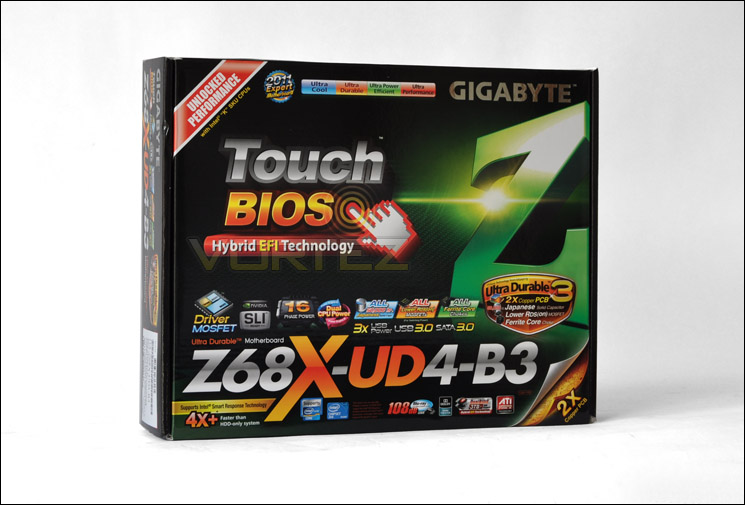
GIGABYTE present the Z68-UD4 to us in a rather eye-catching box. There is plenty of information on there for those who want to take in what this board has to offer. Both on the front and back the features are highlighted extensively and you are left in no doubt what this board offers.
GIGABYTE Z68-UD4 packaging
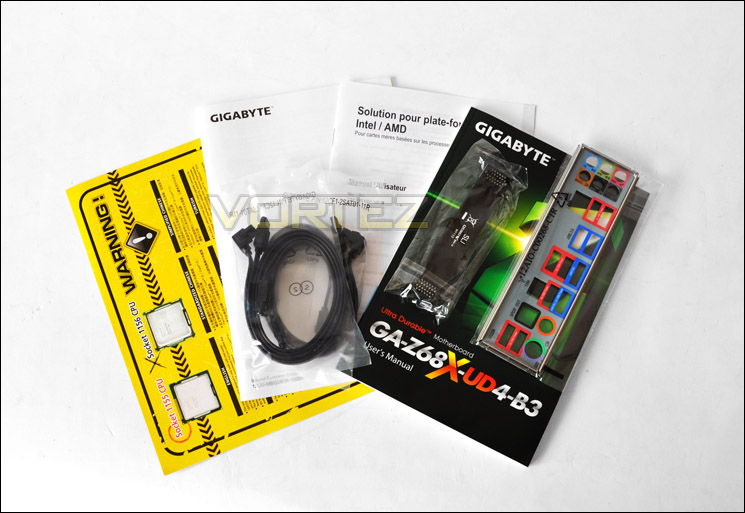
Opening the box up we have a small assortment of accessories within the bundle. Included, we have the following items:
• User manual
• I/O panel
• 4 x SATA 6G cables
• Quick start manual
• Warning sheet (difference between 1155 and 1156)
• SLI bridge
• Case badge
Included items within the accessories pack
GIGABYTE redesigned their motherboards this year with the introduction of Sandy Bridge and now endorse a stealthy black paintjob on all major ports, sockets and lanes with subtle undertones of matt grey on the heatsink. The Z68 UD4 differs only very slightly from the P67 UD4. Notice the differences?

An overview of Z68-UD4
Closer Look
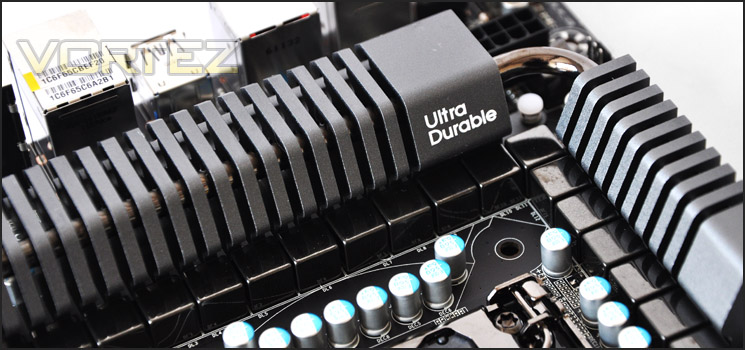
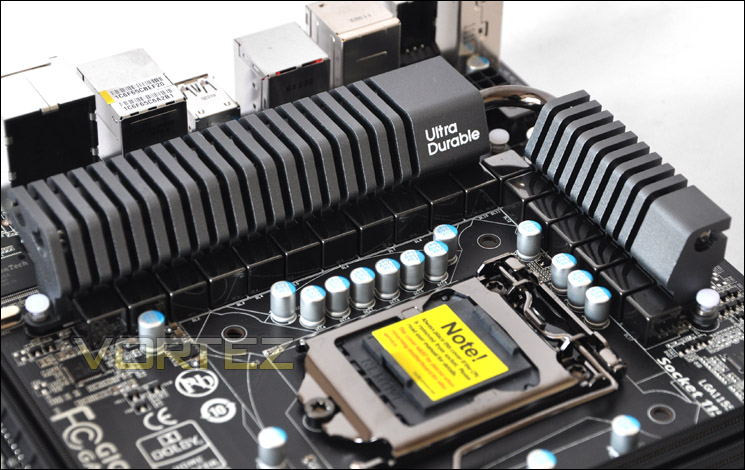
Moving from P67 to Z68, the UD4 has some subtle changes. Starting around the CPU socket we have a 16 phase power design over the 12 Phases found on the P67 UD4. We still have the Ultra Durable heatsink around the MOSFETS with a 2x Copper layer design. GIGABYTE claim this will lower PCB impedance by 50%. It’s always important to have adequate cooling around this region, especially concerning stability and better overclocking potential – every element counts.
16 Phase power design and the Ultra Durable heatsink
DDR3 DIMM slots provide up to 32GB of capacity, support Intel XMP and allow frequencies of 1066MHz right through to 2133MHz. Of course this is dual channel.
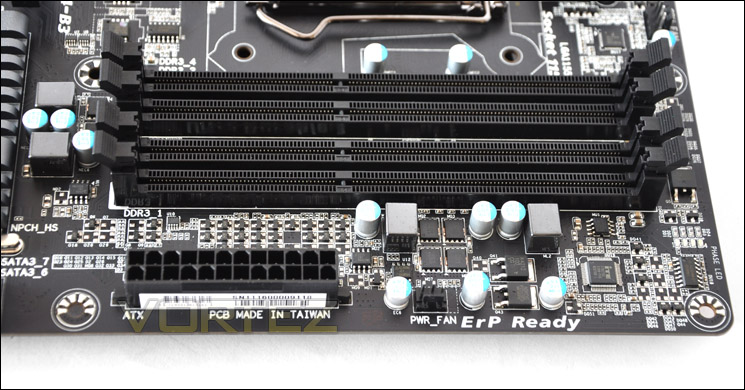
DDR3 DIMMs provide up to 32GB and 2133MHz
Moving to storage, available are 4 x SATA 3G and 4 x SATA 6G. The 3G ports are signified by black and the 6G in cream/grey. The reason for the colour difference within the 6G ports is due to two controllers that have been used. Notice how the SATA ports now sit right on the edge of the board. On the P67A-UD4 there was a gap, angled SATA connectors would have trouble slotting into the bottom ports… not anymore!
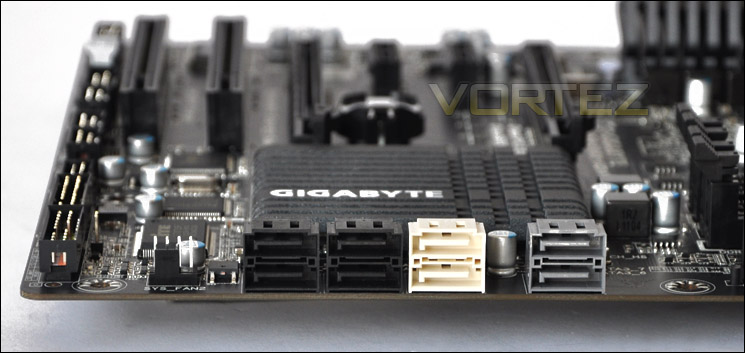
3Gbps and 6Gbps SATA functionality
USB functionality is abundant. We have a USB3.0 header for front panel USB3.0 functionality on the chassis. 3 x USB2.0 headers contribute to up to 14 USB2.0 ports. The headers here give a maximum of 6.
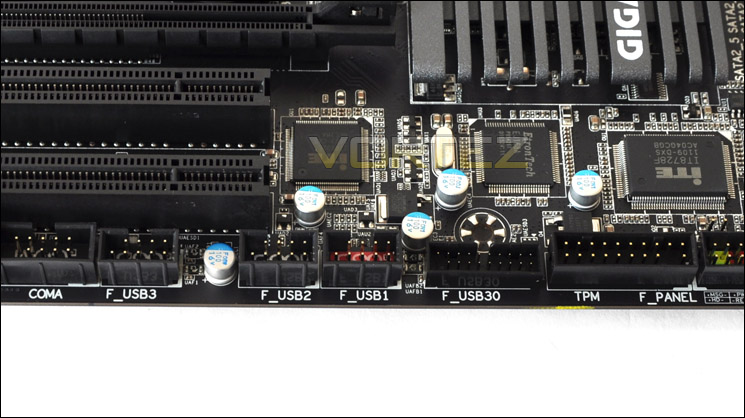
Lots of USB functionality
Over on the PCI-E lanes we have 1 – x16 and 1 – x8 slot. Unlike the ASUS P8P67 that we reviewed back in January, the Z68-UD4 will support both SLI and Crossfire. If you do choose to go with a dual card configuration, bandwidth will drop to x8. We also have 2 – x1 slots and 2 x PCI legacy slots.
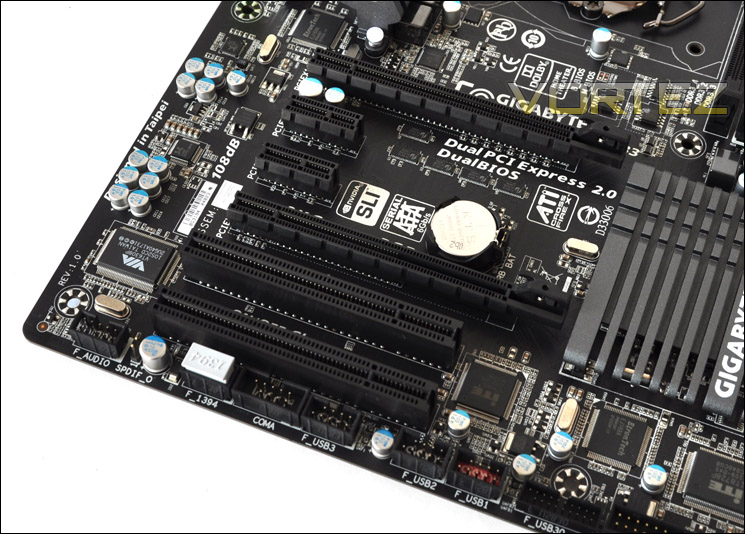
SLI and CrossfireX is supported
Looking at the back panel there are quite a lot of features integrated.
• PS2 keyboard/mouse
• 2 x USB2.0 ports
• SPD/IF optical/coaxial
• IEEE 13394
• USB/ESATA Combo
• 2 x USB2.0
• 2 x USB3.0
• Gigabit LAN (Realtek 8111E)
• 2 x USB2.0
• 6 Audio Jacks – Realtek ALC 889 with integrated Dolby
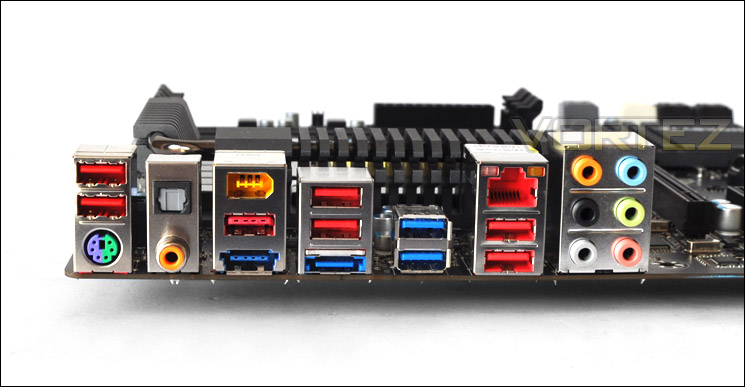
The I/O panel on Z68-UD4
GIGABYTE Touch BIOS
For those who have built their own computers, there is a strong possibility that you have switched into the BIOS to alter settings. Perhaps the boot priority for a Windows install. The BIOS is quite an archaic tool. To the novice, the interface can appear quite daunting and lets be honest, they are far from user-friendly.
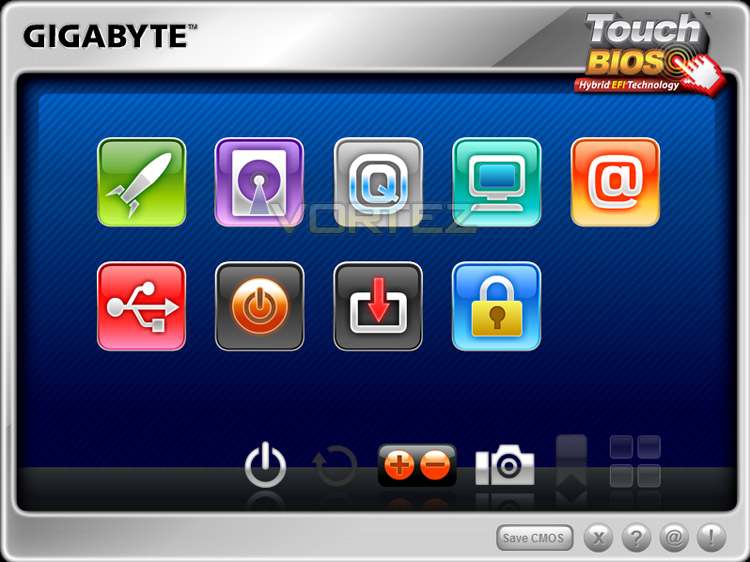
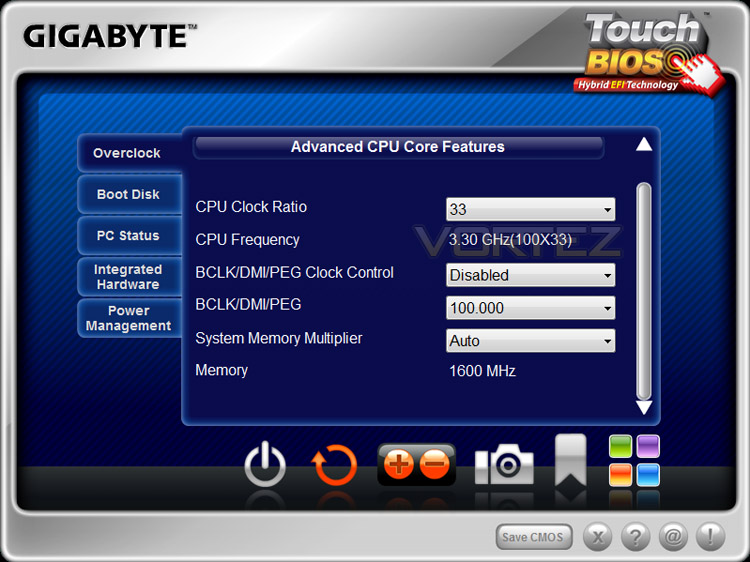
So, GIGABYTE have developed an innovative new windows based BIOS application that will bridge that gap for those who perhaps aren’t familiar with BIOS modification. If you have a touch-screen monitor you can even navigate the interface via your fingers!
Touch BIOS is actually a very handy tool. It saves you having to reboot and hit that del key. You can simply switch to BIOS whilst in Windows and check or tweak settings. Surely this will encourage the novice to experiment with altering aspects of the BIOS – because it is presented in such a friendly manner. Here are some screenshots of the Touch BIOS on our test machine, showing some of the available options and a video by GIGABYTE, demoing the new Touch BIOS.
Test Setup & Overclocking
CPU Intel Core i5 2500K (3.3GHz)
Motherboards
– GIGABYTE Z68-UD4
– Foxconn Rattler P67
– ASUS Sabertooth P67
– ASUS P8P67 (LGA1155)
– Foxconn P67A-S
– ECS P67H2-A (Black Extreme)
Memory 4GB Kingston HyperX CL9 1600MHz
CPU Cooler Noctua NH-D14
Graphics ZOTAC GTX 460
PSU OCZ Fatal1ty 750W
All P67 Sandy Bridge motherboards will be benchmarked against each other using the Intel Core i5 2500K. The maximum overclock will also be included within the proceeding benchmark tests to identify performance gains as a result of tweaking CPU clock speed via the multiplier.
Overclocking
As previously mentioned in our Intel Core i5 Sandy Bridge Roundup – overclocking is achieved by altering the multiplier rather than the BCLK. So the BCLK stays at 100MHz and the multiplier is modified. So if we have 100MHz on the BCLK and 40 for the multiplier this will obviously output 4GHz. We chose to use the Intel Core i5 2500K across each of the motherboard tests and indeed for the overclocking due to its unlocked multiplier.
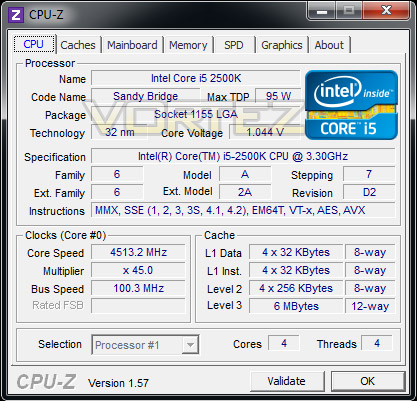
With overclocking simplified on Sandy Bridge, this means that achieving the best overclock couldn’t be easier. CPU voltage and multiplier just need to be modified accordingly. I tried two different Intel Core i5-2500K chips during the overclocking process here and settled for 4.5GHz @ 1.4v. Guidelines do specify that around this region of voltage and beyond can have a negative impact on longevity of a chip. I even tried tweaking PLL and VTT but both chips would not play ball. 4.5GHz is still a rather impressive overclock, although it would have been nice to take it higher.
NOTE: Voltage in CPU-Z doesn’t show actual voltage. Z68 isn’t currently fully supported.
SSD Caching – Intel Smart Response
Intel have incorporating Smart Response Technology with the new Z68 chipset. In essence this operates by combining a standard (mechanical) HDD with an SSD. The SSD is then used as the cache drive whilst the traditional mechanical HDD is used as the OS drive. The idea is that recalling data and files will be much more efficient in daily use and this will speed things up for the end user.
So to test this we have paired a Samsung Spinpoint F3 1TB 7200RPM SATA drive with a Kingston V+ 64GB SSD. The Operating system will be installed on the Samsung drive and the SSD will act as the cache drive.
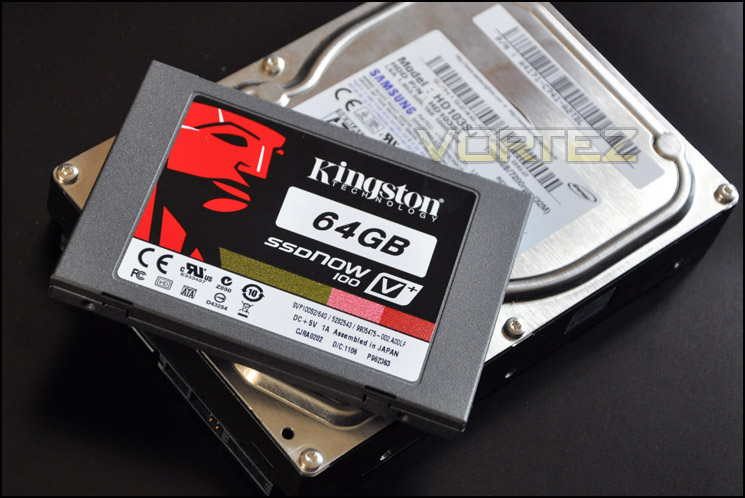
To get this setup we need to follow the following steps in order for everything to work correctly. So here it is:
• Boot into BIOS and change PCH SATA Control Mode to RAID (XHD) – under Integrated Peripherals.
• Install OS onto Samsung Spinpoint 1TB drive.
• Boot into Windows and install Intel Rapid Storage Technology via Diver CD
• Load up Intel Rapid Storage Technology. Select Accelerate Tab. Click Enable Acceleration,
• Select chosen options from screen – Enhanced or Maxmized acceleration mode.
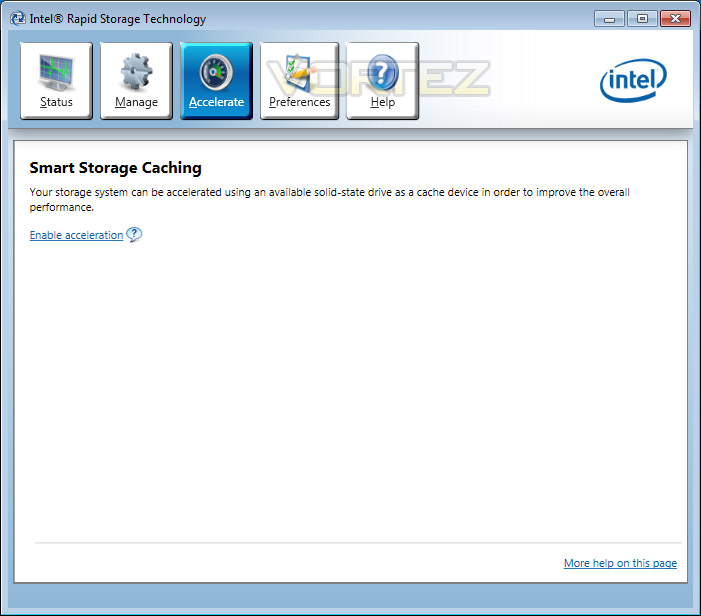
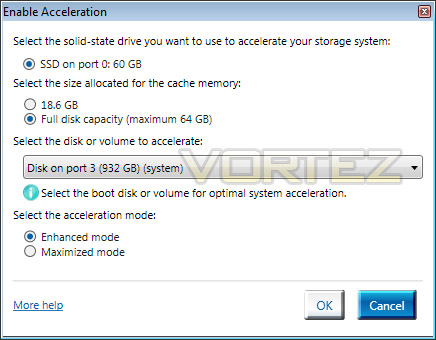
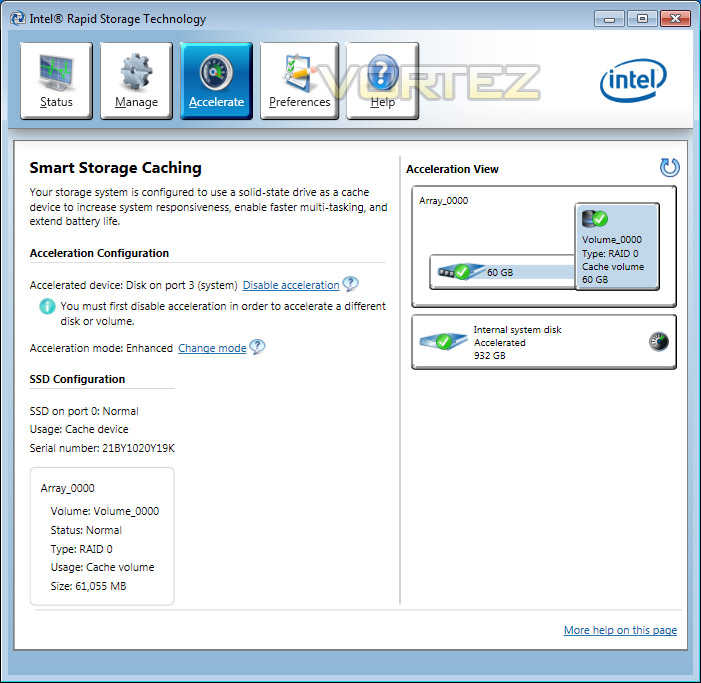
Benchmarks – PCMark 7, Windows 7 Boot Time & Large File Copy
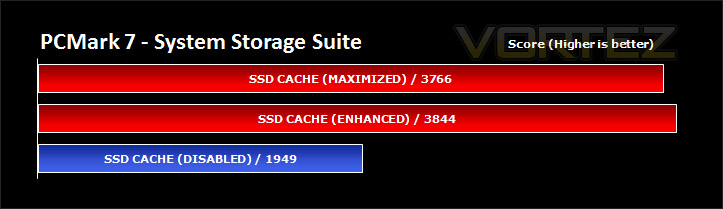
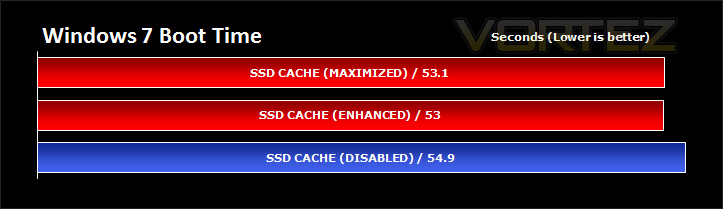
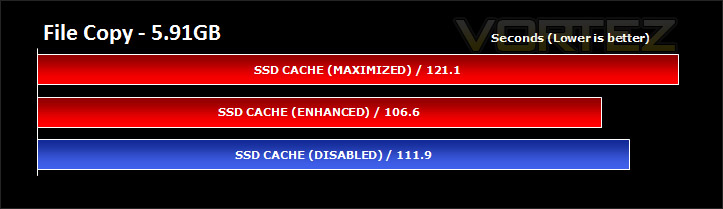
Next we ran some benchmarks to determine how much SSD caching actually affects our real-world experience. The first test sees the new PCMark 7 being used – more specifically the System Storage Suite that gives us an overall score. After this the Windows 7 boot time was observed via a stopwatch in each of the modes and finally a large file copy of 5.91GB was transferred to the Samsung drive using each of the modes – Enhanced, Maxmized, Disabled.
Power Consumption
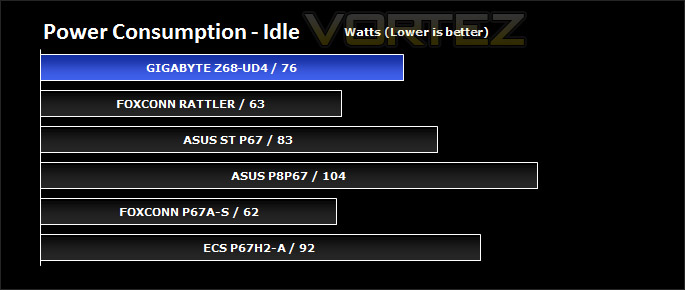
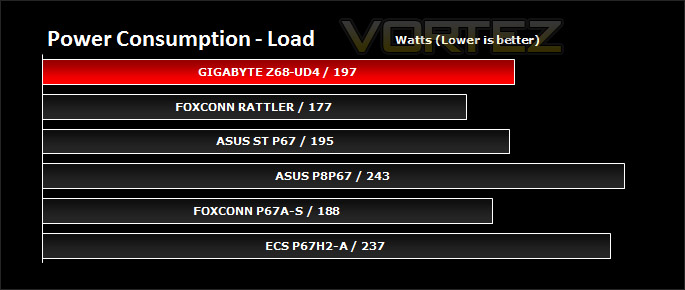
It’s interesting to note the power consumption across all motherboards. Although they are all using the P67 chipset, energy results can fluctuate between manufacturers due to the features and specifications that are integrated. First of all, for the idle tests the system is cold booted into Windows and no additional applications are executed – the watts are noted on the external energy monitor we use and then the system is loaded with 3DMark 11 – watts are again monitored for the duration of the test and the highest rated wattage result is then noted down. Below are the results of this energy test.
It’s good to see that Z68-UD4 is an efficient motherboard. It may not appear as the most efficient but it isn’t far from it. Just look at the comparative results between the ASUS P8P67 and Z68-UD4. The difference in power consumption is very significant.
Synthetic Benchmarks: AIDA64
CPU Queen
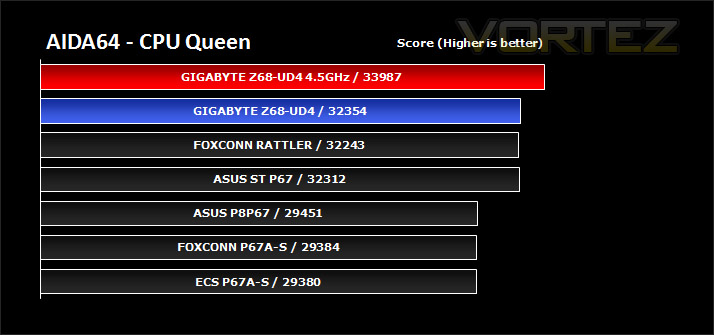
This simple integer benchmark focuses on the branch prediction capabilities and the misprediction penalties of the CPU. It finds the solutions for the classic “Queens problem” on a 10 by 10 sized chessboard. At the same clock speed theoretically the processor with the shorter pipeline and smaller misprediction penalties will attain higher benchmark scores. For example — with HyperThreading disabled — the Intel Northwood core processors get higher scores than the Intel Prescott core based ones due to the 20-step vs 31-step long pipeline. CPU Queen test uses integer MMX, SSE2 and SSSE3 optimizations.
There isn’t a great deal to separate the motherboards being tested below, its neck and neck between the brands. Overclocking gives a decent boost to CPU performance, as may be expected.
CPU Photoworrx
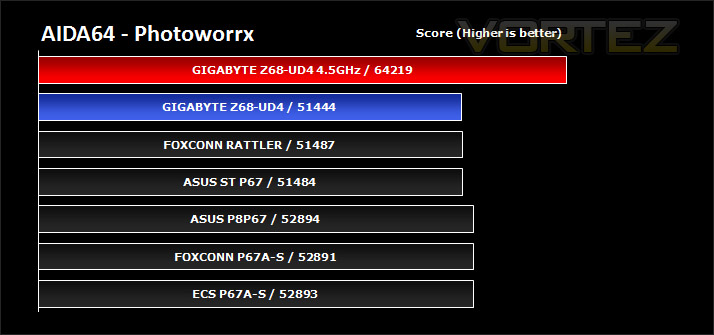
This benchmark stresses the integer arithmetic and multiplication execution units of the CPU and also the memory subsystem. Due to the fact that this test performs high memory read/write traffic, it cannot effectively scale in situations where more than 2 processing threads used. For example, on a 8-way Pentium III Xeon system the 8 processing threads will be “fighting” over the memory, creating a serious bottleneck that would lead to as low scores as a 2-way or 4-way similar processor based system could achieve. CPU PhotoWorxx test uses only the basic x86 instructions, and it is HyperThreading, multi-processor (SMP) and multi-core (CMP) aware.
The Z68-UD4 falls behind slightly in this benchmark. It’s worth noting though that the difference is only marginal. With an overclock, this changes things considerably and the score is catapulted forward.
CPU AES
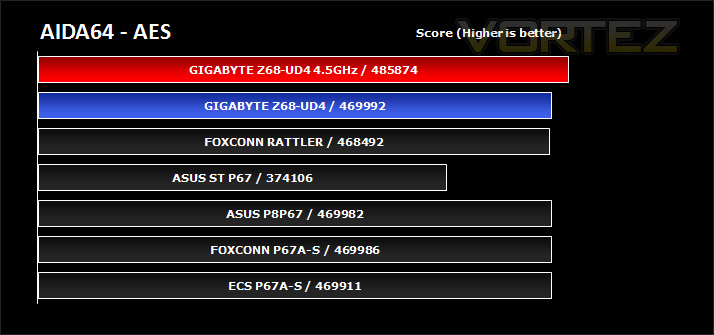
This benchmark measures CPU performance using AES (Advanced Encryption Standard) data encryption. In cryptography AES is a symmetric-key encryption standard. AES is used in several compression tools today, like 7z, RAR, WinZip, and also in disk encryption solutions like BitLocker, FileVault (Mac OS X), TrueCrypt.
CPU AES test uses only the basic x86 instructions, and it’s hardware accelerated on VIA PadLock Security Engine capable VIA C3, VIA C7 and VIA Nano processors; and on Intel AES-NI instruction set extension capable processors. The test is HyperThreading, multi-processor (SMP) and multi-core (CMP) aware.
CPU AES test uses only the basic x86 instructions, and it’s hardware accelerated on VIA PadLock Security Engine capable VIA C3, VIA C7 and VIA Nano processors; and on Intel AES-NI instruction set extension capable processors. The test is HyperThreading, multi-processor (SMP) and multi-core (CMP) aware.
This test may be relevant to those who zip or compress large files, the Z68-UD4 reveals a lead at stock and an overclock further increases this win. Results here reveal that this motherboard is consistently good.
FPU Mandel
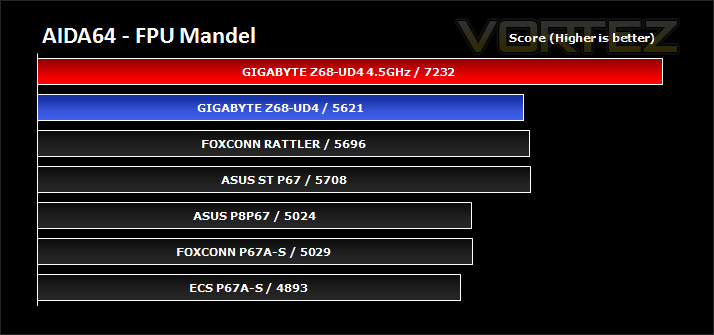
This benchmark measures the double precision (also known as 64-bit) floating-point performance through the computation of several frames of the popular “Mandelbrot” fractal. The code behind this benchmark method is written in Assembly, and it is extremely optimized for every popular AMD, Intel and VIA processor core variants by utilizing the appropriate MMX, MMX+/SSE, SSE2, SSSE3, or AVX instruction set extension. FPU Mandel test is HyperThreading, multi-processor (SMP) and multi-core (CMP) aware.
During stock frequency settings the Z68-UD4 falls behind slightly but overclocking really pushes that score up, showing that fine tuning on Sandy Bridge and especially on the Z68-UD4 will encourage good overall performance.
Synthetic Benchmarks: x264 HD
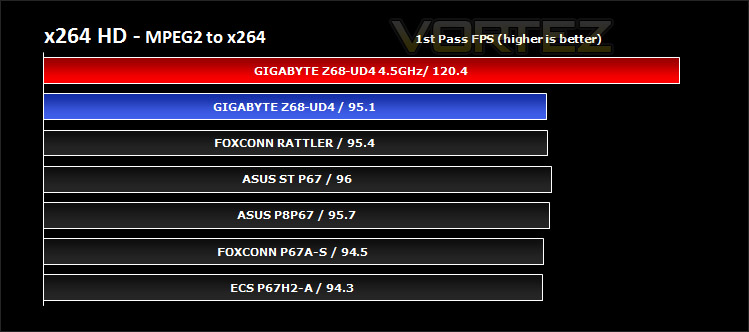
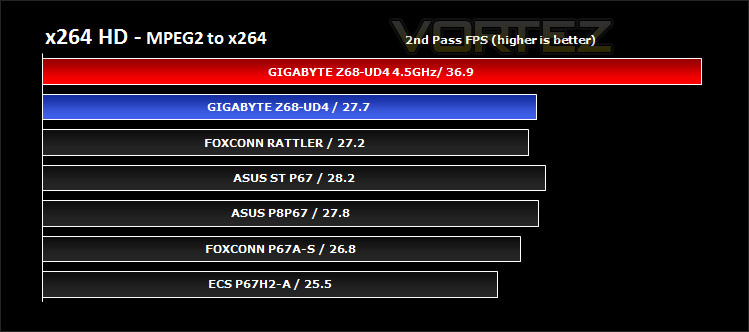
Simply put, this test measures how fast your machine can encode a short, DVD quality MPEG-2 video clip into a high-quality x264 video clip. What’s x264, you ask? It’s more or less the next-generation Xvid/DivX codec. I think it’s ideal for a benchmark because the application (x264.exe) reports fairly accurate compression results (in frames per second) for each pass of the video encoding process, and it uses multi-core processors very efficiently.
x264 HD gives results for 2 passes when compressing an MPEG-2 clip into x264. It presents 4 seperate results for each pass giving a total of 8 – all results are given in FPS. For each pass I have averaged out the results.
Stock performance during this benchmark test reveals no clear winner and there is little to divide between the boards under examination. Overclocking to 4.5GHz provides you Z68-UD4 with plenty of processing power to achieve a clear win. Video encoding is a breeze with this board, it has shown that against its foes, the Z68-UD4 can provide some great performance for the end user.
Synthetic Benchmarks: Cinbench 11.5
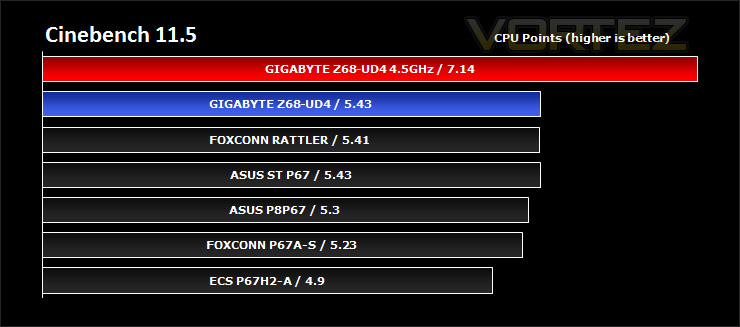
CINEBENCH can measure systems with up to 64 processor threads. ThIS test scene contains approximately 2,000 objects which in turn contain more than 300,000 polygons in total, and uses sharp and blurred reflections, area lights, shadows, procedural shaders, antialiasing, and much more. The result is displayed in points (pts). The higher the number, the faster your processor.
Cinebench produces neat and easy to understand results, giving a quite representative overall CPU performance. Here it indicates that the Z68-UD4 is able, achieve the best results out of all the boards under examination. Overclocking gives a very good boost in performance. With overclocking so simple on the Sandy Bridge platform it’s highly advisable to do this. The benefits are there to be had.
Synthetic Benchmarks: SiSoftware SANDRA 2011
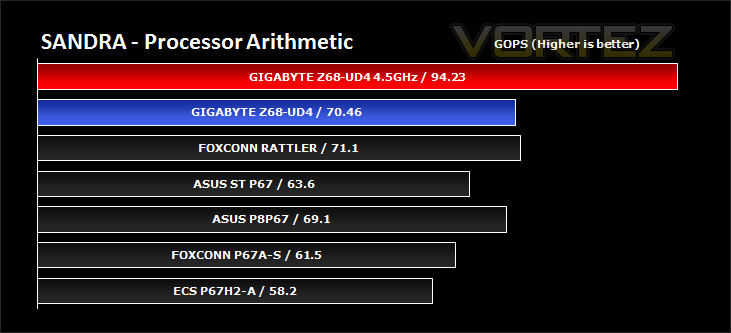
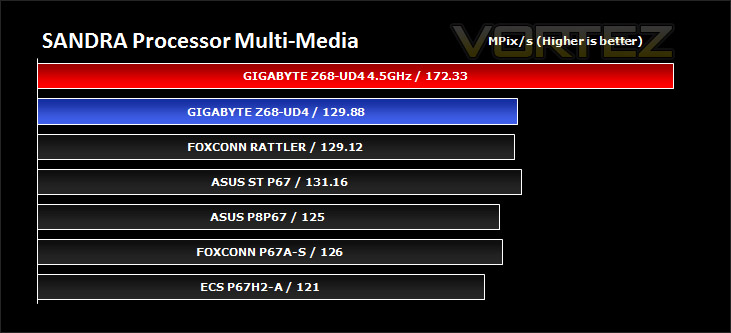
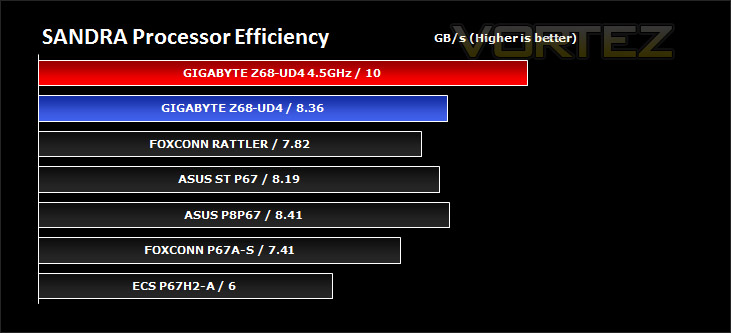
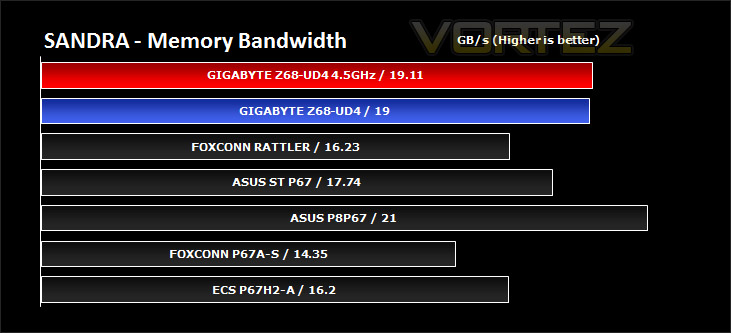
SANDRA isn’t always a benchmark that is included in hardware reviews but I believe it shouldn’t be ignored. SANDRA provides a vigorous package that tests your system in a rather large array of benchmarks. There are many aspects of benchmark that can be executed. We will be considering – CPU and memory tests.
Processor tests – In the processor tests Z68-UD4 is consistently good and offers strong performance. Overclocking gives even greater performance gains of 30%+!
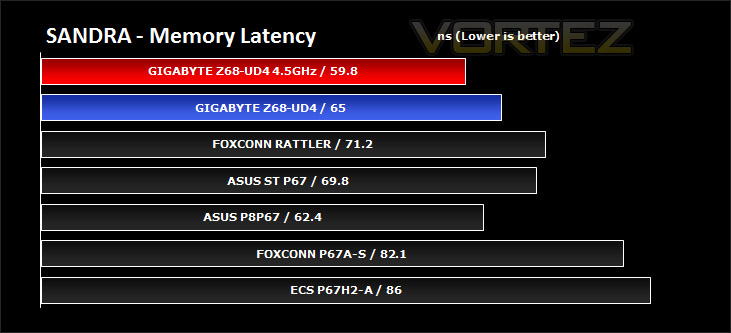
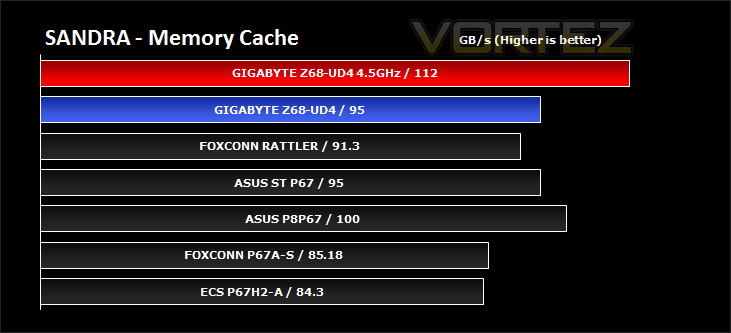
Memory tests– Simarily, in the memory tests the GIGABYTE offering again battles it out with ASUS flagship motherboards and does a great job.
Synthetic Benchmarks: 3DMark 11
Designed to measure your PC’s gaming performance 3DMark 11 makes extensive use of all the new features in DirectX 11 including tessellation, compute shaders and multi-threading. Trusted by gamers worldwide to give accurate and unbiased results, 3DMark 11 is the best way to consistently and reliably test DirectX 11 under game-like loads.
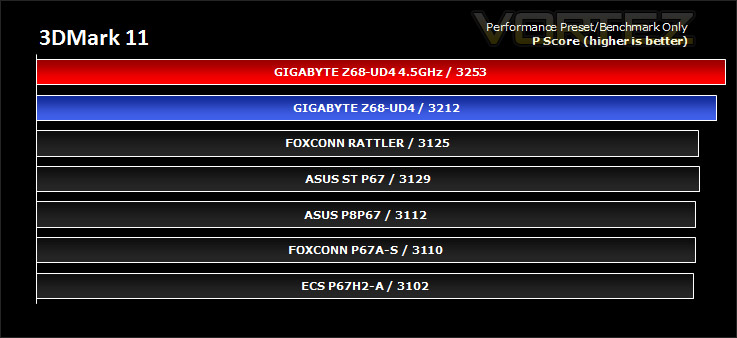
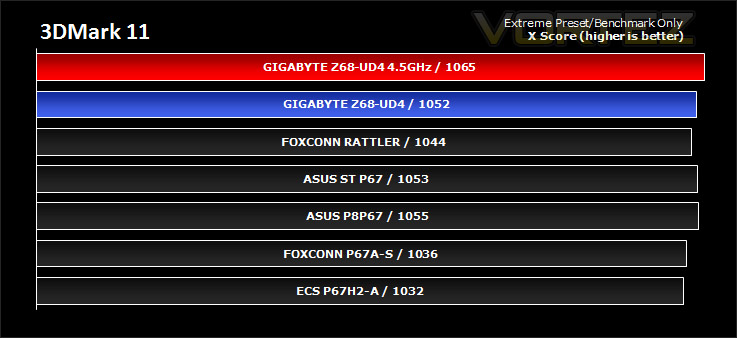
3DMark 11 was released at the end of last year and needs little introduction. For the test settings both Performance and Extreme presets are run with ‘benchmark only’ being selected. This provides good analysis. Many will only test the performance preset, using the extreme mode we can examine the board under much more severe stressing.
There isn’t much to separate the motherboards in both our performance and extreme 3DMark 11 benchmarks. Z68-UD4 does provide more points within the “Performance” preset though (which most users will be familiar with as this features in the free version).
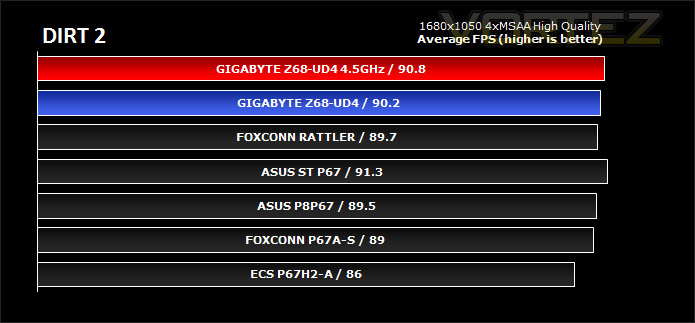
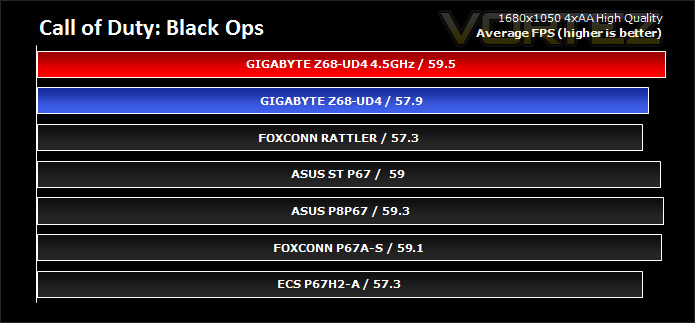
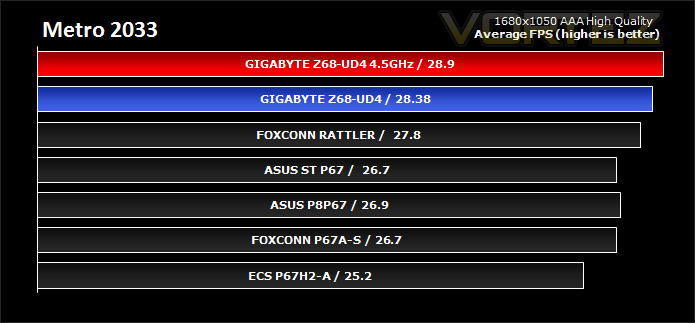
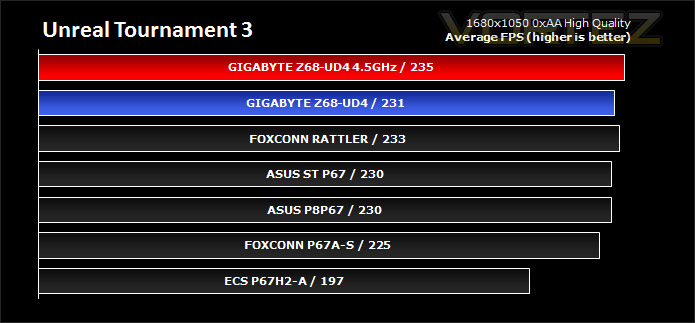
Gaming Benchmarks: DIRT 2, Call of Duty Black Ops, Metro 2033. UT3
It’s important for us to perform a number of game benchmarks as well as the synthetic tests because many of our motherboards on the test bench have features which market them directly at gamers. So here we have a selection of popular gaming titles, critically acclaimed and action-packed.
Gaming performance across each of the motherboards is marginal. FPS remains very much the same, even with a modification to CPU clock speed. Nevertheless it gives you an idea of typical performance that can be experienced from this set of components. Note: Z68-UD4 offers slight FPS improvement over the other boards, although it is quite minimal.
Conclusion
We’ve seen the benchmark results and we are aware of the features so what do we make of the Z68-UD4? Well, it ticks all the boxes in terms of offering a good blend of multimedia and performance. It may not have video outputs/onboard graphics that seem to be a big selling point for many other Z68 branded motherboards but I understand GIGABYTE’s reasoning behind omitting this feature – many who will invest in such a board, even the lower end UD4 will be choosing to install a high-end graphics card solution and possible multi-GPU configuration, why else would they spend so much on a motherboard with features such as SLI and CrossfireX?
The additional features we do get with the Z68-UD4 are the fantastic new Touch BIOS and SSD caching. As we’ve briefly seen, the Touch BIOS is a highly innovative new feature, allowing you to access BIOS settings without the need to actually boot into the BIOS at POST. For those who perhaps have concerns about entering the BIOS this new Touch BIOS will make steps to encouraging more users to customise their systems and this can only be a good thing.
Although the performance gains we have seen across all benchmarks have been marginal, overclocking the 2500K used in our tests proved to be a very worthwhile thing. Overclocking provided even better results, showing that we can access even greater bandwidth, FPS and access times. There are plenty of storage options (with 6G in there too), USB functionality, PCI-E lanes, and lots of great features on the I/O including a very handy ESATA/USB combo port.
So now we come to the price-point. Z68-UD4 is priced at £170 inc. VAT at launch. Some £20 more than the P67A-UD4. Projecting it closer to £200. The UD4’s close rival, the ASUS P8P67 can be had for £134 which will be a tempting alternative for many, although we only get Crossfire support with this board and there are lucrative features with the Z68-UD4 such as Touch BIOS, SSD caching, more SATA ports and that fantastic black/grey colour-scheme – even from just looking at this board, many will be drawn to it.
The bottom-line is: Z68 may not have been the most exciting launch this year but it does provide some interesting and very useful features, especially from GIGABYTE’s offerings. Z68-UD4 supplies a great blend of multimedia and performance with some stimulating features. There’s no denying it we have a soft spot for the Z68-UD4, just from looking at it!
Pros
+ A good blend of performance/multimedia
+ Touch BIOS
+ Very attractive styling
Cons
– Bordering on expensive
– Small justifications for moving from P67
+ A good blend of performance/multimedia
+ Touch BIOS
+ Very attractive styling
Cons
– Bordering on expensive
– Small justifications for moving from P67


