







HS2 is a new external storage SSD which connects via USB 3.0 interface. Armed with speed, reliability and low power, is this the perfect portable storage device?

Product on Review: HS2 Series
Manufacturer and Sponsor: Hyundai
Street Price: £121.99 @ Box (At time of review)
Hyundai are more commonly known for their expertise in the automobile market but they are also no stranger to consumer technology products too. Having delved into storage products in the past, Hyundai are now pursuing external SSD storage in a bid to bring super-fast transfer speeds for portable data storage.
HS2 is an external SSD which utilises the USB 3.0 interface. Within the range, an assortment of colours are available and a selection of model capacities including: 60GB, 128GB, 256GB, 512GB, 750GB, 1TB. Today we will be taking a look at the 128GB version to discover how this new USB 3.0 SSD compares to a conventional USB 3.0 drive and SATA 3 SSD.
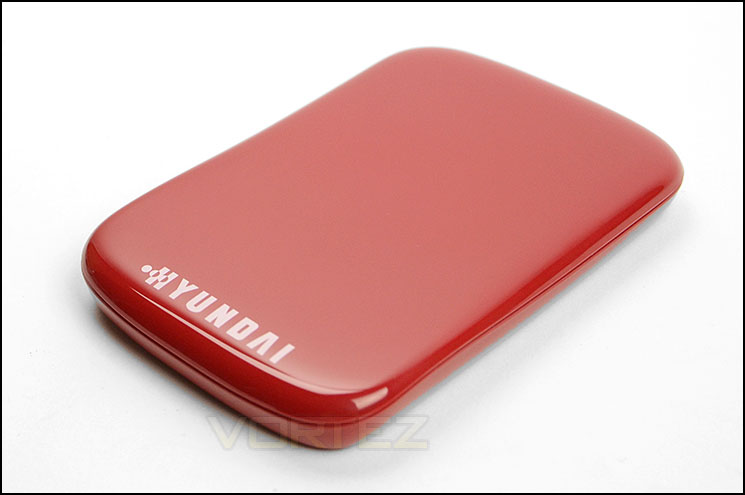
Hyundai on their HS2
Introducing a new breed of eternal storage – the Hyundai HS2 Series State Solid Drive has evolved offering on the go speed and power. Benefit from faster access to your files, along with the more robust nature of SSD, making the HS2 more resilient against vibration and shock, an essential addition to your modern day survival kit. User friendly, the exterior case is sleek and slim-line. The light indicator glows blue when connected to USB3 and white when connected to USB2.
Technical Specifications
Formatted storage capacity
60 GByte – 128 GByte – 256 GByte – 512 GByte
Memory
19nm MLC NAND Flash Memory
Power Consumption
0.045W (Typical, DIPM ON)
Physical specifications
Height 125 mm
Width 82 mm
Depth 15 mm
Weight (typ.)
98 g 98 g 102 g 102 g
Operating system
Windows XP, Windows Vista, Windows 7, Windows 8, Mac Osx, Linux
Reliability
MTTF 1,500,000 Hours
Warranty
3 years limited
60 GByte – 128 GByte – 256 GByte – 512 GByte
Memory
19nm MLC NAND Flash Memory
Power Consumption
0.045W (Typical, DIPM ON)
Physical specifications
Height 125 mm
Width 82 mm
Depth 15 mm
Weight (typ.)
98 g 98 g 102 g 102 g
Operating system
Windows XP, Windows Vista, Windows 7, Windows 8, Mac Osx, Linux
Reliability
MTTF 1,500,000 Hours
Warranty
3 years limited
Packaging & Closer Look
HS2 is presented in small but eye-catching cardboard/plastic packet. This packet has a transparent window for a preview of the drive and choice of colour. The front of the packaging lists integral features such as USB 3.0 and USB 2.0 backwards compatibility, low power consumption, plug & play plus being just 14.5mm ultra slim. The back of this packaging goes into more detail for such information as technical specifications.
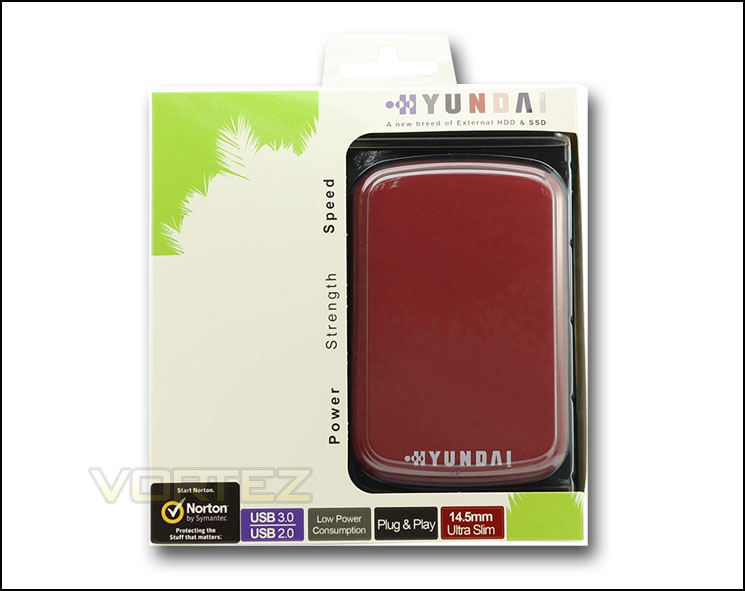
Packaging for HS2
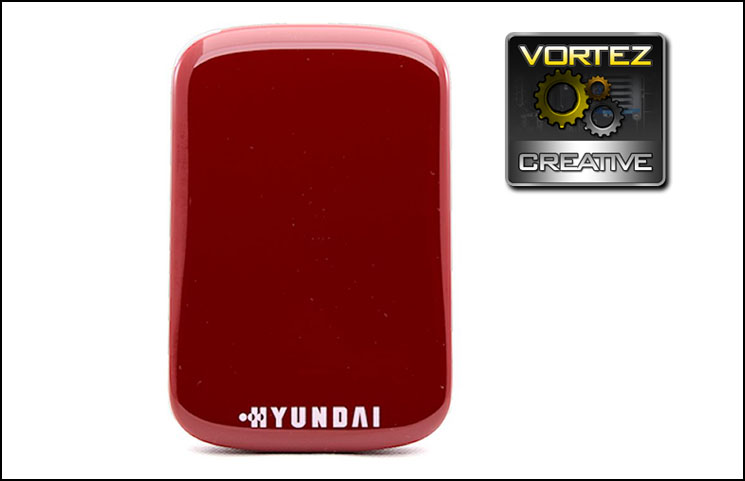
The HS2 drive itself is rather nondescript in its styling. The outer shell features a glossy plastic cover with just the Hyundai logo has the stand-out feature. We like the appearance, it looks professional and clean. HS2 is available in an assortment of different colours our sample is named “Red Dragonfly”, access to the inside is only available by prying the covers apart which permanently breaks the seal and also voids warranty. Do so at your own risk.
HS2 differs from other portable drives by containing an SSD for super-fast transfer rates and enhanced reliability. All models within the HS2 series up to 512GB feature the Toshiba THNSNH256GCST or as its otherwise known – HG5D. As we pointed out in our review of this SSD, the drive uses a Marvell based controller with Toshiba 19nm MLC NAND. As our review outlined, the Toshiba drive is a great performer, so it will be interesting how this drive operates using the USB 3.0 interface.
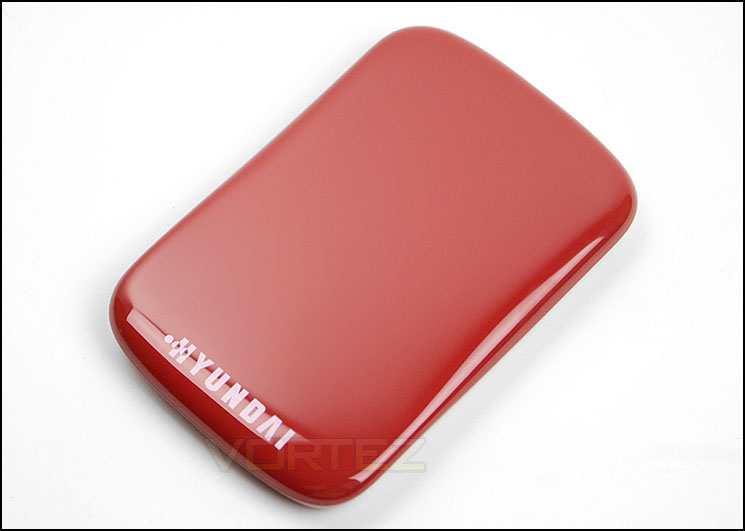
Subtle styling – glossy black exterior
Being a portable solution, HS2 utilises the USB 3.0 interface. As such, Hyundai provide a USB cable to connect between the drive and your computer. If you don’t have a USB 3.0 port, the cable/drive is backwards compatible with USB 2.0, the transfer speed will just be capped. Compared to the common desktop/internal SSD which takes advantage of the SATA interface, the USB 3.0 interface could have some constraints – exactly where, we will discover on the subsequent pages.
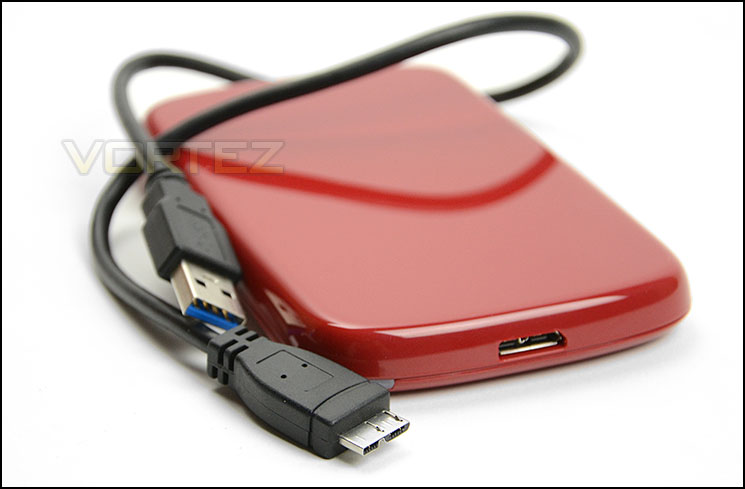
Connectivity via USB 3.0
Test Setup & Methodology
Our test system is formatted and a fresh version of Windows is installed with just drives in place – no additional applications. Windows is then updated to the latest release and the drivers are installed. Included in the list of benchmarks are the following applications:
Benchmarks
ATTO Disk Benchmark v2.46
AS SSD
CrystalDiskMark 3.0
Iometer
SiSoftware SANDRA 2013
AS SSD
CrystalDiskMark 3.0
Iometer
SiSoftware SANDRA 2013
Test system
CPU Intel Core-i7 4770K
Motherboard GIGABYTE Z87X-OC
Graphics XFX R7970 Black Edition
Memory 16GB Corsair Vengeance Pro (2400MHz) CL10
HDD
– Hyundai HS2 128GB (USB 3.0)
– Samsung 840 EVO 750GB (Sata 6Gbps)
– Samsung S3 (USB 3.0)
PSU Corsair HX1050 Gold
OS Microsoft Windows 7 Professional 64-Bit
Motherboard GIGABYTE Z87X-OC
Graphics XFX R7970 Black Edition
Memory 16GB Corsair Vengeance Pro (2400MHz) CL10
HDD
– Hyundai HS2 128GB (USB 3.0)
– Samsung 840 EVO 750GB (Sata 6Gbps)
– Samsung S3 (USB 3.0)
PSU Corsair HX1050 Gold
OS Microsoft Windows 7 Professional 64-Bit
Benchmarks: ATTO
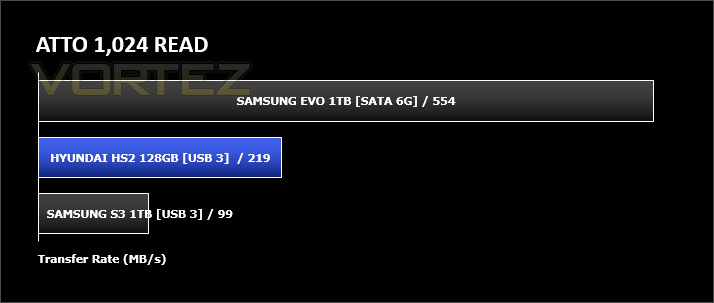
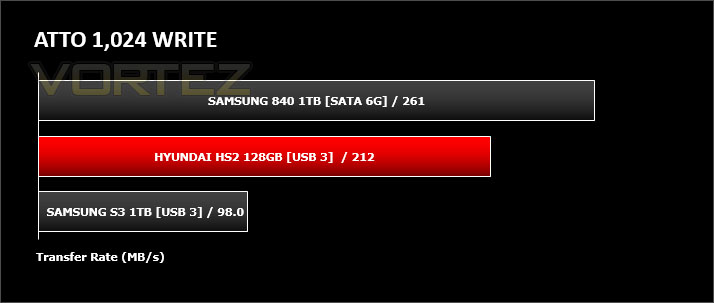
The ATTO Disk Benchmark performance measurement tool is compatible with Microsoft Windows. Measure your storage systems performance with various transfer sizes and test lengths for reads and writes. Several options are available to customize your performance measurement including queue depth, overlapped I/O and even a comparison mode with the option to run continuously. Use ATTO Disk Benchmark to test any manufacturers RAID controllers, storage controllers, host adapters, hard drives and SSD drives and notice that ATTO products will consistently provide the highest level of performance to your storage.
Benchmarks: AS SSD
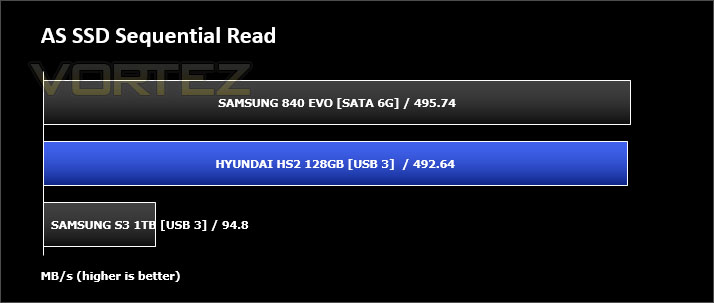
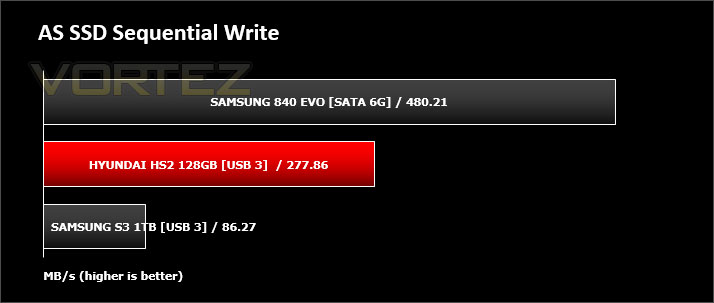
AS SSD Benchmark is a straightforward tool for measuring the speed of your SSD drive.
Simply launch the program, choose your drive, click Start, and it’ll test your SSD’s read and write speed in a variety of ways, delivering a score for each when it’s done. And if that’s not enough, there are also additional file copy and compression-related benchmarks available from the Tools menu. (The author’s support page is German only, but if you need further English explanations then there’s a thread on the program at the OCZ Technology forum.).
Simply launch the program, choose your drive, click Start, and it’ll test your SSD’s read and write speed in a variety of ways, delivering a score for each when it’s done. And if that’s not enough, there are also additional file copy and compression-related benchmarks available from the Tools menu. (The author’s support page is German only, but if you need further English explanations then there’s a thread on the program at the OCZ Technology forum.).
Benchmarks: CrystalDiskMark 3.0
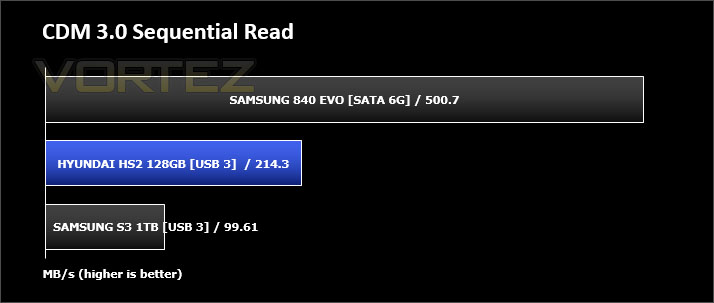
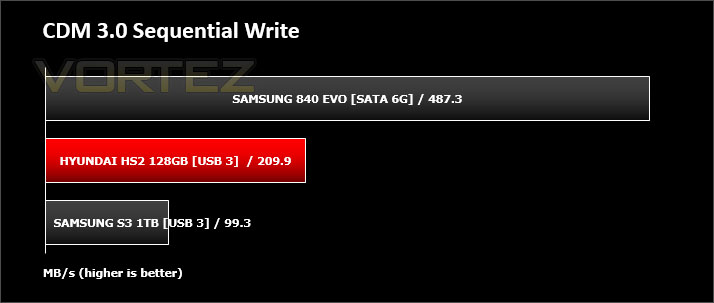
CrystalDiskMark is a disk benchmark software that analyses different types of hard drive. Giving sequential benchmark write and read statistics in MB/s. A simple program that is very useful.
Benchmarks: Iometer
Iometer is based on a client–server model, where one instance of the Iometer graphical user interface is managing multiple ‘workers’ (each one representing a separate Dynamo.exe process) which are doing the I/O. Iometer performs Asynchronous I/O – accessing files or block devices (later one allowing to bypass the file system buffers).
Iometer allows the configuration of disk parameters such as the ‘Maximum Disk Size’, ‘Starting Disk Sector’ and ‘# of Outstanding I/Os’. This allows a user to configure a test file upon which the ‘Access Specifications’ configure the I/O types to the file.
Iometer allows the configuration of disk parameters such as the ‘Maximum Disk Size’, ‘Starting Disk Sector’ and ‘# of Outstanding I/Os’. This allows a user to configure a test file upon which the ‘Access Specifications’ configure the I/O types to the file.
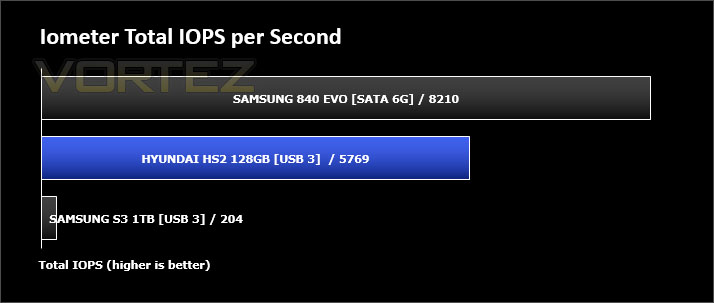
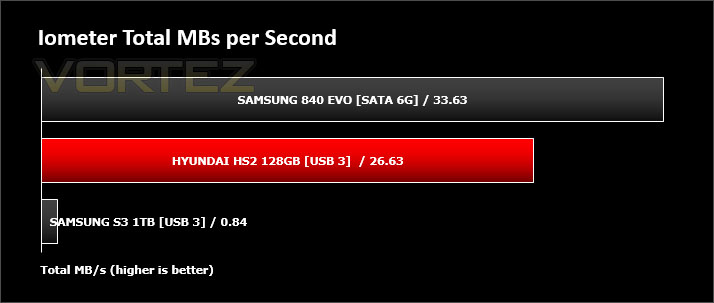
For the purpose of this test. The 4K 50%/50% read/write file will be under the examination with 100% Random Distribution – reporting back on IOPS and MBs per Second.
Benchmarks: SiSoftware SANDRA
SiSoftware Sandra (the System ANalyser, Diagnostic and Reporting Assistant) is an information & diagnostic utility. It should provide most of the information (including undocumented) you need to know about your hardware, software and other devices whether hardware or software.
Sandra is a (girl) name of Greek origin that means “defender”, “helper of mankind”. We think that’s quite fitting.
It works along the lines of other Windows utilities, however it tries to go beyond them and show you more of what’s really going on. Giving the user the ability to draw comparisons at both a high and low-level. You can get information about the CPU, chipset, video adapter, ports, printers, sound card, memory, network, Windows internals, AGP, PCI, PCI-X, PCIe (PCI Express), database, USB, USB2, USB3, 1394/Firewire, etc.
Sandra is a (girl) name of Greek origin that means “defender”, “helper of mankind”. We think that’s quite fitting.
It works along the lines of other Windows utilities, however it tries to go beyond them and show you more of what’s really going on. Giving the user the ability to draw comparisons at both a high and low-level. You can get information about the CPU, chipset, video adapter, ports, printers, sound card, memory, network, Windows internals, AGP, PCI, PCI-X, PCIe (PCI Express), database, USB, USB2, USB3, 1394/Firewire, etc.
Conclusion
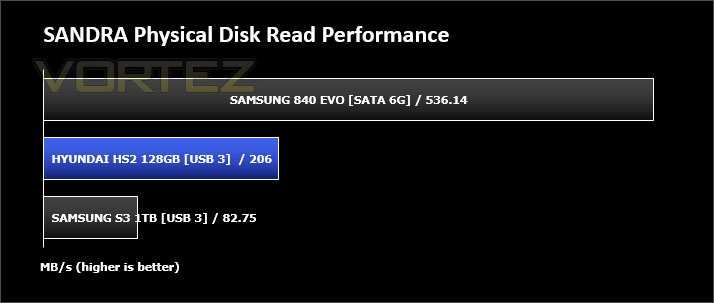
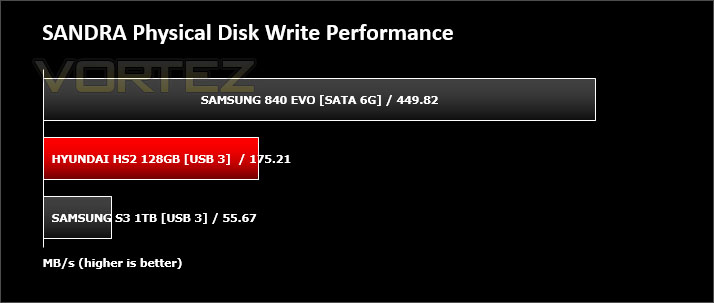
It comes as no surprise that SATA based SSDs still offer significantly better transfer rates compared to drives using the USB interface but our discoveries for this review have been quite surprising.
Hynundai’s HS2 with its USB 3.0 interface may not have been able to match the performance of the Samsung 840 EVO but this is clearly a limitation of using USB for connectivity. Having the drive portable means this compromise has to be expected. What is more surprising is the comparison to another USB 3.0 drive which doesn’t have an SSD under the hood. The HS2 blew our Samsung S3 USB 3.0 drive out of the water, showing that having super-fast MLC NAND flash and an SSD controller has key advantages when it comes to read and write transfer rates.
So where do the benefits lie with choosing a USB 3.0 based portable SSD? Well, as mentioned above there are clear speed advantages of using such a drive, data will pass between the computer and drive much quicker than a conventional USB 3.0 drive. The other benefits are the durability and power usage. Having an SSD underneath the cover means that accidental drops will not affect the drive, whereas conventional drives could be affected by such an incident. SSDs also have a proven track record for longevity, with a much lower failure rate. HS2 also uses 0.04w whilst the drive is active compared to 4.5W which the Samsung S3 portable drive draws when active.
The price for HS2 will vary depending on the size of drive you choose but our 128GB model can be found for £120. Where SATA SSD has now moved far away from £1 per GB, USB SSD still has some work to do and comparing this to a standard USB drive the gap is quite large. A 1TB USB drive can be found for as little as £50 nowadays, a USB SSD like HS2 will cost in the region of £600. It all boils down to how important transfer rates, reliability and power consumption really is, with any new technology like external SSDs, the initial price will be quite high but we are hoping that over time the cost will drop to make this investment more appealing to the average consumer.
Hyundai’s HS2 external SSD offers key advantages over the conventional USB storage drive. The transfer rates are substantially better, power usage is much lower and the bonus of reliability is of course inherent with this drive being solid state. If you are after super-fast portable data storage and need reliability HS2 is definitely worth a look.
Pros
+ Excellent performance results
+ Robust and reliable
+ Low power consumption
+ Choice of lots of colours
+ 3 years warranty
Cons
– USB 3.0 interface limits transfer rates compared to SATA
– Premium price for fresh tech/product
+ Excellent performance results
+ Robust and reliable
+ Low power consumption
+ Choice of lots of colours
+ 3 years warranty
Cons
– USB 3.0 interface limits transfer rates compared to SATA
– Premium price for fresh tech/product

Click here for an explanation of our awards at Vortez.net.


