







Prolimatech have released a new flagship CPU cooler. Is the Genesis the birth of a new champion? Let’s find out.
Product on Review: Prolimatech Genesis
Manufacturer and Sponsor: Prolimatech courtesy of CaseKing
MSRP: N/A
Street Price: 59,90EUR/ £55
CPU cooler designs in the recent years have in many ways stagnated. Most conform to the usual single tower design although we have seen a sudden surge in the popularity of dual tower heatsinks thanks to the unparalleled performance they deliver, but again these are nothing new. However, it is often the way that manufacturers design their heatsinks that help optimise performance. These generally come as subtle changes, such as the ripple-like fin structure of the Thermalright Archon or the bent winglet design of the Thermalright Venomous X. More recently, we saw Prolimatech introduce a unique dual tower heatsink that followed the dimensions/form factor of regular tower heatsinks in the shape of the Super Mega. Their innovation paid off and the Super Mega found itself competing with the best coolers on the market. Thanks to its copper and aluminium fin construction, thermal conductivity was increased without the cost of significant weight addition. However, this wasn’t the end for Prolimatech. Despite the wide variety of Megahalem style coolers already on sale, Prolimatech have been busy coming up with new innovative cooling solutions and today’s review sample is the most unique of them all, the Prolimatech Genesis.

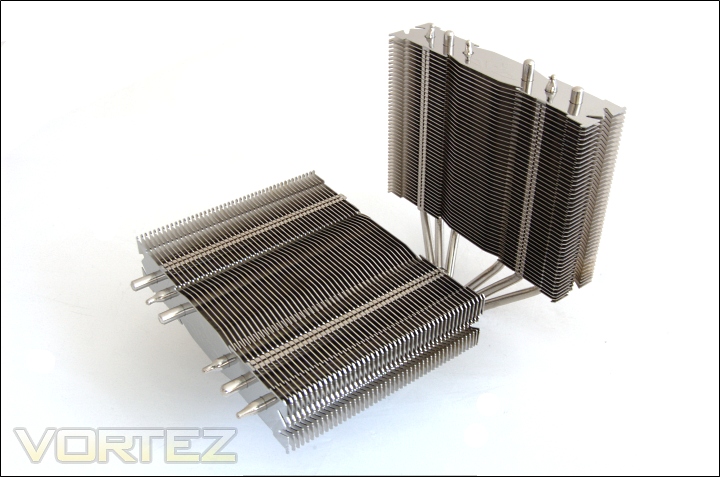
Where do we start with the Prolimatech Genesis? For a start, it’s not your everyday single or dual tower cooler. The Genesis is very unique in its design; it is composed of two radiators, one upright and the other designed as a down-draft heatsink to cool memory modules, MOSFETs and the motherboard Northbridge. This makes the Genesis a very versatile cooler and a promising one at that as it combines the sheer cooling potential of a regular heatsink and the motherboard cooling capability of down-draft coolers such as the Noctua NH-C14. There is a risk that Prolimatech have compromised on the design such that its efficiency is effectively reduced by implementing two concepts into one cooler. On initial looks the upright radiator appears very narrow and realistically we expect larger towers with higher surface areas to be the best performers. But as we all know, initial impressions don’t tell the whole story and with Prolimatech’s history of delivering high quality cooling solutions, we expect the Genesis design to revolutionise the future air cooling market.
A bit about Prolimatech
Prolimatech, founded in 2008 is headquartered in Taiwan, led by a team of dedicated experts with 22 years of accumulated experience in the field of computer thermal solutions.
Prolimatech stands for Professionalism exceeding beyond all Limits. We are here to challenge any limits that stand in our way to achieve what was thought to be impossible.
Prolimatech incorporates integration of the aerospace resource-saving technology and advanced heat conduction technology to create the best heat absorption and dissipation solutions while pertaining to the science of aesthetics.
Our never-ending quest is to satisfy every computer overclocker’s and every enthusiast’s needs for high quality and performance oriented thermal solutions for their high-end computer components.
Prolimatech stands for Professionalism exceeding beyond all Limits. We are here to challenge any limits that stand in our way to achieve what was thought to be impossible.
Prolimatech incorporates integration of the aerospace resource-saving technology and advanced heat conduction technology to create the best heat absorption and dissipation solutions while pertaining to the science of aesthetics.
Our never-ending quest is to satisfy every computer overclocker’s and every enthusiast’s needs for high quality and performance oriented thermal solutions for their high-end computer components.
Let’s have a look at what Prolimatech have in store for us. Next page please.
Features & Specifications
Tower CPU heatsinks have been mainstream for the past few years. While power end users may consider them to be pinnacle when it comes to performance, there are others who would prefer down draft low profile heatsinks for their versatile ability to cool not just the CPU but also its surrounding components such as RAM, MOSFET, and Northbridge chipset heatsink. Genesis combines the best of both worlds with top-notch engineering design and superior built quality and performance that are surpassed by none. Either 120mm or 140mm can be installed on the Genesis for a maximum installation of 3 fans of your choice! If you are looking to overclock your CPU to the max while keeping your system stable, we highly recommend the ultimate CPU heatsink, Genesis. The New Era of Super Cooler has arrived.
Features
•High clearance for better motherboard compatibility.
•Massive cooling range; cools not only CPU but also MOSFET and RAM.
•Cooler surrounding temperature allowing more stable environment for higher overclock.
•Takes both 12 and 14cm fans for a maximum installation of 3 fans.
•Six high quality heat-pipes for effective heat transfer.
•Light weight at 800 grams (without fans) in the high-end class.
•Intel and AMD platform supported. All mounting hardware is included.
Specifications
Physical Specifications
•Dimensions: 146 x 216.5 x 160 mm (L x W x H)
•Weight: 800g (without fans)
•Heat pipe: 6mm diameter x 6 units
•Heatsink material: Copper and Aluminium
•Suggest Fan speed: 800-1600RPM
•CPU Platform: Intel Socket LGA 775/1366/1156/1155 & AMD socket AM2/2+/3
•Fan Compatibility: 120x120x25mm & 140x140x25mm
•High clearance for better motherboard compatibility.
•Massive cooling range; cools not only CPU but also MOSFET and RAM.
•Cooler surrounding temperature allowing more stable environment for higher overclock.
•Takes both 12 and 14cm fans for a maximum installation of 3 fans.
•Six high quality heat-pipes for effective heat transfer.
•Light weight at 800 grams (without fans) in the high-end class.
•Intel and AMD platform supported. All mounting hardware is included.
Specifications
Physical Specifications
•Dimensions: 146 x 216.5 x 160 mm (L x W x H)
•Weight: 800g (without fans)
•Heat pipe: 6mm diameter x 6 units
•Heatsink material: Copper and Aluminium
•Suggest Fan speed: 800-1600RPM
•CPU Platform: Intel Socket LGA 775/1366/1156/1155 & AMD socket AM2/2+/3
•Fan Compatibility: 120x120x25mm & 140x140x25mm
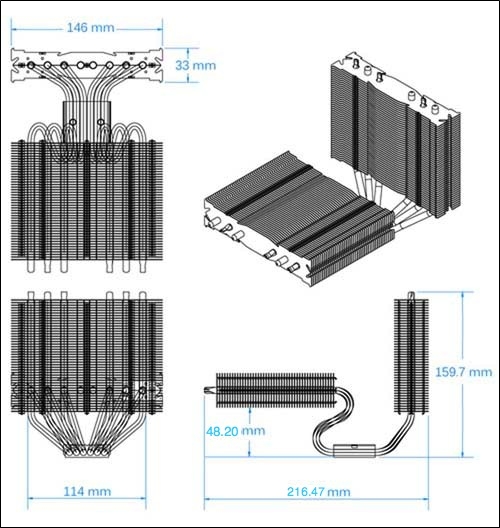
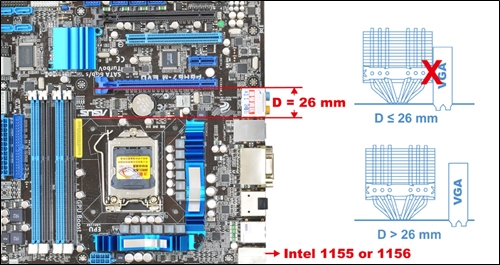
What is immediately striking about the cooler is its sheer size. In terms of height, it rises up to the standard 160mm. Length-ways; the Genesis is 146mm where the Super Mega is only 130mm. This is to compensate for the narrower 33mm thick radiators so as not to reduce the surface area as significantly. As such, it is important to take into account nearby expansions slots and installed devices. Prolimatech recommend a 26mm clearance between the CPU socket area and the top most expansion slot. The Genesis spans 216.5mm in width, the second radiator spanning the width of the motherboard to cover the memory modules. As we will see more clearly later, it stretches out to the edge of ATX sized motherboards. For more information regarding the cooler’s compatibility, have a look at Prolimatech’s site.
Spec-wise, there’s nothing uncommon about the construction. The Genesis uses six 6mm heat pipes and weights 800g thanks to its copper base and aluminium fin construction. It ends up 145g lighter than the Super Mega so it is a fair bit lighter. The main advantage of the Genesis over the Super Mega in terms of features is its support for all AMD sockets which the latter lacked. The Genesis is a very versatile cooler achieved by its 120 & 140mm fan support, Intel & AMD support, and its ability to cool both the CPU and the surrounding motherboard area. Let’s take a closer look at the Genesis.
Packaging and Content
The front of the box
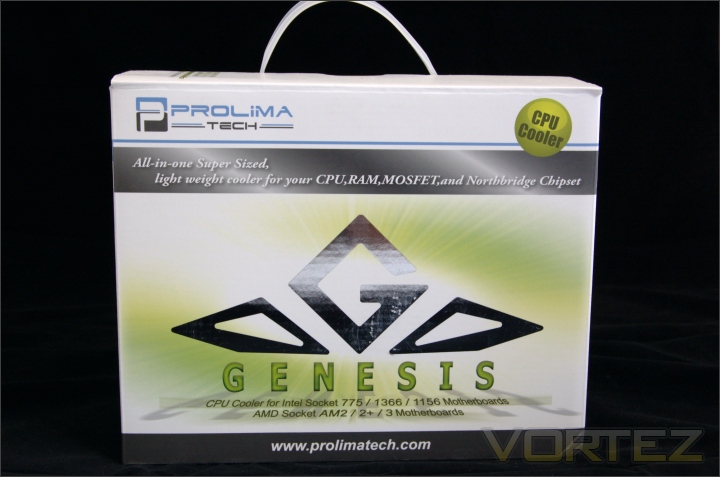
The Prolimatech Genesis comes packaged in a very large cardboard box. It is several leagues ahead of the quality of the Super Mega’s packaging so more protection is ensure. The theme follows on from the Super Mega and we see the reflective metallic foil depicting the ‘G’enesis emblem. As the front suggests, the Genesis is Super-Sized but light weight, reflecting the specifications detail on the last page. It also supports all Intel/AMD sockets currently. For some reason, Prolimatech thought it relevant to specify that the Genesis is indeed a CPU cooler as opposed to something else (a GPU cooler perhaps?). The box comes with a carrier handled, which for the size makes perfect sense for easy transportation.
The features
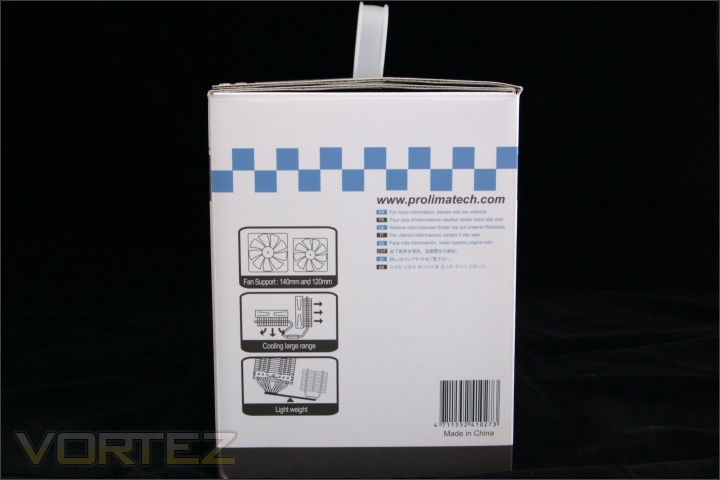
Since the back of the box follows the same design, we’ll have a look at the sides. On one side of the box, Prolimatech demonstrate the versatility of the Genesis through its support for both 120 and 140mm fans and its ability to cool more than just the CPU. It is also shown to be significantly lighter than the Super Mega and Megahalems at only 800g compared to over 900g in the latter two cases.
The specifications
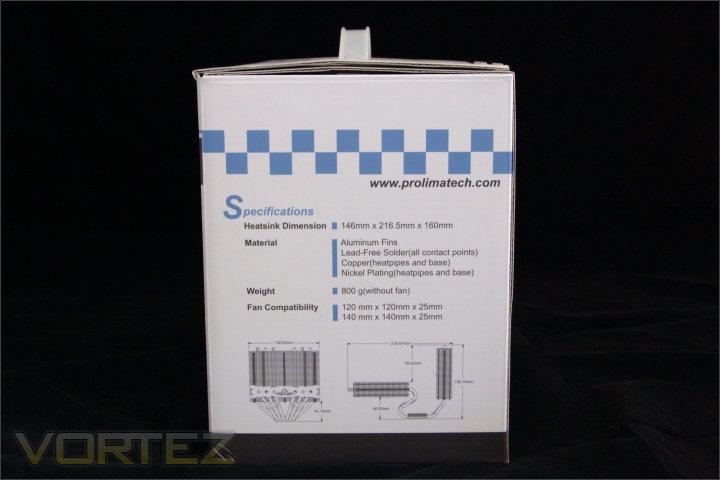
On the other side, the specifications are listed including the dimensions, material, fan compatibility and an illustrations of the dimensions so potential buyers can visualise the size.
Opening the box
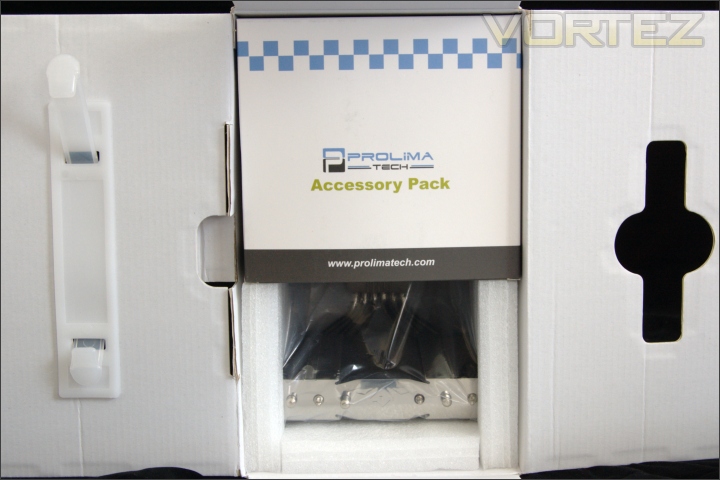
When opening the top, the first encounter is the Accessory pack containing all the relevant mounting mechanism and accessories. This is slotted nicely at the top of the heatsink within the foam cut-out.
Interior packaging
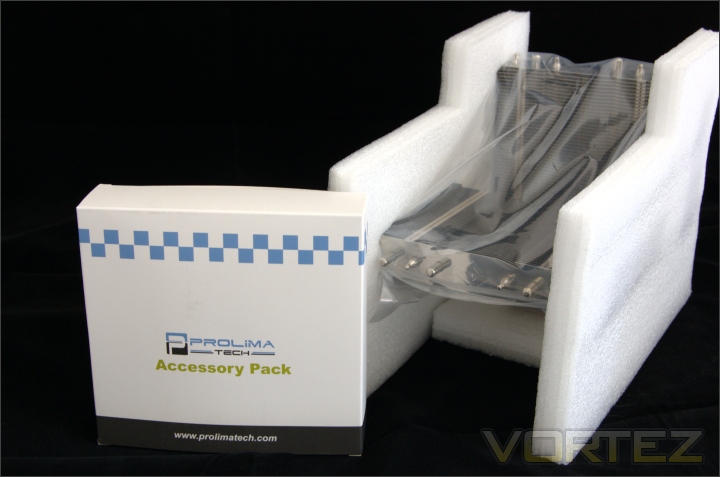
The heatsink is well packaged in a plastic bag enclosed on the side by foam which the Genesis slots nicely into. The base is also protected by foam so as not to damage the finish. The size is unlike a lot of previous coolers I have tested. It feels fairly light-weight when compared to the likes of the Noctua NH-D14 but its sheer width makes it look disproportionate in nature.
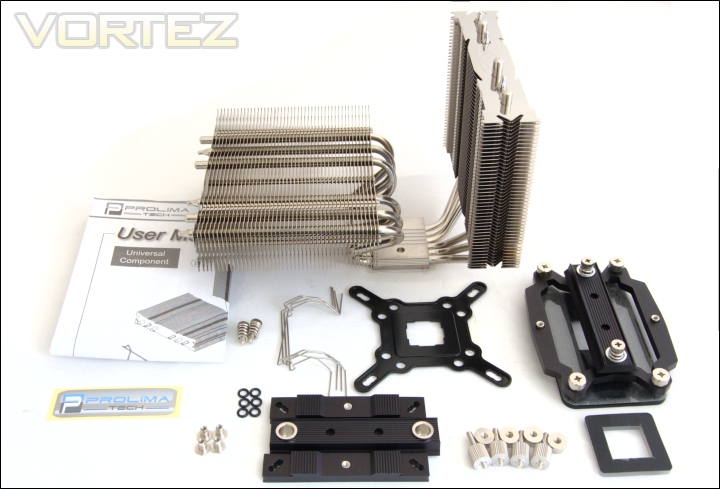
The bundle and moounting kit
Prolimatech have provided mounting kits for both AMD and Intel for a change. These include:
-The Genesis heatsink
-120/140mm fan wire clips x4
-PK-1 thermal compound tube
-Intel back-plate
-Custom LGA775 back-plate spacer
-O-rings x6
-Rivet nuts x4
-Double end studs with nut x4
-Screw nuts x4
-Aluminium strip adapters x2
-Aluminium mounting plate x1
-Spring loaded screws x2
-AMD back-plate
-AMD aluminium strip adapter
-AMD aluminium mounting plate
-AMD screw nuts x4
-AMD spring loaded screws x2
-User manual
-Prolimatech sticker
The installation components are constructed solidly to ensure that the cooler can be installed securely despite its weight. A nice addition is the thermal paste which again is a very good performer. Unlike with the Super Mega, only one type of spring loaded screws is provided, the other type providing 70lbs of pressure which is outside of Intel’s recommended specification anyway. The AMD kit comes pre-assembled so installation is very intuitive.
Closer Look
The Prolimatech Genesis
The Genesis is a stunning looking heatsink thanks to its aluminium construction and nickel-plated finish. Its unique styling represents style as much as it is orientated towards performance. The fins have a reflective finish. The Genesis is composed of two heatsinks perpendicular to each other. One stands upright like a typical heatsink tower and one faces the motherboard PCB, representing the down-draft component. Each heatsink has the ends of the six heat pipes passing through.
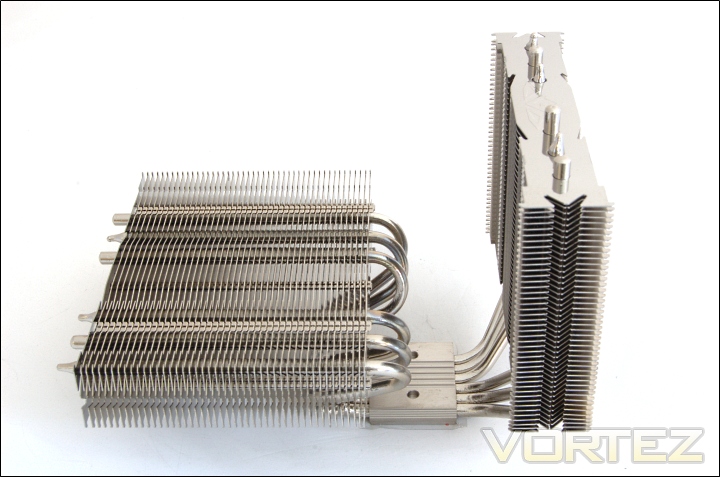
From a slightly different angle
From the side, we can see that the Genesis spans a great width, 216.47mm to be exact. The weight of the heatsink is surprisingly well distributed as demonstrated by its ability to stand up without toppling over.
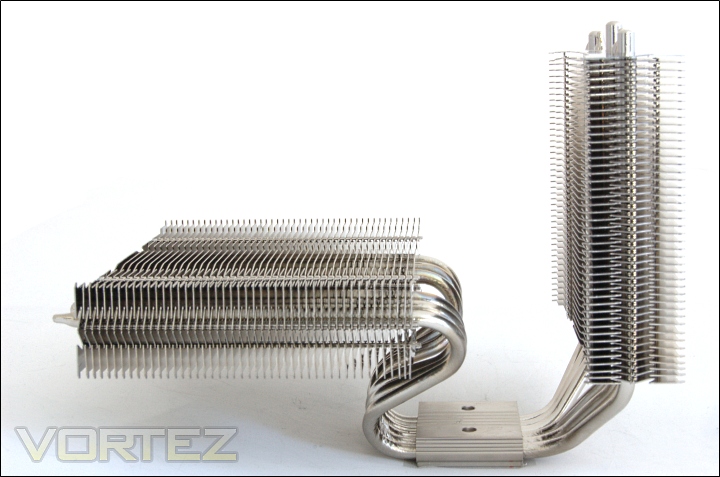
The side profile
The fin array is planar with each fin stacked parallel to each other and flat in nature. Both heatsinks use the same construction but vary in size. On appearance, the fin array is dense to maximise the surface area. The horizontal heatsink is connected to the base through the six purposely bent heat pipes. It has 48.2mm of clearance above the base of the motherboard so even large memory modules can fit. Obviously, users will need to check the size of their modules as obscenely tall modules such as OCZ blades will not fit.
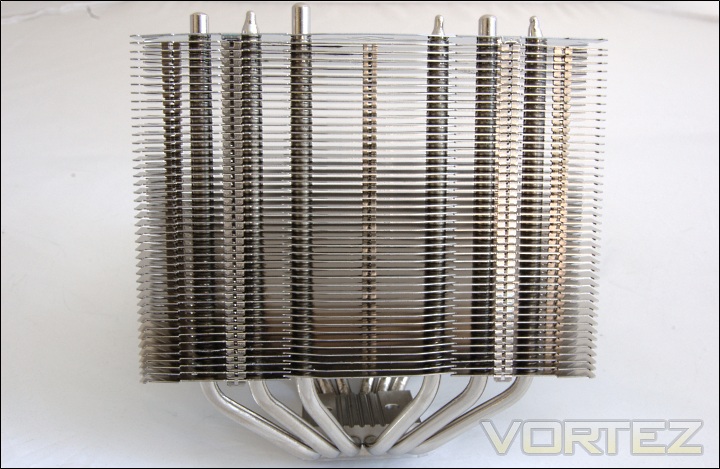
The first radiator
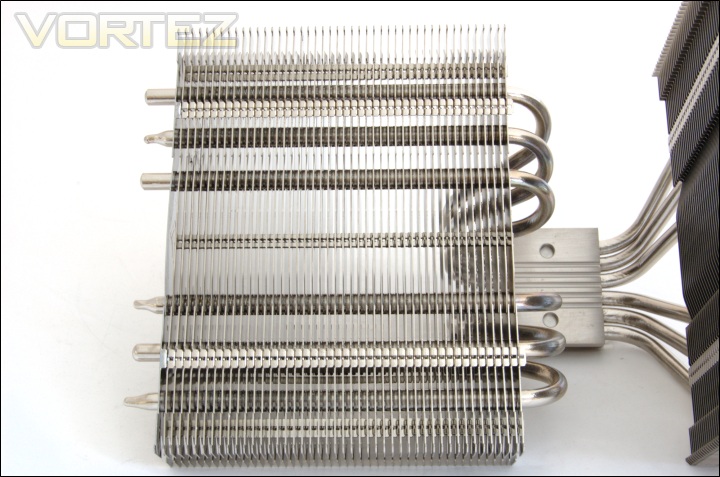
The vertical tower is 107.5mm in height, made up of 44 parallel fins each separated by 2.5mm. This puts the total heatsink height at 160mm, the same as most other high end coolers to have come through our testing grounds. The length (distance across) of the radiator is 146mm. For comparison, the Super Mega spans 130mm across. The width of the radiator is 33mm. In total, the surface area of the radiator is 211992mm squared.
The second radiator
The horizontal heatsink is slightly larger extending a further 5mm for a ‘height’ of 112.5mm. It is made up of 46 fins, again with each separated by 2.5mm. This particular radiator has a surface area of 221628mm squared making the total surface area of the entire heatsink 433620mm squared. This is significantly higher than the Venomous X’s 384000mm squared but cannot compare to the likes of the NH-D14 and Silver Arrow.
Bottoms-up
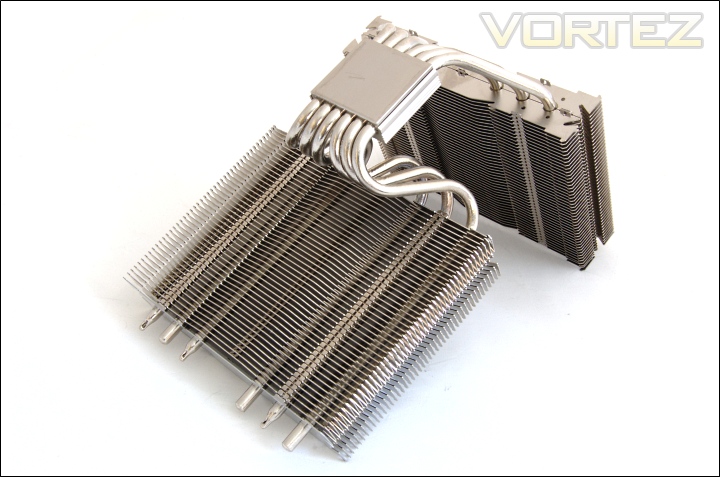
The nickel-plated finish makes the Genesis a very appealing product, and the well finished curved heat pipes makes the heatsink geometrically perfect.
Closer Look (Continued)
The base of the heatsink
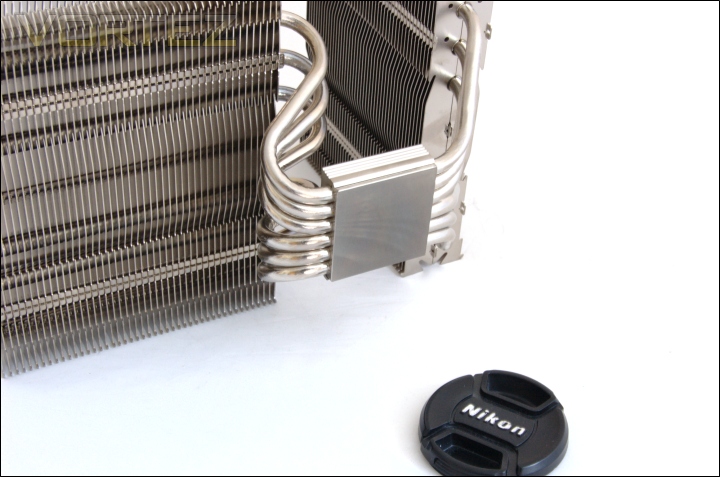
The Genesis uses a standard copper base that is nickel plated. The base is very flat but lacks a mirror finish. All six heat pipes are directly soldered to the base for the best heat transfer directly from the CPU.
The heat pipes
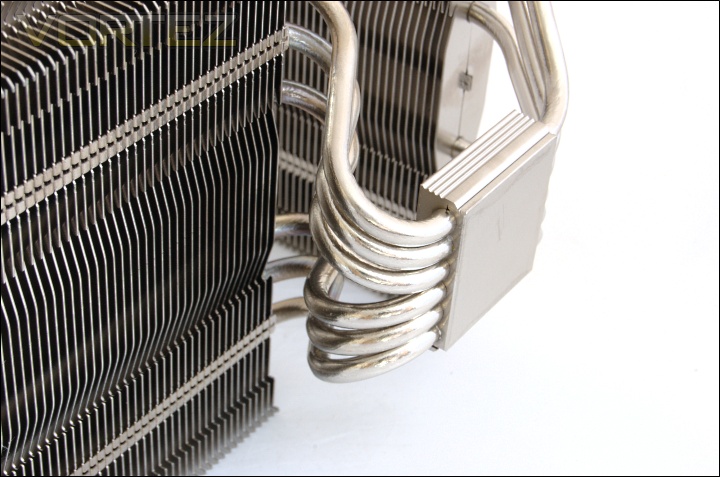
The Genesis uses 6 heat pipes each 6mm in diameter. They follow an asymmetrical design as they emerge from the base due to the orientation of the heatsink. Each end of the heat pipes lead to one radiator. The heat pipes leading to the horizontal radiator follow an ‘S’ shape and the construction is of very high quality. They are all made of copper, again for the most efficient heat transfer.
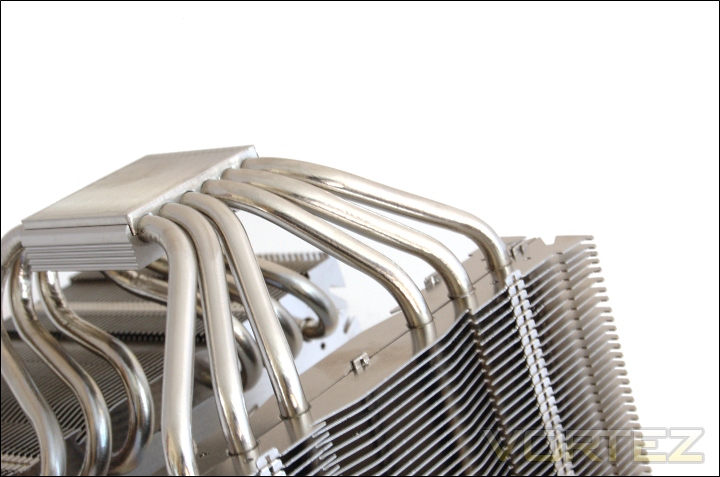
The other ends of the heat pipes
On the other side of the base, we see the other side of the 6 heat pipes. These spread out to form 6 columns rising through the vertical radiator.
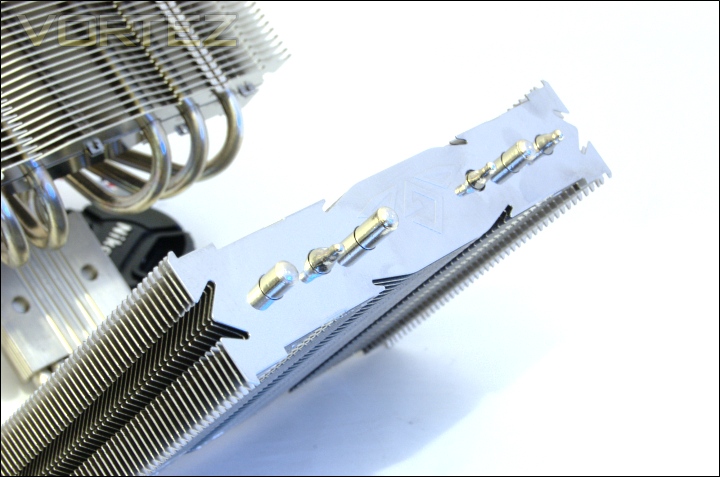
The top of the heat pipes
The heat pipes are distributed length-ways so that they are all exposed to airflow. The ends of the heat pipes are either capped or grooved. Here we see 3 capped ones and 3 grooved end. The other corresponding ends go through the second radiator.
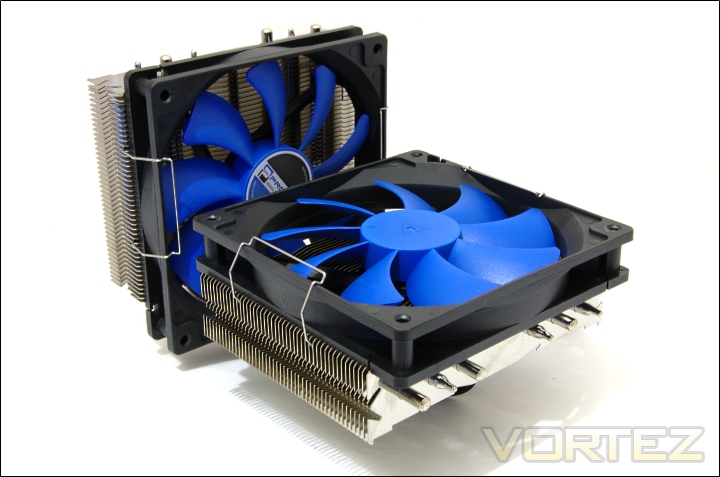
Installing the fans
And finally we have two Prolimatech Vortex 140 fans installed on the Genesis for a taster of the finished looks. There’s no doubt that the Genesis is one, if not the most attractive coolers on the market today. The horizontal radiator is designed as a down-draft one so the fan was installed to push air through. Similarly, the second fan also pushes air through the vertical heatsink. The Genesis supports three fans in total, the third being able to attach as a ‘Pull’ fan behind the vertical radiator. The Genesis has already been described as versatile and this added feature only makes it more so.
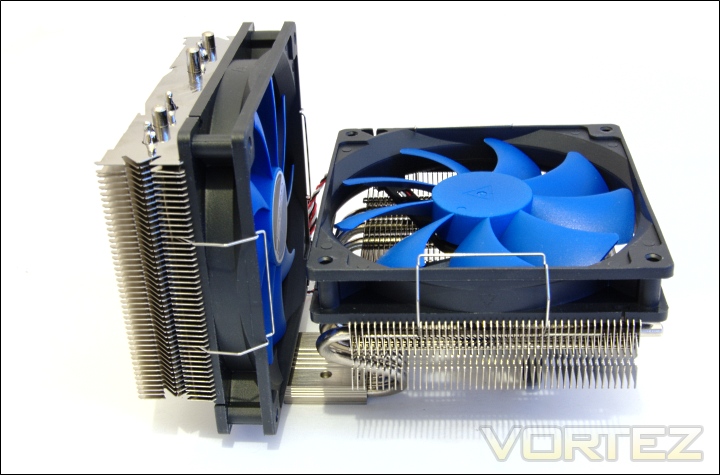
The side profile with the fans installed
Thankfully, the fans don’t extend the dimensions of the heatsink further. Another benefit of the design is that the base of the cooler is still easily accessible when installing the aluminium mounting plate.
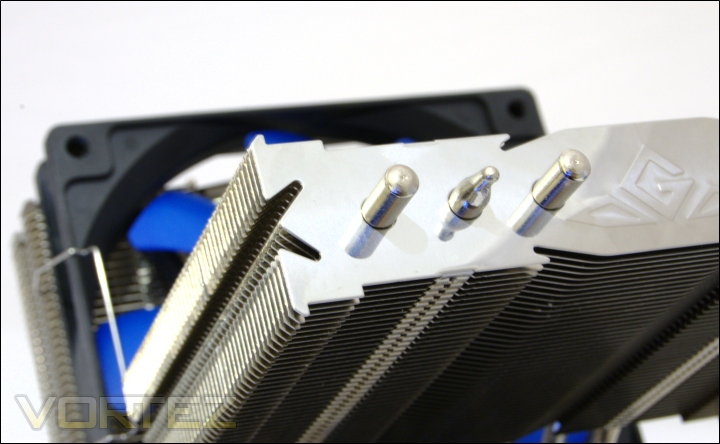
The 120mm & 140mm fan notches
If we look closely at the fins, we see two right angled notches that help accommodate both 120mm and 140mm fans. This is much better than the Super Mega, which despite being advertised as supporting both fan dimensions, had notches only for 120mm fans to rest in. It meant that bigger fans sat on the side fin protrusions and the fan wire clips had to be stretched to wrap around the fan casing. This isn’t a problem on the Genesis as it was designed from the start to accommodate larger fans. The vast span of the radiator means that they benefit greatly from the increased flux of air. On the side of the radiator are two orthogonal grooves for the fan clips. An additional detail is the engraved Genesis emblem on the last fin.
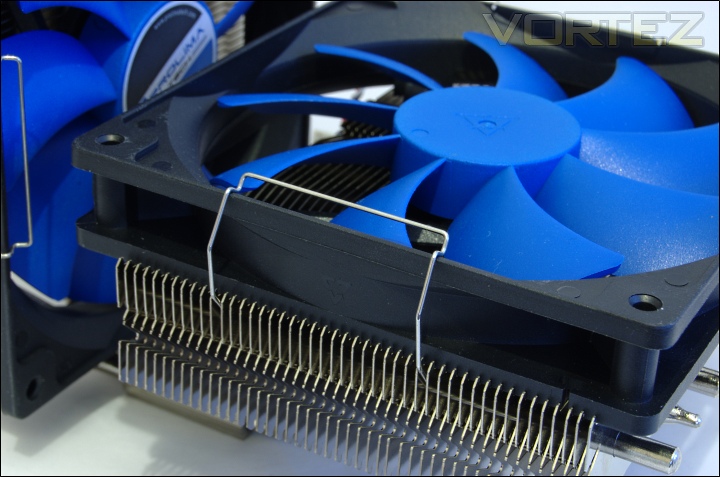
The fan clips
The Prolimatech wire clips are ingenious. They are easy to install and they don’t rely on fan mounting holes so a greater diversity of fans can be supported. They simply clip on to the fan casing while the other straight ends fit within the fin grooves. It also means that the position of the fan can be easily adjusted. My only complaint is that it can be a bit fiddly installing the wire clips in tight spaces when the heatsink is already installed inside a case.
Closer Look (Installed)
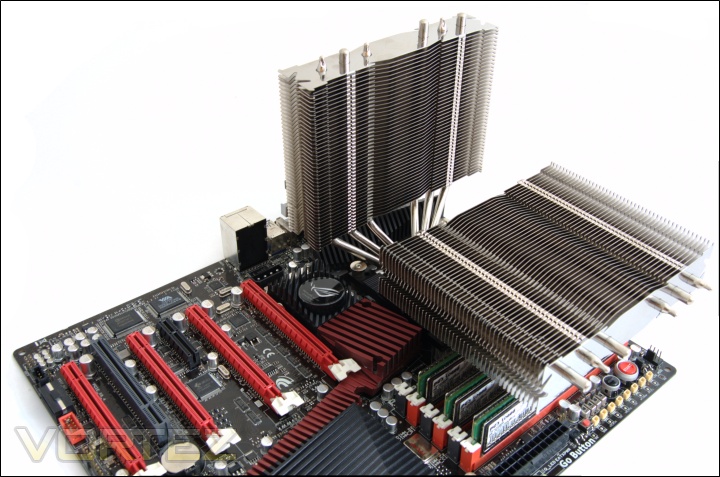
Installed on the motherboard
Once installed, the Genesis dominates the upper part of the motherboard thanks to its great expanse. Although the vertical heatsink is fairly narrow, the horizontal one adds to the cooler’s sheer size. It overhangs the memory slot and part of the Northbridge heatsink so the fan can further cool it.
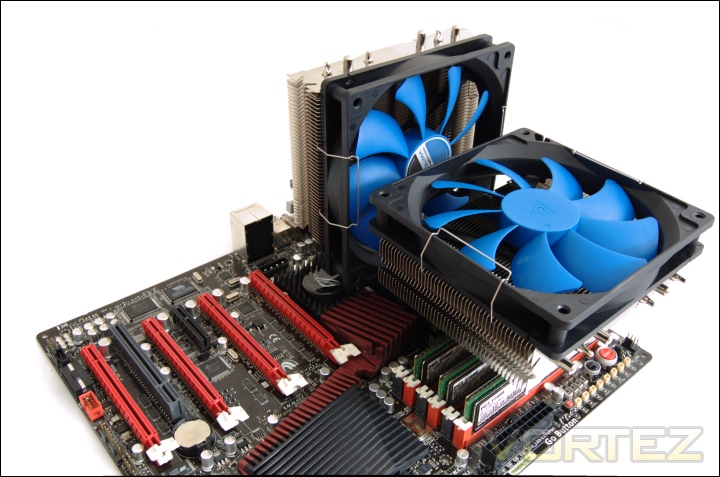
Installed with fans
And here we have the fans installed. It would have been great if Caseking had sent some red Prolimatech Vortex 140 fans instead but the blue provides an attractive contrast to the red and black of the ASUS Rampage III Extreme.
Memory compatibility
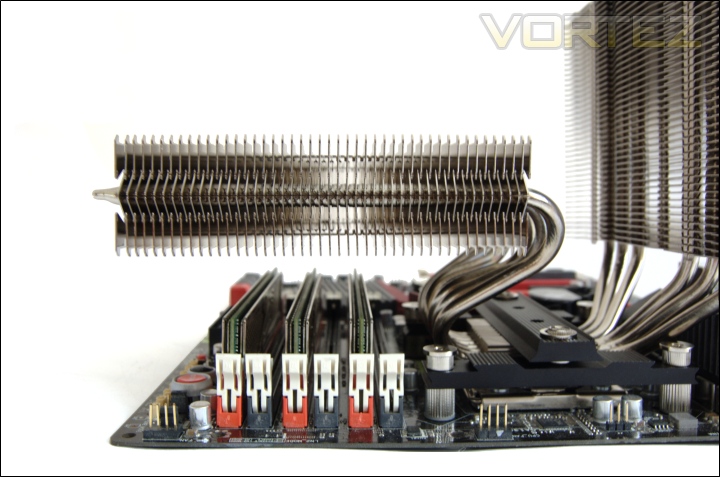
This is the part where we normally talk about memory compatibility. As we can see, the horizontal radiator extends beyond the edge of the Rampage III Extreme, which itself is already 1 inch wider than standard ATX motherboards. The radiator overhangs the memory modules but provide adequate clearance for taller modules. For reference, the OCZ Platinums used here are 2.7cm tall and Corsair Vengeance modules are 5cm in height.
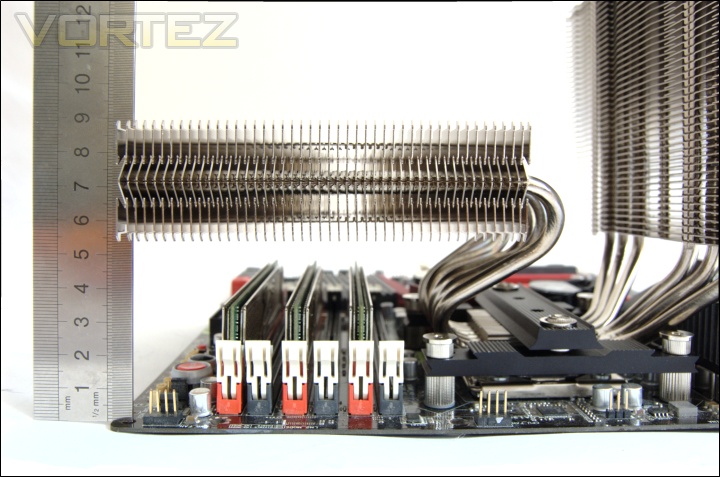
A ruler always helps…
The height difference between the horizontal radiator and the base of the heatsink is 48.2mm. Since the CPU socket and CPU are raised slightly above the PCB, there is over 50mm of clearance between the radiator and the PCB itself. Memory modules that are less than 5cm in height will fit comfortably below the Genesis. This is a welcoming feature because on initial impressions, the Genesis looked to limit memory compatibility. The only disadvantage of the design is that the cooler has to be removed to install memory modules.
From the front
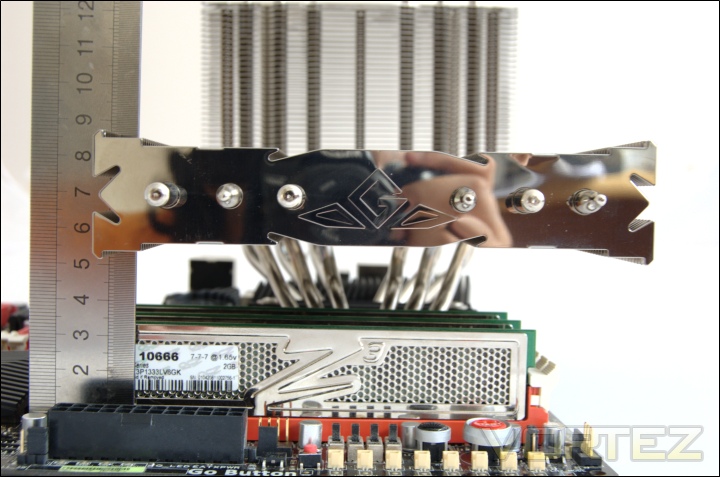
The top fin of the radiator has a mirror finish and the Genesis emblem engraved onto it. Those insane amongst us thinking about placing another fan below the radiator will be disappointed that there isn’t enough clearance for a 25mm thick fan underneath.
Inside my PC
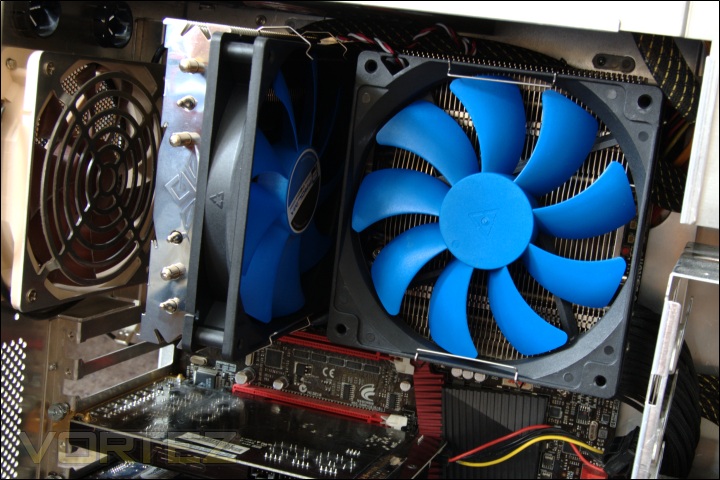
The extent of the heatsink means that users need to be weary of whether it will fit inside their case before opting for the Genesis. Most recent cases are deep enough to accommodate the Genesis but if they don’t, then I’d avoid such a case.
Test Setup
CPU – Intel Core i7 920 – 2.66/4.0GHz
RAM – 6GB (3x2GB) OCZ Platinum DDR3 1333MHz
Motherboard – ASUS Rampage III Extreme
Graphics card – XFX HD5870 1024MB
Power Supply – Enermax Revolution 85+ 850W
Hard Drive – OCZ Vertex 2E 120GB
Samsung F1 320GB
Samsung F3 1TB
Drivers – ATI Catalyst 10.10
CPU Coolers:
Prolimatech Genesis using 2 Noctua NF-P12s/NF-P14s, 2 SWiF2-120Ps and 2 Prolimatech Blue Vortex 14s
NZXT Havik 140 including tests using 2 NZXT fans, 2 Noctua NF-P12s/NF-P14s and 2 SWiF2-120Ps
Alpenföhn Matterhorn including tests using 2 Noctua NF-P12s/NF-P14s, 2 SWiF2-120Ps and 2 Föhn 120 Wing Boost fans
Prolimatech Super Mega including tests using 2 Noctua NF-P12s/NF-P14s, 2 SWiF2-120Ps and 2 Prolimatech Blue Vortex 14s
Noctua NH-C14 (U.L.N.A and default speed) including tests using 2 SWiF2-120Ps
Thermalright Silver Arrow including passive and tests using 2 Noctua NF-P12s and 2 SWiF2-120Ps
Thermalright HR-02 including passive and tests using Noctua NF-12/NF-P14s and Thermalright TR TY-140
Thermaltake Frio (Low/med/high speed) including tests using 2 Noctua NF-P12s
Corsair H50 including tests using 2 Noctua NF-P12s and 2 SWiF2-120Ps
CoolIT ECO A.L.C including tests using 2 Noctua NF-P12s and 2 SWiF2-120Ps
Thermalright Venomous X using 2 Noctua NF-P12s and 2 SWiF2-120Ps
Coolink Corator DS including tests with dual fan setups
Tuniq Propeller 120(High speed fan)
Noctua NH-C12P SE14
Prolimatech Megahalem
Noctua NH-D14 (U.L.N.A and default speed)
Noctua NH-U12P SE1366
Thermolab Baram (with 2 Noctua NF-P12 fans)
CoolIT Domino A.L.C
Sunbeam Core Contact Freezer
Coolermaster Hyper 212 Plus including test with 2 Noctua NF-P12 fans
Alpenföhn Nordwand including test with 2 Noctua NF-P12 fans
Tuniq Tower 120 Extreme (Low/med/high speed)
Program Suite:
Core Temp 0.99.5
LinX stress Test
AIDA 64 Extreme Edition
CPUID HWMonitor
How I tested:
Testing will be based on temperatures recorded by Core Temp and PC wizard after 20 passes of LinX stress test. The absolute temperatures recorded in the tables are averages of the 4 cores and the delta value provided for a fair comparison, taking into account ambient temperatures. The test will be run at stock speed and at an overclocked speed of 4GHz.
Installation
Installation is a very process despite the number of small components present. Even inside a case, installation is straight forward as long as the backplate is installed into place. We will detail the Intel installation process as the AMD mounting kit comes pre-configured.
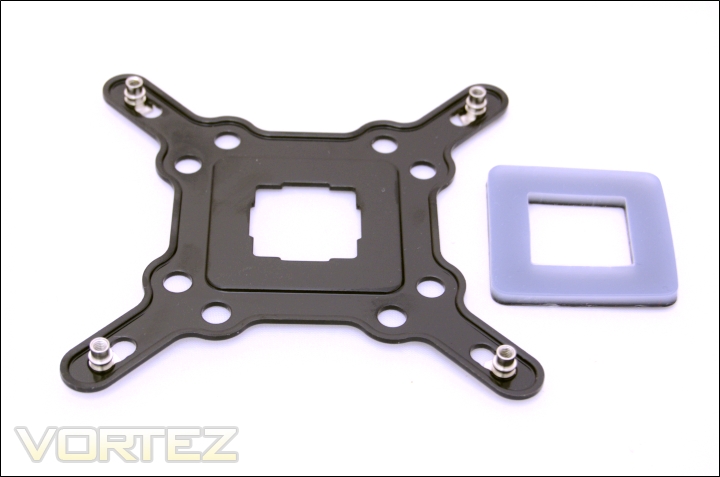
1. The first step is to insert the rivets into the appropriate backplate holes. The outermost ones correspond to LGA1366 and going inwards, there are the LGA 1156/1155 holes followed by the LGA775 ones. For LGA 775 systems, the spacer has to be placed onto the backplate.
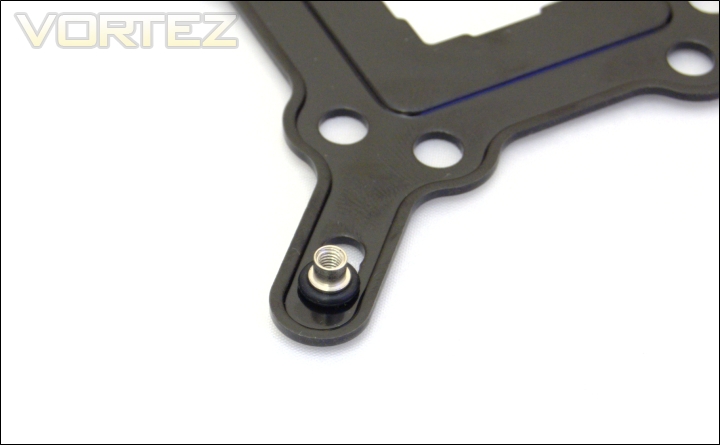
2. Place the O-rings on each rivet to secure them.
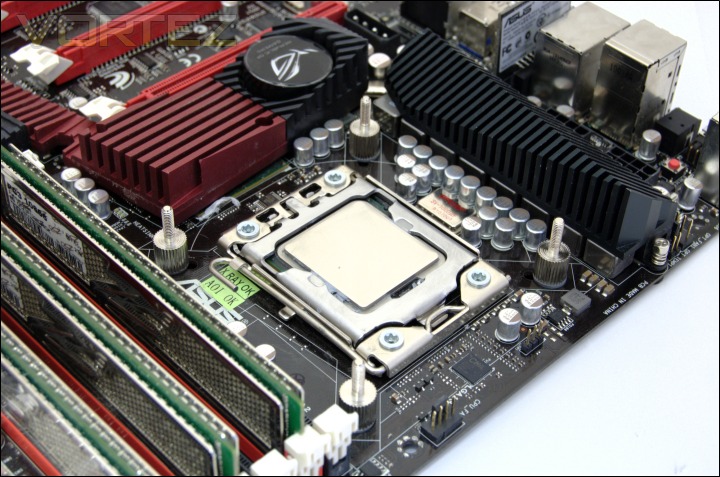
3. Place the backplate behind the motherboard and screw in the shorter end of the double end stud from the top side of the motherboard.
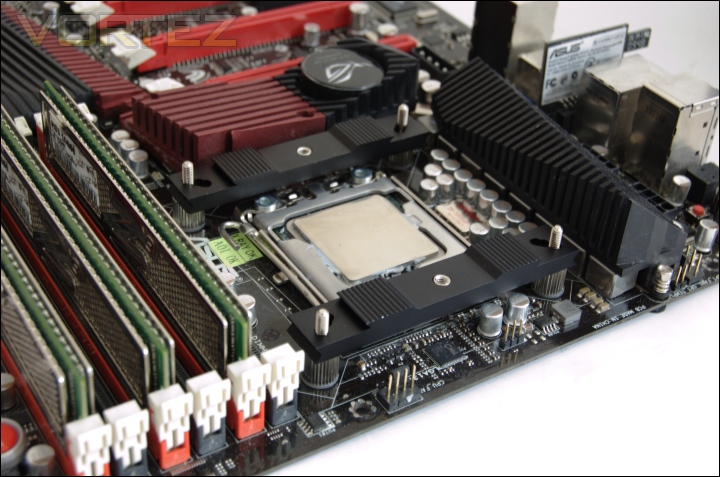
4. Put the aluminium strip adapters on each side of the heatsink using the corresponding holes. Make sure that the innermost holes face towards the middle of the socket.
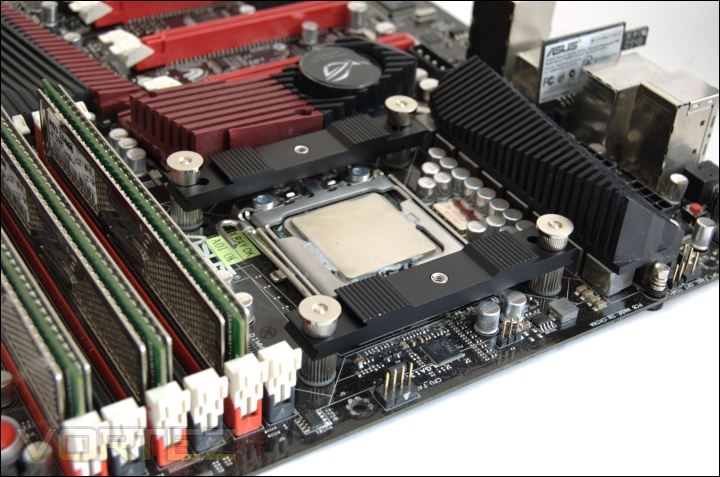
5. Secure the aluminium strip adapters using the screw nuts.
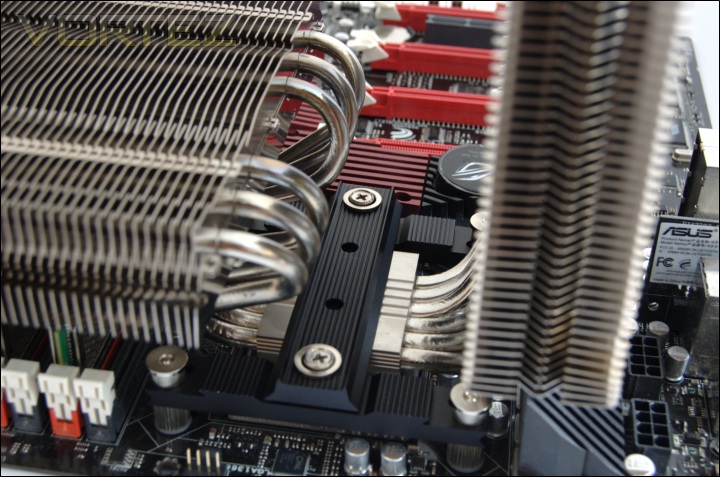
6. Apply a blob of thermal paste on the CPU and place the heatsink on top. Slide in the aluminium mounting plate so that the middle is inserted into the heatsink itself and the ends line up with the holes on the strip adapters. Use the silver spring-loaded screws to secure the mounting plate into place.
The installation is very straight forward and the aluminium construction of the mounting kit ensures that the system is robust without fear of the cooler dislodging. The positioning of the aluminium mounting plate means that it can be installed or removed even with the fans attached to the heatsink.
Results (Grouped)
2.66GHz
The results have been arranged in terms of the fan configuration that yields the best results for each cooler. However, it is important to take into account that many coolers come with their own fans and changing those increases the costs significantly, so the “out of the box” cooler configurations have been highlighted in red each group.
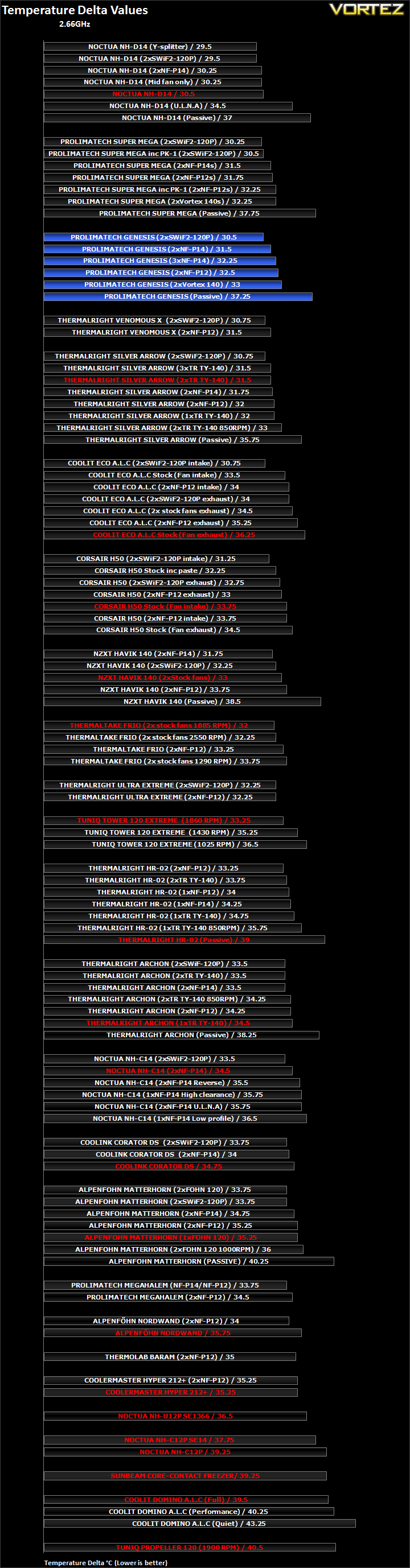
The Prolimatech Genesis gets off to a very good start. It picks up third place thanks to its best fan configuration being comparable to a Noctua NH-D14. The optimal fan configuration is with the NF-P14s since performance is still on par with our highest end offerings while also being very quiet. Unfortunately and surprisingly, adding a third fan in this case reduces temperatures marginally. It may be due to disruption in the airflow. Rather than fully describe the results, I have broken down the results into several graphs to get a much better appreciation of what the results depict.
Results (Ascending order)
2.66GHz
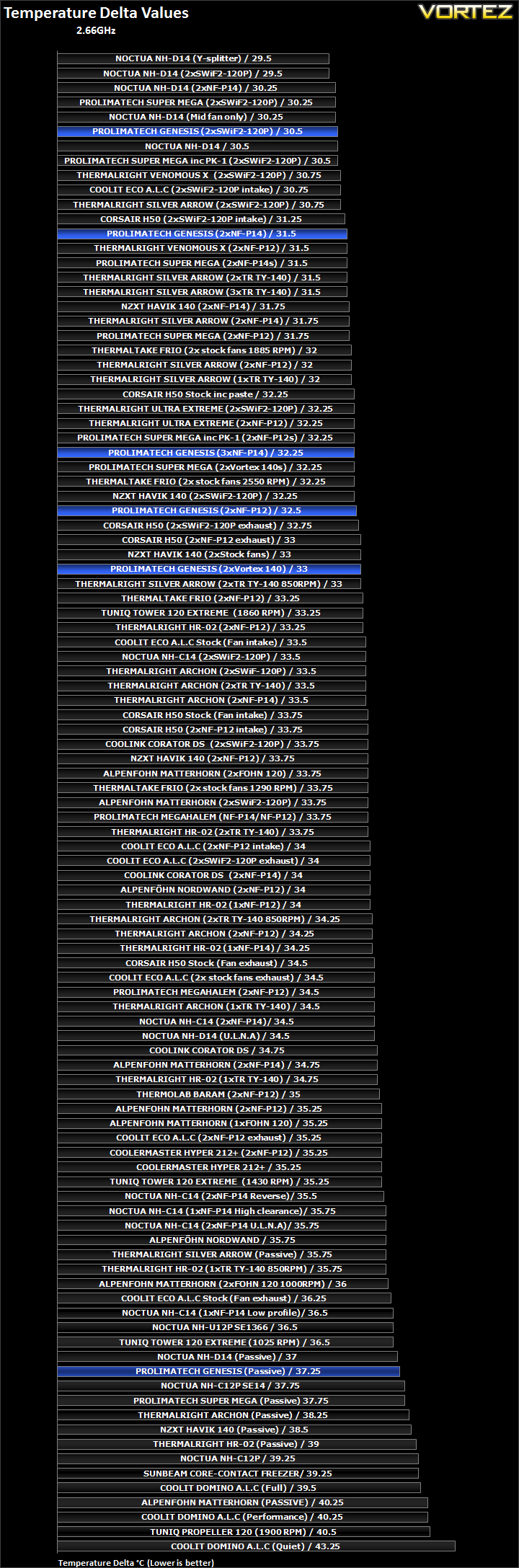
With two Coolink SWiF2-120P fans, the Genesis finds itself climbing to the top of our charts and even manages to match the Noctua NH-D14 in its default configuration, but it falls 1C behind the latter when configured to use the same fans. Prolimatech intended the Genesis to be used with its own Vortex 140 fans and we case see that its performance stands up well against the competition. The Vortex 140 fans only operate at 1000RPM so it’s testament to the heatsink’s efficiency that it still compares to the NZXT Havik and performs better than the Thermalright Archon.
Since the Genesis comes with no fans, buyers are free to choose their own. The faster rotating NF-P14s perform very well on the Genesis and even manages to match the Silver Arrow!
Results (In-depth analysis)
2.66GHz
In the next comparison, we look at the default cooler performance as they come out of the box with their bundled fans. Coolers that come with no fans have been coupled with Noctua’s NF-P12 or fans that the manufacturers intended their coolers to be used with.
As already mentioned the Genesis does not bundle any fans so it was teamed with two of Prolimatech’s own Vortex 140s. The combination works extremely well, considering that it is quieter than all the other coolers that perform similarly.
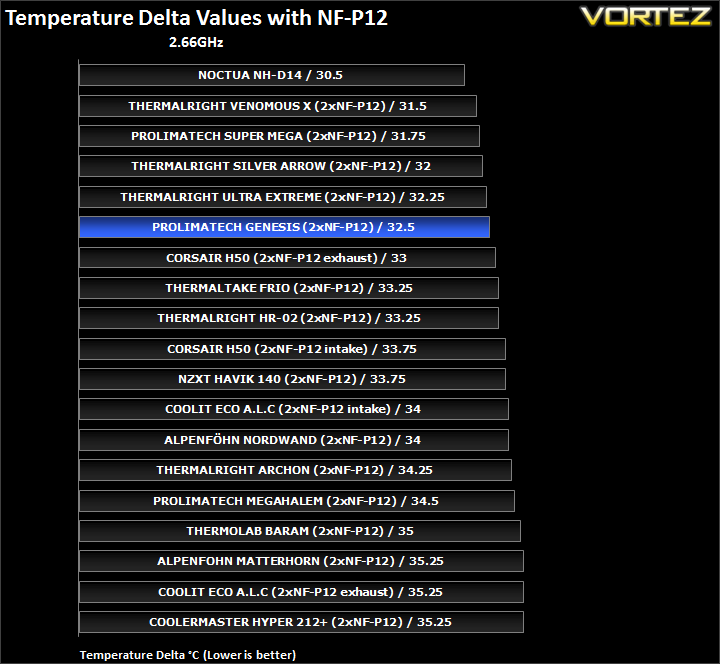
To demonstrate the efficiency of the cooler, we can look at how it compares with other coolers using the same fan configuration. The Genesis easily outperforms the likes of the Havik and the Archon, only dropping behind the Silver Arrow by a mere 0.5C.
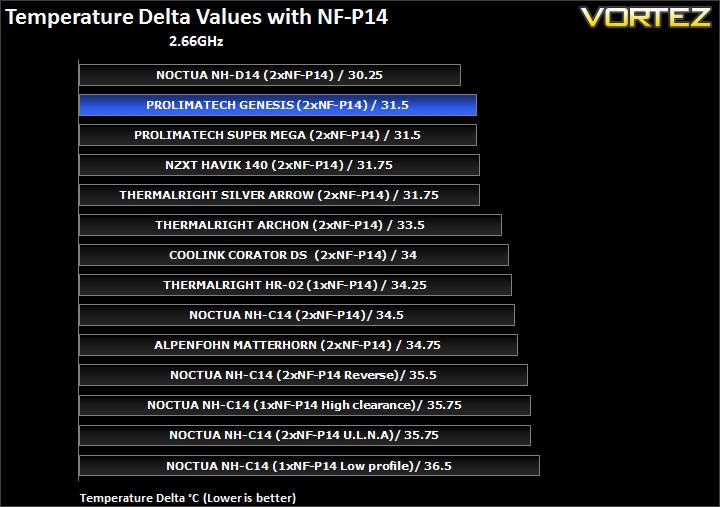
The size of the radiators means that the Genesis makes optimal use of larger 140mm fans that can push air through more of the fins, hence higher air flux. In this configuration, it is only topped by Noctua’s NH-D14. So despite the lower overall surface area of the Genesis, heat is transported more efficiently from the fins.
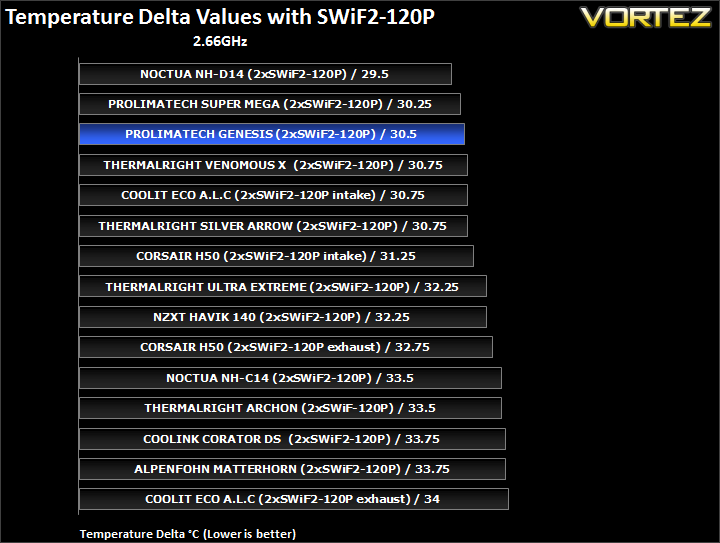
And with the SWiF2-120P, we see that the Genesis can also benefit from higher RPM fans. In this case it outperforms all Thermalright coolers, not an easy feat!
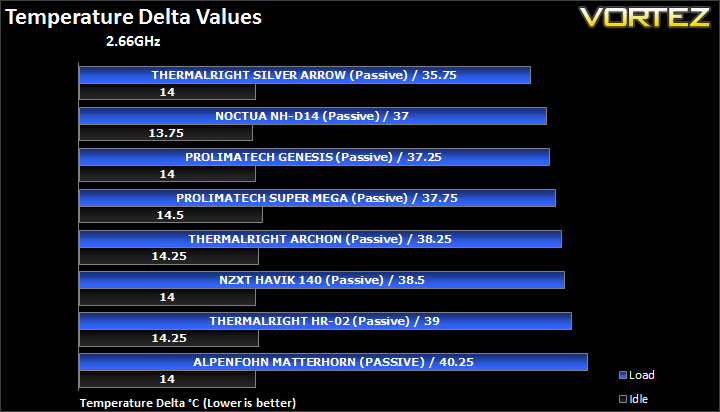
Under passive cooling, the Genesis is a mere 0.25C behind the Noctua NH-D14.
Results Overclocked (Grouped)
4GHz
The results have been arranged in terms of the fan configuration that yields the best results for each cooler. However, it is important to take into account that many coolers come with their own fans and changing those increases the costs significantly, so the “out of the box” cooler configurations have been highlighted in red each group.
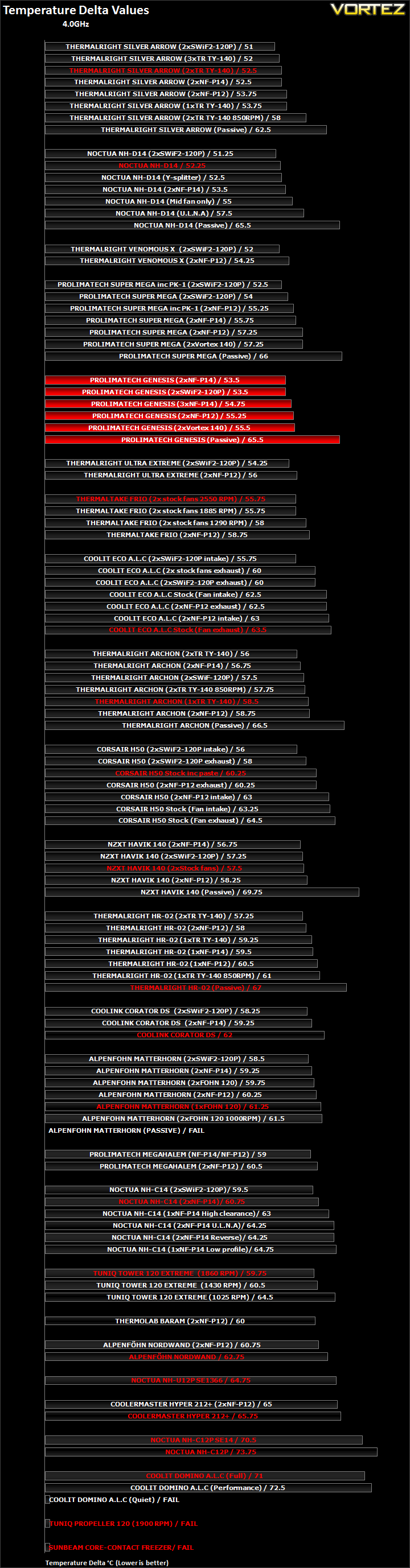
When overclocked, the different fan configurations reflect our previous findings. The Genesis performs best with the two NF-P14s or high RPM SWiF2-120Ps, allowing the cooler to battle through our crowded charts towards the top. Again, we see that 3 fans perform slightly worse than two implying a disruption in airflow. The two Vortex fans don’t perform as well. Instead they are compensated by quieter acoustic performance. Passively, the Genesis continues to impress.
Results Overclocked (Ascending order)
4GHz
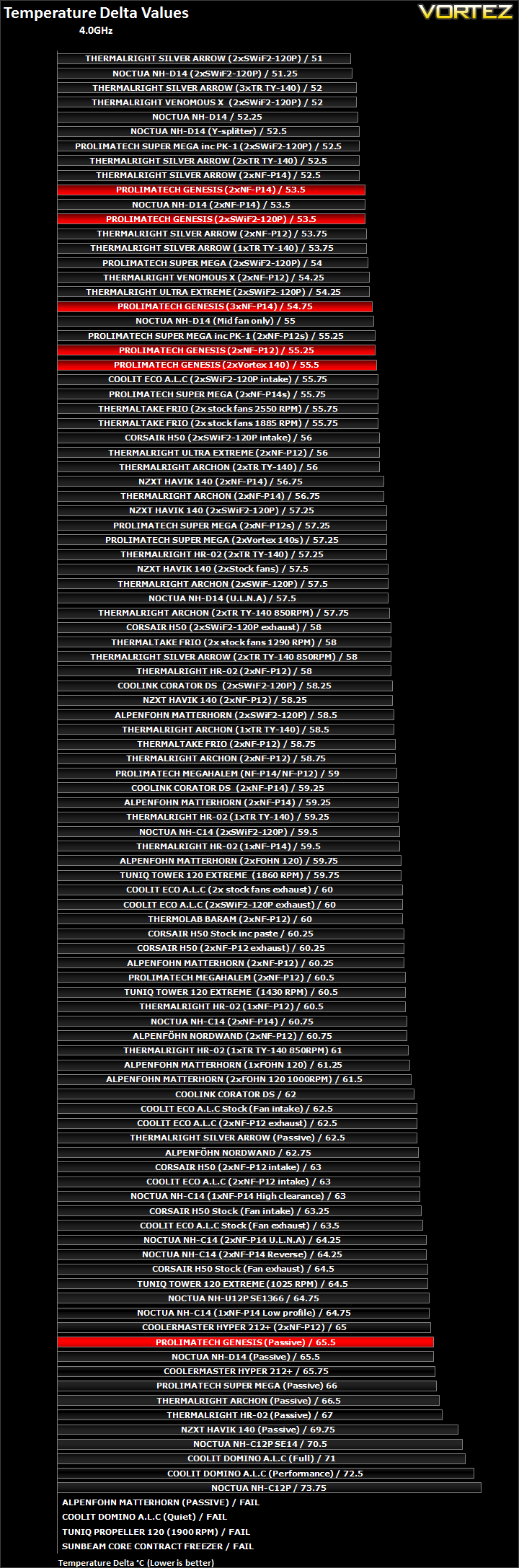
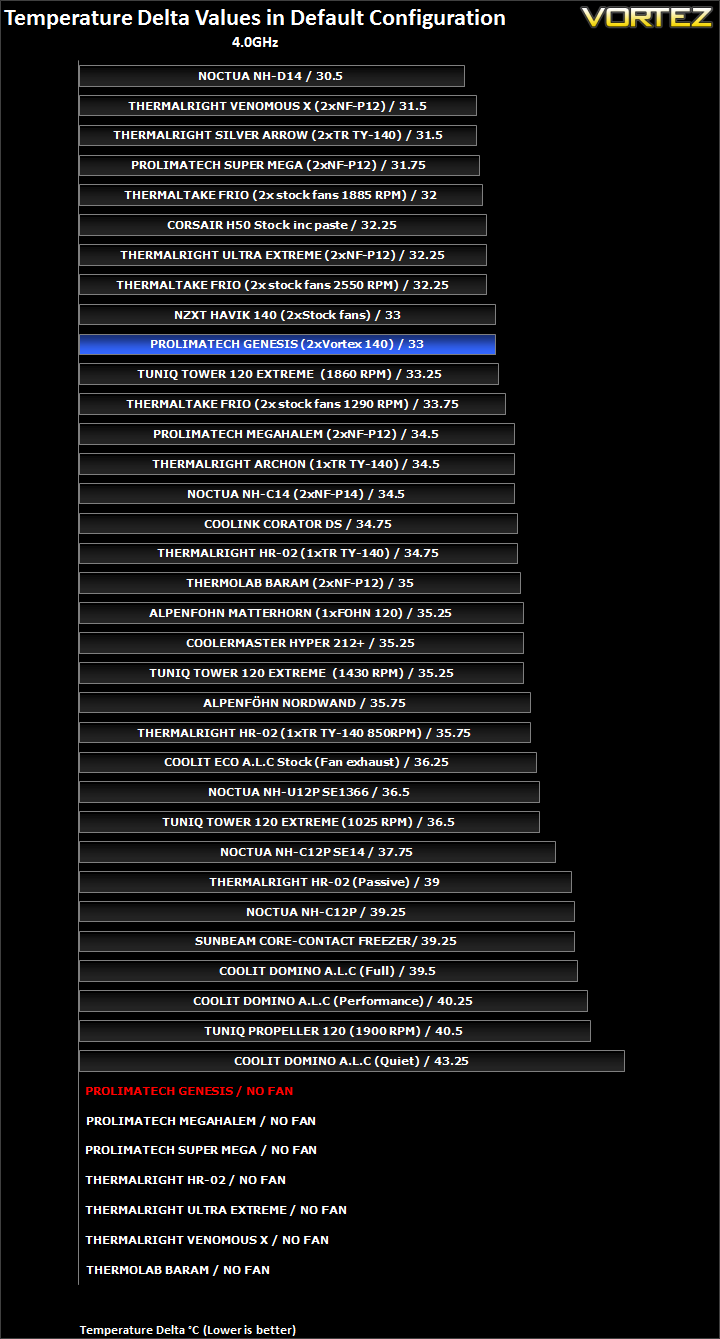
The Genesis is easily one of the best coolers on the list. Its results concentrate near the top where the Super Mega, Venomous X, Silver Arrow and NH-D14 also compete. In its best configuration, it lags a mere 2.5C from the top and only 1C behind the default Noctua NH-D14 and Thermalright Silver Arrow’s default configurations.
Results Overclocked (In-depth analysis)
4GHz
In the next comparison, we look at the default cooler performance as they come out of the box with their bundled fans. Coolers that come with no fans have been coupled with Noctua’s NF-P12 or fans that the manufacturers intended their coolers to be used with.
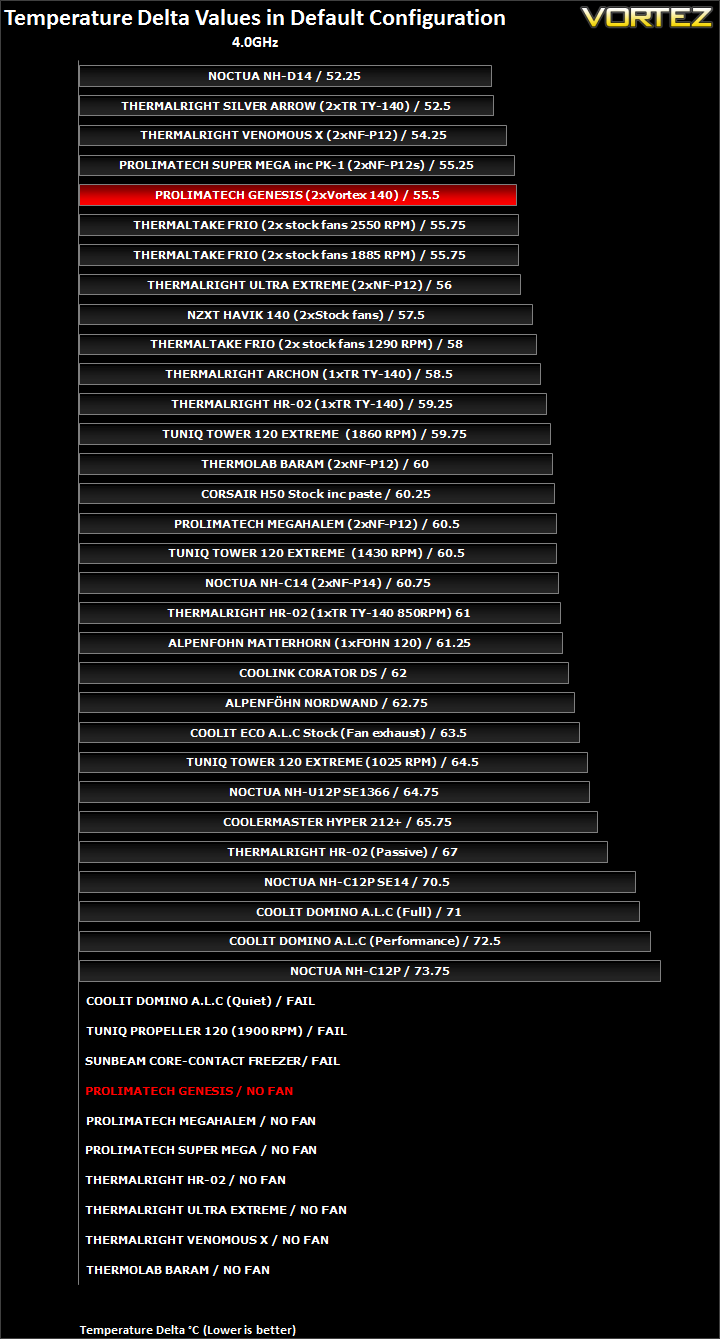
As before, we have drawn up a list of cooler in their default/intended configurations. The Genesis is not far from the top despite using the low RPM Vortex fans. Obviously, better performance can be expected by using superior fans. With two NF-P14s, it would take the Genesis into third place but one could argue that the same can be achieved with the Super Mega or Venomous X.
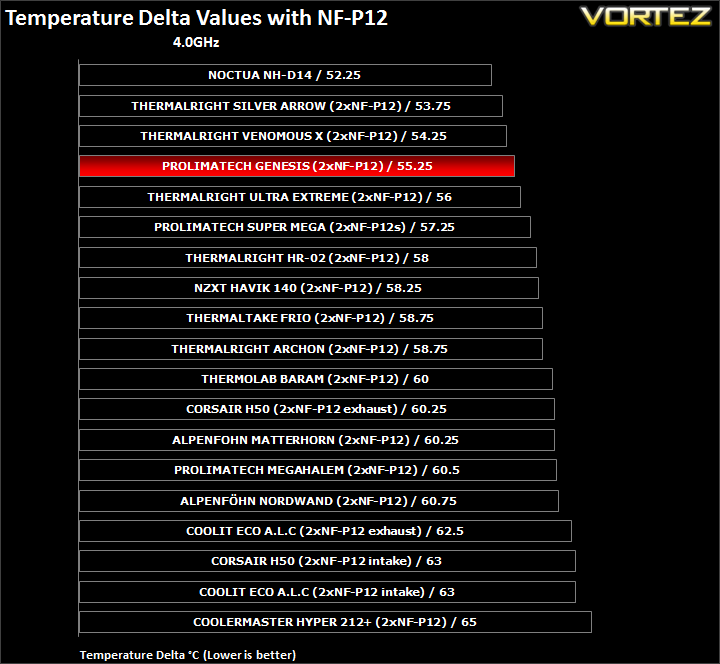
The Genesis is very efficient, managing to outperform its sibling by 2C.
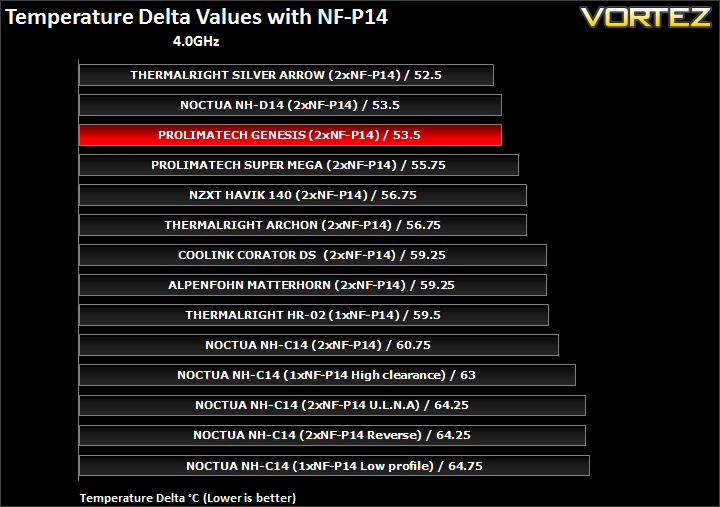
Since the Thermalright Venomous X was not tested with the NF-P14, the Genesis creeps into third place here, matching the Noctua NH-D14!
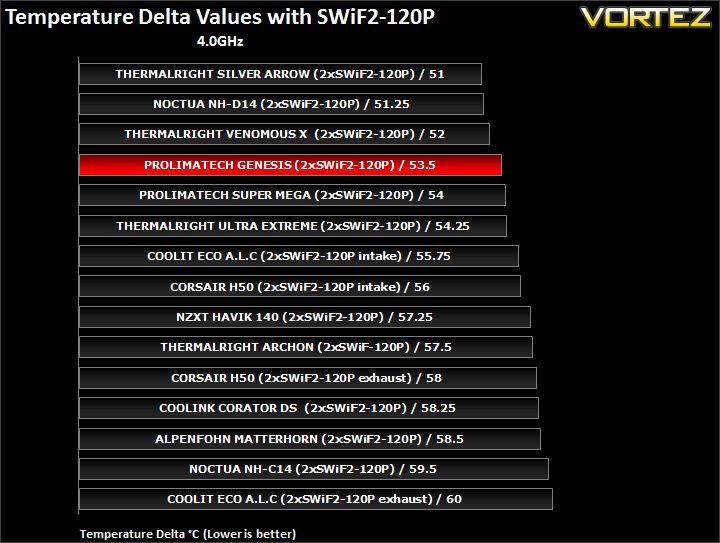
Once again, the Genesis outperforms the Super Mega but lags just behind the Venomous X, the latter making better use of 120mm fans than the Prolimatech coolers.
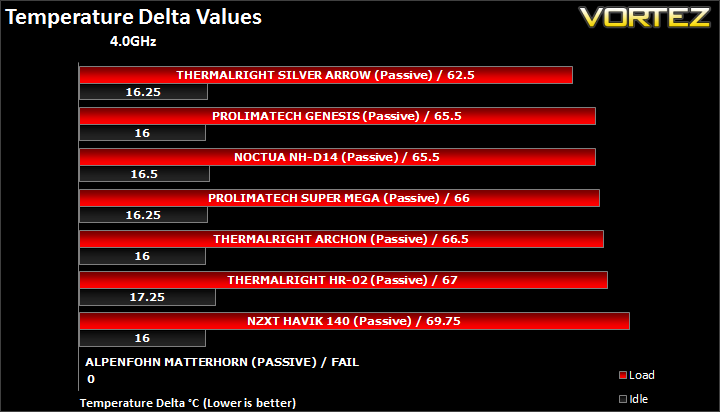
With no fans, the Genesis is on par with Noctua’s high end cooler and idle temperatures are slightly better.
Other Observations
Thermal paste comparison
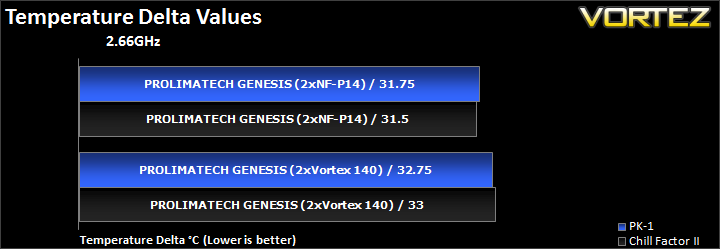
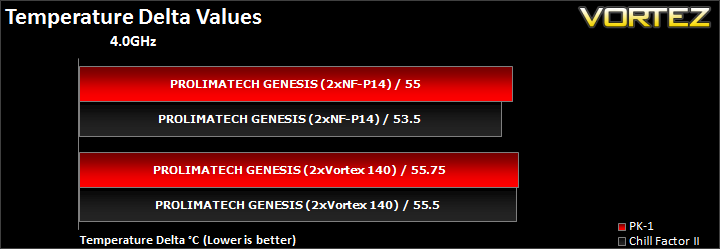
With the Super Mega, we found that Prolimatech’s PK-1 to perform better than Thermalright’s ChillFactor III. Here we observe the opposite to be true. It highlights the inconsistency of thermal compounds, especially when they are from different tubes.
Northbridge and motherboard temperatures
Having recorded the northbridge and motherboard temperatures for both the Prolimatech Genesis and Noctua NH-D14, no difference was observed despite the former having a down-draft component. The reason may be that the horizontal radiator is too far offset from the CPU socket area on the Rampage III Extreme. The MOSFETs are on the opposite side of the CPU where airflow generated by the Genesis cannot reach.
Conclusion
Let’s start by applauding Prolimatech for an excellent job on the Genesis. It is a breath of fresh air when we see a unique concept that turns out to be so successful as it demonstrates the risks that manufacturers have taken to further the field of air cooling. Tower heatsinks will always be good performers if a certain formula is used but to create a new design takes a different level of engineering which Prolimatech has somehow pulled off. I must admit that I was sceptical when first introduced to the Genesis. The relatively narrow radiators seemed like a novel but bad idea considering other manufacturers were focussing on ever bigger tower heatsinks, and even thick dual tower ones. However, on closer analysis we found that Prolimatech have carefully designed the radiators to have a greater length allowing the overall surface area to be higher than the best single tower heatsinks currently available. A promising start for such a concept but the key question was how it was going to translate to real world performance.
Thankfully, Prolimatech delivered. Its efficiency with various fan combinations matched the likes of the Thermalright Venomous X and even the Thermalright Silver Arrow and Noctua NH-D14 in some cases. The latter two were still consistently better or are on par with the Genesis but rarely outperformed so credit to both for still retaining the crown, especially with the overclocked CPU. At stock speed, the Genesis demonstrated its efficiency with the 140mm Noctua NF-P14 and high RPM Coolink SWiF-120P 120mm fans very well. The Genesis is flexible in its fan configuration because it supports both 120mm and 140mm fans, and buyers are left the choice of deciding themselves. So although the Genesis was designed to primarily work with Prolimatech’s Vortex 140 fans, buyers can opt for more powerful ones if they prioritise cooling performance over acoustics. Nonetheless, I was still impressed by how well the fans performed on the Genesis. The only drawback is that fans such as Thermalright’s TR TY-140 are also quiet, perform better and are available for cheaper.
The Genesis has other advantages thanks to its unique design but there are compromises to be made. The sheer size of CPU coolers always raises the question of RAM compatibility. Prolimatech somehow managed to address this issue and moreover compliment users’ choice of memory modules. The position of the horizontal radiator provides around 5cm of clearance so taller memory modules (Corsair Vengeance) will be supported without fans getting in the way. The fan placement also means that the Genesis can provide additional cooling to those modules. Prolimatech advertise the Genesis as a ‘Super Cooler’ that can also cool the components surrounding the CPU such as the Northbridge and MOSFETs. Unfortunately, we didn’t find this to be the case but nothing lost there as most motherboards provide adequate cooling. The main downside on the other hand, is that the horizontal cooler blocks access to memory modules and underlying cables. Whilst not a major problem for most who install components and leave their rig alone, it is still an annoyance especially to enthusiasts who like to change components as often as their clothes.
So here we have a cooler that seems to perform amazingly well and takes memory compatibility into consideration, surely there must be something negative to report? Well, there is and this is the inevitable cost of the Genesis. At £55 or over without fans, it is one of the most expensive heatsinks on the market. The Silver Arrow is £5 cheaper and still retains our performance crown while the Noctua NH-D14 which shares the crown is £10 more expensive but bundles two fans to compensate.
The Genesis is a brilliant concept by Prolimatech and it has proven to not only be very effective but also versatile in nature. I wouldn’t be surprised to see other manufacturers borrow the idea and reproduce their own concept.
Pros
+Excellent performance
+Very well packaged
+Support for 120/140mm fans
+Support for Intel and AMD sockets
+Ease of installation
+Aesthetics
+Memory compatibility
+Efficient
Cons
-Cost
-No bundled fans
-Reduced accessibility to cables and RAM
+Excellent performance
+Very well packaged
+Support for 120/140mm fans
+Support for Intel and AMD sockets
+Ease of installation
+Aesthetics
+Memory compatibility
+Efficient
Cons
-Cost
-No bundled fans
-Reduced accessibility to cables and RAM
It gives me great pleasure to give the Prolimatech Genesis our coveted Vortez Gold Award.


