







Looking for a boost on your laptop? Samsung have the perfect solution for your mobile computing needs with 840 EVO mSATA.

Product on Review: 840 EVO mSATA
Manufacturer and Sponsor: Samsung
Street Price: £153.43 & £297.34
We reviewed the SATA version of this SSD back in July of last year and it thoroughly impressed us back then winning both Gold for it’s astonishing performance and also our creative award for the RAPID feature. Today we take a look at a further two models from the EVO range, only this time in mSATA format.
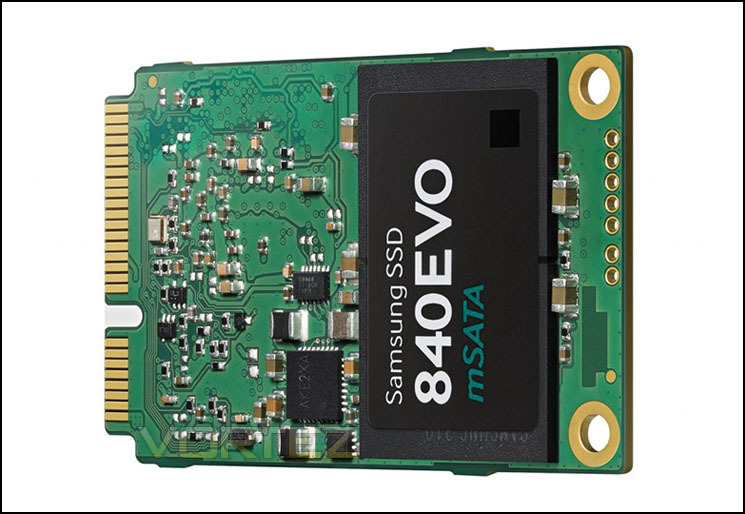
For those not aware, mSATA was designed to be used in laptops, or more specifically, ultra light notebooks, even tablets. Basically anywhere where power, and space and weight were held at a premium. That said, mSATA is not a new concept but due to its small foot print, mSATA was restricted to small capacities meaning its main use was as a boot drive. As today’s samples exhibit huge storage capability (1TB drives are also available), the mSATA format can easily replace a main system storage drive.
Before we examine if performance has taken a hit, let’s take a look at the Specification and Features…
Samsung’s take on 840 EVO
The evolution of the compact SSD has arrived with the Samsung SSD 840 EVOmSATA. Combining the best SSD technologies from Samsung 840 EVO, this thin and exceptionally light SSD is specifically designed for ultra-thin laptop PCs. Plus, 840 EVO mSATA delivers faster-than-ever, superior performance with Samsung’s 2nd generation3-bit MLC technology and superb reliability with self-monitoring features. In addition to these cutting-edge features, your PC will stay connected longer, consume less energy and power back up from the sleep mode instantly. So, don’t trade in your current laptop PC, simply upgrade it with 840 EVO mSATA. With 840 EVOmSATA, installed on your current laptop PC, your mobile computing will be taken to a whole new level of performance.
Specification
Usage Application Client PCs*
Capacity 120GB, 250GB, 500GB,750GB,1TB
Dimensions (LxWxH) 100 x 69.85 x 6.8 (mm)
Interface SATA 6Gb/s (compatible with SATA 3Gb/s and SATA 1.5Gb/s)
Form Factor 2.5-inch
Controller Samsung 3-core MEX Controller
NAND Flash Memory 1x nm Samsung Toggle DDR 2.0 NAND Flash Memory (400Mbps)
DRAM Cache Memory 256MB (120GB) or 512MB(250GB&500GB) or 1GB (750&1TB) LPDDR2
Performance**
Sequential Read: Max. 540 MB/s
Sequential Write***:
Max. 520 MB/s (250GB/500GB/750GB/1TB)
Max. 410 MB/s (120GB)
4KB Random Read (QD1): Max. 10,000 IOPS
4KB Random Write(QD1): Max. 33,000 IOPS
4KB Random Read(QD32):
Max. 98,000 IOPS (500GB/750GB/1TB)
Max. 97,000 IOPS (250GB)
Max. 94,000 IOPS (120GB)
4KB Random Write(QD32):
Max. 90,000 IOPS (500GB/750GB/1TB)
Max. 66,000 IOPS (250GB)
Max. 35,000 IOPS (120GB)
TRIM Support Yes (Requires OS Support)
Garbage Collection Yes
S.M.A.R.T Yes
Security AES 256-bit Full Disk Encryption (FDE)
Weight Max. 53g (1TB)
Reliability MTBF: 1.5 million hours
Power Consumption
Average : 0.1W **** (Typical)
Idle : 0.045W (Typical, DIPM ON)
Temperature
Operating:
Non-Operating:
0°C to 70°C
-55°C to 95°C
Humidity 5% to 95%, non-condensing
Vibration Non-Operating: 20~2000Hz, 20G
Shock Non-Operating: 1500G , duration 0.5m sec, 3 axis
Etc. Worldwide Name (WWN), LED Indicator support
Warranty 3 years limited
Capacity 120GB, 250GB, 500GB,750GB,1TB
Dimensions (LxWxH) 100 x 69.85 x 6.8 (mm)
Interface SATA 6Gb/s (compatible with SATA 3Gb/s and SATA 1.5Gb/s)
Form Factor 2.5-inch
Controller Samsung 3-core MEX Controller
NAND Flash Memory 1x nm Samsung Toggle DDR 2.0 NAND Flash Memory (400Mbps)
DRAM Cache Memory 256MB (120GB) or 512MB(250GB&500GB) or 1GB (750&1TB) LPDDR2
Performance**
Sequential Read: Max. 540 MB/s
Sequential Write***:
Max. 520 MB/s (250GB/500GB/750GB/1TB)
Max. 410 MB/s (120GB)
4KB Random Read (QD1): Max. 10,000 IOPS
4KB Random Write(QD1): Max. 33,000 IOPS
4KB Random Read(QD32):
Max. 98,000 IOPS (500GB/750GB/1TB)
Max. 97,000 IOPS (250GB)
Max. 94,000 IOPS (120GB)
4KB Random Write(QD32):
Max. 90,000 IOPS (500GB/750GB/1TB)
Max. 66,000 IOPS (250GB)
Max. 35,000 IOPS (120GB)
TRIM Support Yes (Requires OS Support)
Garbage Collection Yes
S.M.A.R.T Yes
Security AES 256-bit Full Disk Encryption (FDE)
Weight Max. 53g (1TB)
Reliability MTBF: 1.5 million hours
Power Consumption
Average : 0.1W **** (Typical)
Idle : 0.045W (Typical, DIPM ON)
Temperature
Operating:
Non-Operating:
0°C to 70°C
-55°C to 95°C
Humidity 5% to 95%, non-condensing
Vibration Non-Operating: 20~2000Hz, 20G
Shock Non-Operating: 1500G , duration 0.5m sec, 3 axis
Etc. Worldwide Name (WWN), LED Indicator support
Warranty 3 years limited
Packaging & Closer Look
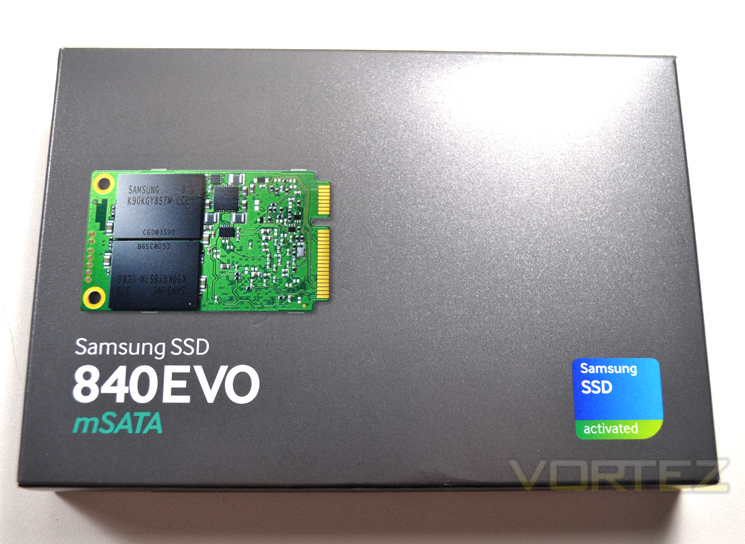
The diminutive mSATA drive arrives packaged in a gun metal grey cardboard box, around the same size as a 3.5″ mechanical drive but weighing much less. You would be forgiven for thinking that there was nothing contained within were it not for the plastic blister pack providing some structure to the thin packaging.
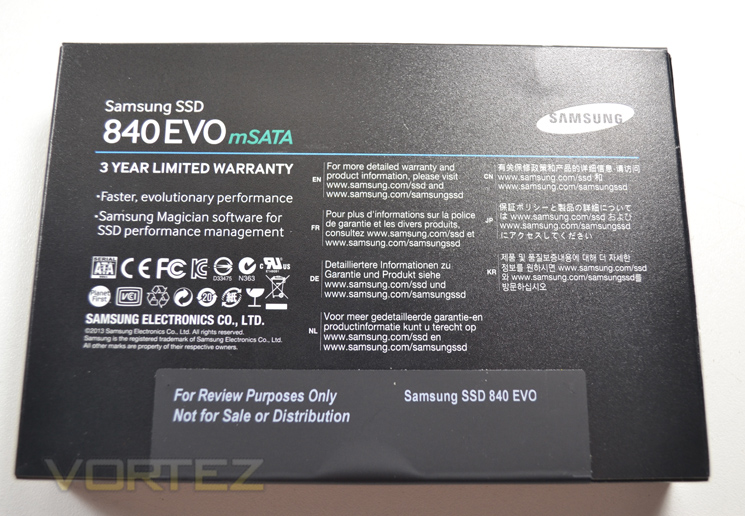
Flipping the box over we find scant details of the product inside other than it comes with a 3 year limited warranty. Our sample had no details regarding the size of the drive inside but we would be surprised if the retail examples did not have some form of capacity identification via a sticker which would double up as a seal to the product.
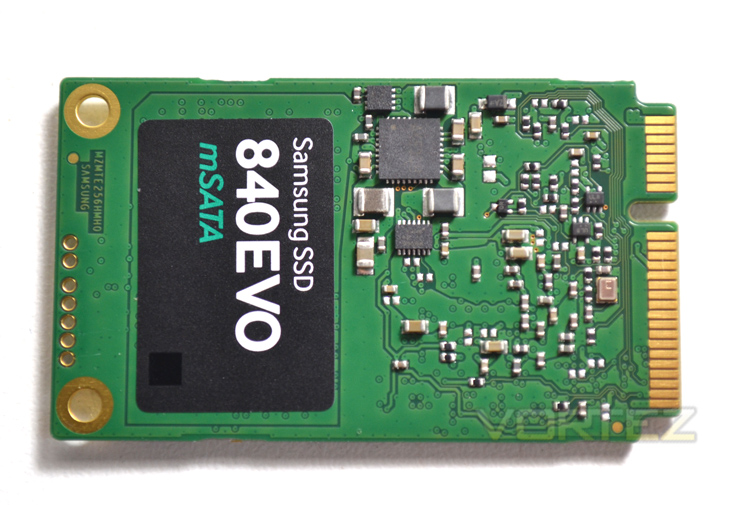
The 250GB version pictured above is slightly different from the 500GB & 1TB versions in that there are 2 NAND IC’s missing from underneath the product sticker. Samsung claim a massive leap in speed thanks to their write algorithm and write buffer which triples the write speed when comparing the 120GB models and doubling it for the 250GB model.
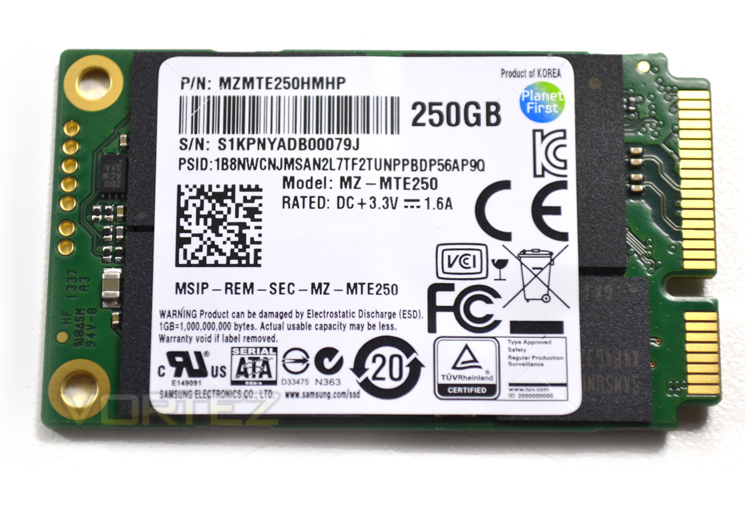
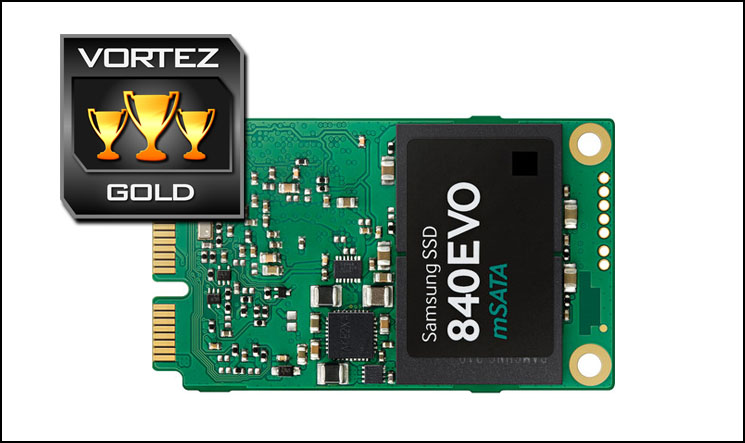
The rear of the module features a further 2 NAND packages, the Samsung 3-Core MEX Controller and the DRAM Cache module. The drive includes an AES 256-bit hardware-based encryption engine for file security meaning should you lose your laptop, your data will remain secure.
Let’s take a look at our test setup for today’s models…
Test Setup & Methodology
Our test system is formatted and a fresh version of Windows is installed with just drives in place – no additional applications. Windows is then updated to the latest release and the drivers are installed. Included in the list of benchmarks are the following applications:Benchmarks
ATTO Disk Benchmark v2.46
AS SSD
CrystalDiskMark 3.0
Iometer
SiSoftware SANDRA 2012
HDTune Pro 5.5
AS SSD
CrystalDiskMark 3.0
Iometer
SiSoftware SANDRA 2012
HDTune Pro 5.5
Test system
CPU Intel Core-i7 4770K
Motherboard GIGABYTE Z87X-OC
Graphics MSI R7970 Black Edition
Memory 16GB Corsair Vengeance Pro (2400MHz) CL10
HDD
– Samsung 840 EVO mSATA 500GB (Sata 6Gbps)
– Samsung 840 EVO mSATA 250GB (Sata 6Gbps)
– Kingston HyperX 3K Na’Vi 240GB (Sata 6Gbps)
– OCZ Vertex 450 256GB (Sata 6Gbps)
– Samsung 840 EVO 750GB (Sata 6Gbps)
– Samsung 840 Pro 256GB (Sata 6Gbps)
– Samsung 840 256GB (Sata 6Gbps)
– Toshiba 256GB THNSNH256GCST (Sata 6Gbps)
– OCZ Vector 256GB (Sata 6Gbps)
– Corsair Neutron GTX 240GB (Sata 6Gbps)
– Corsair Force GS 240GB (Sata 6Gbps)
– OCZ Vertex 4 128GB (Sata 6Gbps)
– Kingston HyperX 3K 120GB (Sata 6Gbps)
– Kingston HyperX 240GB (Sata 6Gbps)
– ADATA S510 120GB (Sata 6Gbps)
– Intel 520 480GB (Sata 6Gbps)
– Samsung 830 Series 256GB (Sata 6Gbps)
– Samsung HD103SJ 1TB (Sata 3Gbps)
PSU Corsair HX1050 Gold
OS Microsoft Windows 7 Professional 64-Bit
Motherboard GIGABYTE Z87X-OC
Graphics MSI R7970 Black Edition
Memory 16GB Corsair Vengeance Pro (2400MHz) CL10
HDD
– Samsung 840 EVO mSATA 500GB (Sata 6Gbps)
– Samsung 840 EVO mSATA 250GB (Sata 6Gbps)
– Kingston HyperX 3K Na’Vi 240GB (Sata 6Gbps)
– OCZ Vertex 450 256GB (Sata 6Gbps)
– Samsung 840 EVO 750GB (Sata 6Gbps)
– Samsung 840 Pro 256GB (Sata 6Gbps)
– Samsung 840 256GB (Sata 6Gbps)
– Toshiba 256GB THNSNH256GCST (Sata 6Gbps)
– OCZ Vector 256GB (Sata 6Gbps)
– Corsair Neutron GTX 240GB (Sata 6Gbps)
– Corsair Force GS 240GB (Sata 6Gbps)
– OCZ Vertex 4 128GB (Sata 6Gbps)
– Kingston HyperX 3K 120GB (Sata 6Gbps)
– Kingston HyperX 240GB (Sata 6Gbps)
– ADATA S510 120GB (Sata 6Gbps)
– Intel 520 480GB (Sata 6Gbps)
– Samsung 830 Series 256GB (Sata 6Gbps)
– Samsung HD103SJ 1TB (Sata 3Gbps)
PSU Corsair HX1050 Gold
OS Microsoft Windows 7 Professional 64-Bit
Benchmarks: ATTO
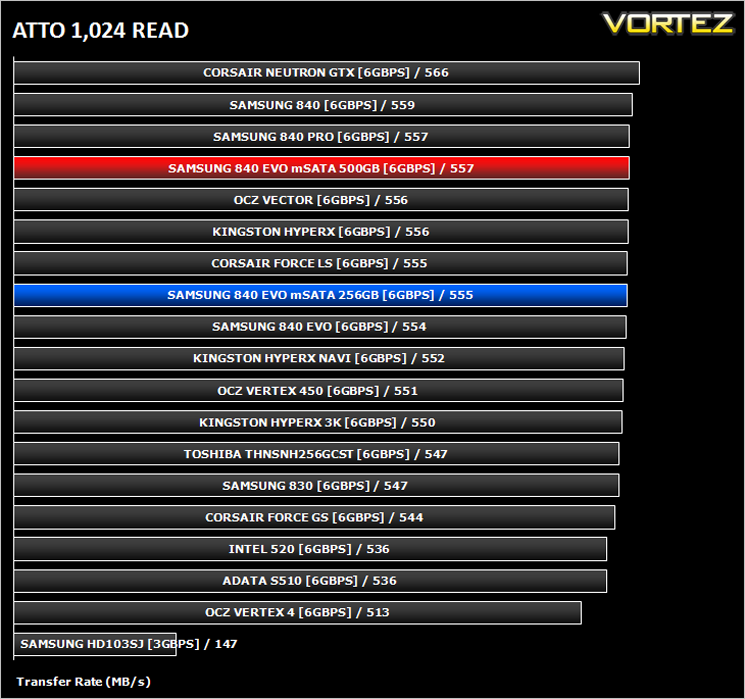
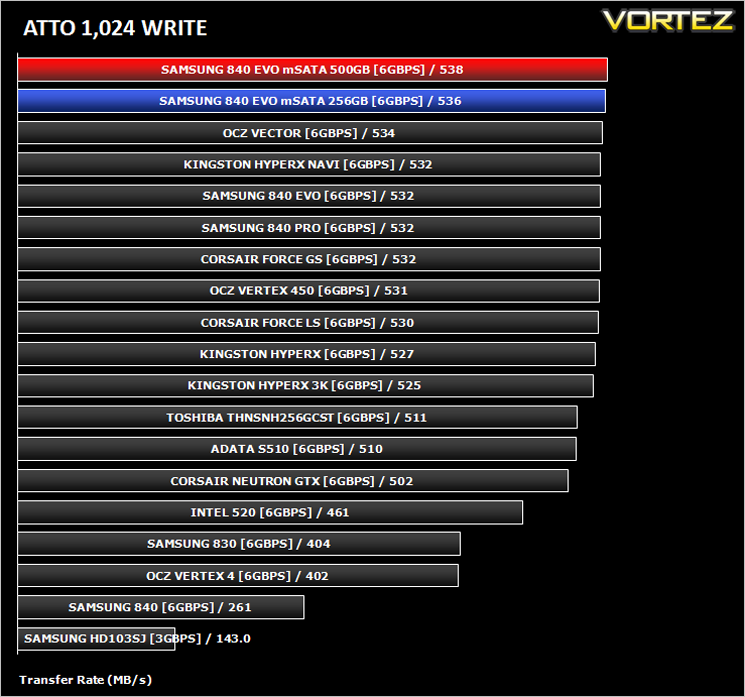
The ATTO Disk Benchmark performance measurement tool is compatible with Microsoft Windows. Measure your storage systems performance with various transfer sizes and test lengths for reads and writes. Several options are available to customize your performance measurement including queue depth, overlapped I/O and even a comparison mode with the option to run continuously. Use ATTO Disk Benchmark to test any manufacturers RAID controllers, storage controllers, host adapters, hard drives and SSD drives and notice that ATTO products will consistently provide the highest level of performance to your storage.
Benchmarks: AS SSD
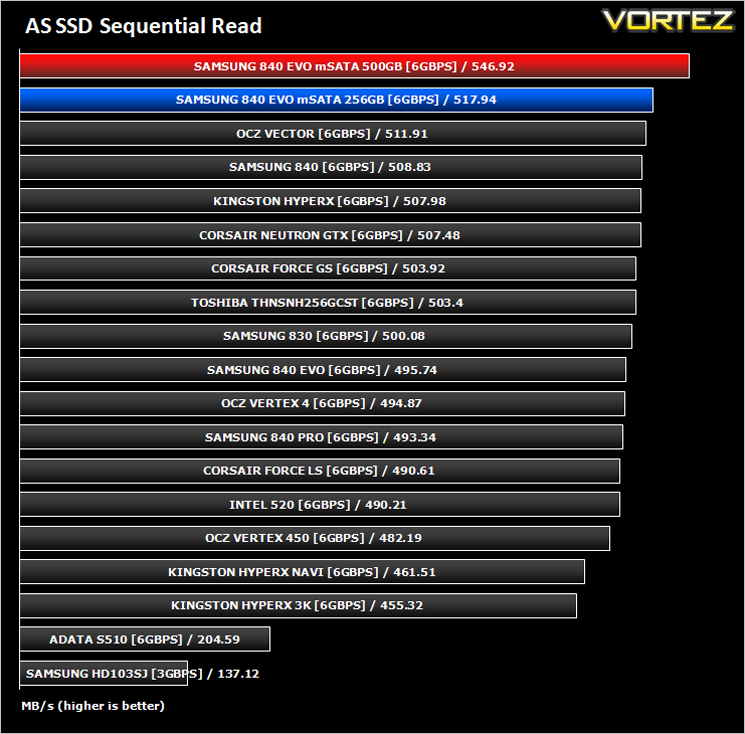
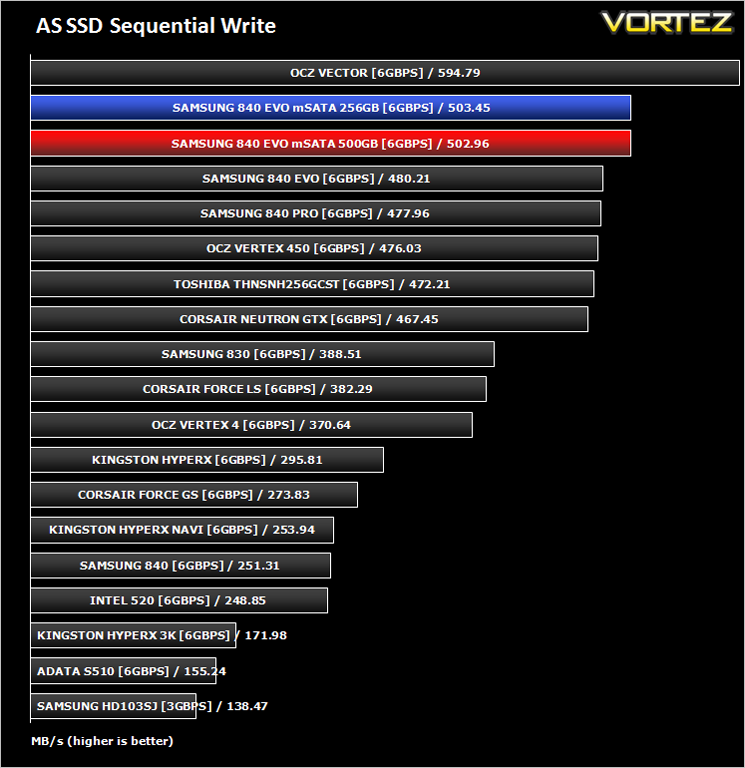
AS SSD Benchmark is a straightforward tool for measuring the speed of your SSD drive.
Simply launch the program, choose your drive, click Start, and it’ll test your SSD’s read and write speed in a variety of ways, delivering a score for each when it’s done. And if that’s not enough, there are also additional file copy and compression-related benchmarks available from the Tools menu. (The author’s support page is German only, but if you need further English explanations then there’s a thread on the program at the OCZ Technology forum.).
Simply launch the program, choose your drive, click Start, and it’ll test your SSD’s read and write speed in a variety of ways, delivering a score for each when it’s done. And if that’s not enough, there are also additional file copy and compression-related benchmarks available from the Tools menu. (The author’s support page is German only, but if you need further English explanations then there’s a thread on the program at the OCZ Technology forum.).
Benchmarks: CrystalDiskMark 3.0
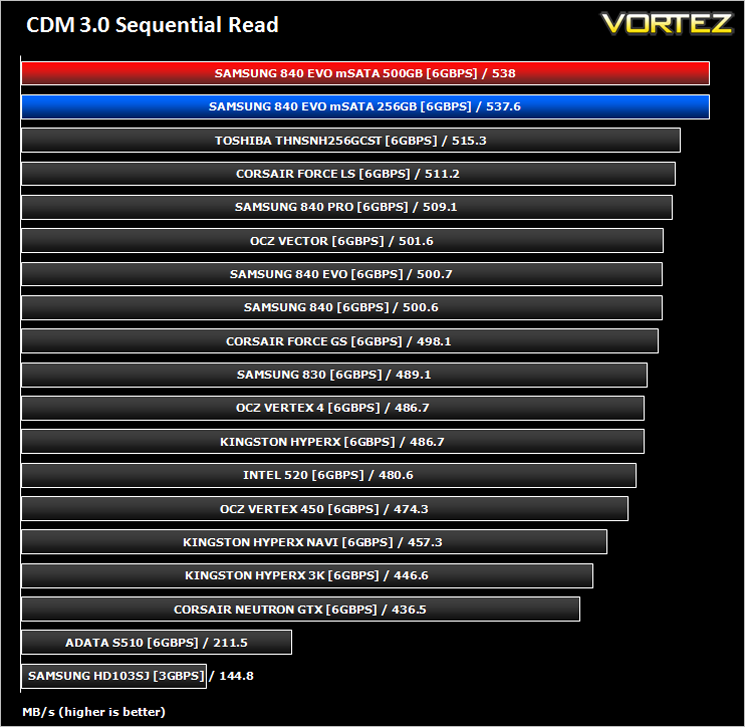
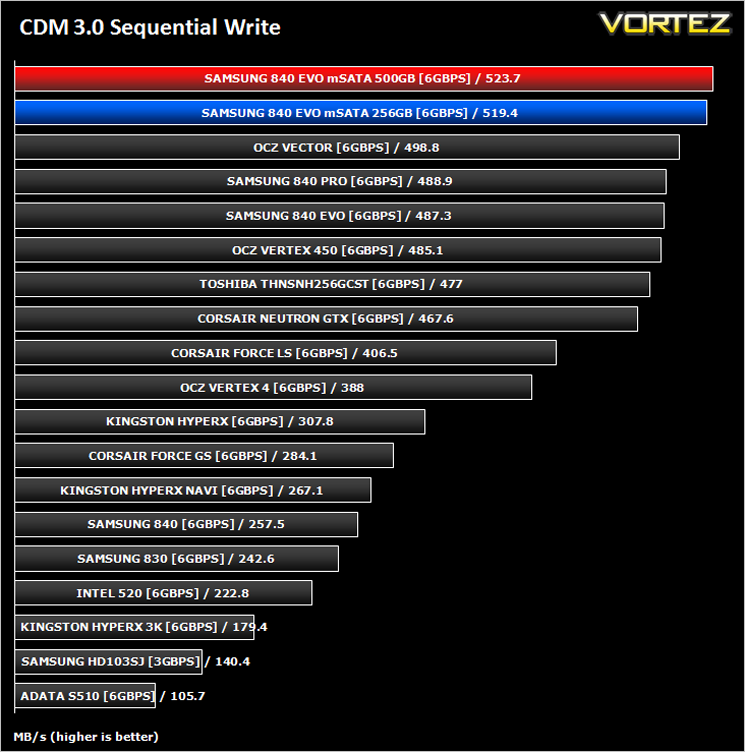
CrystalDiskMark is a disk benchmark software that analyses different types of hard drive. Giving sequential benchmark write and read statistics in MB/s. A simple program that is very useful.
Benchmarks: Iometer
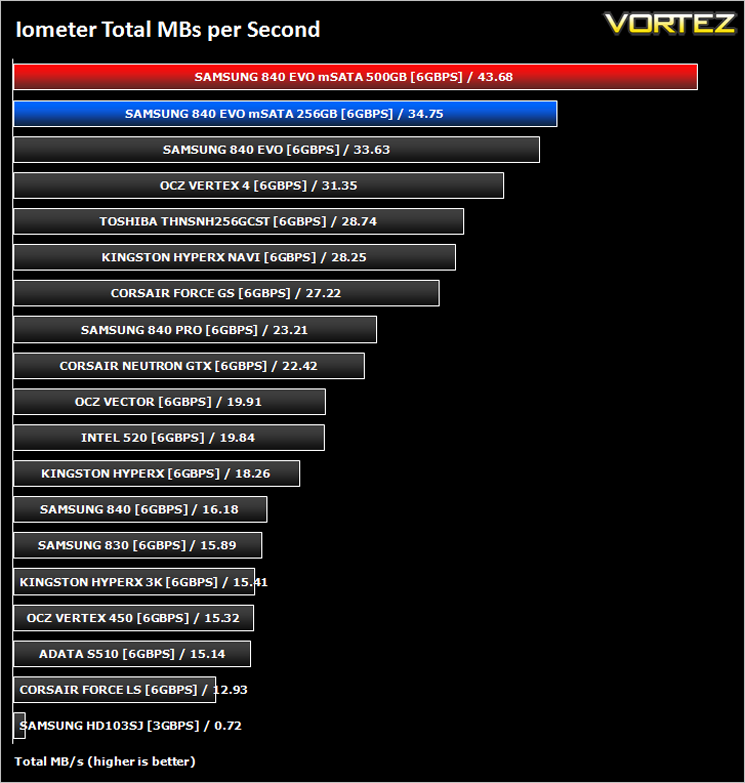
Iometer is based on a client–server model, where one instance of the Iometer graphical user interface is managing multiple ‘workers’ (each one representing a separate Dynamo.exe process) which are doing the I/O. Iometer performs Asynchronous I/O – accessing files or block devices (later one allowing to bypass the file system buffers).
Iometer allows the configuration of disk parameters such as the ‘Maximum Disk Size’, ‘Starting Disk Sector’ and ‘# of Outstanding I/Os’. This allows a user to configure a test file upon which the ‘Access Specifications’ configure the I/O types to the file.
Iometer allows the configuration of disk parameters such as the ‘Maximum Disk Size’, ‘Starting Disk Sector’ and ‘# of Outstanding I/Os’. This allows a user to configure a test file upon which the ‘Access Specifications’ configure the I/O types to the file.
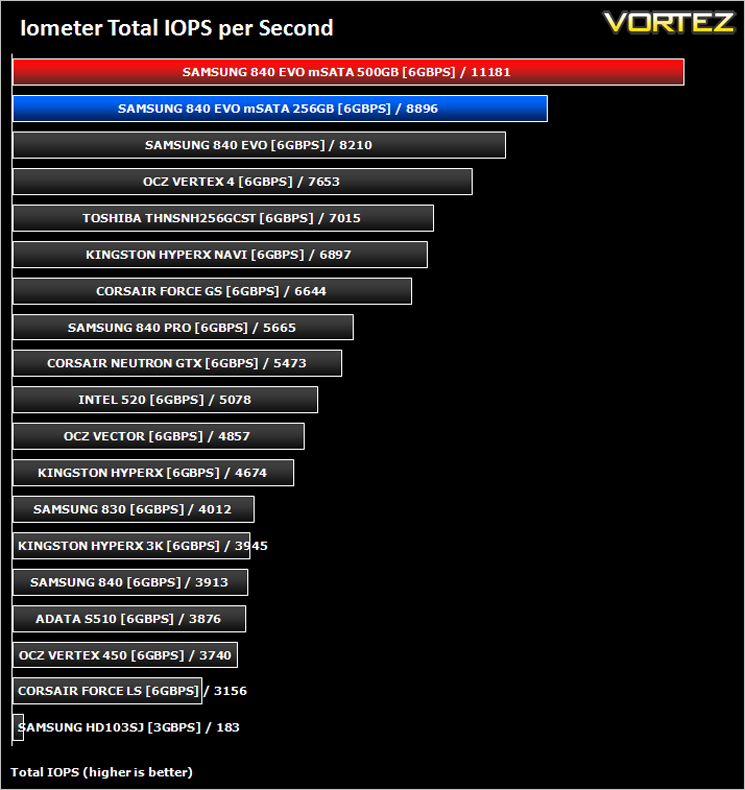
For the purpose of this test. The 4K 50%/50% read/write file will be under the examination with 100% Random Distribution – reporting back on IOPS and MBs per Second.
Benchmarks: SiSoftware SANDRA
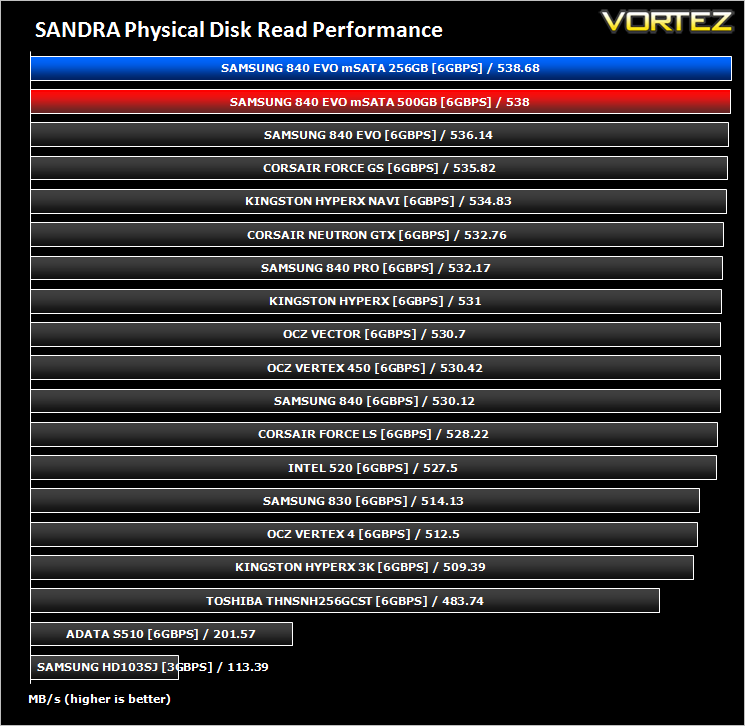
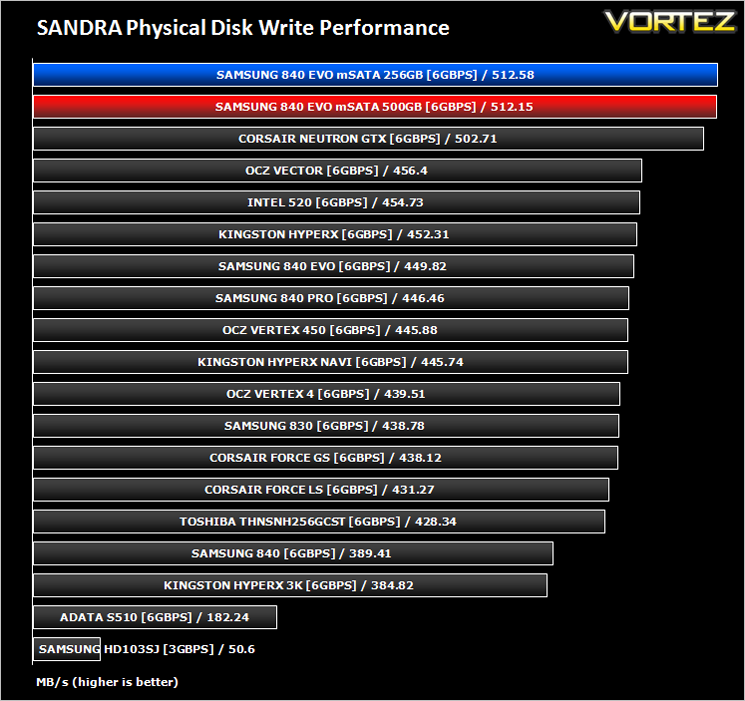
SiSoftware Sandra (the System ANalyser, Diagnostic and Reporting Assistant) is an information & diagnostic utility. It should provide most of the information (including undocumented) you need to know about your hardware, software and other devices whether hardware or software.
Sandra is a (girl) name of Greek origin that means “defender”, “helper of mankind”. We think that’s quite fitting.
It works along the lines of other Windows utilities, however it tries to go beyond them and show you more of what’s really going on. Giving the user the ability to draw comparisons at both a high and low-level. You can get information about the CPU, chipset, video adapter, ports, printers, sound card, memory, network, Windows internals, AGP, PCI, PCI-X, PCIe (PCI Express), database, USB, USB2, 1394/Firewire, etc.
Sandra is a (girl) name of Greek origin that means “defender”, “helper of mankind”. We think that’s quite fitting.
It works along the lines of other Windows utilities, however it tries to go beyond them and show you more of what’s really going on. Giving the user the ability to draw comparisons at both a high and low-level. You can get information about the CPU, chipset, video adapter, ports, printers, sound card, memory, network, Windows internals, AGP, PCI, PCI-X, PCIe (PCI Express), database, USB, USB2, 1394/Firewire, etc.
Benchmarks: HDTune Pro
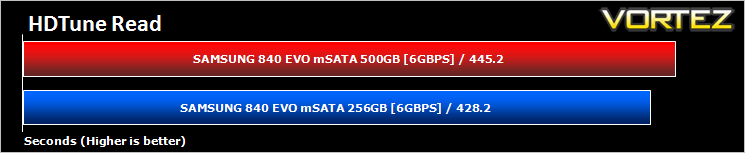
A new utility we have added to our line-up of benchmarks is the ever popular HDTune Pro. HD Tune Pro is a hard disk / SSD utility with many functions. It can be used to measure the drive’s performance, scan for errors, check the health status (S.M.A.R.T.), securely erase all data and much more.
RAPID Mode Performance Analysis
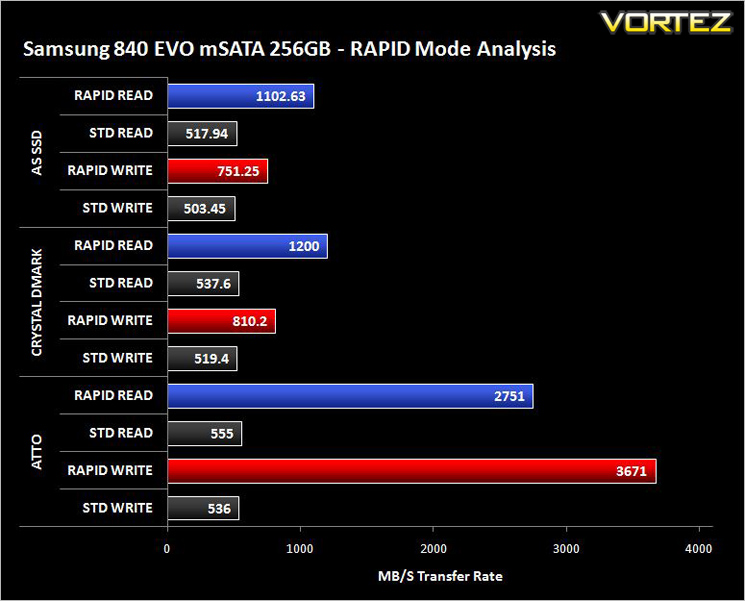
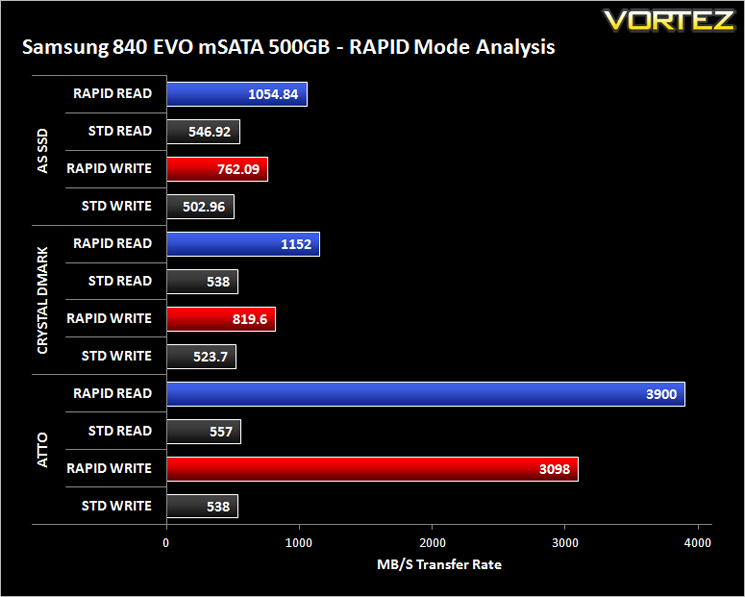
With Magician V4.2 the 840 EVO is able to boost beyond 500MB/s using the SATA 6GB/s interface. Samsung claim that this feature can push transfer speeds even past 1GB. In short, RAPID mode takes advantage of dynamic disk caching technology. This makes use of left over CPU and RAM resources in order to boost the performance of the SSD.To demonstrate this feature we will show performance results for read/write transfer speeds with and without the RAPID mode enabled within Magician V4.2. (To take full advantage of this feature just install Magician V4.2+ and click RAPID mode – reboot required).
Conclusion
We initially had reservations regarding mSATA, not just the drives we have tested today but the socket as a whole. It is rare that reducing power consumption and perhaps most pertinently, a products footprint that performance will not suffer as a result. Hopefully we have shown today that our reservations were unfounded because the mSATA version of Samsung’s EVO 840 is blisteringly fast. It topped many of our charts so it’s performance cannot be held in question.
Should you use one in a ‘standard’ PC system? We don’t see why not, especially if your motherboard supports mSATA. You would however do well to consider the additional cost of purchasing an mSATA converter (to use standard Serial ATA ports) if your motherboard does not support the mSATA format though.
Overall though if you wish to boost the performance of your portable PC, especially if weight and power consumption are high on your requirements then the Samsung mSATA EVO 840 comes thoroughly recommended because it is one of the fastest drives we have tested and proves to be the ultimate of offerings when Samsung’s RAPID technology is enabled.
The 840 EVO mSATA weighs next to nothing, uses little power yet results in blistering speed. A perfect addition to any compatible mobile computing platform.
Pros
+ Top drawer components used
+ Astonishing sequential read/write results
+ Consistently strong performance
+ RAPID Mode doubles performance
+ Magician software is very useful
Cons
– SATA converter required if no mSATA port
Tip = Install Magician 4.2+ and use RAPID mode for better transfer performance
+ Top drawer components used
+ Astonishing sequential read/write results
+ Consistently strong performance
+ RAPID Mode doubles performance
+ Magician software is very useful
Cons
– SATA converter required if no mSATA port
Tip = Install Magician 4.2+ and use RAPID mode for better transfer performance

Click here for an explanation of our awards at Vortez.net.


