XPG are pushing the boundaries once again, this time with more RGB and more speed, with kits available at up to 5000MHz.

Product on Review: XPG Spectrix D41
Manufacturer: XPG
Street Price: £168.99
XPG, well known for flashy RGB and solid performance, have provided us with another set of DDR4 RAM. This time we take a look at the successor to a review we only published a couple of weeks ago, the Spectrix D41. With this new kit we see a more diffused RGB strip on top as well as less obstruction, allowing brighter and more vibrant effects. We also see support from many more manufacturers for synchronising the
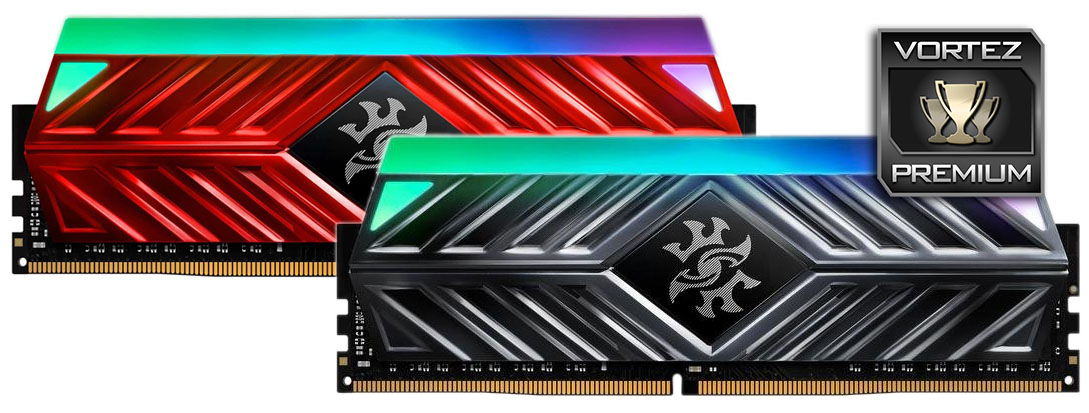
Not only have they improved the RGB element, we also see an improvement in speeds, starting at 2666MHz and soaring to an insane 5000MHz for those who need the absolute bleeding edge of performance. The sticks arrive with both a bright red heatsink or a titanium grey option.
In the D40 review we observed genuinely excellent overclocking results, mainly due to the headroom left available by the large heatspreader and relatively low stock operating voltage; due to this, overclocking is something we will certainly take a good look at.
For testing today, we have a 2666MHz 16GB kit (2x 8GB), in Crimson Red, let’s get stuck into the review and see how it performs.
XPG on the Spectrix D41:
The XPG SPECTRIX D41 DDR4 RGB memory brings together outstanding performance and mesmerizing RGB lighting to give you a worthy upgrade for your system. Featuring stunning speeds up to 5000MHz the SPECTRIX D41 delivers smooth, fast gaming and overclocking, all the while supporting Intel® X299 and AMD AM4/Ryzen platforms. What’s more, with vivid RGB lighting that is compatible with a range of lighting control software, your gaming setup will outshine the competition.
Technical Specifications
Model name speed size Latency Voltage Heat Sink Colour
DDR4-2666 PC4-21300 16GB x 1 CL16-16-16 1.2V Crimson Red
DDR4-2666 PC4-21300 16GB x 1 CL16-16-16 1.2V Titanium Gray
DDR4-2666 PC4-21300 16GB x 2 16GB x 2 1.2V Crimson Red
DDR4-2666 PC4-21300 16GB x 2 CL16-16-16 1.2V Titanium Gray
DDR4-2666 PC4-21300 16GB x 4 CL16-16-16 1.2V Crimson Red
DDR4-2666 PC4-21300 16GB x 4 CL16-16-16 1.2V Titanium Gray
DDR4-2666 PC4-21300 8GB x 1 CL16-16-16 1.2V Crimson Red
DDR4-2666 PC4-21300 8GB x 1 CL16-16-16 1.2V Titanium Gray
DDR4-2666 PC4-21300 8GB x 2 CL16-16-16 1.2V Crimson Red
DDR4-2666 PC4-21300 8GB x 2 CL16-16-16 1.2V Titanium Gray
DDR4-2666 PC4-21300 8GB x 4 CL16-16-16 1.2V Crimson Red
DDR4-2666 PC4-21300 8GB x 4 CL16-16-16 1.2V Titanium Gray
DDR4-3000 PC4-24000 8GB x 1 CL16-18-18 1.35V Crimson Red
DDR4-3000 PC4-24000 8GB x 1 CL16-18-18 1.35V Titanium Gray
DDR4-3000 PC4-24000 8GB x 2 CL16-18-18 1.35V Crimson Red
DDR4-3000 PC4-24000 8GB x 2 CL16-18-18 1.35V Titanium Gray
DDR4-3000 PC4-24000 8GB x 4 CL16-18-18 1.35V Crimson Red
DDR4-3000 PC4-24000 8GB x 4 CL16-18-18 1.35V Titanium Gray
DDR4-3200 PC4-25600 8GB x 1 CL16-18-18 1.35V Crimson Red
DDR4-3200 PC4-25600 8GB x 1 CL16-18-18 1.35V Titanium Gray
DDR4-3200 PC4-25600 8GB x 2 CL16-16-16 1.35V Crimson Red
DDR4-3200 PC4-25600 8GB x 2 CL16-16-16 1.35V Titanium Gray
DDR4-3200 PC4-25600 8GB x 4 CL16-18-18 1.35V Crimson Red
DDR4-3200 PC4-25600 8GB x 4 CL16-18-18 1.35V Titanium Gray
DDR4-3600 PC4-28800 8GB x 1 CL17-18-18 1.35V Crimson Red
DDR4-3600 PC4-28800 8GB x 1 CL17-18-18 1.35V Titanium Gray
DDR4-3600 PC4-28800 8GB x 2 CL17-18-18 1.35V Crimson Red
DDR4-3600 PC4-28800 8GB x 2 CL17-18-18 1.35V Titanium Gray
DDR4-3600 PC4-28800 8GB x 4 CL17-18-18 1.35V Crimson Red
DDR4-3600 PC4-28800 8GB x 4 CL17-18-18 1.35V Titanium Gray
DDR4-2666 PC4-21300 16GB x 1 CL16-16-16 1.2V Crimson Red
DDR4-2666 PC4-21300 16GB x 1 CL16-16-16 1.2V Titanium Gray
DDR4-2666 PC4-21300 16GB x 2 16GB x 2 1.2V Crimson Red
DDR4-2666 PC4-21300 16GB x 2 CL16-16-16 1.2V Titanium Gray
DDR4-2666 PC4-21300 16GB x 4 CL16-16-16 1.2V Crimson Red
DDR4-2666 PC4-21300 16GB x 4 CL16-16-16 1.2V Titanium Gray
DDR4-2666 PC4-21300 8GB x 1 CL16-16-16 1.2V Crimson Red
DDR4-2666 PC4-21300 8GB x 1 CL16-16-16 1.2V Titanium Gray
DDR4-2666 PC4-21300 8GB x 2 CL16-16-16 1.2V Crimson Red
DDR4-2666 PC4-21300 8GB x 2 CL16-16-16 1.2V Titanium Gray
DDR4-2666 PC4-21300 8GB x 4 CL16-16-16 1.2V Crimson Red
DDR4-2666 PC4-21300 8GB x 4 CL16-16-16 1.2V Titanium Gray
DDR4-3000 PC4-24000 8GB x 1 CL16-18-18 1.35V Crimson Red
DDR4-3000 PC4-24000 8GB x 1 CL16-18-18 1.35V Titanium Gray
DDR4-3000 PC4-24000 8GB x 2 CL16-18-18 1.35V Crimson Red
DDR4-3000 PC4-24000 8GB x 2 CL16-18-18 1.35V Titanium Gray
DDR4-3000 PC4-24000 8GB x 4 CL16-18-18 1.35V Crimson Red
DDR4-3000 PC4-24000 8GB x 4 CL16-18-18 1.35V Titanium Gray
DDR4-3200 PC4-25600 8GB x 1 CL16-18-18 1.35V Crimson Red
DDR4-3200 PC4-25600 8GB x 1 CL16-18-18 1.35V Titanium Gray
DDR4-3200 PC4-25600 8GB x 2 CL16-16-16 1.35V Crimson Red
DDR4-3200 PC4-25600 8GB x 2 CL16-16-16 1.35V Titanium Gray
DDR4-3200 PC4-25600 8GB x 4 CL16-18-18 1.35V Crimson Red
DDR4-3200 PC4-25600 8GB x 4 CL16-18-18 1.35V Titanium Gray
DDR4-3600 PC4-28800 8GB x 1 CL17-18-18 1.35V Crimson Red
DDR4-3600 PC4-28800 8GB x 1 CL17-18-18 1.35V Titanium Gray
DDR4-3600 PC4-28800 8GB x 2 CL17-18-18 1.35V Crimson Red
DDR4-3600 PC4-28800 8GB x 2 CL17-18-18 1.35V Titanium Gray
DDR4-3600 PC4-28800 8GB x 4 CL17-18-18 1.35V Crimson Red
DDR4-3600 PC4-28800 8GB x 4 CL17-18-18 1.35V Titanium Gray
Packaging & Product
A black and red theme to the packaging is the norm for XPG, with a touch of RGB. There’s an almost 1:1 scale image of the RAM stick on the front with some information relating to manufacturer support, however, the indication of capacity in the bottom-right is a little confusing.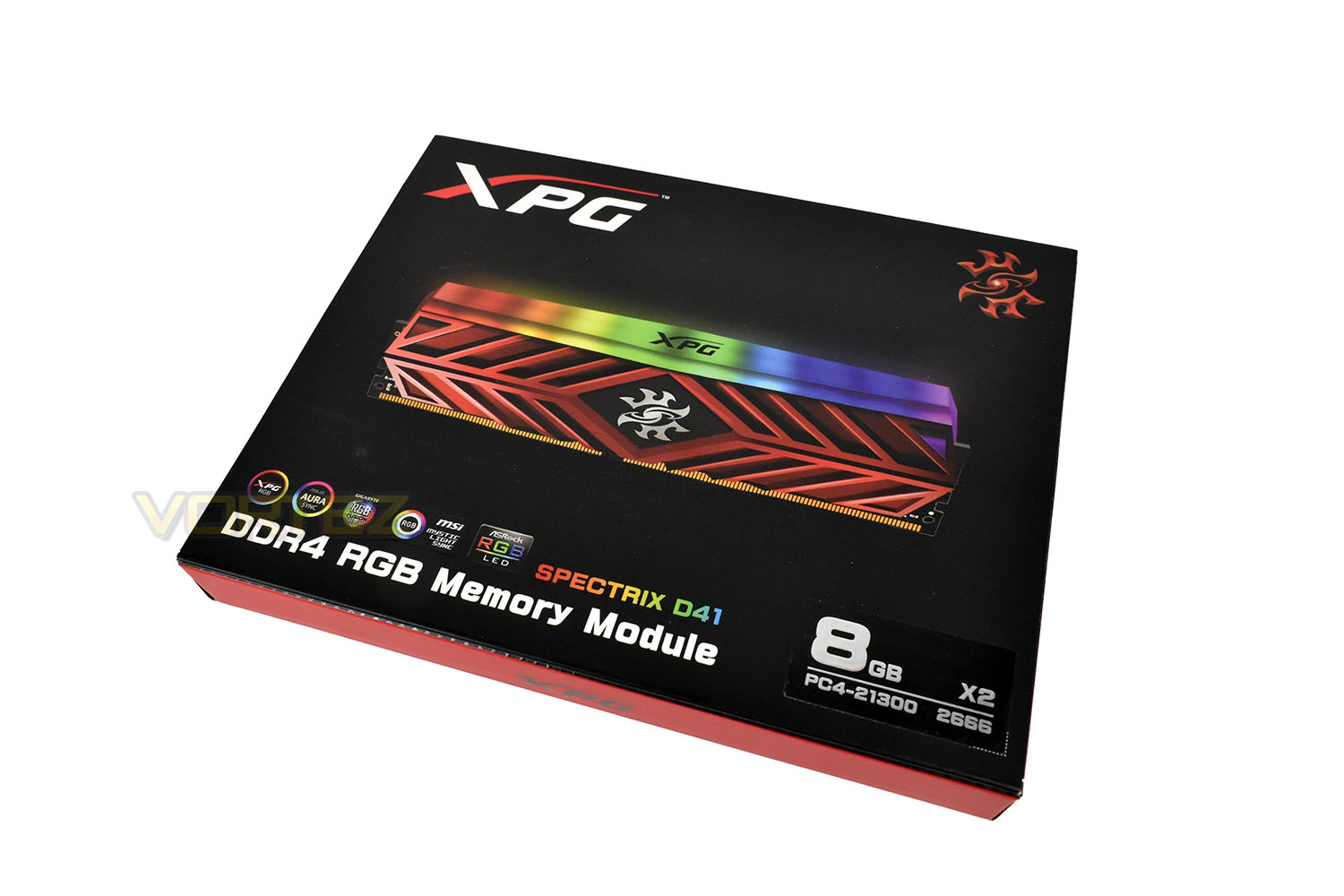
XPG love adding a flip-up flap on the front of their packaging, with the Spectrix D41 being no exception.
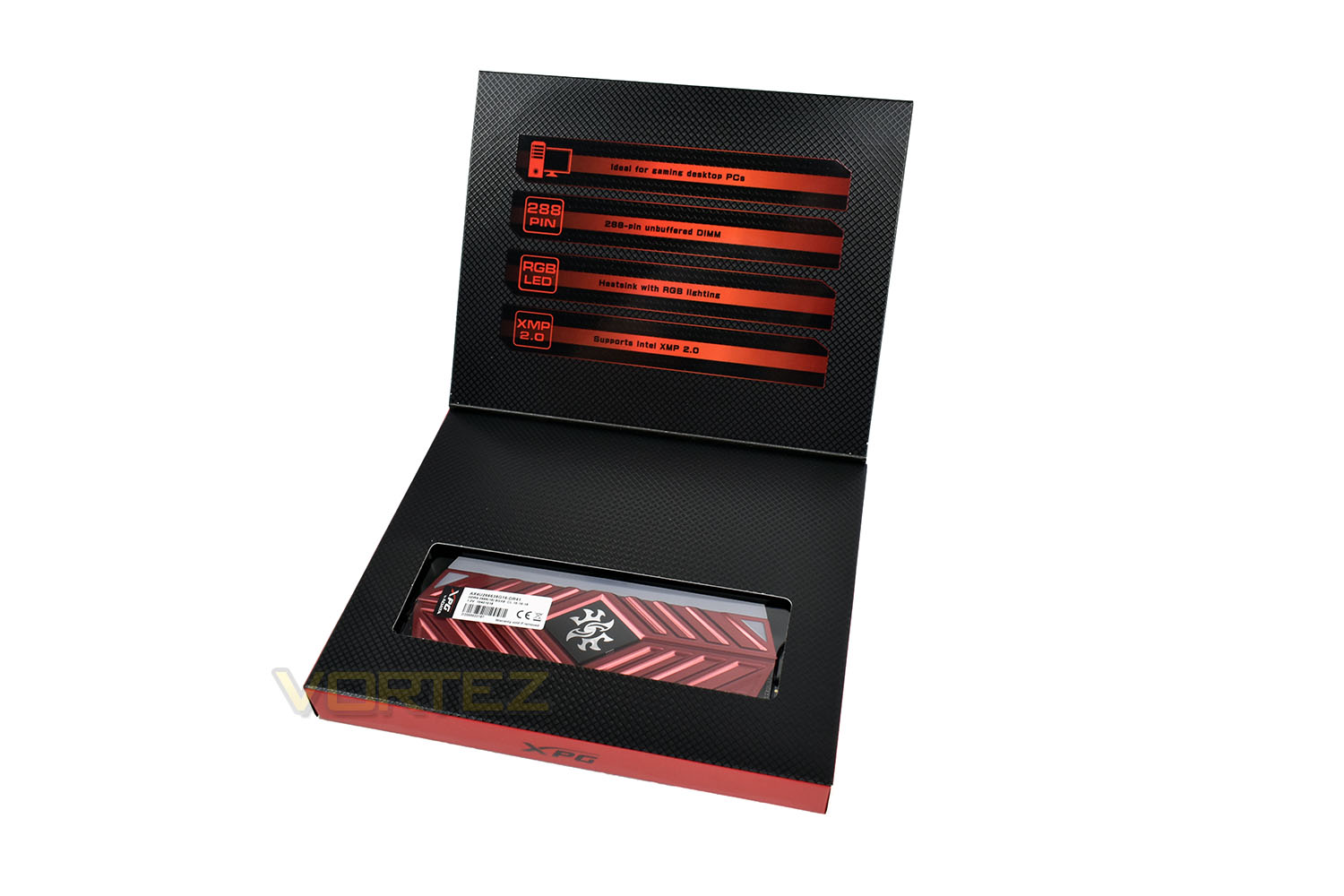
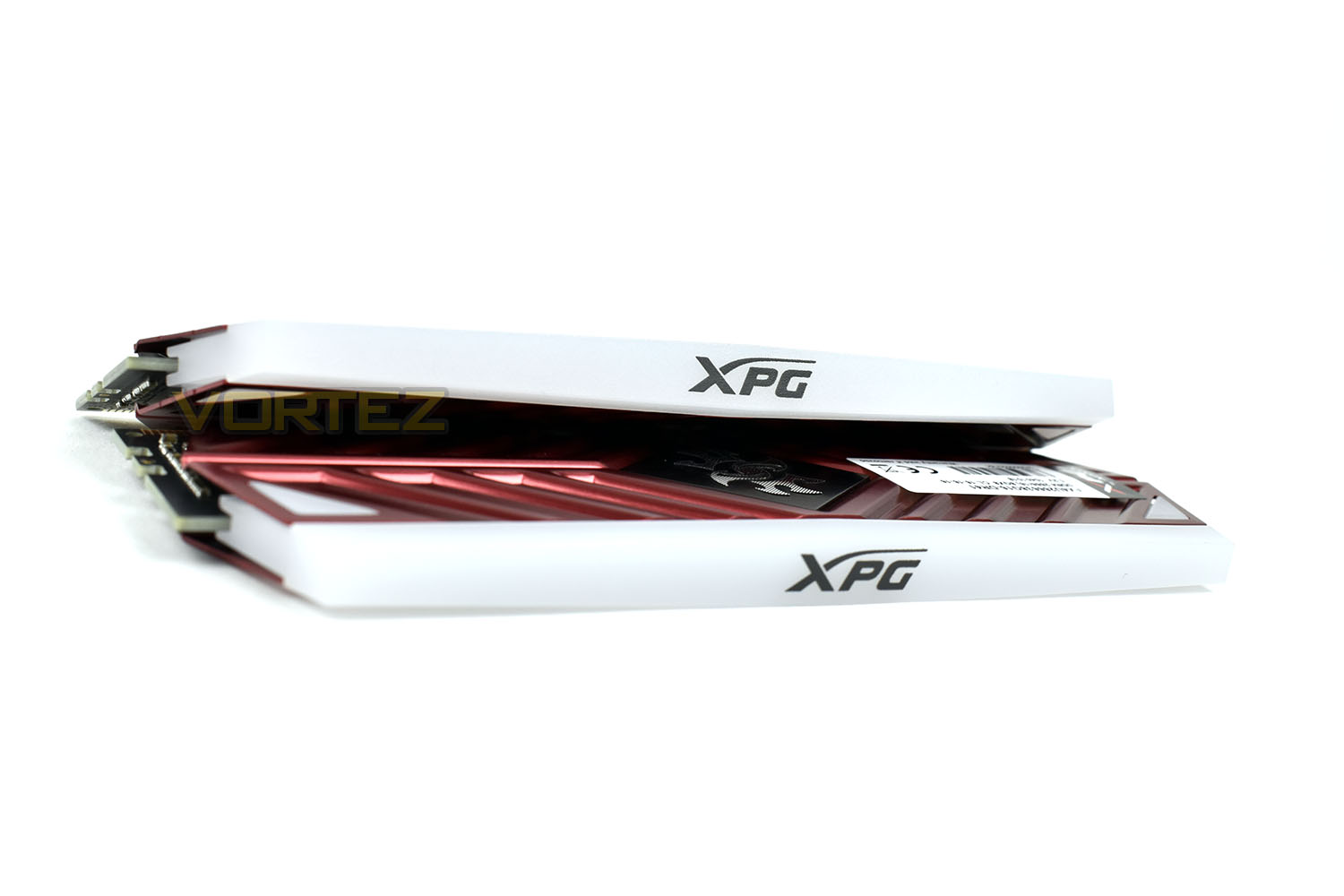
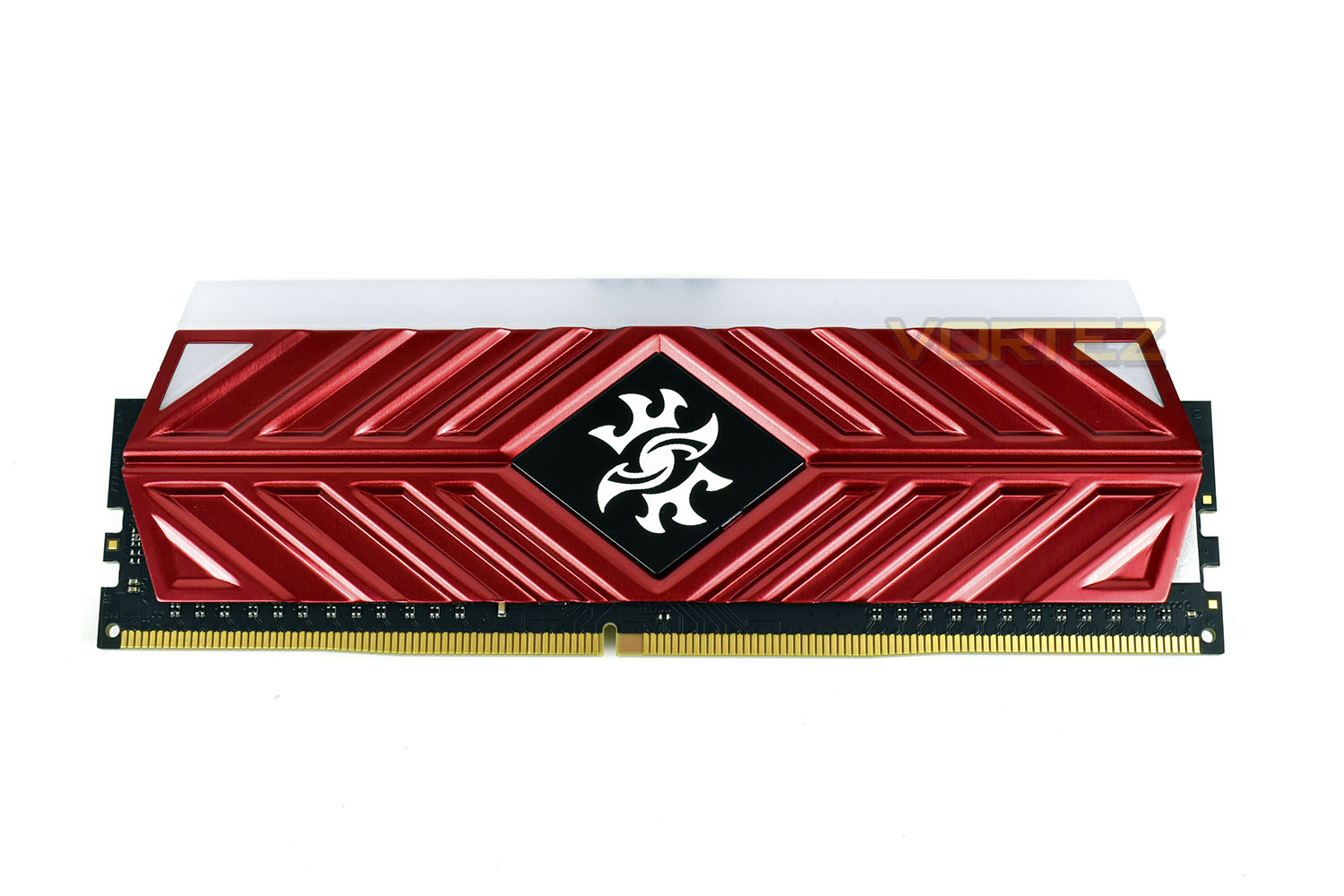
The striking red design looks excellent, with a very bright paint finish applied. The large heat spreader should also help with temperatures when overclocking.
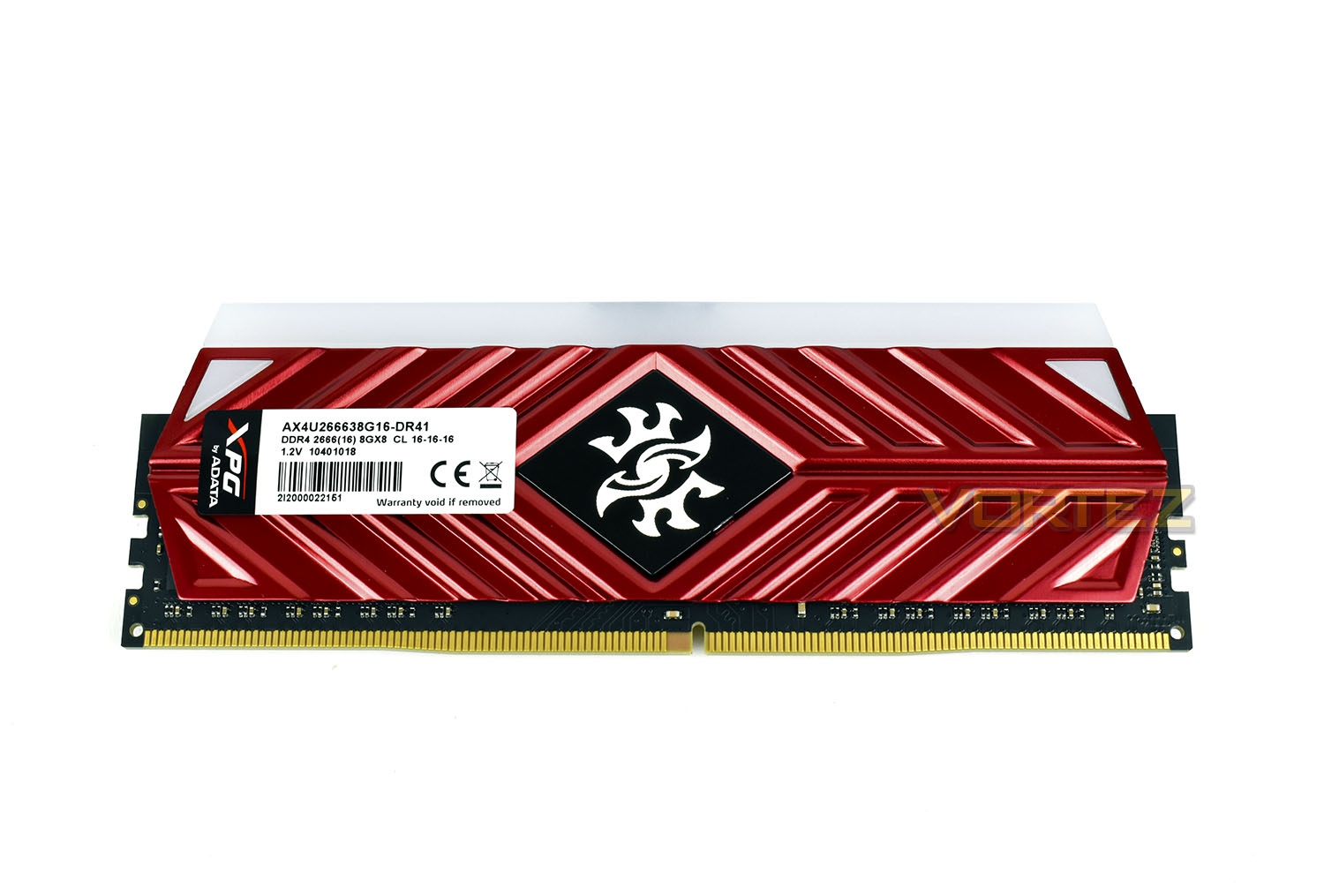
The symmetrical design is only disturbed by a sticker; you’ll be glad to know this faces the left-side of most motherboard layouts so shouldn’t be immediately visible when looking into your case.
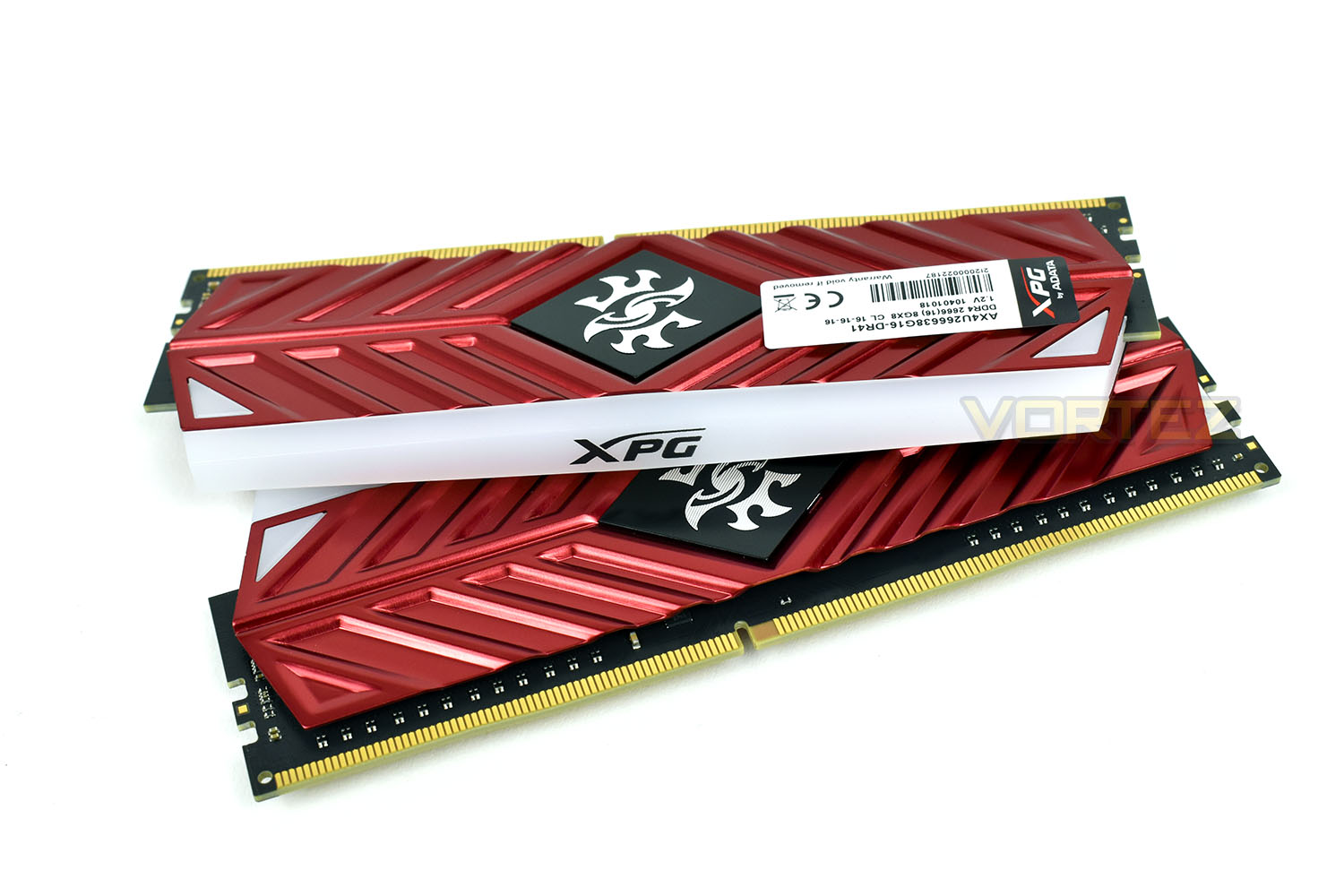
XPG have also flipped the logo on top of the RGB strips, this aligns itself much better with a traditional system layout, with the logo now being 90° counter-clockwise.
Test Setup
Memory Configurations
XPG Spectrix D41 DDR4 2667MHz
2667MHz @ 16-16-16-16-39-51-1T – XMP 2.0
3133MHz @ 16-16-16-16-39-72-1T – Highest reached frequency
Test Setup
Cooling Corsair H150i Pro RGB
Processor Ryzen 7 2700X
MotherboardMSI X470 Gaming M7 AC
Graphics Radeon RX 480 8GB
Storage Samsung 970 EVO 1TB
PSU Corsair RM 750X 80 Plus Gold Certified PSU
Compared against
Corsair Vengeance LPX 3000MHz (2x 8GB)
Crucial Ballistix Tactical Tracer RGB 3000MHz (4x 8GB)
G.SKILL Sniper X 3400MHz (2x 8GB)
XPG Spectrix D41 RGB 2400MHz (4x 8GB)
XPG Spectrix D41 DDR4 2667MHz
2667MHz @ 16-16-16-16-39-51-1T – XMP 2.0
3133MHz @ 16-16-16-16-39-72-1T – Highest reached frequency
Test Setup
Cooling Corsair H150i Pro RGB
Processor Ryzen 7 2700X
MotherboardMSI X470 Gaming M7 AC
Graphics Radeon RX 480 8GB
Storage Samsung 970 EVO 1TB
PSU Corsair RM 750X 80 Plus Gold Certified PSU
Compared against
Corsair Vengeance LPX 3000MHz (2x 8GB)
Crucial Ballistix Tactical Tracer RGB 3000MHz (4x 8GB)
G.SKILL Sniper X 3400MHz (2x 8GB)
XPG Spectrix D41 RGB 2400MHz (4x 8GB)
Benchmarks
Cinebench R15 – CPU
SiSoftware SANDRA – Memory bandwidth
AIDA64 – Memory Benchmarks
PCMark 8 – Photoshop
Games – Dawn of War III
SiSoftware SANDRA – Memory bandwidth
AIDA64 – Memory Benchmarks
PCMark 8 – Photoshop
Games – Dawn of War III
Other Software
Temperature Analysis: Aida64/Ryzen Master
System Monitoring and Stress Testing: AIDA64 Stability Test
CPU Specification Monitoring: CPU-Z
System Monitoring and Stress Testing: AIDA64 Stability Test
CPU Specification Monitoring: CPU-Z
Lighting & Overclocking
Feast your eyes on this short video, playing through some of the more extravagant lighting effects built into the software.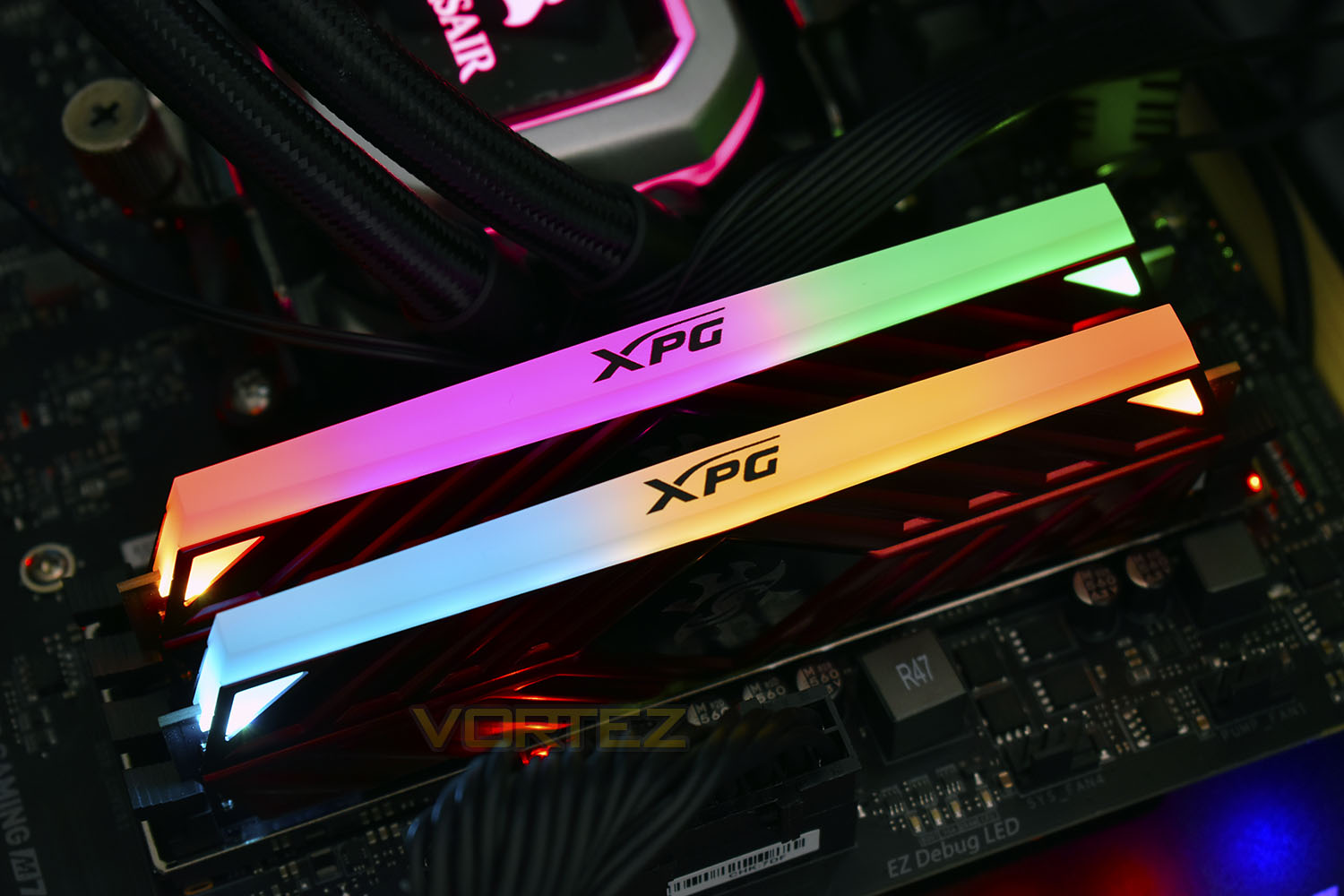
Just like we saw with the Spectrix D40 set, the full height heatspreader, paired with a stock 1.2v seemingly left some headroom to allow overclocking. Most RAM kits run at 1.35v for an overclock above JEDEC standards, therefore we deem this a safe voltage to use for a 24/7 overclock.
We began by trying for 3000MHz at stock timings; 3000MHz is generally regarded as a solid base for any modern system. During testing we found zero issues with this frequency so tried to push further.
3200MHz was the next target, again with stock timings. Our testing was going well until a hard lockup happened, forcing a restart and reset of the settings. We then aimed for 3133MHz, at stock timings again, using only 1.35v.
We found perfect stability with this overclock, representing a 466MHz overclock without affecting the timings.
Our Cinebench R15 CPU scores are below, as well as stock vs overclocked AIDA64 Memory Benchmark results:
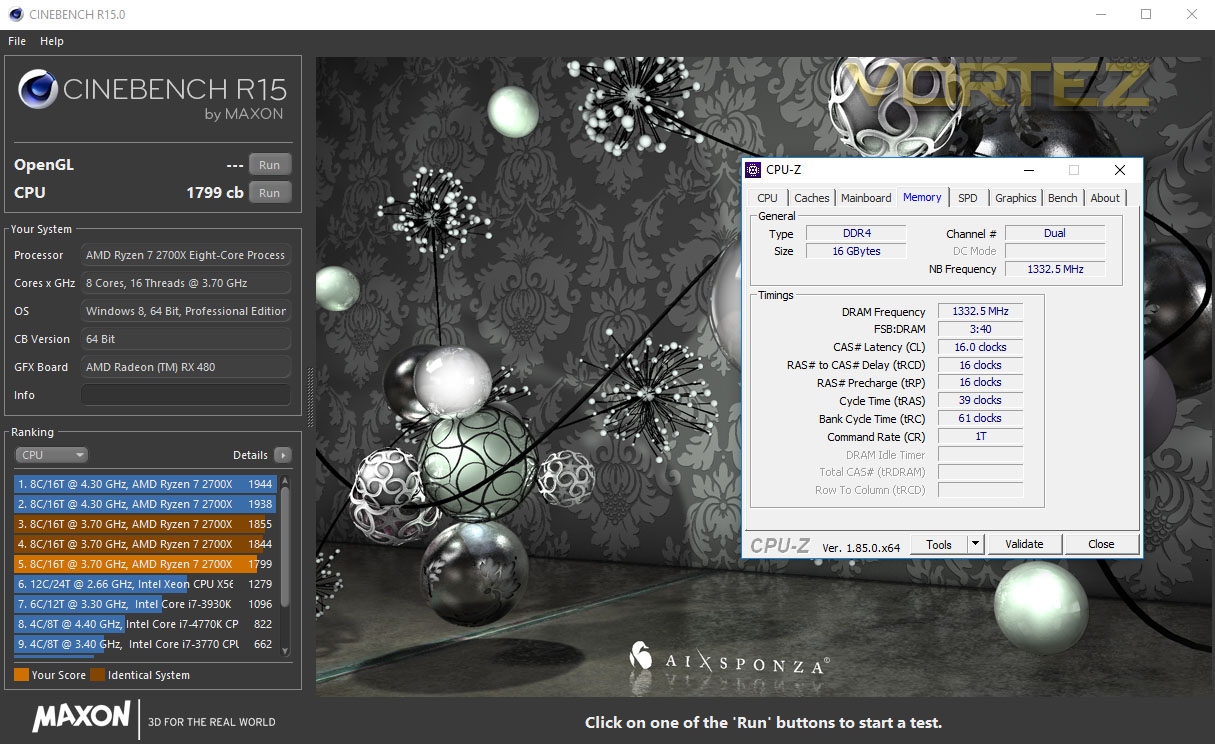
Stock Result
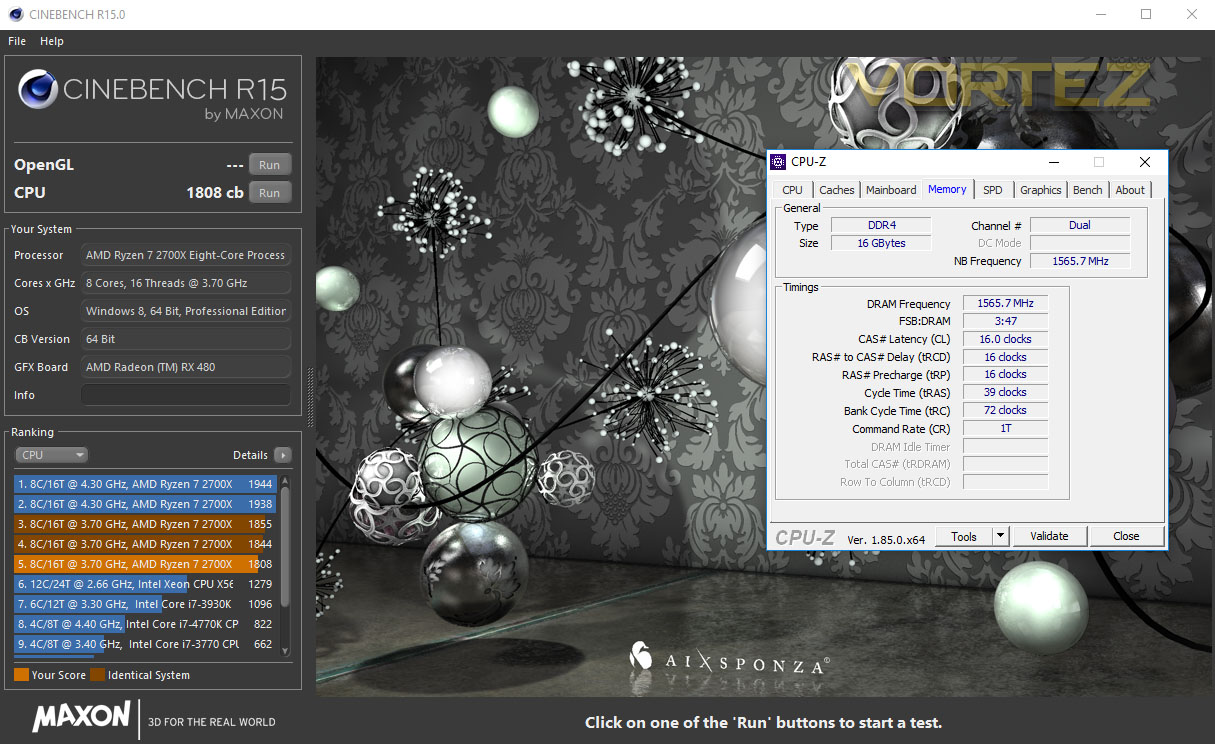
Overclocked Result
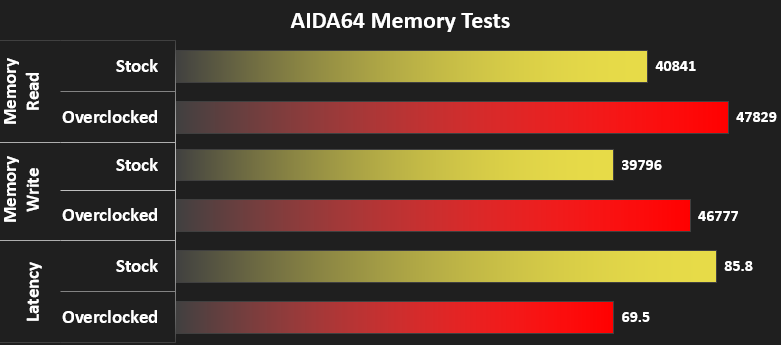
Stock vs Overclocked
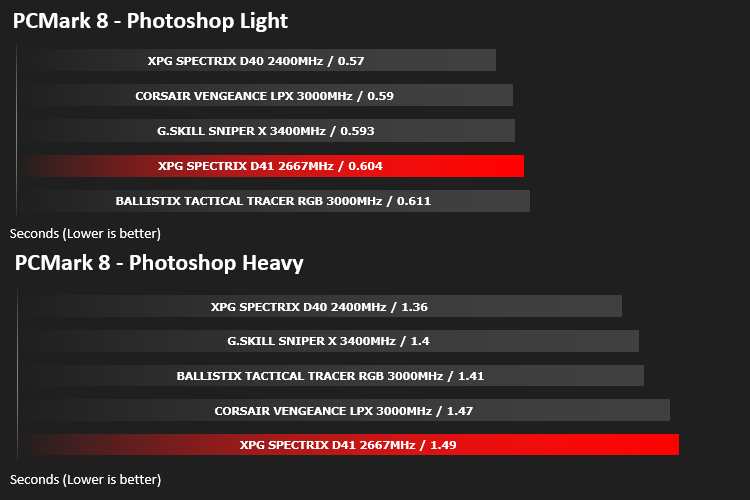
Memory Transfer Performance – AIDA64
AIDA64 Product PageMemory bandwidth benchmarks (Memory Read, Memory Write, Memory Copy) measure the maximum achiveable memory data transfer bandwidth. The code behind these benchmark methods are written in Assembly and they are extremely optimized for every popular AMD, Intel and VIA processor core variants by utilizing the appropriate x86/x64, x87, MMX, MMX+, 3DNow!, SSE, SSE2, SSE4.1, AVX, and AVX2 instruction set extension.
The Memory Latency benchmark measures the typical delay when the CPU reads data from system memory. Memory latency time means the penalty measured from the issuing of the read command until the data arrives to the integer registers of the CPU.
The Memory Latency benchmark measures the typical delay when the CPU reads data from system memory. Memory latency time means the penalty measured from the issuing of the read command until the data arrives to the integer registers of the CPU.
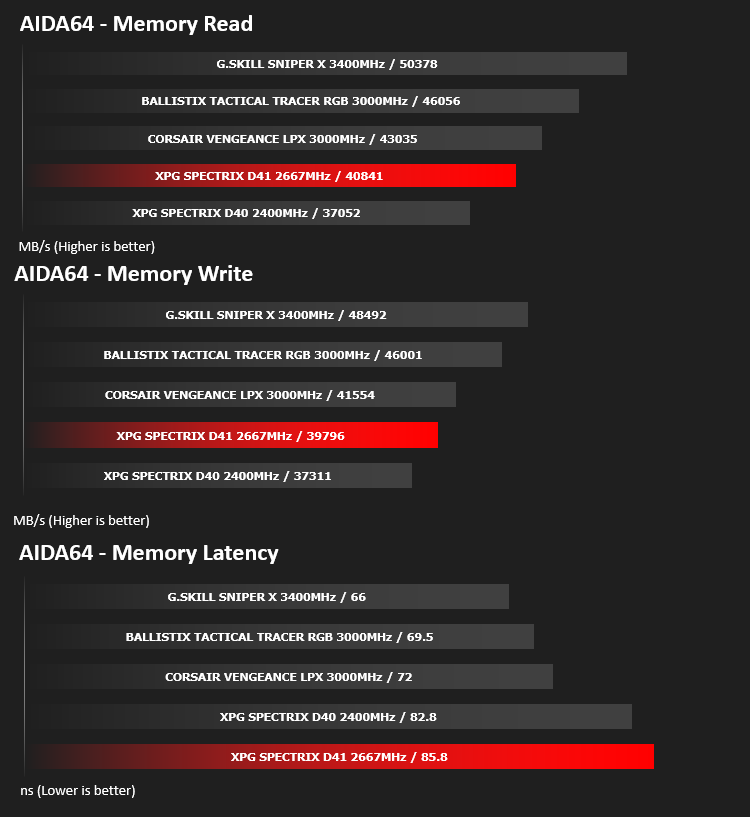
Bandwidth Performance – SiSoftware SANDRA
SANDRA isn’t always a benchmark that is included in hardware reviews but I believe it shouldn’t be ignored. SANDRA provides a vigorous package that tests your system in a rather large array of benchmarks. There are many aspects of benchmark that can be executed.
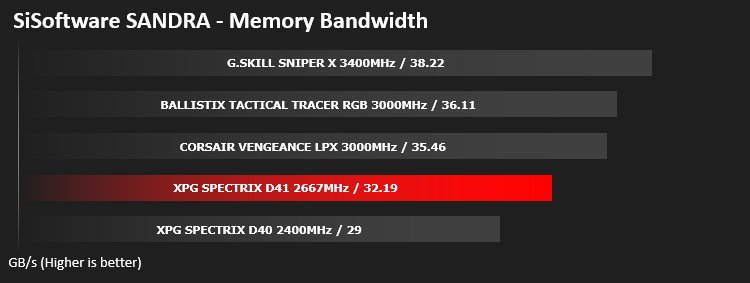
Processing Power Performance – Cinebench R15
CINEBENCH can measure systems with up to 64 processor threads. This test scene contains approximately 2,000 objects which in turn contain more than 300,000 polygons in total, and uses sharp and blurred reflections, area lights, shadows, procedural shaders, antialiasing, and much more. The result is displayed in points (pts). The higher the number, the faster your processor.
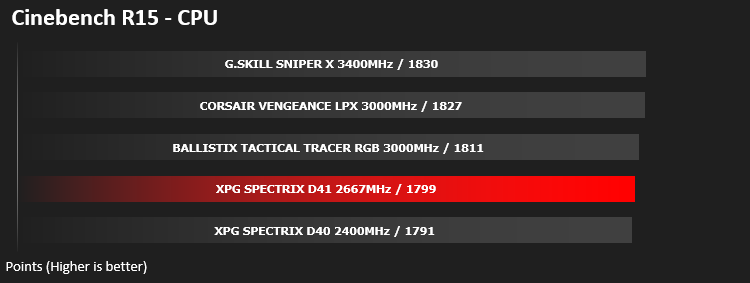
Image Editing Performance – PCMark 8 Photoshop
PCMark 8 Product Page Developed in partnership with Benchmark Development Program members Acer, AMD, Condusiv Technologies, Dell, HGST, HP, Intel, Microsoft, NVIDIA, Samsung, SanDisk, Seagate and Western Digital, PCMark 8 is the latest version in FutureMark’s popular series of PC benchmarking tools. Improving on previous releases, PCMark 8 includes new tests using popular applications from Adobe and Microsoft.
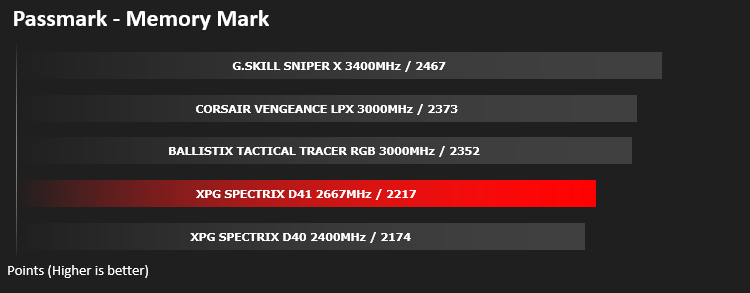
PassMark – Memory Mark
PassMark Performance Test. Fast, easy to use, PC speed testing and benchmarking. PassMark PerformanceTest allows you to objectively benchmark a PC using a variety of different speed tests and compare the results to other computers.
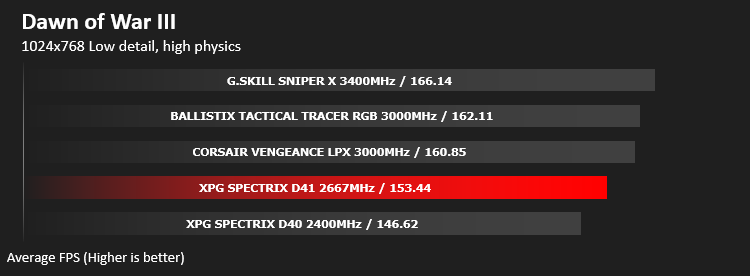
Gaming Performance – Dawn of War III
To test out the benefit of faster memory in a real world scenario, we have taken a recent game and created a CPU limited scenario by reducing the resolution and graphics settings to minimum, while setting the CPU dependent settings at their highest.
Conclusion
Compared to the D40, which was already an impressive show of RGB colours, the D41 has improved upon that remarkably well, mainly by opening up the area and putting less in the way. The newer, more translucent piece also disperses the light much better.Starting the kits at 2667MHz, instead of the typical 2133 or 2400 will help improve performance across the board, but the stock 1.2v obviously leaves a great amount of headroom for overclocking; we managed to extract an extra 466MHz from the kit without any adjustment of the timings, just by boosting the voltage to 1.35v.
You may feel a little put-off by our test results, but the way we test, using only stock settings does hamper this kit somewhat. The overclocking page will illustrate what kinds of improvements you can find if you’re brave enough to fiddle with the settings.
All in, considering how good the RGB lighting looks, the performance and the ease of overclocking, the £168.99 pricetag seems very reasonable for a 16GB DDR4 kit. However, if you’re willing to sacrifice the RGB element for speed, faster kits are available at a similar price tag.
RGB, big heatspreaders and great overclocking at a decent price.
Pros
+ RGB lighting looks awesome
+ Good overclocking performance
+ Great heatspreaders
+ Big improvement over the Spectrix D40
Cons
– Not the best performance “out of the box”
– RGB adds cost
+ RGB lighting looks awesome
+ Good overclocking performance
+ Great heatspreaders
+ Big improvement over the Spectrix D40
Cons
– Not the best performance “out of the box”
– RGB adds cost
Click here for an explanation of our awards at Vortez.net.
Stay connected with the Vortez Social Media pages:
Join in with the discussions on Discord