







We take a look at GA-Z68XP-UD3P GIGABYTE’s mainstream Z68 LGA1155 Sandy Bridge motherboard offering. Will it be just another average motherboard? Let’s find out!

Product on Review: GIGABYTE GA-Z68XP-UD3P 2
Manufacturer and Sponsor: GIGABYTE
Street Price: £135 inc. VAT (At time of review)
With the introduction of the Intel Z68 chipset, P67 has taken a backseat and certainly with some brands is now being phased out. Z68 of course delivers similar specifications but allows discrete GPU and IGP on the Intel 2nd Generation chip to work together, we also have Rapid Storage Technology (SSD Caching). So as things stand, the likelihood is that we will no longer be looking at any further P67 motherboards.
Our current spate of motherboard reviews centred around the LGA1155 socket has dealt mainly with top-end offerings, often with money being no object. Today however things change slightly, we will be taking a look at a mainstream motherboard from GIGABYTE. Not everyone has the cash to splash out on a top of the range motherboard and so today should reveal what level of motherboard can be had within the mid-range sector.
Enter the Z68XP-UD3P, a motherboard adorning that much coveted black/grey colour configuration and looks that could kill. Could this be the ideal motherboard for those seeking a mid-range offering? Let’s find out!
GIGABYTE’s Take on Z68XP-UD3P
About GIGABYTE
• G1-Killer Gaming Motherboard (2011): World’s most advanced weapon for elite gamers.
• USB 3.0 (2010): First motherboard manufacturer to release motherboards with USB 3.0 support.
• Ultra Durable™ Technology: First motherboard manufacturer to implement the following technologies.
Technical Specifications & Features
CPU
• Support for Intel® Core™ i7 processors/Intel® Core™ i5 processors/
• Intel® Core™ i3 processors/Intel® Pentium® processors/Intel® Celeron® processors in the LGA1155 package.
• L3 cache varies with CPU
Chipset
• Intel® Z68 Express Chipset
Memory
• 4 x 1.5V DDR3 DIMM sockets supporting up to 32 GB of system memory
• Support for DDR3 2133/1866/1600/1333/1066 MHz memory modules
• Support for non-ECC memory modules
• Support for Extreme Memory Profile (XMP) memory modules
Onboard Graphics
• Integrated Graphics Processor
• 1 x HDMI port, supporting a maximum resolution of 1920×1200
Audio
• Realtek ALC889 codec
• High Definition Audio
• 2/4/5.1/7.1-channel
• Support for Dolby® Home Theater
• Support for S/PDIF Out
LAN
• 1 x Realtek RTL8111E chip (10/100/1000 Mbit)
Expansion Slots
• 1 x PCI Express x16 slot, running at x16 (PCIEX16)
• 1 x PCI Express x16 slot, running at x8 (PCIEX8)
• 3 x PCI Express x1 slots
• (All PCI Express slots conform to PCI Express 2.0 standard.)
• 2 x PCI slots
Multi-Graphics Technology
• Support for AMD CrossFireX™/NVIDIA SLI technology
• The PCIEX16 slot operates at up to x8 mode when AMD CrossFireX™/NVIDIA SLI is enabled.
Storage Interface
• 2 x SATA 6Gb/s connectors (SATA3_0~SATA3_1) supporting up to 2 SATA 6Gb/s devices
• 4 x SATA 3Gb/s connectors (SATA2_2~SATA2_5) supporting up to 4 SATA 3Gb/s devices
• Support for SATA RAID 0, RAID 1, RAID 5, and RAID 10
• When a RAID set is built across the SATA 6Gb/s and SATA 3Gb/s channels, the system performance of the RAID set may vary depending on the devices being connected.
Marvell 88SE9172 chip
• 2 x SATA 6Gb/s connectors (GSATA3_6, GSATA3_7) supporting up to 2 SATA 6Gb/s devices
• Support for SATA RAID 0 and RAID 1
USB
• Up to 14 USB 2.0/1.1 ports (8 on the back panel, 6 via the USB brackets connected to the internal USB headers)
• 2 x Etron EJ168 chips: Up to 4 USB 3.0/2.0 ports (2 on the back panel, 2 via the USB bracket connected to the internal USB header)
IEEE 1394VIA VT6308 chip
• Up to 2 IEEE 1394a ports (1 on the back panel, 1 via the IEEE 1394a bracket connected to the internal IEEE 1394a header)
Internal I/O Connectors
• 1 x 24-pin ATX main power connector
• 1 x 8-pin ATX 12V power connector
• 4 x SATA 6Gb/s connectors
• 4 x SATA 3Gb/s connectors
• 1 x CPU fan header
• 2 x system fan headers
• 1 x power fan header
• 1 x front panel header
• 1 x front panel audio header
• 1 x S/PDIF Out header
• 3 x USB 2.0/1.1 headers
• 1 x USB 3.0/2.0 header
• 1 x IEEE 1394a header
• 1 x serial port header
• 1 x clearing CMOS jumper
• 1 x Trusted Platform Module (TPM) header
Back Panel Connectors
• 1 x PS/2 keyboard/mouse port
• 1 x optical S/PDIF Out connector
• 1 x IEEE 1394 port
• 1 x HDMI port
• 8 x USB 2.0/1.1 ports
• 2 x USB 3.0/2.0 ports
• 1 x RJ-45 port
• 6 x audio jacks (Center/Subwoofer Speaker Out/Rear Speaker Out/Side Speaker Out/Line In/Line Out/Microphone)
I/O Controller
• iTE IT8728 chip
H/W Monitoring
• System voltage detection
• CPU/System temperature detection
• CPU/System/Power fan speed detection
• CPU overheating warning
• CPU/System/Power fan fail warning
• CPU/System fan speed control
BIOS
• 2 x 32 Mbit flash
• Use of licensed AWARD BIOS
• Support for DualBIOS™
• PnP 1.0a, DMI 2.0, SM BIOS 2.4, ACPI 1.0b
Unique Features
• Support for @BIOS
• Support for Q-Flash
• Support for Xpress BIOS Rescue
• Support for Download Center
• Support for Xpress Install
• Support for Xpress Recovery2
• Support for EasyTune
• Support for Dynamic Energy Saver™ 2
• Support for Smart 6™
• Support for Auto Green
• Support for eXtreme Hard Drive (X.H.D)
• Support for ON/OFF Charge
• Support for Cloud OC
• Support for 3TB+ Unlock
• Support for TouchBIOS
• Support for Q-Share
Bundle Software
• Norton Internet Security (OEM version)
• Intel® Smart Response Technology
• LucidLogix Virtu
Operating System
• Support for Microsoft® Windows® 7/Vista/XP
Form Factor
• ATX Form Factor; 30.5cm x 24.4cm
Bundle & First Look
The UD3P that we received admittedly didn’t arrive in a box using the retail packaging. Our sample was one of the first to arrive in the UK and so at the time GIGABYTE didn’t have packaging ready. Rest assured though, the UD3P you will buy off the shelf will come in a retail box.
The UD3P bundle consists of the following:
• Documentation – Manual, Smart Response Guide, Installation Guide
• 4x SATA 3 (6Gbps) Cables
• SLI Bridge
• I/O panel for chassis
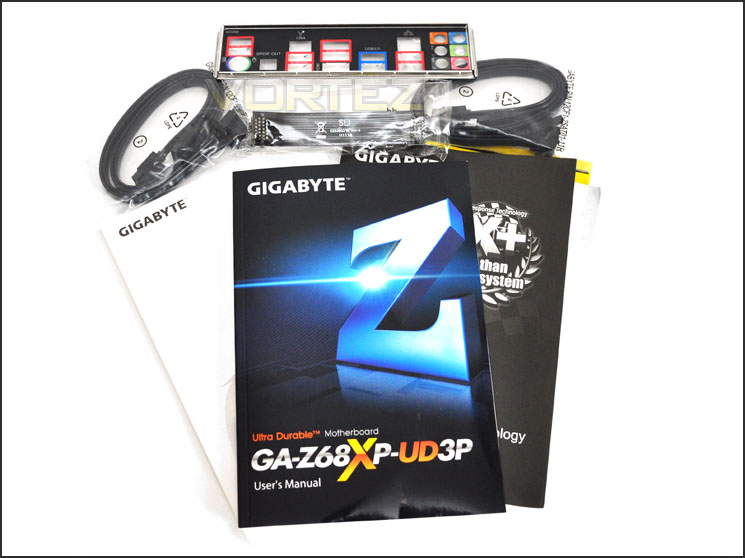
The UD3P bundle
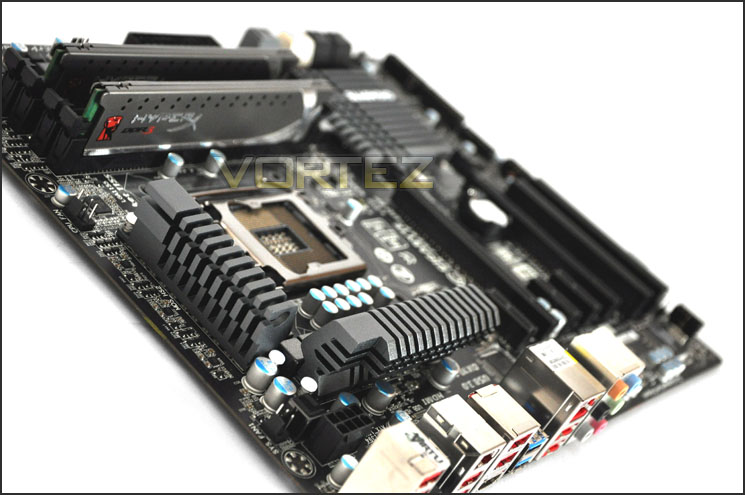
The motherboard itself is very much in keeping with GIGABYTE’s revamped colour configuration of black/gunmetal. The layout and design is very similar to the recently reviewed Z68X-UD4 – the obvious physical difference being the heatsinks on the MOSFETs of the UD3P are smaller.
For a mainstream motherboard the UD3P looks aesthetically pleasing. It ticks all the boxes in terms of its physical appearance – over the page we will take a closer look at each section.
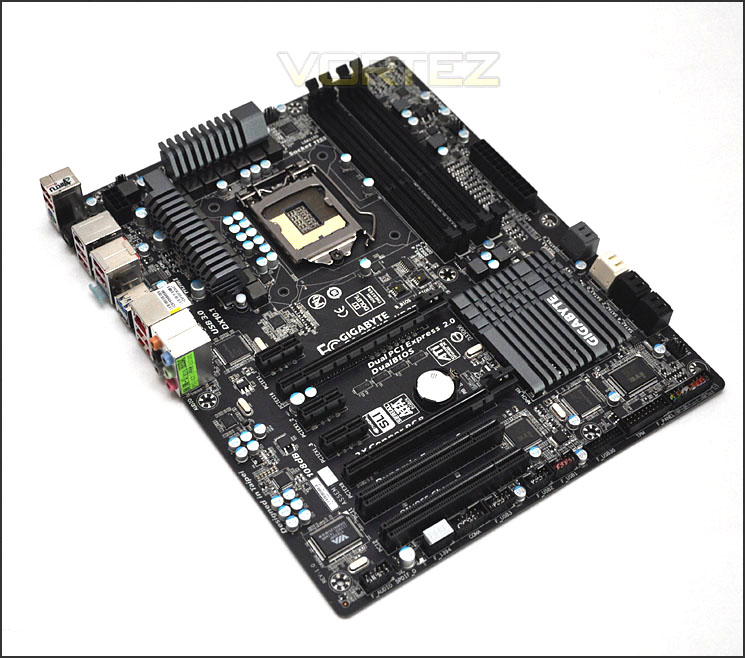
An overview of the UD3P. Black/Gunmetal fares well
Closer Look
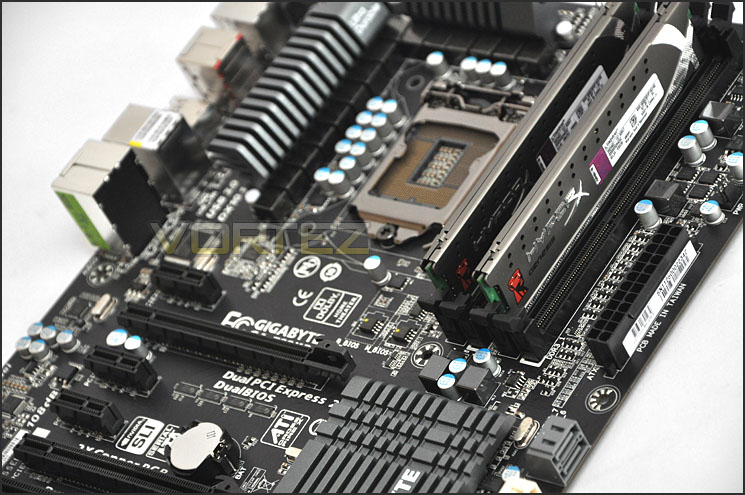
Moving in for a closer look the UD3P takes advantage of a 12-Phase Power design and utilises a similar heatsink design to that of the other Z68 U series of motherboards. Using the Intel Z68 chipset the UD3P is of course LGA1155 and will therefore work hand-in-hand with Intel’s 2nd Generation Core i7/i5/i3 processors. The UD3P has an 8-pin socket for EATX power – you can use 4-pin but it’s advisable to use 8 for better stability, especially for overclocking.
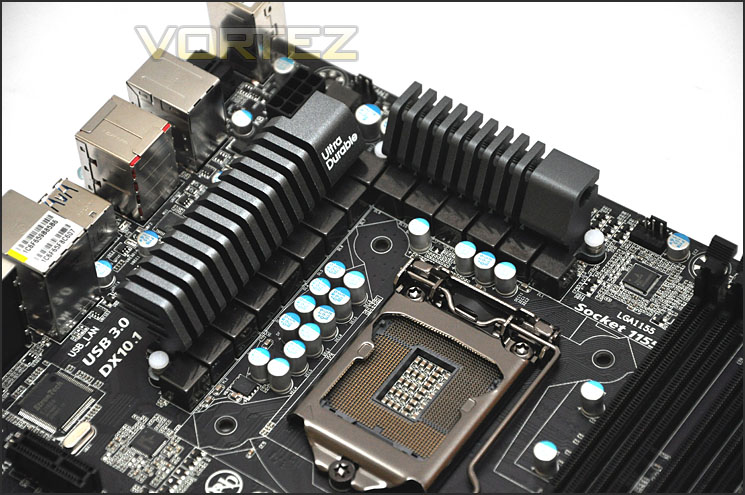
12 Phase Power Design and gunmetal heatsinks covering MOSFETs
Being Sandy Bridge we have support for dual channel DDR3 memory. There is support for Intel XMP and for a maximum of 32GB – 1066MHz to 2133MHz.
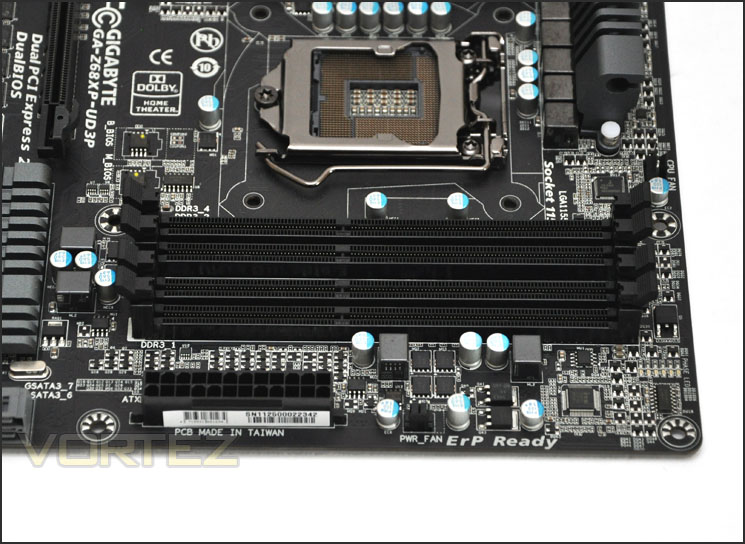
The memory slots on UD3P – dual channel DDR3 (1066MHz to 2133MHz)
Further along the motherboard we have the SATA storage ports. There are 4x SATA 2 (Black) and 4x SATA 3 – 6Gbps (White/Grey). The SATA 3 ports share two different controllers – 2x ports are supported via the Intel Z68 and another 2 via Marvell 88SE9172. These ports are placed precisely along the edge of the motherboard so that right-angled SATA cables will fit perfectly.
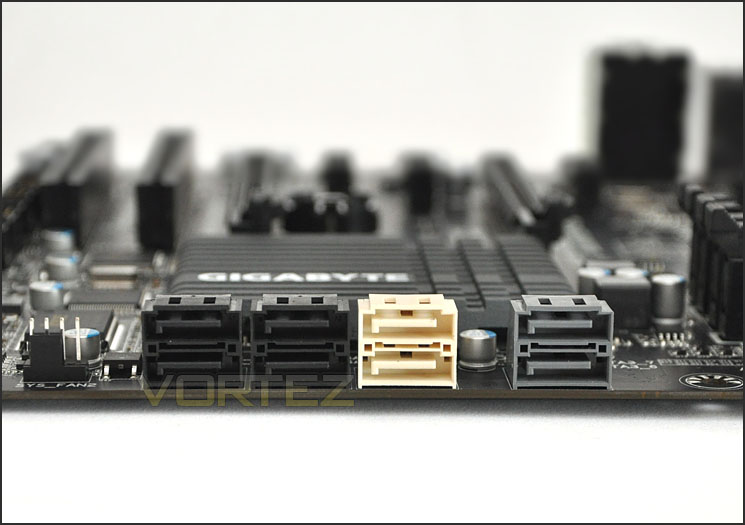
Storage – SATA 2 and SATA 3
Pictured below you can see the large heatsink that covers the Intel Z68 chip on the UD3P. At the bottom of the UD3P there are 2x USB2.0 headers giving a total of 6x USB 2.0 ports. We also have a USB3.0 header in this region, this gives us 2x USB3.0 ports.
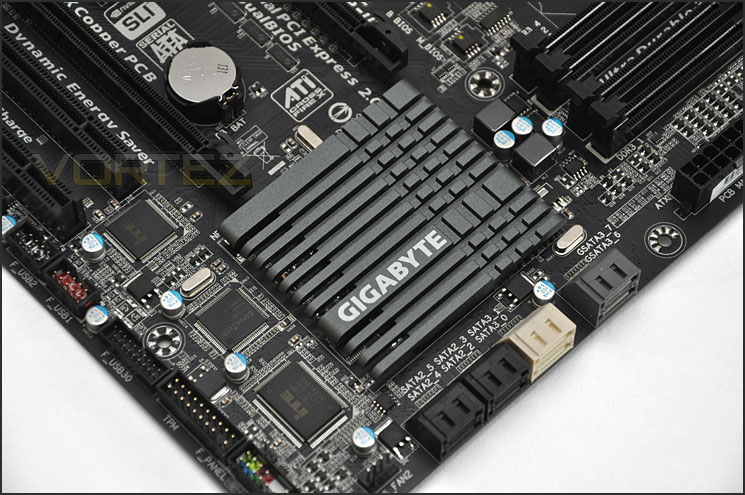
Intel Z68 chip with large heatsink
Moving to the PCI-E lanes we have 2x PCI-E 2.0. The top lane will provide x16 whilst the lower lane will deliver x8. If you do intend to go with a dual graphics card configuration then the speed will drop on both of the cards to x8 as this is shared. In this region we also have 3x – x1 PCI-E 2.0 lanes and another 2x PCI for older devices such as sound cards.
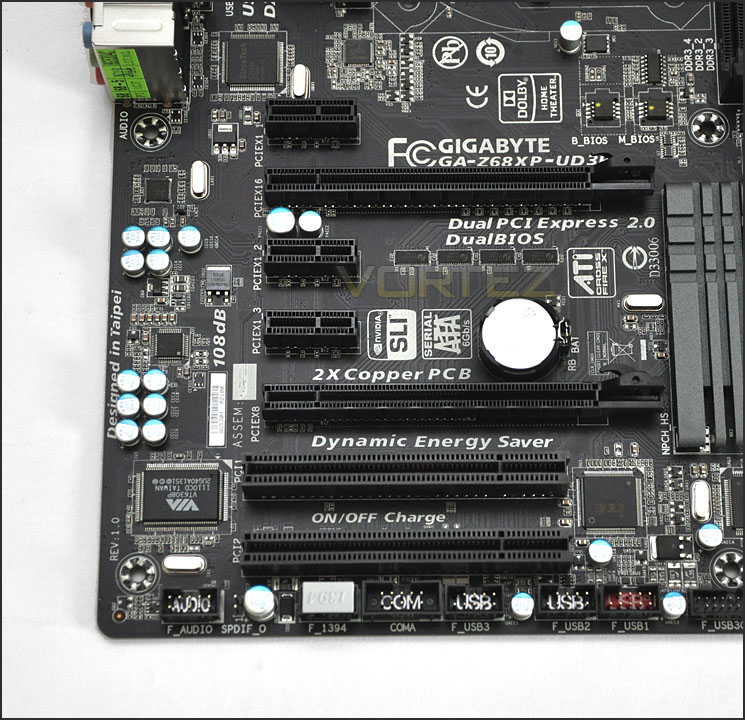
SLI and CrossfireX compatibility with UD3P
Finally, turning our attention to the I/O we have the following ports:
• 1 x PS/2 keyboard/mouse port
• 1 x Optical S/PDIF Out connector
• 1 x IEEE 1394 port
• 1 x HDMI port
• 8 x USB 2.0/1.1 ports
• 2 x USB 3.0/2.0 ports
• 1 x RJ-45 port
• 6 x Audio jacks via Realtek ALC889
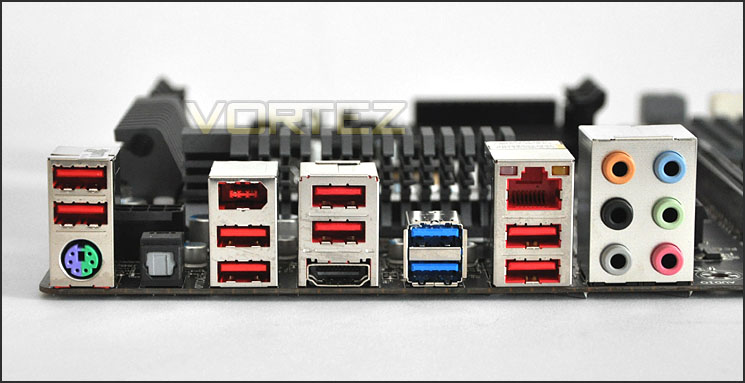
The I/O panel on the UD3P
Touch BIOS
For those who have built their own computers, there is a strong possibility that you have switched into the BIOS to alter settings. Perhaps the boot priority for a Windows install. The BIOS is quite an archaic tool. To the novice, the interface can appear quite daunting and let’s be honest, they are far from user-friendly.
So, GIGABYTE have developed an innovative new windows based BIOS application that will bridge that gap for those who perhaps aren’t familiar with BIOS modification. If you have a touch-screen monitor you can even navigate the interface via your fingers!
Touch BIOS is actually a very handy tool. It saves you having to reboot and hit that del key. You can simply switch to BIOS whilst in Windows and check or tweak settings. Surely this will encourage the novice to experiment with altering aspects of the BIOS – because it is presented in such a friendly manner. Here are some screenshots of the Touch BIOS on our test machine, showing some of the available options and a video by GIGABYTE, demoing the new Touch BIOS.


Test Setup & Overclocking
CPU Intel Core i5 2500K (3.3GHz)
Motherboards
– GIGABYTE Z68XP-UD3P
– ASRock Extreme4 Gen3
– MSI Big Bang Marshal
– ASUS Maximus IV Extreme
– GIGABYTE Z68-UD4
– Foxconn Rattler P67
– ASUS Sabertooth P67
– ASUS P8P67 (LGA1155)
– Foxconn P67A-S
– ECS P67H2-A (Black Extreme)
Memory 4GB Kingston HyperX Genesis CL9 1600MHz
CPU Cooler Noctua NH-D14
Graphics ZOTAC GTX 460
PSU OCZ Fatal1ty 750W
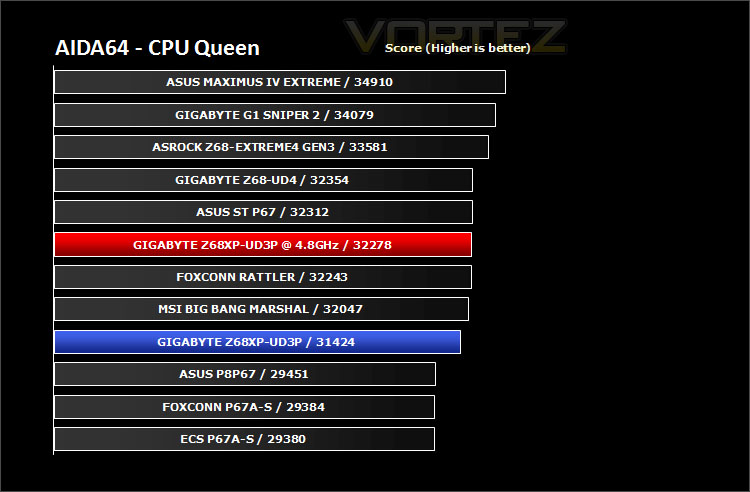
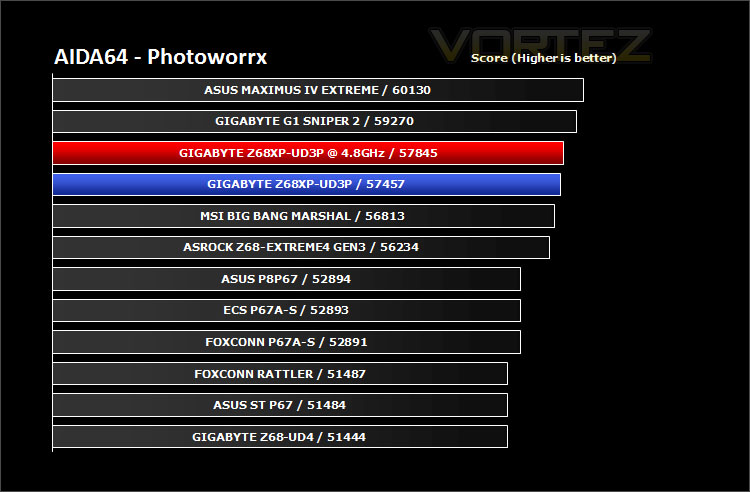
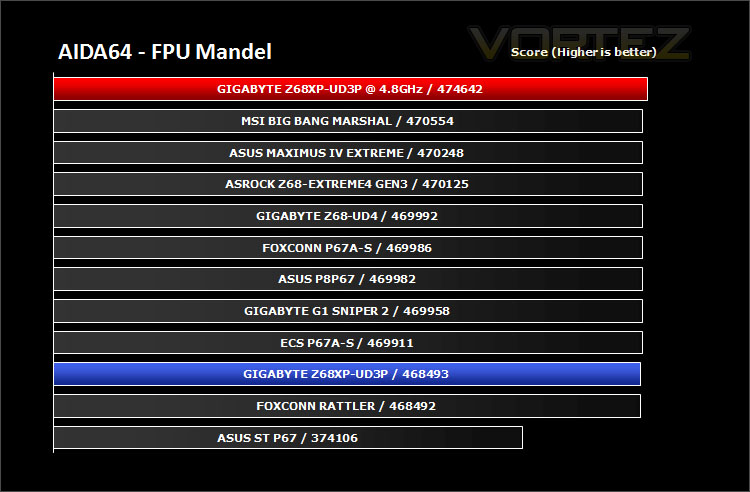
All P67 Sandy Bridge motherboards will be benchmarked against each other using the Intel Core i5 2500K. The maximum overclock will also be included within the proceeding benchmark tests to identify performance gains as a result of tweaking CPU clock speed via the multiplier.
Overclocking
As previously mentioned in our Intel Core i5 Sandy Bridge Roundup – overclocking is achieved by altering the multiplier rather than the BCLK. So the BCLK stays at 100MHz and the multiplier is modified. So if we have 100MHz on the BCLK and 40 for the multiplier this will obviously output 4GHz. We chose to use the Intel Core i5 2500K across each of the motherboard tests and indeed for the overclocking due to its unlocked multiplier.
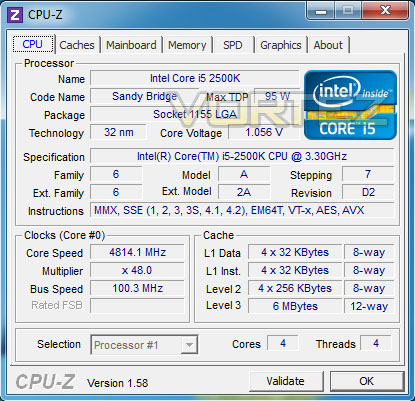
With overclocking simplified on Sandy Bridge, this means that achieving the best overclock couldn’t be easier. CPU voltage and multiplier just need to be modified accordingly. The ultimate milestone is 5GHz on air cooling for the Intel Core i5 2500K, my immediate action was to set the multiplier at 50 and increase voltages to sustain this overclock. I soon began to have problems with this, altering PLL, VTT and increasing the CPU voltage to 1.5v still wasn’t enough to allow for a stable overclock. It did boot but during stress testing using LinX I was soon given a BSOD. So the work then began with slowly moving backwards whilst having higher voltages to establish the best frequency overclock.
So, from here I began moving the multiplier back whilst keeping reasonably high voltages in place – 4.8GHz (40 x 100) was ultimately the overclock result that was stable. CPU voltage being 1.475v and PLL 1.9v. Note CPU-Z screenshot displayed the voltage incorrectly… as you will appreciate overclocking 4.8GHz would not be possible on 1.044v!
Power Consumption
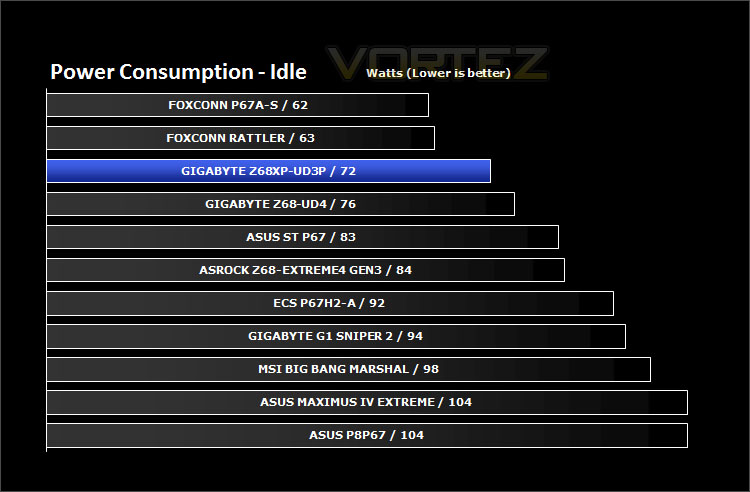
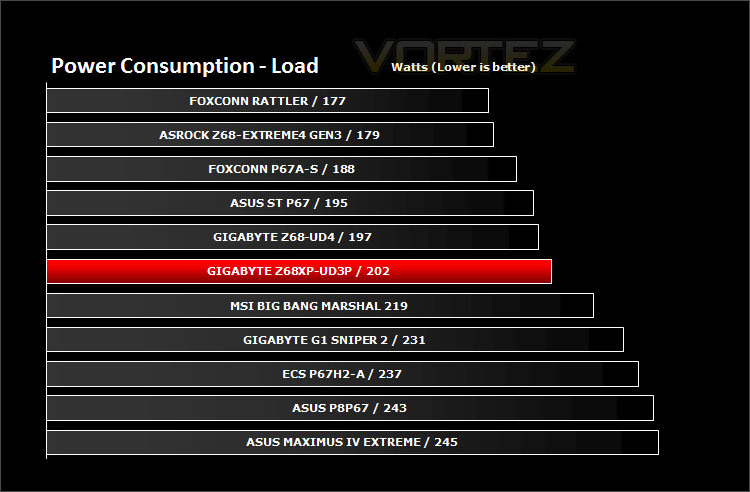
When it comes to energy efficiency the UD3P is actually very reasonable. Compare to the motherboard to some of the ASUS equivalents and its plain to see that on this front the UD3P is a winner.
Synthetic Benchmarks: AIDA64
Get your copy of AIDA64 here!CPU Queen
CPU Photoworrx
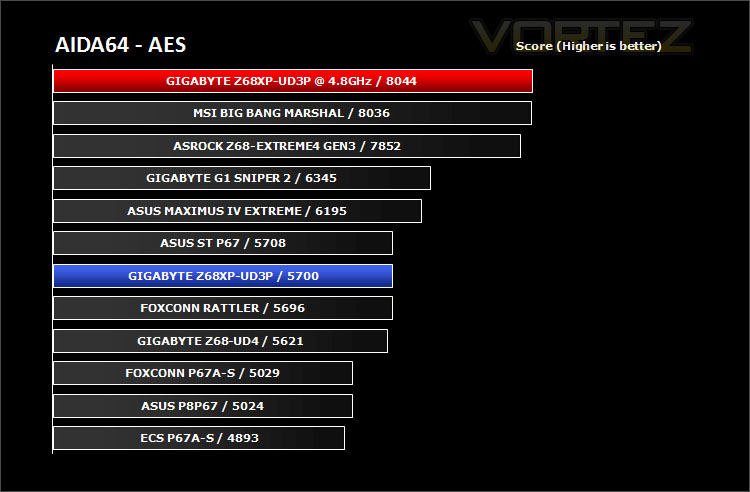
CPU AES
CPU AES test uses only the basic x86 instructions, and it’s hardware accelerated on VIA PadLock Security Engine capable VIA C3, VIA C7 and VIA Nano processors; and on Intel AES-NI instruction set extension capable processors. The test is HyperThreading, multi-processor (SMP) and multi-core (CMP) aware.
FPU Mandel
Synthetic Benchmarks: x264 HD
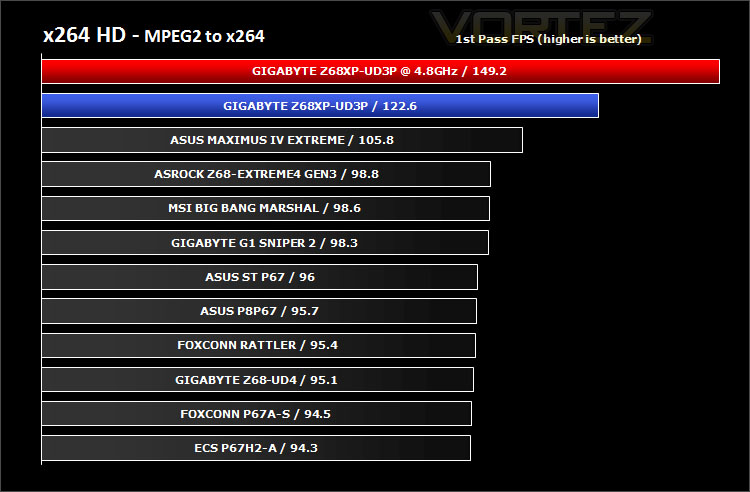
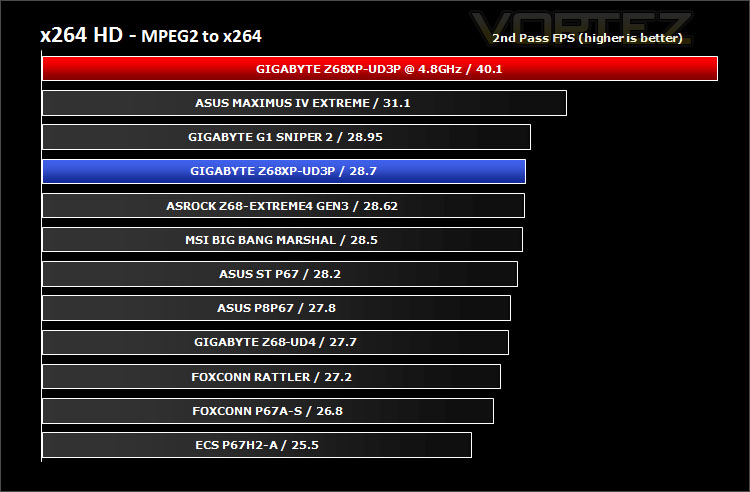
x264 HD gives results for 2 passes when compressing an MPEG-2 clip into x264. It presents 4 separate results for each pass giving a total of 8 – all results are given in FPS. For each pass I have averaged out the results.
The UD3P delivers some excellent performance figures when being used for video encoding. Overclocking clearly gives a distinct advantage.
Synthetic Benchmarks: Cinebench 11.5
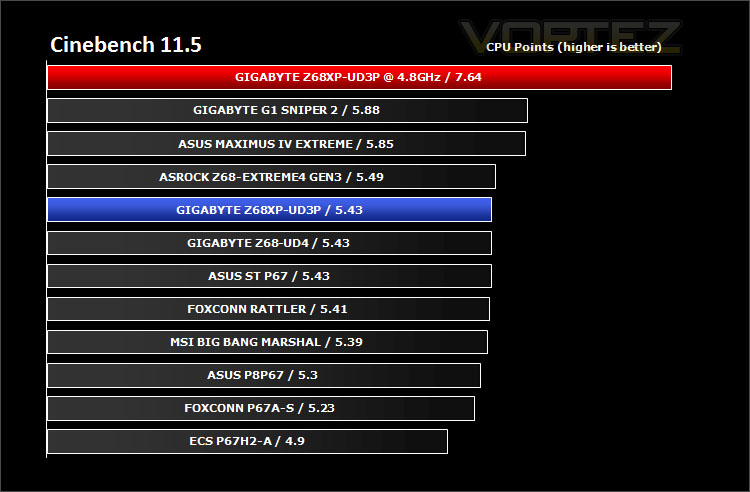
For our Cinebench CPU score the UD3P settles amongst some of the flagship motherboards. An overclock of 4.8GHz ensures a clear win.
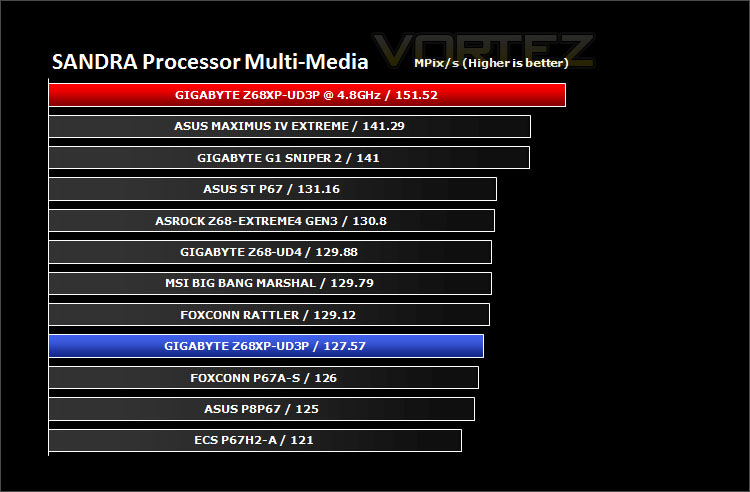
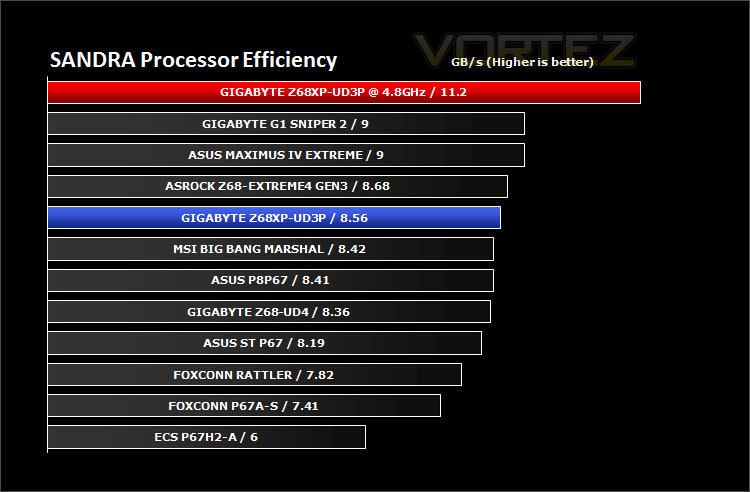
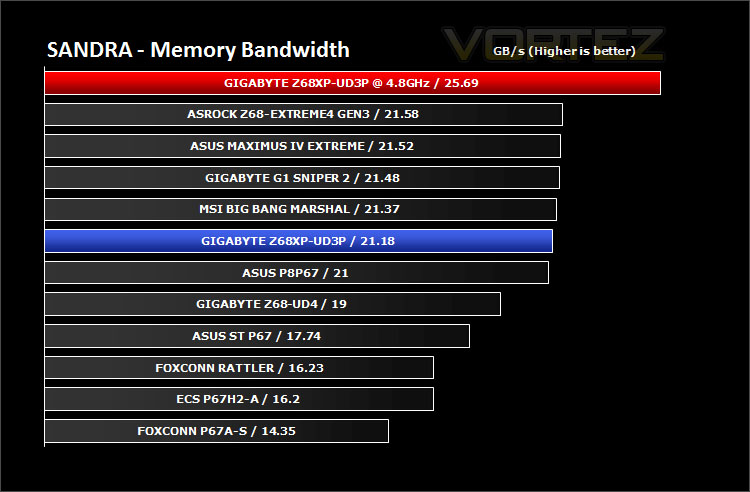
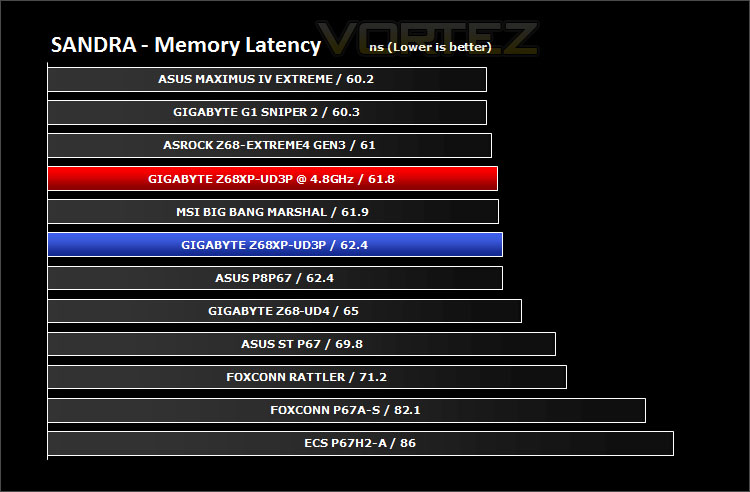
Synthetic Benchmarks: SiSoftware SANDRA 2011
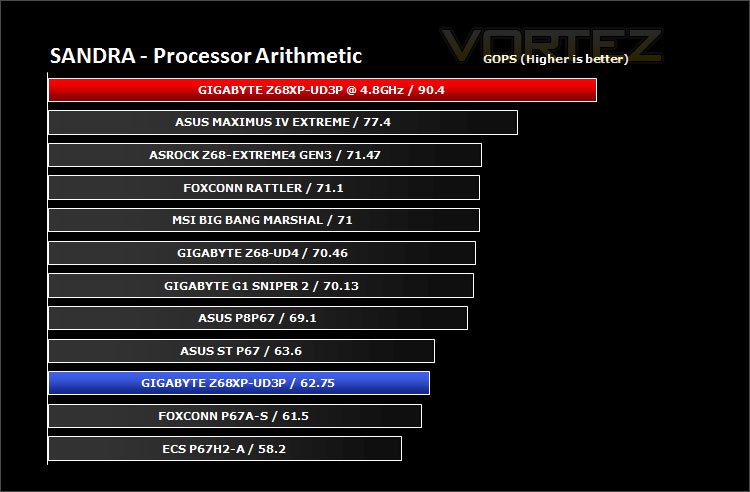
Processor tests – Whilst the UD3P does fall back slightly in these tests – take note of the actual difference between each motherboard, it isn’t much at all. Overclocking provides an increase in bandwidth/processing power.
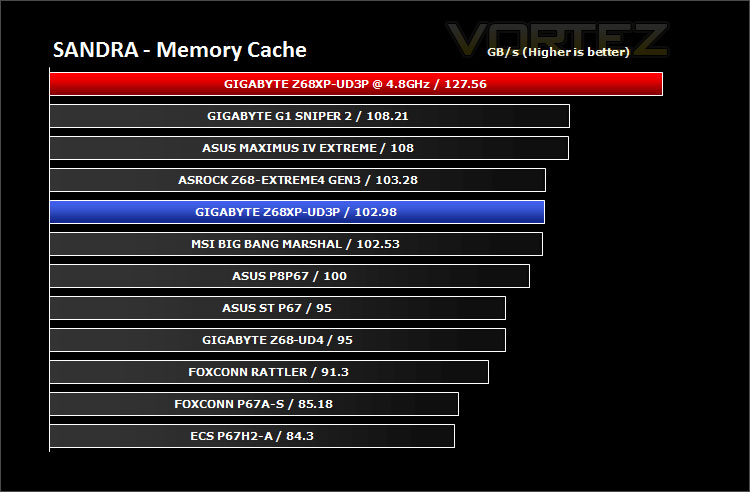
Memory tests– Whilst the results in this arena of testing are fairly nominal in difference the UD3P still performs consistently.
Synthetic Benchmarks: 3DMark 11
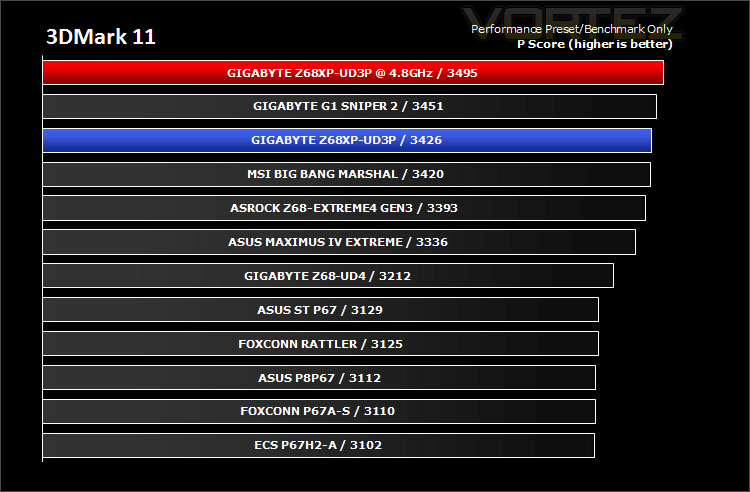
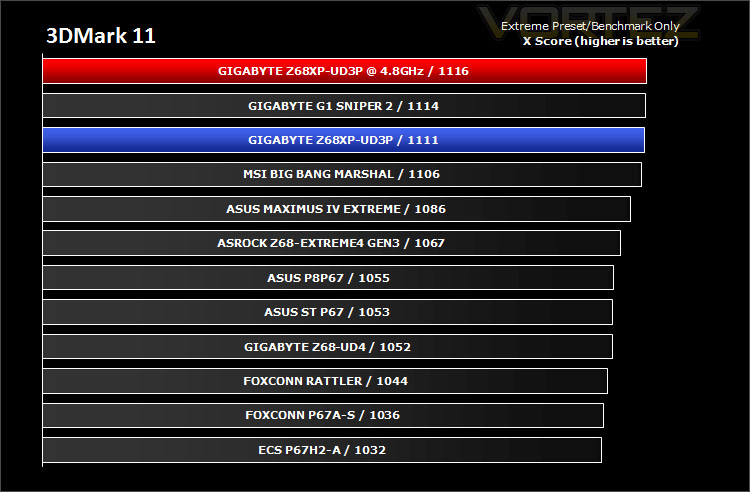
3DMark 11 was released at the end of last year and needs little introduction. For the test settings both Performance and Extreme presets are run with ‘benchmark only’ being selected. This provides good analysis. Many will only test the performance preset, using the extreme mode we can examine the board under much more severe stressing.
There isn’t much to separate the motherboards in both our performance and extreme 3DMark 11 benchmarks. The UD3P does however set the standard – revealing that this mainstream motherboard isn’t to be underestimated.
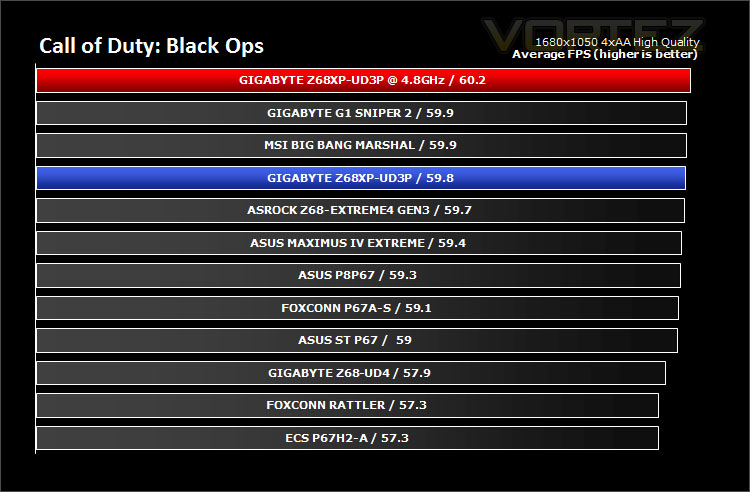
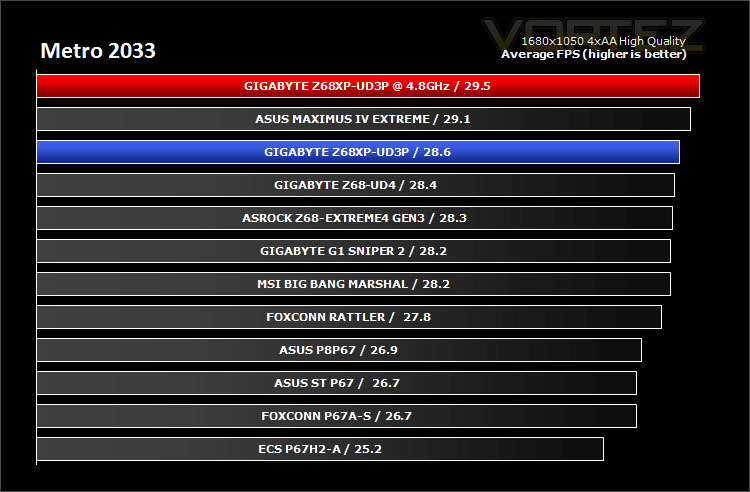
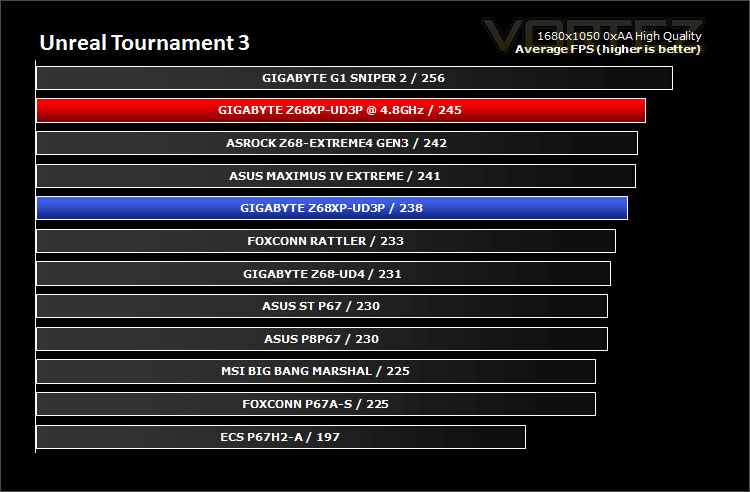
Game Benchmarks: DIRT 2, Call of Duty Black Ops, Metro 2033. UT3
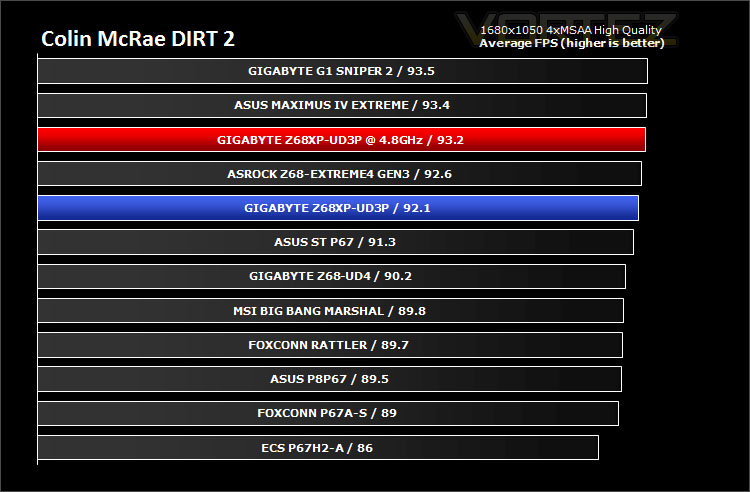
Gaming performance across each of the motherboards is fairly marginal and as we discover in most of the motherboard reviews there isn’t a great deal to separate the competition.
Conclusion
It’s hard to deny the visual attraction with GIGABYTE’s current lineup of Sandy Bridge motherboards. The black and gunmetal appearance is an instant distinction and has proved very popular throughout the hardware communities the world over.
Today we have taken a step back from top-end Intel Z68 performance to consider a mainstream offering from GIGABYTE. So how does the Z68XP-UD3P shape up?
Well in terms of price to performance ratio the UD3P is excellent. In a range of scenarios the UD3P delivers similar/better performance figures against some of the flagship motherboards from a series of top brands. So certainly in this aspect, if you are looking for a decent motherboard with the possibility of moving to a dual graphics card configuration in the future then the UD3P is bang on the money.
At one time I would have had no qualms in recommending the ASUS P8P67 to those who are seeking a mainstream motherboard that offers great performance at a nice price-point but the GIGABYTE Z68XP-UD3P now nudges this out of the way. It offers better performance, better overclocking potential, is capable of both SLI and CrossfireX and also has the added onboard VGA functionality thanks to the Z68 chipset should you need it.
Priced at approx. £135 inc. VAT (GBP) the UD3P is a very sensible investment. It is one of the best mainstream Intel Z68 motherboards that money can buy. The UD3P comes with almost all the features you could expect, the only thing really missing is the lack of UEFI – though we do have the ability to use Touch BIOS within Windows.
Bottom line is:The Z68XP-UD3P looks great, offers consumers great performance and comes at an affordable price-point. One of the best mainstream motherboards using the Intel Z68 chipset we have tested.
+ Aesthetically pleasing – looks great
+ Great performance from a mainstream product
+ Overclocks well
Cons
– No UEFI


Click here for an explanation of our awards at Vortez.net.


