







Are you looking for an multimedia entertainment unit to sit beside your TV? MC001-BD featuring Intel Atom, Bluray, USB 3.0, WiFi and much more!

Manufacturer and Sponsor: ARCTIC
Customised configuration Price: £500+ inc. VAT
Over the last few years ARCTIC have been delving into various different markets in an attempt to be the ‘all singing – all dancing’ brand. From gaming consoles to remote controlled vehicles ARCTIC aren’t ashamed of their passion to cater for your every need. They originally rose to notoriety with their cooling products and still continue to produce solid products in this segment but today we will be taking a look at something that features within their “Entertainment Center” section called the MC001-BD.
Designed to give the consumer access to all their multimedia needs the MC001-BD is a passively cooled compact computer system which comes with Windows 7 Home Premium and a long list of useful features such as a Bluray drive, USB 3.0 ports, WiFi and much more. Follow us as we put this new unit under the spotlight and reveal its true characteristics.
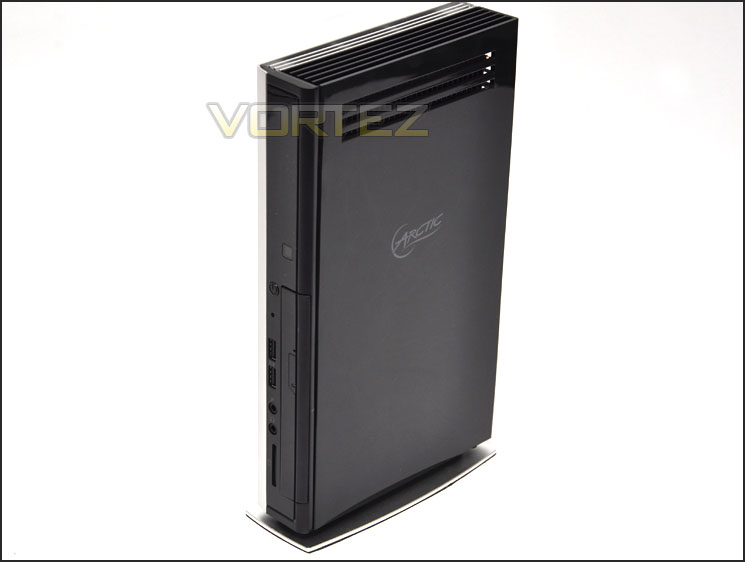
ARCTIC’s take on MC001-BD
The ARCTIC MC001-BD has more to offer than a PC or a multi-media streamer – it’s a refined entertainment center which combines both devices. With MC001-BD, you can spice up your leisure time with movies, music, TV and radio programs and enjoy all sorts of web-based activities ranging from checking emails, reading news, shopping online, social networking and many more. Be inspired by the possibilities that an MC001-BD offers for your digital home.
Technical Specifications
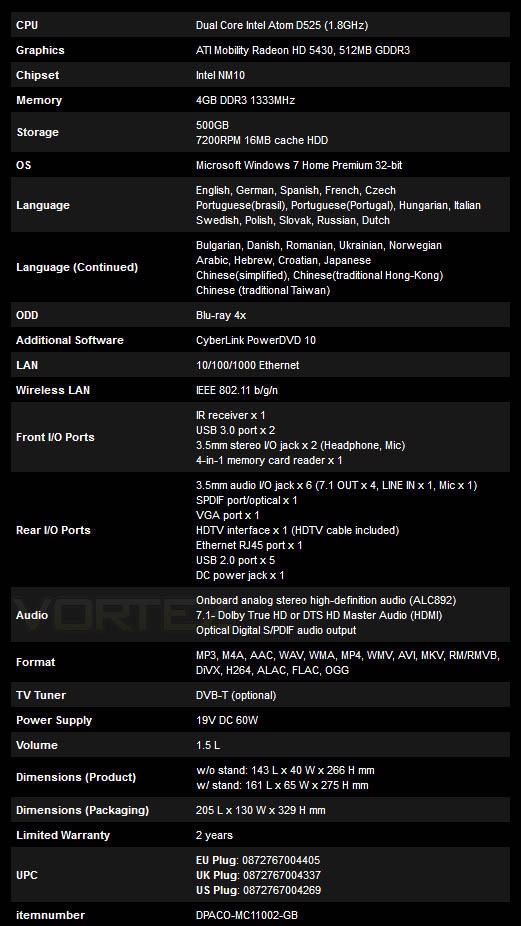
Packaging & Bundle
The MC001-BD is presented in a small white box – the front having a depiction of the device along with the featured brand logos for each aspect of the MC001-BD’s hardware/software. The back of the box lists the technical specifications and has a picture of the back panel so that you know exactly what you are getting.
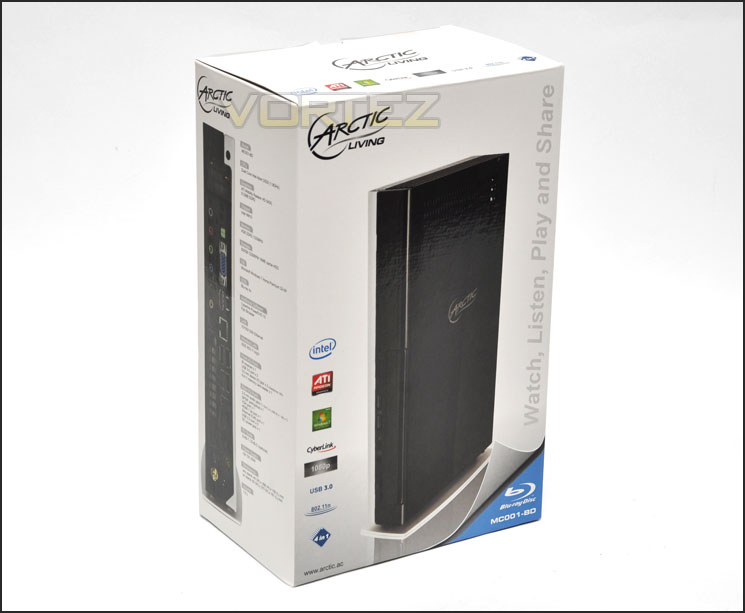
MC001-BD packaging
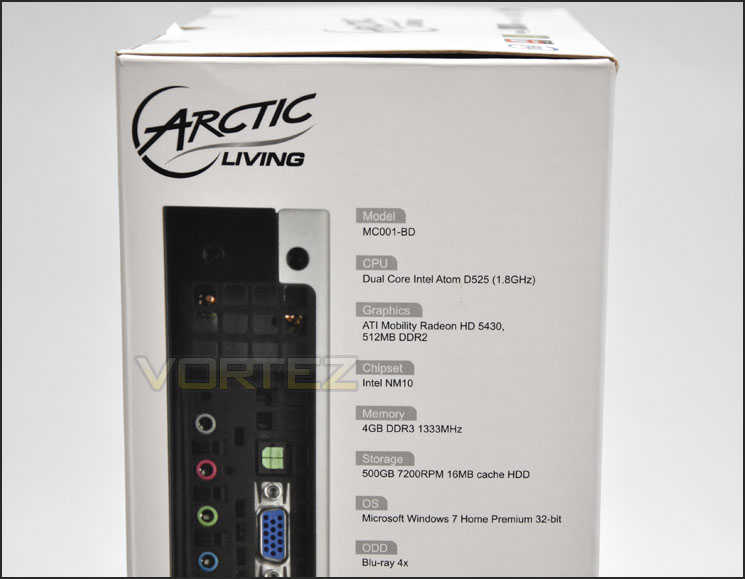
The side of the box with detailed specifications
Opening the box and removing the entire contents we have a rather extensive set of bundled accessories that allow you to get on your way with making the most of MC001-BD. Included in the bundle are the following:
• MC001-BD covered in padded foam
• DC adapter for power
• Instructions manual
• Warranty card
• Windows 7 32bit OEM
• Premium HDMI cable
• Cyberlink BD Solutions disc
• Wireless antenna
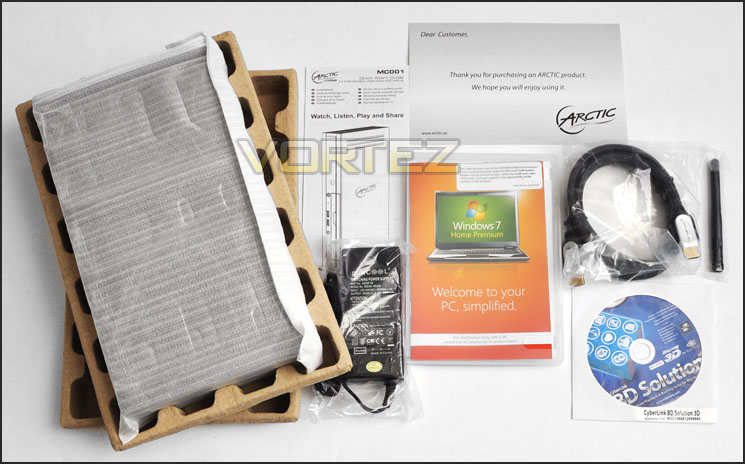
Plenty of items within the bundle
With MC001-BD unboxed, let’s now take a closer look at the device itself over the page.
Closer Look (External)
The MC001-BD has a two-tone colour configuration with one side having a black glossy plastic fascia and the other a more robust silver, metal cover. MC001-BD is extremely slime-line and will combine very well with any TV. It can be positioned as pictured – standing upright or the base plate can be removed so that the device lies flat.
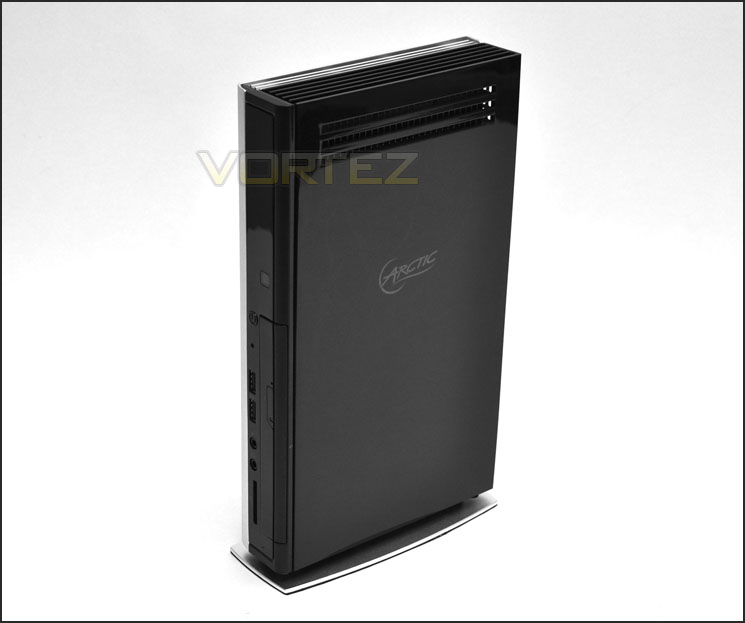
An overview of MC001-BD
At the top of MC001-BD are the heatsink ventilation slots. The heatsinks on the underside of this cover rest on top of the Intel Atom D525 processor. The beauty with the MC001-BD is that it offers a silent entertainment solution – there are no fans at all within the unit. The only component that does generate noise is the Bluray drive.
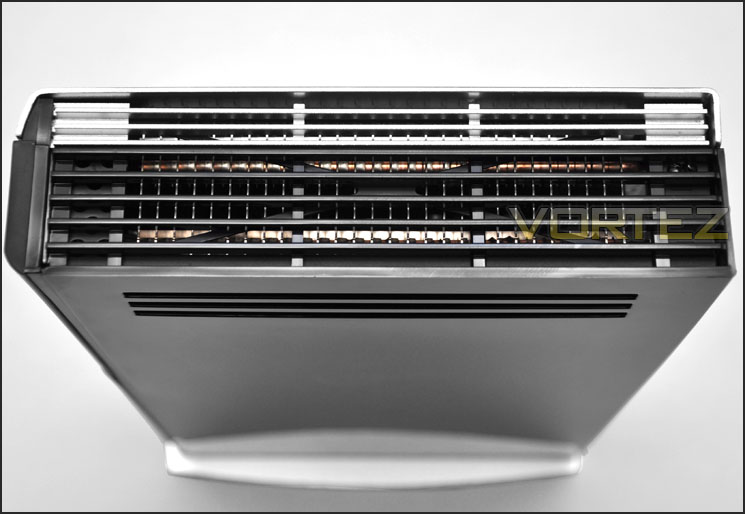
Heatsinks dissipate heat – no fans within MC001-BD
At the front of the unit are an assortment of ports including the Bluray 4x drive. Here we have the following ports:
• 1x SD card slot
• Headphone/Microphone jack
• 2x USB 3.0 ports
• Power button with blue LED
• Activity LED
It’s great to see that our unit has USB 3.0 ports but I’m slightly disappointed the MC001-BD only has a 4x Bluray drive – 10x and 12x are pretty much the standard nowadays and this unit would have benefitted more from having a faster drive due to the limited hardware inside.
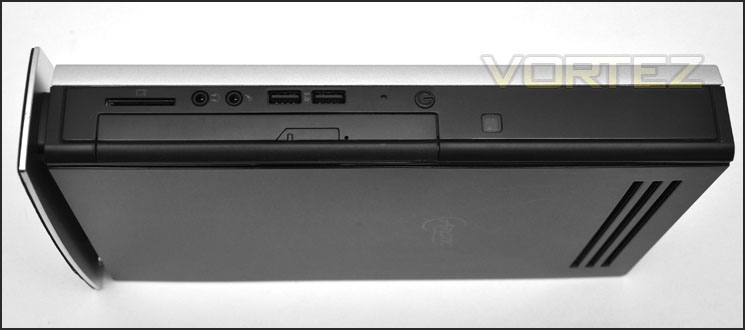
The front features USB 3.0 ports and a 4x Bluray drive
Spinning the MC001-BD round to the back we have even more ports for audio, visual and input/output. Included here are the following:
• Audio ports x6 – Side, Mic, Out, In, Surround, Center/Sub
• SPD/IF Optical Audio
• VGA port
• HDMI port
• RJ45 LAN (Gigabit) port
• 5x USB 2.0 ports
• AC Power
• Wireless antenna
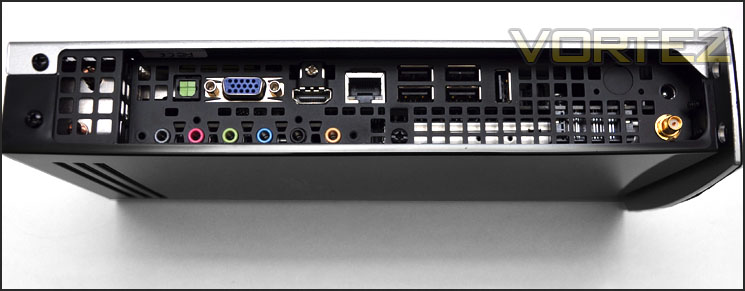
Ports on the back of MC001-BD
Finally onto the underside of the unit. This baseplate can be removed depending on which orientation you would like the MC001-BD to be in. The underside of the baseplate has a soft foam material for both anti-slip and anti-scratch. For those wondering where the Windows 7 serial is (it isn’t in the documentation) it can be found on the base of the unit.
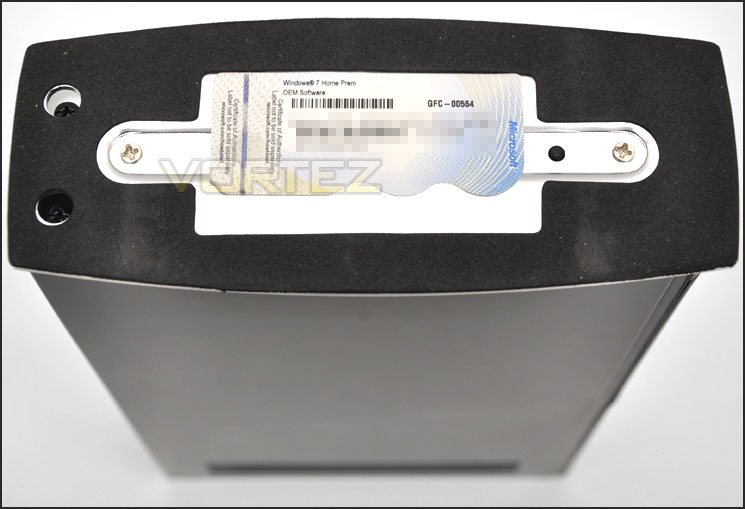
The underside of MC001-BD with Windows 7 serial
With the external inspection over let’s go inside for a close look at the components that MC001-BD uses over the page.
Closer Look (Internal)
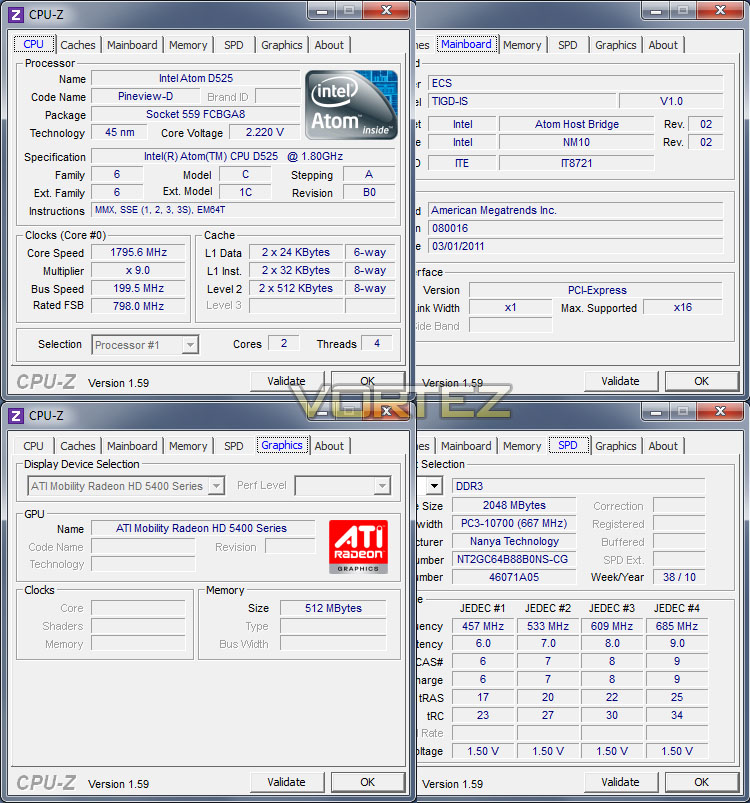
After removing various screws the cover on MC001-BD just simply slides off revealing the inner workings. One of the biggest selling points about this unit is that it features no cooling fans and is completely silent having only heatsinks for dissipation. The motherboard is provided by ECS and is the TIGD-IS (Mini ITX) and uses the Intel Atom D525 (Pineview-D) processor which is dual core and operates at 1.79GHz.
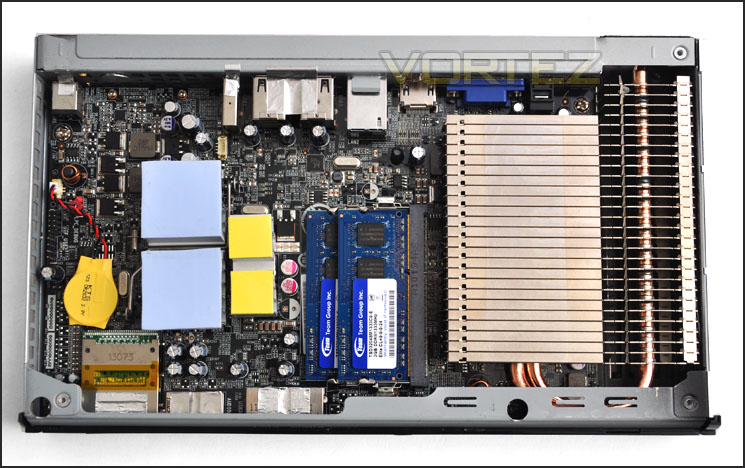
An overview of the components within MC001-BD
Covering the Intel Atom chip is a rather large heatsink. This uses a dual copper heatpipe design and promises to keep the CPU cool even under load.
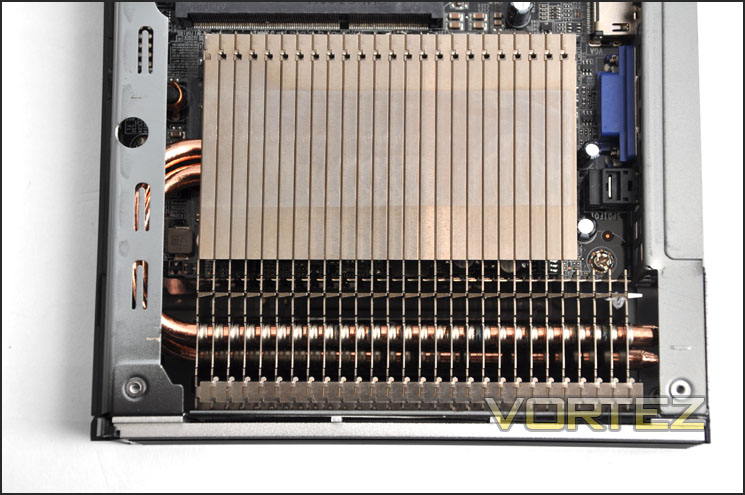
Large fanless CPU heatsink
System memory is provided by Team Group – 4GB 1333MHz DDR3 with CAS timings of 9-9-9-24. This should be more than sufficient for entertainment purposes.
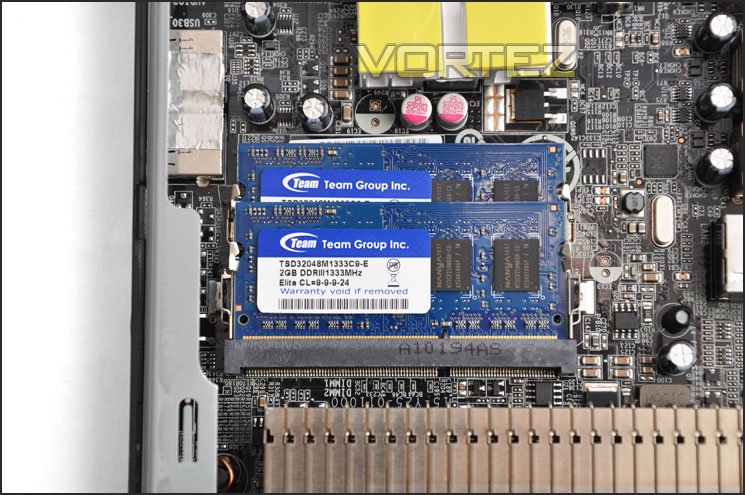
4GB 1333MHz DDR3 for memory usage
Spinning the unit over – on the underside is where the HDD sits. This is a Hitachi 500GB
7200RPM 16MB cache 2.5” SATA HDD. Fast and ready to be loaded with all your entertainment data!
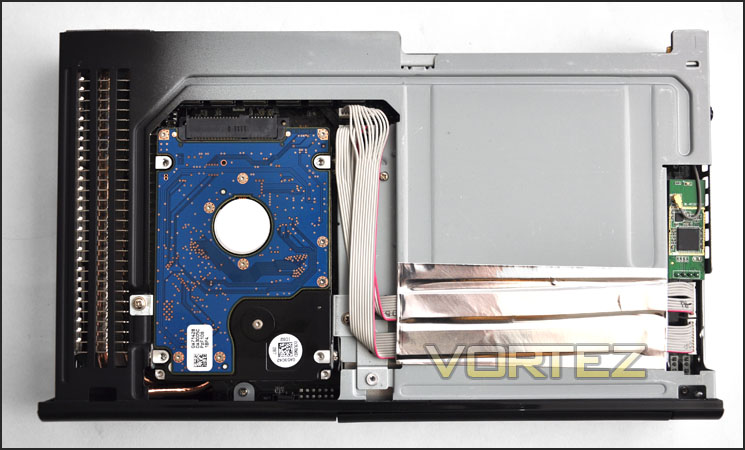
Hitachi 500GB 7200RPM SATA 2.5” HDD sits on the underside
We’ve taken a look at the physical appearance both inside and out – now let’s see how the MC001-BD actually performs. Over the page we will start testing this unit.
Testing Methodologies & CPU-Z
ARCTIC MC001-BD
CPU Intel Atom D525 (1.79GHz)
Memory 4GB 1333MHz DDR3
Graphics ATI Mobility Radeon HD 5430 512MB GDDR3
HDDHitachi 500GB 7200RPM 16MB cache HDD
Custom PC – Intel Core i5 2500K, ASUS P8P67
CPU Intel Core i5 2500K (Quad-Core 3.3GHz)
Motherboards ASUS P8P67
Memory 4GB Kingston HyperX Genesis CL9 1600MHz
CPU Cooler Noctua NH-D14
Graphics ZOTAC GTX 460
HDD Samsung Spinpoint 500GB SATA 2
PSU OCZ Fatal1ty 750W
Benchmarks
Windows 7 Boot Time – Measuring with digital stopclock
x264 HD 4.0 – 1st and 2nd pass encoding
CrystalDiskMark 3 – Sequential Read/Write
Cinebench 11.5 – CPU Score
AIDA64 – Disk/Cache benchmarks
SiSoftware SANDRA 2011 – CPU benchmarks
3DMark 11 – Performance and Extreme preset
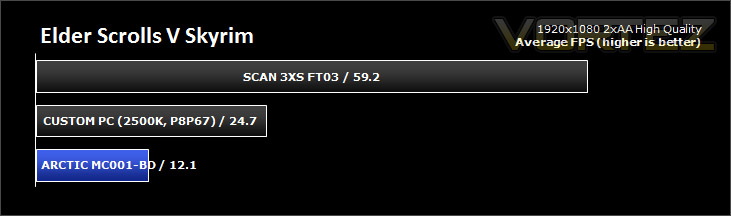
Gaming – DIRT 3 and Skyrim (Average FPS)
The above benchmarks will be run on both above systems and previously reviewed systems. In comparison the ARCTIC MC001-BD has limited power against the other candidates. It’s important to remember that this entertainment unit is exactly that – for use with entertainment. It is compact, silent and designed to run various types of media. It’s hardware is fairly limiting but perfect for its designed purpose.
I’m not expecting the MC001-BD to compete with the other systems in the testing arena as they are in a totally different league but it should give us an idea of what the unit is capable of.
NOTE: The CPU inside MC001-BD is an Intel Atom D525 – dual core and operating at 1.79GHz.
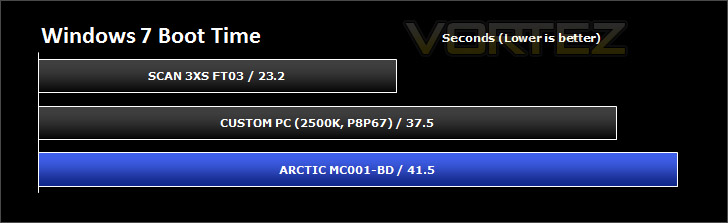
Real World Performance – Windows 7 Boot Time
Synthetic testing is valuable in the examination of systems, but some of the tests may not mean all that much to some readers so this real world test will show the Windows 7 boot time. A digital stopclock is used to record time duration.
Real World Performance – x264 HD 4.0
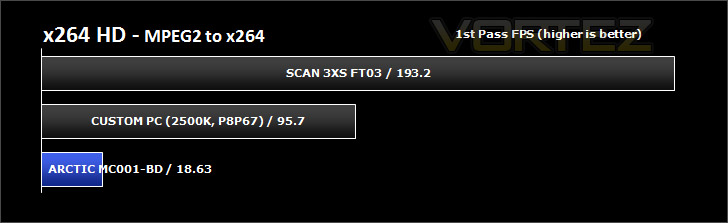
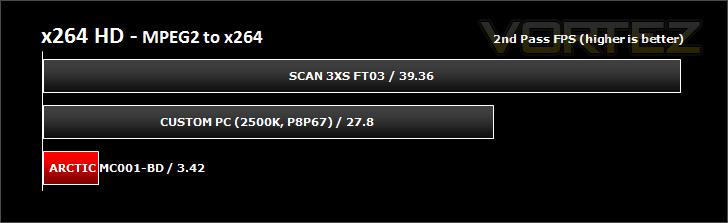
Simply put, this test measures how fast your machine can encode a short, DVD quality MPEG-2 video clip into a high-quality x264 video clip. What’s x264, you ask? It’s more or less the next-generation Xvid/DivX codec. I think it’s ideal for a benchmark because the application (x264.exe) reports fairly accurate compression results (in frames per second) for each pass of the video encoding process, and it uses multi-core processors very efficiently.
x264 HD gives results for 2 passes when compressing an MPEG-2 clip into x264. It presents 4 separate results for each pass giving a total of 8 – all results are given in FPS. For each pass I have averaged out the results.
HDD Performance – CrystalDiskMark 3
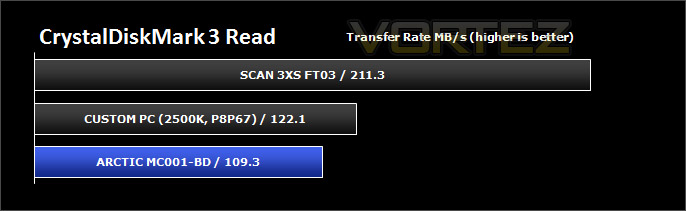
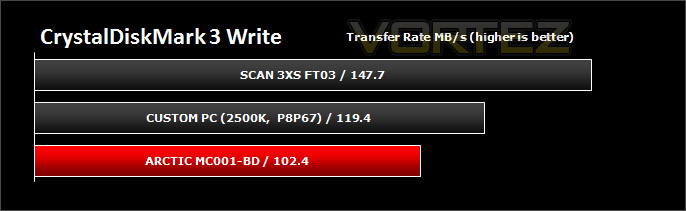
CrystalDiskMark is a disk benchmark software that analyses different types of hard drive. Giving sequential benchmark write and read statistics in MB/s. A simple program that is very useful. Sequential read/write performance is monitored.
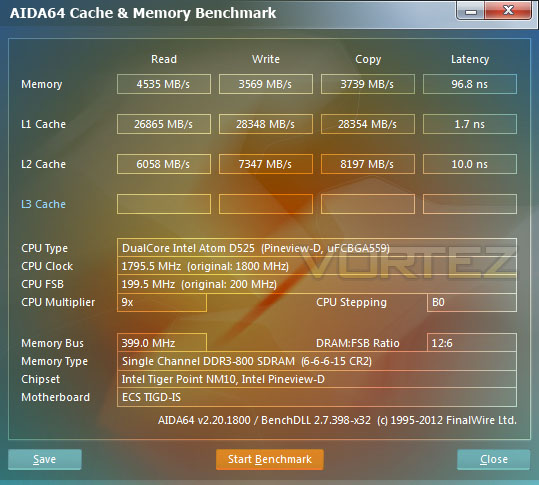
HDD Performance – AIDA64
Benchmark pages of AIDA64 Extreme Edition provide several methods to measure system performance. These benchmarks are synthetic, so their results show only the theoretical (maximum) performance of the system.
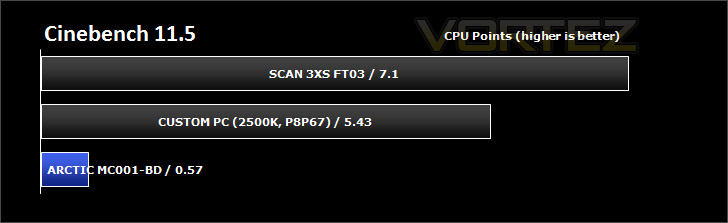
CPU Performance – Cinebench 11.5
CINEBENCH can measure systems with up to 64 processor threads. This test scene contains approximately 2,000 objects which in turn contain more than 300,000 polygons in total, and uses sharp and blurred reflections, area lights, shadows, procedural shaders, antialiasing, and much more. The result is displayed in points (pts). The higher the number, the faster your processor. CPU score is monitored.
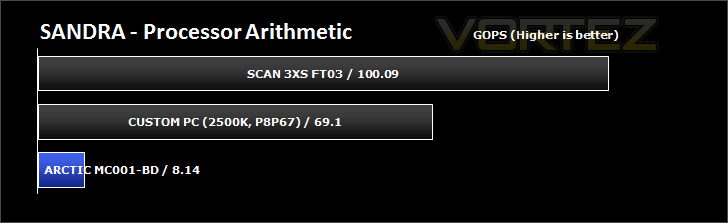
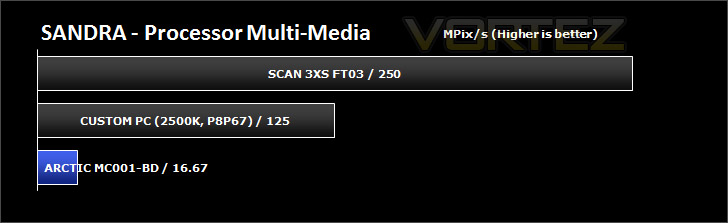
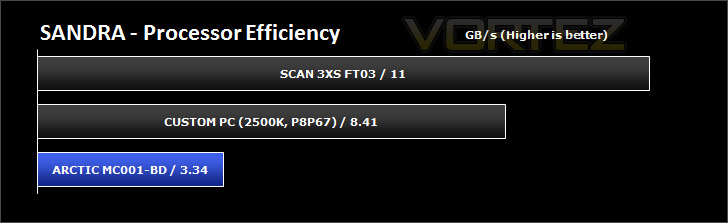
CPU Performance – SiSoftware SANDRA 2012
SiSoftware Sandra (the System ANalyser, Diagnostic and Reporting Assistant) is an information & diagnostic utility. It should provide most of the information (including undocumented) you need to know about your hardware, software and other devices whether hardware or software.
Sandra is a (girl) name of Greek origin that means “defender”, “helper of mankind”. We think that’s quite fitting.
It works along the lines of other Windows utilities, however it tries to go beyond them and show you more of what’s really going on. Giving the user the ability to draw comparisons at both a high and low-level. You can get information about the CPU, chipset, video adapter, ports, printers, sound card, memory, network, Windows internals, AGP, PCI, PCI-X, PCIe (PCI Express), database, USB, USB2, 1394/Firewire, etc.
Sandra is a (girl) name of Greek origin that means “defender”, “helper of mankind”. We think that’s quite fitting.
It works along the lines of other Windows utilities, however it tries to go beyond them and show you more of what’s really going on. Giving the user the ability to draw comparisons at both a high and low-level. You can get information about the CPU, chipset, video adapter, ports, printers, sound card, memory, network, Windows internals, AGP, PCI, PCI-X, PCIe (PCI Express), database, USB, USB2, 1394/Firewire, etc.
3D Performance – 3DMark 11
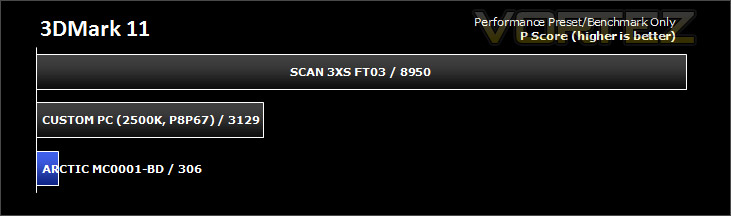
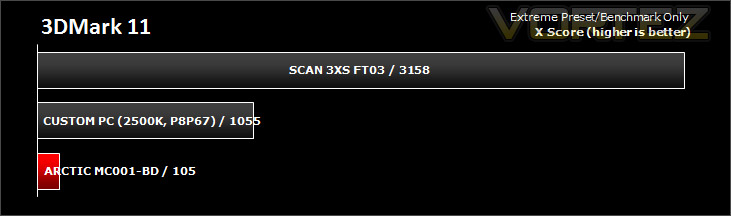
Designed to measure your PC’s gaming performance 3DMark 11 makes extensive use of all the new features in DirectX 11 including tessellation, compute shaders and multi-threading. Trusted by gamers worldwide to give accurate and unbiased results, 3DMark 11 is the best way to consistently and reliably test DirectX 11 under game-like loads.
3DMark 11 was released at the end of last year and needs little introduction. For the test settings both Performance and Extreme presets are run with ‘benchmark only’ being selected. This provides good analysis. Many will only test the performance preset, using the extreme mode we can examine the board under much more severe stressing.
3D Performance – DIRT 3 & Skyrim
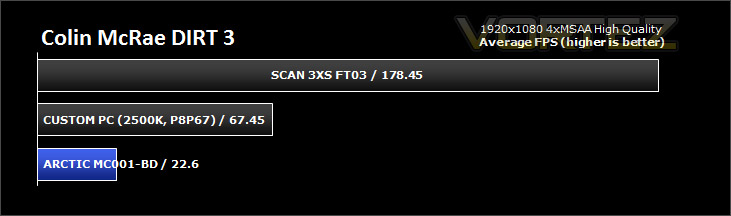
It’s important for us to perform a number of game benchmarks as well as the synthetic tests because it allows us to test the 3D performance. So here we have some popular titles, critically acclaimed and action-packed. FRAPS and in-house benchmarking tools were used to capture average FPS.
Conclusion
In recent times ARCTIC have moved into many varying markets and the home entertainment or HTPC segment is a particular avenue they appear to be passionate about. ARCTIC currently have 3 different units that populate their “Entertainment Center” category – the MC001-BD under review today being the most capable.
So how does the MC001-BD fare? Don’t be alarmed by the benchmarks on the previous pages, as I outlined earlier – the MC001-BD isn’t a ‘like for like’ comparison. Its intention and overall design is purely to operate as an entertainment device, giving the consumer the ability to access a range of video, imagery, audio – call it what you like. It’s Intel Atom CPU and Mini ITX form factor means that it is limited to these applications but this doesn’t mean its inferior by any means.
As an entertainment device the MC001-BD shines. Its fast bootup times mean you are into Windows 7 in no time at all and once there you can access files via the Bluray drive, HDD, network or even the internet via WiFi. Movie playback is obviously better if the files are on the HDD within MC001-BD but it doesn’t have any real problems accessing movies or music across the network via WiFi or the Bluray drive.
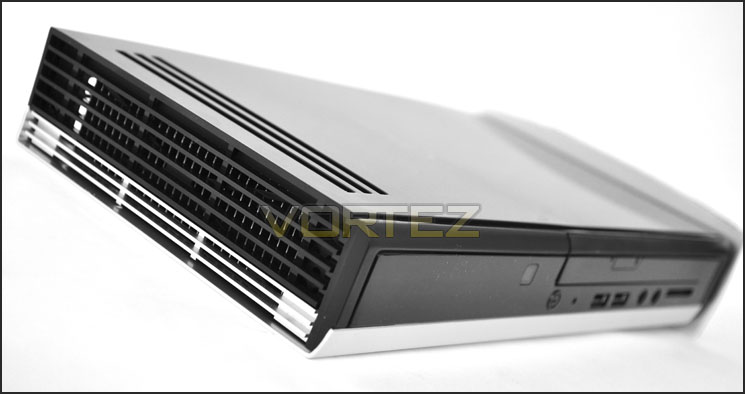
Thanks to its passive cooling and compact design the MC001-BD is great next to the TV. It can connect via various ports and even has USB 3.0 ports and an SD slot at the front.
Costing over £500 inc. VAT the MC001-BD is a considerable amount compared to other comparable devices from the likes of ZOTAC, ASUS and Foxconn but there is the inclusion of an operating system and Bluray drive with the MC001-BD which many similar devices are actually absent of.
So in conclusion ARCTIC’s MC001-BD is a great entertainment device that is extremely useful when next to the TV. Access to the home network or internet is quick and easy thanks to the WiFi and playback is very good.
Pros
+ Entirely passive and quiet operation
+ Compact & easy to store
+ Impressive bundle
+ Flexible – lots of different input/output ports
+ USB 3.0 ports
+ Wireless
+ Extremely low power consumption
+ Upgrade possibilities
Cons
– Physically hot to touch
– Only 4x BDROM
– Price
+ Entirely passive and quiet operation
+ Compact & easy to store
+ Impressive bundle
+ Flexible – lots of different input/output ports
+ USB 3.0 ports
+ Wireless
+ Extremely low power consumption
+ Upgrade possibilities
Cons
– Physically hot to touch
– Only 4x BDROM
– Price


Click here for an explanation of our awards at Vortez.net. Thanks to ARCTIC for providing today’s review sample.


